#ue4-general
1 messages · Page 590 of 1
 plush yew
 maiden swift
Wouldn't be totally shocked if Epic followed suit.
 rotund scroll
xXxUnReAL EnGiNe -=10=- xXx
 dawn plover
yep similar to substance
 cloud cobalt
People like to think about "UE5" but it's very unlikely they'll ever do a full engine rebuild like they did for 4
maiden swift
You really think so?
 lapis vine
Yea, Autodebt 2019 or VS 2021
cloud cobalt
Yeah I do
dawn plover
autodept lool
 normal burrow
Please no on trendy year versions
dawn plover
debt
rotund scroll
with new subscription models
plush yew
make the different features of unreal DLC
dawn plover
how about names? unreal engine snow leopard 😄
rotund scroll
Unreal 7 season pass
lapis vine
UE Ultimate
cloud cobalt
Think of how different 4.24 is if from 4.0 - what would warrant being called UE5 after all these huge changes ?
rotund scroll
extreme edition (tm)
normal burrow
Unreal Pro /w dark theme pay to win
maiden swift
I'm pretty confident they're at least exploring the possibility (of a UE5 or similarly significant change).
cloud cobalt
I'm not
rotund scroll
gamedev is already pay to win
 frosty bloom
An engine that is fully modular would be the future. Think "Paper2D" being something they could fully remove and reimplement with whatever new thing they want.
rotund scroll
unfortunately 😦
lapis vine
I also agree that they will change this one until its disaster to update anymore, due to more features. This can go long way on 4.x and they just will rename to else.
cloud cobalt
@maiden swift At this point there really is no such thing as rebuilding all, or even large parts of the engine, at once
maiden swift
Even if they don't start over from scratch, there are still many scenarios in which they might deem it sensible to increment the major version number.
lapis vine
Exactly, but the base will be the same.
cloud cobalt
Sure. But 5.0 would probably be mostly identical to 4.69 or whatever large version it was before
It's not like the first UE4 release looked a lot different that the last UE3 release
maiden swift
Under the hood it might have a lot in common, but it would almost certainly come with a new UI theme, new programming paradigms, etc.
lapis vine
Nah, at most some more major feature slight UI update.
cloud cobalt
The new UI came after the version number on 4 😛
maiden swift
🤔
cloud cobalt
Not talking 4.0, but private UE4
rotund scroll
we can't see past the singularity
maiden swift
Or at least I was when talking about the next major version number increment.
Going from 3 to 4 did exactly the things I mentioned above, so it's safe to assume going from 4 to 5 will do at least the same.
cloud cobalt
I'm just saying large releases are not a trend right now, and for something as big as UE4, I don't see an UE5 coming with drastic changes, ever. I would see an UE 5.0 that's basically UE 4.XX + 1 for branding purposes
The idea that 3 to 4 brought singular changes at one particular version is just not really true imho, because it took years to make that transition, with no public release, while developers did use this... transitional version ?
maiden swift
Fair enough. The next major version bump may look totally different to previous ones. My assumptions are based on past evidence only.
cloud cobalt
Basically the idea that 4 changed everything is only true seen from the perspective of UDK vs UE4.0
maiden swift
I would argue that major shift was the case for most developers.
cloud cobalt
Early UE4 still had the UE3 material editor with grayscale, right-to-left nodes
etc
Again, not public UE4, but I worked at a 10-people studio
maiden swift
Most developers went from UE3 or UDK to UE4, and it came with a completely new UI and programming paradigm.
Even Rocket had these changes.
Right, I'm sure there were earlier internal versions that didn't look the same.
cloud cobalt
You're correct that there was a large change at some point basically when Blueprint landed for good and UScript was removed
Which was UE4
I'm just saying it did feel quite gradual, and first UE4 releases looked quite different still
So yeah, huge breaking change, new version number
maiden swift
I think you're in the minority having had a more gradual transition, but I could be wrong I suppose.
cloud cobalt
Maybe !
maiden swift
I first used UE4 when it was Rocket, and so did several other local developers in my area. I don't personally know many people who used or even saw it before Rocket.
maiden swift
Along your same line of thinking, it's very likely that there are already internal builds of UE4 with whatever major changes a v5 bump would bring.
You're right that these types of transitions are actually developed over a long period of time. My whole speculation about a v5 was from the outside perspective. 🙂
cloud cobalt
See, this is where I'm skeptical. What could be bigger than raytracing support, or a new physics engine, or the new console devkits landing ?
I just think work has to be iterative now
Because of how large it is
Rocket was the codename for UE4 basically
And you can look for UDK screenshots 😛
Because it really was UDK with Blueprints, imho
Nah
maiden swift
@cloud cobalt The Rocket I used had an early version of the UE4 interface. Nothing like UDK.
cloud cobalt
@maiden swift Mine had the UE4 windowing, but I distinctly remember things like the material editor being straight UDK
maiden swift
You might've touched it earlier than me, then.
cloud cobalt
Okay, that's fair 😛
@opaque vector Mostly the UI changed look, and Blueprint became the main user-facing programming language vs Unrealscript
Also it had PBR
That's the biggest I think ?
maiden swift
I would consider those to be large-scale changes, not iterative.
cloud cobalt
Indeed
 opaque vector
wasn't the UE3 editor based on native interface api instead of Slate? That's a pretty dramatic change I'd imagine
cloud cobalt
Lightmass in UE4 is still pretty much Lightmass from UE3, to name one system that hasn't changed much in a decade
Slate was also new, yeah
maiden swift
If v5 is mostly a new UI and the next generation of Blueprint, I'd consider that worthy of a major version bump in this era.
cloud cobalt
Most of the gameplay code was essentially the same
@maiden swift Fair, I can agree on that
maiden swift
I think you're right that v5 might not come with a slew of drastic new features, per se, but more so new workflows and paradigms.
cloud cobalt
You're right that a lot did change with UE4
I hadn't considered PBR for example
@opaque vector Personally moving away from C++ would be me looking for a new engine but well
They haven't improved the gameplay framework from UE3 to support multithreading, so I don't see a new language supported
😛
normal burrow
JavaScript
maiden swift
I think C++ will stay, but we'll see a next-gen Blueprint to go with it.
normal burrow
If you want your slow and easy to use runtime language, it’s js
maiden swift
I don't think they'd make such a drastic change as moving to JS. Although it is very, very popular so I give you that.
normal burrow
I think it will just feed off bp bindings
maiden swift
Python is a more likely candidate considering they've already added support for scripting the editor with it. Maybe gameplay is the next step.
If you can, it's with a third-party plugin. Epic's Python support is for the editor.
lapis vine
Panda comes to mind, but never tried it.
maiden swift
Worth noting that the 4.24 preview builds already has the beginnings of a UI refresh. Kind of hoping the stable release goes further.
If not, perhaps 4.25.
lapis vine
So, 5 comes sooner then? lol
maiden swift
Haha no. It's a minor UI refresh by all indications.
Whatever the future holds, I hope it comes with a nicer launcher. 😅
cloud cobalt
I wish
maiden swift
Hm... I hope 4.24 comes out today. 👀
frosty bloom
Imagine UE4 Launcher 2.0.. Completely separate from games and with actual Vault control
maiden swift
I'm reserving my hype. The refreshed UI in the preview builds is very, very minor and seems unfinished/scattered. That's why I'm hoping the stable release brings a full-scale refresh.
But we'll see.
normal burrow
Hope toolbars aren’t massive
 radiant haven
is there a version tahts is wonderful for Mobile developement
 willow void
How do i get lighting to be "Noice" on the first person weapons. The weapons on the fps character doesnt seem to work very nicely with lighting. Any help would be appreciated
 vivid narwhal
Part 1/2 Can anyone see the problem with this blueprint task? when I hit "play" it runs through every single selector instead of just stopping after the first one is complete
2/2
 zealous cloak
can someone help me with some errors that occur during building?
 lone tapir
Guys does anyone know how to play 360 videos inside Unreal?
 shrewd steppe
zealous cloak
shrewd steppe
zealous cloak
yes good idea
 safe rose
Where are thou 4.23.2?
zealous cloak
If you referring to me yes, but I had a massive crash of unreal, so I think I should rebuild my whole project as long as it is manageable. Sometime opening a map makes unreal to crash out of nowhere
 velvet root
Dont know if this is the right place to ask but I can't seem to get materials to apply to my buildings
Things like basic cubes, no problem.
But i'm using geometry. I select a face and drag on the texture and nothing happens.
 nimble moat
have they been modelled and exported correctly
velvet root
Its all inside unreal
You can see this for example.
It should have a brick texture on that face. It's worked before.
I made a small test map a few months ago and it was working totally fine.
I'm doing everything the same.
Okay it seems I can't apply material instances to the faces -_- only flat textures.
safe rose
When you right-click your C: drive on your PC and try to FixUpRedirectors
radiant haven
Hey ppl I want to make a Mountain as my map, and want to sculp it as well it means wanna have a landscape as my mountain how do i make meshes to landscapes
plush yew
Hello
normal burrow
sup
 abstract relic
Print string (“Hello World”);
plush yew
For using unreal engine 4 you need a beast pc?
plush yew
I just want to start learning but I have a little low pc🐱 this is my first job so maybe in short time I can buy something better, just asking because seems to be cool this thing🤔
it depends what you want to use it for
2d games maybe, and learn some coding too in my free time
It is just for hobby
ye should be fine
abstract relic
So long as it isn’t an procedural generated open world mmo, you’ll be fine
normal burrow
an easy way to tell is to try and install it
plush yew
And, another thing. How much difficult is to create a game like clash of clans but more simple and another theme of game (I think you know about what kind of games I'm speaking). City build, etc. That stuff
nimble moat
quite easy but time consuming i guess
normal burrow
its like a 21/42
 sonic pagoda
Welcome to game programming where you can learn anything on youtube but if you dont have a clear design document that states your goals you are going to spend years just making things with no end
nimble moat
me ^
plush yew
Ah, understand
normal burrow
if your just getting into game development fixthat, its not really worth thinking about difficulty. whatever you do you just want to get some understanding of it to start with
plush yew
True
normal burrow
i like the rolling marble template myself, i think this is probably one of the best templates you can start with
nimble moat
i made an endless runner, didnt like what i made but i learned a shit ton and used what i learned to make better things
plush yew
That's sounds fun
normal burrow
just the server fix that, there are many more talented people you can get advice from
 tiny coyote
get overlapping components does only work sometimes. Somethimes it just doesnt get any overlapping component but I can see that both collision boxes are overlapping. After a restart it can work without any problems. After a new restart it does not work anymore. Why is this? There are no other objects overlapping (length of array of overlapping actors is 0)
tiny coyote
no, the game itself
normal burrow
what if you reload the level in editor?
plush yew
But, for running a game online like coc, you need a kind of hosting? How it is working this ? I searched on google but I don't find anything
I mean, how you can get a server, hosting (of he need) , etc..
tiny coyote
its a vr project and the controller is vibrating if I grap and if both collision boxes are overlapping
normal burrow
wouldn't be concerned with that yet fixthat
tiny coyote
reloading level does not work
plush yew
Thanks mate
normal burrow
is the controller rumble the only thing your going off?
have you verified its zero besides relying on the rumble?
abstract relic
^use print string or a proper debugging indicator
tiny coyote
the vibrations is handled somewhere else from the template. If the vr hand is overlapping the collision box it makes a little "move" to show that there is a collision (also from the template). If I grab it vibrates and I'm printing the number of overlapping components from the box (the vr hand has a sphere as collision) and sometimes it says 0 overlapping components and sometimes it does work. If it does work I can test it as often as I want and it works every time in this particular "session"
normal burrow
k but do what hightide said
tiny coyote
but where shoult I use the print?
normal burrow
put it right where you check the array size
tiny coyote
The event when to check the overlapping components triggers
and right after that I check the length
normal burrow
a print there is fine too, you can use the output log just to track that its actually happening or not
tiny coyote
and if it is 0 it prints another message
normal burrow
concern for me is I am unfamiliar with rumble and ue4. its not impossible that your overlaps are failing, but even a log message when the motor is turned on or off would be something better to rely on
i've worked with input devices before and something that happens over multiple times and then does not correct itself with a map reload sounds more like a device issue or device api issue
but again, this a complete assumption
sonic pagoda
@tiny coyote
i know exactly what you ar talking about because i was working on that template yesterday lol
hold on let me show you
so did you edit the motion controllers bp?
and are you using the template's boxes
to test these overlaps for grabbing
tiny coyote
a little bit but I have just added something at the end of the input actions
sonic pagoda
this is the process, when you try to grab an actor, it first checks if there is a valid grabbed actor already
so it could be that, that somehow you edited it, and that grabbed actor did not get set to "null"
so when you try grabbing again, it won't work
tiny coyote
I dont think that it is this because I dont use the Pickup Interface
Wait a sec, I will explain what I have done
sonic pagoda
ok , i assumed you were relying on these functions
because at the end of this one
it sets the actor to null
radiant haven
can someone tell me why UE hasnt applied the heightmap to the entire landscape
tiny coyote
If i trigger the "LeftGrap" or "RightGrab" Action I just search for an specific actor by a tag and then I call a custom funtion event for that actor. The rest happens at the actor where I want to check for overlapping actors and if there is an overlapping actor with tag "hand sphere" (its the sphere of the vr hand) I use the location of the sphere
radiant haven
sonic pagoda
i dont know why you didn't just use the interface function for your custom function, but anyways, if you press win+shift+S you can screenshot and show your setup
and then press ctrl-v
to paste that screenshot
tiny coyote
Its on a different pc 😦
sonic pagoda
get overlapping components or get overlapping actors
tiny coyote
components
sonic pagoda
maybe try, get overlapped actors, and cast to bp motion controller and then get the sub component instead... its kind of hard to advise you without really seeing your setup
i know that in my case
i messed with it, and was not invalidating the attached actor
and so i could not grab a new actor
so thats a good place to look, print string all of the steps
that are supposed to happen
so that you truly know what is failing
tiny coyote
Tried it before and there was a problem where I wasnt able to use a "get world location node" but back to the interface thing. The problem there was that I dont want to attach something to the hand and than the "drop" function was not calling because there was nothing attached to the hand
radiant haven
pls help though
sonic pagoda
have you tried using fit to data, or messing with the heightmap resolution @radiant haven
normal burrow
@tiny coyote only thing i'd recommend is just print stuff you expect to work and find out why its not. it's not clear that the overlap is the fail point here to me
tiny coyote
so maybe I can get it to work now by unsing the interface or I have to look for the mistake by prints
Thanks for your help @sonic pagoda @normal burrow
normal burrow
even if you add prints to the number of things overlapped lennard you'd be assuming that code even gets executed
so printing only when its zero, when your actually not running the function in the first place is not the best way to do it
putting break points in is another tool you can use lennard
tiny coyote
using the interface does work! Dont know how many other things are broken now but who cares 😄
normal burrow

tiny coyote
xD
 sweet relic
hey guys anybody know a good way to bake out the world transforms of a camera that is parented under a camera rail/crane rig? The "Bake Transforms" function in the sequencer only bakes the local transforms so it just stays at 0,0,0. I can kinda get it to bake the camera's path if I use the "export to camera anim" function but there does not seem to be a way to bring this data back into a sequencer track
safe rose
@worldly dust just green now

While I'm working on a video game demo project for my Reflective Essay, I wanted to show you guys how to work on the new Calculation Direction. I wanted to p...
normal burrow
@lapis vine that video seems to be why everyone uses vector length squared lol
 charred chasm
guys
I need help
I am opening my project but it shows the default scene
How do I get back to my level I was working on before
I am panicking rn
charred chasm
it's not there
charred chasm
Like before it would just open to the map i was working on
But then I moved the save folder to reduce space
then I undid that
charred chasm
Can you call?
lapis vine
@normal burrow "That's what you are supposed to do", slaps VectorLengthSquared 🥇
normal burrow
its funny because, everyone is like "where my blue node go?" and then they get told to use vector length squared and now everyone uses vector length squared lol
 analog blaze
@charred chasm you can dm me
charred chasm
Sure
analog blaze
and send screenshots
charred chasm
Can I just share screen?
analog blaze
im busy right now
charred chasm
ok
lapis vine
Its cute tho. And good lesson to be skeptic to anything you see on internet.
analog blaze
that's how it is
people believe what they see after reading it once, and then start spreading it as facts to the people around them
normal burrow
@charred chasm make sure your in the same project you made the level in first.
then click the content folder
set filters to "Level"
it should show you every level saved in your project
normal burrow
nah
 dry merlin
So, before I go into this project, I was hoping for a little feed back. Basically, I am developing a OpenWorld system that includes everything necessary to create any world with all terrain, weather, smoke, fog VFX. I am aiming to make it simulation capable but keeping all physics, including some really unique stuff life global time, weather, wind. The issue I was check is that it seems additional things like this are not automatically computed by the GPU. So I am planning to develop in C++ a OpenCL and Concurrency library then make those available in Blueprints for use so you can CPU computer things like Real Time, World Time, across any world, and GPU Compute Wind Dynamics, Weather, Above Sea and Below Sea Thermal Layers, Temperature, Elevation, Cloud Elevation, just a ton of stuff then leave it open to do distributed computing so the heave grunt work is done on my dedicated servers then communicated to the client which then uses those variables for very accurate effects. The drawback to this is the dedicated server would always be a requirement for the game the benefit is, the client is only left to deal with game mechanics, like collision, obtaining information from the server for producing the visuals and proper effects client side. Any thoughts?
I'm trying to keep this to two months work, just a ocean and swimming mannequin, weather simulation, material and effect demonstration and make it open source but you pay for the server unless you want to build your own production server with it.
 supple totem
my first thoughts are doubting the 2 months
abstract relic
Yeah that's not going to happen with an army of one in 2 months
dry merlin
Well I am only aiming for the physics and limited visuals
that's it
Not a full project, just something to show then opening up to contributions
abstract relic
not to a point to being marketable anyway
normal burrow
i3di would look into why the gpu is largley not used for these types of things
dry merlin
I am not marketing it, it's meant to make it so you can create any game without having to do all the recreation of the world every game.
abstract relic
you want others to use it yes?
abstract relic
then you need to treat it like a product
dry merlin
Loads of art already done in two years
I have a VFX guy, not bad at all, great artist
abstract relic
Why would someone dedicate their time for this tool? Free or not. Just how people are
normal burrow
whats the name of the project?
dry merlin
Well, that's why I am doing the brunt work so you can see why, every game you always have a world. Why not something where the world has everything you need for any game style so all you have to do is the client work and customization on your side.
??
Every game has standard things, you can add some extras, document then use it, not re-invent the wheel every time
abstract relic
they'll still want quality
dry merlin
I do have quality terrain, I finally perfected the rock PBR's,
abstract relic
if you can do it, power to you. Just warning you of scope and general public reception.
dry merlin
Right now I am just aiming for the open ended physics, compatibility with SRTM but no implementing it, a water plane some weather using actual calculations server side so you get accuracy in any game but can be used for simulations to
Just keeping the initial simple, make some visuals, throw it on Patreon and build support
That's why I went 2 months, I am not doing the whole thing right away.
abstract relic
I honestly think it'd be foolish to call that simple
take heed to what pat said. There's a reason why it isn't done on gpu
normal burrow
not only that, but i don't think many developers care enough to simulate these things. You must have some other audience your targeting?
dry merlin
Well the gravity, wind, weather, those are pretty simple, so is latitude, longitude, seasons, time, it's mostly just redundant. Complex would be below sea level thermal layers for sub sims, weather patterns based on barometrics, that's future stuff, as long as you can get wind, location, some basic weather, a water plane and have the open ended variables coming from the server and a swimming mannequin, I think that's a good start
Well, the simulations would be available, you dont' have to use them, again open ended pick what you need the server runs the calculations sparing the client.
Survival game, temperature might be important and wind, rain, obviously gravity is important. But you may not need all the simulation stuff for aerodynamics so don't use it.
Just pick what your game needs and spare the client but get the accuracy because dedicated servers can run massive GPUs
abstract relic
So why ask for feedback if you're just going to try and sell this instead?
dry merlin
I'm not selling it
normal burrow
lol i3di a gpu on a server for a game is almost never existant
dry merlin
Haha, it's open source
abstract relic
You absolutely are
dry merlin
I have one
abstract relic
trying to garner interest
dry merlin
My server has a GPU, I can increase it and do distributed computing
Well, I haven't done the work yet, I've planned, I was just wondering what people thought about the idea. The drawback is just that, it's server requirement
normal burrow
a game whos dedicated server requires a gpu to do in game temperature calculations is not going to fly
you need to target someone beyond game developers imo
dry merlin
Well I like military sims for instance, DCS World, problem is hardware varies from client to client so if you centralize the models on something like a server, you can really get accuracy
Leaving the client open to the local things like collision detection
rendering
But if you do a fantasy, do you need wind dynamics, no probably not, but it would still be available making it adaptable
normal burrow
tbh i don't think much of what your saying you've actually researched much into though. all the statements are grand and everything but we have cpu threads laying around doing nothing in pc world right now. the gpu is not a free resource
abstract relic
take this to #design-chat or #lounge
 grave nebula
@dry merlin Certainly go for it. Come back in a year and tell us the result.
dry merlin
@Deathray you might be right, I was going to try simple first see what people thought. But yeah, probably a larger project down the road, I'll just keep it to myself for now and then pass it along for people to clone and see what they think
normal burrow
yea i just think its so far out there that it sounds like your just trying to promote a patreon. If thats not the case, again opinion would just be need for such things and trying to fit gpu stuff to blueprints, like none of this is simple or standard
grave nebula
Brave programmers vs unrealistic tasks. I always like it.
 swift spindle
so brave........
 next wedge
What I should use for the death count in my game uint8 or uint16, I am kinda noob, don't know which differences they have
normal burrow
oof.
grave nebula
What if there are a lot of deaths ?
 silver crown
Unless you know what the difference is
next wedge
Ok, but if you had to choose between those 2
grave nebula
and int32 just doesn't cut it anymore ?
grave nebula
🙂
 vital cosmos
when copying content from a different Project into the engine, none of the materials seem to work
normal burrow
"I just advise people to do the normal thing" :D
silver crown
On a side note, tracking overflows is hella tricky
normal burrow
it is
silver crown
Clang has a nice sanitize option
that will error out at runtime when it overflows any int
but ofc it doesn't work with cuda
😄
next wedge
Int8 - [ -128 : 127 ]
Int16 - [ -32768 : 32767 ]
Int32 - [ -2147483648 : 2147483647 ]
I guess this applies to UE4 right
normal burrow
i still think it is weird how division by zero int is death
next wedge
so if I assume my game sesion never will have 32767+ deaths, I can use uint16
silver crown
It'll just do fun stuff
normal burrow
"fun stuff" lol
silver crown
hehe
normal burrow
whitevader, if it were only so simple
normal burrow
the problem is, blueprints don't want to implement uint16
silver crown
Use uint32 : 13
normal burrow
they REALLY don't want to do it.
next wedge
So they use what?
normal burrow
int32
next wedge
Thanks!!
next wedge
no, I would like to force an equivalent of BP "Byte"
normal burrow
yea uint8 is bp ready
normal burrow
yes phy
next wedge
I see
silver crown
Does it errors out on overflow?
next wedge
I have that in BP
normal burrow
you can't mask them or anything tho or bitwise shift or you know simple things
uint8 is c++ for byte vada
next wedge
Im Just converting BP -> C++
silver crown
why would you align on 8 bytes
normal burrow
vader again, Byte is uint8
next wedge
That means uint8 [ -128 : 127 ], so the maximum deaths is 127?
silver crown
Nope
normal burrow
if your struct size is 9
normal burrow
and if your on 64 bit operating system
next wedge
Ah, yeah,
silver crown
Was that an and or an or pat
next wedge
https://clickhouse.yandex/docs/ru/data_types/int_uint/ I was reading this, but looking for the wrong part
Makes sense
normal burrow
an or pyh that an and or not or an
grave nebula
At some point I used to think that it is unsigned, because nobody agreed to sign that BS and it is not valid format. So if something is unsigned, you'd use it completely at your own risk 😭
normal burrow
because
silver crown
BeCAuSe?
normal burrow
yea
silver crown
ok
normal burrow
the 32nd bit is only sign
not a lot of sense in in increasing exponent or or fraction by one to throw away -0
silver crown
right
lapis vine
ufloat, lol
silver crown
I bet it's on thing on some weird arm
grave nebula
uboat ufloats
abstract relic

silver crown

Arm för att koppla ihop olika komponenter på C-kula.Med ett enkelt vred kan du manövrera ditt tillbehör där du vill ha det.Finns i 2 storlekar: 8,89 och 14,2...
 normal burrow
suppose itd be 1.fu - 2.fu
lapis vine
Looks like some lewd tool
normal burrow
1u.f?
silver crown
lol
lapis vine
Nah, think the dudz there did some interesting optimization for the 0.
normal burrow
this is a double precision number though
unless its hlsl, which just doesn't care.
 kindred viper
std::setprecision(16); ftw
silver crown
syntax error: expected an identifier
kindred viper
worked for me 😦
kindred viper
well the :: would help
 kindred viper
I recall needing higher precision for importing real world scale data for road mapping, and simply using setprecision within scope was enough for the calcs I needed.
lapis vine
weird
kindred viper
not really. Its just a temp fix over a limitation of the engine really
lapis vine
std::setprecision?!
kindred viper
im sure people would berate me for using std in an unreal proj but hey ho. it worked
normal burrow
doubles can be literals if that was a question
lapis vine
No, it was statement. 🙂
normal burrow
statement: are double literals
lapis vine
aah, you forgot the 1. in front
normal burrow
lol 😂
lapis vine
😄
normal burrow
brain didn't know it was supposed to count that as part of the statement
thought you were numbering something
lapis vine
@kindred viper that func is for output operations, how so it changed your compute? You parsed the output?
Yeah, lol
kindred viper
let me dig it out and ill give you a code snippet
it was freaking ages ago so bear with me
normal burrow
yea if it ain't got that f after a period its a double
lapis vine
You can also do hex floats, but never did them. Wait, I remember one game engine dude doing them.
normal burrow
-.;
lapis vine
Supposedly, it was portable solution.
normal burrow
auto f = .0; did not realize this was good form
lapis vine
Fun fact .0 == 0.
kindred viper
https://pastebin.com/Au0YziL0 //setprecision

Pastebin
ignore the crap in there pls. I was young and wild
lapis vine
Not sure I can. How that helped tho? 🙂
kindred viper
it allowed me the extra calculative precision from the lat/long coordinates that I was bringing in
unreal was treating everything to 6 decimals so it borked up accuracy
in scope, I could temp use that and put it back out as unreal friendly
normal burrow
i'm so very confused
lapis vine
Ah, I see. It does some stuff behind the scenes. Weird.
Maybe doing some stringstream, dunno. aww..
normal burrow
oh yea its for stream operators
lapis vine
But UE should have some stuff for setting precisions anyway? They avoid std as hell.
normal burrow
marc i think that does absolutely nothing
lapis vine
lol 😄
normal burrow
kindred viper
if I didn't use that, the entire thing was completely different. Inaccurate. When I used it. It became exactly what was mathematically correct. So I can't say otherwise
I dont even pretend to understand it lol
lapis vine
Mysticism, I like that.
kindred viper
I did it in 4.3 or something
kindred viper
no idea. But my road tool was working fine. For the most part.
the idea was to use Google Earth to create a path. Then export that path as KML. Then convert that to a UE4 usable set of data for creating a spline based road tool based on real world, real scale roads.
normal burrow
Returns an object of unspecified type such that if str is the name of an output stream of type std::basic_ostream<CharT, Traits> or an input stream of type std::basic_istream<CharT, Traits>, then the expression str << setprecision(n) or str >> setprecision(n) behaves as if the following code was executed:
 frozen pond
trying to inport character from fbx file created in character creator but my hand bones are getting werid, everything else is fine
lapis vine
Man leave it. It did the magic.
normal burrow
lol 😂
lapis vine
There is so much fairy code around, just one more.
 jolly cairn
stack I need advice. Quite small if that is no problem.
What is the best why to push actor in some direction.
kindred viper
I always feel bad for not finishing that road tool. I recall errors halted me then I got some work and let it slide. But it was a fun thing to do.
normal burrow
what kind of actor whitedragon
jolly cairn
I have 2d sprite and i not using physic.
normal burrow
two circles type deal?
jolly cairn
?
jolly cairn
its something like force and impulse.
yes
Is circle collision i think as transform.
lerp timeline and alpha by lerp. wit transform
with transform sorry its little like advice. I do not know what will do for me best work
we have also Add Movement input.
jolly cairn
Sometimes its hepend go to explorer something is inside or something is refer to folder.
So what will be a good why to move what you use and when?
normal burrow
abstract relic
jolly cairn
ICan you show me where you put mass center
normal burrow
Mass Center would be the location of the thing being pushed
Pusher Center is the location of the thing pushing
jolly cairn
But push that in transform?
I do not know exacly how is the best why to move element
normal burrow
it gives you a new location to use for the transform
jolly cairn
You can move object by transform, Add movment input, and you can use psyhic function
normal burrow
theres no best, you just use the one you need
jolly cairn
So most basic why to move something is by transform?
normal burrow
yea, SetWorldLocation node
SetActorWorldLocation or SetWorldLocation with component/rootcomponent
(going off memory)
jolly cairn
How to smoothly transfer between locations by lerp and timeline?
I am more confused what and when will be good. So sorry for your stress.
My question can be pretty strange and stupid.
normal burrow
your fine, Delta seconds is how much time passed for the last frame
so when you multiply it by a number that gives you that number per second in position change
position change == velocity * delta_time
jolly cairn
So get time and do math?
normal burrow
I don't know how to use the component move to things with time line
jolly cairn
or timeline?
normal burrow
It is your decision
timeline approach might be better if it means you don't need to tick every frame (if the only concern is performance)
but you really shouldn't put too much thought into this right now
jolly cairn
You create timeline and inside you have track from 0 to 1 and you use larp is changing betwen 0 to 1 and changed vector from one to secound
to next
sory its stupid
normal burrow
ye, its fine though :D just use Tick
 pulsar badge
Is there any way i can get substance textures without paying for the subscription
jolly cairn
pulsar badge
like another website or something
normal burrow
for that whitedragon, you need to provide A B values for lerp
jolly cairn
its not will work but also i saw that concept.
abstract relic
We don't condone theft
jolly cairn
Yes you are right
normal burrow
You want to go with the concept that works for the problem, there are always many options
normal burrow
if you just need back and forth movements, like ping pong that timeline would work yes
jolly cairn
For some resson its not work from start
normal burrow
are you looking at the event graph whitedragon
normal burrow
you need to connect Play to something
jolly cairn
Yes i know that will not work any why its not work becauses itsa not go up for soem strange rteasson
but forget
I have problem with transform because they are block in some other collision .
I can use transform or phisic function to move something or add movment input?
They are also projectile component and rotation?
But in most simple situation peoples are use transform?
normal burrow
Projectiles have special ways to adjust the way they move yea. But all actors have "Set Actor World Location" that you can use to move them. AddMovementInput is only for Pawn Actors
There is also "Set Actor World Transform" these both change the same part of the transform. setting location changes the location of the transform only.
jolly cairn
For my problem and simplicity transform will be good. But i have with transform one problem.
But that was not possible but by using movement component work.
When i moved character in Y (in and out scena) moving up working
By transform by jumping from movement component work.
normal burrow
You use the movement component to move by joystick. But if you need to push something else you use Set Actor World Location to set a new location and enable sweep so you can't move the object into collision
jolly cairn
I do not know i have problem with transform or simple better use psyhic what will give me better simulation
normal burrow
If your enemies are physics simulated, which means they fall over on their own. then the add impulse and more will work. otherwise it won't do anything (but send log messages to you)
 hollow crescent
I have downloaded and installed some content by clicking "Add to project". But now I've created a new project, which is open in UE. How do I add this content to my project without using the Epic Games Launcher or closing and opening my project?
normal burrow
theres not really a safe way to do this
normal way is you open original project and migrate to new project, by right clicking content folder
jolly cairn
I will try
I will test
but i should to use tick that is just for test
Or export. from old to new.
normal burrow
try it
its hard to say. but that lerp is not good because A will be moving
Still you'll see something happen though haha
jolly cairn
Also i think abaout using movment component its not this same as transfer
But i think using movment component to move actor
or some mush can be really wird?
normal burrow
there are reasons you do and reasons you don't
projectile is also a movement component
jolly cairn
But that will be all unreal give physic, transfer and movment component to move something.
SO there are no other why to move something to other location yes?
normal burrow
character movement component?
jolly cairn
yes
normal burrow
Character Movement Component cannot be pushed normally
jolly cairn
what if i use that to move something?
normal burrow
you can only use it on characters as well
jolly cairn
I can always add that to actor but i think can be lityle wird just in this moment better use psyhic that is right why?
normal burrow
The purpose of that node is to drive the character by the input like the joystick. Characters are not physically simulated normally. To push another character you need to set transform with sweep
jolly cairn
Yes you are right
normal burrow
think of that node as how the character wants to move. don't use it to move the character, character moves itself for where it wants to go.
when you need to move the character to somewhere it does not want to go, then you set transform
jolly cairn
mining with some tile controller what will be uptaded location
Yes i think you are right
I do not trast performance of transform
Any why
i think transfer will be the best
I was really confused by so many option. I need just figure what will be the best why to control upgrade location smoothly. Sory my question was so wird.
normal burrow
your okay, there are many options
 true leaf
Right now it seems like my client is 'ticking' every actor on the entire map
is there an easy way to specify a max distance for that ?
i see an option for 'net relevancy' but not for like local client relevancy ...
normal burrow
You'd want to not enable ticking for actors that don't need it. but i don't believe there is a distance based tick thing.
ticking and rendering are separate beasts
 pulsar kraken
Is there anything for a in game cash shop... buying ingame currency etc
 lime gull
Is there a way to save where you are in a song so you can load from that point again?
 merry pilot
Im new at unreal so i might sound stupid but does anyone know how to hook up a character asset up so when you click play it plays that character. I got an asset that came with an already rigged blueprint with the character and i put it in the level and deleted my old character and when i click play it just spawns the mannequin
swift spindle
there's a lot to explain there. But you can't just delete and replace items.. things need to know what to do with the new items... In this case... you need to consider how the engine picks the new pawn. If you look at the default templates and game modes.. that will give you an idea where to start
plush yew
Has anybody made a "Best-of" for the black friday sale? 5,000 assets is a lot to sift through
pulsar badge
Does anyone know why im getting this message "this action is not avaible while play in editor is active or when previewing less then shader 5 model UE4"
when i try to build lighting
plush yew
hey im boutta sound like a dumbass but how do i open the error log
pulsar badge
Its ok i dont kow how either O_o
plush yew
crap
abstract relic
 reef jackal
So i had a custom movement component from c++ and recently removed it in favor of Character Movement. But now the details of Char Movement arent shown in the details panel. Anyone know the fix for this?
normal burrow
@reef jackal sure
UPROPERTY(VisibleAnywhere,BlueprintReadOnly)UCharacterMovementComponent*WhatYouNamedIt;
reef jackal
so i have to edit Character.h?
normal burrow
Uh no
Did you use FObjectInitializer to overwrite the base type?
For your old version?
Of the original
reef jackal
yeah
normal burrow
This is gone now?
reef jackal
yeah. The movement class is there from inheritance now. Im not overriding it anywhere
normal burrow
What if you make a new blueprint of your c++ character type?
reef jackal
you can see the details...
normal burrow
K
reef jackal
its only this pre existing one i have
normal burrow
Hm would make a duplicate of it
reef jackal
not that i know of. Theres a "Reload" which ive treid
normal burrow
Hm may have to reparent
normal burrow
If you make another one of your types in c++
Er Charater
You can swap parent classes and maybe that’l dump out the bad serialization data
Could also make a class redirector
From your old CharacterMovementComponent to the real one
That may fix it
reef jackal
the old one is a cluster. Ive pretty much commented the entire class out.
normal burrow
Class redirectors go to the ini file
Core Redirects enable remapping classes, enums, functions, packages, properties, and structs at load time.
You could just delete your old class and redirect the name to CharacterMovementComponent
reef jackal
oh its engine.ini
 snow sphinx
Any ideas on creating a multiplayer top down fog of war?\
reef jackal
thank alot for th help. Ill give that a go
abstract relic
Post processing material using a sphere mask
jolly cairn
Unreal Engine (web) have some place when I can read about cross platform function.
COmpatibility
🙂 I'am interested physic is implement across many platform.
 grim ore
usually if there is something not working on a platform the info about that is in that section otherwise the general platform sections https://docs.unrealengine.com/en-US/Platforms/index.html
 autumn elbow
Helllooooo
Using blueprints, is it possible to spawn with parameters?
When I spawn a object, it has a init....a OnBeginPlay. How do I pass in a parameter when the object is created
kindred viper
yeah you have to expose on spawn though
autumn elbow
expose what?
Right now I'm spawning the object, then casting to it, then calling a "init" function that sets up the object.
doesn't seem very efficient.
I would like to spawn, set vars on create
Something like.... SpawnObject( ID, Transform, Name)
jolly cairn
@grim ore Hi I like your chanel.
 ripe saffron
@autumn elbow you can set variables when you spawn from class, just drag off the spawn nodes output and type the variable you want to set. Pretty sure you dont have to cast to it
 deep grotto
@autumn elbow Click the variable you want to expose
then at the top right click instance editable and expose on spawn
autumn elbow
Okie...I'm sure I tried that, but I'll try again
Ohh yes..I know about that Dion. I thought he was talking about something else
Thanks peeps!
 late lake
Hi all, is there a way to switch levels being viewed while in PIE?
 ruby ocean
Anyone have an idea on how to fix this?
 royal temple
Hey, anyone has any idea on how can I publish an article on Unreal Engine Spotlight page or how can I request Epic games to publish one of my articles?
lone tapir
Guys, can anyone explain to me how I can make a UMG button change an image in another UMG?
snow sphinx
is it possible to connect a sphere mask to a character?
 honest vale
what do you mean by connect?
 thin tendon
Is there a way I can reduce a texture's resolution? Like if I have a 4k or 8k texture and I want it to be 1k
royal temple
@thin tendon
If you want to do it inside UE, you can change the LOD Bias of the Texture.
But its better if you downscale in some other software
thin tendon
@royal temple Thanks heaps mate.
 tawdry lily
@ruby ocean What are we looking at?
@royal temple I don't know.. probably try to get in touch with your Unreal Area evangelist? https://www.unrealengine.com/en-US/programs/unreal-indies/meet-the-evangelism-team
@lone tapir call a function on the other umg?

Unreal Engine
We have a growing team of global evangelists who want to help you! Find the evangelist closest to you right here, right now.
royal temple
@tawdry lily
Thanks! Will look into it
lone tapir
@tawdry lily I wanted to change this texture so that it changes dynamically in StereoLayer. I do not know what would be the best way to do this, I tried to create an instance material and was trying to change the texture but I can not get the widget as if it was a mesh, to be able to change the texture.
tawdry lily
You should get the brush from the umg, then you can access the image property
lone tapir
@tawdry lily So with this node can I change the texture? But how am I going to change the texture by firing the command from another Widgetbleprint?
tawdry lily
@lone tapir You can make a custom event or a function
 mossy nymph
only if you originally set the Image from that same brush
tawdry lily
that too
mossy nymph
easier to pull from an Image pin and call SetImageFromTexture, i think it was
 gaunt raptor
Can someone guide me through excluding stuff from a post process material ?
tawdry lily
@lone tapir @mossy nymph Yeah, i would probably add an image widget, make it public and set the image directly on there
snow sphinx
@honest vale im attaching the sphere mask to a camera at the moment, i want to attach it to the player
royal temple
@gaunt raptor
Check this out
https://www.unrealengine.com/en-US/blog/webinar-achieving-cinematic-quality-with-post-process-effects-in-ue4
Skip to 29:00

Unreal Engine
Learn how to enhance the visual quality of a scene in Unreal Engine using post-process effects.
lone tapir
@tawdry lily @mossy nymph The problem is that: 1- This is my widget that outputs to a Stereo Layer. So I could not change the texture itself because there is no button in this WB! 2- The menu that has the button to change in WB (marked in the image above as 1) does not recognize the commands of that other WB.
mossy nymph
top of the details panel has a checkbox IsVariable
if its checked, the EventGraph will have the Image_189 variable you can then use to reference the image
the names of exposed slate widgets are also printed in Bold font in the designer
gaunt raptor
@royal temple i already have this material - but its not really working - maybe you can see where i went wrong ?
tawdry lily
@lone tapir @mossy nymph That's what I meant, I said public, but meant variable
royal temple
@gaunt raptor
Im sorry dude, Im not too familiar with creating materials😅
AFAIK, you have to select filters on each Scene Texture node.
honest vale
@snow sphinx maybe a material parameter collection would work?
lone tapir
@mossy nymph @tawdry lily I changed the name and saw that it was marked which is a variable!
But when I go to my Menu WB when trying to call this variable I just renamed these errors happen!
I tried to cast but unsuccessfully too.
mossy nymph
no Cast
just SetBrush, that is not a reference to your widget blueprint but a slate widget (Image) contained within your widget BP
snow sphinx
@honest vale so im trying to change the camera position to character position
lone tapir
I think I'll give up on this idea, everything went wrong so far! Obrigado pela ajuda! @mossy nymph and @tawdry lily
tawdry lily
@lone tapir Here's how you do it
@lone tapir
@lone tapir I know it can be hard sometimes, we've all been there. Hang in there and keep learning, in the end it will all (okay, most of it) make sense. Just do loads of tutorials and just copy stuff that you can use from there 😉 Have fun!
lone tapir
It seems to be simple but always some other error appears! This is the WB of my button!
@tawdry lily And this is my WB with the image / texture I needed to change!
tawdry lily
@lone tapir The widget with the button doesn't have a reference to the widget with the image. So you should make sure they are somehow connected. How are you initializing the widgets?
lone tapir
They are two different blueprints that are in the same scene!
tawdry lily
@lone tapir You can see in the errors that the function is missing a target, so it doesn't know where the function is that you want to call
@lone tapir Okay, but do you create them somewhere? Or are they 3d widgets or something?
lone tapir
Both are WB! Separated.
tawdry lily
So they are not in the scene, you just have them sitting next to each other in the content browser?
 dim plover
How do I more "delicately" zoom in within the Static Mesh viewer?
I have a small Static Mesh (~5cm^3) that I can't really examine because the zoom in increments like 20 units forward/backward.
Frame/Focus is alright, but... if there's another way.
tawdry lily
@dim plover
dim plover
I don't see that in the static mesh one. I think only Skeletal Meshes have that, unfortunately.
tawdry lily
@dim plover rmb + scroll is the short cut, that works for static meshes too
https://docs.unrealengine.com/en-US/Engine/UI/LevelEditor/Viewports/ViewportControls/index.html
Learn about the various control schemes for the editor's viewports.
dim plover
Interesting, thanks Eivar.
thin tendon
Does anyone know how I can remove this seam in my texture? It appears everywhere the material has to apply the texture again to match the Meshes length
 serene birch
you sure it's in the texture and not a seem between triangles?
thin tendon
If I have the boards going vertical it works perfect. But if I rotate the textures so the boards are horizontal I get this gap
tawdry lily
@lone tapir I don't really know how to help you as I don't know how your widgets are related to each other. But I get the feeling that you need to learn a little more about blueprints and how they relate to each other. Maybe try some more tutorials..
cloud cobalt
Does the texture tile horizontally ? How is the UV ?
serene birch
how do you rotate the texture? you might be having a small float accuracy problem in the way it is done
though it does seem like you are doing texture mapping from inside UE4, you working with CSG elements?
thin tendon
Thats how I am rotating. The mesh itself is good. I have tried many textures on it. This texture though I got from quixel.
cloud cobalt
Well, does the texture tile ?
thin tendon
What node would I use to switch them?
serene birch
(uv1 is the before and uv2 the output)
break the TexCoord into it's components and apply cross the values then multiply one of the two by -1
well, make it 1-u1 maybe, in case you have different tiling on your texture
thin tendon
I understand what you are talking about I'm just unsure of how to break the texture coordinates
serene birch
I do not trust CustomRotator to give you perfect results for any rotation angle that isn't 0 or 1
cloud cobalt
Seriously though does the texture tile
serene birch
you literally "break" it
he says it tiles when vertical which I take as meaning "without applying the rotation in the shader"
thin tendon
@cloud cobalt It should tile nearly all of quixels materials so far have tiled
serene birch
cloud cobalt
That's not a rotation
serene birch
the 1- is cheating a little but I use it to replace the uv in 0-1 if possible 😛
it's basically just adding 0,1 to the resulting uv anyway
wait, I forgot to cross the lines XD
serene birch
my bad
btw, this would be a LOT easier if this node worked for float2 (or I missed something)
thin tendon
Thanks for the help guys. I have discovered it an issue with one of my texture files. Because base colour on its own works perfectly
cloud cobalt
Yeah, this is why I kept asking
There's no reason for a rotation to have results this wrong
thin tendon
The issue was my displacement map
 oblique tangle
Anyone know of some good resources that can help me out with a simple traffic AI system?
 wary wave
I'm not sure there is such a thing as a 'simple traffic AI system'
it's a notoriously difficult thing to implement
 dusk fern
how to force the editor to use a limit of 120 fps?
Whatever I do
- set up ini files - https://wiki.unrealengine.com/How_to_Change_FPS_Cap_,_Near_Clip,_Editor_%26_Game
- entered the console command:
r.VSync 0
r.VSyncEditor 0
t.MaxFPS 120
still empty scene displayed at 60 fps
and the same question is only for a packaged project.
 umbral pagoda
@dusk fern In project setting - Use locked frame rate
But maybe you have 60 HZ monitor?
cloud cobalt
Shouldn't matter.
With vsync off and smoothed framerate off, there's no reason not get more than 60fps
There's no point either in editor, but well
honest vale
doesn't editor run on top of windows desktop compositor?
and desktop has v-sync on always (unless you use linux with shitty drivers)
cloud cobalt
It doesn't work like that
If you don't have vsync, you can run and render at 900fps
What Windows renders at is irrelevant
honest vale
I'm pretty sure all my games in windowed mode run at 60 fps due to being capped by vsync 🤔
cloud cobalt
That's not the point, though
 dim merlin
honest vale
dim merlin
honest vale
yea I don't know how ue 4 is supposed to do windowed rendering
cloud cobalt
You can create any dummy OpenGL application and render the same rectangle over and over at 900 fps if you like
It doesn't matter how it's presented, or if it's presented
As long as you don't actively write code to wait for the next vsync, the only limit is performance
And sure enough, you're not going to present at 900fps
honest vale
right
cloud cobalt
But that's not what OP was asking here
dusk fern
But maybe you have 60 HZ monitor?
yes but that should not be a problem
in earlier versions of the engine,
console commands with the same monitor worked fine for me
cloud cobalt
It's possible that Epic forced a framerate limit for the editor now, because it's pointless to run at more than vsync in editor
It's not like input lag is a problem
dusk fern
I even tried turning off vertical sync in the video card settings ... but that didn't help...
cloud cobalt
Why do you really want this anyway ?
dusk fern
well let the editor be 60 ... although it used to work ... suppose it is ...
How do I pack a project with 120fps?
Why do you really want this anyway ?
in short - for tests
I want this for a simple reason: there is some code,
which of course I looked at performance in the profiler,
But I want to see its direct impact on the frame rate. I want to make sure that it does not lower the frame rate even at 120 fps
 static raft
Hey anyone using FMOD in c++ for audio able to help me out understand a certain method?
cloud cobalt
@dusk fern Removing vsync and setting smoothed framerate max to 120 should do it
Having your game running at more than 60fps is perfectly supported, though 120fps in UE4 isn't going to be easy to reach
dusk fern
Removing vsync and setting smoothed framerate max to 120 should do it
but this does not work for some reason ...
empty scene just do nothing without giving 120
everything else interests me so little.
cloud cobalt
Please clarify what's happening and what you've tried if you need help. What happens if you set r.vsync to 0 and the max smooth framerate to 120, in standalone builds ?
Do you see 60.0fps ?
62 ?
More ?
dusk fern
 dusk fern
editor Standalone Game
cloud cobalt
Forget about editor
Just launch your game outside editor and check what happens first
You don't profile in editor anyway
The results are completely wrong
dusk fern
but some preliminary conclusions can be made with the editor ...
in earlier versions of the engine (probably 4.18 4.19), I had no problems working with 120 fps inside the editor.
in a packaged game:
https://i.imgur.com/IDvTP72.png
https://i.imgur.com/APiRlSb.png

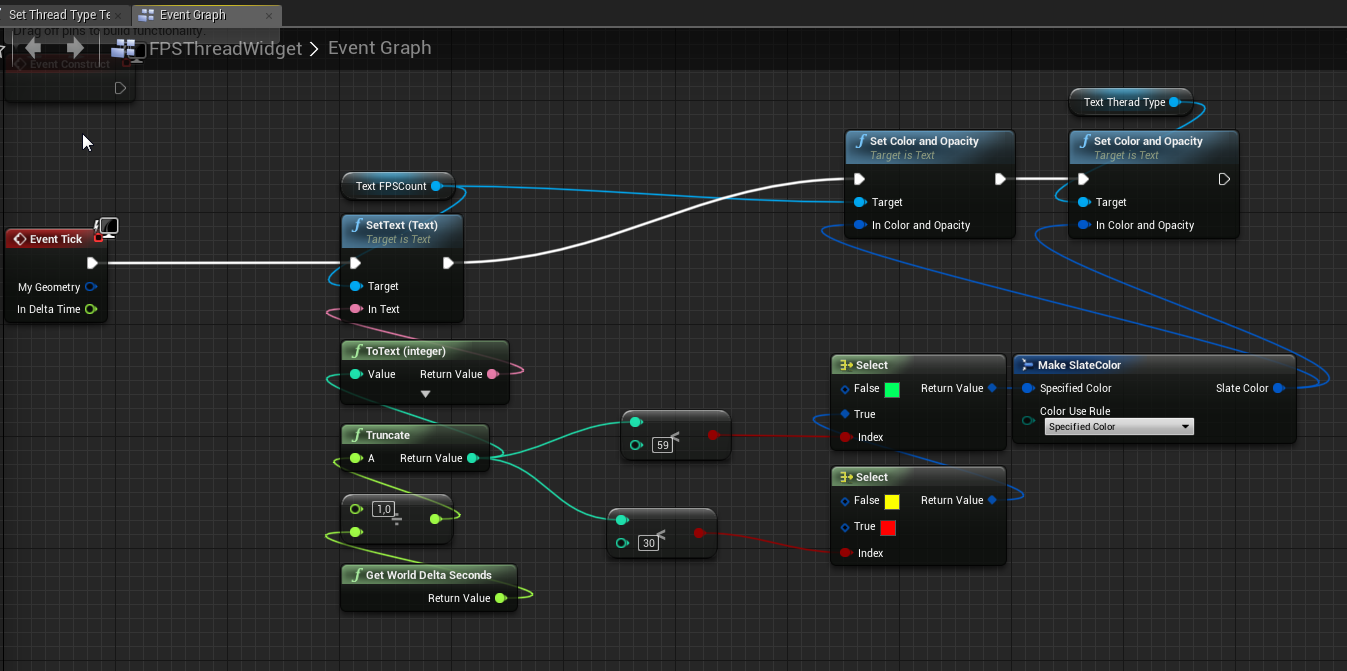 deep grotto
t.maxfps
dusk fern
dont work, I don’t know for what reason
deep grotto
Measure with stat fps
cloud cobalt
He's doing it already
deep grotto
And make sure you turn vsync off too
cloud cobalt
He's doing that too already
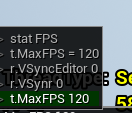 cloud cobalt
Isn't it r.Vsync ?
dusk fern
I tried different options already, without result.
Ideally, I want to know the exact settings of everything related to get my 120 fps
cloud cobalt
Try outside editor first. No need to package, just launch your game, type r.vsync 0 and check the result.
dusk fern
https://i.imgur.com/mdp7mBY.png
Does it work like this in a game mode?
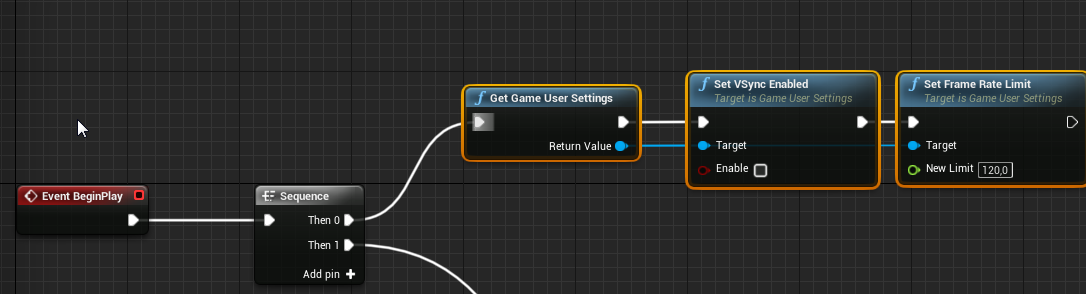 cloud cobalt
Yes
You also need to correctly set the max smooth framerate settings in your project settings obviously
dusk fern
ok i will try now
cloud cobalt
But lile I said, just launch your game outside editor, type r.vsync 0 and tell us the framerate
dusk fern
but the console does not work in shipping
cloud cobalt
Who said anything about shipping
Right click the uproject file and click launch
Open the console, toggle vsync off and check the framerate
dusk fern
ok i followed your instructions
launched the game
https://i.imgur.com/o06AFMf.png
and console commands
https://i.imgur.com/7bizbZi.png
result:
https://i.imgur.com/jS9L3bj.png

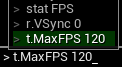
 cloud cobalt
What are you smooth framerate settings ?
dusk fern
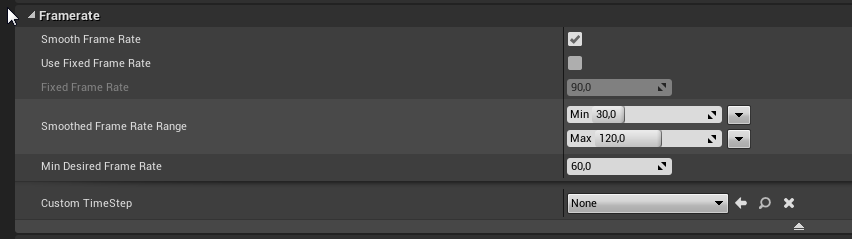 wary wave
smooth frame rate + min desired = 60, looks like what I'd expect, if the display is 60Hz?
wary wave
well, it should hit 120 if it can maintain a smooth 120 and the display's native refresh rate is 120Hz
cloud cobalt
No one really has a 120fps monitor though so I'm taking this as an exercise in low input lag
dim plover
This isn't really covered in the popular style guide, should each map have its own folder?
So all maps go in /Maps, but Map1 would go into /Maps/Map1
 fierce tulip
personal pref. I'd prefer them in one folder, mayhaps seperated by stuff like bonus levels, towns, that sorta thing depending on the game.
dim plover
Hmm, alright. I'll do that.
dusk fern
@cloud cobalt
I tried all the options ... there are not many to try all of them.
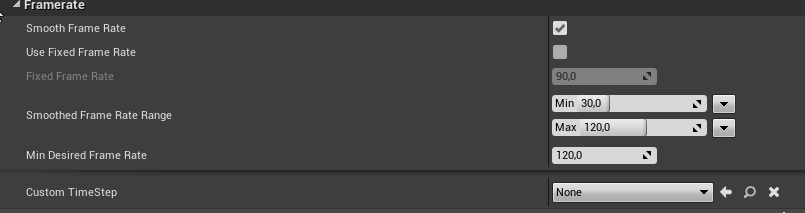
https://i.imgur.com/TVea1iA.png
I turned on turned off smooth frame rate
and tried different values
the result is always 60 fps even after entering console commands


 abstract relic
Test it yourself, it’s purely circumstantial to the requirements of your project
dusk fern
@cloud cobalt
is it likely that this is a hardware problem? I had problems with the monitor recently. Theoretically, with VSync disabled, should this not be a problem?
abstract relic
Low quality height map. It’s using pixels to calculate it after all
grave nebula
tis a bug
umbral pagoda
When the character moves there is a lag in random time as a little trembling, but it is strongly evident. I use the standard paper 2d character movement BP
radiant haven
@abstract relic whats the difference
wary wave
number of bits per pixel is the difference
8 bit has half the detail
not rocket science, really
radiant haven
ye but which detail
honest vale
elevation
cloud cobalt
@dusk fern There is no reason to not have a higher framerate outside editor, if you have removed everything like you did
cloud cobalt
How would we know ?
radiant haven
how can i know
cloud cobalt
How did you author the height map ?
radiant haven
just searched for heightmaps
cloud cobalt
Breaking news - free Internet content sucks
cloud cobalt
You make them I guess
tawdry lily
https://terrain.party/ From what I gather it exports 16 bit heightmaps. Or you can make your own..
like ambershee said
wary wave
plus if you use WM, you don't have licensing issues
cloud cobalt
I mean, people who make games usually make their own content
Because what's the point if not
wary wave
since you know, randomly googled textures probably have copyrights attached
fierce tulip
http://www.demenzunmedia.com/home/ < free terrain tool
 haughty geyser
Hello! I've been reading up on the auto instancing introduced in 4.22. Does this only apply to static meshes, or to skeletal meshes as well?
fierce tulip
the author of terresculptor made it free as of recently.
wary wave
static meshes only
haughty geyser
Thought as much. Was hoping I wouldn't have to go through the entire ordeal of figuring out skeletal mesh merges and atlasing for customizable characters
Thank you for the answer :)
radiant haven
@fierce tulip I think WM is more realistic but thx
@wary wave thy man I donwloaded WM but its completely new for me uff
@tawdry lily I need a bigger map thatn only 60KM²
can I export a heightmap of WM into UE cause normal mehses you can use it as a n landscape
fierce tulip
the user is in control over how realistic it looks, not the tool
cloud cobalt
Because clearly 60km² is too small
fierce tulip
lol
cloud cobalt
Make it over water.
tawdry lily
lol
radiant haven
with an island well i had that in mind but idk hmh
i cant find a good island
cause all of these are just 8bit maps
cloud cobalt
No seriously, make it over water
radiant haven
and i made myself one but that doesnt looked good though
cloud cobalt
If you're doing a flight simulator, the realism of the ground surface is both extraordinarily expensive, and not that much of a requirement
Not to mention the performance problems of far rendering
It's not like DCS World looks any good
tawdry lily
Think about your scope.. you're just one guy. Focus on the things that are important to make a good game first. After you managed to create a flight sim over water, then you can start working on cool maps
radiant haven
dsc world is pubg 2.0
new benchmark
no shit
@cloud cobalt and what is with mipmaps (LOD Levels)
well of course you wont see grass though
cloud cobalt
DCS World has 150 people working on it
grave nebula
Make it a sim in the fog. Less visibility, less problems
cloud cobalt
And it takes way more than mipmaps to get nice rendering of far objects
It takes careful LOD on every single mesh, to start with
Seriously though, since you have 1/150th of the manpower of DCS, you should aim to have 150x less planes, 150x smaller terrain, 150x less graphics, 150x less features
That is, if you're as good as the average DCS World developer
radiant haven
@grave nebula you tell me taht you dont grab this question(topic) serious
cloud cobalt
Fun fact : plane pilots are expected to land planes blind
That is, instruments only
grave nebula
Call it the most realistic CAT 3 autoland simulator ever and shovel them cashes.
@radiant haven I call it brave developers vs unrealistic tasks.
tawdry lily
If I would like to make a flight sim, and I would argue that I probably have a little more experience than you, I would start super simple. I would take a cone and try to make it fly first. With just a boring flat landscape without textures. It is only after this works that I will start to touch models and landscapes..
cloud cobalt
Why is it that no one tries building the Space Shuttle in a garage, but everyone wants to build full video games ?
Doing any trivially small video game alone is a shitload of work
tawdry lily
I mean, I get it, all these games look super cool. And you get the tools for free, so what's stopping you, right?
cloud cobalt
Yup
Arguably, you can build a decent airplane with garage tools, though
You still don't see many people trying 😛
tawdry lily
Lol XP
And I'm actually super happy that so many people are interested in making games. It just gets a bit frustrating that everyone wants to make AAA games on their first try. Like.. get a cube to move and then we'll talk again..
plush yew
is there anywhere one could find the various Unreal Engine scenetextures, who writes on them and how?
tawdry lily
Sorry @radiant haven if we are a little rough on you, we are just trying to protect you from some serious disappointment.
cloud cobalt
I mean personally I spent 5 years on a space sim. It's like a flight sim, but without landscape !
So when I see "I'll do a realistic flight sim alone", I'm a bit skeptical
radiant haven
@tawdry lily lol thx
well I made a heightmap using Blender and exported mesh from Marketplace
still these stairs I dont understand 😭
cloud cobalt
Well, is the heightmap 16bits ?
tawdry lily
How did you make it?
cloud cobalt
No idea
tawdry lily
I was checking this for you:
https://en.wikibooks.org/wiki/Blender_3D:_Noob_to_Pro/Landscape_Modeling_III:_Exporting_as_a_Heightmap
and it clearly says:
"As mentioned earlier, exporting the heightmap as an 8-bit image (Blender doesn't support any 16-bit formats that I'm aware of) has the drawback that you only have 256 discrete height values which can cause a stair-step effect when the terrain is subdivided. Ideally, you could use an application that can export the image in a 16-bit raw format, such as Terragen."
so unless you can find some source that disputes this claim, I'm going to assume that your heightmap is still 8 bits
 regal yoke
how to randomize delay time
 gaunt tide
I mean