#ue4-general
1 messages · Page 589 of 1
 wary wave
 kindred viper
the day someone taught me that double-clicking the lines added a reroute node, was the day I started adding them even if I didn't really need em 🙂
 obsidian nimbus
sometimes you have to sacrifice performance for better looking blueprints!
 supple vault
can you add one if it's not connected to anything yet?
obsidian nimbus
yea you can start your bp with 1000 reroute nodes
some1 should sell a MP asset with premade reroute nodes
supple vault
how?
kindred viper
lol
obsidian nimbus
np 😛
 valid pike
@remote roost lovely Blueprint
 dim plover
Why do you people not use functions?
obsidian nimbus
I use cloud functions 😄
cant get more multithreadded than that 😛
it has some uses i guess but there is some delay
I use firebase functions
 winged walrus
Quick question, havent used UE4 in over two years. Is Paper2D dead? I wish to make 2D isometric game with ambient lighting and 3d scenery.
 cloud cobalt
It kind of is.
 wispy comet
AFAIK, epic hasn't updated it in like 17 engine versions or so
There's some community effort to revitalize it, but i'm not up to date on any of that, i work only in 3d
kindred viper
@winged walrus there are better options these days. Godot does ok for 2d. Unity obviously. You could do it in Adobe Animate too tbh.
winged walrus
Thank you for input!
 serene birch
consider that for 2d I guess
Unreal Engine Forums
Hey,
For the past year or so I've been working on a secret project for the marketplace. It's called Pixel 2D and it's sort of a beefed up sequel to my previous 2D
if you want to remain in UE4
 midnight tree
Does UE4 have a feature to unwrap or something?
 silk rock
hey, does UE forum works now? getting weird message
 manic pawn
works for me
midnight tree
@cloud cobalt 😢 would be nice to have at least something like box unwrap...
cloud cobalt
Use your modeler
midnight tree
It time consuming to jump in between, importing and stuff...
serene birch
not sure I see the workflow here
how come your model reached UE4 without correct unwrap UVs in the first place?
cloud cobalt
^
Basically every model comes from your modeling software already so just do it right
midnight tree
I am new to UE4 and forgot to unwrap a model, but it's a plain box and I thought that simple box unwrap will do the job. But if there is non, then yes, I go back to DCC and unwrap it there...
serene birch
be ready to practice that loop more 😛
 uncut vigil
@silk rock me too :(
serene birch
you can just reexport the model in the same place and press the "reimport" button in UE4 btw
silk rock
opened with firefox instead of chrome, and everything works fine
it's second time when chrome cant access UE forum / marketplace at random moment
cloud cobalt
@midnight tree Reopen the 3D model in your modeling software, unwrap and export, click reimport in UE4 if you haven't set it up for auto reimport
The whole thing takes literally 30s for a quick unwrap
manic pawn
unless you didn't save the original model 
cloud cobalt
... I did not even think of that tbh
I can imagine "no version control for assets" but not having the asset at all would be a new low
manic pawn
I want a plugin that blocks submitting an asset to source control if the import path points outside the project folder
cloud cobalt
Fuck that, let's have a plugin that fails to import if source control doesn't come up
 forest ingot
you can export an asset back to fbx from unreal engine
cloud cobalt
Instant 30% less traffic on Slackers 😛
forest ingot
so if you didn't save it/someone else made the model you can just export it, edit it, and reimport
cloud cobalt
@forest ingot It will be nowhere near the original asset though
manic pawn
idk why I didn't think of that much simpler solution lol
forest ingot
it won't? it's worked fine for me before
besides the mesh being triangulated but I can fix that with one hotkey in blender
cloud cobalt
It's gonna be triangulated, for starters, and raw geometry that lost all modifiers, smoothing settings etc
It's probably fine for a quick fix that reimports without major changes, but otherwise it's still not great
forest ingot
well yeah but in that case it's your own fault if you don't save the original and it's better than nothing
cloud cobalt
Obviously
dim plover
I want a plugin that blocks submitting an asset to source control if the import path points outside the project folder
I'm not proud to admit this, but I'm glad you said this because... guess what I've been doing.
serene birch
UE4 evaluation mode : you can use it for 30 minutes and after that it requires setting up some form of source control
supple vault
noooooooo ... think of all the students you will destroy
manic pawn
also, when you save something, the editor will crash exactly 137 seconds later.
cloud cobalt
30 minutes is a bit long
Creating the project takes less than that
Hell, arguably you should create the source control workspace before the project
manic pawn
that might be a bit difficult unless you have a template ready to use
supple vault

GitHub
A collection of useful .gitignore templates. Contribute to github/gitignore development by creating an account on GitHub.
manic pawn
that template is big egg
cloud cobalt
Honestly you can start with Intermediate and Saved and like, you're good to go
supple vault
so how do you deal with a merge conflict on .uasset files?
supple vault
😱
cloud cobalt
Technically you can use the UE4 Blueprint merge tool if it's a Blueprint, but....
serene birch
well you find the other person that modified the file and you resolve the conflict
I suggest chair jousting
supple vault
lol
cloud cobalt
The main reason Git struggles at game content is that locks are only implemented in LFS, and poorly
supple vault
can you elaborate on "use locks"?
cloud cobalt
"Use Perforce" is what he meant
manic pawn
^
cloud cobalt
Git has locks, but they're unusable
serene birch
locks are basically saying to everyone "I'm changing this file so everyone else buzz off from it"
cloud cobalt
Locks = file has to be checked out for one person and everyone else is barred from editing it
supple vault
oh i thought this was a ue4 specific thing
manic pawn
of course, now you get the problem of people checking out random shit and just leaving it locked forever
cloud cobalt
The problem is that locks spit in the face of most Git concepts, like decentralization and branches
supple vault
well, that can always be resolved with the proposed chair jousting xD
but is git gaining traction here or svn still preferred?
manic pawn
print out the two versions, fold paper swords out of them, and fight
the one that breaks first is deleted
supple vault
ok so i have an unrelated question. the students are unknowingly editing engine content. like one of them changed the simple collision on the default cube, which caused problems for anybody else relying on expected behavior...
i found out that I can use epic games launcher and "verify" the engine to restore original functionality.
is there a way for me to prevent engine content from being edited?
or should i just plan on re-verifying every now and then?
manic pawn
mark the engine content folder read only in windows 
supple vault
but then i can't install plugins right?>
manic pawn
plugins don't go in the content folder
manic pawn
I guess, you could also set it on the config folder
but that's probably useless since it never modifies that
supple vault
i'm kind of curious though, how exactly was non-admin able to do stuff in this folder in the first place through the editor?
(i'm bad at windows, usually in *nix)
manic pawn
why wouldn't you be able to edit it?
supple vault
it's owned by the admin account, and under C:\ProgramFiles ...
i thought that stuff was "default protected" from non-admin
manic pawn
the epic launcher seems to set the permissions to allow everything when it installs something
supple vault
interesting. i'm ok with accepting "magic" as the answer 🙂 thanks again for the fix, seems to work!
dim plover
Probably want to make the Source folder read-only too, if not already.
 blissful trail
alright so ive been trying to get this key bind system to work for about 3h now you can set the key but when you set another key it changes the key you just changed back to the original key it was at
this is the ui
and this is the keybindingsbp which is just a character bp
it basically only lets me change one key
also heres a gif if it helps
https://gyazo.com/a117d4aae15bffb5304626bba92273c4

 slender mist
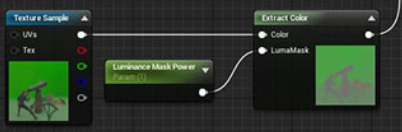
I'm trying to follow this tutorial on settings up a chroma key material in UE4: https://www.unrealengine.com/en-US/tech-blog/setting-up-a-chroma-key-material-in-ue4
He creates a custom function Extract Color which he then uses in the material editor as node: https://i.imgur.com/GSGJmiF.png
How do I create this function so I can use it in the material editor?
 digital anchor
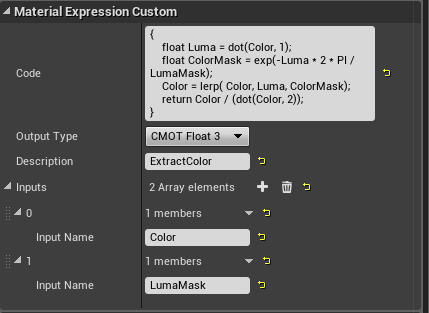
create a node called Custom, copy paste the function from your link on it, add the parameters on the parameter list
slender mist
how do I create a node*?
 tidal totem
Hey guys, I have a question that may call for opinionated answers. I'm trying to switch over from Unity after about a year of learning. Within that time I was learning C# as well. I'm not the best at either, but have always wanted to learn Unreal and figure might as well even thought it's considered more difficult (by some). With that being said, would it be smarter to focus my time into learned BP inside Unreal and learning C++ proper, or should I go all out and do Unreall C++?
digital anchor
i meant add the node on the graph, dont need to create from scratch
slender mist
I can just copy the code in here?
digital anchor
yep
slender mist
oh thats handy, thanks!
 lapis vine
@tidal totem I would advise go with BP first. C++ and specially UE C++ can come any time later. You can do a lot without it.
slender mist
@digital anchor How do I set the parameter types? https://i.imgur.com/DuFphFa.png
 digital anchor
i think its not needed
tidal totem
Thanks @lapis vine that's exactly what I was looking for. I don't really know the extend of BP, so it's great to hear that a lot can be done with just that.
slender mist
seems to work 👌
wary wave
so I'm debugging something at the moment, and one of the encroachment (overlapping actors on a certain channel) checks is coming back true when I wouldn't expect it to
the actor it is apparently encroaching is "Generic_Mesh_NoGeometry", which makes no sense to me
the only reference I can even find to that is an fbx import error
 gaunt raptor
if i have a particle effect in my scene - that shows in my seqeuncer but is not rendered when i render out my seqeunce - what do i need to do for it to show up in the render ?
 fierce tulip
it was a few years ago, but when we had that same issue we made sequencer activate a blueprint that activated the particles. @gaunt raptor
gaunt raptor
yeah thats what i figured - ohh well ill try it out ! thank you
 red crane
Can you transfer blueprints from one project to another?
fierce tulip
same version > yes (as long as you migrate properly)
to older version > nope
to newer version > maybe
fierce tulip
(not trying to be like "Yo google ffs" more like: it explains it better than I could in less time)
 dark rune
I suddenly can't see the folders in the right side menu
help what did I do
wary wave
turn whatever filters you have enabled off
dark rune
i already reset filters
 tawdry lily
@dark rune Did you check this setting:
dark rune
yes but still did not work
but nvm I just rebooted the editor and it fixed itself
is this a thing that just happens
tawdry lily
those things happen sometimes yeah.. :/ glad you got it fixed!
dark rune
@tawdry lily I just realized i had typed a single spacebar into the search tab
So that was why
tawdry lily
haha, oops XP
fierce tulip
lol
 regal yoke
How to make it so that i need to press 2 or more buttons to do something
 north kelp
Hey guys, So recently i upgraded my machine to an i9 9900K with 32gb of ram to help me improve shader compile times plus light builds. Light builds have increase an insane amount however shader compile times are still quite slow. Does any one kow af a way for my to imrove this.?
 normal burrow
9900k is good for gaming but not so much on development
You’d want more cores and threads for these things
cloud cobalt
Shader compilation is slow on even the best rigs, it's best to just work around it. Have a lot of parameters, cut down on permutations, avoid needing recompiling shaders
normal burrow
True but these things scale better with thread count vs. core performance. If those two things are what you desire (light mapping and shader compilation) you’d be better off going with a 3900x or 3950x if you can still return. The 9900k is still gonna be a great cpu, just the exact two things you mentioned it’s not ideal for
north kelp
Ahh ok, its too late to return now. i'd also be out of a computer while its being returned and i use it for client work. my old machine died and it was the best i could get my hands on in short notice. apart from slightly slower compile times i havent seen an issue with it tbh. I build VR projects which is why i decided to go for something game worthy aswell.
normal burrow
Yeah it’s not a bad setup. Just do less of these things as stranger suggested how.
wary wave
@north kelp - apparently there's some issue in the newer engine versions that has massively increased shader compilation / light built times on some systems
but the cause is currently unknown
 mossy nymph
starting with what version?
north kelp
@wary wave Ahh ok, thats good to kow. but im using the oculus quest source code build so i doubt this might be my problem but hopefully that helps others.
normal burrow
An issue that only affects hyperthreading stuff on intel?
wary wave
I don't know with which version, my projects either use dynamic lighting or custom solutions
normal burrow
Only other hardware thing I can think of Jonathan would be to make sure your temps are good. It may be scaling for temps
north kelp
Since i have access to source code im going to try this but i have to rebuild the engine. https://rhycesmith.com/2019/05/27/improving-ue4-shader-compile-times/

So if you’re here, I’m going to take a lucky guess and say you feel shader compilation is slow and you want to speed it up. Well I’m happy to say that you’re in luck! Read more…
Ill let you guys know if it improves anything.
serene birch
ugh, don't do that XD
I feel like you'll get marginal improvements in shader compile that
at the expense of making your computer mostly unusable while it's compiling them
normal burrow
Yeah, that
serene birch
if his computer got 100% improvement in shader compile speed with that
maybe he should stop playing Fortnite while shaders are compiling 😉
or stuff like putting UE4 editor in not "Real time"
 grave nebula
I still member times when UE4 was actually okey at compiling shaders and material editor was actually usable.
normal burrow
Though if you don’t run chrome or Spotify or whatever while you work, this might be a way to improve shader compilation jonathan. The more idle cpu the better
When was this deathrey
grave nebula
4.19 and below
normal burrow
Think I came in at 4.16. Do recall it being a bit snappier then
 chrome cedar
Hey 🙂 I´m a beginner with UE4. I imported a house I built into ue4 and now I wanna create dense grass to the garden around. the problem I have is no matter if I take quixel grass or the grass from the open world demo collection.. it always tells me that I should decrease the lightmap resolution of the foliage.. but when I do that it doesn´t look good anymore...
and another question: is there any way to kinda cut the grass at the edges of the surface? In forest pack pro it´s possible but I couldn´t find a way yet to do that in ue4...
 north kelp
You cant exactly cut the grass but you can use the grass node on the material to spawn grass only where the material is. Regarding the lightmaps its difficult to get righ i find. just trial and error.
chrome cedar
alright! 🙂 thanks! 🙂
 dawn vessel
Just a quick Q to the knowledgeable UE4 users. Is having an Actor that has tick fully disabled and replicates only once every second. Having hundreds of these in the world, is that expensive?
 worn granite
why does it replicate once a second?
worn granite
Do they all (try to) replicate at the same frame? What are you replicating?
dawn vessel
Some visuals.
worn granite
It's probably cheap, iunno
dawn vessel
The Replication frequency is set to 100 by default right ?
 zenith narwhal
does anyone here have experience with using gauntlet on android devices? (specifically trying to work on oculus quest)
dawn vessel
I’m not in unreal atm. On my phone
 somber quail
This issue was marked as fixed in 4.19 however I'm getting it in 4.23. Can anyone else confirm this?
 nova spruce
hello! How do I have lighting auto update in editor. In unity if I put in a light and rotate it, it adjusts roughly what the shadows will look like
in unreal every time I move a light I have to rebuild the lighting every time?
normal burrow
Movable button
nova spruce
I have to make every object moveable to see the lighting in real time? and then Do I move them back to static once I like where they are?
nova spruce
oh okay! and then when I'm done perfecting it I just switch it back to stationary?
normal burrow
You can’t change state in game
Yeah
I mean as long as you only need it in editor to move yes
somber quail
@nova spruce
Static = Fully Baked
Stationary = CSM + Dynamic
Movable = Dynamic
 vernal thicket
CSM?
nova spruce
so I should use stationary, not movable?
nova spruce
I just want it to live update the shadows while i'm working
normal burrow
TinkerTyler stationary just means you can change color
nova spruce
like if I rotate the directional light all the shadows dissapear and it says "rebuild lighting"
digital anchor
its Cascaded shadow maps
normal burrow
Movable is what you want to avoid bakes
somber quail
My mistake, stationary still uses LIghtmaps but you can adjust the direct properties at runtime
nova spruce
I just want to rotate it and see the new shadows.
somber quail
I use static lighting 99% of the time so not too familiar with stationary or moveable workflows
digital anchor
then dynamic
vernal thicket
@normal burrow i was wondering how you do that
normal burrow
Change color?
nova spruce
so you just rebuild your lighting every time you move the light slightly to see what it would look like @somber quail
vernal thicket
No pat just said if you use moveable you don't need to bake
somber quail
@nova spruce Yes, I do ArchViz. We have a small build farm and have GPU Lightmass installed on all machines so it doesn't take long. You also build at preview or medium when doing tests.
nova spruce
ooooh
that makes sense
and I getcha josh, just wanted to know why he only used static, arch viz makes sense
and a gpu farm hahahahah
vernal thicket
GPU farm jesus
nova spruce
may I ask where you work @somber quail
not looking for a job, just have a friend who works at an arch viz place in britain
nova spruce
oh no, I'm from CT, USA
somber quail
I work at Soluis
vernal thicket
Ah 'friend'in Britain gotcha
nova spruce
Friend is in London
vernal thicket
Lots of USA blokes in here
nova spruce
fight me
vernal thicket
😂 😂
nova spruce
hahahah
normal burrow
It’s that AOL thing
vernal thicket
I love the idea of living in America tbf
nova spruce
I don't know what a bloke is, but I defend your freedom to say it. MERICA
vernal thicket
It's just another word for man lol
nova spruce
and it has it's ups and downs, especially now, but you guys pretty much are having the same thing
i know i know hahah
vernal thicket
Mate our tax is fucked
nova spruce
ok okay, getting off top joshy, we'll talk in private if you want.
vernal thicket
If I made 1 million, I'd have to give 400k to the govt
normal burrow
@plush yew
vernal thicket
Yeah 👍
somber quail
@plush yew Performance testing should be done on shipping builds using a combination of built in profiling tools and graphical debuggers
normal burrow
Unreal insights @plush yew
If 4.23
Stopwatch

Could use insights on editor but it’s gonna negatively affect results
Swarm keeps track of timing already I think
Sweet do you have said cpu?
Me too 3970x tho
It’s all I do pretty much, is how I justify it
But yeah it’s not cheap
Hell no yeah lol
Though compared to my 1950x it should be night and day with gaming lol
Yea my 1950x is always the neck of bottle
 polar viper
I'm getting a weird error while saving
 keen shadow
hello, i am trying to figure out this probelm in my simulation game, Whenever i play the game in unreal it works perfectly fine- i can drop 3d models of objects, add thier rows and colums and other things, but same thing i do in packaging it doesnt work ? does anyone have any idea why it might not be working ?
also it says packaging succesful so dont know what is going wrong
polar viper
"You do not have sufficient permission to save the following content to disk. Any changes you make to this content will only apper during the current editor"
 abstract relic
Most likely you need to enable long path support in windows and in Unreal Ross
 timid jacinth

My thirdpersoncharacter suddenly got deleted and i got these errors
is it corrupt?
polar viper
@abstract relic how does one do that?
 raven nest
it would be really nice to be able to select a few objects in the world outliner and then convert them to a blueprint actor
or at least if you tried to copy and paste them into a blank blueprint, it would carry over all the relevant data =p
abstract relic
For Windows:
https://eocloud.cloudferro.com/knowledgebase.php?action=displayarticle&id=135
For Unreal:
Simply enable it in the editor preference
 jovial musk
🤔 Never seen that... What do you mean "suddenly got deleted "
timid jacinth
i opened the project and realised that my character controller had been deleted
Was working fine the other day
 errant osprey
anyone here that can help me out?
errant osprey
@timid jacinth i had that the other day. you need to find and delete the asset causing the issue or slow Migrate your project to a new one
timid jacinth
How do I know whats causing it
jovial musk
@timid jacinth try fixing up your redirectors
timid jacinth
thanks ill try that now
jovial musk
If things get moved from one folder to another, it can cause issues
errant osprey
and do that
mine unfortunately got so messed up i had to move all to a new project
timid jacinth
Where do i find that option
jovial musk
right click any folder (I usually just do the entire content folder)
errant osprey
^what he said
errant osprey
does it crash if you do anything?
timid jacinth
No
errant osprey
do you know where that asset is?
timid jacinth
 jovial musk
Interesting.
errant osprey
you may need to load everything in a new project
timid jacinth
create a new project and copy the content?
errant osprey
thats what i did
timid jacinth
alright doing it now
 strong mesa
Wait .. @grim ore Live streams ?!
 radiant haven
for now and for the future should i still use 4.22 or should I switch to 4.23
strong mesa
i'm using 4.24
 frosty bloom
Do you need a feature from 4.23?
strong mesa
@radiant haven check out the futures of each and weather your game will benefit in the future from upgrading or no
Release Notes for Unreal Engine 4.23
raven nest
it would be great is there were buttons and keyboard shortcuts to go to the next or previous keyframe in the current timeline track
keen shadow
guys, any idea why my game isnt able to call few refrences whn packged but is able to call them during editoir play ??
 plush yew
I have setup a basic enemy that uses ai perception. How can I make it so when my enemy hits my character, the fps camera snaps towards the enemy and the screen shakes?
 slate urchin
hey! I'm trying to create interactive apartment and be able to change wall, floor etc textures in game using a simple popup menu with texture thumbnails. Do you know some tutorial about that? Been trying to find something but with poor results. Thanks!
vernal thicket
@slate urchin for starters you can change textures in blueprint by set texture, you could start by building a widget, adding a few images in the widget, add buttons on top and just bind the button with what texture you want
@plush yew to move the camera grab your camera in blueprint, get the enemy world location and set that as the new location, delay and set back to normal after delay?
 dry merlin
I have a question. The AGameModeBase for the dedicated server, I am wanting to do all the physical computations on the dedicated server since my hardware has massive GPU capabilities then communicate the physics computations with the clients. Can you set up the dedicated server to use GPU computer thru OpenCL or Vulkan for math computations?
timid jacinth
@jovial musk @errant osprey Its still not there
slate urchin
@vernal thicket I'll try that, thanks!
vernal thicket
@slate urchin by the sounds of it though your probably better off having whatever you need (I.e wall, floor) as individual things you can reference like an actor, theres probably an easier way to do it though
@slate urchin if it's an actor for instance you can add blueprints to it, and do a lot of it from inside that actor blueprint, such as when you look outline the wall with a white line to show you're looking at the wall
@timid jacinth you might want to try posting it in the forums and waiting for an answer before changing too much and breaking your game especially if you've put a lot of time into it, I've broken games before by prodding too much lol
slate urchin
@vernal thicket having an outline would be awesome. Let's say the best option would be to have two modes: normal and edit mode (showing outlines and options etc)
vernal thicket
@timid jacinth or backup?
vernal thicket
@slate urchin well tbf you could just have it so when a key is pressed while looking at wall to open 'menu' for that wall to change things. But obviously it depends on the style of game you're going for, my mind is going more towards a Identity style game lol
@timid jacinth yeah that's something I've learned the hard way lol
timid jacinth
haha
vernal thicket
@timid jacinth Goodluck bro, and remember, if it's a bug, someone else would've experienced it, searched and found an answer somewhere
jovial musk
@timid jacinth If it's just the default thirdpersoncharacter and you haven't made any/many tweaks to it, I would delete (or back up) the .uasset from your file explorer, delete your Saved and Intermediate folders, start a fresh blank project with the 3rd person character template, and migrate the asset into your project fresh.
vernal thicket
@timid jacinth Happy for you bro! Make a backup😂
timid jacinth
i will haha
abstract relic
Everyone here is from the internet
vernal thicket
Fair point 😂👍
slate urchin
@vernal thicket great idea! thanks 🙂 Well, I'm trying to learn how to make interactive interior presentation of a house, apartment etc
vernal thicket
@slate urchin ah right sounds good!
 remote fulcrum
question - i have a bunch of UASSETS deriving from a game that was on an older version of UE4 - i tried putting them onto a project on the latest version of unreal but similarly to trying to open uassets saved with a newer version of the engine in an older version of the engine - the assets dont show up in the content browser
is there a workaround for this?
 rotund scroll
hey guys, I've done some pose rotation inside an animation (directly in UE4), yet I can't seem to make the new pose stick. the pose is unrelated to the animation itself
vernal thicket
@remote fulcrum check this, maybe you can find a fix https://forums.unrealengine.com/community/general-discussion/78098-revert-downgrade-project-from-4-11-to-4-10
Unreal Engine Forums
General discussion about the game industry and the Unreal Engine community.
@rotund scroll what are you trying to do? Change the base pose of the animation or?
rotund scroll
trying to change part of the animation that isn't touched by the animation controls
vernal thicket
Can you not just set it to the pose and 'add key' to the animation where you want?
rotund scroll
I guess, I was just thinking there'd be a way without having a key set given that this part of the animation isn't touched
like the anim is upper body and I need the legs to be correct
rotund scroll
alternatively if I could separate the upper body anim from the legs somehow
rotund scroll
cast anim but yeah
vernal thicket
Okay sweet
Do you have a normal blend space, based on your character idle - walk/run based on speed &/or direction?
rotund scroll
I have the basic stuff the 3rd person template ships with currently
vernal thicket
Right okay, so a blend space will change the anim on whether you're moving or not
All you have to do is, in animation blueprint, add a state after entry > idle walk/run
So connect the state to idle walk/run
rotund scroll
that's done already
rotund scroll
vernal thicket
Okay go onto your casting node and screenshot for me
rotund scroll
vernal thicket
Now go into your idle/run and screenshot for me
Do you want to add me as a friend and I can talk you though it privately?
vernal thicket
Okay no worries, right
So go under your casting, disconnect the play casting_young but keep it in there
dry merlin
Anyone know the header that defines the UCLASS() variable for Unreal Engine in C++?
vernal thicket
@dry merlin not me sorry bud it's pretty quiet in here check the other channels
vernal thicket
@rotund scroll you inside the casting?
rotund scroll
yea
vernal thicket
So add your third person_idlerun_2d
Connect the speed variable
Drag off the thirdperson_idlerun_2d and type layered blend per bone and add that
Connect your casting_young to the base pose 0
Click on the Layered blend per bone node
And screenshot that for me I forgot what the next bits called lol
I need to see the details panel of that layered blend per bone node
rotund scroll
vernal thicket
So where it says Bone_Name, pick the bone that's at your characters hip
So if you look at your characters skeletal mesh, you should have a bone at the hip usually called spine_01
Type that into the Bone Name, make sure all the letters and characters are exactly as it's spelled in the skeletal mesh or it wont work
Then where it says blend depth, just set that to 1
vernal thicket
👍
rotund scroll
thanks
rotund scroll
but just to be sure, there is no way to truncate parts of the anim that aren't being used by keys in the animation editor_
?
vernal thicket
I'm not too sure on that one bud, I use the blend as i buy my animations and wouldn't even attempt to add my own in fear of the mess that would become lol, I'd check on google
rotund scroll
fair point
vernal thicket
But once again as I said earlier to someone else, word it in different ways you might find your answer
rotund scroll
I'd love for a permanent way of just discarding junk anim data if you see my point
@vernal thicket I appreciate that, will do
vernal thicket
@rotund scrollyeah I think you can delete the anim keys you don't need
 atomic forge
I can't even see my player start
rotund scroll
thanks again for the assistance, at least now I got something functional 🙂
vernal thicket
No worries pal
 sweet relic
@atomic forge Check to see if game view is enabled
in the viewport dropdown
it will hide all editor only gizmos
sweet relic
np
vernal thicket
@rotund scroll oh p.s, if you only wanted the cast animation to play once at a time, go under the casting, click the casting young anim inside the state, where it says looping turn that off, and the nodes to and from idle to casting will need to represent something inside the game, albeit left mouse button as the transitional rule, and then to go back to the normal anim just put the same variable with a NOT boolean
rotund scroll
ah no worries it's looping
I'm trying to transition to state based animation that also fits with advanced locomotion, so that I never have to do root motion
 topaz dawn
Hey, guys!
Has anyone ever had a problem with a client beacon not receiving replication when connected to a hostbeacon on client build configurations?
to be more precise ALobbyBeaconHost and ALobbyBeaconClient
strong mesa
Is anyone here relevant with Matheo's Drag and drop Tutorial !?
 spice canopy
@topaz dawn dont know. Have you tried the #multiplayer topic here?
topaz dawn
No I didn't. Thanks @spice canopy ! Gonna post in there
rotund scroll
@vernal thicket I forgot to ask, is there a way to copy a transform from a pose onto a keyframe in another animation? for instance as a starting point
 short hatch
Hey guys, maybe a bit of an awful question to ask but I’m trying to come up with a sort of game demo within the next month and a half. I’ve done a few of the official blueprint tutorials in the past, but this is the first real time I have time to sit down and actually learn Unreal. I was wondering if anything decent could be produced from that sort of timeframe? Given I put a significant amount of time into it.
grave nebula
Yes.
 nimble moat
yes
supple vault
^^^ !!! also, check out quixel megascans, they have great tutorials on youtube and super nice assets for you to use 🙂
(NOW FREE!)
so say i have 10 instances of BP_MyThing in the editor. And somebody else made a different blueprint BP_BetterThing. Is there a way to select all instances of BP_MyThing and change them to be BP_BetterThing?
atomic forge
yes
short hatch

supple vault
@atomic forge was that directed at me? If so, how do I do it?
atomic forge
It was directed at the other guy, but there probably is a way. Are they instanced through blueprints?
supple vault
hehe np np xD yes, i think i just found it. it's in Details -> Actor -> Convert Actor
 tribal steeple
Where would I find "grass type" settings?
 jolly cairn
@tribal steeple If you not
@tribal steeple Something like that? how to draw on map? by pen on ground?
 thick herald
Possibly 4th down in the google results of that exact question?
jolly cairn
And put deferent type?
tribal steeple
?
jolly cairn
You searching how to do that?
tribal steeple
Searching now
jolly cairn
... Where would I find "grass type" settings? You ask how to do something like i show on printscreen?
tribal steeple
I was having an issue with an asset so I asked a developer and they said I can change fix it in the grass type settings
jolly cairn
A Quick Start guide for setting up and using the Grass Tools.
Look that this give you full answer how to paint and get fun around grass.
That help you?
tribal steeple
I think I found the issue
The grass would come from a material, I didn't have to paint it
But now I broke the grass altogether, but at least I know what to change
jolly cairn
When you have terain you puting on the ground by painting ground
You use material to paint
tribal steeple
I made the terrain material the ground type I wanted
jolly cairn
Yes its pretty this same. But you ask more abaout material or grass like a model?
jolly cairn
Its different assets any why that link give you right answer. On down you have extra information
Good lack.
tribal steeple
Thanks :)
 vivid narwhal
Evening gang
polar viper
When i come back can someone help me via voice chat?
polar viper
Sorry I'm getting pissed off with trying to do something. Doing the same exact thing 3 times 3 different outcomes
 gaunt tide
I feel that
Been trying to get grass to work but I end up having to reimport 961 height map tiles
Had to reimport 25 times now
jolly cairn
I do not understand your question@polar viper
I can help you via voice
But when you come back?
@gaunt tide So maybe you take that asset export to new project and get practice?
polar viper
I've been trying to get interactive grass to work and it's different outcomes each time
Thank you
Yeah 1. Fir frech air 2. I need to get things 3. I need to feed a cat
gaunt tide
Well it has to do with how I originally made the BP for my material
jolly cairn
@polar viper The answer is simple We do not know nothing about your cat. So when you go back you can ask. But what if your cat eat you?
gaunt tide
As the texturing is based on height and slope
jolly cairn
If problem is? Alweys when you change something you need to debug and its spend time. 1. you can change quality F1 F2 F3... But or export that to other game end experiment in other place until you get know how its work.
How i know grass is not generated by blueprint.
Is more like included in UE.
gaunt tide
Im trying to send a screenshot but Gyazo isnt working atm.
gaunt tide
So my texture samples go into a Landscape Layer weight than to the Base color in the material node. Would I just add the grass before the input to the layer weight node?
polar viper
@jolly cairn it's not my cat it's my sisters lol. She's out of the country for 2 weeks so i have to cat sit and feed him.
I'll be home in 30-40 minutes
plush yew
hey how do i get rid of this texture streaming pool limit thing
 copper flicker
so... what would be a good way to add simple movement to a simple object.. without character movement, and ideally without physics?
also.. this is for AI, so it needs to be controllable. I was thinking projectile movement.. but I'm not sure how to control it yet
in other engines, like Unity or whatnot, I guess I'd do it with physics tho...
I just want a simple impulse that pushes the dudester
ideally.. not every tick, or with some custom tick
strong mesa
How can i clear an actor variable
copper flicker
hmmm.. I store the default in another variable.. maybe there's a better way?
 frail sun
When I create an anim montage from a 240 fps animation, the original animation has 104 frames, but the montage only has 12. Anyone know why?
normal burrow
there might be math here
how long is the 240 fps animation in seconds
12/30 == 0.4
104/240 == 0.43
so i'm betting your montage frames are in 1/30 intervals
30fps
polar viper
@jolly cairn that's me home
normal burrow
if we add another frame 13/30 is also 0.43 so i'm pretty sure its doing something with 30 fps
frail sun
So I guess Animation Montages are locked at 30 fps?
normal burrow
they might not be literal frames
i have no idea really tbh
30fps is the default animation timing though for ue4 iirc
polar viper
@jolly cairn im on the vc
 marsh swallow
This may sound dumb.... but i have to ask.
When your using Dynamic Lighting.... Should you set the: Force No Precomputed Lighting in the World Settings
The google didn't give me the direct or even indirect answer that i was looking for. lol
 true leaf
oh god...
TIL 'translation' of gui widgets will totally throw off 'drag offsets'
that plagued my game for 9 months i couldnt figure out why my draggable icons for certain things were so screwed up
dont set'translation' of widgets if you can help it, just use the X and Y positions to position them lol
normal burrow
Are there any tutorials on setting up swarm agents over a network?
 harsh tiger
so i cant change that inside c++?
normal burrow
You make a new AProjectile
and could then switch parent class on the blueprint if you wanted
harsh tiger
https://www.youtube.com/watch?v=D4UM73O7Zxs im basically following this tut. but its over a year old and i dont have what he has, so i made a new c++ actor and im just copying what he has in mine an hope it works 😂

Learn to make games in Unreal Engine 4 C++ today with Tom Looman in this step-by-step video! In this intro to C++ tutorial I will quickly take you through th...
5:00 for the time stamp
normal burrow
yea i see nothing like that in your project
type projectile
A means actor, its excluded from name
 nimble anvil
@plush yew #looking-for-talent you aren't gonna specify anything?
harsh tiger
the black one is what ive made
harsh tiger
the one in the tut is the pre made one with the first person template. but i dont have that one, which is why i was wondering if epic remove the projectile ball and replaced it with a line trace
normal burrow
can't you fire up pie and see?
harsh tiger
plush yew
@nimble anvil I didn't because i dont request anything special, it's just voice acting for a pirate
harsh tiger
just the one i made
normal burrow
tada
harsh tiger
thats not what im looking for though
there is a projectile that comes with the first person template. which is what is being using in that tutorial. but i dont have it, i think epic removed it but im not sure
normal burrow
what happens when you shoot?
harsh tiger
nothing
https://www.udemy.com/course/unrealengine-cpp/ im considering buying this while its on offer, but im not sure how updated it is, it says last updated jan this year. but i dont know how useful that would be. like whether it would be outdated info or not. i would imagine not
Udemy
Unleash the power of C++ and Blueprint to develop Multiplayer Games with AI in this Epic Games-approved course.
lapis vine
These courses go on discount most of the time. 2nd: it is up to date with 4.22 at least I think. Then instructors usually are responsive and can help (3rd).
harsh tiger
thank you, the only other issue is i seen a comment say he uses this https://www.wholetomato.com/ and its like £75 but i dont know how useful it is
on the website it says massive companies use it, so i can imagine it to be really good
grave nebula
Visual assist is optional and the course is really well done. Do not hesitate.
normal burrow
VAX is also awesome, although optional yes.
harsh tiger
one of my main issues in c++ is the intellisense doesnt seem to always work and it causes so many issues for me
harsh tiger
i couldnt tell from the website. is vax a one time payment?
normal burrow
yes and no
you pay for a year of updates
after that year, you keep the last update you had forever or you renew
harsh tiger
can that still be used for commercial projects after that year is up?
normal burrow
yes, but no updates that come out after that year is up
only the versions covered up to the end of your year
which is a problem when new visual studios come out that you want to use
harsh tiger
im on 2017 atm like, had issues with 2019
normal burrow
i've not tried 2019, everything is working and i don't chance it lol
harsh tiger
im the same 😂 i appreciate your help btw, i really want to get into c++ as i've used bp for a couple years now and want to progress. but every time i try a c++ tut it never works and i just loose motivation for it
 neat forge
uuhhhh?
normal burrow
The marble example is pretty cool
it says: Sorry, your account is inactive and may not login.
harsh tiger
marble example?
normal burrow
yea the template
neat forge
Thank you for typing that, Im wondering if anyone knows why?
normal burrow
dunno what your trying to do but if its quixel i've heard of people having similar problems to this recently.
neat forge
I have an email saying my accounts been banned for suspicious activity and it says I tried to get a refund for something today but I have not submitted any refund requests? Maybe my account got hacked or something
normal burrow
Does kind of sound that way
normal burrow
choice
things that go into the private folder aren't available to including modules
harsh tiger
so he has set that up? he doesnt show how
normal burrow
it doesn't have meaning when your not externally referencing your game module in another
You just make the two folders and put public headers in the public folder, and private header and all cpp files in the private folder
you just name them Public and Private
harsh tiger
this is the issue im currently facing
normal burrow
you can safely ignore anything with that abc icon
where it says build + intellisense
set it to just build
harsh tiger
is what ive done wrong? seems like im setting the root component to the collision comp
normal burrow
are you actually building though?
If you are, you don't have that variable on the class
 spare steeple
anyone else unable to login to their account
harsh tiger
build - build solution
spare steeple
password wont work and i dont get the email to reset it
normal burrow
@neat forge
spare steeple
his issue looks to be different
normal burrow
idk
neat forge
I figured it out
normal burrow
F5 you don't have some variable on your class then
neat forge
I got an email saying fraudlent activity detected and i got a refund on something I purchased a few weeks ago, but its because my credit card was stolen and I had to get a new one, so that card is now invalid and epic detected that the card is now invalid I guess
normal burrow
look at their example in the header for a CollisionComp in the .h
harsh tiger
his
spare steeple
looks like i finally got an email after the 3rd try
harsh tiger
mine
i noticed i spelt sphere as shphere 😂 but fixing that hasnt done anything
im thinking the #include stuff is missing at the top
plush yew
hey can i get some help with reducing the texture dimension
dim plover
F5, only look at your Output tab. The Error List is useless.
Take a look at this. Nice qualities of life stuff.
https://docs.unrealengine.com/en-US/Programming/Development/VisualStudioSetup/index.html
normal burrow
now you know how to handle this error
 thin tendon
Does anyone here know the shortcut in blender to select along a line? I'm trying alt click on the line but nothing happens
 compact rover
Is get right vector bugged? It's returning the world right vector instead of the component right vector
normal burrow
you mean its returning 0,1,0?
compact rover
hold on I just retested it and it's not, Im trying to rotate an object by its right vector as an axis, and when I print the Y value of the right vector it changes as it should, but its rotating as if Its being told to rotate along the world Y axis
maybe Im just a huge pepega and theres something im missing
This should be rotating it 10 degrees every second by its right vector
plush yew
if I add two vectors then normalize them I'll get the average between them with a magnitude of one, right?
compact rover
Just going off of intuition if the x value of the vectors were 2 and 1 and you added them together that would be 3 which isnt between them
I think you would need to add them then divide by 2 but thats just a guess
plush yew
because I'm adding several vectors together and i'm trying to get the average between them
compact rover
try adding them all together and then dividing by the number of vectors
plush yew
normalized vectors always have a magnitude of one though, so it wouldn't be three would it?
compact rover
I think the magnitude would be 1 but the direction would be different
try not using the constant version
plush yew
well yeah direction is what I'm trying to get
average direction between these vectors with a magnitude of one
gaunt tide
When level streaming bugs out on you and your terrain isnt connected....https://gyazo.com/f787eb72a9471fa7bc1d617d6cb5b1fc
 plush yew
Adding an normalizing should do that right? I'd normalize them all then multiply but some of these vectors might be 0
compact rover

Stack Overflow
I am writing an opengl based iphone app and would like to allow a user to translate around a view based on the direction that they move two fingers on the screen. For one finger I know I could just
add the vectors together and then divide by however many vectors you added together
gaunt tide
Anyone experienced in tiled landscapes? More so than the Ue4 pages
compact rover
after some ms painting it looks like adding them and normalizing would also workj
at least in 2 dimentions
not sure about the 3rd
but by normalizing you're doing more math so just be aware that it might be slower
@autumn crystal
also there is an rinterp
 molten path
Hey I'm having the exact same problem as this person https://help.quixel.com/hc/en-us/community/posts/360008485437-Unable-to-import-static-meshes-foliage-from-Bridge-into-UE4

Quixel
When I downloaded some 3D assets in Bridge and export to UE4.23 (Megascans installed), only materials, normals and roughnesses shown in UE4 but not static meshes, how can I import the static meshes...
Does anyone know how to fix that?
compact rover
which would smooth outthe rotation
normal burrow
you can throw the location out
molten path
@autumn crystal what exactly do you mean
compact rover
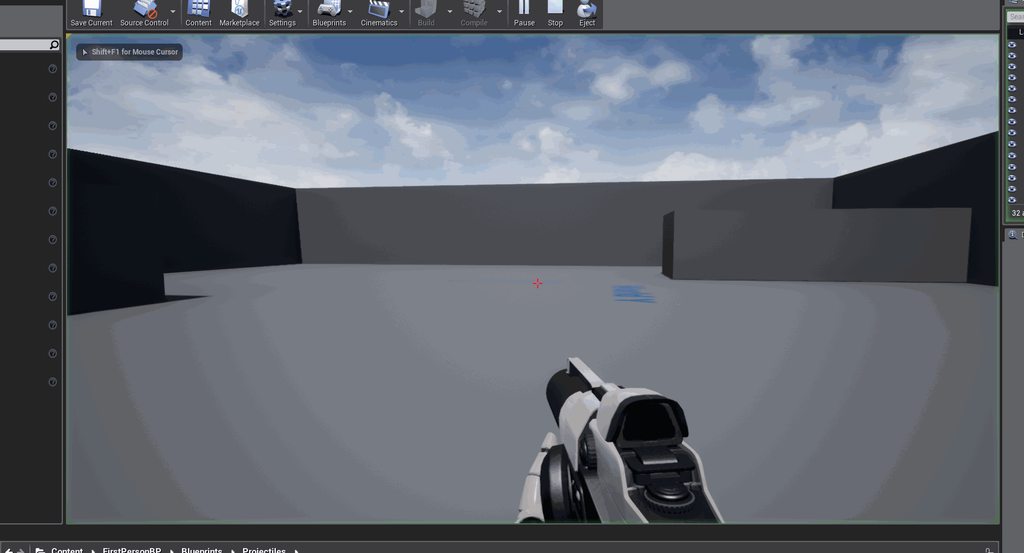
https://imgur.com/1iGOBhk Ok so I have this arrow set to rotate on its right axis 10 degrees every second, does anyone know why the direction im firing it is having an effect
 normal burrow
All primtiives are scene components just for reference
its more about the actor type you want hours
your name
if you create a blueprint off the selected actor
you can change the parent type maybe
molten path
big brain right there
normal burrow
to regular actor
k open up enemy bp
go to class settings
and change parent to Actor
yea change parent class to actor
it might delete your static mesh, but you will want to add a static mesh component anyways
i think it will still keep addl components you added
yep so you'll want to not save if it does
yep
make a copy of the bp if you think it might lose data
now your scene root isn't locked yea?
lol 😂
you pasted it to discord before reading lol
yea np
yea np
whenever you run into something like that limitation on changing thing its the actor type conforming that, so moving back to actor will let you change stuff
normal burrow
do you see a delta seconds argument
you will want to multiply things by delta time to set a rate in.
5 * deltaSeconds
means 5 per second.
unless you are making sure that function gets called at a specific rate on everyones computer the thing will move at different speeds based on frame rate.
so the idea is 1 cm at a time?
your missing square operators before the sum operator btw
er nvm re-read
if you want distance its sqrt((X^2)+(Y^2))
sqrt is what you want though
yea so, this gets you distance though
its asking for time
so with distance, you say how fast you want it to travel
50cm per second would be distance / 50
yea
if your setting a destination, which it appears to be whats going on i think you've got it. though, i'm not entirely sure i understand what xloc and yloc represent, and am confused by the target relative location name of argument
relative to what though?
for that distance calculation, you'd want to use the x and y movement amount not the starting location then
they move to zero?
then your good
I've not used this thing your using, you just need to verify if its smooth or not
blissful trail
is there a way to cast a shadow from an invisible actor ?
keen shadow
Guys need help, any idea why my game isnt able to call few refrences(fbx models) whn packged but is able to call them during editor play ??
normal burrow
These soft references may need to be implied to pack
Take a look at project packaging settings
May need to explicitly define each
Or just allow it to be more curious somehow
 lost lily
What's the channel to ask for help in
normal burrow
Yes ken but the additional assets to cook is likely what you want
Right now it sounds like maybe these things are just not packaged
keen shadow
okay let me try that once, thanks a lot
normal burrow
All things In each directory you put there will be sent out with the game
 deep grotto
@lost lily Depends what you need help with
if it's programming go look at the programming channels and see what's relevant
lost lily
animation
dim plover
Where were you setting the soft references?
lost lily
so I went to animation
deep grotto
@lost lily Idk how well people respond cause i never do animation
are you having issues trying to get them to play or what?
normal burrow
They respond badly
deep grotto
ahahahah
dark rune
is it possible to use C++ and Blueprint in the same project
dark rune
yay
normal burrow
It’s the fun part mixing the two yea
 sudden agate
normal burrow
sudden agate
normal burrow
That actually looks worthy
 storm venture
hey so my post process effects are all messed up when i render my scene as an image sequence
anyone know of a solution to this?
actually it seems as though it goes darker when playing in viewport / simulating as well
 dim arch
auto exposure?
storm venture
i checked* that, i turned it off
dark rune
can I make a blue that kinda fades out towards the center in a Image from the WidgetBlueprint
or do I have to do that out of UE4
dim arch
you can make a material using radialgradient as an opacity mask and assign it to the widget
dark rune
ok thx
 hard bronze
Hi anything good for this month free content?
 grim juniper
We won't know until later today. If they update them at the same time as they have in the past it'll be sometime around 8 or 9 hours from now.
dim plover
Is there anything special about Blackboards/BehaviorTrees?
Do they have some special performance (multi-threaded or single instance managed) or other features?
 analog loom
I have a... weird question. So we have a very complex deterministic simulation written in C#, for the Unity engine - it's completely standalone and can run outside of Unity (i.e. under .NET/Mono/Xamarin). I know there are C# 'plugins' for unreal (no idea how up to date those are tho), but is it possible to run C# inside Unreal on Android? Yeah... i know this is weird.
I really do not want to have to rebuild all of our stuff in C and/or C++ unless I really have to.
kindred viper
thats a pretty good question
UE does have a mono plugin. Whether it works with Android though I couldn't say myself. I can't see why not, but then I like to think nothing is impossible
tawdry lily
If your C# dll exposes a COM interface you should be able to call it, otherwise you can wrap the dll with CLR to be able to use it..
 honest vale
are you sure it's deterministic? 😛
thin tendon
Does anyone know what would be causing this? When painting the texture it has colours appearing in spots I don't want it to.
honest vale
probably a messed up UV map
thin tendon
I used the smart uv unwrap in blender. Might have to make my own one manually. Thanks
honest vale
shouldn't be too hard, just use angle based selection tools to select faces and unwrap them
thin tendon
okay. I'll try that now
analog loom
@honest vale Yes I'm very sure it's deterministic, why?
honest vale
no reason, just procrastinating at work
analog loom
@kindred viper Yeah, I might have to dig into the sources of that then... @tawdry lily CLR won't run on android tho afaik
It's a 'game engine' of sorts, which is full predict/rollback deterministic, with physics, navigation, the whole nine yards.
I mean it's not a 'game engine', its just for the game logic.
But no matter, it was a lot of fucking work, i'd like to not have to re-make it, at least not now
I know it's one of those "why would you ever want to do this" questions... but i'd also not want to re-write 100K+ LOC if i don't have too
thin tendon
@honest vale Thanks heaps mate. That fixed it perfectly.
 maiden sundial
Did i missed something that the free stuff of the month isn't anymore at the 1th of the month ?
Feels like this is already the second month where it's like this
fierce tulip

reddit
Posted in r/unrealengine by u/Phyronnaz • 21 points and 6 comments
dark rune
How do I make it so that my Material is blue fading in from the edges and not one great big sharp circle
 humble ridge
Is it possible to set Initializations fields dynamically on geometry collections?
dark rune
there's only translucent in Blend Modes though
fierce tulip
dithertempaa is a node that can fake transparency on masked stuff.
 brisk osprey
That is pretty cool! Voxels coming along pretty good, inb4 pretty advanced in engine terrain editing
honest vale
is that yours @silver crown?
maiden sundial
This is hot
fierce tulip
just sharing the love
 rose glen
hey guys, anu one knows how to smoth the edges of the alpha cutt offs ? like rather than what i have here i want it to be smooth (fade out to clear) sort of, this is a Decal trying to make Fog of war
u can see below it its all rounded, i want it smooth gradient or something
dark rune
How do I make it so that the blue is on the edges and not in the center, and also make sure the material can be used in a Widget Blueprint?
serene birch
alpha cutoff is meant for harsh edges
smooth means translucency
though you could cheat with dither + TAA smoothing and not have to go to the translucent pipeline
dark rune
how do I use the translucency thing
also the material looks like this at the moment
how do I make it so that the blue fades out towards the center instead of fading out towards the edges
serene birch
it was more a reply to Forcas
for your case, just output 1-value instead of value in the Opacity
or rather
pass 1-value to the DitherTemporalAA node
 true finch
Hey! Does anyone of you use Media Players and Media Textures?
Somehow for me, the auto clear feature in the texture doesn't work... So everytime I play a movie
the last frame of the last movie shows up at the beginning of the next one
dark rune
@serene birch cool, that did the trick. thx
honest vale
@silver crown does your voxel terrain sculpting thingy do subtractive sculpting as well?
 silver crown
ye
silver crown
ye
 quiet timber
Hi there! Anybody here has experience developing for Nintendo switch?
fierce tulip
generally anything involving developing for consoles is NDA
silver crown
yup
quiet timber
Well I have simple question
If I develop as a freelance for a company, do I register the Nintendo account or the company representatives?
 dim merlin
Anyone knows how to define what levels are loaded when using world composition? right now it loads all levels found in project at once 😐
quiet timber
@silver crown , @fierce tulip ?
 unique kraken
anyone got a good course or so for a overall ue4 learning experience? i want to learn the basics as well as blueprints and shading. (i already have good 3d knowledge)
mossy nymph
@dim merlin right click level that isn't a persistent level -> change streaming method
fierce tulip
@unique kraken not sure if there is much bp/shading in here but https://www.humblebundle.com/software/unreal-engine-game-development-software

Humble Bundle
Pay what you want for awesome content and support charity!
unique kraken
im already pretty good with nodes in blender and substance so its not aaas important rn
thx
this is quiet expensive
isnt there like a good fix udem course u can recommend
dim plover
Those three UE4 training courses get recommend a lot too. Those are probably ~$10/ea.
dim merlin
@mossy nymph cant find anything like that? need to rightclick in level window?
quiet timber
@fierce tulip and probably wait for an answer for week :/
 remote roost
@unique kraken it's not just for one month... you keep it forever
unique kraken
lel
remote roost
there's no subscription
unique kraken
wud
unique kraken
uuuh sry then i missunderstood
remote roost
anyone know when the free marketplace content goes up for the month, didn't really pay attention to it until recently
fierce tulip
iunno, dont we get emails when it happens
remote roost
i never have gotten an email regarding that
tawdry lily
I think I read somewhere here that it should be later today. I would say: check back tomorrow.
mossy nymph
they said "first tuesday of the month" somewhere recently
dim merlin
@mossy nymph cant find such a setting anywhere?
quiet timber
That why hired me, doesn't know. Im helping
fierce tulip
generally company name btw
mossy nymph
@dim merlin right click a sublevel in levels window
quiet timber
@remote roost that I know. But me, or the Company im freelancing for?
fierce tulip
he wants to know if he has to apply himself or use the company name from peeps that hired him
the company
remote roost
the person who runs the company
and they need to show an example of their work and prove that they're a dev company that can release a product
quiet timber
Mkay
remote roost
what are you talking about monthly?
oh
you're probably talking about humble monthly
unique kraken
nono nvm
remote roost
which is a seperate service entirely just for games
unique kraken
im dumb today
quiet timber
@remote roost you know this from personal exp. or is it just your opinion?
dim merlin
@mossy nymph every sublevel i right click has no such option
remote roost
you cannot build for Nintendo Switch using UE4 without having the nintendo build plugin
there's no personal opinion or personal experience about that
lol
quiet timber
@remote roost not about the SDK, but why registers the account
dim merlin
So how does world composition works? it just loads all availble levels together? Why?
remote roost
check it if you dont believe me
fierce tulip
@quiet timber you need to prove to ninty you are worthy
remote roost
if you have the legal authority to enter legal agreements for the company then yeah you can
otherwise you cant
remote roost
do you have the legal authority to enter agreements for the company?
quiet timber
Me or Company I freelance for, has to deal with these registrations
remote roost
not talking about legal status
i'm not sure about the legal stuff surrounding it
but i'd assume freelancers aren't allowed to enter a contract on behalf of the entire company
silver crown
yeah
quiet timber
thats true
dim merlin
@mossy nymph the menu map is not persistent or world composition
just havent got that option
fierce tulip
i blame "terms and condition" for people never reading rules.
quiet timber
@fierce tulip , @remote roost is it worth start prototyping the game before getting that NS switch approval? It's not that the development process changes orsmth?
cloud cobalt
You can start prototyping the game on PC with UE4, just know some technical work will be required, a devkit will be required and the performance will be very different.
quiet timber
@remote roost that I know. But can i start working one the game before the Kit arrives etc? Like now with default UE
?
remote roost
yes
quiet timber
Good
remote roost
that's what the majority of devs do
hence why the switch has so many ports
ngl im tempted to port half-life 2 maps and functionality to VR using ue4 while waiting for half-life alyx. the existing vr tools for the source games are a bit shit
quiet timber
Big fan of HL game series
fierce tulip
if you want to work on games for switch, best to really delve into any and all resources you can find related to ue4 and mobile games.
a lot of what you learn for mobile games can be applied to switch
remote roost
yeah similar architectures/power
 tall plume
Hello everyone, I have been playing with the Paragon assets. Noticed a Rig asset shown in the screenshot. I understand what it is. It's a skeleton mapping used for retargeting animations. The engine comes with a build in one called "Humanoid Rig". My question is how can I create such an asset like the one in the screenshot? I can't seem to figure it out. Sorry if this is not the right sub category of this Discord. Kinda new to it.
 light coyote
@tall plume Hover over it and see what info it gives you about the asset.
Or open it to get extra info.
tall plume
Hello, already did that. It's not a blueprint. It holds a tree structure representing a skeleton, nothing else. It's weird for me.
Wait, let me try capturing the thumbnail so you can see for yourself. It doesn't seem to be inheriting from anything either.
 lone tapir
Does anyone know of any way to improve AA quality in oculus quest?
 opaque vector
what's wrong with the AA in the Quest? If you are talking about the general bluriness of UE4's TAA then I could help you.
lone tapir
@opaque vector My 3d objects get flicker a lot! And even changing MSAA nothing different happens.
 grim ore
@tall plume that's a saved retarget rig. You can save them after you assign mapping to use later. In the rigging section on the skeleton you can save/load
opaque vector
iirc MSAA will only work when using the Forward renderer, you can toggle it forward rendering in project settings.
and forward rendering is the go to for VR I believe.
Describes the advantages of using the Forward Shading Renderer.
tall plume
@grim ore , thank you! It all makes sense now.
opaque vector
not sure how TAA holds in VR, but I'd imagine it sucks because of the blurriness.
wary wave
TAA isn't an option in VR
plush yew
Hello!
Recently I have noticed that every different static mesh in the level adds 2 draw calls, is this normal? I know about the automatic batching on same meshes using the same material.
(empty scene with no light and unlit materials only)
opaque vector
have u tried using a material instance instead of the same material?
plush yew
no
but meshes with the same material are merged
I am merely curious as per why adding a new mesh adds 2 draw calls instead of one
opaque vector
it might be because u arent using material instances, though I'm not certain on this.
plush yew
thanks anyway 🙂
wary wave
you probably have two draw calls because of rendering the mesh, and shadowing the mesh


 plush yew
how to remove the target node in a blueprint pure function (c++) ?
plush yew
how do i set a custom speed when spawning a projectile? i tried setting the initial speed after spawning but i guess that's too late
opaque vector
@sudden agate not sure if this works on BlueprintPure meta = (HidePin = "Outer", DefaultToSelf = "Outer")
but i think u are looking for BlueprintGetter
 sharp crest
feels so lame when they make marketplace stuff free that u already bought...
I mean not that I dont want free stuff.. just.. feels lame lol
plush yew
where to get unreal 4.9?
fierce tulip
perhaps a tutorial using that version?
fierce tulip
software version numbering doesnt
plush yew
that's stupid, it should be 4.09 imo
fierce tulip
or you are just not used to it
sharp crest
^
plush yew
it's counter-intuitive
fierce tulip
"doesnt understand something, calls it stupid and counter-intuitive"
sharp crest

plush yew
Cuz when I saw "unreal 4.9" i was thinking oh damn unreal engine 5 about to release
fierce tulip
you and every other person when 4.9 was announced :p
plush yew
see
sharp crest

fierce tulip
...that have never worked with software versions.
lapis vine
After 9, it comes 10. After 99, comes 100. That how decimals go.
fierce tulip
ps4's software version is 5.2 something
¯_(ツ)_/¯
littlebigplanets versions where cheese names
 maiden swift
PS4 system software is on 7.00.
fierce tulip
:p last time I had time to update it
oh hell, thats years ago then
I was a gamer once
lapis vine
00 is confusing. Now that implies you can't get over 99
 dawn plover
eventhough every company work with their own numbering and naming conventions, I do agree that 4.9 sounds more recent than 4.23 😄
maiden swift
I think it's safe to assume we'll see UE5 before 4.99. That's a long time for an engine version.
cloud cobalt
Honestly I see Epic changing their version numbering before UE5
dawn plover
why? if it works, it works
rotund scroll
game engines will be obsolete by then, obviously
lapis vine
Nah, software versions were always decimals. Its dunno what percetion that 9 is more than 23. Tho I understand it, it was never like that, hopefully never will be.
 signal orchid
and UE6?
maiden swift
lol
signal orchid

cloud cobalt
Look at Windows or Mac OS for "why". Large software that moves to iterative releases every few months tend to drop their major version entirely
plush yew
@rotund scroll becuz in maths 4.9 is more than 4.23
cloud cobalt
UE will probably be called UE4 for as long as it lives
maiden swift
Maybe 5 will be so good they'll pull a Microsoft and skip to Unreal Engine 10.
Or Unreal Engine X. 😂
rotund scroll
Xreal Engine 1 X
lapis vine
That will do too.
dawn plover
Unreal Engine 2020
cloud cobalt
Or Firefox, or Windows now
dawn plover
was there ever an unreal engine 2k
maiden swift
@dawn plover Actually that's a good possibility. Moving to year-based version numbers seems rather popular in the game industry as of late.