#ue4-general
1 messages · Page 586 of 1
 sharp crest
 gaunt tide
Since I am broke so cant really do much atm. Got all the player animations, stamina, health, ammo count, a placeholder main menu, pause menu, settings menu, etc all done in under 2 days
 dawn plover
well making a list of what should go in a good presentation def helps
gaunt tide
Yeah I have a list as well as dates when i started and when I completed it and any details in google spreadsheets
dawn plover
visuals always a must-have for kickstarters
maybe add some art direction to it
for example, instead of a simple screenshot of your editor, the image is "dressed up" a bit to attract attention
gaunt tide
Yeah thats why Ive been working on the landscaping aspect of the project now after completing the what I consider basic character movements and game intro stuff. I just have to import foliage and paste it with placement based on satelite images
 marsh swallow
we have been in production for close to 2 years with 18 people. we are JUST getting our KS launched on February. KS anymore for games is hard. so many failed projects
we dont need it to finish but it would be nice and accelerate our development a bit.
dawn plover
but not due to kickstarter, most projects (regardless of the type) fail because most creative people can't handle the management side as passionate as the creative side
gaunt tide
Yeah this is something ive wanted to do for a long time but I know most people arent freelance so Im limited in my options for "hiring". I have the entire game idea all imagined just gotta put that from the paper to the engine and such. A few of you know the process im talking about
dawn plover
have you at least written down the idea/concept/story?
gaunt tide
I have a 3 section spiral journal with 300 pages almost full.
But solo developement was the cheapest option for me when I first started last year and the same situation now
gaunt tide
Well no. I ment that as in 3 sections for like ideas, artwork, and ai type stuf
 proven needle
good story and detail about it as it goes 300 pages seems ok 😛
dawn plover
I meant a summary of the idea that you can share for marketing purposes
gaunt tide
Just different sections for different aspects of the game
dawn plover
yeah so a 300 pages full story is great, but you don't want to share that to the public without nda 😛
gaunt tide
Nah I couldnt write 300 pages of story lol
dawn plover
the piece you do wanna share is more like a paragraph so people know what it is about, without all the spoilers
gaunt tide
Yeah. One of the key problems is the fact that I would like it be geared towards realism and almost simulation. i think for me the most challenging part is going to be the AI.
Sight, Noise, and "Smell". The smell part being imho the most complex of the 3.
dawn plover
the last thing I want is the ue mannequin swatting my home, because it used your AI to sniff me all the way to my location 😂
gaunt tide
Oh dear
Adding horizontal cones and wind direction affecting whether the AI smells you or not 😅
sharp crest

gaunt tide
inhales deeply like jeepers creepers
sharp crest

gaunt tide
Hmmm
 rough scaffold
Hello everyone! I have a doubt. I have a montage with 5 animations (attack animations) each has a section, how to get length each section?
 zealous cloak
Man I tried to create a new fire spreading system within 1 actor and all my multicast particle emitters are not visible 😄 I have an invisible fire to fix today
gaunt tide
Invisible fire is my favorite tho. YOu never see it coming lol
 tidal totem
I don't know if I am doing something wrong, but when I update my script through the content browser, it doesn't update inside the hierarchy
Is there a way to update the script instance specifically?
gaunt tide
Trying to take leaps over here when baby steps is what I need.
Well as stated. Time to get working on the artsy fartsy side of things before I get too into adding more player functions to my menus...
@sharp crest Ill admit you are correct. I need to change Index to something different. As character movement works fine when loading the level directly but not when going from the main menu -> level
Ahh...probs figured it out
sharp crest
gaunt tide
Forgot the set input node...
zealous cloak
I'm trying some set timer by event for the first time
sharp crest

 gaunt tide
Well it seems I can only set the gamemode to single player in project settings but I would like to be able to have both single and multiplayer. So i would create one blueprint for both?
Ehh nevermind Ill worry about that later time to get artsy 😫
Procedural foliage is probably the way to go with this large of of world tho
Well forget that idea. My project doesnt even show up when trying to add a foliage pack......
 crude vessel
Okay gentlemen! I have a material question. I'm playing with that procedural eye shader, it's pretty instruction heavy as is and I have a need to have some characters have a different colored iris in on eye, Originally I had just made the eye mesh have two materials and would load the second material with a different or same eye color. But I thought maybe it would be better to have the eyes stacked side by side in a rectangular UV space so they could share the same material but have two different iris effects. However i noticed the procedural eye shader generates a gradient sphere for a lot of it's effects, and while I have successfully offset a copy of this shader so it'll work with the two eyes in one material space, I need to duplicate the RadialGradientExponetial function for each instance because this effect does not tile. So needless to say this is going to cause the instructions to increase even further for this material. so TLDR: Is it better to have two material instances with a lower instruction count, or have a single material instance with a higher instruction count?
gaunt tide
I'm no expert but from the last sentence you said probably lower instruction count.
crude vessel
I'll probably either simplify the material to remove un-needed functionality or redo it entirely but the base material is 247 base instructions(!?)
 quiet token
how do i figure out how much percentage of the screen an actor is taking up ?
crude vessel
so I haven't re-written the entire material function but just adding a few more has increased it to 263 instructions and i'm not even halfway adding all of them.
So would a 280+ instruction material be preferable to two 247 instruction materials?
gaunt tide
Okay so Im asking whether to report this or not. my current project Im working on is named "FirstAttempt". Idk how it happened but eventually it stopped popping up in the UE Project Browser, so I created a new project named "TestTest". I even tried some of the trouble shooting from the UE4 answer hub and the UE4 user guide but to no avail. I than proceeded to delete the project named "TestTest" directly from the folder where my projects are stored and renamed the "FirstAttempt" file to "TestTest" now my actual project pops up in the Projects tab in the Project Browser. Should I just file a bug report as the fix seems inconvenient considering both projects were version 4.22.3 and in the same folder.
 molten path
Hey does anyone know if there is a way to get this 3d model (https://www.3dcadbrowser.com/3d-model/montreal-city-qc-canada-2019) without paying 600$ lol
gaunt tide
I mean. Thats a $600+ model tbh
gaunt tide
My current tiled landscape is from satelite data than gonna use the current rendering of it on google earth for foliage placement. Giving credit to Nasa and OpenTopo since it is theirs
 abstract relic
We also don’t condone stealing. Pay up, use public data, or hire an environment artist
gaunt tide
Just make sure if you are doing stuff with 3D model make sure to read thoroughly so as to give credit where credit is due.
Dang now if only I had $30 for these assets xD
abstract relic
Yeah that’s honestly a pretty cheap set. No idea if it’s game ready or has lods of course
 next badger
Is there a way to get $600 without selling anything or doing any work?
gaunt tide
Not really no
 nimble moat
my brains gone blank and googles not helping me, how do i add a widget to an object in game, ive done it before but cant remember for the life of me
abstract relic
Asset flip of course. You’ll be a billionaire in no time
gaunt tide
Its usually $60. Looks like its 7 different characters. Has from 12to16 animations per character etc
@abstract relic Its the African Animals Pack in the Marketplace. No LODs though from the looks of it tho
next badger
@nimble moat make widget -> add to viewport
gaunt tide
^^^
abstract relic
3D widget would be the key word then
nimble moat
ive done it you just add a widget to blueprint and select the class
next badger

GitHub
UE 4.13 plugin for UMG & Slate widgets on StaticMesh surface - skeskinen/MeshWidgets
@nimble moat how's that makes a texture out of widget?
nimble moat
i mispoke
next badger
oh...sry
crude vessel
lol, why is my shader compiler list negative numbers now?
 digital anchor
its decompiling the older ones
molten path
alright so i now have a 3d of a city in google earth
now how tf do I import it to maya
i converted it to .dxf but it's not working
:C
gaunt tide
Dang this is really disappointing. Cant import any type of tree with minimal seeding and age to this landscape without UE4 crashing. Like dang
I dont even have my grass mesh into the game yet
crap.
molten path
anyone know if it's possible to import this to maya or unreal engine?
 wooden sierra
New here, Google could not find any proper Info :
How is the license fees according to a vfx Studio? Since they wont sell games, how is the 5% payment?
 rain dome
Hey, guys! Is it me or UE4 doing the math wrong way when you type-in values as basic math operations? Opened a widget and typed 1080/10*2 and was expecting 216, but instead it gives me 54.
rain dome
@gaunt tide Mutiply and divide have equal priority and should be executed from left to right. 1080/5/5 gives me 1080))
gaunt tide
Well if they have equal priority than how did it give you 54 instead of the expected 216?
 sweet relic
Is it possible to have two post process material instances of the same base material
as blendables in the same post process volume?
I have a post process volume with several blendables, they seem to work as long as they dont share the same base material. If i enable two instances of a base material only the first one in the blendables list seems to be applied to the post proccess
gaunt tide
@rain dome Than you just answered your own question lol
rain dome
@gaunt tide UE executing it from right to left for some reason. It would be pretty hilarious if it's a bug that has travelled all the way to the 4.24
gaunt tide
Wouldnt be suprised honestly
 kindred viper
yeah
 plush yew
someone know how to make a dedicated server on unreal engine 4.23 ?
kindred viper
the same way as every other version
plush yew
do you know how to do it ?
kindred viper
yes
plush yew
can you send me a link or explain me please ?
plush yew
do we need to do it whit vs ?
kindred viper
no
plush yew
i google it at my school and the only thing i found his on oldest version that we need to use vs
kindred viper
Im not a fan of being a personal google for such simple things but seeing as you are at school. https://docs.unrealengine.com/en-US/Gameplay/Networking/Server/index.html
An overview of the role of the server in multiplayer.
plush yew
it's just explain what is a server
plush yew
? "cmon now"
kindred viper
yeah if you get people to google and dont take the time to read what they helped you with.... cmon now
kindred viper
ahh its short for "come on now". My bad. It's an English term for "dude"
as if to say "duuude" or "brah"
that kind of thing
plush yew
to make the server you need to type this in cmd UE4Editor.exe ProjectName MapName -server -game -log ?
kindred viper
ok this is what you do. Make a shortcut to your UE4Editor.exe. Then add those command line parameters at the end
\\UnrealEngine\419\Engine\Binaries\Win64\UE4Editor.exe "U:\UnrealProjects\PvE\PvE.uproject" "Lobby?bIsLanMatch=1" -server -game -log -nosteam
Here is an example
plush yew
do you enter the command here ?
 ornate ice
Hey is there a way to make a floating text always look at the camera
without using the event tick
plush yew
@kindred viper how i get the server ip UE4Editor.exe ProjectName ServerIP -game ?
kindred viper
dude you have to figure it out. Im busy sorry
plush yew
@kindred viper ok thank you
 swift spindle
@ornate ice you can do it in the material
rain dome
@ornate ice I think you need some kinda wrapper function like move_camera that would be called each time when your camera need be moved for whatever reason, then move_camera should call smth like sync_the_angle function that would update the angles. But i may be wrong.
ornate ice
I like the idea of using the material
swift spindle
look for billboard facing
ornate ice
its more performant?
ornate ice
yeah
swift spindle
that's the most expensive thing you can do
ornate ice
I want to use a widget cause I'll make a custom design
swift spindle
widgets are not the cheapest things...
ornate ice
:S
rain dome
Well, you can't do it more effectively than through wrapper i think. Anything that would force camera to move should do it through some move_camera function that would call a sync function. You would sync the same exact number of times the camera was moved and only when it was moved.
swift spindle
annnnd your performance is dead 😛
rain dome
And what would cause its death?)
ornate ice
O.o
 cursive salmon
For the movement of the AI we use the AI move to, but when I try to launch it at the beginning of the game, it does not work
Please help me
swift spindle
anything that sets something with your framerate
ornate ice
@swift spindle then which would be the best solution to update the widget rotation
rough scaffold
Hi guys! anyone have idea how to solve it?
plush yew
@kindred viper if i make what you give to me do my friend can join me if is not connected to my wifi ?
rain dome
@swift spindle And who said that it's a problem in the first place? You can sync every other or every second or whatever he would decide in a sync_the _angle implementation 🙂 The question was how to avoid checking the camera and widget sync on every tick)
swift spindle
trying to find my notes 😛
I had to deal with something like this a year ago.. was an issue (especially in VR)
rain dome
Wow VR)) That escalated quickly)) lol
 undone cedar
I have question when i start game, do variables get updated in Details View, when you use debug filter?
swift spindle
eh ? no... just framerate issues
undone cedar
im just migrating from unity, and in unity its gets updated in realtime, i'm not sure about unreal
ornate ice
@swift spindle waiting for those notes 😛
swift spindle
I'm sure u are
kindred viper
@undone cedar what do you mean by start game? The detail view is for the editor
undone cedar
i hit Play button and i want view variable values
kindred viper
if you want to debug values, you can set Watch on vars/objects and check them in Debug
swift spindle
@ornate ice can't even open my freaking onenote..... but a quick google gave me this... https://www.tomlooman.com/creating-actor-widgets-umg/

Today I’d like to quickly show how you can add UI for things like health bars, nameplates, interaction prompts and more in Unreal Engine. It’s quite simple to do, and I hear a lot of questions about this, so today I’ll share you some tricks to make this even easier....
kindred viper
@undone cedar if you want more info for blueprint debugging check this. https://docs.unrealengine.com/en-US/Engine/Blueprints/UserGuide/Debugging/index.html
The other way to debug would be in VS but that requires some setup
Pause execution using Breakpoints to inspect graphs and the values of variables.
 spice canopy
I have an ai question but nobody's answering in the ai channel....
undone cedar
i found you can watch nodes like this but is it posible watch variables?
spice canopy
I think I may have found a bug but I'm not sure
ornate ice
@swift spindle but there is nothing there about update world widgets rotation or position
undone cedar
because it looks its not updating until node is hit, even if i pause execution
kindred viper
@ornate ice a 3d widget in the world is a contained object. You would be looking to rotate the 3d widget container, not the widget
ornate ice
thats what I'm doing
undone cedar
something like to click variable and add watch to this
 radiant fox
I'm trying to make something happen once the float variable = 1.0, but it isnt working... help?
 glacial basin
@radiant fox Try the Nearly Equal (Float) node. https://docs.unrealengine.com/en-US/BlueprintAPI/Math/Float/NearlyEqual_float/index.html
Nearly Equal (float)
radiant fox
okay ill try
glacial basin
@undone cedar Its possible but there are a few annoyances. When watching variables, they can go "out of scope" most of the time. When its out of scope you wont see the value. Sometimes its not obvious when its out of scope or in scope. Possible solutions are 1) printing the value to log file, 2) update a local variable then watch the local variable instead
radiant fox
@glacial basin didnt work
kindred viper
@glacial basin yeah I had that issue with blueprint debugging so I do all my debugging in VS now
you still get scope issues but breaking/stepping is easier
glacial basin
@radiant fox Try printing the Warmth to screen or log file and then you can see exactly what value it is getting.
@kindred viper I've not tried that . thanks for the tip
kindred viper
man did they change the discord mention sound? It just pierced my eardrum 😄
glacial basin
Uncertain. I think I muted them all
nimble moat
is there a way to get a class of the object youre looking at?
i have muliple of the same blueprints in a level and i need a way to distinguish which one i want to use
kindred viper
GetClass()
 tribal steeple
How to I up the render distance for grass?
undone cedar
@glacial basin i think i found where i can see variables
if i select in world outliner then it works
but in blueprint "Details" panel shows defaults only and not updating in realtime
@kindred viper in visual studio i think you can debug only c++ scripts or what you talking about?
kindred viper
you can debug anything with debug symbols installed
undone cedar
debug symbols i thought its for unreal source code debugging?
 candid stratus
in my game when i move more than 10 feet away from my landscape it becomes really low polly from rendering and i dont know how to fix it
kindred viper
yeah I guess. But whatever it does, I've never had an issue with debugging blueprints with it. Perhaps compilation adds to it
undone cedar
hm so how you watch variable in visual studio, that created in blueprint?
kindred viper
well I don't often use the Watch. I just step through from a point and check the objects available
radiant fox
@glacial basin yo I got it working, thanks mann
tribal steeple
I have a material that when placed in creates grass on top of it. But empty area in my game looks butt ugly because the grass has a tiny render distance. Is there a way to fix this?
glacial basin
@tribal steeple What did you put the material on? A Landscape or a Static Mesh?
tribal steeple
Landscape
glacial basin
I think you just need to go into your Landscape Foliage tab and select the grass there then change its culling distance maybe
tribal steeple
The grass isn't there
I believe it may be an issue with the grass coming from a material
But have no idea other than that
glacial basin
Does the grass Static Mesh have LODs ?
tribal steeple
How would I check?
glacial basin
Double click the grass static mesh then move the camera away from it (backwards)
inside the SM preview window
or check its Details tab
tribal steeple
Just selects the landscape
tribal steeple
So open the material that the grass comes from in the content window?
I can't find any meshes for grass
glacial basin
I dont understand your issue then. Perhaps a screenshot would help me to understand
Show me your butt ugliness 🙂
(grass)
tribal steeple
😩
I bought an asset that had a material. When I place the material down the grass comes out
Issue is as you can see, the grass doesn't seem to render beyond a pretty close point
Making the empty area look god awful from a vantage point
abstract relic
If it’s an foliage instance, tweak the cull distance
tribal steeple
Where would I find cull distance?
abstract relic
If it’s from the material itself, probably from a depth fade
tribal steeple
Where are both of those?
abstract relic
One is in the material, the other in the landscape foliage tool
tribal steeple
Done a bit of looking for depth fade and I have no idea where that is
gaunt tide
Anyone else having trouble with assets in the Open World Demo freezing and crashing UE4?
kindred viper
mostly everyone. What are your PC specs?
 azure shore
hey how do I make the player slide a little after they stop walking
I tried a bunch of friction and braking values in character movement but nothing seemed to do anything
gaunt tide
I7-6700K, 1080Ti, 32GB DDR4 2133MHz, 500GB SSD, 4TB HDD.
kindred viper
ahh then its not that :p
gaunt tide
Nah lol
kindred viper
When you first load the Open World demo assets it will try compile the shaders which will take forever. Might give the impression the editor had hung too
azure shore
...well then I dont know
 plush thicket
when level streaming, is it best to have completely separate sections load, or is it best to keep things like the floor in?
instead of creating separate floor actors for every level, just have one big floor
which is most efficient would you guys say?
gaunt tide
Says not responding and all I’m doing is trying to use procedural foliage and than a separate foliage actor and when I load the mesh to the foliage actor without the map even loaded it crashes
I created a map that is 64km^2 and consists of 961 tiles.
Still get 100fps+ with grass on a 10km^2 section loaded
But haven’t been able to add trees yet :/
kindred viper
yeah not responding is the type of hang I mean. Just stick it out for a while
gaunt tide
3hrs was enough for me lol
kindred viper
it will only need to be done completely once and then its saved
gaunt tide
Takes me less time to build lighting for 10km^2 than load one tree lol
kindred viper
make sure your setup is using all your cores also
the engine compiles 1 shader per shader worker so complex things can take forever. Just how it is
probably takes 3 seconds on a new threadripper :p
gaunt tide
Maybe
But usually it loads instantly for me the last time I used those assets
So that’s why it’s foreign to me
plush thicket
is there any difference to using a box trigger or a level streaming volume?
for loading stream levels
kindred viper
some do, some dont. But im not saying there isn't an error of somekind, but if its not putting anything into the error log or shutting down the editor, then its still working
plush thicket
it's not wrong to use a box trigger for loading stream levels, right?
kindred viper
well if you want to stream levels, a level streaming volume sounds like it was made for purpose
glacial basin
@tribal steeple Do you have a Landscape Grass Type object in your Content Browser?
Try have a look in there
gaunt tide
Yeah but if you want multiplayer your going to need to use box triggers and load the map to a dedicated server if it’s a large enough map
glacial basin
Also maybe you can go through this page to familiarise yourself with grass on landscape https://docs.unrealengine.com/en-US/Engine/OpenWorldTools/Grass/QuickStart/index.html
A Quick Start guide for setting up and using the Grass Tools.
gaunt tide
Since level streaming doesn’t work with multiplayer according to their world comp. guide
glacial basin
@tribal steeple The Landscape Grass Type object has its own culling parameters too which you might need to fiddle with
Max Distance and stuff
swift spindle
the grass is whatever you want it to be
all objects are basically the same in the foliage system (unless it's a BP)
plush yew
I've got a weird one. I've got inputs for walking, dodging, and blocking. All can be pressed on the keyboard at the same time. So moving back to the left while blocking and dodging is four buttons pressed at the same time. (Left, Back, Dodge, Block) That works fine. But doing that to the RIGHT doesn't work. It's as if only three buttons can be pressed at a time. I assume this is a keyboard issue and not an unreal issue? Because dodge/blocking to the back left works fine. But to the back right does not even though its the same number of buttons pressed at once, the only difference being right instead of left
I can block dodge and move to the right or back but if I try to go back right while blocking and dodging it seems to lock itself off of any inputs after the third key in the sequence is pressed
hmm, it looks like I specifically can't block while walking to the back and right. So that'd be C,D,S all pressed at once.
azure shore
hey what am I supposed to do if Im using pixel sprites, but resolution makes some of the pixels look imperfect due to screen size and stuff? (I checked up close btw, and the sprites themselves are fine its just the distortion)
plush thicket
@azure shore make sure if you're resizing pixels you do so only in increments of 100
if you're resizing a sprite*
azure shore
wdym?
plush thicket
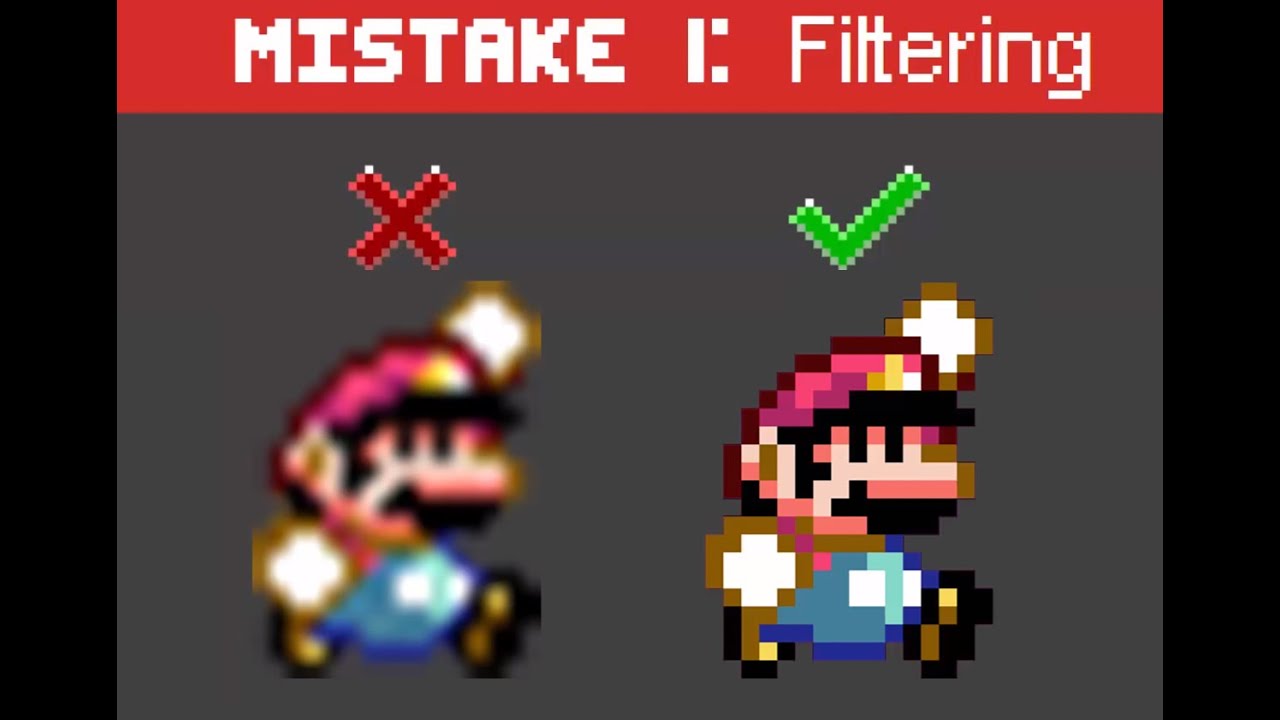
This is a list of 10 common mistakes I see beginners make all the time. I provide suggestions to solve each one My links: twitter.com/marcovaleKaz twitch.tv/...
go to this timestamp
in this video
he explains is extremely well
azure shore
ok itll be hard to show it though
plush thicket
what you're describing sounds like a non-multiple scaling issue
azure shore
I dont really understand though like the sprites are just sprite components on a capsule component
nimble moat
screenshot?
azure shore
its to do with animations and screen size I cant screenshot
Im saying screen size makes it look distorted/imperfect
 neat forge
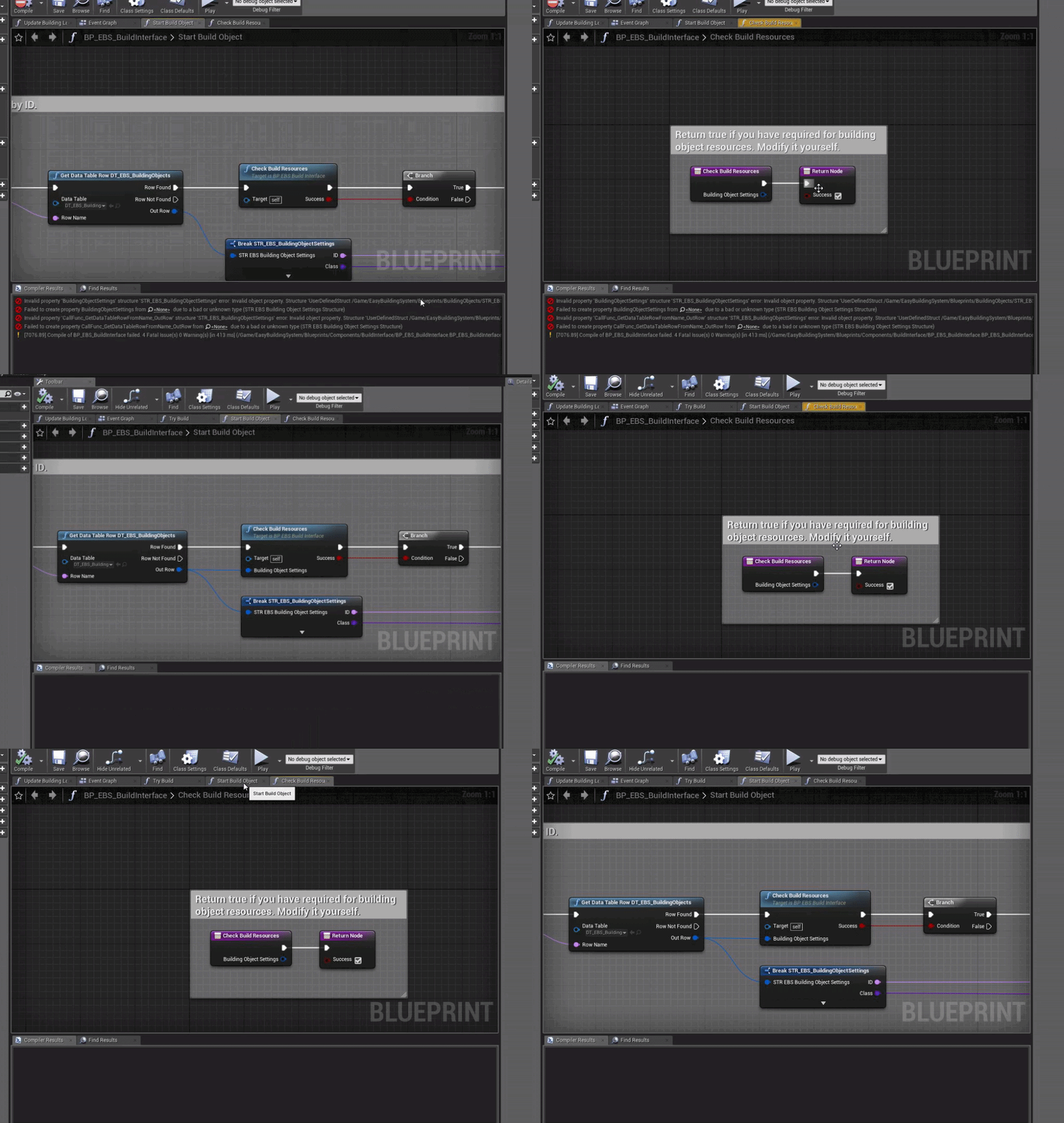
Hi, Im merging a building system into my project, for some reason this pin is gone and is causing problems. Ive spent like 40 minutes trying to figure this out, everything looks the same, the function is set up exactly the same as well.. Any idea why it is broken in my project?
azure shore
ok here are two running frames and as you can see it looks like it adds some extra lines around the edges but if I zoom in with debug camera it looks fine
hang on let me post that bigger so you can see
plush thicket
yeah @azure shore that's a result of non-multiple scaling
azure shore
so I can see how it has this sort of outline but idk how to fix that
plush thicket
you're scaling your sprite by an increment that isn't by 100x
azure shore
but the images themselves are fine Im sure it cant be this
nimble moat
those 2 images look identical to me lmao
neat forge
Thats what I was thinking
azure shore
look at the top of the head
nimble moat
does it have that on the sprite frame?
nimble moat
look into what MEJKO said then
azure shore
but if I look closely in ue4 they have smooth outlines
what Im talking about is this
that should be sharp
anti aliasing is low too
is there some way I can just make it really sharp?
nimble moat
you can change it to no mip maps see if that helps but i know literally nothing about sprites so
neat forge
Does anyone know what would cause a struct pin to disappear when copying over a function to a different bp?
The function is set up exactly the same
azure shore
what is that and where do I change it?
nimble moat
texture details panel
plush yew
can u fucking help me
nimble moat
oh hi
neat forge
Lmao
plush yew
where to setup WHEN I LAUNCH ENIGNE that it doesnt go straigh into some project
neat forge
Well youre opening the project
nimble moat
load the launcher not the project file?
plush yew
I LOADED I FUCKIJNG JUST SAID WHAT I DID
JUST LAUNCHER FROM EPIC LAUNCHER
FFS AGAIN WITH THIS SHIT I SAY SOMETHING EXACTLY AND U TURN IT UPSIDE DOWN FFS
azure shore
ALRIGHT CALM DOWN
nimble moat
bruh
abstract relic
<@&213101288538374145>
neat forge
Damn lmao
 grave nebula
I hear sound of flipping tables.
 glass rapids
 snow crown
you summon me?
neat forge
This dude is about to shoot the whole lobby up
azure shore
I will admit thats how I want to type every time I come here with a long lasting problem lol
abstract relic
Hissy fit
nimble moat
he getting his trench coat, mods help
neat forge
Lmao same
plush yew
k sorry
glass rapids
@azure shore are you using 2d sprites, correct?
azure shore
yeah
snow crown
and to answer your question, the unreal launcher in the library tab has a list of projects that are registered
you can't launch engine and go straight to project
but you can launch the project directly from that menu
it works as you want it to
although when you upgrade engines things can get a little wonky
sharp crest
array index foreachloop starts with 1 or 0
snow crown
0
plush yew
HEY. I just want to launch engine and get the default choose project type window.
sharp crest
ty
 maiden swift
Actually can't you create a shortcut to a specific project? I believe it will still open the launcher as well, but at least you only have to click one thing.
glass rapids
@azure shore I'm going to use my crosshair as an example because its something I have up,
snow crown
oh, if you are looking for that, then launch the engine directly as linked in the picture above
 neat forge
Yes you can create a shortcut, thats waht I do, you can open from the directory in your program files
nimble moat
lmao
azure shore
ok thanks
snow crown
that will bring up the select project dialog, and the other tab is to create new projects
plush yew
LIKE I DIDNT DO THAT 1000 times already
maiden swift
And what happened when you did that?
 dim plover
Bruh, it only gets harder from here.
plush yew
IT OPENS A PROJECT
neat forge
Lol fr
glass rapids
@azure shore did that help?
neat forge
If youre already flipping out just about opening the program, idk if you want to get into game dev lol
azure shore
ah very nice and sharp now thanks!
glass rapids
okay just making sure
azure shore
UUUUGH screen size still bloody affects it
abstract relic
Trouble afoot
plush yew
just omg
 normal burrow
cat pile?
glass rapids
@plush yew what are you trying to do?
plush yew
How can i prevent opening a project when i launch the engine like normal people do
jesus christ
neat forge
You have to open the epic games launcher, and it will let you select what project you want to open
glass rapids
do you want this screen
plush yew
..................... XDDDDDDDDDDDDDDDDD
snow crown
i am not entirely sure what you are doing
ornate ice
Guys
abstract relic
Screenshot what you’re seeing when you launch it then
snow crown
that is causing it to go straight to project
ornate ice
one question
nimble moat
ahahahahha my stomach
snow crown
perhaps record a short video of what you do?
azure shore
I can see its not a good time rn but it still doing this thing
maiden swift
What Roy said. @plush yew can you show us what happens when you try to launch the engine? 🙂
plush yew
YES IT GOES TO A PROJECT
ornate ice
is there anyway to request a variable update from an actor or a component
plush yew
WHAT THERE IS TO SHOW?
snow crown
it might be that you are just clicking the wrong button
plush yew
I HAVE ANOTHER ENGINE VERISON AND IT DOES NORMAL THING
ornate ice
without having to have a reference of another actor
plush yew
LIKE SHOW THE PROJECT TYPE
snow crown
hm
azure shore
here are two running frames and they look fine up close but this is how it looks from the normal perspective
snow crown
what engine version are you launching
maiden swift
I know you're frustrated but please stop typing in all caps. We can figure this out.
plush yew
ALL I WANT IS WHERE IN THE FUCK IS THE SETTINGS FOR DISABVLING DEFAULT PROJECT..
 runic iron
Try disabling capslock, it'll work then
normal burrow
file -> open project
runic iron
Had the same issue
plush yew
ahahahahahahahaha just fucking unbelievable
nimble moat
can you screenshot us exactly what button your pressing?
neat forge
 plush yew
how many different ways to tell this problem
neat forge
Do what I did in that video
plush yew
alid0n??? are u kidding me?
nimble moat
oh no
neat forge
bruh
neat forge
You cant even open the engine dont start
runic iron
...
plush yew
MAYBE I SHOULD CONTINUE CAPS
abstract relic
Seeing is believing
snow crown
aight, last warning, calm down @plush yew
neat forge
Were trying to help you lol
glass rapids
do you want to create a new project or go into an existing?
snow crown
people are trying to help you
nimble moat
Yo, first off all chill the fuck out, 2nd of all send a screenshot or video of what button your pressing cause what your saying doesnt make sense
snow crown
this is getting into "you are just trolling" territory
neat forge
He probably is
plush yew
HastalanpastaToday at 3:21 AM
where to setup WHEN I LAUNCH ENIGNE that it doesnt go straigh into some project
YES
plush yew
I know there is a editor setting somewhere
jesus christ
i ijust want to know where to search
i cant find and google wont help
snow crown
there is, if you go into the project go File -> Create Project
neat forge
If you do what I just did, it will create a short cut that will not open a project.. just try it
snow crown
that will close the current project and bring up the dialog you are looking for
plush yew
nopezor
maiden swift
^ That's a second way to access the New Project dialog. Almost forgot about that.
nimble moat
when it launches the project just do File > New Project. problem semi solved
snow crown
what engine version are you using?
nimble moat
ye
azure shore
yeah I mean its not even that bad for it to launch a project automatically but you can just open from epic games launcher anyway
plush yew
NOPE NOPE NOPE
azure shore
as in the project library
 normal burrow
so we can agree we've all helped them?
plush yew
this is the thing I WANT
azure shore
JUST OPEN THROUGH EPIC GAMES LAUNCHER PROJECT LIBRARY
neat forge
If you do what I did in the video you will get that.
glass rapids
normal burrow
your prrobably clicking on a uproject file
glass rapids
plush yew
JESUS CHRIST....................
nimble moat
tbf he has said many times hes been pressing the launch button
plush yew
I JUST SAID
snow crown
(i am very confident that he is trolling now)
 snow crown
(because he will not answer my questions)
abstract relic
I would really like a video of this
plush yew
HOW TO PREVENT THAT BUTTON FROM OPENING A PROJECT INSTANTLY
neat forge
It doesnt
snow crown
it doesn't do that
azure shore
alid0n its not that I dont think
normal burrow
no body has this iss ue
plush yew
LOL WOW
abstract relic
Betting on trolling though
runic iron
Same
nimble moat
same
abstract relic
So video please
plush yew
EVERYTIME I ASK QUESTION NO ONE H AS THAT PROBLEM jesus,...
azure shore
right hastalanpasta just go into the epic games launcher project library and scroll down and open it from there then
normal burrow
explain
nimble moat
i dont think hes sent a single screenshot or video yet
glass rapids
Before you say anything else, What is your goal. Is it to go into a project you have made or create a new one. give me an answer
neat forge
Dude, calm down, its not the end of the world. Dont go through life so angry. You have 5 people trying to help you right now, its okay
plush yew
I WANT TO UPGRADE PROJECT
abstract relic
It will help you
plush yew
Unreal Engine 4 tutorial on how to convert or update your projects created in older engine version to new upated Unreal Engine 4 version.
abstract relic
Video please
plush yew
WITH THE #1 Option
snow crown
alright
normal burrow
make a video hasta
snow crown
I'm 100% convinced he is trolling
abstract relic
Yep. Troll
runic iron
Yep
grave nebula
he is
glass rapids
ty
runic iron
Thanks
nimble moat
how do you know hes trolling and not just an angry person
snow crown
@plush yew if you are not trolling, calm down, listen to people, answer questions when people are trying to troubleshoot
 normal burrow
plus we gave them the answer
nimble moat
why me
snow crown
and don't PM people while muted
normal burrow
if you forget to unmute does it just work forever?
neat forge
Can someone help me with a problem Im having with a pin not appearing on a function? Im merging a project and Im pretty much done once I fix this. This function node doesnt have the pin for the struct even though its set up the same way. https://gyazo.com/3becc2f5fbb25bf4fb913c8e3ff2ab33
 snow crown
normally we have a bot that mutes people
but i don't remember the command
and the help command doesn't work
so, yes, if i forget he's muted for ever
neat forge
The second one I show is the main project and it is appearing fine, after merging it, it broke
snow crown
oh, i figured it out
~mute @plush yew 10800 aggressive
good work bot
you did nothing
nimble moat
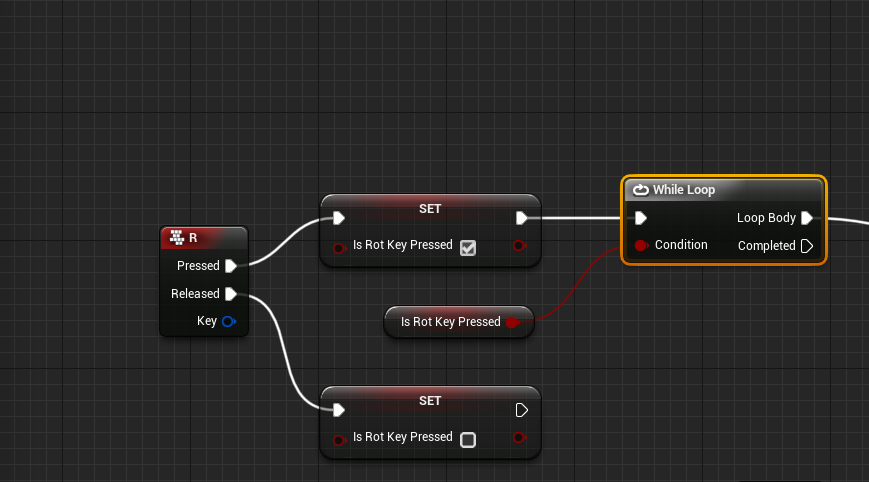
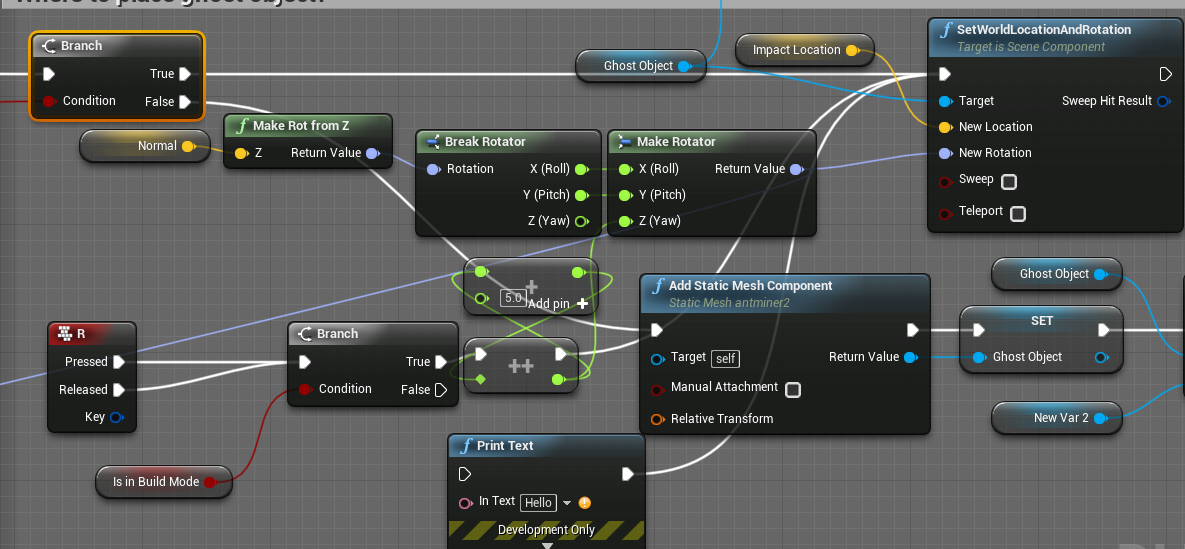
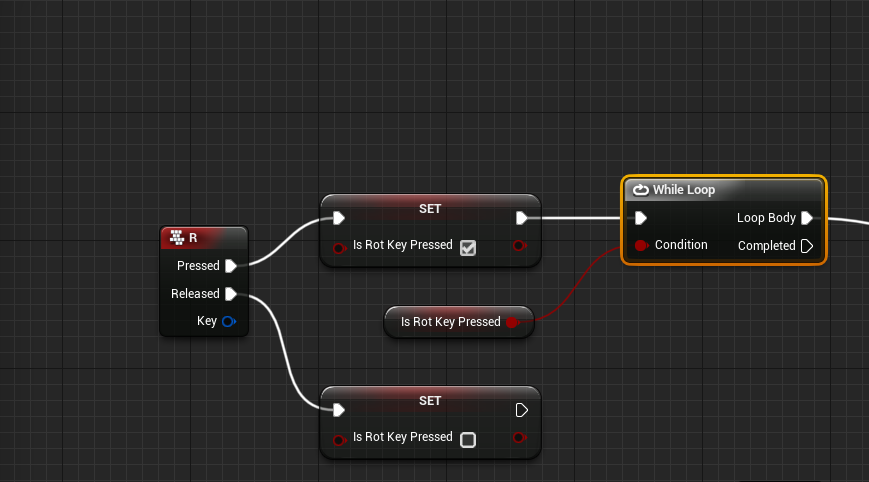
now my problem, does anyone now a better way of doing this https://i.gyazo.com/2598996d5ce17f1bc3892652e92592a7.png
 sharp crest
need more context than that.. lol
neat forge
What is it that youre trying to do? lol
sharp crest
nimble moat
when i press R, rotate an item lmao
sharp crest
whats wrong with how u r doing it now?
nimble moat
i want to press another button to rotate in another direction which wont work with that setup
nimble moat
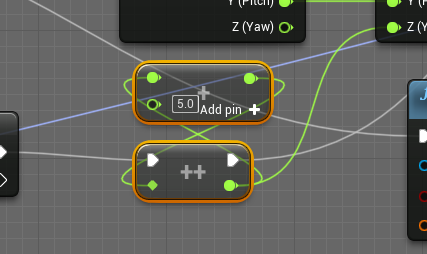
if i were to do same, it would snap to 0 degrees instead of decrease the current value
runic iron
Rotator
dim plover
Does the picture you posted even work? It's... plugging its own output to its input.
neat forge
lol
nimble moat
honestly floss i dont know, its literally one of them things i dont know why it works it just does
sharp crest
it's probably saving it as a local var
I can see why it works
maybe it will cache out at some point tho
Idk
abstract relic
Mess with the person who pinged you instead 😜
nimble moat
yall dont even wanna see the full thing
glass rapids
@neat forge remove and re add the input then refresh the node
 sharp crest
spaghetti at it's finest
nimble moat
yup
sharp crest
back to my ui 
glass rapids
can you try deleting and remaking the function?
dim plover
Dylan, I don't think you should "cross the wires" like that. Make use of functions.
glass rapids
is it the input doesn't exist when you call the function?
neat forge
Its supposed to connect like that
But the function no longer has the input settings pin
glass rapids
try making everything outside of the function and collapsing it into a function?
so having the connection when you collapse to a function might do it
for example I broke the info, then collapsed it into a function
neat forge
Oh I see
glass rapids
sry, if its not the best explanation. I'm decently new to UE4
neat forge
glass rapids
right click and refresh the node in the graph
neat forge
it disappeared lol
glass rapids
does the variable even exist?
glass rapids
idk. maybe take all of the broken variables and put them into the function then make the struct from them?
that is a weird one but that is all that I got?
I will brb
any results?
neat forge
No 😦 why is life hard
glass rapids
idk, if I was you I would be trying every possible wat to get it to work. It might take some time tho
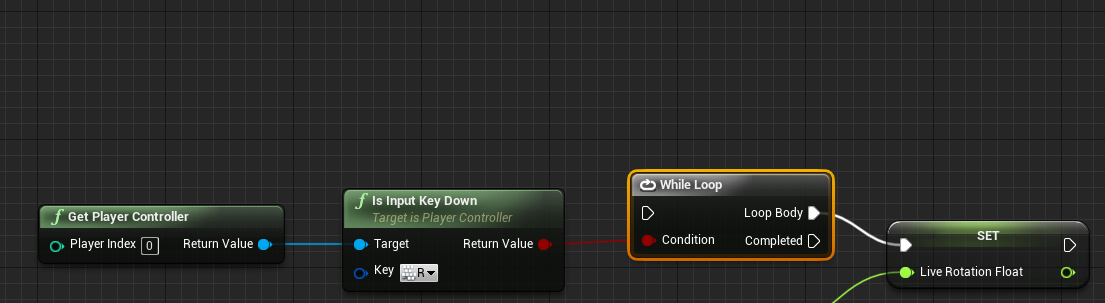
nimble moat
is there a better way to check if a key is being held down other than setting a boolean and whileloop?
neat forge
Yeah I have spent 2 hours just trying to figure this out lol.. Im so close to being done 😢
glass rapids
just keep thinking, I believe in you.
 ripe saffron
only 2 hours ... come on dude fight that shit
neat forge
😂
glass rapids
@nimble moat
nimble moat
literally thank you
glass rapids
np
 nimble moat
yeah ive used it before but like 2 years ago, i started using ue again recently so ive forgotten most things but know they can be done, if that makes sense
glass rapids
it makes total sense, I'm new to UE and I forget a lot of things.
kindred viper
im not and I forget things all the time. 😄
glass rapids
It happens
ripe saffron
...often catch myself staring into space trying to remember what I am doing
nimble moat
same
glass rapids
same
 ripe saffron
you need some kind of event
nimble moat
yh, literally nothing i can think of to use though
its hard because i cant just hook anything up to the while loop cause itl be infinite
nimble moat
is there another way? its really basic what im trying to do, while R is held keep adding 5 to float
ripe saffron
I would use the R input and set your booleans true or false like before then fire a timer from function then cancel it when you release
dont actually need the booleans but I always stick them cause they come in handy
nimble moat
yeah, im just really struggling to find an exec pin for it, i feel like putting a branch off event tick is really inefficient
ripe saffron
let me knock up a quick example
nimble moat
thank you, ive never used timers before so im quite unsure
ripe saffron
Compooter freeze ...rebooting hang on
nimble moat
ahahha no problem
ripe saffron
Its a daily thing .. fkin windows
nimble moat
i hope you have ssd lol, no way would i have the patience for a hdd with constant crashing
ripe saffron
I have a nvme drive so it boots up real quickly
just a pain i cannot find any reason for it
ripe saffron
welcome ... kernel power ... all that tells me is windows was shutdown from my hard reset button
Its been more than a year I have tried literally everything ... Its usually just once a day
nimble moat
thats crazy
ripe saffron
a lot of people have this issue with windows 10
nimble moat
you know what, come to think of it i used to have a similar problem but i just realised its not happened in like a year
ripe saffron
its less frequent after some updates...but after the last one its daily again
nimble moat
do you have the white taskbar? whats the deal with that
ripe saffron
mine is black
nimble moat
same but ive seen loads of people with "the new white one"
ripe saffron
I stay as far away from white as I possibly can ...its melts my eyes
ripe saffron
me too ... I feel like I live in a cave with all my curtains closed and all my dark themes
nimble moat
ahahahah yeah, and my led keyboard
ripe saffron
I have no lights on the keyboard ... that is lit by dual monitors
nimble moat
ah, i have the dual monitors and leds around my desk + keybaord thats all the light in my room
ripe saffron
darkness!
 fervent sigil
I'm trying to spawn a niagara system at runtime, but I don't see the effect and not even the system it self.
I printed the value of the return from that function, and got "Player_C_0.NiagaraComponent_0 TransformSystem", so the return value isn't null.
What am I missing?
normal burrow
turn on wireframe
f1 while playing
or change it from lit in the viewport
its likely playing, just the effect maybe is too small or fully occluded.
fervent sigil
f1 leads me to docs btw, but I found the shortcut on the menu (alt+2).
But I still can't see it
Shouldn't I at least see the component on the object though?
normal burrow
f1 while playing
nimble moat
f1 while playing leads to docs?
fervent sigil
oh it was playing but I was in "eject mode" (not possessed). f1 for wireframe works if I'm possessed.
normal burrow
k then click on the niagara component in details and press f
fervent sigil
I can't see it in the details, that's the thing
normal burrow
are you adding it at level start or something?
fervent sigil
nope. it's on key input (with abilities and some extra layers in between, but that's the trigger)
 ruby ocean
What’s a good free program for making custom animations?
normal burrow
it could be a few different things msh91. your system may be set to destroy on finish, not loop or just spawned in a bad position.
fervent sigil
I just tried setting the auto destroy to false so it's not that. It's also set to loop, but even if not it should still exist assuming auto destroy is false.
What's "bad" position?
Also, I just thought of something; I'm using multiple levels. Any chance that might be the issue?
mm ok, so spawn system at location does work.
(unlike spawn system attached)
normal burrow
bad position means not where you expected it to be
unsure what space the vector is for attached
fervent sigil
I think it's due to the attachment actually. When adding a system component under the same component in the editor it's also not showing up. Weird, but it works with location so I guess it's fine.
normal burrow
could try just sending 0 0 0 for position and see where that goes with attach
fervent sigil
it was already using 0 0 0, and it will set it to the position of the attached component (player). I also printed the position and noticed it was the same when I didn't move, and changed when I did.
Now I have a different issue though: how do I set a skeletal mesh parameter? I tried using the Set Actor Parameter, but I had to give it an actor, and it's simply not working (I hate those "not working" without any logs problems)
normal burrow
believe if you set none it will scan for the skeletal component on the actor
but
it sounds like your making an actor so that wont work
you'd have to use set actor i think. not positive on it though, i've not used the skeletal features of niagara, only static mesh
fervent sigil
I tried to use set actor, it doesn't seem to work. I made sure it's that by removing the set node, where it does work (with the default value I set in the niagara system).
mm I noticed I'm seeing the error "no mesh assigned error" when using the niagara system as component in editor, even though it has a mesh in there. Any idea what's that about?
normal burrow
not really, i've only gone through static mesh code. but if its a chld of a skeletal mesh component i'd think it'd work (assumption)
fervent sigil
I'm afraid it doesn't though :\
normal burrow
luckily the devs of niagara are very reachable in #niagara
probably unlikely to reach them this weekend but yea
fervent sigil
😮 didn't know there was special channel for that. I'll continue there, and thanks!
normal burrow
yep
 trim trail
anyone knows where settings from Edito Settings > Content Editors > Graph Editors > parameters from Spline section, are stored? Can't find keys in project and editor config folders
does ue4 store settings in other folders than those two?
for example, ForwardSplineVerticalDeltaRange=2111.000000 (default is 1000 instead 2111), when i load configs from both project Config folder and editor Config folder (in Program Files), it doesn't show any results when i search for key name or value 2111
 glacial storm
hey guys

It's been awhile. An apocalyptic scene which takes place on a railroad. I should have taken a bit more time with the city area but I am content. Wanted to ge...
is there a course for placing these trees?
tutorial?
plush yew
There's not really a specific way to place them. This is more of your own thought, your own way of placing them. As far as Im concerned, there isnt a tutorial or course.
Just your imagination.
glacial storm
ok 🙂
plush yew
...and a strong computer :)
 gusty geyser
There is a procedural foliage tool you can use.
Wrong channel for that tho. 😉
Oops, changed channels... LOL.. fail. Ahh Friday..
 fallen marten
@plush thicket that tip about deleting files in the manifests folder did the trick man - very grateful for that tidbit so thankyou very much 🙂👍
gusty geyser
Regarding above statement, just to look a bit less crazy. 🙂
https://docs.unrealengine.com/en-US/Engine/OpenWorldTools/ProceduralFoliage/QuickStart/index.html
How to set up and use the Procedural Foliage tool.
plush yew
I guess I should have mentioned that as well
Truth to be told,
I tend to forget UE4 has all these nifty little tools that do alot of things for you.
 ashen brook
@plush yew with any project opened, go to file -> open project. That will bring up the dialog. There's a checkbox in there somewhere to skip that dialog. Turn it off to get the behavior you want!
candid stratus
hey i need help
how do raise your render distance
like if i move just a little bit from my project the whole thing starts to become really low polly and i dont know how to mix it because im new...
abstract relic
You need to tweak your LODs setting in the affected asset
Would just use a preset for now though
candid stratus
ok thanks a bunch
 echo kernel
Having an issue with my landscape
plush thicket
@echo kernel the resolution is too low of your terrain
echo kernel
ah
echo kernel
Yea I got ya
echo kernel
I just used default settings
 honest vale
the layer weight resolution is tied to landscape resolution
only way to make it more high-res is to reduce landscape scale
 open jackal
Getting this shadow issue when i turn on cast raytracing shadow . any idea to fix ?
 opal berry
guys
does anyone know what is a good tutorial video or doc that will help me build a 3rd person character in UE4 using C++ for movement and binding the animations in BP, I dont understand how its done in the third person template and I want to understand it.
 hardy granite
^ also tag me in one if get a good one, im needing to do that soon lol
 dark rune
is there a prone pistol animation in the anim starter pack
 eternal swan
hey, id like to know if anyone has made any experience with cloud gaming and ue4 projects, and if yes, how is it set up, does it work, what type of project do i need to ship (html), what services are available. i have a project with large file size i want to stream via a web ui if possible
 tall pendant
html5 is no longer supported as of 4.24 iirc
 vivid narwhal
Is there a way to add onto a Vector so it's always the same direction no matter the facing? Using WorldLocation not RelativeLocation
 cloud cobalt
@eternal swan As far as I know only Stadia allows that for now
HTML in UE4 only means your game is playable directly in a browser, so you need to load it entirely
It's also unsupported now
opal berry
help please
 ebon grail
Hi, i have a general question for starterNoob, i startet to build a landscape and if i place a physic volume it moves if i move... how can this be disabled?
 dim merlin
so when enabling world composition on a level, will it load all levels on BeginPlay ?
how do i specify the maps i want to load?
 native helm
does any one know where i could find a tutorial of some kind on duel wielding weapons. like a firing system that fires from both guns at the same time?.. i currently have a line trace system that dictates to direction in witch the projectile goes.. how can i make it shoot twice and once form each barrel?
 stuck musk
Hi. I have problem with creating Spline Components in runtime. I have prepared Controller BP there I have Add Spline Component node. But there's an error
AttachTo: '/Game/Maps/UEDPIE_0_Editor.Editor:PersistentLevel.EditorController_C_0.TransformComponent0' is not static (in blueprint "EditorController"), cannot attach '/Game/Maps/UEDPIE_0_Editor.Editor:PersistentLevel.EditorController_C_0.NODE_AddSplineMeshComponent-2' which is static to it. Aborting.
How to make my TransformComponent static?
Or I should use other BP type?
Basically I want to spawn multiple spline components in controller. (idk if it's good option tbh)
plush yew
has anyone here got the Multiplayer Racing Framework? no matter what i do i cant get it to run, i have been talking to the dev on email but he don't understand either, i have gone as far as uninstalled all UE4 and engines, re installed launcher and 4.23. i think it is just the framework that is not working but didnt know if anyone else has it and had this problem of it not building or playing in the editor. UE4 crashes when you try to play.
 vernal thicket
@native helm You could try a line trace from a socket location on the barrel of the pistol? Or set up a weapon projectile for both weapons to be spawned as a projectile from the socket location of the barrel of the pistol
@native helm So spawn projectile at location, name being the socket where you want the bullet to spawn from, and just duplicate that same information again so another spawns from the other weapon, you could flip flop it so it does one then the other
native helm
@vernal thicket Thank you
vernal thicket
Anyone know how I could reference a projectile hitting an actor inside an individual character blueprint? My character activates a reference inside a weapon actor that spawns a projectile, how do I get the information of an actor has been hit to my player character without referencing other characters on the level using the same blueprints?
dim merlin
So anyone knows about world composition.. hhhm
plush yew
Anyone know how to fix this? Unless I get really close it looks nice, but anywhere further then 2 metres make it looks fugly
marsh swallow
well i would the retopo tool over it, then use a brush to make it bumpy like it would irl
 sudden agate
marsh swallow
sudden agate
marsh swallow
i assume your using brushify?
 desert jay
I need an Unreal Guru. I want my melee to apply a physics impulse to the target character's skeleton using the physical animation component. Any idea how to do that?
 wicked sparrow
Anyone know whether it's possible to move UE4 to an SSD without a total reinstall? Picked up a new one on Friday and want to dedicate it to project stuff 🙂
plush yew
So idk if this is the correct channel to ask but im trying to import an alembic file that i exported from blender. It is a fluids simulation with foam from the addon flip fluids. When i try to import it to UE4 it says it failed to create asset and check output log for details. Here's what it says

 wary birch
@wicked sparrow just move your project folder :)
 hoary locust
@dim merlin you received a joke answer, just so you know
gaunt tide
@dim merlin I mean I know a little bit about world composition. I’m working on it more and more as my landscape is pretty large
 opal timber
Hey
anyone know how to import downloaded zips from quixel megascans to ue4?
i just wanna use a mat i found on there
 lone tapir
Guys does anyone know how I can fire two events at exactly the same time? 🤔 🤔
lone tapir
@plush yew The sequencer didn't work! Because I need to start two videos at the same time. One video is the color and another the Alpha cutout. And a video starts at a different time from the other.
plush yew
Sequence node in bp
lone tapir
Yes, I was talking about BP Sequence!
plush yew
hmm idk then
lone tapir
@plush yew But you gave me a good idea! maybe I can shoot both videos using Level Sequence
 obtuse root
Hi everyone. For some reason i can't make an array with anim Instances. Does anyone know why? I'm on 4.23 and i'm about to upgrade to 4.23.1
 austere frost
i make a blank proyect to test this.
when i make a blank proyect i put the preview in ES3.1 (takes like 20 mins to make the preview )
and the light is more bright in some areas than the standar preview, and when i compile scene for android the game looks like the ES3.1 preview ( more bright )
obtuse root
creating the array doesn't fill the array list
obtuse root
thinking about it now i might be able to bypass the whole array and simply make a boolean reference to the notification and place that in the animation state machine. yeesh. Why does it take a full day of misery to figure it out the next day??
vivid narwhal
So, animations. if I disable root motion the character doesn't move (obviously) but if I enable it, after the animation played my camera/character movement/pawn is in the wrong place and seems to just rubber band all over the place. Can I set up animations so that the final position of the animation becomes the point the character then moves from?
@obtuse root You can make a Struct of animations, that'll solve your issue
obtuse root
@vivid narwhal thanks! I'll try
austere frost
when i make a blank proyect i put the preview in ES3.1
and the light is more bright in some areas than the standar preview, and when i compile scene for android the game looks like the ES3.1 preview ( more bright )
https://forums.unrealengine.com/filedata/fetch?photoid=1663178
there are 2 post whit the same problem, someone know what is the problem whit the es3.1 preview ?
https://forums.unrealengine.com/development-discussion/rendering/1663179-strange-issue-whit-preview-light
https://forums.unrealengine.com/development-discussion/android-development/1663177-light-problem-whit-es3-1-preview

Unreal Engine Forums
i make a blank proyect to test this.
when i make a blank proyect i put the preview in ES3.1 (takes like 20 mins to make the preview )
and the light is more bright
Unreal Engine Forums
i make a blank proyect to test this.
when i make a blank proyect i put the preview in ES3.1 (takes like 20 mins to make the preview )
and the light is more bright
 neat cargo
Hi I am working on making a gang beasts ragdoll style game. I don't know how to make the caracter move and be a ragdoll. Help would be apreciated. and if you don't understand what i am describing ask me.
🙂
nimble moat

any idea why i cant check this box?
i have a static mesh inside a blueprint with an emissive material but i cant check this box to give it actual lighting
found the problem, its because the blueprint will be placed during runtime so i cant use it
 noble finch
@plush yew - Could it be your tiling settings are set very low? I'd need a bit more info about the landscape resolution you made, and the scale etc
 river fox
Any idea why my visua/UE would run slow? My friend's pc is way worse and everything is instant for him. When I type sth in visual it takes so long for a list of variables/functions/etc. to appear for example. My cpu usage is at 7%. 60% memory free.
 silver crown
welcome to stock vs
vernal thicket
@neat cargo to ragdoll you add physics to the mesh and then set physics in blueprint when he dies/gets knocked down etc
neat cargo
?
vernal thicket
Do you mean like that game.. I cant remember the name of, sorta battle royale but the chars are all over the place?
neat cargo
tabs?
vernal thicket
Is that the style you're going for?
neat cargo
yes
azure shore
hey how do I set the view mode to unlit through bps?
 edgy halo
anyone with an oculus HMD who can help me test multiplayer functionality for my game?
vernal thicket
Maybe you can set physics to certain bones on the skeleton?
neat cargo
how do i get to the physics asset
vernal thicket
@neat cargo one sec
neat cargo
ok
vernal thicket
@neat cargo do you have a character mesh already?
neat cargo
yes
neat cargo
it is the person for the 3rd person template
azure shore
soooo is there a way?
plush yew
for? @azure shore
vernal thicket
@neat cargo there should be a physics asset for the mesh, they get automatically added when you add a skeletal mesh under default
azure shore
setting view to unlit through bps I said up there
vernal thicket
@neat cargo what's wrong? Am I not understanding you?
vernal thicket
@neat cargo to make the mesh move the way you want I'd start by: turning on physics to a specific part of the skeleton (I.e: LowerarmL), I'd duplicate one of the animations (so you don't fuck up the original anim), and I'd go through the anim deleting any keys that control the arm movement maybe? So the arm isnt detached but also not animated and physics will just drop the arm down and it should swing about
 static raft
Hey, is there any way to remove an assigned material slot from a static mesh from the editor? I assigned a material slot to a few faces and I would now like to remove it.
vernal thicket
@neat cargo sorry I've just watched a video on the game as forgot how it goes, what part of the game are you trying to replicate?
neat cargo
im trying to replicate the player
vernal thicket
The way it looks? The way it animates? What sort of game are you trying to make?
neat cargo
I guess the way you control it
because the player flops around and it is hard to control
mainly animation and movement
because sometimes it falls like a ragdoll
vernal thicket
What game are you referring to though coz tabs is a God style game??
Do you want to play as the character or fight against them?
neat cargo
i want to play as the caracter
vernal thicket
Right okay
I think you'd need to do quite a bit of research coz thered be loads of settings youd need to adjust, and it's best to understand the basics before adjusting things
azure shore
should I ask again then
neat cargo
ok thanks for the help
radiant fox
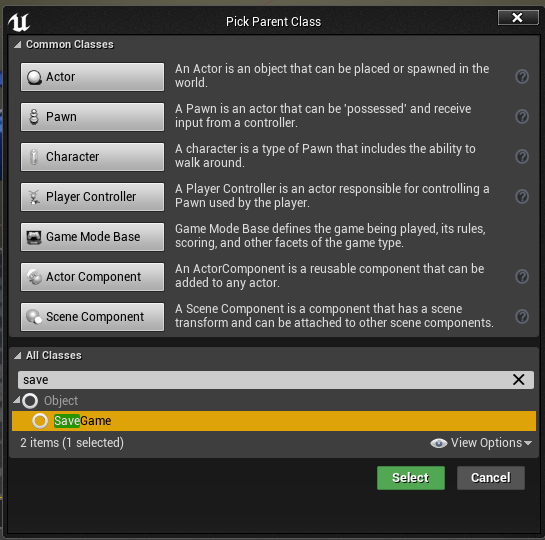
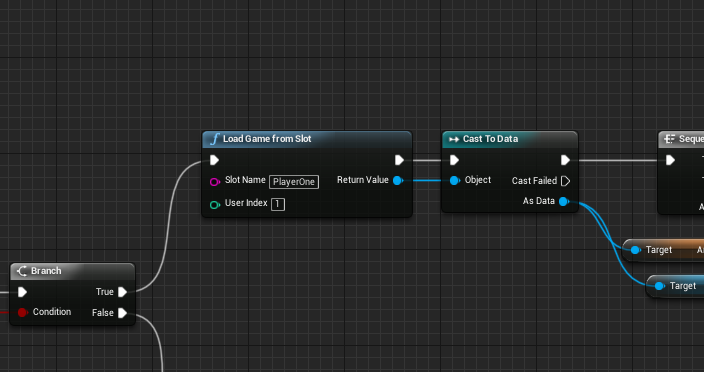
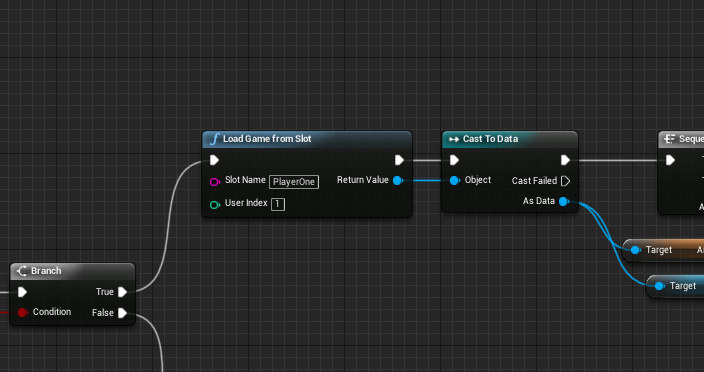
im trying to do a kind of save mechanic with variables, but its not working how i want it
the second picture is in the night1 level, once you start playing, i want it to set the variable and if you die, you can go into the same night that you were just in
nimble moat
https://i.gyazo.com/84877fd84ae95dc57d0a318d2d0f229b.png
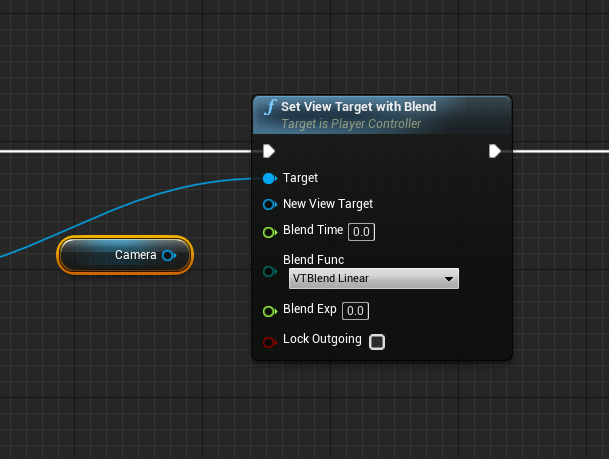
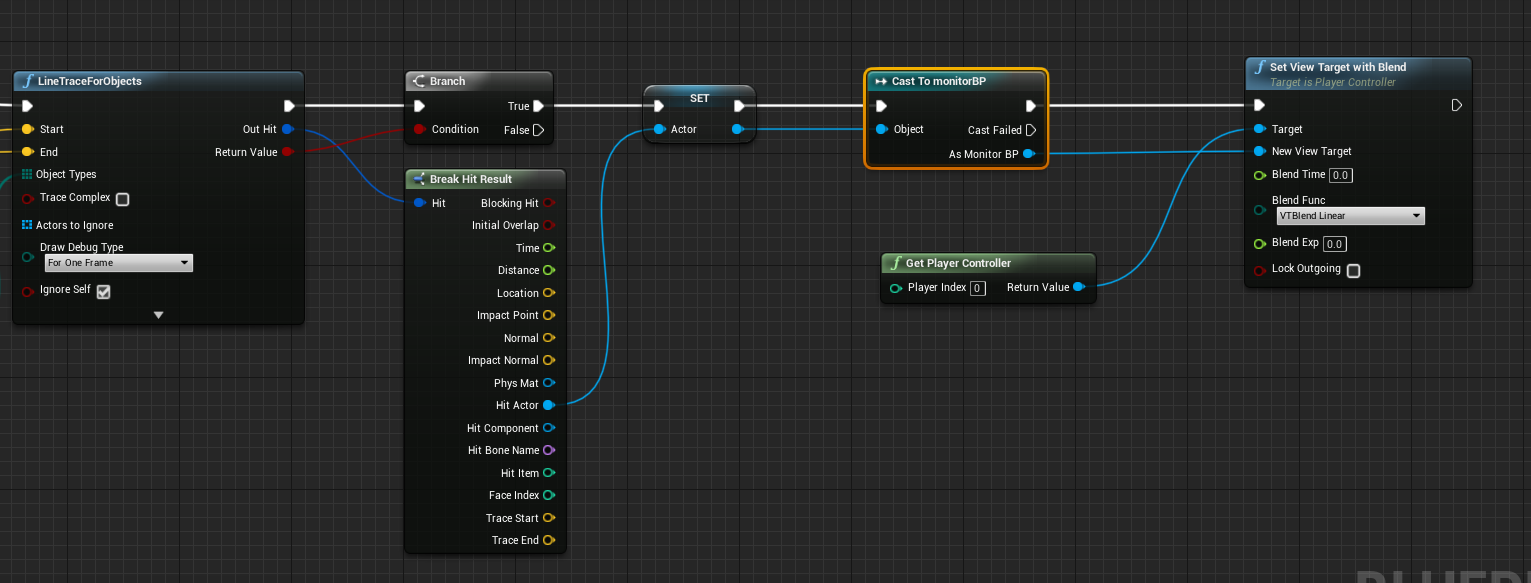
how can i turn a camera component into an actor to plug into new view target?
 azure shore
hey I was literally just trying to do the same thing
nimble moat
@radiant fox thats a bit confusing from your explanation
radiant fox
idk how to explain it lol
 frosty bloom
You can enable/disable cameras, interpolate camera from current transform to another etc but if you wanna use SetViewWithBlend it requires an actual actor, not a component
nimble moat
Yeah I know that but im unsure on how to actually turn it into an actor so to speak
azure shore
yeah how would I transition a camera using timelines
frosty bloom
You can't turn a component into an actor
There is something called a CameraActor, but you're probably looking for a way to handle the CameraComponent
Which would be the manual interpolation method
in other words, timers and math
azure shore
I dont know how to do it with timelines
frosty bloom
Nobody is going to create it for you though.. Check tutorials, it's nothing fancy so should be quite a few of those out there
 radiant fox
i still need help lol
azure shore
yeah Ive got it working with that, and I know how to move camera position with timelines but I dont know how to just transition cameras actually you know what
nimble moat
you said its not working how you want, how do you want it to work @radiant fox
azure shore
is there a way to transition from orthographic view to perspective
without just an instant switch
radiant fox
I want to make it to where if you die in a night and you get kicked back to the menu, i want it to where you can go back into that night through the menu... like a "continue" type feature @nimble moat
nimble moat
variables wont work for that you will need a save blueprint
 floral moat
how check status caps lock, num lock ?
radiant fox
a save blueprint?
azure shore
oh no, nights



 radiant fox
ahhh
nimble moat
whereas the variables you are saving to get reset to their default value after everyload
radiant fox
okay makes sense lol
river fox
@silver crown ? Like I said, my friend has a worse pc. His setup is the same as mine so what do you mean by welcome to stock vs
nimble moat
https://i.gyazo.com/9acad1859bd48aa5724d83c22914ebf0.png @radiant fox this is mine, whatever i save or load from the "Data" will be there forever regardless if i close the game or reload a level
 radiant fox
okay thankss
opal timber
Hey, I need to make a static mesh inside my character model appear depending on whether or not an object is interacted with in the world
so the flow should go
Object touch
toggle visibility
river fox
So why is mine consistently slower and his is pretty much instant. There must be some specific reason for this
radiant fox
how do you get a whole level to save through that save game bp thing tho?
opal timber
but i dont know how to communicate variables across the blueprints
radiant fox
@nimble moat
river fox
When I do non Unreal engine stuff then my vs runs without slowdowns. Only happens in unreal
silver crown
Maybe antivirus?
river fox
Its off
silver crown
Could be disk
river fox
Hmmm. 7% usage. And its ryzen 2700x. afaik these are unaffected
silver crown
Could be a VS bug during install
silver crown
Did you try to delete the .vs?
river fox
hmm?
nimble moat
you cant really, you have to do most of it manually such as save player position and rotation, save health etc..
silver crown
and regenerate the project files by right clicking the .uproject
nimble moat
yeah i know lol, its not aaasss hard as it sounds tho
radiant fox
I want to just restart the level from the beginning with the save game tho
gaunt tide
30% SSD space is not good
nimble moat
yeah it will do that automatically
you dont have to save everything, only the things you want to save
river fox
@gaunt tide ? It's totally fine.
river fox
As long as you don't go over 75%~ there should be no noticable slowdowns Sandman
I have 30% free and I keep it that way
@silver crown oof
I have like 4 diff ssd and 2 tb drives that I have collected over the years 😂
silver crown
well
radiant fox
okay... ill try to do it lol
river fox
I need to finally buy a gigantic ssd and get rid of all these. Cable management is not fun with sata drvies
silver crown
laptop 
azure shore
ok so can anyone help
nimble moat
@azure shore put the camera in a blueprint and cast to the blueprint and use the full blueprint as the view target and it will find the camera auto
azure shore
but then how would that seperate blueprint camera work how I want it
like attached to the player
opal berry
I am creating a third person survival game using C++ so i opened a third person template C++ project and found the player animated and all but could not understand how it was handled because the movement was coded in C++ but the animations were all from the anim BP. Can anyone explain how that done and how can I recreate from scratch it so i further understand it
plush yew
@silver crown thats, a ssd?
azure shore
and IS there a way to set the view to unlit using blueprints
opal berry
I know how to code the movement in C++, just dont know how the animations work with the C++ and all
silver crown
@plush yew ye it's in the name
opal berry
I am creating a third person survival game using C++ so i opened a third person template C++ project and found the player animated and all but could not understand how it was handled because the movement was coded in C++ but the animations were all from the anim BP. Can anyone explain how that done and how can I recreate from scratch it so i further understand it. I know how to code the movement in C++, just don't understand how the animation BP works with the C++ and all.
that my whole question in one message