#ue4-general
1 messages · Page 584 of 1
 vocal flume
@sharp crest is this for me?
 sharp crest
yes
@vernal thicket just keep debugging the vars to see exactly what part is the issue
and if u didnt try to google thats a good idea too
vocal flume
Ok. Thanks. I’ll try
 vernal thicket
will do thanks bro
I guess calculate direction on AI doesnt work like it does on player character
If I hook it up to World rotation of mesh it's constantly 90 degrees lol
sharp crest
try to understand what value you need and then calculate it yourself
vernal thicket
yeah
sharp crest
or google 'calculate direction not working on X'
 runic iron
@vernal thicket Don't do your cast to zombie char in the event animation update, it's a waste to do it everyframe
Do the cast operation in the "blueprint initialize animation" event and put the result in a variable
vernal thicket
I had it like that as they will be spawning in the game, will bleuprint initialize animation work with spawning?
runic iron
Yeah didn't check his actual issue, just saw the screen quickly and noticed that
sharp crest
I mean talking about fps
sharp crest
I'm bored and tired 🍭 why does completing games so difficult 😅
vernal thicket
Okie dokie i'll change that then
runic iron
yeah it's better, casting every tick is a waste
 frosty bloom
^ Or completely new to programming
vernal thicket
So I promote my cast to a var, but from the var I dont have access to variables inside the char?
sharp crest
just cast it on initialize, save the cast as a var, and use that var in the tick
vernal thicket
NVM ignore me i'm a retard
runic iron
Did you store your cast result in a variable ?
vernal thicket
I cast to the wrong player lol
vernal thicket
Lmao
 vivid narwhal
afternoon gang
sharp crest
hey
vivid narwhal
what's the current issue?
vernal thicket
I'm looking on google for Direction in AI but can't find anything 😦
sharp crest
well, if you ask..
broke up with my boyfriend,
my project is at a boring stage I need to do,
I'm trying to start working out but it's difficult,
continue?
@vivid narwhal
vivid narwhal
get two boyfriends to replace what is lost.
Boring parts are a chore but they're an important part.
If it's a hobby and not a job, remember to take breaks
@vernal thicket what do you mean by direction? Direction the AI is walking or facing?
vernal thicket
Direction he is walking yeah, I've got a lean on -90 and 90 but can't seem to get them
sharp crest
mmmm ty for the advice I will try the first one
vernal thicket
I can get 90 if I get world rotation
vivid narwhal
can't you just grab the forward vector
vernal thicket
I will try
sharp crest
ye also thought about that but Idk he used that bp which made me think it's a bit more complex than that xd Idk what he is using it for
vivid narwhal
assuming the direction they're walking is = to what they're facing
sharp crest
I doubt he tried googling so 
vernal thicket
^ I never know what to type in google to get an answer, but I always google
sharp crest
😅
vivid narwhal
I'm trying to do maths but my brain is failing me
 vernal thicket
@vivid narwhal Do I plug the forward vector into Calculate Direction?
vernal thicket
Okay
vivid narwhal
I have the vectors of two sockets, Sword_Tip and Sword_Hilt, and I want to calculate the Half Height of a capsule collision to go the length of the blade. I've got as far as knowing "You need maths for this"
vivid narwhal
if they were relative vectors it'd be easy but they're world vectors
sharp crest
runic iron
@vivid narwhal Take the length of the difference of the 2 vectors and divide by 2 ?
If I understood well at least
vivid narwhal
Hit Minus Tip then normalize?
runic iron
As long as you only care about the length you can subtract in whatever order
vivid narwhal
Am I getting the length of the norm? since it's a vector and I need a float
runic iron
Oh yeah when I say norm I mean length sorry or magnitude, whatever it's called
 spare steeple
get the length not the norm
runic iron
Yeah in French it's called "norme" lol
vivid narwhal
that works perfectly! thanks
vernal thicket
So do I need to somehow get my forward vector into the Direction float?
vivid narwhal
can you reword that for my limited brain
vernal thicket
I've got a Blend Space set up for my character, so at -90 and at 90 degrees at a speed of 350 he leans as he's running
But obvs it's an AI not a playable character
sharp crest

In this timelapse you see me implementing a walking and running animation in a little prototype I am currently working on in Unreal Engine 4. I use a Blend S...
I googled 'blendspace leaning while running ue4'
and thats the first vid that came up
vernal thicket
?It's different for AI though
sharp crest
Idk try it 
vivid narwhal
direction is local to the instance of the controller so it doesn't matter if it's AI or player it'll still give a direction
 grim ore
why would it be different for AI if it's based on the actor velocity and such?
If I throw a ball or a pitching machine throws a ball the math for the ball is still the same when it's in motion
 neat forge
How would I get a material to choose a random diffuse color?
 abstract relic
One takes input from the player, the other takes input from the computer. Both are input based however
sharp crest
@neat forge

This tutorial shows Unreal Engine Texture Randomization with the Texture Bombing feature.
abstract relic
Make a dynamic material in a bp and set a random value in its parameter.
grim ore
@neat forge you can use a material parameter inside the material to give it a new vector for the color from something like a blueprint. If you want to do it inside you can do some stuff like random noise texture and time to get a random value and set it once
neat forge
Thanks
grim ore
but uh.... all of those answers were googleable... you didnt google did you?
abstract relic
You are google Mathew
neat forge
I did but what I was looking for wasnt coming up
sharp crest
I showed you what I googled above
sharp crest

grim ore
lol I google his exact question with UE4 on the end and the second result was the official UE4 video showing material instances and colors
neat forge
I apologize
sharp crest
it's alright everyone has to learn how to google 😅
grim ore
you don't have to apologize, I think we just want money for our time back!
sharp crest
neat forge
😞
sharp crest

vivid narwhal
well my google-fu is failing me on this one
I've created a capsule collision with the Add Capsule Collision node, it's set to Overlap All, then I've made it a variable. In that variable I'm trying to trigger On Component Begin Overlap with a break point but it's not triggering
vernal thicket
AI move to is very straight, rotation stays at 0-0.2 unless you are very close doing circles, anyone know a way to stop it from being so.. 'straight'?
 gaunt tide
Pretty new to game development(just a warning). I have a landscape that is 64km x 64km. 31x31 tiles at a resolution of 2017. I can load around 8 km x 8km with barely a performance hit(barren no other assets currently)The issue I current have is that I have a main menu setup and it works wonderfully. I hit play and it spawned me into the third person template just fine. Now that I’ve imported all 961 tiles and I load just 1 of the tiles to have my main menu load me onto when I hit play. My character is instantly killed. I do believe the character spawns below the Kill-Z limit but I am unable to adjust the terrain as is. If more information is needed or clarified I’ll do my best but I am not currently at my PC right now.
vernal thicket
Maybe a way to make it run towards AI Move to at an angle instead of head on?
 dry merlin
Hi, I am just wondering, does anyone know where I can go to ask for a couple artists and developers to assist me in completing assets for a project? I run a company, pay for tools, just finding doing all this myself is challenging and though people would be willing to help now that I have quite a bit of work to show for it. I got 1 license seat additional for iClone, I have 1 more availability for Adobe Cloud, I pay for Speed Tree, Substance, I am using my web hosting and tech company to fund. I just don't know where to go to post a request.
vivid narwhal
AI in it's basic form will always calculate the most direct route @vernal thicket
vernal thicket
yeah i'm seeing that just gonna have a goggle
vivid narwhal
@gaunt tide your game environment is loading on play?
gaunt tide
OnClick(PlayButton) -> Open Level(Level Name)
Worked fine for the third first template building that was constructed so I didn’t change it
vivid narwhal
is it generating the landscape?
gaunt tide
Doesn’t look like it. I only have a couple seconds at most when the character spawns before they are destroyed
neat forge
Everything on google is saying how to randomize color for world position. I want this to change the skeletal meshs material color per instance, I tried using a dynamic material instance in the bp but it wasnt working so I thought maybe i would have to randomize it from the diffuse color in the material but i dont know much about materials
grim ore
@gaunt tide you can disable or change the kill Z limit if you think that is the issue, its in the world settings for the level
gaunt tide
Okay so it's not kill-z. Looks like its my height damage system I setup. Once the player his 12m/s on z its instant death. So looks more like I am not loading this particular section correctly
grim ore
yay we narrowed down the issue 🙂
grim ore
@neat forge when and where are you trying to change that color?
sharp crest

gaunt tide
I think I just need deleted all the heightmaps I imported and start over almost
vivid narwhal
... why don't you just move the spawn point so it's not falling
neat forge
I have a construction script in the AI to set the skeletal mesh according to its stats which are generated randomly, after it gets the mesh to use I want it to apply a random color to the meshes material, I tried using a dynamic material instance and vector parameter but its not applying the color
gaunt tide
Thats the thing too. The player spawn point is just above the terrain.
grim ore
this is an example of changing the color when I hit the 1 key on the default third person player. You can see the code for setting the parameter in the material in the player and you can see the parameter itself in the material https://i.imgur.com/sivFebW.png
neat forge
Oh alright, thank you
Wow I found the issue! I had bodycolor wrong lmao
Typos are always getting me
Spent an hour like wtf is wrong
gaunt tide
I played around with the map for the third person template and the only thing I changed besides adding stamina, animations, health, and a main menu is the level for which the character loads onto. I took the time to import all 3,844 tiles into UE4. I used one heightmap tile which is 2.45km x 2.45km as the new level to load. Even added player start to the middle of it just above the terrain.
vivid narwhal
any suggestions on the collision capsule btw?
gaunt tide
To me?
vivid narwhal
nah just in general. Why is your character falling then if fall damage is triggering death
gaunt tide
Map isnt loading it looks like.
Just loaded in the minimal_default level in the starter content folder and yeah the player just spawns in mid air away from the floor tile and dies.
vernal thicket
@vivid narwhal So I figured out in the end. The Direction can be updated the same way as any player character, so actor rotation and velocity into calculate direction. To get more of a realistic angle I changed the character movement rotation settings Z value down, and the direction in the Blend space required to activate the Lean animation.
gaunt tide
Yeah I probably broke something when I implemented my tiled landscape or probably forgot I changed something
 open eagle
how should I tell all my connected players to show their HUD widgets
i have a multiplayer game
gaunt tide
Because that along with the fact that my "in-game" hud pops up upon hitting the "play" button for the editor when it should only pop-up after I hit "play" in the game @vivid narwhal
 nimble moat
hey guys, so im creating something where i can place objects in the world what would be the best way to save them, is there a function i could just save the whole map and everything in it?
i feel like getting all actors and saving their world positions is a bit inefficient
grim ore
@open eagle they should be handling that all in the local client however you want them to show it. UI is local to the player only
open eagle
should I do it in level blueprint
grim ore
is this a player UI? it should go in the player or player controller or the HUD class object
open eagle
Yea
ok
thanks
But i have 1 player controller for all modes of my game
Can I have the gamestate tell the playercontroller to tell the HUD to spawn it
grim ore
you can have anything tell anything for sure, do you have different huds for each mode?
There will be 1 player controller locally for the local player so having it spawn and handle the HUD will be unique for each player
 pulsar kraken
Quick question... anyone had this issue with structures where you cant change the default?
 heavy stratus
@gleaming narwhal or anyone who may know. How can i get mocap to work during a multi-user session like was seen in the live stream. currently we can only get the mocap working when we press play
grim ore
@pulsar kraken actors are items in the world and since this struct is not in the world it make sense to me
pulsar kraken
so i need to have it in a world some how for it to let me populate the fields?
grim ore
chances are you would not be able to do what you want unless this struct was on an item in the world as well yes. Setting the default to something that may or may not exist is not possible
pulsar kraken
I basically just want to create a struct map that has a base unit with 3 different actors underneath each key..
grim ore
then you would probably want to reference the blueprint itself and not the actual item in the world (actor)
 pseudo swift
howdy bois, is there a way to copy and paste a selection like this with multiple parameters selected? Or do I have to do them one by one?
pseudo swift
shift drag u mean?
pulsar kraken
not sure if it will work
nimble moat
try ctrl c then move the timeline and press ctrl v (this works in sequencer not sure about anim)
grim ore
@pulsar kraken it sounds like you might want to change the Actor Object reference into an Actor Class reference instead and that might get what you need
pseudo swift
@nimble moat this is the sequencer, copy paste only work for single parameters
@pulsar kraken alt dragging worked but it doesnt seem to replicate the animation
camera is moving over keyframes but acting weird
nimble moat
it works for me, i can highlight all the markers and move the pin then press ctrl v and it will paste everything
gaunt tide
Yeah I cant figure this out so Ima take a break lol
nimble moat
im trying to make a quick gif for you lol but atm ive fully forgotten where sequencer is lmao
pseudo swift
hahah
thats kind of you but not sure its necessary
the copy option is greyed out
is there other steps I have to make ?
nimble moat
shouldnt have to, i literally just highlight them press ctrl c then move timeline press ctrl v then line them up
pseudo swift
what verssion are you using?
nimble moat
4.22
pseudo swift
im 4.23
anyways copy pasting is really sketchy for me
doesnt work and sometimes no keyframes are pasted but camera is changed in weird ways
pseudo swift
yes but this is one parameter man
i swear if you do multiple then its not the same
thanks though
vivid narwhal
This is what I'm having issue with. The collision capsule I'm creating doesn't seem to trigger any sort of events.
gaunt tide
Lol. When you don’t assign the main menu widget to your level. And the hud widget to the game level..
Than you find out that somehow it causes your level to not spawn and your player to die.
vivid narwhal
glad you solved it
 atomic abyss
Hi, does anyone have any resources on how to get paralax occlusion to work properly? I've been following some resources i found online but instead of getting the function to work it makes my texture flash on and off
D:
gaunt tide
Solved to an extent thank goodness after 72hours ima get some sleep.
 upbeat tendon
i am looking at my saved dir it is huge, i found a 30gb file
can i configure my project to keep the saved dir on another disk?
vivid narwhal
not that I know of
 cloud cobalt
Nope
upbeat tendon
can i simply delete saved?
cloud cobalt
Depends
It contains game save data, screenshots, profiling data, backups, autosaves, the cooking cache, logs, and previous game releases
If you need none of that, go ahead
grim ore
delete it all and you can save more than 30gb 😉
gaunt tide
Bet!
vivid narwhal
I solved it!
nimble moat
is it normal to stuff everything into your player blueprint, i find i do that a lot
vivid narwhal
"Normal" does not mean "best practice"
nimble moat
fair
i just find it super easy to use the player blueprint mainly because i dont know how i could do it without
grim ore
Everything should be in the player blueprint to show how important they are to your project
even your custscenes should all be handled using timelines and set actor location nodes in the player!
upbeat tendon
i don't need anything there
nimble moat
i once had a player blueprint so full it lagged to even open it and look
upbeat tendon
how do i know what dx version i am using?
grim ore
mouse over the project name in the top right in the editor
grim ore
correct
there is an option in the project settings to change the default renderer RHI to 12 if you want
upbeat tendon
dumb question, is there a strong reason for the default to be dx11?
grim ore
also I beleive windows 7 is not dx12?
cloud cobalt
W10 only
grim ore
yep so there is a reason why for dx11 default
and dx12 changes the CPU <-> GPU balance so its not "faster" out of the box it depends on your machine and the way the game is designed
like for me I can have 80% cpu use and 30% GPU use under DX11 and when I change on DX12 in Division 2 I get 40% CPU and 90% GPU
upbeat tendon
is dx12 more cpu bound?
cloud cobalt
DX12 uses CPU more efficiently
upbeat tendon
oh more gpu bound
cloud cobalt
But it's a bit slower still
grim ore
dx12 is a requirement for DXR so thats about the only time you "need" to enable it right now
upbeat tendon
my cpu is 100% while my gpu is 12%
grim ore
dx12 might help with that but it depends on the CPU and GPU and cores and blah blah maths and your game setup. basically there is no answer
cloud cobalt
Compiling shaders is purely CPU
grim ore
oh compiling shaders is 100% cpu
upbeat tendon
oh well
upbeat tendon
maybe time for an upgrade in the new year
yeah the new AMD line up looks awesome
first amd cpu i've had since 2006
grim ore
I went from a 5820k (6 core) to a 2700x (8 core) on the cheap (just wanted the motherboard for later) and it was a nice little boost to compile times. Now that I have the motherboard and replaced slower memory with faster I am on the hunt for a 3950x. 16 cores.... so much compiling
sharp crest
back boys
 strong mesa
Hellooo
sharp crest
 kindred viper
Im still rocking the i7 4790k and 32gb of ram. I feel like im a black and white photo in a colour photo age
 vivid narwhal
Sometimes just reading your frickin' blueprints properly is the best method of debugging
sharp crest

 ancient lotus
and then moving them to cpp lol
sharp crest

strong mesa
@kindred viper are you serious, i'm using a Ryzen 3 1200 With 8gb of ram and AMD Raredon HD 6570 lol
vivid narwhal
.... Do you not create your own custom event graphs to clean it up? ALSO OH MY GOD NOT A SINGLE COMMENT
strong mesa
i bet no one even heared of that GPU xD
sharp crest
lmao
vivid narwhal
who hurt you?
sharp crest
dont worry that's old I'm better now
mostly my stuff are clean but get messy when I keep on adding and have no energy to reorganize
grim ore
@strong mesa lol that is the same GPU in my wifes all in one machine at work
grim ore
yep I started with UE4 on a 3317u intel machine using integrated graphics. Whatever works works 🙂
strong mesa
8 years *
kindred viper
hah harsh
I started on a dual core Intel 2ghz with a radeon card that was about 5 years old. As soon as UE4 came out, I came into some cash and immediately bought this pc with a 970 in it
strong mesa
I guess yeah, hopefully i'm able to profit from this project i'm making so that i can get something a little better
sharp crest
indie dev's last words
strong mesa
Before the Ryzen 3 1200 i had an Intel core 2 duo E serious
 lone tapir
Guys can anyone send an idea how to solve this problem: My VR Hands / Motion Controller doesn't render on top of StereoLayer! Does anyone have any clue how I could solve this? Thank you for your help!
nimble moat
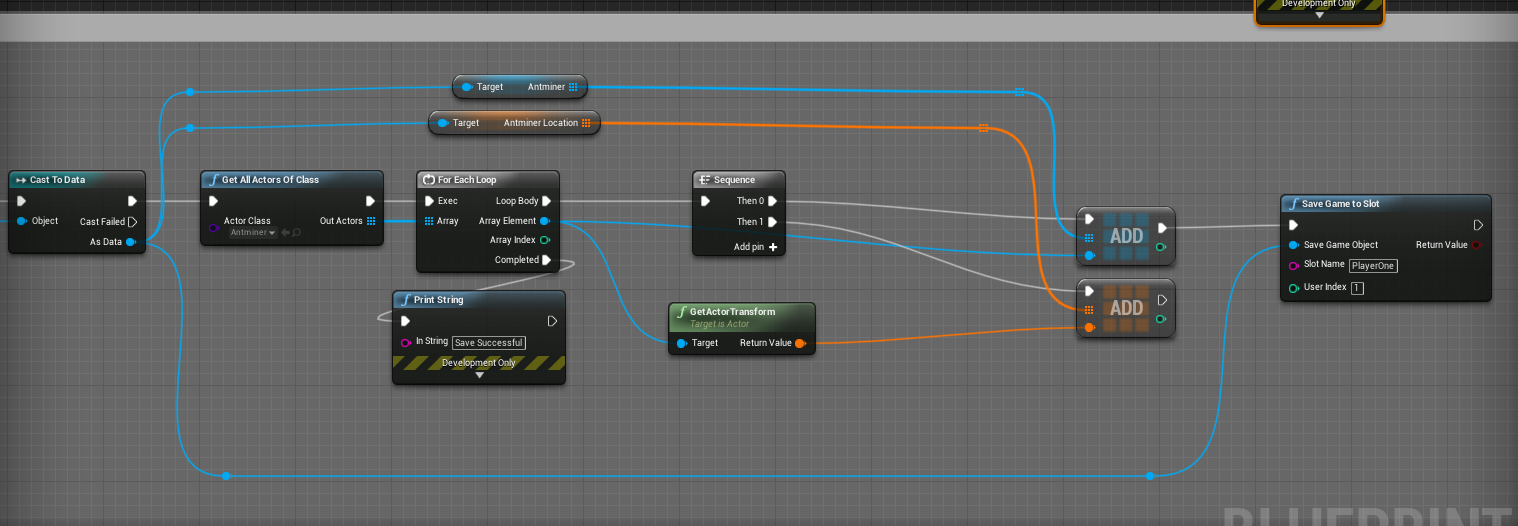
is there a way to clean an array/delete the contents of it, im using it to save objects but it seems to duplicating on every load of the game (i assume when i save its adding the same items)
nimble moat
@sharp crest perfect thank you
kindred viper
@nimble moat its literally Clear node
sharp crest
nimble moat
yeah, usually its never that easy though, atleast for me
strong mesa
you shouldn't use that thought, i think solving the root of the problem would be better
if whenever you save it adds items to the array then make the adding of items seprated
nimble moat
im not experienced enough though to find a different way, basically the player can place items in game and im using an array to save what was placed, but when saving its like "ok player placed 6 items save 6 items" except there was already 6 items there so its setting the array to 12
12 then 24 etc..
strong mesa
if the save button executable pin is connected to add items it will do that
If you show me i'll do it for you
 lone tapir
@sharp crest This is basically it: https://docs.unrealengine.com/en-US/Platforms/VR/DevelopVR/StereoLayers/index.html
Setting up and working with VR Stereo Layers.
sharp crest
I dont rly know vr stuff so probably better off waiting for someone else and posting in #virtual-reality too @lone tapir
@nimble moat I bet it took you more time to organize this than actually programming it or whatever
👀 overorganization
nimble moat
it did actually lmao
lone tapir
@sharp crest Got it, thanks for the clarification! I had already posted there, but maybe thought it was a more widespread problem. Thanks!
sharp crest
always good to post here too
I hate UI so much
It's so boring
Someone save me
This day has just been me looking at UE4 not wanting to do anything

nimble moat
i love ui but hate back end stuff haha
sharp crest


 nimble moat
it is a waste of time i just like designing ui stuff
sharp crest
wonna design my ui?
seriously lol if u r that bored dm me come help I'm dying here 😂
nimble moat
lmao i have to go bed soon for work
sharp crest
rip
kindred viper
you paying for UI work?
sharp crest
na I can do it myself just lazy
kindred viper
hah fair enough
sharp crest
I basically just need to design the layout I bought some nice ui pack
kindred viper
Im gonna revolutionise UI in Unreal. If I ever get this shit finished 😄
kindred viper
nope I dont really get around much with games currently. A few choice titles. But I'm a path of exile player and have played every league since they started, but it always takes up 2 weeks of my time, so I have to crack on with work for the other 10 weeks or I'd get nothing done
sharp crest
dont revive chat pls I need to work
 mint sequoia
BlueprintCosmetic uproperty specifier makes sense for UI related work, but does it make sense to slap it on anything that is gameplay related but shouldn't be used by server?
 mint sequoia
Its not really a question for Google
mint sequoia
Hmm I feel like Cosmetic is misleading
nimble moat
is there an easier way to make a clock other than count to 60 then +1 minute EDIT: lmao
mint sequoia
Not for that reason
It doesn't feel like its specifically for cosmetics
Well w/e 🤷♂️
 nimble moat
yeah i was hoping ue4 had some sort of function that i could just use as a digital clock other than me creating one from scratch
 manic pawn
oh right
sharp crest
oh u can use set timer
manic pawn
I wanted to check out that style thing
 gleaming narwhal
@heavy stratus That seems to be specific to your mocap setup, and doesn't necessarily have anything to do with multi-user
heavy stratus
@gleaming narwhal well what I really want to know is. Is it possible to use it while running a multi user session so we can see the live animations. In the multi editor twitch stream. I noticed you were using mocap as the guy on the island while others were browsing the scene
gleaming narwhal
Yeah, we're using live link. If your mocap setup only works at run-time, you'll have a problem
Multi-user is used during editor time
mint sequoia
@nimble moat There is a robust date/time library FDateTime
If you're building custom date/time systems you start by reading through that
heavy stratus
Ah live link would make sense. But when I asked they told me that Maya live link cannot be done in real time. How did u accomplish this
mint sequoia
Also be careful with latent actions like delays @sharp crest because if you repeat a delay properties changing outside of the delay loop wont be updated within the loop, timers are better in this way
nimble moat
ive made one manually now 😦 it just counts up the minutes checks if its more than 60 then adds a minute or hour
its all i need really
sharp crest
I dont rly used that I just made it for someone that wanted a tick loop or something Idk lol @mint sequoia
ye timers r better
mint sequoia
That's not a valid tick loop 🙂
gleaming narwhal
@heavy stratus We're not using Maya at the mocap studio. However, that's pretty much the extent of my knowledge when it comes to our setup, I was only the guy in the suit for a day over there
abstract relic
There’s only a guy in a suit? 😜
 vivid narwhal
stupid question time
sharp crest
Anything but working on UI
vivid narwhal
is there a way to find out what blueprint is causing a debug sphere/print string without opening every single blueprint one at a time
 fierce tulip
@vivid narwhal yes you look good in stockings
vivid narwhal
good? Darling I look fabulous
sharp crest
do ctrl + f
then search for spheretrace or whatever ur node is called
then press the icon that searches in all bps
fierce tulip
sorry, I understated my opinion
vivid narwhal
I forgive you
 uneven fractal
Say I have four different boulder foliage with different meshes. If I want to have different destructible meshes for each one is there a better way then having four foliage settings and four different custom static mesh foliage components with the destructible mesh data?
sharp crest
I do destruction with the foliage class
 near notch
Greetings people. I hope some one can help me out with this issue. Project background: I am creating a character BP which can switch between various animals. I am changing the size op capsule for each one. Problem: The character can gets pushed when it comes in contact with the AI. The AI also gets pushed sometimes when it comes in contact with the character although with not as much force. I have not fiddled with the physics settings and neither am I applying any force or impulse. Thank you.
sharp crest
@uneven fractal
uneven fractal
so you use a custom component?
uneven fractal
that's the same as what I'm doing I just don't like how for every type of foliage I make I need to add two new files the foliage settings and the component class
sharp crest
well u just do one for like 'tree' and then make a child of it with different destructible or whatever
the destructible has to be created for each one, cant be coded dynamically so
uneven fractal
I was hoping there was a way to put the destructible refrence directly in the foliage settings like they have in ark
might be something they coded directly into the engine though
uneven fractal
a currently unnamed survival game
sharp crest
👀 send links or something I will follow
kindred viper
I'm playing a survival game atm called my life. Doing ok but its going downhill. Think I need a DLC with some new loot.
sharp crest
weird flex but ok
kindred viper
hardly a flex. Im about to go broke
 pliant yoke
is there a way to make visibility channel traces sensitive to material opacity masks?
kindred viper
im gonna be pimping my l336 UE3.9 skills soon to pay for things.
sharp crest
nope @pliant yoke
pliant yoke
any popular workarounds?
pliant yoke
hmm alright
uneven fractal
is there anyway to use the lod mesh reduction tool on the lod 0?
I guess I can just force it to use lod 1 instead of 0 to start
 merry oasis
Hey I am having trouble creating a HUD if anyone could help please?
Health, Stamina, Ammo works fine. Instead of 32/96 ammo/max ammo, I am trying to display Ammo (in mag) on one line and the second line is for Mags (total remaining), But I want to use 3 small images, that will be removed when you reload, added when ammo is picked up. Currently I have the mag images set as EditableTextBoxed in a HorizontalBox widget
any help would be great!
merry oasis
I do not know how to incorporate the EditableTextBoxes into my bp
once all ammo is spent, I have a line returning out of ammo, which works as well, the images themselves I just cannot figure out how to remove/add
uneven fractal
same way you remove any other widget
remove from parent
alternativily set visibility to collapsed to make it invisible but keeps the refrence so you make it visible again instead of making a new image
merry oasis
Thank you!! I am completely new to ue4, but have some programming background
have has such a hard time finding good info on google
lol
sharp crest
what did you search to find the solution to that?  @merry oasis
 frozen pond
any idea of making tree cuting ? like in the forest ?
pseudo swift
guys is there a way to load an autosave if I cancelled the option presented when re-opening the project ?
uneven fractal
I know how but I'm not in the mood to write the dissertation required to explain it to you
sharp crest
@pseudo swift yea it's in Project/Saved/AutoSaves
just find the file you want to restore, remove the date name or whatever, and replace it with the old file in Project/Content
uneven fractal
to start with you can place static meshes using the foliage tool
frozen pond
@sharp crest what about destroying it while cutting ?
sharp crest
well u can change the material/mesh, or use decal, again - google/youtube it

Finally finished ! ___________________________ Project: https://drive.google.com/open?id=0B7veQ6DXFhpbX21pYVE3eWo2dDg ___________________________ As always l...
first video result
It's really not that hard to google
actually it was the second
 plush yew
google is hard man
sharp crest
but first one was short so obviously no tutorial there
plush yew
🤡
sharp crest
😅
plush yew
it does take a minimum of expereience to search online
pseudo swift
thanks @sharp crest got it restored:)
plush yew
keywords
sharp crest
gotta practice then!
frozen pond
seen that one before, not what im looking for, looking for something more let say interesting ?
sharp crest
I can't design the game for you, you will have to explain what you need or actually try my suggestion and google 
 swift spindle
Need a bot to auto google shit for ppl and pm them
sharp crest
😂
swift spindle
I almost made one for a boss once
sharp crest

sharp crest
Unreal Engine Forums
Dear Community,
I've decided to create my own C++ Blueprint Function Library of any functions that I've written that think you will find useful!
A Blueprint
screenshot ur graph
did u print the file object to see if it's valid or not?
not what I asked
pretty sure this says u need to use .ogg
 sharp crest
also I dont suggest having the file in your content folder, dont think that will get packaged and if it will it will be in pak which wont work for you @autumn crystal
nimble moat
and ogg file sizes are huge if i remember
sharp crest
@nimble moat try deleting the function and readding the event
anyways this is a trouble way to do this, it runs every tick
do it from construct or a tick with delay or something
what do you need this sound file loader for? @autumn crystal
maybe there is a different solution to what u want
nimble moat
it wont let you change text from the event graph?
nimble moat
jesus christ, that 1 checkbox has been ruining my life
nimble moat
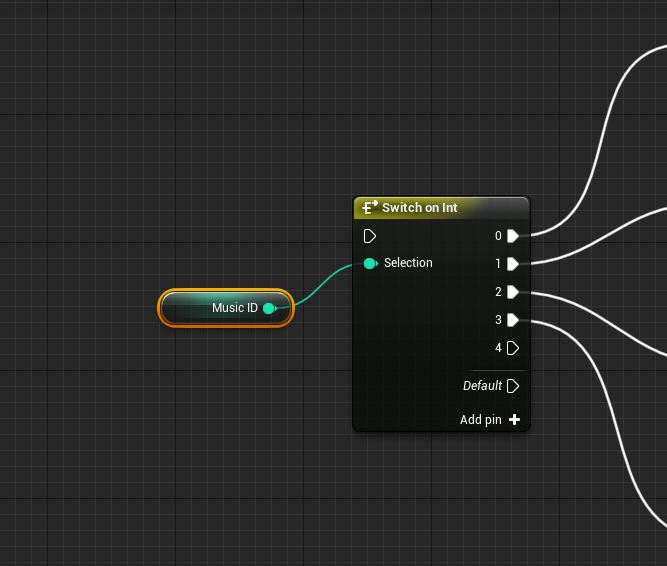
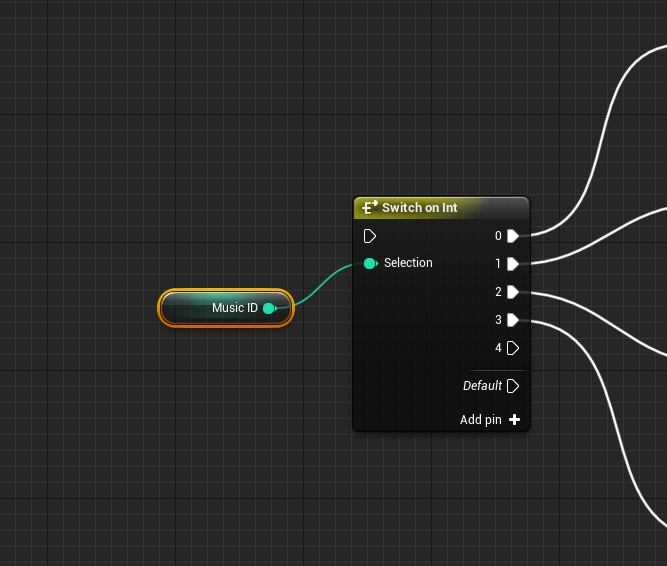
use a switch?
sharp crest
there are cool things called variables

no idea then, maybe try contacting the plugin author
but I still dont get why u need that
nimble moat
using a plugin to play ogg files? what
sharp crest
how would u do it without a plugin? @nimble moat
sharp crest
he is doing it from an imported file
and he doesnt realize he can just use a variable
lol
yes
explain what u want to do with more details and I will tell u how
but u def dont need to do this for a selectable music option
nimble moat
use a custom event and call it when a button is pressed to stop all music and play a new track
sharp crest
brb
like, their own custom music?
ahh then u need that alright
is it still not working?
working or not working
lol alright
there is also this https://www.unrealengine.com/marketplace/en-US/slug/real-time-import

Real-time import and use sound (wav) and image (png,bmp,jpg) files in a compiled/packed game.
nimble moat
whats wrong with this
im trying to help the other dude lol
i think it would work with what he wants
nimble moat
custom how
sharp crest
like user added music
nimble moat
ohhhh
that would be something id be interested in too tbh
although i feel like a plugin might definitely be needed
sharp crest
nothing about mp3 on the marketplace so u r out of luck
UI is boring
#3
ok now I'm actually going to work on this and finish....
I promise... maybe..
Idk I have to do some ui stuff for my game
and it's boring
nimble moat
@sharp crest do you do ue4 for a job?
sharp crest
trying 😅
my last game did ok ish but most of my income is not from ue4 games still
I do ue4 full time cuz I have money from other stuff atm
so who wants to do my ui
rip
I mean I have the style done I just need to like lay it out for everything I need and stuff
Idk
boring
nimble moat
so you work from home or?
sharp crest
I dont rly work I have income from previous games not in ue4
nimble moat
Ah
id love to do ue as a job, i work as a cnc engineer irl which doesnt leave me with much time to learn more
sharp crest
@nimble moat me too, but market is tough and good games take time..
eventually if you stick to it it should work
nimble moat
i feel itd be one of those things tho where its fun in free time but if you did it as a job youd not like it
sharp crest
well, Idk, for example I'm forced to sometimes do updates for my previous games to keep em alive, I dont really enjoy it, but I mean I like programming in general so it's not too bad, and sometimes I make things that excite me.
it's not too bad 😅
starting a new project, and seeing it successful are the 2 most fun things in this
nimble moat
id love to have people actually play and enjoy what id make
sharp crest
cant rly help u with that still trying to figure out how to do that with 3d games 😅 but.. yea it is nice
guys u have one last chance
who wants to do my ui
nimble moat
i would but i really need to sleep lol
nimble moat
i cant i have unfinished things on my ui lmaoo

 nimble moat
it mightve auto saved
 south ridge
This is the day you learn to mash the save button after every single action you take
Like the rest of us
sharp crest
I think I saved a few times
 dim plover
Honestly, I practically hit Ctrl + S after every word.
sharp crest
Yea I used to do that lol
south ridge
I will ctrl+s sometimes after ctrl+s just to double make sure
nimble moat
i do that lol
sharp crest
I do that too lol
nimble moat
or more like ctrl s s s s s s s
sharp crest
xD
ok guess it's gonna load forever now
gonna go to eat
and hope it saved some..
pseudo swift
guys when I move my keyframes in my timeline it changes the geographical position of my animated kamera
sharp crest
fuck I forget to take a screenshot of what I did lol I always do that when it's about to crash
pseudo swift
i just wanna re-time the animation
sharp crest
forget this time, was too ragy
pseudo swift
anybody know why?
 pseudo swift
i need to move my selected keys 100 frames back
but when dragging by mouse it changes my environment
there must be another way of adjusting them without affecting the objects physical positions
keyframing in unreal is literally hell
nimble moat
carl your having no luck are you
pseudo swift
haha its just acting so weird
im not using unreal for building games but for animation and its rough sometimes
since its not made for it
well again, it is, but at the same time its not
i dont know any other timeline that works like this, blender, AE, c4d etc. its just weird
swift spindle
@pseudo swift you can set local vs absolute
strong mesa
What Are most populare uses for local variables ?!
 normal burrow
temporary things?!
uneven fractal
is there anyway to dynamically remove landscape grass in a set area?
 autumn grail
Hi , i need to know how to package a project which use World composition. when the game load my character fall through the ocean and there is no map loaded
swift spindle
@autumn grail that's easy.. right click on the level and set to always loaded instead of load from blueprint
swift spindle
gimi a min to get u screenies
autumn grail
thank you vmuch
swift spindle
@autumn grail
autumn grail
I havent got it maybe because i'm on 4.22?
autumn grail
@swift spindle
 hoary vortex
Not sure where to post this but I'm having trouble deleting an object which has LODs and its giving me an error saying that they're in use (the object isnt placed anywhere on the map) and its telling me to try loading the engine with NoLoadStartupPackages but I have no idea how
There are no documentations on it and I cant find solutions anywhere else, any help is appreciated.
sharp crest
@uneven fractal you need to add a layer that removes the grass
autumn grail
i have found a guy who have the same problem , the option is not shown in the window *
I try with 4.23
autumn grail
yes
swift spindle
so your levels are unloaded
@autumn grail https://docs.unrealengine.com/en-US/Engine/LevelStreaming/WorldBrowser/#levelshierarchy
System for managing large worlds including origin shifting technology.
uneven fractal
@sharp crest I'm guessing a map sized render target isn't possible for that?
autumn grail
@swift spindle no my levels are loaded
swift spindle
the instructions say if they are grey they are unloaded
autumn grail
i have loaded just now there is no the options
uneven fractal
that's the only way to get a dynamic map of where to mask the grass
sharp crest
ahh I see
hmm Idk
maybe make it an alpha brush thing and paint the erase grass layer with it
plush yew
is UE4 bad at streaming?
plush yew
many games have texture pop in or game freezing to load stuff
swift spindle
that's almost always your HDD / setup
and the fact is.. ue4 is a AAA engine.. it's designed for high end content for the most part.. as a result.. far more is loaded then a lower level engine would
sharp crest
^
plush yew
streaming can't be done with hdd?
swift spindle
well of course it can.. it's just slower....
@plush yew what exactly is your question ?
 ripe saffron
in regards to streaming ...I have a persistent level with only streaming tech in it. I build all my streaming levels separately and fine when play in editor but complains reflection captures need rebuilding in standalone and packaged. I cant see anything wrong so I assume this message is just because i'm not building in the persistent level. Does this sound right?
open eagle
How can I have my BlueprintNativeEvents be replicated?
open eagle
yea
in c++
I want to make a BlueprintNativeEvent in c++ and have it be replicated
not a blueprint custom event
uneven fractal
I have player placed structures so I want the grass to disappear when I place a structure on top of it
sharp crest
ahh
maybe try doing that with the material instead @uneven fractal
uneven fractal
as you can see the current state of things is rather sub-optimal for building
 high stream
Hello, how do you make a third person camera possess-able by a VP Root Actor?
Is it possible to do this? I have a cine camera actor as a component of the third person character blueprint (it’s attached to the camera boom component) and my brain is all over the place trying to figure out how to achieve this
 rich helm
normal burrow
rich helm
normal burrow
its broke or something grass
 onyx ferry
hi guys, i'm trying to get into developing vr games with unreal and i have no experience with coding outside of highschool. but unreals blueprints are amazing. i just wanna know how anybody starts to learn to develop with unreal. especially for vr using only blueprints. i don't think i'm learning what i need to learn from youtube. there's not much help for vr with ik body and the little that is there, i can only follow but not understand. where do you suggest i start?
 versed spear
So, I was getting editor crashes constantly. It was related to my gpu. D3D11 error device reset. I set my editor exe to run in compatibility windows 7 and now its not crashing the editor anymore. Anyone know why it would make a difference?
swift spindle
its likely your gpu is a tad underpowered for your project and it's timing out so windows terminates the gpu driver and restarts it
@onyx ferry building an IK body for 3 point is a difficult task... there are VR templates out there already.. google is your friend 🙂
versed spear
Yea that is the case. I'm just wondering why compatibility windows 7 runs better with my gpu.
onyx ferry
but that is how everybody starts?
versed spear
ah got you now I understand.
onyx ferry
thank you so much!
swift spindle
unreal ships with a bunch of them. And there are templates for most types of projects out there already
 sleek spear
out of curiosity, anyone knows the price range of the new twinmotion version?
gaunt tide
So I have a little problem. When I hit my play button on my main menu I can go to the minimal_default level in the third person template and my hud loads fine but if I try and make the “open level” inside the main menu hud widget set to “MyWorld” instead of “minimal_default”, it doesn’t load my map I created but it does load my hud. Have created light mass importance volume, as well as a sky light, And player start.
 sterile surge
@gaunt tide it sounds like this should work fine. Could we get a screenshot of the hud code and the level you're loading?
gaunt tide
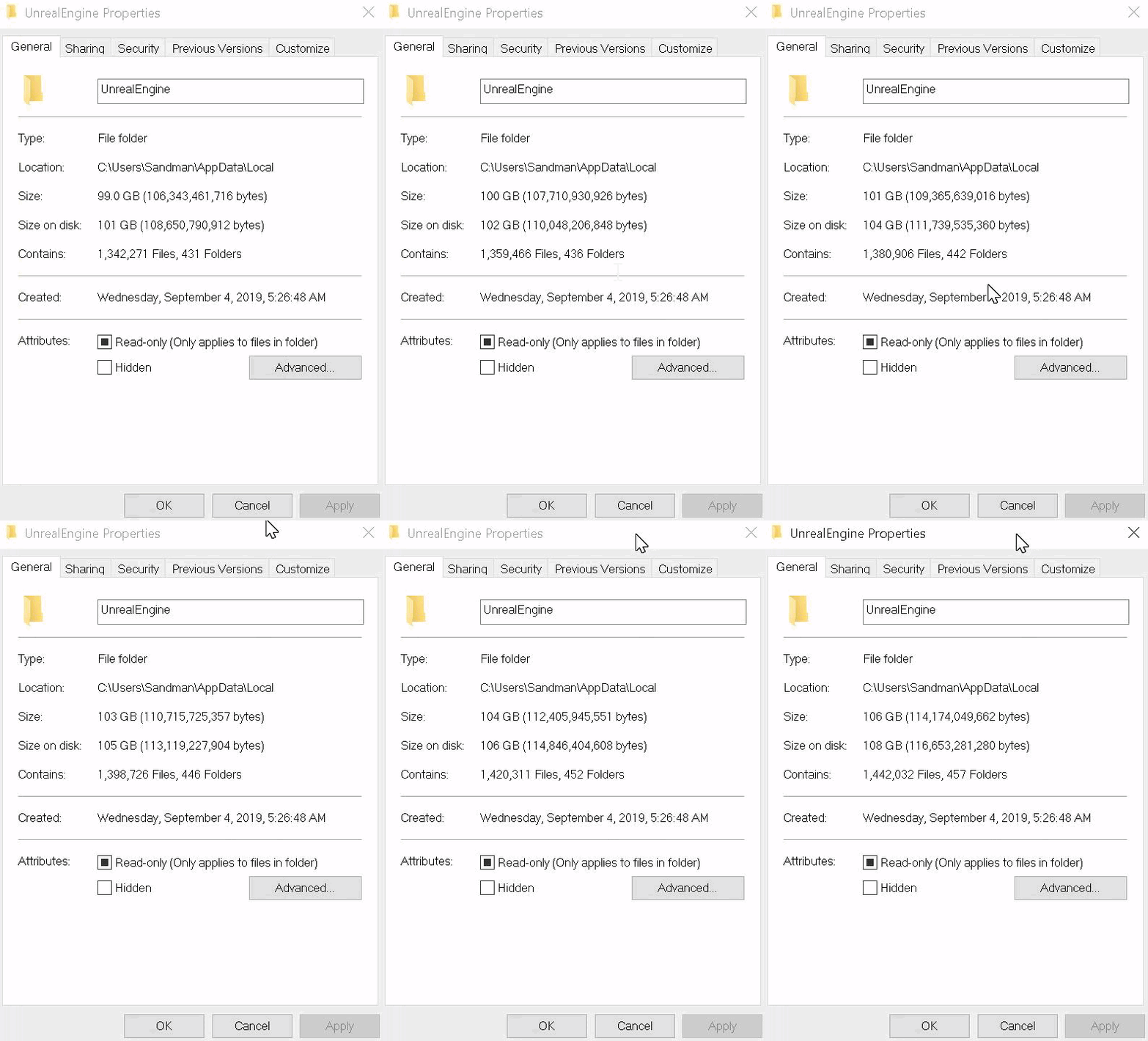
Yes I will in a second. I just found out that UE4 is saving files to my SSD instead of my HDD like it needs to which filled up my SSD and is causing my Pc to crash. I currently can not access anything to include Epic Games Launcher, Discord or Steam atm.
@sterile surge
Yeah UE4 file size is currently at 400GB on my SSD.
sterile surge
oh that hurts
gaunt tide
Idk how or why it put the directory onto my SSD when everything else is on my HDD.
Plus the assets I have loaded only equate to about 20GB so idk what UE4 is doing anymore.
sterile surge
It is probably the asset vault cache
gaunt tide
Nope I only have the newest version
 brazen cairn
then it must be vault cache
gaunt tide
Still going up
brazen cairn
ohvgod
 radiant fox
gOD dang!
sterile surge
I would close epic games launcher and delete that folder. since its in the AppData folder, it's more of a buffer.
radiant fox
I need help lol
gaunt tide
How can I prevent this from happening again?
radiant fox
no idea
sterile surge
i'm looking into it, but i'm pretty sure that there is an option in the launcher that stops it from caching the entire vault
radiant fox
I need help, how do I disable an input UNTIL you do something to enable it, like collide with a trigger box, or when a sound plays?
sterile surge
@radiant fox what I would do is have a boolean flag that is true when you want the input to fire. Then just add an if/branch first in the input to check if the flag is true
gaunt tide
Yeah my PC is deleting the entire folder but it’s just causing more problems than it’s fixing. It’s looking more towards a fresh install of Windows rn.
radiant fox
okay, i'll try that and tell you if it doesnt work 
sterile surge
@gaunt tide Ok I found the option. In the launcher, then settings, towards the bottom is Edit Vault Cache Location. Set the location where you want it, then reset the vault. This will clear it and move it
gaunt tide
Dang. Funny thing is the vault cache is set to my HDD...
sterile surge
I would still reset it
grim ore
that is the DDC not the vault cache
gaunt tide
Alright reset it. But am currently deleting 300GB+ from the SSD.
grim ore
you can change it to a local DDC if you want so its in the project directory. You would still probably have the engine DDC however in your appdata unless you mess with some of the config files in the engine directory
gaunt tide
Yeah I only messed with a couple files to try and direct all the data for everything UE4 to my HDD since projects tend to take up a lot of space. This didn’t happened until just recently when I started importing tiled landscapes into UE4
Figured it shouldn’t of caused problems since everything else game developement related is on my HDD.
@grim ore I feel kinda dumb asking but how would I be able to keep all files for UE4 on my HDD with minimal going to my SSD?
Because I initially thought that is how I had it setup and for the first year never had issues up until recently
swift spindle
@gaunt tide are you using "source" version of unreal ?
gaunt tide
Not that I know of. Just downloaded epic games launcher. Hit install Unreal Engine 4.22.3
Well after deleting the 305GB of data from my SSD looks like it also includes deleting my entire project. Not that big of a deal but that means it wasnt saving data to my HDD in the first place.
Checked the directories and they are all showing pathing to my HDD.
@swift spindle Also looks like Im going to encounter the same issue. I am not currently running UE4 or any epic games system and the file is filling back up again. https://gyazo.com/36695a082d2ca0dc47eeaca3bea6f7cf
 radiant fox
I need the Tick event to go to more than one output but it only goes to one, can someone tell me how to make it work with more than one output?
nvm i think a sequence node might work
gaunt tide
^
sterile surge
The check should be in the use event
otherwise you're enabling/disabling input on every tick
radiant fox
how would I do that? sorry, im not that good with this stuff lmao
sterile surge
off the pressed exec on the use event, put the branch with use. if its true, then allow whatever is supposed to happen in the use event
 light coyote
@grim ore
Hey mathew, i have an issue with something i left aside and im struggling a bit to get it done.
I will eventualy get there. But i thougt you may have intrest on doing a video about it, or maybe can be split to 2 or 3.
However, its just a thought and it may not fit your chanel. Its ok if you dont like it. Should i mention it here, or direct msg you?
radiant fox
bruh im so confused
uneven fractal
how do I enable the old system where you could right click a static mesh file to generate a destructible mesh?
radiant fox
i suck a
light coyote
I dont have much time and its not super important, that is why i left it aside.
But i do belive is something intresting to know, and that they are other peopple who will be intrested, and who are also trying something similar. @grim ore
sterile surge
Don't sweat it man. Move the branch you have in the tick to the use. That way when use is called, it checks if it can actually do it.
radiant fox
like this? I did that and it was still activating the thing that shouldn't be enabled yet
sterile surge
I saw earlier that use is set True during begin play. Should it only be enabled when something is triggered?
radiant fox
yes
sterile surge
Ok, so you want use to be false by default, which it is. When do you want use to be True?
radiant fox
after a sound plays
sterile surge
after the sound is over or when it starts?
radiant fox
when the sound starts
uneven fractal
migrating my entire project was more painless then I expected
sterile surge
Ok, so the code you have looks good. Is the use event enabling or disabling input when it's called?
I also have to ask, why have the check in the first place? The sound is played on BeginPlay, so why have the disable input?
radiant fox
is this messing something up? this is what it should be doing when it is like enabled and stuff, and the sound isn't played at the beginning its play after you collide with a trigger box a bit later
i just moved all of that stuff to the branch area in the bp and imma see how it works
sterile surge
It looks like use is being called once from the first blueprint, probably a character, and again in this image. the disable/enable input in the character blueprint won't stop the latter from firing
radiant fox
90% of my stuff takes place in the level bp, so does those 2 things... it looks like its being enable when it should be now, but I want the release to be doing something aswell
but i cant because of... y'know... idk how to explain it lol
sterile surge
do you want release to do something different or the same as pressed?
radiant fox
something different, I got it to work for now tho
sterile surge
I also saw that one of the images had pressed and released going into the same branch. You would want separate branches for pressed and released. Don't know if this is how you're code is setup right now. Good to know that the code works for the most part right now though.
radiant fox
yup, i did separate branches and now it works how i want it! thanks man!
sterile surge
No problem, at least I could help one person tonight. No idea what's happening with MrSandman though. That's wack
radiant fox
lmaoo me either like wtf 
you legit made my night better tho, i was just gonna give up lmao
sterile surge
Can't give up. That's how projects die
radiant fox
you're right @sterile surge
im happy i didnt because ive been working on and off on this project for 5 months lmaoo
sterile surge
Nice. Keep pushing.
radiant fox
yup, these past 2 weeks ive been working on it non stop
plush yew
Hello, is there in Unreal an equivalent of Unity's assetbundles? Basically what I would need to do is to let the user choose and download into my software new meshes, materials, Maps and so on at runtime, without the need of including them into the Unreal project
sterile surge
Unreal doesn't have a feature like assetbundles. I can't think of a way to get assets at runtime, but maybe someone else can think of a way.
plush yew
Thanks, that's what I thought. So there isn't any way to support, let's say, user created levels, other than mods?
sterile surge
All I can think of is using a mod with an abstract loading system to add user-created maps
 undone cedar
is there easy way to open parent c++ class?
because i want open c++ code, not blueprint class
gaunt tide
@sterile surge Didnt you ask me earlier for a screenshot of a few of my blueprints to figure out why my landscape isnt spawning but the default ones are?
sterile surge
Oh yeah. I was wondering if the level was actually loading but the lighting was off since you said that the hud and everything loaded but the screen was black
gaunt tide
Even when I build the lighting
For one reason or another too when I try level streaming it doesnt like my tiles too much
Probably put too much on my plate for a solo dev.
sterile surge
I'm not that well versed in level streaming, but I know that there are a bunch of tutorials on level streaming. Just remembered to not get put off by the pressure as a solo dev. This is just a learning experience.
gaunt tide
Yeah. Ive watched a ton of tutorials. I think its mostly because my level is rather complex without any sort of foliage and buildings. The landscape is 64km^2. 31x31 tiles at a resolution of 2017. My heightmap is 961 tiles total. Than I have 3 heightmaps for high, mid, and low angles for texturing so 961(3 times for the three angles). I mean it takes over 2hrs just to import the tiled landscape but once I do manage to load it into my game I get stuck at getting the player to spawn on the first tile x00_y00 even with the level loaded.
sterile surge
Sorry man, I've got nothing. Just keep poking at it and it'll pop eventually.
gaunt tide
Yeah ill probably just have to go to with a 8km^2. Even after building the lighting and adding the required components. When I hit "unlit" the terrain lights up and when I hit "lit" the terrain is dark
So I have no clue lol

 cosmic veldt
Guy's how can I manipulate dynamic parameters of the layered materials in blueprint? It seems set material node only effects the background layer.
 noble zodiac
Hey hivemind! i got a problem opening a 4.22 in 4.23 its asking for a plugin called ConcertForntend that it cannot find. Any clue what this is ? Thanx!
brazen cairn
uh guys how do you create a city grid
is there a specific tool you need to get from marketplace or make something yourself
plush yew
Hi ! im trying to make a structure and put that as basic stats to my character, bud i think im pretty noob at that :p , is there something i did do wrong or is there a simple node that can make this happen ? so i can make my first attributes ingame to finely make skills that comsume the attributes and even got stronger if my attributes are higher ?
brazen cairn
yes i do

In this Unreal Fest Europe 2019 session, members of the Frogwares team share their three years worth of experience developing an open world game with Unreal ...
its from this video
creators of the sinking city
@runic iron
runic iron
Pretty sure it's a private tool they developped for their game
Yeah it's definitely that, looks nice
 honest vale

Unreal Engine
As with any open world game, one of the main challenges is to create a world that doesn’t get boring - both from a gameplay and visual point of view. Today, we want to talk to you about a solution that we created in Unreal Engine 4 that will help us with the latter.
 lapis vine
Depends what you need I guess. If its not runtime generation, you can pretty well manage with some of these tools.
brazen cairn
I cant find anything similar to city generator
or maybe i just cant type in the correct key words
lapis vine
Well, I think it was more like building generator. So you can easily make meshes/actors and then spread them over.
brazen cairn
i have quite a lot of building models/prefabs ready
i just needed something similar to City generator because it might help me cut down so much of work
lapis vine
That a big city? At runtime or you can build it in advance
 wary wave
if you need a 'city generator', you probably want to make one that works for your game
brazen cairn
oh
lapis vine
Yeah... Kinda. If you work on stupid grid, can do it easily. But not sure what your goal is.
runic iron
Thing is what's faster between making a procgen tool or placing your buildings by hand
Ask yourself that question depending of what results you want
 dim merlin
anyone familiar with quixel bridge and how to do landscape materials with it?
 fierce crest
@mich I ve just used one of the brushify landscapematerial and changed the textures and some foliage to quixel ones.
But i am curios if you find a better solution 😉
 ornate ice
Good morning?
People is there any object in the game world that initialize first than everybody where I can spawn all my actors at the beginning of the game?
I know for sure that the game mode doesn't do that
actually the game mode seems to initialize at last
lol
 fierce forge
hello , when i try to open a project it load but not opening , what i can do ?
 mossy nymph
@ornate ice all actors from the package are loaded before the gamemode is spawned
but GameMode is spawned, and spawns GameState, before BeginPlay is called on the World
it actually contains the code that triggers World's BeginPlay - which calls BeginPlay on all the Actors
ornate ice
thats interesting cause I've made some tests
and for example if I initialize some actors
in the GameMode
I have to make a small 0.2 delay
to be able to fetch them
in other actors
for example I decide to spawn the QuestManager from the GameMode
and I want to fetch it from BP_Player
I have to make a small delay in my begin play
to be able to find the QuestManager
otherwise it wont find it
 sterile geyser
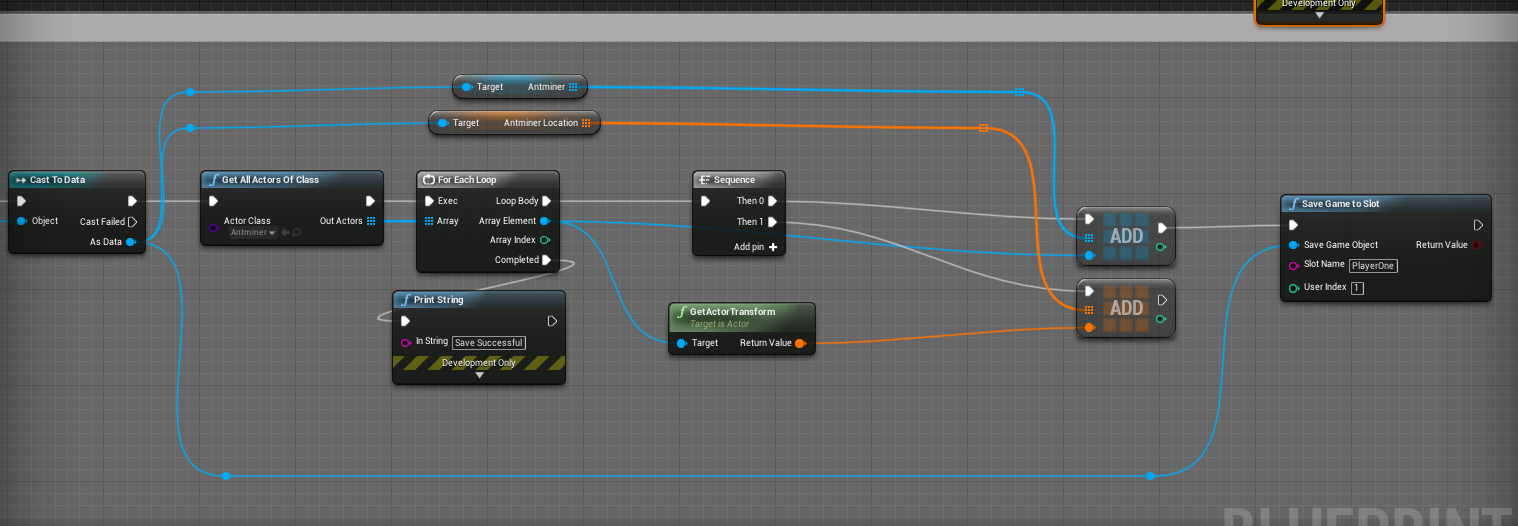
I have something that works as intended but continually throws me annoying errors...
Any advice here?:

 jaunty quiver
Any one had a weird bug where steam vr forced the game in the left corner ?
sterile geyser



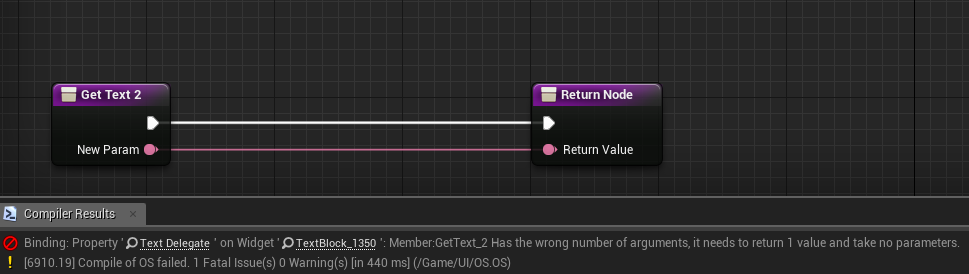
 mossy nymph
@ornate ice the order of BeginPlay calls is not guaranteed
you can do it without delay if you inject their dependencies as you spawn them
mossy nymph
or cache them inside the GameMode itself (or some other easily accessible place)
then access via GetGameMode->Cast->GetQuestManager
ornate ice
thats what I do
but as I said for example
if I have a player start object in the world
and as soon as the player shows up
I try to make the cast
jaunty quiver
@sterile geyser No worries, but you will still need to add some logic. So once the thing spawns trigger an event to do the rest of the logic you need. Because if its not valid the error will go away but w.e you're doing after it will too
ornate ice
it seems that the QuestManager still doesn't exist
mossy nymph
if it was spawned before the character, or before you called BeginPlay on the world, it will exist
jaunty quiver
Hi sorry to interrupt, but @mossy nymph when you've finished helping this gentleman. Could you please have a quick think, if you know any reason why in 4.23 when running steam VR it breaks the fullscreen and causes it to go in the top corner
mossy nymph
i don't know, sorry, 4.22 and not using VR
jaunty quiver
Okay no worries, thank you.
mossy nymph
if you spawned the QuestManager before the Character you could even inject the reference directly, although i much prefer having static accessors (Blueprint Function Library) to fetch one of a kind Actors
 lyric tusk
Does anyone know what degenerate triangles are
I tried to do cloth sim and it's giving mr degenerate triangles error at first I thought it was vertex overlapping but in Maya i checked and no vertex overlapped
mossy nymph
quick google search says its a triangle with all 3 sides parallel - it will have a + b = c relation between its sides
jaunty quiver
Is there a way to change hte package name without changing the project name ?
jaunty quiver
Just the packagename but that doesn't change the name of the exe
lyric tusk
And also how do i solve degenerate triangles
abstract relic
Basically when a triangle is stretched to an absurd degree
jaunty quiver
The project name i mean
cloud cobalt
I'm pretty sure you need to rename the project.
jaunty quiver
Yeah thats what i know of as well... which really sucks
cloud cobalt
@jaunty quiver Should be a rather quick operation tbh
 plain snow
i think i have ran into an issue, I need my Ai character to play an animation when walking threw a box trigger. So far i am having no luck. Anyone got any pointers
jaunty quiver
Hopefully im running a source version of 4.23
plain snow
i am at a loss :/
jaunty quiver
Well animationstate tree or just directly play the montage
plain snow
i tried the montage it wont play
jaunty quiver
Strange send a screenshot. If i remeber correctly
plain snow
animation state haven't tried that
jaunty quiver
you need to create an animation group
and then set that group in your animation blueprint
and it should work
plain snow
it works like that for an ai character too/
?
goona give it a shot i will post screenshots if it doest work
ty
jaunty quiver
Well the AI character is just a character with an AI controller as oppose to a player controller
everything else is the same
 stray marsh
anyone can help me creating a mesh blending ?
lyric tusk
Use ditherAA
stray marsh
ditherAA doenst really give me a smooth affect
lyric tusk
@stray marsh in the material of the cylinder object add a dither mf and multiple it with a scalar and then have it plugged in the pixel offset depth
It works for me
stray marsh
 lyric tusk
U can use a plane with spine to create like a skirt around a object which is your focus to have it nore blended
Like a skirt
abstract relic
Ah that’s easy. Make a depth blend using pixel offset.
lyric tusk
That works too^
stray marsh
dont know pixel depth dont give me this result, it looks more than a opacity and the edge than this, maybe i just do it wrong https://vimeo.com/223731600
abstract relic
Unreal Engine Forums
This is the place to show, share, and link to your stuff!
fierce forge
hello , when i open ue4 it load but after nothing , it is not opening
cloud cobalt
What do you see ?
abstract relic
Show us the crash log
cloud cobalt
I'm guessing this is just a "stuck at 45%" question
abstract relic
In Saved folder
sharp crest
@stray marsh your rock is hot
fierce forge
just close without crash
sharp crest
(sry I have something with ue4 rocks they are just so hot)
fierce forge
i see loading and after some seconds it's closing
abstract relic
That’s a crash
fierce forge
not like a normally
cloud cobalt
If it's a crash there is a crash reporter
fierce forge
where i can see the crash log ?
abstract relic
Again. Saved folder
abstract relic
Launch it in vs then
sharp crest
@fierce forge I like your avatar
fierce forge
😄
sharp crest
Btw my editor crashed because I pressed ctrl z that's why I'm here
didnt even crash, just been not responding for like 10 mins
if anyone knows what I need to upgrade in my pc to fix it let me know lol
project still loading
someone revive chat pls
fierce forge
@abstract relic if i launch ue4 project is same like ue4 without project
sharp crest
whats the issue?
fierce forge
when i open ue4 after some seconds it will close
fierce forge
randomly
sharp crest
u mean the ue4 project loader thing?
when u can create a project?
abstract relic
Still need a crash log. All we can do is nod without it
fierce forge
where is the crash logggG?
fierce forge
i tried
lyric tusk
And i found the solution for the degenerate triangles
fierce forge
i have a good pc
sharp crest
well seeing as u have a minecraft skin in the avatar
fierce forge
gtx 1060 , 16 gb ram , amd fx 8370
abstract relic
Launch the engine in vs if you can’t be bothered
fierce forge
@sharp crest it's my youtube channel avatar
sharp crest
o no
cloud cobalt
Mostly you should just check in Saved if you can find crash logs, again.
fierce tulip
@sharp crest play nice.
sharp crest
I'm jokking but ok
well whats the issue anyways just create the project before it closes? @fierce forge
fierce forge
@cloud cobalt where is Saved ?
cloud cobalt
In your project dir.