#ue4-general
1 messages · Page 581 of 1
 sharp crest

 scarlet birch
any precision greater than the tic interval is useless
 light thunder
Let me see if I can take my own advice and show him, maybe, by example for how to ask for things
 dim plover
I don't think it is possible to check things in between ticks on the Game thread.
 vivid narwhal
where do you get 0.000001 from... Surely system time only goes down to 0.001 anyway
 light thunder
So I have 4 category buttons - for example, fruits, vegetables, meats, dairy (or whatever) -I only one one button in each category to stay selected
how can I control it using the categories? do I have to rely on using switch statements?
 mossy nymph
what do you mean by using categories?
light thunder
 strong mesa
Is there a variable type that i can give it both name and integer
light thunder
those are two different ones
sharp crest
@strong mesa yes string 
light thunder
I'm keeping track of the lastbutton pressed and lastcategory pressed
sharp crest
why am I doing this I have a game to make and you guys have google
strong mesa
string is bad for replication
light thunder
It's not the end of the world for me to expand the switch statement to include other categories I am just checking if that is a decent way, without refactoring the entire structure I have
sharp crest
the general types are always at the top, so just check there what fits your needs the most @strong mesa
vivid narwhal
@strong mesa you could use a strut?
sharp crest
that will be even worst for replication
strong mesa
Yup
mossy nymph
@light thunder i would put all buttons inside a panel on another widget, have the parent widget subscribe to buttons clicked event, and handle it by first telling the previous button its unselected, then setting the last button that was clicked as selected
adjusting the visuals accordingly
sharp crest
anyways u shouldnt worry too much about each variable, it wont kill ur game to use a string instead of an int
light thunder
strong mesa
@vivid narwhal thanks you though ❤️
light thunder
@mossy nymph Hm, I can't just unset the previous button because it needs to stay IF the button is a DIFFERENT category, but I think I might change the execution order around based on the way you phrased that
mossy nymph
this approach includes 2 custom widgets - one ButtonWidget and another one holding a panel that houses them
light thunder
that's basically what I've done
 sage wharf
hey . does anyone have an idea if ue4 have an Addressable Asset System like in unity ?
sharp crest
@light thunder try using functions instead of copying the same code 5 times  this is how I would do it too tho
mossy nymph
ButtonWidgets can be instantiated knowing their category
and broadcast it in custom event dispatcher when clicked
and parent would then hold a TMap<Category, SelectedCategoryButton>
 frank badge
hey guys 🙂 can anyone help me with the new quixel stuff? Whenever I import a material it gives me the warning "Displacement Samples as Color" and the displacement and roughness do not work
sharp crest
@sage wharf or explain what you want to do because none of us use unity here
sharp crest
explain what you want to do..
light thunder
@mossy nymph how would I have the nonselected button remember to change back, if I've selected a few other buttons from different categories (and this changed the lastbutton pressed variable"
sage wharf
i am not a unity user actually but it is very nice feature
sharp crest
u need to make a function that resets the style of all the buttons thats how I do it @light thunder
mossy nymph
at the time dispatcher is called
light thunder
mossy nymph
your parent widget still has a pointer to whatever button was last pressed in the Map
light thunder
mossy nymph
it calls an event/function on it that "unselects" it
light thunder
but it will only have one "last button"....
mossy nymph
not if you store them in TMap with whatever your category is (string, name, integer, doesn't matter)
as a key
and a pointer to selected button as value
light thunder
so if I were to click back to the Engine101 thing and click something else, "SecondarySearch" would change back, while "BackPorch would still stay lit
ah
I see what you mean now
basically, build a map at run time
mossy nymph
this approach also scales well - you can freely add buttons into categories or even add new categories without changing the logic in the widgets
sharp crest
Just got a sneak peak at UE 5
light thunder
yes that's what I was looking for
 flat idol
webUE
sharp crest
light thunder
@mossy nymph Would I want just the actual widget element as the value or do I have this backwards?
mossy nymph
yeah, push button in it
that way you can just directly access it by key
altho, making a literal map here... probably not
i'd make the map a variable in the widget
sage wharf
mossy nymph
this might not be a concern for you, i don't know - but enumerations have been known to break some blueprints when you modify them
so you should consider a FName or some such as key if you're going to invent categories on the fly
light thunder
the categories are planned and exist before runtime
sharp crest
enumerations have been known to break some blueprints when you modify them
never happened to me
mossy nymph
then enum is fine
light thunder
I'll be constantly reworking and adding more but nothing afterwards
dim plover
UE4 has the AssetManager, you can async load assets by path.
mossy nymph
each button has to know the category it belongs to, so that it can send it when calling the event dispatcher
sage wharf
@dim plover okay, thanks
light thunder
I've been passing that through the interrace call as part of the ButtonDataStruct
vivid narwhal
sorry to interrupt. Is there a way to increase the "arc" on a nav mesh link so I can actually jump over objects?
mossy nymph
that would require buttons to be aware of the existence of a parent widget
sharp crest
@vivid narwhal step height setting in nav mesh will work for you I think
mossy nymph
@vivid narwhal can you read c++?
strong mesa
I can read English
vivid narwhal
enough to modify variables but not enough to write my own code
mossy nymph
i suspect NavLinks are using
    UFUNCTION(BlueprintCallable, Category = "Game", DisplayName = "SuggestProjectileVelocity Custom Arc", meta = (WorldContext = "WorldContextObject", AdvancedDisplay = "OverrideGravityZ, ArcParam"))
    static bool SuggestProjectileVelocity_CustomArc(const UObject* WorldContextObject, FVector& OutLaunchVelocity, FVector StartPos, FVector EndPos, float OverrideGravityZ = 0, float ArcParam = 0.5f);
that function in GamePlayStatics to generate an arc
vivid narwhal
it would be ArcParam?
mossy nymph
you would need one with higher ArcParam
something around 0,7-0,8
its alpha, so 1 or above would have no solution
if you're lucky, the thing is exposed somewhere
vivid narwhal
it beats up Chrome in dark alleyways and steals the RAM
dim plover
Do you have a lot going on in Unreal? Mine only takes like 2GB.
sharp crest
mine takes 20
mossy nymph
mine can take 20 if i don't close it for a few hours
vivid narwhal
mine is only taking 2gb atm
sharp crest
only7
mossy nymph
it kinda depends on the size of assets you have loaded
but if you're practicing creating hard references freely in BP, you will load the entire game as soon as your first BP loads
vivid narwhal
There's nothing in NavLinkProxy.h that says ArcParam sadly
sharp crest
@vivid narwhal why not use nav step height?
mossy nymph
that won't work here
sharp crest

mossy nymph
you do have a BP exposed delegate OnSmartlinkReached
vivid narwhal
step height doesn't effect the arc, only the nav mesh height
mossy nymph
you can hook into it and do a custom launch
vivid narwhal
This is the launch I'm doing before I add animations
mossy nymph
it would not render the arrows in editor to show the new arc, but it would let the AI go over them
whats the Target of CalculateVelocity?
vivid narwhal
good question
sharp crest

mossy nymph
ah, it says, NAvLinkPRoxy
vivid narwhal
yeah you can only cast it to NavLinkProxy so it's just a self reference
mossy nymph
but i do not see it in code
vivid narwhal
the thing is. If I set Jump Duration to stupid high, it jumps over, but, it doesn't land at the target, it still just lands halfway
mossy nymph
so this is inheriting from a derived class of NavLinkProxy
try calculating it with SuggestProjectileVelocityCustomArc instead @vivid narwhal
sage wharf
i am not rally understanding how to get the asset manager working in ue4
vivid narwhal
YEET
vivid narwhal
it's .... weird. If arc param is 0.0 it gets yeeted into space. if it's 0.01 or higher it doesn't even jump at all
sharp crest
not following anymore
vivid narwhal
The SuggestProjectileVelocityCustomArc doesn't seem to be doing anything. Since if the arc is 0 it just goes into space, if it's anything above 0 nothing happens
dim plover
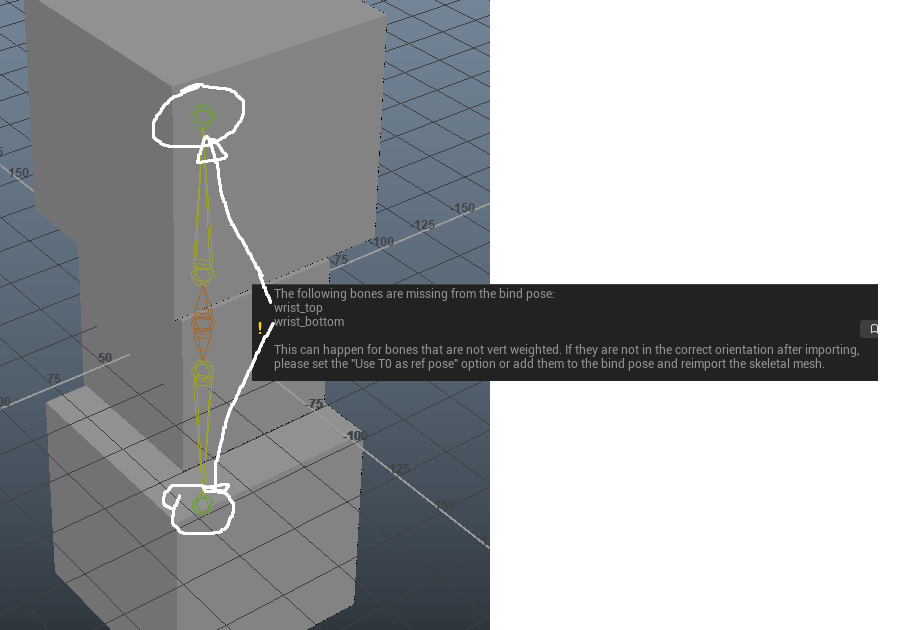
When importing a skeleton to Unreal, does every joint need to be bound to skin?
If I use "Use T0 as Ref Pose", the entire thing gets weirdly rotated.
Overall, importing stuff is pretty weird, does anyone have any good links for this process?
sharp crest
Never had an issue with importing stuff
Might want to google your error/issue
vivid narwhal
I'm wondering if there's a more complex method I can use instead of Launch Character
 grave osprey
where i can find quixel suite ?
vivid narwhal
 vivid narwhal
if you just want the megascans (Which they make part of unreal) go to the Marketplace Tab, click on Free and click on Megascans
grave osprey
so quixel suite isn't free ?
vivid narwhal
megascans are, quixel as a tool isn't
you don't need quixel to texture your mesh, UE4 has a material editor for that
grave osprey
i meant for baking stuff.
vivid narwhal
you got a couple of options and most of them cost money
vivid narwhal
hi!
 ornate ice
anybody has an idea how to make a tab section that slides
when passing to the next tab
in UMG
 serene quiver
How do I edit the text in a TextRenderActor?
ornate ice
oh
I got an idea
anyone knows how to make a generic
fade in/fade out animation
for any widget>
vivid narwhal
you can animate a widget's opacity in the animation track
ornate ice
but that would be specific for that widget
I want to be able to
generic fade for any widget
vivid narwhal
that's beyond my knowledge sorry but I don't think that's possible?
ornate ice
😦
 fervent sigil
Is there a way to change a component property on multiple objects? They are all the same type, if it matters
flat idol
You can usually select multiple items by press ctrl while clicking and the closest detail panel will give you the identical settings if there is any. But it may not work in some situations.
fervent sigil
yeah I did, and it works, but I can't select a component of the objects, only the object properties
vivid narwhal
is it exposed?
flat idol
i think you can enable the little eye icon next to the property in the actor component, and it should show up on the main panel of the actor
fervent sigil
the component is a static mesh, so I don't own it. It doesn't have an expose icon either
The expose thing works for variables, I don't think it works for components. Not for the static mesh anyway
 dry nymph
Hi, anyone familiar with "composure"? I am trying to set up a layer element onto which a geometry is rendering with a material different than the one seen in the editor. I take it this is a possibility but I suspect there might be some blueprinting involved and I am rather noobbish in that department. Any pointer?
serene quiver
How would I respawn the player at the start point if they get killed by the KillZ?
sharp crest
pretty sure you need to spawn a player character and then possess the player controller into that character @serene quiver
or a simpler way will be to add your own actor above the kill z that will teleport the player on hit/overlap
serene quiver
So uh, how would I do that?
sharp crest
which one
serene quiver
Spawn the player then possess them
sharp crest
well you can add an event end play to the player character that will spawnactor another player character at the location you want
and then just possess it with the possess node and get player controller
 forest totem
Replay System for Unreal Engine 4.22?
 forest totem
not for 4,22
sharp crest
right, rip
I mean you can just make your own one?
Idk I guess just save all the actors transform and position? lol
Idk guess this kind of thing will be quite complicated
forest totem
yah
sharp crest
he is saying ue4 has a built in replay system?
would make sense that they ported it over from fortnite
try googling it
serene quiver
?
sharp crest
😅 this might be more than a sentence to explain without just showing u how to do it
maybe try some blueprint tutorials first
going to sleep good night and good luck
serene quiver
Oke
dim plover
Alright, I seem to be out of my depth with basic importing of Skeletal Meshes.
https://i.imgur.com/Du3FYbt.png
I have this simple skeleton that imports weirdly. And I get this warning. If I do as the warning says, "Use T0 as ref pose", the mesh becomes weirdly rotated.
All in all, I have no idea what I'm doing. pls help 😭
 strong mesa
This used to work but now it doesn't
strong mesa
have you looked into Interpolate to
flat idol
when you lerp rotators isnt there a short route boolean somewhere?
maybe it not present on all nodes, but there is definitely at least one give you this option that ensure won't full turn (hence the flip flop effect you may experience)
ornate ice
Hey guys is there anyway to avoid timelines being interrupt by pause game?
strong mesa
ok i know the lerp node show me your setup to see what you are trying to achive
Timeline is time Based and Pausing the Game stops Time
ornate ice
Any idea how can I make a generic function where I send the widget and I can modify the opacity over time?
strong mesa
Create a timeline and Shift click to add tow points and set the first to time 0 and value 0 , the second to time one and value 1
Then et up you Actor that you want to rotate like this
ornate ice
But pause the game will fuck the timeline
strong mesa
For the opacity you should do an animation in the widget interface
ornate ice
But that would require to make the animation for each
strong mesa
in the A pin plug in your current rotation and in the B pin plug in your desired rotation @autumn crystal
yes
dim plover
I think I solved my skeletal mesh import issue. Apparently, selecting Up Axis : Z when exporting from Maya = bad?
strong mesa
Yeah you should use the default settings
flat idol
The problem is probably with the ue import because engine will rotate these from Y to Z regardless
 plush yew
ue4 crashes when assigning materials to landscapes and making layerinfo, can anyone help me please?
flat idol
Maybe the material is bugged just assing a builtin material (eg simple white) and see if that crash or not
If good then probably material has a bug
plush yew
the material works in 4.22 but not in 4.23 or above
Or it works on smaller landscapes but not on larger ones
Anything over the resolution of 513x513 and it crashes
flat idol
Maybe tessellation is sky high and crash gpu
plush yew
dont have tessellation on
flat idol
Can you see errors in landscape material when open it?
flat idol
How many layers you got there btw?
plush yew
6, 5 being main texture layers and the 6th being specifically for puddles
I can send you the material if you want
flat idol
Just try create new empty map, new empty landscape with high dimensions and assing the material there.
Is it crashing?
flat idol
Spooky stuff no idea
strong mesa
I'm casting to my child actors so that i can access them, this used to work fine but now it doesn't, any idea why
plush yew
It hangs for 3 hours then says it has run out of video memory
it isnt an outright crash, it just hangs for 3 hours
flat idol
Do you have updated vga drivers?
plush yew
Yes
I have a Radeon VII
Here wait let me put my full specs
Ryzen 7 1700
Radeon VII
32GB DDR4 2400
dim plover
Sheriff, what do the warnings say?
plush yew
this is from importing a layerinfo mask for a landscape
landscape resolution is 8k, it uses all of my system for about 3 hours then crashes
flat idol
reparent malee template to base on item template asset
strong mesa
flat idol
compile all these stuff and see if the problem disappear
strong mesa
I did everything
plush yew
ok this is outright infuriating. I cant do anything with this landscape because UE decides not to work
I've never had this issue until 4.23
strong mesa
Problems everywhere
 fathom dust
is it possible to add more variables into game user settings?
strong mesa
i think yes
not sure
you had to type saved game settings in a special node
something along those lines
fathom dust
any idea what the node is called?
strong mesa
can't remember i'm sorry
fathom dust
alg. ill look for it ty
strong mesa
https://www.youtube.com/watch?v=q2oo91qAg1Y
Maybe This Leads you in the right direction

How would I create a basic menu using the Game User Settings to adjust the screen resolution and FPS cap. Source Files: https://github.com/MWadstein/wtf-hdi-...
 lime gull
When making a turn based battle system, what part ahould I start with?
Id say menu functionality, like pressing all button
fathom dust
Watched that but he didnt show anything about adding new variables just changing the values of existing ones
 normal burrow
htf lol
 midnight tree
Does anyone have troubles logging to bridge with Epic account?
Can't log in for two days
 abstract relic
No. But bridge itself is a hacky mess
normal burrow
I expect epic to replace the hell out of that plugin
 ripe saffron
 fervent sigil
I have multiple objects placed at different location on the X axis. Is there a way to add a specific number of units for the X axis to all of them? (e.g. 23.57)
 dark rune
An overview of the Blueprints HUD example level, example 1.1: HUD Example
 polar hawk
the quixel python thing
dark rune
how do i get this example project? where is the "Content Browser"?
i dont think its the one in the editor
 tall pendant
first step might be getting the Content Examples from the launcher (or mp)
dark rune
@tall pendant from marketplace?
tall pendant
just get them from launcher
 hidden heart
Content Examples are on the Learn Tab, under Engine Feature Samples
dark rune
ok thx
 dawn plover
Am I blind, or is there no Twinmotion channel in here?
tall pendant
probably want to check #aec-visualization for twinmotion related stuff
 radiant haven
How can I transform a mesh (mountain) into a terrain so I can skulp it n stuff
 rancid lynx
Why are these triangles missing ? Blender fbx exported. i checked normals, they were also recalculated, they are correct in blender. these should all be quads, no Ngons. any idea why some triangles just dissappear?
abstract relic
Did you remove double vertices
rancid lynx
i tried that also. this was just a plane, that was subdivided by only 20
then just raised the Z on some verts. thats all X_x.
ive seen this problem 3 or 4 times this year. deleting the polygons and manually replacing them solves the issue . even though the normals are not the problem, and they show up correctly in blender.
its an easy fix. but id like to know what the fff the problem is
 digital anchor
when you said you a are recalculating the normals, you set to recalculate on import? so it doesnt matter how it looks in blender, you could try importing normals instead
rancid lynx
i recalculated in blender. before the export. they look the same in blender either way, correct.
rancid lynx
inside ue4 , add recalc norms? ok ill look for that also ty
digital anchor
when you import you can choose if you recalc or if you import, you always wanna import
else you lose your normals
rancid lynx
its set to import now. thats correct right?
98 percent of other meshes have no problem
digital anchor
you can get that sometimes when you have non planar quads
rancid lynx
that was my guess. but 2 triangles = 2 triangles, no matter what location the 4 verts are at X_x. its simple origami
so i thought surely games like RDR2 are not possible if editors cant even get 4 verts into 2 triangles correct.
manually triangulate the quads before export solved it.
dont save after the triangulate eh ^ ^
dry nymph
anyone knows how to visualise a render pass in the composure post process material? I've managed to show layer elements, but could not find a way to show passes (which must be relatively easy), and the documentation does not mention it.
 agile silo
Hey is this possible to change the control points of the InterptToMovement component?
It seems to me it fucked up every time I try to do it
 thick knoll
a curious question more than anything, are line traces always instant or can they have a travel time? (Without using say a physics object that generates the trace)
 cloud cobalt
Traces are always instant.
For travel time you'd need to split the path into multiple smaller frames over time.
radiant haven
no advertisement
 whole quarry
@stray dock #looking-for-talent
plush yew
I have a problem
radiant haven
How can i download marketplace Stuff without owning it???
plush yew
I built the whole graybox with geometry,and now that i try to put material to check how it is it doesnt show,only if i turn the geometry to static mesh it shows
@radiant haven that's called piracy and its not allowed
radiant haven
no
free stuff
I have the problem that i cant delte owned things for multiple reasons (paid and u delete it)
radiant haven
Unreal Engine Forums
All Things Related to the Unreal Engine Marketplace. Discuss Marketplace Offerings, Request New Content, Promote Your Work.
yeah i know, well in some years I have sites over sites of unusesd content
cloud cobalt
So what ?
radiant haven
?
cloud cobalt
There's no option for this so that's how it is
radiant haven
k
other question is
Yesterday I got adisczussion with someone cause I couldnt build smth out of the Grid
so ue has a build limit?
cloud cobalt
What do you mean ?
radiant haven
I cant play smth out of the Visual Grid
It teleports my camera without mesh or character to the 0position xyz
and after exit I earlier had some errors but now nothihng
thick knoll
@cloud cobalt Thank you for that!
 crude vessel
I can't get a straight answer but i'll ask again. Is there a way to do numeric inputs for the postions of Physics Asset Editor objects and constraints ?
 gleaming creek
Have to love the UE4 documentation. I wanted to know if normalising a vector would make it so that the highest angle is 1.0, or the length is 1.0 (it's the latter), or something completely different that I hadn't thought of. The documentation just says it normalises the vector, without even bothering to explain what normalising even means in this context.
I had to actually run the thing with a vector to figure out what it did.
cloud cobalt
gleaming creek
Been there already 🙂
cloud cobalt
... I mean, normalized means normalized
 manic pawn
why would the engine documentation have to explain basic math you can look up anywhere?
gleaming creek
To confirm that the function actually does the basic maths that you think it does?
manic pawn
well, that's why it has a specific name "normalize a vector"
it would be weird if it did anything else
cloud cobalt
To be fair, some of the UE4 math can be misleading in materials
The game logic math is however usually straightforward
The material math however does clearly state deviations from standard sine etc
sharp crest

cloud cobalt
Basically if the documentation doesn't tell you anything, well, you can assume it works like everywhere else
gleaming creek
Eh, it's not just maths documentation which is like this though, a lot of other documentation also just has a vague one-line description
cloud cobalt
I know for a fact that the documentation team specifically wants feedback on unclear documentation, so do report this on the forums
gleaming creek
Yeah but now I just feel like I'm stupid for not being sure what normalised vectors are 🙂
Which is in part because I was specifically looking for a function that did the other thing (vector scaled so the highest angle is 1 or -1) and can't figure out what it would be called or even if exists
cloud cobalt
No idea either, tbh
gleaming creek
I'd imagine I just have to get the abs max manually and divide it
 magic sluice
hey, im watching a course and in the tutorial the code is
"FString ObjectPos = GetOwner()->GetTransform().GetLocation().ToString();"
i managed to find in the API this solution
"FString ObjectPos = GetOwner()->GetActorLocation().ToString();"
Is there any difference between the two? Both works as i want them to
gleaming creek
No real difference
Each object has a transform
which is location, rotation, and scale
So you can either query the transform and then get the location from that, or query the location
I'd use the latter because it's less code
I suppose in theory one might be slightly more efficient depending on the internals of the engine?
But by "slightly" I mean "by a truly miniscule amount"
magic sluice
mhm, ok, thank you. I think i'll stick to the 2nd solution, if i ever need rotation or scale there's always GetActorRotation and GetActorScale
looks better imo
gleaming creek
GetTransform is more for when you actually need the full transform to pass into another function
cloud cobalt
Pretty sure GetActorLocation gets the location from the transform of the root component
So yes, same thing
magic sluice
root component?
radiant haven
well the green one is my landscape that i want to make as a background
The yellow oneis my mointain
h.. how?
gleaming creek
The root component is the part of the object which is used to determine the object's location
Other components can be below it and offset from that root component location
magic sluice
oh, ok, ty
plush yew
Hey, is it possible to make a billboard text ?
radiant haven
 fierce crest
Hi all, noobquestion: is there a landscapematerial for quixel surfaces (maybe with generative placement of stones and foliage) or does this make no sense?
 frozen pond
hi guys, got problem with set material node, my script look like this, and material is not setting, i'm getting not rendered material instead
magic sluice
hey, the way i have doors set up in my game is that their Z rotation by default is set to -90 degrees, can i change that to 0 while object stays rotated like it is now?
frozen pond
you can reimport static mesh with rotation, that should work
magic sluice
how do i do that?
magic sluice
clicking reimport doesnt do anything for me
frozen pond
did you change import rotation /
 river magnet
Looking for a paid level designer
10$ for the map
With textures and stuff
If interested hit my dms
magic sluice
@frozen pond i didnt get "Import Settings" window
frozen pond
enter inside static mesh and they are inside
 vagrant aurora
Question:I am fairly new, I'm using a "portal gun" in my game but trying to have the portal stop at a fixed distance when spawned instead of hitting a wall and activating. How do I implement keeping the bullet but spawn at a fixed distance? Not sure what the set up would look like
vivid narwhal
of my head I can think of a couple of ways @vagrant aurora
First way is you could get the distance in front of the gun X distance away and set that at your spawn location
vagrant aurora
I was attempting to edit this section
vivid narwhal
you could also trace the bullet and see if it hits something before it reaches max distance, if it does reach max distance (using the previous method) spawn the portal there
What's plugging into Spawn Transform?
 obtuse nest
Is the Epic Games UE course the best tutorial series or is there another that people favour?
vivid narwhal
personally I don't hold the official one in high regard
it's good, but it;'s not standout
obtuse nest
@vivid narwhal have you heard of any other standouts?
The official one seems a bit broad
vagrant aurora
@vivid narwhal I sent you a message with the Spawn Transform area
vivid narwhal
honestly it's going to depend on your learning technique
plush yew
Not sure if this is the place to be asking this but, does anyone know where I can find a definitive list of all of the games made with the Unreal Engine 4?
vivid narwhal
This is a list of notable games using a version of the Unreal Engine. The main article on the Unreal Engine gives further details on the engine itself and its versions.
plush yew
Okay thank you. I was looking at this but, wasn't sure how reliable it was.
vivid narwhal
obviously it doesn't include all indie games and since it's a wiki it's user generated but it is the most complete one I'm aware of
 final wren
Is there a way to stop SteamVR and Oculus from loading each time you load the UE4 editor?
It's getting really annoying
vivid narwhal
lerp it
yeah you need a lerp node
are you controlling the lerp alpha with a timeline?
try that
yes you can
you make a float track in your timeline and you set 0-1 to however many seconds you want it to last
then you get the alpha float track and times it by whatever multiplier you want to speed it up or slow it down
yep
what value is rotation speed
that's not how it works
you can do that with what you've got but you need to understand the mathematics
your alpha is going over a 1 second duration currently, because it's going 0-1 over one second and multiplying the value by 1. So it's always going to be at value of 1 at 1 second.
You want it to be one degree per second?
you could increment the target rotation by X every second
IF CurrentRotation =/= TargetRotation, +CurrentRotation by 1
run that every second and change 1 to a variable so you can speed it up/slow it down
then you test if TargetRotation is => CurrentRotation and then change the incremenet variable to be a negative
 tired oracle
is there a way to somehow "transfer" all the foliage tool assets to a new landscape? Or do you have to place them all again from scratch?
vivid narwhal
not as far as I know
 crude robin
so, after the pass few days of me thinking i coded my ai wrong i was just dumb enough to forget to switch the controller to the correct ai controller
and it work
vivid narwhal
that'll fix it
crude robin
yeah i was like pump fisting cause i finally have decent smart ai lol
plush yew
@vivid narwhal Yeah I figured as much but, thank you.
 opal berry
Is it expected that static shadows look so bad
vivid narwhal
are they baked
opal berry
Ya
vivid narwhal
afaik static are usually cheaper
vivid narwhal
either you haven't set the pivot in the correct place in the mesh or you haven't set your socket location in the right place
plush yew
Is either not resulting shots ingame, So bullets go past the player, Any knownledge about what that could be?
 jagged sigil
can you make something look like this ingame on unreal engine?
cloud cobalt
There are very few scenes that you can't render in UE4 at all
ornate ice
indeed
it was used in the new Star wars stuff
the mandolorian or whatever it was called
OMG I've been fighting this UMG animation system the whole morning
 kindred viper
top tip. Use manual animation instead of the UMG animation system. You will live longer.
ornate ice
😮 manual animation?
kindred viper
yeah
ornate ice
what is that?
kindred viper
seriously?
ornate ice
or how do you eat it?
lol
I mean
what do you refer to manual animation?
like photoshop animation?
kindred viper
just doing your own movement of widgets
kindred viper
I dont use the animation timeline tab to do any anims in UMG because the first time I tried it, it didn't do what I wanted. So I never went back to it
ornate ice
jum is this manual animation as you called is independent of time as the UMG timeline?
cause my menu happens when the game is paused
and most of timebased stuff freezes
when game is paused
but UMG animations keep working
kindred viper
nothing in this engine is independent of time so to speak. Its all tick related. But you can tick when paused so of course
ornate ice
can you show me an example of for example fade out a widget using the manual animation?
if you can and its not a sadness for you
🙂
just want to understand well how would you do that
from there I can take over
kindred viper
its the same as everything else. Take the value, decrement it with a timeline or a looping event system
kindred viper
you dont need a timeline to do it. Thats merely convenience
just gonna load up a project to give you an idea of how I did some stuff for a slot machine
Ok so in this case, I used SetTimer to do it. I have a function I want to fire off several times a second.
kindred viper
In this case I want to move the umg in steps.
I have distance (pixels to move) and I pretty much just interp to it
At the end of the function I use the value to Set Position on the widget.
Rather in my case, I am animating slots to move blocks of widgets, but it applies to single widgets too
As you can see, I use SetTimer in this situation. It's like a timeline but without the fancy stuff and it doesn't have to be planted on an Event Graph.
it does require a little extra work to get the same functionality out of it, but less is more
mossy nymph
that looks like it will move faster on higher framerates
usually not ideal
using InterpToConst, or w/e its called in BP, providing it DeltaTime and InterpSpeed (change per second) should eliminate that
kindred viper
its got delta time factored in elsewhere
 humble sun
@plush yew probably a transform being applied somewhere in your charcter BP
make sure you reset all rotations to 0,0,0
 azure shore
oh Ive been having lots of trouble with the shotgun doing that with my character, I just keep moving it around and seeing if its any better
so outside of the game his arms and the shotgun are in a really weird position but in game he holds it properly
 glacial basin
Anyone , is it possible to downgrade a project, from 4.23.1 to 4.22.3 for example, please?
opal berry
When I add my trees to the scene, set them to static and bake lighting, the shadows look horrible
Tried with multiple assets
Default settings did not change a thing
glacial basin
@opal berry why not use dynamic lighting?
I'm sure that you're not supposed to use static lighting with foliage because it takes too long to bake for one thing.
If you have really simple trees then it might be worth trying though.
opal berry
I bought them last month when they were free for the month
 copper flicker
O o
I mean instances seem to be a bit of an issue for my machine
dunno if it's just mine
opal berry
Haven't tried
copper flicker
but even if my FPS is high, like 70-90 FPS, OBS will stutter like mad, even freeze
thing is... it's not doing that if I kill foliage
and replace it with meshes
opal berry
I use to have this problem but with normal recording
copper flicker
same high poly result
copper flicker
yeah I use GPU accel for OBS, and I have a 1070
opal berry
Uninstall and download agian
copper flicker
hmmmm. maybe
opal berry
Are u using obs classic or studio?
copper flicker
but again, what's really weird is that this problem only happens if I have foliage in my scene
dunno... not in studio mode
opal berry
I don't know but try checking for updates or running as admin
copper flicker
it's obs regular... free... 24.0.3
opal berry
Usually those small stuff are the ones causing the problems
copper flicker
ok, thanks
opal berry
Obs studio is free
Can u send a screenshot of ur obs editor or something so I can see which one you are using?
copper flicker
oh wow... now it does it just cuz of level streaming
it's getting wierder and wierder
if I stream content, vs just load a normal level...
when I stream my modules OBS simply goes nuts
I have the latest
and the latest GPU drivers
aaaand we're back to normal
I think it was the Experimental Procedural Foliage that was ruining the day for OBS
I had to disable it, rebuild
just cuz it was enabled, even if I had NO foliage in my scene
OBS went nuts
and I guess that's why we don't use experimental features that have been experimental for years now...
O o
normal burrow
you using hardware encoding or something?
plush yew
Hey
normal burrow
Hello
plush yew
Just joined I was thinking this place would be good for tips
 pseudo swift
hey, does ue have control over keyframe easing? Ik theres a curve editor but i dont have much luck
maybe I just have to learn more about interpolation
plush yew
On a forest what would be a good specular for the terrian (grass, dirt, ect)
I put 0.2
normal burrow
I think there are tables of pbr values for everything somewhere. but don't most just eyeball it?
plush yew
Im trying to build like a avatar type game
pseudo swift
anybody experienced with camera rails?
is there a way to make a loop?
or make a cam go full circle?
id like to render out a sequence where the camera moves around a room
i guess i could eyeball it lining the rails up
normal burrow
Software encoding would relieve work from the gpu if you've got the cores for it. Unless its the encoder being overloaded with complexities, likely just resources in use.
but with obs
copper flicker
I have to use the gpu
normal burrow
t.MaxFPS 60
in console will help capture a lot
copper flicker
it speeds up things a lot
normal burrow
yea set t.MaxFPS to the capture frame rate to take stress off gpu then
normal burrow
on the capture?
normal burrow
those could hurt your captures more than help, esp. if you have gsync/freesync
copper flicker
ok, so the old NVENC work... without stutter, but at awful image quality
I think I have gsync disabled
anyway, the problem here is not with OBS not being able to capture properly I think
normal burrow
k yea, well woudl recommend trying it. it makes day and night difference for me (t.MaxFPS)
copper flicker
it's ONLY if I have foliage created by the experiemtnal procedural thing
yeah I will try to limit to 60
normal burrow
its a shared resource since your using hardware enc
copper flicker
but again, my capture works pretty well... normally
normal burrow
if your cpu is getting bogged, that could cause it to yes.
but if its something that only occurs with obs on, idk
copper flicker
more over........ by just having that procedural thing enabled, without any foliage in my scene, I have the same issue
so it seems like a proc foliage bug
yes, it only occurs with proc foliage generated content, and only when recording with OBS
or again, if the proc foliage is enabled
in unreal
normal burrow
if thats the case then i'd have reason to think the gpu is just getting nailed
copper flicker
so I tried simulating, disabling.... and reloading unreal, and building
strangely, that worked... but not for OBS
O o
well, if my gpu is getting nailed by procedural foliage... that's gonna be the same for anyone else playing the game
it's a pity cuz it looks awesome
😄
 rain lintel
Is there a way to have a space not be effected by the ExponentialHeightFog?
 nova spruce
Hello, does anyone know of a good tutorial to make a text adventure in Unreal Engine?
copper flicker
everything works fine it seems.. with the old NVENC
so it's maybe an issue with OBS
the old NVENC was not working with the latest nvidia drivers
now it works...
O o
and the new one has issues
 lime kernel
Hello, what's the easiest way to get a UE4 tutorial to get me started on the engine?
serene quiver
How would I make a launch character go in whatever direction the player is facing?
 honest vale
did you guys hear that Epic is moving towards having a single uasset file per each actor that is placed in level in editor?
the file would store the properties of the actor
that will greatly improve multi-user editing of worlds
instead of having the whole map file checked out (or conflict) you'd check out individual actors
dim plover
I did not hear about that. That sounds good. Hopefully those uassets don't get corrupted easily.
kindred viper
per each actor? isn't that how it is already? Or do you mean combining used assets into prefabs of sets?
oh wait. now i get it.
plush yew
Hey can anyone help me i got a question
Is there a place where i can find a group of people to work on a project online on here
How do i make a post
 feral owl
Anyone else work using Perforce?
Ive used it for about 2 years now wonder if anyone ahs a different preference of source control?
I have heard good things
cloud cobalt
Perforce is much better suited to game development in a team
Git is much better suited to programming
There's a reason most developers run Perforce despite the cost
pseudo swift
If I keyframe a camera, is there any way I can tweak the path with bezier handles?
 uneven fractal
all the other textures seem to have imported properly but the megascans albedos are converted into completly black on import
serene quiver
Is there a way to teleport the player to a blueprint actor rather than teleport them to specific cordinates?
dim plover
So, when going from Maya to Unreal, Unreal doesn't like groups?
In my case, there's a group that covers the entire skeleton and mesh, and fails to import into Unreal.
serene quiver
Cause I want to make say a "Teleport Entrance" actor and a "Teleport Exit" actor, but wouldn't I have to change the blueprint coordinates every time, which would mess with the other actors?
Or I could make copies for each induvial teleporter, but that seems inefficient
 vernal thicket
Hey guys. looking for some help, been on it all day head is hurting lol. I'm trying to add some stuff in my Actor blueprints so that, similar to using a box trigger, when the player steps into the collision, if player presses interact key I can delete the actor etc. I figured using the sphere collision on the mesh, obviously you can On begin overlap - delete. But I want to like begin overlap and end overlap with a gate?
plush yew
btw i just started using UE4 like 5 days ago and im 13 so if there is lessons that are free on things can u guys maybe send some
pseudo swift
@plush yew what do you wanna learn?
plush yew
idk ive been doing landscapes a lot ive gotten really good at it and i didnt know where to go from here
vernal thicket
Landscapes is while very important, also a very small part of designing a game bud
 tame bluff

 vernal thicket
Obviously to start people would need to know what type of game you want to create, I'd recommend using Virtus Learning Hub on youtube for all your beginner learning stuff though, he teaches the basics and you can implement that into more complex things
That message was for Lyphen btw
plush yew
ok thx @vernal thicket
vernal thicket
np
plush yew
ive been going for more mission type kinda like GTA V kinda theme with a city or in a abandoned forest
vernal thicket
@plush yew I'd start by creating a simple game using tutorials first
plush yew
ok
vernal thicket
Anyone know how I can Begin overlap End overlap - Gate inside an actor??
plush yew
What does the noise do in the landscape editor
vernal thicket
@plush yew Select Sculp - Noise and find out haha
plush yew
i tried but it didnt work
vernal thicket
Turn the Tool Strength up, and the Noise Scale up
plush yew
it just like flattened the terrian
 vague sable
It is under dev tools
cloud cobalt
They're in Svaed/Logs undere your project
frozen pond
how many is too many variables in one blueprint /
 rustic magnet
is there somewhere I can read the license for using the megascan assets for unreal engine?
pseudo swift
how do I modify these animated paths? id like bezier handles so I can adjust the curve of the path
(referring to the thin turqoise line in the img)
plush yew
why is it whenever i put a object from KiteDemo it always says Not Responding on the task manager
pseudo swift
i believe kite demo has huge assets
might be crashing your system
or taking a long time to load
maybe lack of ram
plush yew
its whenever i import a tree
sharp crest
for bps loading and saving upgrading the processor will help a lot?
 swift spindle
@sharp crest what is your system ?
sharp crest
rtx 2080
i7-7600k
@swift spindle
scarlet birch
I have to know if the UI guy changed his name on his own or a mod did it.
Because if it was a mod, it's a thing of beauty.
vivid narwhal
oh god what has it changed to
sharp crest
lol what is it
pseudo swift
is there tricks for making camera loops in ue ?
swift spindle
@sharp crest really.. the only thing that will make a difference is your SSD / HDD at this point
sharp crest
well I tried
it seems to load at the same speed
maps loaded faster but bps didnt really have a difference
vivid narwhal
oooh I scrolled up lmao
swift spindle
@sharp crest BP's should really never take that long
even my old system of 7 years loads them mostly instantly
sharp crest
well Idk my engine is generally slow
I want it to be faster

maybe I will try working with a smaller map loaded
swift spindle
are you running it off the SSD ? is your cache a normal HDD ?
 trim trail
hey, seems the only way to save console command settings (rtx commands in my case), is to either use level blueprint or write commands manually in project config file?
swift spindle
are you segmenting out your project ?
like... is it all one giant level or many sublevels
are you forcing it to load everything at once
pseudo swift
@trim trail curious about what rtx commands you use ?`
trim trail
mostly just disabling some rtx features because they kill fps
like raytracing landscapes
pseudo swift
haha thats what i was like
trim trail
theyre enabled by default if thats what youre asking
swift spindle
RTX stuff is not enabled by default at all
sharp crest
doesnt look very rtxy to me
I have an rtx just cause I wanted to buy an upgrade but didnt know which one

probably was a waste of money
pseudo swift
guys I really need tips on how to fix this camera animation path, im trying to create a seamless loop, not sure how to blend the keyframe of the start of the seq. with the last etc.
trim trail
global rtx perhaps, but if you enable it, seems at least most of rtx features are working
swift spindle
@sharp crest depends what your trying to do with things.... I don't consider it a waste and I've not really used it yet
but I will use it soon
sharp crest
Idk what I can do withj it
vivid narwhal
@pseudo swift can't you just start the camera from the initial position at the end of the track
trim trail
the point is, all i need currently, is rtx ao and/or reflections, rest I want to have disabled, which I do by commands or post process settings, wish it was simpler
swift spindle
@sharp crest learn 😉
pseudo swift
@vivid narwhal thats what im doing
sharp crest
that sounds boring
pseudo swift
@vivid narwhal unfortunately its not all thats needed to make it transition smooth
vivid narwhal
sounds like you have lead in/lead out time that's causing the issue
sharp crest
I'm bored why does deleting landscape components takes so long
all I want is a faster version of my map
swift spindle
your in the wrong field if you find all this boring
this work is very slow and itterative
pseudo swift
@vivid narwhal for e.x in AE you have bezier handles which you can tweak your path with etc.
sharp crest
dont worry me and you are gonna make it fun and fast after we figure out what I need to upgrade! @swift spindle
swift spindle
@sharp crest it's unlikely you actually need to upgrade any hardware
sharp crest
That sounds like I'm going to need to spend time on making it faster
swift spindle
Optimisation is what I do for a living...
swift spindle
it's rarely the hardware as much as people make it out to be
sharp crest
well thats the ez solution
swift spindle
"never do something your good at for free" or you'll always be poor
swift spindle
wont make a diff
swift spindle
nice answer.. your "skillz"
swift spindle
or your ram if your sitting on like 16gb
sharp crest
o
swift spindle
..... how much ram do u have...
sharp crest
good point it does say I'm using 98% of my ram rn
and it's gone red
k thx lol
well my pc is frozen fun
ok it's back
I have 16 I think
swift spindle
well shit son.... there's your problem
swift spindle
no
sharp crest
and the editor is still stuck
swift spindle
your floored
swift spindle
you could try
sharp crest
lol
swift spindle
and on that note... photography time!
swift spindle
vivid narwhal
why is your landscape so laggy? Are you using complex meshes?
sharp crest
hm dont think so it's on default settings
Idk big landscapes are always laggy for me at least lol
u pictured it Altermind?
nice I used to take photos with some shit camera someone gave me lol
swift spindle
yes.. my photos
 grim ore
The recommended spec for the Editor for The boy and his kite is 24GB ram so yep, 16gb is no bueno
swift spindle
helps to train my eye
your editing boy and his kite demo ?
no wonder your system is crawling
swift spindle
more ram... goto shop and get it
sharp crest
but maybe it was slow because the map is loaded in the background
yes I will if it's still slow after I make my map smaller
I dont work on the map anymore so dont need it loaded
swift spindle
"devs on 32 gigs minimum"
sharp crest
ook I go get it it's black friday why not
ornate ice
Hey anybody knows why when calling get display name of a class it returns the class with a _C at the end?
sharp crest
because thats how it works?
just replace _C with empty
lol
no way someone is gonna revive this chat
 blazing owl
Hi, what is the best suggestion for a project management software or website? Basically a place to easily log everything I do during the development of my project and schedule myself in an organised manner?
trim trail
trello, notion.so @blazing owl
best is super subjective there, test those, there are other similar softwares
sharp crest
I use Trello, and if you would like it more advanced then try Hacknplan
@blazing owl
vivid narwhal
used hacknplan at university. It was alright.
sharp crest
I tried it but Idk was too many options for me 😅 I just use Trello
blazing owl
I'll have a look at trello then thanks
I've heard that name before but forgot it. Will definitely check it out
vivid narwhal
multiple ways, depending on what you're trying to achieve
vague sable
are there any tools to show where space is being used up in packages? like in Defold we can get a build report which details everything
lime kernel
Does epic even have an official UE discord? This one filling a gap?
normal burrow
this is the official discord for unreal engine
sharp crest
Idk if this is official
normal burrow
but its not the official unreal engine discord
sharp crest
lol
normal burrow
its an offical discord partner, but its not ran by epic. if epic has a discord, i don't believe its public
sharp crest
is there going to be a black friday marketplace sale? 👀
vague sable
anyone who know is not allowed to say!
sharp crest
ye rip
serene quiver
How would I make the player teleport to an actor class rather than to specific coordinates?
 weary basalt
This Discord is not officially recognised by Epic. It is a community ran Server for all things Unreal Engine.
serene quiver
Like touching a teleporter entrance takes you to a teleporter exit rather than teleporting you to specific coordinates, this way you don't have to change the blueprint each time which would mess with other levels
 cosmic veldt
I learned about it from Epic launcher how it's not officially recognised?
normal burrow
its only officially recognized as an official discord partner, its not officially recognized as an entity of epic thus its recognition is unclear.
weary basalt
In the capacity that it is a public entity operated by Epic it is not recognised this way.
normal burrow
yep, they just recognize it and refer people to it.
they don't run an official unreal engine discord yea?
lime kernel
Couldn't find it I found this one. That's fine, I was just curious as Unity official came right up.
normal burrow
yea, unity has mind control there
weary basalt
There is no official Unreal Engine discord ran by Epic, no.
lime kernel
Thanks for feedback.
weary basalt
They have plenty of public channels for which you can reach them through on other platforms though.
normal burrow
lol, its kinda funny cause you pretty much can reach them here though. they just accept no ownership
weary basalt
You can reach them here, though you are usually directed to their official channels anyway.
normal burrow
outside of discord yea?
weary basalt
Typically yes, unless a CM directly answers the question for you via Discord.
normal burrow
cool
lime kernel
I bought a couple Humble bundles to get started with courses on each engine. Started GameMaker (a bit pricey), tried Godot but it lacked support, tried Pixel Game Maker MV demo = nice but not quite there yet, so I'm looking into Unity and UE4 now.
normal burrow
would advise caution with unity, its a bit of quick sand
weary basalt
Your better off choosing the right tool for the job.
lime kernel
I like how UE4 has all the templates.
weary basalt
UE4 is great for FPS games for example, it lacks support for 2D games though, 2D is where Unity shines.
I would not make a 2D game in UE4.
trim trail
how does it shine?
normal burrow
yea, but 2.5d ue4
weary basalt
In context of UE4 vs Unity, Unity outshines UE4 for 2D
normal burrow
it has photoshop style layer filters and lots more for 2d tonpix
like very specific 2d things
even though its unity3d, unity3d, its better at 2d
trim trail
yeah, but i wanted to hear some specific examples
lime kernel
I was trying to get a simple 2D game going first. I eventually want a 3rd person in 3D. Still trying to get coding skills in order.
normal burrow
stuff like 2d lighting
nothing unreal can't do, but it would take considerable time to do all this yourself
problem with unity is, you have to be an expert with c# to not result in something barely playable
and i don't mean early prototypes
trim trail
ty for video, will check
lime kernel
Both use c# as primary scripting language correct?
trim trail
i heard also unity has more customization/scripting for shaders than ue4?
normal burrow
no, and this should make you happy, c# is not good
doubt it tonpix, unreal beat unity to the punch with graph materials by years
but i quit using unity before that was a thing
weary basalt
@lime kernel Unreal uses C++ and/or Blueprints
lime kernel
blueprints = visual scripting?
normal burrow
C++ is really not something you'll have to use though, if that sounds too scary
trim trail
there are some games in unity those 3d graphics felt very polished/customized, namely Inside and Last Night
normal burrow
sigh kind of gamedev in training.
blueprints means lots of things
in unreal
but yea afaik thats what they refer to the visual language now, used to be 'kismet'
trim trail
for example, Inside had some really nice fog effects that can't be achieved in ue4 out of box, there were some custom sahders if i remember tech talk
normal burrow
blueprints are also types, and they are also kinda prefabs, and they are also levels, and the can drive animation but they aren't the same. materials are visual scripting but they aren't blueprints
still getting used to this keyboard
lime kernel
Hmm, sounds challenging. I better dig in on some of those courses I purchased. 😄
normal burrow
its one of those things where, you have to put time into understanding little peices of it in, and eventually it all comes amass and makes sense
theres not really a good way to explain it without confusing someone
due to it actually being confusing
lime kernel
ok
weary basalt
It wont happen overnight though. You need to work at it and in time your skills will come together.
normal burrow
absolutely, takes months
abstract relic
Quite literally nothing will happen overnight. Regardless of which route you choose
lime kernel
I agree, it took me time to do anything in each game engine I've tried.
 sharp hazel
How do you tell the size of a mesh in the scene? If I drop in a mesh and I want it to be 200 units wide, how can I achieve that?
serene quiver
Hey, I'm trying to do something fairly complicated and don't want to flood the chat with my stupidity, can someone dm me?
sharp crest
@sharp hazel when you hover a mesh in the content browser it will tell you the units
then you can multiply the scale when you place it in the level
@serene quiver doubt anyone is going to do that, just post and whoever can and feels like helping will do so
sharp hazel
@sharp crest Thanks. No easy way to set it on items in the scene?
sharp crest
nope only the scaling thing
serene quiver
Ok so I want to do atm is pretty complicated so I'll make it simple for now and then add onto it later. So I have an actor class named "GrappleBlock", for now, let's make it launch you upwards just since thats easy to test. It's collision box is larger than the mesh itself, but whenever I put onbeginoverlap it doesn't seem to do anything?
Ok well I got it working for now actually
Ok so let's move it to the next step, how could I make it speed up the players momentum, only whilst they're inside it's collision box?
normal burrow
define momentum
serene quiver
The players max speed whilst walking or in the air
Or if its more simple for now we could just increase the players max walking speed
serene quiver
But wouldn't editing that edit the characters movement at all times?
vivid narwhal
so the first thing you wanna do is store the default movement value.
Then make a variable for movement increase,
And every second the pawn spends in the overlap volume, increase the current value by your addition value
serene quiver
Would I make that value in the thirdpersoncharacter or the blocks blueprint?
vivid narwhal
the defautl value would be in the character bp
serene quiver
So how would I put the character coming into collision with the block in the characters bp?
vivid narwhal
you wouldn't
the block would either be in the level bp or it's own bp.
And from there you'd cast overlappingactors to mycharacterbp
serene quiver
Yeah it is it's own bp since it's going to be used multiple times
vivid narwhal
yeah you're going to want to cast
serene quiver
Ok gotcha
So the variable for increasing movement speed will be an integer, right?
vivid narwhal
or a float. Depending if you want to use decimals or not.
serene quiver
Gotcha
 lavish quarry
Hey , If anyone knows, I was wondering if you could render things out of unreal engine similar to something like 3ds max and vray
i know vray has a plugin for unreal but, i was trying to doing it without buying more stuff lol
serene quiver
Hmm, there doesn't seem to be a way to increase speed by one with this...
It doesn't show the integer + integer
 dense gate
Is there a setting that breaks masked materials to be black instead of transparent?
Black dots should be transparent here
abstract relic
Nope
vivid narwhal
@serene quiver maybe try something like this?
serene quiver
Thank you! I would've never guessed this on my own haha
vivid narwhal
note: I haven't actually tested that
serene quiver
Lemme put it down and I'll tell you if it does or doesn't
vague sable
are there tools to visualize what scenes will look like on older dx versions lower than 11?
abstract relic
Without anything to reset the speed, prepare for a ride 😜
serene quiver
I can't seem to get the looper?
vivid narwhal
it's a timeline
serene quiver
Ah
vivid narwhal
yeah @abstract relic that's why I said you also gotta store the default speed somewhere 😛
serene quiver
Um, how exactly do I store the default speed?
abstract relic
Just make a float variable
uneven fractal
in a variable
vague sable
maybe not worth being too concerned about lower dx version support
serene quiver
Should I store it in the character bp or the block bp?
vivid narwhal
I'd store it in the character tbh. I'd go either on a construction script or eventbeginplay depending on how I'm feeling, getting the movement value and setting that to a varaible
abstract relic
I wouldn’t even use the construct script. You’re hardcoding at that point.
serene quiver
Also @vivid narwhal what's that under the timeline? If I search up target I get nothing
abstract relic
Target is reference
vague sable
@manic pawn good to know
strong mesa
Can someone tell me about construction scripts, and examples of what they can do that the Graph can't
serene quiver
Is this the same thing then?
vivid narwhal
if you drag off the cast and type max speed it'll add that character movement component target thing automatically = )
 open eagle
Should my variables such as PlayerName be set as replicated for my playerState in a multiplayer game?
normal burrow
yea make it easy on yourself with variables, just add normalSpeed and fastSpeed floats or something to the character
serene quiver
And then where do I get the increaser?
abstract relic
That’s also a variable
vivid narwhal
that's just a variable I added, set to "1"
it might be a nice idea to take a minute or two to learn what colour the common variables corrospond to
normal burrow
like hightide said yea, add variables. one for normal speed for fast speed. set the movement components max walk speed to one of these based on if your in the volume or not
serene quiver
I also don't get the target out of the set max walk speed?
vivid narwhal
you dragging off the blue dot on the cast node?
serene quiver
normal burrow
can't read that
serene quiver
Oh yeah I also added the timeline finished thing
normal burrow
but shouldn't be mutliplying anything. have two floats
vivid narwhal
he wants it so the longer you spend, the bigger the increase, as opposed to just swapping two floats
normal burrow

would still start by having two floats unless you actually want no upper limit
then prepare for ride yes lol
abstract relic
Trial by fire Pat
vivid narwhal
I don't want to give all the answers, rather push them firmly in a direction of discovery
serene quiver
Thank you for that actually, I learn way more from figuring out myself than just being told the answer! I actually super appreciate that!
That message comes off super sarcastic but trust me its not
vivid narwhal
^-^
normal burrow
theres no best way to do anything yea
serene quiver
But uhhhh, I can't seem to find out how to put a target with the set
vivid narwhal
how's your timeline set up? did you double click it?
serene quiver
Oh no I just put down a timeline
normal burrow
if you did go the whole two float route
vivid narwhal
okay.
So before you double click it, look at the exec exit nodes. you've got "finished" and "update" but if you double click it, you can set stuff like looping, length, etc. Timelines are one of my favourite things outside of Interfaces but they're just one of many solutions here
normal burrow
where instead of current you just use the current max walk speed. and instead fo target you use one of the two floats
serene quiver
Alright so I got the timeline chart up, but is there anything I should do with it? I turned on looping cause I'm assuming that'll deal with being inside the block
vivid narwhal
sec booting up the editor to make sure I don't give the wrong advice here