#ue4-general
1 messages · Page 577 of 1
 proper crane
 pseudo swift
@plush yew epic bought quixel (megascans) so should be free to use for ue
We are proud to announce that we are joining forces with Epic Games, for what is the next step to democratize transformative technology and content. What doe...
id suggest you watch this
 smoky fable
@wary wave i am not sure on the case with phys mats since the landscape material should work in Squad which i want to create a mod for. Also so far i have just put my textures in a big material with layerblends and some tessalation so i am rather undecided what i should do next. I could read into auto materials or generate it with world machine or what its called.
 plush yew
Thanks carl
 blissful trail
is there a way to get the size of a texture variable ?
 normal burrow
dimensions?
 abstract relic

normal burrow
what kind of texture variable is it potato god?
blissful trail
heres the code
normal burrow
unfortunately i don't know what kind of texture variable that is
blissful trail
normal burrow
you must either use a Texture2D, or try to cast your Texture to Texture2D
abstract relic
I think you are looking for Texture quality node
normal burrow
There are GetSizeX and GetSIzeY (int) properties on Texture2D to get the dimensions. Unsure what potato god is looking for tbh
blissful trail
got it thanks 🙂
abstract relic
Mysteries asunder 😜
normal burrow
Am a bit curious too lol
plush yew
Is using free assets frowned upon?
 pallid minnow
I am running in some problems with this guide, https://wiki.unrealengine.com/index.php?title=Dedicated_Server_Guide_(Windows_%26_Linux)
any idea what channel I should post in about it?
abstract relic
 swift spindle
@plush yew I don't see why it would be.... unless your claiming said assets as your own..
 ripe saffron
so I changed my subscription with quixel and updated to a new version of bridge and this has somehow buggered the python path. I cant launch the engine now even after verify. So any ideas how I can fix this. I am pretty sure its megascan/python related as I don't actually get any errors (engine just closes), but I did try and rebuild my current project in vs and that tells me it cant find python.
swift spindle
a few things you can try
one.. reinstall the plung
two.. disable the plugin from unreal
both are easy
ripe saffron
i just moved the unrealenginepython plugin out of the plugin folder and the engine launches
swift spindle
that's one way of doing it
ripe saffron
now I need to reinstall it
ripe saffron
@swift spindle thanks! everything seems to be fine.. project is up and running anyway.
swift spindle
awesome... however that being said.... I'd seriously look into something like perforce if the project is even slightly important to you. (you can host your own free small one)
ripe saffron
I do have the project backed up with git .... but did a lot of asset importing yesterday.
swift spindle
small thing to keep in mind.. "clean up" cleans up the 1k redirectors when you move files alround
and if your using git.. make sure it's setup correctly with LFS.. or your in for a nasty shock
ripe saffron
clean up ... the same as fix up directories ?
maybe I should look into perforce.. I did set it up with LFS, not sure if it is correct or not though. Is perforce more trustworthy?
swift spindle
in content browser.. right click on a folder "clean up redirectors"
perforce is not great... but it's also not eaten any of my projects in the 2 years I've been using it
ripe saffron
I do a weekly local full copy backup anyway , just because i am paranoid
swift spindle
"evil voice" you should be
ripe saffron
haha
 ripe saffron
Yeah ... far too much time and energy invested to lose everything
ripe saffron
I've been at it a year and a half now ... if I lose it all you may find me dangling at the end of rope.
swift spindle
just came out of an almost 3 year contract
with virtually nothing to show for it
trust me... I've got a rope bar in my apartment rdy for me
ripe saffron
such happy thoughts on a Tuesday morning.
swift spindle
well it's a monday for me.. so extreme mondayitus for me 😉
ripe saffron
actually they are all Mondays now, since I started this game...all the days just blur together.
ripe saffron
English ...Live in Thailand
swift spindle
was not expecting that
ripe saffron
Been here 15 years now, seems like I got stuck.
swift spindle
if it works.,. it works
ripe saffron
yeah cant complain too much... not wealthy but happily married
 winged crypt
If I see this in a fully dynamic scene, it's probably not a lightmap UV issue then yeah? Even though it looks like it.
ripe saffron
did you rebuild your lightmap after making the scene fully dynamic? It could be the old lightmap still.
winged crypt
Ah right on, one sec
This is with the scene fully re-built
I'm looking at the base texture for this and it kinda looks like these darkened areas are a part of the texture itself
But it's weird that they start/end so abruptly
And that in static lighting, they're so exaggerated
ripe saffron
i guess it is uv a seam issue
or bad geometry ... could be overlapping polys or something off with the normals
 stiff spoke
Finally I still have this problem, and that in all levels, but it happens only when I want a widget that created at the beginning of the game When I created by click widget on a key the widget this creais without problem
 burnt aspen
is it a bug that ue4 has no refresh button in the content browser?
 vague sable
what material library is good to study for node tricks to make various effects beyond PBR basics?
swift spindle
@vague sable have you looked at the "Content Examples" in the learn tab of the Epic games launcher ?
there is great stuff in there
 verbal carbon
Does anyone know if it's possible to assign light channels to BSP/BSP surfaces?
 sturdy schooner
hey guys, does anyone know how to, within an actors widget component, get that actor from the widget?
 mossy nymph
you should push it instead of working backwards
BeginPlay->GetWidgetComponent->GetUserWidgetObject->CastToYourCustomWidget->SetActorRef
your custom widget should have a variable of its owning actor type, it should be instance editable (exposed on spawn doesn't hurt either) and when setting it the owning actor passes Self as the new value
sturdy schooner
ah fuck i was hoping i wouldnt have to do that and there was a simple sort of 'get owning actor' func; thanks
 hoary locust
Get Owner
sturdy schooner
sadly widget classes dont have that func since they arent actors themselves
 pearl dome
Is there a way to look at the raw capture output from a sphere reflection capture?
Trying to figure out why two captures with the same parameters within the same hallway are creating very different specular intensity in their sections of the hallway.
EDIT: nevermind, looks like Unreal doesn't like me putting lighting inside of the blueprint as the props it's lighting, even when I set it to static. Fixed it by making the lights in a separate blueprint 😛
vague sable
@swift spindle do you have a suggestion of which materials to look at? at first glance, they seem mostly basic and only describe standard features
swift spindle
what exactly are you trying to create ? and how deep down the rabbit hole do you wanna go
vague sable
don't get me wrong those examples are useful but what I am looking for is like a huge collection of experimental materials
swift spindle
well.. you could look at the projects they have given away for free
vague sable
something I'm trying to replicate right now is the sand in Journey / ground in Slime Rancher / snow in Overwatch winter event
swift spindle
the specular highlights eh ?
vague sable
yes - the guy who made the Slime Rancher effect described it but it uses different systems and I don't know how to adapt them to UE4 https://twitter.com/PolygonCherub/status/1116415227443195904
 swift spindle
there's a few ways to do it
one is with a custom mask for whatever materials use it in the scene.. then just have an overlay of a 2D normal map with speckles on it
the other is adding it into your material as a camera facing component
vague sable
I have tried a bunch of ideas but nothing so far is good enough, here's one failed attempt https://gfycat.com/richgoodcow
 abstract relic
Still love it
vague sable
I think the room just before the Leviathan Throne Room in Destiny 2 also had a similar effect
normal burrow
Looks cool
vague sable
we don't have access to light direction I think with the way the materials work which is what is stumping me atm
I thought about using a single vector for the primary light though
normal burrow
Primary light?
swift spindle
so...
vague sable
I'm not a UE4 expert only been using it a few days so far
swift spindle
there is an automative car pack in unreal
vague sable
I just don't know what the appropriate things would be yet
swift spindle
and one of the shaders has sparkles
normal burrow
You may be able to get that kind of information with forward rendering pkeod. Hmm idk maybe you could use a light function some how
vague sable
at the moment what I need is to be able to generate a mask similar to the first object in this post https://twitter.com/PolygonCherub/status/1116419460448038913

Then a glitter texture mask is multiplied onto the hot spot which is further multiplied by a color. In this case cyan.
Lastly, this is all added on top of the existing ground texture as an emissive. https://t.co/0X3QeYFk30
 Twitter
so I can mask off other areas properly
I tried using pixel distance + circle mask but didn't work
I also tried a texture with view reflection also didn't work
sturdy schooner
is that speckled effect in slime rancher not just a mask on the specular?
the effect is super common in every game with snow materials since ue3 too - you could probably search something like 'ue3 snow material' and find it
abstract relic
I’m assuming you want more than just a roughness mask yes?
sturdy schooner
https://youtu.be/Bx6cebSctrc?t=398
^ shiny speckle effect in ue4 materials

Learn how to quickly create a layered ice material in Megascans Studio, and see how importing simple masks can translate to a powerful shader in Unreal Engin...
abstract relic
You can give it a little more of a pop if you add some iridescence on the mask
vague sable
the slime rancher dev posted how he does the mask

I'd like to figure out that part for now
a problem with UE4 is that things are mostly focused on realistic rendering vs stylized so the stylized tricks have not become as common as they are with tools like Unity
like is there a comparable person in UE4 community who published super juicy stylized material examples/tutorials like this person does? https://twitter.com/minionsart

Artist/Shaderwitch/Programmer. Weekly tutorials on 3D/Unity. Solo Dev of Astro Kat, a Catventure Game!
https://t.co/TGbQHGL9zo ,
https://t.co/3Fpqmx0cug
Tweets
5219
Followers
42042
Twitter
may be an opportunity for someone who knows what they are doing
gonna give it another shot now
abstract relic
That just an emissive with fresnel
sturdy schooner
the lightdir dot surfacenormal formulas vanilla lambert lighting which is already handled by specular. did you try just putting a mask onto the specular to see if it takes you in the right direction?
vague sable
can I use the existing generated specular as a mask?
found this and testing it now https://forums.unrealengine.com/development-discussion/rendering/5897-custom-specular-calculation
Unreal Engine Forums
For discussions about Materials, Textures, Lighting, Particle Systems, and Post Process Effects.
normal burrow
Does the shimmer move on it’s own ideally?
vague sable
it's promising but has some issues
@normal burrow the shimmer repeats as a texture and is masked away, that's what makes it twinkle afaik
normal burrow
Hm yea you know, the thing there seems to be entirely: light the thing from parameters. Which works ?
sturdy schooner
also, i dunno if it was mentioned earlier above but if you want the material to get the light location, youre gonna want to send your lights location vector into a material parameter collection and use the CollectionParameter material node to read it. it really sucks
vague sable
well at least for this effect it's okay to use a static vector for the light vector position
as long as your sun doesn't move
sturdy schooner
hold up. your making a game in 2019, almost 2020, and your sun doesnt move?
im just kidding. its late. im too new hear to be a dick. ill cya
vague sable
I appreciate the help!
 grave nebula
Sparkle 101: Have two textures in material(procedural noises, whatever). One is fixed in world space, the other one is fixed in screen space. Multiply one by another, multiply the result by 0.5 and add it to specular output. In deferred light shader, add a check, if specular is above 0.5 and shading model is subsurface and it is a directional light, change the normal from gbuffer normal, to such normal that would reflect the light into the camera, proportional to gbuffer specular, that being at 0.5 or below, you are using gbuffer normal, at 1 you are using bounce normal.
vague sable
the project is stylized so I'm not even going to have a sun in the sky
grave nebula
And if, for some reason, you need a subsurface shading model and specular above 0.5, I gloat over your misfortune.
vague sable
@grave nebula I can try to do that, but I'm only 4 days into using UE4 so I'm not sure how to 😄
normal burrow
Doesn’t using screen space make the glitter uniform?
Or is the world noise depth/volume based?
grave nebula
Well, you have control over the strength through specular 0.5-1 range, so if you want to fade it into the distance or do something else, you are green to do it in material, whatever way necessary. Can be screen-space, can be screen space multiplied by world space mask. Can be two world space masks, where one is stationary and the other one is seeded from camera position.
vague sable
why do I see the chunks in the terrain so clearly? a texture issue somehow?
normal burrow
Hm idea of pointing normals at the camera is interesting. You’d slerp around axes using tangents?
grave nebula
the normal in question is a half way vector between ToEyE and ToLight.
pff I meant to ToLight
normal burrow
Do we have ToLight?
grave nebula
in a light shader, yes
normal burrow
Light shader is light functions right? Or is there some way to overwrite collectors?
vague sable
https://gfycat.com/spiritedcautiousantarcticgiantpetrel what's going on here with the terrain? it's like it's only applying the material in the chunk I am in
 grave nebula
No,it is the shader, that runs light calcs. You are mainly interested in GetDynamicLighting function in DeferredLightingCommmon.ush
normal burrow
Hmm I have no idea how to edit / override that stuff yet. Can it be done on a per material basis?
(Also interested in glitter lol)
grave nebula
You can't override it, it needs to be engine shader edit. I wish one could optionally replace engine shaders from plugins.
normal burrow
Ah yea that’s what I thought
But still, very cool
Any room on the gbuffer to mask glitter?
In a way that one could tap that lighting func?/available at that time
grave nebula
You don't really need a room, because you can add an extra shading model. Shading model ID has enough space.
normal burrow
Oh what, dang
vague sable
I tried a larger component chunk size and it still does the same thing, ignores chunks right next to it!?
the effect is close otherwise
normal burrow
Does adding another shading model affect performance negatively overall?
grave nebula
The fact of adding one, does not at all.
normal burrow
Wow cool
vague sable
if anyone knows how to get the terrain components to work right with this please ping me
 honest vale
@vague sable does that happen with movable lights too?
vague sable
@honest vale does not appear to
vague sable
oh, I think I know why it's happening
the different terrain components interpret the light vector location differently?
I don't know enough about these things to know what to do about it still though
doesn't appear to be the light vector causing it
lightmass importance volume didn't help
https://blueprintue.com/blueprint/ipuj4uyu/ here's the material
BlueprintUE
this part is not the problem
 oblique tangle
Yo, I was wondering if anyone could give me some insight into how to create this sort of seamless menu which goes from running realtime to gameplay? Any response would be greatly appreciated, cheers 🙂
 glass walrus
Hi all,
I have a problem about UnrealInsights.
After I open the UnrealInsights.exe it will not have any sessions in windows.
like screenshot.
How can I add a session or it will detect automatically
Path:
Epic Games\UE_4.23\Engine\Binaries\Win64\UnrealInsights.exe
Reference:https://docs.unrealengine.com/en-US/Engine/Performance/UnrealInsights/index.html
The Unreal Insights system for performance profiling
 bleak elk
So confused by this one....
Why does the material graph compile shaders when you change the color of a comment box?
 tame delta
Hey, I'm working on a VR project (although I think it's irrelevant), and I'm seeing actors from multiple levels in my scene. Can anyone give me the rundown of how that works, and how can I move a couple actors to their own levels to modularize my scene?
I need a sort of base level which contains a background warehouse scene, lighting, and VR setup, and add machines to it in great number (10-20k actors)
I need to do this because when I want to delete my actors, 10-20k actors takes multiple hours to delete
normal burrow
@glass walrus you start insights then the packaged build afterwards
https://docs.unrealengine.com/en-US/Engine/Performance/UnrealInsights/index.html launch packaged game with the command line args at the bottom. (Otherwise the data you get is extremely limited)
The Unreal Insights system for performance profiling
 civic hound
Did someone had trouble migrating materials, textures or functions from 4.22-4.23 to 4.21?? It doesn't seem to work at all, the assets didn't get discovered
 silent lark
Hi there, does anyone know if there is a way when reimporting a landscape from world creator to unreal engine, to not loose the layer infos ?
glass walrus
Oh I open the UnrealInsights first and then open ue4 editor, it will work normally!
plush yew
My cameras acting funky, controls are inverted, up is down, etc, in the basic Thirdperson blueprint, anyone had this issue?
plush yew
Does anyone have experience developing multiplayer and steam stuff once a steam ID has been given from Steamworks?
 zealous cloak
i want to make a tank that will be filled with water through a particle system
so basically after 8 seconds or so i want to give the message, that the tank is full
 radiant haven
Blueprint Runtime Error: "Accessed None trying to read property Component". Blueprint: FlightFunctions Function: Get Socket LRV Graph: get_socket_LRV Node: Get Physics Linear Velocity at Point
idk whats wrong
 cloud cobalt
Sounds like GetSocket LRV returned nullptr
 midnight gate
i need help
cloud cobalt
Don't we all
 worthy flame
how can I make a funcion where it disables a variable from decreasing?
plush yew
I want to import an animation and upperarm_l has 0 scale value
I need it to have 0 scale value though
radiant haven
@cloud cobalt whats wrojng
plush yew
any ideas on how to make it work?
cloud cobalt
@radiant haven I told you
There isn't one really
This is more of a development channel
You should be looking for players
This isn't a gaming community though
radiant haven
@cloud cobalt what does this mean returned nullptr
 fierce tulip
@raven beacon how about not spamming this everywhere?
worthy flame
anyone know how to make a variable stop decreasing?
honest vale
what
radiant haven
@worthy flame not make i editable
worthy flame
what?
 wary wave
@radiant haven there is only one thing in there that can even be 'none', and that's the thing you are passing in...
radiant haven
@wary wave is none and unspecified name or a function
wary wave
'None' means no value
it means you're calling the function and not passing a valid object into it
cloud cobalt
Which in this case is what the first node on the left returns
fierce tulip
lol
wary wave
the error does explicitly say what the problem is
 pale forge
Anyone know why UE4 git plugin would ignore my Source directory? It's not the gitignore.
cloud cobalt
IIRC it's meant to help you use Git for UE4 assets only
pale forge
yeah but how is your c++ source code not considered part of the game?
cloud cobalt
I didn't say it wasn't part of the game
Just that it wasn't an UE4 asset
As in, .uasset
You're going to need a real Git client anyway
pale forge
yes ... I understand. It's just bewildering why they have a plugin that excludes directories that are not in the gitignore
I can do better by just running from the command line, which makes the plugin useless
cloud cobalt
The plugin isn't useless by any mean
It's meant for editor users, not programmers who will use a real Git client because they need more advanced operations (mainly branches) that the editor can expose
Artists on the team can still use Git transparently
If you've ever tried to teach an art team to use Git, you'll understand the value of the plugin real fast
pale forge
but what is the point of excluding Source directory? It's there regardless. Why not include it? And why ignore the gitigore file?
cloud cobalt
The point is that Epic didn't want to have a C++ solution explorer in the editor, I guess.
Or code to read gitignore files
Git is huge
cloud cobalt
This isn't even about Git, I'm pretty sure it works exactly the same in every other VCS
The point of in-editor version control is to handle UAssets and that's pretty much it
pale forge
well... git is a standard and it's simply about files. Your gitignore is how you tell the client what to add or ignore. There are plenty of Git clients that do that. Why change that?
pale forge
Anyway .. the way it works renders it useless to me.. and that's too bad because it looked pretty cool.
but it's not called a "friendly helper".. it's called "source control", and it should work like every other plugin out there.
cloud cobalt
It works like every other source control plugin for UE4, AFAIK
Look, I think you're being a bit unreasonable here
A real Git client is no joke
pale forge
Yah ok ... well.. yes I've been using Git for years so I have some expectation about how it works... and there are several gui clients out there that are not hard to grasp.
cloud cobalt
So just do what everyone does and use one
pale forge
I will ... thanks for your input.
cloud cobalt
When you work with 50 artists who have never used Git before and teach them how, I guarantee you'll have some fun
And you'll probably tell them to use that plugin
Or you'll use Perforce like the rest of the industry because well, your artists are going to break everything with Git
If you're a programmer or otherwise tech-friendly person, you already have a real Git client
pale forge
neither does git have any knowledge of UE4
cloud cobalt
Git doesn't need the knowledge
fierce tulip
i remember being told by the admin of the team that I was not allowed to update perforce, as any other version than the one installed would break the whole system for some reason XD
#justversioncontrolthings
one time my vita crashed during a pull and it took the admin a whole day to fix everything.
cloud cobalt
Git tech support is next level stuff
You can actually just erase the entire history from any Git client, so there's that
And you can rather easily lose work if you stumble through it the right way
Well, not lose
Since there's the reflog and all
 manic pawn
git tech support:
"something's wrong"
"ok, delete the entire folder and clone it again"
fierce tulip
lol
cloud cobalt
That's one way, but then if the guy didn't push for days...
fierce tulip
or the artist that goes "I uploaded all the quixel content to the project just in case"
in 4k AND 8k because reasons
 fallen flower
So, how are you capturing your video output? OBS just isnt't cutting it
too hard on fps
fierce tulip
OBS, because its cutting it :p
fallen flower
Really? Are my settings wrong? I get awful compression
 vocal flume
Is there a way to create a blend space without a variable attached? Like blendspace 1d requires 1 variable and 2D requires 2 variables. I just want to make a transition between 2 animations. Without any dependency on any value.
fallen flower
Okay. I think Google drive compression was throwing me off.
cloud cobalt
Using OBS too here
Lossless, of course
It's pretty much the best video capture software you can get
fallen flower
Yeah, I'm looking back over my footage. it's not compression, that's just Drive being 'helpful'. It does noticeably stutter thought
cloud cobalt
usually the stutter is your hardware lacking
I recorded my previous game only at 30fps, capping the game framerate etc
plush yew
if i make it that a wolf attacks me do i first have to make the machine state before i go do behavior ?
pseudo swift
guys how can I prepare a handbag with straps for a character in ue if I want the bag to jiggle around with physics ?
fierce tulip
kudo's for plastikman avatar
pseudo swift
haha thanks:)
love that logo / char
i was thinking of adding a socket to my character, and then attach the bag to the socket, and then cloth paint it maybe?
but not sure how that would work with the cloth / physics
cloud cobalt
No
Something is wrong with Target
We told you so, multiple times
Just try printing it on screen
fierce tulip
@solar latch #old-rules buddy.
try the designated channel for it.
 solar latch
fierce tulip
solar latch
fierce tulip
np, first warning is free :p
 rough cedar
Hey, everyone, hope you're doing okay. Got another issue with mobile cascaded shadow maps/shadow distance fields, on a mobile project I'm working on and previewing (ES2). In mobile preview gameplay, the shadows look awful, just like they do when I scroll all the way out in the editor window. Been tweaking various projects settings and stationary lights settings for a whole day now and I'm losing it~ Take a look:
Editor Window - far far away
Editor window up close, and the effect I want to achieve in mobile preview when I play
Mobile preview window
In this a shadow fields distance thing? Should they even be enabled in a mobile game? How about the combined static and CSM? Is this a project setting issue, or something to do with the meshes? Rendering volumes? Stationary light's properties? Lightmap resolution? CSM distances? Aaaaaaaah
pseudo swift
im trying to attach this radio to this character armature which has an animation, kind of making it look like the character is holding the radio, it doesnt have to be perfect, just trying to figure how to attach a static asset to my animated armature. If I right-click and try attach it I cannot choose my armature in the list, any tips?
rough cedar
Can a static mesh be even attached to a socket? Doesn't it have to be a skeletal mesh instead?
pseudo swift
maybe you are correct
 dim plover
Pretty sure you can attach static meshes to static meshes by socket.
fierce tulip
yup
rough cedar
But the character seems to be a skeletal mesh
dim plover
Should be fine too.
 frosty bloom
Can be attached to a skeletal mesh as well.
pseudo swift
so how would I parent a static mesh to a skeletal one?
I am not using a BP, only a skeletal mesh with a premade animation
an imported animated fbx so to speak
@dim plover or anybody else know how I would attach my static radio mesh to my skeletal character?
rough cedar
New socket maybe. Another one
 opal berry
trees that have lods cant be static right
vocal flume
I’m trying to implement a cover system with the third person character. I’m using state machine to switch to cover state. Character turns and gets into the “in cover idle” animation when I enter the collision box of the cover(wall). Problem is there is a space between the character and the wall. If I move the character close to the wall and then hit cover button, it works correctly. But if I’m at the edge of the collision box and press the cover key, the character turns immediately and there is some space between him and the wall. How to fix this? Any ideas?
 visual belfry
accidentally undocked my viewport, does anyone know how to fix it? I can't seem to find a spot to drag it so it snaps back in the middle
opal berry
I get that weird thing that when I have my Trees(that have LODs) on static and my Directional Light on stationary my when I build my shadows for my trees they look awful for some reason, but when I have my Directional Light on Static it works fine but I need to have it on stationary because Trees can be destroyed
how do I fix that/
?
 ruby folio
Change the trees to moveable?
I cannot get Quixel Bridge to export 8k textures consistently. Even if the object downloaded is using 8k textures. It wont export via live link with 8k textures intact
radiant haven
@cloud cobalt sry I didnt understand
 digital anchor
if trees get destroyed you dont have a choice
opal berry
but why does it not work with Stationary?
vocal flume
My question got lost among other questions 😕
 grim ore
yay .24p3 is out.... we are so gonna get .24 final for christmas
radiant haven
@cloud cobalt and idk how to fix it acutally I am a bit pointless
grim ore
@vocal flume it might not have been lost, no one here might be able to answer it right now
plush yew
So i have a quick question:
I am trying to create a game like wither 3. So i have the combat system set up already but since i am creativless af idk what things i could implement into the game itself. I was thinking of a Inspection System. But i cant really think of smth else hahah. U guyz have ideas or aspects that are must have for an open world game?
 zealous linden
Anyone else having problems using Substance LiveLink with 4.23? Right-click -> Send to Substsance Painter crashes the UE4 every time.
pseudo swift
so i figured out how to attach my static mesh to my skeletal mesh, now im trying to turn on physics for my static mesh (the radio). When I turn on physics the radio fall to the ground and lose its connection to the socket while playing the viewport, any fix?
tame delta
If I want to control a VR experience with a sort of physical control panel (something like a launchpad with post-its, or maybe even individual screens under the keys https://external-content.duckduckgo.com/iu/?u=https%3A%2F%2Fnovationmusic.com%2Fsites%2Fnovation%2Ffiles%2FLaunchpad-ExpandedImage-2-4000-2670.png&f=1&nofb=1) what should I get?

Typing stuff like "physical control panel/array USB" on google didn't net me any result
opal berry
Why does it look that awful
vocal flume
@grim ore hey you are the WTF is guy from YouTube! I remember the profile pic and name checks out too. Great work on the videos! Helped me a lot!
grim ore
🙂 glad they helped
@opal berry what is the lightmap resolution you have on the floor mesh?
uh oh... I ran into that stuck at 74% when installing bug... I can't use UE4. I am panicking here....
pseudo swift
any1 able to help with getting physics simulation to work for a static mesh attached to a socket?
 tall crow
@opal berry your lightmap resolution your floor is too low, up it a bit and it should be fine. You can check whether your lightmap density is good enough by clicking on the ‘Lit’ button in your viewport. Green generally means your density is okay. Blue means too low and red means too much resolution!
sturdy schooner
@tame delta
https://github.com/monsieurgustav/UE4-OSC
(an ipad)
GitHub
OSC plugin for Unreal Engine 4 Blueprints. Contribute to monsieurgustav/UE4-OSC development by creating an account on GitHub.
rough cedar
Oh hi
plush yew
I have a goal for my first 2 months in UE4
radiant haven
Accessed None trying to read property Component". Blueprint: FlightFunctions Function: Get Socket LRV Graph: get_socket_LRV Node: Get Physics Linear Velocity at Point
rough cedar
Does it have a spring arm? I'm guessing it does. Never played those two.

In this series of videos, Wes Bunn will walk you through the steps to create a third person game. (00:05) - Intro and Play in UE4 (02:17) - Importing FBX ass...
plush yew
I have already watched that and it really isn't what im looking for
rough cedar
I see
plush yew
I was able to do it in unity by having the body rotate on 1 axis and the head on 2
anyone ever work with geo brushes? Im looking for a way to give em proper collision. as of rn it doesnt seem to block the "playercamera" properly even after converting them into static meshes.
give what proper collision?
the geo brushes
or the static mesh converted from them. doesnt matter
uh
make a mesh collider?
or some sort of one
how would I do that?
sturdy schooner
looks like the camera might be attached to your player meshes head, so it could be a case of 'the players head is being told to rotate into the geometry' rather than a geometry collision issue
plush yew
let me remember
@sturdy schooner yea exactly. but the assets from the game dont seem to have the same issue
so there must be a way to block the view for geo brushes as well
sturdy schooner
try lowering your cameras near clip to something tiny like 1 as a test to see if it helps
grim ore
does your static mesh you made from the geometry brush have collision and what collision settings is it using.
plush yew
cameras near clip?
I dont think I can change basefunctions like that of the game
using complex to simple collision
ive tried every setting there
I can give it collision but the playerviewcamera can always bug through
plush yew
right away
didnt seem to change anything
by the way is it worth trying to get the default 3rd person camera in ue4 to make it work like I want it or should I make my own
sturdy schooner
another potential easy fix would be to increase the player collision width. try upping it 16 or so units and see how it feels
plush yew
nah I dont think the game allows for such modifications
sturdy schooner
oh, like youre modding a shipped game?
plush yew
I need a fix for the geo brushes not any feature of the game
no
im just making a map
sturdy schooner
hm well, if your wall has collision and blocks the player from moving into it, the player pawns camera clipping issue would not be a level design issue
grim ore
geometry brushes and static meshes are 2 things so try and keep them correct if you are looking for help, if you changed these into static meshes then refer to them as that
grim ore
if these are static meshes do they have collision assigned to them, simple collision
plush yew
theyre ofc static meshes now but I have the "before conversion" backup as well. so It doesnt matter in which state I fix em as long as I got that camera clipping issue fixed in the end
grim ore
it does matter as you cannot add collision to a geometry brush,
so if these are now static meshes, did you add collision to them
sturdy schooner
on the level design side, you could keep players away from walls by putting some buffer collision between them and the wall. any idea if the games other levels is doing something like that?
grim ore
geometry brushes have default basic simple collision on them when they are in the brush state. When you convert them to a static mesh they have no collision and you need to add it.
plush yew
I know
I did assign collision to the static mesh
I have collision, u cannot run thorugh it or anything but u can clip ur playercamera in
maybe its the clipping on the camera
grim ore
is your camera on something that prevents it from clipping thru, like a spring arm? it's weird it would clip thru this item and not other items. if this is a FPS camera then perhaps the items its attached to is not using the correct blocking.
but all things the same if you are using correct collision on the item and it's set to the same collision settings as a mesh that came with the engine they should behave the same as they are both static meshes.
I just tried using the default FPS template and converting a box brush to a static mesh and adding simple box collision worked as expected
 crude robin
when creating a behavior tree it telling me both are the same node and failing the patrol not sure how i can fix this issue.
plush yew
confusion
crude robin
and sad thing i follow the exact unreal documentation
plush yew
its outdated then
 severe pulsar
- Records and Audits
You agree to keep accurate books and records related to your development, manufacture, Distribution, and sale of Products and related revenue. Epic may conduct reasonable audits of those books and records. Audits will be conducted during business hours on reasonable prior notice to you. Epic will bear the costs of audits unless the results show a shortfall in payments in excess of 5% during the period audited, in which case you will be responsible for the cost of the audit.
whats this actually mean
abstract relic
Try and falsify your records = bad things will happen
crude robin
how is it outdated it just says a value failed/both are same node
 viscid jetty
What is the path I should use for the OpenLevel component? I used to have MyLevel as the input, but then I moved my levels into a folder, so it's now located in Content -> Levels -> MyLevel So now my OpenLevel's input looks like: Levels\Mylevel yet I'm getting an error:
Why when my character with the animated offset, he's at the feet under the floor, but when he's at the offset anim and he's arguing this does not produce it
?
grim ore
@viscid jetty if using the Open Level blueprint node you should just use the level name itself, nothing else regardless of where it is
plush yew
hello
stiff spoke
Hi
plush yew
do any of u smart peoplez
grim ore
you can use the full path format if you need to tho like "/Game/Levels/MapName" and it will work just like "MapName" would work
plush yew
know how to make a 3rd person camera were the body rotates with the camera
viscid jetty
Oh 🤔 Thanks
 keen moss
My swarm seems to have stopped working entirely, any engine version, any scene, when i try and do a light build fails and gives me the "invalid class" error. Anyone have this issue
grim ore
@plush yew if you are using the default third person template you can check the "Use Controller Rotation Yaw" option on the Character and it will turn the character when you rotate the mouse. It's basically a fixed camera behind the character
 pallid talon
Question, I have my Skylight Source type to Cubemap and a Custom HDRI selected. When I shutdown and restart UE4, my custom HDRI is no longer selected and replaced with "FlatTexture HDRI" default map. How do I get my Skylight to remember my HDRI selection?
grim ore
getting stuck with were sorry we suck try again later?
because if so yes I am and its the engine stalling out, i unchecked all the other options and just can't get it to finish 😦
upgrade and clean install
restarted pc, restarted launcher, reinstall launcher.... I guess work is off the table today!
the percent you get stuck at depends on what options and if you are upgrading but I think we are all stuck on the same chunk of data
I'm on a time limit and needed to work in .24 so this is a kick in the crotch for me lol
grim ore
nopers
plush yew
bc the same thing happened to me
grim ore
I've done everything reasonable on my side short of reinstalling windows, something is fubar on their side
fierce tulip
lol
pallid talon
@grim ore Dun, dun, dun, dun.... Tomatoes?
grim ore
Affirmative 🙂
pallid talon
What am I doing wrong here. I have a custom HDR in my SkyLight Cubemap, but soon as I start a light build, it disappears and resets to the default FlatTexture_HDRI? What I am missing?
 crude vessel
So if I star a project in 4.24 preview, will it be converted to 4.24 when it's released it will I still need to make a new project?
 ivory pine

 pallid talon
@crude vessel If you started in 4.24 preview, it will remain 4.24 after official release. Wont need to convert.
crude vessel
Nice
I skipped 4.23
But there is a material pack I want to play with that is 4.23 so I can't open it in 4.22
pallid talon
Keep in mind a lot of plugins and addons are not officially supported in 4.24 yet until 4.24 is official.
pallid talon
Never mind on my skylight issue. I solved it.
grim ore
nah this is not a serious project it's for educational stuff once .24 is out. Kinda can't do .24 stuff without using .24 lol
 next badger
@gleaming narwhal where is hte proper place to leave a feedback for 4.24?
 gleaming narwhal
@next badger https://forums.unrealengine.com/unreal-engine/announcements-and-releases/1683413 is a good place 🙂
next badger
are you sure?
cause
https://forums.unrealengine.com/unreal-engine/announcements-and-releases/1683413-unreal-engine-4-24-preview?p=1683952#post1683952
I left and...0 feedback.
gleaming narwhal
We highlight important feedback to the devs, but it doesn't always mean that we respond to the threads
next badger
okay...it's hard to tell
 stiff fossil
hi
someone knows why when i export from bridge to unreal, is not exporting the albedo texture?
 safe rose
Just do what I do
gleaming narwhal
If it's specifically an issue and possibly bug, the bug submission form is the best place: https://www.unrealengine.com/en-US/support/report-a-bug
safe rose
And spam it until someone notices
Also, twitter the shit outta people
link with your forum post
Hashtag
post everywhere until someone bites
safe rose
Although...
next badger
@stiff fossil cause it's not enabled by default
safe rose
It took FOREVER to get non-VR projects
plush yew
You cant migrate C++ into a BP project, can you?
safe rose
?
next badger
@pseudo swift there's a checkbox, combine meshes in import settings
safe rose
That doesn't even make sense
pseudo swift
@next badger im aware, but I need it as a skeletal mesh
safe rose
I mean, you can convert a BP project to C++
plush yew
How does one do that?
 crimson lake
Is there a thread or a good reddit post on basic to advanced unreal vfx stuff bois ?
stiff fossil
@next badger ou, where is the configuration?
safe rose
@next badger https://forums.unrealengine.com/unreal-engine/feedback-for-epic/1355927-disable-all-vr-plugins-by-default
Unreal Engine Forums
Now, I am a VR dev, and for the most part, it works just fine for me sometimes. However, I don't always work on VR games. And it's just a little annoying having
two years 😉 good luck with your feedback!
next badger
@safe rose yeah, i know -_-
pseudo swift
im importing my mesh as a skeletal mesh, and I never seen a single polygon object import as this
I checked normals and geo in blender, looks ok
stiff fossil
@next badger what albedo i must to export?, im a begginer on this
pseudo swift
@stiff fossil do you ever watch an intro video of the software you use?
stiff fossil
yes, I was using the software before and it worked fine but now it doesn't work anymore
 rapid iris
Question if I was making a multiplayer racing game ran on discarded server how would I go about making check points local to the client
Dedicated*
grim ore
if the client spawns the check points then they would be local to the client
rapid iris
Hmm ok that makes sense
Thank you
Would there be a way to let the server create them for the clients though? I read somewhere is not good to let clients control key gameplay functionality
worthy flame
ok Ive been stuck on this for the whole day, and I cant figure it out. How can I make it so a float value doesnt decrease if something happens. it can increase but it shouldnt decrease
and I cant even figure out how to sketch it out since I dont know what node to use
 vivid narwhal
why is it decreasing?
worthy flame
because of damage
vivid narwhal
you storing Max HP somewhere?
worthy flame
I have max hp but will need to redo it since the current system is bad
im just doing a small project and this is all that its left to make it work perfectly
pseudo swift
guys i been error searching this for so long, what is messed up with my geometry? I need it to stay one piece in ue
worthy flame
i just need to know how this will work and then I can do the health system
 solar swift
does anyone know how to fix this? i cant see any of my windows in my car blue print:
grim ore
@rapid iris probably not but why would you want the checkpoints to be on the clients only and not the server?
digital anchor
@pseudo swift explain by what you mean one piece, how its two pieces right now?
is it two meshes? or are just the edges split?
pseudo swift
its just a simple object from blender
i need to import it as a skeletal mesh
so I export it as fbx, as one object, one piece and leave the skeleton blank so ue generate a simple one
grim ore
@worthy flame you are in charge of if it goes up and down, just don't change the health down unless I am missing something
digital anchor
and it generated two assets?
pseudo swift
correct
rapid iris
@grim ore well idk rn they aren’t distinct for individual racers for example if I have two racers if racer one goes threw checkpoint 1. Racer two can’t
pseudo swift
which I dont get since its one object, which geometry should be ok, i checked it so many times and its seems ok in blender
not sure why ue split it
grim ore
it sounds like your code tracking racers and checkpoints should be updated to track separately for the racers
worthy flame
well kind of but the value could change in game if the character is damaged, and I want it to for example when I pickup a isInvincible pickup it wont decrease its health
digital anchor
yeah i never seem it that happen
plush yew
I got my third person camera to work better
worthy flame
saying this right now, it could be easier to just make it not change at all and stay with the current health
plush yew
this is gonna be epic
rapid iris
Yes how would I do this how would I update checkpoints separately for the racers
pseudo swift
i exported a default cube with a extruded inward face, mimicking my object and that was ok
worthy flame
and not allow increase health
pseudo swift
so must be something wrong with my mesh
worthy flame
ok ill try thtat
grim ore
@worthy flame so you check to see if they are isInvincible and if they are you dont adjust the health down?
vivid narwhal
@worthy flame have a Float as MaxHP and a Float as CurrentHP and a Bool as CanTakeDamage? and if you pick up the invicible pickup, set CanTakeDamage? To False
rapid iris
@pseudo swift when you import donyou see a checkbox that says import as one object?
worthy flame
but still i dont know how to set it up as I need the same thing. how do I make it not take damage?
grim ore
@rapid iris how you would do it would depend on how you do it now. You can have an array of checkpoints on the drivers and just update them on the driver itself as they go thru them. You could have these arrays on another object for example. You could have it on each checkpoint and it could track who has activated it.
vivid narwhal
you use a Branch node when damage is occuring and if CanTakeDamage? is False then the branch node would go out False and not change CurrentHP
rapid iris
Ahh ok I see thank you @grim ore
pseudo swift
@rapid iris thats only if importing as static mesh, i need it as skeletal
rapid iris
Ohh I see
rapid iris
So it’s two different skeletal meshes?
pseudo swift
it imports as one object, but inside the editor I can select different parts of it
keen moss
I have uninstalled and reinstalled unreal and my swarm is still failing. all lightbuilds throw an invalid class error, and when i try and clear the cache i get a [RequestCacheClear] Request ignored because of active, open connections error
pseudo swift
which is bad since I want to cloth paint the entire area
and it shouldnt be seperated into different parts since its one in blender, its basically a box
digital anchor
thats not what you told me before lol
that just means you have 2 sections, probably because of edge-splitting, set the mesh as smooth so it doenst create different smoothing groups, it will cause bad shading but you can fix with bevels
also check if you dont have two different materials, on different faces, it also causes creating new sections
grim ore
@opal berry click on the mesh, the floor in this case, type in lightmap in the search box in the details panel or go down to lighting. Check the overridden light map res and change it to something higher like 512 and build again
opal berry
how about if its a landscape
pseudo swift
@digital anchor importing as obj works, but lost my materials, I do have different materials assigned on different faces, i thought i had used that before, but might be diff. with skeletal meshes?
digital anchor
yeah different materials create new sections, as it will split vertices
grim ore
@opal berry for a landscape change the static lighting resolution option
pseudo swift
@digital anchor hmm ok, then thats my problem, is there a way of baking all my different materials into one tex map in blender? ill of course google around
or somehow tell ue not to split
digital anchor
should be as easy as creating a texture and baking the base color
pseudo swift
ok thanks i feel like I can see the light in the tunnel
grim ore
that's all up to your level, try higher and go from there. and it's static lighting is why
grim ore
static lighting uses textures for shadows. If you have a really big area and a small texture you won't have much detail in it.
if you were using dynamic lighting it renders the shadows in real time so you get much higher quality at a cost of performance. Putting a texture down to fake shadows is basically free but at the cost of quality.
 true leaf
So in my game I added a Spring Arm to my character and then attached a Camera to the spring arm. This way with a third person camera if I back into a wall, the camera spring automatically retracts in so it doesn't clip into the wall. However.... I have an issue. If I walk right up to a wall infront of me, my camera sometimes snaps right up to it, immediately collapsing the spring arm completely
digital anchor
id argue that stationary shadows have better quality than dynamic, when done right :p
(bounces, soft shadows, translucent shadows etc)
true leaf
What is a better approach? Is there a way for me to allow my spring arm to only collapse with an intersection from behind and not from one from the front ??
Like a unidirectional spring arm ?? Or no
opal berry
but I think the textures I am using is 2K @grim ore
They are the ones from the Environment Set Got them when they were free last month
grim ore
textures on the landscape, your material, is not the same as a lightmap
you might also be using a crummy lightmap UV setup on the tree as well which isn't helping
grim ore
your problem is the shadows from the trees on other objects right?
grim ore
yes the ground is another object
opal berry
ya
grim ore
so the object the shadows are on controls how the shadows look
so the resolution for the lightmap texture being used on that object (landscape in this case) needs to be higher for higher quality shadows
opal berry
I improved the landscape static light res and it fixed it
grim ore
yep
opal berry
now I am just trying to further understand it
grim ore
ok so lets say you have your landscape and its 1000 units across
you use a lightmap for the landscape to show the lighting results and shadows
it makes a texture to fit onto that 1000 units
if you have a small texture to fit ontop of your landscape its going to have very little room for details
opal berry
so if the landscape is larger I will have to turn up the Static Light Res on the landscape?
will this affect performance or only build times though?
grim ore
you don't have to unless you need the finer details. Houses for example might not need higher resolution due to not having many fine details (walls, edges, etc.)
it will affect memory use, performance shouldnt be an issue. Build times as well of course
I could swear there was a doc page on all of this but I can't find it lol
opal berry
is there a way to make the landscape res affect the trees and not the house so I limit the ram usage?
lol
 unreal comet
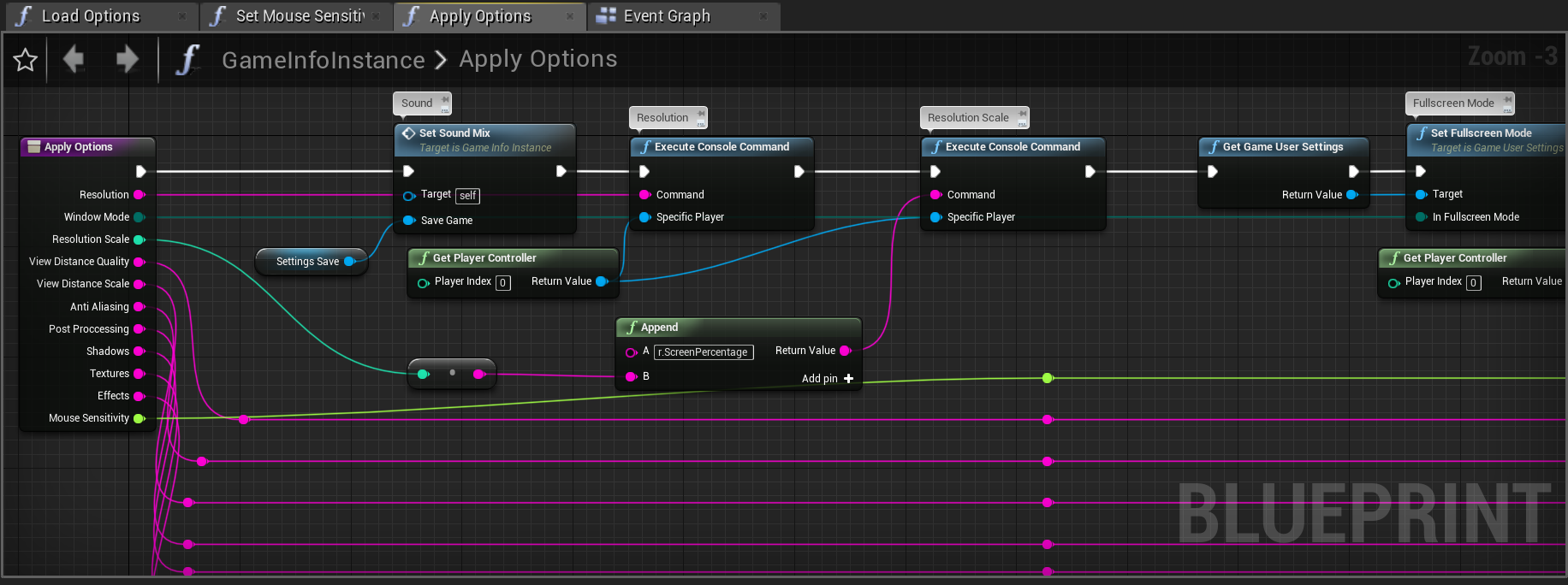
I'm sorry to interrupt the conversation. @grim ore Remember when I was telling you about a person I knew's game crashing when applying settings to file? Well I had a few other people have the same issue. I sent them a 4.22 version of the same project and it doesn't crash anymore. So from my deductions I would say something in 4.23 is causing the crash but IDK. What do you think I should do to try and fix this? I still can't recreate the crash on my two PC's. But I'm on Windows 7 where everyone else is on Windows 10. Am I doing too much on the apply function? https://i.gyazo.com/ae812472782897efddb465cb893587c2.png
 grim ore
@opal berry I believe there is a way to do that but I am not an art expert, #graphics might have the exact settings for that.
@unreal comet my only thought just seeing that is you are mixing game user settings and console commands and that might be causing issues
viscid jetty
So I've got a custom cursor, made via Project Settings -> Engine -> User Interface -> Software Cursors it shows perfectly when I launch the program, but as soon as I close a widget and open another, the cursor goes back to default.
Any ideas why? and how to fix?
opal berry
Thanks for you Help Mathew my mind would have exploded if I moved on without understanding this lol
your*
grim ore
there is a TOOOOON of stuff once you start getting into graphics and lighting and so many options to tweak. Once you start getting to that level 80.lvl has some good articles about proper lightmapping if you get bored
plush yew
hello everyone 🙂 nice to meet you all
grim ore
aHoy hoy
plush yew
hows everyone doin? im BRAND new to unreal engine and have no prior experience, but am excited to get started
unreal comet
@grim ore Thanks. Yea I think I'll have to redo some of the video settings stuff so that it doesn't use console commands anymore.
grim ore
@plush yew doing horrible, having to work in UE4 all day is the worst
grim ore
the last thing he said was he got it fixed, he increased the lightmap resolution on the landscape
vivid narwhal
I know you can retarget animations to a different mesh and animation blueprint, but can I retarget a mesh to be an alternative mesh of an existing blueprint?
 storm venture
this is going to sound stupid but i dont know how else to phrase this:
when i have a ue4 scene open, my computer makes clicking sounds, if i minimize ue4, the clicking immediately stops, what gives?
 frozen pond
not sure is this channel is correct, i need to reearange this static meshes, but i can't drag them...
(i need to change order of static meshes)
grim ore
@storm venture perhaps one of your fans is speeding up due to the extra GPU/CPU use?
storm venture
@grim ore wouldnt that be delayed? it's definitely an instant reaction
vivid narwhal
@storm venture are you using a SSD or HDD?
storm venture
both, but ue4 and my OS are on SSD
grim ore
it should be delayed yep but I dunno your system 😦 Super weird tho, could be the drive like above or something like coil whine from the GPU (but thats not ticking)
storm venture
yeah ive heard the whining before when i have certain scenes open or if im rendering something, but this has a very distinct noise
grim ore
is it every UE4 project, like a new blank one does it?
vivid narwhal
I'd recommend testing it by disabling your HDD and see if it still clicks, clicking noises are usually a HDD. Otherwise you'll have to check each fan using the fan manager to speed up each fan to see if it makes a clicking noise
grim ore
@frozen pond re arrange them how? they look like they are all children so the order shouldnt matter in that list
storm venture
seems not to happen in a blank scene
grim ore
maybe you have some sound playing lol
frozen pond
@grim ore they are static mesh component but i'm changing materials in loop so it don't look good
storm venture
lmao it's definitely mechanical and in the pc 😛
if you can imagine the sound of a handheld airpump being pumped with a small click sound, it sounds like that
which worries me because i have a liquid cooler, lol
frozen pond
@grim ore
storm venture
about 4 clickypump sounds per second
grim ore
oh yeah you might want to not do that because the order is never guaranteed. what if it changes later?
make an array on begin play or construct and put them into the array in the order you want then you can use that array for looping thru
frozen pond
not possible, got main class for building blueprint then creating multiple diffrent childs of that one so i can't define what order will be
grim ore
you can have the blueprint that has these items in it contain the array and then get that array
frozen pond
you mean, make array in mother ship class and then fill them manual inside of each child ?
grim ore
yes I guess? You showed a components list you wanted in a specific order so that must be in a BP. Inside that BP have an array which is just those components in the order you want.
grim ore
begin play or construct -> make array -> hook up the components to the pins in the order you want yep
 cerulean sundial
Hey guys, I was wondering if u guys could help. I have a problem, where basically I have made my sequence animation where at the end I have my screen faded so its black and from this point I want to play media track with End Credits and then quit the game, could anybody give me tips how could I do that?
grim ore
that should work just make sure it's called of course
frozen pond
just small question, how i can have acces to that in child blueprints ?
grim ore
the event or the variable?
cerulean sundial
From here, sequencer make my screen black and then I want to play the media track, however if I simply put media file into squencer it doesnt do anything, any idea how? Plus I also want to make it quit the game..
grim ore
you should be able to override it by just calling it in the child and doing the same thing
either would work if the child calls it the parent should not get called as well unless you call parent. If you plan on just overriding it in every child then yes a blank event is perfect
frozen pond
thanks !
grim ore
@cerulean sundial you can add an event track, call an event at that point, in the event you can play your media track and then call quit when its done
I've never used media tracks inside of sequencer itself so that might work as well somehow lol
lets find out lol
yep it should work https://docs.unrealengine.com/en-US/Engine/Sequencer/HowTo/UsingMediaTracks/index.html but you need a texture that it's supposed to be playing on so perhaps a UI element or something else that shows up at that point when you tell it to play
cerulean sundial
Bascially I made animation after I reach roof of my game, it play an animation and after that animation ( made in sequencer) I want to play media file I made in another program and then quit
Yes, I read that documentation but was unable to make anything out of it :(
I dont think thats exctacly what I want
For example every game has it, after game ends they play end credits
and then game ends
this is what I want to do also
I already have a video with end credits
grim ore
I would assume for UE4 you would fade out after your animation, show a UMG widget on the screen with your media texture material on the image, play the media file, then call quit when it's done
cerulean sundial
But I think If I fade out screen and play umb widget it wont be visible cuz I faded the screen alrdy
I thought it would be alot easier
Like its basically in every game there is on the market
grim ore
@cerulean sundial let's assume it's basically in every game there is on the market, how do they all do it?
cerulean sundial
Exactly, I am sitting for like 7 hours already trying to figure it out :P
vague sable
it appears that when UE4 exports a FBX if multiple material slots are using the same material they get discarded? so you have to temporarily change the materials in additional slots on export to preserve their definitions
grim ore
I just tested what I thought would work and it does. I have a media player with the media file saved as a playlist. I created a UMG Widget with a fullscreen image and set the image brush to the media player material. I added an event track to my sequence and created an endpoint in it (custom event) that would create the widget and add it to the viewport then I told the media player to play and it plays full screen video
cerulean sundial
Oh wow, I will try to do it now, I am beginner so fingers crossed :P
Doing now the widget with tutorial
plush yew
I have a generalized question for you guys
vivid narwhal
I have a generic answer for you
plush yew
I'm about to start my first project. Where would you guys recommend starting?
Lol nice
vivid narwhal
blueprints or C++?
plush yew
I'm gonna have to go with blueprints
cerulean sundial
plush yew
No. I have no experience
cerulean sundial
Weird, I cant add my media texture to image brush
cloud cobalt
The answer is the same, programmer or not - Blueprints
plush yew
I've always wanted to make games and being my imagination to life
vivid narwhal
pick a genre of game you want to make and make something really simple from tutorials then expand on that as your knowledge grows beyond following a step-by-step
plush yew
Bring*
cloud cobalt
Start with Pong
grim ore
@cerulean sundial right click the media texture in the content browser and tell it to make a material out of it, you use the material
vivid narwhal
yeah whatever idea you have, half it, then half it again, then half it once more
plush yew
P0nG
cerulean sundial
@grim ore right, thanks alot bro!
plush yew
That's a lot of halfing. But tiny pieces are easier than a massive project
cloud cobalt
Actually start with FizzBuzz, but... in UE4 it's a bit pointless.
plush yew
How much of a p.i.t.a. is Nintendo about fan games
cloud cobalt
Very
plush yew
Darn it
plush yew
If it somehow managed to get popular, they'd shut it down right?
cloud cobalt
Yes
 rotund scroll
absolutely
frosty bloom
I'd have to go with Bethesda tbh
plush yew
Rats
crude vessel
@plush yew I found this helpful

raywenderlich.com
In this Unreal Engine tutorial, you will be guided through installing the engine, navigating the interface and creating your first game object.
plush yew
@crude vessel thank you sir
cloud cobalt
Your first game won't be popular anyway, either
vivid narwhal
no harm in doing a fan game as your first project to learn, just don't think about ever publishing it
crude vessel
I like it vs video tutortials because you can go back and overview stuff easier than having to follow a strict video timeline
Yeah I mean, you can do a game just for yourself.
rotund scroll
a fan game is terribly vague, especially for a first project
a first project should be well defined
plush yew
Yeah you're right. As disappointing as that is, it wouldn't work. I'm just really really upset with the quality of the new pokemon games and wanted to make something of my own
cloud cobalt
Doing a complete game by yourself that isn't too terrible is a great achievement
A very rare one, too
Think less Pokemon and more Angry Birds
rotund scroll
but muh pokemans
plush yew
Ah I see
cloud cobalt
Even a clone of Blue is a shitload of work
plush yew
I tend to jump face first in the deep end without thinking. Or even a plan
cloud cobalt
Everyone does, and spends years doing a shitty game that no one wants, at best
Usually people just give up
 cedar snow
stranger handing out hopelessness 😛
cloud cobalt
Oh no, I'm not
cloud cobalt
This is actually me hoping that someone won't do it
plush yew
Really? Dang I'm sorry to hear that guys. But I appreciate your advice. I'm 22 have I started late?
cedar snow
give up or start game dev?
cloud cobalt
No, you haven't started late
rotund scroll
way too late
vivid narwhal
if you don't start at 2 you're too late
plush yew
Lol
rotund scroll
we can't all be savants
frosty bloom
That's the spirit
vivid narwhal
I started at 23
plush yew
Lmao I'm not looking to be Mozart 👀 I just wanna make things
rotund scroll
also a symphony is something that can actually be written a single person
vivid narwhal
but my students tend to start at 16 with the real basic stuff
rotund scroll
by contrast making a game requires a skillset that goes far beyond the spectrum Mozart used
so what I'm saying is, successful one man indie teams > Mozart
cloud cobalt
Basically, modern games are made by 300 people with 100 different jobs that each require years of training, so you're not going to make Pokémon alone. But you can do something much smaller, learn a whole lot, and then find other people with experience who want the same game idea.
rotund scroll
or at least > Mozart, aged 10
cerulean sundial
@grim ore I have a problem with this material, after I assign it, it says 'This material doesn not use the UI Material', no idea whats that
pallid talon
Question, I saw a video once where someone had their exterior directional light set to 8000. Is that overkill or am I missing something? I thought a good sun light/directional light was around 16-24 on a bright clear day?
rotund scroll
@cerulean sundial you gotta set the category for your material to UI
domain*
or whatever they call it
cerulean sundial
@rotund scroll I right clicked on the Media Texture and just clicked Create Material
@rotund scroll How do I set the category for it?
Ohh I got it!
thanks
 graceful stream
Hi there, so i completed the online tutorial called "your first hour with unreal engine" from the official unreal website. And now im looking for what to do next
So if you have suggestions on some tutorials to build up some basic knowledge/skill, it would be great^^
(if this is the wrong channel for that question im sorry)
cerulean sundial
@rotund scroll But I have the problem, I do all the same as a guy on tutorial and he has his video played and mine is only black screen, any idea what I do wrong in the widget?
rotund scroll
short answer: nope
viscid jetty
@graceful stream I like https://www.youtube.com/playlist?list=PLL0cLF8gjBpqGJwEe5XL5mSL8UvwwVMKu

YouTube
Ever wanted to create your own survival horror game from scratch? Well now's your chance, we go over how to create a terrifying survival horror game from the...
plush yew
Is it normal that if I digest information by watching somebody do something? It doesn't always stick
Like, I need to do it myself many times before I get it mastered
vivid narwhal
well glad I just did a backup because I broke my project
plush yew
OUCH how
vivid narwhal
Yeah that's normal
cloud cobalt
Yes Banksy that's how most people learn
vivid narwhal

By Felicity LuHill April 17, 2017 When encouraging kids to read, it’s important to note their specific learning styles. Every child has his own way of learning and trying to make him learn through a different method can prove to be frustrating and counterproductive. W...
plush yew
Oh that's a relief
unreal comet
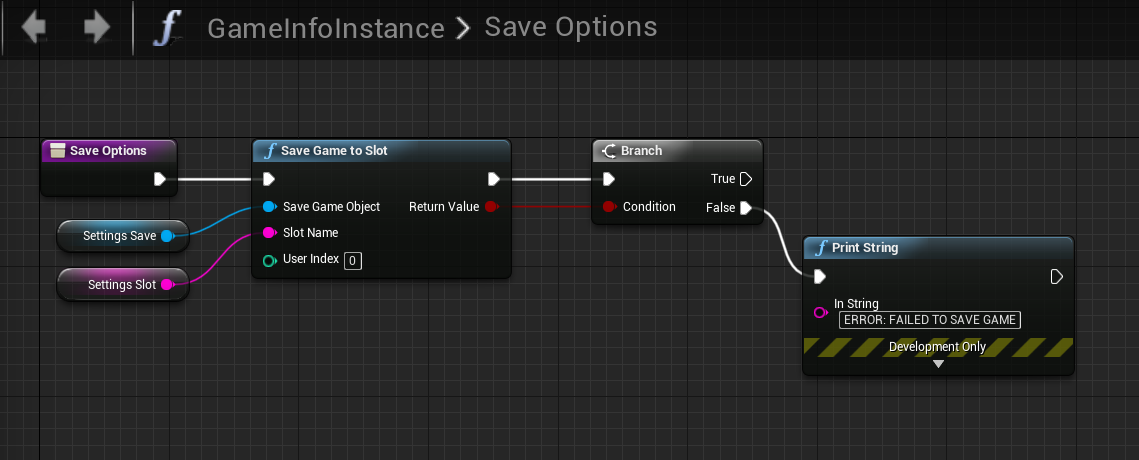
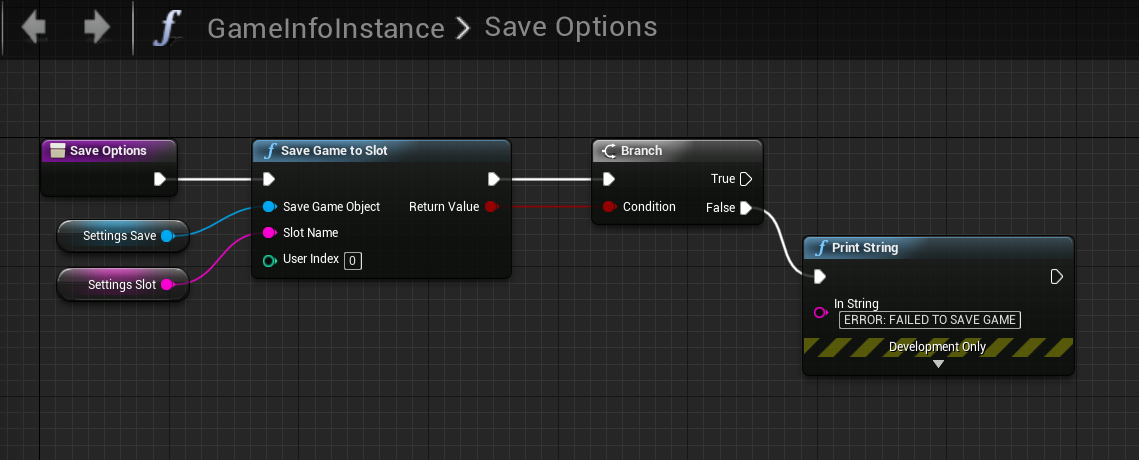
@grim ore So I removed everything from my apply button accept the save to slot function and it still crashes. So I'm thinking it's because of a bad value or a null value? Did 4.23 add something that made this not work right? https://i.gyazo.com/072ac713d9c5a80d8cafedfb682639d2.png
 graceful stream
@viscid jetty thanks, i am very new into unreal engine and i am a bit more interested in enviromental design like those unreal engine speed build videos on youtube. (im aware that they are at a very high skill level but yeah, something in that direction would be great^^)
vivid narwhal
@plush yew I was trying to replace one of the paragon assets with the blank mannequin skeleton to get rid of the fact that the paragon asset has a sword attached, and rather than go through the long process of retargetting all the animations I needed and making a new animation blueprint from scratch, I tried to import the mannequin to use the greystone skeleton, which broke everything (Hence why I made a copy of the project before attempting)
If you don't get into the habit of making backups and version control, you're going to have a bad time as an indie dev
plush yew
O.O I tend to forget doing that. I'd better work on that
Maybe a simple, 3d platform game would be a start?
vivid narwhal
yep, that'd be a good place to start
you'd learn about animations, such as jumping, add in some moving platforms and that'll teach you basic sequencer
my first project was a jump puzzle and it taught me all about creating and importing assets (If you have 3D modelling interests)
plush yew
I do actually. I'd like to know a good program for making 3d models
vivid narwhal
Well
Maya/3DS Max would be what big studios use, but most indies will be using Blender
rotund scroll
blender is almost usable now I hear
so it may be worth getting into
keep in mind learning any 3d package is its own little slice of hell
swift spindle
beware... trying to lean this many things will become unattainable very quickly.. pick an area and focus soon
vivid narwhal
yeah, pick one thing and get kind of good at it
 short geyser
random rant I love when I'm typing a super long comment in a blueprint and autosave kicks in and just erase what I typed. Yay.
plush yew
Awwwww that's a thing...?
vivid narwhal
yep, autosave will get annoying sometimes, but it's better than not having it on imo
plush yew
So is Ray tracing as painfully confusing as I imagine it to be
vivid narwhal
not at all
plush yew
What's the difference between current lighting techniques and Ray tracing
short geyser
as you can tell by the no-response, this is a huge question. There's many great youtube videos that does explain the difference very well
viscid jetty
Hey I'm importing a .obj from Blender, and a tutorial I'm following says to make sure Auto Generate Collision is turned off but Unreal won't let me uncheck Auto Generate Collision. What am I doing wrong? or what do I need to do to let me uncheck that box?
sturdy schooner
not sure about the checkbox, but you could always just remove it after importing it
vivid narwhal
Is there a way to change the search filters to only affect the current open folder
graceful stream
hi my unreal engine is "very slow" i have an i7 7700k a gtx 1080ti and 32gb ram, is this normal?
dim plover
No, those specs are pretty good -- shouldn't be "very slow".
 uneven tundra
It seems i changed the base starter kit items in UE4, is there a simple way to "reset" them?
viscid jetty
@vivid narwhal this allows you to search in the opened folder
grim ore
@uneven tundra which "base starter kit" items? Is this the starter kit that you can choose when you create a new project then yes click the Add New button at the top and go to feature packs at the top and go to content packs in that window then try and add the starter content again. Resetting them? Not really depending on what you did you would just have to replace them.
@plush yew https://docs.unrealengine.com/en-US/Engine/Rendering/RayTracing/index.html has some info but basically ray tracing is real time for neato looking stuff that is more realistic while the other methods are either not in real time or not as high quality/less realistic
plush yew
Fallen Order seems to suffer from pop up and freezing
is streamming bottlenecked by HDDs?
graceful stream
@dim plover i had my taskmanager opened while working and my cpu was at 100% while my gpu was practicly inactive, do i need to select my gtx as the graphicscard (maybe its using the intel hd)
grim ore
@graceful stream what was the engine doing when this was happening? compiling shaders?
graceful stream
yes
grim ore
then that is why it is running slow, once that is done it should be fine. Compiling shaders is 100% cpu and the engine is near useless when it does that
sturdy schooner
@next badger thats a limitation of screenspace reflection technology. youre going to want to look into applying a cubemap (or similar) to your waters surface to supplement the screenspace reflections
basically, screenspace reflections rely on manipulating whats already rendered and, when those objects like the tower are outside of the players view, they cease to render, which is why they arent visible in the reflections
graceful stream
@grim ore ah okay i see, thank you^^
vivid narwhal
Let's see....
Animation Montage plays when I drag it in the scene
Character Blueprint has the correct mesh and anim class
But when I try to trigger Play Anim Montage which the montage dropped in, it doesn't trigger
grim ore
Is the montage and the anim BP set up to use it? https://docs.unrealengine.com/en-US/Engine/Animation/AnimMontage/UserGuide/index.html
 uncut osprey
What are the options in UE for deforming meshes?
I've heard of 4 possible approaches I can look into: rigged, morph targets, procedural meshes, and mesh deformation along splines.
I want to be able to have terrain that changes shape... like a road that undulates, etc.
Any other/better approaches anyone might know of that I should think about?
vivid narwhal
you want to create terrain seperate from using the terrain tool?
you could use tesselation to create bumps and cracks or you could paint the road directly onto terrain
 uneven fractal
snap point systems suck
 sharp crest
SSD questions:
- Does an SSD make the engine load and save files faster? (Not only initial engine loading, I mean specific files too when working with the editor)
- If it's a yes to 1, then should I put the engine files on the SSD or the project files, or both?
uncut osprey
Can the terrain tool let you make terrain that moves?
sharp crest
what does 'moves' mean? lol
u want to animate it? not possible
 gloomy apex
uncut osprey
gloomy apex
uncut osprey
Yes animate, undulating like a wave
sharp crest
not possible
gloomy apex
for the life of me I cant figure out why objects paranted to the camera jitter like that with emmissive
uncut osprey
So no terrain tool then
 autumn turtle
anyone know of any tutorials in creating a spherical map? basically trying to create a small... planet, I guess, to free roam in.
uneven fractal
it's part of the material
uncut osprey
Do you know if that would at least allow raycast hits?
uneven fractal
you could make the verts of the landscape themselves behave like waves but it's merely visual
grim ore
@sharp crest the SSD has faster access time and read/write times. Anything that can benefit from that would benefit from that. For UE4 the engine/editor usually loads only once so not a big deal but your project might access non engine files a bit depending on what you are doing. If you have the space I would put both on as in the end it's just simply faster than a mechanical drive.
uneven fractal
not only that some projects get massive so you end up enabling on demand loading which makes the ssd more noticable
uncut osprey
A long time ago I found (or at least, I thought I found, could've been wrong) that I couldn't use raycasting against a deforming mesh unless the physics engine was rebuilding itself each tick it deformed
sharp crest
@grim ore for a blueprint only project will ssd help with saving and loading?
so say I save/load a map or a blueprint I want it to be faster
uncut osprey
I imagine I'll find out how UE behaves in that way
uncut osprey
No, I literally want ground that moves
uneven fractal
why
uneven fractal
landscapes probably aren't the tool then
making the verts move around is one thing but if you want the player to walk around on it then that's just not a great idea
might want to check out some sort of voxel system
uncut osprey
When you say tesselation and landscapes, are these referring to the same tools?
uncut osprey
ah
uneven fractal
here I'm tesselating the landscape to make snow trails
uncut osprey
What makes that a bad approach?
uneven fractal
but it's all visual my players feet are still at the original landscape level not the landscape + snow
grim ore
@sharp crest literally anything accessing the SSD will be faster, it's just the way a SSD works. for your saving and loading a BP it might be CPU related as well if it has to load/compile your code and systems
uncut osprey
Do you know if a raycast can hit the snow after/as it deforms?
uneven fractal
landscapes were created to allow players to sculpt a static landscape in engine instead of with a 3d modeler
they aren't really designed for dynamic stuff like that
uncut osprey
Yeah I see
 frosty heron
is there a way to see the center of mass for a static mesh?
uneven fractal
I don't think they can since materials are client side only...
uncut osprey
But it sounds like it could be a possibility still
sharp crest
@grim ore I see
thanks for the help
uncut osprey
I'll check out a voxel system too
I don't think they can since materials are client side only...
Ah ok
Thanks for the pointers
uneven fractal
just procrastinating working on my current abomination
dim plover
Pretty sure that just means you saved that asset.
sturdy schooner
@gloomy apex those objects are in the final scene and subsequently included in the velocity buffer (for motion blur). move those objects into the UI to prevent them from receiving motion blur
 light vigil
When dropping actors into my level, it positions them below the floor - seems to do with having a scale on their capsule component
Anyone know how to fix that?
grim ore
@frosty heron if you click on show in the viewport, then advanced, then mass properties a new round widget should show up that shows center of mass but... I dont know if it works right all the time
uneven fractal
triple nested loops my favorite
sturdy schooner
@gloomy apex looks like there was some discussion in https://answers.unrealengine.com/questions/71050/excluding-object-from-motion-blurr.html with a suggested workaround linked at the bottom. no guarantees
grim ore
@light vigil it should use collision on the object you want to drop it on and the pivot point of the actor is where it should be trying to snap to the floor
gloomy apex
thanks
uneven fractal
snap points are really quite miserable to make
 main chasm
OH MY GOSH
IT'S STILL THERE
HOLY CRAP THIS FREAKING ASSET PACK IS THE BANE OF MY EXISTENCE
grim ore
the green words from earlier was just you saving the material, nothing weird about that
frosty heron
@grim ore thanks! I was able to find the center of mass, and now my thrusters don't add tons of extra torque :D
grim ore
🙂 yep you can adjust the center of mass if you didnt notice that as well @frosty heron in the details panel
frosty heron
harder to know where to offset it to if I can't find it in the first place xD
grim ore
yep makes sense to want to see it then lol
plush yew
anyone ever had their controls inverted? Idk why but my third person BP(the base starter content one) has its controls inverted
up is down, down is up, etc
light vigil
@grim ore How do I change an actor's pivot point?
vivid narwhal
@plush yew sounds dumb but is your gamepad inverted on anything else?
uneven fractal
he did a whole video on pivot points lol

How does a Pivot work in UE4 on a Mesh and how can I adjust it inside and outside of the engine.
frosty heron
um... I have one other question, I have three thrusters, but I can only fire one at a time
light vigil
I didn't realize I was talking to that mathew
HE IS A HERO
OF THE PEOPLE
🎉
I have watched millions of his very helpful videos
❤
grim ore
🙂 @light vigil glad some of them helped
@plush yew is it just up and down that is backwards? what is your input axis scale set for look up? and is it using mouse or gamepad lol
@frosty heron is it only 1 event that is firing at a time? have you checked to see if more than one can actually fire at a time (keyboard buffer not letting more than 1 key down at a time?) add a print string at the end of each FIRE event and see if when you press A it prints the string then holding A you press D and it shows another print string
that atleast lets you eliminate the keyboard being an issue and then at that point it's your code lol
frosty heron
good point, it might be my keyboard
light vigil
@grim ore I'm not sure if the pivot point is the exact culprit here, could you confirm for me by chance? In this case I am not changing a static mesh actor, but a regular actor for a character with a collision capsule. So the pivot point is center, but as I drop it in, it'll correctly snap to the bottom of its collision capsule and looks normal. If that collision capsule gets scaled (either at start, or after dropping it in, breaks in both cases), it no longer obeys the collision capsule needing to be above my floor
Whereas if I scale up a static mesh actor for example, it does snap correctly above the floor
Ahh but that thing's pivot IS at the bottom, hmMmMmMmmmm
grim ore
well the difference I can see there is yep
light vigil
nevermind, I am maybe dumb
grim ore
your scale is going to always be up on the bottom one heh
light vigil
can I change the pivot of an actor too? Or just static mesh actors
uneven fractal
just change the offset of the static mesh in the actors components
light vigil
The static mesh actor is correctly set to pivot, but that doesn't seem to be the pivot point of the actor itself