#ue4-general
1 messages · Page 576 of 1
 opal berry
 plush yew
fixed
@opal berry there is good free too
how to do like this
is this just casting?
opal berry
@plush yew what is the name of the free one
plush yew
@opal berry open world demo collection
 dry shuttle
Hello does anyone know where i can find some good documentation for adding cheats to my game?
 oblique raptor
Hello, is there a way to change the default loaded map in a project outside of the editor? I managed to make it crash on a map that is the default and now its crashing every time. Help will be appreciated!! 🙏
 dry nebula
no, but how do I fix exporting my game?
dry shuttle
@oblique raptor look in the DefaultEngine config file of your game
theres a section called scripts/enginesettings.gamemapssettings
plush yew
Hello so custom built unreal engine from source code is crashing after a powerloss during saving im only opening editor and not the project.... what is going on this is the error i have
Faulting application name: UE4Editor.exe, version: 4.23.1.0, time stamp: 0x5dcf7ae4
Faulting module name: ucrtbase.dll, version: 10.0.18362.387, time stamp: 0x4361b720
Exception code: 0xc0000409
Fault offset: 0x000000000006db8e
Faulting process id: 0x65b0
Faulting application start time: 0x01d59d8136bfaaa8
Faulting application path: E:\GDK\Engine\Binaries\Win64\UE4Editor.exe
Faulting module path: C:\Windows\System32\ucrtbase.dll
Report Id: 62aa4121-bb94-4dc9-aedc-2857ef5bf1ef
Faulting package full name:
Faulting package-relative application ID:
Corrupted
Fault bucket 1618265153415991083, type 5
Event Name: BEX64
Response: Not available
Cab Id: 0
Problem signature:
P1: UE4Editor.exe
P2: 4.23.1.0
P3: 5dcf7ae4
P4: ucrtbase.dll
P5: 10.0.18362.387
P6: 4361b720
P7: 000000000006db8e
P8: c0000409
P9: 0000000000000007
P10:
Attached files:
?\C:\ProgramData\Microsoft\Windows\WER\Temp\WERBEEC.tmp.dmp
?\C:\ProgramData\Microsoft\Windows\WER\Temp\WERC67E.tmp.WERInternalMetadata.xml
?\C:\ProgramData\Microsoft\Windows\WER\Temp\WERC6AE.tmp.xml
?\C:\ProgramData\Microsoft\Windows\WER\Temp\WERC6BC.tmp.csv
?\C:\ProgramData\Microsoft\Windows\WER\Temp\WERC749.tmp.txt
These files may be available here:
?\C:\ProgramData\Microsoft\Windows\WER\ReportArchive\AppCrash_UE4Editor.exe_e25ca9065922ce07547dfaa2a7c951617087c0_070079d8_b0294400-af1d-49ac-921c-801218e8fbea
Analysis symbol:
Rechecking for solution: 0
Report Id: 62aa4121-bb94-4dc9-aedc-2857ef5bf1ef
Report Status: 268435456
Hashed bucket: 50248493fbcf67b676753b9545c0cf2b
Cab Guid: 0
Does anyone know what is happening and how to fix it
oblique raptor
Ahh @dry shuttle , thanks! Found it!! Cheers
dry shuttle
welcome
 abstract relic
This weekend theme is in: engine crashes
 merry gazelle
Guys help me my car broke. Not in UE, i mean real life
merry gazelle
Lol just joking around
merry gazelle
Any mechanics in chat?
plush yew
im trying to recover my game else i've lost like a lot of $$$$
il try wiping ddc
Hopefully it loads.
:/ im scared.
Does anyone know if DDC fixes problems sometimes
opal berry
@plush yew i fixed the shadows by making my light source to static too
but its werid because I had it on stationary and made it look werid
but isnt Stationary spouse to mean both?
plush yew
opal berry
but when i use static for my trees and stationary for light source and build lighting I get a weird looking shadow that sucks
 tawdry lodge
maybe look up about lightmass settings
light map resolution etc
idk
maybe you just have to tweak some value
 wispy raven
hi! i would like to make the camera smoothly rotate/pointing at the player (top down view with third person template), how should i do it?
abstract relic

A couple of blueprints to make a set of actors automatically orient at edit-time toward another actor. This behaviour can be useful for artists during the creation of an environment in Unreal Engin…
 dawn gull
Hey, does anybody have a sort of basic idea on how the team of Snake Pass made the body and if there is any documentation on how to create that character?
Please ping me
 manic pawn
..make it not transparent? what's the issue here 
 copper elk
the highlighted but is a border which is purple (I want it to be a be transparent, that is done on purpose)
I want it to be transparent
manic pawn
how do you expect transparency to work if not by slightly tinting the background?
copper elk
well idk
is there a solution where I can have two different colours or not?
with it being transparent...
abstract relic
That’s not the definition of transparency 😜
plush yew
Perhaps have the background texture not extend all the way down to where you want the border to be at.
Set up a vertical box, put the background texture on top and the transparent border thingy below it.
hey, guys?
I have AI, and I want them to alert each other when they see a player to come to their position
how would I do that?
One approach would be to have an event handler in your GameMode or GameState, and have all of your AI bind to that event. Then when an AI sees the player, it calls the event. So now all the AI, including the one that spotted the player, will fire that event where you can handle the logic.
wouldn't that be with blueprint AI?
I'm using a behavior tree
also never messed with a gamemode or gamestate
I am talking about behavior tree AI with blueprint. I don't know how it would work in C++, but it must be the same.
then how exactly would I handle an event in the gamestate that connects to the behavior tree?
I'm just not sure in the first place of interaction between ai and ai
I think you should not allow the AI to let each other know, but rather have some system that let's all of the AI's know, similarly to what I recommend. I can't help you out with implementing it though
I don't know, I tried having a stimuli source as well on the AI controller, and sending out a noise event when they see
tried both after activating cansee on the blackboard, and also first node in the canseeplayer part of the behavior tree
the sound does play when putting it in the behavior tree like that, but, it doesn't work to alert them to the location
and, as I said, I've never messed with gamestates, so I'm not sure about that
 stray smelt
Suddenly I have materials where texture references have been broken, even though nothing in those assets have been changed. Someone else who checked the same file (SVN) and doesn't have this. Is there some cache/temp data on my computer that could cause this?
 swift spindle
you could try clearing your intermediate folder
stray smelt
hmm ok it seems like the textures are in the correct folder, but they're not showing up in the editor. I can find them in the win folder
swift spindle
if they were moved around in content browser... but then not saved... or the pointers got lost... these can all cause this problem
stray smelt
ok, but I'm deleting the assets then re-downloading them from SVN and they're still broken? where is whatever data that is corrupted/causing them not to show?
the problem isn't that the references are broken, but that the assets they're referring to are simply not showing up in content browser/UE4
swift spindle
are your files 1k by any chance ?
 robust flume
I hope this is the right place to send this. So i recently bought the new ''Star Wars Jedi: Fallen Order'', which uses Unreal Engine. So ingame, there is a bug that causes fog to turn green and black. It looks really bad and i found no one having the same issue. I didnt even find a good support to send this issue to. Does anyone know what this is and how to fix it?
stray smelt
+2k
swift spindle
@robust flume not the right place at all... but that bug is most lilkely because some files got messed up.. or your video card is old
robust flume
@swift spindle okay, do you know where i could get help for this?
swift spindle
your best bet is to look at the games official forums https://answers.ea.com/t5/Technical-Issues/bd-p/star-wars-jedi-fallen-order-tech-en

Technical issues with STAR WARS™ Jedi: Fallen Order™? The player community may be able to help.
robust flume
okay thank you very much.
 regal radish
Quick Q. can you use Megascans to texture a custom wall (in blender) for ue4.. or is it strictly for megascans ue4 use only (ms-ue4) or (ms-blend-ue4) [The Quixel deal with Epic]
 tight birch
How do you change the resoluttion your game renders at and whether or not it should be fullscreen or not, in godot this is in the project settings but I can't seem to find it there in UE, i can only find resolution scaler which is fine and all but i would prefer to change the actual resolution
regal radish
Because on the web info it don't rly specify
tight birch
well it sounds like megascans are free for ue4 users, idk about actually using them in engine though
regal radish
ye @tight birch
down arrow on settings at the top then scalability i think @tight birch
tight birch
That's the resolution scaler though not where you can set the non scaled resolution
like I dont want to set a % value I want to set an actual width and height avlue (in my case 720p fullscreen)
regal radish
ok i just looked im pretty sure its the get default resolution in components
with other actions conncting.. theres also one for windowed and fulscreen..
tight birch
what menu are the components in
regal radish
im not sure how you'd set it up with some ui so you can select to your desired one like if you where actualy playing the game (game-options-video-resolution dropdownmenu... with resolutions)
im a noob @tight birch sry
tight birch
Oh i thought you meant an editor setting
you mean actually coding a gui to change it ok
regal radish
i seen it in bp you right click then (get default resolution)
swift spindle
@regal radish you can use any of your software to work on megascans files.. but you can only release it in a ue4 build.
swift spindle
networking mostly
 sharp crest
Is it public for everyone even people not on Epic Store?
sharp crest
Yes seems very beta as there was no announcement 
Having an issue with removing foliage about file changes:
- I made a level with foliage and foliage types.
- I sent the level file and the foliage type files to someone.
- He added foliage and sent me back the map and foliage files (he added some foliage type files too)
- I can now no longer erase foliage using the paint tool or select it using the lasso tool. However I can select specific foliage and remove it.
- Newly placed foliage by me works just fine and can be removed using any tool correctly.
Any idea how to fix/avoid this issue? Please ping me when you respond. Thanks.
 thin tendon
Hey guys. I want to store a colour as a global that I can use for all of the widgets in my game. Can this be done with a material parameter collection or is there a better way to do it. I want to be able to save and load the colour.
 molten grove
Hey, so um I have a question, I don't even know if what I want to do is possible, So I'm trying to do some ''procedural'' street generation, I use a spline to define the path for the street and I'm generating the buildings on each sides of the street in the contruction script with random integers to determine the meshes, but the thing is that I want to ''Lock'' the layout so that I can add some assets manually. I'm kinda new to this so it might be a completely wrong way of doing this but I really don't know how to do the ''locking'' mechanism 😫
swift spindle
@sharp crest its most likely he created another foliage actor...
 swift spindle
when your in the foliage tool.. you'll notice some options at the top.. about single instance and whatnot... this is a per user setting
swift spindle
awareness more then anything else =/
 swift spindle
.>
sharp crest
ok will try it once I load the map again, thanks!
 vagrant spindle
anybody interested in working on a star wars jedi knight VR ? 😂
swift spindle
paid ?
sharp crest
thats the ultimate question ^
 distant depot
Does anyone here have experience working with a character that uses a very large number of animations, like several thousand? Or if anyone knows anyone who does.. pm me please if so. Thank you!
 normal burrow
#looking-for-talent if your looking for help
 random moon
IT depends on what you're trying to do?
sharp crest
u can write that or just write what u want to actually get people to care 
normal burrow
yea ask a question otherwise
random moon
question: what exactly becomes a subsystem in ue4? does an inventory system? cover system? etc
swift spindle
I've worked with hundreds before.... but thousands...
vagrant spindle
thousands? i cant even imagine that many animations
normal burrow
sora its up to you
vagrant spindle
btw @swift spindle not paid lol im broke af
random moon
i find that the documentation for ue4 is grossly lacking. i can design stuff outside of the framework of ue4 but i have absolutely no idea (in ue4) whether somethings should be a subsystem or just a independent code.
normal burrow
if your referring to actual subsystems ```cpp
/** Subsystems are auto instanced classes that share the lifetime of certain engine constructs
*
- Currently supported Subsystem lifetimes are:
-
Engine -> inherit UEngineSubsystem -
Editor -> inherit UEditorSubsystem -
GameInstance -> inherit UGameInstanceSubsystem -
LocalPlayer -> inherit ULocalPlayerSubsystem```
so would inventory need a subsystem? it matters if you need a singleton for it more or less.
random moon
well considering my design currently is for a coop game. def not a singleton
random moon
@normal burrow is there a documentation vid, page, item, that you use to understand this?
normal burrow
always read the headers for the stuff. pulled that directly from Subsystems\Subsystem.h
other documentation is iffy usually.
i've not seen a video on this particular subject though
an example of where you might need a subsystem, if you were pooling non-actor uobjects, you could do that sort of logic in a subsystem. you want to be careful with any objects that have a world owner though as holding references to these will pin a reference the world down, preventing it from fully destroying
random moon
many thx @normal burrow
just wish that the official documentation was many times more detailed and better than it actually currently is
normal burrow
Yea, the headers are usually the go to. The man pages for things are usually just extracted from headers. You get used to it, stuff is complicated enough to where reading what someone wrote on the subject can be very hit or miss I find. Its all very tightly interlocked usually, so trying to touch on one subject and ignore another relevant one is difficult.
 halcyon flame
is there anything important to know/avoid about attaching lights to a pawn? as in headlights
 rotund scroll
don't go overboard with creating too many of said actor
halcyon flame
how many is too many?
rotund scroll
depends on so many variables
halcyon flame
<10 ok?
rotund scroll
go with the heuristic of less is better
not just in amount of actors, but also in amount of lights per actor
again I can't give you a number because I don't know the rest of your game
just keep in mind that they eat a lot of performance
halcyon flame
do you know what kind of light to add as a headlight?
rotund scroll
I'd venture to say a spotlight would look best
and probably would be the most performant as well, although some point light specialists might correct me on this
swift spindle
if your dealing with lights... main thing to concern yourself about is shadows
plush yew
Why is my source code built ue4 around 80GB
The engine doesnt contain the assets for game
 grim ore
lots and lots of files
lots of smaller text files compile down to lots more text files then sprinkle in some debug libraries and you have a code build
plush yew
yeah but why unreal engine in epic games is smaller?
abstract relic
If you enabled Chaos, add another 40gb
plush yew
Chaos?
grim ore
you dont have all of those files that I just mentioned
grim ore
you dont have the text files that turn into more text files and binary files and debug libraries
its like making a car, you need a billion pieces and parts and machinery and warehouse space to make it but in the end your final result is smaller than what you need to make it. If you go back into VS and tell it to clean you should regain some space as it gets rid of the wasted temporary files
plush yew
anyway to make it smaller
grim ore
but.... you will have to remake them all if you change it
the compiler takes your text code and turns it into machine code for every file and then saves a copy of that machine code so it can piece together the final result. When you change 1 file it remakes that 1 piece of machine code and hooks back up what it needs. It's trying to be efficient in the event you need to change something later. If you are just compiling and never need to compile again go for a clean
grim ore
after compiling you did clean?
halcyon flame
does anyone know why I'm not able to see an effect from this new spotlight in my level? I've plopped in the pawn just to find values I like and I can clearly see the cone overlapping an unlit mesh but there is no light
grim ore
and now that you rebuilt you have all the intermediate files. Clean again if you never intend to compile again and want to free up space.
 viscid jetty
So um, where do I ask questions about the Landscape tool 🤔
regal radish
Need help I created a new (empty) project.. added character with movement but on play i fly around and characters on the ground
plush yew
I'll only upgrade in 1-2 years
grim ore
@regal radish how much basic UE4 have you learned so far in the docs or tutorials? It sounds like you have not changed your default pawn.
swift spindle
there was a point when I was rebuiling once to 2 times a day.. that was.... fun
abstract relic
Project settings >>> maps and mode >>> set your default pawn
regal radish
k 1sec
 crimson lake
Hey guys, is there something similar to a boolean function where I can contain my unreal scene into a sphere?
inside of unreal?
swift spindle
you could mask everything and make a post process to fill in the mask
abstract relic
Would do it in post process. Much cheaper to
Though, if @wary wave is lurking, didn’t you experiment with Boolean shapes beyond the crummy bps?
grim ore
you can make a 2 sided translucent sphere and just put your crap inside of it. that is what that looks like no?
crimson lake
any links I can reference? never played with post process before and my deadline is in a couple of hours lmao
abstract relic
Ouch
grim ore
hell the default skysphere is just a giant sphere around you showing clouds and sky
plush yew
@grim ore so i rebuild the ue4
swift spindle
just mask out your water
grim ore
take a sphere, drop it into the middle, scale it up, drop a new material on it, make the material translucent? I must be missing something
abstract relic
Wasn’t there an mat node for intersecting geo? Like depth fade or something
swift spindle
but there is no quick way of dealing with it
 wary wave
I've done stuff like this before - but it involves a lot of math and custom materials
crimson lake
@grim ore wanna cut the outside tho my g
wary wave
there is no 'two click solution'
crimson lake
@wary wave why you breaking my heart like this 💔
wary wave
easiest and least efficient way is to sphere mask the alpha on the mats
swift spindle
something like this needs to be planned well in advance :p
crimson lake
@swift spindle shhh let a last minute idea flourish :p
swift spindle
sorry.. I'm known as general buzzkill
 pale forge
Hello everybody... I am working on a paintball sim, and currently with projectile movement. I am trying to make it so the projectiles don't travel perfectly each time but have some variation. To that effect I have some bit of code in my Projectile class (after much googling and trial and error).
void ASBProjectile::BeginPlay()
{
Super::BeginPlay();
    VarianceVector = UKismetMathLibrary::RotatorFromAxisAndAngle(CollisionComp->GetForwardVector(), FMath::RandRange(0, 360)).Vector();
    VarianceForce = FMath::FRand() * VarianceMaxForce;
}

void ASBProjectile::Tick(float DeltaTime) {
    Super::Tick(DeltaTime);

    auto pveloc = GetVelocity();
    pveloc += VarianceVector *  VarianceForce;
    auto reltrans = CollisionComp->GetRelativeTransform();
    auto invtrans = UKismetMathLibrary::InverseTransformDirection(reltrans, pveloc);

    ProjectileMovement->SetVelocityInLocalSpace(invtrans);
}
This appears to work at first glance, but I am seeing different behavior when shooting forward and behind the player, compared to left and right. The trajectories left and right are all over the place, whereas front and back are almost straight. Can't understand it.
crimson lake
thanks for the effort boisss ❤️
abstract relic
Close to a magic button. https://m.youtube.com/watch?v=2BxrGjPcirk
What is the Material: Depth Fade Node in Unreal Engine 4 Source Files: https://github.com/MWadstein/wtf-hdi-files
plush yew
I just accidentally deleted my entire source build
grim ore
but how much trouble is this going to be since most of this is material level no?
abstract relic
Marry Mathew
wary wave
I'm not sure depth fade is what you want
abstract relic
Probably not
wary wave
needs to be a mathematical mask if you want a 'diorama' type deal
crimson lake
me here as a degenerate art student reading the word maths 😄
abstract relic

wary wave
welcome to game dev
crimson lake
lmaoo
normal burrow
maths are maths
crimson lake
fibonacci you bastard why you gotta lump art in this
abstract relic
Post process is still the way to go 😜
grim ore
I'm not an artist so I have no good idea, just ideas that don't work till you figure it out
wary wave
I would make a sphere mask material function and drive it with a parameter collection
swift spindle
++
wary wave
then you can plug that into opacity on every material in the scene
grim ore
oooh I like that idea
wary wave
expensive AF to render, but it will work
swift spindle
@wary wave you got the right idea
wary wave
this is why the people pay me the big money
grim ore
whats the non expensive way to do it?
wary wave
(they don't pay me the big money)
swift spindle
awwww
normal burrow
i just noticed the math in your name mathew
crimson lake
1- sphere mask material function -- parameter collection(?) -- what if the thingy alr has opacity in
wary wave
non-expensive ways require a lot more trickery
abstract relic
Exposure bux?
wary wave
if it already has opacity in it, then it's time to do some more maths
crimson lake
y u gotta do me like that
ok ignoring opacity i'll just delete everything with opacity
so
wary wave
(probably multiply existing opacity value by sphere mask)
crimson lake
sphere mask
abstract relic
We have no sympathy. Been there done that 😜
wary wave
I don't even get exposure bux any more because NDAs 😄
normal burrow
exposure bux non compete?
crimson lake
nda's be like that sometimes
normal burrow
(don't say anything if your exposure bux nda will be broken 😉)
wary wave
a lot of the more interesting stuff I do revolves around building systems and processes for stuff
crimson lake
I shall rape youtube on spheremasks and be back in a sec
swift spindle
exposure bux are great for losing weight and death
wary wave
but the companies I work for own said systems and processes once I'm done
c'est la vie
swift spindle
sigh yup..
abstract relic
And blocked
 strange bear
So I'm pretty new to UE and learning a lot, what I was wondering is how people make caves. Is there a "right" way of doing this? Do people just make holes in the terrain and use a mesh to make a cave? You cant just have a second terrain because it doesn't have a "roof" then. Unity has a tool called "digger" to do these things. How do I do this in UE4?
wary wave
anyway, I'm going back to sleep, it's getting on for 3am and I have jam tasks to do before work tomorrow :p
wary wave
@strange bear you had it right with holes & meshes
crimson lake
have a great one ❤️
wary wave
no problem!
strange bear
Mmh I see. That's sort of unfortunate but I guess so be it
halcyon flame
so I figured out why I couldn't see the light from my spot light... it was just too weak. I've since turned it up to maximum intensity and it is still incredibly dull in a dark space cave... am I missing something?
regal radish
Thx @abstract relic I managed to sort it out 🙂
wary wave
UE4's landscape system is a bit dated, it's derived from a system from 2009
it's had a lot of upgrades, but it still is what it is
strange bear
Yeah. We're seriously considering using unity just for that digger tool. It's just so convenient
swift spindle
also... keeping things unified for diff gfx cards is also keeping it from moving forward
wary wave
there are alternatives, such as Phy's voxel plugin
swift spindle
12 textures = boooo
wary wave
it'll cost you a small amount of pennies, but it's more flexible
strange bear
I'll check that out. Thanks!
normal burrow
yea @silver crown is easy to reach too
abstract relic

voxel plugin™
Create infinite terrains procedurally using in-engine tools. Edit landscapes in realtime. Join an active community and benefit from frequent updates!
wary wave
it has it's own caveats etc, but if you want easy cave generation, that's an advantage it has
normal burrow

strange bear
Right!
wary wave
I keep meaning to buy it myself 😄
normal burrow
plus, its not unity.
wary wave
I never get enough time to dev my own stuff these days
normal burrow
aw, super busy?
abstract relic
super asleep
normal burrow
lol, consumed in sleep. no time to dev
pale forge
Hello everybody... I am working on a paintball sim, and currently with projectile movement. I am trying to make it so the projectiles don't travel perfectly each time but have some variation. To that effect I have some bit of code in my Projectile class (after much googling and trial and error).
void ASBProjectile::BeginPlay()
{
Super::BeginPlay();
    VarianceVector = UKismetMathLibrary::RotatorFromAxisAndAngle(CollisionComp->GetForwardVector(), FMath::RandRange(0, 360)).Vector();
    VarianceForce = FMath::FRand() * VarianceMaxForce;
}

void ASBProjectile::Tick(float DeltaTime) {
    Super::Tick(DeltaTime);

    auto pveloc = GetVelocity();
    pveloc += VarianceVector *  VarianceForce;
    auto reltrans = CollisionComp->GetRelativeTransform();
    auto invtrans = UKismetMathLibrary::InverseTransformDirection(reltrans, pveloc);

    ProjectileMovement->SetVelocityInLocalSpace(invtrans);
}
This appears to work at first glance, but I am seeing different behavior when shooting forward and behind the player, compared to left and right. The trajectories left and right are all over the place, whereas front and back are almost straight. Can't understand it.
 grave nebula
I swear I saw this message before..
pale forge
ha ha sorry
grim ore
you did 17 minutes ago
normal burrow
spammer is spamming 
halcyon flame
90% of the light from the spot light seems to be gone within 10% of the attenuation radius... is there no way to make this more powerful?
normal burrow
do you really want the paintball to move around randomly? or just offset the trajectory like an aim cone?
grim ore
so you are using projecticle movement to move them forward from their starting rotation?
because if not why not?
pale forge
yes .. with an initial and max speed
grave nebula
Why on tick though ?
grim ore
so all you need to do is adjust the initial rotation a small amount randomly then?
 digital oracle
quick question, does linux have a swarm agent, because all my servers run ubuntu?
pale forge
ideally they travel in an slight arc, but I could try that
grim ore
well it just depends on your goal. If you are using the projectile movement to push them forward over time with an initial velocity then just adjust the velocity that you give it and you would get random drop like in real life
if you want to account for barrel spiral and other things, maybe imperfections then you might want to do the initial velocity change and a slight change to the initial rotation
pale forge
Yes thanks ... I really thought that was what I was doing. It's just that depending on the direction I'm facing, the variance is becoming more and less.
Which I just don't understand
grim ore
it might be depending on how you are determining forward?
pale forge
GetForwardVector
grim ore
like when you spawn in the projectile is it X forward and is it then spawning in the correct spot with X forward
pale forge
well it's (I thought) all in local space
the projectile forward is wherever I'm facing
grim ore
is this using the actual projectile movement component or are you calculating movement per frame?
pale forge
no it's projectile movement
grim ore
seems weird you would be updating it by hand per tick then and not letting it handle it once you set the initial force
crimson lake
yo Mathew
grim ore
even then that can all be configured in the editor and then never adjusted
crimson lake
https://www.youtube.com/watch?v=xRxkcFOhNrc 7:38 they show us a collection param

What is the Material: Sphere Mask Node in Unreal Engine 4 Source Files: https://github.com/MWadstein/wtf-hdi-files
theheck is that referencing
grim ore
right click in the content browser and it should be under materials? its a global object you can create and access
grim ore
not retarded, knowledge light 😉
pale forge
I am creating the variance vector in begin play
VarianceVector = UKismetMathLibrary::RotatorFromAxisAndAngle(CollisionComp->GetForwardVector(), FMath::RandRange(0, 360)).Vector();
and then in Tick only updating the current transform...
uto pveloc = GetVelocity();
pveloc += VarianceVector *  VarianceForce;
auto reltrans = CollisionComp->GetRelativeTransform();
auto invtrans = UKismetMathLibrary::InverseTransformDirection(reltrans, pveloc);
ProjectileMovement->SetVelocityInLocalSpace(invtrans);
lol 🙂
@pale forge but why are you updating the transform (moving it) every frame? the projectile movement is supposed to handle that
crimson lake
plot twist lmao
pale forge
in order to add a variation to the otherwise perfect trajectory
halcyon flame
in case anyone was wondering about the spotlight you can make a way more powerful one by unticking UserInverseSquaredFalloff. this allows you to have physically impossible lights... which I suppose search lights irl are.
grim ore
all you should have to do at the minimum with a projectile movement component is put it on the actor you want to move, make sure the root is the item to move , and set the initial velocity to something positive in the X and it should just go forward
ah yeah you might be fighting with the actual component then
you dont want just initial change but change over time like wind and other stuff?
i mean at that fast of a projectile wind shouldnt be a big deal but if you want to account for it you might want to just not use the projectile movement component and do all the math yourself
pale forge
Ok thanks... well paintballs are known to have quite a bit of spin. I'll keep at it.
grim ore
yep if you want to actually simulate then the projectile component might not be enough, its just meant to be a quick launch something and something happens in a vacuum
crimson lake
I still can't figure out the location thing aa
random moon
honestly i think the spin isn't really necessary for simulating paintballs. just do a random value for each of the movement compoents (excluding rotation)
eg irl bullets have mad spin but other than for extreme range shots (600m+), all the spin does is increase flight distance (which doesn't need to be simulated)
normal burrow
FVector AimCone(const float variant_off_degrees, const float variant_about_degrees) {
    FVector dir;

    FMath::SinCos(FMath::DegreesToRadians(variant_off_degrees), &dir.Z, &dir.X);

    if (FMath::Abs(dir.X) < (1.f - KINDA_SMALL_NUMBER)) {
        float AboutX, AboutY;

        FMath::SinCos(FMath::DegreesToRadians(variant_about_degrees), &AboutY, &AboutX);
        dir.Y = AboutY * dir.Z;
        dir.Z = AboutX * dir.Z;
    }
    else {
        dir.Y = 0.f;
    }

    return dir;
}
``` @pale forge wrote this quickly, untested. but it will get you the standard aimconepass random values for each, first argument is spread from {1,0,0} and second is a rotation about the x axis that spread applies to. (each in degerees)
grim ore
@autumn crystal nothing particular now but there are quite a few out there on the internets
crimson lake
it doesn't show anything tho when I press it
yes its empty the right one
press it
and nothing in dropdown
fuck me
wait
still empty
pls
ive been stuck like this for 30 minutes like an idiot lmao
grim ore
do you have an instance of that actor in the world for it to debug?
grim ore
begin play might be a better place to put that so it fires when it's created in the world not just at design time but either way might work lol
so vertical box with buttons in it?
crimson lake
wait how do I link the material to the blueprint
not the material the material parameter
(soz for interrupting big bois)
grim ore
you can add buttons at runtime, you just make a loop for X amount of times and create X buttons that do X things. each button can reference something if needed or you just keep track of them and do whatever when that button is pressed from the list.
@crimson lake you don't link the material to the blueprint. The parameter collection is the link between. something somewhere in the world updates the parameter collection with a value. Any material anywhere can read that value and do something with it.
crimson lake
but the I can't see Location or whatever Scalar or Vector name I chose in the parameter name
D:
grim ore
did you create the value in the parameter collection? If so it should show up on the list. If it's not then maybe you created aftter and you need to clear out the one in the blueprint node and then reselect it so it reloads the parameters you created.
crimson lake
ah fuck me I'll redo it for good luck
grim ore
I just tested this using the soul slums epic demo and it works but none of those materials are translucent so settings them to masked for this to work was no problem
grim ore
the parameter is in the material parameter collection?
crimson lake
yes
grim ore
and the material parameter collection is selected in the node?
grim ore
it says select collection on the node
crimson lake
wh?
grim ore
the node on the right, set vector parameter value
crimson lake
OH FUCK OFF
grim ore
you have not selected the collection so you can select the parameter lol
crimson lake
not even switching to unity
switching to blender
screw this
I blame your horrible tut (jk it's amazing thanks a ton)
still not working tho fml
grim ore
its not perfect because I just smashed in the sphere mask code into the materials raw but it certainly masks stuff lol https://i.gyazo.com/40eefbf3e1fb21578bbef87370ccf7cf.gif
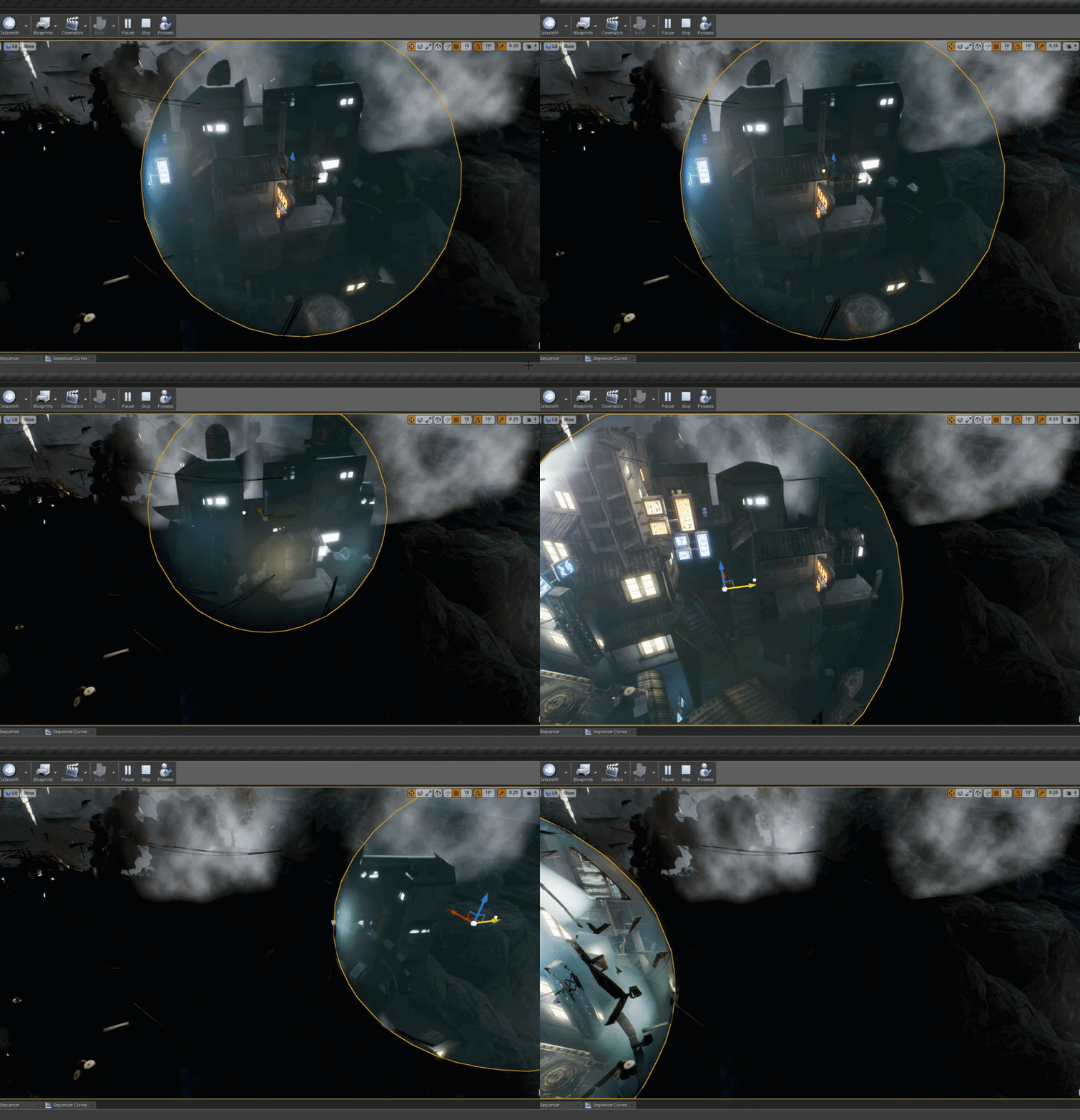 grim ore
this is my actor that I move around, if this is a fixed scene then it can be done once in begin play. https://i.imgur.com/zHri2IS.png
crimson lake
grim ore
this is my sphere mask material https://i.imgur.com/EqDuQMG.png , the important part is just the crap that goes into radius
crimson lake
yo that's next level help man 💔 hope it works this time ill retry tracing those
grim ore
this is an example of a material I converted https://i.imgur.com/I83Vzir.png , I took the existing material, changed it to masked for the Blend Mode, then pasted just those nodes in the top right and hooked them up to opacity mask
if you are doing this to every material then you want to make sure your radius is correct or you are gonna have to change it later for all of them lol
plush yew
I've got two sets of animations that I need to play at the same time and they need to overlap at one bone. Is there a way for me to apply the rotation of one animation along with the translation of the other to the same bone? Because right now I can only get every aspect of one animation to play on the bone at a time
grim ore
this is sooo not the right way but for quick and dirty for presentation it should work it just has issues with other masked stuff (need to lerp to get it to mask right) and opacity stuff (no idea on this one, gave up)
grim ore
chances are you dont want the one minus there in the mask, that does the opposite effect which isnt what you want
other than that maybe move that code from the construction script on the BP to the begin play, make your radius larger just to test with, and uh.. pray?
plush yew
There's a few animation nodes that let me translate data from one bone to another but my problem here is that I'm essentially translating the data of the pelvis back to itself. I just want to use the rotation information from one of my cached poses and the translation of another pose
crimson lake
I'm basically stuck at the point where it still isn't masking shit
let alone the small sphere and material
so im trynna figure that out first
grim ore
have you tried testing it in simulation mode first just to see if its an issue with the location not being correct until simulate/play is ran?
crimson lake
just played it this second
sphere disappears (obviously)
wait
I took off the oneminus maybe thats why
grim ore
you might want to remove the emissive link as well, you can see exactly what I used.
crimson lake
FUCKIGN
HELL
THAT
TOO
K
SO MUCH
I don't need this sort of stress in my life 😆
literally thanks a huge friggin ton
plush yew
blend bone by channel looks promising, I'm going to make an extreme walk cycle and see if its doing what I need it to
IT DOES, hallelujah
is it possible to get the bone rotation data of one cached pose and compare it with the rotation data of the same bone in another cached pose?
on the event graph I can get the direction between sockets but once again I'm comparing the pelvis rotation in one animation against the pelvis rotation of another animation
crimson lake
any way to quickly add fog or volumetric clouds?
 vague sable
I saw in a blueprint a while ago there was like a connection pin to help better guide the flow of a blueprint in an area but I can't figure out how to make that?
@crimson lake this 3 part series was informative to me for fog / clouds with special shapes https://www.youtube.com/watch?v=VC35I7BR6M0
this is part 2 of 3 of the UE4 Local Volumetric Fog tutorial. I explain how to bringt the fog into custom shape and I talk about quality settings. PART ONE: ...
crimson lake
ouuu thanks boss
flow of a blueprint, to not sound totally retarded, is this related to materials or not?
if so I know what's up, if it's strictly technical stuff then soz
 unreal comet
Can I move my UE4 engine to another harddrive? I'm not talking about a project, I'm talking about the actual engine itself.
 idle mountain
Anyone know why my mesh looks completely fine in preview but in game its really dark colored ?
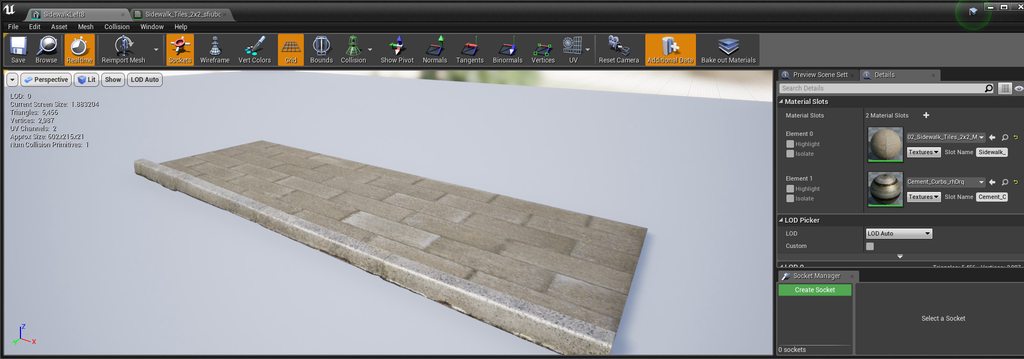
 mossy nymph
no light?
idle mountain
scene has lighting
click on the imgur link you'll see what i mean
no idea whats causing it lol
mossy nymph
your material is different
plush yew
Hey so i can't get quixel megascans to show their material on brush box geometry, it works fine on the default basic cube/sphere, but anything editable just shows the grey checker texture. Starter content materials show just fine on brush boxes. Any ideas?
halcyon flame
is there a way to tell whether an actor or mesh is lit whatsoever?
or to determine the amount of light that is hitting it?
opal berry
Should my directional light be static or stationary
normal burrow
mostafa, do you need to turn the light on and off, or change its color?
if neither, static.
 crude robin
so i have animation to use i just want to use the same animation for ai and character just so i can learn what to do. The animation work on my player character but when i go to make AI and do the same thing the animation doesn't play. am i doing something wrong. i heard of retargetting but the ai character has the same skeleton as player character
 open eagle
I have a snow rock material in mixer made of a rock material as a base and a snow material with a lowered threshold. How can I get the same effect of hiring the threshold with a layer blend for my landscape. I want to keep the effect of the residual snow on the crevices of the rock texture
I want to be able to landscape paint snow in to the cracks and crevices of the rock texture all while keeping the normals of both
normal burrow
you'd have to show us what your event graph looks like on the animation blueprint @crude robin
open eagle
How would I do this?
crude robin
.the only thing i am seeing from animation blueprint is castto character.
i dont know how i can show you the whole thing as the window is so small
this is the animation starter pack
 spiral creek
I have this absolutely maddening bug where if im in my HUD widget and I change ANY functions, it overrides all the other function
does anyone have any idea what could cause this?
crude robin
@normal burrow
normal burrow
which animations do not play for your AI?
crude robin
none of them though they all work for player
normal burrow
is your AI a Ue4ASP_Character?
crude robin
the only thing i did was open the skeleton mash and change the animation blueprint to the animation starter pack
im thinking i may need to duplicate all the animation to reuse them?
normal burrow
enter play mode with your AI. While it is playing, open your animation blueprint. at the top of the window above "Debug Filter" select the AI from the list. You will then see red line(s) on the event graph. Find if the red line stops anywhere.
crude robin
i'm thinking i might of mess something up when i added the skeleton mesh to the animation itself
to where the character took over the animation
im going to just start over from the beginning
 fathom dust
do people make a gamecontroller on ue4 or do they just throw everything onto the player blueprint
normal burrow
recommend keep trying ai and player as you restart ayopunky. there shouldn't be a reason for the animation blueprints to act and differently
crude robin
alright will do.
 bold zealot
anyone successfully get UnrealJS to run on android?
 blissful trail
hi im having an issue where when i rename things it disappears
 vivid narwhal
Today's stupid question from me is: Does a Timeline "Finished" node trigger on "Stop" or does it only trigger when the whole timeline has played out?
 warped tangle
Pretty easy to test, but to answer it will fire when the timeline has played out in either direction
vivid narwhal
that explains why it wasn't working as I hoped then, was worried I messed up somewhere
blissful trail
anyone know how to fix my issue ?
vivid narwhal
What things disappear?
Like are we talking variables dissappearing or whole ass blueprints
 primal harbor
anyone know what causes this crash?
these are the errors after installing debugger and i dunno why im getting these errors
 alpine wigeon
Is that the entire log? the message before this is usualy important...
 cloud cobalt
That's a call stack
The log would be useful too
Looks like a corrupted Blueprint though
blissful trail
alright JackUniverse so when i rename anything from the content browser on any project it removes it but it is still in the explorer and doesn't reapear on startup it also removes it from the content browser
 fierce tulip
because you need to fix up references.
 light coyote
@blissful trail right click, yes @fierce tulip says
Right click content folder, fix redirections, or something like that
vivid narwhal
I'm wondering if I can somehow "Interrupt" a Move To Location or Actor node. There doesn't seem to be an option to break it once it's in motion.
 solar dirge
Hi, I've been working with my team on a project on the 4.23 for a while ; however we recently realized we had to downgrade to the 4.21 for various reasons. Since you can't automatically downgrade a project or its .uassets, is there a better solution than recreating every single .uasset by hand ? I can copy and paste the blueprint nodes but everything else will be a real pain
fierce tulip
odds of that working are near nehil besides having to remake everything by hand practically
i'd wait for 4.24 instead
solar dirge
why wait for the 4.24 ?
fierce tulip
im guessing you are downgrading because bugs (you where not clear)
so wait for 4.24 instead
random moon
upgrading is possible and automatic.
downgrade is not
well not automatic. it will ask and u can do it
and if it is a major bug. it will typically be fixed by the next patch
blissful trail
here is a gif of whats happening
https://gyazo.com/3fc4376c5edca5bd4e9df18bc7cfcc56

for me
solar dirge
No, we are downgrading because we're using Nvidia Flow on a custom UE4 build which is the 4.21 - we can't do it on a more recent version, i do not know the technical reasons
fierce tulip
then why did you move to 4.23? in that case, revert from source control and count your losses
solar dirge
We were originally working on the 4.23 before figuring out that we had to transfer to 4.21
welp
vivid narwhal
how far into your project are you?
solar dirge
Pre-production, so it's not a huge deal, it's just a pain because of the time I'll have to spend just copying stuff by recreating them manually
vivid narwhal
could you not copy and paste the bulk of stuff?
vivid narwhal
Indeed
fierce tulip
if there is anything id expect not to work its blueprint copy/pastes to older versions
often causes crashes
random moon
there shouldn't have been that much bp changes between 4.21 and 4.23 tho?
altho if it does have issues, wouldn't it simply not copy the relevant node?
primal harbor
@cloud cobalt here is the full log. i cant seem to identify what the cause is that i can fix
@alpine wigeon this is the entire log.
vivid narwhal
Can I line-trace to an object that exists but isn't visible?
alpine wigeon
well not by visibility but yes
vivid narwhal
I'm assuming I'd need to make a new trace channel? Trace via Camera confuses me, how is that not just by visible
alpine wigeon
Not rly... you can trace by something that is not visibility, depends on the response setting on the target object in the collision
@primal harbor that does not have the stack trace in it so it is not log from the crash, you do have some issues in your project but nothing that should crash the engine
Check the Warnings for those and check the files referenced
primal harbor
can i dm you? that way this doesnt get clogged up?
vivid narwhal
I'm thinking if I just add a cube and make that overlap everything and have the opacity set to completely seethrough that should work
primal harbor
you can have it be traced based on collision type
that way, even being invisible would allow it to be found
cloud cobalt
@primal harbor It simply looks like your project was corrupted somehow. You have multiple missing files and the editor crashes on reading one - you should revert in version control to the latest working stage. Other than that, the only way forward would be to debug the engine in Visual Studio, find out which files were being loaded at the crash, and remove them, so you're losing files anyway.
primal harbor
ou
ill see what i can do on that. i think it was cause of a sudden jump in engine versions
vivid narwhal
This is why I don't fuck with engine versions until there's a feature I desperately need or a bug that I need solved
primal harbor
same. but it was not upt o me to decide
cloud cobalt
It's fine to upgrade engine versions
Create a branch on your version control software and merge it when it's safe to do so
That way, you can always roll back to the current version without losing any work
primal harbor
this crash only happens when trying to open in stand alone btw.
on a completely separate issue, any idea why this happens?
thats a geometry box. i used it instead of mesh so texture wouldnt stretch. got myself another problem out of nowhere
cloud cobalt
I don't see what the problem is
primal harbor
the bottom half of that geometry is gone. i dunno how to explain it
i can record a video and send it here if that works but 8mb max on discord
cloud cobalt
No idea, I haven't used geometry in more than a decade. Meshes is very much the suggested workflow
wary wave
BSP goblin, probably
primal harbor
whats that
primal harbor
so i cant use them as a replacement for walls?
wary wave
you absolutely can, but you need to respect that they have issues
wary wave
best way to use them is to ensure they don't overlap and to be extremely frugal with subtractions
cloud cobalt
There is no scenario where meshes aren't a much better idea
 wispy comet
That sounds like an oof
primal harbor
and to think i was making my life easier by switching over to geometry to avoid texture stretching and BS
 serene birch
BSP is better for making new Unreal 1 maps 😛
fierce tulip
id still make that bsp in max :p
primal harbor
time to start converting those geometry to meshes slowly i guess @_@
cloud cobalt
Yup
primal harbor
thanks. atleast i know the issue and can solve it for that. unlike the other one :v
fierce tulip
@wary wave ooh i participated in that
wary wave
I built ridiculously elaborate brushes 😄
cloud cobalt
I made some decent brush maps back in the day
wary wave
level was mostly 1 brush with about 400 faces, lol
vivid narwhal
well, my solution to try and find the nearest footprint in line of sight completely clogged up and lagged out the game
primal harbor
try single trace instead of multi trace
fierce tulip
@wary wave still need cat sounds?
wary wave
I'll take anything you can send me 😄
fierce tulip
video with sound ok?
vivid narwhal
Not sure if it's the trace that's slowing it down, I suspect it's how I tried to find the nearest footprint to be the target of the trace, since it was 3 foreachloops going off, trouble is the blueprint decorator checking for them is running constantly
vivid narwhal
yeah. I'm just trying to figure out how to do it without loops. I can do a check for nearby footprints easily but that ignores walls which breaks the whole point of having an AI follow your footsteps
fierce tulip
k, got 4 minutes of 50% silence, and 50% mrrrowl
wary wave
thanks!
 radiant haven
what is this and for what do i need it?
is it a curvevector
curve float
one of these
fierce tulip
Ouch.
also: lol, people saving stuff on c:
plush yew
Its my ssd
i got a 6TB drive
that is just unmounted rn
this is my ue4 pc and its kinda weird source build is so big when i only built it for windows 🤔
I just like having it on C cause it loads faster. Honestly my game is around 100GB
 loud valve
Hey guys, hope someone can help me:
When I test my game with the DS controller, the left stick forward is exit play session. what is happening here?!!
vivid narwhal
stupid question but have you checked your input mapping?
loud valve
No its okay, yes I did. Also do not even know how to set that up as Exit playtest without it being a packed game
So I use a ps4 controller, and then the DS software that makes it a xbox controller, I did this before and it worked, now it exits any project I open.
 dark rune
hello. anyone know how to secure the cursor to the view port of the game? right now, i have to keep holding LMB and drag to move the camera
cloud cobalt
Look at mouse capture, mouse lock.
 lethal cliff
How can i make/learn how/where to make animation on use only ? like as an example i would like to make a desk and the drawer opens after using it. i made the desk and the drawer in blender , but after importing the animation is allways happening.
dark rune
k thx @cloud cobalt
vivid narwhal
@lethal cliff sounds like you've dragged the animation into the scene and you're not using Play Animation on a skeletal mesh
lethal cliff
so i need to put first the skeletal mesh only and then add somehow the animation as play animation on the mesh ?
vivid narwhal
yes
There are basically two (there are more but yolo) ways of doing it.
You can either have a skeletal mesh and use Play Animation or Play Anim Montage to play the animation via blueprints
Or you can use Sequencer to animate a static mesh, having the draw section come out, and use Play Sequence
lethal cliff
allright, thanks a lot for the help. i think i kinda understand it. time for some tutorials to find where that kind of stuff is
vivid narwhal
using sequencer would be your easiest method
 dim merlin
hi, anyone knows why this node returns zero always on terrain trace:
cloud cobalt
Not sure that can work on terrain.
 steady owl
Is there any risk of anything bad happening if you rename your project folder name?
So instead of it being MyProject it could be MyProject V2.0
With the same files inside and nothing else renamed (the same .uproject name etc.)
cloud cobalt
Should be fine.
steady owl
Thanks
 plucky stump
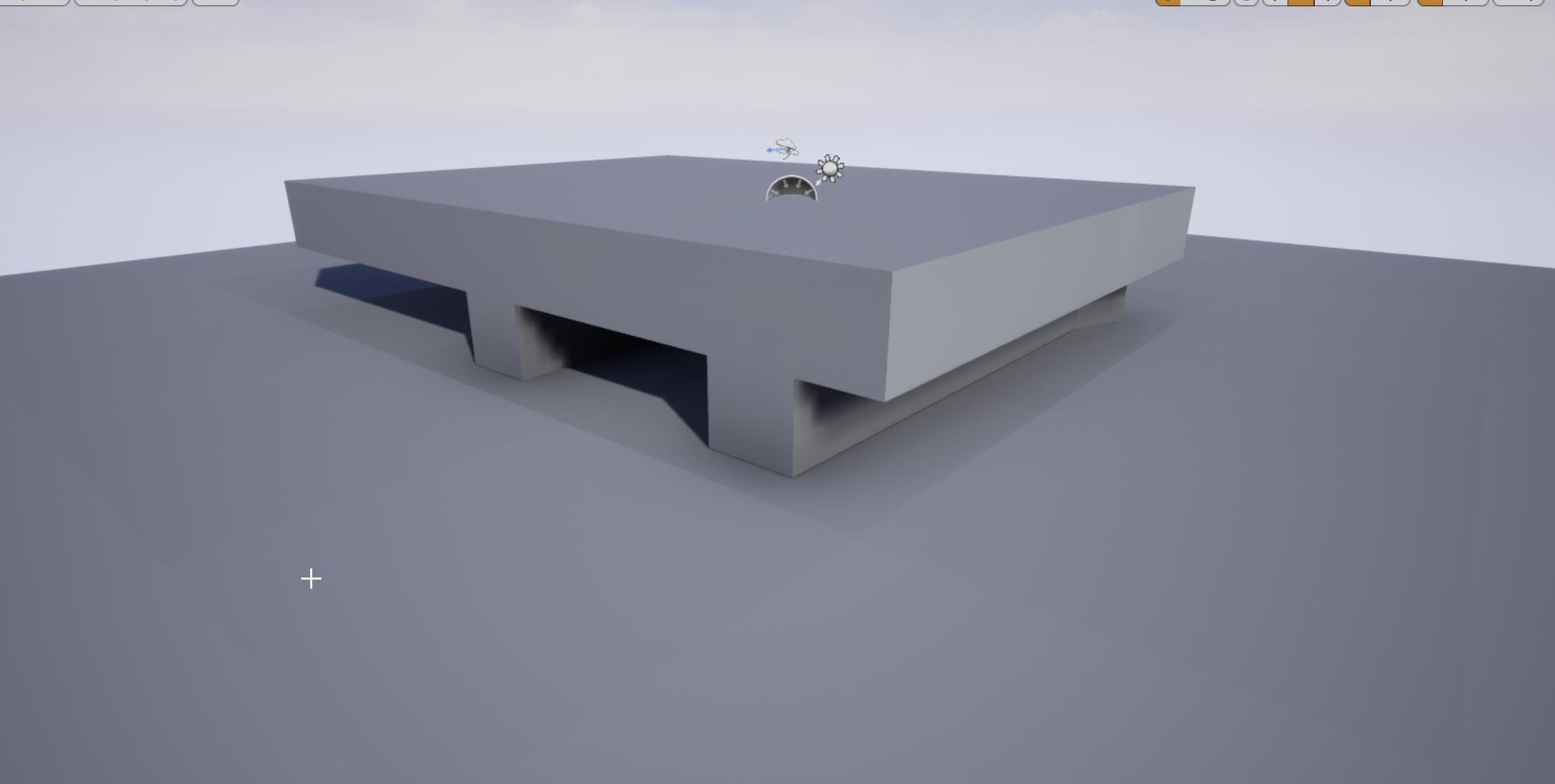
why does the default landscape, or any landscape i have, have these enormous seams running between the components?
this has been bugging me for a while and cant figure out why
cloud cobalt
Static lighting ?
alpine wigeon
because of light build
plucky stump
this is expected behaviour?
alpine wigeon
switch your directional light to movable and they will go away
yes
or build your light
alpine wigeon
Are you sure it is built?:)
because they do go away after build for most people...
plucky stump
yes you can see the crisp shadow cast
alpine wigeon
I also do not see the seam in that screenshot
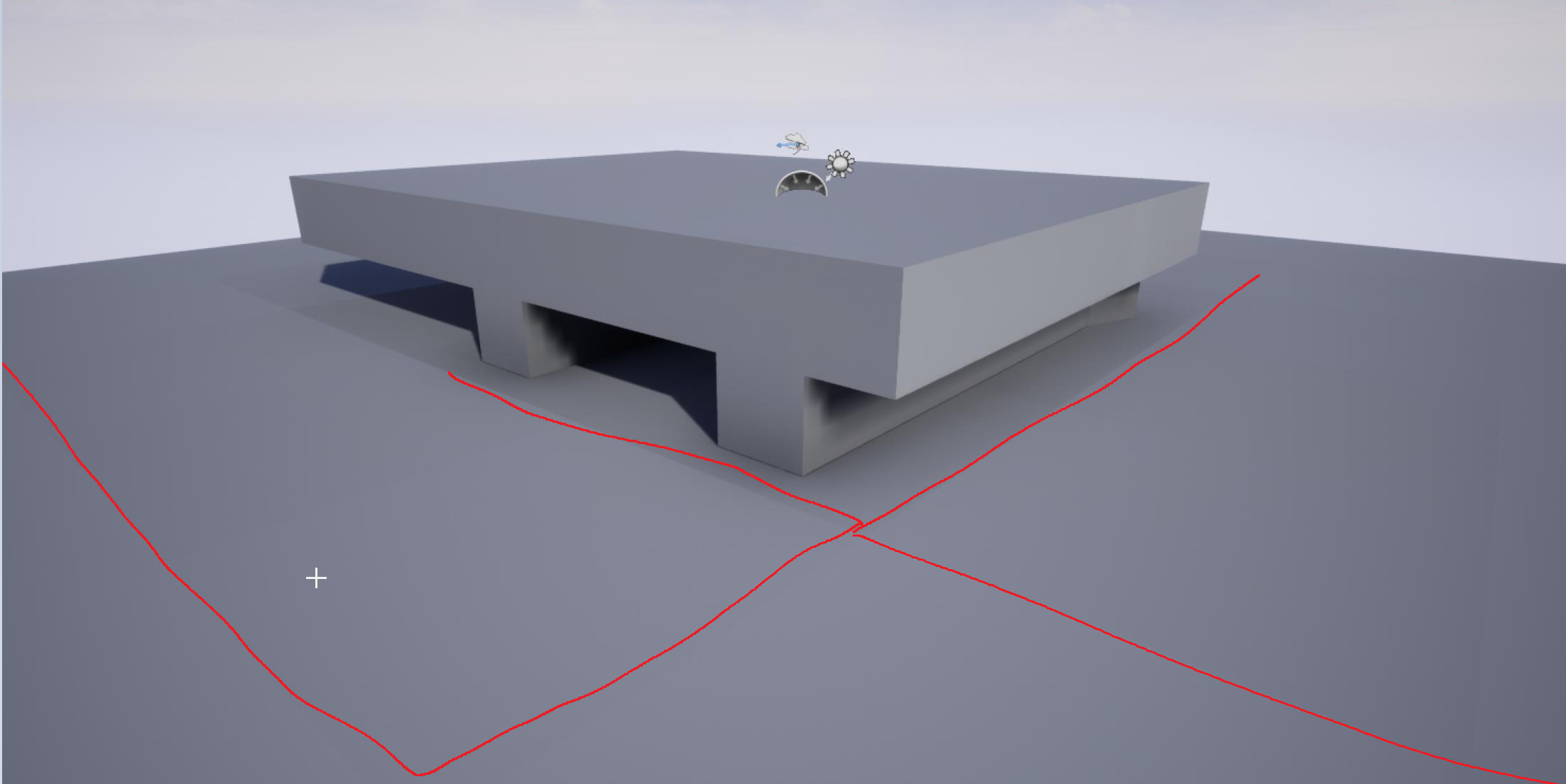
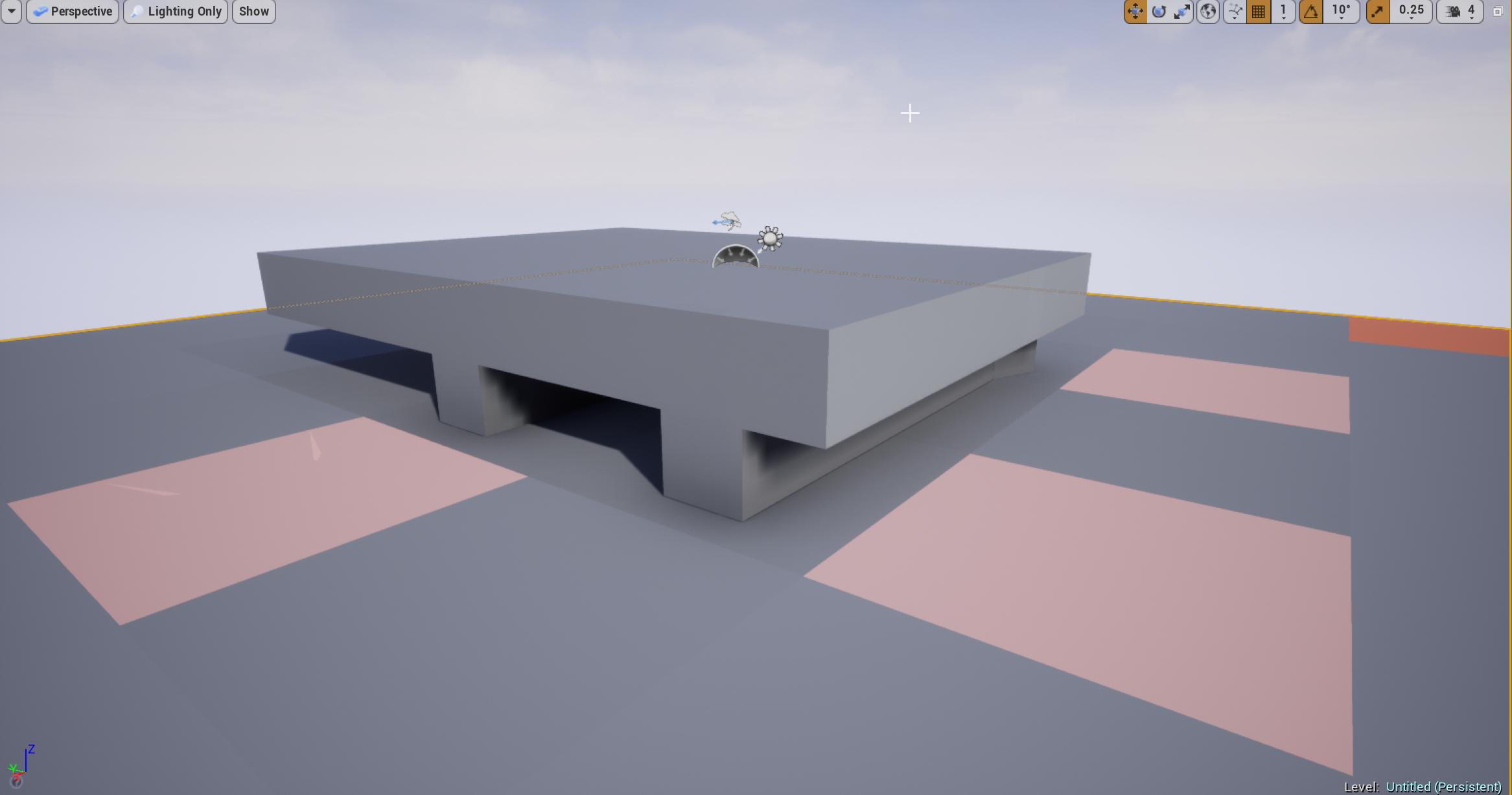 alpine wigeon
ok that is a different thing 🙂
alpine wigeon
Is that a landscape or a series of static meshes?
plucky stump
landscape
i checked if i didnt just mess something up in my other project
so i made this level and tried to reproduce
cloud cobalt
@plucky stump Try GPU Lightmass
plucky stump
ill check @cloud cobalt
cloud cobalt
It has much less seams
But otherwise, static lighting, while very nice and very fast, works better if you avoid seams
However impractical, you need to avoid them
plucky stump
ye :/
alpine wigeon
I would always do dynamic for the design phase.... and switch to static in polish...
plucky stump
its really really impractical for the landscape in my scene
im in the polish phase now
alpine wigeon
ah 😄 polish away... 🙂
plucky stump
ye
alpine wigeon
did the GPU lightmass help?
plucky stump
tryign to fix it
cloud cobalt
I think these components are way too small tbh
Thought they'd usually be much larger
plucky stump
i cant imagine EVERYone in everyproject has this problem
or are landscapes just this fundamentally broken
how do i use gpu lightmass @cloud cobalt @alpine wigeon ?
cloud cobalt
You download it
And read the instructions
And it's not just landscape
Every single object has this problem
plucky stump
only the landscape has this in my project
cloud cobalt
Because you haven't placed two walls next to eachother and found out they'll do the same
 sudden agate
why do you compose a ladscape of multiple flat meshes tho
cloud cobalt
Anyway, static lighting only allow for seamless lighting between objects at the cost of extreme care
Perfect lightmap UVs, and basically GPU Lightmass too
 supple totem
you had multiple pros just take time out of their day to talk about your issue
I wouldnt call that useless
 next badger
How to fix this doc link?
vivid narwhal
That's only for Unreal 4 Pro subscribers
plucky stump
look into distance mesh fields, itll fix your doclink issue
cloud cobalt
And another one to the blocklist
plucky stump
gpu lightmass would fix landscape seams 🤷♀️
cloud cobalt
GPU LM looks much better and has much less seams, @lapis vine
Regular Lightmass hasn't changed much since circa 2008
 lapis vine
Oh... then I might download it. But isn't that kinda just volunteer of 1 man show?
Oh..
cloud cobalt
It is
lapis vine
Oh!
plucky stump
do you pros have any cool projects you could show me?
cloud cobalt
That's still the best we have until Epic delivers on DXR-based Lightmass
They did promise it, but it's not a priority
lapis vine
Ah, so maybe not next year even...
cloud cobalt
IIRC the new engine versions support isn't even by luoshang
lapis vine
I was contemplating at it before 1-2 weeks... Too bad can't help for all good projects out there. You have to choose where you put the effort.
Will give it a try when the time for good bakin' comes. Thanks.
 desert jay
My interaction system is generally a state machine which triggers animations and other events. (Move to position, holster weapon, interact, reequip...among others) Right now I hard code it into my interaction component blueprint. Is there a better way to handle this? I would be happy with a nice way to create/handle state machines in BP.
pale forge
If anyone ever wants to create a random splatter pattern with Projectile Movement.... this code will do that!
void ASBProjectile::BeginPlay()
{
    Super::BeginPlay();
    VarianceVector = CollisionComp->GetRightVector().RotateAngleAxis(FMath::RandRange(0, 360), CollisionComp->GetForwardVector());
    VarianceForce = FMath::FRand() * VarianceMaxForce;
}

void ASBProjectile::Tick(float DeltaTime) {
    Super::Tick(DeltaTime);

    auto pveloc = GetVelocity();
    pveloc += VarianceVector *  VarianceForce;
    auto reltrans = CollisionComp->GetRelativeTransform();
    auto invtrans = UKismetMathLibrary::InverseTransformDirection(reltrans, pveloc);
    ProjectileMovement->SetVelocityInLocalSpace(invtrans);
}
https://gyazo.com/58ba685072a8348a3c682d0e4b13dbe7
Sorry it took me days to figure this out and I had to tell someone.

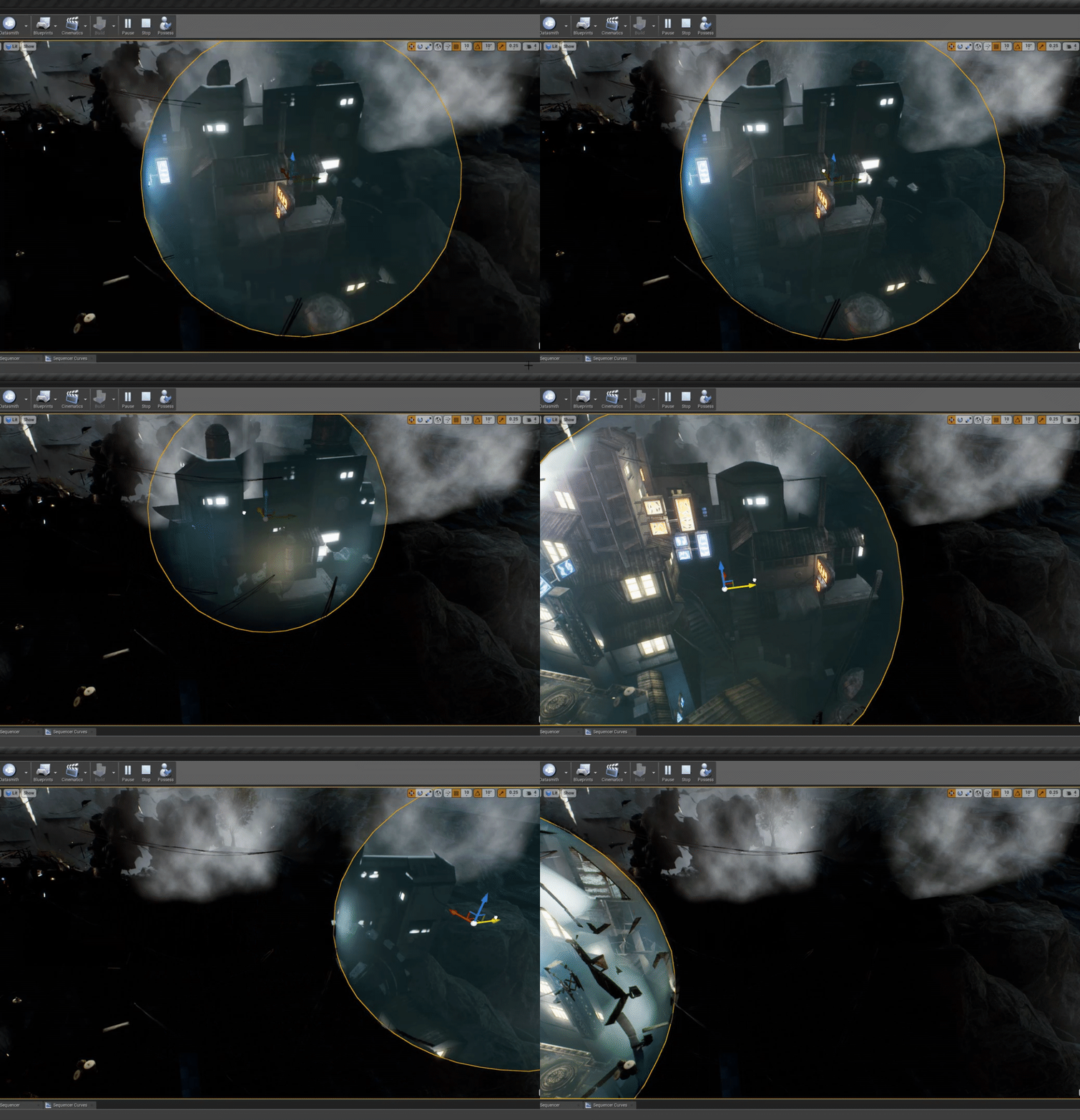


 nocturne bison
ooh, pretty decals
pale forge
yes they are pilfered splats
merry gazelle
guys I'm generating line trace using [getrandomreachablepointinradius]. The origin point is the defaultsceneroot of the BP actor placed directly in the middle of my map. It seems however that every time it generates, there's bias towards one side of the map (always west).
Any idea how to make it more randomly distributed?
manic pawn
its probably the get input axis value one
so he has an input axis called "yaw" and that's why this node exists
 patent ibex
i have full dynamic lights setup in indoors environment
how am i supposed to get ambient lighting?
the only option i could see is skylight, but there's no option to control per volume/object
 vale silo
Is there any difference, performance wise (on mobile), between single surface skeletal mesh with multiple materials and multi-surface skeletal mesh with the same number of materials (where each surface has 1 material) ?
 ruby folio
Wanted to try the Megascans Live Link plugin but its taking forever to download.
Is it possible to download it from GitHub instead and install it manually?
 indigo wedge
At the moment I have no internet access at home so can anyone tell me if there's a way to get an update or install for a specific version of the UE engine without having access to the internet?
specifically I'm looking for UE 4.23.1 for Windows
ruby folio
No
The source installer has to grab all the prerequisites from the internet during setup
grim ore
@ruby folio you can do that but from what I saw the latest actually built in the github repo is for 4.22
 sonic pagoda
How do you scan a folder for assets during runtime with blueprints?
grim ore
Matinee is removed in .24 so older projects do, newer ones should not they would use Sequencer
 grave osprey
Ok thanks.
wary wave
@sonic pagoda - you don't, generally
crude robin
@normal burrow i figured out what the issue was i didn't replace the original skeleton mesh with the ue4 mannequin and now it works.
 shrewd shuttle
when i hit package project and select windows 64 bit it just opens a browser page
normal burrow
@sonic pagoda python editor utilities are a good way of building lookups that could be used at runtime though
grim ore
@shrewd shuttle is this a blueprint project or a C++ project?
which template did you use, it's possible it's broken for packaging without the C++ toolchain
I see mention that some of the unreal studio templates, like multi user, seem to have that issue
grim ore
yay
shrewd shuttle
wait, but now it says it failed because it need universal CRT to be installed
grim ore
its in the individual package part of the installer
shrewd shuttle
where do i install it?
 obtuse root
hi guys, does anyone know how i can have 1 blueprint for 2 online players where there is a hit reaction and a hit action in one blueprint
actually if i can have a if one actor plays this animation, then other character plays another animation
 lofty imp
im working on graphics settings menu, has anyone ever seen in a game where it says output monitor and it lists the number of monitors you have? and you can change which monitor the game displays on very simply... GTA V for example has it
im looking for a way to do that
grim ore
@shrewd shuttle it's part of the VS installer, run the VS installer, click on modify, go to individual components, search for CRT, and install it.
 jolly shore
hi guys , I am new
and I am happy with you
and also I have a questions
I'm trying to make the event in this video, but I didn't quite understand what admin said meant

Project Files : https://www.patreon.com/CodeLikeMe/posts?tag=source code Support my work on Patreon : https://www.patreon.com/CodeLikeMe In this episode, I...
how do i create "Blueprint initialize animations"
bp_character variable in animation blueprint
he said to me
we have last comments
grim ore
what is the time where they say/show that?
jolly shore
How can I set reference to BP_Character in event "Blueprint initialize animations" using try get pawn owner and casting to a character.
wispy comet
Hey @thick ruin (hope the ping is ok), i've got a bug with what i believe has to be livelink that's causing UE to open every time i try to open a map which has scatter assets (foliage, rubble) in it
I'm wondering where i should report it
sorry
causing UE to crash every time i try and open a map
😅
 thick ruin
Of course, feel free to ping me if you need something and I can assist. I've never heard of that issue however, I'd recommend sending a detailed report to support@quixel.com
wispy comet
Alright, will do, thanks 👍
grim ore
@jolly shore maybe they mean the Event Blueprint Update Animation event
plush yew
Why does my engine crash when i try retarget all my animation onto another character
Should i do a few in a time, As it apparently just crashing
rotund scroll
has anyone tried migrating assets from one project to another, and if so any advice/tips for common pitfalls?
I feel like this task is like one step above refactoring blueprints
opal berry
should my trees be static or movable
becuase when they are static and built the shadows like like circles of blobs
its awful
but also putting it on movable it costs more in the renderer
plush yew
Why do i crash when i retarget my anime class to another character ?
opal berry
btw Directional Light is on stationary(default) and the skylight is static(default)
plush yew
With what
normal burrow
Dial 911
 karmic mountain
i am working on walkthrough
normal burrow
Oh
karmic mountain
and i am creating pathways of residence society
i don't know how to create the intersectional part of pathways
can any buddy help me out here
plush yew
Is it a bug when retarging animations on 4:23?
When it should be fixed in 4:22 https://issues.unrealengine.com/issue/UE-68490
grim ore
when you retarget one does it crash? is this custom animations or skeleton?
plush yew
Some is custom animation, But same users have had no issue like this, Some worked to retarget when i tryed 1 line of animations, But when i tryed 2 rows it crashed
As i followed Defuse tutorial, And he or neither he's users had the problem, But he used another version so maybe that could be the problem
grim ore
it could be, it's using the exact same animations and setup as what you are following?
plush yew
Is not targeting to same character but other that that yes
grim ore
you might have to just retarget 1 at a time and figure out if it's all of them at once causing the issue or just specific animations or something else. There is nothing in this log showing a crash unfortunately
plush yew
Ok, It look like some other hade had this problem with other versions, But Ill retarget one in a time, I choosed ro send and restart so hoppfully the may fix is if its a bug
opal berry
help please
normal burrow
Help with trees static or not?
karmic mountain
i need also help
lapis vine
Me too!
normal burrow
@opal berry answer to this question is always prefer static. Don't use static when you can't use static. If the trees need to move, you can't use static, if the trees need to disapear you can't use static.
Stationary means light cannot move, but it can be turned off or have its color changed
I don't know enough about pathways vista.envision, imagine you mean your making a sidewalk? if your using splines just look at youtube videos on the subject. believe intersections are just placing the splines nicely
karmic mountain
ok
normal burrow
what can i help you wtih @lapis vine , does it have to do with struct vs class?
opal berry
most trees have that sway affect in their leaves is this considered moving @normal burrow
lapis vine
@normal burrow I dunno yet, I just need help. In general. Will come up with something later. Thank you for caring about me 🎁
karmic mountain
i have tried alot to search for that tuts not find good one
normal burrow
mostafa all i could suggest would be whom ever made those trees likely knows better than me. check documentation or examples. static things can animate with world vertex offset i believe but i have no idea what your trees do.
 winged crypt
Have any of you guys used TextureGroups before?
normal burrow
was i right in guessing that its a sidewalk / road intersection vista?
isn't texture groups just that organizational / quality adjustment feature?
winged crypt
@normal burrow Yeah, I'm hoping to package with different texture sizes on different platforms, I only discovered this recently but the documentation isn't clear and the forums have little to nothing
normal burrow
Yea tbh, thats about as far as my understanding goes on it. "If i set this to character face normal map, i can then scale back character face normal maps quality uniformly"
grim ore
@opal berry depending on how you want it to move, like leaves swaying, you can use UV animation on the textures themselves or displacement of the mesh. Stationary/static/movable is for lighting and light maps in this case
normal burrow
mathew its okay to have world position offset on static marked things yea? imagine you don't want lightmapping on those right?
grim ore
that is just changing the material so it should be fine yes
normal burrow
cool
grim ore
its just all dependent on your level and your art style and what you need
normal burrow
yea, just thought was when it goes to bake the light if it applies the offset or not and then when it moves etc
grim ore
thats a good question. If you are using displacement and static lighting will it bake the shadows for example based on the normal mesh or the displaced mesh
it wont bake the moved stuff for sure as that is at runtime not design/baking time
normal burrow
interesting
assume there is benefit for marking something to not be lightmapped but still marking it static yes?
grim ore
art style? not affected by the lighting for example is what I could think of
normal burrow
Hm I was asking more on the topic of performance. Marking something static even though its not lit for example would imply performance gains?
grim ore
that is a good question
 velvet cape
If I want to implement custom FPS movement (for, say, a skateboard based FPS), would I be better off implementing it by building a blueprint/class top of Character, or by implementing a custom CharacterMovementComponent? (e: in short, does Character provide any way to implement custom movement?)
grim ore
@normal burrow to answer the other question, i displaced the hell out of a cube and used static lighting and the shadow is the original cubes mesh for the shadow. With dynamic lighting the shadow is the displaced meshes look. So it looks like the static lighting for atleast shadows ignores the meshes material just mesh shape
normal burrow
thanks for testing it out 👍 interesting result
grim ore
and since the light source is what determines shadows as long as the lighting is movable the displacement works on the object for shadows. Static/movable object & movable lights = shadows can change in real time. Static/movable object & static lights = no realtime shadows. This makes sense as that is how it works for anything else that moves
wary wave
is there a quick and easy way to reverse a rotation?
I'm 'Getting Rotation at Distance Along Spline' and want to point backwards along it rather than forwards along it
wary wave
there is one, but it didn't do anything, hence asking
currently just getting ForwardVector from the rotation, flipping it, and converting that back into a rotation, but it seems a bit daft, heh
grim ore
that was actually going to be my first suggestion lol
but I tried the invert rotator on a mesh and it works on that
wary wave
yeah, it did literally nothing for me that I could see
rotation seemed to remain the same
ah well
grim ore
aww, well your idea is atleast the same one I had that does work
wary wave
I think invert as a node is probably broken, because you can't choose which axis to invert it in
or maybe it just flips the sign of all components?
if it's doing the latter, then they're not handling 0 correctly
either way, meh
grim ore
thatmight be it
normal burrow
reverse a rotation?
you can compose rotators using 180 around Z
or FQuat{0.f,0.f,1.f,0.f}
 molten path
😳
 smoky fable
Guys, i have no clue if this is the right place to ask but does someone on here have a smart idea how i could generate my landscape layers from an already existing heightmap based on slope and height??
wary wave
maths in the shader
normal burrow
do think there would be a way to get raw to hightmap marcel
#level-design would be a place to ask if theres no luck here
wary wave
tools like World Machine have these features
but if it's literally just slope and height, might as well do it in the material and save yourself a feckload of wasted texture memory
normal burrow
material wont get you physics though yea?
ah nvm, layers yea.
but still, impact and stuff from the layers idk if that could be pulled
 hard quarry
What is the best way to let an objet allways face a specific socket, even when the parent moves?
smoky fable
@wary wave the thing i have read was that that extra math will also be kinda heavy on the frames? I would also have to figure out how i'll handle phys materials then.
wary wave
you won't need phys materials if you're doing it mathematically
and the performance cost isn't really any different; grabbing Z value or doing dot product on a normal is pretty cheap
winged crypt
How do I re-name or create new/custom TextureGroups?
wary wave
IMHO the cost of 2-3 material instructions outweighs the need for multiple layer masks
hard quarry
Hi guys, I am inside an Actor blueprint, can I manually fire a tick event?
winged crypt
@hard quarry Yes, in what context?
hard quarry
In my case I want that on every Timeline Update a tick event should be fired
winged crypt
Let's move over to #blueprint I can help you out there.
wary wave
"In my case I want that on every Timeline Update a tick event should be fired"
- err?
 crude vessel
Put a flash hider on it.
 azure shore
Im literally copying a tutorial step by step and its not even turning out the same, my best guess is different versions
azure shore
idk how but I always seem to completely break the particle emitter thing whenever I use it
right fuck it is there any free simple muzzle flashes out there
 plush thicket
Hey all! What method do you guys think would be BEST for going about making leaves on trees look like this?
crude vessel
I mean, I feel like being able to troubleshoot what is not working is more valuable than cosmetic muzzle flashes in a game.
plush thicket
azure shore
wdym charlie
Ive tried and the more I use the particle window the worse performance gets and every time I touch something it gets worse and its super stressful
who am I kidding I cant do shit for visuals
 pseudo swift
hi, i have a question regarding how I would go about preparing a handbag for a character in ue, I would like the bag to have physics and kind of be attached to a characters hand / shoulder etc. should I rig an armature inside the handbag straps and use a constraint to contrain the two objects together? appreciate any tips:)
crude vessel
@azure shore I found this tutortial series helpful, it has a section on particles, it's pretty basic but maybe it would be helpful? https://www.raywenderlich.com/771-unreal-engine-4-tutorial-for-beginners-getting-started

raywenderlich.com
In this Unreal Engine tutorial, you will be guided through installing the engine, navigating the interface and creating your first game object.
azure shore
thanks
crude vessel

raywenderlich.com
In this Unreal Engine 4 tutorial, you will learn how to create particle systems and update them using Blueprints.
But sometimes his tutorials build off each other so I just did the whole thing.
crude vessel
wjat?
open eagle
is there a way to use multiple online subsystems
can you use 1 for matchmaking and another for logging in
plush yew
I'm trying to decide between Unity and Unreal. I'm leaning towards unreal because I like the UI better and the Blueprints seem interesting to me. I have a question - can you make a very small game from just blueprints?
open eagle
you can make a gigantic game just from blueprints
some games are made entirely with blueprints
there's no reason to use unity for 3D games nowadays
with free megascans, UE4 is a perfect engine for any game and team size
open eagle
you will only need C++ if blueprints does not have a function you need
open eagle
yep
plush yew
That's actually great for our team. We were originally going to use unity but this is simpler. I also like UE4 more in terms of graphics, even though we aren't making a graphics intensive game.
 dim plover
You should probably learn BPs first, with Unreal.
plush yew
What are BP's? I'm completely new to programming in general.
plush yew
Thanks
 proper crane
Anyone know if I could get Steam overlay by putting UE4 in my Steam library?
I want to use Remote Play to get help with testing split screen, but I have no working controller chargers to test it myself
Someone... Literally broke them last night by ripping them out of my PC
It is a... Plausible idea
This... Will be difficult compared to most other programs...