#ue4-general
1 messages · Page 560 of 1
 haughty flare
 novel vine
Ok I’ll check
 woven cliff
@sudden agate how can i set the texture size there ? do u have alink for a documentation, i googled it and it dropped me some andriod platform stuff
 inner yacht
As a Seller in marketplace, Can you completely rebuild the product once it has been published? I mean for the better such as the Title and all the work behind it.
woven cliff
@sudden agate also it has texture lod settings not max ingame texture unless that's the same as ingame texture size i don't think it's what i need
haughty flare
well what else would a lod to a texture but scale down size was my thought
novel vine
Just checked and the marketplace has like 2 free songs so idk I’m also not sure if I find music if it’s allowed in a game so
haughty flare
ohh i meant pay for stuff
but its not expensive
not mine though , dont know how it sounds
woven cliff
@novel vine anything on the market place is allowed to be used in ur game as long as u don't share the project files
haughty flare
what would be the deal if you had a team working on a project legality wise, would they all have to purchase the assets
woven cliff
@haughty flare no it's ok, but i meant to share the project files online.
haughty flare
sure
novel vine
Not really wanting to spend money cause I’m making a game for Pavlov vr not my own so I don’t get any money or really anything
woven cliff
sub distribution they called it
haughty flare
makes sense , as it seems very counter productive or expensive if you had a big team to have to purchase multiple assets
woven cliff
lol no that would make the marketplace a no go.
haughty flare
yep
novel vine
Ok so I’ll just check more websites
woven cliff
any idea why this line didn't work ? i have it in the project'
haughty flare
royalty free doesnt = free btw
woven cliff
config folder
haughty flare
not necessarily
novel vine
@haughty flare yea I’m looking for free royalty free music
haughty flare
even in the case you purchase a image or song it doesnt necesarily mean you can distribute it wihtout permission or at all, just need to read the fine print haha
@mdk well that would mean lod = texture size
@woven cliff
i dont think you can have a 1 pixel texture
novel vine
Yea All the music I’m finding says it’s allowed for use on YouTube would that also work on a game if I give credit or whatever the requirements are
novel vine
Ok
haughty flare
i cant tell you one way or another
woven cliff
oh well i keep digging :/
woven cliff
thanks!
haughty flare
if you try typing in commands in the console while in editor playing
is there anything like max texture
r.maxtexture
anything like that
it should pop up a list of commands if you try different key words
woven cliff
novel vine
Welp I’m just gonna try and make music in studio one now haha
haughty flare
@woven cliff i guess it makes it harder because you said all your textures are different resolutions
woven cliff
yes :/
haughty flare
otherwise i think the mip bias would be a general do all if they were all 4k
woven cliff
so max-ingame limitation for textures to be 2048 is optimal solution
if only i managed to do that
as in max ingame 2048,
won't forice the 256 textures to be 2048 as well or affecting their lods
cuz if i forced lods on all textures
even the low ones will use their lods
 woven cliff
that's per texture
woven cliff
yeh that's the one i manually use to downscale a texture
but if i did this project wide
a 512 texture would be 256
woven cliff
and the code i sent u earlier was working back in 4.8 to allow 8k resolution
according to intel graphic analyzer
and i have ltos of them
i will just manually work my way out of the landscape
haughty flare
well how about
woven cliff
as it have a huge draw call
haughty flare
try force all to half
check performance
see if it really makes a difference
just as a general should i go through the commotion
haughty flare
tbh texture res isnt hard on gpus its just the memory usage
thats really all nowadays
so unless youre aiming for 2gb cards to run it
then it should be no issue
but i dont know your target pc
woven cliff
the scene runs on 30 fps on gtx 1070
woven cliff
thing is the sum tries count
haughty flare
was the view distance
haughty flare
set it manually to like 40k for each object
can just mass select them in level and change
in the world outliner
for me i went from 29 fps on a rx 570
woven cliff
most of the assets are in foliage tool
haughty flare
to like 90
just making sure things werent always rendered
and if you add the epic view distance option in graphics options people have a choice to make it always render everything
and yes foliage does that
woven cliff
i used engine scaplity settings
haughty flare
if there is no culling
woven cliff
set the view distance to near
fps got a bit better
but still drops back to 30-20
there is culling
haughty flare
try cull distance
that is what you use for foliage
and view distance for meshses
that arent foliage
for foliage i normally stagger it
so some grass 25k
other grass 22k
woven cliff
stagger?
haughty flare
other 28k
so it isnt just a line pop in
pop out
seems to fade
but you really need to use culling
im assuming you have a ton of foliage assets
that a 1070 runs at 30fps
woven cliff
i do most of them are from redwood collection
haughty flare
dont worry about min
just set max
and epic settings overrides to render everything always
so theres always that option
for graphicfiles? (people who love eye candy)
and have a 1080ti or 2070 super and higher
woven cliff
i will keep trying :/
haughty flare
i had your exact issue a few months ago
woven cliff
what did u do 😄
haughty flare
and cull distance / view distance fixed it massively , i tried a million things before , thought it was to do with landscape - totally rewrote my landscape textures
materials*
i mean i will take a screen so you can see
the fps
woven cliff
so i should cull distance on my foliage ( reduce the max)
and engine scability view distance?
haughty flare
also if you have a bp open or content window
open
it will drop fps almost in half
woven cliff
nothing is open no 😄
haughty flare
and make sure in the viewport
press g till nothing is selected (it selects / deselects)
ie renders collsions then just the game as it would be played
just toggles wireframes off
woven cliff
i packaged the game to see if fps will be better
but it was averged around 30
@haughty flare
woven cliff
am gonna pm u what iam dealign with
haughty flare
and thats basically no culling
 sacred sun
@@woven cliff if you open a texture and click the little drop down in the compression settings section there is an option to change the textures max resolution. For bulk editing I'd assume you could use the property matrix.
 plush yew
What is the command for high resolution screenshots? HighResShots does nothing
 sudden agate
HighResShot X where X is the multiplier of the current Resolution
 empty plinth
Hello guys. I'm trying to get into UE4 and I'm making a basic landscape. When I paint my textures on the landscape, certain chunks of it just stay black. This usually wan't a problem since it refreshed itself and it worked just fine. The problem is that they are just there even after quite some time. Is there any way to get rid of them manually?
plush yew
Paint first layer completey on teh full tile before adding more materials
empty plinth
I did that with dirt. Then I started adding more layers
It went black when I painted the rocks
That was a 4th layer I think¨
plush yew
Maybe you need to set teh textures to shared:wrap
sudden agate
your material needs shared samplers for the textures
plush yew
4th layer might be max iwhtout it
sudden agate
you can have only a certain amount of textures bound to a shader. using shared textures bypasses this
empty plinth
I mean it works on some places.
empty plinth
Alright
plush yew
all texture nodes
empty plinth
I'll give it a try
plush yew
' Sampler Source -> Shared: Wrap '
plush yew
Short answer, tells it to stream the teh different texturelayers based on priority
Not a completely correct answer but in short it is basically that
plush yew
It loads the entire texture into the shader at start, whether it is visible or not
If you use from texture asset
 junior thicket
How do I add something to the #looking-for-talent channel?
 loud kernel
Hey guys!
What is an EQSTestingPawn for?
plush yew
format you need to type in should be pinned in the channel @junior thicket
junior thicket
Says I don't have permission to type anything in there in the first place.
 abstract relic
Read the pinned message in the channel
plush yew
Hey guys - new here - Unity3d dev with 60+ projects and about 15 released - last time I used UE was a long time ago - and I am using a new machine with some sandboxing and VMs - so not sure if the behavior i'm seeing is normal or not
when I click marketplace - nothing happens, and when i click add to project, nothing happens, the files are on the system but nothing updates on the UI / no project file
i'm trying to load soul: city - loading the October motion pack worked fine, and I could play it,. but for some reason soul city does "compiling 1234 shader" and loads sounds, but nothing updates in the UI
is that normal? or something wrong with my install? I installed latest just a few hours ago
 grim ore
so when you click add to project nothing happens in the launcher, or when you click add to project it adds it then there is nothing in the project when you open it?
plush yew
Locomotion project loaded fine, was WASD and running around - trying to add soul city to this project, or to a new project, nothing happens - it says it's an asset pack, do i need to dl it manually and create a new project from it?\
so i started a new project, and it has Starter Content folder
I click add to project in marketplace (inside epic launcher) it does some stuff, but after it still only says Starter Content folder
and I verfied that Soul City is in the Content folder, next to the current "Starter Content" that I am using (and when I added it next to the dynamic locomotion, it was in the Content folder then too, it's like the UI isn't getting filesystem events?)
also it shows two projects c:/projects/test2 and c://projects/test2
(two forward slashes) (and this is windows)
ok when i restart the project it does show the folder
grim ore
I was going to suggest you try that, don't have a project open when adding content
plush yew
ah ok - is this a common issue?
grim ore
not an issue, you just shouldnt have a project open when importing from the launcher
plush yew
is it best to not have it open? i am using a mix of network drives and local drives and maybe that's why it is doing .. aaah ok
I will remember that. so close it, add stuff. open it
grim ore
unless you are importing yes, stuff from the launcher shouldnt interact with open project if you can help it
plush yew
is that what you do? so it's not a problem on my computer i need to fix re the network drives eh?
ok cool thanks
oh... ok... wow... I am having a moment. I just opened soul city and... I am gobsmacked. wow.
grim ore
I've never tried to add items to an open project. It should work but in your case you might just have a weird file and system setup where it doesnt update in the content browser correctly until restart.
plush yew
^
oh wow, this looks awesome. thanks for the info, I will make sure to add things in closed
 plain tiger
Visual studio 2017 community has the unreal package. Does the latest community version also have this? https://docs.unrealengine.com/Images/Programming/Development/VisualStudioSetup/VS2017_SettingsNoInstaller.jpg (note the 'game develpment with c++, 'unreal' part)
 grim ore
they do yes, it's just the installer nothing really special
all it does is try to make sure it installs the other requirements like the toolchain and sdk's when you check the game dev with c++
 distant marsh
Does anyone know how much input lag UE has? I remember fighting games made in UE all had problems with it, then Epic released an update (4.19) that apparently fixed about 2 frames of input lag, but I don't really know how much there's still left.
 worthy flame
i cant find the tutorial on how to optimize the material to allow more textures to be used
anyone know
 shut hemlock
Hey, I have a small question. Is there an extra channel for questions or can I ask here? Because I didn't see any
sacred sun
if you google 'shared sample source texture ue4' you should find stuff @worthy flame
 light coyote
@worthy flame What do you mean ?
worthy flame
i have a lot of textres in 1 material and when I paint some of the textures turn gray checkers
and I know there is a fix
but I dont remember how its done
light coyote
Grey checkers = wait
worthy flame
its all updated
light coyote
It is doing its thing,, give it a sec
light coyote
grey checker is default
@shut hemlock Ask, someone may be able to help
@worthy flame send screenshots
worthy flame
light coyote
how long waiting?
worthy flame
15 miins+
shut hemlock
I exported a model as fbx from Blender 2.79 into UE, but I can't texture it. I have the texture as a png file, but I can't slap it on the model like I should
light coyote
I would restart see if it solves the problem,,, if not, dig in google if no one else here has the answer.
I had problems in slow pc where it would take 20/30 sec,,, but 15 min is something wrong there.
@shut hemlock
Just asking.
Have you mapped the object ?? UV mapping ?
shut hemlock
yeah I did it with UV mapping
worthy flame
yes i did
shut hemlock
it works in blender as well, I just don't understand whats the problem in UE
worthy flame
i told you it has something to do with mataerial set up
there is a way to optimize it using a lot of textures
i just dont know what it is
light coyote
Ok, the texture you have...
Did you touch anything from the material wherever you textured it or tryed it or whatever
??
Like tieleing etc..
sacred sun
have you already set the sampler source of all the textures to shared: wrap?
worthy flame
no i didnt
shut hemlock
Nope I didn't do anything. I have my working texture as png in a folder and also in UE. But in UE4 I can't use it on the model, but for example on everything else
shut hemlock
Are we talking about the texture or the model? And how do I check?
light coyote
no,, i use tga allwais, but i have used png in spontaneus ocasions
@shut hemlock send screenshots
 arctic valve
hi i was wondering if anyone could help me with a bug. its saying: "Cant play in editor when performing edit rate scale". I have messed with the rates of the animation that plays in my imported animations but saved and exited out of the animations. any idea on how to fix this?
arctic valve
i will try that
light coyote
or reopen, sometimes, even after saving you can CntrZ
arctic valve
that worked. thanks lol i was thinking it was something i had to get around by editing something.
plush yew
Yeah I thought it seemed like a process had hung, restarting the project would force quit it
arctic valve
cool i will try that when i need to
light coyote
@shut hemlock I think we may be misunderstanding,,, screenshots will help
shut hemlock
Sorry I just saw your message. Screenshots of what exactly? The texture? The model? I'll send these later, when I'm home again
shut hemlock
Alright, I'll do that. One last question: I was trying to find "Event Blueprint Begin play" earlier and somehow it was not selectable in my animationswindow. Did some update rename it or am I missing something obvious?
light coyote
Begin play is for levels, actors,... In widgets or UI, the equivalent is the event construct,, triggers when the object is constructed,,,
You mean you doubble clicked your animation right?? and it opened a window ??
Or did you create something ?
What i mean by this, is that begin play event is not avaliable in everything that has a graph
 velvet fern
is there a way to change the camera speed in the editor with hotkeys?
sacred sun
Rolling the middle mouse wheel
shut hemlock
yeah I double clicked the animation that I created by clicking "blueprint animation"
- "animation blueprint"
and I'm in the event graph. I saw in a tutorial that Begin Play should be there
only thing I find is "begin tutorial"
abstract relic
Mouse scroll wheel while moving camera
plush yew
^
grim ore
@shut hemlock if you are talking about an Animation Blueprint it does not have it to start with, you can right click and type in "begin play" to add it.
shut hemlock
Yeah I know, but when I type "begin play" I get nothing. The only thing I find when typing "begin" is "begin tutorial". I'm trying to add it, but somehow it doesn't work
light coyote
in the right click menu, top left of it you will see a thing to click to enable and disable content sensitivity
shut hemlock
Still no Begin play
 faint cedar
Has anyone here used Inkle with UE4?
Or any other sort of markup for narratives / dialogs?
shut hemlock
Yeah I know that it should be there, I just don't know what's wrong with mine. I just created the blueprint and seem to not have it, weird
shut hemlock
it's exactly what it should be
shut hemlock
Just the charactername, but yeah everything seems alright. So I have no idea where the problem is lol
shut hemlock
Here is the inside of the animation blueprint
light coyote
Executed when begin play is called on the owning component.
It seems like there is no owning component cause that is the description of the node.
shut hemlock
So....what exactly am I supposed to do? I'm not that familiar with UE, sorry if that's a stupid question. How do I get an owning component?
light coyote
Google it,,, mr google is the best
Give me a sec anyway
If its an animation i gess your owning component are the bones,,, however, technicaly bones are used to move vertices of a mesh,,, anyway, you have no bones nor mesh that i can see.
I would sugest you create a default project and check how things are done and referenced/linked between eachother
For me what im seeing in your screenshot does not mach what i have
shut hemlock
yeah that's through that our screenshots look different. I'll check that, thanks man
arctic valve
hey i used this blueprint but for somer eason i cannot piclup an item. I have it already set to folow the mouse movement ad have the physics handle on it. Also I have made the boxes simulate physics but it is still not working
arctic valve
you know what i think its time for me to quit unreal forever jk jk. thanks. always love this its something simple
abstract relic
Just blame it on the weekend
arctic valve
true that
 pearl sonnet
@gilded eagle how to deal with an intentionally long blocking operation
ie you're loading/generating something
when you google for those terms you get a bunch of tips on optimization and what not but sometimes it just is what it is and i dont want to be told that its an infinite loop when i know it's not
 gleaming creek
Infinite blueprint loop? There's a setting for how many iterations is counted as an infinite loop IIRC
pearl sonnet
oh cool that could work
 lime gull
So theres something I wanna accomplish and I csn guarantee theres not a single tutorial out there, or even anybody whos done this
lime gull
Hahaha nope im starting to get it ;)
I set it up the way I want
pearl sonnet
😬
lime gull
I wanna do a turn based battle system in 2d kinda like undertale, where when it's the enemies attack a box will open up that you can move around and have to dodge attacks
But with widgets you cant make a controllable character show up in front
Idk its difficult
And like I said nobody has a tutorial for an Undertale battle system
pearl sonnet
i dont think UI and widget components are intended for that purpose
lime gull
What about using sprites for the background
pearl sonnet
sure
lime gull
But I also wanna have interactable buttons, (which a widget is required for I think) as well as meters for liie health and stuff
pearl sonnet
you can use sprites and have UI seperate shouldnt be an isssue
lime gull
OH i know a good question then, can I make an actor smoothly move to a location I want? Like move to the left this far, stuff like that
I tried finding it awhile back but i had no luck
pearl sonnet
actors have a transform which contains their location (x, y, z) and rotation
you'd hook into your input events and change their location
doesnt matter if you move them over all axis or just up/down left/right for your 2d purposes
where the axis to and from the camera you could use as render depth
from foreground to background
lime gull
But wouldnt it just teleport them?
pearl sonnet
you can make it a steady rate relative to deltatime and do small increments
or lerp over time from A to B
abstract relic
Enable sweep will do the trick
 clever rapids
Is there a way I can install 4.23.0, instead of 4.23.1?
pearl sonnet
it's always a teleport in a sense
lime gull
Thats how i did it before, I put a tick and made it move to the left at like .1 a millisecond or whatevee the time is
@abstract relic will that make it so if I have it go say 4 to the left, it will automatically slide to it?
pearl sonnet
i dont know what the rate is that for example your MoveRight input event would tick,
but you multiply that by deltatime and and a 'movementspeed' multiplier to get a steady amount over t
because moving up every input tick is too fast
lime gull
And what if I wanted to make it go a certain distance then change direction
pearl sonnet
that would effectively be your movement speed
or if you literally want to jump from A to B you just change its transform to the endposition at once
abstract relic
Nah, sweep will stop the object upon first collision if I recall. Don’t mind me 😜
pearl sonnet
lol
lime gull
Ooh haha yea I turned on sweep but it still teleported
pearl sonnet
mathew youtube: https://www.youtube.com/watch?v=GyJVYB3IzGA

What is the Delta Time in Unreal Engine 4 . Source Files: https://github.com/MWadstein/wtf-hdi-files
lime gull
Okay so lets say I want to make an attack that will want to follow the character
But like it will move towards the character, stop, then move towards the character and stop
pearl sonnet
so you get an offset behind your character and decrease the offset at a given rate
abstract relic
Not as relevant but this may give you an idea of an approach https://m.youtube.com/watch?v=qDH7zTxgZBE
 lime gull
Would it work in 2d? It should I imagine
pearl sonnet
yea
abstract relic
Same concept, just with one less dimension
pearl sonnet
playerposition-bombposition gives you a vertex that specifies that starting offset of your attack
then you decrease that at the 'movementspeed' of your attack
doesnt matter 2d or 36d
pearl sonnet
watched the NVIDIA Studio advert like 5 times and im still not sure what exactly it is, concretely lol
is it a toolset is it a driver middleware for RTX featureset no clue
grim ore
@clever rapids you would have to download that branch/tag from source and compile it directly if you wanted a specific version.
 sly coyote
@lime gull honestly from the sounds of what you are trying to make you might have chosen the wrong engine to do it in..unreal is complete overkill and the paper2d, while supported, is not really being expanded on and is more a relic in the engine at this point....it sounds like you should be using Unity which is far more geared at 2d support since thats what it originally started as...hell even GoDot would be a better choice than trying to force unreal engine to do what those engines support as actual classes from the start....
pearl sonnet
fair point
lime gull
I mean I suppose but
Imagine how cool it would be to make something like that with unreal
Plus learning a new engine is hella hard
grim ore
tell the guys who are doing siege and the sandfox it's overkill 😉
sly coyote
if youre worried about hard stay away from GoDot, however Unity has a scripting system similar to the old RPGMaker2k systems
lime gull
The only engines ive evee dabbled with is Unreal and game maker
But I love unreal so much more
Also here a thing i made on my own a while back
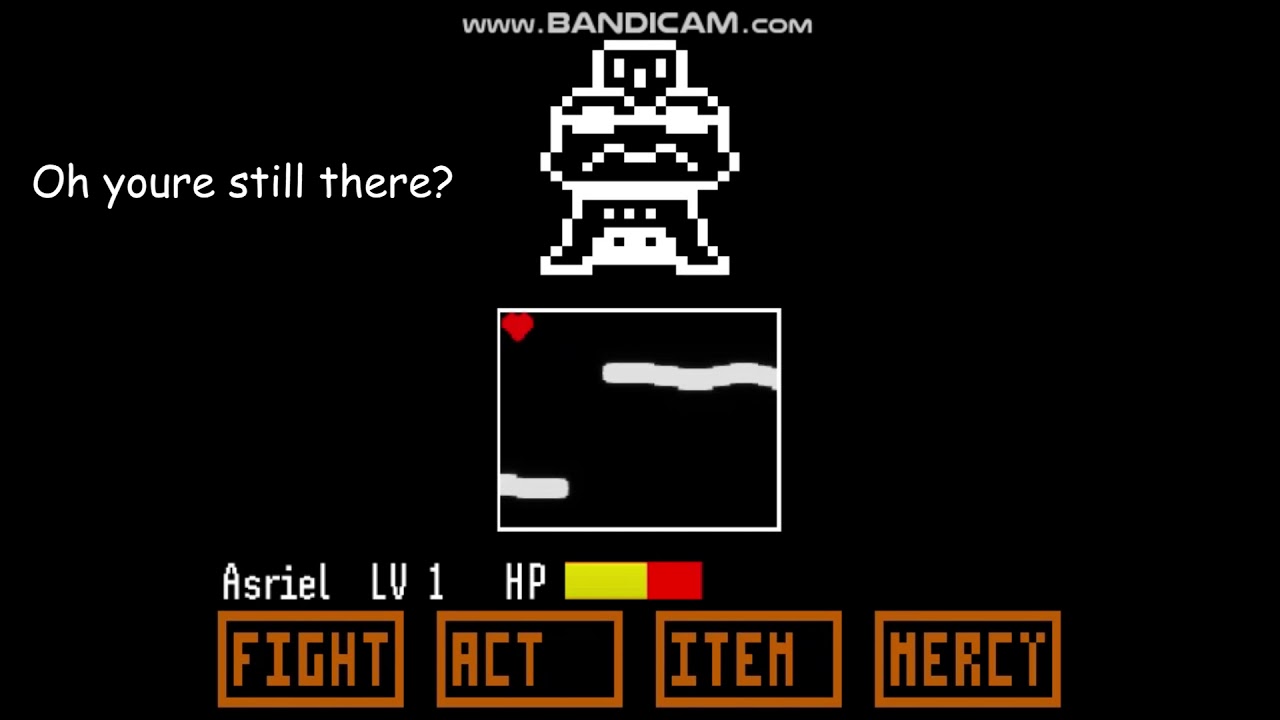
Its un polished but if I tried hard enough I think i could make a better system
sly coyote
well. hopefully you end up making use of the engine, cause if youre going for pixel art style without any physics, ray tracing, or use of 90% of the engine...imo Unreal is not the engine you should use...again thats just my opinion...to each thier own.
abstract relic
We implore you to convert to the dark z axis side.
lime gull
I do 3d games too sometimes
pearl sonnet
when it comes to materials, animating, head candy, ue4 has the edge
unity is much simpler to work with
lime gull
I jist prefer 2d cause its easier and i cant model
abstract relic
Head candy? 😜
 runic iron
You said you knew gamemaker too right ? Undertale was made using this engine
pearl sonnet
although unity ECS is a braincracker to work with in its volatioe everchabging undocumented state too
lime gull
I tried to get into game maker becsuse of undertale
But its hard elarning a new engine
runic iron
Oh ok I see
runic iron
Don't know the engine myself unfortunately, only know Unreal and Unity
lime gull
I only know Unreal
sly coyote
gamemaker is interesting, its blueprint system is more of scripted block nodes
that you slap in a row
lime gull
Yea its weird
sly coyote
pretty much the same thing as blueprints but without the strings
lime gull
But i read that using drag and drop you cant really do much
sly coyote
its a little restrictive cause if you dont understand the creation of custom Nodes for gamemaker youll end up very stuck and very frustraited
you said that exactly as i was typing it 🙂
abstract relic
You can always try Construct
lime gull
What do you mean?
sly coyote
Do you want to make games? Create games today, no programming knowledge required! Make and publish games to the web and share your creations. Build games the fast way.
he means this
same concept tho, as gamemaker
lime gull
Looks interesting
pearl sonnet
to me all that sounds like 'i want to get into digital drawing' 'have you tried paint'
chew through
sly coyote
😉 not totally, its actually more like "im learning how to paint!pulls out a paintball gun" ..."have you tried using a paint brush instead of that paintball gun?"
pearl sonnet
xD
pearl sonnet
'engine' learning curves
sly coyote
using unreal engine for pixel art games is equal to using a flamethrower to kill a spider
lime gull
I do that anyways
sly coyote
it gets the job done for sure
pearl sonnet
but man will it be a spectacular sight
lime gull
Maybe im just into overkill
sly coyote
i can see it being useful for complex choice systems tho
as blueprinting massive trees of choices and consequence is a lot easier than scripting it in the other engines
abstract relic
Unsupported overkill mind you. Paper2d was made during Free Friday basically 😜
sly coyote
Its there though, and seems pretty complete...
lime gull
But i could still technically do it yes?
pearl sonnet
that's true but the blueprint system sure has its limits
it's much easier to type than connecting those nodes and keeping it readable at times lol
or finding the right nodes to pick from as a beginner
sly coyote
its not called messy, its called obfuscated duh
pearl sonnet
haha
lime gull
As I showed i made a working fighting system with no tutorials
So with some DETERMINATION and time and all that I could probably do it
Even if it is overkill
pearl sonnet
for sure
sly coyote
thats why i nest everything into structs and connect all nodes to a Pnumber system 🕵
abstract relic
Hey, so long as you enjoy working on it. Don’t let use grumps turn you away. Just be warned of the impending headache 😉
sly coyote
no....no i dont lol im not that crazy
by all means do it, no need to learn another engine...
lime gull
Haha believe me, making that battle system was a huge pain
Hey have any of you played Little big planet
sly coyote
i have, great game
pearl sonnet
heard of it
just not big into actually playing games tbh
i have this chronic, persisting feeling of running out of time
lol
lime gull
Thats actually where i learned my ability to think 'logically' so to speak
They have a programming type thing with studf like and gates, or Gates, trigger boxes and all that
pearl sonnet
a lot of UE users have a programming background
in any way it definitely helps
lime gull
Yea for sure
abstract relic
 pearl sonnet
and a background in mathematics can help even more
many more interesting 'problems'
abstract relic
Now you’re speaking blasphemy
pearl sonnet
^^
let's be honest, programming problems are a hand full where in mathematics its almost about the motivation to find problems
lmao
yea reading myself those are biased comparisons
twisted even
what i meant is that in applied software engineering you only stumble upon so many patterns and problems
while that's true in applied mathematics in most cases too it's just applied much more broad with their own added problems
specially into the lalaland of theoretical physics
abstract relic
You’ll scare the weekend warriors away with such disturbing talk of mathematics 😜
abstract relic
Though if you’re interested in the topic. I’d hunt down Blackfox.
pearl sonnet
all hail the fractalgod
abstract relic
I’m sure he’ll forgive a ping if you call him a fractal god 😜 @south ridge found a friend
pearl sonnet
lmfao
man, like i said i have this persistent feeling of running out of time
when i get into an anime i'd binge the living light out of it but feel guilty for not doing anything productive know what i mean
 merry gazelle
guys is there any way to use Unreal Engine (Blueprints) to control hardware? For example pressing a button in UE to turn a motor
pearl sonnet
purely blueprint you're limited to whats provided pretty much
abstract relic
Also very sketchy.
 south ridge
What about fractals?
pearl sonnet
uh oh
abstract relic
Evening/morning fox o/
south ridge
It's midday here
abstract relic
It averages out
south ridge
I see. That's clever
pearl sonnet
slaps self; dont go there brain
https://i.pinimg.com/236x/71/c4/f3/71c4f33c8dfa65a3c19e42a83bd73c88--clock-tattoos-tree-tattoos.jpg basically encodes the inspiration for my project

 normal burrow
timetreepeacebrain?
pearl sonnet
nothing to do with peace but yes the other 3 elements definitely
although there obviously has to be at least conflict for it to be a game
axioma more specfically
but its not the time yet to tease XD
i'm so far from being able to get on screen what i need there to be that it's just stupid
ok one more
axioms and axons
normal burrow
cool
owenprescott, make sure you read what is allowed with the engine license. but something like ifttt with web requests would do such things
pearl sonnet
he could always look into plugins and C++
it'd be perfectly suitable for the job
normal burrow
anyone have a prefered method of like.. physics materials?
stick them all into a folder, put them next to graphical things, something else?
sly coyote
place them in a folder with the meshs that use them
thats just me tho, I hate when I change a phys mat and forgot something else shared it that should not have been changed
keep it with the meshs that ref them is just easier to spot at a glance before tweaking
normal burrow
the fear of having to go through and tune thousands of them strikes me too
but good advice. just worry about duplicates i guess
 next badger
@normal burrow place them separately, as soon as the amount of physical materials incomparably small
i doubt someone uses even dozen
also phys materials declared in project. and they can be used by materials and meshes
 oblique tangle
Anyone know how I'd go about implementing sort of like a crash texture below my character when they fall from a high enough distance and gain enough velocity
pearl sonnet
there is isfalling, there is getvelocity
dump crap in a variable and upon landing determine if you slap a texture on the floor?
as for the distance get the vectorlength between startfalling location and on landing location and compare the velocity you logged during fall for your wanted value
normal burrow
essentially gibb0, your going to want to keep track fo velocity and if the person is touching the ground or not over time.
 rotund scroll
can anyone get the Key bool "Is Float Axis" to work?
as in, to return true?
grim ore
how are you using it?
 ornate ice
Good night
people anybody knows how to display a Widget next to a 3D model
but without putting the widget in the actual 3D world
like taking the position and converting it to screen space
and then find the offset based on the widget anchor
cause for example my widget has the anchor in the middle
rotund scroll
@grim ore just trying to get it to return true when using the AnyKey event currently
ornate ice
so 0, 0 is the center of the screen
 next nebula
Hey guy. My game performance went from 90 FPS to 20 FPS after I added a few media player to play videos in the game. The videos are in mp4 and 720p. Does it cost that much to play videos? What's the best format? Or am I doing something wrong?
grim ore
oooh when did the docs page get a dark theme, neato
@rotund scroll damn I can't figure it out either. I thought it might be due to needing an actual axis device like a joystick but no luck there. There are quite a few places this is used in code but the node doesnt seem to return true
based on the code I have no idea what a floataxis could even be or its for another input device. Keyboards, gamepad, mouse, touch are all valid options and tend to be the returned value instead of floataxis. Maybe its for VR lol
which ... seems to be correct. it's used in the Windows Mixed Reality, Oculus, and SteamVR libraries along with like Magic Leap and ndisplay so there ya go
rotund scroll
what a shame
grim ore
yeah I dunno what you planned on using it for, maybe there is an alternative
rotund scroll
so there is no general way of seeing whether an input is part of a float axis?
grim ore
what use case?
rotund scroll
to generalize input over gamepad and mouse for instance
input axis input that is
so like analog inputs on a gamepad vs mouse movement
grim ore
not that I can see to do that I guess, Still lost on the concept honestly
rotund scroll
axis input allows for floats to determine the strength of a button
I was looking to standardize that across both mouse and gamepad
grim ore
so like looking with the mouse left or right or using the stick to look left or right? the only problem I can see is mouse input is not really an "axis" in the fact it has no 0-1 range its just a value based on how much you move it in that range for that one frame
where as an analog stick can hold that value indefinitely
well technically it's valid for that frame as well but it will not be 0 the next frame if you dont move it unlike the mouse
rotund scroll
so it is mouse acceleration then?
grim ore
I know there is mouse smoothing in the engine
rotund scroll
so if that is turned off, the axis value returns 0 always?
grim ore
I would think you would want them to both be adjustable in the options if someone chose that so you would have 2 separate input events for gamepad and mouse and then they can both have their own multipliers
grim ore
with it on or off every frame without movement on a mouse it's going to return 0
for a gamepad it's going to return the value of the analog stick if that is what you are using
assuming these are set up as Axis Events
rotund scroll
yeah I understood that
I wanted to confirm that it was mouse acceleration then as the axis value
but it's fine, I can reconstruct the input using relative distance
and direction
grim ore
ah that one I dont know. I know the default TPP template handles analog stick and mouse look separately
rotund scroll
but that's beside the point?
grim ore
I guess, I think I am just not understanding the goal 😦
rotund scroll
the point was to try and have mouse axes mimic analog axes
which can still be done
I assumed it was as easy as using the axis values
but if it is acceleration I will need use screen resolution and relative mouse position and distance instead
grim ore
so like if you move the mouse left a bit it will act like you are holding the stick left?
rotund scroll
it will give the same input yes
sly coyote
the gamepad is always normalized tho, where mouse varies wildly in the direction you move, do a printstring and see for yourself, they would both need to be handled seperately
grim ore
makes a bit more sense then, like a flight sim stick with the mouse
rotund scroll
@sly coyote yeah that's the conclusion I reached
grim ore
you should be able to do what you want then, check the mouse position based on a base state. You can always feed it into the joystick event once you "adjust" it to match
rotund scroll
mouse position doesn't really matter, what matters is direction
grim ore
yes you can determine direction based on position unless there is some other way
rotund scroll
well yeah I know this
I understand the method, it wasn't part of my query
for the record this is for something like a radial UI
oblique tangle
Anybody know where this material/model/asset is from? I've seen it in quite a few projects here and there and was wondering if anybody knew about it! Any response would be greatly appreciated, cheers : )
ornate ice
Hey
Anybody can help me with some vector math?
I need to mirror
my position
but on the other side of an object
something like that
how can I get that opposite position to the player
its a 3D world so it matters if the player is coming from above, I need the opposite from the bottom
gleaming creek
That should be simple enough.
Mirrored = Object - (Original - Object)
So, for example, if the original is 6, the object is 10, then the mirrored point is 10 - (6 - 10) = 10 - -4 == 10 + 4 = 14.
Or if the original is 12 an the object is 10, then the mirrored point is 10 - (12 - 10) = 10 - 2 = 8
gleaming creek
If you're talking blueprints, you can just subtract the vectors from each other in one go
ornate ice
I want to conserve my player Z
@gleaming creek thank you very much
worked amazing
Here is the function
if someone needs to use it
plush yew
hey can someone help me with a problem im having, i just dont know how to do it and there is nothing online about it
is there a help channel or?
ornate ice
I always ask help here
and if its very specific
I got to the specific channel
like graphics
shoot ur question
plush yew
im making my character sit and look right or left
so when he turns right i want him to be able to press a to turn back to forward
but i also want the charactor to be able to turn left
and thats it
 scarlet birch
Anyone have an idea what I need to do to get the "keep simulation changes" to not be greyed out in the editor.
ornate ice
never tried that Mike
I don;t event undertand what the fucking simulation is for
Normal can you make a small video of the error?
or the problem
scarlet birch
I use it for fast tunning
ornate ice
or a Drawing?
plush yew
wanna get it call
scarlet birch
but now for whatever reason the keep changes option won't work
scarlet birch
I mean I can screenshot and set them , but right clicking is much easier
plush yew
Out of curiosity.
By default the FPS C++ template has inputs for both mouse and game controller thumbstick.
I felt like I had some issues with the mouse input, but that went away by removing the game controller input that were assigned to the project by default
 signal minnow
How hard is it to learn ue4 cpp?
plush yew
That probably depends on many things.
Are you already familiar with Object Oriented Programming?
signal minnow
I'm alright at java, can make simple games like snake, work with arrays, lists. I made a tic tac toe for a school project the other day, and did all the checks by using loops and like X==Y for diagonal, and( X+Y = n-1) for the anti diagonally.. (it was a 5x5 grid, no hardcoding win patterns), I'm a pretty logical thinker
scarlet birch
Can anyone remind me how to alter values on the player BP while running in PIE and have them saved? Keep simulation changes isn't working on things not present in the level before it starts playing.
signal minnow
Mhm, what about unreal itself though? Like I've only done BASIC movement and stuff in ue4
plush yew
UDEMY | Unreal Engine 4 Mastery: Create Multiplayer Games with C++
signal minnow
Like a "zombie" game that all creatures would just walk towards you, no matter if they can even see you, and the gun had unlimited ammo, no delay between shots (autoclicker set to 1ms was funny), and it'd 2 tap every creature
scarlet birch
Nevermind I figured it out
signal minnow
Zombies would fall from the sky, such a meme game
How's the Udemy course? Free? $1000?
plush yew
I usually get them for $15
If the tutorial ends up being a bad one, I dont feel too bad for having invested only $15
scarlet birch
Instead of spawning the player form the player start, place an instance in the level, Simulate, click the instance, make changes, then the edit blueprint drop down menu and select apply changes to blueprint
signal minnow
@plush yew $26 (Canadian pesos) rn for one, "Unreal Engine 4 Mastery: Create Multiplayer Games with C++"
scarlet birch
and the adding an instance isn't necessary, my mistake.
signal minnow
Should I learn in cpp or blueprint though?
plush yew
Personally, I'd go for C++ first
abstract relic
If you’re going to specialize in programming, learn cpp
signal minnow
Ahh, well I never thought of learning by a paid tutorial, I tried looking for a free one like two years ago, I tried a couple couldn't find any good ones, so I guess I'll pay to learn
Oh I will learn cpp, it's not I "don't want to"
It's a "how should I do it"
abstract relic
Ah
signal minnow
Because I used to know someone who got very bad habits in java for Minecraft plugins
Great guy, made good minigame plugins, but the code was, uhh, very odd.
abstract relic
Heh, it is good that you’re aware of such traps
signal minnow
He got bad habits and I wanna learn with proper habits and code practice like camelCaps
plush yew
Hii
signal minnow
Sup
plush yew
Can someone. Help with this #looking-for-talent still not working for me
But I do need a coder for my game
abstract relic
Udemy is definitely decent for game related lessons. As far as teaching you the fundamentals? I can’t personally vouch. I was stupid at the time. 😜
plush yew
What
signal minnow
Cpp fundamentals is good, but I feel like it'd be boring to just make cpp examples... I'm just scared if I learn through unreal short hand, and other stuff I may get bad habits
@plush yew you need to speak to the looking for talent bot
plush yew
There oonly 3
signal minnow
Send the message "talent" to Unrealbot
 hoary silo
Can someone show me how to fix the primitive error in a custom shader in the material editor?
I looked on the answer hub but that didn't work
plush yew
Done
abstract relic
That’s an understandable concern. I can guarantee the courses there are of higher quality than what you would find browsing YouTube or following old tutorials.
Or random advice from a blue bird
signal minnow
Ehh, I'll just go for Udemy course then. It's funny because I've had a steam app license for like a year, mind you I'm 17 lol
abstract relic
Some of them are 8+ hours for $15. It’s worth it
signal minnow
It's like 7.5hrs or something
plush yew
Um it won't work
signal minnow
17.5**
abstract relic
Just know everything is “98% off”
signal minnow
Yeah, i was wondering what that's about
That's used to trick people into buying it usually
It's a psychological trick
A $4 item will be put for $5 normal, with 20% off for example
plush yew
So who can post it for. Me cuz unreal engine bit is ingorin meee
signal minnow
@plush yew you message the bot, then the bot asks you questions and posts it for you
plush yew
What do I say
abstract relic
Just one of those sites, “99% off the next 48 hours!” After that, it’ll be, “99% off the next 48 hours!”
signal minnow
Yeah that's what I mean
abstract relic
Sometimes you’ll get wildly different “limited time” offer by just refreshing the page
plush yew
I stopped looking for the perfect tutorial a long time ago. Just pick up one and soon enough you'll get the foundation you need to just learn by yourself and mess around with the code
signal minnow
Yeah, probably lol
plush yew
Ok so how long it take
abstract relic
You probably didn’t enable Allow DM from this server
plush yew
Finally worked
 ancient lotus
anyone know how i can make a skeletal mesh have a static mesh's collision? for example i have a skeletal mesh in the shape of a box, and a static mesh that is in the same shape as the box that i would like to use for collision. i cant seem to set it in its physics asset
plush yew
Yes
But I forgot
ancient lotus
10/10 most helpful response ever lol
ancient lotus
how far up is your thing
ancient lotus
i have 0 clue what you just said
ancient lotus
signal minnow
@ancient lotus he really did post in talent, he just needs to wait.
ancient lotus
ah. also figured out my issue.....it helps when you remember to assign the physics asset
signal minnow
Mhm okay
 gilded plinth
Hey all is there any way to search tags in the ue4 editor? I'm searching for an Actor with a certain tag, but there are over 500 objects in the outliner so : /
lots of them are actors
ancient lotus
tag as in the name?
gilded plinth
@ancient lotus tag as in the Actor tag you can find by selecting an actor in the editor viewport, then scroll to the bottom of the details or search for 'tag'
there you can add tags
 dry moon
Oh geez PixelDepthOffset doesn't work right with Virtual textures
signal minnow
Sounds like unreal
plush yew
Who read it
plush yew
Is there a builtin way to view live memory resources? Like what variables are loaded into memory and what are their values?
plush yew
Everything
 dim plover
You can view the size map for the size on disk and the memory size. It also shows how much their properties occupy.
There's also some console command to view the memory sizes of some things, though I forgot what it's called.
 cursive walrus
hi i have issues with the springarm. even with the sprim arm it still clips. if the player is already sticking to the wall
 radiant haven
what?
 limpid rivet


 loud valve
Hey guys short question: when I test my game with the DS controller, when I walk forward with the left stick it exits the play session.. why is this happening? All other controls work fine.
 midnight gate
help
my character falls thought the sprites
i have the collision in the character but it wont show in this viewport
plush yew
help me too
midnight gate
my player start was messed up haha
 stiff spoke
The problem can also come from his animation Idle @plush yew
plush yew
I fixed it
i still dont understand what problem was but i made new playerstart and it got fixed lol
plush yew
me?
stiff spoke
Yes @plush yew
midnight gate
hey i need to use a flipbook in ui help
widgets animated flipbook
also how do i make an object overlap once and have like a 6 second timer to not to overlap again
midnight gate
why wont it work
i need animated ui
why can i only do it with materials this is so stupid
sly coyote
Someone wrote a plug in to use flipbook in ui, its on the market for 12$
Also if your project includes c++

Gist
UMG Animated Image. GitHub Gist: instantly share code, notes, and snippets.
Someone shared there code for animated images in ui on github
@midnight gate
 fierce tulip
gitgub jist?
*gist
sounds like like, hmm this is prolly the gist of whats pushed to server
/care to double check
midnight gate
i think the uvs are broken there
sly coyote
Its githubs version of codeshare, or snippet or whatever version of code block sharing you prefer
midnight gate
but i dont know how to manage uvs for the flipbook node
no i cant use plugins
im in tears
why is it like this
plush yew
how would you go about making changing LEDs you know like RGB
sly coyote
I would check your alpha channel
midnight gate
how
sly coyote
I dont use flipbook so i imagine whatever flipbook uses as a material for that object
sly coyote
Emassive color is just glow...
radiant haven
radiant haven
noone helps u if u scream or use caps
radiant haven
I suffered 3months 3h is nothing
midnight gate
thats the life of a coder
sly coyote
Anyways you can try holding 1 and clicking then hook the node it makes to opacity, turn it up until its a solid instead of see through...likewise you can drag the alpha over from the previous node and hook it to opacity...you probably want something in base color... emassive just controls how glowy something appears
sly coyote
Try hooking to base instead of emassive color
You have nothing hooked up in base color
midnight gate
i dont think thats the problem
sly coyote
Didnt fix it when you tried?
next badger
@midnight gate you're usign flipbook wrong way...it has texture object input
you may right click texture sample and convert it to object
T2D is reference to a texture, that can be later sampled by Flipbook node
 waxen marlin
Hey guys, is there any way to change the sliders speed when tweaking material parameters, like for example holding 'shift' in Blender or something?
midnight gate
AH THANK YOU
merry gazelle
anyone know of a simple system to create online auctions in a game? I don't have any multiplayer exp, just curious if there's a really simple way
 cloud cobalt
How could anything like that be simple ?
 tall pendant
Well, for some people FF7 is also a rather small game to make. 😄
merry gazelle
@cloud cobalt Well all the auction functionality in UE imo would be easy, I'm just not sure about making it online
cloud cobalt
We're talking about an ingame auction, right ? Something with a menu to display the item, prices, interaction with databases, etc ?
Sounds like weeks of highly game-specific work
merry gazelle
yeah I've already create a trading game where prices fluctuate like a stock exchange type deal. I might aswell just create a singleplayer system to start with and go from there
 mossy nymph
For the UI part that works
Bud adding networking after the fact is a pain in the arse
And doing it while learning networking is worse
merry gazelle
For the networking I can always outsource. I think rather than realtime auctions, maybe if the sale starts / end at a specific time so that the listings are updated periodically on a schedule.
I will just do some research on possible options
pearl sonnet
https://www.youtube.com/watch?v=sOHMfrsnhfQ
is this a culling issue going on?

HISM, material uses the seed parameter what is this flickering? culling related? what to do about it?
culling settings are all 0 as in infinite
is there another setting for anything out of view frustum
i noticed that when i offset all those cubes where they dont touch eachother it doesnt occur
midnight gate
anybody know how to change 2d sprites depending on the health?
midnight gate
this is my charcater blueprint
after she gets 2 hp everything changes yes but the running animation has only one frame in it even tho the sprite has 10
worthy flame
anyone know any good run away from player BT's tutorials? or on ue4 docs i cant find
 dark rune
anyone know where the help server is on this discord
abstract relic
dark rune
yeah i cant find 1 that explicitly states to ask question
do I just put it in #blueprint or the like
abstract relic
This entire server save for a few channels is for asking for help and discussion
dark rune
ah yes thx
 remote roost
tfw ur compile button doesnt want to work :(
 manic pawn
tfw you use hot reload
runic iron
@remote roost As Zeblote said avoid hot reload. Use Live coding when you can otherwise close the editor and build using VS (if you need to modify headers for example)
 hidden heart
yeah, yer gonna have a bad time with hotreload
radiant haven
Hello
got a pickup bp
but i wnt that the picked object stays in the middle of screen(crosshair)
other thing is when i move it is like this
cube has a delay
and when i pick it up i got these strange lines
next badger
line looks like debug trace
radiant haven
never activatesd debug liners
hidden heart
show us the BP ?
radiant haven
hidden heart
you do have debug traces on
hidden heart
the traces are useful for debugging, lets you see if something is working or not
radiant haven
oh ok
well u know how i get a pickup system like in protal?
or other valve games that uses SurceEngine gmod, half life, portal...
hidden heart
you're pretty close keep working on it 🙂
radiant haven
yeah hmhm
hidden heart
with the Hold Object Location variable, where is that located on your player bp?
hidden heart
and in the viewport?
radiant haven
nothing to see
hidden heart
https://www.youtube.com/watch?v=HnR1Gf5gXcY this may help you

How to let your character pick up objects, Skyrim style (kinda...). Twitter: https://twitter.com/Play_Ruff Patreon: https://www.patreon.com/deanashford
dark rune
I have somewhat finished my TPS shooter character blueprint and such
Is there any good tutorials for implementing that in a multiplayer evironment
next badger
i'm not aware of any proper network tutorials, #multiplayer may know better
replication is quite tricky to do, esp properly
dark rune
@next badger alright ill check there
replication? you mean using the blueprint in multplayer?
next badger
replication is a process of transferring function calls and variables between server and host
Overview of the samples provided in the Network Features Content Example map.
dark rune
ohh i see
yeah im looking to get my foot in the door on how any of this works
also just to ask, its possible to get a simple server (for tests) up and running for free?
radiant haven
yeah
next badger
ue4 has all you need, you just set a number of players to spawn
radiant haven
@hidden heart he has the same problem
next badger
@dark rune it's under Play button
radiant haven
@hidden heart Fucking made it
dark rune
@next badger well thats convinent i thought some third party service was needed
hidden heart
how'd you do it?
radiant haven
next badger
nope, ue4 actually has pretty good network subsystem, and it's kinda works with bare BPs...but many network features are not exposed to it
hidden heart
and it has the feel you want?
next badger
event tick...will need a refactor later
hidden heart
cm are standard units in UE
ornate ice
Hey Good morning
I wanted to ask if anyone knows how to map actions by name only for gamed ones?
next badger
it's almost 9pm
ornate ice
lol
abstract relic
Halfway to morning!
next badger
map actions by name only for gamed ones... gamed ones
normal burrow
question is how to get a list of input actions for the game?
 supple totem
if I want a skeletal mesh to hold a pose, should I just do a 1 frame anim sequence?
I see there are pose assets but those seem to be for a special purpose
normal burrow
if you wanted to yes
pose assets are primarily for assigning curves to bone 'poses'
theres no such thing as a 1 frame animation in ue4 though
needs at least two frames
after you make a sequence player node, right click it and convert to evaluator
would recommend that over setting playback rate to zero
supple totem
ah, all good advice, thanks
ornate ice
it was gamepad ones
but I've found
I'm trying to switch my icons for when using a gamepad vs keyboard
I pass the name of the Action
like
Interact
that will find 2 ways of interact with Keyboard "E" or with GamepadFaceButtonTop
after that I find out if I'm on windows if so check for the selected controller scheme that could be PS4 or XboxOne
this ones are selected in the main menu
and then find the appropriate icon for the action
🙂
worthy flame
what are LOD's?
next badger
In computer graphics, accounting for Level of detail (LOD) involves decreasing the complexity of a 3D model representation as it moves away from the viewer or according to other metrics such as object importance, viewpoint-relative speed or position.
Level of detail technique...
next badger
ue4 physics already has settings for weight, each actor has
ornate ice
For LODs is there a way for UE4 to do it automatically or you have to pass like low end models to the engine for it to replace when you are getting away from an object
radiant haven
next badger
ue4 has tools for generating low poly versions of LODs
How To use the Automatic LOD Generation system in UE4.
supple totem
I'm getting a crash when trying to weld 2 bodies in PHAT. What is another way to keep two bones rigidly locked to eachother?
ok got it set constraints to locked
 vast fossil
is there a diference between cast to and get all actors of class ?
or doesnt it matter which one u use
normal burrow
one turns a representation of something into another when it can, the other gives you every single actor of the class in the world
vast fossil
hmm, so for performance casting is better ?
normal burrow
depends on what your doing. if you need every single actor of the class, you should probably use that instead of casting every single actor in the world
how are you using get all actors of class?
normal burrow
is it like you've got gone one manager type actor you need to find frequently?
vast fossil
for example im in my character BP and I need something from another BP, so I get actor of all class, select that BP and get the stuff I need
scarlet birch
is anyone aware of any bugs with vector math in BP with 4.22.3? If so, @ me when you respond. I'm having a weird issue with a trace and it seems random to me.
I figured it out, it was a float variable that was bugged. That's the second time in this project that has happened.
Replacing it with a literal fixed it, even though the variable showed the same value
normal burrow
mike yes
its an issue with the latest vs. if you didn't compile the code though, unsure why you'd have issues with math
scarlet birch
I'm working with BP in editor and compiling in editor. It is a cpp project though
normal burrow
i don't know enough about the problem because i've stuck on old versions of VS but #cpp knows a lot more about the issue
what i've heard is, if you mix launcher engine with latest vs compiles, it misoptimizes vectorization. making assumptions the engine code is optimized the same way or something
scarlet birch
I'm just going to make a mental note to check for it in the future if there's an issue and trudge on blindly
Updating to 2019 does feel like a mistake
normal burrow
its not specifically 2019 i don't think, just some of the latest updates to it
something to do with simd, which it used to not optimize but now it does
worthy flame
does anyone know how to randomly select a animation in state machines?
if you have multiple
normal burrow
believe there is a node for this.
 upbeat epoch
Does anyone know if there is a way to change the mouse pointer colour inside the editor?
plush yew
I TELL YE, BEWARE OF NESTED SIMPLE PARALLELS!
worthy flame
I looked in the docs I cant find anything for multiple animations
grim ore
use the Blend Poses by int node
Blend is what you want in general for using more than one animation
worthy flame
ok and how are they randomly selected? what do I need to do?
grim ore
did you put the node in and look at it?
worthy flame
yes I can get a int to control it,and am looking at the docs
but cant figure out how to randomly select 1
and play it
grim ore
what does your code look like now?
worthy flame
2 animations going into blend pose by int then output
grim ore
ok, and the output is plugged into the output animation pose?
grim ore
so right now it is playing pose 0 because the int is set to 0. When you do you want the pose to change?
worthy flame
at random I dont have any checks to do that specific one
I could get a random int but there is no delay
grim ore
ok so you need to feed it a random # randomly or on a set time. You can either have the main graph generate the # and reset itself eventually and make a new one, or you can hook up the animation ends to anim notifies and have it generate a new one once it is done playing the current. the second options is the betterest since you are guaranteeing an idle will finish before the next one is chosen
worthy flame
Ok the second one sounds good, ill try to do that
pearl sonnet
atavism coming to UE
worthy flame
what is the animation ends?
plush yew
@worthy flame In the animation
Set up animnotify's
then place teh anim notify events in your animBP
and from those events change bacik to default int pose
grim ore
https://i.imgur.com/SchxR7X.png is the blend by int, https://i.imgur.com/ABkpQvq.png is the event graph. this is for the delay version

 plush yew
@worthy flame WHen your animation reaches the frame with the notify it will execute the event in your animBP
grim ore
https://i.imgur.com/Ch55XOt.png is the idle animation with the anim notify near the end of it https://i.imgur.com/NTLPneg.png is that event in the event graph in the anim bp

 plush yew
^
grim ore
the anim notify is probably the "smarter" way in the end, anim notifies are neato
worthy flame
thanks it works
 white plume
Is there any way to program "evolution"? Like for example, if a red cube mated with a blue cube then the baby cube could be a blue cube with red stripes, sharing traits of both parents, then if striped cube bred with a flat orange cube its child would also have orange stripes, etc.
Of course, it'd be more complicated then that
Like if a green slime bred with a slime with wings the offspring would be green and have wings
abstract relic
Evolutionary Programming - Evolutionary Algorithms - Clever Algorithms: Nature-Inspired Programming Recipes
 frank escarp
@white plume you first need to setup a "genome" of some sort
this genome is what drives the parameters of the object
and then you can cross 2 of them into 1
white plume
Is unreal capable of doing that?