#ue4-general
1 messages · Page 559 of 1
 fierce tulip
8-ish on my trade, general ue4 knowledge around 5
though, it depends on if I compare it to the best i know, or average pool
 wary wave
yeah, but even programming tutorials are videos now >.<
 cloud cobalt
Picturing a template tutorial in video
 pearl sonnet
the interesting thing is that the more professional people get the less they would overestimate themselves
maybe you should inverse axis on that chart for more accuracy 😛
 polar hawk
you're gonna have to run that first sentence by me again
fierce tulip
the more you know, the more you realize how much you dont know
pearl sonnet
ye
fierce tulip
poor english luos
 grave nebula
The peak should correspond to pros who are likely self-appointed pros.
 plush yew
how do i get trees and put them in my level ( im a complete noob
polar hawk
someone make a video tutorial
fierce tulip
get a chainsaw, cut em down, drag em into your level.
fierce tulip
"where to buy a chainsaw"
pearl sonnet
as for english,
my english gets worse the longer i live in the US
fierce tulip
if you are a complete newb, try some of the beginning stuff on the learning tab in launcher
pearl sonnet
;d
plush yew
lol
fierce tulip
im at the "if I know there is an expert" and was thinking of @grave nebula XD
plush yew
i want to build a house for my level and sme scenery around it. where can i get the textures. or should i make it myself
cloud cobalt
I answered that too
fierce tulip
@plush yew
https://docs.unrealengine.com/en-US/Engine/QuickStart/index.html
https://worldofleveldesign.com/
Get up and running with the basics of the Unreal Editor.
Hundreds of tutorials for level design and game environment art. Tutorials include level design, UE4, UDK, CryEngine 3 SDK, Source Engine, 3D Modeling, Maya, game texturing and much more.
pearl sonnet
Allar, could it simply be that relevant videos on a topic are faster to find than scrubbing through forums or discord
polar hawk
it could be anything
pearl sonnet
😛
polar hawk
this exercise has taught me very well that I shouldn't be making surveys or trying to correlate things
pearl sonnet
haha, ikr
 stone oar
surveys are hell, especially when you realize afterwards that you have asked wrong things and data is almost useless
grave nebula
It is 2019, people should consider that video tutorials consume much more bandwidth, and are not as environment-friendly as text ones.
pearl sonnet
lol anyone who took statistics in school beyond GED niveau 😛
polar hawk
I took some advanced statistics but
grave nebula
Search question in the poll should unmistakably point to flaws of documentation btw.
fierce tulip
@grave nebula thats why I donate 30 trees a month
polar hawk
Aye, a strong resource would keep people in that resource
instead of bouncing between many
.... I would assume
 manic pawn
why wouldn't you still use google
it will find results from both that resource and others
so it's always better
polar hawk
I can't speak for the masses but
pearl sonnet
maybe my google-fu is outdated but google gets worse and worse for me
polar hawk
if I'm learning most other things I generally stay within certain resource domains
for example
I'm learning Golang
and Golang makes it really easy to stay within Golang documentation for whatever I need
pearl sonnet
golang has great documentation
pearl sonnet
examples, everything youd expect
 serene birch
isn't google doing the search for golang? 😛
pearl sonnet
😉
polar hawk
ayyyyy
lol
also, arduino stuff
I've found I can stay within arduino resources for a very long time without bouncing back to google
I tend to immediately get lost within epic documentation
pearl sonnet
the problem with UE is that you can have so many angles
you have programmers, artists, level designers, you name it
it's hard to have one bible for all of them
and if you have one, it's not specific enough for any one of them in terms of use
grave nebula
googling for very specific and advanced topics usually ends up being what it is best for, that being generic at best.
polar hawk
Majority responded that "There is a lot of documentation."
Majority also responded that "There isn't enough documentation."
plush yew
how to i change the size of a cube? change scale?
 stone oar
statistics are all lie, you can get any numbers from it you want
plush yew
and how do i decrease the size of the texture then
pearl sonnet
#philosophy
it's like saying that technology is good because it provides in what people want
ignoring everything else there is to it or wrong with it
polar hawk
I hope this slide shows that my analysis can't be taken too seriously
pearl sonnet
seeing how the website and learning section are in overhaul it could be useful
but there is a lot to say on those topics
i'm sure the brilliant EPIC minds have considered everything we said already lol
it's brilliant how fortnite, and others in the store, are both a good games and a demo showcase for UE
they have the opportunity to really do this thing right
it's all a matter of making sure people can hook into it, first easily, then increasingly more in depth
and the learning videos do exactly that
appeal to the professionals, provide to the beginners
from there on it just needs more density and coverage (broadness)on features and approach to get people capable to do whatever they want to do
biggest miss in all of this is the asset aspect of things
cloud cobalt
Video is probably the best format to address beginners because it's less threatening that a wall of text. It's just the least efficient format overall - it's way more work to build a proper video tutorial compared to text, it's almost impossible to update when the interface changes every few versions, and for experienced people who're looking for something factual quickly, skipping through the whole thing to find the three seconds of actual worthwile content is annoying
pearl sonnet
agreed... but it also makes more connections in the brain because it shows how things are implemented/used
like myself, i've been a programmer for 3 decades and have pretty good technical understanding of 'things 3d'
but i found UE as a whole hard to get into
polar hawk
I'd like to create a course that goes from wildly vague to wildly specific
For example I want to start out covering what a variable is by explaining Egyptian rope computers
pearl sonnet
haha 😄
i'm certain people would appreciate it
if on top of that too, you shows them how to use them in UE both in code and blueprint 😛
the latter is where things are broken for beginners
polar hawk
aye
I also want to do a series that takes a look at a single code commit
and go into great detail about it
fierce tulip
basically like your latest livestream :p
polar hawk
yeee
there is a lot of information you can learn about the general systems by learning hyper-specifics
like multi broadphase pruning
pearl sonnet
personally i think going hyperspecific is the way to go
getting some megapack and trying to get oversight on that as an absolute beginner is useless
a lot of the streams and videos work towards a demo and people get exited, which is great for marketing
not for learning
they dont show the specifics enough*
'this is what you can do with UE'
'you can add a potion like so'
they install UE with a blank project thinking... what the...
 runic iron
Most of the time I end up looking at the source code
pearl sonnet
yea, good thing they added the archetypical templates
runic iron
When I learned the gameplay ability system plugin I didn't have any other choice. Fortunately Dan made a super good doc about it so people won't have to do that anymore
Yup
 next badger
@polar hawk i wonder what are the things that people mentioned they want to pass to Epic?
runic iron
How does it work for big companies like Square Enix btw ? Does Epic send some employees to form them or something ?
pearl sonnet
relevant people stay in touch
same with intel going around for optimization and such
runic iron
I see 👍
polar hawk
@next badger I'm saving combing thru those for last but they've already been passed to Epic in some regard
next badger
no death threats?
pearl sonnet
haha
next badger
BTW, google results are broken for docs now...irony
grave nebula
#define Majority Minority
fierce tulip
more emphasis on supporting community making documentation and tutorials pl0x :p
polar hawk
roughly
fierce tulip
instead of giving cryzen a grant
polar hawk
Also these slides are still subject to change based on deeper looks at data but
are mostly solid
pearl sonnet
it's harder to maintain a quality brand with 'community' contribution
great for filler and community building
points at unity
next badger
@polar hawk you probably should add a country of origin there, i think academics issue is specific to each country (my guess)
polar hawk
I didn't do any form of geolocation
or language
both of which have proven important
also remember only 300 people responded
grave nebula
Just worried about Do not want to prioritize API sources as a trigger to We can safely drop updating it, instead of a pointer to its flaws.
polar hawk
Aye
pearl sonnet
Luos if you want community videos you better have a voting/pruning system in place and make sure categorization is tight
pearl sonnet
ah
fierce tulip
they already do community video stuff
but they are extremely strict
to the point where its no fun imho
fierce tulip
not sure on the nda-ness of that list so cant share.
pearl sonnet
i would too if i attached my approved seal brand to it
polar hawk
fierce tulip
@pearl sonnet to the point where I'd need to spend bleeploads of money to make a room soundproof? while I am doing this for free?
nein
pearl sonnet
😄
grave nebula
Voice synthesis ftw.
pearl sonnet
yea.. if they would let the community have their way, 'unapproved' they better have a voting/pruning system
and make sure to mention that it's not necessarily EPIC quality 😛
fierce tulip
oh right, and I could not even apply as I dont have hd monitors
only 4k <_<
and setting those to hd is eye ouch
pearl sonnet
ya lol
fierce tulip
 pearl sonnet
majority still uses 1080
and if its not the monitors then its the streaming aspect of things, bandwidth wise
 hasty osprey
after i have put my skeletal mesh into the level how do i pose it?
polar hawk
 light coyote
@polar hawk It would be great to see Mathew videos with official UE intro 🙃
polar hawk
but can they see why kids love cinnamon toast crunch
pearl sonnet
xD
next badger
"Epic" quality...is that the one when the ue4 crashed in the middle of the stream?
pearl sonnet
lol
fierce tulip
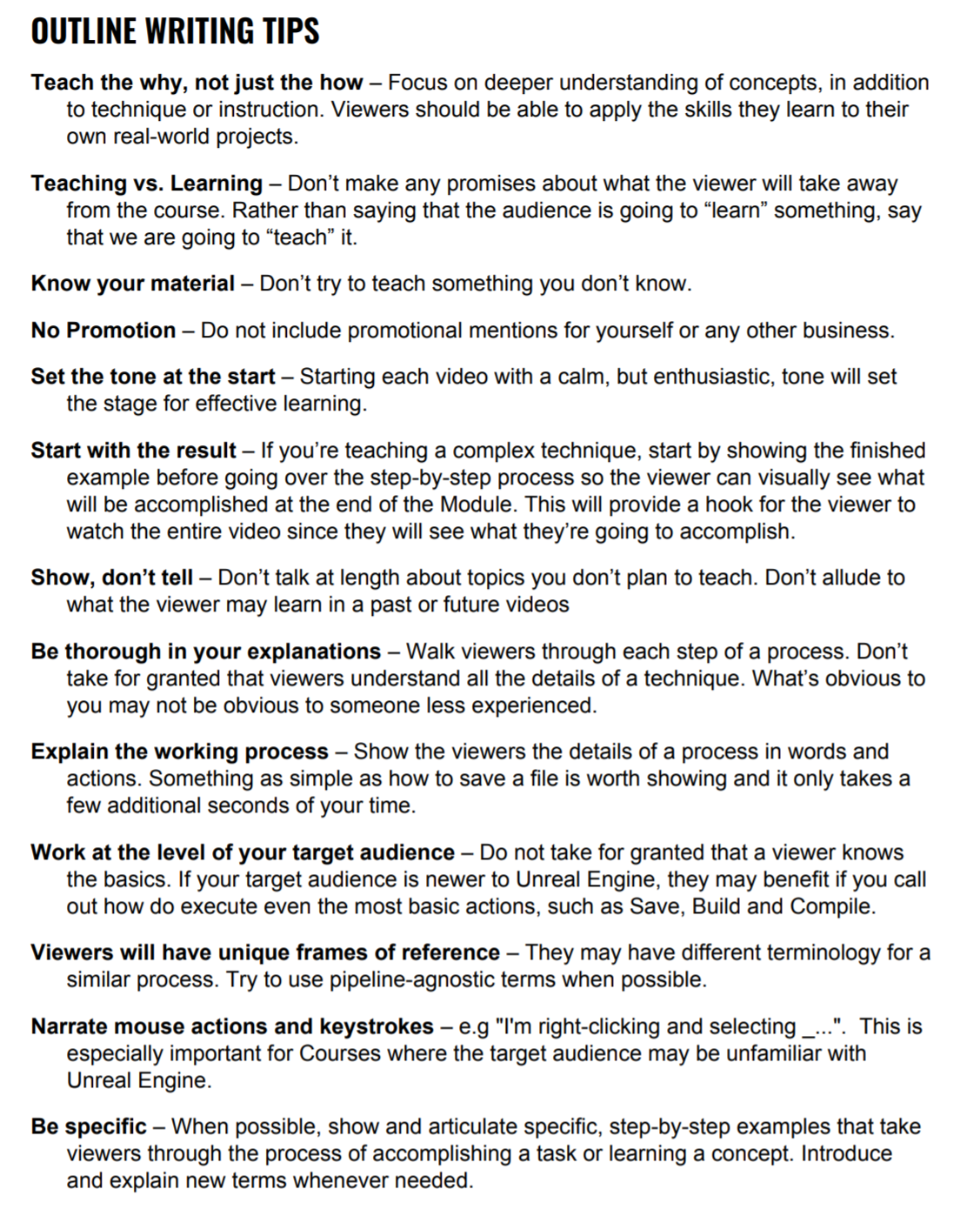
Be specific
○ Try to avoid vague pronouns for engine specific terms, use full names
LINEAAAAAR INTERPOOOLAAAAATE
PARALAAAAX OCCCLUSSION MAAAPPPINNG
instead of lerp and pom
grave nebula
pom pom pom
fierce tulip
pompadompom
grave nebula
lerpy pom
light coyote
tomatos?
next badger
Mathew probably very fond of "PARALAAAAX OCCCLUSSION MAAAPPPINNG"
next badger
bet sweep is a term no?
fierce tulip
if I cant use made up words, I cannot express vfx XD
pearl sonnet
ít's like watching modeling videos
"this feels good" "that looks right"
from a nitpicky programmer POV that does not compute
fierce tulip
"the scientific term for this is a religious summoning that has been answered by a holy deity, touching the targets their evil hearts convincing them to move onto the afterlife"
"Holy pew"
runic iron
@hasty osprey You already have anims ?
If so go to the blueprint and choose the anim you'd like to use. Or create an animBP
fierce tulip
having said that, the list of do's and donts is actually quite informative.
runic iron
Is there an actual dictionnary of vfx terms somewhere ?
next badger
yeah, and programmers definitely not use words like "NANded", and "NULLed"
pearl sonnet
look at it this way
you either want to work under epic,
or you don't 😛
grave nebula
My list of do's and dont's varies with mood unfortunately.
fierce tulip
@runic iron Glad is making one
runic iron
Ah dope 👌
fierce tulip

Real Time VFX
Hey! Many moons ago I started a thread on tech-artists.org where I wanted to collect useful realtime vfx knowledge in one place. It started out as a dictionary, but then I started collecting reference dumps, discussions from the Facebook group and so on. I was approached by s...
pearl sonnet
do it their way, which is clever
do it any way, they'll be happy for connecting the community
runic iron
Thank you !
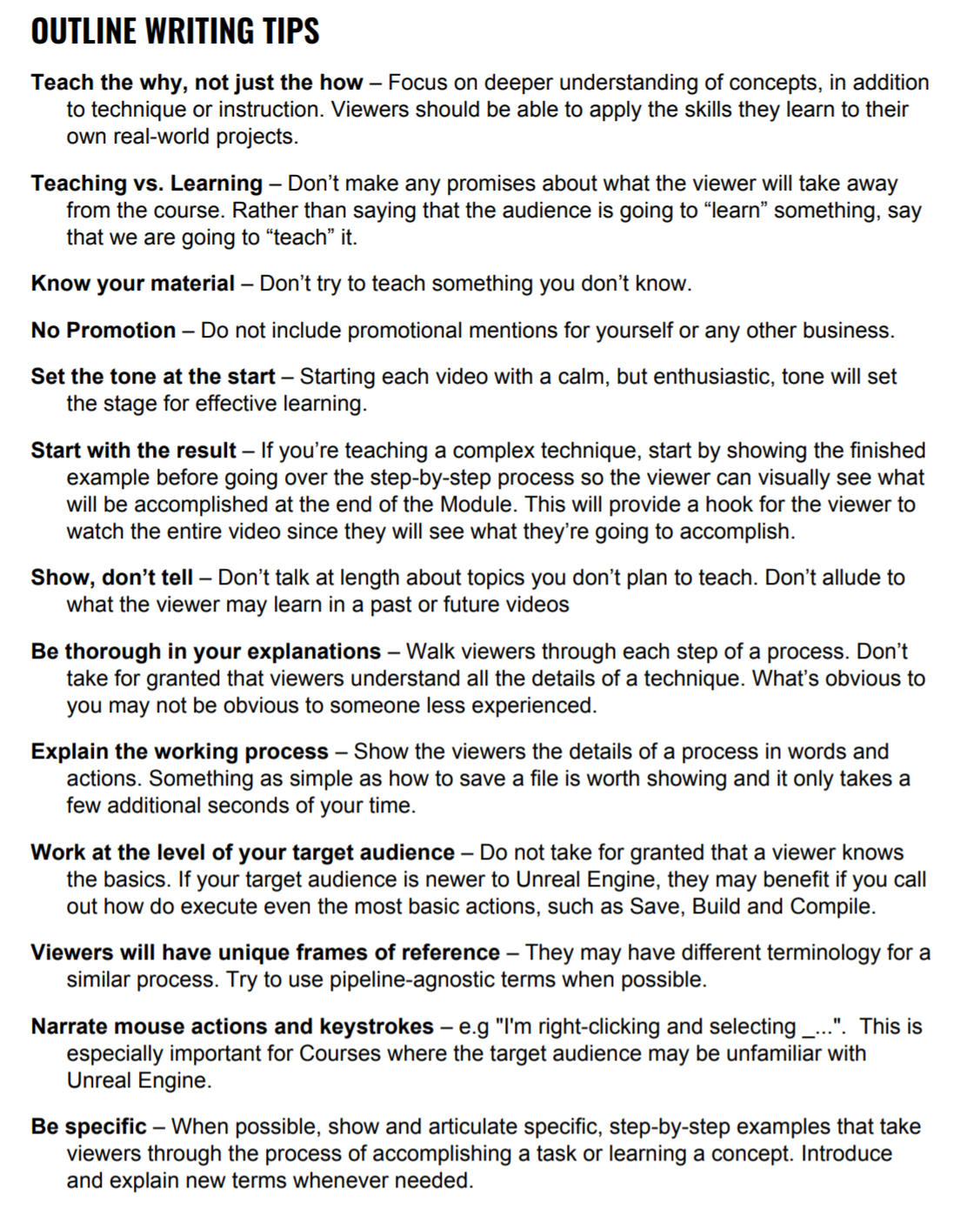 polar hawk
where are you pulling those outline tips from
fierce tulip
epic's community tutorial guidelines
polar hawk
got a link? #things i should have included in the survey if I was even aware of them
polar hawk
ah
fierce tulip
should be public imho, some good info
 void kraken
When building engine from source, after that when I try to launch it.. It closes automatically after 79% loading.
Anyone knows what's the issue?
fierce tulip
@polar hawk its a "Epic Games
Unreal Engine Online Learning
Author Audition Guidelines"
grave nebula
@void kraken Unfortunately, most of us are only journeyman and below in telepathy, so you might need to take a peak at the logs and such.
next badger
Work at the level of your target audience
imagining Deathrey standing alone in the room
 delicate needle
Hit a bit of a snag. I have built out and baked (using vray for unreal) and nice apartment project. Looks good in the editor, etc. Once I hit play, it seems to disregard the lighting and render as "unlit" with everything looking pure diffuse. I've not had this snag before.
next badger
@fierce tulip kinda lame to see "No Promotion" there...
next badger
it says no self promotion
pearl sonnet
same logi
fierce tulip
I get that part
I would not like to hear "go buy my mp stuff or patreon stuff" on epic supported content
delicate needle
pearl sonnet
it's very well thought out for epic... you might not understand it and that's fine
you can do it your own way but you cant tell anyone you did it in their name
delicate needle
Okay, there is the bake is still there, it seems more like a gamma boost.
next badger
@fierce tulip it's not self promotion, it's a promotion of your content
hasty osprey
@runic iron thanks
grave nebula
It is place for YouTube channel, not for community tutorial.
next badger
@grave nebula oh...sry...i get that wrong
grave nebula
Nothing good comes out of a 40 min video, that bumps into needing to buy a plugin to finish it.
next badger
it's the one for Academy?
pearl sonnet
you think they're going to slap your on the fingers? :P
it just wont be accepted as epic material
grave nebula
Academy, community tutorial, tutorial.. looks the same to me.
next badger
for me community tutorial is the one that is made by community, no matter where it's located
YT included
grave nebula
As long as you call it a tutorial, you'd want to keep your commercial content out of it. Otherwise, it is a universally dick move.
next badger
what is "brand" ?
polar hawk
next badger
i've never seen one so...
pearl sonnet
lol for example... your video would never be accepted as official epic material
if you wanted to send it in for their use
next badger
what is "official epic material" ?
polar hawk
Personally I don't want to see Epic acquiring community resources
pearl sonnet
for example what they would accept on the learning section
polar hawk
I'd rather see "Epic-approved" rather than "Epic-official"
fierce tulip
^
pearl sonnet
maybe
stone oar
Isn't some Udemy courses "epic approved"?
polar hawk
A lot of things I do that I think my particular audience are fans of go against guidelines lol
next badger
What's the point of them being approved if they are already made and free?
next badger
No self promotion probably means 0 promotion
pearl sonnet
nonsense
polar hawk
"Don't blaze up 420 style while instructing"
polar hawk
I kind of want to create a video that breaks every guideline possible
pearl sonnet
plenty fame-babies don't even care about getting paid
fierce tulip
so no need to be paid in exposure
next badger
i had to google "420 style"
 next badger
audio is main thing
pearl sonnet
lmao, with audio
next badger
"Yo, there's an error right here, don't worry about it, Epic has errors all the time"
pearl sonnet
hilarious
fierce tulip
still reminds mf of that depressed photoshop tutorial guy
pearl sonnet
only photoshop guy i know is aaron blaise and he's cool
delicate needle
90% of tutorials on youtube: (00m00s - 00m20:00s Logo) , (00m:10s - 05m:00s "Hey guys! This is a long boring intro), (05m:00 - 25m:00 nonsense clicking around) (25m:00 - 25m:10s the actual information you need). Ends with don't forget to slam that like button etc..
next badger
"It's a cube! And It's chamfered! Holy s**t, next gen graphics!"
pearl sonnet
oh man don't get me started on youtube stupidity lmfao
fierce tulip

MORE: http://www.MyDamnChannel.com/YouSuckAtPhotoshop Follow us on Twitter: http://www.twitter.com/mydamnchannel Like us on Facebook: http://www.facebook.com...
 blissful willow
My foliage turns black after baking...I was wondering if this was the reason, and how I can fix these errors. Does anyone know?
pearl sonnet
it's an echochamber of the psychologically feeble copycats for self value
building upon the even more naieve
lol Luos xD
next badger
@fierce tulip DONNIE!
fierce tulip
lol
pearl sonnet
that would be me teaching photoshop
if i knew photoshop in the first place
minus the funny
next badger
I want to make Funny Insulting videos, problem - i'm not funny.
pearl sonnet
yea
polar hawk
if I can make a video anyone can
pearl sonnet
dont underestimate how uncreative and low of selfesteem and value a person can be Allar lol
pearl sonnet
that's a power right there lol
next badger
Was it still that time when UnrealSlackers were Slack?
pearl sonnet
as long as there are still things to look up for 😛
polar hawk
yee
 ember shadow
hey guys, was hoping someone would help me ?
ember shadow
hm
polar hawk
hey guys
and @fierce tulip
I'm back on my dumb shit
if yall can shitpost a gif on this twitter thread that'd be great

 pearl sonnet
not even sure if i have a twitter account
 pearl sonnet
was the reply i had for a long time in denial of twitter.com 😛
fierce tulip
deleted that, just.. well.. stuff
pearl sonnet
haha that's fine
delete my 3:18 too because its just out of context now
next badger
@Finnbullar#8727 you need to ask to get answers
next badger
good luck restoring deleted file with perforce
i mean the one that was deleted, and that change was not tracked by p4
fierce tulip
about time Allar gets a massive devgrand and makes us better version control
version contrallar
pearl sonnet
dated notepad file
files*
somewhere on the desktop
or better yet with random names such as asdasdasdas and fdgjdfgjdfjg
next badger
VCS, Version ContrAllar, Seriously?
@pearl sonnet some_texture_r05_final_copy_copy_copy_copy.png
fierce tulip
some_texture_r05_final_copy_copy_copy_copy.png.BCKUP
next badger
dang it, Windows adds - Copy...
pearl sonnet
lol ya alex
@rugged jungle how do i reply on the same starting tweet
turns out i have an ancient account
woops @polar hawk
meeh dont want to know 😛
i thought i figured it out but now they're all gone
RuntimeMeshComponent way to go for high number of instances?
or does ProceduralMeshComponent support instancing
yet*
next badger
RuntimeMeshComponent is a plugin?
pearl sonnet
yea, i thought it was a well known one
anyway, i read that people favour it for a large number of meshes, for instance your typical minecraft clone tryout
 boreal topaz
bitlocker keeps popping up on a user laptop , any idea why its happening all of a sudden?
pearl sonnet
yes, you need to send 100 BTC to Alexey
pearl sonnet
haha
pearl sonnet
oops
plush yew
hi! i got a project in my mind and i wonder if anyone can assist me about it.
next badger
Just got a call from authorities...they were asking who could send me $770000
pearl sonnet
FSS is quick man
 clear fractal
Does anyone know where I should start for working on a physics-animation blend third person rpg
next badger
start with explaining "physics-animation blend third person rpg"
pearl sonnet
next badger
@pearl sonnet doesn't look like rmc is supported by 4.23
pearl sonnet
yea i was just looking at their git too
i guess i should see if i can work my way with built-in solution
have a strong preference for that anyway
runic iron
@plush yew Explain a bit here if you need specific help. If you need to find partners #looking-for-talent
next badger
@pearl sonnet interesting
https://github.com/Koderz/RuntimeMeshComponent/commit/78e1cddf9065b23b8200dec5014d98e0abed5a91
 plush yew
@runic iron i dont need partners
im just wonder if my project is possible with unreal engine
 calm widget
whats it about then
runic iron
^
pearl sonnet
@next badger what is interesting in that commit? =d
next badger
it says the dev is back
 abstract relic
It’s the “I’m alive” commit 😜
pearl sonnet

Unreal Engine
Fabian Buchmaier breaks down “Cubes,” a short animation video created in Unreal Engine.
calm widget
commited to being alive, sounds good too me
pearl sonnet
but... shaders
calm widget
woh
looks like this im currently watching

In this coding challenge, I attempt recreate a 3D @beesandbombs GIF with p5.js and the WebGL renderer. GIF: https://twitter.com/beesandbombs/status/940639806...
 vast fossil
guys, is it possible to multiply the variables with each other inside the array and return the value in a single variable?
plush yew
does unreal support 2d and json
next badger
@pearl sonnet what is "World Parameter Collection" ?
vast fossil
or do I need to get out the indexes one by one and do the math like that ?
next badger
i know Material Parameter Collection
pearl sonnet
so apparently there is some top hierarchy
i havent done anything in this area yet at all
it's not going to be useful for my usecase either
i just want a ton of cubes with a simple material with collisions lol
for starters
next badger
this one used vertex(world) position offset -> no collision
pearl sonnet
yep exactly
plush yew
...
pearl sonnet
what do you mean does unreal support 2d and json
yeah you can render 2d or make 2d games
and json is just a way to represent data
sure you can get it it to play together
polar hawk
Okay, everyone. The results of my State Of @EpicGames @UnrealEngine Education Survey are out and fully public.
I really hate dealing with surveys and big datasets now.
#gamedev #indiedev #education #documentation #ue4 #learning #data #survey #feedback
 Twitter
next badger
Twitter
next badger
@polar hawk That's hell lot of letters out there.
plush yew
hi everyone
next badger
not all like pictures but i'd like to see at least some banners to split this wall of text (not ad banners)
fierce tulip
see #unreal-news @polar hawk
pearl sonnet
👌
fierce tulip
@polar hawk in some cases the piegraphs in the corner of my eye look like chrome icons :p
next badger
@polar hawk i've used Plotly for charts
quite simple to make them in JS, right in codepen
https://codepen.io/plotly/pen/bdZbWy
polar hawk
uh
you know how much effort it would take to run the data through that
im not arguing that it can be better
it definitely can
but this is what I was working with https://docs.google.com/spreadsheets/d/1xi-bNhvSDxJobLkpEw6sMtqTWQ6XS6EPjivj6OQXTO0/edit?usp=sharing

Google Docs
Form Responses 1
Timestamp,What do you identify as the most?,How would you rate your skill level within your specialties?,How broad is your baseline knowledge of Unreal Engine?,How long have you been using or trying to learn Unreal Engine?,Have you worked or are currently wo...
next badger
it also has python binding
polar hawk
yeah im not gonna write an app for this
fierce tulip
i really did not expect reddit to have such an active community
fierce tulip
same XD
fierce tulip
A trench coat full of stacked cats” has been regulated to “other XD
pearl sonnet
https://forums.unrealengine.com/development-discussion/c-gameplay-programming/100358-how-to-have-many-instances-of-a-single-procedural-mesh
from 2016 lol
who knows what the way to go is anno 2019
Unreal Engine Forums
For gameplay programmers writing C++ code.
 polar viper
Does anyone know good tutorials for the portal doors? I feel I'm going to need it at the end of April next year
I've saw the code version and I'm not fond of it
pearl sonnet
what do you mean by portal doors
like a collider that changes your transform location to elsewhere?
polar viper
plush yew
What is the best way to make so my hud don't overlay the main menu, But shows in the dedicated server
polar viper
Like this. It's like a tardis effect
fierce tulip
XD been reading allars survey, totes forgot to make dinner
polar viper
Where the exterior building is small but the interior is huge
pearl sonnet
i dont know what the ideal way would be to make that but at the very least you could just load a new map on trigger or so i would guess
polar viper
The envrioment I'm creating is like that small buildings but big interiors
next badger
there are several ue4 portal tutorials on YT
 heady frost
I imagine the trick is a render texture +teleport on contact
abstract relic
You can have a camera render the interior and project it onto the door entrance
heady frost
the only way I see it getting a bit complicated is if you want to see a portal from within another portal
polar viper

Hey, after many hours of work, i almost did it. This is the portal effect for a project named "Project Tardis" This is not a trailer but a test. A trailer, i...
This is the video that gave me the idea for my environment
pearl sonnet
yea thats badass
could defo find uses for that
polar viper
I have plenty but it's how do i do it blueprint of code
Because the code version when i saw it had me pulling my hair out
pearl sonnet

Cover image from UnsplashIn this article I cover how to create Portals in Unreal Engine 4. As I didn’t find any write-up that would provide enough details to explain how to create such system (viewing but also crossing the portals) I decided to write my own. This article wa...
polar viper
@pearl sonnet that's the one that worried me. Of i had to use code
abstract relic
How else can you do it if not using bp or cpp
polar viper
I haven't used cpp. Im a 3d modeler but my lecturer talked me into using unreal since what I'm creating is a game environment
pearl sonnet
first one is purely BP
polar viper
I've used blueprints for interactive grass
pearl sonnet
but outdated maybe but it gives an idea
abstract relic
You gotta pick one 😜
polar viper
The cpp one looks great so i guess I'll try and figure that out
 nimble steeple
All creeds to EPIC on the new TwinMotion!
This is the most amazing tool i have tested 😍
Can't wait to fill up the library with archviz stuff...
nimble steeple
Just a quick test in twinmotion. Just discovered it
I only tested what comes in the stock library.
Very awesome tool...
It's basically modified to let you build arcviz scenes faster and with more options then in vanilla UE
pearl sonnet
i don't know what all that means but it looks great ;D
abstract relic

Create high-quality real-time visualizations for architecture, construction, urban planning, and landscaping in seconds.
I honestly thought they were talking about the starter template
pearl sonnet
haha
delicate needle
I'm having this issue where overwriting my "defaultinput.ini" isn't fully updating in my 'input' project settings. The config is good, but the Action and Axis bindings won't update, but the Axis config will. Anything to cause this?
pearl sonnet
did u reopen the project is all that comes to mind =d
delicate needle
@pearl sonnet - Close down all the apps, overwrite the config, launch all, no bindings. I had this before in another project. and it eventually showed up. 🤷
 fleet wraith
Are there any UE4 classes? I’m not talking about udemy or YouTube. I mean an actual class with scheduled lectures and assignments etc.
Like a structured class with a teacher to ask questions
 nimble wasp
where can i indefentely my loop
indefinitely
for my animation
or where can i find level sequence
 sudden agate
There is a loop boolean in the animation sequence player
nimble wasp
or player sequene
sudden agate
In your state machine
light coyote
@fleet wraith Not that i know for free onnline.
If yoou mean videogame development courses, of course,,, universitys and private schools in general.
fleet wraith
@light coyote yeah I didn’t expect for free. Do you know any universities that teach it?
light coyote
Of course,,, but i live in Mallorca in Spain,,, your Google friend is your solution to find options wherever you live. @fleet wraith
fleet wraith
Ok
next badger
https://www.unrealengine.com/en-US/academic-partners-apply only few mentioned
 grim ore
sheesh, spent the last hour going thru chat history reading all the stuff since allar started bombing the channel with his survey slides lol.
grim ore
@nimble wasp select your sequence in the world and change the "Loop" drop down in the details panel to allow it to loop
 tawdry lodge
the transition will not be smooth tho I think
your gear gonna stopped for a short time and start again
pearl sonnet
you can always rotate it in BP
tawdry lodge
his point is probably to not have to use BP
grim ore
@delicate needle what does your defaultinput.ini file actually look like? perhaps it got corrupted. Does every Action and Axis binding have a + infront of it?
pearl sonnet
i see
pearl sonnet
the less i have to do with anim the happier i am haha
tawdry lodge
😂
next badger
@nimble wasp
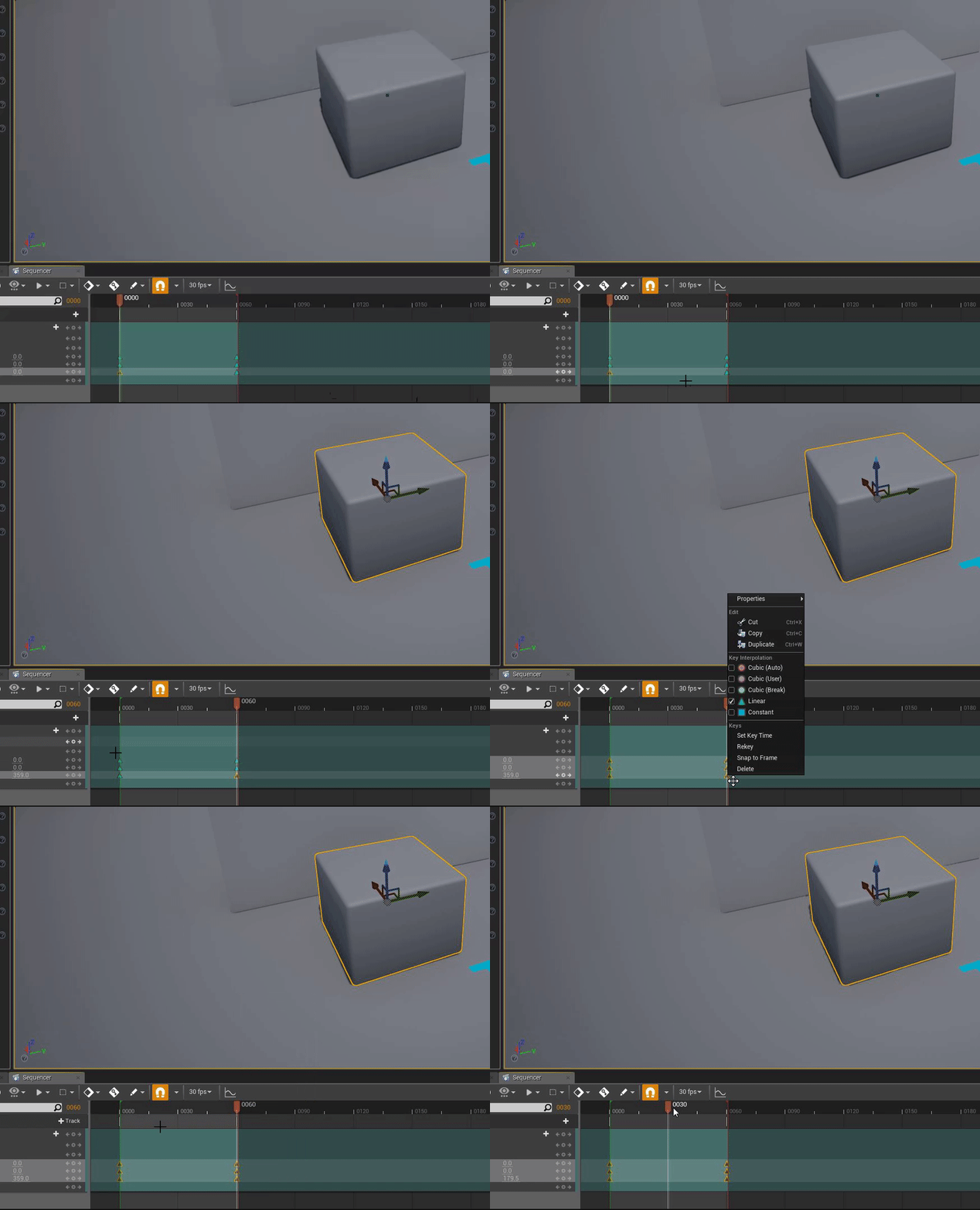
grim ore
chances are your using a cubic curve
next badger
you may set to cycle with offset
but my guess is the same as Mathew's
select key and press 4 to convert it to linear
grim ore
I just tested and it works fine, 2 keypoints (0 at 0 and 359 at the end time). select all the keys and right click, select Linear for the curve type, profit.
you can also test it in sequencer using the controls on the bottom left, the last one changes from play once to loop
nimble wasp
next badger
and?
grim ore
I really should learn hotkeys for most of this stuff at some point lol, Material Editor is the only one I have memorized and thats because remembering constant/scalar is super annoying
grim ore
blueprints makes this so much easier with a timeline (for me atleast). I never understood why stuff like rotation of world objects was handled in matinee in stuff like the fps project
nimble wasp
then it wont loop forever
grim ore
did you change loop on the sequence itself?
next badger
yeah, @grim ore 1-5 are bound to key types...pretty straightforward
grim ore
you know it's weird I was just checking that and they dont show the hotkeys for them, probably why I never figured it out 🙂 makes sense
next badger
i found that thanks to stream by epic =))))
grim ore
uh your sequence itself is longer than your key frames
tawdry lodge
Designers and Artists probably dont want to have anything to do with BP thats it
grim ore
programmers don't seem to want to either, poor BP 😦
next badger
those are different things
grim ore
the red line is the end frame of the sequence, the duration
next badger
grim ore
the top of the timeline is the controls for it
grim ore
Give YT like a minute to encode this video 😉
https://youtu.be/JsUUTa4XYts it's still processing higher quality but it's there lol
next badger
Have you used sequencer component btw?
grim ore
I have not, it's newish right?
next badger
yeah, slightly different from level one
grim ore
oh yeah I checked it out when it first came out, lets you have a sequence timeline in a BP.. i got confused and it kept crashing lol
 normal burrow
its hd now 
grim ore
lol @next badger just tried it again, duplicated the level sequence stuff in a separate actor BP and... when I hit play the cube just disappears
because the transform is not local its world.... thats annoying
next badger
don't even mention that...wanna see Epic fail?
grim ore
It makes sense but it doesnt since I never keyframed the location just the yaw on rotation 😦
tried to keyframe the cube component instead of owner and it crashed, yep this is why I only tried it once lol
next badger
oh jss...EPIC fixed it
grim ore
oh well it was a good try, I tried, back to something more fun
grim ore
yeah someone else had an issue trying to use it for flythru cameras in an RPG.. it went... amusing
the stupid thing kept rotating relatively wrong then flipping around the wrong axis
 cursive walrus
hi i notice when i crouch the camera snap down base on the crouch height. i was wondering if theres a way for smooth transition even for crouch
 spark sonnet
https://www.youtube.com/watch?v=q9NnXAOjfNQ
@cursive walrus

This super-quick, 90 second tutorial shows you how to work around the unrealistic crouch function built into Unreal Engine 4 characters, and implement a smoo...
cursive walrus
thanks!
 steady owl
Is it better to upgrade your project through each . release like (4.23.0 -> 4.23.1 -> 4.23.2 (when it comes out) rather than (4.23.0 -> 4.23.2) or is there no difference?
 marsh swallow
Can you replicated Maps yet
fierce tulip
skipping .x's should be fine.
steady owl
yeah have to be converted to 2 arrays if replicating
marsh swallow
we use those all over the place and were looking at making part of our game multiplayer
yeahhhhhh i know. 😂 its a pain
Come on EPIC!
 amber ocean
Any idea on how to download the default templates for ue4 ? I managed to delete them
 cursive dirge
@amber ocean isn't there like verify option on the launcher for the engine install?
amber ocean
yeah fixed now that was silly of me
plush yew
how to remove character turning in third person template
i want it to look always to same direction
spark sonnet
You can remove mouse input
plush yew
it didnt help
it turns when i press WASD buttons. I dont think that mouse has anything to do with this
spark sonnet
Then you need to turn of Orient rotation to movement
in the character movement component
abstract relic
Or enable Use Controller Desired Rotation
plush yew
thanks it helped @spark sonnet
spark sonnet
^
delicate needle
I have an imported mesh, with 2 elements. Can I in Unreal change it so the whole mesh is just one element?
*material elements
 vivid plank
hello Sir, I created an open world in world creator 2 and I exported to in unreal engine using 2K heightmap, so I started to test in the total landscape with a 3rd person template. when I start to play at a certain distance that 3rd person mannequin is going disappear what should I do sir, I didn't write any blueprint code for mannequin and other things. please give me the solution.
grim ore
can you show us the issue?
 whole quarry
Play in wireframe
 remote umbra
oh! Scroll up! That should be in the agreement, lol. doh!
calm widget
anyone know of any changes to atmospheric fog in 4.23?
had a nice sundisc before update
plush yew
Is there a way to make a terrain autopaint (say...a sand material) below a certain z height
it's painstaking having to draw sand manually under all the water
calm widget
yes
plush yew
im using landscape auto material so there's grass being added underwater
abstract relic
Get absolute world position >>> component mask blue channel (z axis) >>> plug it in a If Node
 sweet relic
hey guys anybody know how to access project plugin modules in python?
unreal.[name of plugin] does not seem to work
nor does [name of plugin]
plush yew
Cheers for the help peeps
calm widget
good luck
pearl sonnet
is there something funky going on with the CDN or something?
im getting like 1.1 MB/s lol
instead of like 30
oh it was a hiccup i guess it downloads/installs flipfloppy
for lack of a proper technical name lol
pearl sonnet
https://i.imgur.com/nfocAIy.png
i remember reading that UE 4.23 automatically detects identical objects and instances them but 2~3 fps at that lol
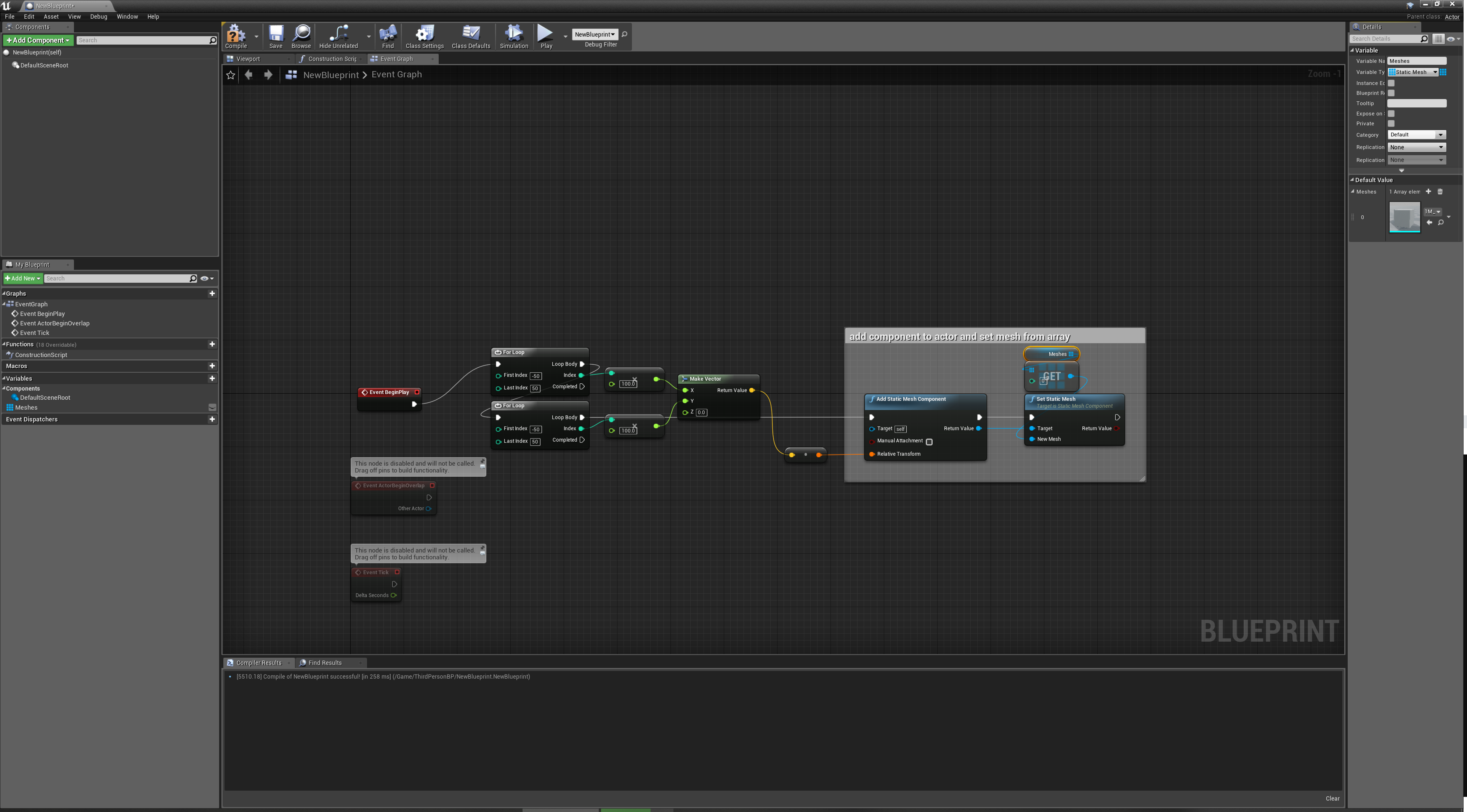
what do you think @next badger
you seem to know interesting stuff
next badger
Automatic instancing?
ue4 does instancing for all meshes/materials that are identical, put them in batches and push to gpu at the same time
your case the issue caused by CPU, not gpu
each component is an actor
and it is ticking
pearl sonnet
i kinda see what you mean
 lime gull
Wait does anyone know how I can make a text box that displays the text one letter at a time?
Someone told me but I cant find the thing
pearl sonnet
like a timer? and you use an increment of how many characters of a char array you show kinda thing?
i dont know if there are any neater ways
lime gull
Im not sure the technicals of it
All I know is I wamma recreate like a traditional rpg type thing
 mystic oar
Wait, you want to make a text-based RPG, @lime gull ? In UE4?
grim ore
lime gull
Nah, not text based, a top down rpg game
pearl sonnet
^^
lime gull
Think undertale
grim ore
look for scrolling text or typewriter text
mystic oar
Oh, so you're talking about a text display box, like for a story or other in-game strings.
lime gull
Yea, like id you look at a sign or talk to someone
mystic oar
Oooh, that looks cool, @grim ore .
grim ore
muuultiple results on the googles for Ue4 Typewriter
lime gull
I wasnt sure what to look up
grim ore
i uh... apparently made a video on this already lol
I thought I did but forgot till I was googling. I made too many videos 😦 brain broke
lime gull
Maybe its because im dumb but I believe I tried that video you sent and it didn't work
I probaly meased something up
mystic oar
@lime gull Well, what happened? The lion's share of programming is debugging, after all. What did the end result look like?
lime gull
I dont remember it was awhile back, when it didnt work i gave up hope
mystic oar
@lime gull Well, I would try it again and see what goes wrong this time. Like I said, most programming is about debugging.
@plush yew Have you tried the default height map resolution supplied in the landscape widget?
lime gull
Alright ill let you know the result
Any way someone could dumb this down?
1st:
create a Wrapbox into your Widget.
2nd:
create a new Widget with only a Text inside. Make the Text empty and a Variable.
3rd:
In your first Widget, take a String and parse it into array. This will give you every word of the string as a single array field.
4th:
Iterate in a Loop through the Array and read every sign of each word.
For each sign, add a new child Widget to the Wrapbox - We'll use the second Widget for it (the Text). And change the TextWidgets Text via SetText, to the given sign.
whenever reaching the last sign of a Word, add a Space " " to it.
1 and 2 i think i understand
why add a new child widget, can I not just use a single text widget and change what it says each time?
mystic oar
@plush yew I am checking the documentation now. You really seem to be at an edge-case here, and they even say in the documentation that there are some unusual restraints on heightmaps in UE4.
@plush yew Have you modified the Z-scale at all?
@plush yew Also, to be clear, this is the documentation you're looking at, right: https://docs.unrealengine.com/en-US/Engine/Landscape/TechnicalGuide/index.html ?
Technical Settings for Landscape.
@lime gull I think you probably could just update your textbox. What tutorial did you pull that from? They might have a different goal than you.
lime gull
It was from Unreal forums, ill send a link
Unreal Engine Forums
Talk about Level Design, Static Meshes, Physics, and more.
mystic oar
@lime gull Huh. Okay, are you trying to do this in C++ or Blueprint? If blueprint, try that video tutorial that was posted above.
lime gull
Blueprints, and Im following it now. Hopefully I can learn what to do and change it up- or hell maybe what hes doing is the most efficient
Ill let you know the outcome either way
mystic oar
@lime gull Yeah, it doesn't seem too difficult in theory, but doing it in a way that's not taking framerate every tick is the trick.
lime gull
The thing Im a bit iffy with is that he set the text message in the widget itself, where as I set up a system that casts to the gamemode and changes that variable ( I did it so that way all the programming is done inside each actor you interact with and its not messy) but again, maybe what hes doing is a better way
mystic oar
Honestly, your way sounds like it's better object-oriented programming. Here's the thing, he posted some psuedocode on the forums. He didn't test any of his code, didn't even post blueprint screenshots. Also, if your game has this typewriter component as a primary feature, it makes sense to group it in the gamemode (or possibly in the Event Graph of a HUD element if it's super integral to that HUD).
runic iron
Can anyone remind me the shortcut to put objects directly on the ground when placing them in editor pls ?
mystic oar
@runic iron Oooh, yes. Click object, tap "END" on your keyboard, and it should drop relative to the "ground".
runic iron
Oh yeah that was it ! Thanks a lot man 😁
mystic oar
I use it all the time, and forget it all the time too, hehe.
pearl sonnet
is there a workaround to allow a function to take longer without getting told that there seems to be an infinite loop lol
grim ore
Split it over frames if it's looping.
Break after x iterations, go to next frame, continue from last iterator
pearl sonnet
hm
i just dumped it into the ctor for now
lol 70fps with 8million meshes in hierarchy mesh component
with one side of that huge cube in full view
oh it tricked me
it didnt make all of them lmfao
lime gull
I followed the tutorial and it didnt work ://///
 vast moon
Is anyone else's epic launcher horribly slow? like scrolling is laggy and loading things after clicking on them takes 10-15 seconds?
never noticed until now
fierce tulip
always been like that
pearl sonnet
crazy when you think about it eh
considering how well their actual product performs XD
who knows one day we'll have 3d full gpu driven interfaces
pearl sonnet
xD
mystic oar
@lime gull Sad to hear. What went wrong in particular?
lime gull
Appose to it scrolling, nothing appeared for like 10 seconds then the entore message appeared at once
mystic oar
Hrmm. Did you make sure that the HUD element is updating after every character, rather than at the end of the loop?
stone oar
You didn't use for/while loop node?
lime gull
How would i update it each time
And no, that wasnt in the video
@mystic oar
OH YOOO
HAHA iT DID THE THING
I just plugged in the exit back into the loop
mystic oar
@lime gull Did you find the bug?
pearl sonnet
😄
lime gull
I may have an idea
I think it was exiting before assigning a new letter, although idk why it didnt do the first letter, or why it randomly showed the full message
WAIT
I think i plugged a branch the wrong way
I made it exit before checking the over all value
Again not sure why it caused that bug though
Alright i got it to do what I want, thats all that's important
:DDDD
pearl sonnet
gnite everyone
mystic oar
@lime gull Great to hear it!
 idle sail
Portal nodes please epic 🙏
 digital badger
Hello, if I have already released my game and I want to change an asset in a Pak file, could I use a patch Pak to update the asset?
fierce tulip
O_o
 blissful trail
alright so i got soul city and waited about 4h for shaders to compile and i was having a look a texture and may have accidently changed the file location for the texture
then clicked reimport but when i clicked ctrl z it didn't undo it
then ue4 crashed
abstract relic
Yes, ctrl z can do that
digital badger
I have a skeletal mesh which has a material instance that has a texture. If I have a patch with the updated texture, the texture doesn't change in game.
How come?
blissful trail
when i clicked reimport after i clicked ctrl z it didn't work
digital badger
Paths are the same
blissful trail
cos the file wasn't on my pc
 proper hatch
Hi, when I right-click to create a User Interface Widget blueprint I see no menu for "User Interface". Is that normal?? I'm on 4.23.1
 neat forge
is there any way to transfer components to another actor?
mystic oar
@proper hatch You're right-clicking on the content browser, and you don't see the option for User Interface? I'm on 4.23.1 too, and it's there for me. It's at the very bottom of the list, are you sure you're seeing the entire list?
proper hatch
@mystic oar I just realized that because of the resolution of my screen it was hidden. I moved UE to my other higher res screen and now it shows.
I was going crazy!
mystic oar
@proper hatch Glad to hear it!
proper hatch
@mystic oar Thanks!
my 1600x900 res screen was the problem. The UI menu doesn't show up in there
 dry moon
Is there a way to enable stat fps from the config file?
normal burrow
not sure, sorry misread question
dry moon
executing normal commands ya is easy
but not stat commands
Guess I gotta use MSI afterburn
grim ore
IF you have the latest Windows 10 and Game Bar they have an FPS meter and stats in there now, not as fancy as afterburner
lime gull
Anybody know a good way and/or a tutorial for making an inventory system
For 2d top down btw)
 crisp fable
You're really asking for a lmgtfy
lime gull
Nobody makes 2d tutorials for Unreal
crisp fable
An inventory surely doesn't care that the game is 2d
lime gull
What im looking for is very specific and Idk what to google
crisp fable
You're going to have a hard time finding specific tutorials, most of the time you'll need to adapt what's available to your situation
 sly coyote
its probably cause youre not looking it up correctly....in unreal its called Paper2d
and there is TONS of tutorials
I Imagine an inventory system would work the same regardless of 2d or 3d...
@lime gull
lime gull
Im Trying to find an rpg inventory btw, like healing items, 1 armor slot, 1 attack slot, basic stuff
sly coyote
Enjoy the videos and music you love, upload original content, and share it all with friends, family, and the world on YouTube.
you can follow this one, it goes from inventory into equipment
it is pretty indepth and he goes into everything concisely
it actually goes through an entire RPG system, so if you get stuck on other things, pretty sure its covered
there is also virtus, all his tutorials are excellent
If you've ever wanted to create a role playing game (RPG) but wasn't too sure where to start, this is the tutorial series for you. You'll learn everything yo...
virtus video on inventory creation looks like it would work great for a 2d game so thats a plus for you
lime gull
Thank you very much! :D
I'm going back to tryinf to get a letter by letter text effext cause last time had lots of bugs
An someone briefly explain how it works if possible? I wanna use the current set up I have with variables and such
lime gull
Yea haha i thought it was good but there kept on being bugs so im restartinf
lime gull
On the forums i dont understand what they so, and 1 video didnt work and the other ones don't show you how to do it
pearl sonnet
yea it seems hard to find certain things in an up2date fashion
lime gull
Do you know how it works though?
I cant understand whats happening with jt
So maybe if someone explains it I can figure it out
pearl sonnet
i havent been following the chat, just got back on discord as i can't sleep
lime gull
Ooh that happens to me a lot
lime gull
Depends on what you're referring to, as of me personally not much just trying to figure out my text issue, as for the project, it looks quite bleak
Know what maybe ill pay someone to do it
pearl sonnet
yea i meant whats the issue
 tribal steeple
I have an issue that the character disappears if you go to certain areas of the map in the test thing, how do I fix this?
pearl sonnet
that's too vague 😛
lime gull
Cause I restarted the whole thing, my only issue is i dont understand what to do and the tutorials online dont help
But when I did follow the tutorial, the text would scroll but then I couldn't get out of it
pearl sonnet
i have no idea what your blueprint looks like though or how you try and get it done ^
grim ore
take string, loop over string using get substring, take substring and put on screen. optionally play sound when substring is on the screen. profit?
pearl sonnet
ya that was the first suggestion
lime gull
grim ore
and I know that works because I just checked and that was what I did in my tutorial video lol
tribal steeple
https://www.youtube.com/watch?v=MzEh1NRPcfk Why is this happening?
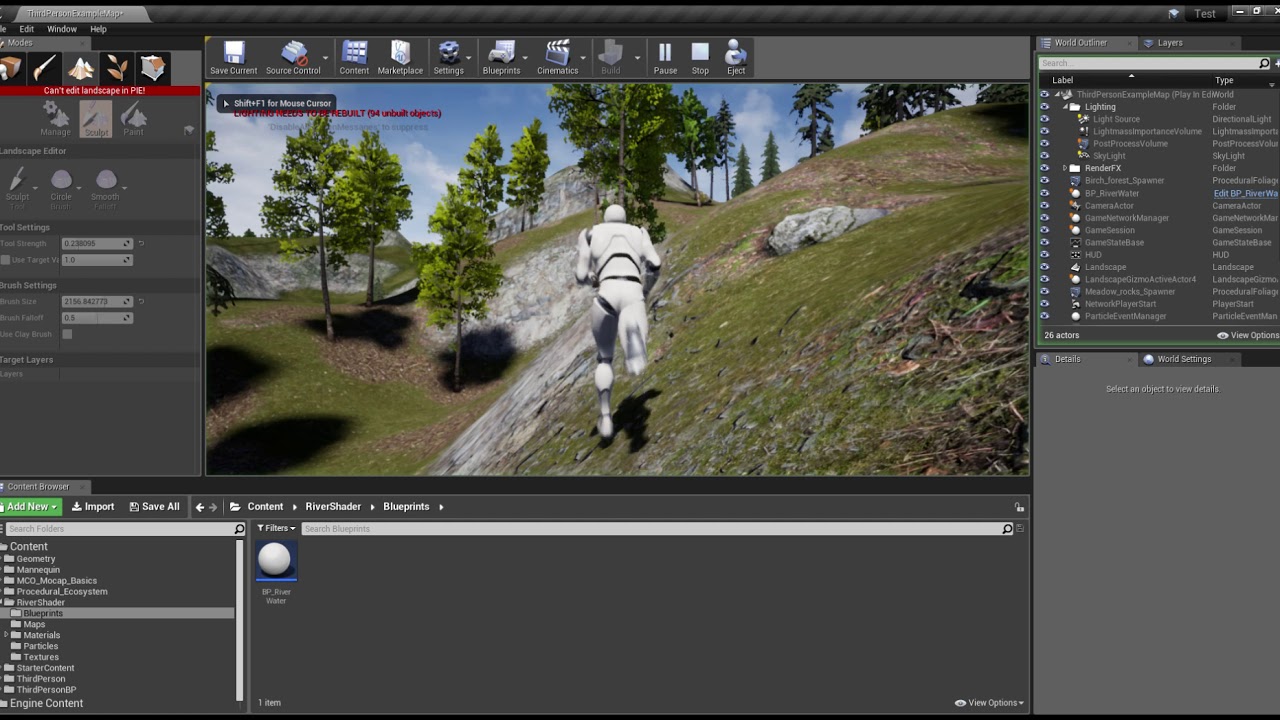 lime gull
I can convert my text to a string right?
pearl sonnet
sure
lime gull
Also, should I use a Macros for this?
grim ore
I think it's more you convert your string to text
pearl sonnet
you could make a function that takes a substring like mathew suggst, have a counter, use a timer, rerun and print remainder
lime gull
The whole way Im changing the text is I have a text variable in my gamemode, and whenever I want to make, say a new NPC i cast to the gamemode and change the text variable, and when the widget pops up, the text binding is to the gamemode variable
so should I make it a string instead of a text?
grim ore
@tribal steeple click on your player once the game is running and look at his Z location as you move him around, what is his Z when you disappear. is he "visibly" disappearing or is he getting deleted?
tribal steeple
@grim ore Deleted
grim ore
if you really really need something to start with https://youtu.be/XolvdHmo2q0 is my video and there is a link to the github to download the actual files
@tribal steeple go to your world settings for that level, change your Kill Z to a much larger negative number or disable it, test again
the easiest way is to click the down arrow below Kill Z and disable enable world bounds checks and test
tribal steeple
Where are the settings for it?
lime gull
what does get substring do?
grim ore
and now I am curious if my 3 year old code actually works in 4.23 lol
pearl sonnet
you get a part of the string
lime gull
would i make the length the amount of words there are?
pearl sonnet
characters
grim ore
@tribal steeple your world settings, you have it docked next to details in the bottom right
lime gull
and is there a way I can count the amount of characters there are in a text with a node
grim ore
you need to make sure you are keeping your types correct
pearl sonnet
there's Len
tribal steeple
@grim ore Thanks :)
pearl sonnet
which you can drag off of your string
grim ore
text is what you see on the screen and is used for localization, string is what you typically use when messing with words and has a TON of helper functions
lime gull
I think im just too stupid to understand what it is im supposed to do haha
pearl sonnet
i uh, i'll make a quick project and see if i can make something simple
grim ore
you would take MyString, and get the first letter using Get Substring
then take that result, "t" in this case, and put it on your screen
then you wait
after you wait you do it again but now you increment your count to 2 letters
get the first 2 letters this time using Get Substring and put it on the screen again, in this case "th"
repeat until you are at the length of your string
add in helper stuff to handle multiple strings and bam done
this is just one example for example lol 🙂
lime gull
2 things, after i use get substring how do i put it on the screen? Also, isn't the print the tiny blue letters on the left side of the screen?
cause im trying to use widgets to display a message that changes based on what im interacting with ( it i didnt make it clear )
grim ore
Just an FYI I checked and my example for this, video and project files, all work fine in 4.23
lime gull
Im opening up that project right now)
grim ore
Then my computer crashed when compiling shaders do to my overclock being too high LOL
lime gull
I know its bad quality but this is what im trying to make display the text
The "text" there has a binding that is to a variable in a gamemode, and whenever i interact with something i cast to the gamemode and change the text variable
Thats how i have the basic dialogue set up
 deft sparrow
Out of curiosity, can materials on the marketplace be "compiled" as it were so that you can't actually look at how they work?
Considering buying a thing sometime in the future because it managed to implement a siggraph paper in UE4 that I would never be able to crack. Seems like it might be interesting to learn from.
grim ore
What you want will work fine once you set it up. It's.... Not good programming practice to do that but it will work
lime gull
Im still kinda newbie with unreal, i think ive been doing it for 3 - 5 years but all my knowledge is based from watching tutorials of things i need
grim ore
@deft sparrow unless it's a compiled dll using c++ code I don't think anything else is obfuscated at all in marketplace assets.
blissful trail
just curious is this a bit overboard just for a simple weather system ?
deft sparrow
Okay nice! Thanks Mathew
grim ore
Probably not overboard
blissful trail
its only got rain, thunder, and clear
grim ore
you might be able to stick more things in functions or collapse graphs to make it cleaner but it's still going to be the same code
 haughty flare
Hey guys, was wondering if this video of my personal project showcases enough skill to use as a promo vid for applying for work?

Elder Gate Chronicles www.facebook.com/eldergate/
 slender vale
normal burrow
slender vale
normal burrow
Invert, Would just start applying places. Video is nice, but interviews are likely where you’ll land something.
 sacred sun
I think its fine if you use the playthrough, though I would rename it to demo or gameplay trailer. as playthrough implies you made a game with so little content that it can be completed in five minutes. which may be the case but there's no reason the potential employer needs to know that.
the main drawback to using a playthrough is that the viewer cant tell what you made from what you bought and assembled. if you made a demo room to showcase specific features that you made, that could be better. though you could include both videos or make a hyrid video cutting back and forth from demo room feature to gameplay execution.
 manic tree
Guys, is anyone having problems with anim notifies at 4.23?
Some of mine just don't play, after updating from 4.22.3
Holt shit, 4.23.1 broke the shit out of my game lol
No warnings, no C++ exceptions, nothing screaming on the logs, just broke ksksksks
light coyote
@haughty flare This would be considered a game Alpha,,,,, when the concept of the game is sufficient to conclude viability in terms of gameplay,,, together with its game design document, project plan and business plan.
Game would become Beta when its seems evident that is very close to end product, and polishing details is the major factor at that stage.
 novel vine
So uh I’m making a map for a game(Pavlov vr) I’m not new to ue4 but I do need good dubstep and i would like to use like knife party and stuff but I need it to be royalty free so anybody here have any good suggestions I can’t find any that actually sounds like dubstep it’s just like dance music claiming to be dubstep so if anybody can help with this that would be great
light coyote
@haughty flare That was a note i mentioned before.
If you are wondering if its enough to look for work answer is not straight forward.
Generaly speaking in the videogame industry people specialise in things,, 3d generalist, specialised weapon artist, vfx artist, rigger, etc...
The more specialised in something, the better in general, because there is lots of competition, and some incredible ppl out there.
If what you want is to work as a game designer, and this is your goal, you have to do more and more of these to prove just that, that you are good at designing a game,, all things do not have to be yours, but you must say so what is that you did, and show your game designing skills,,,, why it stands out, and why it will be enjoiable by the player.
 pseudo canyon
@novel vine a quick goolge search for "royalty free dubstep" brings up several promising results
light coyote
.
Inside animation for instance, people specialize in character animation aswell, because character animation is a big and important part of a game and if someone is a specialised perfeccionist at character animation, AAA companys want this guy.
@haughty flare Go to artstation.com, go to the jobs beeing offered and check out what the industry is asking for.
pseudo canyon
Animation is a pita but good anims make or break a game in my opinion
 barren coyote
hey, if I create an actor in my game instance bp, I assume I have to spawn it, I then set a ref to it in gameinstance, What will happen when I Switch to another level? I don't actually want it in the level, but when I used UObject as the base class it could not access some BP Library functions in a c++ library
fierce tulip
because its a skeletal mesh
plush yew
is there way to get it there
fierce tulip
unless you are out to murder performance, make it a static mesh
plush yew
but then it cant move in wind
fierce tulip
do it trough vertex manipulation in the shader
whole quarry
😅
fierce tulip
@whole quarry a client did the same thing, whole env was skelmeshes
whole quarry
Google for "ue4 grass foliage wind"
fierce tulip
there was a neat twitter post about it recently as well.
sadly twitter search is bleep

ArtStation
In this tutorials I'll show you how to make very naturalistic foliage wind that can be applied to both stylized and realistic environments. As a bonus I'll show you how to make a material that will allow you to dynamically modify the vertex normal direction of an asset. This ...
not the one, but twitter is bleep
 gleaming fern
Hi anyone else freeze at BlankProgram when open Engine's Solution project with visual studio 2019 16.3.6?
It's fine using VS2017 though
cursive walrus
is there a way i can edit spring arm's target offset locally? bec i notice as it moves it's base on world. not local
 ebon goblet
Anyone know how to implement an insect jumping onto and skittering around freely on a mesh?
 real mantle
Hi guys. Let's say I've a uproperty that is some subclass of UObject and that property is exposed to the editor (in a dataasset, or blueprint, etc).
Is it possible to instantiate this property from the editor itself?
also, if that class I'm instantiating has exposed variables, is there anyway to show them in the editor so I can setup them there?
 mossy nymph
UPROPERTY(EditDefaultsOnly, Instanced)
and on UObject UCLASS(EditInlineNew)
- whatever other specifiers you need
@real mantle
real mantle
Awesome @mossy nymph , that did it thanks:)
haughty flare
@light coyote and @sacred sun ty for your feed back, i guess the name is misleading as it says playthrough when it is only showing a part of my project , there is a lot more to it that isnt showed so i get that and take note.
It was more a showcase of the first 5min , to show a different range of capabilities, i have other videos as well - but also i dont want to totally giveaway / break the wonder of my project if and when i ever release it
pearl sonnet
@haughty flare i'd play that lol
haughty flare
@pearl sonnet ty 😄
light coyote
@haughty flare yes, i see your point.
It doesnt really matter if its clear.
But now thinking i dont really know if this would be called an Alpha Demo ?
haughty flare
well not that little i see your point as well
but there is a lot more i have showcased on my facebook page , so all in all i think there is a decent a mount of game play (a ton more than the video shows) - really what i was asking is whether that video shows enough different skills to apply for a coding job on the UE4 forums

this is an early video of a different chapter in the game
basically there are 3 chapters , 1 you play an evil peep destroying the realm, 2nd you play a good peep trying to restore the darkness that is overcoming the realm (the stories and events played within both chapters intertwine) and then a final 3rd chapter where you the player get to choose good or evil so to speak and play out the ending with which ever you choose
really i guess my main goal if anything was to create a project capable of showing my skills i have developed over the 2years i have used UE4 and maybe get some more contracts (i have had a couple and they went really well, good feedback) - and whether or not my own project actually hit reality or just was for showcase that was never really the point
pearl sonnet
it shows different techniques
if its for a job what more do you need
a completed game with 500 hours of questline?
haughty flare
that really is hard , for 1 person haha
pearl sonnet
yea
pearl sonnet
it reminds me of a game called RYL
which is cool, to me lol
but not 15 years old and with much better graphics and mechanics lol
pearl sonnet
thats very good for such a short time of practise i think
in 6 weeks i have exactly 0 projects worth showing anything after a hundred tries of different things 😄
haughty flare
dont give up
it does take time to learn things
my work was nothing like this in 6weeks haha
not saying this is really good, but you know just if you are serious about learning , it does take time
pearl sonnet
your project contains everything, even mesh destruction
i guess at some point there will be that eureka moment and you slap all those tryouts into something cool like yours
light coyote
@haughty flare It looks prety dam decent.
It is clear you have spent time on making things work.
There is no clear unfinished obvious thing.
Im not saying is perfect.
But it does look prety complete and playable enough.
haughty flare
ty
and yeah def it isnt perfect haha
i dont have all the time in the world to work on it either , but i do look into different aspects i can learn and implement in some way or just get to know for my own "hey i know that"
i mean what ive found with UE is , it is easy to get a decent knowledge , but to master that would be almost impossible , at least unless you spent full time learning everything
abstract relic
I’d argue there isn’t enough time in the world for full mastery
haughty flare
i agree
light coyote
From your last video.
And this is just an opinion.
But i think it could be cool a sort of boost charge in horizontal direction that would damage enemys aswell(a time based ability i gess).
In the sense that you could charge enemys, jump and shoot in any combination.
I thing something along those lines could give it a little more coolness to do stuff.
haughty flare
there is a skill where you can slam to the groud and there is like a cracked fiery earth particle
and there is a dash where if while dashing you press jump he slams the ground
again with the particle effect
let me see if i have uploaded a video
ive altered it a lot since this
but this shows somewhat of what i mean



that video is real say first day messing with the skills
instead of slaming straight down there was a forward vector as well
which was hard to aim
so i removed it
and also shows i had this cool dark dragon aoe, alas with it targeting every enemy there was lag
\
so i made it just a delay spawn 1 delay etc
instead of what i wanted for them to swarm out from all directions from you
which was really cool , much better , but alas the lag and my system is decent so no way i could implement it unless i could limit the number of objects in a multi sphere trace for objects
light coyote
Its prety cool
haughty flare
thats real early , first day messing with skills
light coyote
Its clear the effort you have put into it.
haughty flare
but really ty for taking the time to give opinions , good / bad they all mean something
im not going to be upset from bad criticism either , need reality to progress
lime gull
Yea
 limpid rivet
nice
 plain tiger
I use visual studio community 2017, which has the unreal libraries in it. Is it ok to use the latest version? But it does not have the unreal packages? Or does it?
 woven cliff
is there a command line to set all textures"max in-game to 2048 instead of 4096 ?
haughty flare
theres a umm option in the texture
if you edit the actual texture in engine
some setting change it from 0 to 1
umm if you took a screen of the texture settings i could tell you
it just divides or some math the texture so you can make a 4k 2k or 1k or less
by altering the value
but you would have to do it to all the textures which is a pain , i dont think theres a mass do to all option
mip bias maybe
cant remem
@woven cliff
woven cliff
@haughty flare i was hopping for a mass option cuz there are alot of textures :/ and differrent sizes so i just wanted to make the max ingame texture size to 2.048
haughty flare
yeah
well i mean if there is , i havent looked into it myself , google would be your best bet
woven cliff
I remember back then when we had to modify some config files to allow 8k textures, i tried to use the same code and down it to 2048 but didn't work
sudden agate
go to Device Profiles @woven cliff
haughty flare
effects the texture size
novel vine
So I’ve been looking for free royalty free dubstep for a map I’m making for a game and I need good dubstep I just can’t find any that’s free and non copyright so idk what to do if someone could recommend a website for this that would be amazing thank you
woven cliff
this will apply lods to all textures @haughty flare even the low res ones