#ue4-general
1 messages · Page 545 of 1
 dense gate
dense gate
dense gate
Ah, in the CharacterMovement component, the Use Acceleration for Paths property
I think it was that one
dense gate
Still, it's weird it just randomly started working
 plush yew
yeah, I know
but, I'm trying to make the ai stop losing sight and stuff so easily
how do I do that?
if I keep being in front of it, works
jump over it's head, gone
dense gate
Are you using pawn sensing?
plush yew
nope
 next badger
@plush yew not aware, probably not
dense gate
Some angle check? Or a dot product compare?
plush yew
I haven't really done anything else than put on the aiperception module on the controller
and naturally on the character of the player, aiperception stimuli
dense gate
So it does use pawn sensing
plush yew
aiperception is pawn sensing?
dense gate
Pretty much
plush yew
I thought it was two different things?
I know that pawn sensing is a bit more simplified, at least from what I've seen
dense gate
If you click on the component you have a Senses config
dense gate
So my guess is your sense is set to sight
plush yew
I had this no lose behaviour set to 200-300 units, but idk
even if I was behind a wall, it seen
dense gate
200-300 units is 2-3m, which is basically less than 2 mannequins tall
plush yew
yea
didn't actually know that it was in cms
see anything I should change?
I'll just zoom in
plush yew
so, no change to sight and lose sight, or degrees to vision, or auto success?
my problem with auto success was always that it's too much of a gapstop for me
dense gate
Lose sight is basically once it has a target at what point it ignores it
plush yew
I want it so that if I hide behind something, it'll go to where it last seen, stop there, and search, I have that in the behaviour tree, but in practice, it's failing because of that the player is too close for the ai to stop sensing it
dense gate
Ah, I think you'll have to custom code that one
next badger
any reason not to use #gameplay-ai ?
plush yew
the very left "chase player" is called that, because I'm just reusing a script that I use for chasing
since they both use target location, I can just use it
if it loses sense, it should still go to the target location where it last seen, and then search 3 times because of the loop
this is all the script is
Is there no way in UE4 to create instances of a class?
next badger
um...all actors are instances of a class
plush yew
@next badger But I can't reference to an actor from another class?
dense gate
Just gotta expose the variables and you can instance them all you want
@plush yew do you set the target location while it's chasing?
Because I think that one is missing
plush yew
huh? is it?
I'm pretty sure I use "vector" for that
I forgot completely, been up doing this for days
probably should sleep more
dense gate
I mean, you have a "ChasePlayer" with the TargetLocation, but unless you're setting it in that task, it's not set
plush yew
no, vector is for that
dense gate
So it just goes to the first location and then stops afterwards
next badger
@plush yew you can reference whatever you want, just make that reference
plush yew
ah, I don't know
I use the vector variable that's set to target location
and chase player reads that target location
I mean, if I use c++ or idk, maybe easier with c# as it's more object oriented:
If I have a class item, I can create an object with name "Iron_Ingot", and add it to the item list, and then later when user smelts an ore I can just givePlayer("ironIngot")
How do I "Create" the iron_ingot here if I have the item class?
Probably a really stupid question but I seriously can't figure it out
so I thought that if it stops seeing, it should keep the target location in the BB, and then it stops after it gets to it
dense gate
So wait, your issue is that once you jump over or "juke" the AI it stops chasing, right
plush yew
yeah
dense gate
The FindPlayerLocation seems to be doing that behavior as once it loses sight of a cone that would be its vision, it goes into the "not seeing" state
So it goes to the last location it has seen the player, which is basically right in front of it
Which means that it's basically deaf and doesn't hear you running right next to it
But it doesn't take in mind your velocity, meaning that you basically "teleport" for its eyes
If someone teleported when you were chasing them, you'd also be wondering where they would've gone
dense gate
It would make sure it'd still "hear" the player that's running around them
plush yew
so, having vision, hearing, prediction is what I should do?
next badger
@plush yew just drag it to the world, or use some existing actor, level, game mode to spawn it
plush yew
keep vision as dominant?
dense gate
I haven't worked much with sensing myself as I'm using a more optimized AI for my minions
Ye, keep it dominant
dense gate
I'm doing a MOBA, so having a more optimized AI for minions is huge for optimization
And isn't useful for your case
plush yew
I'm just trying to make a cod zombie kind of game
I don't really plan much for it, just something to play with friends
but I do want to make things as best as I can
next badger
@plush yew well, now you have to write it here
plush yew
so I basically just want to make a zombie game with this whole idea of defending yourself like cod zombies, keeping the original idea of keeping them out as best you can, the whole planks at windows kind of thing
I do have the "Item" class, and I want to create the items I will have in game (non-placeable items, just those in inventory used for crafting etc)
The question is: How do I create the item? Let's say "blueberry"
next badger
@plush yew @dense gate you have issues using channel dedicated to #gameplay-ai ?
plush yew
oh, sorry, that's really down on the list, didn't see it
Probably really stupid question, but I seriously can't figure it out
next badger
@plush yew blueprint is a class representation, you may spawn instances of it in the world as long as they inherited from Actor class
 brave salmon
@next badger @dense gate you can set this parameter to whatever you want using consolecommand even in pure BP project. But I'm sure we didn't explout it
plush yew
@next badger Yeah but I don't want to "spawn anything" in the world, those are supposed to be just images with some values
next badger
@brave salmon clearly won't make any errors
@plush yew then what instances you're talking about?
dense gate
That's the general detail mode, but the particle detail mode is only up to 2
Since you got a crash in ParticleComponent
 ember notch
How the UE4 5% fee works? I mean if i publish the game and what will happen in the next month? Will EpicGames ask me how i much earned or how?
next badger
Changing it in console does nothing. Fool proof.
next badger
@ember notch https://www.unrealengine.com/en-US/faq

Thanks for considering Unreal Engine 4 for your development needs. Here you will find a list of common questions answered to make informed decisions with little guesswork.
ember notch
thanks
plush yew
@next badger imagine a class
public class Item
{
   private string name;
   private 2DTexture thumbnail;

   public Item(string name, 2DTexture thumbnail)
   {
      this.name = name;
      this.thumbnail = thumbnail;
   }
}
Then in the main I could have a List<Item> and I can simply create items
Item IronIngot = new Item("Iron Ingot", 2DTextureReference);
For the emitter itself
plush yew
How do I "create" that IronIngot item
 crude vessel
Okay this is a dumb question but im gonna ask it, can I scale an object by pushing and pulling the face/bounds vs scaling from the center?
next badger
@plush yew look at variables on the left
brave salmon
@dense gate so I had the same exact setting
and it seems like if you reset to default bug is gone
lmao
dense gate
That's where my guess is coming from, you have something trying to set a detail mode above high

plush yew
@next badger Looking at them for the last 3 hours 🙂
brave salmon
😅
next badger
Add a variable
dense gate
Indeed
brave salmon
and that's broken our LODS
next badger
set the type
brave salmon
or whatever we were trying to calculate
plush yew
@next badger So I should just add a variable in the Item class for every single item I will have in the game?
next badger
set array or map
brave salmon
I believe it is
we had to use bEnableEditorPSysRealtimeLOD
to walkaround
and it works without it now
dense gate

brave salmon
lmao
next badger
@plush yew variables for class, functions(methods)
stuff that not spawned in world - does not exist
*with some exceptions
are you instantiating stuff in main()? probably not
same here
plush yew
So I literally have to "drag" an item list into the world?
Sounds like the skyrim merchant chests lol
next badger
to spawn them manually? yes...
you can spawn things automatically...spawn functions exist for that
you probably should learn how ue4 works before digging too deep
https://docs.unrealengine.com/en-US/Gameplay/Framework/index.html
Core systems, such as game rules, player input and controls, cameras, and user interfaces.
plush yew
kk so, based on what I understood, the process of "giving the user an item" would be:
- create a list of items and spawn it in the world
- Add all the item types to the list
Then when user "picks up the item"
3. reference the list and get the correct item from the list
4. Create a new instance of the item from the list and give that to the player
 grim ore
for #1 and #2 you can use data tables and any spreadsheet program
if it's just data, then a data table to hold the data is what it is designed for
plush yew
Yeah probably, made a few games in java and C# from bottom, but I have to admit UE4 is "mildly" confusing me
@grim ore Oh that's amazing, didn't know UE4 had that
solves the problem instantly
[3]Yao. I need some navigation kind of help with translucent lighting modes for thingys like that.
Volumetrics limits me by whole scene size n detail, so i wanna use Surface forwardShading, but literally non Directional and per-vertex, except that one exists as directional and per-pixel with tons of instructions like normals or specular which costs way too much and i dnt really needed..
So.. If anyone knows someth about that.. huum.. How i can manange n rebuild that thingy faster then vi couple more reversal months to understand how it works, please poke me n that.
 hoary mason
@plush yew I wouldn't use a list for that because if you have a few thousends or more of items it costs a lot of time searching them in the list. Use a hashmap for it
 vivid narwhal
Anyone know why the anim notifies from the paragon assets aren't showing up in blueprints?
 ruby ocean
Can someone walk through skeleton retargeting with me? I’m genuinely lost
dense gate
@vivid narwhal afaik you can get events for them from the OrionFootstep notify event, they're simply renamed inside the animations
They worked like that when I tried it for 4.17, so things might have bugged out for later versions, I haven't personally tested it
 maiden sundial
Could i also just upgrade the engine version 4.22.3 to 4.23 rather than downloading the whole engine again ?
dense gate
Unless you really need something from 4.23, I'd recommend you wait a bit
maiden sundial
The chaos thingy looked cool.
Thought i could use it for some effects in my game 😄
vivid narwhal
@dense gate no luck sadly. OrionFootstep or even Footstep comes up with no results. Seems odd they'd put notfies in every step but no way to access them
dense gate
The version is very unstable in this current moment so if you're relying on your project, wait a bit
Ah, so it bugged out at one point
maiden sundial
Sounds reasonable
dense gate
I'm telling you that from experience
I had to workaround a bunch of my own BPs to even run without causing access violation crashes
maiden sundial
oof
dense gate
Because I was also hyped for Chaos and got it working to a decent point
But currently it doesn't support collisions with landscapes/static meshes so you'd get borderline weird results if you have any slopes and columns that aren't destructible
@vivid narwhal best thing you can do next is create your own notify and replace the included notifies where applicable
 calm widget
Anyone good with PhysicsAssets?
My characters legs and arms can bend backwards just as easy as forward, i dont know if my problem lies in the physicsasset or the rig.
crude vessel
WTF do constraints NOT work?
vivid narwhal
@dense gate yeah sadly. Just hoped there was an easier way than replacing them for every animation
calm widget
Thats my constraints set up, just like mannequin
Anyone knows what the extra lines are on the mannequin constraints? Settings are identical
 normal burrow
you have to rotate the constraint
i think its shift + rotate or something to set where the center is on the angle about axis
calm widget
Will check it out, thank you
normal burrow
believe they have some mirroring tools now too. so its not an absolute chore to mirror hinges
calm widget
oh? i'd have to look in to that as well. either way your suggestion seemed to have worked. just a bit of tweaking to be done. thanks
plush yew
So this looks how I want when I use the roughness node, but its too glossy. How can I keep the same look but turn the glossiness off?
 serene birch
use more roughness?
ember notch
how?
serene birch
answering to Trickers Goat
for your question, my experience is that 45% is when UE4 is compiling shaders
and it can REALLY take a long time
should be cached for the next time though
ember notch
Yeah i see it's compiling shaders ._.
but it's a 2d game lol
I think i will try it with UE 4.23
plush yew
Where do I find the roughness 0-1 slider lol?
serene birch
mostly, UE4 compiles shader live in the editor
the fact it compiles some during launch tells me those are needed for the editor itself to work at all 😛
you just outputed a value in roughness
that value is too close to 0/dark so your material has very low roughness
just put something whiter XD
plush yew
@serene birch I want the same color, just less glossy
serene birch
you are already outputting a roughness value
ember notch
UE 4.23 have nice features
serene birch
it's a low roughness because you send in there a "dark" color
so just don't?
put inside some value closer to 1
plush yew
@serene birch ok thanks that works
crude vessel
@calm widget I have the same issue, I think it might be alt+rotate? I'm still trying to figure it out!
if you get it figured out let me know
calm widget
@crude vessel oh, yes i forgot to mention that. it is indeed alt rotate. it's a little tricky i found to get a hang of it but it should work
crude vessel
I find the lack of documentation shocking.
serene birch
why did you make Base color lighter at the same time?
wait no, you didn't 😛
well make it darker I guess
plush yew
I can't get any darker xD
serene birch
instead of multiply
use a lerp node
make the other color black
and use the "lerp" control between 0-1 to find the right value you want
the "alpha" input
grim ore
Considering the preview (which is dark) doesn't seem to match the in game appearance (which is light) I would be curious if it was something else causing the issue
plush yew
What do I do from here?
I might have the wrong type of lerp lol
It is very strang the output is not the same darkness at it is viewed in node editor
grim ore
my thought is eye adaption or something else causing it to lighten up but it's hard to tell. have you tried that material on another object, like a sphere or cube, by itself somewhere else
serene birch
the preview is seen on the "dark side" judging from the shadow
 patent vortex
Whats the settng called in the post processing effect that alters your perception of light when youre looking at a light source versus not
patent vortex
Thanks, I couldnt remember the name but I want to turn it off, its annoying.
 sudden agate
its in the Project Settings, too.
if you disable it there, it is disabled by default
grim ore
^^^ project settings is bestest 🙂
patent vortex
Yes I just disabled it there, I had no idea it could be accomplished in something other than a volume but thanks! Helps a lot
 quick sable
sudden agate
quick sable
sudden agate
Lol UE crashes when using a Custom Node in Material Editor <3
 regal mulch
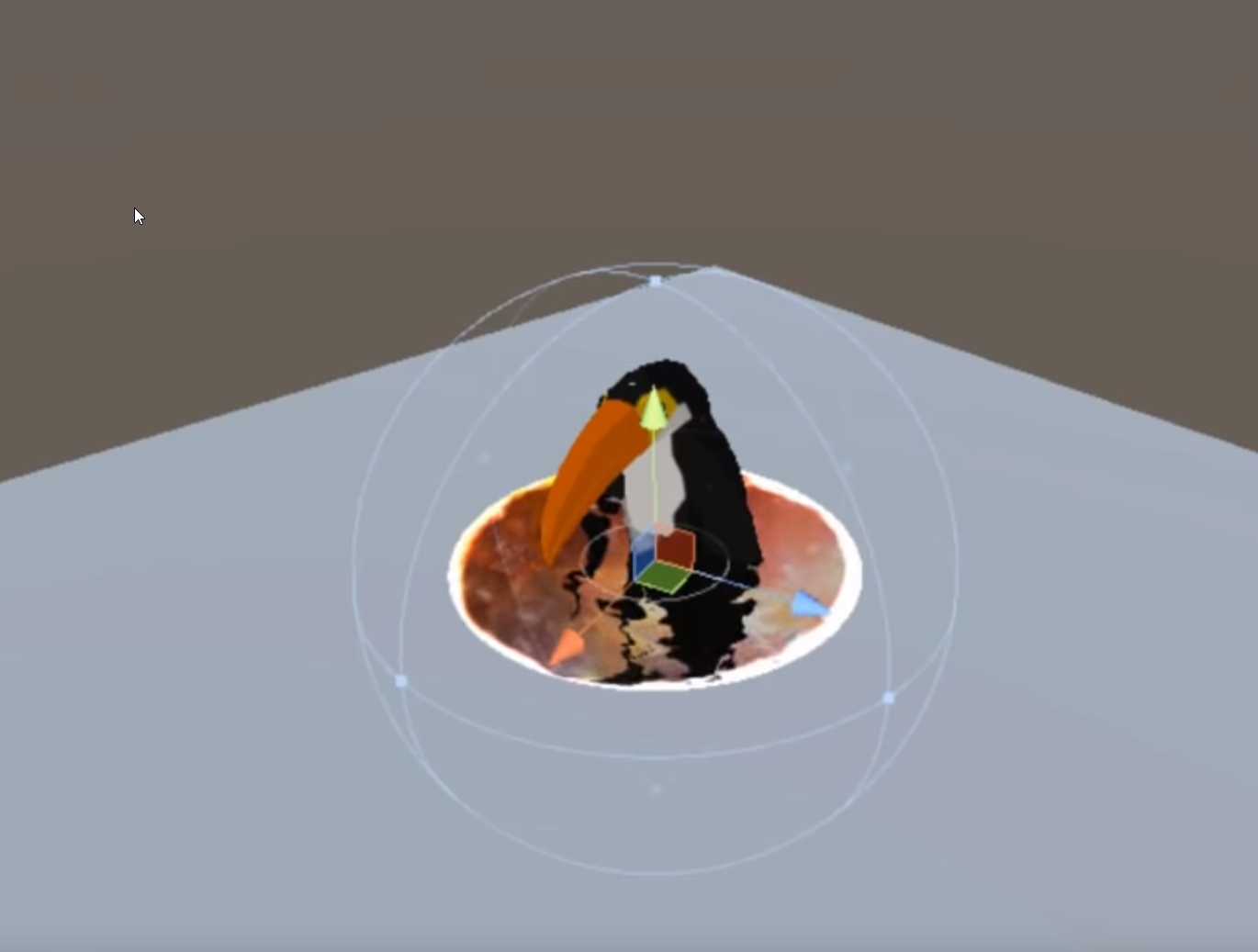
Quick question (I'm not a materials person and this is a screenshot from a Unity YouTube video):
Are there any limitations in UE4's material/shader stuff that would prevent stencil buffer stuff to create an effect like this portal?
https://i.imgur.com/MHIw9sm.png
 grave nebula
Apart from not able to sample custom stencil in opaque base pass, none.
regal mulch
That mesh can basically hide in below the portal and come out of it.
I know how it's done mesh wise (there is a circle mesh around the portal and a cyclinder).
But I'm not sure if UE4 would miss anything or have a limitation that prevents the different stencil stuff
@grave nebula Which part of the effect would suffer from that?
As far as I can see, it basically gives the bird mesh a stencil value and only renders it if the portal or the invisible cylinder around the portal overlaps it
Basically more or less the setup
grave nebula
Whatever pops from the portal, needs to be anytranslucent to read custom stencil.
plush yew
Why does the lightning change in position, As I can't find why and that's not how i want to have it
 leaden mauve
I'm new to fiddling with any type of game engine, what's the word for ex. roads, fences, railroads, farm-boundaries that size-up in realtime when moving the mouse?
next badger
@regal mulch @grave nebula yet, you can read custom depth/stencil in decals
But it requires r.CustomDepth.Order = "0"
regal mulch
@next badger RIght now i'm just playing around with having two big planes above each other, where the lower one is the floor and the upper one by default invisible.
In addition, above both of these planes, there is another, a lot smaller plane, that has some slightly translucent material on it.
The invisible plane should only be visible below that smaller plane.
Right now i have the Floor Plane Opaque and just full green.
The plane above that is also Opaque, full red and only renders custom depth pass (not main pass) to hide it.
Now that's basically all I got. Currently fiddeling with a post process material to only render the red if it's below the smaller plane.
I wish I would know as much about materials as about gameplay programming >.>
next badger
@regal mulch have you seen last stream about tech art?
regal mulch
No, haven't followed the streams since Alex left the team :x
Or rather the Community Manager team
next badger
Chris showed how to render pp inside mesh
regal mulch
I'll quickly check if that goes into the direction I need
next badger
it's somewhere in the middle/second half
 next current
could anybody help me make ue4 work on my mac? every time i launch it gets the window to pop up for a split sec then it crashes. says in the log its calling sigabrt but i dont know why
next badger
@regal mulch 1:18 and later
https://youtu.be/nqatEfc5w5I?t=4751

Epic Evangelist Chris Murphy returns to share his latest adventures with shaders, procedural landscapes, and fully scaleable buildings. ANNOUNCEMENT POST htt...
regal mulch
Thanks, that's more or less that I want to do
next current
thancc
 shell compass
Okay so matinee animations seem to be deprecated in 4.23 and will be removed in the future, but... what if I need those for a custom camera shake movement? Is there a better way to do that in sequencer?
Because sequencer confuses the bejezus out of me right now. Seems to need to be tied to specific levels too.
 uncut osprey
With a Blueprint function, if you make the input node have an input parameter, is that always going to work as a copy by value? (In short, can you make a swap blueprint function)
shell compass
@uncut osprey I think you'll have to mark inputs as being copy by value
They're not by default
shell compass
If the input is circular its not, and if it's a diamond it is
uncut osprey
The pin, do you mean?
shell compass
Yeah
next badger
@plush yew depends on your scene...post process, fog etc
uncut osprey
Thanks
shell compass
Or sorry, it's the other way around. If it's circular it's copy by value, if it's diamond, it's copy by ref
uncut osprey
ah
plush yew
@next badger Thanks, Is was the post process 2 that seem to be the problem
 gray tundra
Hi, I'm getting a warning I've never seen on a new computer:
**Memory Allocation Warning
A resolution of 1024 will require 64MiB of video memory. Are you sure?**
Whether I click "yes" or "no", the project/game runs fine with no visible difference. However, the warning pops up five times when opening the project, on play, during play, etc.
Does anyone have an idea how to avoid this warning?
next badger
@gray tundra are you running ue4 on dedicated gpu?
gray tundra
Intel Graphics. It's my secondary machine for testing multiplayer.
next badger
well, you may increase the memory sharing limit...but ue4 generally not intended to be run on integrated gpus
gray tundra
I'm not pushing it far. But it would be nice to get rid of the warning.
next badger
i'm not sure you can...try ask #engine-source
gray tundra
Thanks.
 loud knoll
which section should I ask questions about APEX troubles?
Anyone know when they are releasing an update to 4.23?
 fierce tulip
they dont make public announcements about that until its released
next badger
afaik apex is not part of default ue4 build...isn't it?
fierce tulip
we dont have a dedicated APEX channel atm
loud knoll
it was for years
Should created a Chaos Apex channel
I got a bug that isn't in 4.20 but is happening in 4.23

 radiant haven
can someone help me with switching visibility in the UI
loud knoll
Like they broke the Apex object editor
The apex object wont update until you make a change to any option on the settings, so delete a material and it will update, change a value and it will update, if you don't the old preview slider / update wont work
I got 4.20 running with the same object and they work fine
next badger
#legacy-physics probably
but if it's a bug, the only way to report it is epic form
loud knoll
yeah I have been reporting bugs for years now and most get ignored
I think all
consider it a heads up if you use APEX and it stops working
next badger
i always get my bugs logged in issue tracker...or get a response form epic in case it's not a bug
loud knoll
dont think they will fix bugs related to APEX when it is Nivida code and they are replacing it with Chaos
next badger
they won't fix any bugs in side libs
loud knoll
Yeah I do too I think I already reported it and asked it as a question and got nothing back yet but I log them and then wait for a year to hear that it will not be fixed.
next badger
loud knoll
I am sure they Epic broke it, but I am glad they replacing the system with Chaos. Nvidia cant seem to even get a driver out with out replacing it 3 days later.
Yeah those bugs are up to 4 years old
 dim dragon
Kind of a dumb question, but does anyone know a tutorial for faking a point-cloud effect without using real point-clouds? Something kind of like this?
Like just using conventional geometries and surfaces?
next badger
niagara particles
cause conventional geometry probably will kill performance on this level of overdraw
dim dragon
Ye.
How would you get them to render so they're always the same size on screen, not like a 3D object which falls off at a distance?
Like, do shaders support that sort of stuff?
next badger
but it's possible
dim dragon
Thank-you.
loud knoll
well everything I said about it being broken isnt true in a test project
I am using the exact same settings I am using in my project and they work.
even the preview is working
I think in my goal of reducing package size I turned off a plugin that is needed
I reduce it 220 MB but it might have cost me functionality in APEX
uncut osprey
Is it possible in a blueprint to take an input field that is a reference, and put a new value in it?
Ie., can this be made into a swap function
I don't know how to say something like "Set InputA"
loud knoll
Plugins are matched still broken - trying project settings on rendering side.
shell compass
Anyone able to understand why gamepad works fine to navigate in the editor viewport, but a simple Gamepad Left Thumbstick X-Axis input event node does nothing?
dense gate
I'd recommend adding it as input instead
loud knoll
@shell compass I just saw a plugin for controllers like flight sticks and input pads
is that on?
shell compass
@dense gate I did that first, didn't work either
dense gate
What gamepad?
loud knoll
did you install a xbone dev kit?
shell compass
Nooo?
shell compass
I mean UE4 picks it up inside the editor. Can fly around and look around
loud knoll
I am talking about the SDK?
dense gate
My guess is the lad wants to add gamepad support rather than support the entire console
dense gate
What UE version?
dense gate
Wait lemme test
loud knoll
anyone running a new 3900x ? Any troubles with it or crashing or anything odd?
shell compass
It's probably some silly inheritance/override parent binding issue on my end
loud knoll
should have a development hardware channel 🙂
so we can all help each other with hardware related questions
like memory / cpu / mobo
I see a lot of questions over the years on reddit about that subject
I just want to know how fast shaders compile on the new chips
dense gate
Works properly for me
shell compass
So weird!
dense gate
All buttons and axis work as intended
loud knoll
@shell compass are you supporting all the platforms? do you have xbox and all that stil turned on in the project settings?
dense gate
I have only PC enabled for me and it works
shell compass
Yeah, it's not a packaging thing I think
It should just work 😛 but ah well ty anyway, I'll keep digging around
dense gate
To note tho, I'm using a third party gamepad that emulates being an X360 one
shell compass
If the editor picks up the controller, it should work during play as well imo
loud knoll
yeah I agree
loud knoll
fuck I fixed the trouble with APEX it was in my project settings.
been trying to fix this for 2 days
I am going to my bed and bite my pillow
shell compass
Yeah, I tried all combinations of those checkboxes 😛
dense gate
And your inputs look like this?
dense gate
Do you create a new window to play in editor?
If yes, try playing in current viewport
 dense gate
If you were running in a new window it's not automatically focused for the gamepad
So you'd need to click it once
shell compass
Nope, no dice. And same with running as Standalone
Gonna reboot and see if that solves it
fierce tulip
https://www.youtube.com/watch?v=ecerIIClbMA Koooolalala at it again
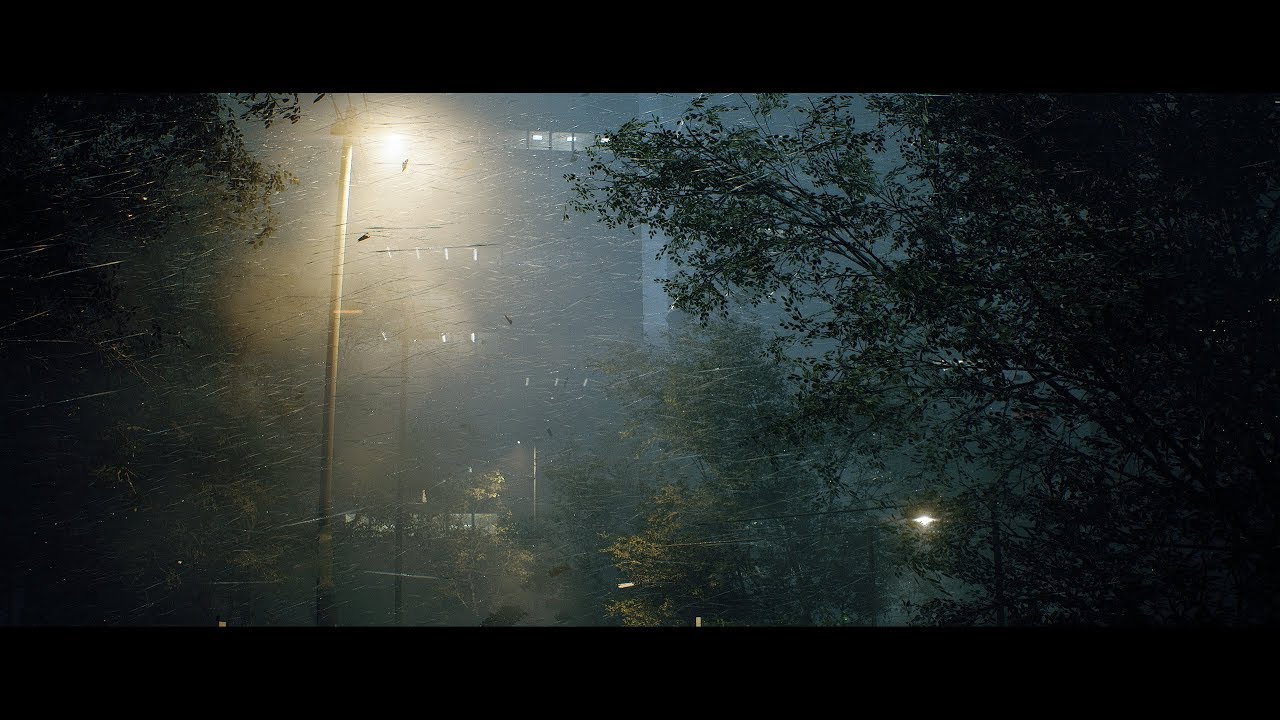
Unreal Engine 4.23 - Speedtree - Substance Designer (Sorry, no audio) UE4 Plugins : - VICODynamics by VICO Game Studio LLC - Custom Lens Flare VFX by Artyom ...
next badger
not bad...again
would be great if not those wiggle trees
generally in strong the trees just bent along the wind...i'm living in a very windy spot
grave nebula
Nah, seems authentic to me: https://www.youtube.com/watch?v=EIRNXpCe1v8

Typhoon Meranti made landfall in the coastal city of Xiamen in southeast China's Fujian Province at around 3:05 a.m. Thursday, bringing strong winds and down...
shell compass
Never did manage to solve the problem, but I found a post on the unreal answerhub where a guy had the same problem. Then I realized that guy was me.
Back in april
dense gate
Oof
 ornate ice
Good afternoon
dense gate
Seems to be something on your end then
shell compass
Yeah
Just so weird though that UE4 is fine with navigating inside the editor using the gamepad
ornate ice
Anyone knows how to use a ue4 mannequin animation into my own rig?
shell compass
Actually, just found another person with the same problem..
https://answers.unrealengine.com/questions/735902/gamepad-not-working-3.html?sort=oldest
No answers though
 open eagle
does anyone know a xbox and pc compatible subsystem I can use
I want to create a session on xbox that pc players can join and vice versa
plush yew
so I opened the 'multiplayer shootout' demo for learning purposes, it was made ages back (version 4.5 or something), is it normal to take forever to initialise? Here is what task manager says, it's been stuck at 45% a long time
dense gate
Usually the first time you open an example project with sizable content will have a long load where your CPU is at 100% even if you have an SSD
plush yew
definitely time for a pc upgrade
next badger
45% is shader compilation time
plush yew
yes and I understand it needs to update for every engine version change? I think there are about 16
next badger
yes, it's a shared cache
next badger
i honestly have no clue what for are those shaders...
 manic pawn
a significant amount of them are for nothing, never used
 light vigil
I can't trigger breakpoints in EditorUtilityWidgets, is that expected?
plush yew
I made a task for my BT but the BT gets stuck on it. How do I set my custom task to move along? For example, a wait node waits for the designated time then the composite node goes on to the next task. My custom node does not move along, it just keeps going
nvm Wadstein video covers it. Needed a finish node
loud knoll
@plush yew which cpu proc you have? I am going to upgrade soon.
Trying to wait for the TR3 or 3950x
or now that intel 50% the cpu maybe stay with intel
My cpu is almost 8 years old
 stiff spoke
@loud knoll you can't help me get instigator
dense gate
Ye?
plush yew
I got a new animation problem 😓
I'm trying to play the montage of the hitting animation, or just the hitting animation.. if I use the node play animation, it just goes into a T position.. if I use play montage, it doesn't do anything
plush yew
it was just a way to test if it works with that
but it doesn't work with playmontage
horribly confused
dense gate
That event is called from an interface, right?
dense gate
Are you sure your montage has an animation playing?
dense gate
I meant the montage itself
loud knoll
@stiff spoke Not sure what you are talking about
dense gate
Hollup
plush yew
lmao
dense gate
Is this in multiplayer?
 misty creek
What does you anim bp look like?
plush yew
I know that I'd have to change stuff for the server to see the client stuff
 terse drum
yo so I'm currently doing my first year at uni and have been told just to do "complicated stuff" in UE4 because I already have some experience with it, and the course's first few months are very basic stuff (3d platformer, stuff like that). What's some cool, complicated stuff I can do with pretty clear tutorials? Ideally I'd like to work on a movement shooter w/ parkour or a 2d fighter w/ street fighter-style inputs. Cheers!
dense gate
For playing a montage, the AnimBP is pretty much irrelevant
terse drum
preferably code, not blueprints
plush yew
yeah, I sent an animbp in chat before too, it's nothing special though
very newbie in animations
plush yew
uh, I did it very different
misty creek
But do you call the slot that you are using?
plush yew
I didn't make it a separate thing in the animbp, I just grabbed default, cached, then.. I'll just screenshot
well, yeah, I call the upperbody
dense gate
Seems normal
misty creek
Looks like it should be good
plush yew
yeah
I don't get it
I'm using dynamic locomotion for my character, and normal third person bp from the third person template for the ai
sorry, 2 am
dense gate
Does your AI call the animation at one point?
plush yew
just calls the montage as I've shown
misty creek
Probably a dumb idea but what happens if you call the slot after the Layered blend per bone?
dense gate
Wait
plush yew
hm
dense gate
You're using a different character?
plush yew
for my player, yes
plush yew
for the third person, it wouldn't work with the locomotion
so, the ai does use the third person mesh
and skeleton
dense gate
I think your problem stems from it being different meshes
So your player would be using DynamicLoco/Meshes and your AI uses ThirdPersonBP/Meshes
plush yew
dense gate
It won't automatically detect the skeleton/mesh is the same
plush yew
huh?
I tried using dynamic loco on the zombie too, but it completely refuses to work, nothing else happens other than sliding in a T position
dense gate
Then make a montage specifically for the zombie skeleton
plush yew
in the animations, I can only select the dynamic loco mesh though
so that's why it was?
dense gate
The skeleton is only valid for the DynamicLoco mesh
plush yew
dense gate
If your zombie uses the ThirdPersonBP mesh, the montage won't work
plush yew
so.. I reimport the animation?
dense gate
Nah, simply create a new montage
plush yew
but it only sees the dynamic loco mesh in the animation
dense gate
However, have it reference the skeleton of the mesh the zombie uses
dense gate
Wait
Lemme try again
So, in your content browser
Right click, create new Animation>Montage
Select the ThirdPersonBP skeleton
Now for that one add the animation
If you can't, retarget the animation
plush yew
retarget?
dense gate
Basically casts an animation from a different skeleton
plush yew
damn, I've been avoiding casts too
dense gate
Nah, it's not in the BP
Go to the attack montage and animation in the content browser
If you right click the animation you can retarget
plush yew
I just reimported the animation with a different name, referenced the zombie skeleton instead this time
does that mean that I don't need the animation once the montage is created then though?
dense gate
Ah, I thought you were using a marketplace pack
dense gate
I see
plush yew
dynamic loco doesn't have animations for hitting
I also really need to figure out IK for it in UE4 too...
dense gate
Ye, with the new animation create a montage
As long as your player won't be using the same melee animation, should be safe
plush yew
I also really want to get rid of the fact that if I go to a wall, I basically bash my head inside of it
terse drum
what's the best way of detecting inputs for street fighter esque special moves?
plush yew
finally, thank you
dense gate

plush yew
do I use IK for the whole detecting of mesh and wall interaction, so that my character doesn't just bash his head into it?
I mean, it's fine if he bashes his head into it, just not inside of it
dense gate
I don't know how these work as for my project I don't need them for optimization reasons
plush yew
yeah, fair enough
dense gate
So you'd have to look up the docs yourself there
dense gate
I remember there being something
plush yew
ugh, I'm useless with animations
dense gate
Don't worry, I am too
dense gate
I simply know how to make them believable enough so it's less noticable
plush yew
lmao
any ideas for the whole falling thing
when you fall, the animation basically teleports
it's really pissing me off
terse drum
anyone got any advice for input detection?
plush yew
what do you mean?
you normally just make an inputaction in the project settings
I don't know about any other ways?
terse drum
as in, street fighter style inputs
plush yew
street fighter style?
are you doing your own animations taken?
nope, let me rename myself
there we go
so, I'm not, I'm using dynamic locomotion
terse drum
you know, like down > downforward > forward > punch for a hadouken
plush yew
Are you able to edit the animations?
it got free this month, so I said why the hell not
terse drum
what's the best way to detect that within a reasonable timeframe
plush yew
hm.. you can export them from ue4, can't you?
Oh okay. Yeah I do my animating myself and I don't work with root motion so I probably can't help you
I'd probably give them half a second, sepir
you can def export I've seen other people do it and I've exported my own animations back out of UE4
if you want it to be a fast paced fighting game that is
dense gate
@terse drum I'm almost sure there was a marketplace plugin for it
terse drum
@dense gate I can't really use plugins for code, it's for school
or at least, practice for school
dense gate
Ah
terse drum
I don't really mind if it's in blueprint or code for just learning, though
I'm using the Paragon models so that's simple enough
dense gate
I have something similar but it's rather big
terse drum
and have some ripped Marvel 3 anims I can use with them, I've already checked
dense gate
It's about ability buffering of a MOBA
terse drum
maybe sort of similar
I know the right buffer time, I've been playing fighting games all my life
dense gate
So it stores inputs of abilities and casts them as soon as possible
terse drum
it's just the concept that's a little different to what I'm used to
terse drum
what I'm thinking is detect all inputs entered and scrub after a certain time, and if a recognised input is entered, carry out the move
or in this case print to console
plush yew
idk
what I would've done, but I am fairly new to ue4
is to make a variable to store the key sequence real-time of what they did
clear it every time they achieved or failed
it'd be just a simple check at every key if it matches any known combos
meh, I might be thinking of something different
I'm too old for this crap, even though I'm the youngest here
terse drum
but let's say you're doing something similar to Zero's MvC3 LL, which is a large sequence of non-special inputs. Surely would destroy the buffer relatively quickly as you'll normally do over 100 inputs to take out a single character
plush yew
well, that's not all that likely..
huh?
if you're talking to me, I talked about clearing the variable if they failed, or if they achieved it
I wouldn't just keep that long sequence, it'd mess everything up
terse drum
but how would you calculate a "failure"?
plush yew
a failure to abide by a known sequence
if they pressed the wrong button
4 keys, 3 keys right, 1 key wrong
dense gate
A failure in the case would be "do nothing"
plush yew
success is obviously if they in time managed a combo sequence
terse drum
fighting games have a buffer mechanic, where something such as forward downfoward down downforward forward punch will still be detected as a DP input (forward down downforward punch)
dense gate
I think you're handling the bull by the balls
plush yew
I don't see how my thinking process failed on that?
no, in games like mortal kombat, he's right
terse drum
or you can buffer inputs, so to quickly confirm from a h.K in SF3 into mShoryu you can input Shoryu, hit K and then hit P to cancel the K into the Shoryu
dense gate
If you're just learning, you'd want something simpler if possible
plush yew
it plays a role on which direction you're looking at
I don't know if I understand how that works though
4 inputactions grouped into 1 thing, wouldn't you just enum at that point?
just false and true whatever was pressed, check if it abides by a known sequence?
that's what I've been trying to say as a solution to it
but, again, I have never done that, and I am fairly new
I'm good with logic, (normally) but my knowledge on ue4 is.. let's just say pretty limited
meh seems to have a bit more experience, even though he seems to main moba-like games
but I wouldn't believe he'd be having bufferputs in a moba game
 polar barn
Anyone here knows much about microdem? and bringing heightmaps into unreal4
 serene sorrel
anyone got a recommendation for a set of first person arm animations
 modern sinew
Are there any real noticeable floating-point errors at 1/10th scale?
because then I could have a 50x50km map
serene sorrel
youll have issues regardless with sizes like that, scale doesnt matter
look into resetting the origin
then your map can be infinitely large and you wont hit precision issues
modern sinew
that doesn’t sound like it would work with multiplayer tho
serene sorrel
apparently not out of the box no, hopefully they add this properly in a future version
engine should have been designed from the start around shifting everything around the origin
 scarlet birch
No.
@modern sinew The problem is if you're using physics it's not really setup for that.
 heady frost
So I've discovered that using the geometry brushes in unreal engine is a bad idea if you ever want to use lightmaps
scarlet birch
You just eventually convert them to actual models.
heady frost
Turns out they take a significant amount of time to load compared to just a static mesh with the same verts and textures
 subtle crow
Is this a place a newbie can get help
heady frost
Yeah you're right, I thought I could just try setting up some lighting scenarios to block out a level using them, but even just for prototyping I feel using brushes was a mistake
Next time I'll just import some meshes from blender and use those to block out a design
scarlet birch
I like using them for quick layouts. It helps keep the focus on the overall design.
heady frost
That's fair, it does help to avoid getting caught in the details
terse drum
ok so I got inputs working and I have basically recreated SF4's Sakura in Unreal
we're getting somewhere
only one ultra because it's easier to do shin hadouken than anything else
 slow scarab
Hey, I'm trying to spawn an actor and attach it to an Actor in Blueprint, but I think that the Get Actor Transform, as it doesn't end up in the same place as the actor I'm attaching it to. Why is that?
Here's the blueprint event graph
That also doesn't seem to be working either. I've tried many things instead of Get Attach Parent Actor, such as Get Owner, but nothing worked.
 rugged zinc
For the first image you sent, you never connected the white line so "SpawnActor Shoot" is never being called
slow scarab
Yeah, I fixed that already
That was originally connected to a print string node, which I removed
But it was attached to the Spawn node, so that's not the problem
rugged zinc
Is your bullet spawning, but just in the wrong place? Because I'm not seeing any errors in logic here. Could it be that your bullet is spawning, colliding with the player and deleting itself instantly?
Also just as a quick note: The transform of your character actually contains it's rotation so when you set the transform of the bullet to equal the transform of the player you are already aligning it's rotation. So you shouldn't have to set rotation again
 boreal sparrow
OK. When importing a rigged mesh from 3ds max unreal gives an error saying there is no mesh in the fbx file. anyone know whats going on, because ive been stuck on this for a while now?
crude vessel
I've been messing with the joints for.. like 4 days and still can't get them to reliably constrain in a consistent manner.
compounded further there is no fucking precise numeric input? So I can't even see what the actual coordinates are so i'm just guessing based on ambiguous 3d widgets
I get like 75% done then a joint randomly is like "I'm gonna rotate 180 degrees for no reason, and flipping or rotating it won't help you now!'
 vast fossil
oh man, I just saw a video on c++ vs bp performance
I should start learning c++
and redo my project in c++
plush yew
I'm supposed to be just getting hearing, since I'm using a whistle sound for reporting a sound event for my ai, but it's just
.. it's just sending signals both to 0 and 1, sight and hearing
and I cannot figure this out
it's 6 am, and I'm getting tired
I don't know if I just cannot for the life of me get an array index out of this for that switch on int, or if I just somehow managed to make it so that it sees me when I whistle, which I have no idea how I would've done
you have got to be kidding me
what...?
and, okay, that's it, I am going to sleep, that is my queue to leave, if you guys have suggestions, just ping me, both just light up, no matter what happens
even if it's just sight
okay, now I'm sleeping
 rain coral
How do i post in #looking-for-work
 spice canopy
Hey everyone, I haven't been able to find anything about this error when I run my game I packaged for Android (same project works fine executing a build for windows:
E/ActivityTrigger(1739): activityStartTrigger: not whiteListedcom.MightyEnigma.ScootyShooty/com.epicgames.ue4.GameActivity/1
This is the first Error in the log cat of the game when I try to launch it
I think it causes all the other errors
It's brought the Android version of my project to a standstill
Is it not enough that part of the android manifest has this in it?
<activity android:name="com.epicgames.ue4.GameActivity" android:label="@string/app_name" android:theme="@android:style/Theme.Black.NoTitleBar.Fullscreen" android:configChanges="mcc|mnc|uiMode|density|screenSize|orientation|keyboardHidden|keyboard" android:launchMode="singleTask" android:screenOrientation="sensorLandscape" android:debuggable="true">
<meta-data android:name="android.app.lib_name" android:value="UE4" />
<intent-filter>
<action android:name="android.intent.action.MAIN" />
<category android:name="android.intent.category.LAUNCHER" />
</intent-filter>
</activity>
I tried removing Web Browser widget plugin but that didn't seem to help at all
 midnight gate
i have made a simple game now
now how do i figure out levels?
lvl 1 player wins when he collects 4 coins in lvl 2 there are 8 coins but he also wins when there are 4 do i get to have a difrent character for every level?
also the win menu says level up and opens lvl2 but in lvl2 i had to create a new wigdet that when he wins opens lvl3
how do i fix these issues
 thin tendon
I am getting warning messages when packaging for AI characters that I deleted a while ago. Game runs fine and packages fine. But how can I get Unreal to update and stop trying to reference deleted files?
 honest vale
what's up with the editor trying to send data to some epic host?
LogHttp: Warning: 000002244D859D00: invalid HTTP response code received. URL: https://datarouter.ol.epicgames.com/datarouter/api/v1/public/data?SessionID=&AppID=&AppVersion=UserID=&AppEnvironment=datacollector-binary&UploadType=eteventstream
dcb60-db8e-4c97-a263-7575daa83514&AppEnvironment=datacollector-binary&UploadType=eteventstream, HTTP code: 0, content length: -1, actual payload size: 0
LogHttp: Warning: 000002244D859D00: request failed, libcurl error: 0 (No error)
LogHttp: Warning: 000002244D859D00: libcurl info message cache 0 (Found bundle for host datarouter.ol.epicgames.com: 0x22466e93f70 [can pipeline])
LogHttp: Warning: 000002244D859D00: libcurl info message cache 1 (Re-using existing connection! (#2) with host datarouter.ol.epicgames.com)
LogHttp: Warning: 000002244D859D00: libcurl info message cache 2 (Connected to datarouter.ol.epicgames.com (34.236.85.100) port 443 (#2))
LogHttp: Warning: 000002244D859D00: libcurl info message cache 3 (We are completely uploaded and fine)
LogHttp: Warning: 000002244D859D00: libcurl info message cache 4 (TLSv1.2 (IN), TLS alert, Client hello (1):)
LogHttp: Warning: 000002244D859D00: libcurl info message cache 5 (Connection died, retrying a fresh connect)
LogHttp: Warning: 000002244D859D00: libcurl info message cache 6 (necessary data rewind wasn't possible)
LogHttp: Warning: 000002244D859D00: libcurl info message cache 7 (Closing connection 2)
LogHttp: Warning: 000002244D859D00: libcurl info message cache 8 (TLSv1.2 (OUT), TLS alert, Client hello (1):)
LogHttp: Warning: Retry exhausted on https://datarouter.ol.epicgames.com/datarouter/api/v1/public/data?SessionID=&AppID=&AppVersion=UserID=&AppEnvironment=datacollector-binary&UploadType=eteventstream
@midnight gate perhaps data tables can be useful in your case
Data tables are basically a key-value array/map that isn't on a blueprint
And values are structs
So you can have your key be the map name, then the value be data for the level, be it coins required, next level, etc
They're also useful if you want to share the same key-value between various blueprints
serene birch
that looks like classical telemetry events
honest vale
yeah, I just wish it would not keep spamming the log
plush yew
How do I use DOF in UE4.23?
Camera settings are grayed out in Post Processing Volume
What I intend to do is, blur objects after a certain range
midnight gate
@dense gate please how do i set that up its so useful
dense gate
First, create a struct that would hold your level info, like coins required and the next level
midnight gate
ok how do i create a struct
dense gate
@plush yew check the Lens>Depth Of Field on the PP volume
Right click on content browser, Blueprints>Structure
midnight gate
hmmmm
plush yew
@dense gate I'm not on PC rn, Is that the one with three fields? I've tried it and it doesn't have any effect
midnight gate
where is content browser
plush yew
Lol
dense gate
You'll have to tick them and make sure you've set it up and have the respective graphics settings turned up
@midnight gate where you navigate your assets, like BPs
dense gate
Add the respective fields to it
So, an int field for coins required and a string for next map
brave salmon
what could affect background windows sounds during PIE? I can't find what mutes my music. Can't work at all 😄
midnight gate
i dont understand
dense gate
I'm calling the struct variables fields
So, change the first variable to be int instead of bool
Then add a new variable and have its type be string
plush yew
@midnight gate https://docs.unrealengine.com/en-US/Engine/Blueprints/UserGuide/Variables/Structs/index.html
Blueprint struct variables allow you to store different data types that contain related information together.
It's detailed
dense gate
In the content browser, right click, Miscellaneous>Data Table
You'll get a Pick Row Structure window
Select your new struct
dense gate
In there you should have 2 sub-windows: Data Table and Row Editor
midnight gate
yup
dense gate
Does it have 1 row by default?
midnight gate
nope ill make one
dense gate
Once you do, in the Row Name put your level name, you'll get to edit the int and string for that respective row
It's basically an Excel table at this point but with hard-defined fields
dense gate
Wait, the struct is universal
As in, it would apply for all levels
So have the int be named "CoinsRequired" and the string "NextMap"
midnight gate
oh okai
dense gate
You'll be basically using the same struct for all levels
dense gate
So, once you have that, make sure CoinsRequired is however many you would like for that level
I think you said 4 for level 1
And for NextLevel have it be Lvl2
dense gate
Once you've done that, go to where you check how many coins the player has (pawn/gamemode)
midnight gate
yus
dense gate
In there, have a Get Current Level Name node
midnight gate
okai
dense gate
Make it connect somewhere after your begin play
After that, make a Get Data Table Row node
midnight gate
yup i did
dense gate
Now, connect the out of the Get Level Name to the in of the Get Row
Then the Return Value to the Row Name
It'll automatically create a conversion node
Might as well move the new nodes down so they don't get in the way of the rest
midnight gate
allritie
dense gate
For debugging reasons, from Row Not Found create a Print String node that instead of "Hello" says "Row not found!"
Click the arrow pointing down on the Get Level Name and make sure Remove Prefix String is ticked true
midnight gate
dense gate
Replace the Hello in Print String with a "Row not found!"
midnight gate
ok i removed that checkbox and renamed
dense gate
Do you have a "CoinsRequired" variable in your pawn?
If not, create one now and have it be int
midnight gate
yup
dense gate
Aight then
dense gate
Check your "win condition" and see if there's a CoinsRequired linked
midnight gate
dense gate
From the "4" int pin, drag and then click Promote To Variable
Should be the second option
Name that variable CoinsRequired
midnight gate
okai
dense gate
From the Get Row node, from Row Found drag and make a Set Coins Required node
 fierce forge
hello , when i import a fbx and i put the material the mesh will be this , the material on mesh are just a color but the real material it's different , what i can do ?
dense gate
Nah, the Coins Required should be an int
midnight gate
ok i changed it
dense gate
And the same variable should be in place of the "4" you have at the == node
fierce forge
?
fierce forge
my ?
dense gate
Ye
fierce forge
yes there are correct
dense gate
@midnight gate on the red in the Set Coins Required, right click and click Break Link
And I'd recommend having a new Get node at the condition
fierce forge
this problem is for any materials
midnight gate
okai i unlinked it
fierce forge
do you know what i can do ?
dense gate
Your condition should look like this
Once that's done, from the Out Row on the Get Row node, drag a Break <your struct name>
If it happens with all materials, then I guess it's your UVs
midnight gate
hmm
dense gate
But beyond that I haven't experienced it
midnight gate
okai
plush yew
DOF is not working
midnight gate
i did it
fierce forge
?
dense gate
Now drag from the CoinsRequired on the Break struct node to the input of the Set Coins Required
plush yew
I want everything certain distance away to be blurred while I'm in a PPVolume
How do I it?
midnight gate
dense gate
Looks about right
midnight gate
yay
dense gate
@plush yew is your project set to be scalable 2D/3D or maximum quality?
plush yew
max quality
dense gate
And make sure your post-processing graphics settings are at epic
plush yew
every setting is on epic
dense gate
You should have 3 settings with ticks at the DoF field
Dept Blur Radius is what "smears" the distance
The higher that is, the more blurry things affected by DOF would be
fierce forge
hello , when i import a fbx and i put the material the mesh will be this , the material on mesh are just a color but the real material it's different , what i can do ?
midnight gate
im still waiting
dense gate
That should be it if you want to test different levels
Make sure this one works, you don't get the "Row Not Found" error and you're good to go for the next step
midnight gate
so does it juts take me to lvl2 map and stuff
dense gate
It will set the condition to move you to level 2, then 3, etc
For the next part I'll need to see where you transition to the level
Because depending on that it's either gonna be the widget or the pawn
midnight gate
well my character is flying for some reason and the score is set to nonexistant when i collect coins nothing changes
plush yew
@dense gate blur radius was capped on 4
I had to manually make it 200 to work
dense gate
I can set it to 1000 no problem
midnight gate
im gonna cry in the corner now :3
dense gate
I'll have to drop out for a bit as I've gotta prepare to go out for about an hour
Papa bless someone else helps you, but currently I'm in a hurry to think of what went wrong
midnight gate
thank you
i try my best but i cri
maybe i did something wrong i dont know
my widget for the score wont work
stiff spoke
@dense gate my screen shot in Blueprint
midnight gate
rip
 twilit rover
Who is using unreal studio(datasmith) ?
 visual pawn
Im using the Top Down template. And ive modified the blueprints a bit, removed the VR stuff, and added WASD movement and keeping the point and click movement as well. But for some reason now, when i play, the camera is like inside the character, and not from a top down view anymore 🤔 anyone know how to fix this?
plush yew
@midnight gate that should be fairly easy
visual pawn
Got it, i removed accidentally which camera is the default camera 😅
plush yew
did you delete the boom?
oh
lmao
I'm still trying to figure out why my indexing for aiperception doesn't work 😓
visual pawn
Yeah, there was a blueprint, when the game starts, and if VR is enabled, use VRCamera, and if not, use Camera1 xD
midnight gate
wat i got tagged
 abstract relic
Welcome to the weekend
plush yew
yeah, no prob
@dense gate do you have any idea how to read the index so I can group for what happens for each sense?
I want to do different things for sensing with sight or hearing obviously
dense gate
Can't help you with those, haven't used them
plush yew
crap
no matter what I try, both senses trigger when I whistle
it's just a sound that's playing, and I report it
then I take an event update ai node, put that into a foreach, then that into a - I'll just send it

meh, or anyone have an idea?
visual pawn
How would one do, so that the character reacts to Mouse click OR WASD, because right now they kinda interfere 🤔
Note : I have WASD on the character themself, and Mouse click in a TopDownController
i think i would need to move the WASD into the TopDownController and add a a branch?
visual pawn
Also Q & E camera movement (side to side around character) but setup clamps so i can only move the camera a certain distance
 civic cobalt
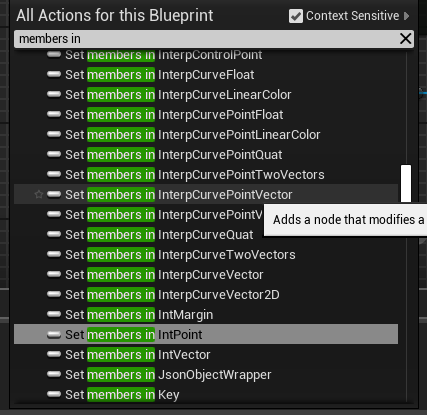
why am i getting al these irrelevant enums in every blueprint?
and structs
are they coming from engine content? can i hide them?
 tender sail
can anyone help me out with animation bp's, what works in PIE isnt when compiled and im at a loss after about 8 hours trying various solutions!
dense gate
These aren't irrelevant tho
They're used by the curve editor
Whether it is timelines, float/vector/color curves, particle systems or sequencer
tender sail
https://www.youtube.com/watch?v=JWjnxk3oQdM&feature=youtu.be shows my issue, suggestion gratefully received!




 crude vessel
I had a dream,is there a way to render a skeletal mesh bone weight to texture in ue4?
 heady river
Hello.
We have a situation in a classroom where it takes 20 minutes to open a file in UE. Is there a way to speed that up without just saving locally?
I should mention that the files that open slowly, are on a network server.
ember notch
@heady river How much performance the pc have? What gpu and cpu and how much ram?
heady river
NVidia Quadro RTX 5000, 32 GB, Xeon 3.9Ghz
(they're classroom boxes that have other software needs too)
I apologize, I don't teach UE. I'm just a teacher who is trying to help others.
ember notch
Oh ok, which UE4 version are the computers using?
heady river
4.2 I think.
Took an instructor 20 minutes to open a file that, from his home, opened quickly. But the file was placed on network directory for easier access to him the the classroom.
that'll KILL a 90 minute class.
haha.
And then I have another question. Is there a "release history" list showing all the different development releases of UE? Another instructor who uses Unity says that UE never gets new releases or updates...yet I know that's not true.
ember notch
I would recommend to use the new version UE 4.23. Unity is bad because you need to make the shader yourself and UE4 have a better performance than Unity. On UE 4.23 you can control a project with a website.
 shy silo
can I make new things I open open docked instead of as a new window?
 jovial solstice
I'm having a problem where my gamepad only is able to control the other player, ie on client it controls the server character and vice versa. Keyboard works fine. I feel like I've checked some option somewhere that I forgot about
plush yew
can someone help me?
grim ore
@heady river https://docs.unrealengine.com/en-US/Support/Builds/index.html for release notes/history. For the network stuff it sounds like you Identified the issue. Once you import the file from the network it would be local tho so that shouldnt be an issue unless the entire project is on the network then 😦
grim ore
🙂
heady river
hmmm...great link, but doesn't have the dates the versions were released.
grim ore
yep that's just the notes. the blog has all the articles when things are released but I doubt there is a list of release dates for versions anywhere
Everything is thru the launcher so there is no single web page with download links like Unity
heady river
Does UE stay current via the launcher, or does one NEED to actually initiate the update to newer releases?
Blog? Where is this thing called "blog"?
(jk, I know what a blog is.)
grim ore
UE4 does whatever you want it to do, once you install a version it keeps it at that version unless you choose to update it. you "technically" don't have to update it if you don't want to but it will show you there is an update for any installed versions.
you can technically have 24 versions of the engine installed thru the launcher right now if you wanted
well more if you want to get really technical with preview and custom branches like magic leap
plush yew
so.. no one has any idea how to fix my problem?
scarlet birch
You're going through the full perception array.
What's the event you're calling that on? It's cuttoff in the image
@plush yew
The way it's setup it's always going to trigger both if you have that many senses.
Your senses are setup in the array from 0 to last. So there are always as many indices as there are senses. You need to break the stimulus and use it to determine the logic.
plush yew
that many senses?
@scarlet birch
this is all of it
I only have hearing and sight as senses though
so.. I don't get it?
I'm checking for the last sense's info
scarlet birch
Whichever is setup first is 0, then the next is 1
plush yew
yeah
I know
sight 0, hearing 1
but it always triggers both
I used switch int before
scarlet birch
That image is not the same as the one you posted when you asked for help
scarlet birch
What's the problem
plush yew
but I always get both hearing and seeing triggered, when I'm just reporting a sound event
this is what I do
it should be fairly simple.. I'm looking for the last sense's index, if it's hearing or seeing, but it always goes into both
even when I'm just whistling
so, I'm just supposed to be sensing hearing
not seeing