#ue4-general
1 messages · Page 543 of 1
 grim ore
I believe targa is the recommended import format? beyond that pack those textures lol
 crude vessel
Yeha I normally use TGA for my masters
I suspect I'm gonna be doing a lot of prototyping with greyscale masks
So I want to avoid packing early on
 uneven fractal
PackagingResults: Error: Failed to properly read XML file : C:\Users\Xanji\AppData\Roaming\Unreal Engine\UnrealBuildTool\BuildConfiguration.xml
crude vessel
How performance heavy is it going to be for me to modify a greyscale mask in shader as far as the curve/level/threshold
I see there is a 3 point curve function
I made a greyscale mask which is like a infintstly variable color mask for customizing a character
 snow thorn
@grim ore i watched your tutorial about the Cheat Manager and PlayersOnly built-in command. do you have any idea why it's not working for me in the sense that i become unable to control my possesed character?
uneven fractal
huh fair enough just deleting the buildconfig file fixed it since it made a fresh one
 honest rune
Is there a way to force the order in which material slots are listed for a mesh? It seems like they are forced to be ordered alphabetically
I want to be able to programmatically assign materials to specific slots on character meshes.
ooh haha nevermind. My display port was hiding the Slot Name properties
uneven fractal
huh apple is a restricted word apprently
uneven fractal
but what if I have a blueprint for edible apples
 honest rune
oh haha
uneven fractal
they are now called red fruit
honest rune
🙂
 warped tangle
I prefer the GreenVariantOfRedFruit
 leaden mauve
I actually like YellowLongFruit
To stay on topic though, are there anyone in here good at RTS?
I don't find a lot of RTS tutorials and information compared to say .. FPS or 3rd pers.
uneven fractal
probably because ue 4 is primarily a 3d engine
seems a bit like hitting a nail with a sledgehammer
crude vessel
Wait what are we talking about? Apple? Where is that banned?
uneven fractal
cooks will fail if you have a folder named apple
crude vessel
What??
uneven fractal
🤷
uneven fractal
I mean I could but it's easier to just rename the folder
would be tempting if it like a parent folder with 1000 things in it though
crude vessel
That's so weird they'd do that
 plush yew
@crude vessel you mean Tim Apple?
crude vessel
I mean, talk about a branding coup!
crude vessel
I mean Steve balmer could have changed his name to Steve Microsoft...
Nevermind, so what other words can you not have as a folder name?
plush yew
developers developers developers...
plush yew
they are too busy ripping their own product to shreds lol
crude vessel
Can we make a Randy pitchfork joke?
EPIC should release a list of banned folder names.. unless it's literally just apple....
How about apples?
Or grannysmithapple?
Bigapple?
plush yew
Hey, just wondering how hard it would be to make a "berries" system for plants.
I currently have a simple bush actor that can be harvested and send items to inventory, but I would love to make this a "multi-step" process, basically allowing the user to "pick berries from bush" instead of harvesting the entire bush system. Making this in code is quite simple, but I'm more about the visual representation of the berries (make each bush display the berries it has left on the bush, and remove 1 and 1 berry from the object as they get harvested)
https://gyazo.com/4547d5f042a93451a19cd633cd7d106f
 crude vessel
Apple?
plush yew
If it's a long process I'll skip it for now, but maybe you guys know any "simple" ways to do this
@plush yew you could just make the berries harvestable instead of the bushes?
crude vessel
Doesn't UE4 have a socket system for attaching meshes?
plush yew
@plush yew with the current code you got basically
Hmm that's fully possible, lemme check
seems like a quick win
crude vessel
Have the berries be a discrete mesh that plugs into the bush socket?
And they would be instanced right?
leaden mauve
I guess use multiple meshes for the bush @plush yew ?
a "Bush" and 50 "Berries1-50" ?
plush yew
@leaden mauve Sounds like a really ineffective solution
sure, the easiest, but for sure ineffective
crude vessel
Or have each berry be a bone and just shrink the bone?
leaden mauve
A solution nonetheless 😄
plush yew
just use LODs on the berry mesh and you should be fine i'm guessing
crude vessel
It would be like dismemberment
plush yew
@crude vessel Haven't worked much with meshes/skeletons, quite new to the whole graphical concept
crude vessel
Except a bush
I saw someone ported an old Ue function to blueprint on the forums
In regards to dismembering people
plush yew
I'm a trading algorithm developer that wants to play with UE4 as a hobby
i think it might be overkill to makes sockets and bones and whatnot for this
crude vessel
It would shrink a body part down to nothing
Hehe
Well it depends on how interactive it has to be
Or how detailed you want it to be
How about a particle system?
The berries are just particles and a int variable controls how many berries are in each bush?
plush yew
then you need something else anyway if you want to harvest by aiming at them
crude vessel
Well is that required?
plush yew
cant do raycasts on particles i assume
crude vessel
Or is it more abstracted?
plush yew
thats kindof what he showed in his example
crude vessel
Can you cull particles inside a collision volume?
plush yew
instanced mesh is proably the way to go tbh lol
crude vessel
Like I saw that for blocking rain from going through a ceiling
Well I mean, it all depends on what your vision is I guess
plush yew
crude vessel
If you wanted to be able to trash a bush and have berries rain down
crude vessel
I haven't messed with too much in depth stuff beyond some tutortials, been wasting all my time on a character asset I've been porting into ue4
But you can combine meshes in one blueprint object?
plush yew
I guess?... lemme try
crude vessel
So it seems simplest to just have a bush with berries, or have a bush that spawns berry objects in space
Unless you have we to have it sway in the wind together
Or react to player touching it
Is this something like the forest?
Or berry picking simulator 2000?
Because in the Forest it just seemed like they had a bush mesh with berries, and one without, and it swapped between the two?
Or maybe the berries were a sub mesh
plush yew
OmniToday at 11:01 PM
Hey, just wondering how hard it would be to make a "berries" system for plants.
I currently have a simple bush actor that can be harvested and send items to inventory, but I would love to make this a "multi-step" process, basically allowing the user to "pick berries from bush" instead of harvesting the entire bush system. Making this in code is quite simple, but I'm more about the visual representation of the berries (make each bush display the berries it has left on the bush, and remove 1 and 1 berry from the object as they get harvested)
https://gyazo.com/4547d5f042a93451a19cd633cd7d106f
mind the multi-step part
NICEEE
jsut copying his question....
the one you are answering you know
No I mean
I got it to work
The multi step part is easy
haha sorry confused you with Buster
No idea whether this is a good solution, but I added the berry mesh to the bush object as a separate "component"
nice does it pick them one by one if you have multiple on the same bush?
@plush yew Can just make a quick array loop function for that
if the bush was slightly more dense you could even place them random so every bush looks more unique
Yeah this is just a placeholder
but placing them randomly might be a bad idea, unless I make it only place it on the outside
otherwise you won't be able to see how many there are
yeah on a few spheres or something
so some are slightly more inside then others
 slate vessel
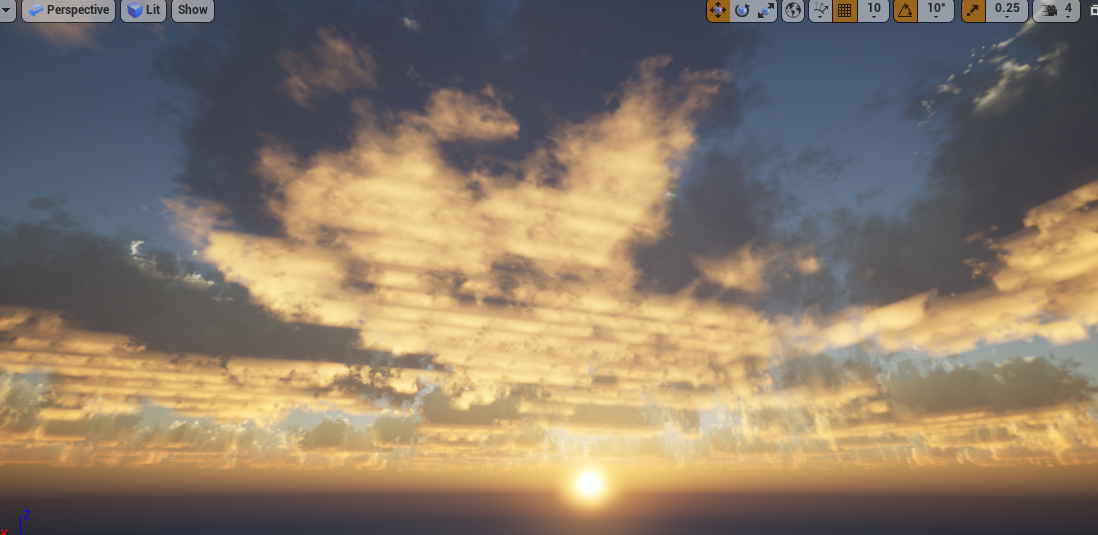
Does anyone here have experience with truesky? I can't seem to find a setting to reduce this horrendous "lattice" appearance in the clouds...
 plush yew
Ehm
is there no "reverse for each loop with break?"
@crude vessel https://gyazo.com/5cf94e24ca5d190831f42fb4dd3f4266
@plush yew now it does do one by one 😄
 autumn elbow
Helllooojellloooo!
Anyone know how I can have my player interact with widgets?
I have a VR character, and I'd like his hands to interact with widgets- rather than mouse. So...when the player swipes across the screen (widget) his her hands move things.
leaden mauve
#virtual-reality (Personally i dont know)
snow thorn
@autumn elbow I'd give this component a try even with VR https://docs.unrealengine.com/en-US/Engine/UMG/UserGuide/WidgetInteraction/index.html
Outlines how to use the Widget Interaction Component to interact with 3D Widgets.
it works fine for me but never tried it in VR
autumn elbow
Will do! Thx!
 ember notch
plush yew
ember notch
plush yew
@plush yew cool i like that you just aim at the bush
crude vessel
This is driving me nuts.
As far as I can tell the two physics assets have the same constraints but in the UE4, it's not showing up the same in the tree.
plush yew
Hi can someone help me
warped tangle
you gotta ask a question first
plush yew
I’m trying to download unreal on epic games but it’s stuck at 83% and all the data required was downloaded
leaden mauve
So the download is done and you can use the engine, but in Epic Games Launcher it shows 83% still?
plush yew
is there a way to convert a project from unreal studio back to normal?
warped tangle
mmmm not that I know of? Make a new non-studio project, and migrate everything from the studio one?
plush yew
Why this glitch ? 😢
( It does this only with a pack of material that I downloaded on the marketplace. With others material, it doesn't do this... )
@warped tangle i hoped it was avoidable, probably wont have to do it though
 left citrus
I'm getting an engine crash when adding more than 10 input variables to a custom node, when opening the expanding arrow to rename or clicking the rename box, it hard crashes to desktop
anybody able to replicate?
uneven fractal
@left citrus have you considered using a structure for that...
 storm venture
so how can two users connect with the MultiUser Editing settings when they're working remotely?
there appears to be tunneling options in the UDP settings, i tested a bit but with no luck
plush yew
@storm venture are both computers on the same LAN?
storm venture
@plush yew no, we're working remotely. we're aware of the documentation that assumes the users are using a VPN to connect but we would like to avoid that
plush yew
doesnt matter its likely just a matter of networking
can you ping the server from remote?
plush yew
try setting the ip you can reach the server with in the settings as unicast endpoint (port 0)
if that doesnt work just look at the network interfaces of the server and find out which one is used for remote access
then try the ip set to that
if that doesnt work talk to IT lol
in fact talking to IT is probably recommendable anyway
storm venture
lmao well i am IT i guess, we're just two guys
im attempting to host the multi-user server + session on my own desktop
plush yew
can i ask what you use for remote access?
storm venture
remote access?
plush yew
oh right you are at home and the other gut is at home too?
i had an office situation in mind
storm venture
yeah, when i said remotely i meant to say that he's trying to connect to my multi-user session but he's located elsewhere
plush yew
you'll need some sort of VPN like solution
wont work because your computer does not (likely) have an internet IP, your router does NAT
storm venture
we're trying to avoid VPNs, i imagine there should be a way to port forward and host a listening server for the multi-user tool
plush yew
you could find out what ports to forward but if you get something liek a VPN you can work from anywhere where the VPN works
i'm not sure whats a good tool for home use without a server
storm venture
i mean, i might sound dumb by saying this, but i can host servers for videogames (like mordhau, minecraft, etc) and the process should be the same
port forward the required ports, host the server, send required IP:PORT to friend?
plush yew
it uses multicast so seems unlikely its even gonna work with portforwarding
warped tangle
I'm pretty sure you need to VPN/be on the same network for multi-user sessions. Epic just did a livestream about this I think last week. I haven't had a chance to fully watch it yet but I'm pretty sure that was a part of it
plush yew
hamachi used to be nice for stuff like this
seems reasonably priced
you could use a tool like that to setup a temporary "vpn"
no need to mess with portforwarding for this
storm venture
ill give it a shot, thanks
plush yew
oh wait its still free for up till 5 computers
i thought it was only paid now but apperantly not
yeah definitely try, it used to be pretty good waaaay back
warped tangle
Pointy ass mushroom, nicely done!
plush yew
No idea how to add textures and export it to UE4 tho xD
 stiff spoke
How to do that if, for example, I kill you with points I have a score of +1
 open eagle
I'm getting really bad lag with listen servers over steam
The host side is fine
The client side is very laggy
I only have a few replicated functions
I have physics simulated cubes and they are extremely laggy
 wraith socket
Hey guys, do you know how can I remove the bleeding of lighting on the top of the windows?
 green rampart
 weary basalt
Links to various example scenes, sample games, and tutorials.
 gray hazel
My builddata files are now huge (4.23). Anyone know what might be happening?
 kind egret
@green rampart I recommend the Udemy courses by GameDev.tv (Ben Tristem). They give you a very cool step-by-step hands-on introduction to the engine.
 deep raft
sorry if this is FAQ, but is there a way to get the node graph editors to open the "add new node" dialog with tab or any other key?
(tried searching and going through the key binding editor)
 fierce tulip
afaik not really
this might be an alternative solution:
https://answers.unrealengine.com/questions/532368/remap-the-right-click-mouse-button-in-the-editor-v.html
deep raft
that autohotkey solution sounds a bit risky, if it would remap right mouseclick in all of UE.. but thanks 🙂
fierce tulip
yea, though generally you should see what nodes you use a lot and set up keyboard shortcuts for individual nodes
 inland kettle
Hello everybody, my goal is to move stars in the background. Like a spaceship starting and braking. So i start a simple timeline (Float / 0 to 1) and control a scalar-parameter that controls the speed of a pannernode (Starmaterial on a plane). Forward this works fine. When I play the timline "Reverse", the speed is getting less again, which is ok, but my stars are moving in the opposite direction. My goal is a clean acceleration and braking. Can anyone help out?
 vernal relic
 gilded igloo
hey guys, is there a simple way to subtract a sphere from a cube inside a bp? is there a situation where I dont need to scratch my head around a procedural mesh?
please?
plush yew
that can become an incredibly complex question depending on what you mean
if you are talking about brushed, I'm not sure if they are allowed to be used on blueprints, adding/subtracting operations are editor only afaik
plush yew
anything that involves modifying geometry requires you to use procedural mesh, static meshes by design can't be modified, brushes by design are built at authoring stage because they are slow and are usually only used for whiteboxing
another way and the simplest way is to fake it
you have to fake a lot in game dev
plush yew
prepare the subtracted mesh on a 3d modelling program and switch the meshes via blueprints?
plush yew
fbx is preferred format for ue4
gilded igloo
great, thx!!
 serene birch
is there a replacement format for fbx that would be more standard and open that UE4 would support in the near future?
serene birch
hmm, I heard about another format that people were looking at too
I can't remember XD
would be neat to have ONE standard people stick to that isn't fbx 😛
fierce tulip
.ase is also still supported, though no clue how open it is :p
or was it .obj
i forget
I think .ase is what I used back in the ued 2.5 days
might be .obj
/thoughts
 sudden agate
what about dae
sudden agate
you didnt say something about web
serene birch
well yeah but let's be honest, UE4 on the web isn't exactly the most common use case at all 😛
but I'd love it if gltf was better adopted
and more useful on non web 😮
fierce tulip
i think as of very recent html5 is no longer being supported, or at least they quit any additional progress on it
 shy rune
anyone know what causes the tire lag?
 magic ermine
Hi, is it possible to import a spline to unreal engine 4.21?
fierce tulip
a simple google search:
https://forums.unrealengine.com/unreal-engine/events/105795-training-stream-spline-importing-w-alan-noon-jan-10th-live-from-epic-hq
and
https://www.unrealengine.com/marketplace/en-US/slug/spline-importer-plugin
Unreal Engine Forums
Trade Shows, Livestreams, Dev Tours, Workshops, and Other Official Unreal Engine Events.

Import external spline/curve data and use them as USplineCompoents.
though looking at the legacy comments, hmmz
magic ermine
@fierce tulip thank you so much, I saw this, this is not working for me, I don't use 3dsmax. I use blender or c4d for this. anyway thats plugin in not for sale
fierce tulip
hmm, cant find any info on blender support.
what is your purpose of wanting to import a spline? they should be somewhat easy to make in ue4 itself.
plush yew
dae or collada is just a bad format in general
if anything can replace fbx it would be gltf, but it needs industry support
magic ermine
@fierce tulip I want to import splines and use it as a road or railway, I have osm files and all this data is sitting there, I want to export from a blender as fbx or obj
@plush yew I can export gltf
plush yew
I'm not sure if the new enterprise stuff has something to import splines, but afaik you need to reconstruct splines inside unreal, or convert the spline thing to a mesh and export normally
it depends on which 3d program you are using though
 tall pendant
on the new format race gltf vs usd ... usd might win
plush yew
usd support will probably come to ue4, but probably won't be gamedev oriented
magic ermine
@plush yew does it mean that I can convert the spline to a regular mesh, and later in a engine convert it again to a spline?
plush yew
no just use it as a mesh, and if you need to modify it you modify it from source and reimport, obviously not ideal
better way would be to recreate it inside the engine
that depends on the content etc, a lot of things to consider
just mentioning it as a general thing
serene birch
USDZ has Apple, Pixar, and Adobe behind it, but glTF has Microsoft, Google, and Facebook
damn 😄
plush yew
meanwhile fbx still has autodesk behind it 😄
magic ermine
yes, but I need to create a road in the engine, I have a lot of kilometers of roads or railway, I want to adapt to the terrain later
plush yew
that isn't a good workflow in general, if you want it as a level you are almost always better off working in the engine
first you can always enter the game and look around
magic ermine
@plush yew I have GIS data in osm file
plush yew
anyway that is how I would do it, your project might be different, but I believe this is the preferred workflow
if you have such a data ready best way to do it would be handling it via blueprints or c++
magic ermine
yes, but for small projects, if you have a road 1000 km you will do it for a long time, I want to save some time
plush yew
doing it from another app and importing doesnt make sense
there was a openstreet plugin made by someone that did a similar thing

GitHub
Import OpenStreetMap data into Unreal Engine 4. Contribute to ue4plugins/StreetMap development by creating an account on GitHub.
this is all c++ though
magic ermine
ooo @plush yew thank you, I check this
crude vessel
I'd like some advice from someone more informed on this. Right now my character has 4 materials, everything for the body, the mouth/tongue, the teeth,and I want to use that procedural eyeball material. Mouth/tongue and teeth texture are going to be used across multiple characters. While the body texture might be modified for each character. I could combine the teeth and mouth but I wanted to use a simple solid fill material instead of fully textured.
So TLDR: is it performant to share a common material across many characters even if it's a separate material, as opposed to wasting texture space by packing the same data into a single texture?
serene birch
it's more the extra draw calls that will impact performance
crude vessel
Yeah but if the materials are the same, won't that be the same across all models?
Like if 5 characters have identical materials for their mouth mesh, like instanced?
Maybe I misunderstand draw calls then, I thought the same material got drawn at one pass
Also would a more complex material be preferable to two simple materials?
serene birch
the combo of "model/material params (aka textures) makes a draw call more or less (well shadows had extra copies of the draw)
UE4 might auto batch together in a single draw call all the tongues of your NPCs if they are all the exact same model and material, only changing on position (starting from 4.22)
crude vessel
Maybe I just need to do a demo map
With a ton of NPC and see the performance difference between packed textures or discrete materials
For LOD I pretty much drop the extra materials
Since you won't really see inside their mouth after a certain distance
serene birch
measuring is always a good way to go at performance!
plush yew
skeletal meshes never get batched, more materials are more draw calls
crude vessel
Yeah, but I'm still learning and I figure thia might be a straight forward question
Damnit oka
Good to know
plush yew
even if every character will have them, it is better to include them inside the normal character texture
crude vessel
Okay so then I might just need to go back to my idea of a super complex masking system :)
plush yew
you can compromise and reduce their size on the texture though
crude vessel
The issue isn't just that it's the workflow
But I might bake them out and just manually composite them into UV quadrants
My main character texture is probably going to be very busy with a series of variable masks
I want to make a customizable material to generate characters that look unqiue
But if each skeletal mesh has a large shared texture set, the draw calls will be larger but texture memory will be lower
I guess the other option is to render out each texture to a cached yexture
fierce tulip
in that case you should (if you havent already) do extensive research on good approaches, see how others did it trough documentation, tutorials, and potentially look at how people did it in their char customizer projects they released on the mp.
crude vessel
Thant would simplify the material but baloon the texture memory
Right now what I'm doing is very specific
So it's probably more complex than what I've seen in other games
plush yew
skeletal mesh performance is problematic in unreal
they have a combine mesh system, but it can bloat the memory since it creates a new texture for every mesh
crude vessel
Is skeletal mesh including a non deformed mesh attached to a character bone via blueprint?
plush yew
best bet is to limit yourself to few parts and limit the number of characters on screen
that is what fortnite does
also aggressive lods
crude vessel
Aggressive LOD I can get on board with
plush yew
my unreal-fu isn't that up to date, but that should still go through the dynamic path, not sure if the new renderer improvements can batch dynamic path or not
crude vessel
But the issue is I'm probably going to have some kind of modular clothing/body part setup, but I know that's gonna be a mess
But one of my project goals is literally spinning unique NPCs
plush yew
you are not going to be able to get good performance with a modular skeletal mesh setup without getting your hands dirty on the engine side
fierce tulip
you might want to consider having things like tongues, eyes, certain accessories to be separate entities which you can LOD out depending on distance and such.
plush yew
(unless skeletal mesh numbers are few that is)
crude vessel
I'm trying to avoid army of clones look
plush yew
how many skeletal meshes would be on screen at one time?
crude vessel
I guess face concealing helmets and uniforms eh?
plush yew
you might end up running into cpu bottleneck as well with character movement component etc
crude vessel
I'm determine, I'm not going for fighting an army
crude vessel
Well agreasive LOD but I'm hoping to simplify the movement issue of background Npc
plush yew
anything about skeletal mesh is expensive 😄
or rather 'character' as a package is expensive
crude vessel
What's the best way to test certain optimizations, I noticed with LOD I can limit bone influences per vertex, or even remove.bones
I'm wondering the best way to test performance gains of this
plush yew
last year there was a fortnite gdc talk about this, how they cut up characters into different chunks, their cost, animations etc, you could watch that to get an idea
crude vessel
Good idea, thanks
Yeah I was modding Overgrowth and the character script/physics really killed the performance
You could have maybe 6 characters active before it got unplayable
Disabled (no script) you could have 70 on screen easy
So I kind of get that all the nice little things can add up real fast
So maybe I'll prototype with my multiple materials and bake down the materials when finished
plush yew
flexibility is more important than performance when you are prototyping
crude vessel
I'm still curious about simple materials (say a solid color and roughness value) vs a material with textures or masks
plush yew
multiple materials make much more sense for that
in a real scene they shouldn't matter
unless you are going ham with textures and masks, they shouldn't matter that much
plush yew
it would matter if you do material layering though
but that isn't just simple texture masking
 meager copper
hey. I would like to animate the background (an animated texture maybe) to create an effect like shown here (http://alkemann.com/webroot/retro/starfield/ click mouse at different areas or click and drag). Is this possible in UE4?
i dont meant to ask for the details of implementation, just if possible and where to look to get started
plush yew
possible, in variety of ways, but depends on your knowledge
you could do it in a shader, or via blueprints etc
meager copper
can u draw pixels to a texture using blueprints code maybe?
plush yew
depends on how you want it, what you are good at etc
meager copper
this is made with a loop and drawing lines in x,y space
crude vessel
Well here is the deal, with material layer a simple RGBA is not enough. Unless I'm doing like stacked masks in UV space, and I could split the value range to get more masks
plush yew
if you want it as a texture only you are probably better off doing it on a shader
you can do dynamic textures in blueprints, but they would be very expensive for a background
meager copper
what are the alternatives to as textures? i mean i dont see this done with 3d objects in the background
plush yew
you could do this in a shader if you know how to program shaders, then replicate it via material editor or just use custom node for it
meager copper
i can have it on a plan, far underneath the player pawn and it moves with the player, so the placement is taken care of there. and to get the speed, maybe have a couple of animated gifs that it switches between?
plush yew
typically, doing dynamic things with textures in unreal is a bit problematic and not intended for general use
meager copper
i dont know how to program shaders. but the whole point of this project is to learn new things, so if you have a link to a good resource, maybe a youtube series, for that, I would be much obliged 🙂
(ofc I could just search for it, but I have found a lot of bad results going blind search for unreal tuts)
plush yew
probably won't be able to find unreal tutorial for this since it is very specific 😄
you could use flipbooks (gifs) or simply a video file if you don't want it to be dynamic
meager copper
so basically how do you write a shader to do procedural 2d animations?
plush yew
if you want to learn shaders you can take a look at this, but it would be overkill to learn how to program shaders just for this, anyway here's an example https://www.shadertoy.com/view/WsfGDM

hackiest way would be to do this in 3d somewhere else in the level and use render to texture to get a dynamic texture off of that, it would be needlessly expensive, but would be the simplest approach that is still dynamic
https://www.shadertoy.com/view/3dSXWt this is a bit close to your example
 meager copper
and this code is pluggable into an UE4 material?
plush yew
nope, its not even a language that is supported by unreal, but you could convert it to hlsl
why do you want it as a texture?
meager copper
not that i want it as a texture, it just seemed like the likely approach
since it is 2d background
basically i am recreating this http://alkemann.com/webroot/retro/asteroids/ in UE4 because i enjoy learning new things more than creative about what to make 😉
plush yew
oh, you could just do it in 3d though?
you could probably do it in cascade or niagara as a particle effect
i was gonna say maybe try particles
meager copper
hmm.. yea i probably havent been considering particle system good enough
inland kettle
Hello everybody, my goal is to move stars in the background. Like a spaceship starting and braking. So i start a simple timeline (Float / 0 to 1) and control a scalar-parameter that controls the speed of a pannernode (Starmaterial on a plane). Forward this works fine. When I play the timline "Reverse", the speed is getting less again, which is ok, but my stars are moving in the opposite direction. My goal is a clean acceleration and braking. Can anyone help out?
fierce tulip
^ hehe related to alkemans
plush yew
cascade is pretty good, with niagara you can use visual programming to add your own stuff, it is crazy flexible
meager copper
haha convergent ideas 🙂
plush yew
should be pretty cheap and straight forward with particles
fierce tulip
Tower, odds are that the value that is moving the panner turns negative, you might need to find a way to remap values.
inland kettle
i have checkt this. it is positive all the time
plush yew
ok, make it turn negative :-p
fierce tulip
I dont know in what situation you want the stars moving towards screen @meager copper but a simple gpu particle setup should work, perhaps have some shader math influencing verts so particles always move away from center of screen.
meager copper
@plush yew so I should look at particles and Cascade and Niagara are key words for tools?
fierce tulip
niagara is not superduper ready for production, cascade can do this
plush yew
cascade is the proven one, it is production ready, lots of resources, I would recommend that
fierce tulip
@inland kettle care to show the material for the pan stuff?
plush yew
if you think cascade is a bit too limited for something, then you might want to look at niagara, but I would still recommend sticking with cascade
meager copper
basically the particles (remote suns) should always move from a point on the screen, FAR away, towards the screen, but always to the sides, spread randomly around, never hit the play area
plush yew
yeah but its jsut an effect right?
fierce tulip
@meager copper there are ways to make sure stars do not move into the screen by some math into the vert offset in the shader
what is the panner set to, and from what value does the speed go trough the timeline?
plush yew
maybe jsut keep it flat, nice and simple, spawn in the middle, move them faster and faster to the side
 vapid narwhal
Did anyone here ever have the problem of the engine crashing when deleting objects in the world? Even when I delete a TextRender-Actor it crashes. On 4.23.
plush yew
you can zoom on them a little as well to make em bigger
meager copper
so funny that Tower is asking about a similar thing at the same time
plush yew
i mean scale them
fierce tulip
well, his is texture based
meager copper
which I also assumed mine had to, but i think particles may be better option for me
 severe ibex
This is quite general, not sure where to put it but the company I work for is looking for some Unreal support from able professionals. I keep seeing Fabrice Bourelly pop up but the one time I met him he was not so impressive and he cancelled his talk because it was "getting late". Is there some Epic Games email or person I could contact?
fierce tulip
either (and some others) all have their pros and cons
plush yew
you could always use a video loop, but personally i would go for particles
inland kettle
@fierce tulip
fierce tulip
direct epic help is only possible trough some contracts, else your best bet is answerhub, ask people here, and if its job related you could try #looking-for-talent
@inland kettle can you click on the panner node, and screenshot the settings of it?
severe ibex
@fierce tulipthanks. I'll look it up. I've heard of the partnership program so I'll look again.
plush yew
you could probably do the star effect with texture by panning a starfield texture on a cone mesh and layering them
you could also use some simple vertex coloring or uv mapping to change the cone top vertex location so that the thing would look dynamic
it would take a lot longer than simple particle system though 😄
 severe ibex
@plush yewthanks.
fierce tulip
one sec tower
inland kettle
Oh Sry. Missunderstanding. This was German. 😄 So? = Do you mean this? 🙂 @fierce tulip
fierce tulip
few more secs :p
instead of altering speed or time, you might want to actually pan in another way. one sec
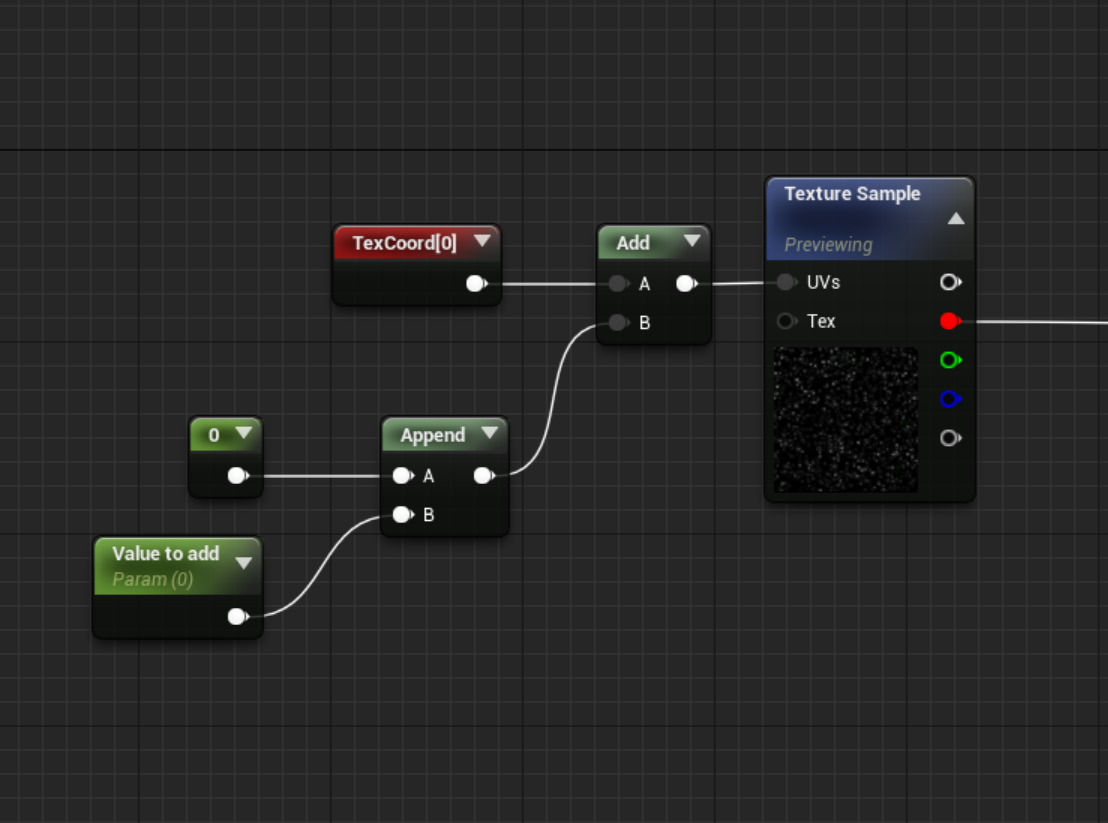
 regal mulch
So basically offsetting the texturecoord by hand
fierce tulip
you dont need to use a timeline that goes back that way
just add to it until a certain value.
regal mulch
That's basically what Raildex already suggested them in #blueprint
fierce tulip
didnt see blueprint :p
inland kettle
no hehe i was asking him in blueprint for a picture or further infos
so thank you very much.
gilded igloo
can I set the pivot of a static mesh in the construction script?
fierce tulip
just smoothly go from 0 to another value.
but not sure what a good approach would be to reset the value in case it becomes really big.
can tell my brain farting because hunger
crude vessel
Anyone here use ALS?
plush yew
just a compare and a set i would say
can i put anything on that first black screen when you open the game?
like loading screen
inland kettle
Unfortunately that was not the solution. But thank you very much for the effort.
I wonder how others do that. - A star background controlled by a timeline to simulate speed acceleration & braking process
fierce tulip
dont run the values trough a timeline moving backward.
it should only ADD to it unless you go backwards.
fierce tulip
you can ramp the value
inland kettle
On top of that the Background should run at all time. exept 0
fierce tulip
could always add a time node with a low value that constantly adds to it.
inland kettle
yea but withot a curve it is not smooth enough
hm...
It would be a great pity if I could not use the curve system.
fierce tulip
there should be some bp nodes that are related to curves and what not
plush yew
why do you need the curve?
inland kettle
@fierce tulip yeah. let's see what I can get out it
Its a effective fast system. I want to sitch fast betwen these curves
plush yew
i think you just need an exponential decrease / increase when stopping or starting movement
inland kettle
it should be like a acceleration curve from a car for example
plush yew
so basically you double the speed or divide by 2 until you are at your desired speed or 0
curve seems way overkill for this imho
inland kettle
Every ShipEngine has its own AccelerationCurve. I thougt this was a good idea. Until now 😄
plush yew
lol you can still change acceleration speed 🙂
plush yew
multiply by 3 to make it faster 🙂
inland kettle
yeah but this is linear
plush yew
linear is no problem, just add the speed instead of multiplying
kind egret
Hey everyone. Currently I am looking into options on how to realize a runtime procedural landscape generation and which option might be the best to go with...
Actually it would be great if I could use UE4's landscape class for it, but as far as I see (in code) most of the implementation is editor only. Is there a way to manipulate landscapes at runtime? It would be great if I could give a landscape a heightmap at runtime and it does the work for me.
The other options that I see are to use Procedural Mesh Component or Runtime Mesh Component. How do they compare in terms for functionality, performance, LOD etc. to landscapes?
Are there any other plugins that have proven to do the job?
plush yew
you can do everything without curves unless you want some fancy curve shape basically
(and even then you could argue about it lol)
plush yew
the only difference is your ship acceleration curve is now defined in the code and not in your curve, but you can turn it into a parameter or whatever
this could be benifitial i you plan on upgrading shipsd to make em faster and whatnot
jesus i cant spell
(i'd have to say though linear seems unrealistic if its in space)
inland kettle
Oh. Missunderstanding. This was the answer for the "change acceleration speed " thing.
I was looking towards the curves because its no linear thing.
crude vessel
Unreal Engine Forums
For discussions about Materials, Textures, Lighting, Particle Systems, and Post Process Effects.
Hummmmm
plush yew
@inland kettle well you can do both linear and exponential without curves
@inland kettle if you multiply the speed by 2, the speed would look like this for example: 1 2 4 8 16 32 64 128 .....
so the speed increases more and more
you can do the opposite when you get close to your target speed
 shrewd gust
so i got my gamepad (logitech f310 on windows 10) working in a project then came back to said project the next day the gamepad is not being recognized in it. literally changed nothing so i'm confused what's up 😕
plush yew
@inland kettle if you try this though make it timebased and not framebased
 opaque salmon
how would I debug a blueprint game that crashes with this assert Assertion failed: [File:D:\Build++UE4\Sync\Engine\Source\Runtime\RenderCore\Private\RenderResource.cpp] [Line: 151] A FRenderResource was deleted without being released first!
happens 50/50 when a second player joins
 ornate ice
Good morning people 🙂
plush yew
yo guys, any tutorial on how to replicate the flying template of epic?
 abstract relic
Aside from reverse engineering?
 polar barn
anyone else having issues trying to download content from marketplace through the launcher?
 mortal cedar
that feel when you finally get your game to perform well
those 3000 bois down there think theyre causing a ruckus. but theyre not anymore!
 dim plover
Has there been any information on a new navigation system?
gilded igloo
hey guys, is there a way to turn off soft edges on a procedural mesh?
 frank escarp
@mortal cedar what you doig there?
mortal cedar
@frank escarp ripping off "they are billions" haha. but with multiplayer
not going to have their 20k zombies but 3k zombies in multiplayer should be fine imo
noticed like every other review for that game was asking for multiplayer so I thought I'd give it a go
mortal cedar
yeah literally everything is instanced
using vector fields for the path finding, and currently copying planetary annihilations keyframe networking
 trim trail
I'm getting tired of having empty folders remaining after moving assets. Fixing redirectors rarely works if at all and only working solution I know is deleting old folders from windows explorer. Is there something I can do to reduce this problem? 😦
meager copper
@plush yew @fierce tulip I have gone through a long Cascade tutorial and I am able to create particles that look close to what I need for my star field. 1 major issue. I need them to be pregenerated. Now they take a while to get going.. how can they start already in the loop?
fierce tulip
startup time
meager copper
also the particles have an intial vector, i need that to offset when I move the origin. is that possible?
 radiant haven
Hey ppl Well Ive got an error by my brothers phone when trying to start game
"Plugin 'X' failed to load because module 'X' could not be found."
well i looked up in ue forums and found a post where smone said that i need the plugin folder in the game project
well the plugin is from the marketplace and there is no plugin folder in my game project and i think thats the reason why i have this error
I ask where does ue saves the plugin or how do i get it into the Project Folder
fierce tulip
or you know, dont use bold font for nothing
meager copper
where is the "startup time" setting?
fierce tulip
click in the empty space next to where you add new modules, it should then show a general info/options thing where you normally change values for the modules
sorry, warmup time
fierce tulip
can you dm me a screenshot of cascade?
stiff spoke
Do you know how to add points to the score of the one who shot and not the one who was shooting
grim ore
add points to your points variable when you want it added. When should it be added? Is it when something is shot? How is the person being shot? Do they know who shot them? If they know who shot them then tell that person who shot them to add points
stiff spoke
When I do that it adds to the one who was fired
grim ore
then you didnt do that
you did not tell the one that shot them to add points, you are adding it to the one who was shot. what does your code look like for being shot and adding points?
stiff spoke
Hold on
My code is simple on do when a key is clicker I call a custom that I connect to a functions and the code to add points is when you shoot your enemy and that after that it to his life to zero then I to do variable score plus 1
plush yew
Ehm so, I finished modelling my mushroom, how do I change the "default" scale of it after import?
man i keep having this stupid issue where visual studio cant find my generated.h files
 tawdry sierra
Hello, I need some help. Ive been trying to parent spring arm to this Mesh(Inherited). (mesh will be he child). But because its inherited i have to mess with the c++ files. Ive been trying that but i cant find what im looking for.
https://answers.unrealengine.com/questions/244955/view.html?sort=oldest
someone posted this
but i cant find that class in any of the .h files
stiff spoke
Do you know how to add points to the score of the one who shot and not the one who was shooting please help me
 misty creek
Open the folder location and you should see Mushroom @plush yew
plush yew
that mushroom look just fine, why do you need to fiddle with the scales? 🙂
@plush yew Would prefer to use trees for that rather than mushrooms 😄
trees? so last year..
don't have an editor in front of me, but it should be in build settings, as a setting called scale, however I would recommend fixing it at export rather than after import
not sure which program you use, but they could probably save export settings so you don't have to adjust for every individual mesh that way
stiff spoke
You do not know me
plush yew
arent you nathan?
stiff spoke
If
plush yew
build settings after you open up the mesh editor. if you export the mesh again with the same name, you can just right click the mesh and select reimport
Any idea how I can move an asset without having to re-implement everything?
it will reimport completely
Yeah but how do I drag this to the above folders
grim ore
click the source panels on the left, the top left icon above the bush. To the left of Filters
uneven fractal
uneven fractal
because collision is enabled on it?
plush yew
It is on the rock as well
exactly the same settings
default import settings might be auto generating collision
you can remove it from static mesh editor
meager copper
Can anyone tell me why the selected camera cant see the particles even though they are everywhere in the world viewpoirt?
plush yew
could be a bounding box issue, especially with gpu particles you need to set it right
haven't used cascade in a while so might be misremembering, but iirc you would let the particles run and capture a good bounding box when you get good amount of spread
KK solved my problem
meager copper
yes i have reset the bounds
i was able to get close to what i wanted visually with particles @plush yew , but to get it to work in the game world has proven very difficult.
starting to think maybe particles isnt the way to go
uneven fractal
so my project has no c++ but I get an error saying I need to rebuild from source manually when I try to start up my project but when I right click on the uproject file to make the project files so I can manually compile them it says I have no c++ files so I can't make project files
meager copper
i am operating with really big sizes. maybe that works badly with the particles.. i guess I could just scale down everything?
plush yew
it really depends on what you want, how much control you want etc
if cascade doesn't have enough control, you could go for a niagara script, but that might be a bit rough around the edges
or you could make your own simple particle system with blueprints/c++ actors to have total control over it
I'd say tweaking particles would be the most optimal though, cascade is pretty powerful, plus with some material logic it could be pretty expressive
at least, for unreal that is
meager copper
not sure if cascade isnt giving me enought control. i think what I want is pretty simple. i was able to do it with just canvas in a browser after all 😉
there is performance issue with the cpu particles and Lous says there is a bug that affects me with the GPU ones
plush yew
well canvas is pretty generic, unreal has a pretty tight pipeline for the gpu
depending on what you want, niagara probably might be able to give you pretty good amount of control
meager copper
what do you mean depending? you know what I want by now 😉
plush yew
there are also other techniques that are more material and mesh based, but again hard to recommend since they can vary heavily on execution
well text chat isn't that good at conveying what you want, sometimes even when you are standing side by side it is difficult to articulate 😄
meager copper
did you look at the link I shared?
plush yew
but this was more of a niagara thing
it is pretty unreal focused thing
so getting that amount of control might not be easy if you aren't used to doing things unreal way
if you want total control, you could take a look at instanced static mesh component, and animate things via code
with instance static mesh component, you just set a mesh, and provide a transform to the component, it renders it efficiently with a single draw call
you can than update it every frame etc
 vital cosmos
How do I fix that issue with the face looking all weird when importing mixamo characters into unreal
 unreal comet
So there is no way to manually downgrade a ue4 project from 4.23 to say 4.18 is there? I can't just migrate assets or copy and paste the content folder correct? There has to be some kind of 'hacky' way to do it right?
 manic pawn
there is no way
unreal comet
@manic pawn Awwwwwwwwe 😦 Is there a way to copy variables from a blueprint and paste them in another? I know I can paste nodes but creating all the variables from scratch takes forever.
manic pawn
when you paste stuff to the event graph you can right click the nodes referencing nonexistent variables and click "create variable xxx"
 timid pilot
Hi, can I use Unreal version selector with command line?
grim ore
@autumn trout what are you trying to do there?
 modern sinew
I feel there's got to be a more streamlined way to do this, right?
 autumn trout
@grim ore I'm trying to make a collection
grim ore
It's hard to understand what you want to do with that screenshot, it seems like it works fine but after that ?
uneven fractal
stick it in a function and add local variables so you don't have wires everywhere
a sequence node seems like it would be good here too
modern sinew
It works fine, but it's messy, it's just a long if-else chain
uneven fractal
rule 6. Strictly no advertising?
uneven fractal
your advertising your project no?
 limber sphinx
no i didnt mention it at all
uneven fractal
even though it's developer aimed and not customer it's still advertising
limber sphinx
just mentioned we had an open development people could join more like a resource
its not really job based
 sonic cedar
I think you meant to post in #looking-for-talent, @limber sphinx
limber sphinx
wasnt really advertising for positions its more of a resource ill just delete the post
sonic cedar
I mean you directly asked for developers to join your team
limber sphinx
thanks though!
sonic cedar
It's not a huge deal, it's just there's better channels for it
limber sphinx
right would career chat be better?
plush yew
I need some help regarding substractive geometry brushes. Up untill now they were working just fine but now everytime I use them, instead of just substracting where the actual substractive brush is, it substracts all the way vertically. Do I maybe have too many geometry brushes in my level?
limber sphinx
like i said its not really a job posting im not filling specific roles
sonic cedar
@limber sphinx you're looking for talent, so the #looking-for-talent channel sounds like what you're looking for
limber sphinx
okay i can just feel by doing it that way that it limits to people who feel they are talented enough for work this is more of a learning thing, like come get your feet wet regardless of skill levels
sonic cedar
I mean you can put that in the post
It isn't limited to expert pros only
Anyone know the timeframe on getting accepted to the steamworks dev group?
I applied like quite a long time ago and didn't get a response
plush yew
is it possible to get all child bones of a specific bones?
plush yew
@sonic cedar this is automatic, you need be partner steamworks
sonic cedar
Weird, I was before I thought
We got through steam greenlight for a project quite a while ago
This is one of my partners
plush yew
you need partnership, 100$ license
plush yew
i'm trying to make a new class for a data asset, and i need an array of materials, which does not work whatever i try
i changed it to strings to test and that works fine
is it not possible to make an array of materials there?
 frank pike
Hey guys, I am new. I have two imported materials and would like to paint both materials to separate parts of my terrain. Can you point me to a tutorial on how to do this?
plush yew
I need help converting this into a single mesh / object / asset, whatever. It includes lots of geometry brushes, additive as well as substractive.
grim ore
did you try selecting it all and using the convert to static mesh option in the details panel?
plush yew
@grim ore it doesnt show that anywhere unfortunately
well I was able to select convert to static mesh from rightclick but it only turned the static meshes in the building into a new one. the rest was completly ignored despite selection
limber sphinx
can you delete or edit in the looking for talent
i migrated a backup to a discord server and the invites wrong
grim ore
What ^^ said. I think the issue is you have geometry brushes & static meshes mixed. You would have to convert just the brushes to a mesh then you could combine all the meshes into one or put them all into a BP.
warped tangle
Yeah looks like he used the right click -> convert to static meshes which isn't for brushes I don't think
grim ore
yep it would explain why the brush settings don't show up as well if he has more than brushes selected
plush yew
How is the line of sight to node different than doing a line trace, is it more complex? Because right now I check LOS by doing a line trace but that isn't a perfect solution since waist-high fences block LOS. But then I saw the Line of Sight to node
whats a good way to save some data without having to make a new C++ class ?
(as there are layers of problems with defining a class that has a struct)
 mossy nymph
in c++? not really
just toss the struct, if not exclusively used by that class into a header containing... shared structs/enums
and include it
plush yew
been trying to use a data asset
mossy nymph
there is no special consideration for classes containing structs
plush yew
and to make the data asset you need to define a class, which works fine as long as i dont want an array of materials
mossy nymph
except you can't forward declare them unless its a pointer or a reference
mossy nymph
array of materials doesn't sound like something that should cause troubles
plush yew
so how do i declare them? :-s
i know, as soon as i replace it with an array of strings it works fine
i dotn get whats so special about materials lol
plush yew
thats chinese to me
mossy nymph
UStaticMeshComponent has editor exposed materials
they are actually declared in MeshComponent.h
there is usually an engine example of what you're trying to do
just need to figure out where to look ^
plush yew
i dont know what editor exposed materials are
 ruby estuary
Does anyone know what >> LogUObjectArray: Warning: Empty slot << means?
 loud knoll
Packaging for 32 or 64 bit which is better for getting the most players to be able to play a game? Any other benefits?
manic pawn
64 bit is all you need
any 32 bit toasters still in use in 2019 are too weak to play an unreal game anyway
 polar hawk
this is a gross oversimplification but
if you ship 32bit your game will run faster
note: do not ship 32bit just to run faster without understanding why
 thick herald
This is a longshot. Anyone know if it's possible to change a BPs parent en mass? Such as via the editor widget functionality. I'm fairly certain it isn't but doesn't hurt to ask.
plush yew
@mossy nymph i was using FMaterial instead of UMaterialInterface... lol @manic pawn helped me out
 opal totem
I've tried googling this but I'm not sure how to word it. But I'm importing a staff to my project but the world root is at the tip of the staff and I want it somewhere else in order to place on a character. How do i change the world root/pivot point of a mesh?
or do I need to do this in blender
nvm i just fixed it in blender
plush yew
@opal totem in case you ever need it again https://www.youtube.com/watch?v=N1h5mMviSKs

Use the key combo of ALT + Middle Mouse Button to move the Pivot Point on either a BSP or a Static Mesh. To make the change permanent right-click on the shap...
plush yew
or is there any way to get the current "input mode"
I am basically trying to make an event where "if you click outside the inventory window, the window closes"
And yes, I know you can do "onFocusLost" close inventory, but that means that it will also close if I alt-tab, and I don't want that
grim ore
put another panel/widget in the background and detect a click on it as a handler
you can even do that if you are using a canvas panel as the main widget on the viewport and adding other stuff to it, just have it handle clicking on "itself"
plush yew
nice i see you figured out how to unwrap your mushroom and import it 🙂
a blender tip, if you select the top faces and press space then type shade smooth, then those sharp edges where the light reflects will be gone
@plush yew
@grim ore Found another solution with a bit different approach, but thanks!
@plush yew Will try that straight away!
grim ore
What did you go with @plush yew ?
plush yew
Decided to instead pause the entire game and make clicks outside the box just bring back focus to it, this way only way of toggling the inventory is with the hotkey (tab)
@plush yew Cant's seem to make it work, is that in the shading tab?
it only starts the video player for me
@plush yew in blender ?
got it to work, rightclicked then shade smooth
yeah space should just give a search box
at least with 2.79, i assume this is the same in 2.8 but not sure
anyway glad you found it
a lot changed in the newest blender
i'm used to 2.79 im sticking with it for now
also, any idea how to change the size of this thing? I mean, if I import the mushroom directly from blender it's the size of a 100 year old tree
lol
I mean
I know how to change it
if you export as fbx there is a scalar iirc, but you can also setup blender so blender units are unreal units
but how to have a reference
ohhh that's cool
okay, last question:
After scaling it down, how do I bring it back to the bottom centered position? 😂
N should open a panel, if its the same as 2.79 lol
you should see transform in that panel and a X Y Z median, jsut set that to 0
median in edit mode, location in object mode
set object mode to 0 if it is not yet
after that you can set the medians in edit mode if needed, just select all
Think the problem is that my midpoint isn't on bottom
 sly coyote
@opal totem you can only temp change the pivot however there is one of the greatest tool I purchased on the marketplace called pivot tool that allows you to change the pivot and bake it permanently into the object without having to go to an external program like blender to do it...I'm not one to advertise anything but felt that it deserved to be mentioned as nothing is more annoying than having to stop your work flow to do something (which unreal engine should ALREADY have built in support for) externally
plush yew
@plush yew in edit mode, select the middle bottom vertex, snap 3d cursor to that, then go to object mode, then set origin to 3d cursor
@plush yew after that just set location to 0 0 0 in object mode
then it should be placed perfectly on the ground in the middle
 blissful trail
plush yew
blissful trail
plush yew
@blissful trail What range do you have it set to
how do i get my data asset in my blueprint? dragging it doesnt do it and no error either
opal totem
@sly coyote I'll take a look into the plugin. For now I'm going to make sure to remember to set the pivot in blender the first time around but yea theres no reason Unreal shouldn't have that option
plush yew
why would my game instance slow down the game startup so much?
 rotund harness
does anyone know how to access variables/functions of one actor in another actors blueprint? Ive looked into interfaces, blueprint comms. nothing is working and this seems like it should be fairly simple
plush yew
@rotund harness GameInstance
sudden agate
@rotund harness you simply need a reference of your actor and make sure your variable type is the same as your actual actor class. this way you can access public methods and fields
rotund harness
@sudden agate I tried that, but when I created the reference to the actor, I cant set the target to anything, it says ,"editing this value in a class default object is not allowed"
sudden agate
wtf are you doing. you need to set the reference at runtime
you cant set it in the editor
rotund harness
yeah dont understand how i am supposed to do that
basically trying to get the world location of one actor, then teleporting player character to that location
regal mulch
Then watch the Blueprints communication video pinned to #blueprint
rotund harness
will check that out thanks
 gentle moth
How can I calculate which size my model in blender should be to be same size as as pawn in ue4 for example
gentle moth
I can check that after exporting but I would want to have proper size before doing it
and blender scale is same as unreal?
gentle moth
thanks
trim trail
is it possible to disable compiling shaders when you move/right click levels in Content browser? I dont see much sense there, I think compiling shaders should happen uppon loading level
plush yew
This setup doesn't work if on the baseUnitBP I set the vector to something else. the character will only move to the default value
fierce tulip
@trim trail sadly I dont think so
plush yew
hmm, its because everything looks like it starts at beginplay.
 ashen cape
Hey guys, I have an issue that when I import png with transparent background or parts into the engine it doesn't detect alpha channel and it comepletely distorts the imagine, any tips? Thanks in advance
ashen cape
export it as tga?
fierce tulip
so on import it replaces the alpha to padding
trim trail
hm.. i think i had some recent issues with png, i think photoshop with default 'save as' doesnt save/add alpha channel, but if you go for 'export file as' (or something like that), you get option to add alpha channel, maybe that could help you?
fierce tulip
nope, sadly it doesnt
trim trail
oh well, i guess i was remembering wrongly if it doesnt add alpha channel
trim trail
and bummer with compiling shaders, im thinking how to optimize smoothness when managing assets in ue4, best to do is to have fast cpu and both ue4 project and ddc folders on ssd, anything else?
can you show screenshot @ashen cape ?
fierce tulip
that only works if there is an alpha channel
but photoshops png puts the alpha info in rgb
ashen cape
not true, I used photoshop with my previous assets which are also png but for some reason they have different format
DXT5 which shows alpha channel and DXT1
fierce tulip
¯_(ツ)_/¯
 fierce tulip
its been a known issue since even udk, apparently it is in the way many tools store their png info, there have been odd examples where it works, in some cases by using the photoshop plugin superpng, but take it from someone who has been around for quite a while, save as tga. png and alpha mess up in ue4
occasionally you can have success by saving as "save for web and devices"
ashen cape
@fierce tulip Yes you are right, I have tried to do it as "save for web" and it worked, still there is little distortion but atleast with alpha channel 😄
fierce tulip
when I moved to ue4 I tried a long time to keep sticking to png, but the random it working, generally doesnt work gets so much in the way of workflow and being in the zone that I just made two small scripts, save as 32bit tga when it has alpha, save as png in other cases.
 gaunt raptor
how would you guys go do hair in a cel shaded / Toon game ? Can you do outlines with hair cards using alphas ? Or does anyone have any inputs ?
 mint sequoia
How do you stop UE4 from vomitting all of the components into the details panel?
Makes it really annoying trying to find anything at all
sudden agate
there is a flag in the component's details panel to disallow showing it in these panels
 rocky wing
Is there something in AnswerHub that lets you see your questions?
fierce tulip
you can go to your profile
it shows a list of your questions, and a list of all the answers you gave
plush yew
whats a good starting point ro learn about UI in UE4?
regal mulch
Yeah. Just click on your profile at the top.
plush yew
meaning how to make my own UI
regal mulch
Wow, discord didn't scroll the last 3 lines. gg
@plush yew Checking out everything that has to do with UMG.
And discarding tutorials that still use AHUD class
plush yew
is UMG from epic itself?
regal mulch
Yes
regal mulch
Not entirely deprecated. It has its usage. But you don't want to actively draw your UI with it.
You can store your Widget (UMG classes) in it if you want.
In C++ there are some useful debugging functions and stuff
But that's about it
plush yew
nice thanks gonna check it out, got most of my logic but no UI yet 😄
rocky wing
XenialJesseToday at 7:12 PM
Is there something in AnswerHub that lets you see your questions?
Thanks Luos and eXi... and I'm certain that checking my profile worked for me yesterday but right now ... it isn't. Not sure what I'm doing wrong.

 dim merlin
Hi, anyone knows its possible to change the mesh of a instanced static mesh component at runtime?
Warning: Calling SetStaticMesh on '/Game/Maps/UEDPIE_0_IslandMap.IslandMap:PersistentLevel.InstancedFoliageActor_0.TreeFoliageInstancedStaticMeshComponent_C_0' but Mobility is Static.
got this warning when use SetStaticMesh on the component
plush yew
@regal mulch do you know if its possible to get asset thumbnails from UMG? like meshes or materials for example
cant seem to find much on that
manic pawn
@dim merlin the message even tells you what is wrong, change the mobility to movable
plush yew
@regal mulch damn thats kindof useless :-s
manic pawn
I wonder why umg assets don't have thumbnails
regal mulch
@plush yew Maybe I don't understand you correctly. Do you want the Thumbnails that some of your assets have as icons in your UMG UI?
plush yew
@regal mulch yeah that seems the most straightforward way of having a thumbnail right?
regal mulch
Yeah right that's not a thing :P
The thumbnails of the assets that you see are a lot more complex than that
plush yew
well that is very very limiting then
manic pawn
those thumbnails are editor only
regal mulch
Why is that limiting?
regal mulch
2D art has to be created :p
plush yew
because it would require to manually make a texture for every material and mesh if you need them in your UI
regal mulch
Correct, that's how people do it
plush yew
which is not very empowering to say the least lol
manic pawn
or you make your own thumbnail renderer
regal mulch
Well I can give you a thumbnail plugin
Unreal Engine Forums
Hello!
Here at Panda Studios we made a thumbnail creator for our games to speed up the process of creating thumbnails of our assets to use inside Slate and
Made by the person who sits behind me
Not gonna give support on that though
plush yew
give him a beer from me
regal mulch
her*
 haughty hound
Hello, does anybody know how to move an AI character using forces while they play the walk animation? Similar to using MoveTo in a behavipr tree
plush yew
give her a beer for me


 leaden mauve
She needs all the beers tbh
haughty hound
Please, anybody knows that?
leaden mauve
I'm a newb, so i don't know, which is why i'm not answering 😅
haughty hound
No worries bro😊👍
fierce tulip
we do have an #gameplay-ai channel
haughty hound
Oh thx i will check that, just arrived to this group
leaden mauve
Welcome 👋
 atomic onyx
Would the use of UE4 for 3D Product Demonstration on android apps be a good idea for a business?
I mean, do people pay for such apps often? Has anyone worked on similar projects before?
 wary wave
depends on what you mean by "3D Product Demonstration"
but the answer is probably 'no'
plush yew
put yourself into the shoes of someone wanted to buy a product, are you going to pull out your smartphone, then download an app, to look at it in 3D?
probably depends if there is any added value to seeing it this way
i've seen apps that let you place small furniture virtually into your house with your tablet for example, that could be useful to a degree
tawdry sierra
Hello, I need some help. Ive been trying to parent spring arm to this Mesh(Inherited). (mesh will be he child). But because its inherited i have to mess with the c++ files. Ive been trying that but i cant find what im looking for.
https://answers.unrealengine.com/questions/244955/view.html?sort=oldest
someone posted this
but i cant find that class in any of the .h files
plush yew
this thumbnail generator is looking more and more awesome, it compiled fine
 next badger
@atomic onyx those apps are generally free and provided by shops themselves, like amazon - https://www.amazon.com/adlp/arview
leaden mauve
Ikea as well
 icy mulch
Quick question do I need online To make a online multiplayer level
next badger
@regal mulch just found out you're working with Cel 😮
regal mulch
Well, yeah
fierce tulip
hehe
grim ore
@tawdry sierra you will not be able to change the character's inherited components without rewriting your character code in C++ with a custom character. The class they are pointing to in that post is custom code and even then it's not what you wanted since you want to change the inherited class (character)
are you using a custom C++ character? if so you could try the same basic code by creating your camera boom (spring arm) then calling AttachToComponent from the MESH onto the spring arm after you have created it and added it to your capsule
crude vessel
So what's the real perspective on draw calls?
Like wouldn't many objects in a level have many draw calls?
wary wave
potentially, yes
most objects will have multiple draw calls
the more complex an object (components, materials, etc), the more draw calls..
crude vessel
Well I mean. My character models may have multiple due to the nature of me wanting to make them modular
next badger
recent ue4 versions have automatic instancing
crude vessel
But I'm wondering could I just compensate by simplifying other aspects of the game?
next badger
modular characters...you actually can optimize those as well
tawdry sierra
@grim ore i am trying to edit the c++ code but i cant find the structure that the component order its in.
crude vessel
Like one of the ideas I'm going to prototype is a character color mask based on a continual hand painted gradient
So I want to be able to generate a character with a color vartation based on manipulating that gradient cutoff and levels
Which I realize might be a bit heavy , but I'm thinking it's preferable to caching a lot of custom textures, but I guess I'll need to test that out
But my goal is to make many unique characters by combining a series of masks in the shader,
Other games I saw do something similar but they would bake down the texture
I'm just wondering if I had characters who had more complex materials, is that inherently going to kill the performance if I don't go crazy with other details in the level on general
Like from a memory standpoint I think a character with a set of shared texture maps that can change in appearance would be better than having to bake out many many megabytes of redundant texture maps
next badger
Just test it. Look at overall cost, shader complexity etc. Then decide if it's worth it or not.
crude vessel
Yeah, that's what I'm going to have to do 🤔
I'm just. Bit new to ue4 in specific, I'm coming more from the art end of stuff
So if course I want to make a very robust character customization process to save labor :)
 uncut osprey
UE 4.22 in-editor tutorial: "This button switches the Blueprint Editor to Defaults Mode."
Can't find the button
Online docs: The Blueprint Editor Modes were removed in 4.7.
grim ore
@tawdry sierra you do know if you want to do this you will have to use a source build of the engine and edit the character.cpp file or the character.h to allow access to it from outside?
next badger
someone should report it then
tawdry sierra
@grim ore i dont inderstand. Its not an engine content, its from an asset
wary wave
he doesn't need to edit Character - he can create a new Character and reorder the components in his own constructor
grim ore
its not re ordering, he wants to take the mesh that comes with character and attach it to a camera boom
well spring arm technically
wary wave
yes? that would be reordering, changing the hierarchy, parenting, whatever you want to call it?
you can do that in your own subclass
grim ore
yep your right, the issues I was having was stupid hot compile and the private class lol I really don't C++ enough to answer these
i mean it's super weird lol
GetMesh()->SetupAttachment(CameraBoom, USpringArmComponent::SocketName); will get the mesh on the character and attach it to the CameraBoom that was created earlier in the custom character
you end up with this https://i.imgur.com/hcsWvdt.png @tawdry sierra which is still odd since I didn't move the camera itself but lol the mesh is now under the spring arm

I am curious why the mesh would be on the spring arm tho
wary wave
you create a new character subclass
grim ore
oof. I think you have less C++ experience than me and that's not a good thing in UE4 heh
wary wave
but if you're totally green to this, it may not be the best idea to start tinkering with this kind of thing
grim ore
what is the reason you want it like this? having the mesh on the spring arm on the capsule is just going to pull the mesh outside of the capsule and collision will be wonky
tawdry sierra
i know C, we started learning c++ this year(2nd year of CSE)
i need to make it sway
the mesh is a weapon
next badger
ue4 c++ != c++
grim ore
for the example above I just make a new C++ Character then added that line of code at the end of the constructor
well a cool side effect of doing it this way is you can enable camera lag on the spring arm and it looks weird heh
feels like moving on ice
tawdry sierra
can you think of a better way to implement weapon sway?
i looked it up on youtube but it didnt work right
grim ore
I would assume it would be an animation but I am not an artist so nope I can't think of a better way lol
ahd weapon sway != what I think it is lol, so yeah weapon sway is lag when turning?
tawdry sierra
yeah
grim ore
yeah the one video I found just interps the current and desired values of it as you move
so another option btw would have been to just not use the mesh that came with the character, just keep it empty and hidden, then add in your spring arm and weapon mesh as children so you don't have to worry about all this weird c++ stuff
tawdry sierra
i tried adding the spring arm as a parent of the camera
but...
it does this
ive set the length of the spring arm to 0 aswell
how to i fix this?
grim ore
it's not going to be perfect and I cant see a problem there
grim ore
i would assume the arms and gun are not moving together in this case? since you have 2 meshes and only one is on a spring arm?
if you noticed in the other example videos they didnt show anything more than 1 mesh being swayed
 visual pawn
Anyone has a good tutorial Youtube channel for Unreal? 🤔
uncut osprey
I'm just going through the in-editor guides first
I find a lot of tute videos are "How to make this exact thing" but don't describe the fundamentals much
 carmine scroll
Ryan Layley @visual pawn
visual pawn
thank you!
grim ore
@tawdry sierra I get https://i.gyazo.com/9f904cfca0b8e3de40d97adea94334f7.gif with https://i.imgur.com/9nuKdIJ.png
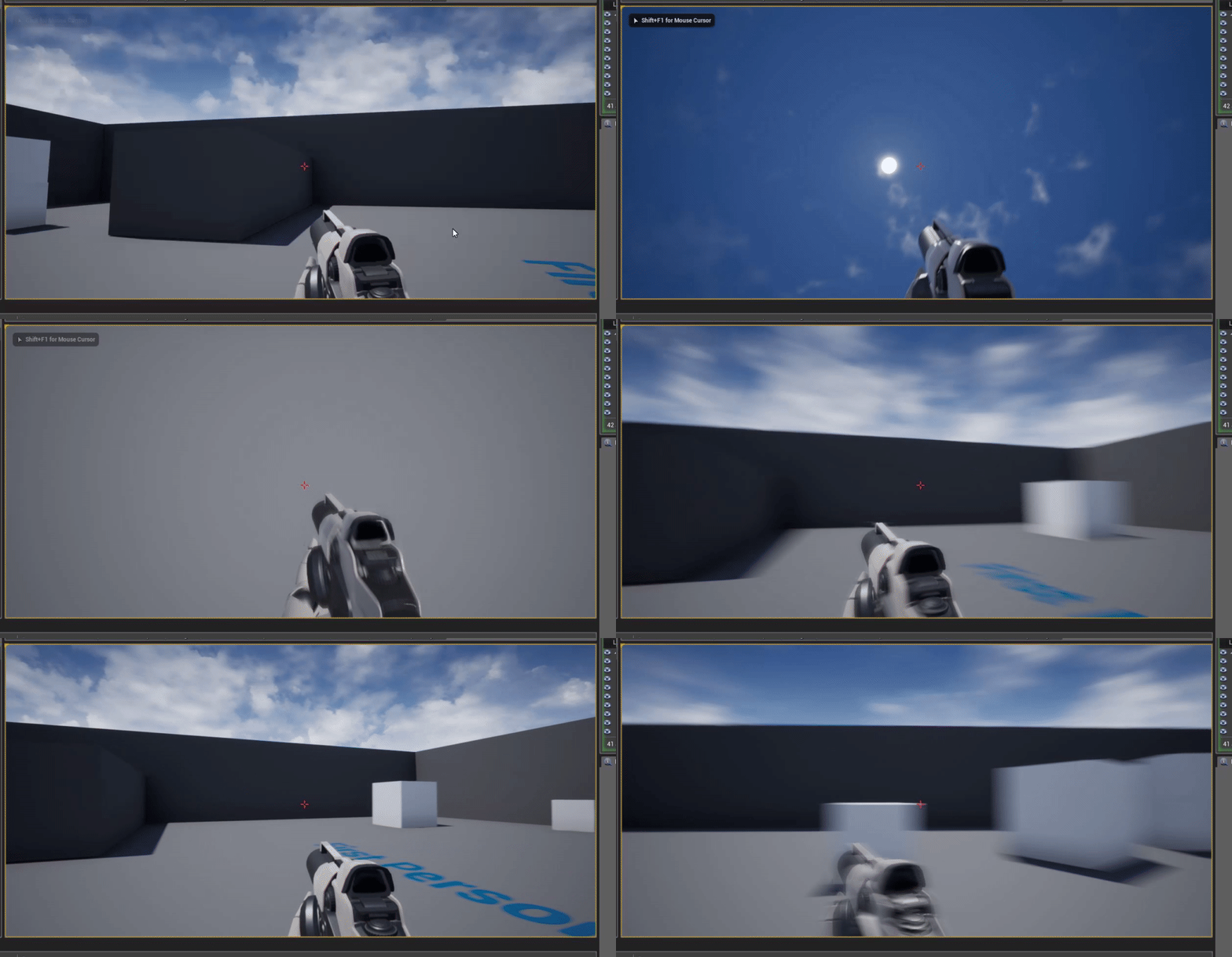
 tawdry sierra
but i cant parent the spring arm? How do i do that
grim ore
you can see exactly what I did using a clean FPS BP template. you are using the FPS C++ template?
if so just ignore the mesh that comes with it and make the same hierarchy from the camera down
you can actually see that is exactly what it does in that screenshot lol
visual pawn
i have a question. The Monthly Free stuff, is only for that month and you can use it throughout that month or is it permanent? 🤔
snow thorn
@visual pawn it's permanent for you if you get it this month
grim ore
anything you add to your account, free or paid, is yours for life or until it gets removed for some other reason.
visual pawn
oh alright 😄 cool
gonna keep a close eye on them then
alright, downloading Unreal....here we go 😂
A lot of sweat and tears incoming !
serene birch
some of the monthly free stuff is permanently free, you can get it later
visual pawn
yup i saw that, was mostly curious about the Monthly Free 😅
 vale silo
@gleaming narwhal could you guys please answer these questions during tomorrow's stream https://forums.unrealengine.com/unreal-engine/events/1670169-unreal-engine-livestream-tech-art-with-chris-murphy-october-3-live-from-hq?p=1670201#post1670201 ?
Unreal Engine Forums
191003_YT.jpg
WHAT
Epic Evangelist Chris Murphy returns to share his latest adventures with shaders, procedural landscapes, and fully scaleable buildings. Follow
Last time I posted questions in the forum and they were totally ignored :/
 gleaming narwhal
@vale silo Ignored and not asked are two different things! I always let the guests know about the questions on the forum announcement, and if they can/want to answer them they get asked
I don't think Chris can talk about the future, but procedural landscapes based on a height map is what he'll be demonstrating
grim ore
holy crap whats coming in .26? isnt that like a year away at this point?
wary wave
define "procedural"?
grim ore
I think you give them too much credit about that far in the future heh
 slow hearth
why does downloading kite demo for 4.23 take 24GB when I already have the 4.21 version in vault cache? Why not only send the delta (the engine already has a block delta encoding like rsync as part of the patching system)?
wary wave
it's not really a delta because the assets aren't strictly the same
slow hearth
large binary chunks of them are, which would compress fine
I'll look at what size rsync takes to sync between a 4.21 and 4.23 download of it, I would guess a few hundred megabytes or something
 dull egret
So I have an Actor with a skeletal Mesh and a character with the same skeletal Mesh. But somehow, both objects have a different hitbox. Also, when I'm behind the character and shoot between its legs, it says I hit it. When I'm in front of the character and shoot between his legs into the exact same position, it says no hit. I know its hard to solve something without screenshots, but has anybody experienced something similar. Thanks :).
wary wave
but you can get around it anyway by putting the assets into a 4.21 project and migrating what you want across
also the 4.23 version needs to be able to just shift the assets into the directory you want
slow hearth
yeah, but can just never be sure they havne't made fixes with the 4.23 release because they don't seem to do changelogs
wary wave
true enough - but I wouldn't expect they've been touched much after they were released
just had whatever additional version data diddled automatically
slow hearth
I've seen shootergame occasionally modify the uassets for various purposes