#ue4-general
1 messages · Page 528 of 1
 scarlet birch
@grim ore I didn't know anything about nav area filters until you said something. I looked it up now though and see you can use that for this.
 grim ore
yeah im at work so its a bit hit and miss being able to do this depending on call traffic lol
but I have this so far https://i.gyazo.com/40ee56082db280062297b7595c8f35d6.gif , one of them is set to not care about the avoid part in the middle the other is set to follow the normal rules and avoid the obstacle
one nav mesh, just using a filter on the one AI in the Move To node to set the cost of the node to nothing instead of 1000000 basically
scarlet birch
This is a little outdated, and it looks like you don't need the plugin anymore to do it, but I think it's the basic approach you're talking about. https://www.youtube.com/watch?v=xwdVQQtQa8s

You can download the project I created for this video here: https://forums.unrealengine.com/showthread.php?3851-(39)-Rama-s-Extra-Blueprint-Nodes-for-You-as-...
grim ore
it might be? I saw that video but was using the built in nodes yep
scarlet birch
Nice, glad I caught your response I had not seen that before
 plush yew
Oh I've seen this video too ! But I don't understand so much... 😕
scarlet birch
Much easier than what I was thinking
grim ore
the issue I mainly ran into was setting up the avoidance cost on the nav area had to be super duper high to get them to avoid it lol
you would think 10 would be enough but noooooo
scarlet birch
@plush yew basically every step in AI navigation has a cost and AI tends to take the path of lowest cost, you use a filter to tell some AI a certain area has a higher cost so it will never use it
grim ore
yep yep which is nothing special but getting one of them to ignore that was the issue and filters save the day for that lol
I normally don't use those move to XXX nodes so that's a new one on me 🙂
scarlet birch
Ah gotchya
grim ore
I should be using more EQS but I started to learn it, half the nodes are deprecated, I noped out lol
scarlet birch
I hadn't used them at all until a few weeks ago, I've been moving away from Behavior Trees
grim ore
hopefully this works for him, I know he has been trying for a bit but I haven't had time to try and figure it out
plush yew
( I'm also using AI Move To in my BP... Didn't even know there was "AI move to" and "simple move to" ... )
grim ore
yeah using auto complete you don't see some of the other ones since they require inputs like the AI controller
the actual Move to Location/Actor nodes which take in the AI Controller as the Target have the Filter Class on them. None of the other ones do which is annoying
this BTW was where I got some inspiration for figuring this out https://www.vikram.codes/blog/ai/03-navigation-filtering-and-avoidance
scarlet birch
I'm missing something, it's not changing the nav mesh color when I add the modifier volume.
plush yew
@scarlet birch Ah ! I had the same problem when I added the modifier volume, last time !
I saw a tutorial which said there was a bug or something and it had to rebuild or close and re-open the editor, something like that... But it didn't work
scarlet birch
I'm going to mess with it some more this afternoon.
 vast fjord
can i get some help with deleting maps please?
grim ore
just make sure for the modifier you have the area selected you want to use and it has a higher cost than another modifier if it's with another one
@vast fjord restart the editor and make a new blank level then try and delete?
grim ore
that's weird if the map itself is not loaded. Is it your default map?
 sonic pagoda
had this be4, for sure corrupted... i had to restore it from an autosave... but are you sure you dont have 2 copies of the editor open
with the same project
scarlet birch
I'd move the level outside of the content folder and see if the project loads.
if it does delete it, if not move it back
vast fjord
it says the level is stil lbeing referenced in memory
plush yew
It's blocking well the NavMesh where the Nav Modifier is put :
( around the crates, for example : https://gyazo.com/0425037442989a199b63454607ab8c2c
 scarlet birch
Close the project, and move the levels files to a folder outside of your content folder, see if the project still works
vast fjord
wait
i have level blueprints
oh i got it
I just removed every object from the level
plush yew
( but I would want to this NavModifier assign ONLY some NPCs and not another, that is the problem... ^^ )
scarlet birch
On those NPCs you move with the filter
grim ore
@plush yew you would create your own nav area, not use one of the default ones
lemme toss some screenshots out see if they help
scarlet birch
oh,
grim ore
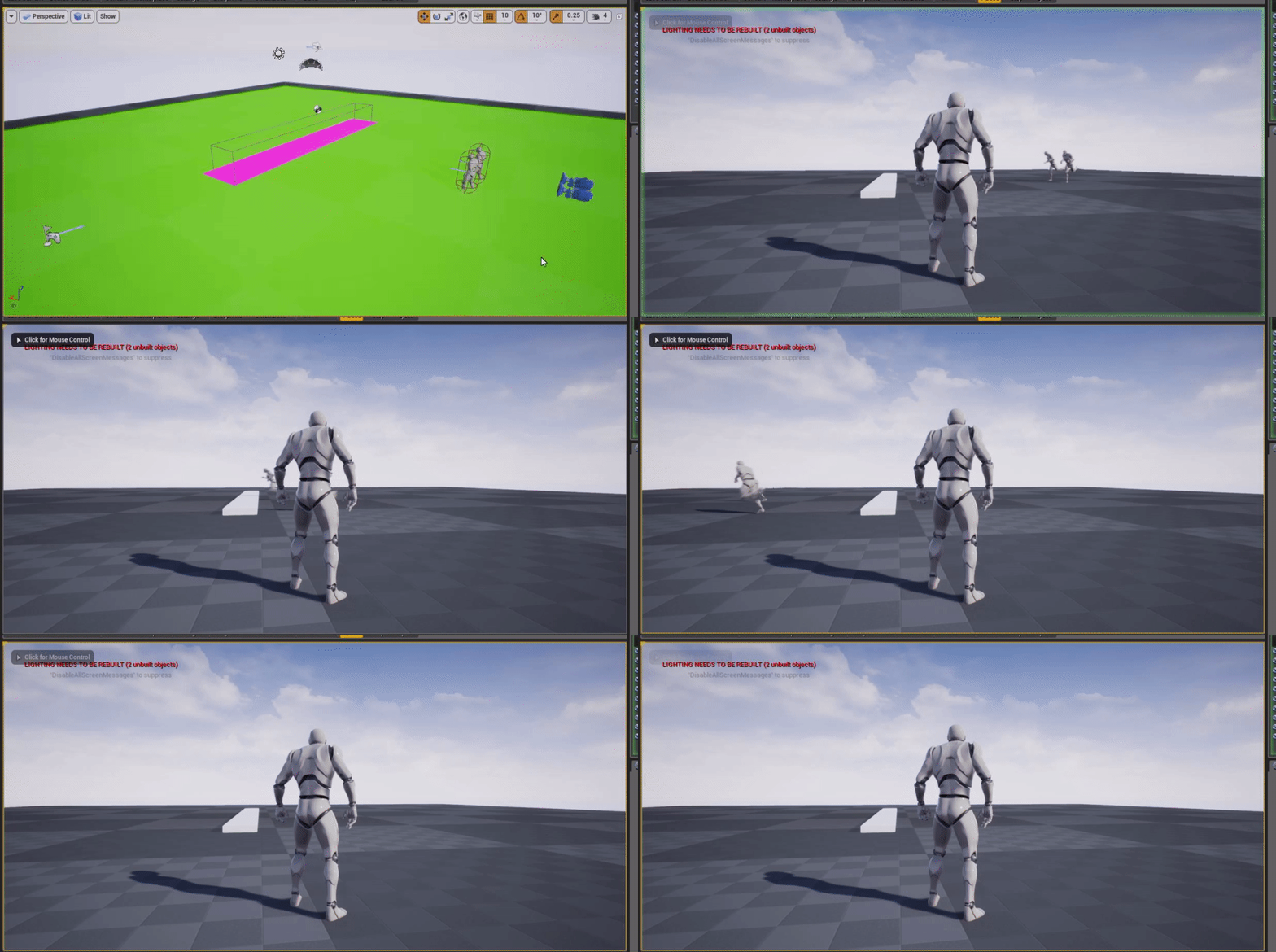
so the first picture shows the nav modifier in the world, the pink area, and it's area class is set to my nav area avoid I created
the 2nd picture is the nav area I created with the default cost set to 100 so the AI will try and go around it
the 3rd is the navigation filter I created which is set to the nav area avoid I created and when using it it changes the cost to 1 (instead of the 10 it normally is)
the 4th and 5th are the 2 AI's I am moving, one has the filter I created above as the filter class and that basically says "yo that nav area that you would normally avoid since it costs 10 is now a cost 1 so go ahead and go over it"
not saying this is the most efficient setup and you could flip this if you want, set the default for the area to 1 and then the filter is setting i to like 100000 and give the filter to the people you WANT to avoid the obstacles
that was actually my plan based on the naming of the files but I kinda did it backwards lol
I just tested that btw and it worked fine 😛
Another option that works (just tested) is instead of increasing the cost on the override in the filter (the 2nd method I mentioned) you can just tell it "is excluded" with the checkbox and it will avoid those areas as valid
plush yew
@grim ore Oh, man... You're my savior !!! I love you !!! 😘 😘 😘
Finally, Mike, I was right to get stuck on my original plan, haha !! 😁
grim ore
I hope that means something is working lol
plush yew
I'm trying to do just now ^^
 uneven acorn
Hey Guys, can you please recommend for me good tutorials for realistic lighting in arch viz
I am working on a project and I tried so much to reach a better lighting but still I am not there yet
scarlet birch
@plush yew I'm happy to be wrong, especially when I get to learn something new in the process.
plush yew
@grim ore When you created the NavF_Avoid, do you rebuild the light, restart the editor or something to get the pink area ? Because my area is not pink when i put the Nav Modifier :
grim ore
the filter isnt something that goes in the level, it's just an object you can use in the AI move node
the nav modifier is what is pink in my screenshot
you might have just named it weird lol
uhm yeah it should be pink if thats the color you are using for your nav modifier
if you change it to obstacle does it go brown?
plush yew
@scarlet birch Haha, cool ! You couldn't have known ^^ (and me neither, haha !)
 low valve
So i tried turning on 'generate mesh distance fields' and when i reloaded to enable the settings the lighting in my scene became weird and light blue. even when showing 'Lit' with no lights enabled i can still see everything. anyone know whats going on here?
 azure shore
hey not important but Im just wondering, why exactly do things like position and rotation values refuse to be exact numbers sometimes? like you type in 90 and it insists on 89.99999
low valve
even after turning off the setting it persists
my objects are visible light blue, in the lit viewport, when no lights are turned on
maybe more white than blue
must be something simple but im puzzled
i fixed it, by deleting my skylight
must have been buggin out
scarlet birch
@azure shore Floating point precision
azure shore
whats that?
 tight light
Excuse me, I'm not a dev, just a fan who likes to casually riffle through the files of games when possible to look through cut content/hard to find lore.
I was wondering if there was a way to just get the variables in a human-readable format for a particle effect from cooked .ueasset files so that I can compare two effect files for two character's powers to see if they were probably meant to look alike or whether I am just imagining things when looking at the kinda blurry VR gameplay footage?
I can open them up in Notepad and stuff of course, but it's binary files I think and so it's mostly unreadable.
scarlet birch
You're asking how to rip assets from someone else's work. You're not going to find much help here
tight light
Why are you saying that in an accusatory tone?
I didn't know this was kind of a trade-secret type server, sorry.
 craggy kraken
@tight light it’s not but you are asking to decompile a compiles game
That isn’t cool
That’s stealing someone else’s work even if you do have good intentions
azure shore
I think he's just trying to view it
I had great fun looking through the models in the files for my favourite game but it was just umodel viewer, so I couldn't do anything with them but look at them
it was interesting seeing the names and stuff
craggy kraken
Seems like he’s trying to make a binary file readable
That sounds a lot like deconstructing
azure shore
hm I see...
tight light
I mean it's not that important, being able to look through the filenames of the files themselves is still plenty fun on its own, when I was looking through Psychonauts a few months back some of the filenames for the textures made me giggle every few minutes
It might be the fact that I was coming straight from looking through a 2005 game that I was expecting more files to be technically mostly human-readable since it was mostly in .lua, which I could just open with any plain text/code writing program and just look through 90% alphabetical actual words.
 slow hearth
when I try and create a shootergame or content examples 4.23 project nothing happens, anyone else having that issue? works for 4.22
 celest umbra
Unreal Search is a Google Custom Search Engine that tries to only show you search results that are related to Unreal Engine 4.
 copper elk
ok so Im trying to add a cooldown progress bar but it keeps resizing when I play
Widget
in-game
the text not showing isnt a problem I did that on purpose
this is the widget
thats the cooldown bar
the selected one
in the widget its perfect size btw
its only ingame
grim ore
wrap the progress bar with a size box, or the overlay with a size box and set the fixed size if that is what you want
plush yew
@grim ore and @scarlet birch Pfiuuuu ! Finally I've just understand why I didn't get the pink area with my Nav Modifier... It was such stupid bug from UE... It needs to restart UE. But also move the Nav Modifier, just like this :
 grim ore
ah
copper elk
oh wait
plush yew
@grim ore and @scarlet birch Didn't you have had to do this ?? What UE version of UE you have ? (I'm on 4.22)
copper elk
ingame as in editor its small but in standalone its fine so it doesnt matter thx anyway
grim ore
i am on 4.22, maybe you changed some of your navigation system settings so it doesnt automatically refresh?
grim ore
yeah it looks like your nav mesh was not rebuilding when you put in the modifier for some reason
grim ore
look at the Render Transform section
 dawn gull
Hi, I am trying to install a plugin into my Unreal Engine project called "Victory Plugin" and it was compiled for UE4.22.3 and my game is Flex UE4.22.3 and it always fails when I try to recompile so I can't really open my project. Any help? Also I don't know where a log would be so please tell me so I can help with that. Thanks! 🙂
copper elk
@grim ore got it thx
also my progress bar isn't updating progress. when the value goes to 0 then it instantly changes colour
grim ore
progress bar values are in the 0..1 range
copper elk
so how can I make it so it displays 500/500 health for example
but the first 500 corresponds to the health float
 warped tangle
As MathewW said, progress bars take a 0-1 value. You just have to convert
copper elk
thank you very much
grim ore
ok the new web remote control is pretty cool, you can mess with the editor over a website lol
grim ore
its not and the docs walk you thru getting values from the editor 🙂
pretty neato { "objectPath" : "/Game/ThirdPersonBP/Maps/ThirdPersonExampleMap.ThirdPersonExampleMap:PersistentLevel.LightSource_0.LightComponent0", "access":"READ_ACCESS", "propertyName":"RelativeRotation" }
and you get back the value you ask for... kinda... sexy
if I dont have any work today I think I know what I will be playing with
man all this like professional work stuff makes me feel a little sad that I just like to tinker with the small stuff . Then I remember real work is hard and I go back to playing with the small stuff 🙂
plush yew
@grim ore How did you add the Filter Class variable into the "Move to Location" ? What kind of variable is it ?
grim ore
man they did a good job on the docs for the new stuff
that is a navigation query filter class
the same way you made the Nav Area, make a NavigationQueryFilter
 rich stream
hey, does anyone know if Chaos will work for mobile?
Also, I see they say you should download a build from github, but when checking the launcher version chaos editor is there. So is that old info or do I need to download from github?
plush yew
@grim ore Yeah I've created the NavArea BP and the Filter BP but I mean, I just don't remembre how add the variable into the node
( in this case in the "Move to Location" node )
 tiny bison
guys exist olther way for installing code work?im getting bigs buggs, can not install it
the frist time worked well, then i change discovery becouse of less mamory on C and its beggin to give me errors to unreal packing
so i try to delete it complety, but now i can not enymore istall it i get a error 1
grim ore
@plush yew if you don't see that in your node then you need to use a different node, the one you want is the one that targets the AI controller
copper elk
I am trying to make a healing potion that will only activate if the player isn't on max health
but I cannot figure it out
everything is fine except the adding health
 unreal comet
Does anyone else get this error when trying to install 4.23? https://i.gyazo.com/7686d435720a5fa0bce8b9b070639c66.png

I'm putting it in C:/Programfiles(86)/EpicGames. How is that too long?
Oh Well I'll Just intall it on my E: drive so it's not too long. I've always installed in program files though. Weird. They must have went crazy with new stuff lol
 gleaming creek
Microsoft really should fix that silly 256-character limit
 dim plover
UE4 added support for over 260 character paths.
 kindred viper
there was an old way around it too. https://webcache.googleusercontent.com/search?q=cache:25dCSsE7yoQJ:https://coconutlizard.co.uk/new/programming/solongmaxpath/+&cd=1&hl=en&ct=clnk&gl=uk

Unreal Journal
Almost every developer that we’ve spoken to seems to have, at some point, encountered the MAX_PATH limit problem… this post talks about how to PROPERLY fix it
kindred viper
the chaos is fun. The demo runs smooth as butter
grim ore
need source build, so sad at work, 😢
rich stream
btw does chaos work for mobile?
slow hearth
@plush yew worth it, virtual texturing is a huge deal
plush yew
@kindred viper can u share it ? too bad it must be compiled !
kindred viper
share it?
plush yew
how did u download it ?
kindred viper
github
grim ore
the Chaos demo is on the learn tab on the launcher
kindred viper
oh the demo
grim ore
was just filling in the other part, i dont know what he wanted shared heh
kindred viper
one of the better demos ive seen tbh
grim ore
it's on the top of my list along with web remoting today when I get home 🙂
and the new DXR features whooo.
kindred viper
I noticed some lbuggy things in the physics but its physics and beta. There has to be 😄 Just things you can fix with a timed sleep tho
its nice its laid out like a real tutorial though. Working it out from no documentation was a nightmare. I was close tho apparently.
and now the migraine has kicked in. Time to kick back and break some stuff.
plush yew
@grim ore chaos demo is as project right ?
grim ore
yes it is
plush yew
i can have it with out the compiling ?
grim ore
you can have it sure you just cant run it
the engine needs chaos compiled into it, the 4.23 on the launcher does not have chaos compiled into it
plush yew
oh that shame.
grim ore
it is a bummer
 cursive dirge
no
 wide gorge
Anyone have any insights as to why spawning a particle emitter with a multicast event is causing the clients only to crash in a packaged game with an error about LevelTick.cpp ?
plush yew
@grim ore Ok, I was able to repeat your code and all but I don't understand why my bot refuse to move...
( The BP of my bot is the same as your... )
 grim ore
well can it actually get to that point?
and if you have no filter class does it move as well?
plush yew
Nope... It don't move with the filter class or not
grim ore
print out the return value and see what is going wrong?
 grim ore
drag the return value from the move to into the in string on the print string
so we can see the return value of the move
 grim ore
make sure your location is valid then, the 1600,0,0 you are trying to move it to
azure shore
idk if anyone will be able to help from my explanation, but Im really struggling with this: I have a first person camera, and a gun that fires with line traces from the camera view to where the player is looking. the problem is, in third person mode, theres a shoulder view, but I cant get it to work for that
Ill see if I can get a screenshot
so as you can see it still sorta hits from the first person view
the other way I tried meant that you could aim round corners whilst the player was the other side of a wall
I tried having the start location of the linetrace at the first person camera and the end as player camera manager but then it just does whats in the screenshot
 light vigil
Hey guys, I am setting my camera on BeginPlay of level, but there is a couple fames where the level is loaded but the camera hasn't been set yet on slower devices, anyone know how to resolve that issue?
light vigil
The camera is set to auto activate
plush yew
I've copy/paste my jumping function to my game project to another project and I have this error on the "Self Actor". How to fix this ?
 azure shore
ugh
azure shore
this is really frustrating me
scarlet birch
@azure shore You have to do at least two traces with a third person setup like that
One from the camera first, then one from the fire point to make sure nothing is in the way
azure shore
damn, I was hoping that wasnt the case
scarlet birch
It's not that bad
azure shore
wdym by fire point? where the shots hit?
scarlet birch
Where they fire from , muzzle
azure shore
oh you mean a seperate one for first person and third person
scarlet birch
you check if somehthing is in the way of the camera cross hair and the hit
no two traces for the third person shot
you do the normal trace like you would with a first person shot, but you add one to make sure there isn't anything in the way of the view and the muzzle
if something is in the way then that's your hit
azure shore
I dont understand
the trace already isnt going in the right place anyway
its just going straight forward using the first person camera and not to the third person one
scarlet birch
https://www.gamasutra.com/view/news/124925/Opinion_Adventures_With_Guns_In_A_ThirdPerson_Shooter.php

Uber Entertainment software engineer Forrest Smith discusses his third-person camera experiences from Monday Night Combat , in this #altdevblogaday -reprinted opinion piece.
You do a second trace to avoid the shooting around corners you were talking about
You do one trace from camera like you would for FP, then a second one from the muzzle towards the FP hit to see if there is anything in the way of the hit
azure shore
no offence, but it seems you're telling me what to do, but not how, which has been the problem like I think I know what I need to do but I cant get it working
plush yew
Is this 2 target nodes are the same ? 🤔 (I'm still cherching how to add this "Self Actor" node like I have on the code that I've copy/paste from my other project but I don't find it...)

( I mean "Self" and "Self Actor" )
azure shore
so uuum
 warped tangle
@kind dew That's just how they render when you're viewing the bounds. Don't worry about that
warped tangle
I think you have a different issue then
 kind dew
uh oh
plush yew
@kind dew Maybe the issue is that just your character is too high in your CapsuleComponent. Nav Mesh are always a bit wobbly.I noticed that and it's screw me up too but nevermind...
@grim ore It seems that I've manage it ^^ Youpi ! : https://gyazo.com/9011eff92af00c23777305a3332efcf4
grim ore
@scarlet birch was adamant with getting it solved as well so kudos all around 🙂
azure shore
honestly why am I so thick
Im literally stressing over one tiny problem for hours that most people can probably fix within minutes
kind dew
thank you @plush yew thats all it was lmao
azure shore
why do I evven bother
warped tangle
@azure shore If it's not gameplay breaking, put a TODO for yourself and go back to it when you're more fresh. If it's breaking gameplay just ask
azure shore
yeah I already did and here and the other place I asked I was just told to do what Ive been trying to do for hours
but not actually how
warped tangle
what are you using for your trace start/end
scarlet birch
@azure shore Did you read the article I linked? It goes into a fairly detailed explanation of a solution.
azure shore
right this is how its set up
sorry its hard to see its a shotgun so it has spread stuff there too
I tried setting start to shotgun location too, just makes it shoot straight
plush yew
@grim ore Mh, I have still a problem to resolve. I worked on a test project and a simple I don't know"Move to Location" function. Now, in my game project, I have an "AI Move To" function :

And I don't know how to implement the "Filter Class" parameter in the "AI Move To" node ... 🤔
scarlet birch
You have to use one of the other move nodes that has it
warped tangle
theres multiple move to nodes, check them all out
@azure shore have you gotten it to work with just 1 trace with no random vector added to it?
to see if that functions as expected?
warped tangle
I would strip that other stuff out and focus on getting that to work
look in to....screen to world location or something like that
plush yew
@scarlet birch Oh, right... That's why you and Mathew told about differents Move To earlier ! Ok, I know...
warped tangle
can't remember the node exactly
azure shore
yeah I tried just having the start as the shotgun location and the end as the player camera manager thing and yet it still shoots straight forward
warped tangle
I would think you would want to trace from barrel to your crosshair projected in to world space
scarlet birch
Sort of, but you only want to do that for a shorter distance
warped tangle
fair
scarlet birch
at some arbitrary point you let the trace from the camera win.
warped tangle
so trace to x distance from muzzle to camera, if no hit then fall back to camera. Is that what you're getting at
scarlet birch
Trace from camera to crosshair, then trace from muzzle to that hit for some distance to ensure that the path isn't blocked by an obstacle the camera can see around, if the second trace hits something then that's the hit for the shot, if not then the first trace is the hit for the shot
warped tangle
Fair. I work mostly VR so the aiming is far simpler lol. but that makes sense
And I read the article you posted, good stuff
azure shore
is this more effort than its worth, I mean - well no I have to do this
I cant have no shoulderview in third person, but the shoulderview allows you to shoot around walls
warped tangle
DJ, the purpose of the 2 (or 3 if you take heed of what the article is telling you about clipping the muzzle through the wall) is to stop shooting around corners
You trace from camera, and trace from muzzle to camera, if muzzle to camera hits something, then something was in front of the muzzle and thus that's your hit, otherwise your camera trace is your hit
azure shore
yeah, I just still cant really visualise that
sorry if its a lot to ask, but do you think you could do a rough image of it like top down or something?
warped tangle
let me mock something up
scarlet birch
In the left half of the image the trace is from the camera only.
A second trace is done from the muzzle towards the hit of the first trace, that trace would hit the wall in front of the blue player and that is where the shot should stop
warped tangle
not the greatest but should serve to illustrate what we're talking about
the line from the camera is the camera trace, the line from the muzzle is the muzzle->camera trace. Notice the muzzle->camera trace hits the block, thus that's your valid hit, otherwise your camera hit is valid
azure shore
but how does this muzzle trace even relate to the camera
all I can see is it just hitting the block, I dont know how it communicates anything to the camera
scarlet birch
You use the camera hit as the end point,
warped tangle
your trace start is the muzzle location (use a socket or arrow component or something), the end is the camera hit
yep
scarlet birch
or not
Really you just trace from the muzzle forward for some distance to make sure there is nothing in the way,
warped tangle
I would imagine tracing from the muzzle to the camera hit would be better at the extremes of looking up/down (depending on the aim offset setup) right?
scarlet birch
probably, it really just depends on what feels right in the game,
azure shore
OH I might understand something from this
warped tangle
yep
azure shore
so basically if the trace from the gun hits a wall, it disables the one from the camera, if it hits nothing, its good to fire that
warped tangle
for quick testing, take out all the additive random vector stuff you have, and focus on getting the muzzle forward trace working, and the camera hit trace working
azure shore
so actually youre not even tracing from the gun location to the camera centre aiming point
warped tangle
you can do it either way, either just use the muzzle forward and trace out to whatever distance you decide to check for corners/obstacles
or you can trace from muzzle to camera hit
azure shore
so am I right in thinking it would actually impossible to link the gun trace to wherever the camera trace would hit
must be, because it doesnt really exist like that
warped tangle
what do you mean, like have the trace from the muzzle hit exactly where the camera trace hits?
azure shore
yeah, from how it looks thats not possible, so you kinda have to fake it
warped tangle
literally game dev motto
scarlet birch
You take the hit location from the camera, if there is one, and plug it into the end point for the muzzle trace
azure shore
thanks, I think Im FINALLY understanding a bit of this
warped tangle
remember when you were in school and your teacher said you were going to use math....and you thought naaaaaaah forget math.... lol
azure shore
hah I must admit, I failed maths by 7 marks
warped tangle
Vector math still took me a bit to get used to, but once you pick it up it's fairly straightforward
azure shore
I THINK IT WORKS
I think
yeah probably not
at least I think I might know what to do from here
anyway thanks a lot, I couldnt have done this without help
warped tangle
good luck
plush yew
Ok, I'm trying to replace the "AI Move To" node of my BP by a "Move To Location" node because the latter have a Filter Class that the other haven't
The AI Move To is downstairs and the Move To Location upstairs :

 serene sorrel
instead of tracing, you should spawn an actual bullet that has actual physics collisions just like the "RL"
plush yew
My biggest problem is that the "Move To Location" node has not "On Success" and "On Fail" outputs...
warped tangle
@serene sorrel That's a different discussion, that's a gameplay style decision. Projectile != Trace
azure shore
yeah and its a shotgun too
I know its still doable with projectiles, but switching that now would mess everything up
serene sorrel
rust spawns a real projectile for every shotgun pellet
azure shore
I mean thats a super realistic game
and actually my enemies use projectiles for damage
warped tangle
We've had a similar conversation before.....just because "x" game does it 1 way, and you happen to like that, doesn't mean that's how it should be done
He's trying to trace, if nothing else he'll learn the mechanics of it, and maybe decide to do projectiles later
serene sorrel
of course, just its more realistic, depends on the type of game you are making. Wouldnt really fit into a quake style game
azure shore
tbh I would probably prefer to use projectiles, but I think its harder to make them feel natural and work well
serene sorrel
has anyone done real projectiles in unreal engine? Dont know what ark uses but it can obviously bring up physics problems
warped tangle
Honestly, you can get the same feel of a projectile with traces, without physics
serene sorrel
go on
azure shore
great, Ive bloody gone and broken the shotgun spread now, of COURSE I would
warped tangle
tick or timer based, move forward, calculate gravity/drag/windage, trace forward, and do it again
I have a system like that, fairly accurate. Honestly I got the most accuracy using set physics linear velocity on beginplay, but the trace system isn't physics based which is nice
and is relatively framerate independent
warped tangle
basically every tick oyu trace forward your intended muzzle velocity * deltatime (if using tick) + environmental variables (gravity, drag, etc)
serene sorrel
i think something like that would be fine if you could set a reliable tick rate yeah
warped tangle
Yes and no, by multiplying your environmentals by deltatime, you're moving forward the proper amount per tick based on your framerate
serene sorrel
right, but different frame rates, different results
for accurate shooting that could be annoying
warped tangle
^^^
serene sorrel
so you dont think the arc of a bullet changes with 10 updates vs 60 updates ? even if the general shape is similar?
warped tangle
delta time is the time between ticks
warped tangle
If I want to move 1000m/s, and my delta time is .01, I'm going to move 1000 * .01
scarlet birch
so it is consistent at any framerate
warped tangle
if my delta time is .02 (half framerate) I'm going to move 1000* .02
serene sorrel
it changes the path of the bullet depending upon the updates, even if you use delta time
 floral carbon
who designed the way the camera moves around. it is impressively unintuitive. were all the better navigation methods copyrighted or did the UE crew just want to be different. (noob complaint)
warped tangle
yes it will slightly change the fidelity of the arc, but at anything above 30 fps its unnoticeable
remember about the frame times we're talking about
60 being the standard
serene sorrel
yeah i donno, you can get frame drops to single digits "Sometimes" due to background processes, in cases like that it would be significantly different
warped tangle
If you framerate is single digits, you have WAY bigger issues than "hey my bullet arc isn't right"
scarlet birch
This is video game 101
serene sorrel
different pcs, sometimes just turning around can take you from 60fps to 30fps depending upon scene complexity, that changes bullet path vs having a pretty fixed "bullet update" rate
warped tangle
your argument that using physics based projectiles is less framerate dependent than using a trace and deltatime?
serene sorrel
if you can have a fixed update rate in physics (can you in UE?)
its at least reliable
scarlet birch
this is painful
warped tangle
He likes to argue, we had a good one about edge scrolling in RTS's not too long ago
scarlet birch
But he usually states stuff that is less than half accurate as fact,
warped tangle
Agreed
@azure shore back to your thing, keep going with the traces, doesn't hurt to experiment with projectiles as well, as that will end up being a gameplay feel decision on your part. Either way, it's good to get a handle on doing these traces, as you won't solely use them for projectiles in the future
serene sorrel
using variable rate delta time physics for important gameplay items like bullet physics just is a bad idea. More so for a multiplayer game but it would be annoying having the bullets act different based on your frame rate and using human subjective terms like "you cant notice it" isnt a good answer. The fact is its different
scarlet birch
It really comes down to the type of weapon, and it's rate of fire
instant hit weapons like machine guns use a trace
warped tangle
@serene sorrel FFS, DeltaTime bro. Look it up
scarlet birch
weapons like gernades and rockets probably use projectile movement
warped tangle
Yep
serene sorrel
the key world there kharvey is "delta" do you know what that means
 ripe saffron
yeah cause they are slow
warped tangle
Yes, the delta is what makes it framerate independent. It's the change in time between the 2 frames
scarlet birch
@serene sorrel Your way off base
serene sorrel
it means a bullet would literally be on a different path if the delta is different, even if its approximately similar. Different. And if your gameplay revolves around realistic gun play having different results for your bullets depending upon client frame rate is silly
warped tangle
You're in the minority here bro, sorry. You can do things howeeeeeeeeeever you want. That's the joy of development, but stop stating things as fact that you are being told by multiple people is wrong
Holy shit somebody take over here
I can't anymore. He doesn't understand basic math
scarlet birch
Physics uses something very much like delta time for the same purpose, you substep
serene sorrel
you would usually have a fixed amount of steps per second when doing anything like that, so the result is always very very similar
ripe saffron
brick wall ..head ...and start banging
azure shore
projectile does feel more limited tbh, my enemies use projectiles and its difficult playing with their collisions but that could just be me
warped tangle
@ripe saffron LOL
@azure shore Projectiles have their place, and they do get used for primary weapon mechanics, but mostly get used for, as Mike stated, grenades, rockets, etc
azure shore
yeah
serene sorrel
@scarlet birch do the math yourself, 10 steps vs 20 steps for a ball being thrown. plot them and youll see the interpolated points on the 10 step version is different. This is basic math bro
plush yew
Is there a way to replace the "On Success" and "On Fail" outputs of a "AI Move To" node by real nodes ? Because i'm using a "Move to Location" node and it don't have the "On Success" and "On Fail" outputs...
scarlet birch
@serene sorrel I understand. You need to stop
warped tangle
@plush yew any reason you're not using a BT?
ripe saffron
@serene sorrel are you making a simulation for the army ? or a game ?
azure shore
one benefit I can think of for projectiles is slow motion, but I guess theres a workaround for tracers
serene sorrel
@ripe saffron reliable gunplay in a gun game is just basic stuff. This isnt hard which is why you have fixed steps per second so the bullets act the same regardless of framerate
azure shore
its cool to do bullet dodges and stuff which I think works best with projectiles
serene sorrel
even in a singleplayer game that would be annoying to me
warped tangle
Then don't play any major games out there nowadays other than your BFF Rust, becuase you're reaaaaaaaaaally going to get annoyed
 weary basalt
@plush yew Not in Blueprint, C++ allows you to do that, its a custom node setup
scarlet birch
@plush yew use the enum output and a switch
serene sorrel
look its fine if you do it your way, i just brought up that theres issues with that. Instead of pretending there are none you could have just said "yeah i know" if you did know. Then there doesnt have to be a debate
warped tangle
There's issues with every method. He was doing traces, and asking how to do them, and you come along telling him that he's effectively wrong and needs to use projectiles
scarlet birch
@plush yew The results are output as an enum putting that on a switch will give you the same three execution setup
serene sorrel
nah i just offered an opinion that he could do it that way. then we went into your way of doing things which i found interesting. Again if you know what i said in the future just say i know because you acted like you didnt and that you were getting educated with what i was saying
warped tangle
I can guarantee you I have not been educated by anything you have said here today
serene sorrel
You may want to work on your communication then
warped tangle
Lol
 warm swift
Softball question most likely: I'm looking to make a complex volume that triggers state changes for my pawn. Everything I've tried so far triggers begin AND end overlap simply by crossing fully into or out of the volume.
Is it possible to create a custom volume that functions like the simpler collision volumes, or is this only possible with dot math and other logic to detect location?
plush yew
@scarlet birch I'm gonna try it...
scarlet birch
just drag off the green dot, right click and type switch
serene sorrel
@warm swift is there some reason you want it like the simpler version? Think it will be performance problem or?
warm swift
Performance and flexibility. I worry that some Shapes may throw the math out of whack.
My knowledge is limited with regard to c++ going on behind the scenes. But I assume the currently available out of the box triggers use similar math to what I'm thinking
serene sorrel
From what ive seen the volume stuff is pretty performant, usually its best to worry about that if it becomes a problem rather than prematurely optimize something
you could do your own volumes with simple box collisions and such if you want to go that route
Bit of a shame chaos physics in 4.23 still has to be compiled
scarlet birch
yes
plush yew
Ok cool
plush yew
Mh, I have an error message...

Apparently, this Move To needs imperatively a location
But in my case, I don't want a location, I want that it follow the main character... 😦
scarlet birch
get the character, get its location, plug it in
warped tangle
@plush yew there's a move to actor function as well as the move to location
warped tangle
They both basically do the same, you can use the move to location, and do what Mike said, just get the actors location and feed that in to the Dest
plush yew
Ok
I changed though
I've just do a simulation and I have an error : https://gyazo.com/2e74c0a8fe1cca8e8ef4e1d31c98c368

( My NPC don't follow the main character )

Uh ! I forget to connect 2 nodes !
dim plover
I'm not sure where to ask this,
but when traveling (seamless), do the GameState's properties get transferred from the old GameState to the new one?
Because I'm pretty sure this is happening and I don't know where to look to confirm this.
plush yew
( Fuck ! Same error... It doesn't change nothing... 😕 )
warped tangle
did you give it a reference to your playerchar
also, you're not executing the switch statement
scarlet birch
Make sure you're checking that the reference is valid
and that you're setting the reference
warped tangle
yeah according to that screenshot there's no goal actor
scarlet birch
and you are using it only after the AI controller possess the pawn. Ideally the AI stuff would be in the controller
warped tangle
^^
plush yew
Ah !
It's because it was a "Pawn" pin in my first "Move To" (the "AI Move To") :
But there is not on the "Move To Actor" ............
plush yew
oh you're right ! It's same ! What an idiot ! 😆
warped tangle
And as mike suggested, you may want to do an isvalid on the player pawn reference (and make sure you're actually setting that reference somewhere)
you can also right click on the reference and convert to validated get
plush yew
I presume that I must to do a Cast To also ? (because the main char is in another BP ?
scarlet birch
no
You're not trying to access anything that is specific to the child class so no need to cast
plush yew
I see
.. but I see only "Cast To" to go towards my main character (his BP is named "ThirdPersonCharacter") :
warped tangle
If you make the variable of type "Actor", you don't need to cast
I'm assuming you're variable type is "ThirdPersonCharacter"
also, you can't right click in the event graph and search for "ThirdPersonCharacter"
you need to do getplayerpawn or something along those lines to get a reference to the player pawn
plush yew
Ok
So..
I've just created this variable (with a type of "Character object reference")
warped tangle
It needs to be actor reference. If you want to make it of type thirdpersoncharacter you can, you just have to cast to thirdpersoncharacter in that case
plush yew
Ok
Let's go for an actor reference
So I just put it in the goal's pin of the Move To :

I also must do add the "getplayerpawn" ?
scarlet birch
I'd move that acceptance radius up to at least the same as the player capsule or even 2-4x that.
warped tangle
I'm going to repeat this to save you some headache, you need to be getting an actual reference to the playerpawn and setting that variable or it's not going to work
scarlet birch
Just plug in a "get player pawn and be done
warped tangle
lol yeah
plush yew
@scarlet birch Like that ? https://gyazo.com/1c707a0ec7dbc30c19f7666753f1b95f
 scarlet birch
sure
plush yew
But I can't connect the "Third Person Character" to the Get Player Pawn
scarlet birch
You don't need to
plush yew
So the Player Index pin stays like this, ok !
warped tangle
that will work for the first local player pawn
scarlet birch
Player index is the index for the player controller for this it will be 0
plush yew
Ok, I understand
Let's test it !
Ok, still the same error message : https://gyazo.com/bc2f0e4b4ad93b8547b98e5685230a51

I presume it's because I don't set the variable
warped tangle
you're not using the variable though right? You plugged get playerpawn right in
are you simulating or playing?
warped tangle
how can you read that lol
plush yew
playing
warped tangle
ignore my question, Mike knows whats up
plush yew
ok ^^
scarlet birch
I'm not sure I do
warped tangle
If that's what the error is saying then there's probably not an ai controller, or the AI actor isn't set to use the ai controller
plush yew
I have the Move To which says "Target is AIController" (this was not written with my old AI Move To)
and I added "Get AI Controller" to the target
scarlet birch
Ah, look at the old screen shot, you have followed actor -> get ai controller
probably needs to be a ref to self or something
warped tangle
is followed actor a reference to self? you can just use self -> getaicontroller
plush yew
this "followed actor" variable is a way to make the BP more, mh... "versatile" (not sure of the word in english ^^)
smart...
but yeah
guess it's more simple to just to getaicontroller > self
warped tangle
you have it backwards, it would be self -> getaicontroller


 mellow gale
I want to have a surface, an in-game screen, play a live stream from twitch, and I'm not sure how to go about it.
plush yew
You're right... It was because I was dragging the pin
but ...
I can"t connect the pin... 😫
warped tangle
...what class does your AI actor inherit from?
in the top right corner, what does it say
plush yew
Mh
In fact
The BP of the bot itself is an actor component but I have a "complementary" BP (with the following function) in "actor component"
 untold epoch
Hello, Is it possitble to control the pawn in a transition map?
warped tangle
It should inherit from Pawn at minimum
plush yew
🤔
warped tangle
I don't believe Actors can be possessed by AI controllers, just as they can't be possessed by a player controller
warped tangle
there you go then
plush yew
cool !
warped tangle
obviously I don't know the layout of your BPs
plush yew
(I don't still tested the NavFilter though ^^ )
( it worked with the Move To Location but I still must see with this Move To Actor ... )
@warped tangle Yeah, it's the my "CompagnonComponent" BP which manage my bot, in fact
but I could have some difficulties to explain this myself
warped tangle
well as long as it works
plush yew
Yeah, cool !
Thanks to you and @scarlet birch 🙂
It's left for me to add the NavModifier and the filters but I will do tomorow ^^
warped tangle
@mellow gale You're probably looking for the Web Browser plugin. You have to enable it, then you get access in UMG
plush yew
👋
mellow gale
I'm really new at UE4. I was using the source engine, but this seems to be a better, more capable choice.
warped tangle
look in to the web browser plugin and 3d widget component. That should give you what you're looking for
 lavish glacier
chaos is pretty cool
mellow gale
Thanks!
 chilly gale
Kia ora
Can somebody explain this please, it tends to happen if I rename a level
Can't save U:/Unreal Projects/Data/Annwyn_Island 4.13/Content/_Data/Scenes/Annwyn_Map.umap: Graph is linked to private object(s) in an external package.
External Object(s):
Texture2D_130_BaseColor
Texture2D_141_BaseColor
Texture2D_154_BaseColor
Texture2D_166_BaseColor
Texture2D_179_BaseColor
...
Try to find the chain of references to that object (may take some time)?
copper elk
I am trying to make a healing potion that will only activate if the player isn't on max health, but I cannot figure it out. I will send some screenshots in a few hours as I have skl
warped tangle
where is your health variable stored, just get a reference to that, check if it's != to maxHealth or whatever
scarlet birch
Anyone know what might cause some trees placed with procedural foliage to not render in PIE? Their collision is still there but nothing is rendered.
I'm crashing soon. If anyone has any ideas please mention me so I see it.
 lunar depot
New: Storing Custom Per-Primitive Data
We now support storing data on a per-primitive level instead of per-Material Instance, enabling primitives to be automatically considered for dynamic instance drawing.
Storing data with Use Custom Primitive Data per-primitive has the advantage of lowering the number of draw calls required for similar geometry, even if each primitive were to have to have its own custom data.
this is new feature in ue 4.23
how do I use this ??
how do i save per primitve data ??
warped tangle
@scarlet birch draw distance? about the only thing I can think of off hand
 placid arrow
last night i learned: blueprint interface definitions rock. that is all.
i managed to build a unified AI system that works with any skeleton, with a complex animation blueprint, and by putting an interface onto the animation blueprints, any differing type of skeletal mesh and set of animations can present the same set of functions and be identified easily as supporting it.
@scarlet birch there are many causes. you could have a set of nodes in the material that fade it out over distance
or, you could have a cull distance volume
or there could just be a delay
on my machine, foliage thats rendered immediately when in editor editing, takes upwards of 30 seconds to actually appear in game when i run PIE
its been that way for me since 4.8
 polar viper
Any advice on getting the best static collisions? I'm playing around with a old enviroment model from 2003 and the models collisions aren't the best when i did max hulls etc
 silent frost
Any ideas please on why the collision fails when hitting from the side, but not straight on, and causing the player to ride up and over? Stumped 😦
low valve
Where can i find the quixel megascans plugin for UE4?
 wary wave

GitHub
The Megascans LiveLink for UE4 lets you easily integrate Megascans into your pipeline by providing out-of-the-box material setups, automatic imports, custom blend materials, and more. - Quixel/Meg...
that took 2 seconds in google?
low valve
i found that, but i wasnt sure if it was the official one to use or not
since i also found this https://support.quixel.se/hc/en-us/articles/206750179-Is-there-a-UE4-plugin-

Quixel Suite
The UE4 plugin is currently not part of the build (it's being revamped). It will come back shortly!
Tags: SUITE, UE4, Unreal Engine 4, Plugin, Coming Soon
wary wave
yeah, seems like it's not included in their software by default, but you should still be able to use the Github thingo
low valve
cool, thanks
 static raft
Hey guys, anyone that can help me with a few questions about force/rotation using physics on a static mesh? 😄
 cloud cobalt
Depends on what it's doing, but no, it doesn't have to be opt in if it's not personal data
 copper flicker
so I tried bringing my old menu system into my new project..
and a bunch of children don't open up cuz they lost their parent.
so I guess I'm making a new menu system..
and I was wondering if there's a way to use the cursor hover and click with Gamepads
I'd like to simplify the madness from my prev project, and have hover-based menus
it might be nice if I could move the cursor with the gamepad..
but then.. I guess the trickier thing would be to click
without a mouse..
O o
does anyone know if this is possible?
 dim merlin
Hi, im placing meshes at runtime, and when creating a new one, it takes a little time to load, is there any way to preload these assets?
 dim arch
well it depends on the use case
you could spawn one, set it hidden in game, and then unhide it when it's used, it's always going to take time to spawn a new actor and draw it
not sure what the tradeoff is between just unhiding an already existing actor and creating a new one but its probably a bit quicker
 north monolith
I have a silly question. Is it harder to create/implement games like fornite, at that size, for mobile or is it easier to create it for PC?
 green phoenix
Guys I'm having so much troubles with a project I'm working on, I don't want to spam the chat so I made a google doc with my question, if any of you want to have a look, I would really apreciate any kind of help, here is the link: https://docs.google.com/document/d/10fix9IbHtMke1PhMAhBxmoGYnZHB83HbSXuiYXbtmAA/edit?usp=sharing

Google Docs
I’m trying to create a tool that paints information from waypoints, so basically I want to use it to paint a mask/texture that follows the roads. I’ve achieved this result so far, I’m able to read the waypoints and paint a mask in one color, depending on the format of ...
feel free to dm me, I'm so lost! hahaha
warped tangle
google it, there's info out there
plush yew
oh
ty i found it
Overview of the Chaos Destruction tools that are available and how they work together to create destruction in UE4.
or not
warped tangle
haven't done it myself yet, so not sure
plush yew
rip
cant wait to test it
looks better than bfv
lmao i cant even edit my cs
got it workin
 mint sequoia
So I reported the bug where if you have a BP exposed TArray<FMyStruct> where FMyStruct has a TMap<anything,anything> it crashes the editor in 4.23 but as expected they can't reproduce it. They asked me for sample code/project and I'm just like... how much time do I need to invest so you can fix your engine when you really should be escalating such a critical bug to someone who can fix it
How does anyone without UDN access expect to report bugs and stay sane
 serene birch
bug triage is pretty standard
you can't have engineers spend THAT much time hunting for a bug they cannot even reproduce
mint sequoia
What engineers, lol, if they were 'engineers' they would be able to make a C++ actor, struct, and TMap
Without asking me to do it
 mossy nymph
that assumes that the bug doesn't involve a blueprint and upgrading a UE version
mint sequoia
I've already gone through the hoops, this makes a total of 3 severe bugs I've reported where they just leave them in the engine because the people are gatekeeping you from actual support
serene birch
yeah, if they cannot reproduce it, it means they don't have enough info/are missing something crucial
mint sequoia
Or don't know what they're doing and exist solely to prevent you getting to people who do
mossy nymph
all of the bugs i eventually had to work around involved blueprint serialization in some way
and most of them happened after version upgrades
mint sequoia
@mossy nymph I don't have the original reproduction steps I gave them since you don't get a copy of the report, but it went something like this
- Make a blank C++ project in UE4.23 (release, not preview)
- Subclass AActor and add a BP exposed struct to that same file
- Add a UPROPERTY(EditAnywhere, BlueprintReadWrite, Category = Actor) TMap<int32, float> to the struct
- Add a UPROPERTY(EditAnywhere, BlueprintReadWrite, Category = Actor) TArray of the new struct
- Compile, open the editor
- Make a blueprint from your new actor
- Open it up and click the + for TArray and then the TMap, editor crashes
The guy didn't even say what his trouble was
He didn't tell me "I did the steps and there was no crash" or anything like that
plush yew
i got the destruction thing on but wont show
 plain gazelle
Anyone else having issues creating projects based on the Epic game examples, like shooter game and vehicle game?
wary wave
yes, everyone - you're like the fourth or fifth person to mention it today :p
something is broken
plain gazelle
ok, I'm glad I'm not alone.
 loud knoll
easy question: I want to bring my color palette over to 4.23 from previous version of the engine where is that file located so I dont have create all the colors again?
wary wave
I would assume it's in the config files somewhere
plain gazelle
Config of Content, is it part of the engine or the project?
wary wave
project
loud knoll
@wary wave Not sure I have looked all over to see a way to export it or find something with an updated time stamp based on adding another color to the list
 willow void
Any idea whats wrong  After build
warped tangle
Anybody gotten this DX12 crash before? I'm opening a material in a marketplace asset. Crashes every time
Only thing I could find on the google was DX12 with forward shading can cause it
loud knoll
DX12 is and RT is all WIP code all bets are off.
 mighty field
@willow void lightmap resolution on the ground is too low
cloud cobalt
@warped tangle You'd need to install the engine debug symbols to know more
But really, you should take it up to the author.
warped tangle
I'm going to, for the time being I'm using a material instance with no issues while I build my own material for it
warped tangle
valid, I suppose I could force DX11
cloud cobalt
What do you mean force ?
It's the default
DX11 is more stable, faster, and DX12 brings nothing in forward rendering
loud knoll
@warped tangle You have made a wise choice. DX12 was added to force people to switch over to windows 10 most people cant even fully take advantage of DX11 advanced features.
warped tangle
I'll be completely honest, I didn't even pay attention to that nor realize that it defaulted to DX12. This is the first crash I have gotten with DX12 referenced anywhere
Learn something new every....~5-10 minutes lol
loud knoll
@warped tangle That is the magic of game development 🙂
loud knoll
I just learned that I should turn on the output log when I am running my game to see BP errors
 quartz lion
In UE4 I have 256 UProceduralMeshComponents, which render slowly. But 1 big mesh which is all 256 stuck together, renders pretty fast. Is that to be expected? 256 doesn't seem like a lot to me.
warped tangle
Yep I have that up all the time
loud knoll
@quartz lion Not sure does each mesh component create a new draw call? If so 256 extra might be putting you over the limit not sure
1 Object of made up of 256 seperate objects might be treated as one draw call.
quartz lion
hmm, I dunno. Not sure I can get that low level
it's 1 actor with 256 components.
quite a lot of vertices overall
loud knoll
you might want to ask in rendering I am not sure how those objects are treated
quartz lion
okie dokes
loud knoll
You might want to see if you see improvement if you group the 256 into 128 then 64 see if you see progress that is my designer way of figuring out things like that.
quartz lion
I have. It gets faster the fewer components I use. But that gets slower to update.
 potent wing
Need help, i cannot click on buttons on my main menu widget?
I already tried set game mode to game and ui only
Its still not working
warped tangle
need way more info, was it working before and stopped working? Is this the first time you've gotten the main menu up?
potent wing
It doesnt work at all, and no this is not my first time doing main menu stuff
warped tangle
@loud knoll here's one for you....since switching the default RHI to DX11, I'm getting 10 or less FPS, but I have no bottleneck and my scene time is 7.72ms
It worked fine the first few times, now I'm getting odd behavior
 thorn vector
hey guys i thinking of buying this system for my project and what you guys opinion of it https://www.unrealengine.com/marketplace/en-US/slug/arpg-inventory-system# and is there a better version or better kit

The Action RPG Inventory System is a multiplayer supported inventory management system featuring equip-able and usable items. It can be used in single-player and multiplayer projects, regardless of your game theme and UI design.
im trying to get the best bang for the bucks
 static viper
yee pirate made a good system
thorn vector
what u mean by pirate?
static viper
thats the name of the author
thorn vector
ouh i thought u said the kit is piraating from another project
potent wing
@thorn vector to be honest, you can take the inventory system of DYNAMIC COMBAT SYSTEM which is the last free for the month asset, or you can just build complete inventory system yourself, theres tons of tutorial on youtubes
static viper
the best thing todo is to write it all by yourself.
thorn vector
i saw lots of comment in the store page telling its really hard and really confusing to merge in their own project and the doc isnt well documented
static viper
these people are stupid then
100% stupid
its an highly advanced inventory system
ofc it isnt easy to merge...
thorn vector
does the creator have a discord group would like to get his guidance on my journey merging in my project
static viper
just take what ever system yo9u have khai
and delete it.
then put this system in your project
and start working on it
thia is not "click your game together"
warped tangle
and don't just toss it in and expect it to work, learn how it works
static viper
and i know the author. Hes a nice dude.
thorn vector
yeah that what i expect to do of course 🙂
does he have a discord group for his product or do u know his discord tag?
thorn vector
do u guys have experience using the kit?
static viper
you can always refund it man
thorn vector
just bought it now i wanna dive in @static viper i sent u a friend request
static viper
dont sent me friend requests again ^^ i hate people
warped tangle
you're saltier than a cup-of-noodles
thorn vector
crying tears
plush yew
yo
static viper
its not personal.
warped tangle
if it says anything under .2 at the end, probably no
plush yew
sorry for the noob q
loud knoll
I found where the colors are stored for your project so you ever lose them or switch engine just check Saved/Config/Windows/EditorPerProjectUserSettings.ini
potent wing
What is the difference between "clicked" and "pressed"? I just fix my problem, and the problem is i use click instead of pressed? Im so confused now, i think i use "click" every single time and its all working fine
loud knoll
Looks like a UMG question
static viper
pressed means you click on it and then hold
click mean you click
one happens on release
one on touch
polar viper
Any advice on getting the best static collisions? I'm playing around with a old enviroment model from 2003 and the models collisions aren't the best when i did max hulls etc
loud knoll
@polar viper you can use prims and manually edit them or you can use complex collision
Testing 4.23 I clicked quality low in the editor preview settings and triggered rebuilding all shaders I dont remember this happening before in previous versions.
Only happens the first time
grim ore
it does, its normal as the difference between low and high normally require a recompile
loud knoll
@grim ore Roger that! How is the hero of the people doing today? When are we getting some Chaos tutorials?
polar viper
@loud knoll would high or low poly models make any difference or quad or tris?
loud knoll
Everything should be converted to tris when it is exported
so you dont have to worry about that
if it is in the engine it is tris
polar viper
Okay. I'm doing my honors degree and my lecturer talked me into using ue4 as another skill to learn
So i have to model my environment then put it into ue4
loud knoll
You have made a wise choice
polar viper
My renders last year took 20 computers and 2 weeks 🙃
loud knoll
The collision that you are getting automaticly generated should be good enough for environment how tight and clean it is depends on how it is being used, Spheres are the fast to calcuate over any others so if you can use Spheres for everything you are saving processing power
Yeah you want that to be rendering 60 x per second now so it is a great thing to learn
polar viper
I would rather do complex just so it's much better to walk around in without any glitches
I'm made to render at 25fps and i like 25 fps
 mortal cedar
you might want to post on the official unreal forums, or make a bug report or something haha
maybe make a post to the answerhub under "everything else"
loud knoll
@polar viper if you are producing a movie that is great but 60FPS has much better feel for the user.
polar viper
It's going to be a animation and a game so the animation will be 25fps and game is 60
loud knoll
@polar viper you have a link for your previous movie you rendered out?
pm me with it if you dont want it public
@polar viper yeah that makes sense
polar viper
I need to find it first 😂
loud knoll
I am amazed by the progress of Unreal being used for previz and movies when I was at dreamworks I was using Unreal 3 and the tools are so much better now, I wouldnt have to break the models to get them to render.
 ember cliff
What is the process for reporting a bug that was fixed but has reappeared? https://issues.unrealengine.com/issue/UE-16688
polar viper
Or 90 for 1 frame
loud knoll
I spent days trying to get each part of the model under the poly limit to then rebuild the entire scene in the engine to figure out how to get movie content into a game engine but eventually we had command line linux commands that would just break it up by scene and then make a nice package to do previz but it took about a year to get that all working
@ember cliff Post it on the Epic site bug reporting you might has well create a new bug and reference the old one.
Nobody here can help you
ember cliff
I figured, I was hoping there was an easy way to get attention to the bug without creating a new report.
Thanks
polar viper
Wow. I kinda want the hull count, max hull vert and hull precision to go higher
loud knoll
@ember cliff I am not sure I just reported a bug in the Epic Unreal content in 4.23 so something got missed it is in the Toturial
ember cliff
?
loud knoll
@ember cliff It dosen't surprise me that bugs that were fixed are repearing
copper elk
I am trying to make a healing potion that will only activate if the player isn't on max health, but I cannot figure it out.
I also want to make it so the longer you hold down E the more you get healed
but there is a cap on how long you can hold it down for
I will send screenshots in a few minutes
I have Z to make it so I get -10 HP and it works
displays in HUD and its updated and all that
but I cannot get it to heal
mint sequoia
"May not be prioritized or fixed soon" - is this something they say by default when filing a bug report? Because.. its pretty damn serious https://issues.unrealengine.com/issue/UE-79917
mint sequoia
So we've just lost the ability to have a TArray of structs containing TMaps, that's hilarious
scarlet birch
@copper elk Select the first branch in your ability1 and press F9 to add a break, then try it out. If the break triggers then you know it made it to that branch. Push F9 on the node again to remove the break and go to the next branch and do the same process. Once you find a point it is not making it to then figure out why
wary wave
yup
mint sequoia
Stone walled <=4.22
wary wave
I'm glad you caught it before we did in one of the projects here :p
now that code can be rewritten prior to updating
mint sequoia
I basically just emailed him back and told him he should prioritize it lol
Its pretty 🤦
copper elk
@scarlet birch I have fixed it and everything is working
but yesterday I made a progress bar in my HUD and I would like to Cap the healing but Idk how
this is my HUD binding to my progress bar
and im not sure what to do from there
I want it capped at 500
scarlet birch
progress bars are normally scaled from 0 to 1
copper elk
I know that
I tried dividing by 500 yesterday and it was working fine but now that the heal is fixed I need it capped
wait
scarlet birch
Current health/ max health = bar fill? I'm not sure I get what you're missing
scarlet birch
It happens
copper elk
basically I have an ability right
so its a progress bar
and I have another ability that works just fine so I sorta know what Im doing
but Im stuff on the first ability
after realising the cooldown starts
and the progress bar is not filling up until it hits the 1 - 0 mark
this is what I mean
the right ability is the one that works fine
scarlet birch
can you show where you set the fill value
copper elk
its at 10 seconds and its going down at the right rate
but the lft one doesnt
here u go
its a binding
scarlet birch
What's it bound to?
scarlet birch
I've not used that binding before, is it bound to a function result? if so can you share that function
scarlet birch
I mean I have always bound to a variable and the symbol looked like a function
 abstract relic
A rather interesting approach setting a character var in a binding
 radiant haven
Hey guys, can someone help me that AI moves to player after I trigger a trigger
copper elk
but my HP is above 100 so I need to divide it by 500 to display it properly and that works but now that the heal is implemented the timer has broken and the bar only fills up when the value is at the 1 to 0 mark
scarlet birch
Can you share the function?
I'm not seeing anything that will let me say, ah there's the issue. Like where the fill percent value is set, how the timer works, Nothing you've shared shows that.
copper elk
the timer is the current health value
the "return Node" in the binding
is the timer
scarlet birch
I understand that you haven't shown the actual function
grim ore
well that's a neato new node, instead of having to do Get All Actors of Class then -> Get 0 from the array we have an easier Get Actor of Class node which just returns the first one found. yay 4.23
low valve
Hey, im having an issue trying to get world displacement to work on a terrain material. i dont get any displacement. and sometimes if i use an extra lerp node with constants of 0 and 1 in it all my textures vanish.
scarlet birch
I've never found a case to use get all actors of class
 summer turret
can someone tell me why all my shadows are pitch black everything looks ugly
low valve
@summer turret problem with skylight?
radiant haven
@summer turret REbuild Lightning
summer turret
i rebuild everything
grim ore
it's actually night time and the world is on fire?
summer turret
idk what the problem could be
grim ore
it's really hard to tell just based on a screenshot. Does it look the same in editor or just when playing?
are you using anything weird like DXR
do you have the default lighting or what did you change
are you using custom post processing
etc.. etc..
is this static or dynamic lighting
summer turret
looks the same in editor, i am only using chameleon for the sharpening
lemme show u my sky light
radiant haven
Hey guys, can someone help me that AI moves to player after I trigger a trigger
summer turret
i get this when i finish lighting build
radiant haven
???
grim ore
yep those errors would do it
radiant haven
@summer turret rebuild everything, look for MObileHDR if its disabled and create your light source new
lmaoo
grim ore
you have bad lightmapping UV's so it's just going to be black in those spots
summer turret
bruh what is even that lol
radiant haven
@grim ore u mena lightmap LODs?
scarlet birch
If you're using baked lighting then it uses UV maps to make the light maps. It's telling you your lightmap UVs are fubar
summer turret
is there a way to make them not fubar? coz im using free assets from epic monthly drops
 solid rose
Good day everyone ! I'm outputting my viewport render from Unreal to Spout using Spout plugin.
Unfortunately, when I'm changing my window focus from Unreal to something else, it drops a ton of performance and start to stutter.
I try the only solution that I've found around the web "going to Edit->Editor Preferences->Miscellaneous and disabling the Use Less CPU When in Background option" but it doesn't help.
Any idea to solve this issue ?
 inner cloak
hi guys, is it possible to export a model as FBX from UE4? My project is 4.22.3 but 4.23 has a better datasmith importer so i would import in 4.23, save as FBX (or any better option) and load in 4.22.
scarlet birch
You have to either generate them in engine, which is iffy , or make them in a modeling program
grim ore
which assets are you using?
copper elk
@scarlet birch here
scarlet birch
You could switch to dynamic lighting for now
I don't think you ussually bake the lighting for trees anyway
copper elk
@scarlet birch Im actually braindead it happened again
I was looking at the wrong thing
summer turret
is that easy to switch to? or do i have to go into another program and edit things for that too?
scarlet birch
Those are all trees that are giving you issues
Change your directional light to movable
grim ore
Video card crashed while compiling UE4... that... uh.... seems odd lol
scarlet birch
...
low valve
im trying to follow this tutorial https://www.youtube.com/watch?v=W1MRDXUWID4&list=PL7wN36Cx4-DPT4zS0vCc3QJQ0yvNgYPyE&index=4&t=0s .... however when i plug into world displacement i go from this...

In this tutorial Series we are going to create a Landscape Material that features advanced heightmap blends, tessellation and procedural puddles. This third ...
scarlet birch
@grim ore Par for the course here. Every time I switch to a new version I get weird video card driver crashes
grim ore
It's been happening since I got a new card. I assumed it was the card but now I am thinking the power supply might be randy lol @scarlet birch
scarlet birch
Sorry wrong mention
low valve
np
inner cloak
is it ok to repost a question in here?
low valve
it does not happen if i skip the final lerp node, but i never get any actual displacement on my landscape
summer turret
okay i think i fixed it, all i had to do was remove skylight and add a new one
thanks for the help
grim ore
displacement is very subtle most of the time, did you look at it close?
scarlet birch
@summer turret You likely switched it to dynamic lighting when you changed the light.
low valve
yeah i looked close but didnt see anything, maybe its so much so you cant see it
grim ore
plus it's possible you are hitting the texture sampler limit which is why the material is not showing up anymore?
scarlet birch
It uses dynamic lighting to preview
plain gazelle
What causes focus issues in game but not in the editor?
low valve
hmm, ok maybe, is there a workarround for that kind of thing? im using 3 layers on a landscape. thats the only thing in the scene
plain gazelle
I turned off depth of field.
 wary wing
@low valve Is it just me or can I see color way out on the far LOD of your landscape?
low valve
@wary wing yes there are some squares that keep the texture
scarlet birch
@grim ore I've noticed I have a lot fewer random issues since upgrading my UPS
low valve
the rest is plain, i also tried multiplying displacement, it appears on the material preview but not on the landscape still
grim ore
@low valve go to each of your textures in the materials and change the sampler source to shared
grim ore
😦
wary wing
If you go over to those squares do they still have it?
As in is it the far LOD, or just the layer combination on those bits of your landscape?
wary wing
Those parts have fewer layers I presume?
grim ore
man I just checked and those trees by default have overlapping UV's. That's kinda not a good thing to have in a MP asset 😦
wary wing
Like fewer with weights that aren't 0?
Ah I was just loading up that pack to check those @grim ore, thanks
grim ore
they do have overlapping in 0 which is fine, and they do have a 1 but the models are set to use 0 for the lightmap instead of 1 for some bad reason
 obsidian wasp
I can't get the Set Collision Response to Channel to work... Am I doing something weird?
I've got a custom trace channel called "Mouse", and its default response is "Ignore". In a construction script, I call "Set Collision Response to Channel", plug in a Static Mesh Component, and set the "Mouse" channel to "Block". However, when I do a LineTraceByChannel on the Trace Channel "Mouse", it doesn't generate a hit when I click on the mesh.
I know the mouse tracing is accurate, because if I set the Default Response to "Block", everything provides hit data. What do I do?
Seems similar to: https://answers.unrealengine.com/questions/362622/set-collision-response-to-channel-not-working.html but there don't seem to be any solutions posted there?
wary wing
Hmm that ain't great
scarlet birch
@obsidian wasp is the mesh instanced?
scarlet birch
No, they have the same issue that's why I asked that
Have you tried changing the channel after the constructor?
 autumn elbow
it doesn't work with Instanced Static Mesh instead (just to add on)
obsidian wasp
What would be the best way to do that, Mike? Haven't really gotten past working with construction scripts and some super basic Event Graph stuff...
scarlet birch
I don't know. You can likely brute force it to work by calling ReregisterAllComponents in C++, but I'm not sure why it won't work for you. I've had similar problems off and on.