#ue4-general
1 messages · Page 523 of 1
 copper flicker
the player does restart at the start of the level
but his life... stays where it was last time
copper flicker
nono, there's no stacking
copper flicker
enemies yes
they respawn
the player's job is to stay away from them, and the game is all platforming and avoidance
 static viper
can the player regain healh?
copper flicker
yes
static viper
how does he do that
static viper
and these upgrades are paid for in what
copper flicker
well, I guess not that Various..
umm.. the upgrades are 7 in total
and happen one per stage
copper flicker
it's possible you don't get a life upgrade
 radiant haven
UE is crashing while trying to duplicate a map (never ha d that before)
static viper
my question is
can the player break the system by respawning at high health before the end of the level
copper flicker
anyway, not sure where all this leads to..
static viper
i am judging your game design
static viper
bc i doubt your save system
copper flicker
thx btw, for design feedback
static viper
why cant you just stay simple and save per stage
what does that change
the only thing this system does is saving total progress.
copper flicker
yeah
but you will find shrines to refill
it's more humane than a lot of old games with 1 life
static viper
what are the downsides then to not saving every second?
copper flicker
also, the focusis on movement and avoidance
static viper
i would take advantage of this
copper flicker
well... dunno how to save accurately
static viper
what if you remake your design here
and give the player a timer
a timer on screen when it saves
that way he has to be save every 5 seconds
so
he cant be in air
or with enemy
that would add gameplay
static viper
and reduce your system problems
copper flicker
this is more like a Path of Exile situation, where I have to make sure nobody is quitting with ALt F4 and saving their asses just in time..
static viper
i never saw your game
i cant judge if your issue is an actual gameplay issue just from text
copper flicker
I know
static viper
right now it sounds just weird.
copper flicker
thx for trying to understand my problem tho
static viper
yee np
copper flicker
why wierd
static viper
saving every second and less
and then this constant alt f4 argument
and this reference to poe
i think your problem doesnt exist,
copper flicker
can I message u?
so we don't fill this chat to the point where other people will get angry..
copper flicker
ok
 plush yew
how do i check if a variable is null?
 grim ore
use an is valid check if using blueprints
plush yew
erm, why is there a disable movement node but no enable movement node?
grim ore
which node?
plush yew
nvm i figured it out, should use set movement mode instead
grim ore
either one works, disable is just a shortcut to set movement mode (None)
 broken stream
HI guys, so when i use a day and night , the map newer turn dark at night time, its like its stil light if you understand, whay is that ?
grim ore
skylight? ambient light? directional light?
static lighting? stationary lighting?
all of those could be the cause
 real hound
This seems stupid but why cant I put my cursor to world in my Character Controller?
grim ore
?
real hound
It just doesnt work. Using the topdown character template I moved the cursor to world stuff into the player controller, added a decal for it, put it on tick, and just nothing. Nothing I put in the player controller ends up being visible.
grim ore
is it using that controller?
real hound
Should be. Let me double check my project settings and gamemode.
grim ore
run it, hit shift-f1 to get the controller, then check the world outliner for it
broken stream
any tips on the seting for that
real hound
Yep, its there, the decal is loaded into the world. I can see the box but its not interacting wit hthe world and its not following the cursor.
Looks like the decal is stuck at position 0,0,0
grim ore
@broken stream it would be specific for your level. a sky light for example always shows lighting so that won't help if you need it dark, the directional light will show light from the direction it is rotated so it would have to be up or turned down to hide the light, the sky sphere itself would need to be updated to a darker settings to make the sky changed to night.
sounds like the code didnt move over correctly to the controller
broken stream
okay thanks, i will look in to this
plush yew
This is my blueprint for the koopa shell in super mario and I STILL haven't dealt with all of the edge cases
grim ore
man.. almost can keep the Sequencer learn example at 30fps with raytrace shadows, AO, and GI... almost with my 2070s
 neat forge
How come when I change the skeletal mesh of player character from the mannequin to anything else (rigged with ue mannequin) it doesnt use the animations? What else do I have to change?
grim ore
If you just changed the mesh part of the blueprint then the animation blueprint is probably not the correct one for that skeletal mesh (it would be targetting a different skeleton)
 midnight sparrow
Hi, again me.
I migrated my scene and the light builds is too fast and looks cheap. There is no GI happening.
It also happened to me after transfering project to another pc.
Any idea?
Also the lightmass settings are still set same as they were before
Dont mind me.. i even asked here for it like two weeks ago and forgot on it 😄
I hope i will remember it the third time
 calm widget
At least it will be a well optimized game
midnight sparrow
But lighting quality doesnt affects optimization the lightmaps still have the same resolution it will only build faster
atleast i think
 scarlet birch
@warped tangle This is what I was talking about last night. https://youtu.be/m5Kf-3cqCxk

Scaling a static mesh so that only certain areas are distorted on any given axis. Similar to how 9 slicing is used for 2d images.
 warped tangle
@scarlet birch gotcha, that's somewhat was I had in my mind trying to visualize what you were trying to do. Good stuff
 glacial pecan
@grim ore can't remember if I asked you before, but have you made a video on the gameplay ability system? I've watched several hour+ long streams of people trying to explain it, but they never seem to go into building block details, only finished specific examples
grim ore
I have not. It's on my list but it's such a specific set of systems I am trying to get a valid generic example working
i know the #gameplay-ability-system abilities group helped me a bunch getting past the basics
glacial pecan
oooh, there's a group for it, thanks!
 nova pier
@grim ore any plans for creating new Niagra tutorials?
plush yew
how do i make a material's texture spin around 360 degrees?
nova pier
use a panner node in your material
 inner cloak
Is it me or is there an issue with dropping a bunch of MeshActor from main level to an Actor BP ? What i see is Mesh not being set in the BP
warped tangle
Not following
inner cloak
add a bunch of objects in a level ... then make a BP, and try to move the objects in the BP viewport ... the meshes will not be assigned
grim ore
@nova pier at some point once I get some good experience with it 🙂
warped tangle
can you show something @inner cloak ...
inner cloak
ya, gimme a minute
 keen moss
we have a project in unreal that suddenly has started crashing when trying to run in VR thru the editor, the window opens and immediately closes with no errors shown, is there a way to fix or find out what the issue is?
warped tangle
did it previously work with the VR Preview?
keen moss
yes
plush yew
@nova pier isn't panner just for horizontal and vertical panning? not rotation?
warped tangle
have you changed anything since the last time it worked?
keen moss
we tried changing engine scalabilty from epic to medium and changed it back, we have restarted the engine and comptuer since and it still wont work
warped tangle
@plush yew I think theres a rotate material node, different than the panner
rotate about axis?
warped tangle
@keen moss hmmmm.... haven't had that issue before, and I've tweaked engine scalability plently
did it recompile all your shaders when you changed the scalability setting?
keen moss
the only other thing we did was using a console command to up the max fps but again we restarted everything multiple times since
warped tangle
you should still be able to package and run it I would assume
wait, you tried to up the max fps?
keen moss
even when we package it crashes on startup
warped tangle
VR uses fixed fps
keen moss
dont console commands reset on restart?
inner cloak
Part 1: from scene
warped tangle
@keen moss I'm assuming then you didn't do a beginplay execute console command or something like that then? You just entered it once?
keen moss
yes using the ~ key
warped tangle
I can't imagine that would persist
and anyway, steam or whatever intermediary should run the HMD at it's target FPS regardless of your FPS setting in editor
keen moss
is there a way to reset it? a console command?
inner cloak
hmmm ... having a problem to repro ... have to go home and will try again there !
keen moss
is there a way to add a debug test to get errors?
warped tangle
just out of curiosity, can you simulate/PIE without a crash?
 rotund scroll
generally you shouldn't crash using any of the tools of the editor
but your mileage may vary depending on your setup
warped tangle
VR is it's own fantastic beast
keen moss
when we simulate is fails too
we get a warning that the project name is more than 20 characters, but its been that way since the beginning, could that now be the issue?
warped tangle
now, is the entire editor crashing, or just the play window?
keen moss
just the play window
the play window crashes when doing VR test
the whole editor crashes if we do simulate
warped tangle
do you get a crash report when you get the simulate crash?
keen moss
we get a crash window with this
You do not have any debugging symbols required to display the callstack for this crash.
 rose quartz
im getting this error: D:\Program Files\Epic Games\UE_4.22.3\Engine\Source\Editor\SwarmInterface\Private\SwarmInterface.cpp(21): fatal error C1083: Cannot open include file: 'metahost.h': No such file or directory what can i do about it?
warped tangle
@keen moss you should have a crash report that's linked at the top of that crash window
could give more context
keen moss
ok let me check again
grim ore
@rose quartz you need to install the correct SDK for your version of VS, are you using 2017 or 2019?
keen moss
we istalled the debug stuff and now we get this
let me get a closer screen grab
this is the error
Access violation - code c0000005 (first/second chance not available)
UE4Editor_UnrealEd!UEditorEngine::ToggleBetweenPIEandSIE() [d:\build++ue4\sync\engine\source\editor\unrealed\private\playlevel.cpp:3496]
UE4Editor_UnrealEd!UEditorEngine::PlayInEditor() [d:\build++ue4\sync\engine\source\editor\unrealed\private\playlevel.cpp:2479]
UE4Editor_UnrealEd!UEditorEngine::StartQueuedPlayMapRequest() [d:\build++ue4\sync\engine\source\editor\unrealed\private\playlevel.cpp:1270]
UE4Editor_UnrealEd!UEditorEngine::Tick() [d:\build++ue4\sync\engine\source\editor\unrealed\private\editorengine.cpp:1640]
UE4Editor_UnrealEd!UUnrealEdEngine::Tick() [d:\build++ue4\sync\engine\source\editor\unrealed\private\unrealedengine.cpp:403]
UE4Editor!FEngineLoop::Tick() [d:\build++ue4\sync\engine\source\runtime\launch\private\launchengineloop.cpp:3699]
UE4Editor!GuardedMain() [d:\build++ue4\sync\engine\source\runtime\launch\private\launch.cpp:174]
UE4Editor!GuardedMainWrapper() [d:\build++ue4\sync\engine\source\runtime\launch\private\windows\launchwindows.cpp:145]
UE4Editor!WinMain() [d:\build++ue4\sync\engine\source\runtime\launch\private\windows\launchwindows.cpp:276]
UE4Editor!__scrt_common_main_seh() [f:\dd\vctools\crt\vcstartup\src\startup\exe_common.inl:283]
kernel32
ntdll
rose quartz
2019
 stoic cobalt
i tried hidden shadow but it doesnt work still
rose quartz
@grim ore I did install all sdk now and compiling now
grim ore
you would want .net 4.6.2 then for 2019
keen moss
@warped tangle any ideas?
warped tangle
@keen moss Can you set up a blank project and see if it repros?
same engine version
keen moss
sure, let me do that, ive opened other projects in the same engine and tested it and there are no problems but i will try making a new blank project
plush yew
how do you get the direction unit vector a character is facing?
warped tangle
get forward vector
keen moss
@warped tangle no issues with the new blank project
plush yew
ah, was using the wrong forward vector function
warped tangle
check your frame rate settings in project settings just to be sure something weird didn't happen there. I don't see it but who knows
keen moss
what should the settings be?
warped tangle
depends on your requirements, I usually leave mine at a fixed 90 targeting the vive
warped tangle
however, when I test with the Index at 80Hz 90Hz, etc (theres 4 I think), my fps defaults to the target platforms required framerate
so the frame rate settings in engine SHOULDN'T matter. You could set 200 fixed and it would only give you 90 or whatever yours requires
Rift is 90 right?
I haven't touched one in ages
warped tangle
I'm assuming you tried quitting the editor, close out steamvr/oculus program and relaunch?
keen moss
yes
warped tangle
well it was an access violation which sounds like a nullptr to me
did you recently add a variable pointing to another BP or something along those lines that might be unset?
also, when you "get" references, do you validate them?
also...is this C++ or BP?
keen moss
everything is BP
im am the artist on the project, we have another person who is in charge of coding, i apologize if i am not understading everything
warped tangle
basically what I'm saying is it could be due to something is trying to reference something else (and maybe call a method or something along those lines), but the reference was never set.
keen moss
ok i will see what i can find
question from the coder: if the reference was never set, why does message log not give me any errors?
warped tangle
Not sure, again, I haven't seen a crash like that on any of my BP only projects....I've seen plenty on code based projects. And it's 99.99999% a nullptr issue
do you have multiple maps/levels? If so, does it crash on all levels?
I suppose for ease of testing you can do the VR preview so you don't crash the editor, just the preview window (which is weird in and of itself)
 pulsar fractal
Is there a way to test multiplayer using server travel too? I can have multiple clients if I play in the viewport but I’ve been using standalone game because only that will allow me to use server travel. However I can’t get multiple windows of it to open to test multiplayer. Any advice? I hope I don’t have to package the game each time I want to do this
warped tangle
yeah I'm pretty sure you have to package to test servertravel
keen moss
@warped tangle all of the sublevels are crashing on load too, im out of ideas. going to have to go to a previous version and redo some work
warped tangle
yeah next was going to be start removing things from the world that were recently added
also check your gamemode/playercontroller and check your references, make sure things are being set
 inland granite
Any idea when 4.23 is released?
keen moss
ugh im going to kill my coder, he added a verify entitlement check to the game mode, and on fail the game closes, and he forgot
warped tangle
LOL
keen moss
i guess the next questions is how do i solve the entitlement check problem
FFS what a waste of time that was lol
warped tangle
I don't think you can implement that until you are ready to publish
 rancid wadi
No ios channel so im posting it here, anyone encounter 4 tap console commands not working on ios13?
pulsar fractal
Hey I’m packaging my game and just realized in the advanced settings that the list of Maps to package had nothing in it, should I cancel the build or will it then just cook every map?
keen moss
@warped tangle thanks for putting up with all the questions, sorry it was a red herring
warped tangle
@keen moss No worries lol, happens
 quiet rampart
Hey does anyone know why my game is compiling shaders everytime i open a stand alone play ?
 cloud palm
would I be able to use the paragon character in mobile game?
They are size are huge, each of them are around 2.6GB
 olive hamlet
aint that a betch
camera is a tad bit crooked and it rotates to far when i try to fix it
any fixes?
 shy silo
um the camera in the viewport rotated how do I fix this?
 sonic pagoda
super advanced question: how do you move a component in a blueprint up to reorder it
@cloud palm you would have to do a shit ton of reductions in polygons which is do-able in engine with skeletal mesh reduction, and you'd also have to simplify all of those materials, depending on how many bones they have as well android es3.1 has a limit of 75 bones so if they have like a bunch of attachments all as bones, which sometimes they do, than you'd have to remove those in blender
@shy silo
@pulsar fractal it will cook everything, unless you specify 1 map in that package settings, than it will only cook that 1
its best to select only the maps you need
because if you dont all of the content that is referenced by any other unused map gets packaged as well
pulsar fractal
Thank you good man
 split wedge
Delay cannot be placed in function graph
is this new bug it was letting me collapse delays yesterday
 still bronze
How to add gravity to my charater's hair/tie/skirt (Hatsune Miku) ?
I want to add gravity to these part https://image.noelshack.com/fichiers...-hue-again.png
And i try to put the model part who have gravity for an another actor but i can't detach these, the model is in 1 part (optimised for MMD)
 frail light
guys why the object is so dark how can i fix it?
im new so a bit of help :P
i wanted to be like this without changing the ground lightning
grim ore
how is the image being show right now?
 steel patio
I guess your textures are too dark, maybe?
steel patio
If you do that then you're not getting enough out of your textures and you're trying to compensate with too much direct lighting.
This will probably cause your assets to not look very good and probably breaks the entire PBR workflow.
I would suggest you compare your assets to some of the starter example content, use the advancedlighting test level to check your assets in there.
frail light
anything else is good but this object is too dark
steel patio
Then its your asset, not the lighting
frail light
ah okey thanks :)
 harsh tiger
anyone know of a fix for this? character is invisible on mobile due to bone count?
warped tangle
@harsh tiger pretty sure you're over the max bone count for mobile
harsh tiger
@warped tangle yep, an i got the character from iclone an my free trail has ended. fuck knows how im gonna fix it
warped tangle
gonna have to remove bones in blender or similar program
harsh tiger
bringing it into maya now
olive hamlet
im trying to place a key frame but it wont place
it keeps saying "Nothing to keyframe, or selected object can't be keyframed on this type of track."
warped tangle
what are you trying to keyframe?
warped tangle
in sequencer or what?
olive hamlet
goes up and down
 crystal wind
Reading the above, it looks like the same thing high schools here use where you have a shared set of files between multiple school user accounts, each able to touch the same files
It's ugly
warped tangle
man I haven't used matinee in a long time
it is just a static mesh that you're trying to keyframe?
crystal wind
@gaunt raptor If the system your using is like I mentioned, yeah avoid it like cancer. Cause that's basically what it is >.< Github works fine if you have a decent gitignore file and and follow the rules. Only one person per bp/level. Code files can be touched by multiple people though. If you have to change something someone else did make your own folder within the project with a copy of their work, and make your changes there.
In short. Text/code files may be mergeable. Everything else CAN NOT therefore version control won't know how to deal with it.
ALSO I've not tried it but there is "multi edit" if you've the time to play around with it. Where multiple people can edit the same level together realtime, while seeing changes that others make realtime as well. Like your sharing the exact same game world. Like halo forge did >.> Or garry's mod in a way but way more advanced.
I've never met anyone that worked in a computer lab that was knowledgeable enough to actually setup projects correctly... Let alone teach accurately >.> Your going to have to do a lot of legwork yourself.
olive hamlet
;-;
cloud palm
Any tutorial to suggest for beginners that want to start learning make game character in blender?
olive hamlet
"Nothing to keyframe, or selected object can't be keyframed on this type of track."
WHERE DO I FIND THE TRACK VIEW !?!?!??!?!?!
grim ore
IF you are trying to use matinee, stop and switch to sequencer.
if you are just trying to move a door is that item a mesh or is it part of a blueprint?
olive hamlet
its a cube i changes into a door in modes
grim ore
sounds like just a static mesh actor then
olive hamlet
i swapped it from static to movable so thats that
idk what else to do it still wont place
grim ore
the biggest issue is if you are using matinee, if you are use sequencer
alternately look into using blueprint to do this stuff with timelines
warped tangle
^^^
olive hamlet
so i should swap from matinee
warped tangle
yep
olive hamlet
to level sequence?
warped tangle
as stated, matinee is "legacy", it's been superceded
olive hamlet
ah
grim ore
its been about 3 years at this point
warped tangle
That can be done easily with a timeline in a BP
grim ore
blueprints would be the smarter way of doing that but you can use a sequence
warped tangle
you would need to make a new blueprint
@grim ore have you played around with 4.23 yet?
plush yew
anyone know how to enable world displacement in the materials nodes? i can't find the tessellation setting anywhere and the documentation doesn't say anything about it either
there it is, under the details of the new material node, wish it told me that XD
olive hamlet
how do i put sounds into unreal engine?
warped tangle
ambient sound if you're placing it in the world, or you can do a play sound at location or play sound in a BP
warped tangle
well yes you need to import the audio into UE4, then you have access to play it however you're trying to
be aware that I believe WAV is the only supported format
 empty marlin
Hi all,
Does anyone know how to add the curve of different colors?
like screenshot.
I don't have any idea about this part.
Thanks for help.
 weary basalt
Its a Vector Curve asset, as opposed to simply a Float Curve
 blissful trail
idk if this is a bug but when you set the outline to 366 it crashes the engine
empty marlin
@weary basalt
Do you know how to use it? (Vector Curve)
weary basalt
It works the same as every other curve asset? You just get 3 float outputs instead of 1.
 dim arch
Hi, Does anyone know if UE4 currently supports variable-rate shading, or mesh shaders?
rose quartz
is tthere a way to add the Source Build unreal engine to the launcher?
dim arch
no
empty marlin
@weary basalt
Which class or struct I need?
FCurveViewModel?? FLinearColor??
warped tangle
@empty marlin It's a Vector, what are you trying to do with it
empty marlin
ok
weary basalt
dim arch
This VRS video said it would be available in UE in Dec2018
looking at 4.23 there are no cvars to enable it, and no mention of it on google

NVIDIA Developer Blog
NVIDIA Variable Rate Shading (VRS) now includes VRS Helper, enabling easier integration of VRS with eye-tracking in modern HMDs.
empty marlin
Got it and I will try it and thanks.
rose quartz
How can i install plugins from launcher library to source build unreal engine
dim arch
copy them from your plugins directory for that engine, into the source version
or make a plugins folder in your project directory and put them there
rose quartz
but its not downloaded yet
rose quartz
this is what i see
dim arch
I am guessing you want to use that plug for 4.23
dim arch
yea, then you have to download a launcher engine to install plugs to it
you cant link source builds to the launcher
without hacking it
dim arch
the plugs are only available through the launcher, or if the developer has a link
rose quartz
oke but the launcher i mean
dim arch
the launcher source isnt available publicly
rose quartz
ow oke
 dense patio
With the new 4.22 i have noticed something not happening before... our meshes are fading in and out... when close
like it jitters visible and not visible...
inner cloak
Hi guys!
Can anyone tell me if copying a staticmeshactor (from world outliner) to a blueprint viewport or blueprint component works properly for you in 4.22.3?
riuthamus, i kinda get the samething, it feels like another face is too close of the first face and they try to blend the colors
warped tangle
@dense patio check your near clip settings
dense patio
where is that setting at?
warped tangle
project settings I believe
warped tangle
I don't know if clip plane affects editor time or not, it may be play time only
dense patio
the odd part is it does it in game and out of game
warped tangle
well in game would suggest clip plane
warped tangle
is that before/after adjusting the clip plane?
dense patio
it looks like angle.... of the camera
does it'
it is 100% the angle of the camera
in relation to the object....
warped tangle
didn't know bounds could cause that
dense patio
how would i modify the bounds?
warped tangle
well go to the mesh your having an issue with, show -> bounds. curious now what your bounds look like
or click bounds on the toolbar
dense patio
its a rather small mesh but okay ill do that quick
no clue how bounds does this 😛
i have never modified bounds before, and never had this issue
so is this new to 4.22?
warped tangle
no, bounds are not new
dense patio
k, well this issue is 100% new 😛 first time ever having it after 4+ years of use
and i have done nothing different, so very odd
how are those bounds?>
inner cloak
clip plane does not affect renderings from far, it just limit how far from the camera you will start seeing things, and personally i wish they allowed to clip from 0 but they clip at 10 units minimum
warped tangle
in the details pane of the static mesh, under general settings, are the positive/negative bounds extension all 0,0,0?
I don't think you can set clip to 0, but you can do small amount like .05
dense patio
his mesh is not having the same problem and its bound look similar
so... dont think its bounds
it only does it from a certain angle of the camera... so odd
warped tangle
does it disappear when your camera is somewhat flat
dense patio
yes
warped tangle
and reappear when you look from above?
dense patio
that is def it
warped tangle
sounds like ambershee was spot on
dense patio
okay, but how do i modify the bounds so that doesnt happen, and why does it happen with ONLY this model?
bounds on this are the same... and i dont ahve issues with it
its almost 5x that models size
warped tangle
never had the issue myself, so not sure. could try offsetting the bounds inboard and see if the problem persists
dense patio
what does that mean 😛 sorry
this whole bounds thing is new to me.. never had this issue at all
 civic hound
Bounds look ok for me...
warped tangle
a couple posts I see say the physics asset can affect this
check your physics asset for that mesh
dense patio
so out of all these meshes the ONLY thig different is the tank
physics might be it, since it does have that... but no clue how to "check it"
what am i looking for? lol
warped tangle
check it against one of your other ones and see if anything seems out of place
make sure the physics bodies look right
civic hound
Check min/ max draw size
dense patio
civic hound
sorry draw distance
civic hound
they are in the actor settings
civic hound
dense patio
also seriously thank for the help here guys, this is blowing my mind
civic hound
it looks correct also
warped tangle
is that tank body a parent or child in the BP?
dense patio
so the skeletal mesh is a parrent
warped tangle
another couple posts say either increase the bounds scale (on the actor BP), or use attach parent bound
dense patio
so bounds scale works...
but why.... is this needed
set the scale to 2 and it has no issues... this is just so silly/odd
maybe because of how we combine the actors and meshes?
warped tangle
no clue
dense patio
thanks again guys for helping me!!!
warped tangle
yep
dense patio
FYI, dont set clipplane to 0...lmao nothing shows up
radiant haven
What is more popular(most used) mobile(IOS, Android) or PC/MAC for game publishing
 cloud cobalt
@radiant haven Not sure what you're asking here.
 tough relic
Has anyone got much experience with Swarm? I'm trying to set up 2 machines with it but one of them is stuck as "Available, Unassigned" and I can't get it to work for the life of me
 midnight bolt
is it possible to bulk rotate actors, like lets say i want to rotate 100 actors by 90 degrees. if i parent them to cube, and rotate cube - the whole selection gets turned, instead of each actor separatly by 90. any ideas?
rose quartz
what the problem im trying to build the light but im geting this error:
warped tangle
@rose quartz add a lightmass importance volume
 dim plover
Do you need a source build to package for WindowsClient? Because I am unable to package for WindowsClient.
rose quartz
@warped tangle do i need to scale it to the whole map?
warped tangle
no the point of the volume is to specify the important part of your map
warped tangle
@midnight bolt one way is in the construction script, add a relative rotation via a variable or something like that. Although that doesn't exactly explicitly set the rotation
Epic did a live stream a while back about doing basically exactly what you are looking for via a bluetility
@rose quartz how big is your lightmass importance volume?
rose quartz
200x200x200
warped tangle
200m?
midnight bolt
@warped tangle if you would have a link that would be great. i'm not too sure what you're talking about
 mighty field
@dim plover yes. Only source can build pure client and pure server builds
warped tangle
@midnight bolt https://www.youtube.com/watch?v=s_rt49atj0Y

Editor Utility Widgets arrived with Unreal Engine 4.22, which allow you to modify the layout of the editor user interface, and set up Blueprints just like UM...
dim plover
Thanks, Neto. Always just thought it was for Server. I had thought that Client builds would be popular enough to be included in the launcher versions.
 fast finch
In a single player game with locked levels & items which unlock with progression. Would you generally save such information locally in a file, or on something like the steam cloud?
 wary wave
...you need local files for Steam cloud to work.
stoic cobalt
anyone knows how can i make my skeletal mesh work with physics
warped tangle
like to ragdoll? or what
stoic cobalt
nah nvm
i had to override physics asset
the simulate physics thing was greyed out
fast finch
@wary wave I meant more like, put them somewhere where a player cant themselves go to the file location and unlock all items?
wary wave
unless you want to host your entire games on dedicated servers, what you're asking for is impossible
at the same time, if it's a singleplayer game, why do you care?
the thing is, if the game is running locally, players can fiddle with it, and there's not really much you can do about that
fast finch
I dont really care, im just trying to learn. You saying basically most singelplayer games on steam, even the big ones operate this w ay?
wary wave
yup
fast finch
alright thx
 serene birch
it's pretty simple, hosting the player inventory in a safe spot is easy
but updating it?
who has the authority to say "player now acquired a sword of infinity+1"
if you have the game client sent that network message, well anybody could cheat and craft those
might as well not bother!
but if it's not the client, you are actually in a "dedicated server" situation
cloud cobalt
@fast finch You basically need your game to be always-online with all of the game running on your own servers, like other people said. People will edit their saves to cheat in your game if you don't do that - but you probably don't really care.
fast finch
Yeah. With singleplayer games, if you buy it you own it, if you want to cheat that's your choice
cloud cobalt
Singleplayer or player-hosted.
wary wave
aye, it's possible to cheat in online games like Borderlands, or Deep Rock Galactic too
I've had a lot of fun with memory editing in Borderlands 2 multiplayer 😄
fast finch
Would creating an array of bool, size of the amount of levels, where each element is true or false depending on whether the level is unlocked or not be a smart way to go about this?
Then you'd save that information to file
And if it is, would you create that array in the game instance?
wary wave
more or less a save file is literally just a list of variables
how you recreate that game state tends to be more important
how you save it is the easy bit
fast finch
I guess just storing the highest unlocked level is smarter, because then you know everything above it is locked and everything under is it unlocked
Reading in a single variable seems pretty simple too
wary wave
if that's all you need, then sure
 light coyote
Yes, what @wary wave means is that, if something is diffrent when level is loaded with save in mind than when it isnt,, anything at that state that can provoque conflict will have to be saved previously. So.. transform of various objects, an animation of some buiding breaking down should allready be broken obviously, etc...
plush yew
omg .___. something terrible happend
Im trying to open a level and i get this "serialization error : action needed corrupt data found, please vertiy your installation." and then ue crashes what do I do ??? pls help
wary wave
I'd probably start by using the launcher to verify your installation, as per the error message
light coyote
Is usefull to use struct variables, wich can store many variables, and variable tipes, and maybe call it Enviroment_State_Struct,,, Characters_State_Struct...etc... as an example,,, it obviously depends on the game, and the way things have been done and distributited, that will determine what is best to do
plush yew
I did that..it took forever and then the same thing happend 😦
wary wave
next thing to do is check the autosaves folder for a backup
if you don't have one, and aren't using version control, then you've managed to lose the file somehow
if you're not already using version control, consider this a pretty good example of why you should be
serene birch
we should greet any new user with a message of the genre "have you heard about our lord and savior git?"
proactivelly getting them into version control BEFORE they delete some file
wary wave
I use perforce for my own projects, but yes
still, not as bad as the person who came in here the other week with "I deleted this entire folder for some reason and now I can't open the editor"
plush yew
oh i have not heard of it ..thank you for informing me 😄
 tardy sapphire
Hey guys, Im trying to hide this text when I capture a movie from a sequencer.. cant find it anywhere -_-
plush yew
so there is nothing i can do to fix it ?
light coyote
@plush yew As @wary wave said,,, check in your project folder.
Ue makes full saves of your project just in case your project corrupts or whatever,,, you may have lost a day of work only.
light coyote
That is why sometimes an unreal project takes so much space. You have multiple copys of the same project in different points in time.
And is why when you want to transport your project to a usb to take somewhere, deleting them is more than an option xD
Just kidding, is better to keep them, but they do take quite a bit of space.
wary wave
It only makes saves of the currently edited map (autosaves every ten minutes by default IIRC)
So a backup may exist in the autosaves folder
 gray tundra
Is anyone familiar with the "High Resolution Screenshot" dialogue? I'm having a peculiar issue trying to use it.
plush yew
Needing company to release own game?
light coyote
@wary wave ahh, i thought it made it from the full project 😅
@gray tundra What is the issue ?
gray tundra
Hi, thanks for your reply.
static viper
@plush yew
plush yew
hahaha whats is that^^
gray tundra
I'm trying to use the RenderToTexture tool setup described in the docs, but when I enter the "ke * rendertextures" command, the High Resolution Screenshot dialogue unchecks "Include Buffer Visualization Targets".
plush yew
Thanks^^
static viper
thanks what
plush yew
my bad i understand it false^^ I finished my first game and want to release it for poublic do i need company
static viper
it really depends on alot XD
is your game big?
are people involved?
customer support?
plush yew
solo project
light coyote
@gray tundra check on the screenshots folder in your project folders, maybe resolution is good enough for you.
But dont go crazy on multiplier, goes up really quick i belive.
or what is it that you want to do ?
are you only concerned about resolution ? or are you looking for any particular thing in the screenshot ?
gray tundra
I need to render the Decal Mask of the flipbook I'm rendering so I can manipulate the background.
static viper
you really cant @plush yew
bc you answer in long intervals
in which i save the world twice
and when you finally answer
i totally forgot what the issue was
gray tundra
Without the visualization targets checked off, it doesn't output the decal mask I've asked for in the RenderToTexture blueprint.
light coyote
@gray tundra I read something about a post process material, but i dont really know what it can do. Give it a look, maybe it helps on your issue.
If not, and if i sort of understand what you mean,,, you can create a custom depth material. I think some of this will help on what you want to do.
gray tundra
Thanks for your time.
light coyote
@plush yew If you dont want to make money of it. You can find a solution, maybe they let you publish in certain bigger plataforms somehow. But if not, you can find a publisher, who may publish your game for free if you give them the rights. You can find somethiong for sure,,, depends on where mainly.
But if you want to make money, of course. You need some kind of type of society, some kind of company, some kind of juridic form,,, all i said is the same, in case you get confused while researching.
plush yew
haha sorry its bc im freaking out inbetween my answers ^^
light coyote
A company is literaly like a person in a sense. It has a name, and a identification number.
But as they are many diffrent companys, juridic forms or types of societys,,, whatever you want to call them,, and some have certain benefits, and others, other ones. You chose, and you have a market name, a market personality and rest of market knows the kind of person you are.
What i mean by this is that some present more risk to others, or to banks, and that may also play a role if you are intending to make money with your game.
plush yew
yo
my rtx is here hype !
but i cant raytrace on ue 4.23 preview
its says : Error: r.RayTracing is read only!
grim ore
DXR is turned on with the General -> Rendering -> Ray Tracing option in project settings, then you turn on Platform -> Windows -> Default RHI to DX12 then restart
cloud palm
can I use free model from CGtrader for commercial use if it is under the royalty free licenses.
what is a good size for mobile game, like 500MB?
fast finch
Depends on what you mean by good
Its 2019, size isnt much of an issue anymore
If your game is good, its good
Hearthstone on the phone for example is over 1gb
 robust tree
Hey @everyone that's I was working on for last 2 weeks. It is not actually gamedev but I use Unreal to make it. Enjoy! Switch on english subtitles! https://www.youtube.com/watch?v=YFKMMDM3oNI&feature=youtu.be
---- SWITCH ON ENGLISH SUBTITLES ---- Spotify - https://spoti.fi/2VEUELr Castbox - https://bit.ly/2VWtd4T Facebook - https://www.facebook.com/Na-skórzanej-ka...
keen moss
does anyone have any experience putting a game on the oculus store?
plush yew
@grim ore btw thanks alot it worked
 lost ember
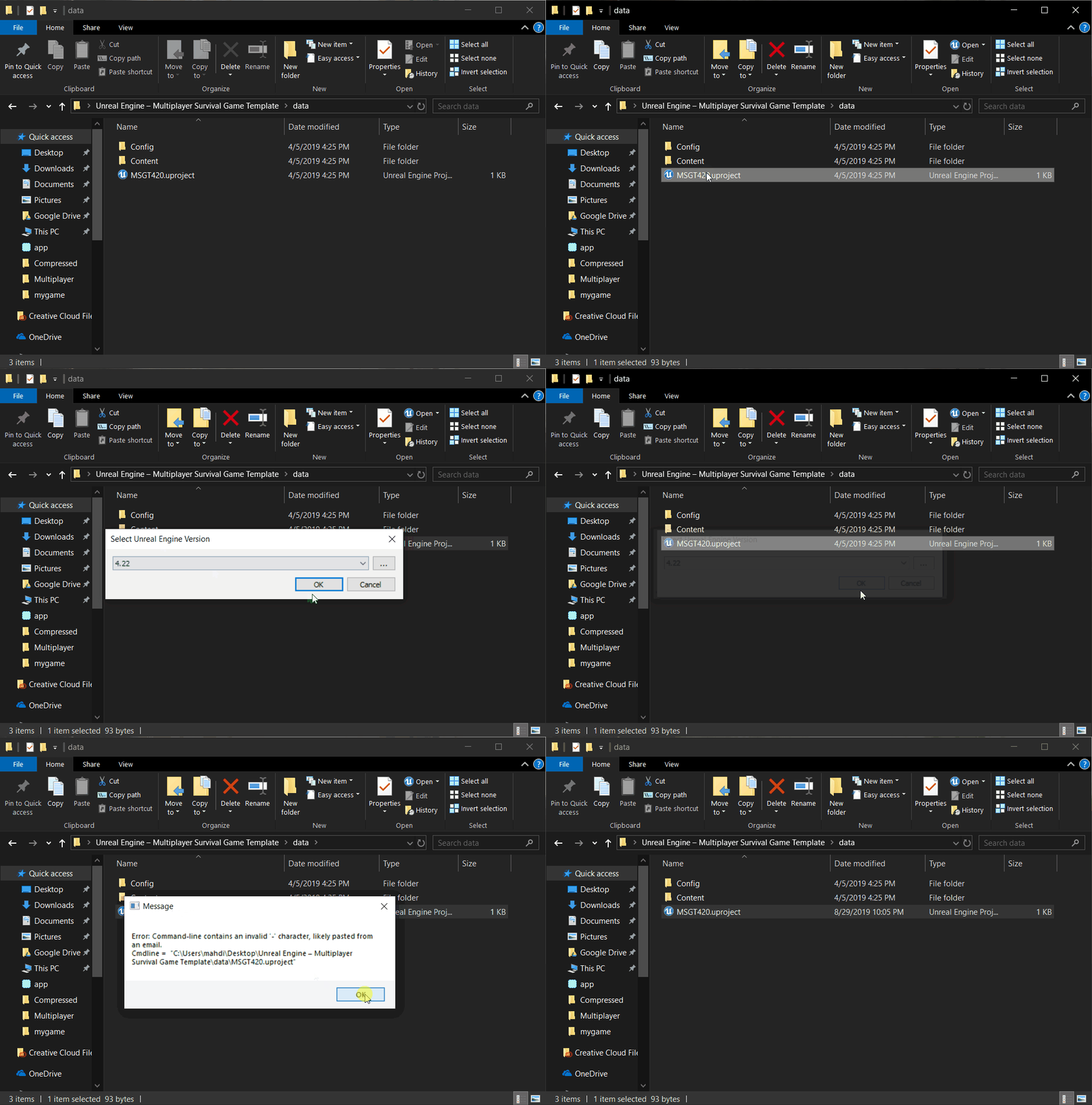
@crisp gust rename the folder
Unreal Engine - Multiplayer Survival Template is invalid because of the -
 crisp gust
@lost ember ty its work now ❤
cloud palm
How can I change the LOD for my texture to limit the use of memory?
inland granite
If I use preview version and later it goes away from being preview. It only updates preview, not installing new 4.23?
So the transaction is smooth?
 coral shoal
anyone know some good places to look for free to embed/use in a game fonts? a majority of "free for commercial use" fonts seem to exclude that usage in their terms.
 coral shoal
Fancy, thanks
fast finch
np
 maiden swift
@inland granite Yes. If you already have a 4.23 preview release installed, the stable version will show as an update to that.
 jovial wraith
hey folks, just followed this tutorial https://www.youtube.com/watch?v=r1kR9frULOs on getting arm swinging locomotion working in UE4

This is a tutorial of how to create arm swinger movement with collision in Unreal Engine 4 Link to the plugin: https://drive.google.com/file/d/1zXElI6n2vPqB0...
but because it uses collision between the player's character to avoid clipping through meshes, there's a bug that occurs if you pick up an object underneath you
hm, as I'm writing the question, I'm realizing that it should be possible to add an "is grabbed" boolean to the actor, and ignore the collision if that flag is checked
I'll try to figure out how to do that
 cyan cargo
since mobile is slow: how can I get the position of the phone in a mobile AR session?
 azure shore
hey, is there any way to fix the skysphere looking so obviously spherical?
in my maps youll only really see the sky when you look directly up from maps that are entirely inside, but by default you can clearly see the centre
even just rotating the sky texture would work for now if thats even possible
 hallow radish
Anyone know how to do a reptilian type shapshoft I know it's easy to program change between skeletal meshes but I need to add some kind of effect of morph between the meshes
neat forge
Im using brushify and it says "Texture streaming pool over budget" at the top left in red, why is that? How do I fix that?
 noble finch
hey, unreal has a certain texture pool size, and it's being exceeded. You can increase it though... or alternatively lower texture resolution of the assets loaded in your project. Brushify uses 2048 textures for the landscape, of course, the more paint layers you put down, the more textures will be loaded, so you have to consider that. As well as any other assets/objects/AI/player etc in your world... they all take up texture memory.
If memory budget isn't a huge issue on your target hardware then just increase r.Streaming.PoolSize
there's a thread here:
https://answers.unrealengine.com/questions/343646/texture-streaming-pool-over.html
 mint sequoia
Does anyone know how expensive world aligned textures are?
I did some googling but all they say is its a few times more expensive than a regular texture but without any context
W/e, I'll just use them until they cause issues, which they probably wont
mighty field
WorldAligned needs to read the input textures 3 times and blend the result
@mint sequoia
mint sequoia
Ah
Not too bad then I guess
So long as its used appropriately and not a lot 😄
Nothing better when it comes to making walls blend together nicely
 velvet oyster
Is there any way or library that can have UE4 games/apps control windows features such as restarting the pc and the audio mixer? (change volume, mute volume)
 dense finch
is there a way to make it so that when I open UE4 every day, the restored content goes in the regular window and not it's own separate popup?
 gleaming creek
Would also like to know that
It's so annoying to have to drag everything out of its sub window and back into the main window
Though the better question is why they still haven't fixed the bug that the secondary windows are always-on-top of the primary after all these years
@dense finch Actually, setting the asset editor open location to "Main Window" instead of default seems to do it
In editor preferences
mighty field
@gleaming creek Mind blown
 marsh swallow
How might one go about literally drowing out all other sounds and overriding with underwater sounds?
dense finch
@gleaming creek you rock, thanks!
@marsh swallow I am guessing you have a global variable that lowers all other volume and only allows specific ones to come through
I haven't played around with the audio engine yet, but I am assuming adjusting volume on each sound instance is pretty easy
marsh swallow
well you have volume classes
and u can assign sounds to classes
i do know keeping track of sounds playing can be a huge pain. For everything else UE4 does amazing, referencing the sounds is cumbersome imo
dense finch
yeah, I see there are some volume multiplier nodes and adjust volume functions. I guess you need one of those in each audio component, then call them all to minimize when underwater
grim ore
I would think you could use a sound mix override at some point to do the change, I just don't know if you can make a mix sound like underwater. Or do you mean a completely new set of sound waves?
marsh swallow
well ideally we just lower/muffle the sounds outside of the water and play a new sound wave while under water
i mean so long as i make all sounds under SFX Sound Class i can control them all with the Mixer
i never thought about using the mixer. but then again i plan on implimenting FMOD. Would i still be using the UE4 mixer?
 final swift
What's causing this to occur? Normally, my textures appear lighter but the whole material turns out fine. This particular instance, the floor material is just as light as the node.
 hearty cosmos
If any game devs need a mocap system, I have 2 xsens awindas up for a lowball price on ebay, I used em in and out of UE4 seamlessly
warped tangle
how much you selling them for?
is awinda the full body suit or the strap based
@hearty cosmos
hearty cosmos
like $1500USD each, on auction right now, its the strap based one
warped tangle
yeah I have that one
hearty cosmos
oh nice
plush yew
Very confused, When I import an FBX from blender some objects that were part of the static mesh are slightly inaccurate like these bolts. In blender it is perfectly resting on the surface of another object. In URE4 it is clipping into the boot. Any fix?
warped tangle
it should be noted that anybody that buys that would need a license as well correct
hearty cosmos
yeah I put that in the listing
warped tangle
do you have a buy it now price, or a low price that you're willing to let it go for?
warped tangle
aait
hearty cosmos
buy it now is $6000 canadian
hearty cosmos
for both
which is a pretty good price because I paid $5000 CAD for my 2nd system 1 year ago
(from some game dev on ebay)
the only reason im selling is because I switched to full hand animation
and need the money so I dont have to get a full time job so I can focus on my project 
I know its kind of weird selling them because you have to buy the subscription which is like minimum $2700USD, thats why I'm selling them pretty low
 iron merlin
@magic knot Maybe no smooth?
cloud cobalt
Looks like motion blur or TAA
iron merlin
Hey guys, i would like to ask when creating a combat system, should i bother to create a animation template/blueprint for my tech art guy? I have no knowledge on ue4 animation template/blueprint.
Would it be efficient if i work with them to create animation blueprint?
crystal wind
I've spent a week just figuring out the process.
The hard part is surprisingly stuff like melee.
 magic knot
@iron merlin @cloud cobalt but in old ue4 version my menu working fine
crystal wind
If it's in blueprints... A lot of stuff is gonna change >.<
iron merlin
I only use blueprint D:
cloud cobalt
@magic knot What's old UE4?
iron merlin
My combat system basically passes a string to animator as an identifier/condition for animation. Do you think this is efficient? It's just that i don't know how to setup animation blueprint. Should i take my time to learn animation blueprint or let my tech art guy handle it?
crystal wind
It's... Special.
iron merlin
@crystal wind Are you replying to me ? o.o
crystal wind
If your going to try helping him in any way with animations, it'll be helpful to learn that stuff. Unless you can do it entirely in code.
And yes.
AnimBP's are quirky >.>
iron merlin
I have no knowledge in cpp btw. So it will be blueprint only.
crystal wind
They depend on state machines, and... Require special attention to share data with the character bp.
cloud cobalt
@iron merlin Animation blueprint is the interface between behavior and animation, it's a pretty great tool
crystal wind
Yeah if your doing this in blueprints, i'd recommend taking a few days to learn the basics yourself. There's models and animations you can play with.
cloud cobalt
It's the interface so both artist and programmer would use it
iron merlin
Let me show u how i did it. Correct me if i'm doing it badly because i'm not good..
crystal wind
There's tutorials for this as well. The one ue4 provides is alright to start with.
Neither am I honestly.
crystal wind
I do know that just doing simple walking/running/strafing is the easy part. Doing different animations "on command" such as melee/block is the hard bits.
iron merlin
Ah i'm not the handling locomotion 😅 I don't know how the other guy did the locomotion
crystal wind
Especially when you have a variety of weapons in the mix.
cloud cobalt
Mostly, here's how you want to do this
The behavior should expose a state
Is jumping, current target is there, 1.34s since attack started
Then the artist needs to use this information to blend animation components together
crystal wind
IsBlocking, IsSwinging, IsAimingBow, IsAimingFirearm. I find this messy >.>
cloud cobalt
You get the current state of the Pawn in the Blueprint side of the anim Blueprint, store into variables
You can have some logic in there - for example storing the time since a state changed, etc
Then in the ABP still, but in the anim graph, your artist can use the variables
crystal wind
They have to copy every variable before usage though and that's just... Eww >.<
Could be worse I guess.
cloud cobalt
Using variables is very important because it's both much cleaner, and much faster
iron merlin
Sorry i don't understand any of these because i have 0 knowledge on ue4 animation stuff. 😅
cloud cobalt
Let's make it simple then
crystal wind
Sorry for complicating the subject.
cloud cobalt
Anim Blueprint has a Blueprint graph, and an Anim graph
The Blueprint graph runs on the same processor core as your game code (Blueprint is code)
It's where programmers work
The Anim graph is what the artist uses, using the programmer-provided data from the Blueprint graph, to drive the animation
It runs on another processor core, independently
Here's how this goes : your artist will say "I need to know if I'm attacking, and how long it's been since the attack started"
You'll create a boolean variable in the ABP, which will automatically be shared between both graphs
And a float time variable
The programmer controls the variables to keep the anim graph informed, and the anim graph uses the data
crystal wind
Since he's dealing with the anim graph I think all you'll need to do is provide state variables in your Pawn/character blueprint. At least that's one way.
iron merlin
@cloud cobalt I can't really use a boolean for attack sequence like attack1, attack2. Why does artist need to know how long it's been since the attack started?
@plush yew Your model backface?
crystal wind
You pretty much have to use variables to store that stuff. FOr attack "sequences" you can use an enum to explain which attack is active.
iron merlin
@crystal wind I try not to flood the character blueprint as i'm doing combat controller in an actor component
crystal wind
As long as the animBP can get a hold of it somehow that's fine.
You need variable states somewhere though.
plush yew
@iron merlin What do you mean by backface?
plush yew
ah, well this is the blender front view, and half the front faces are shown
iron merlin
Wait so i have to create variables in blueprint graph for my artists?
 rustic imp
you can expose c++ variables to blueprint
crystal wind
I don't think he wishes to use c++ though
iron merlin
Here's what the attack sequence.
crystal wind
BP variables work perfectly fine.
iron merlin
I can't do c++ lool
crystal wind
There a list like that if it's accessible as a variable is perfect ^-^
iron merlin
I don't wanna learn c++ because i don't have time to do it. UE4 makes learning for c++ harder..
crystal wind
Honestly your not wrong about that last part.
plush yew
How do I make unreal draw the correct side of my polygon?
crystal wind
I think the mesh was made incorrectly honestly.
There's another channel called graphics that'd better explain what may be wrong.
iron merlin
@plush yew Backface culling. It should be invisible in your 3d software as well.
plush yew
I do see the texture on the inside, however it is not invisible in blender,very wierd
iron merlin
Anyway guys so u guys think that i should create anim bp for my tech artist?
because when i try to create one, it requires bone or something.
crystal wind
My opinion is na. As long as they have someplace to get your variables(states) it's fine.
iron merlin
@crystal wind Ah okay thanks!
Thanks @cloud cobalt and @crystal wind for explaining how animation bp works. I have a clearer idea on how to modify my system to fit it.
crystal wind
I'm not the most experienced but that's my perspective haven gotten this far. You can ask them if they are comfortable and/or able to get the states you setup. And again it can be stored in a component, the characterBP, it doesn't matter so long as it is accessible. I believe animBP has access to the mesh and the actor that is using said mesh.
And if your component is accessible through that actor then it's perfectly fine ^-^
plush yew
@iron merlin Applying 2 sided material worked, so somehow I put the faces on backwards in blender? xD
crystal wind
Correct.
iron merlin
@plush yew Yes
@crystal wind Ah i see
I know characterBP has access to animator its using.
crystal wind
If i fucked up in that advice or your having trouble feel free to come back. 3D isn't my specialty as a programmer.
iron merlin
Alright
I asked this because they say that if i'm creating a system, i should be creating a template for them like animation, user interface and etc. Then it will be considered as a system.
Thanks guys! 😄
crystal wind
Welcome ^-^
 rose horizon
an Australian Rapper used Ue4 and some basic blueprints to make a Game to promo a new song, thought it was pretty cool
https://www.youtube.com/watch?v=kaNuAFMy0X0

Play the Good Times game at genesisowusu.com Game is not available on phones, and Macs must have macOS 10.13.6 or later to run the program Creative direction...
 obtuse nest
Does anyone use the geometry tools within Unreal, other than landscape builder?
inner cloak
Not sure if that would work for you but i use Mesh Tools by Mary Nate from the Marketplace
and Greetings everyone !
 dusty latch
Hi ! Can you help me , why crash the unreal engine 4 22.3 or 21.2 at all time after 30 second ?
dusty latch
okay , but I dont know the error
 south ridge
I don't know it either. You have a better view of your computer than we do. What's the crash log? What's in the log?
south ridge
Almost. The error message there tells you what to do next (get debugging symbols)
dusty latch
I need to download it ?
south ridge
That's what the error message implies
dusty latch
Okay , thank you
south ridge
It's not going to fix the problem, just going to help in figuring out what the problem is
dusty latch
okay
 cedar snow
i'am using the topdown template and get these warnings in my log
LogLinker: Warning: Failed to load '/Game/TopDownCPP/TopDownOverview': Can't find file.
LogLinker: Warning: Failed to load '/Game/TopDownCPP/TopDownOverview': Can't find file.
LogUObjectGlobals: Warning: Failed to find object 'Class /Game/TopDownCPP/TopDownOverview.TopDownOverview_C'
any idea on how to get rid of them?
checked code and ini files; didn't find anything referencing that file
 manic pawn
I had this before
the fix™ was to go into AppData\Local\UnrealEngine\4.22\Saved\Config\Windows\EditorSettings.ini and remove the reference to a tutorial that doesn't exist
real hound
First Bug to make me actually LOL
static viper
man that code is chaotic
real hound
Haha yeah, trying to modify some stuff to get some kinda character spawning behavior like Rust but where when you die you become a ghost. My issue right now is with the camera. I dont know where this squished floating chracter bug came from though lol
 regal mulch
Anyone an idea why on a Windows Server instance, the "WindowsMoviePlayer" Plugin would fail at
HRESULT Hr = MFStartup(MF_VERSION);
check(SUCCEEDED(Hr));
Greetings, i'm trying to create a piston system and according to info i could gather i have to set the collision box on the parts, but when i try to set collision box, it does not assign it 😦
cedar snow
i will also have a look at the ue4 folders in appdata now
real hound
Fixed that weird bug, some with the transform scale on spawn. The other weird thing is its double spawning characters. I changed the default character to none, thinking maybe it was the gamemode. Still getting double spawn
manic pawn
theres a ton of ancient trash in there
cedar snow
that's what i'am afraid/hoping to find
my C is only a 512gb drive and has barely any space left
inner cloak
you have other drives ?
cedar snow
haha yes
inner cloak
i believe you can moves the files to a different disk
inner cloak
just move the project files, no ?
cedar snow
ah those are already on the other disks
inner cloak
ok, so you just have too many apps on the c drive ?
cedar snow
yep
inner cloak
then maybe a little bit of uninstall from C, install to D (or E or F etc) ?


 cedar snow
if part == mesh then you can create collisions in the ue4 mesh editor
inner cloak
by mesh you mean staticmesh or staticmeshactor ?
cedar snow
mesh asset
cedar snow
have you checked out the collision menu at the top?
have only needed it once and if that doesn't work for you..
inner cloak
I did, i tried to set simple or complex collision .. does not stick 😦
 empty nacelle
how do i video game
cedar snow
not the visibility button
inner cloak
lord of cheese, you need a mouse and some cheese !
cedar snow
the actual drop-down "Collision"
inner cloak
i know, i click on the collision dropdown and tried with both option (simple or complex), then i save the model and when i close and reopen it and look at collision, nothing is ticked !
cedar snow
inner cloak
uh ? where is that ?
cedar snow
lol read my messages ^ 😛
cedar snow
np
south ridge
Try updating your drivers
@dusty latch and yes, this is the crash log (well, callstack)
static viper
what engine version is this?
dusty latch
21.2
dusty latch
I try the 22.3 ,but that is the case
After I try to move the camera in the viewport at the third person character
static viper
well if that is all
dusty latch
I click on something and it crash
static viper
then indeed your drivers might be broken ^^
dusty latch
what can I do whit this ?
static viper
check your gpu drivers ^^
static viper
and
what are you opening with the editor?
is this a new project?
can you give a screen before you click an actor
i wanna see
dusty latch
no , it was the same project
static viper
pls show
dusty latch
okay
I cannot click on viewport because it crashed
I only clicked on edit at third person character
static viper
can you list your pc specs
pulsar fractal
Hey, I just packaged a game and after all 32 hours of it it failed due to not enough space on the disk for it (Yes, I know its too big). Nevertheless, is since the only part that failed was the part where it had to write the packaged content to my harddrive; is there a way to only do this step or will I have to redo the entire process? Thanks
static viper
yes and no
if you packaged for the first time you will experience the package cooker
this one will check if there has been stuff changed and or packed before
that way the second build always gets alot faster.
like
alot
packaging a game 32 hours is very execissive tho...
what da hell is in that game
pulsar fractal
Okay, thats great news.. so i just have to start the process the exact same way as the first time without making changes to the game?
wary wave
....32 hours?
pulsar fractal
And lol first of all my processor pretty much exploded its nasty
Yes make your jokes its okay
pulsar fractal
Also I do have garbage assets still
haha i totally understand i should get a new one
'I was just curious
But anyways
I set it to package to my desktop, but after all that it took up all of my remaining hard drive space and I can't find where it actually exported to delete it
(Another mistake I set it to export to my SSD D:)
pulsar fractal
hmmmm
static viper
you only can find history about it from a log.
pulsar fractal
I wonder why im -30GB since i started the build that is strange
 proper crane
This is a... weird issue
static viper
i love it weird
pulsar fractal
I think it's time for some spring cleaning of my computer
proper crane
Place the light on one side of the mesh, the opposite end lights up
static viper
show
proper crane
static viper
james bond is real
and your light is not movable.
this error wouldnt be there if they were.
proper crane
I don't get what You mean by not movable
static viper
i thought this was supposed to be weird
in your details panel.
click movable.
for both lights.
proper crane
What is it supposed to do?
static viper
fix your glitching
proper crane
it did not
static viper
it did
you are just not knowing enough about light ^^
i see 3 lights in room one
and 1 you move
and one unbuilt light object
all lights are stationary
well except lamp
lamp is the only good actor in this story
 vast fossil
guys quick question. I downloaded a project online with some templates. Im trying to understand the nodes, and I see alot of arrays in the variable section but they all have 0 array elements in default value.
proper crane
It's more about the walls...
vast fossil
how can I find the link ?
static viper
your floor is also black
proper crane
and ceiling
static viper
well that was always black anyways...
proper crane
I mean, that's not what the textures are
static viper
Using Lighting and shadowing geometry, using Global Illumination, and setting up reflections.
read up on this allen.
pulsar fractal
@vast fossil in any blueprint you can go do Ctrl+F and in the Find Content bar type the name of the variable, then click the binoculars to searchall of the content for where the variable is, then you can see from there where items are put into that array
vast fossil
thanks ill take a look
obtuse nest
Anyone know why my objects pulsating when I have them selected with vertices on
proper crane
I'm pretty sure it's a problem with the mesh...
static viper
i wanna see pulsating
obtuse nest
they're just standard brush objects from UE
proper crane
what
static viper
show me herncabret
 fringe drift
This is my first day playing with UE4, and I'm using the flying template, following a youtube tutorial. But I need to simulate physics on the FlyingPawn's plane mesh. The check mark is greyed out.
An internet search & the unreal engine forums indicated that for simulate physics to become checkable, it needs a physics asset. And that unreal can do that upon importing the asset.
How do I go about re-importing the UFO mesh?
obtuse nest
Like dis
static viper
what cubes
static viper
is that an issue with selection?
obtuse nest
I was thinking itd be graphic related somehow though its just a sample scene and my GPU is good
pulsar fractal
@fringe drift im not familiar with that template, but in the FlyingPawn plane you should just have to have a Mesh component added and in there you can select simulate physics
obtuse nest
because its any geometry that I bring in from the UE4 geometry panel
obtuse nest
ah ok just a bsp issue
I was only using them for following tutorials but damnnnn the flickering is a headache
crystal wind
Ahahahaha
Dude seriously nice audio you've got there with the video showcasing a bug/problem. That's just over the top awesome.
fast finch
Boys and girls
Is there a type of class that can hold both a skeletal and static mesh?
So I dont need to create seperate arrays for each
maybe just a UObject?
crystal wind
Isn't a skeletal mesh also responsible for holding the static mesh which the skeleton belongs to?
static viper
a skeletal mesh is an asset which combines all the main assets
like the skeleton materials animbp.
that means it has no relation to static meshes
crystal wind
Ah woops.
static viper
that is the theory
crystal wind
You'll end up with an array of pointers.