#ue4-general
1 messages · Page 505 of 1
 broken stream
 grim ore
@spark moth what node are you using from the update part of the Timeline? if it's add relative then that would explain your problem. The curve in the timeline outputs the value on that curve at that point in time out of the output pins on the timeline. as an easy example if the curve was 1 second long and going from 0 to 1 when it first starts at 0 the value would be 0 from the output, at 1 second the value would be 1. The issue to remember is at 0.2 second or 0.3 second or 0.78 seconds the output is still putting out a value such as 0.2 or 0.3 or 0.78 in this example.
 plush yew
@grim ore your awesome, fixed the issue was the int and bin folders
grim ore
if you want something to go a fixed distance over time and you are setting the fixed values in your curve (10 units over X time) then you would set the values and not add to existing when you are using the output, so in this case Set Location instead of Set Relative Location/Add Relative Location might be used
@plush yew yay! 😃
 spark moth
Ah I see, I am using set relative location
 onyx cedar
@grim ore Have you had any success writing to internal storage on the quest?
I can get it to work when I build for windows. My .obj exporter SAYS it's written the file on the quest, but there's nothing there when I check with my PC.
grim ore
I have not tried to store anything yet, just ran a few test project 😦
onyx cedar
Ah bummer. Knew it was a longshot, just thought I'd ask anyway.
grim ore
@spark moth what I normally do for stuff like this is save the current location before the timeline of the object I want to move, use a 0-1 float track over however long I want it to be in the timeline (so like 0 at time 0 and 1 at time 3 for 3 seconds long), then use the set location node with a LERP to output the value for the set location. The Lerp can use the output from the timeline for the alpha to set the values and for the top and bottom values on the lerp I would put the starting location you saved before and then the starting location + however much you want it to move as the ending location. This would let it use the timeline to move the item from start to end over however long you set your timeline to be. This is just the way I do it, you can do it your way as well you just want to either change the values in the timeline to be your start and end vectors and set it directly or your changed values (10 in the Z) and add them to your starting location (saved before the timeline) and then set the location
spark moth
OH right, because my location is updating every frame and i'm just getting my new location each time and adding 10 units every frame over 3 seconds, correct?
Yep, that seems to be working now, thank you again for the help!
 brazen cairn
im not sure where to post this but whats the point of this menu?, the persistant level is my current one which is my actual level, I created day and night sub levels but they are empty (was following a lightning documentation which had these so i made them)
can anyone explain me how to actually precompute lightning according to day and night light scenarios?
grim ore
There should be documentation on that. https://docs.unrealengine.com/en-US/Engine/Rendering/LightingAndShadows/PrecomputedLightingScenarios/index.html
grim ore
Now place any light or Static Meshes your project needs into either of the lighting levels and then build each level's lighting as you would with any other level.
but how am i supposed to figure out the exact location to place the lights or meshes?
grim ore
So your persistent could be a house, the day could be flowers outside and night could be no flowers and lights illuminating a walkway
grim ore
In the above image; the Directional Light, Sky Light, and Skybox have been placed in a Lighting Scenario level called Day Scenario. The Spotlights for the streetlights have been placed in a different Lighting Scenario level called Night Scenario. is how epic is using it
grim ore
Not stupid, just learning. There is definitely missing stuff from that page explaining the persistent level in this case.
They assume you know what you are doing lol
brazen cairn
brave of them
so does this mean i have to create an entire city twice/copy paste in day and night levels and then put the lightning accordingly?
plush yew
I have two targets standing on the same height,, ai can target both seperately but only generate paths to the first one, does this ring a bell to anyone?
I'm thinking the path target is out of bounds, but it shouldn't be because both targets are next to eachother
 amber girder
since there are also a few epic staffers around, any clue or workaround for this: https://issues.unrealengine.com/issue/UE-38871
i would rather not like to change my character cpp too much. Thats what the component system is all about, right?
onyx cedar
@grim ore Just in case you were wondering, yes, you can write to the quest's internal storage (straight from the man himself): https://twitter.com/ID_AA_Carmack/status/1159130817936941057

@ReedSealFoss You need the WRITE_EXTERNAL_STORAGE permission in your manifest, then you can write to /sdcard, which is what is visible when the HMD is plugged into a computer. Implementing some kind of cloud transfer would be more convenient for users.
 Twitter
grim ore
Twitter
grim ore
ah ha, that makes sense since it's an android 😃
onyx cedar
yup
I guess it's doing some weird stuff tho. The quest doesn't have an sd card. So I guess it's forwarding the files somewhere else or something. Who knows?
 light coyote
@grim ore Hi man.
I wrote you a private msg, is just a quick question about arrays, but i had to explain what i meant, and what was my struggle.
Is just a thing that is been boggling my head for a wile, and i cant seem to find the answer.
grim ore
ah, I don't have PM's turned on in here. What was the question maybe someone here can help
light coyote
ok
Hi Mathew
I have 2 programing questions if i may ask
one is,,, what is the maximum amount of things an array can have?
Not sure how to ask this, cause i dont know if it is max data, or if there is no limit at all and works in a wierd way.
I mean, that you can have arrays of ints, or arrays of vectors, and i gess a vector is heavier.
Are there any limitations to arrays ?
i have not written the other one cause is sort of related to this one
If anyone knows it would be very helpfull to my head xD
 warped epoch
Does anyone know how to post jobs in the Looking for Talent section?
 cloud cobalt
Read the pinned post
 radiant haven
How to assign an UI to the Viewport?
warped epoch
Where is the pinned post at? I don't see it in that channel.
cloud cobalt
😛
amber girder
@light coyote as far as i can see, there is no hard limitation on tarrays (not even a check for INT_MAX/UINT_MAX at least in array.h)
but Num() delivers only int32
grim ore
@light coyote I would assume the max # is the Max Value of an Int32 as I beleive that is what is used for an index for them. Don't know if it's true but it atleast makes the most basic sense. In addition I would assume some physical limit due to data storage and memory usage. like an array of int's wouldn't be bad but an array of structs of arrays of structs of enums of structs of maps of lists of ....
lol what he said above me ^
 steel bronze
Hi. I'm new. I have this Cube in my scene and it casts this beautiful static shadow. Then I have this SkeletalMeshActor guy in my scene, who is just standing there without a shadow. How do I get him to cast a static shadow too?
light coyote
@amber girder @grim ore Thank you guys
 orchid marsh
@steel bronze There are several ways - try making the light a dynamic light
steel bronze
"Cast Dynamic Shadows"? That's already enabled, but it doesn't do anything, because I'm using an orthographic camera, so I need to use static shadows.
light coyote
What i am basicaly wondering is if i hypoteticaly where to iterate something lots and lots of times, and i had lots of memory,, would it break and stop by reaching some kind of limit, would it stop withot me knowing, but its still doing its thing, just that the array is full.. :/
I know is a wierd question
amber girder
@light coyote i didnt see any limit in code
grim ore
there are limits for recursion and looping but if you limit those things to more than 1 frame you are fine
steel bronze
I think I figured it out. I can right-click on my guy and select "Convert To Static Mesh" and then that mesh can cast a static shadow. :D
light coyote
Thanks
 surreal cloak
by saying " top edge ", are you referring to an edge like the red line on this box?
the yellow box in the bottom left, are you able to play from there?
try to imagine a grid across the map, if you were to try to spawn in a spot about 5-6 boxes above the yellow one, would it let you spawn there?
i think it will still crash.
the fine line between able to spawn and not able to spawn may be that horizontal yellow line.
i think that yellow line may be the map boundary.
not that i know of. and even in terms of map size, " nothing is really infinite "
it allways needs to stop at some point.
it has to do with 32bit and 64 bit numbers.
grim ore
you can disable the world bounds check, maybe that would help
it's in the world settings itself
surreal cloak
i think there's a way to make the player permanently ( 0,0 ) and to make the map itself move under the player that way everything the player in next to is more acurate.
lol
i would maybe submit it to the forums or something like that, that's really weird.
when did it have the segfault?
or where
radiant haven
Which function uses "Toggle Visibility"?
grim ore
atleast you can identify the cause of the crash now and can work on a "real" solution 😃
or I dunno just ignore the problem 😛
radiant haven
Got two different Flashlight modes, wanna switch between these using Toggle Visibility but how to turn one of the m off
 heady frost
If you're using a blueprint I'd probably use a flipflop
set the colour of the light source on each output
radiant haven
I use a flip flop but need to turn one of them off to change the modes
 crisp arrow
hey everyone, when I attempt to export my game and run it, I get this message
---------------------------
LowLevelFatalError [File:D:\Engine\Source\Runtime\Engine\Private\Materials\MaterialShared.cpp] [Line: 1622]
Failed to find shader map for default material WorldGridMaterial!  Please make sure cooking was successful.```

this just started happening yesterday but everything was fine before, and I made no significant changes. Unfortunately, I'm locked to version 4.15. Is this a known thing?Wait, so are you trying to turn off a pointlight or something?
heady frost
try the toggle active node
radiant haven
Using Toggle Visibility
??
oh yeah its a auto program that makes me this
**idk why **
light coyote
@radiant haven Are you looking for a light to randomly turn on and off?
light coyote
As in a scary game or whatever ?
radiant haven
** I have two diffferent Flashlight modesone Short, one Far, I want to switch between them, I use Toggle Visibility and Flip Flop, but One needs to be turned off at the beginning (logic?)**
SRY
got problems with software LOL
Thats what I am looking for
light coyote
ahh
grim ore
it seems like you know what to do already? flip -> turn one on and one off, flop -> turn one on and one off... no?
light coyote
for what i said you would use a light function, wich is pretty cool
radiant haven
Mathew Yes but at the beginning both of them are turned on, but one of them needs tro be turned off
grim ore
why are both turned on?
radiant haven
fuck software, hold on i´ll close it
grim ore
just turn them both off and then uh... they are both off lol
grim ore
are these components in a BP or items in the world, and what types?
light coyote
are they the same type of light? if they are i can add something,, if not @grim ore is much better at programing
grim ore
so two spot lights?
radiant haven
well idk if u need to have experience with bp´s in this situation lol
heady frost
wait just go to the component and set the intensity to 0
grim ore
there is a "visible" boolean on them, turn them off.....
grim ore
it's the same thing you are doing with the Toggle visibility
radiant haven
grim ore
you are jumping between problems
are the lights on or off when you first start? before hitting the button.
grim ore
I can verify right now that if you uncheck visible on the light it will not cast light
light coyote
If they are the same type of light, i would just use one, and from the graph, you change to the parameters that the other one has
grim ore
we don't know what your code is but I would assume it's wrong
radiant haven
heady frost
Ok let's reset so that we're on the same page, cause I think we are not
you have how many light sources?
in this blueprint of yours
radiant haven
do i?
heady frost
you need to set one to visible and the other to not visible
light coyote
yep
radiant haven
light coyote
oh no
radiant haven
yay it works
grim ore
I dunno that might work, looks weird tho lol
light coyote
Xd
grim ore
but if you are doing that you might as well just hook up A and B to the same toggle visibility node lol
radiant haven
thx @grim ore @light coyote @heady frost ❤
grim ore
Nodes are weird like that, some can take in more than one target and it will loop thru them all and activate but it feels so dirty
looks dirty too lol
heady frost
huh, how can you tell if a node will take more then one target
light coyote
They are quite a few things you can do. I learned some of this from @grim ore youtube chanel wich i higly recomend you check out
grim ore
uhm.... I think you can't really tell unless it doesnt work. Pure nodes can't be fore sure but I think most Callable Nodes (the execute ones) can be if they are not latent
you can call "Pause Game" to pause the game if you want heh
light coyote
yes
radiant haven
ye
grim ore
just keep in mind pausing the game stops input actions unless you tell the input action to be allowed when paused 😃
because I know that will be the next question lol and I know this because I always forget and get confused when the pause key stops working....
light coyote
i would like your opinion on this @grim ore
let me show you the mess i had to do on a project in order to be able to properly pause the game.
Most of these problems arised from me wanting to use a focuss on buttons, so using a gamepad.
Wich just created a cascade of problems one after another
light coyote
grim ore
I know when I did it I just manually tracked using an index of where the controller was highlighting and then looped thru the index up or down as they moved the joystick and just kept track of it all by hand. I think you can let the engine handle it now but I dunno it's been a few years lol
hey atleast what you have is organized, kudos for that
light coyote
After trying absofuckinglutly everything i could find, and every combination i could think of, when it worked properly with no issues of any kind, i would not touch anything, if it works it works xD
heady frost
Hmm, I didn't realise that people put widgets in their characters
That's an interesting idea
grim ore
depends on the widget, like I would put character specific UI in the character since it's tied to the character
but menu stuff might go into player controller
but again put it all in the game mode because it's single player and who cares is an option lol 😃
crisp arrow
Sorry I've asked this a couple times here already, I'm just flailing around and no longer know what to do. A client is expecting a build here very soon. When I attempt to export the game and run it, I get this message
---------------------------
LowLevelFatalError [File:D:\Engine\Source\Runtime\Engine\Private\Materials\MaterialShared.cpp] [Line: 1622]
Failed to find shader map for default material WorldGridMaterial!  Please make sure cooking was successful.```

this just started happening yesterday but everything was fine before, and I made no significant changes. Unfortunately, I'm locked to version 4.15. Is this a known thing? Basically all I changed were some blueprints, no materials, nothing. Now it just fails to launch.everything runs correctly in the editor
prior to this error I was getting one about the automation tool choking on a duplicate file (It was a DefaultEngine.ini???)
grim ore
did you try this fix @crisp arrow ? https://answers.unrealengine.com/questions/41195/failed-to-find-shader-mapworldgridmaterial.html
crisp arrow
I did encounter that in my search, but the project specifically is meant not to have any static lighting
and I believe there are some optimizations that get triggered when that flag is disabled
 runic patio
If i have a point light and i want to disable 'cast shadows on it' but only on mobile platform, how would I go about it?
Can i do it through config or do i have to write runtime code
crisp arrow
(also as for the duplicate file error, I disabled the line in AutomationTool's code that forced the build to stop in that case, which is a very ugly hack for sure, but might be relevant to this problem I've encountered.)
light coyote
@heady frost When you get tiered on running with problems on referncing stuff, because its not there, still not instantiated, is in a level so you need to use dispatchers...
After lots of pain, if you are learning and dont want to run in to tooo many problems, general rule is,,, if it happens once, level,,, if it repeats, character
 misty creek
I know you can Get Platform Name. I'm not sure about through a config file though
light coyote
@heady frost In other words.
Things that will repeat, with the thing that is going to stay.
Things that dont repeat, in the place that will go .
crisp arrow
this was the error I was encountering with the automation tool btw:
Program.Main: ERROR: AutomationTool terminated with exception: AutomationTool.AutomationException: Staging manifest already contains E:\<ProjectName>\Saved\Temp\Win64\DefaultEngine.ini (or a file that differs in case only)
light coyote
This is so you dont have to create the same thing over and over across the levels.
 astral phoenix
is there some1 that can help me with some day/night cycle? i have so i can change it but i want so i can do it with a button in game how can i do that? 😃
grim ore
UI button or something in the game physically? check out the UMG documentation for the UI stuff or else look into triggers for the in game stuff.
heady frost
https://www.youtube.com/watch?v=_Sdm_gsbaos @astral phoenix you can probably adapt this pretty easily
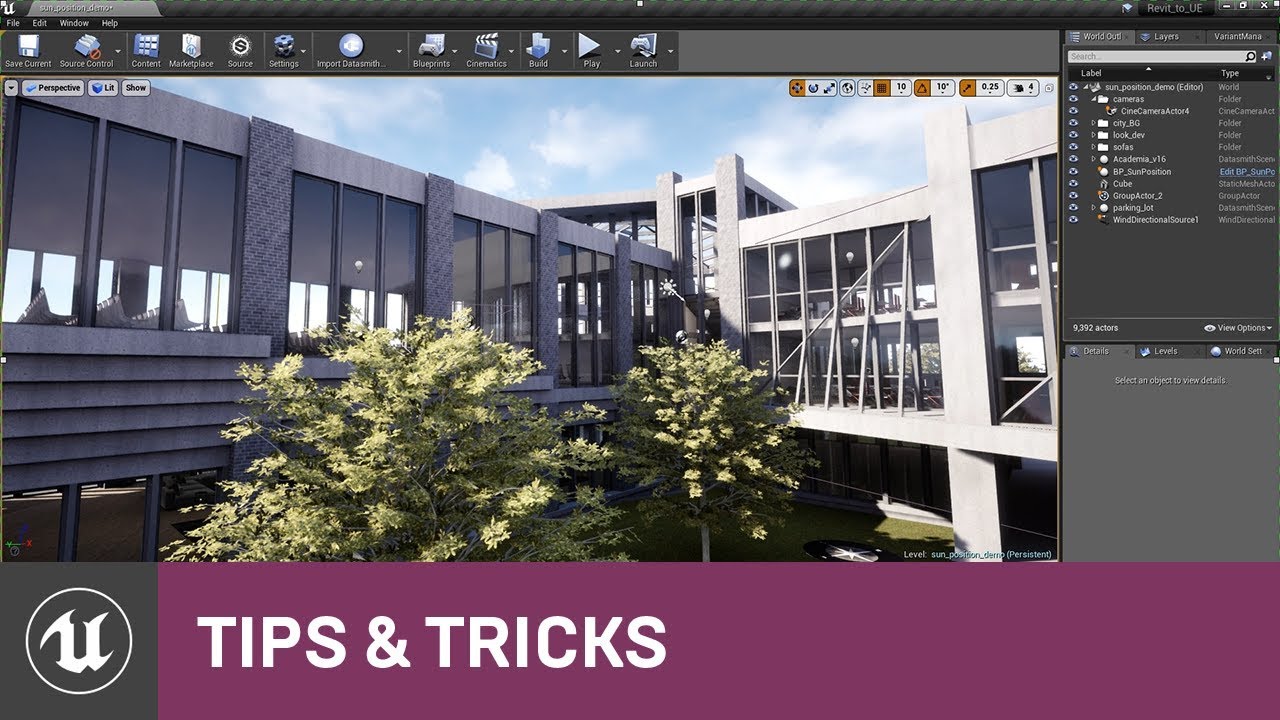
Creating accurate and realistic patterns of sunlight and shadow is critical to some scenes, especially for large architectural and construction projects, and...
onyx cedar
It just dawned on me that the reason files are going to /sdcard on the quest is because the games and everything else a user may install or copy to thing is on an sd card.
i wonder if there's an actual sd card in the thing somewhere
i'm not about to break it open
hilarious if the difference between the two models is a bigger sd card hidden in there somewhere
astral phoenix
@heady frost he dont go over what i need :/
heady frost
wait, do you mean a button like on the user interface
or a button as in a 3d thing in the game
 storm venture
@heady frost if you make a 3d button actor, like a cube or something, you can make events on it like On Begin Cursor Over / On End Cursor Over and On Clicked
astral phoenix
3D thing i the game
storm venture
then you need your character to have the cube in view, set their gamemode to UI and set their Show Mouse to true, and then when they click the 3d button, it will execute that event
oh wait i mentioned the wrong guy
i think this was for you @astral phoenix
heady frost
haha, it's still interesting
astral phoenix
@storm venture i know u can do that and all that stuff but my problem is the code i have for the day/night cycle dont work in other blueprints than the ''level blueprint''
storm venture
is it because the code relies on things placed within the level? like the directional light and maybe fog and stuff?
heady frost
can't you have a custom event in your level blueprint and call that custom event when the button is pushed?
 autumn dawn
@astral phoenix try the marketplace item good sky
grim ore
set your level blueprint on fire and never use it again, that is a start to fixing the problem
astral phoenix
yeah my problem is the directional lights
storm venture
itll take a bit but move everything into a single actor
grim ore
yep this is why you never should start learning UE4 with the level blueprint, you skip learning about blueprint and exposing variables then get stuck when you need to do real work 😦
storm venture
directional light, fog, post process, etc, if you move all of it into a single actor and code it all in there, you can drop it into any level and make referencing other actors easier
grim ore
^^
astral phoenix
this is my code inside the ''level blueprint'' https://blueprintue.com/blueprint/ibq65ef6/
BlueprintUE
how can i put it inside the actor?
grim ore
you can also make a "time of day" blueprint that can reference any other object in your world, like the lights, and do stuff to them
all of that code is normal, your issue is you hard coded your lights in your level blueprint rather than having them be gotten at run time or exposed to the editor and letting you pick and choose them from the level using another blueprint. yes all of that code can be put inside of an actor
storm venture
yeah what he said ^
you can just copy your code and paste it into an actor, then, everywhere where a hardcoded reference is (SkyLight1 for example) you would replace with the corresponding actor reference (SkyLight Object Reference for example)
then set that variable to Instance Editable and Expose on Spawn, then when you place your actor in your level, you can select SkyLight1 as the variable
grim ore
^^ what they said 😛
too bad they can't put a comment in the level blueprint by default to warn people to not use it if they can avoid it
storm venture
i would have loved that when i started, haha
astral phoenix
i dont understand what u mean
grim ore
Even sequencer doesn't need it anymore so I don't know what is left that does
storm venture
so biebob, do you have an Actor made that you will use for your time cycle?
astral phoenix
yeah! i have it! and the level blueprint code is there aswell!
grim ore
https://docs.unrealengine.com/en-US/Engine/Blueprints/UserGuide/Variables/#editablevariables is the docs section for reference
astral phoenix
so how can i hook it up?
storm venture
perfect, so when you compile, the hardcoded references should say Unknown, like this, right?
astral phoenix
yep!
storm venture
awesome, so see the first Unknown? That was originally a SkyLight in your level blueprint
astral phoenix
yeah i could guess that xD
storm venture
so make a new variable as a SkyLight Object Reference
astral phoenix
so i just put that variable where it says '' Unknown''?
storm venture
yup, and make sure you have these checked off
that will allow you to change what this variable holds in the instance of it (the version you place in your level)
astral phoenix
so i just do that with all 3?
storm venture
yup
onyx cedar
If any of you have an oculus quest and want to try out my blocks modeling "game", here's a link: https://drive.google.com/open?id=11dLfoT1qsJkgC71bGbestgEYXcjr_dzd
touch the big red button with your hand to export an obj
you'll have to go digging for it yourself in the device. it's in /sdcard/
you'll need to use adb
astral phoenix
what about the light Source? its not there?
 hard quarry
Hi Guys,
what is the correct way to import an FBX Object into the Engine. I have an Object which has multiple Objects inside of it.
If I import it with File -> Import into Level , then the pivots are not correctly placed
storm venture
Light Source? you have three unknowns, SkyLight1, DirectionalLight-1, and BP_Skydome_C-1
astral phoenix
i have ''SkyLight'' and ''Light Source'' and ''Sky Sphere''
storm venture
well in the code you linked here, there was a Directional Light, so try that
grim ore
@hard quarry what are you importing, if this is a group of objects and not a complete scene you should drag/drop it into your content browser or right click and import asset to get the import dialogue open
astral phoenix
it works now but now i just got alot of errors when i try xD
but ty! @storm venture 😄
storm venture
no problem!
 dawn gull
Hello, when I run my compiled project, I get this error: Fatal error: [File:D:\Build++UE4\Sync\Engine\Source\Runtime\CoreUObject\Private\Serialization\AsyncLoading.cpp] [Line: 3568]
Could not find SuperStruct GravityCharacter to create BP_GravityCharacter_C
0x0000000076442cf2 KERNELBASE.dll!UnknownFunction []
0x000000000188239e DirectionalGravity.exe!UnknownFunction []
If you could help, please tag me. Thanks! 😃
hard quarry
@grim ore It is a hierarchical object, if I import it via drag and drop each object gets imported, but not the Whole Object itself gets lost and I would need to reconstruct it
Of course If I check "Combine Meshes" the Object would be there, But I need to access some inner objects
 glacial pecan
anyone know how I can get this public variable exposed in the world outliner after being added as a child actor? It has collision volumes in it, hence why it's not a component...
grim ore
well all of the items should in theory still retain the pivot point as the pivot should be the 0,0,0 of the scene when you exported. If you put them all in a BP or the scene with their locations at 0,0,0 they should still retain the basic layout?
hard quarry
If I import them via Drag and Drop and Select all of them and Drag them into the screne, the layout is correct. So everything is where it should be. But the pivots are all at 0,0,0
In Maya the Pivots are at the location of each object itself, so I could rotate each object
Now If I rotate it in UE, it rotates about the 0,0,0 pivot
grim ore
im confused. This is a scene in maya laid out how you want it?
glacial pecan
@hard quarry if Maya has a Datasmith plugin, use that... fbx is a nightmare with hierarchial stuff in Unreal, imo (import into level works kinda ok, I guess, but is rather limited).
hard quarry
Yes, its modeled in Maya
grim ore
@glacial pecan at this time they are not exposed, it's possible to make variables in the parent and then in the construction script set them on the child actor directly
are the items all laid out in Maya how you want them? in a scene basically
I assumed if they are laid out in a scene, like a living room for example, when you export it all out they all keep the 0,0,0 in maya as their pivot point so they "should" all be offset and laid out the same way when you import them into the engine
hard quarry
I saw this plugin, which looks like what I want to achieve, anyone ever used it?
https://forums.unrealengine.com/community/community-content-tools-and-tutorials/60110-fbxbuilder-rebuilds-fbx-static-mesh-imports-to-retain-original-pivots?88531-FbxBuilder-Rebuilds-FBX-static-mesh-imports-to-retain-original-pivots!=
Unreal Engine Forums
This is the place to show, share, and link to your stuff!
grim ore
yep im not crazy lol, I made a scene with items laid out how I wanted them, exported it out to fbx, imported them into UE4 and they all retain the offsets from Blender when in ue4
granted I have never used blender before and can't even move the camera but hey it worked properly lol
glacial pecan
but only using "import into level" right? and then you can't reimport it easily?
Blender just got a Datasmith plugin, and its glorious
grim ore
uh no using the import asset option when you right click
glacial pecan
(or will very soon be at least) 😃
grim ore
and when I reimport it overwrites as expected
 worthy ginkgo
Hey! Is there anything similar to Unity Multipurpose Avatar (UMA) for Unity in Unreal?
glacial pecan
but Ue4 splits an imported fbx scene into individual meshes?
worthy ginkgo
Similar to this : https://github.com/umasteeringgroup/UMA

GitHub
Unity Multipurpose Avatar . Contribute to umasteeringgroup/UMA development by creating an account on GitHub.
grim ore
it does split it into multiple meshes and it keeps the transforms as expected (relative to the 0,0,0 in the DCC)
unless I combine it of course then it's one mesh with the proper pivot
radiant haven
Has someone experience with AI?
grim ore
i've used blender for 2 minutes and I hate it...
 shell path
@radiant haven beyond blackboards and sequences?
light coyote
@grim ore hahahaha
glacial pecan
@grim ore it takes about 2 months to fall in love with Blender
radiant haven
@shell path yes
glacial pecan
2.8 that is
grim ore
jesus who decided the middle mouse button was camera move 😦
glacial pecan
2.79 is all hate 😛
glacial pecan
@grim ore sounds like you want the industry standard keymap instead of the blender default keymap
grim ore
yeah with 2.8 coming out I decided I should learn it so I have a free DCC program I can show people how to use with the engine
yes I want the standard I have used in every other real program 😛
shell path
@radiant haven what kind of logic can you not achieve with blackboards, Logic gates and sequences? Machine learning lol?
light coyote
@radiant haven I have little expirience with ai.
If its to get started, i can help, if its more advanced, no xD
grim ore
@glacial pecan lol do I have to remap all the keys to get blender to industry standard or is there a toggle?
light coyote
I was going to say about what is used, and a little few extra stuff.
I will have to remember and test a bit as i have not interiorized it yet
plush yew
having a bit of a problem with aim offsets, i can get the aiming to work in that the character's upper torso points in the direction i want (yay! small victories) but he is kinda crunched up in the sweird position that doesnt look good, any ideas wherer my problem might be? will post pic
glacial pecan
@grim ore toggle when you first start it I think... let me check, perhaps it didn't make the official 2.8 release
 autumn elbow
I just got Blender 2.8... it is wonderful!!
Not as good as Max, but free... and good enough lol
plush yew
like this, he's supposed to be pointing like holding a rifle. He turns well and matches the aim of the player, but idk why the animation is messed up
light coyote
lol
glacial pecan
@grim ore https://developer.blender.org/T54963 says it's found in edit - preferences - keymaps ?
@grim ore
dawn gull
Anybody for my problem yet?
grim ore
@glacial pecan yep found it just now hidden up there 😃
 magic dune
I haven't used 3ds since I was in college like 10 years ago but back then Blender wasn't very good. Now Blender seems to be pretty damn nice. I don't know how Autodesk stays in business charging $195 a month for a software that can be replaced with a free one.
glacial pecan
@grim ore do you know what basic thing I got wrong here?
grim ore
I mean Blender is no UE4 but I guess it will work for now 😛
glacial pecan
@magic dune Max is still king for arch-viz
light coyote
@plush yew im asking,, you have tried to rotate by geting actor rotation, and it did not work?
grim ore
I think you have to get the child actor from the tile info component then cast to basic tile info? @glacial pecan
plush yew
no i got controller rotation and applied it to my aim offset animation blendspae
let me show you my BP
glacial pecan
@grim ore I thought that was exactly what I did... I dragged the blue child component variable onto the blueprint, and then cast it... but I'll try some variations
plush yew
I actually dont think that my BP is causing the problem here, all the variables come up with numbers that make sense i think i just forgot to hit something in the blendspace or something
magic dune
i guess the renderer is better in 3ds which gives them that market of consumer
grim ore
the "TileInfo" on your object is the Child Actor component itself. It spawns in a Child Actor which is the class you select and what you want
plush yew
like maybe im messing with the wrong skeleton branch or im not using a correct base pose, not really sure cus animations are still really alien to me haha
light coyote
Try this
glacial pecan
@magic dune you always use a 3rd party rendered like Vray anyway, but what's better is the way it handles a large amount of complex objects, offers non-destructive editing options, and bases many modifiers on real-world units
plush yew
right now in my animation, the play controller modfies the upper body animations, the run direction modifies the lower body
what is teleport back rot in this case?
dawn gull
ah dang it I will come back later for help with my problem
glacial pecan
@grim ore oh, thanks! That would have taken me ages to figure out 😃
grim ore
😃 Took me a while originally lol
magic dune
i know those feels dude
i feel like im stumbling around in the dark and when code works it feels amazing... then i realize it could have been done way better a different way and that i still suck
😛
magic dune
that needs to be a Yeehaw variable type
dawn gull
argh nm
plush yew
haha ok got it, and just break that rotater to get my pitch and yaw for the iffset blendspace?
dawn gull
Ok so this is my problem: I compiled my game, and when I run the .exe file, I get this error. Fatal error: [File:D:\Build++UE4\Sync\Engine\Source\Runtime\CoreUObject\Private\Serialization\AsyncLoading.cpp] [Line: 3568]
Could not find SuperStruct GravityCharacter to create BP_GravityCharacter_C
0x0000000076442cf2 KERNELBASE.dll!UnknownFunction []
0x000000000188239e DirectionalGravity.exe!UnknownFunction []
Is there anybody that can help me with this? I am very confused.
light coyote
Variable of type rotator, or the end rotation of your animation getting the rotation of something else, or however means you can get a rotator tipe ting from
dawn gull
Oh, also, please tag me.
light coyote
@plush yew sounds good
plush yew
hm ok i see, but this take aways the rotation from the mouse
im trying to get my character's upper torso to rotate with the mouse, which i have done
i think my problem is just i have messed up somewhere with blending animations on top of each other
plush yew
yes i agree, it looks like maybe the aim offset is going way past the range i set
light coyote
Can you show a pic of what makes the torso turn
plush yew
the AimOffset?
grim ore
@dawn gull about all I can see is related to plugins and it not being compiled in the shipping version https://forums.unrealengine.com/development-discussion/c-gameplay-programming/1433619-could-not-find-superstruct-classname-when-building
light coyote
What ever controls the torso turning
dawn gull
Dang it. It was updated to a newer version. Is that the problem @grim ore ?
plush yew
this is the torso animator, works fine in BP
grim ore
@dawn gull that would be my guess if you are using a plugin it's not loading it properly for some reason
light coyote
How do you turn in game ?
dawn gull
Ok thanks
light coyote
Mouse ?
plush yew
with the mouse, the very first screenshot i sent has the BP to get the rotation information
yeah, and as far as i can tell, the mouse gets all the information correctly, i watched the variables in my BP and the angles returned values that made sense
hm, im getting a little closer, the head and torso point the correct way, now it's just the arms are held up strangely
so maybe there is something wrong with my skeleton
light coyote
So why do you want to lock it ?
Because you want some freedom of upper boddy without touring the legs right ? @plush yew
plush yew
yes, I want the upper body to rotate with the mouse because that is how he will aim, and the lower body rotates with the WASD because that is him running
so when he runs left but aims forward, the upper torso will point forward and his legs will point left
but right now i dont think my rotations are a problem haha, just the skeleton
light coyote
ok ithink i know what is wrong
plush yew
i firgured out why my rotations were weird, i accidentally chose the wrong base pose but i still have the arm problem
storm venture
is it possible to add an offset to a particular bone in a skeleton which happens to be following a Master Pose?
plush yew
wait, i think i might know what im doing wrong
when i rotate my controller, im only getting the rotation in world space
i need to get the difference of the angle between the rotator and the character
light coyote
Im not sure, but guive it a shot.
You are using a clamp, that means you are locking it betwen those values, and maybe, but i dont know, the rotation in this case behaves sort of like when you want to move something 50 m forward, you cant just say set location 50m forward in terms of the world.
You would use relative location to be able to write that 50, and not location by itself if im correct.
Try using the two nodes i sent in pic, and use a lerp rotator.
@plush yew EXACTLY
use lerp rotator
plush yew
hahah awesome, thank you so much for the help
plush yew
hahaha, it was a good brain exercise!
im glad we both came to the same conclusion, its satisfying to be able to think for ourselves haha
light coyote
imagine you have something constantly rotating on pitch, yaw or whichever
what does setting it to 90 will do
😃 yep nice
plush yew
setting it to 90 makes it point straight one axis right?
like directly straight, directly up, left, etc
hm ok, so im getting so close, he points in the direction i need, but his arms are still a little weird
light coyote
Yes.
I dont think it will increase 90 of whatever is rotation was at that moment
And i think that was the problem
plush yew
yes actually you are right, i dont need the 90 clamp because since we are getting the difference between pawn rotation and controller rotation the clamp isn't absolutely necessary
my problem now is just the arms
light coyote
use lerp rotator instead of clamp
plush yew
ok
plush yew
hahaha
i really do think the arms problem is because i might be doing somethwing wrong with animation blendspaces
maybe my alpha strength is messed up or some coordinate is wrong in the animation skeletons
light coyote
ok ive been thinking and i think a mix of both things is needed
plush yew
got the lerp to work, arms are still weird, what are you thinking?
light coyote
not sure yet xD
plush yew
hahaha, i appreciate your help anyways, you are helping me a lot
and im proud im also contributing to my own help haha
light coyote
I was thinking on something like this
Along those lines
But i dont know if this is stupid or not
but think about it
What piece of the splitted circle is ?
Give things a try and see what happens
Ok stupid question, just read the toggle bubble Xd
Says clockwise
 next badger
Anyone familiar with the sequencer?
light coyote
Swop minus to min, an posi to max


 toxic quest
@plush yew, @light coyote isn't your problem about Aim Offsets ?
https://docs.unrealengine.com/en-US/Engine/Animation/AnimHowTo/AimOffset/index.html
light coyote
We are not sure
plush yew
thats what i think it is, because i rotate just fine, its just the arms on the character are crooked and way out of place
so since the rotations work as intended, i think its a problem on the skeleton
light coyote
I know i had problems with rotating a character when teleporting, and had tou use difrent nodes than he had,, so i gessed it may be a similar issue
I tried 😃
toxic quest
Can you send a screenshot ?
plush yew
ok yes it definitely is a problem with base poses, i just did what the turoial said to do and it messed it up
when i dont have a base pose it's fine, the animation blendspace preview is the only place where there is no base pose and it works totally fine until i add an additive base pose to the preview then it messes up
light coyote
I only used blendspace once. No sabe mucho yo xD
plush yew
hahaha
esta bien
i really like the idea of blendspace it seems like something i want to work with alot, its just hard to understand sometimes
toxic quest
To be honest, animation blueprints scare the crap out of me
toxic quest
I agree, but UE4 has just too many things to smash your head against
plush yew
then smash early and often haha
toxic quest
Good idea
plush yew
yep
either leave it scary and mysterious forever or dive in, fail a bunch of times, and eventually get familiar
 zinc rivet
man, all this talk of smashing is so violent. It's more like being scared of the cold water
 woeful wraith
hi! could be a better channel for this, but... does anyone happen to know if it's possible to get overlap events out of an MRMesh component? physics collision is working, but I don't seem to be getting anything on overlap. generate overlap events is checked, collisions channels should all be fine, static mesh overlap events are working 🤔
 kind robin
hi, i am using a "finterp to" node and i have the speed on 0.00001 and it is still moving very fast
there is a difference between speed 10 and speed 0.00001 but its not nearly 500x slower as you would expect, your lucky if its even twice as as slow
does anyone know why this might be?
plush yew
ok, i think i know what to do, i need to have the blendspace only affect the bones above the pelvis, kinda forgot how to do that
@kind robin what's your delta?
kind robin
just a get world delta seconds node
plush yew
maybe use a timeline instead?
kind robin
i tried that before, i needed it to be a variable amount of distance so i switched to interpt
woeful wraith
I've never seen that behavior in finterp… could you try lerp node?
kind robin
yeah lol
ive spent the last 5 hours getting it to work at this point
im unfamiliar with a lerp, what is that?
woeful wraith
finterp shouldn't be hard at all, something weird is going on lol 😄 can you post screenshots?
plush yew
lerp is essentially like a more straightorward interp
woeful wraith
lerp is linear interpolation, basically does what finterp does
plush yew
how lerp works is just say i have 0 and 10, lerp has a variable x that figures out what's between 0 and 10
kind robin
oh i see, i have a whole mess of code across multiple files so its kind of hard to follow
plush yew
so for example if x is 0.5, that's 5 between A and B
woeful wraith
to make lerp do essentially what finterp does, you can multiply the speed by delta time and plug that into alpha
kind robin
ah, that would require a lot of changing and im just happy that its working at this point lol
would the delta time effect how fast the interpt is moving?
plush yew
delta time only gets the amount of time since the last frame, which essentially means your FPS will not affect the gameplay
woeful wraith
not necessarily, longer delta times will make it move faster so that the end result is the same regardless of framerate
plush yew
so for example, deltatime on a super computer would be like .002 seconds or whatever, but on an old crappy pc deltatime might be .1 for example
the purpose of deltatime is to essentially make sure a game runs at the same speed on a crappy low end pac as it does a higher end pc
some games they dont do this, for example Skyrims i believe actually physically runs faster on higher FPS
like in skyrim if your FPS is 100 your character will actually slightly move faster than someone running on 30fps
which is not good game development lol
woeful wraith
if a game behaves that way it's probably meant to be framelocked, but yeah, not good haha
kind robin
right, i think that happened in fallout 76 too if i remember lol
plush yew
yeah i think beth locks their frames, and honestly in a single player game like that, it doesnt really matter TOO much
but since stuff like speedruns or competitive multiplayer have been becoming so important, deltatime is important too
kind robin
is unreal setup by default with that in mind or is that something i need to be looking into more?
plush yew
same thing happens in unity
woeful wraith
anything that moves over time should use delta time
plush yew
idrk if you should look into it more because the concept is fairly simple, you dont need to know the ins and outs of it, but deltatime is just good programming practice
unreal i think has the ticks with a deltatime node
and i know in unity, they have two update systems in their library, one is for regular time and the other for delta time
its kind of a weird concept when you first learn about it, i was confused for a while too
but i understand its uses now
its not really a use you will see much of either because you will probably only ever be using your own pc
woeful wraith
I like to purposely ruin the framerate to make sure everything will still behave
plush yew
but comparing a crappy pc to a high end rig will have some effects, and like kvon pointed out, it's usually intended for framelocked games but a lot of people get mad at games frame locking haha
@light coyote oh bro i figured it out! thanks so much for the help, my problem was in fact in the blendspaces, i needed to set my base pose type to selected animation frame haha
astral phoenix
can some1 help? 😃
woeful wraith
@astral phoenix you're trying to access something that is null. i'd suggest doing an IsValid check before calling anything on a var that gets set at runtime
My_Skylight_Reference, My_LightSource_Reference, and My_SkySphere_Reference all seem to be undefined when you're accessing them
 wary wave
is valid check will fix the warning, but not the problem
better to find out why it's happening, the warnings are there for a reason
woeful wraith
true. I always roll with isvalid though because your game can crash without it.
just put a log coming off false if you need it ¯_(ツ)_/¯ or better yet, run it through a function that sets the var you need when isvalid returns false.
woeful wraith
hmmm I guess I'll bring up MRMesh component again - is it possible to get overlap or hit events out of it? physics collision is working, but i still haven't been able to get overlap or hit events. not really finding a lot of info about it.
 dim plover
I'm having problems with flying CMC-based AI.
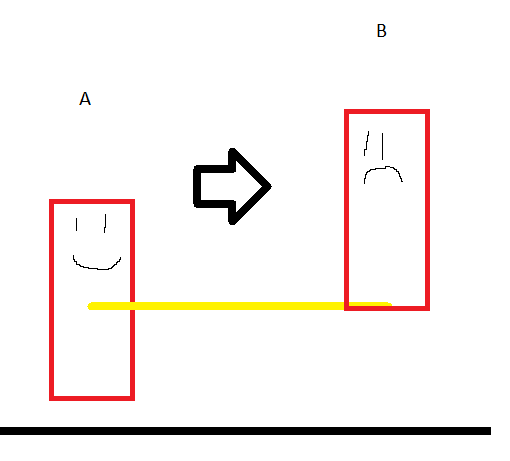
From the AI Controller, I get the possessed AI's location and project that forward to get the target location -- just a straight line.
However, by using MoveToLocation (with pathfinding off), the AI tries to meet the target location with the bottom of the AI character's root capsule.
This results in the AI constantly moving higher when it should really just stay straight.
Any ideas on how I could accomplish straight flying movement?
https://i.imgur.com/sD9a6oC.png
 silver bone

In mathematics, linear interpolation is a method of curve fitting using linear polynomials to construct new data points within the range of a discrete set of known data points.
dim plover
I don't really see how that's applicable. Could you elaborate?
woeful wraith
@dim plover i think AI uses its own agent collider which will have its own origin location, if you're getting actor location it might be different
nice graphic btw
(it's entirely possible that i'm mixing things up with unity, apologies)
dim plover
I'll check if the Capsule Comp's location is the same as the actor's location in world space. *Yeah, they're the same.
woeful wraith
is the origin on the bottom of the capsule or middle?
dim plover
Middle, but the AI MoveToLocation wants the bottom, I guess.
woeful wraith
i'm guessing the AI movement function is using the bottom of the capsule, but the actor origin is in the middle
dim plover
So it starts from the middle, then the bottom reaches the target location resulting in higher altitude.
Or if there's a way to get the location of the bottom of the capsule, that would be good too.
 muted minnow
So... I'm working on my game, and I shoot a projectile, and my character goes through the terrain and falls into the nothingness void. Here's what I don't get. I've been a hobbyist game developer for 20+ years... and in that time, we still haven't figured out a rock solid solution to solid rock?
woeful wraith
@dim plover possible workaround would be to stick a component at the bottom of the capsule and use that components location instead of the actor location
dim plover
I got this: UNavMovementComponent::GetActorFeetLocation and I'll just use its implementation.
Strangely not accessible in BPs.
Yeah, the feet thing worked great. Awesome.
woeful wraith
hate when that happens
@muted minnow i don't think shooting a projectile should move your character unless it's colliding with it, and also no, nobody has figured out solid rock 😄
muted minnow
@woeful wraith I'm pretty sure I've had that issue pop up in every game engine I've ever used...
In all fairness... physics are not my specialty... https://www.youtube.com/watch?v=2y5Luthx1BA
 muted minnow
😉
I think my current issue happens because the projectile occasionally spawns and hits my character immediately.
woeful wraith
i think the projectile might be colliding with the player
muted minnow
Going to try and exclude it from hitting myself.
 novel summit
Anyone want a pc fan?
muted minnow
By happenstance, yes.
plush yew
can I create a box brush's reference in blueprint?
woeful wraith
it's already in degrees
storm venture
Is it possible to add an offset to a bone which happens to be following a Master Pose?
 ancient otter
Im confused then
Because basically i have a importer that is using xyz
but when it imports some stuff is flipped
I was talking to someone and apparently its because of that difference
woeful wraith
it could be using xzy instead of xyz
ancient otter
xzy?
I will try xzy, let me check
I need to compile 8,000 shaders first
I am importing with python
actor_rotation = unreal.Rotator(float(info['RotX']), float(info['RotZ']), float(info['RotY']))
X, Z, Y. Lets see if it works
woeful wraith
ah i see. yeah unity for example switches y & z compared to unreal, there isn't really a standard
ancient otter
    "RotX": "0.0000",
    "RotY": "63.5000",
    "RotZ": "0.0000",
I have a json with a bunch of info
Pos, Rot, Scale and some other stuff
The problem here is the Rot, since some stuff is flipped and its not where its supposed to
woeful wraith
Y is pitch in unreal
the XYZ XZY etc stuff is usually just for vector3 locations, rotation might have different issues (unsure)
woeful wraith
X is roll
woeful wraith
it goes x: roll, y: pitch, z: yaw
ancient otter
ohh
Yeah but thats the problem
i think
Nope
Didnt work @woeful wraith
This should be looking to the other side
that is what i mean by flipped
 eager swan
Wouldn't you want 180 degrees in yaw then?
woeful wraith
so it's offset by 180?
ancient otter
Yeah, but if i do that then a lot of other stuff gets misplaced
woeful wraith
is the world generated procedurally? couldn't you just rotate it in the editor?
ancient otter
The fence circled as blue would be were the line is
and it would be intercepting with what is marked red, exactly in the midle
alredy tried it
Not, its not
Its a map from imported, so it alredy exists
Its imported with python basically
woeful wraith
ahhhh i see
ancient otter
it should look like this https://cdn.discordapp.com/attachments/480489397498806283/608740399665905664/unknown.png

But as you can see its fliped
There is some stuff missing but thats fine, i can fix that later
rn the problem is rotations here
woeful wraith
is everything flipped? i would think everything would be wrong if anything
ancient otter
Not everything, i tried to offset everything by 180 but it was a mess
XYZ = Degrees =  The info im getting
Euler = Angles = Raw, Pitch, Roll (UE uses that)
are the rotations in the level file maybe relative rotations and the objects are supposed to be attached to something else, which is rotated?
ancient otter
the original file has this
{
"classname" "misc_model"
"model" "accessories_book_row03_paris"
"origin" "828.9540 363.2440 -47.0000"
"angles" "0.0000 -165.0000 0.0000"
"modelscale" "1"
}
It has all the info
ofc, there are thousands of this
then i convert it to a json like this
  {
    "Name": "accessories_book_row03_paris",
    "PosX": "828.9540",
    "PosY": "363.2440",
    "PosZ": "-47.0000",
    "RotX": "0.0000",
    "RotY": "-165.0000",
    "RotZ": "0.0000",
    "Scale": "1.0000"
  }
there's no parent reference though? so it's all world space rotations?
ancient otter
Yup
No parent or anything
I took the model name, the rotation/location and the scale
and organized it
And so it takes the info from the json
But as you can see, its kinda fliped because of what i said
woeful wraith
i kinda feel like the axis order is still wrong, and it should be 0,0,-165 instead of 0,-165,0
ancient otter
let me show you, here
actor_rotation = unreal.Rotator(float(info['RotX']), float(info['RotY']), float(info['RotZ']))
This is what ue does
its the rot part of the script
i can just change xyz to whatever i want
so like
zxy
or whatever
So what you are saying is xzy?
woeful wraith
yeah that's what i think the issue is with that, but if that messes everything else, that's weird
ancient otter
I will re-place the assets with xzy
and you will see
its on it, it takes like a minute or so because, again, its thousands of lines
woeful wraith
the constructor for FRotator is indeed pitch, yaw, roll. i was going off x,y,z in the inspector.
woeful wraith
i assumed x,y,z in the inspector matched the constructor for FRotator, but i guess not
ancient otter
So i have to convert from xyz to yaw pitch roll
In python i can probably do that
But idk what do i have to do convert it
Idk if i have to do an equation, or nothing
That is why i came here to ask
You got any clue?
woeful wraith
kind of at a loss but i still think the order of those values has something to do with it
ancient otter
It does
I assure you that
if its xyz its a total mess, so yeah, it has something to do
I found this on the internet
The rotation of the thing is 70.199997 °
if i put that value in te quaternion it outputs 178.3677519
if i do 70 + 178 i get 248
I puted that in the z value again and its perfect suddenly
Wich means that yeah, its what you said + what i said
woeful wraith
weird. rotation values in unreal go from 0-360, and then loop, so it's already degrees
ancient otter
Well, at least ik solution
woeful wraith
haha indeed, whatever works 😄
ancient otter
This is what i used
It is open source also so thats amazing
So somehow i think i gotta figure out what equation it is doing and translate it to py
woeful wraith
you shouldn't be using quaternions though if the rotations are stored in x,y,z degree format
woeful wraith
lol yeah
ancient otter
wait i will do a gif and show you
woeful wraith
going to drive home real quick, be back in a bit 😃
autumn elbow
Are you setting yup ur level in a Dcc then using Python to place it in Unreal?
autumn elbow
Like Maya, Blender, Max
ancient otter
Its a map importer for (in this case) bo2
autumn elbow
Digital Content Creator
ancient otter
it takes the .map, and then i made a script that converts it to a json with the info i need, and only that info
and then i use the info from the json to place/import stuff in ue4
autumn elbow
Pretty coool
ancient otter
its almost done, i will release it for free for the community of 3d editors
but first i gotta fix this problem
autumn elbow
I'm going to have to do that soon. Lol
ancient otter
wym?
autumn elbow
For my game
autumn elbow
I want to build my level in 3dsmax and import
autumn elbow
I don't wanna use Unreal to place it
ancient otter
give me a sec
autumn elbow
Not Yet... but when I get to the building portion lol
ancient otter
How To Use Python Inside Unreal Engine 4 Introduction Video ──────────────────────────────────────────────────── GitHub ► https://github.com/AlexQuevillon/Un...
autumn elbow
Niceee...thx!
ancient otter
np
autumn elbow
Just finished my snap cube blueprint. Took 2 looooong months
plush yew
hey guys, is there anyway to access variables in an actor's compenents in the BP?
for example, I made a component that tracks health, how do i get the health float variable into the bp?
 light thunder
what is causing this? I updated to 4.22, I 'modified" all the color curves and saved it but it's still doing it (ultra dynamic sky I believe) ...I don't see any HLV yellow errors about linear color clamps
 cunning siren
Anyone have any idea why perforce wouldn't be tracking a specific folder in the C++ classes folder?
autumn elbow
@plush yew Via cpp?
light thunder
@plush yew watch the blueprint communication video 2 times at least
plush yew
@autumn elbow yeah the component is cpp
autumn elbow
Expose the variable to blueprint read write
plush yew
i have
autumn elbow
Then drag the component into your bp graph , and off the pin choose Get...
plush yew
oh ok, thanks
light thunder
anyone see that distoriton in the video?
plush yew
guess i figured it would have shown up as if i made the c++ for the bp
thanks for the help!
autumn elbow
@light thunder your vid doesn't play for me
plush yew
click here if youre on mobile @autumn elbow
that will open the video in your video playing app
light thunder
Does anyone understand the backend for the proxy mesh generation of HLOD's.....I have a strange doubling of static meshes in my sublevels (and they are BOTH tied to an LOD actor....) other than their display names, they appear identical and they cause a lot of z-fighting (flickering) .....super annoying because there is no easy way to fix them
 violet olive
Heya, really hoping someone can help me getting unreal working properly. The CPU just stops compiling shaders (ShaderCompileWorker.exe drops to 0 percent) its making unreal impossible to use. I know the project isn't the problem as I tried it on my girlfriends pc (which is worse than mine) and it all works perfectly. I have just reinstalled everything and its still the same. I've had this problem since I first started using UE and it's really getting to me.
woeful wraith
@violet olive what are the specs on your machine? one thing that comes to mind is maybe your graphics card doesn't support newer shaders and something isn't compatible with it
violet olive
GeForce GTX 1080, i7 7700k, 32gb ram
violet olive
yeah, my gf has the same card, just the 1060 and it was working perfectly
woeful wraith
have you tried deleting saved & intermediate folders?
violet olive
I've wiped everything to do with unreal off my pc and reinstalled it all
woeful wraith
these folders are in the project
violet olive
Well I tried the project on her pc and it worked so would that make a difference?
I'll go try it though
woeful wraith
sometimes those folders get messed up, they're not meant to be transferred between pcs afaik
violet olive
just tried it, same thing, processor goes to 100 percent for about 3 seconds they all the shader workers die
it loaded on her i7 4770k in about 10 seconds
on mine it just hangs forever
woeful wraith
you can also try messing with Settings > Preview Rendering Level to force it to compile differently, and maybe one of those will work (not a real fix but you could see if one works, at least)
plush yew
@light thunder
light thunder
that seemed to fix it, I tried that once before but this second time it worked
not sure why
I appreciate you finding that
plush yew
np
violet olive
It wont even load into the engine
plush yew
way2close what operating system
violet olive
windows 10
plush yew
have you updated to the latest windows 10 drivers
violet olive
yeah its all up to date
light thunder
oh ho, dynamic resolution unsupported...wtf
woeful wraith
@violet olive try loading an empty project, does that work?
plush yew
@violet olive Are you running it as administrator?
plush yew
Are you running "IncrediBuild"?
woeful wraith
if an empty project doesn't load, that's no good. there should be logs in the engine and/or project folders
plush yew
"IncrediBuild" breaks UE4 and needs to be uninstalled using add or remove programs if you have it
violet olive
I know, I wish it were incredibuild
but i dont have it installed
Ok it loaded an empty project
plush yew
Try turning off your computer, removing your video card, and run on CPU
violet olive
so it has to be the shader compiling thats wrong
because its the same in the material editor
i dont have video out on my motherboard
woeful wraith
check the log files in Saved/Logs for the project
there will probably be some shader errors in there
violet olive
the log looks fine
when i finally did manage to get it in the engine, the log would say something like
4000 shaders left to compile
0 shaders left to compile
woeful wraith
what version of unreal?
plush yew
If IncrediBuild broke it on some computers this could also be a similar issue
violet olive
4.22.3
plush yew
IncrediBuild broke UE4 because of a runtime package
woeful wraith
you could try copying the project to a new folder and load it into 4.23
woeful wraith
since 4.8?? lol dang. maybe just reinstall windows at that point
plush yew
^
violet olive
ive reinstalled a few times in that time period
woeful wraith
hmmm very strange. i've never seen it fail consistently like that
violet olive
I know, it's driving me crazy
woeful wraith
but that makes me think it's a hardware issue
woeful wraith
i suppose it's possible if it's not running stable
violet olive
its stable as a rock 😦
plush yew
woeful wraith
does putting it under full load make it freak out with other programs or just unreal?
if you have spare parts you could try switching the gpu, cpu, memory, etc one at a time
violet olive
full load works fine for anything
plush yew
@violet olive the i7 7700k was not meant to be overclocked according to intel
it's simply unlocked
violet olive
would that cause this issue though?
woeful wraith
worth a shot to set it at stock speeds imo
grim ore
you are letting ue4 have access to your network and not blocking it on a firewall/AV level right?
violet olive
i gave it the same exact access i did on my gfs computer
woeful wraith
i don't think the shader compiler requires network access, only lights
violet olive
the only thing that is different is that i have f-secure
but i turned it off for the install and test run
grim ore
shrug works on hers but not mine, only difference is X but it can't be that
woeful wraith
any chance you could try loading the engine on linux and see if that works? lol 😄
violet olive
not really lol
woeful wraith
if it works in linux that means it's most likely some sort of software/driver issue in windows
violet olive
Its just like it gets bored half way through compiling and gives up 😦
also I dont understand why there are 5 workers
i have 4 cores
woeful wraith
it should spawn 1 process per logical cpu
grim ore
4 cores, 8 threads, 1 worker can be active per thread
violet olive
so there should be 8? lol
grim ore
"can"
violet olive
oh
woeful wraith
maybe migrate all of your materials into an empty project and see if that compiles
grim ore
this is on my 5820k with 6/12 and you can see it using 8 workers when editing a material https://i.imgur.com/NruV8uF.png
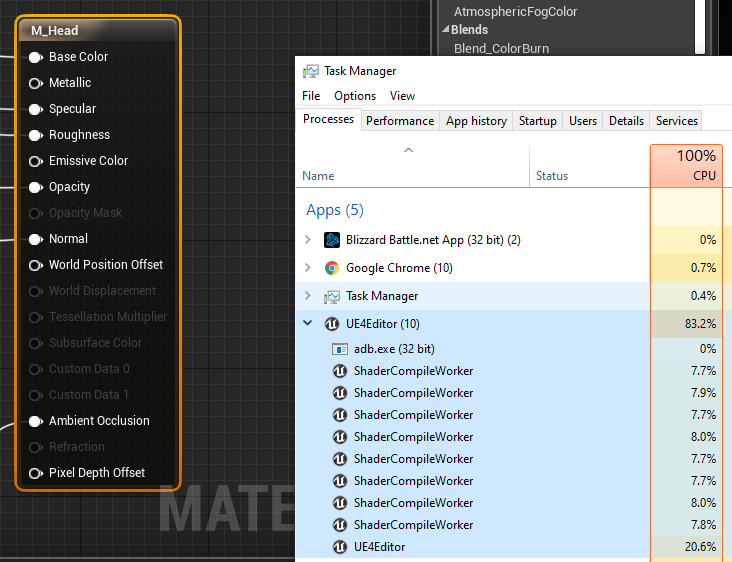
and I have a 1ghz overclock on this sucker so it would definitely be weird if your overclock was causing issues like you describe, unstable from an overclock should just kill the machine itself not stop compiling
woeful wraith
oh good point 😦
grim ore
technically make a new project then copy/paste the .uasset files into the new one should work if it's the same version
woeful wraith
could be something in project settings then, rendering settings
grim ore
so is that project set for DX12 or Metal or something odd like SM5 only ?
I mean if it's that issue then nuke your saved directory temporarily and open it and see what happens
the Config dir as well for good measure 😛 Keep the Content and any source folders and the .uproject and see what it does lol
woeful wraith
yeah, maybe start copying files from config dir. DefaultEngine or DefaultGame maybe
hopefully you don't have a ton of custom settings
grim ore
well if you just rename the folders and open the project you can always pull the files back in if it "works"
or hope you dont obsessively empty the recycle bin like I do...
violet olive
It was just the vr template
grim ore
I swear every time I see the desktop I have to clean it
violet olive
i hadnt changed any settings
woeful wraith
right there with you on obsessively emptying the recycle bin
if there's nothing custom, then copying in the config from an empty project should work
violet olive
how do I check dx12 metal or sm5?
grim ore
Project Settings -> Platforms -> Windows -> then you have stuff like Targeted RHI's and the Default RHI
autumn elbow
Is a uasset a collection of files, or just one?
woeful wraith
just one
autumn elbow
Coolz
Anyone seen any good, creative VR inventory systems? I'm looking for something cool for my game.
violet olive
just copied DefaultEngine.ini and its stuck at 45% again
woeful wraith
try DefaultGame.ini too, and if that doesn't work, move onto the others, or just copy them all
Engine, Game, and Editor are probably the only relevant ones
grim ore
stuck at 45% is fine, thats compiling engine shaders like normal
stuck in the engine tho 😦
grim ore
yep that is weird then, 45% on the loading screen with the splash screen or somewhere else?
and those look like default RHI's so you should have no issues
violet olive
45 on the splash when you load the project
grim ore
ok that is when it is creating the engine DDC which is normally somewhere else on your machine, like in the %appdata% folder
so that sounds like a weird permissions issue
well I guess it could be caused if the shader compilers are being killed as well but 45% is when that part of the engine loadup is happening
you don't have any weird characters in your login name or anything?
grim ore
nope
i mean it's just a guess that it's an issue like that, it could be the shader compilers being killed off by something else and that's why it never gets past because 45% is compiling shaders
grim ore
did you try this fix? ```
For a project related configuration just place into /config/DefaultEngine.ini:
[SystemSettings]
r.XGEShaderCompile = 0
shader workers still died
grim ore
well poop. If you open the editor itself and not the project does it still die? if so then we know it's not project related lol
super duper weird
violet olive
well the blank project opened fine
grim ore
😦
violet olive
LogShaderCompilers: Display: Shaders left to compile 0
while its simultaneously saying compiling 360 shaders
/sigh
 real hound
Anyone with ProceduralMeshComponent or RuntimeMeshComponent know how material blending (WorldAlignedBlend) is handled between sections? I know each section will have its own discrete UV's but I dont know if the material blending will be seamless. Currently I have multiple actors of RMC spawned in instead of multiple sections on one actor and my materials seem... well its just bad.
woeful wraith
i've never used RuntimeMeshComponent, but if ProceduralMeshComponent has proper uvs defined the sections will tile seamlessly (i think). i had a way to test this a few weeks ago, but it's different now 😦
real hound
Sections - In RMC you can designate sections of mesh that can be updated at runtime without having to recalc the entire mesh after an update. PMC has the same functionality but apparently its recalc is much much broader and slower.
I can tile normal textures seamlessly, however when I try to use a materialwith two layers essentially that blend based on the slope it gets some pretty funky results.
amber girder
just tried a world aligned texture on my procedural landscape, no issues (multiple actors with 1 section each)
real hound
^ Thank you. That is exactly what I needed to hear.
So clearly I have something funky going on material wise.
Its the multiple actors with one section I was thinking was screwing up my blends.
woeful wraith
multiple sections should have the same result as multiple actors
real hound
Yeah. I am driving my material with worldcoords too so I really have no clue wtf if causing my issue now. But at least I can stop building a replacement that used sections instead of individual actors.
woeful wraith
is it just the slope that screws it up?
the normals at the edge of the mesh might not be set right
amber girder
^^ what he said, typical issue. i have some overlap + normal calculation for edges to counter that
real hound
Yeah. I have my normals being derived though with RMCs function that takes the vertices and triangle arrays and calcs it for you. I hope and expect it's not that though.
Can you talk a little more about your implementation @alg?
amber girder
lemme open it up
thats basically my tangent/normal calc here

my heightmap is overlapping, so i can use the additional coords to calculate accurate normals/tangents
woeful wraith
@amber girder are you generating LODs procedurally as well?
autumn elbow
What's the best way to pack Geometry hierarchy for save game?
I use AttachTo to attach awhole bunch of cubes together. Now I wanna save it... and load
woeful wraith
@autumn elbow this might help you - https://forums.unrealengine.com/development-discussion/blueprint-visual-scripting/1406447-please-help-spawn-all-actors-from-save-file
Unreal Engine Forums
Hello and Happy New Year!
Watched a Youtube video on how to create a save actor file. It works but it does not show how to save all actors, just one actor.
autumn elbow
@woeful wraith sweet! Checking it out rn thx!
 still moth
whats up unreal world?
wary wave
0,0,1
autumn elbow
lol... sup
 scarlet birch
Oh , I need to go to sleep. I'm so tired I laughed at that.
woeful wraith

 autumn elbow
I saw the article... not really helpful for my case.
woeful wraith
i wonder how much that gets posted in here?
autumn elbow
What's the best way to actually pack my actors ?
I'm thinking maps, but then again .. not really
woeful wraith
hm, it looked like that post pretty much went over how to save/load things. pack as in serialize?


 woeful wraith
store a unique identifier (name/id/something) for parent and rebuild the hierarchy on load
autumn elbow
Yes! That's what I want. So.. name..Id ..
 empty marlin
Hi all,
Does anyone know how to add a point and make this point uneditable?
I hope the new point is fixed on the curve.
I konw that "FRuntimeFloatCurve" provide a way to add new points on the curve.
ex:
FRuntimeFloatCurve Curve;
FKeyHandle h;
Curve.EditorCurveData.AddKey(0.5f, 0.5f, true, h);
But I don't know what attributes can make the point fixed on the curve.
Thanks.
autumn elbow
Instead of name.. maybe class..
I could have 10 things of the same class..but I don't wanna store 10 of the same things
woeful wraith
objects have unique ids but i actually don't know if they persist with saving/loading, so probably check if it does, and if not store your own unique ids and use them as a parent reference
autumn elbow
Ok .. I'm picking up what you're putting down. 😃
woeful wraith
so each object you would save id, parent, location, rotation, scale, etc, etc, etc, anything you need to save 😃
autumn elbow
Id would just be the class, ya?
amber girder
@woeful wraith yep
woeful wraith
no it would be a unique identifier, like UUID or even a name like Cube27 would work if there was only one Cube27
nice! i didn't get that far on my implementation but i noticed you had LOD stuff in there 😄
autumn elbow
Ohh.. umm.. that may be inefficient.
woeful wraith
how so?
autumn elbow
If I save by object (actor), there will be more info to loop through when I load.
I was thinking save the Class and its transform
And parent
Another thing... I was thinking ... should I save the parent ? Or child info?
Sorry... just brainstorming out loud LoL
woeful wraith
yep. you'll probably need to do it async if you're loading tons of things - and by tons, i really mean tons. it should be pretty fast for a reasonable amount of stuff.
you want to save the id of each object, and also the parent id of each object
autumn elbow
Won't be tons.. maybe 10
woeful wraith
that'll be no problem
autumn elbow
Like 3 or 4 levels deep
woeful wraith
it only needs to run 1 loop, no loops within loops. so nesting things doesn't really make a difference
autumn elbow
So I have to have a recursive function though
To build the initial save array
1 parent, 5 children, then each of those can have 5 children each
1 block, 5 available snappoints, .....
Also, Thankyou very much for your feedback 😀
woeful wraith
np. i don't think you'll need to do any recursive looping, but you might have to loop twice while loading to set the parent references after everything exists
autumn elbow
Hmm.. no recursive? How do I get all the children ?
woeful wraith
everything you want to save could either have a tag or a specific class that you're looking for
or a component even
then just loop them and save. you only need to get its parent, not children, so no recursive looping
autumn elbow
There will be multiple parents in the Level. I may have forgot to mention that lol
woeful wraith
doesn't matter 😃 just make sure each one has a unique id, save it, load them, then set the parent to the object with that id.
autumn elbow
Oh I see what you mean ...
Spawn all the objects, then run the Attachment function to set their location, parent and rotation
On load
woeful wraith
exactly. you might need to play with the attachment rules to snap everything correctly
autumn elbow
Then there will be 2 loops ... sounds like a interesting way.
woeful wraith
only while loading, and not recursive. there might be ways around by looping in reverse while saving or something
autumn elbow
See... glad I found you. My way was abit more complicated .. lol
woeful wraith
depending on how it saves you might not even need to loop twice... the parent object for the one you're creating just has to already exist or you can't set the parent reference yet
autumn elbow
Sweet! I'll build that system tomorrow morning. Thank you very much for your advice.
woeful wraith
😃
eager swan
can you try adding "reference to self" node to the pawn input on the ai move to
eager swan
have you tried adding a "print" node to 'cast failed' to see if the cast is the problem?
 mossy nymph
ofc, since your acceptance radius is larger then your map
 blissful trail
yep
eager swan
oohh yeah acceptance radius needs to be smaller
mossy nymph
if its inside of it = it arrived on destination
mossy nymph
acceptance radius isn't a radius in which the AI needs to be to accept the command
its the radius for "close enough"
so if acceptance radius is 200
next badger
if goal within of ai radius
mossy nymph
AI will stop at 200 units from the goal
blissful trail
oh lol
next badger
@mossy nymph or closer, depends on speed and tick
mossy nymph
and it doesn't take an ActorLocation either, it takes closest point on collision
for calculating how close it is
so if you were to move to sphere with radius 300 with acceptance radius of 200, AI would stop 500 from sphere center
blissful trail
is there any way to detect if there is a obstical ?