#ue4-general
1 messages · Page 495 of 1
 grim ore
 plush yew
i dont know, it just don't play
i tried the same way as i do in a single player game, but does not work
grim ore
does it not work at all or just not work for the other people or ?
plush yew
it plays on the client pc, but does not play on other people neither the server
 ancient lotus
then your trying to play it from the client pc
grim ore
chances are you are telling the client to play is why and not telling the other clients then using an RPC call
ancient lotus
^
grim ore
look into using a multicast event ran on the server
ancient lotus
if you want everyone to see it (and call it from the client) then do what MathewW said. go from client to server, have the server run a multicast function that plays your montage
grim ore
or somehow make your anim bp handle it and replicate that info lol
plush yew
i did the replication, i think the real problem is the server, thanks
 wary wave
the problem is almost certainly replication
at this point you probably want to drop into #multiplayer with some blueprint/code
ancient lotus
^ dont forget to print some logs to help see where things are running
grim ore
delete all the code and start from scratch!
plush yew
i'm starting to consider that lol
grim ore
It's not a good option tho unless you have changed a ton of stuff and it's all broken. Getting replication down and understood is a pain in the buttocks
lol.. apparently someone already asked this question and when I went to open up a random test project to figure it out I already had the code done for it... wtf
ancient lotus
psychic
plush yew
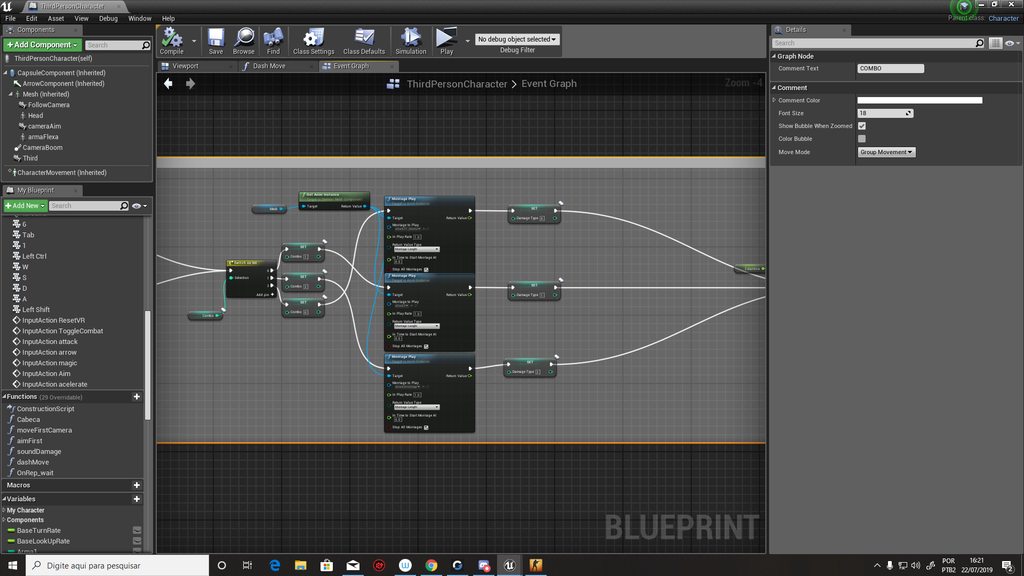
it's a combo event who plays the montages
grim ore
here was the code I had https://i.imgur.com/dGmeHGL.png on the player, 1 key triggers the event to play a montage. https://i.imgur.com/QC3q7tN.png is the function for playing the montage that is called
grim ore
technically no, you could have one event on the server for each montage and call the correct one
this just made it easy to choose the montage to play at runtime
doing it this way you just change one thing, the montage when you press the 1 key, and it will play the same one on all clients so you only need 1 set of functions and events for any amount of montages
plush yew
 cedar moon
Is it possible to hide a component from the component graph?
I want to spawn it at runtime, so the graph doesn't really need to see it.
plush yew
i used something similiar of what you used, but i need to make a event for all the montages
?
grim ore
I can't see the image but you need to make sure that is being played from the server to all the connected clients so they can play it locally
plush yew
thanks man, it worked, i made the same way you did, but i called the same function passing different paramters
 dawn gull
I am having a problem with LAN in Unreal I have followed, and finished this tutorial: https://www.youtube.com/watch?v=pk08GYlOvhE

Previous video (first simple version): https://youtu.be/AWDGsORVgNQ DefaultEngine.ini code: [OnlineSubsystem] DefaultPlatformService=LAN If this works hit li...
I would provide footage of what is happening, but it would be too large to upload. I can't really describe what's happening, so we would need to get in a call and i would share my screen to show what would happen
ancient lotus
@dawn gull also show how to setup a dedicated server on your pc for testing
https://www.youtube.com/watch?v=CfCq_pK78yw&list=PLnHeglBaPYu_aUsm78py_O_OENKhdCGZS

I apologize for my mic, in the beginning it has some static and is picking up every sound, int he second half the mic is not sensitive enough either. I'm try...
 brisk pebble
I have a simple question, for which i cant find a proper answer, after building my lighting it gives me this error "WorldSettings Maps need lighting rebuilt".. the Docs dont seem to contain info about that error and i dont really understand whats ment with "WorldSettings Maps"
Tried rebuilding my light in diffrent qualites but didnt help
dawn gull
@ancient lotus i dont want dedicated servers just LAN
ancient lotus
your setting it up to play on lan (multiple clients on your own network)
dawn gull
yes
ancient lotus
its not a public dedicated server, its a server for testing locally
ancient lotus
thats what the video shows
ancient lotus
you just confused me lol
dawn gull
i did the tutorial and we can we get in a call so i can show you what happens
ancient lotus
in about 5 minutes if that works
dawn gull
ok\
 spark sonnet
Hi. Why is the sun not changing when this is called? The print string works
grim ore
I believe with the BP Sky Sphere there is a function you need to call after updating anything like the light position and such to refresh the material
 sick escarp
Is the actor spawned before that's called?
How do I solve the cooking error: Ensure condition failed: ObservedKeyNames.Num() > 0?
spark sonnet
That could be it Mathew. Let me try
grim ore
there is a function called Refresh Material that should be called after changing any values
Sun Height is only used if you have no light assigned to it tho so keep that in mind
grim ore
@brisk pebble it's possible swarm and lightmass never get a chance to actually build the light which is why the error keeps happening. Did you allow lightmass and Swarm and UE4 all access to the internet when they first started?
ok I cant grammar today I give up
brisk pebble
Uhm yeah, just started pretty recently... is there a way to check?
looks like its working to me
brisk pebble
Found out what caused it, the "Precompute visibility" was disabled and enabling it seems like to fix it
grim ore
super duper weird but yay
wary wave
0_o
grim ore
that was my thought as well lol
 serene birch
the only reasonable explanation I could see is if somehow input mapping was put in it's own optional module at some point 😄
grim ore
but then where does speech mapping come from
 humble bloom
It is 4.23.0 Preview 2
grim ore
well that explains where the other mappings went to then
oh lol
you can delete the entire category now
....
the trash can icon next to the mappings on the right can delete the action and axis...
wary wave
that does not seem ideal
grim ore
it is not for sure, it doesnt let you do that for speech so bug it is
humble bloom
Unreal Engine Forums
Hey guys im a little bit lost.
What happend to the input mapping in 4.23 ?
I see Speech mappings but the axis mapping is gone ? Am i stupid or what :/
grim ore
if there are no mappings in there it defaults to gone is the issue
so import in a new DefaultInput.ini from another project with axis/action mappings or add them back in
that's a pretty cool bug
 compact girder
Hello
I am wondering if there are any plans to make the Array nodes like Add and Remove align better with other nodes
Even with Straighten Connections it doesn't align properly
 safe rose
Well, they have changed other nodes (shapes, sizes, etc)
compact girder
I personally find it a bit annoying
safe rose
So, it could happen
compact girder
I am wondering if others feel the same
grim ore
put the array in a macro to hide it 😛
sick escarp
What does "PackagingResults: Error: Ensure condition failed: ObservedKeyNames.Num() > 0" mean? I googled but even then the anwers are pretty unclear
After googling I thought it meant that I had blackboard decorators with invalid as key type but that's not it
 mild pulsar
How do I change graphics settings when game starts in C++? For example, I want my game(when I packaged project) to load with r.ShadowQuality 0 on startup. How do I do it?
 next ivy
Is there a way to change the iteration naming convention in the world outliner?
So like instead of floor_4x4 iterating to floor_4x5 it iterates to like floor_4x4 (001) or something?
 carmine shell
is there any way to look at the details of the game instance during play short of print string? with a game state I can just select the game state in the editor while playing and look at the variables but I don't see one for game instance
 fervent pike
@grim ore holy shit you're here! Really important question before I screw up my project! I saw your video on the correct sun position plugin and immediately thought this is what I need in my game. It takes place in the North, where the sun angles are weird. I was wondering if this could be used for a day/night cycle.
grim ore
hello 😃 It should be able to be used for a day night cycle yes. You just need to manually refresh the blueprint with "Update Sun" every time you update the time @fervent pike
 autumn elbow
is it possible to loop over the data in a MAP ?
grim ore
you can get the Keys or Values from the MAP which is an array you can loop over
grim ore
😃
autumn elbow
I never knew just how difficult the attaching in Kerbal Space Program really was. lol
 manic pawn
don't actually use the key array, you can also directly iterate the pairs
autumn elbow
How do I iterate through without loop ?
is there a better way than this ? @manic pawn
manic pawn
huh guess you can't in bp
autumn elbow
ah gotcha.. yea..this is the only way i know lol
 rain ember
Hi everyone, new here and not totally sure where to post this... but I was wondering if anyone has had any issues using the High Resolution Screenshots? I'm trying to take screenshots of my level and when I take the high res screenshots some of my assets are gone or in the wrong place... normal screenshots work fine... any ideas?
grim ore
I just took a 1440p X4 high res and no issues here. Perhaps running out of memory during the screen shot?
even then I doubt that is it. Is this at runtime or edit time? All I could think of at edit time is any construction scripts firing for some odd reason
rain ember
I've tried taking the screenshots during both, and the issue is still there.... can't find anything about this on the forums
Maybe its a memory issue idk
grim ore
I ran out of memory once trying but it literally just crashed UE4
so it doesn't seem like that would be it. Does it do it on a blank level? weird test but maybe its the engine not the map
grim ore
well in theory that eliminates the engine, so it's something in the map. The items that are missing or moving are they just meshes or are they blueprints?
rain ember
just meshes
im trying to find properties on the objects that are disappearing / moving but everything seems the same
grim ore
disappearing I could see being culling of some sort or even LOD (which is weird on a screenshot) but moving seems off
rain ember
yeah I'm pretty lost rn
normal screenshots work fine
so it has to be just with the high res
might try loading the level on my other pc and see if that does anything
autumn elbow
is the ADD node the only way to change the value in a MAP?
grim ore
correct unless you want to be crazy and convert the keys and values to arrays, change the value in the array, then make a new map 😛
autumn elbow
hahaha.but then i could just use arrays
btw.. Thank you so much for all your videos!
grim ore
😃 just glad people find uses for them
autumn elbow
Can i manually call Weld Simulated Bodies ? (instead if the Attach Actor node calling it)
grim ore
I don't believe so, I want to say it's part of the attaching process. I would assume you could just re attach it using the keep whatever options and weld it then?
autumn elbow
the problem is as soon as attach to does the welding, the overlap events are called. This breaks the flow. Attach To doesn't go to the next pin until the overlap is done doing its thing.
i have the overlap setting a variable which get overwritten but the 2nd call to overlap by the attach 2. This breaks everything
lol
grim ore
disable overlaps when attaching, re enable when done attaching?
autumn elbow
can't.. cus when i disable it, it fires the overlap anyway becuase it has ended overlap
grim ore
well poop. Are these supposed to overlap at all? the items you are attaching
grim ore
well my next idea is to change their collision profile or settings so they are different before attach and after so they dont collide while attaching or I dunno lol
autumn elbow
each face has a sphere collision component. when they are attached, the sphere collision is disabled and hidden.
when the spheres touch, the event gathers info and sets it in variables. things like what object touched, and which sphere touched.
then when i release the mouse, attach is called to attach them together.
So the process of attaching causes the sphere collision to fire again. This sets all the vars again with incorrect info. Booooo
I'm basically building Kerbal Space Program's attachment system. From the vids of the game, this is what i think is happening under the hood
grim ore
ok so when the spheres touch it tracks data on the objects?
autumn elbow
yup
grim ore
and when you weld it they trigger again but it causes an issue why?
set data when overlap if data is not set, do not set data again if data is set. remove data when welding is broken or the end overlap happens?
so basically only set the data once because you are only setting it if you don't actually have any yet
I can think of a few ways of doing this but trying to avoid boolean checks lol
autumn elbow
i fixed it.. lol I moved the attachment all the way to the end of the flow. it does affect the position because gravity thats affect for a frame, but then the attach to catches it
grim ore
ah nice
autumn elbow
still doesn't fix the issue.. but i'll leave that up to the cleanup and refactor stage.
The fix i think would be what you suggested, where if the var is valid (has some info) then don't process it
grim ore
yeah basically. I don't know your flow but if the goal is to only set the value once on the initial overlap then do just that, valid check it before trying to set it again and if it's set then don't set it to something new. just make sure to clear it out and set it back to nothing when you are done with that data on the end overlap or break I would assume
trying to come up with some new video training stuff but my brain shut off about 8 hours ago lol
autumn elbow
hahaha
Thanks dude, thats what i'll do
I'm still going through your livestreams ... lots of stuff
grim ore
yeah I really liked doing them but they don't pay the bills and Epic won't hire me to just goof off all day with UE4 users lol
autumn elbow
yea... i found that out in life also. Its very rare to find people to pay you to have fun.
LoL
grim ore
well I certainly have fun doing what I do now so nothing wrong with that the problem is there is no "Community Manager who farts around with people all day" position available heh
 compact oyster
Is there tho
grim ore
right now trying to find more focused UE4 content that is missing from the current training system and good ways to do it 😃
I think there are a few CM's at Epic who almost fit that position but Discord is low on the totem pole of faffing off with people category. Apparently there are lots of people in other places with problems and they all want help lol
 hidden mango
I dont know where to ask a question about android but I will ask here. Im new to android developing and I just finished a working game that i have tested on my phone but when i try to upload that apk it gives me problems. what else aside from packaging do I need to do to have it ready for the play store.
grim ore
what errors does it give you?
hidden mango
You uploaded a debuggable APK or Android App Bundle. For security reasons you need to disable debugging before it can be published in Google Play. Learn more about debuggable APKs or Android App Bundles.
You uploaded an APK or Android App Bundle that was signed in debug mode. You need to sign your APK or Android App Bundle in release mode. Learn more about signing.
when i upload it those are the messages
grim ore
when you package the project from the menu there are options for like shipping and development and such
hidden mango
yeah i did put in shipping
hidden mango
that is where i might need help i dont have that set up
grim ore
in packaging in project settings do you have for distribution checked?
and as for the key I want to say recently they added in the ability to generate and sign with a key on the dev portal page itself when uploading for the first time
grim ore
but the signing page is at https://docs.unrealengine.com/en-US/Platforms/Mobile/Android/DistributionSigning/index.html
Under Project Settings -> Packaging do you have Full Rebuild and For Distribution checked?
hidden mango
the box that said full rebuild wasnt checked
i just checked them both now im going to try the key store, alias, etc
grim ore
probably not it, the redistribution one is the key and the shipping drop down
but yeah you "might" still need the keystore
I did some release work on normal apps recently and I had the option to let the play store handle signing for me and replace the one I supplied so I don't know if that works for UE4
plush yew
sop m9s
hidden mango
I'll do the key store and try to upload it and I'll probably come back if it doesn't work
plush yew
hey guys i know this is super random but does anyone here know a good amount about law enforcement/victims rights
 sonic pagoda
is there a way to scale something in the engine with its pivot point not at the center?
compact oyster
@plush yew I watched Judge Dredd so I'm pretty much an expert.
sonic pagoda
for like a flame thrower for example, i want to scale the damage collision box forward as the flame increase
and ive had to scale it and offset it simultaneously so far
grim ore
thats pretty much what you would have to do I would guess unless you made a custom collision box for the offset
plush yew
@compact oyster ok so basically im a victim of armed robbery. however, luckily for me they didnt take anything of value from me so i essentially have no interest in pursuin or even thinking about this case. The detectives involved in this are annoying t he fuck out of me and keep asking me for more info and to come to them and shit and its just really stressful to constantly think about that
so im wondering if im
legally required to actually help him
given no subpoena
compact oyster
(I'm moving to lounge it doesn't seem like the right channel)
plush yew
ok
grim ore
@sonic pagoda well my idea about using a scene component as the parent for the collision box doesnt work perfect but it's an idea. basically put the scene component at the place you want the pivot, move the box so it's "pivot" is at that point, then you scale the scene component and as it scales it scales the child on just that one axis from the scene component as the pivot
the issue is it seems to scale or offset in the opposite direction just slightly as well lol
sonic pagoda
thats great Mathew, im going to try it... this is what happens when you go for realism
grim ore
nope I take that back, my original offset was off lol
it works fine
I have no idea how that affects collision and such but scaling the parent scales the child correctly
screw it, to the testing mobile!
sonic pagoda
yeah thats superb Mathew, this is exactly what I needed!
sonic pagoda
yeah hes lucky i have yet to migrate that code over ....
grim ore
lol
plush yew
I've got a modular character set up with a different material for skin and fabric now. I automatically set element 0 to be skin color so that no matter what the mesh is if there's exposed skin it'll be the right color. The only problem is if one of the articles of clothing doesn't have exposed skin element 0 becomes the fabric, which then becomes skin colored. I can add another element but element 0 will always be skin colored and I can't reassign the vertices of element 0 to be element 1.
Is there a way to reorder/ reassign elements?
Set Material by Name
Actually, this might solve my issues
 worthy lintel
Hey would anyone be able to lend me a hand with my project. I'm trying to make a umg slider to controll a cannon in vr and I am having trouble linking the cannon to the umg slider. Thanks
plush yew
I don't work with VR but I might be able to help. Have you ever gotten a UMG widget to interact with your game?
hidden mango
@grim ore Thanks a lot for the help I managed to get the apk working
 primal salmon
Failed to open map file. This is most likely because the map was saved with a newer version of the engine.
hello guys
try to open up my project but it says this message and dont open my project. my ue4 version is 4.22.3
wtf is wrong with it?
primal salmon
ok fixed
i just goes to my backup folder in my project folder and replace the latest backup there with my map
thats it
 willow siren
Hey. Is it possible to attach an instance of an actor to another instance of the same actor during simulation?
 lusty carbon
Hi ya'll!
Got a question about non skeletal animations in ue4. I have an element in the scene that is an arrow indicating "Go here" pointing down somewhere. I animated it in blueprint code in tick. Is animating it as a sequence a more optimized way? or am I doing it right?
 lilac cedar
does anyone know why none of the UI drop downs work?
 merry gazelle
I'm having a weird issue where collision overlaps don't seem to work. I've never had trouble with these before.
Basically I've set a collision sphere to on (overall all) destory (self) and print to screen. When the BP falls and the sphere then overlaps mannquin & door (both with collisions) nothing happens (fyi I'm trying to get it to overlap anything)
spark sonnet
Is there a simple way to make a flowing water material?
plush yew
Why is it not possible for the blueprinting to reorder functions? Also making folders for functions and variables and so on would be pretty cool.
wary wave
you can have folders for functions and variables
plush yew
@spark sonnet You mean like a normal map + panner?
spark sonnet
yes
plush yew
shocked
spark sonnet
If I use panner with value 1 on x or y the material disappears
plush yew
@wary wave Oh I just tried it, I think you probably make new categories in the project settings? Also I couldnt find a way to move a function out of a category
wary wave
it's nothing to do with project settings
it's all there in the BP editor
top right by default
plush yew
@spark sonnet You could also render it and make a flipbook
spark sonnet
What?
I got something to work I think
But I need a new material. Since with this one I can see the edges
plush yew
I mean talking about a simple material, you could make a fluid sim in your modelling application on a plane and render an animation as a sequence of pngs, make a spritesheet from those and then make a flipbook
there should be a possibility to make it a seamless loop
and I wonder if this could even look better as normal maps than a panner
spark sonnet
Hmm thanks. I will look more into it
 soft lynx
Hi guys I need help...my 3d manipulator is not showing..any help?
plush yew
Hey, encountered a weird thing. I tried to compile my "game" for the first time, it didnt work, and since then, in one of my level (and just one), my main character isnt playable. It's been replaced by a a camera in first person mode. Anyone could help ?
spark sonnet
whats the error message?
plush yew
I have none, got plenty when the compiling crashed
it's just that my playablecharacter isn't playable anymore, and is replaced by a flying camera
spark sonnet
do you have a player start?
plush yew
yep I have, but found it ... I always need to write something here in order to find what it was. For some reason, I needed to change "Auto Possess Player" to 0 in Pawn
spark sonnet
ah
 sudden widget
Hello Devs! I'm facing an issue running a multiplayer project where 8-12 players plays together. This runs on a Dedicated Server. Everything works fine when clients are playing at a limit of 60 fps, but when a client goes over 90, they start to see rubber banding of the characters movement. Really hoping that someone can help on this one.
UE version used : 4.22.2
 lament oxide
On face value sounds like an event tick issue?
 dim plover
Maybe you're getting net saturated by bUseClientSideCameraUpdates (search this Discord for that) bug.
 shut gulch
@sudden widget im assuming this is using ACharacter and CharacterMovementComponent?
one thing to note is that the server processes those characters using the clients delta time, you have to be careful that nothing you do makes an assumption about the range those deltas can be
i have had to test with t.maxfps on different values for different clients to catch bugs that only happen at low framerates/high framerates
turning on p.NetShowCorrections also can help with that
you can see when the client and server disagree about positioning that way
I'm having a silly issue that may be simple but a quick google hasn't uncovered. When you click and drag a UE4 game window, by default the game simulation completely stops. I want to continue running the game-mid drag
otherwise, as you can guess, network synchronization gets messed up as the dragged window is then frames behind the other clients. I could figure out how much time passed and then "catch up" but that seems wrong and would cause CPU spikes after dragging the window, and long drags could cause other clients to wait for the one that is suddently lagging behind
 cyan cargo
So I am trying to get mobile foliage onto my oculus quest with Mobile HDR set to OFF and every time I paint my grass, it crashes on the level load, but if I package without the grass, I have zero problems
Anyone else know what's up?
 regal mulch
Any good way of having Per Level Data? Thought about extending the LevelScriptActor (LevelBlueprint) but not sure if that's the proper way.
It's basically for us to know if a Level is e.g. a specific Gravity type of level which would affect movement.
Could place that stuff into a DataTable, but would be cool if it could live in the level itself.
 stable spire
anyone know how to have a camera/viewport bookmark also save the FOV?
plush yew
Does anyone know if playrate of audio can be set? Can't find docs for it
 calm widget
does not seem to be a feature unless you change the pitch
plush yew
with higher pithc it goes faster though? That works well wnough for me
calm widget
Yes, Set pitch multiplier in blueprint
plush yew
Iz done! worked great, noticed max pitch multiplier won't reach higher then 4 no matter what I set it, not an issue in my case but I noticed it and thought it was a bit restrictive for other cases maybe
I'm about to get started with unreal engine by first creating a in-app level designer. I was wondering if anyone had any idea where I should start storing variables like size. I want to design the level designer to be usable in other unreal applications by people who have little to no experience with the unreal engine or programming
is there some dedicated object type for handling exposed variables?
 fallen flower
You should get familiar with ue4s workflow before you start making custom stuff
trust me
fallen flower
is the level you design not to be imported into ue4?
I misunderstood what you meant by in app
plush yew
dont worry about that stuff
plush yew
this looks fairly similar to what i want
but it is designated "savegame object" so it's not exact
fallen flower
You'd save your object's tranformations and recreate them when you reload
plush yew
the object transformations will be constant
i just need to know the best way to expose some variables to the end user
@regal mulch Maybe you can set it through game mode, Something like this maybe?
regal mulch
I ended up utilizing a custom LevelBlueprint (:
plush yew
Ok neat:)
fallen flower
I have a question. If I import a rectangular non power of two texture, UE4 will rotate the texture to be horizontal. How do I stop this?
wary wave
I'm not sure you can, but also why do you want to;
A) Have a non-power of two texture
and B) care that it is rotated?
fallen flower
I have a big library of ceramic tile images I want to apply to simple rectangles
wary wave
that's a very peculiar use case, but you can just UV the rectangles appropriately?
fallen flower
Yeah, it's an archvis thing. I scale the textures to match the a uniform 0 to 1 UV cube
spark sonnet
How can I call a custom event or event dispatcher thats in the level blueprint from another blueprint?
grim ore
you don't, level blueprint is the devil
cyan cargo
Level blueprints are good for quick one-offs or mini projects
spark sonnet
Its just for switching cameras in the menu
grim ore
it's specific to that level so nothing in it can be re used. Level Blueprint was basically deprecated when they added normal blueprints
cyan cargo
I've switched more to game instance if anything
spark sonnet
How do I get a reference to the cameras then?
grim ore
are they in the level when it spawns or spawned in later? who wants the reference to the cameras? are the cameras the same blueprint or different. are they even a blueprint or just camera actors?
spark sonnet
Just camera actors dragged in
Should I just make blueprints for them and get a variable reference?
dawn gull
Hey @grim ore
I got a fully working version of multiplayer for my game
(sorry to interrupt)
dim plover
What's the difference between ActiveClassRedirects and ClassRedirects? *ActiveClassRedirects is old.
grim ore
@spark sonnet yep that would work, https://i.imgur.com/hl0f1DA.png , a blueprint in the world with 2 exposed variables for the camera. call an event and swap cameras for example, or change to a specific one of whatever you want. Since this is a blueprint in the level your widget can get all actors of class to find that blueprint when it loads up and reference it to call the event later
@dawn gull awesome 😃
dawn gull
ill dm you a dropbox link i did
grim ore
@spark sonnet@spark sonnet the biggest issue with UMG getting access to the world is UMG doesn't exist at design time so you have to get those reference later during run time which is fun fun like using get all actors or another hard link like if your player knows about them you can go thru them
 zealous cloak
Oi, I tried to update my game from 4.19 source to 4.21
big fail
Do I need to go to 4.20 first? or should I take my 4.19 source to 4.19 then upgrade?
fallen flower
@zealous cloak Yeah, take it step by step. You can use the migration guide too.
zealous cloak
Thanks! Normally I push buttons and enable changes without reading or understanding
It has led to a great IT career
plush yew
(the actor class is what i was looking for)
does anyone know how to give a custom actor a spiffy world position and sprite for the editor?
dim plover
Pretty sure you could just go from 4.19 source to 4.20 rocket (non-source).
But yeah, you should do it in increments.
plush yew
is there something like better font sizes for certain resolutions f.e. 1080p? like no artifacts sizes?
ue4 supports ttf
@plush yew
zealous cloak
Thanks floss
plush yew
hi, what's the fuction that rotates an object? But i only want him to to rotate when he detects the player on top.
i already did the detect part but i dont know what fuction to use
spark sonnet
Set actor rotation ?
plush yew
Which one?
if you want your object to rotate you'll need more than just the rotation
i only want him to rotate 180 degrees just once
smoothly?
spark sonnet
Can it happen instantly?
plush yew
you're either asking for an animation or you're asking for an instantaneous flip
not instatly, after 3 seconds or so
this is where it becomes actual work to help you
i will probably need a timeline
you'll need a constant set to 3
you'll need to calculate how long the character has been rotating
or you can set it to rotate for a period of time
there's a few ways it can be done
the easiest way to do it is to increment the rotation over a period of time
spark sonnet
Cant you just use a timeline?
regal mulch
Timeline is indeed all you need
 radiant haven
 dull oyster
Hello guys. Im not very experienced person in unreal engine, i knoww just the basics - or maybe basics of the basics xD idk. I have a problem with tesselation display. I have height map, i ve set tesselation in the material editor. That material on flat surface displays very bad. Different from what i had in marmoset toolbag. Same material on sphere displays quite good. Actually pretty good. When i view it from third person it looks quite good, but from close view its terrible. Doesnt matter what polycount i add to plane. Even if its 260 k polys , it looks same bad as with 70k . I ll attach all the screenshots.
material editor
sphere
flat surface
third view
i ve tried to play with tesselation multiplayer, but it didint help.
spark sonnet
Why does host and join session only work if its in the same blueprint?
grim ore
@dull oyster you might get more responses from #graphics but off the top of my head what looks bad about it? we don't see how it should look compared to Marmoset so no reference there. With displacement it's super important that the mesh have enough vertices to displace properly.
or was the top screenshot marmoset?
grim ore
you seem to have high roughness in marmoset and not in UE4 for the first big difference to me
dull oyster
i ve tested that with plane with 80k polys and 260 k polys. Both looked terrible
grim ore
I would assume you should be using 1 of the channels for your roughness mag (RGB or A) not the entire texture
grim ore
so it doesnt look as thick in UE4?
looks funky too on some edges, ok I think I see what you mean
when you turn on wireframe view what does it look like, is the actual mesh tesellating well
dull oyster
@grim ore DDo u see ? 😛
that wireframe? idk how to switch off wireframe of the "world"
@grim ore
grim ore
you should be able to click the eyeball in the world outliner to hide that mesh
the sky sphere
dull oyster
or i posted question in the wrong channel and i should go to Graphics ?
grim ore
well smarter people are in graphics for graphics stuff, I was just trying the obvious problems
dull oyster
@grim ore ok, ill go there 😃 thx anyway
grim ore
okdoke
 visual belfry
is there a setting per-mesh to keep them from being culled?
grim ore
Distance or Frustrum or Occlusion
visual belfry
occlusion
I have a mesh over in another room that I want to make visible in a post process pass
specific to my game, I have markers placed in the world that I want to toggle visibility from anywhere (turning on the PP material)
grim ore
the only thing I can see that would work without disabling it completely or modifying the code is increasing the bounds scale so it would be larger than anything in front of it
it will keep it "visible" at all times basically
visual belfry
no worky 😦 set it to 1000 scale and still not visible
visual belfry
not sure what you mean 🤔
 bitter iris
why when using custom depth as mask does it constantly have a green border?
visual belfry
@grim ore nvm I might have done it 😬 I think when I was testing I accidentally moved the camera out of the PP volume
nvm, just random luck that it started working again. must be a magic occlusion algo 🤣
stable spire
ive tried so hard and can't recreate this directional snow: https://www.youtube.com/watch?v=B4dV5cLQAMI anyone done it? anyone wanna take a 5 minute look and help for $$$?
Learn how to create believable, fluffy snow in Unreal Engine 4 using materials created in Quixel Mixer. Directional Snow Material: https://pastebin.com/95Rzt...
visual belfry
and nvm again, I think I did get it to work, but the stencil wasn't actually ignoring depth as it advertised.. so I had to take everyone else off the custom depth pass 🤣
visual belfry
yeah! I think I just need to be more careful about what makes it into the custom depth pass
grim ore
ah good old text renderer, how I love thee for text in the scene lol
visual belfry
@grim ore looks good now 👍
grim ore
yay
plush yew
this is a friendly environment. I like i
 native nest
Hey guys, how i can share my project with my friends, we will code in 3 computers but we want do the changes in real time, like my friend change the model of something and in the real time i see the change, idk if the git hub method works like that
dawn gull
@native nest there is a plugin in Unreal that allows you to have to editors work. New versions only, just search multi I think it should be the first one
dawn gull
@stable spire that would be in #looking-for-talent or #looking-for-work
autumn elbow
@stable spire He shows you in the video how to do it. :/
 misty creek
Is there a good site for getting placeholder models? More specifically any sort of armor models? I'm not looking for really quality assets, just something that will work for the time being.
autumn elbow
@misty creek Free3d.com
misty creek
Thank you!
autumn elbow
and https://sketchup.cgtips.org/ @misty creek
Website Free download Sketchup Models for architecture, 3d Ware house free download. All Download Free 3D models and find 3D designers for your needs
misty creek
Thanks, I'll have a look at that one too!
autumn elbow
Keep in mind.. NON COMMERCIAL The free 3d rips game models and posts it.
misty creek
Yep, I'm just looking for placeholders, and mine just look awful. 😄
dawn gull
@native nest no, like in the editor plugins
autumn elbow
www.models-resource.com one more .. @misty creek
dawn gull
@native nest example of the plugin menu I'm talking about:
How to create Unreal Engine plugins.
native nest
ok
dawn gull
Not that plugin in specific though
native nest
ohh
dawn gull
It's by epic games btw
native nest
thx i will check
 copper flicker
I'm in an impossibility that drives me nuts..
trying to hover
shooting impulses upwards
fighting gravity
no matter what I try, I can never get stable values..
I tried shooting stronger impulses the closer we are to the ground
the only thing that happens is an endless pulse..
and my character can't fight gravity
😄
autumn elbow
native nest
thanks
plush yew
@copper flicker You want your character to float, flyr freely at ease?
Or you want gravity
?
 hasty osprey
help how do i assign two texture materials to face object on unreal?
I have tried Lerp, but it mixes the textures, how do I make it so both textures show 100% each
the textures are skin color and face markings, its ok if the face markings texture is added on top of the skin color texture'
 novel vine
Ok so I have this idea for a survival game but I want it to have realistic water I was thinking if I use spheres and hide them and just draw a mesh using the spheres as the vertices then I will be able to have like water collect in puddles and even make lakes but how would I go about doing this?
 zinc rivet
that sounds expensive to simulate
copper flicker
@plush yew hover.
so I use gravity to keep my char close to the ground
I do want a bit of pulsation.. but I want to be able to stabilize it
novel vine
@zinc rivet it would be a very short water render distance
 bright aspen
Is there a way to cast a shadow on an emissive material?
copper flicker
basically this is roughly it

Bit of Interaction. Bit of Sound. And the Circle of Life.. ^ ^ And I fixed my OBS recording settings. Now it's the graphic card doing the work.. And I can re...
I kinda like that you have to fight gravity
but I also want an upgrade that helps the player with some extra stabilisation
zinc rivet
@novel vine some games have done interesting things with metaballs for liquids. it's probably pretty challenging to make it look like water on the ground though, think stuff like portal 2's goo
novel vine
@zinc rivet ok thank you
zinc rivet
but yea you basically just described metaballs
plush yew
@copper flicker I would make it simple, at a button press att movement input in the
world up direction with a deviation of about 5degrees
for stabilisation you could then change the degree parameter after making a funciton to transform the upwards veloctty acordingly
zinc rivet
I agree with Alex - you could go the complicated route and mess with what's basically PID controller theory using impulses, but it's probably much simpler to just fake it using lower gravity values + a binding that moves you upward
copper flicker
@plush yew I think I never managed to get upwards movement input to work
so I ended up with impulses
plush yew
I think gravity scale in ue4 is correct so it should be about 9.8 m/s^2 downward acceleration, so to keep hovering you need 9.8m/s^2 upwards, unreal uses unreal units, which are default setto corespond to cm, which means you need an acceleration of about 980*units/s^2 to start flying and keep hovering
980*
sry
zinc rivet
were you using the correct units? what happens if you use a very large value?
plush yew
So if you send 1000 as a constant input upwards nothing happens?
or maybe more, letm e test
zinc rivet
@dawn gull Jarate
zinc rivet
sniper wants his jar back
zinc rivet
@copper flicker kinda hard to debug without looking at bp's/code.
I'd break debugging it into a couple steps though:
a) are you sure the keybind is actually registering?
b) Is the entity that impulse is being applied to correct?
c) Is value of the impulse being applied reasonable?
You've already done C
like, what happens if you just teleport the character up?
copper flicker
for example
shouldn't that give me 1 impulse?.. or something
it does absolutely nothing
I think it's some setting.. maybe in the character mvmnt
zinc rivet
try doing something like the answer to this question: https://answers.unrealengine.com/questions/110885/adding-force-to-pawn.html
novel vine
Hah I feel stupid didn’t even know metaballs were a thing until now
copper flicker
that doesn't work for upwards tho..
zinc rivet
or directly use AddForce / AddImpulse
what doesn't work for upwards
the example I linked?
it's just a vector. It can point any direction
give it an upwards vector
@novel vine I spent a few days fucking around with them in blender when I discovered them. Much fun 😃
copper flicker
yeah, impulse works
but gets me exacly where I was before
add velocity doesn't work
I mean it works... but not controllable
it keeps adding
😄
it doesn't remove
zinc rivet
what exactly are you trying to accomplish?
zinc rivet
that video doesn't tell me how the input translates into movement
at least without sound on lol
copper flicker
there's not much sound
zinc rivet
either way.
copper flicker
so basically I want to achieve... stable hovering
zinc rivet
do you want to make it so that when you press the button, it activates a hover mode?
copper flicker
like, for a simple sphere for example
yes
but I want true hovering, so that means it should be affected by physics
not jsut a simple offset from the ground
zinc rivet
that's complicated. You'll probably need to implement some sort of a PID controller https://en.wikipedia.org/wiki/PID_controller
A proportional–integral–derivative controller (PID controller. or three-term controller) is a control loop feedback mechanism widely used in industrial control systems and a variety of other applications requiring continuously modulated control. A PID controller continuou...
if you want smooth hovering
copper flicker
so what I did was set impulses, as long as raycasting from ground is shorter than Something
zinc rivet
there are simpler types of controllers that are less smooth (IE they have varying amounts of overshoot etc)
but you'll want to do some research on control theory
copper flicker
that looks way too complicated
I need something simple..
😄
and fast
I mean my thing kinda works....
only not great
zinc rivet
PID probably is more than you need, but you still need to look into control theory to calculate what the impulse you need to apply each tick is
copper flicker
but I imagined my math is not exactly tight...
I tried to shoot impulses that are stronger when close to the ground
it got me in the EXACT same spot
same pulsation
when I'm too high.. I start falling, and I can't stop the fall fast enough
at that point I guess I would need to shoot stronger impulses
but just a bit too strong... and I ascend too fast upwards
and it all has to work in a messy non-flat.. env
zinc rivet
the force you apply needs to be a function of your current velocity, the force of gravity, and your distance from the desired height.
lots of info here: https://en.wikipedia.org/wiki/Control_theory
Control theory in control systems engineering is a subfield of mathematics that deals with the control of continuously operating dynamical systems in engineered processes and machines. The objective is to develop a control model for controlling such systems using a control a...
 junior cairn
How can i add colllision in a 3d animated sequence ?
 crisp fable
Hey is there any place I can get the docs offline?
I found a few dead links from 2014
worthy lintel
@plush yew no I haven't been able to get the widgets to Interact with the objects
zinc rivet
@copper flicker I can explain what you need to do a bit better, but it's probably much faster to jump into the general voice channel with me.
plush yew
Okay so what I do is on construction of the widgets I assign the constructed widget to a widget variable within whatever it's interacting with
so if I had a slider that turned a gun then on construction I would assign that widget to a variable and then reference that variable from the gun with casting
copper flicker
@zinc rivet thanks, I found a tutorial, trying to create a hover component with physics..
maybe the solution is linear and angular damping
that might stabilize the system
in a cheap way
zinc rivet
the control system that you're looking for called a feedback control system. There are many types of control systems. You can probably use a proportional control system, which is one of the simplest and only slightly different than what you're currently using
one problem with proportional control systems is that they need an offset, otherwise they bounce forever
plush yew
Simple way to simulate hovering, adjusting the force to something very small and setting limits is wise, and also roating the movemnt input a small amount of degrees to not keep it rising prefectly
Just set movemnt mode to flyin while appliyign upwards movement, when releasing set back to walking mode and gravity works fins, works well just tested it
Ofc this is aquickand dirty set up
don't jsut copy paste what I did, ratehr build on it if you are going to use it, so it has appropriate limits, as you can see I am lacking a well needed clamp so upvwards velcoity can rise to any amount for now, and right now it rises perfectly straight, which migth not be desirable
@copper flicker
zinc rivet
he pretty much wants a hover button, rather than a "move up" button
which reacts to distance to terrain, etc
plush yew
what is hovering unless flaoting untill you don't want ot hover anymore
so puttign movemnt mode to walking when iinput is not upwards anymore gives teh same feeling
zinc rivet
hovering is flying that's clamped to a specific distance from the ground.
plush yew
As long as upwards velocity is not constant and a function si made to modulate teh upwards velocit based on limits adn it will be no different
zinc rivet
your method would definitely work with some enhancements though
plush yew
I specifially mentioned him needing to put limits to the velocity, I think you missed it, Yeah as is it isn't waht he want's
that is why I said he needs to build on it
zinc rivet
nah it's not the velocity limits
just needs to have some stuff that adjusts for distance from the ground and applies downward movement if you're too far away, upward if too close
plush yew
If you modulate velocity acordingly, a limit of ditancve can be assured
next ivy
The default jump height seems pretty accurate to the real world but the time in the air seems off. I definitely am not in the air for a whole 2 seconds. The gravity value in project settings is 980 cm/s which is right - so what's the issue? I feel like I'm floating a bit on default settings
zinc rivet
depends on how high you jump
plush yew
idealized environments as well
zinc rivet
for instance, when you jump, how high does your center of mass actually go above the ground?
raising your legs during a jump doesn't make you stay in the air longer
except for the additional time it will take to skin your knees
plush yew
^
zinc rivet
I just tested, and I go about.. 2 feet off the ground without trying too hard. That'd not very much air time.
meanwhile ingame, you usually go at least a meter
next ivy
I put a plane at the bottom of the character capsule and he jumps up about halfway up the thigh of the default character. It takes about 2 of my 'counting' seconds to hit the ground. This seems off
plush yew
It could be that they use data from athletes when they made teh default settigns for movements
next ivy
But would jumping the distance from someone's foot to the center of their thigh take 2 whole seconds (to hit the ground again)?
I suppose I could just calculate it
plush yew
That is the animation, the prgrammed jump movemetn could easily go higher tehn the animation and therefore teh animation feels a bit floaty
jsut spitballing here, dut it felt plausible
next ivy
There is no animation I just plopped a 1m1m plane at the bottom of the capsule
plush yew
Or maybe I'm jsut tired, thinking that thorugg it didn't feel as plausible
zinc rivet
yea, it's probably basing it off capsul position
and there's the animation on top of it
plush yew
So you can see that the capsule is only jumping like a couple of feet?
visual belfry
it's hard to compare since humans aren't really as good at standing jumps as ACharacter 😛
next ivy
True - and a lot of my feeling of it being off is me comparing it to other games and not actually real life
plush yew
ok well 70 cm should be hight enough to be close to 2 seconds
next ivy
I'm trying to match Overwatch's movement since I find it to be the most fluid movement system of any game
visual belfry
I hear a lot of games use double gravity to make jumps feel "right" 🤔
next ivy
That's what I'm looking at
zinc rivet
mario gravity is best gravity
next ivy
I think because characters are jumping twice as high to really notice it in first person they are doubling the acceleration so you go down twice as fast
It does feel off with the default settings
-1960cm/s gravity with 600 z height does feel a lot smoother for an action style but now when my character falls he falls really fast lol
Another example of when you figure out a lot more thought goes into a particular aspect of a game than you think.
native nest
@autumn elbow how my friend will join in my session? with some adress ip or something like that?
autumn elbow
No idea.. read the docs i posted. i thnk they tell you how to set it up
zealous cloak
can I run a source and regular build of the same version on a same machine as long as they have different paths? For example, 4.21 and 4.21 source for dedicated server packaging on my home pc?
native nest
the computers need stay connected to the same LAN, or vpn i will try with a vpn
copper flicker
@plush yew using Flying opens up another can of worms, and I also get a system that's hard to stabilize
plush yew
fellas im having some problems
i switched unreals IDE to VS2019 instead of visual studio code
whenever i try to open a c++ component, it just launces console and says 'loading visual studio 2019' in the bottom right corner and never launches it
autumn elbow
is it okay to gitignore the .vs folder?
grim ore
@zealous cloak yes you can, each engine install is pretty much self contained. You could even run multiple source builds of the same branch of the engine if you wanted
@autumn elbow yes that can be ignored. you can find the github supplied .gitignore here https://github.com/github/gitignore/blob/master/UnrealEngine.gitignore
autumn elbow
awesome thanks!
grim ore
@plush yew after you switched and restarted the engine, go back to file and refresh visual studio project. then try and open it again
plush yew
iu've already done that
zinc rivet
@plush yew I had a similar issue where it would open a command prompt instead of VS. My problem was that I actually had multiple versions of visual studio installed, and the executable it was trying to use wasn't the correct one (I think it was a command-line only tool for building visual studio projects)
so maybe see if you can figure out how it's trying to launch visual studio, and make sure it's correct?
plush yew
ah yeah that seems to be what's happening, how would i choose which exe to tell ue to use i wonder?
zinc rivet
🤷 gotta google it. I fixed it by uninstalling the extra "fake" visual studio install, and it found the correct one. There's almost certainly a way to configure it manually though
plush yew
im gonna do that, i have 2019 and 2017 on my pc so i wonder if that might be it
zinc rivet
is it set correctly in preferences > general > source code > source code editor ?
plush yew
yeah it's on 2019
grim ore
the issue is the build tools
uninstall the build tools that you installed with VScode, but leave 2019
plush yew
oh, yep
zinc rivet
ah yea that could be it. I think the build tools were what was popping up for me
grim ore
so yes multiple versions installed and it's defaulting to the build tools 😦
plush yew
i have 2 build tools installed lol
grim ore
yep yep uninstall them so it's just 2019 and make sure you have all the correct dependencies and you should be good
plush yew
roger, stay frosty
grim ore
VSCode was nice but.... I dunno I hated hitting the key combo for build lol
zinc rivet
what, ctrl-shift-b?
plush yew
honestly i only downloaded VScode cus i accidentally thought it was 2019 hahaha
zinc rivet
I mostly use it for Rust and JS development
plush yew
wait, MathewW your icon looks familiar
zinc rivet
and because I dev on linux most of the time
grim ore
yeah then I had to click the correct build type, and yes it would show the last one at the top, it's just so much easier to right click the project in the solution explorer and hit build lol
plush yew
are you guy who does youtube tutorials as well?
zinc rivet
you can set a default build type you know?
grim ore
that's what it says on my profile 😃
zinc rivet
so it doesn't show the menu
zinc rivet
bottom option lol
grim ore
@zinc rivet I did not know that and if I spent more time with it that would have been nice lol
zinc rivet
granted it's in a kinda weird place
grim ore
i just use Code for node.js right now
zinc rivet
that aside, I do use VS2017 for unreal stuff
grim ore
I think I just hate C++ too much to even try and make the experience better...
zinc rivet
lol
plush yew
oh also, i had another question here for something a little later down the road. I'm interested in C++ coding, but someone told me the ideal workflow for UE4 is Blueprints and coding, how easy is it to dissect blueprints to learn from the C++ inside?
grim ore
i dread doing C++ stuff because it just feels so archaic having to type stuff anymore compared to blueprints lol
@plush yew I have a 5 part series covering how to introduce C++ to a Blueprinter where I show how the C++ code matches up to the BP code and how easy it is to compare
zinc rivet
most BP functions have c++ equivalents
grim ore
like literally every BP code is just C++ on the back side exposed to the engine
hover over the node, see where it says its coming from, find that file in C++, find the code, profit
or I just get lazy and use github search on the unreal engine repo lol
zinc rivet
BP communication is handled a bit differently than in C++ iirc
grim ore
yeah you really don't want to mix communication between the 2 if you can help it. Just expose C++ stuff to BP and handle it in BP. let C++ do the heavy stuff and BP do the easy stuff like putting stuff in a level and hooking up events and blah blah blah
prototype in BP, see if you want to move it to C++, move it to C++ and expose it back to BP, repeat till you shipped gears 5 😛
zinc rivet
bp good glue 😃
grim ore
I don't understand people who want to just use C++, it's like using ECHO to create a text file when you have notepad to do it
grim ore
yep yep it's super common to do what you want but honestly you should probably use the same build (source build) for the client and server stuff once you get to that point. no reason to try and use the launcher .21 for client and source build for dedicated server
plush yew
but from what I can gather, it seems blueprints and coding are fairly similar with blueprints just having the visualization present
zinc rivet
eh, you can apply CS concepts in BP.
zealous cloak
Isn't it more efficient to do it in code versus let runtime BP compile?
Which is why I nativize some BP
grim ore
Blueprints ARE coding. every BP has some code behind it. Rather than typeing out like UE_LOG(TEXT("I HATE C++)); you can just use a Print String node and do the same thing
plush yew
ah ok
zinc rivet
BP just makes some of them approachable to artists. Lots of convenience stuff and you don't need to worry about a lot of the C++ pitfalls
zealous cloak
True
zinc rivet
but the actual stuff behind it is the same
plush yew
so i could potentially go into blueprints and add my own custom nodes and stuff in code if need be?
grim ore
- , & , -> , etc... those are things you get to ignore when using blueprints 😃
plush yew
thank god
pointers are my nightmare and im already pretty much done with my CS degree
4 years in school and i'd be happy if i never had to see a pointer again
 snow thorn
is it possible to let unreal open a second client for multiplayer on the second monitor? i always have to move the window when play testing which is annoying
zinc rivet
I'm currently trying to wrap my head around Rust lifetimes. I think they kinda make pointers looks easy. Mostly because they're only used in complex cases, but pointers are used everywhere so there are easy examples.
grim ore
and as for performance, don't worry about it until you have to worry about it. Most of it is negligible for most basic projects. Heavy math or processing of data might benefit from C++ but if you are doing that you probably already know you need to do it in C++. Spinning a Cube with a texture on it in Pure C++ or a BP Actor in Blueprints is the same in the end.
plush yew
that is kinda my worry though, that i won't improve as a coeer if i just use BP
coder*
grim ore
@snow thorn nothing built into the engine will do that no 😦
sure you can improve
learning to use a loop, for each, do while, etc. in BP or C++ can teach the same fundamental concepts
zinc rivet
the important part of programming is the concepts and learning how computers work, not the actual syntax
snow thorn
awww 😦
plush yew
i already know the fundamentals like that, but mnore complex stuff like memory management and stuff like that
and performance, etc
grim ore
UE4 handles memory management for you in C++ or BP so yay for that
snow thorn
thanks for letting me know @grim ore
plush yew
oh thats nice
 severe lintel
I'm trying to make a procedurally generated world. Currently, it is working, but my method of instantiating blocks is extremely inefficient. I am creating a new actor for each block, which is greatly reducing performance. What is a better method?
grim ore
performance is again one of those things you learn as you go and the concept is the same in C++ or BP.
loading up a 200MB mesh into memory 20 times? might not be a good idea lol
plush yew
FINALLY got unreal to play nice with VS2019, thanks for the help everyone
grim ore
@severe lintel there was a blueprint minecraft project out there that you could pick apart but for the most part you can look into using mesh merging, instanced meshes, hierarchial instanced meshes, and in 4.22 they have added in automatic batching for static meshes
zinc rivet
nah, what're you talking about? All the people who play my game are definitely going to be using graphics cards with 20gb of vram no problem 😛
plush yew
now gonna head back to my tutorials and grind at this haha
severe lintel
thank you so much
plush yew
my graphics card is 5 hamsters with a bunch of paint brushes who hand paint every frame
 scarlet birch
In two years I've only had one function that had to move to C++ for performance reasons. With timers by events and some of the other stuff the last few updates have done BP is plenty fast when it's clean.
grim ore
what to use with UE4, BP or C++ or C# or JS or whatever you want to hack in even, shouldn't be a main question it should be more about just making something and learning how to do it and doing it and then later you can iterate on it and do it another way or change the way you do it or just be like "oh wow, I didn't spend time deciding what to do I just did it and now I am done"
zinc rivet
very true. Facebook is built on PHP, and people love to hate on that language
plush yew
minecraft was made with crayons and construction paper iirc
scarlet birch
I just use whatever is faster for me to setup. Sometimes it's C++, most of the time it's BP
zinc rivet
@plush yew nah, java. I think crayons might have been a step up 🤣
plush yew
oh right, notch couldnt afford crayons so he had to use java
grim ore
man the debate about starting with C++ or BP reminds me to put that on the list of frequent questions people ask so kudos 😃
zinc rivet
whups... 8:30 and I haven't eaten dinner. What am I doing...
plush yew
@grim ore i just dont understand why some people have to remind u about the problems of using blueprint and how much better c++ is
scarlet birch
I'm going to start suggesting pascal with an elaborate argument.
plush yew
i have started with C++ but i think after i get comfortable with that i will jump over to Virtus Hub tutorials for BP or something
grim ore
Pascal was one of my first languages so go for it 😛
plush yew
mine was python
scarlet birch
ewww
grim ore
Delphi FTW
plush yew
and if you know enlglish you know python
scarlet birch
I hated pascal.
plush yew
Sounds like u know the basics of python
grim ore
I never hated a language, I just really wish C/C++ would go away and never come back 😛
zinc rivet
I spend my workday switching between scala and javascript. The context shift is brutal 😅
plush yew
hahaha
zinc rivet
the number of times I've found myself writing javascript in scala and vice-versa lol
grim ore
C# was like GC? Pointers? References? Nah here just have a language to program in. Oh yeah here are lambdas as well for fun.
scarlet birch
GFA Basic was the first language I really used, other than fooling around on one of those old texas instrument things that plugged into the tv
grim ore
yep yep Basic on my Vic20 was my first then moved onto QBasic on Dos then it was downhill from there lol
have to learn the hard way with basic to not number in steps of 1 or you end up not being able to insert a new line of code lol. go 10 20 30 stepping
plush yew
Back in high school i had dreams of solving python problems
scarlet birch
ha
zinc rivet
I got started programming my TI84 with programs to solve stuff for my physics tests 🤣
grim ore
@plush yew an alternative to Virtus is the official UE4 video stuff at https://academy.unrealengine.com/ as well
plush yew
ah ok, thanks for reminding me i was gonna watch some of their livestreamed lessons
i saw one for physical animations which im really interested in
grim ore
yep all the live streams on the YT channel are good as well. IF you reaaaally want to learn some neato stuff check out the UnrealFest 2019 Europe playlist every video has something to learn
and you also will start to notice that every company out there has differing ideas on code standards and implementation so you can start to feel better about doing it the "wrong" way lol
plush yew
hm, the unofficial unreal stuff seems to focus mostly on visual stuff haha
ill check unrealfest as well, but i really gotta grind through this beginner tutorial first so i can even use the damn thing! haha
grim ore
95% of the content you are going to find out there for UE4 is going to be blueprint based, it's just one of those things
grim ore
oh like graphics and stuff gotcha
yeah there are some intro to series on the academy, and there is 2? intro ones on the YT channel
plush yew
yeah hahah im not very artistically inclined so im just gonna be using prototype assets until i either learn how to make art or find someone who does
i just been using udemy rn
i got the C++ udemy course so i've been grinding through that, when i finish im just gonna head to yt and find something there for bp
grim ore
there is a reason why all of my videos I make have default assets... It's a little being lazy and alot being art inept lol
zinc rivet
do what the devs for rimworld did - make a game good enough that people don't give a shit about the art 😃
plush yew
meh, can't expect everyone to be a gamesworthy artist
scarlet birch
I like these https://www.youtube.com/channel/UCdoWGpMQK_L29bWXoDeIItw , some of the stuff he does could be done a better way but they're a great overview of a lot of stuff

YouTube
We are a small Indie Game Studio developing games and creating tutorials on the multiple facets of game development. We hope you find our projects and tutori...
plush yew
yeah honestly, my favorite game of all time is dwarf fortress and that game's graphics is literally cave man paintings on stone walls
but i would like to work with some visual flavor eventually just to start seeing my ideas realized
zinc rivet
maybe if caveman had an old block letterpress and didn't know how to use it lol
plush yew
thanks mike, will put that with my other 100 tabs of 'unity vids im saving for later' hahaha
but yeah i definitely agree that for the most part, gameplay trumps graphics usually
there are some games where graphics steal the spotlight but
gameplay can just as well
well, not graphical quality but artstyle i should say
zinc rivet
yea, you're not gonna find a solo developer releasing anything with tomb-raider tier visuals
zealous cloak
I have not tried to update my visuals yet
😄
but they won't be that good I'm sure
 tired oracle
how do i find exactly where an asset is being referenced? The reference viewer shows that one of my blueprints is referencing it, but I dont see the reference anywhere in the BP...
plush yew
i read an article about MtG a while ago about how art can really improve a game
and my take away as an aspiring game dev is for me, as someone with little experience in art, was that the minimum art you should get too is just enough to get the 'feel' for a game
like for example, a bullet from a gun and a fireball are pretty much the same thing as a flying projectile, but making the fireball have a light source and some smoke trails really brings it home for you and lets you visualize your dreams in realspace
grim ore
@tired oracle the reference viewer should let you walk back to it but it isnt showing ?
tired oracle
it just shows the blueprint that is referencing it
but I cant find where its referencing it in the blueprint
grim ore
when you walk down the reference viewer to the blueprint that is using it, what does it show it's referencing?
tired oracle
its just the blueprint. nothing else. says my character is referencing it but its not
its a direct line
nothing else
grim ore
so the character is in the middle and on the right it is showing referencing the blueprint?
tired oracle
yeah its just an animation, says the character BP is referencing it but it isnt
grim ore
is there no animation blueprint assigned to the character?
tired oracle
no
its an empty blueprint class like the core character
has a few variables but nothing else
grim ore
welp save the project, shut it down, re open it and maybe it was a stray reference that gets fixed when you restart
tired oracle
ok
grim ore
a new blank character should definitely not reference anything
tired oracle
i just wish there was a way to see exactly where its referencing
not just "its in this blueprint"
grim ore
yep I certainly can't find the way to find the exact match. You can find referencing objects but its just hard or soft references and back to the core blueprint not what part of it
tired oracle
yeah oh well
 harsh tiger
has anyone here done much mobile dev?
i'm having an issue with input. I have the 2 joysticks on screen which I can use to move around. But if I try click on a button on screen it doesnt trigger the button
if anyone has a solution can you @ me please so i dont miss it, thank you!
 upper wasp
How can I stop making footstep sounds while I'm in the air? do I get character movement, and then get velocity?
grim ore
what is playing the footstep sounds now?
harsh tiger
@grim ore you genius, would you happen to know of a solution to my above question?
grim ore
I haven't used mobile much but is this an on screen touch button like the joysticks or a UMG element?
grim ore
so are these UMG widget buttons not working?
harsh tiger
yeah they dont work
unless i set that z order to -15 then they do work. but the joysticks done
dont
grim ore
gotcha
my first thought is do you have a canvas panel from the UMG widget covering the entire screen?
harsh tiger
yeah
its set to self hit test invisible
the button is the top right button and its under the game canvas in the bottom left
everything is self hit test invisible, besides the button. that is set to visible
grim ore
and none of those buttons work?
harsh tiger
they do on pc
but when i load it on mobile and the joy sticks are on screen they dont work
sorry
the menu buttons work
but once the player starts and the joy sticks come up, the buttons dont work
grim ore
thats weird I have the opposite issue lol, -15 when adding the umg widget disables the button but not the touch interface here lol.
but I am always showing the interface hmm
harsh tiger
should i set that back to -15 in zorder
grim ore
oh lordy they changed the visibility wording in 4.23
harsh tiger
sorry, im using 4.21.2
grim ore
I know just mentioning it lol
when you set the Z order on the hud widget to 100 what happens?
that should set it up front but with self hit test invisible it should ignore the main canvas panel
grim ore
gotcha
and I assume the main base Game_HUD object in that widget is set to self hit test invisible as well?
harsh tiger
yeah mate, all the canvas are set to self hit test invisible, if thats what you mean?
grim ore
well the root is not a canvas panel
harsh tiger
ah, you mean this thing? yeah its on self hit test invisible
grim ore
yep that one, should be fine its weird its not
harsh tiger
people have been having this issue since 2015
grim ore
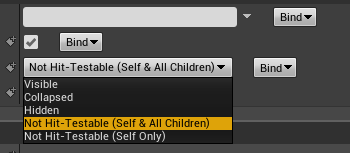
nice to see they are changing it to something more clear tho https://i.imgur.com/yL8QMR0.png


 harsh tiger
found a ton of forums on the ue website
an thats a strange way of wording it haha. why change it xD
grim ore
well self hit test invisible was really really weirdly worded
and weird Accessibility is now default on widgets in .23. so many hidden changes
grim ore
yeah its like its got the wrong hit testing, I expected the buttons to work its at a higher Z order now on the viewport
harsh tiger
that is working, the buttons work but not the joy sticks
grim ore
if its at -100 it should be behind the joysticks but thats weird that the buttons get blocked then
harsh tiger
but i noticed if i change it to -15 then the joy sticks work but the button doesnt
harsh tiger
i seen someone the joysticks are defaulted to something weird like -10. but no real way to know without going into the source code i dont think
upper wasp
@grim ore This is my footstep blueprint.
harsh tiger
should this button be set to visible?
grim ore
yep
grim ore
my only other idea is to make a new widget with just a button in it, add just the button to the screen (try and force the button size to something fixed so it shows up in the top left) and launch it. see if the button works and the joysticks work. IF they both work then the canvas panel is definitely blocking for some reason as it covers it
harsh tiger
its 3am in the uk. if this doesnt work i will try that tomorrow. not the ideal solution but if it works im happy haha
grim ore
@upper wasp you can check for IsInAir on the Character Movement and not play the sound if that is true, it will trigger when you jump. The other alternative is to add Notifies to your animation itself on the foot down and have the animation blueprint handle the sound
harsh tiger
thanks btw mathew, im looking forward to watching your custom template vid tomorrow
upper wasp
I'd prefer the first option, the other alternative I cannot do because I do not have animation for my character, because I made it as is.
grim ore
my other thought is you are activating touch interface right there before adding to the viewport but you have no widget selected to add
which is weird if you have a joystick showing up lol
harsh tiger
my bad haha. i have a strange set up. the first one is so the joy stick doesnt show on main menu. but once the custom event fires it adds the joy stick
grim ore
@upper wasp sorry for animbp it was isinair, from the character movement component you would check against the "Is Falling" function and it would return true if they are jumping for example
upper wasp
What's the function to stop the sound?
grim ore
when its playing or to prevent it from playing?
upper wasp
prevent it from playing when I'm in air
grim ore
it would be something like this https://i.imgur.com/9ahRlpJ.png

you are just checking if "Is Falling" is false before you choose to play the sound
Is Falling should be true if you are off the ground and starting, in the middle of, or falling from a jump
harsh tiger
it didnt work mathew. im trying your alternative now with a new widget an see if it works
grim ore
another option is to use the Function Overrides for On Jumped and On Landed https://i.imgur.com/iU4FrO6.png and set a boolean on if it could play
 harsh tiger
i set the zorder to 100 on the new one haha
grim ore
yeah the idea with the new widget is to literally have a widget on the screen just the size of the button in the top left so there should be no way it can block. If it works then its got to be the full screen canvas panel and maybe you can try using something else to cover just like half the screen on top lol 😦
all of the "fixes" on the internet don't seem to be really consistent and it's weird it even happens
harsh tiger
from what i seen its like its a bug with the default joy sticks thats just been ignored for years. but epic are using it for fortnite im sure. so i must be missing something
grim ore
I think they are only using the left one but yes good point
harsh tiger
how do they rotate the player?
grim ore
its also super hard to test in editor only lol
harsh tiger
with only 1 joy stick
grim ore
I think its swipe to look in the open area, most games with buttons on the right do that
harsh tiger
ah yeah
grim ore
the weirdness is the suggestions on the internet, which you have seen and tried, suggest -15 for the add to viewport on the widget but all that does is disable the button for me lol
but the default of 0 is fine (this is in editor tho so /shrug)
actually the default controller seems to have swipe to look as well which is interesting
plush yew
whew~! im learning blueprints now haha
i just did the first video on Vritus Hub about toggling visibility, i kinda branched off on my own and figured out how to make a light flicker! pretty cool
grim ore
@harsh tiger neato which means.... you have to figure out how to get the UI around the buttons now lol
but man it should not work like that... something else must be funky
harsh tiger
i think my pivot being in the bottom right could be causing an issue
grim ore
well I dunno atleast you might have a path to go down now 😃
harsh tiger
its most likely something small that im missing
grim ore
my testing in editor with -15 is completely blocking the UI even with just the button now so... wtf
harsh tiger
ill get in bed an remember something xD
really haha, seems like there might be a under laying issue. but thanks anyway. your suggestion has worked
grim ore
hell
I just got it to have a button take up the entire screen under the controls, controls worked and input went right to the viewport bypassing the button...
the button taking up the entire screen
harsh tiger
this is basically how i have it now
game hud zorder = -15
joy stick zoder is default which is about -10 but not 100%
new widget with button for mobile zorder = 100
grim ore
+1 for effort for sure 😃
man I got distracted by this and forgot I was logged into a game lol
harsh tiger
that sounds like what was happening to me earlier. but how it is now is working
sorry haha! enjoy your game mate
grim ore
@plush yew awesome, it's not too hard to experiment which is a nice feature of the engine
nah I wasn't really playing was just wasting time wasting time in here
plush yew
yeah bp seems like it makes prototyping a dream
my only problem is, i dont always like having control taken away from me, for instance for player movement, are there any tutorials on how i can manually create my own movement system with BPs?
grim ore
i don't know how you made it flicker but once you learn to use timelines for driving values it's soo nice to just draw a curve and adjust it easily for stuff like that
plush yew
oh, i just made the tick event that toggled visibility every 3 seconds haha
grim ore
plush yew
great, thanks
visual belfry
it takes making your own movement system to appreciate what CharacterMovementComponent does for you 🤣
plush yew
hahaha
grim ore
also you have a C++ one somewhere and my MVP FPS one covers it from start with a blank project
but yeah these all use the CMC so if you mean from scratch scratch
plush yew
idk, for most things i'ts fine for me to let the engine handle it, movement is too personal for me i feel like i gotta tinker with it
grim ore
then it's just normal programming, add locations or change the transform on input
the CMC is nice tho because it works and its networked and it works and it works
plush yew
CMC?
visual belfry
@plush yew have you seen how many options CharacterMovement has? it has tons of levers to pull and knobs to tweak 👍
grim ore
Character Movement Component
visual belfry
off the top of my head, the only lackluster thing is it assumes -Z gravity
plush yew
og i havent found that in blueprints
grim ore
well if you made a character then it's part of it
it's what makes a character a character
plush yew
im looking through the third person example in unity and doesnt have none o that
just add movement input and get vectors
grim ore
yep
all of the stuff you have to do in unity is basically wrapped up into a component and simple commands to it
grim ore
C++ or BP?
plush yew
BP