#ue4-general
1 messages · Page 494 of 1
 dawn gull
i might see it on mobile
Ok I am on mobile
For those who say the icon is bad it is temporary
dawn gull
@normal burrow the logs are in the console which crashes
 normal burrow
they also go to text files
dawn gull
Ok I will check quickly
normal burrow
whats on the picture of the semitransparent console there does look problematic tho. semiproblematic
normal burrow
do you have c++ in the project? or all blueprints
dawn gull
it is a server for the project
it is in c++ i think
nope i only have the manifest_nonufs thingy
Manifest_NonUFSFiles_Win64
dang
 true leaf
BTW guys sometimes my blueprints get corrupted and don't work and the way I fix them is by Reparenting them with the same class they are already parented to
So if that happens to you... Just reparent to the same parent class
Random fun tip lol
dawn gull
Reeeeeeeeeeeeeee
true leaf
Also that crash error looks bad like a dll thing wow . Huh.
 devout gulch
dawn gull
devout gulch
dawn gull
Ok
 mint sequoia
@fringe pivot That issue you had the other day with your characters flying away appears to happen when colliding with their mesh, if you disable mesh collisions it should stop
 autumn elbow
@modern sinew try Get Player Character node
normal burrow
bub would agree with toast. you sure all the pre-reqs are installed?
 modern sinew
@autumn elbow Can't find anything called that
 heavy flax
hey guys does anyone else also get the viewport in black when using player collision/visibility collision mode?
normal burrow
no bub, your best bet is to find someone else having the same issue with the tutorial as you probably. Or check if you missed something
autumn elbow
@modern sinew looks like that
normal burrow
otherwise, you'll just have to determine what happens at launch that could ever cause such problem
autumn elbow
@modern sinew
modern sinew
@autumn elbow
 potent gazelle
Does anyone know if the Maya for games version is too limiting for character animation?
potent gazelle
Yee
 merry gazelle
guys I migrated a quadcopter drone into a new project. After migration the drone tends to fly in a downwards direction and flips upside down with increasingly dramatic glitching movements. From what I can see there's nothing missing in the BP's. I know this is vague but any ideas where to look?
It does slightly respond to control input but the drone still rotates all over the place
potent gazelle
Do you know if you can still access the graph editor? I know you lose MASH
autumn elbow
Features in Maya LT game creator software can help you develop games faster.
Looks like it has all the animation stuff
potent gazelle
Yeah I was reading that, but one part had me confused
autumn elbow
Compare Maya products and see the difference between Maya and Maya LT software.
found the list
autumn elbow
a few missing deformers though
autumn elbow
but the important bits are there.
oh.. yea.. i has to have tht
lol
I use 3DSMax, so not sure if you need those missing deformers.
potent gazelle
I do most of my work in there too lol
Ugh I really want to use 3ds max
If only because ALL the tutorials on 3d modelling use it
But there doesn't seem to be a cheaper version of it, and I want to be able to use assets in my project
modern sinew
@autumn elbow Still nothing
autumn elbow
@modern sinew make a new actor blueprint (blank) and try casting from that. see if you get the menu to show GET PLAYER CHARACTER
@potent gazelle try the student version ? if its not a commercial game
potent gazelle
It is a commercial game, very much ideally
potent gazelle
I have, would you consider that superior to just modelling within Maya?
@autumn elbow
There certainly are more resources for Blender
I'm having a rough time finding anything beyond the basics in Maya
autumn elbow
I would never use Blender.. LOL
 soft crescent
if it's commercial, use blender
autumn elbow
I'm too deep into 3ds max.
soft crescent
its not good to get suited on one tool only
tools change
the ability to adapt is vital in game dev
dawn gull
@autumn elbow why are you an a l i e n
autumn elbow
I was born this way
autumn elbow
Just realized that when you name a function, there are callbacks for certain words like 'to', 'for', 'the'
dawn gull
i have a thingy i am working on and i need to do a thing. how do i disable "async loading" on a dedicated server or an unreal project
 plush yew
I have an issue and idk what channel it belongs in. I have a full fps model with a hand sticking out, with the camera focused on the hand. When I go near a wall, the camera freaks out
potent gazelle
I want 3DSMax arghhh
Especially as it seems very similar to the interface I am used to
dawn gull
"3ds max cracked tutorial %100 real no virus"

Where is the moment we needed the most You kick up the leaves and the magic is lost They tell me your blue skies fade to gray They tell me your passion's gon...
this song is obnoxious
 abstract relic
Please note Bub, this isn’t an off topic channel. Keep it clean for those seeking help
dawn gull
sorry
 latent flume
Can a nav mesh be attached to a actor so it follows that movement or rotation?
 proper crane
I've been looking around and I'm not sure how to approach, er... Having something show up increasing numbers over time... Like... Er, inanimate objects... Like, say... A pool of a non-colliding solid object
Not sure if it would be particles, blueprint, a script, etc.
dawn gull
s p o r e m a n
also guys how do i disable async (honestly i dont even know what it is)
or is it automatically disabled?
autumn elbow
any thoughts on building a Blueprint Shader
 harsh tiger
@autumn elbow yeah I tried something similar to them links an it never worked unfortunately
 teal tulip
@potent gazelle first you wanted Maya and now 3dmax? 👀 what's the problem with blender? Well other than the no 100 file support 🤔
@autumn elbow there are some packs on market I think
But yeah won't look at all like these
Get the edges on white and use a as background that basic print with grid
potent gazelle
@teal tulip all my experience is with Autodesk, and it seems a lot more useful for getting jobs from the skills later?
But I feel it would be a much bigger learning curve
teal tulip
Well yeah that's true, big companies uses that, I give you the point on that
About the learning curves I didn't used at all the autodesl software and I'm not an expert on Blender but probably today are pretty much equal
Problem is blender will return you way more resources to learn and examples than autodesk tools probably
But the support from plug-ins made by epic etc directly aims max and Maya so go ahead :)
But lost nothing giving a try to both software Blender it seems to be used by small studios etc
autumn elbow
@teal tulip Thanks! I found one on the marketplace
teal tulip
Np, sure in youtube etc you have tutorials aswell about highlight corners etc and then is mater of mix 2 things
teal tulip
@dawn gull async or vsync
dawn gull
@teal tulip async
teal tulip
On map load or when I don't know what you mean at all or where
dawn gull
idk i was doing a tutorial and it said "disable async"
i did not know what it was
very bottom of this
in the green section
"Also async loading needs to be disabled or it may/will crash the server."
 grim ore
I wouldn't worry about that until its an issue. That post was 7-8 versions ago at this point.
dawn gull
dang
but i will show you i have the same red text as the post

Pastebin
thats the log
grim ore
uh thats not the same as his
dawn gull
oh
dang
But everything has been fixed this is the only problem i have
So that tutorial is not useful?
grim ore
and is that the entire error log?
and the biggest issue here is without this being a debug build and without the PDB files there is no actual stack trace to trace down the crash. All of the UnknownFunction parts shhould be the actual parts needed to fix the error
thats the first step to figuring out the actual issue, right now you are literally trying random fixes
dawn gull
no not the intire it quickly closes and makes no log file so i have no way to get the whole thing
grim ore
So when you copy your "GameNameServer.exe" copy also the "GameNameServer.pdb" with it to the "Win64" folder of your build.

That way you will be able to get a log with detailed error messages for you to find your problem and fix it.

Hope this helps!```so get an actual stack trace and you might be able to find the exact part it fails at
dawn gull
i copied the pdb file and it does not make any other files :I
grim ore
when it crashes the unknownfunction should be the actual functions this time
full names to debug
grim ore
there should be a full log in the log folder
dawn gull
no log folder ???
grim ore
check the sub folders
dawn gull
what
what are those sorry noob questions
oh subfolder
just this
and then the folder with the .sln and .uproject
grim ore
well you have the crash log now, maybe someone can notice the issue. the only things I see before the fail are related to an animation so maybe you are trying to play an animation or something on a skeletal mesh
maybe try making a new blank scene and using that as the server default map and see if it still crashes so you can narrow down the cause
dawn gull
i dont have any animations though but i will try
ah dang it i have to go in 11 minutes
but still got a little time
dang this is gonna take a while to package
oof
how much longer are you gonna be on @grim ore if you are still on at all
darn i have to go i will keep it running though
 snow thorn
is Jetbrain's CLion as an editor for Unreal working for anybody?
i changed the source accessor to CLion using the editor preferences window
when i try to open CLion using the File | Open CLion menu item i get: Could not open CLion for project D:/Test01/Test01.sln
I'm using CLion 2019.1.4 and Unreal 4.22.3 on Windows 10
I wonder why it says it could not open .sln because why should it want to do it in the first place? It's a VS only file
 shy silo
in a cpp project, is there a way to convert blueprints to cpp?
dawn gull
@polar hawk is making something like that I think @shy silo
shy silo
Ah ok
 cyan merlin
where can I find lightmass settings in 4.22.3?
it doesn't seem to be in same place as previous versions
ah nvm for some reason my world settings tab was removed
 wide lark
Anyone here able to help out with a bug? For some reason I can't get any audio through my preview on project. The audio itself does work, other members of our team have tested it through source control of the exact same project and hardware but for some reason not working on my end. I have updated drivers, attempted to reinstall UE4, reinstalled the project, deleted .Ini Files but nothing seems to work. Anyone have any idea on this?
 inner yacht
@wide lark How's your setup look?
wide lark
Mean Audio setup?
inner yacht
Yah
wide lark
Basically we are using Wwise ,middleware for the audio. But for some reason I just can't hear any sounds in preview I can hear them through going in the content folder but nothing actually in game.
inner yacht
I have no xp with outside the editor but if it is ask away
wide lark
Heres the thing it's not Wwise that's the issue, we have had 3-4 other team members use the same engine files exactly on the same build and audio works fine just seems to be my end.
inner yacht
Is it software or plugin of some sort
wide lark
Plugin
inner yacht
Is there any Manuel on net
wide lark
? I'm not sure I don't use the plugin myself thats for our Audio guys.
inner yacht
Is every version of the engine the same
wide lark
Yeah 4.21.2
inner yacht
And does it meet requirements for your plugin version
wide lark
Yeah
inner yacht
Says on net wwise has sdk
wide lark
That's meant to be only for development but I have that installed either way
inner yacht
You have updated your graphic/sound card drivers
wide lark
Yeah
inner yacht
Man that is crazy prolly someone modded settings
Wish I could help
I would ask that
Something they did to get it to work properly maybe?
Good luck to you
wide lark
Thanks for your help anyway hopefully I can get it working later on.
 mortal tinsel
So guys I have a vr game plan for it to be an MMORPG similar to SAO but it's unique in the body tracking element since I want this game to be as high tech as possible I'm using a camera for body tracking like a Kinect so you don't need body trackers next the real world position will be handled by the camera and to move even farther is a question I have I want it to be realistic but I don't want click to warp to the desired location, any help or thoughts?
basically I want to move more area than a tracked space
or trek more area than the tracked space say the tracked space is 4x4 meters, but the whole world is 4x4 kilometers how do I traverse it without using teleportation
mortal tinsel
Yes I'm actaully helping in development right now for one
soft crescent
alright, do you have millions of dollars
mortal tinsel
No I have a Vr headset a webcam and a good idea
soft crescent
and also, wait, with this mmo... wouldnt every player require this high tech camera setup to play?
mortal tinsel
No all you need is an average desktop camera the software tracks your body like a kinect sensor
soft crescent
have you made Breakout or Pong in VR/non vr in ue4? or have you done that in another engine
right, do you have that working?
mortal tinsel
No Im gonna do the first test in vr chat to see how well it works
soft crescent
Ok, so, have you worked on an mmo before?
mortal tinsel
Yes LOTS well, if you count 2D games
soft crescent
so you know how to handle account management, server management, all that?
mortal tinsel
I think so? I know how to manage a server though
soft crescent
ok, i recommend you put off your mmo idea for now, and start smaller, way smaller
like you have a vr headset, make something basic first
mortal tinsel
Simple concept or simple map?
soft crescent
simple concept, if you try to make an mmo in ue4 using vr and body tracking tech that you dont yet know if it will work or not, you are going to run into some hard brick walls that many have run into before you
mortal tinsel
Im an engineer for one, I know 3D modeling, advanced blueprint, sound design, I know how to modify this stuff, I can make tracking software, I don't exactly think I need to start too small
Im gonna run lots of prototypes obviously, this is highly experimental I just need to really know how to make it so you can, make exploration easily, would I make you move your arms back and fourth to run or something? And jump to jump Idk.
Or should I just make it an ordinary controlled game?
soft crescent
ok if you're asking these questions, you need to take a few steps back, do some research into vr locomotion and build a small vr game like vr breakout or pong. there are a lot of things involving designing for vr that you need to solve first before you can think of anything on the complexity you are going (mmo)
 summer aspen
Hey guys, I'm trying to come up with an effect for my project. It's a simultaneous strategy game and I want it to seem like time stops between rounds. I'm trying to come up with ideas as to how to show this and how those would be done in UE4.
Currently I'm thinking of gradually slowing movement down to a stop, freezing all of the effects and maybe having a camera distortion ripple with a post process volume pulse to signal the changing from action to turn planning. Any thoughts?
dawn gull
@summer aspen yeah! Sound like you have a good idea 👍 I recommend puting like, a violin sound that is higher pitched and does a vibrato at the same place as the screen is shaking
You could also do a stepping down piano song, and at the end muffle it so it sounds like it is vibrating
summer aspen
Thanks @dawn gull! We had a couple of ideas for sounds but honestly we haven't gotten around to sounds yet in our project. I'm just trying to figure out what visual effects to use right now >.<
dawn gull
Yeah, the ripples sound good! But always have input from other people.
 next badger
Is it possible to hide "shaders compiling" popup?
plush yew
Hi ! Could someone help a real UE4 noob to solve an issue he has already lost thousands of hairs on ?
soft crescent
what is the issue
plush yew
can I PM ? I have a few screenshots and dont wanna spam this discord with it 😊
soft crescent
i may not be able to help you though
you need to explain what the issue is first
also if you look to the left column there are channels
for a bunch of the individual components
find the one you're having trouble with
post your issue there
that way you're not spamming
😃
plush yew
yeah just did, since I think it's more a Blueprint issue
dawn gull
oof i might get this for fun or practise

i thought you had to pay for everything
and yes, i know i cant use the models in my game
ok
:))))) hehehehe
illegal
apparently it is really easy to use FX or Indie so i might use that for my models...
blender just confuses me
hah lol
this is really cool

MC TieUp - digital asset for Houdini http://bit.ly/2Rpw4Oa It simplifies and speeds up drastically the process of tying up 3D models. Main Features: -Interac...
i have a legal licensed version of some thingy that gives you all programs for 2 people at the same time
yeah houdini is probably the best modeling program
In gonna get it later today
Also @plush yew there is an older version of almost every Adobe program that you can legally get for free on the website, with the activation key
 dim merlin
Hey guys, just a common question: is it possible or common to use the same skeleton for multiple characters, like male and female?
it seems stuff like eyes and bodyparts go wierd when i try that
plush yew
yes
dawn gull
@dim merlin I have used the default characters skeleton with some infinity blade characters does that mean anything?
plush yew
many people try to use the base unreal skeleton so all others built on that frame remap easily
 bright root
I have an issue with my project,
the right image is the digital human project
the left image is a migration to my project
as you can see there is a clear difference in the sharpness of the image, in particular the hair.
the left image also constantly moves the edge pixels, so it looks like it is vibrating. I obviously cant show this in the picture but it could be something to do with the AA. however, all the project settings are the same.
I admit you have to look closely, but look at the eyes, the hair highlights and some skin reflections
 frank escarp
@dawn gull if you think blender is complicated... you have zero chance with houdini
its without a doubt the most complex 3d program
and its modelling toolset sucks
it can be made work if you are working with things that work well procedurally
but for normal 3d models, you are better running blender
 pseudo void
I went to hotkey save all and must've clicked something while having a blueprint class selected. Now the static mesh component in that blueprint has a blank details panel. it has no details properties. anyone had that happen to them? trying to figure out what caused it
dim merlin
@dawn gull ive got my own characters, but when i share the same skeleton facial animations mostly are not correct
pseudo void
reopening unreal fixed my issue
 glad gulch
Hey there. I looking for the right workflow for custom animations for ue4 and the synty studio chars. I read and got the advice of retargeting. Okay, i understand this way. Normaly i worked with a blender - mixamo - ue4 workflow. And bevor that with custom-animations in blender - to ue4 (but with a totaly wrong / other rig). My main question is: why i should use the default mannequin ue4 rig for all? Whats the matter about it? 2nd big question: Whats the best workflow (Blender, UE4) A tons of tutorials are outtaded, have payed custom scripts or missing important steps. Thanks in advance for every comment & advice.
Maybe there are other easier ways i dont see. So, that why i ask in general. 😊. Because there is a way to work with ue4 skeleton and mixamo as well:
But i cant say if its good or not because i dont know, how important it is to work with the ue-rig-only.
Unreal Engine Forums
This is the place to show, share, and link to your stuff!
plush yew
Is it possible to add 2d vfx to a hud
Like a low-health vingete
Or the effect that appears when tracer "dashes" in overwatch
dawn gull
@frank escarp idc I will invest my time and effort
 tired rivet
Hey there, not sure this is the right place so bear with me.. I wonder how I can make a dedicated server exe file on latest engine?
or is it not needed?
I tried to build one, but just got errors
and I dont want to use STEAM or something else
just the game itself
 tall ridge
If i have a charackter ready in one project, how can i transfer him to another one?
abstract relic
Click on the asset >>> asset action >>> migrate
dawn gull
yay i am installing houdini
 hardy flume
Hey guys just a quick question: How would I switch attenuation to play while the character is in the radius of the sphere and not the camera?
plush yew
im making a game based on a youtube show where this guy owns this apartment conplex and has to go in to get his house payment from the people who live there. Since this is a horror game, should the house have cobwebs in it and boxes or should i be a clean house?
tall ridge
@dawn gull i dont have an assets folder
dawn gull
oh
 icy mulch
Anyone know where I can get a free mountain landscape
dawn gull
uhhhhhhh
yeah
its easy
just use the landscape tool
sorry i have to go i would have explained more
 bold rune
I'm not on 4.22 yet but how do you think it would cope with about 120 point light components all moving around with raytracing enabled?
 mint raptor
Anyone know how I can view or find the pull request for this? https://issues.unrealengine.com/issue/UE-73016
Trying to see how they fixed it?
 manic pawn
there is no github link on the page, so the commit wasn't pushed to github yet
mint raptor
ok
manic pawn
I like how I recently encountered this exact assertion
mint raptor
@manic pawn no way really?
I've never seen it on my main computer but I was testing my game on my secondary computer which is an AMD card and saw it for the first time I don't know how to replicate it
manic pawn
my game crashed when drawing runtime icons from a pocket world into a render target, if a particle system that was set to auto destroy finished in the main world in the same frame
mint raptor
So interesting I do both those things as well so it's a bit of a race condition need to have time gap between the two?
Disable auto destroy on the particle I thought it was an Niagara only thing but I was like I don't even use a Niagara
 visual belfry
swear to god, like clockwork, the editor loses all my personal settings (like folder colors)
😡
manic pawn
my fix™ was to pass the pocket world as world context for render target related functions instead of the main one
mint raptor
I don't quite understand that can't really map it to my situation I draw onto render targets a lot and my game for different reasons but always in the same world
Using voice to text on my phone sorry for typos
I only saw the crash in a build project haven't caught it in Editor to get a stack Trace but I'm hoping it's the same stack Trace as in that link I'll do some digging on my own
manic pawn
maybe it is not applicable in your situation
I am actually creating multiple worlds and drawing views from them to render targets
mint raptor
Ah that sounds pretty neat. Yeah that's not applicable to me what about this particle destroying? the particle order destroyed does play a role in it for you but you can you mitigated by doing what you said you do?
manic pawn
this allowed me to pass a different world context (one of a world that does not currently contain a particle system, avoiding the crash)
mint raptor
Oh so if there is no particle system you get the crash?
manic pawn
the crash only happens when a particle system finishes in the same frame as using the render target functions
mint raptor
Ok and by finishes we mean destroys? Not just that the particle system finish playing?
manic pawn
I suppose, I have them set to auto destroy
oh it is not actually the drawing of the view that was causing the crash but this DrawMaterialToRenderTarget function I was using later
mint raptor
All right thanks that gives me a lot to work off of because instead of otter destroy I'll probably just delay it and manually destroy it or work with the timings for now.
visual belfry
is the author of this post hanging around the server maybe? 🤔 https://www.s1t2.com.au/blog/virtual-reality/ue4-optimised-local-fx
 lunar bobcat
I have a question. So I bought a pack with first peron animations for a gun. And I want to add it to the UE4 Mannequin. With the generic animations with it attached. How do I do that?
So if I had an animation BP and it was the default UE4 animation BP. How do I add FP animations to it?
bold rune
What's this about pocket worlds for rendering icons? I'm currently just using a greenroom actor as a photo studio that's well below the level.
mint raptor
Green room actor?
 mellow turret
I followed this to use a custom font on a text render component but it's not working properly, is there another source I could check to achieve this?
 lunar palm
Does anyone know hwo to set the grid options to 1000 units?
visual belfry
like so?
lunar palm
Ah yeah! Thank you!
 sonic pagoda
pure cast as default, and autocast... its almost like they actually read our complaints...
 floral parcel
What graphics library does Unreal Engine run on?
(like does it use DirectX or OpenGL, etc.)
 sinful plank
All of them
And you can specify which one you want to pack your project with in settings
floral parcel
Oh, that's cool. Thanks for answering my question.
modern sinew
Why isn't my spawner working?
 potent wing
Anyone know how to make a Car Deformation ? Like when i crashed my car into the wall, the front glass wil break or something
modern sinew
sounds advanced
potent wing
I see alot of it in marketplace, but they are paid
floral parcel
yeah, i would suggest you buy one and reverse engineer it. Then build your own from ground up
 worn granite
A very basic search yields this video and project
It's kind of done in a dumb way, IMO, but hey.
potent wing
I got hired to create an Almost-Advanced racer game, he gave me 3 month timeline, heres stuff i have to do
- Learn how to implement new car mesh into a driveable car with complete physics
- Same as Planes and motorcycle
- Trees will fall down if hit by car with highspeed, Motorcycle won't be able too, plane will be easier to the down trees
- Car deformation
- Adds Effects and stuff
- Done
Which some are simple some are hard, i hope people here can help me out, Thanks
modern sinew
anyone know why this isn’t working? it’s getting to the end fine, and looping, but not spawning anything
 weary basalt
@modern sinew Change the collision handling override to Always Spawn Ignore Collision?
modern sinew
Trying it now
 fringe pivot
@mint sequoia yes thanks figured it out the other day after a few more hours
 lament tusk
Hello! Are there anyone here who has set up a perforce server that is working on remote? I can get it work local between my computers, but accessing with a different IP is something that I haven't figured out yet.
dawn gull
@lament tusk use this
Ever wanted to work with friends on an Unreal Engine 4 project but just couldn't figure out source control? Look no further! Collaborate with your friends, w...
 bitter iris
isnt the ue4 multi user editing better? or is that local only
dawn gull
i dont really know i have never heard of that @bitter iris
@bitter iris looked at it does seem easier and better
@lament tusk use this enstead
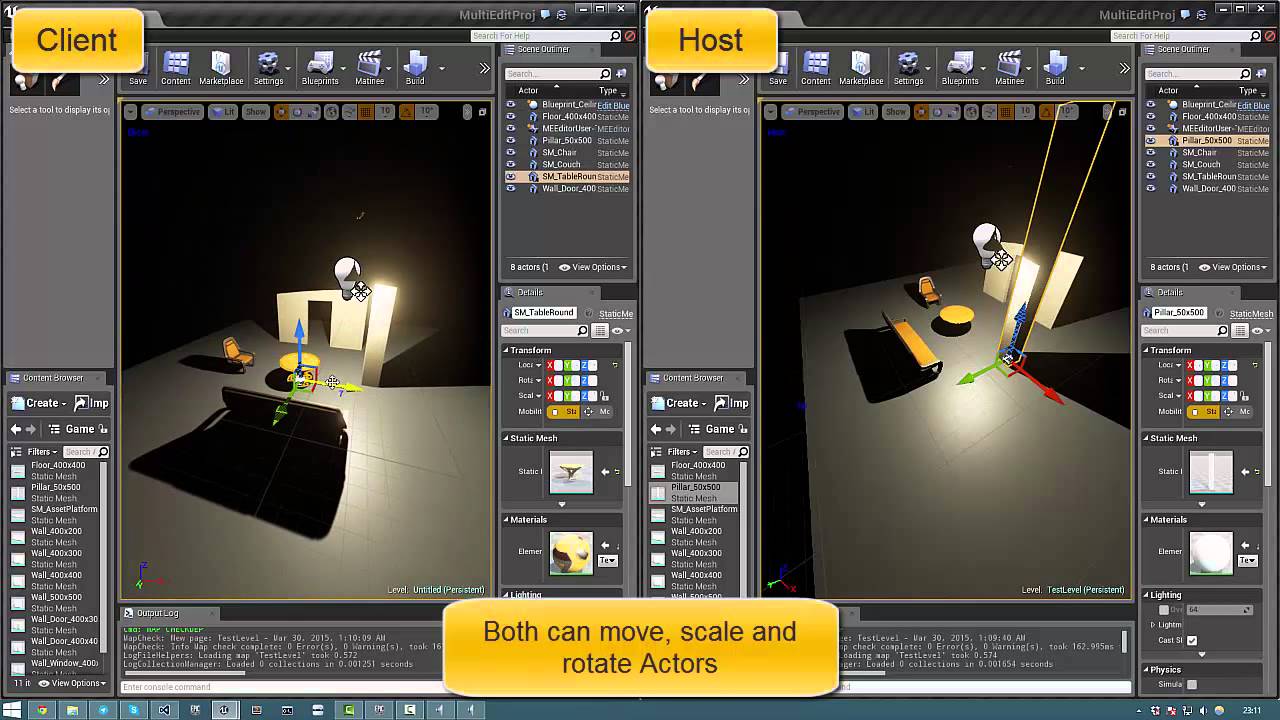
Collaborative level editing in UE4 editor version 0.2. Check out this thread for more information (https://forums.unrealengine.com/showthread.php?50688-Multi...
wait i dont have "MultiEdit Window"
bitter iris
you gotta enable it in plugins
bitter iris
im just not sure if its even worth it for remote
so far i can only get it to work client
bitter iris
nope
dawn gull
because it's like hosting a server so i would try that
dummy thicc question
where the plugins tab
oh wait found it
lament tusk
Do tell!
soft crescent
@dawn gull @bitter iris Multi user is not source control
files are stored on person's machine
dawn gull
i know
lament tusk
Still a cool thing!
But yes, i need to set up my source control to work on remote..
bitter iris
yeah which sucks @soft crescent
I'm waiting on SceneFusion to be like their unity version
no plugin has anything on that
dawn gull
@lament tusk if you port forward it you can get it to work on remote sometimes
if you do it correctly
dawn gull
what
bitter iris

Source control is the bedrock of any game project. Here we show you how to use Scene Fusion together with Collaborate (Unity's built-in source control) to cr...
this is gunna be coming to ue4
dawn gull
cool
bitter iris
@dawn gull what version you using
dawn gull
4.20.3
bitter iris
its a 4.22 feature
bitter iris
make sure its gunna suit your needs
soft crescent
also i dont get what that scene fusion thing does that ue4 cant
bitter iris
If UE4 was to make the multi user editing via host then maybe itll be viable
then the other thing theyd have to add is allow transfer for missing assets something which SceneFusion has done
dawn gull
what is the expected release date
bitter iris
tbh i thought i was talking in that 😂
 bitter iris
its almost done i believe they have 4 more bullet points to meet
bitter iris
id say soon but ive been waiting for over a year 😄
i have an nda so i cant show anything, but its fantastic at the current state, just a bit annoying transferring files via google drive 😄
dawn gull
yeah
you tried github?
wah
eeeeeeeeeee im gonna get breakfast i will leave it running
bitter iris
last time i messed with perforce it messed my project so ill just wait for SF
dawn gull
oof
soft crescent
Also i looked at scene fusion's site and some of the reading, it states that it is not a replacement of source control, more something that should be used along with source control
bitter iris
As a user of SF you dont need to create a separate area for files etc. It all gets stored using SF.
soft crescent
@bitter iris does it keep your revision history?
bitter iris
im not sure but you can always ask the owners, (i dont use unity) ue4 version will hopefully be at the stage soon
dawn gull
i have installed 4.23 and installed the plugin then restarted and still no button :I
(proof i have installed the plugin)
why is it not showing up?
or a theory why
ahhhhhh the lag
mint sequoia
@bitter iris perforce can not mess your project, you can mess your project doing something incomprehensibly incorrect when setting it up (really don't see how). Been using it for years. It's really not optional and SF is not a replacement or alternative
bitter iris
@mint sequoia Your opinion.
mint sequoia
It's the "opinion" of anyone with real world experience"."
It's also not an opinion that you broke your project, not perforce 😛
Wouldn't want any new devs reading what you wrote and being wary of proper source control or resorting to SF
 sick escarp
Is there a way to allow longer cooking filepath lenghts? It says in the editor that it's below 260 but it still says in the log that the filepath is too long
 dim plover
There's a new option to support longer filepaths in either Editor or Project Settings.
sick escarp
Okay I'll look into moving my project to a higher version then
 brave lark
Been working on the intro screen start up phase of my project and it's not very smooth. Once the intro video plays a level is supposed to open ( that is empty aside from some glowing text ) but it's really choppy opening it up. It's then supposed to fade to black and open two levels being a menu scene and a skybox for behind it. Again, really choppy lots of pop in. Fixing performance would be nice, but I'm also open to some visual trickery suggestions to make it just look smoother.
I assume that instead of load level stream in the back ground with set visible not set to true and then setting it to true later is what causes the pop in? so I should load it in visibly while the screen is still black?
 honest vale
has anyone made a tool for automatically placing reflection capture actors in big levels?
would be nice if there was something that placed the capture actors somewhat intelligently
 pulsar fractal
Hello, would anyone be able to direct me to a good tutorial on packaging my game to send out as a file to other people to open? I’m not sure what to do first, if I need visual studio/how to use it. Thank you
honest vale
@pulsar fractal have you read this? https://docs.unrealengine.com/en-US/Engine/Basics/Projects/Packaging/index.html
Packaging Unreal game projects for distribution.
 frozen crater
hey guys, if you would work on a game similar to Raft, where multiple players move around on a small custom ship/raft exploring islands and stuff, would you make the raft always centered and move everything else, or have the raft move around in the world? I dont know if there would be issues with collisions and stuff when moving the landscape/custom mesh components that are below the players feet
 fresh nexus
All of the sudden my engine seems to be locked at 144fps even though I have vsync disabled
It's kind of weird
Even in a new project it's stuck at 144fps
honest vale
you have framerate smoothing on probably
fresh nexus
Nah not even that it's weird
honest vale
running in windowed mode?
fresh nexus
Nah I launched it in standalone game
pulsar fractal
@honest vale thank you, I’ve checked that out before but when I cook the files it fails and I couldn’t figure out why
honest vale
the log should say what fails
 velvet maple
Hi, community, well, I've decided to use Unreal to start creating videogames, but I've been stopped by a big doubt, reading the EULA in section 12. Proprietary Notices and Attribution, I must put in the credits of my game A notice of copyright as long as the product is not restricted.
So reading https://www.unrealengine.com/en-US/branding, I understood that I am not allowed to use the Unreal brand and neither Unreal if the rating of the ESRB is higher than M(Mature).
So if I create a horror videogame, where there are dismemberments, a lot of blood, possible nudity, and murders, then I will not be able to use Unreal since it could end up being for adults?
I do not have money to pay the ESRB to qualify my game, what happens if I do not want to take it out in physical format, only digital?
I understand that some stores use the IARC format, which is free for digital video games, but it uses a different method.
So, for example, if I pay a store to upload my game, I upload the game and they tell me that is for adults, but I do not want the rating to be higher than Mature, to be up to date with Unreal, I would have to delete the game from that store, modify or censor some things in the game and pay again to upload it and get a new rating?
What happens if they again qualify my game as AO(adults)?, I have to do the same process again and end up spending more money ?, the same would happen with the format physical and the ESRB ?.
Is it mandatory to have an ESRB rating, either because Unreal says so?
Finally, the last thing I have to ask is:
https://www.unrealengine.com/en-US/branding, this says that if my game is not restricted and I want to use the Unreal Logo in my game, I should fill out that form. Is this done every time you take out a game or it only fills up once?
I'm sorry to bother you, but I'm very confused about this, I do not want to download the software until I'm sure.
I apologize if my grammar is not good, English is not my main language.
manic pawn
copyright notice != branding
branding is when you want to show the unreal logo when the game starts up or similar
whatever restrictions apply to that are unrelated to you placing the copyright notice in about
sick escarp
How well does the live coding feature work at the moment?
plush yew
I’m really having trouble understanding the different letters before different things in c++. Like what’s a UCLASS
 coral shoal
anyone know how to disable the net relevancy system entirely? Always relevant on a single actor does not disable it for that actor so im wondering if i can rip the whole thing out since it's causing proximity related update rate problems
autumn elbow
Reference to creating and implementing gameplay classes.
 jade hawk
Hey all looking for someone to point me in the right direction. I am working on a multiplayer game. I would like to change skeletal meshes and have them shown to everyone.
The print string at the end fires, and the mesh change fires client side. The server does not reflect the changes to the other clients. Could anyone point me to some good tutorials on this subject or offer any advice?
plush yew
@autumn elbow so basically, prefixing classes, functions, variables, etc with a U opens up more engine specific things to do with it?
soft crescent
no its a naming convention
 wary wave
@jade hawk - you're going to need network code. There's a pinned post in #multiplayer with a PDF that's a decent enough reference
autumn elbow
It's stuff done under the hood. I'm not sure if it's stripped at build time.
jade hawk
@wary wave thanks
autumn elbow
UClass / UFunction / UProperty are Macros. The AActor stuff is just convention.
brave lark
@honest vale should be easy with a bluetility. unless you need something realtime
honest vale
yea I was hoping someone else would've done something similar 😄
guess I need to invest some time into it
honest vale
just a tool that plops down reflection capture actors somewhat intelligently
but I mean, it doesn't matter 😄
 upper heart
Anyone know what could cause this?
That is the details pane of an instance of an actor in my world that I have exposed properties on
I've tried deleting the instance and replacing
It works for certain selections but not others 🤔
next badger
hmm...which stage it is placed under?
try to clone stage1 goal and see if iit could be set there...if it is - it probably related to that
upper heart
hm yeah I think it is sublevel related possibly
 brazen epoch
I am gonna sound dumb most likely, in 4.23 preview, what has happened to action mapping?
I can only see Axis Mappings
 rich thistle
Hi, what is the best CPU choice for UE4 dev?
More number pf cpus and threads right? Any advice about what is the “best” choice?
For now i have i7 4790k
sick escarp
I too have an i7 4790k and I'm not noticing any performance issues, might have to do with the type of game you're making though
rich thistle
For now it’s a good cpu, don’t have any problem. Ofc for biggest project need more cpu and ram
For now for a small game i7 with 16 gb ram i thinks is nice
sick escarp
Yeah RAM is the only thing I would really need to upgrade atm, sitting at 8gb can become a bit of a problem at times
rich thistle
I think about to change the CPU for Xeon, some game developers and studios have Xeon for cpu
sick escarp
I think the fact that I have a pretty shity GPU and a pretty small amount of RAM helps me not make things lag since I would notice it right away
Would of course be optimal to have a good developer setup and a shitty game testing setup
But I personally wouldn't worry about the CPU
wary wave
you're probably fine with what you have for now
there's not much advantage to a Xeon
i7-4790k is a pretty solid CPU
 compact oyster
I used to have a shitty GPU and low ram on a HDD.
Now I have a good GPU, 16go ram and an SSD, but Unreal Editor is much slower to work with overall.
I don't remember the specs but I went from an I7 to an I5
It's anecdotal but from my little experience CPU has a bigger effect than GPU or RAM during dev.
sick escarp
If I had the money I would have bought a much better GPU(I have a Nvidia 960) , 2 more monitors and a better power supply
compact oyster
Wish my desk was large enough for two monitors
the constant shuffling of windows lol
sick escarp
I could honestly fit 4-5
compact oyster
Lucky you
sick escarp
Yeah but the money is the problem, I got the desk from my fathers office when he laid off his local paint/wood store
Are desks that expensive though? Or is space the big problem?
mellow turret
anyone succeeded at importing a custom font for a text render object?
wary wave
I had hell importing custom fonts :/
next badger
UE4 is all about RAM
mellow turret
the font looks fine on a text render inside the world, but run time text render looks really bad
next badger
doesn't affect as much as ram...
bold rune
Get as much ram as you can as intellisense will eat every spare megabyte it can find.
I only need a new PC because something in mind likes to cause a crash and despite all the hardware diagnostics saying there are no problems it still happens several times a day completely at random. I've reinstalled windows a dozen times and it makes no difference so it's definitely some piece of hardware but I have no idea what except that it isn't the graphics card.
mellow turret
I started to have crashes when I enabled intellisense
After disabling crashes stopped
bold rune
This happens when the PC is just idling with nothing open.
The only bits I haven't replaced are the CPU and the motherboard so it's one of those but those are the spendy bits.
But I would never spec a Dev pc with less than 16gb of ram these days
mellow turret
Default font text render looking bad, imported font text render looking bad, widget component looks bad, the solution is simply give up and display no damage numbers apparently
compact oyster
ah yes, optimism
next badger
@bold rune have you tested the hardware?
mellow turret
im still trying to find a way to achieve this, just had to vent a little
compact oyster
You'll manage Wuuhie 💪
next badger
@mellow turret is scalability set to maximum?
sorry, it's hard to tell the issue if there are no screenshots
bold rune
@next badger Yep I've done all the things and when it's being stress tested it works fine and has no problems at all. It's very frustrating. I've learned to live with it for now because the alternative is just too expensive.
 next ivy
Where is that setting option to change the iteration naming convention in the world outliner? Like for me I use "4x4" at the end and I don't want the iteration to change it to 4x5
mint sequoia
@sick escarp I've been using live coding since before epic put it in the engine and can't imagine going back to developing without it. It works exceptionally; eventually it can break but rarely and usually if it does it's exceedingly obviously broken behavior that you'll know to restart. Like hot reload, it'll usually only break reloading header changes but it'll never corrupt anything and a restart always fixes it. It's usually fine for header changes so long as you restart the moment something feels off
next ivy
@rich thistle The 3900x or 3950x
It's a consumer grade model that is better than all but the most expensive thread-rippers (commercial grade)
 maiden bramble
hey dose anyone have any mountainous hightmaps i can use?
 thin tendon
I'm having a weird issue. I'm trying to add a simple collision to a static mesh. I successfully added a capsule. But when I try to use the scale translate and rotation pivot tool. Everything it locked and it won't let me adjust it.
 civic mantle
if the collision component is set as root, you can't scale em, afaik. there should be sliders/settings under shape tho which you can use
thin tendon
thanks 😃
civic mantle
np.
thin tendon
OK that kind of works. But when editing the collisions it makes Unreal super laggy
civic mantle
not sure why, soz
thin tendon
All good me either. The rest of my PC is running full speed. Its just Unreal that lags up
civic mantle
if it's an object you have instanced/spawned alot, mb that is why. it is updating all spawns in the editor. but that is just a wild guess, as said, no real idea why ;)
thin tendon
ohh ok that makes perfect sense. Because its a tree and one of my main ones used. I will try removing instances. Thanks
civic mantle
or just try opening another level without trees in it, and see if it helps
thin tendon
I tried that it didn't help
civic mantle
darn
thin tendon
Yeah removing instances helped thanks works perfect now
civic mantle
hu, lucky guess ;) yw
thin tendon
Is there a way to make my convex collisions tightly wrap around my tree trunk. I have one there someone else set up and it is tightly wrapped per branch. The ones I generate take in to account the leaves and end up weird large shapes
potent wing
Can anyone tell me how much GBs is Substance plugin?
 sinful osprey
Anyone around that knows the editor well? My view is all messed up and I don't know how to fix it
Ok, figured it out. Somehow my Xbox controller left stick was stuck pushing up and it was affecting my mouse movement. Weird... didn't even know you could use the controller in the editor. Well, learned something new 😃
normal burrow
windows will do that now. its great. right click something in task bar and you can move up/down with joystick. perfect for those times when the joystick is stuck
autumn elbow
Which is lighter to reference, the object itself, or the object name ?
or does it even matter given its a object reference?
normal burrow
describe what lighter means
autumn elbow
less resources.. memory and cpu load
normal burrow
normal object reference
normal burrow
well
just keep in mind having a uproperty holding a reference to an object keeps that thing alive
but yea its the fastest way to access an object
 tawny python
Alright folks, idk if there's another channel to post this in but here goes. I have a material that's just rolling red smoke, however it relies on the Absolute World Pos node, and I'd like to have an alternative, as the object is attached to the camera. Any help?
plush yew
No sorry but, Hi I'm new here And I wanted to make a 2d super smash bros project if some one can help me please?
And I'm new at unreal engine so I need help blue printing the menu and stuff.
I have the graphics but don't know how to put them to gather.
abstract relic
The document is a good place to start https://docs.unrealengine.com/en-US/index.html

Complete resources for learning to use Unreal Engine 4
plush yew
Thank you.
compact oyster
top 10 polite RTFM
plush yew
Is there a instruction book I can find or video? This is a lot and I'm Kind of slow.
compact oyster
There's tons and tons.
I don't know how you like to learn, but I think trying and playing around teaches as lot.
Have you tried dissecting the examples?
plush yew
I'm using the newest URE4
abstract relic
Udemy or you can risk it on YouTube
plush yew
YouTube Doesn't have a character select I don't think?
In 2D
If there is can some one tell me?
abstract relic
Oh and there’s Unreal Academy. That site is still wip if I recall though
compact oyster
Is the warning a clue? (I think the right channel is #blueprint )
autumn elbow
I'm trying to attach objects similar to what they achieved in Kerbal Space Program. Anyone here know of that game?
I have a cube class with 6 sphere collision points.
compact oyster
Can we report as a major engine breaking bug that when you type "Not" in the BP search he auto selects "NotEqual" instead of "Not"?
Yeah I think some people on a game dev discord might be familiar with KSP : p
autumn elbow
oh i see
 midnight bolt
how can i easily add to material a way to spin the texture 360 in a loop, like a helicopter?
autumn elbow
i sent you that Sneakerman
midnight bolt
it was too complicated for my use, i already have generated fake spin, now i just need simple 360 animation
using panner i was able to scroll the texture, but not to spin it around
autumn elbow
hmm..there was something like that on youtube...
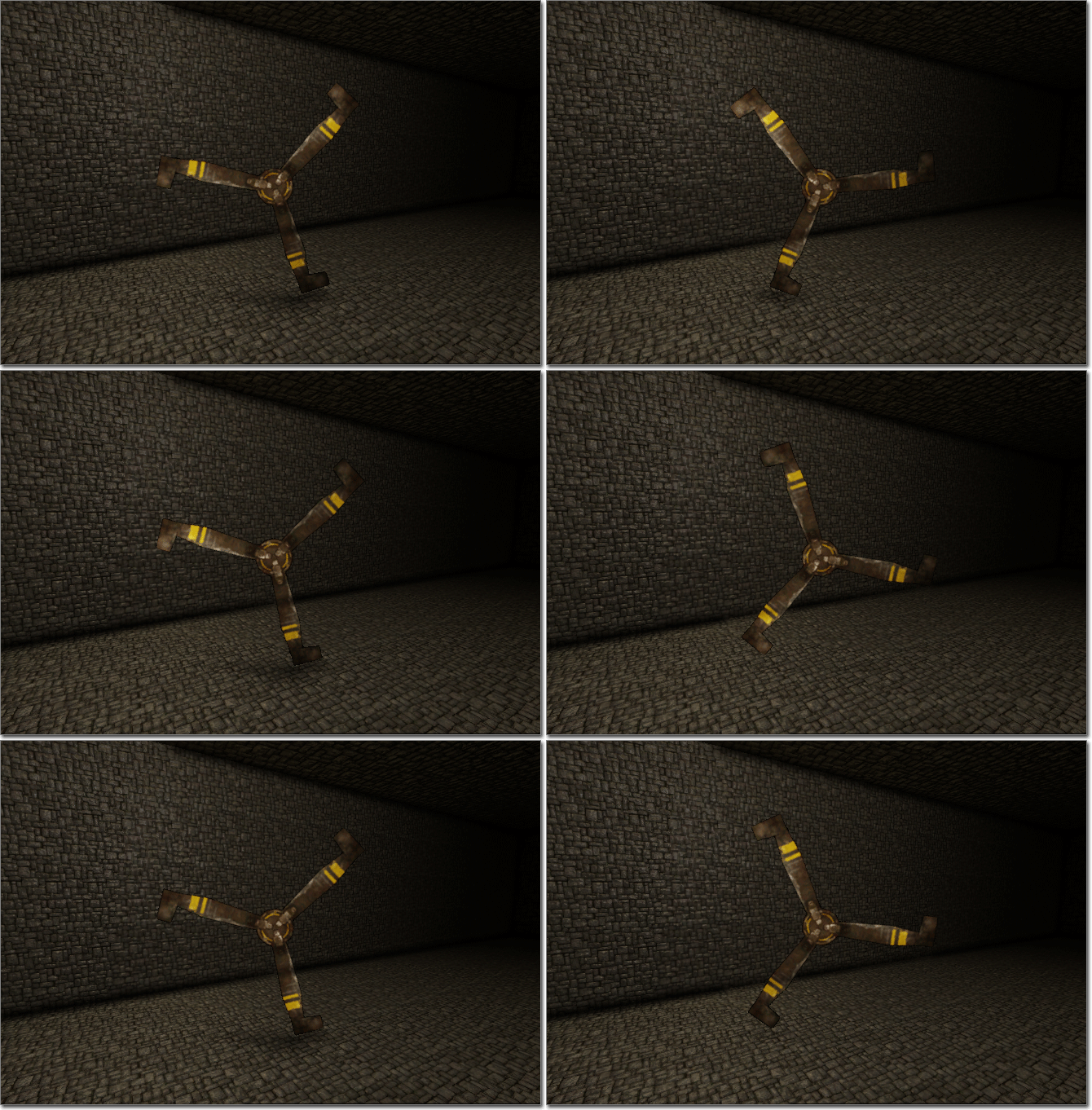

Its UDK, but im sure you can hack it by the pics
Looks like they are using the Rotator node @midnight bolt
midnight bolt
@autumn elbow thanks, it works, but now i see that due to atlasing the whole texture is scrolled ;) i will either split up or look into setting max coords
autumn elbow
work your magic lol
plush yew
Hi again UE nerds. Just a quick question : as a noob, trying to get his hands dirty in UE with a small but real project (for myself ofc), what are the things I should worry about so my game'll be playable ? I have imported a lot of textures/materials, so I can take a look at how they're made, and I've already had a few messages warning me about textures sizes
plush yew
thats what I did, conception is "over", but since I'm still learning (a lot) and used to learn by breaking down existing things, I'm scared I won't be able to remove easily all textures/materials not used in my project
plush yew
k thx, will not forget @sudden agate !
 fallen urchin
Hi Devs? I was looking for a similar sdk (https://github.com/Microsoft/MapsSDK-Unity) which I can use in Unreal.
plush yew
'get percent' takes in a value between 0 and 1, so assuming your health is from 0 -100, you need to divide by 100 first.
@plush yew
 opal spindle
I see on a lot of UE4 "optimization guides" to use the commandline parameter -USEALLAVAILABLECORES. You only see it pop up in those guides of UE4 games though. UE4 has no documentation about it besides what is said here: https://docs.unrealengine.com/en-US/Programming/Basics/CommandLineArguments/index.html#user. Anyone know what it does in practice? I doubt your game will make use of more cores unless you build your code with that in mind.
Collection of arguments that can be passed to the engine's executable to configure options controlling how it runs.
 cloud cobalt
No, it has nothing to do with your game really
opal spindle
It is weird though as the command is under the user category, which is meant for end users
cloud cobalt
It's only used for packaging
cloud cobalt
Oh, but you don't need to believe me
Just search though the code : https://github.com/EpicGames/UnrealEngine/search?l=C%2B%2B&q=USEALLAVAILABLECORES
There's a single result and it's the initialization for the archive compression code.
opal spindle
Hmm
Idk who is in charge of the docs but they may want to update that argument and mention what it actually does
cloud cobalt
Most of the time you'll have a faster time just searching through the doc
opal spindle
Hmm. Anyways, thanks
 rare axle
Does anybody know if it would be possible to generate files from UE4 such as PDF or word doc?
cloud cobalt
To the extent that it's software, yeah
You'll just need to do all of that yourself in C++
This isn't exactly a common thing to do in a game engine
 worldly raptor
Greetings to all! I have a question. Is it possible to activate the console in a project in which it is missing? Are there any workaround options?
P.S Sorry for bad english
cloud cobalt
Two options : don't build in shipping, and change the engine code
First option is really "build in Test" which requires building the engine from source already, it's not exactly meant for that
Since you need to build from source, might as well just tweak the code to get the console in Shipping
worldly raptor
and if the source was lost?
 dark depot
i mean my first question would be is it even your project
cloud cobalt
If you don't have the source code, then you can't do anything.
worldly raptor
maybe bypass or something
cloud cobalt
There is nothing to bypass, the console code won't exist
wary wave
if you don't have the source, there is nothing you can do
worldly raptor
sadly
cloud cobalt
This is C++, disabled code is simply not passed to the compiler and doesn't end up in the executable in any shape or form
cloud cobalt
That wouldn't help
At least you can't get the console back that way
Since it's gone
sick escarp
Why is the logger complaining about a hotreloaded component when I'm trying to package the project? I restarted the editor before packaging and didn't do anything before or under the packaging
cloud cobalt
Did you build in Development Editor before packaging ?
sick escarp
Yeah I'm building in development mode from VS
cloud cobalt
What's the error like ?
sick escarp
HOTRELOADED_ActorComponent has an inappropriate outermost, it was probably saved with a deprecated outer(FilePath.uasset)
How is it hot reloaded when I haven't done any changes to it?
Might have managed to fix it, will see how the next packaging goes
 raw elk
I'm trying to import a character mesh with morph targets. It's all set up in 3ds max, export, imports fine into UE4, all of the targets show up. however, when I adjust a morph target, the characters face (morphed mesh) moves up and down depending on the value on any of the morphs
Anyone know what causes this?
like, it goes wayyyyy up
 royal dragon
Guys does anyone know the name of Marketplace asset that enables copying functions from one BP to another BP?
raw elk
Blueprint Property Transfer Manager
royal dragon
@raw elk Ty
raw elk
np
 regal mulch
@sick escarp Well in general, don't Hot Reload :P
@raw elk Not an artist but maybe you didn't apply scaling before exporting?
sick escarp
Googled it and apparently all I had to do was unconnect and reconnect any pin it in that specific BP
raw elk
@regal mulch thanks for the reply; I tried applying any scaling/transforms I made, and resetting the scale/transforms before exporting. Sadly, with the same result
regal mulch
@wary wave Yop, I haven't used HotReload in the past, idk, 4 years (? When did UE4 go public again?)
wary wave
it was great prior to 4.0
you could do it whilst PIE was running and everything would just update
roll on 4.23 and it's rotted so badly it's borderline useless, if not an outright liability
 silver crown
Live++ though 😍
wary wave
our compile times are too long these days for me to care about Live++ 😦
on a more reasonable project it must be great tho
game project takes nearly as long to compile as the engine, lol
wary wave
can't really diddle with the settings unfortunately
too many layers of custom shit on top
silver crown
I couldn't work without fast compiling/reload :p
wary wave
you get better at not making silly syntax errors and shit 😄
soft crescent
nah nevermind i wasnt exporting all the scene components
 boreal topaz
i have a worksheet i want to scan and popup on the screen, with a few fields editable via text or drop down. what is this method called? im trying to find a tutorial on this.. its a real document we use at work & making a training game on a scenario where theyll be filling out this document
plush yew
Hi. Sry someone pinged me here, but time is going
So now I am just starting learning unreal. Kinda different from unity
 sudden agate
Construction Script (BP and C++) do not execute at runtime when the Actor is placed in the Editor, right?
It is safe to mark helper Components from the actor as Editor Only, right?
plush yew
hi again, noob question : how to you get access to the console while playing the game in viewport so you can see what's wrong ? 😄
dawn gull
@plush yew press the ~ button on your keyboard no shift
 velvet finch
question all, normally when characters interact with objects eg the surface of a wall to climb or to touch the grills of a window, is it done with simple or complex collision?
velvet finch
reading the unreal engine documentation they say simple collision uses simple query and complex uses complex query, so does a player interaction normally count as a complex query? I'm rather clueless about this haha
wary wave
player interaction is 100% how you implement it..
sudden agate
@velvet finch Use Simple Collision for gameplay purposes. use Complex for IK
that would be the best imo
velvet finch
i see got it 😮
plush yew
probably didn't use the right words @dawn gull , I have a trigger than doesn't trigger but leaves me without error, was wondering is there was some sort of "live console" which could leads me to an answer
plush yew
yup that's what I was looking for 😃 thx ! (except my trigger doesn't trigger at all)
dawn gull
oof
civic mantle
try closing in on the trigger with string prints. check the vars needed to trigger, and see what they do ^^
plush yew
good advice @civic mantle : it prints nothing ^^
civic mantle
then your print is at the wrong spot :P print before it should trigger, and check the variables responsible for the trigger
different approach: is it input bound or anything? comming from BP or cpp?
coz BPs have the option to "consume input", and it won't reach your cpp then for example
just to rule out some basic versions of the problem
plush yew
nah, its the most basic trigger ever
civic mantle
wanna send me a screen? pretty meta at the moment, i could keep guessing ofc ;)
plush yew
a good old "box trigger" with a level blueprint
civic mantle
ah, collision trigger?
mint raptor
Is it recommended all serious projects be built by source or only depends on how much you will need to modify source for project?
wary wave
using source gives you flexibility in the long run
it's not strictly necessary
but you may run into fun problems launching on some platforms without it
velvet finch
hey guys what is this convex decomposition thing?
is there any use of it between collision building? From what i'm watching people are saying its bad and useless and should be avoided
plush yew
what's the best way to reference the player object?
wary wave
you can't cast nothing, you need to get it from somewhere
without context that question and BP is meaningless
plush yew
thats what im asking
what's the best way to reference the player
and it's a camera, it's not attached to the player because i want more control over it
@wary wave
wary wave
knowing it's a camera makes more sense
but when is the camera active?
(and why is it not attached to the player?)
plush yew
basically i want to implement camera logic similar to this here: https://www.youtube.com/watch?v=zciJTP23fIk
plush yew
because the camera doesn't always have to move along with the player
wary wave
it can still be a part of the pawn / character
plush yew
it should only move when the player is moving the camera's bounding box
wary wave
that's not how that style of camera works
essentially there's a bounding area inside camera space, and the camera will only be updated if the player leaves that zone
plush yew
isn't that what i'm saying?
wary wave
a bounding box is a specific thing in Unreal
so no
but all of the math should be done in camera-space
plush yew
the bounding area inside camera space, do i have to code it myself or is something like that implemented in unreal already?
wary wave
you have to implement it yourself
by projecting the player position back into camera space, then working out camera movement from there
plush yew
okay but if i attach the camera to the player, how do i not make it move with the player
wary wave
by setting it's location every tick
the camera can be a separate actor if you really need it to be
but you won't gain much because the math is going to be the same
plush yew
won't that glitch out since it's also moving the location according to its parent at the same time?
wary wave
no
plush yew
and so if i make the camera a seperate actor, what's the best way to reference the player actor
wary wave
well, you have to get it from somewhere
plush yew
that's what i'm asking... xd
wary wave
it would make the most sense for the character to spawn the camera
plush yew
can i also get it by object name or something
 severe drift
Hmm, when I create a Foliage Type and assign a mesh, it's just grey with no colour?
grim ore
if your player is the player that you are playing you can always Get Player Character from pretty much anywhere
plush yew
how do i decide the camera in my scene that should be used?
wary wave
you can, but if someone is going to learn, they should probably learn to do things properly
you have more than one camera?
 spark sonnet
Should I use something else than line trace for picking up items in a multiplayer game where there are 6 players? Or should it work fine?
wary wave
line traces are fine
spark sonnet
ok thanks
plush yew
well i deleted the camera attached to my character, and instead of using the seperate actor's camera it's using some kind of first person camera rn
ig it's build into the character
wary wave
you probably want to Set View Target from the controller
plush yew
controller?
spark sonnet
But using tags is bad right? Like if hit actor has tag ?
 ruby robin
Does anybody know, how to start functional test with dedicated server and couple of clients?
ruby robin
How to start with two or more clients? Maybe dedicated server option is somewhere near clients option..
spark sonnet
The arrow on the right side of the play button has an option where you can simulate dedicated servers
And select how many players
grim ore
@spark sonnet there is nothing wrong with using tags, they are basically just a pre made array on the actor/component
spark sonnet
Ok. Thanks!
wary wave
depends what you want to use tags for tbh
I would never use it when doing something like hitting an actor
because then you're doing a string comparison when you don't need to
(lots of them, if an actor can have multiple tags)
ruby robin
@spark sonnet Hmm. Are you talking about play in editor? I'm talking about automated tests
spark sonnet
In the editor yes^
So I shouldnt use tags? 😄 Whats the best/most optimal way to get the hit actor and cast to it?
wary wave
you should know what you're testing for before you even do the trace
I don't see the point of identifying an actor through a tag and then casting
the cast should be sufficient
spark sonnet
Thats what I have done now. Just casting
wary wave
what is this for?
spark sonnet
Its for picking up items
wary wave
right
spark sonnet
Right now there is only one thing that is being picked up but I want to be able to pickup mulitple items later
wary wave
so I assume you're casting out, and seeing if you hit 'class Item'
any reason said items do not share a base class?
spark sonnet
Because they have different uses and meshes
like a flashlight and a radio for example
wary wave
they can still share a base class
and the pickup item likely wants to be a different actor to whatever the player actually uses
alternatively you can use a component, or an interface on your pickup items
and check for that instead
spark sonnet
How would I be able to distinguish the items from each other?
wary wave
why would you need to?
at this point surely all you need to know is that it is a pickup?
spark sonnet
Because one of them is a radio and the other one is a flashlligt
wary wave
yes, but why?
spark sonnet
I need to know what I picked up to be able o attach it to the right place on my actor
wary wave
then have a function or variable in the base class
socket name to attach to (or an enumerator that resolves to a socket name), or a vector offset
bold rune
The thing you picked up should be responsible for figuring out where it goes on the player.
bold rune
So a pickup function picks up a pickup actor which has a use function the player calls on it and then your pickup actor implements the use function to do whatever it wants. The player doesn need to know what it used just that it can be used.
soft crescent
so im kinda messing around now with maya fields and bullet physics for ue4 alembic import.. ue4 gravity is -980 on z right
ive already set my maya to do z axis up
spark sonnet
Thanks^
grim ore
@soft crescent that sounds correct. Default gravity in a new project is -980 which should be -980 cm/s to simulate earth gravity. you can of course adjust it as needed. and yes it is on the Z axis
plush yew
Has someone encountered a "White curtain" phenomenon on a texture? It looks good in the Material viewer, but it's like 500% too bright in game
(btw the White Curtain Phenomenon is ©)
 severe ibex
there a general opinion on poly count to draw calls? like 10 separate chairs or 10 chairs as one mesh?
grim ore
if you are using 4.22 and higher you should be fine to do either one if they chairs are all the same . It might actually be better for multiples of the same item. 4.22 added in auto static mesh instancing to help reduce extra workload if you have the same item all over the place.
if you combined them all into one mesh then culling would not work well as the item would be all visible or not visible even with 1 chair on the screen
severe ibex
oh it did yes you're right
autumn elbow
Morning All
severe ibex
afternoon to you
autumn elbow
Afternoon sir
severe ibex
@grim ore that's fine, so I assume it's more relevant if you have a dining setup to have them all as one mesh and not separate forks and plates
grim ore
combine as much as you can and re use as much as you can yep but at this point I think most modern cards and engines don't really run into an issue with poly's themselves
for a table setting if you don't intend on anything to happen to it I would think the entire table with it's setup could be 1 mesh sure.
or even 1 simple mesh with a texture on it for the setting lol 😛
severe ibex
that's grand, all makes sense, I just didn't want to assume something and have it be pointless or kick me later
are draw calls only for meshes or materials also?
grim ore
both as far as I know (not an artist)
I think the stat unit console command will show draw calls
 worthy ginkgo
Hey! My Blueprint has these "Corrupt Components" that won't go away even if I try to delete them and crashes my Editor when I try to Rename Them. Any Idea How to fix this?
grim ore
this has some good stuff on draw calls in the CPU and GPU sections https://docs.unrealengine.com/en-US/Engine/Performance/index.html
severe ibex
cheers, I know you're not an "artist" but you're very knowledgeable so I'd trust you more than me
@worthy ginkgo best posting in #blueprints
worthy ginkgo
Okay!
severe ibex
and TY MathewW
 round hemlock
does someone know if I still need to set up the texture quality manually in every material and how is it low 512, medium 1k, high 2k?
normal burrow
May be better to have separate mesh’s for fork and spoon vs 8 variants of silverware subtleties
But no idea
severe ibex
@normal burrow Nah we have no need for such extravagances.
Oh and what's the deal with changing the derived data cache to a network location and not locally?
sorry, changing it from Derived Data Cache to Local Derived Data Cache
 lilac wedge
so im trying to possess a pawn with collision overlap, but collision overlap only outputs actors and not pawn. So i need to set an actor variable (collision output to actor variable)and then make a new pawn array which is set by the "set array elem" (actor to pawn variable) and then i have to get the array and input into the possess. This works fine but whenever i restart the engine i need to unpin everything and re-pin it in a certain order or it gives me an error
sorry if it sound confusing
grim ore
so the first thing to keep in mind is pawns are actors in the parent<->child hierarchy
I assume you are using the Possess node?
grim ore
and when an actor overlaps this collision, that actor that is overlapping should be possessed?
lilac wedge
is their a certain node?
yes
but through a complicated way as the collision output is only actor and you cannot possess an actor
grim ore
correct you would need to let the possess node know that the actor that is being overlapped is a pawn
so are all of your pawns the same class?
lilac wedge
no
grim ore
they are all children of pawn tho right?
grim ore
well Pawn is the Parent class, they are all XXX blueprints
if so you can just Cast the Actor that overlaps to Pawn, then possess that
lilac wedge
yhe so all the things colliding have a pawn parent
grim ore
this might not be the best way, but it should be the most basic way.
lilac wedge
how do u cast to actor?
grim ore
use the Cast to XXX node
lilac wedge
and why the actor when i should be pawn no?
but i can use cast to as there are a lot of diffrent pawns in the scene
that will be possessed
grim ore

when this overlaps the Other Actor is the Actor that overlapped it (it has to be an actor as actors are what are in the world)
lilac wedge
fuck my life
grim ore
then you say hey Actor, I think you are a pawn is that true?
if it's true you can then possess it
grim ore
now a safer way would be to have a blueprint that is your parent for classes you want to possess
like Make a blueprint class for "ControllableDudes"
then you make all your people from that
lilac wedge
but the things i can to possess have nothing to do with each other
grim ore
then cast to controllabledudes
grim ore
they could have nothing to do with each other other than having a common parent that you can cast to later
doing things like tags for "possessable" is an option, using interfaces to see if something can be possessed is another, stuff like that is "safer"
learning to spell is another for me apparently... lol
 ornate hamlet
I have a question when it comes to "game structure" as in the extremely high level code stuff. For example, if you make an inventory system you obviously dont want to put everything into your character controller so the question is how to split things. The actual code isn't really all that important to me. Are there online resources for this kind of thing, because I think I am lacking the vocubulary to google this rightg
grim ore
its subjective to your project would be the biggest issue
simple game with an inventory that is just gold and gems is different than one that is persistent among levels and contains a list of items is different than one that actually stores things positional like diablo and is networked
ornate hamlet
Good point, so basically what it comes down to is that you can't know the things you dont know, so you will make something and inevitably back track along the way to fix stuff
plush yew
Is there any way I can make grid snapping in UE every 5 centimeters instead of 10? Otherwise I'd have to remake all my assets <.<
grim ore
well the doing it wrong then learning and doing it right is..... programming 😃
@plush yew at the top of the viewport is the snapping options and the snapping value
grim ore
you will find examples of every type of inventory and multiple ways of doing it out there, I don't know if there are any generic "solution" documentations out there. If you know what type you want to make I am sure half a dozen people could suggest 2 dozen ways of doing it and they would all work lol
ornate hamlet
Well, the inventory was just as an example
grim ore
like for example if I wanted the inventory to go away with the player and the inventory is just a list of items from a data table then a simple array or map on the player character would work well enough
ornate hamlet
I guess "best practices" is kind of what I am looking for
grim ore
which rounds back to the problem, best practices vary depending on the project 😦
ornate hamlet
Hm
grim ore
for example Action RPG can be pulled apart and it has an inventory but it's.... designed around gameplay abilities so its designed to fit that requirement
ornate hamlet
Yeah I guess I will go with the method of just doing things, realizing they suck months down the line, refactoring everything and then just repeat that until I can't be bothered anymore and call it done
grim ore
it does suck but it's honestly how to learn programming
like right now you want to learn best way to do an inventory so you don't have to waste effort or time.
if you waste the effort and time then you would be able to do the inventory based on your wasted effort and time in the past
eventually if you run into an issue where no one has an answer to your problem you are 😦
something that might help tho is look for some game dev post mortems
find a game you want or a genre that has the problem you want solved and they might give you info on how they solved it 😃
visual belfry
the epic launcher though 😬 now that the vault takes a significant (30s) amount of time to recognize all the content I have, it turns out if I update an installed plugin before it's loaded into the vault it'll crash the launcher \o/
 timber birch
Does anyone know a good way to figure out invisible objects or collisions? everytime i paint on certain areas on the map my foliage is floating
the paint sphere shows something is there, but can't figure out what it might be :/
grim ore
so who knew that the engine had a carousel like widget built in? because I didn't until by accident today lol https://i.gyazo.com/0c00b8404603213b5a9ade6182c30d63.gif
 autumn elbow
Now I know why games devs like slot based attachments and not freeform. LoL I'm loosing my hair
 ancient lotus
@ornate hamlet when i first gave an inventory system a shot, i made an actor component(inventory component) that was dedicated to items for adding/removing and calculating weight and returning the array of items and a variable for max weight (gets set by the actor using the component). then i simply made a backpack (actor), added a backpack mesh to it along with the inventory component. inside the backpack i had a simple variable for its current weight (gets set by the inventory components function that simply returns the weight). then on the bag i had the inventory component public so i could simply do backpack->InventoryComponent->AddItem(MyItem) and it would check and see if the current weight + weight of MyItem was greater than the max weight the bag could hold(the bag itself sets, if its not greater than the max weight then it would simply add the item to the array and recalculate the current weight. that made it so it was easy to add an inventory to anything. if i wanted to add pockets to a player, i could simply add the component to the player with a max weight of whatever and the player would have an inventory. if a chest/crate needed an inventory then the component would simply be added to the crate and such
plush yew
hi, there's a way to play anim montages in a mulplayer game? i did not find on the ue4 docs something related
grim ore
any reason it would not work normally in a multiplayer game?