#ue4-general
1 messages · Page 492 of 1
 undone sinew
UE4's built in is, not good
its not terrible
but its not really usable
I figured changing the skeleton would be better, than retargetting 100 animations in motion builder
but I guess I have to try it all to know
 grim ore
the good thing is in theory once you get a good workflow you have a good workflow
 autumn elbow
I take it you've seen the Livestream for retargeting on Ureal's YT?
undone sinew
I've seen an unreal youtube video about retargetting
unless there is more than one video, then the answer is probably yes
autumn elbow

Epic Games has released 20 character assets from Paragon and now we want to show you how to get started with those assets! Shinbi's animation Blueprints are ...
That one ?
I mean, there are a few, so I guess any vids would help. LoL
undone sinew
it isn't that it doesn't work
its an issue of quality
Distortions
even with animation, animation scaled, and skeleton
its still not ideal
 plush yew
anyone else had isses with Aicontroller>Blackboard>SetValueAsVector?
can'tgetit to update it's value from outside the blackboard
undone sinew
in Motion Builder, and like with a few other programs, you have IK sliders to fix issues.
I don't see that option in UE
It seems like wrists are the most screwed up areas
autumn elbow
Unreal only brings in the baked bones.
as far as I know, but there is a new animation system that I havn't looked at yet
undone sinew
The other issue is that, on top of that, I have to have 3 copies of each animation
 lapis bronze
UE4's built in retargeting is actually very good
undone sinew
We are all entitled to our opinions
autumn elbow
LoL
 undone sinew
Motion Builder is better, and thats a fact
lapis bronze
im sure it is
i'd imagine having to use the default unreal skeleton at all means you have bigger problems
retargeting is great in a pinch, or for making new animations from existing ones
holy shit im high, broken english
 broken shadow
No it's "High, how are you" 😄
 dim plover
What's the alternative to Artv1/2?
lapis bronze
there's dozens of rigging suites for Maya
I just get by with the built in one, HumanIK
but there are better ones
dim plover
Alright, haven't looked into the stuff myself. I just assumed Art would be preferred with UE4.
lapis bronze
it would be, if it actually worked
Its a hot mess of python code that breaks itself
AVOID, you will thank me later
undone sinew
Well, if this didn't work out, my plan was to use a custom skeleton, and just retarget in motion builder
 mint sequoia
@dim plover I use akeytsu, its a whole software package that does rigging and animation, if you're up for learning new software then its an awesome program
So nice to work with
Bit of a learning curve
The rig wont be compatible with other software, but of course the skeleton/weights/animations are
If you need complex out of the ordinary rigs that you'd need a proper TD for though, it probably wont do it, though most auto rigging tools don't either
dim plover
I'll give it a look. It's quite cheap with a perpetual license too.
mint sequoia
Yep
I come from Maya myself, and am a 'proper TD', and its nothing like Maya at all so it still took time to adapt but worth the time
 pseudo void
In the more recent versions, when creating a blank project ambient audio is added in by default. Is there a way to remove that? If not then deleting the Audio folder isn't a big deal. Just wondering
 visual belfry
@mint sequoia how is akeytsu for taking say a paragon character out of ue4 and making some new animations? I've played with it before but haven't bought yet
mint sequoia
@visual belfry Don't see why it couldn't do that just fine
There's a trial if you want to try
 cunning siren
Would you guys suggest importing built scenes into unreal from blender, or importing individual modular assets and assembling it in unreal?
 icy mulch
Hey can anyone make me a 3d model please
 misty creek
icy mulch
misty creek
icy mulch
@misty creek I don't see anything
 normal burrow
look at pin eds, you ask for help there
 wild kestrel
do https://answers.unrealengine.com/ works for you guys?
Enterprise solution for all your Social Q&A needs.
 weary basalt
Error
wild kestrel
503?
dim plover
Works for me now, if that matters.
 abstract relic
Good for me as well
plush yew
how do i select a face in brush edit mode?
mint sequoia
I don't suppose there's any form of blendspace with 3 axis lol
Tucked away somewhere
plush yew
yes there is and not tucked away at all
mint sequoia
Blendspace 3D 2D (and there is no 3D) only has 2 axis, fyi
plush yew
i see
mint sequoia
For floating in space, flying with a wing suit (with true angular velocity), etc
That's when it makes sense
I can always fudge together a viable solution, would have been nice tho
plush yew
im checking out akeytsu, looking pretty promising
how does it compare to maya when it comes to animation?
mint sequoia
Its different, but much more intuitive
It excels in doing cookie cutter character stuff
They're still developing it, so there might be missing features
Esp. for mechanical stuff
mint sequoia
It has a UE4 skeleton template, yes
You'll definitely want to watch their training vids
Also has a walk cycle generator
Which saves time
Haven't tried it myself yet
 iron merlin
Hey guys, how do I make actors persist throughout entire game? I'm trying to create projectile pools that will exist throughout the whole game.
 teal tulip
so yeah answerhub is broken
weary basalt
Clear your cache, it worked for me after i did that.

 serene birch
I saw it break in real time
was looking a page, then I followed a link and it broke
maybe I even broke it myself 😎
 rancid lynx
is there a way to set an absolute Min and Max brightness for a map? id like to try a map with directional or skylights as secondary options,
why is "world light .1 - .9 such a difficult thing X_x
 fringe pivot
FMath::Clamp?
rancid lynx
ive explored most directional light and skylight properties, i can get very decent results that are technically semi correct, but i dont want all that mess, i just want a "flat brightness" modifier with even lighting from all angles. supplimented with spotlights or skylights
rancid lynx
pbr is great sometimes, but in 90 percent of games, it looks like cheap trash.
rancid lynx
sure. ive mixed skylights, world lights, directional lights. i can get very decent results.
serene birch
having a hard "light amount on all pixels drawn in the screen" would basically require changing entirely how the engine renders things
 rotund scroll
closest thing is probably GI but I don't think you'll be able to go beyond that
rancid lynx
i dont want to jiuggle 18 sliders. i just want a flat option to start as default.
serene birch
you can get the min light I guess with some ambient lighting effect
the max though? no way
rancid lynx
Gi doesnt mix well with the other types sadly.
i just want to cap lightness and darkness basically
is there a way to cap absolute lightness and darkness? exposure isnt the same thing
serene birch
did you try looking at the tonemapping options?
rancid lynx
yea but i didnt see any kind of min or max settings. just a offset slider
serene birch
I still don't really understand what you mean by "max light"
rancid lynx
max brightness for any pixel displayed i guess.
serene birch
since all lights are additive, min light is just a matter of setting a "global ambient light" effect emiting the "min light" you want
you want to remove whites?
just make a custom LUT based color grading table
that has no blacks and no whites
rancid lynx
where would i set gloval ambient light ? how would i emit light across all objects evenly?
wouldnt that require seting every material ?
serene birch
you can tweak your skylight to just light up everything for a minimum value I guess
or try changing the Color Grading LUT
rancid lynx
my skylight and 4 directional lights with no shadow do pretty well.
teal tulip
skylight and 4 directional lights what
the skylight is ambient light
there is post process aswell
rancid lynx
im pretty happy with these results.
serene birch
I remember an artist that didn't like the look of the skylight so he added a green shadowless directional light from under the ground to simulate some form of GI for the grass terrain 😛
rancid lynx
i was just hoping for a world wide mix and max brightness cap.
thats what i did also
serene birch
the Color Grading options have stuff you can use to wash out the darks/shadows and the bright spots
plush yew
Hi, did anyone had the problem, when pressing Play, even with current camera location, that teleports you to the player start location? If so, how did you fixed?
rancid lynx
no shadow 4x directional lights NSEW
 nova lantern

Playing around with cell shading today with one of my characters I made last week. Trying to become more comfortable with stylized looks.
rancid lynx
thanks. ill check this out also
teal tulip
yeah the 4 directional lights arent free
serene birch
Use Offset in minor amounts to make your shadowed or darkened areas a little lighter. If you want things to look a little hazy or have more bloom, then you can set a higher value, conversely if your scene is overly hazy or has too much bloom you can lower the value to subtract color from the scene.
rancid lynx
oh damn thats brilliant.
serene birch

Tonemapping and color correction effects for adjusting scene colors.
try looking at the post processing options for setting a general lightning look in your game
rancid lynx
any idea how he limited the light coming out of that mesh light that ?
probably from his character materials i guess.
but the video title makes it sound like its a light effect, not a character material. anyways. ill stop spamming.
rancid lynx
a postprocess volume with another material ?
teal tulip
I think yeah
rancid lynx
ok thanks. ill check those next.
 thin tendon
Hey guys I need help. When I import my character created in blender. Once inside the engine it is Super big. How can I fix this so it scales correctly from blender?
abstract relic
Set scene unit in Blender to cm
thin tendon
thanks I will give it a try
 runic iron
Don't forget to apply scale too
(before exporting, it's CTRL+A in object mode iirc)
Also do all scaling in Edit Mode if possible, had some issues due to this but applying transform should be fine if you did it in object mode
abstract relic
Don’t scale in object mode or you’ll have a bad time 😜
 worthy ginkgo
Hey! Can there be an actor in the map without a transform? Unreal's documentation mentions that if the root component of an actor is not a scene component, then the actor has no transforms. But how can it be an Actor if it's not in the world?
serene birch
it is in the world, aka it can be found in the UWorld list of actors
it just doesn't have a position
that's not weird 😃
worthy ginkgo
Sorry I am coming from Unity and this was bit different as Gameobjects NEED to have a transform. 😅
 cursive dirge
Your actors have it too in practice
Via scenecomponent
(It is named root component on your actors hierarchy)
worthy ginkgo
But can this scene component be removed?
serene birch
that's an interesting thing to try
what if you don't ever set a RootComponent basically 😃
cursive dirge
well, you can't really rely on docs for things like this
worthy ginkgo
Okay! I'll try this when I get home. Still quite confusing after coming from Unity lol. W
cursive dirge
docs can be super outdated with their info
basically the true answer is in the source code
serene birch
yeah, experiment !
cursive dirge
just examine actor class from engine sources
or the classes it inherits
answer lies there
worthy ginkgo
Okay!
serene birch
the docs do imply that it's not possible though
since RootComponent has to be a SceneComponent
cursive dirge
I very much doubt you can get rid of it
serene birch
and all components of an UActor have to be attached directly or not to the RootComponent
 wary wave
it certainly used to be possible
I'm not sure that it still is, or if there's much value in it
cursive dirge
in ue3?
wary wave
UE3 and 4
but I suspect it hasn't been this way normally for some time
IIRC all actors get a scene component added to them by default now if they do not have a root component set
 bitter iris
What are the laws around adding guns into a game? Do you have to get a licence per gun? What makes it need a licence? The name or the model?
serene birch
the docs say the first component you add becomes the root too, so the first component you add has to be a scenecomponent
at best it seems you might be able to make an actor without any components
cursive dirge
you can't assign actor component as root component
afaik anyway
it has to be derived from scene component
as the actor class base is SceneComponent
you can see that there if you have github access
worthy ginkgo
So an actor needs a transform to exist in the scene.
cursive dirge
what I try to look into now if https://github.com/EpicGames/UnrealEngine/blob/4.22.2-release/Engine/Source/Runtime/Engine/Private/Actor.cpp actuallly allows you to set that rootcomponent to null
serene birch
it's more that right now, an actor cannot not have a transform
cursive dirge
there are bunch of checks if the root is valid
so it's possible you could just put null pointer to it if you use c++
serene birch
there might be a lot of code that just doesn't want to work with an actor without a valid rootcomponent though
it'll be hard to spot those
worthy ginkgo
Hey! I get a 404 error in that github page. Is it valid for you?
cursive dirge
I quote myself now: "you can see that there if you have github access"
serene birch
you need to validate your github account to access the source
worthy ginkgo
Okay! Thanks! I'll take a look!
cursive dirge
you can still examine the source code that ships with the engine too if you want
but github is often easier to navigate if you don't have VS open
@worthy ginkgo https://www.unrealengine.com/en-US/ue4-on-github
basically, you need to have github and epic accounts, then you go to ue4/epic accounts settings and request github access to your github account
once they validate it, you'll be able to browse and fork ue4 source code on github
you need this to access 3rd party ue4 forks as well
plush yew
i forgot who tried to help me, but to whoever it was, i found the problem.
cursive dirge
anyway, for the rootcomponent thing, what I'd do myself is to just c++ actor and set the rootcomponent to null there, see what happens when you then add that to your map
cursive dirge
if it compiles and doesn't break in all directions, it's at least giving you some indication it could work
if it breaks immediately, no need to examine it further
in general though, if you need something that doesn't need transform, I would never consider using Actor for it
actors have tons of overhead
you basically have to have some good reason for doing that
and simply having "manager" on the level isn't one, you can afford it having transform just fine
serene birch
has been for a couple hours it seems
 copper flicker
hi guys
why doesn't this work?
why doesn't DO SOMETHING happen after 1 second?
it doesn't wait for the delay
 next badger
@copper flicker well, delay does not work that way
next badger
cause...you need to get output from "completed"
copper flicker
EVENT is something taking 1 second, nothing should happen before that 1 sec finished
ok, what do u mean...
how should I use Completed in this case?
next badger
you calling an event...that has nothing to do with its completion
copper flicker
but I need this event to last 1 second, and meanwhile, Unreal to wait
how do I do that
in fact, can I skip the delay and use a timer or somthn?
:d
😄
next badger
you can, timers are better for it
generally you time a function
A How To Guide for using timers in Blueprints.
copper flicker
hmmm.. this is getting complicated
haha
I'm getting animation lengths and delaying things based on that
next badger
cause ue4 is async (most engines are)
if you're using timeline -> make a timeline and trigger events by it
next badger
This document contains an overview of Timelines in Unreal Engine 4 Blueprints.
copper flicker
this is a completely different thing
I;m not using a timeline, I'm grabbign animation sequences
anyway, at least now I understand the bug I had
thanks!
my AIs were behaving well.. unless they had a short path
next badger
Calling an event, it like sending a message. It does not set deadline for it to be completed.
copper flicker
yeah..
next badger
last image - will add a delay between event call and "do something"
copper flicker
yeah... sad days man
😄
I was trying to use an event to make things cleaner
so if delays don't work in events...
next badger
you aware that you can generate event in the animation sequence directly?
copper flicker
maybe the most efficient way is to replace the event with a macro or something
no, I was not
can I do that in BP?
oh, wait, no... I don't want to edit the anim sequence itself
next badger
dynamically? no...i think no
copper flicker
I want to automatically grab its length
next badger
just the length?
copper flicker
and I'm not using an anim BP
I just need to trigger an event at the end of an anim
reliably
O o
oh, maybe I can make 2 events. one before the anim. one after.
and then use a delay between 2 events
😄
 distant cobalt
i have this blend material (http://prntscr.com/ofs512) and i dont find materials to paint here (http://prntscr.com/ofs5h2). can one help me please

 nova lantern
can anybody help me ? whenever my enemy lost sight he starts shaking
copper flicker
@next badger I'm not using montages
so... I updated my system.. things seemed to work fine, but they still aren't
it's like... something about these delays is unreliable.. or more like my logic is faulty 😄
it should be a simple.. AI Idles. AI Plays Anim. AI Moves. AI Plays Anim. AI Idles again..
in reality, they often mix these states
nova lantern
oh k
but its in the pack 😦
why its not working
anyways i will figure it out thx for ur time
copper flicker
so.. sometimes I get an AI Moves without previously Plays Anim. And without changing state
anyway, complicated to explain, sorry to spam
😄
grim ore
if you want an event at the end of an animation that is what anim notifies are for, no efficient way to get around that
@nova lantern when it loses site of the player I assume, is he trying to move to a new location then trying to move to the player then back to a new location then.. etc in your BT?
nova lantern
@grim ore he is idle
grim ore
so your BT shows him in the idle state without it trying to do anything else?
nova lantern
yes
grim ore
maybe you are trying to play your idle animation over and over then from the start?
grim ore
😃
 boreal topaz
i setup a random float in range. is there a way to force it to go all the way out to the 4th? decimal 1.0001
sometimes it does other times it goes to the third
copper flicker
@grim ore anim notifies are supposed to be set up inside anims, right?
manually..
and are anim specific
copper flicker
anywya, my problem, it seems is that I have events inside events inside events...
grim ore
like end of idle1 -> do something, end of idle2 -> do something
copper flicker
I just need to stop using Delays
wary wave
delays are satan
grim ore
almost is why delays should be avoided
copper flicker
in fact, delays are one of the reasons I started using Unreal XD
haha yeah
I was thinking.. wow, no Coroutines!
easy coding! easy cooldowns for everything
😄
so now I'm a bit confused, cuz... I do a LOT of delays, and they work.. usually
bitter iris
usually 😂
 calm widget
That's what they want you to think
copper flicker
wait wait..
I have always used timers as macros with delays inside
and these timers work fine... in Events
nova lantern
use triggerS like this
nova lantern
copper flicker
TZ, use Snipping tool.. nobody can see that tiny text
distant cobalt
i have a landscape material i have a question how can i make displacement for stone and no displacement for grass
nova lantern
@distant cobalt STOP SPAMMING
nova lantern
from yesterday u r asking same q
plush yew
So I have this problem:
When I play in viewport my blueprint triggers the parent class beginplay but when I play in standalone it does not.
Someone on the internet said something like, it might be happening if you set the parent class under the class settings and not create a child blueprint with the right click I suppose.
so it does call the parent begin plays of another class
 frank iron
Anyone here know how to make Google play services sign in work for game?
next badger
@distant cobalt well, you blend different channels, if you don't need displacement for grass put there black color
distant cobalt
I have stone, and grass in one packed now is the question how can I do that because the displacement immediately on the material is no matter if there grass is at clear that is not only on the stone but on the grass too (ps should only on the stones).
 copper flicker
I can't get a timer by function name to work..
😄
and replacing all my delays with timers.. omg
I think I never managed to get timers by function name to work...
they don't do anything
and I'd need a unique timer for each delay?
grim ore
it depends on what you are doing I guess
copper flicker
a custom animation system..
I think it's easier to handle delays and checks for everything
dunno..
O o
my system seems to work fine.. until it's disabled at a distance
 hidden tendon
@distant cobalt You can use a lerp node to mask where the displacement appears.
plush yew

Better safe than sorry. Also... Blender just got a $1.2M dollars grant? Our very special guest will answer a ton of questions! Thread: https://blender.commun...
worthy ginkgo
Hey! When designing levels using the Viewport, or when Editing Assets, whenever I switch from Perspective to any of the Orthographic Views such as Top, Bottom, Right, Left and so on, the View becomes Black, even when the Rendering mode is set to Lit. Is this a Bug? Or Am I Missing Something?
Left View
Top View
calm widget
How does the material look on the object?
worthy ginkgo
Looks like this with the Default Material.
It's the same case with the World Editor.
Perspective
Top View
grim ore
that is going to be normal, you will have to change it to unlit
worthy ginkgo
Okay! So this is the Correct Behaviour when Lit?
worthy ginkgo
Thanks! I just started with Unreal and your videos are really Helpful!
grim ore
it's only the main viewport that does it, maybe they broke it at some point lol
I never ever every used it 😦
plush yew
When I use inputs on the parameters of this function, the BeginPlay of a parent function doesn't fire. How weird is this. The function is not being called at all. The Tick of the actual object does work but its BeginPlay doesn't.
And this only happens in Standalone not in Viewport.
worthy ginkgo
Yeah. It happens in the Main Viewport AND the mesh Viewer. But the Blueprint looks just Fine.
worthy ginkgo
Weird it's like that. Hopefully they'll make it work in the future Update! thanks again!
grim ore
I was trying to see if it was always like that in older videos and... Epic skips right past lit and goes to unlit when showing it off lol
nope they must have changed it, version like 4.2 when lit would work properly
yep its a lighting thing, I guess they changed it at some point when adding DX11/12/sm5. dropping down to ES2 for shaders lets it work correctly
 regal hollow
hey dudes! and dudettes, are there any people here who are working on VR projects? or have a good tutorial for setting up the motion properly WITH a character body?
 azure shore
can anyone help me make a backup of my project in github?
do you just simply upload the project folder or?
 thorn vector
anyone here use trusky plugin before?
grim ore
When using CPP and BP, what is the execution order for Events that exist in both like Begin Play. C++ Begin Play then BP Begin Play or? also when Super is involved how does that muck it up lol
thorn vector
hey guys i wanna ask i've implement the compass long ago right and i wanna ask how do i make the pointer showing the coordinate like this compass from AOC where the pointer shows coordinate
grim ore
compass being the one on the top that rotates?
thorn vector
yep
anyone know how to make the pointer on the compass to show the current coordinate?
grim ore
https://youtu.be/lYTLWBiHXgw this videos shows how to set up a target and mark it as a line on the compass
thorn vector
ouh i've managed to rotate the compass what i wanna know is in the pic above the compass there's a pointer showing the current coordinate i wanna get the coordinate of that
 misty stone
could you do smth like get actor rotation and bind that to the number
thorn vector
wait let me try that
misty stone
that's not exactly what you'd need to do but just a basic starting point ig
grim ore
well the video I showed has getting a target and putting a line on the compass for the location/direction of it. You can get the length / distance from the player to the target and put it on the UI
misty stone
it's the rotation of the compass, not distance to target I think
grim ore
oh yeah you are right that looks correct on that screenshot
distant cobalt
from who can i become parallax textures?
rotund scroll
you need to take the rotation of the world North (whatever you set that to be) and compare it either the player camera's forward vector rotation OR the player character's forward vector rotation
then you need to translate that value into a scale going from -1 to 1 in materials
the arrow pointing is static
 grave raven
Hey, was Animation Rertargeting with different bipeds removed from UE4?
https://docs.unrealengine.com/en-US/Engine/Animation/RetargetingDifferentSkeletons/index.html I can't access this page
rotund scroll
it's the image that moves @thorn vector
grim ore
@grave raven it's the docs site, not you, a large amount of it is in progress of moving
grave raven
Ah, thanks!
 light vigil
Hi everyone! Could anyone please explain the use case differences between a Multicast event delegate and a regular event delegate?
I am having trouble understanding when I would use one over the other
 digital anchor
multiple functions can be bound to a Multicast, only a single function to a regular delegate
 dawn gull
I am trying to get a source built version of UE4 and I am doing the GenerateProjectFiles.bat and i get this: C:\Program Files (x86)\Microsoft Visual Studio\2019\Community\MSBuild\Current\Bin\Microsoft.Common.CurrentVersion.targe
ts(1175,5): error MSB3644: The reference assemblies for framework ".NETFramework,Version=v4.6.2" were not found. To res
olve this, install the SDK or Targeting Pack for this framework version or retarget your application to a version of th
e framework for which you have the SDK or Targeting Pack installed. Note that assemblies will be resolved from the Glob
al Assembly Cache (GAC) and will be used in place of reference assemblies. Therefore your assembly may not be correctly
targeted for the framework you intend. [C:\Users\Bubeboi\Desktop\UnrealEngine-4.23\Engine\Source\Programs\UnrealBuildToo
l\UnrealBuildTool.csproj]
sorry to interrupt
dawn gull
what sdk though?
grim ore
framework ".NETFramework,Version=v4.6.2"
dawn gull
trying to find that...
grim ore
run visual studio installer, click on the add components section, scroll down the frameworks, check the 4.6.2 targetting pack, and install
grim ore
ok that is the 2019 installer, click modify
dawn gull
ok
grim ore
so Modify -> Individual Components -> .NET -> .NET Framework 4.6.2 targeting pack -> Install
dawn gull
ah thanks
grim ore
you will also want to make sure you have the windows 10 or 8.1 SDK or both installed if you do not
dawn gull
ok i think i do already
ok finished trying the thing again...
yay it is working thanks
now that i am building it another 6 hours of waiting! my favorite part
 upbeat tendon
I am wondering when it is best to use an actor component and when I should use another actor like how the shooter game does for weapons
It seems to me I would be better off implementing components unless I want to drop or could swap the weapon and mesh
 faint pier
Hello, i created dynamically by cpp some hierarchical instanced mesh components that reads a map file and create my level, for some reason the instances are flicking on the screen, the problem is gone if i use instanced static mesh components, but i would rather not lose individual LOD, any hints why this is happening?
 hushed hare
I'm not sure if I have a bug or something
My axis events are firing on tick
when they aren't supposed to
I have a scroll wheel axis event
and it is just constantly firing instead of only firing when I am scrolling
action events aren't working I think
keyboard ones arent I guess]
Ok they do when I am possessing one character but in another one it doesn't
yeah I made R print a string on pressed and nothing got printed

You can see its literally just that
and nothing comes out when I spam it
or just press it once or whatever
wary wave
axis events fire on tick, this is normal
hushed hare
no
its not
Axis events fire every frame when the input is triggered
like
If you have an axis event bound to your mouse moving
It only fires on tick when you are moving your mouse
Mine moves no matter what
And my input actions don't work
My mouse ones do
But the keyboard ones don't
it just randomly started working
must've been an engine bug
ok this is weird
it only works when I click the blueprint during runtime and then click the viewport again
and it isn't even working right
plush yew
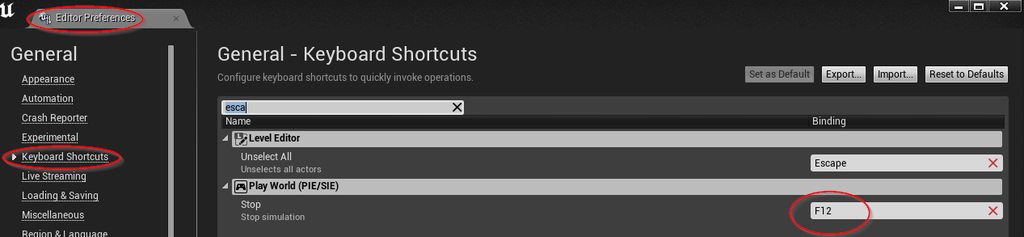
I've got escape bound to a menu button but it boots me out every time I play my game to test it. Obviously I'll just rebind it to something else ATM but later on it'd be nice if I could just hit escape and only have the functionality of my game be relevant rather than the editor. Does anyone know if I can change the escape button?
I found it, finally! I used to have a problem with ALT as well, turns out ALT S is a bind.
 upbeat tendon
i am trying to create some nice screenshots, i thought i would use Photo Mode from the asset store, some of the characters i have have hair and clothing simulation which goes a little crazy, it would be good to freeze all of this simulation
upbeat tendon
ah solution, find all actors with a skeletal mesh and call stop simulation on them
 brave shale
@plush yew Yeah you can see this information by pressing Settings->Engine Scalability Settings
plush yew
I'm doing hair customization and for that I'm just spawning an actor with a certain static mesh related to the hair option. I'm having trouble getting these options into a list that can be cycled through by clicking a button. I can make a struct with "Actor" as a variable but if I can't set the value of that variable once I switch over to a data table
upbeat tendon
i am thinking about building a new pc, i seem to be getting close to what this laptop can do without me spending half my life waiting, i've stuck with intel and nvidia for sometime, is it worth going with amd and radeon now?
plush yew
This is the setup right now but it doesn't seem ideal. I can't figure out how to get all of my hair options in a list with corresponding integers
plush yew
how frequently is it updating?
hushed hare
every time I press R
plush yew
as far as I know this would mean you'd have to press R every tick in order to get an accurate interp
On R press just start a function taht checks if your current rotation is equal to the target
and if it isn't then loop the node
hushed hare
the delta time is connected to event tick
i dunno this whole thing is glitchy I think my engine is corrupted or something
there is no reason for it to act how it is
plush yew
if it's hooked to event tick then what functionality does R have
hushed hare
it triggers the node that the output of the Rinterp is connected to
im just using event tick for the delta time
plush yew
yeah that's what I said originally then
your R interp is happening once, when you press R
so hook it up to a loop that updates every tick until it reaches the desired point
hushed hare
no
plush yew
As in, one tick of the interp
hushed hare
I dont think that's how it works
plush yew
All that event tick is doing is giving you the value of delta seconds based on the information you provided
hushed hare
it was working just fine earlier
plush yew
You said pressing R should do the rotation. If all that pressing R does is set the rotation equal to that rinterp node
then you are getting one tick
so you need to set up a loop
so that you get multiple ticks
could even do a branch like "is R held" or something
 inner scaffold
Change it from pressed to down
hushed hare
inFinItE lOoP dETEcTEd
inner scaffold
Then it will update every tick because it’s held
hushed hare
I have it snapping to a grid so it is only gonna turn 90 degrees
But I want a smooth rotation
iNfInItE lOoP
plush yew
use a delay of world delta seconds
hushed hare
wait a sec
this is apparently an infinite loop
ill just hook it up to tick
with a branch
plush yew
its not infinite if you have a branch
that checks if you're at or within the desired rotation
"so hook it up to a loop that updates every tick until it reaches the desired point"
hushed hare
Schrodinger's Branch
I have an InputAxis bound to Mouse Wheel Axis
It is constantly active
and that is leading to some strange outcomes
It is always outputting and the axis value is 0
which leads to stuff as seen above
inner scaffold
Scripting the logic just seems so much easier. Lol
hushed hare
I already fixed the rotation problem this is something else
inner scaffold
Ahh
hushed hare
I don't understand why it is constantly firing when my finger isn't even on the mouse wheel
 broken stream
how can i Detach mesh or weapon that its in the socket name, like pressing a key then it drops to the ground ? any help
grim ore
axis @hushed hare ?
Axis events are polled events, they are firing every tick, polling for input, and returning that input in the value. You would want an action if you just want it to trigger on action
hushed hare
bruh
plush yew
In the past when I did multiple colors I just made multiple materials. So red and blue shirt were two separate materials. But I always understood that that wasn't particularly efficient. So now I'm attempting to do color changes through textures but I'm struggling to find a resource that explains how this should be done
grim ore
by materials do you mean materials or separate textures? the way you used to do it
broken stream
do you know how to remove somthing that is in a socket name MathewW ? 😄
plush yew
I'd create a new material that was identical to the prvious one but had a different base color
grim ore
then you would use a material instance. Do it the same way but that base color would be a parameter now, right click it and convert to parameter.
plush yew
My current understanding is that I could make one shirt material and several different colored textures and just apply those to the singular material
grim ore
you can then access the material that is on your mesh and set that parameter to any value it would take, in this case another color.
plush yew
Thanks! That should get me moving. I bet you have a video about these I should've just gone straight to your channel
grim ore
assuming you wanted to do this at runtime. If doing this at design time it's the same way with instances you just make multiple instances rather than multiple materials and then adjust the color in the details for them
@broken stream how are you attaching the mesh or weapon to the socket?
grim ore
yes but how is it attached, you said its attached to a socket
grim ore
ok so it's just a mesh you added to the blueprint itself
broken stream
yes
grim ore
so the biggest issue I can see is since you have it as part of the character even if you detach it , it's still part of the character blueprint
hushed hare
input is weird
My scroll wheel is rotating it when I don't have them connected at all
it doesnt at first
and then it randomly starts to
I just wanna make a level builder
plush yew
So just to be clear, this is how it should work? This way I only have several material isntances rather than several materials for one object?
grim ore
yes and no
yes if you plan on using premade instances, no if you want to use 1 instance and just change the color variable in the material
plush yew
Ahhh okay. I'll do some more research then. Because yeah my goal is only to change the color value. And then farther down the line I'd like to be able to change the texture as well but at the moment color is the priority
grim ore
@broken stream to be honest a better way might be to just have the enemy spawn a copy of that weapon when they die, a normal unique copy that would be normally in the world I assume for the player to pick up. then you can destroy or hide the one on the enemy.
broken stream
ok i see
grim ore
@plush yew here is an example in the third person project, the default material for the player has a Vector Parameter called BodyColor https://i.imgur.com/CGLtILW.png
you can see the parameter there in the material, and on the left you can see the code I would use to set the parameter on the materials on the mesh
plush yew
This makes sense the only confusion I'm having is why it needed to be a material instance rather than just a material
grim ore
there are other ways as well, such as creating the actual dynamic material instance on the player when it starts then setting the parameter directly as you can see here https://i.imgur.com/2Jl7nTH.png
materials are fixed, material instances are compiled versions of the material with the parameters exposed to changes
so the material instance is what lets you change things inside of the material at run or design time
The material is the house with a white paint of coat
The material instance is the house with a white paint of coat and a dude next to it with a paint bucket ready to change that white to something else if you want it
@broken stream but if you were going to try what you were trying, you would at begin play spawn the weapon mesh or actor, attach it to the AI at runtime when it starts up, then you can later detatch it and it would be in the world (but this is way messier than just spawning in what you want)
plush yew
Your help is extremely helpful as always thank you so much!
grim ore
and yes I am sure I have a video on this somewhere lol 😛
plush yew
I actually pulled it up! It's now in my watch queue
grim ore
I was working on gameplay abilities today... and yesterday... and the last 2 weeks and I still hate how hard they are to use 😦
broken stream
the thing is that its a child of a base charector, so i want it in the code of that, so when somthing heapand it will drop this mesh
grim ore
you can have a variable on it that holds the mesh or actor and when it dies tell it to spawn it to drop it
I assume you want it to drop to pick up?
broken stream
no pick up
grim ore
oh so they just drop it for an effect?
broken stream
yes
grim ore
well you can still do the same or I guess do the other idea, you dont want it part of the character itself if possible but you want to spawn it in, attach it, then you can later detach it
your biggest issue is realistic stuff like collisions when you detach it and it colliding with the AI
broken stream
so hi got his heand up so when i pres a key lets say it drops it
if you understand
grim ore
yep detatching it from the component or actor would do that
but then you have to worry about to drop it using manual movement down or gravity which means physics which means colliding with the player
your hand is holding it, you detach it, you turn on physics, its now colliding with the players hand and it will go flying away from them
grim ore
I don't, I wouldnt even know how to make it right without custom animations or coding it. I guess you could put it on it's own collision channel that is set to just ignore the pawn (player/ai) so it would not collide with them but still collide with the floor
abstract relic

Hello everyone, this time I show you how can create the inventory off the famous game player unknown battlegrounds. As you might guess this won’t get into 20...
grim ore
hey there we go
but I am curious if that kinda tosses it from the player when it drops it
broken stream
let me look at this
grim ore
yep it spawns the item in front of the player to drop it
abstract relic
Foundational 🤷♀️ hopefully enough to apply it to socket loc/rot
grim ore
yep yep every bit helps
plush yew
In the last version of my project I was working on physics for everything like throwing and dropping but that turned into a nightmare so this time around I'm going to be exploring other options
and doing throwing/dropping last
autumn elbow
Anyone come across a dial creation tutorial...that snaps to values?
plush yew
like a dial that you twist?
autumn elbow
yup
plush yew
idk how you want input to twist it, but in terms of twisting you could just set intervals that you want to twist at in a rotation variable
off the top of my head I'd have pressing E rotate it + 20 and pressing Q rotate it -20
but you'd want to set up a function that interpolates that rotation I imagine
autumn elbow
Oh yea...that part I know. LoL.
I'm interested in the twist part.. I'm doing vr .. I'd like to see how people implement it
plush yew
ohhhhhhhhhhhhhhhhhhh. Yeah that's on the input side then and I don't work with VR
autumn elbow
Kk, no prob.
I debating if I should do the snap on release of the dial, or...if the dial should take control of the hand for the moment and snap the hand along
The later is a bit more fancy
 midnight bolt
does anyone know where i could find some free 3D Mesh cloud assets? something to put in far distance
 burnt pumice
Turbosquid maybe
use there search
Free Cloud 3D models for download, files in 3ds, max, c4d, maya, blend, obj, fbx with low poly, animated, rigged, game, and VR options.
midnight bolt
i see nothing interesting there, i'm thining of some kind of fake cloud, just a few polygons crossing over with nice transparent texture
kinda like smoke particles
burnt pumice
ok
midnight bolt
gonna be a bit tricky to put it together, but i'll see
autumn elbow
It will give you tons of clouds that you can stick on a plane
burnt pumice
niik you have experience with enable input node?
autumn elbow
I'm using 4.22, and my Enable Input works. @burnt pumice
What are you having problems with?
 mint raptor
Anyone know why this may be happening https://gyazo.com/36902dfc268465d7b7e5f8970453008a ?

It doesn't happen on all stairs
but this type of stairs it does
I didn't notice it until now
example of expected movement https://gyazo.com/ff0b52f19856e1fd0e1889bd5ff08e54
not perfect but doesn't look as bad
 modern sinew
How can I add gravity to an actor? I gave it a Movement Component and enabled physics and gravity, but it's still just floating
mint raptor
Is Simulate Physics on?
mint raptor
IDK what you are doing exactly? Screenshot of your Actor BP?
mint raptor
@modern sinew Does your mesh have collisions?
Does it have a physics asset with collisions on the bones?
Also regarding my issue above, looks like my speed is dropping but IDK what makes it drop then go up then drop again? Collision issue?
My Step height should be more than enough at 40
 blissful trail

 modern sinew
@mint raptor Do you mean a physics handle?
modern sinew
Ok, I hit Simulate Physics on the mesh, but instead of just falling down it ragdolled
@autumn elbow
modern sinew
It's a duplicate of the player
that relays the actions of the player from before it was created
basically it just redoes what you did
modern sinew
I did and it still ragdolls
While it would be nice to trigger a ragdoll, I don't want it to by default
autumn elbow
did you add a capsule component?
modern sinew
yea
autumn elbow
turn off simulate pyhics on your skeleton
modern sinew
for some reason that moved the camera down and made it so I can't move
autumn elbow
on your capsule, make sure those are your collision settings
can you send a screenshot , plz
modern sinew
Ok, I made it ignore Pawn and Physics Actor, and I can get out of it now, but if I go into it the camera gets all weird
autumn elbow
it should be pawn, and block everything
autumn elbow
can i see your blueprint setup
modern sinew
Like actual blueprints? or the settings? because I don't have any blueprints for it
modern sinew
For which of these
modern sinew
currently OverlapAllDynamic
autumn elbow
I also just saw that your class is Actor..not pawn
modern sinew
should I switch it? It's supposed to move around
autumn elbow
what are you trying to do again>
?
you want this character is mirror to player character?
modern sinew
Ok, I'm making it so that the player does somethign, and presses Q. That resets the level and creates a version of them that does what they did that attempt. And you can put as many as you want, each duplicating a prior attempt
@autumn elbow
autumn elbow
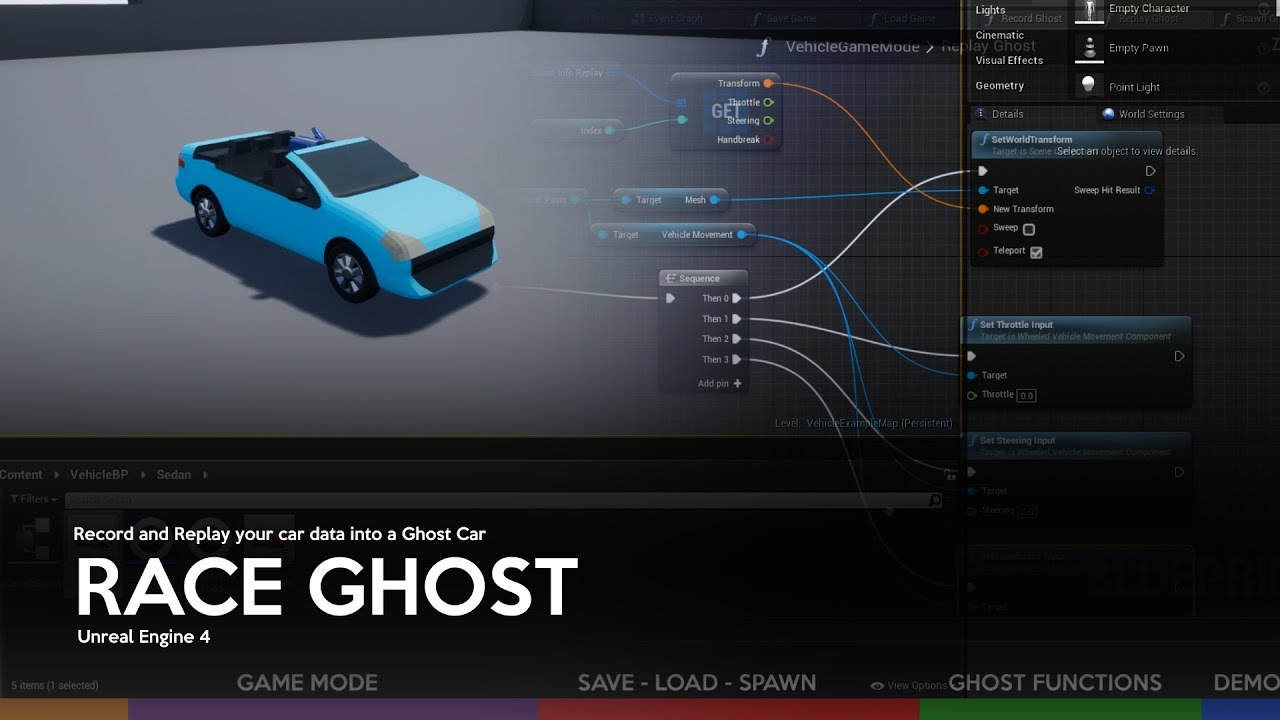
This tutorial addresses one of several possible ways to create a Ghost Car system on Unreal Engine 4. Software Required: -Unreal Engine 4 + Vehicle Base Proj...
Did you see this vid?
modern sinew
But no, I'm not uhh...
It's different
Anyway, so why isn't it being afected by gravity?
autumn elbow
try this,,,
Create a new Blueprint, Class will be character.
add your skeletal mesh
and add your duplicate component
modern sinew
ok, that one is falling now
modern sinew
landing
autumn elbow
ok great
and the rag doll isn't activating
?
shouldnt be activating lol
you can do the same thing with Pawn or Actor as the Class, but you have to make all thise components
Character will give it to you automatically
modern sinew
Now it's falling through the floor, even tho I changed it back to pawn (I'm trying to figure out how to make it so it doesn't collide with the player
autumn elbow
Player is a Pawn. in the collision setting for the duplicate character, on the capsule, set it to ignore pawn
modern sinew
Gravity doesn't seem to be affecting the ones I spawn, but I dragged one in by itself and it's falling through the floor
modern sinew
it is
modern sinew
Wait, I changed Capsule Component to IgnoreOnlyPawn and it worked
Except the camera still screws up when I walk through it, but hey, small problem
do you know how to make a sorta bottomless array? because the only array I know how to make is limited
modern sinew
neither for me anymore
autumn elbow
oh ok
modern sinew
but how did you get it to idle like that? Mine just is frozen?
autumn elbow
i just copied the mesh from the PlayerCharacter to the DuplicateCharacter
It has animation blueprint attached
For Array you can use the Append node to add things to the Array
modern sinew
ok, I got the animation to work
autumn elbow
awesome
modern sinew
how do I get just one specific value from an array? the get just gives me the whole array
autumn elbow
GET node
modern sinew
yea, ok, I found it.
Need to get some sleep, but I
Ill try making the vector array tomorrow
plush yew
i'm overwhelmed, yet at home
hushed hare
what a bruh moment
blend mode: opaque
but when I change it to translucent
and leave everything else the same
 night pond
Hey guys, once I've packaged a game and run it until it crashes - where would I find the error log or the crash log?
 cloud cobalt
Get the crash dump and debug it in VS
 bitter cape
Does anyone know the command to print screen resolution on an IPad? Want to make sure I'm getting native resolution on device.
worthy ginkgo
Hey! I am trying to wrap my head around Player controllers in Unreal. Say I have a game where Inputs are different for different "contexts" like Inventory screen, In game, pause menu, skill tree and rthe same input is used across these contexts, but with different outcomes. Is it a good idea to have a separate unique player controller for each context resulting in multiple player controllers or have a single player controller handle everything across every context. Is it possible to swap controllers at runtime?
wary wave
you will never have more than one player controller per player
you don't switch them in and out at run time..
different UI screens can have focus and handle interpretation of inputs by themselves
worthy ginkgo
What if it's not a screen? Like in final fantasy, when free roam controls are different from the battle mode?
 sudden agate
I use a different GameMode for my Battle Screen and Overworld
with different Controllers
worthy ginkgo
Oh. So you have a player controller for each game mode and swap it?
sudden agate
i dont swap them myself. unreal provides it in the GameMode class
iron merlin
Hey guys, how do i create persistent objects? I want my projectile pools to persist throughout the entire game. What i currently did was spawning projectile pool into a persistent level. Is there an alternate way? Or proper way of doing it?
sudden agate
you can assign the Controller you want to use per GameMode
in c++ its a bit easier to swap them at runtime
i dunno if its even possible in blueprints
worthy ginkgo
So you change the game mode itself when changing to battle?
 warm timber
I read somewhere that having more than 1 directional light kills performance, is that correct?
worthy ginkgo
@warm timber depends on the hardware, the type of lighting and complexity of the scene tbh.
warm timber
Of course, I mean generally speaking.
worthy ginkgo
I'm new to Unreal, but In my experience with 3D game engines in general, I'd say not that much. But prefer baked lighting to real-time whenever possible.
warm timber
I go real-time all the way, actually the first thing I do after starting a new project is to disable precomputed lightning
 whole quarry
Why would you use more than one directional light? Also, is it static or dynamic?
wary wave
sun / moon can surely just use one directional light?
whole quarry
^
wary wave
I don't think you ever see much in the way of light from the moon so long as the sun is visible
warm timber
I guess I could use a single light, it would require some extra work
whole quarry
If you want to minimise the work amount, then just go for static day time? 😛
warm timber
I'm a lazy motherfucker but not at that point
boreal topaz
how can i have a random set object spawn each time the game is played. example: i have a cube that weighs 5 lbs and a cube that weighs 10 lbs. i want only one of them to show up
rotund scroll
create a factory
as in a factory class
that produces your cubes
and assigns them random values
and deposits them in the world
 eager blade
An easier way is to use this plugin which I think is free, can't see as I already own it (I didn't make it, and I'm not affiliated with it, no self-promotion here): https://www.unrealengine.com/marketplace/en-US/slug/prefabricator
rotund scroll
sure if you're not good at BPing I would suggest that
boreal topaz
Thanks to both
eager blade
Even if you're good at it, no point in wasting time reimplementing something like that. Unless you need practice.
rotund scroll
if you are I would almost always recommend doing it yourself rather than buying since you get more control for your project and don't have to rely on external factors
boreal topaz
it is free btw
rotund scroll
e.g. what if it's bugged or breaks
boreal topaz
but i do need the practice. ill probably try both and see what i like best. thanks for the help
rotund scroll
the training will at least make you understand what's going on behind the scenes
boreal topaz
yeah thats something i need to work on
 keen stream
has anyone here stumbled upon this error and knows how to fix it? there is nothing useful other than a post saying "update your vs". it appeared out of nowhere and it prevents me from building my project:
2>c1xx : fatal error C1356: unable to find mspdbcore.dll```you probably haven't installed a necessary component of VS2015
keen stream
i'm using vs 2017 and i have compiled without a problem for a year and this error appeared this morning out of nowhere without any change whatsoever
i have updated vs to the latest version, yet it doesn't make any difference
cunning siren
This was a bug they fixed back in May. I would try completely uninstalling and reinstalling vs2019
keen stream
does vs2019 work okay with unreal?
dawn gull
Hey, sorry to interrupt but I have compiled a source built version of UE4 4.23.0 and i have run it and it has stayed at 45% for about an hour now. Help?
and shootie, it works fine for me
serene birch
from experience, 45% is around the time it complies all the required shaders to even display the editor or so
dawn gull
Should i keep it running for like, a couple more hours?
keen stream
yeah i would say leave it do its thing a bit more, halfway through it does the shaders
dawn gull
ok
serene birch
try it a little more yeah
serene birch
it'll need to convert the project and it might break, and it might be difficult to return to the previous version
aka, backup it somehow (source control for example) before doing the upgrade
for major version changes mostly, 4.20 => 4.21 for example
dawn gull
ok i will try that
and also why is it so hard to just get dedicated servers for your game? this is what i am getting a source built version of unreal for
keen stream
oh man i feel you
dawn gull
i have been using this as a helphttps://wiki.unrealengine.com/Dedicated_Server_Guide_(Windows_%26_Linux)
dawn gull
did it work ok for you?
keen stream
the thing with dedicated servers is that it's a weird and seemingly unnecessary process, but once you get it working, it never breaks (at least in my experience)
yeah it works fine
 honest vale
60 mins to start up?
honest vale
does that include compilation?
dawn gull
no
honest vale
holy fuck 😄
dawn gull
compilation was about 4-3 hours
honest vale
you need a new toaster
dawn gull
oof
honest vale
even my ages old 2600k compiles in 45 mins
dawn gull
oof that is fast
wary wave
what in the heck are you running on?
dawn gull
motherboard wise?
wary wave
processor
I mean my old i7 will compile the engine in around 40 minutes, and will start a project in 2-3 minutes depending on size
wary wave
the current project I have will compile shaders for about 40 minutes if it does it from scratch, but that's because it's enormous
dawn gull
o o f meme big boi
wary wave
that's like a $10 processor 😐
dawn gull
Motherboard=Gigabyte Technology Co. Ltd. GA-MA78GM-S2H (Socket M2)
serene birch
he had to rebuild the shaders from scratch though 😛
rotund scroll
I always set the priority on the shader workers to high so they finish fast
serene birch
that's why the version took a long time to run
wary wave
yeah, ouch - on hardware like that it'll take forever to do anything
dawn gull
f
wary wave
honestly it isn't up to scratch, it won't run UE4 games properly either
rotund scroll
goatsim isn't a good benchmark in either case
wary wave
tbh, I'm surprised that UE4 even started on that machine; if the processor is that dated, what on earth GPU does it have?
 ruby folio
Modular building assets. Would you group different models into sub folders?
f.ex, walls, roofs, misc blah blah
ruby folio
I was just going to do them by interior and exterior, but I now have 70 exterior pieces.
So i figured I would separate the roof pieces into a sub folder
One of the things I wanted to achieve was all different sized roof pieces so when I build a settlement, the roofs will be all different angles and heights.
The only problem I have with that is coming up with meaningful names
 true leaf
Hey my dudes. I'm disappointed in the UE4 datatable editor. You can't copy paste rows, you can't filter by any column ... Etc . Is there a better editor out there ??
Like a plugin
warm timber
export data to a spreadsheet, edit it there and import it back
keen stream
is there really nothing to do to be able to use vs 2017 as i used to up until this morning without installing vs2019? i really don't want and don't have time to go through that process
all my other team members are using vs2017 with no problems at all
keen stream
been there in the first place and no one answered
dawn gull
back
I think the gpu or graphics thingy is a 2047MB NVIDIA GeForce GTX 1050 (Gigabyte)
dawn gull
idk i did not make it
wary wave
I have to ask, where did you get this computer from?
dawn gull
my dad helped me with drive stuff this used to be my sister's but she got a laptop
serene birch
@keen stream consider deleting the solution files/intermediate/other and regenerating a solution file
keen stream
i've done that at least 5 times
wary wave
I would look at reinstalling VS2015
the missing DLL suggests a component is missing, or a registry entry is fubar
dawn gull
dang people still use vs2015?
dawn gull
i am on vs2019
dawn gull
i cannot install 2017 :I
no installer
only the 2019 one
wait
nononononononoonononon
i tried opening a project with my source built
IT CRASHED😭
wait nm
f
keen stream
so what should i do really
i know for a fact vs 2015 won't work for me because i tested it a week ago and it doesn't work
dawn gull
visual studio is a bloat program
wary wave
then don't use it?
 magic scarab
Does anyone have any interest in a modular mmo system that works with ue4 and aws game lift
I'm currently developing one and I was curious if anyone had any ideas I could throw into it
rotund scroll
the people that makes successful mmos probably have their own versions of those systems, so I'm not sure who you'd be developing them for
cloud cobalt
People who think they're doing a MMO
 grave nebula
Everyone starts their gamedev journey with an MMO. That is totally fine.
cloud cobalt
I've tried living from telling newbies not to make MMOs, and I've failed
 tight isle
is anyone looking for help? I have some basic ue4 c++ knowledge and would like to expand that by helping with something cool.
plush yew
anyone using VaRest? I'm trying to authenticate, but I can't find anything on the subject
plush yew
yeah, got it working, just wrapping my head around curl
this is the curl i'm trying to translate into VaRest
curl -X POST https://api.twilio.com/2010-04-01/Accounts/ACXXXXXXXXXXXXXXXXXXXXXXXXXXXXXXXX/Messages.json \
--data-urlencode "Body=This is the ship that made the Kessel Run in fourteen parsecs?" \
--data-urlencode "From=+15017122661" \
--data-urlencode "To=+15558675310" \
-u ACXXXXXXXXXXXXXXXXXXXXXXXXXXXXXXXX:your_auth_token
auth is okay, but I can't seem to get the headers working
might be doing something wrong here
@magic scarab
copper flicker
silly 3D question.. do you guys export things facing Z? or facing X?
Z or Y, depending on your software of choice...
Z/Y or X?
😄
inner scaffold
That’s a good question
copper flicker
cuz I'm not sure which is ideal
I was thinking Z... because then Unrela opens up all my models face-to-cam
but then all my meshes will be automatically set to -90 rotation
in my characters
inner scaffold
I suppose it doesn’t matter, as long as your programming and design corresponds
I’m sure there’s always an ideal perspective
But I think it comes down to your design implementation
I’m a newb, though, so take my thoughts with a grain of salt haha
visual belfry
@copper flicker I like facing X just for consistency
facing Z just sounds like a PITA, but facing Y isn't too bad
copper flicker
Y in Unreal you mean
visual belfry
yeah 😃
can easily build out a level with assets facing Y and not bother rotating, but if they were facing Z ... oof
copper flicker
I know what u mean
but there are software out there that treat Z as Y
and Y as Z
😄
in fact, Unreal does it wrong
Z is supposed to be deth
depth
and not height
visual belfry
yeah, I correct that in the export/import process
inner scaffold
Y is depth in 3D I thought.
visual belfry
the coordinate system wars have begun, take cover