#ue4-general
1 messages · Page 489 of 1
 proper crane
 snow crown
oooOOOoooh virtual texturing
 frank escarp
Skin Weight Profiles. The new Skin Weight Profile system enables you to override the original Skin Weights that are stored with a Skeletal Mesh.
gore confirmed
 raw elk
Wondering if someone can help me out. So I have a plugin I made a while back, and I'm trying to compile it for 4.23.0; but it appears some of the code I used to alter DOF is now deprecated. I was barely able to string this plugin together in the first place tbh
PostProcessComp->Settings.DepthOfFieldMethod = EDepthOfFieldMethod::DOFM_BokehDOF;
PostProcessComp->Settings.bOverride_DepthOfFieldMaxBokehSize = 1;
PostProcessComp->Settings.DepthOfFieldMaxBokehSize = 0;```
I'm not sure what to replace these with as the documentation simply states "Use the new Circle DOF method" ... *but* I can't find source doc on that digital anchor
are you asking how to change from bokeh to circleDof?
PostProcessComp->Settings.DepthOfFieldMethod = EDepthOfFieldMethod::DOFM_CircleDOF;
and remove lines 3 and 4 i guess
 grim ore
you can still use Bokeh until they remove it tho so YOLO lol 😃
digital anchor
ah, i see that DepthOfFieldMethod itself is deprecated
deffered will always be Circle and mobile always Gaussian
 autumn elbow
looking for your 2 cents on VR object interaction. Right now I have 3 levels of inheritance. I have a Object_BP, that handles Saves and Loads. I have 2 Child Blueprints from that- VRInteract_BP and VR_Pickup_BP.
Interact is Switches, Levers, Buttons... things you can't pickup and take
Pickup is everything you can pickup, take, store in inventory
I haven't really setup any physics handle stuff yet, but I assume it will be implemented in the Object_BP as both inherited child bps will use it
 gleaming creek
So, how many people saw the post in #unreal-news about free content and went to check if there was a second drop of free content for July?
 serene birch
so did some try the new features yet?
there is an option for Chaos stuff but the changelog says you'd need to recompile it yourself?
 cloud cobalt
Yup
serene birch
weird ¯_(ツ)_/¯
raw elk
@digital anchor sorry for the late reply, but thanks! All fixed up 😃
I just had to nix most of the lines
turns out the CDOF is set by default now
still haven't figured out how to change it to Bokeh but I'll figure that out later. For now everything works fine though
 frail sun
Is there a feedback thread for the 4.23 preview anywhere?
grim ore
On the 4.23 release notes thread normally
 mint raptor
If I have two camera components how does unreal pick which one to use and how can I change which one to use?
Set View Target With Blend takes an actor and doesn't seem to let me pick which camera to use
grim ore
ok so, the set view target determines which actor the view target is looking thru for the camera manager, it will find an active camera on that target and use it
if you are already the view target, probably are if it's your character, just make 1 camera active and it will use it
sooo......
mint raptor
hmm what does it mean to have a camera active?
grim ore
every component is active or not active, enabled or not enabled, on or not on
mint raptor
Is it just a flag being used to know which one to use or not?
grim ore
It's a property literally called active and more than likely it's set to auto activate for all of your components
so disable it on the 2nd camera, the one you don't want on by default
and when you want to swap you set active targetting the camera you want on, and make it active. then set active targetting the camera you want off, and make it not active
mint raptor
ok
 midnight bolt
I'm using material instsance, but my texture seems overlapped with my master material - any idea why?
 urban crypt
Hi guys! Anyone can tell me how can I make a job post here?
gleaming creek
Check the pinned messages in the job channels
 rotund scroll
we're all doing hos, yes
 midnight mantle
lol
guys i think i need some advice
i don't know what i want to do
I'm not sure if i want to learn cpp, learn bp, learn animation, etc
rotund scroll
that's pretty broad
in what context are you looking to learn? as a hobby or going to school for it
midnight mantle
hobby
well...i want to take some classes for the hobby i guess?
that's why I'm wondering what i should focus on
rotund scroll
it's about what you enjoy the most
midnight mantle
that's a hard one to answer
rotund scroll
if you don't know what you enjoy the most then try doing small projects where you have figure out some hard problems for that particular role
proper crane
A Unity game just crashed my entire PC
rotund scroll
e.g. for animation create a moveset for a character with blendspaces, movement, crouching and create the logic using a state machine and states
midnight mantle
but i will need a rigged character, which in turn needs someone to model it
rotund scroll
for c++ etc. I would start with blueprints and see if I could create a very simple game (space invaders or some such) and figure out exactly what to do to make that happen
midnight mantle
so I'll need to learn three different disciplines
rotund scroll
you can export the skeleton from the ue4 default humanoid
or find some free rigs online
proper crane
@midnight mantle is it just for learning?
midnight mantle
hmmm
rotund scroll
and then retarget them
midnight mantle
well learning definitely comes first
but i eventually want to produce something I've had in mind for a while
but i don't want to be completely useless and only hire people to make it
proper crane
I can send a skeletal mesh and animations, but it's not to be used for a product
midnight mantle
so i want to learn something and be involved in my own project and not just be the idea guy
 plush yew
@snow crown hey i accidentally posted twice in looking for talent
can you delete the first one i accidentally put "contract" instead of "freelance"
snow crown
got it
proper crane
So I'll take it You're looking for something You can use for it
midnight mantle
for now just learning
if you send me something i won't use it for production
I'm a long ways off from that trust me lol
proper crane
I can send a rigged bipedal creature that only has a running animation, or an ant with a fedora that has enough to be a roaming NPC
If I had a portfolio, it would be like a cache of shitposts
midnight mantle
lmao
well I'm not sure what i need for now
i haven't gotten too far into ue4's animation tutorials
is sharer programming a thing in ue4?
shader*
proper crane
Blender isn't very difficult to learn (Besides UI), probably a good origin point for ideas
 gilded osprey
Do you guys know how can I create a realtime render engine like lumion using unreal? 🤔
Is such thing even possible?
rotund scroll
you can do materials in a node based editor for your shading needs @midnight mantle
proper crane
Has anyone else noticed that the Live Training sessions on Unreal Engine aren't actually originally in English?
You can see different words coming out of their mouths as they speak
 blissful trail
ooh ue4 4.23.0 preview 1
 frank iron
Has anyone Noticed FPS loss in 4.22 compared to 4.21 when testing game?
 normal burrow
they reworked rendering in 4.22, so you should have noticed some difference. it positively affected most things for me though
 rotund linden
Boa noite.
 placid hornet
When will google play multiplayer service be supported in unreal?
 hushed hare
Where can I post my discord server that I will put all of my projects and stuff on
grim ore
maybe in #work-in-progress ?
hushed hare
thanks
 abstract relic
Server links are not permitted
proper crane
Alright, now I can check off the two hour Live Training as something that didn't work
 hardy flume
hey guys I had a question, my engine has been crashes randomly for a while when I put my main character into the world and pressing play. I tried to make a whole new character and assign everything step by step to figure out what the problem is, I found out that once I assign the character to any parent class, the engine crashes for some reason. I've checked through my VS code and it both looks and compiles fine. Any help?
blissful trail
how long does this usually take ?
 visual belfry
it's getting there. slowly.
 misty creek
Is your track value changing?
visual belfry
the prints at the top are closer to 0,0,0 than the prints at the bottom 🤔
misty creek
Yes, they are. A very slow change.
 fringe pivot
The last print is the final value
why it stops there then?
oh wait
what a stupid mistake
grim ore
dun dun duraaation
 maiden swift
Anyone figured out how to check out the new Unreal Insights tools in 4.23 preview 1?
@grim ore Did you see the new goodies for editor utility widgets? 😃
 lapis bronze
Epic did a stream a couple months ago about a joint chain with two constraints
one on each end? it was with an Orc character with a drum or something
does anyone remember?
blissful trail
https://gyazo.com/ca1324bae31d79f7e65ea16439bad985 is this a bug ?
cos i can resize the box by using the resize thing in the viewport and i can edit the scale values and it all works fine but when i drag it with scale values with the cursor it doesnt work
 oblique sorrel
Well, another level generation attempt, another failure...
I wish there was an asset or a tutorial that deals with generating maps where every room is a level instance, 'cause it's clearly above my head.
The rooms that spawn do form a coherent route, but sometimes they create routes that go straight into a wall
And the algorithm needs a delay for some godforsaken reason
Repo, if anyone's curious: https://github.com/Atulin/OneGun

It's supposed to spawn 25 tiles, but here it is:
Every actor like the circled one is a valid spawn point
But it just... stops
oblique sorrel
Okay, fixed it... I think
No, not everything
It still needs a delay to function properly, but at least spawns all the rooms when said delay is present
Beautiful
 dim arch
uh so, there is a blueprint node I need to access. this is the signature: ```cpp
UFUNCTION(BlueprintCallable, meta = (DisplayName = "Landscape Import Heightmap from RenderTarget", Keywords = "Push RenderTarget to Landscape Heightmap", UnsafeDuringActorConstruction = "true"), Category = Rendering)
bool LandscapeImportHeightmapFromRenderTarget(UTextureRenderTarget2D* InRenderTarget, bool InImportHeightFromRGChannel = false);```
this project I have downloaded has the node in BP, however I cant find it in the rendering Category
first issue was that its an editor-utility function, so it wasnt in a runtimeBP function list. Made a Blutility but it isn't in the list there either (with context sensitivity disabled)
ok.. seems like the Blutility class needs to be derived from GlobalEditorUtilityBase and it has to be in the eventgraph with context sensitivity disabled
 meager tinsel
having an issue where my client is getting bumped out into the default map(main menu) instead of the lobby it's trying to load. Big digging into it for about a week now and haven't made much progress in terms of finding out the problem. Here is a snippet from the log that i think is the most descriptive of the issue.
https://gyazo.com/faf915b1eb051c5bcfd599655059ab2f
if anyone could help me make sense of it, I'd be grateful. Right now I can't really piece together why it would load my lobby map, just to immediately do a join request for the default map

 dim plover
In the world settings of your lobby/transition map, did you specify a GameMode Class?
@meager tinsel
 grim juniper
So Chaos isn't in the launcher version of the preview?
meager tinsel
I’ll have to check in the morning but that’s got to be where the issue is as I can jump into my other maps, just not the lobby
@dim plover
dim plover
And sometimes it'll reference a class/map that has been renamed and thus can't be found. But that should've been picked up during packaging.
 drowsy kite
Does unreal Engine Supports Exports to .stl
 wary wave
Doubt it
plush yew
Like it youtube:WTF90
 upper wasp
I added a headbobbing blueprint for my character, everything is going nicely, though when he jumps, the headbobbing still continues, how can i stop this?
 fathom void
Headbobbing is the worst imo, never understood why devs like to add it.
upper wasp
adds to realism, I'm trying to make a horror survival game
fathom void
It's not realistic, when you walk your eyes and brain compensates for the head moving.
 timber glen
Hey guys, i tested the BlueprintsToRenderTarget content examples, and found that there are additional ripples for hitting the edges, how can i disable that and just have clamped texture with no reflective ripples?

 mint sequoia
@fathom void @upper wasp Just got up and walked around, B. is right, I don't notice my head bobbing at all, never thought about that
Maybe if you were carrying something super heavy on your shoulders 🤔
But.. maybe it adds to the realism because, like me just now, no one thought about it
 sudden agate
@timber glen you could use a boxmask to stop it from having waves at the borders
 vale bison
uhh I have the quick question is variable still replicated if player just join and out of net cull distance?
plush yew
Well head might not feel like it's bobbing but it's slightly swaying as you walk around so a very weak head bobbing effect might feel more natural than either regular head bobbing or no head bobbing
 distant loom
watching ultimate c++ guide 2019 by rueben ward and im getting red squiggles under "StaticMesh" ```Camera->SetupAttachment(StaticMesh);
SetRootComponent(StaticMesh);```
 errant ice
Did anyone try the new Virtual Texture feature in 4.23?
 thin tendon
For doing updates of a game to steam. Does anyone know the setting so steam patches are smaller? I recently had to restore my project. Patches used to be about 30mb. Now they are about 3gb each time. And I can't remember what setting it was in Unreal that allowed me to patch smaller
wary wave
don't encrypt the content
thin tendon
thanks
 primal prairie
Anyone know why some of particles i placed in level dont work at run time but do in editor view?
 iron wadi
is there meta that acts like EditDefaultsOnly + VisibleAnywhere
I want the property to be editable in default only, but I still want to SEE it in instance
 honest rover
😅 There's no way to automatically resolve these?
 boreal topaz
anyone know of a good text to speech app
cloud cobalt
Depends what you call "app"
cloud cobalt
"software" is a bit vague - do you want a C++ library, a Windows app or a phone app ?
Generally speaking, Nuance has the best tech
It can get quite good sounding with a bit of calibration
boreal topaz
yes , windows app. ill check out nuance
 regal mulch
How can it be that one and the same function in BP allows a specific type and the c++ one doesn't?
Both have a parameter with UAnimationAsset
Both get a UAnimationSequence from me
BP works, C++ doesn't like it
(╯°□°)╯︵ ┻━┻
normal burrow
C++ break struct is messed up too
Cant set break member by ref unless it’s bp asset struct
 manic pawn
isn't that only when you use a native make/break method
and then it's probably on purpose since if you have a native make method you might be doing some fancy initialization
 timber minnow
hi everybody, is it normal that the foliage doesn't work with occlusion culling ?
normal burrow
@manic pawn nope
any c++ declared struct has this inability, whether or not it has a custom make / break
you basically have to use the set member nodes to do the equivalent. but still believe when you break something to get at an array in a native struct it makes a copy
manic pawn
interesting
normal burrow
makes native struct in native struct hard to modify either way
grim ore
@timber minnow yes that is normal occlusion culling does not work for instanced foliage
Because foliage instances are rendered as clusters in a single draw call, each cluster is either rendered or not rendered based on occlusion. If you set a value in the End Cull Distance parameter, the clusters will also be culled beyond that distance. However, this will cause groups of meshes to disappear abruptly as the entire cluster goes out of range.```what's the equivalent of 9-slicing in unreal? https://docs.unity3d.com/Manual/9SliceSprites.html

it's not for a HUD element but for a billboard material (2.5d sidescroller)
 vocal snow
Anyone know how to add a background image so that I can model my landscape off of it? and in addition to this can you go into a wireframe view for the landscape
 copper flicker
I'm getting some random performance drops... cuz of my AI
like some leak..
sometimes I'm running at 60-120 fps
I restart, same scene, same AIs.. will get me to 5-40 fps
I tried debugging but .. I don't really understand most of that debugger
😄
I noticed there was very high HZB
I read a bit about it.. tried to remove HZBOcclusion
set it to 0
it seemed to work but neah
it's hard to tell what it is, cuz sometimes it works fine
every 5-6 runs or so, leak
and then it keeps doing that several runs
I've never encountered something this weird
and disturbing..
O o
 runic gazelle
Anyone wanna help me with my Low poly take on procedural planets. Some what like no mans sky or Star citizen
plush yew
running many services maybe? @copper flicker
plush yew
Ok then it's not that, I was thinking cause services runs on a tick and therefor it can get heavy
Aha BT_Services
a sort of BP used in teh BT
copper flicker
nono, again.. it's not hapening every time I run the game
I have nothing on tick
well, not on tick event at least
I have navigation
plush yew
Not talking about on tick event
In the BT you have Decorators, Services and Tasks
Each service has it's own tick, if you have many services in teh behaviour tree ti can get heavy
plush yew
best way to recreate the ground from mario in unreal? if only i could do 9-slicing...
vocal snow
Just a heads up incase someone else is wondering I just made it a decal and it worked
fathom void
I personally think unity has better tools for 2d game.
Was I allowed to say that? :/
copper flicker
no Beryl.. every single engine out there has better tools for 2D
abstract relic
Construct 2 is better 😛
fathom void
Shhhh
plush yew
well too bad i'm forced to use unreal lol
copper flicker
who's forcing you?
copper flicker
go talk to tim
plush yew
there's not even a 9-slice plugin for unreal, what a pain
fathom void
Make your own
plush yew
aint got the time nor the skills for that lol
plush yew
to make me a 9-slicer plugin? lol no way he's useless
my teacher i mean
i dont know sim tweeney
fathom void
Well he's making you make 2d game in unreal yeah..
plush yew
tbf i'm the one that chose to do mario, but only cuz i didnt know what a pain it would be and cuz i had no inspiration
maybe i should just make the ground 3d lol
copper flicker
you can make 2D in Unreal just fine.. if it's just for a class asignemtn
plush yew
@runic gazelle just hire some people on fiverr lol
serene birch
use Paper2D and make a tilemap with it
copper flicker
it's much easier in 2D anyway
serene birch
doing it manually should be ok 😛
runic gazelle
What’s fiverr 😂
plush yew
but it's 2.5d, mario and the coins are in 3d you see, so i cant use sprites but have to use billboards
serene birch
paper2D is totally 2.5d 😛
copper flicker
anyway. back to my problem.. can anyone make AI that's not massively taxing on performance, with Unreal??
cuz I failed with my 2D AI...
now I'm failing with my simple 3D AI
O o
runic gazelle
@plush yew What’s fiverr💀
copper flicker
to just move around
plush yew
@runic gazelle it's where you can hire people for $5
copper flicker
the simplest AI I'm making in Unreal is already too expensive
runic gazelle
Damn I don’t even wanna hire people I just need a group of people who I can code with and make this game
fathom void
Lollll
copper flicker
well, my problem is more complciated..
fathom void
No one is going to work for you on making your game for free
copper flicker
I do want to eventually have a few behaviors
what do u mean by state graph
I make everything in BP..
I haven't touched behavior trees
runic gazelle
Nah I don’t want people to work for me. I want to be doing a majority of the coding but have a whole team who have faith in the game
copper flicker
so my question.. is it even possible to do what I'm trying to do?
I have nothing on Tick
plush yew
are you gonna give them an equal split of the revenue? @runic gazelle
copper flicker
so I was just wondering if anyone here has made a game with large numbers of AIs
runic gazelle
This sounds stupid but I might give them all the revenue when the game is small as i provable won’t be earning a lot
copper flicker
ok, so let's say that's my AI
 night pond
Hey Guys,
Can anyone point me in the right direction when it comes to solving performance (FPS) issues? I have a lot of AI in my top down large map zombie game using the Unreal Mannequin and a skeletal mesh, not sure where to start, but googling the issue seems to point to getting rid of bones and using LODs. I tried using LODs but it doesn't seem to change much performance wise....
I'd really be grateful if anyone could just point me in the right direction! 😃
runic gazelle
I already got a job anyway on the side
 true leaf
Yeah I have inexpensive ai in my game.. I use a state machine .
I have a one second tick rate on updating the ai state
plush yew
@runic gazelle you might be able to pull off an open-source project, sorta like 0 A.D. did
anyways i'm curious, what's your idea?
true leaf
Ultimately it commands the units to move to different spots and calls other methods that make them use abilities
copper flicker
I have no ticks at all.. my skeletons are simple.. my models low poly
true leaf
It also selects targets to 'focus' infrequently
runic gazelle
A Low poly procedurally generated space game. It’s really ambitious I know 😂
copper flicker
wut?..
true leaf
Simple
plush yew
so basically low-poly no mans sky?
true leaf
You use the unreal move command
copper flicker
it is triggering events, but nothing runs ON tick
runic gazelle
Yeah that’s one of the games I’m inspired by
true leaf
So you don't need to do anything every frame . For the ai.
So it shouldn't be very taxing on the cpu
Unless you have enormous loops - avoid that
copper flicker
ok, I was using move to loc
let's try simple move
I am not using tick....
I literally have zero things happening on tick
yes I have a navmesh..
true leaf
Indeed you need navmeshes
And they have to build
Make sure they are built... Press P
And you'll see green paint
On the map
copper flicker
ummm... simple move doesn't give me info about when the movement is over
runic gazelle
Anyways I’m going to have to make a lot of my own code since unreal isn’t really built for procedural planets
true leaf
You are right it doesn't tell you when it's over
visual belfry
is simple move to not the one with an extra pin for movement completed successfully?
copper flicker
no, I prefer using normal move to
copper flicker
instead of continuously calculating
any continuous ray casting or calculations... I try to avoid that
serene birch
so, use "simple move" so as to not do logic on tick
then check in tick if you are close to the goal to end move?
😛
copper flicker
anyway, look. my problems are not with 5-10 AIs in my scene.. I need 100+, that's the problem, and I wanna know if it's at all possible without C++
visual belfry
yes, with behavior trees
they have incredible amounts of optimization compared to doing state machines yourself in BP
copper flicker
well, I don't want to insult anyone, it was a light hearted joke
🍻
was just trying to say it's not helpful if someone asks about BEER.. and you try to suggest WINE
visual belfry
but all they talk about is ALCOHOL so we haven't got a frickin clue
copper flicker
which is what's happening on all these discords..
😄
so BTs..
I watched an Unreal traning video where the dude managed to make the slowest, most inefficient AI on Earth
with BTs and Blackboards
visual belfry
and how did you come to that conclusion?
regal mulch
The BT is the last of your issues :D
copper flicker
hmm.. maybe.. but the navmesh doesn't seem to be the biggest problem. not sure..
regal mulch
WIth 100 you might still survive with normal collision
visual belfry
@regal mulch and at the 100+ scale, skeletal meshes
copper flicker
I had massive problems with a ton of ticks.. making a 2D AI, for a platfomer. so no navmesh there. but the AIs were as slow as it gerts
gets
copper flicker
ok.. that's what I was wondering
if I can have 100+ AIs, most of them disabled...ish...
without C++
regal mulch
It's more about the avoidance
Yeah, you can compare it to battle royal games
It's technically possible
but not with 100 on the screen
visual belfry
avoidance is overrated \o/
regal mulch
Not in simulations
visual belfry
unless you don't have any variance in pathing
copper flicker
I tought of avoidance too.. not sure..
regal mulch


10.000 pedestrians walking randomly around during runtime at 60fps. Every pedestrian avoids other pedestrians as well as obstacles. Part of the traffic system I made in @UnrealEngine for HALVR. #ue4 #gamedev https://t.co/yp91sgwG7k
Retweets
218
Likes
1632
 Twitter
copper flicker
Twitter
copper flicker
the problem there is I will have to start abusing the tick I guess
and raycast a lot
recast navmesh is supposed to be fast tho
regal mulch
I'M really not sure how good 100 would run
You can really only start to messure the bottle neck
Let 100 run
true leaf
1000 navmesh pathing units in close proximity prob won't won't with simple move. Going to need to get really creative
copper flicker
in Unity at least.. I did some tests with 1000 simple AIs at 60FPS
regal mulch
Improve it
visual belfry
💯 profile before assuming something is slow
regal mulch
Yeah Unity is also a lot simpler
copper flicker
yeah, I don't really understand that profiler
regal mulch
You gotta learn it though, cause otherwise you won't get the 100
copper flicker
yeah, but simple is good.. cuz I need performance, not bloated AI
copper flicker
I tried all the profiling tools I could think of
regal mulch
So you have to locate the GameThread in the list after recording
And in there you have to go to the thing that costs the most
regal mulch
I don't have an example at hand sadly
But when you record for a little while and then stop (let's say 5-10 seconds) while the ais move
Then you click on "load" at the bottom right
And wait for it to load. then you get this big list on the right
copper flicker
regal mulch
There you need to ignore all the weird stuff and locate the GameThread
copper flicker
serene birch
isn't there something to enable in recast in UE4 to get bigger crowds working?
visual belfry
40ms tick 😬
copper flicker
do those numbers mean anything?...
regal mulch
@copper flicker Check at the top left menu of the editor for the SessionProfiler
And utilize that
Yeah 40ms for the tick is too high
copper flicker
but I use nothing on tick
regal mulch
Our multiplayer game with 8 AIs, weapons etc. etc. has 8ms
The Engine does
As said, use the Session Profiler
It will show you what exactly causes this
copper flicker
can't find it..
regal mulch
It's under "Window -> Developer Tools -> Session Frontend"
4th from the bottom
And then in the new window the "Profiler" tab
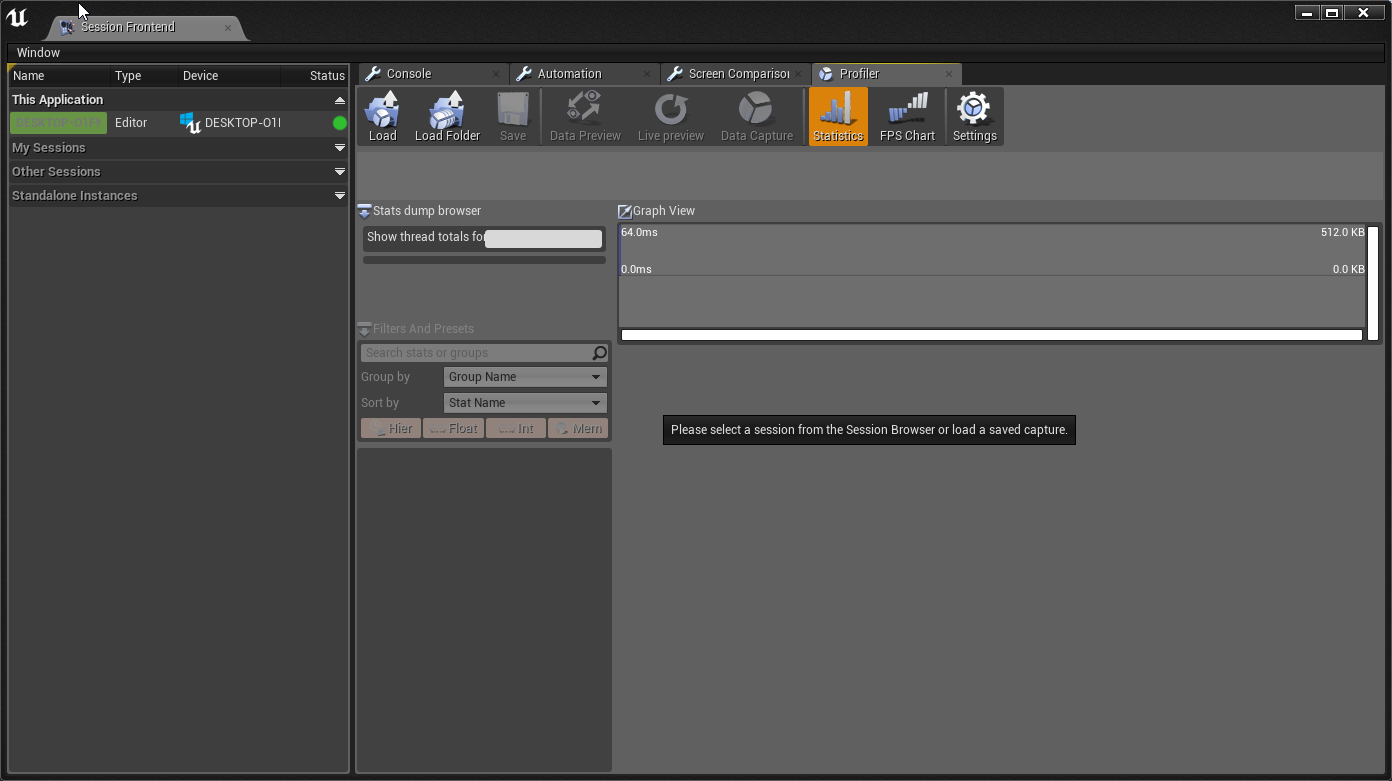
Then you start your game
Go back to this window
And click "DataCapture". If that's greyed out make sure to select the session on the left
Wait 10 seconds
Click DataCapture again
It will ask you if it should load the stuff
Do that
copper flicker
ok, thx!
regal mulch
Once that is done it will show at the bottom another button for "LoadFile"
Once you are there, let me know
It should look somehow like this
Then you locate the GameThread in that red list
And expand it till you find something that you can improve
Here you can see that the PlayerController is the heaviest next to the characterMoveComponent
If we open that up further we get greated with the Tick
copper flicker
umm.. it didn't load anything
regal mulch
And the InputAxis Events
copper flicker
I laoded something manually
dunno if it's the right thing tho
ok, this makes..... no sense O o
I have a ton of entries showing the same number
and numbers in ms that go way above my head
regal mulch
You need to find the gameThread

Here is an example
There is a lot more you can do to debug and profile with this but this is the first step
copper flicker
does that make any sense..
btw, every time I start any kind of profiler, my FPS drops drastically
and I might even have to wait like 10 sec... or so, to start profiling
well, I mean if I use stats
in the console
with this profiler my FPS dropped to 5-10
regal mulch
Check the frame time
Well if you enable the profile you want to click back into the window
Otherwise it's probably reduced frames cause something that isn't focused doesn't need 60 fps :D
copper flicker
I did
I started profiling, clicked back in the window and moved around
at 5 FPS
regal mulch
Your PC actually powerful enough for UE4? :D
Cause I don't have that issue
Eitherway
Check the FrameTime
regal mulch
Yeah not the desired dev machine
copper flicker
yeah. but still.. i7, fairly recent
way more powerful that my older desktop
which was also i7
😄
regal mulch
I moved to an i9 cause i7 was too slow :D
copper flicker
well, the game should run well on lower end machines too
and I'm doing low poly
not realtime hyperrealism
regal mulch
Doesn't really matter all :P check the profiler and try to improve the stuff that is high on frame time
That's the only advice I can give you
copper flicker
visual belfry
is your level BSP btw?
serene birch
are your objects "full" of components with their own collisions?
copper flicker
yes
visual belfry
BSP meshes are the movement killer
copper flicker
I mean full of AIs
no, no BSP
so do those numbers make any sense?
cuz I'm looking at them and don't get a thing
it tells me my characters are using up resources..... I'm like duh
😄
the problem for me tho, is.. I'm trying to make something simple and performant. without getting too fancy
if I have to do in depth profiling and C++ stuff, I'm done
I was just wondering if I made some obvious mistakes
serene birch
are your objects collision shapes complex?
seems it's spending a lot of time updating those
copper flicker
oh, the world yes
but the AI should be using the navmesh
the AIs are the ones slowing down everything
they do nothing on tick, no raycasting, only navmesh navigation... and some simple BP logic
serene birch
the profiling says a lot of time is spent plain "moving" things
not deciding where to move
copper flicker
yesterday I was able to have 100 or so.. if 50+ were disabled.
 carmine shell
how can you set the blackboard of a blackboard component? I'm aiming at having a blackboard component in my game mode that I can set state values into a shared blackboard for all of my AI actors
copper flicker
ok
the thigns moving are AIs on the navmesh... ?
it's stuff that should be stupidly fast
it doesn't show an average tho
it tells me Process Mouse Move 70 ms
I guess that's 70 ms across a long span of time?
what am I gonnna do with that info
 tardy sapphire
Anyone who develops Android apps here on UE?
In project/Intermediate/Android, I have a manifest file and I have another manifest file in project/Intermediate/Android/APK
Which one should I edit to add stuff to the manifest? Adding via editor doesnt work for some commands
 desert jay
Does unreal use the even number releases are stable, odd are experimental nomenclature?
plush yew
how i can do walls for these stairs?
 weak gale
yo, does anyone know any good resources I could use to learn how to make skyboxes? I need one that both fits my game's aesthetics as well as is not emissive. I can make the visuals, but I dont know how to imploement it
@plush yew use Cylender BSPs and cut one in half with a subtractive box for the inside wall, and for the ouside wall do the same but also cut out the middle with another cylindrical subtractive BSP
or you could use blender and model it up
If my explination doesnt make sense I can screenshare and show you what I mean
plush yew
how much is one unit in unreal?
plush yew
where can i see?
 wooden wraith
ah unreal bsp, still sadly clumbersome :<
cloud cobalt
Still in the engine for people to waste their time with it
wooden wraith
I'd love to have something as fast and fun as TrenchBroom in the editor for level design and blockouts
rotund scroll
bsp has its use, not sure why people are so against it
vocal snow
Anyone know how to make a shorline that gradually slopes down to the water? And a pretty even angle or do I just have to do trial and error with the sculpt tool?
rotund scroll
you can use ramp
vocal snow
Yeah was thinking that then gust sculpting over them just was wondering if there was a tool for it
thanks tho
rotund scroll
what's wrong with the ramp tool?
vocal snow
nothing its just Im trying to make the shoreline of an island so its going to be alot of ramps lmao
pretty big island
rotund scroll
I mean no one island would have identical shorelines all the way around
 willow halo
Hello People, I've got the new version of UE4. Where the heck is the mesh Editor for the chaos engine??
rotund scroll
but you can try creating uniform steps as well with the flatten tool, then smooth to interpolate a ramp between them
that might be faster
willow halo

Whether making a high-end AAA game or a small-team indie title, physics simulation and destruction can play a huge part in bringing your games to life. In th...
vocal snow
no wanted to see if there was a way to make them even then was going to had sculpt them insead of having to put like 300+ ramps down lmao
vocal snow
yeah steps didnt even thing of that yeah ill try that
plush yew
anyone who can help me on a little math problem?
Like I want to map a range of values to 0-1 for a lerp.
So let's say my low end is 4 and the high end is 7.
4 should be 0, 7 should be 1.
I have a value "5" that I want to be the alpha.
I found the solution
LowEnd = 4
HighEnd = 7
Value = 5

Alpha = (Value - LowEnd) / (HighEnd - LowEnd)
So Im looking to make dynamic blood for my game, and the marketplace doesnt seem to have what I need (at least not for 4.22). Does anyone know how I should do this?
I dont know whether I should make a particle effect or something else
Actually wait
I think Ill make a sword trail that when an overlap is triggered it will change into a blood effect
visual belfry
@plush yew are you in blueprints? an alternative to doing the math is Map Range node
plush yew
@visual belfry Oh I see that does the job thank you
@visual belfry Oh I see that does the job thank you
visual belfry
yeah, it's practically the exact same but is a little quicker to comprehend when scanning blueprints 😃
rotund scroll
what's with the duplicate messages
visual belfry
oof. I didn't even notice that
manic pawn
discord is dying again
copper flicker
no, I'm dying again
plush yew
is there a way to insert a third person character into a level without makign a new level?
idk where the mesh is <.<
 ancient lotus
@plush yew click on content and search
https://gyazo.com/4384f94d8e9cb327cd95d4dd1c93b23a
 plush yew
it doesnt show up for me
can i import it somehow?
its not in my content my content is a diff source folder
subfolder
ancient lotus
if you dont have it them import it. right click in the window(shown on the right side of my screenshot) and click import, then select the fbx to import the mesh
vocal snow
@
CranzEstebogen Thanks It worked, just wanted to say thx
grim ore
@plush yew do you have the third person character already? as in did you start with that template
plush yew
no i didnt
thats my problem
the project i started is in its own subfolder of assets
and i cant call to the thirdpersoncharacter default
grim ore
click on the green add, go to add feature pack at the top, choose the third person feature pack, profit
plush yew
i only started using unreal 2 days ago so if it looks like idk what im doing its because i dont lol
thank you those are the words i needed
 runic iron
Hey guys, is it possible to export sequencer keys to a curve playable by a timeline node ?
proper crane
So, I'm a flood of errors on a blueprint but it's working perfectly, is this a concern?
ancient lotus
are they errors or warnings?
proper crane
Errors
grim ore
Errors should always be fixed because they are problems. Blueprints helps you not crash for most errors at runtime but most other languages will hard crash
visual belfry
nativized blueprints will crash though
 spiral island
sometimes hard crash is better
helps you know that there is an error, rather than your game continuing to plow forwards but behave increasingly oddly
vocal snow
anyone know why the transform axis arnt showing up? I have then set to show undersettings but they just dont know when I select and object.
proper crane
The error started when I changed my material quality level to low
grim ore
read the error, fix the error. It's how programming works.
vocal snow
NVR mind "Viewport - Show - Use Defaults" worked for me.
grim ore
maybe you hit G for game mode?
vocal snow
yeah I may have lmaO just tried it and that recreated the problem so probably XD, Ill remember for next time Thanks
proper crane
The function works perfectly, so I'm not sure how to "fix" it
It says it doesn't return a value but it does
 civic cobalt
anyone else seen this? a lot of drop down menus do this. using 4k monitor
grim ore
well the errors should have a link to the issue, if you really want help fixing it then paste screenshots of the full error codes and the nodes with the problem
civic cobalt
woow is this you 😄
grim ore
try going to a lower resolution or scaling, everyone with a high dpi monitor or 4k complains about how the editor works 😦
civic cobalt
i could remember your voice woken up in the middle of the night 😄
grim ore
lol 😃
civic cobalt
thanks for all the help
vids n stuff
im trying to figure out what exactly causes this
i was in win 7 before without any scaling
still had this issue,
reinstalled to win 10 today and its still here
maybe a plugin or something could cause this
grim ore
so you are at 100% scaling at 4k?
civic cobalt
i was using lower rez on win 7
now im at 4k with scaling, but with scaling disabled in unreal
i disabled it because i had the same problem with scaling enabled
grim ore
damn. I know slate will do stuff like that when things dont fit on the screen but resizing the details panel for example fixes it. that has no way to "fix" it lol
grim ore
I too was having this issue and it was driving me crazy. After some experimentation I found out what was causing it.

Go to Edit -> Editor Preferences -> on the Appearance page (the one that opens by default) Uncheck the "Enable Window Animations" box.

This only started to be an issue for me after getting a 4k screen, something about my DPI scaling doesn't play nicely with the window animations.

Hope that helps!```Alright, I put the error in #gameplay-ai
I'm gonna continue working and see if it becomes an issue
 south ridge
Hmmm
So lets say I have two actors - A and B. I want A to re-run construction scripts whenever B is edited
What would be the best and most reasonable way to implement this? The actor A has a pointer to actor B, but B does not know A exists
The obvious solution is to have some C++ code that runs when B is modified and looks for all actors like A. I wonder if there's any alternative way to link them up
 harsh tiger
I have a question
 cunning siren
what is the best way to check to make sure your character is moving? In C++
harsh tiger
in my project, i cant build lighting without getting an error. would me using this on begin play. be a good fix to keep the rebuild lighting red text off screen. after i build the project for other players?
south ridge
@grim ore both really
But C++ code is no problem
I was just wondering if UE4 had anything built-in for it already, if not, I'll just extent the code I have already
@harsh tiger a better choice would be switching to dynamic lighting instead
Then you wouldn't be getting those red messages in the first place
harsh tiger
even though it will be on mobile?
south ridge
By setting lights to movable and such
south ridge
@harsh tiger well, I mean, if you can't build lighting, it'll revert to dynamic anyway
harsh tiger
wait, really?
grim ore
@south ridge nothing that I know of but there is no reason you couldnt get all actors -> call a function on them during construction of B
south ridge
@grim ore only performance
harsh tiger
so even though its stationary, when i press play it changes to movable?
south ridge
If you don't have lighting built and there are no lightmaps, it will be treated as movable
All objects that don't have lightmaps will also receive light as if it was movable
harsh tiger
interesting, ill have a play around with it an see how it affects performance. thanks!
plush yew
Feature Needed: Adjusting Bezier Curve Handle Length.
grim ore
in the curve editor?
dim plover
Hi, I'm pretty new with regards to art stuff.
I was wondering if there was any reason, particularly with performance, not to use photorealistic textures like those provided by Quixel.
south ridge
It takes less work hours to create stylized art assets
There isn't enough input in the question to discuss performance
dim plover
In my case, since I have little artistic talent at the momemt, it would probably take me longer to create stylized assets.
What other input was I missing? I'm not too sure of what this entails overall. But I had planned to play with photorealistic stuff to start out.
south ridge
More realistic materials often might be a little more expensive if you add more layers and such in the shaders to add some realism
Stuff like procedural dirt and so on
grim ore
^
or even just adding in AO or roughness maps
4x realistic 4k textures or 2x stylized 4k textures
south ridge
But that's like, a question that maybe is too early to answer for you yet? There is no real inherent performance penalty to just using Quixel sorta realistic textures 😄
grim ore
but the reverse can be said as well
hushed hare
Wowie I never realized how hard some simple stuff actually is to do
proper crane
"Mesh contains Skeleton bone as root but animation doesn't contain the root track"?
grim ore
and your realistic texture might go on a realistic model with 150k more triangles than your stylized one which is.... performance
hushed hare
All I want is a smoother camera rotation (It slows down before stopping)
but fridge it is hard
dim plover
Alright. I understand. Thanks BlackFox and MathewW.
proper crane
This error isn't really listed in documentation
grim ore
that would be an error when exporting out the animation from the software
proper crane
there are errors listed here that could have the same said for them
Anyone else getting their Discord messages corrupted or something when they send?
grim ore
make sure the skeleton matches what UE4 expects when exporting out, hierarchy and names, and that your export out the animation and skeleton at the same time. you can always tell it not to create the skeleton when importing if you want to try to retarget in the engine
proper crane
retarget?
grim ore
when do you get the error? what are you importing and where did it come from.
proper crane
On import, skeleton with animation, Blender
grim ore
which skeleton did you choose on the import, the UE4 one or none?
proper crane
I am using the same file I used to import the skeletal mesh, which I have successfully imported a different animation to
grim ore
so you imported a skeletal mesh without animations, created a new skeleton in UE4 when doing that, then tried to import an animation and chose that skeleton and it failed?
proper crane
Yes. After a different animation imported perfectly fine
grim ore
then perhaps your animation was not exported correctly. that is saying your skeleton that you created for that mesh has "Skeleton" as the name of the root bone but your animation you are trying to import and use does not
proper crane
yes, I named it skeleton
Are You suggesting that I'm not reading it correctly because it's named skeleton?
grim ore
the engine is saying they don't match, I can't say why.
proper crane
Ah
plush yew
@grim ore yeah exactly, in the curve editor, sorry a bit late
I mean for timelines and curve objects, I think this is somewhat of the same UI
grim ore
it's a weighted tangent you want and it's not in the curve editor right now, its in the sequencer and will be added in 4.23
plush yew
aha ok, so it is in the sequencer already and will also be added to curve objects in 4.23? also timeline tracks?
grim ore
the curve editor itself is getting replaced in 4.23 yes, I dont think the timeline editor will be replaced but it can take in an external curve you can set up in the editor
runic iron
@grim ore is it possible to do the opposite? Take keys from a sequencer track and export them as a curve ?
Thanks a lot for you vids btw, helped me a ton ! 😄
grim ore
I dont think you can export out to a curve no 😦
runic iron
Ok I thought so but wanted to make sure 😅
Thanks for the quick reply, I guess I'll have to copy them manually if needed then
 storm venture
i need to add a level group into another level group, how is this done?
my only guess is to merge the first group into one level, which would invalidate all the baked lighting
 dark depot
cool good luck. use whatever you need to make your project
grim ore
now that you have me looking at curves I am super confused on why you can't use an external curve in sequencer or even import/export out a curve to a track
 dark sparrow
is this the right place to ask beginner questions?
dark depot
yeah unless you believe it fits under a different channel better if anything people will direct you there to get more help
 loud knoll
@dark sparrow yes george
plush yew
I'm using a select node that selects based on the value of a boolean. But the true and false inputs seem to be influencing each other. Is this normal? I was under the impression that false should return the 'false' value no matter what is plugged into the true value
loud knoll
@plush yew wouldn't that depend on the default setting of the item and boolean?
isnt the branch connected to the question an either or? couldnt you just use one value and then look at the other thing when it is either true or false?
seems like you could get the result of true and false at the same time
hard to tell what you are doing though I would need to see more
proper crane
Blender server refusing to help with importing
plush yew
Yeaaaaaaaaaaaaaaaaaaaaaaaaah
 brave birch
What was the issue?
plush yew
Not even relevant to the select node. A different part of the code that was still plugged in was fucking with me
plush yew
I try to come here as one of my last resorts. Since I hate clogging it up
brave birch
yeah, me too...
But while you're here, uh
😅
You any good with lighting in UE4?
This painted terrain is....... suffering
Well, painted foliage*, I suppose
plush yew
Sorry never even touched it, sorry
plush yew
I can't even tell whats wrong there tbh
plush yew
ohhh is it the lit flowers in the shadows?
brave birch
The issue here is that I can't figure out how to force any particular lighting type for foliage
And yeah that's the problem
Wait no
No it's that some of the flowers are black
plush yew
Oh, opposite of what I thought hahaha
brave birch
If I turned off volumetric lighting for the whole thing, it would be an intangible mess of black
Np np lol
But yeah it looks like vantablack, especially when I look at it in VR
oooooh...
plush yew
I had an issue with some normals facing the wrong way once but I was too lazy to fix it and that's my only experience ith it
plush yew
So my only suggestion would be to check the normals
brave birch
You may have come up with something 😈
I'm going to disable all this volumetric lighting
Since now I have a rotating light source and I've enabled dynamic lighting stuffs
plush yew
Helping someone in my confusion would be a nice feat
brave birch
😂
Well I'll let you know how it goes in a minute when my lighting builds
Okay so uh
It kinda works???
I just gotta figure out why some stuff ISN'T working but,
Yeah,
plush yew
whats it look like now?
brave birch
You actually fixed the flowers 😂
Now it's just some of the rocks and trees that are improperly lighted
plush yew
I like the aesthetic. I know visible polys is pretty common but it's my favorite
plush yew
Which is nice becasue its also the only thing I know how to model
brave birch
Very pretty starter map 😁
plush yew
oh thats sick
brave birch
I need to rotate those trees so they don't look the same actually now that I see it
plush yew
Yeah I never have to learn texturing and all that if there's no textures
plush yew
If they set the trees up in a particular way you can randomize the rotations and sizes of the clumps of leaves
plush yew
I haven't done it myself yet but I have it written down to try
plush yew
Oh my goodness it's in greyscale too, my favorite color scheme
plush yew
No I'm working on a For Honor clone
plush yew
I'd get a headset for dev eventually but until then I probably won't own one
brave birch
That kinda sucks
It's super fun, trust me
I can attest
Like a whole new gaming medium
plush yew
I bet, I've never even tried it. I'd like to try making a pacific rim type game
Valve at least partially proved my concept. In their new tech demo thing you can go into slow mo, where if you move too fast the system messes up. That was my idea for the Pacific Rim thing. You'd have to move relatively slowly and the mech would react in the same way. Then you could get co op in so that people have to move in sync, which would make it a cool party game
plush yew
HAHAHA yeah
plush yew
Yessssssssssss
brave birch
Like if you'r
you're stomping around, flattening a city
Shooting rockets out of your hands
Judo-throwing giant robots
😍
plush yew
That's my biggest weakness atm tho. I'm basically incapable of multiplayer dev. But everything I want to make involves multiplayer on some level
brave birch
I'm new to networking as well,
But I'm definitely going to figure it out
August 17th I'm going to start getting my Game & Interactive Media Design degree,
grim ore
I am loving my Oculus Quest for devving on
plush yew
I've taken some preliminary steps. Like I'm not using root motion and I'm trying to use as little physics as possible
plush yew
I hadn't heard of a quest so I looked it up, no wires, that is amazing
grim ore
I had a vive and a rift, kid has the rift s. No sensors, no wires is why I went with the quest
grim ore
even the rift s is nice with no sensors
grim ore
only bummer now is I can't use niagara on the Quest 😦
brave birch
What's that?
plush yew
I'd need to finish at least one project before I'd start VR deving.
brave birch
A tour app?
grim ore
Niagara doesn't support android, niagara is the new FX system in UE4
plush yew
anyone know how you get multiple media textures in a level at the same time?
do i need a node for each?
brave birch
Ohhh, rip -
Is it not drag-and-drop?
Do you mean displaying them simultaneously or referencing them in blueprints?
plush yew
when i drag and drop the media soruce it just creates a blank material and doesnt play
and the blueprint is just the one start event start play the video starts at the game start
brave birch
Have you tried following different youtube tutorials?
brave birch
You're working in two levels?
plush yew
one level
brave birch
OH oh you mean media sources
I really don't know man 🙁
I feel like I don't really understand the problem
Could you send some pictures?
plush yew
well you have to make the media source then you make the media player
then you get the video material from that
after linking it in the source
but yeah idk where to go from here
brave birch
Let me skim a few tutorials rq
I feel like you should be able to create two media textures
And then use them in different players
Although they might be unable to be stored within the same folder, potentially?
brave birch
So what exactly is the issue you're encountering
You should be able to just create a second media texture
And also please explain to me why you're doing it so we can make sure you're on the right path, regardless 😂
plush yew
right now im just doing it to see if it can be done
let me start over and remake my media source
 dusty prism
I heard that BSP brushes takes more memory, while meshes takes a lot less, is this true? Also if i convert BSP to static meshes will it take less memory?
grim ore
Often, when a level designer is creating their level, they will come upon a situation where they need a fairly simple piece of geometry to fill in a gap or space. If no existing Static Mesh will fill the space, instead of bothering the art team tasking them with creating a custom mesh, the designer can simply use Geometry Brushes to fill the space. Even though Static Meshes are better performance-wise, Geometry Brushes can occasionally be used without any serious impact as long as the geometry is simple.```Wait so 1 mesh cube is the same as one BSP brush?
grim ore
Mesh cube?
dusty prism
a mesh in the shape of a cube
grim ore
well a mesh is a mesh, I assume you mean static mesh. It would perform better than a geometry brush shaped the same.
dusty prism
Oh thank u so much
Also, if i built something w/ the BSP brushes and then convert em to static meshes, will it perform better?
grim ore
it will yes
it might not be as well optimized as if you made it correctly in another program, the engine just guesses at the best settings when doing it, but Static Mesh is better than brush converted to mesh is better than brush if it matters
a couple dozen brushes or walls, meh who cares lol.
proper crane
holy shit, I spent two hours rebuilding all animations so the import would work right
vocal snow
So I was painting my landscape and the paint is coming off in like jagged squares at the end of the pains is there a way to of it just paint like a brush.
plush yew
er maaybe ur using wrong pattern/brush
vocal snow
Im using Paint tool with a circle brush and a smooth falloff at a tool strenght of .3 and it just does it
 zealous cloak
If I'm having a big problem with shadows being too dark and all the internet / local suggestions have not worked, would it be a big no no to just put in a second less intense directional light on the opposite side of my map? Or should I keep trying to figure out why indirect light isn't getting to these areas?
vocal snow
I personally would try figuring it out, it may cause larger problems later on, on the other had I see no reason to not put another light sometimes I do it, But I try to make it a natural light source like maybe a glowing mushroom etc... But yeah figuring it out would probably be best.
zealous cloak
all my shadows are just super dark
when i view in lighting it looks like nothing gets there. Did the internet things like skylight, adjusting light mass colors in world settings, the usual stuff that google produces that I could find
I guess my idea could also create a second shadow in situations :/ I'll have to try some different search strings

 blissful trail
how do u fix this ?
sudden agate
compile your project
 civic mantle
base setting should snap, so most likely you actually disabled it :P (upper right corner of the preview i think, there are buttons for snapping for rotations, movement, scale...)
plush yew
Hey guys
I wanna build a computer
Should i go with 3700x or 3900x?
I will use it for ue4 and gaming
regal mulch
Random question: My whole understanding of Frames, Tick and DeltaSeconds is that if I have movement or anything else that sits on Tick, having 30 instead of 60 FPS should make the game a bit laggier (cause you are missing every second frame) but the delta time would be twice as high and you'd still move the same distance in 1 second, right? (sanity check)
 vapid sand
yes
regal mulch
Now what freaking setting would cause the game to go into slowmotion when frames go low instead of having a laggy screen?
Cause that makes 0 sense in my eyes (and no, we aren't modifying time dilation stuff)
dark depot
like Vsync?
regal mulch
Not sure? I usually have VSync on in other games and didn't see them slow down when FPS go south
cloud cobalt
@regal mulch That would be caused by not using DeltaTime
regal mulch
Well we are using DeltaTime
As a matter of fact, this is the same code the CMC uses
It's also everything, even running animations that are looping
The game literally goes into slow motion
cloud cobalt
It's easy to check, tick the (on by default but often disabled) "monitor performance in background" (or something) option, and press the windows key while in PIE
If gameplay is affected, then your code doesn't use DeltaTime well
It can be quite subtle
(windows key while in PIE with the option on -> 1fps or so)
regal mulch
Right, lemme double check
cloud cobalt
Vsync just snaps frame times to the upper multiple of 16.67ms
regal mulch
I would understand that it's my code if it's not literally everything that slows down
Particles, Animations, Shaders
But I'll still check
regal mulch
Yeah but these things are UE4 build in and if they update less often, they would utilize the delta times
cloud cobalt
Obviously, if you use the engine's optional fixed framerate feature, that would do that, too
regal mulch
Which causes them to ultimately move the same distance
dark depot
yeah
regal mulch
Fixed 60 fps framerate setting could cause something like this?
regal mulch
"Use Fixed FrameRate"
cloud cobalt
Yeah, that's it
"Use Fixed Framerate" = delta time hardcoded to 16.67 regardless of actual framerate
regal mulch
Yeah It's on, guess people tried to see if they could fix other stuff with that
cloud cobalt
It should be called "Use Bad Practices From Japanese Console Developers from the 2000s"
Because that's what it really is
regal mulch
Hm, and the DedicatedServers tickRate is not affected by that?
cloud cobalt
I'm not sure but I guess it is
(Basically the option is reasonable if QA demands that every single build of your game has strong, constant, immutable framerate)
(Older consoles had this basically required)
(Once you have 60fps as a constant immutable truth, you don't need dt at all)
regal mulch
Might be the reason they enabled it, to make sure we have 60 frames across the game and server at all times cause of physics (not PhysX) stuff
cloud cobalt
Problem is, it doesn't ensure anything really
regal mulch
Na because it just makes the game tick half as often on 30 fps with the DT of 60 fps, which moves everything half as far as it should
cloud cobalt
Vsync is a much safer bet on clients ; for servers, I couldn't say but I wouldn't use it either
regal mulch
I think Servers have a custom setting via ini files