#ue4-general
1 messages · Page 485 of 1
 hoary silo
 grim ore
we don't know what "flickers" means to you, can you show it?
 rotund scroll
10000 floors is anywhere from 20000-30000 wall actors you have to spawn
hoary silo
that's true
rotund scroll
that is going to be a performance issue
hoary silo
yeah
 lament slate
@hoary silo What how
lament slate
Okay
grim ore
4.22 supports instancing of static meshes by default, spawning in a ton of the same item without being an instanced mesh is no where near as bad as it used to be
 dim plover
Does the auto-instance work for things that are spawned in at runtime or for things that were already in the map? Or both.
lament slate
@hoary silo OK then
 serene birch
should be both
lament slate
Yeah
hoary silo
set the positive and negative bounds extension to something like 100 in each box
grim ore
it should work for any objects where draw calls can be merged. There is much more info about it in the Unrealfest YT talk if you want more info. https://www.youtube.com/watch?v=UJ6f1pm_sdU
hoary silo
If that doesn't work then put bigger numbers in the boxes
 plush yew
This is what I'm talking about
When I take mouse control, it automatically starts reversing to the right
keyboard input doesn't do anything
hoary silo
I had the same problem when I was making a car, i couldnt figure out a way to fix it
grim ore
unhook all of your inputs to the vehicle to see if it still does it, see if it's an actual input -> something issue or something else issue
then start debugging based on the result
plush yew
wait is there a way to get rid of mouse control
serene birch
remove the inputs in the input mapper usually
plush yew
And where's the input mapper?
grim ore
lol..
grim ore
also perhaps do you have a gamepad/joystick plugged in?
plush yew
no i don't
lament slate
@hoary silo Nope not yet rectified
plush yew
just a mouse and keyboard
grim ore
in the blueprint for the vehicle it will have input nodes that convert input to movement basically, disconnect those nodes
plush yew
serene birch
The Input object is responsible for converting input from the player into data in a form Actors can understand and make use of.
plush yew
InputAxis?
hoary silo
@lament slate is that box "enforce bone boundaries" checked?
If so, uncheck it
If that doesnt work then Im not sure how to fix it
plush yew
"LeftVirtualJoystickOnly"
grim ore
yes those 3 red nodes are all taking input from somewhere and making something happen, disconnect the white execute wire to see if it stops moving
there might be more, I don't know I don't have the template set up here
plush yew
oh that's mobile
OK now when I focus the window I reverse automatically
Almost there
ok, it's working
Thank you
rotund scroll
what was wrong then
 thick rampart
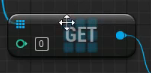
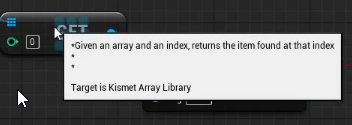
I found a guy whos talking about something I wanna learn about, but he created some functions before the video was recorded.
Do you know what this is? https://i.imgur.com/CvZofhp.png https://i.imgur.com/R4epwwL.png
I don't understand, how I should know what it is...
Do you know some pro tips or am I fucked? 😉
 worn peak
hey guys I new here
theres some ytb channel that its always recommended when starts in UE4
*?
grim ore
@thick rampart that is a normal Get node from an array, it is part of the engine
rotund scroll
@thick rampart what are you looking to do?
grim ore
https://www.youtube.com/user/UnrealDevelopmentKit/playlists?view=50&sort=dd&shelf_id=17 @worn peak is the official channel
worn peak
Oh
i didnt even think on that Mathew
thanks man
if u know any other good channel, I'm taking too
thick rampart
@rotund scroll I'm trying the same as before, but I don't understand that much yet, and I don't wanna spam you in this channel 😄 That's why I found a video
grim ore
there are a few depending on what you want to learn, starting with the official Epic ones or the Learn ones at https://academy.unrealengine.com/home/dashboard
thick rampart
Yeah 😄 But I don't understand if I had to create a function called "Actor Has Tag" or use the default in the engine...
You posted a image of a function - looks like you made it
thick rampart
Do the same?
You mean create a function in the door blueprint called "Actor Has Tag" and make it like you showed?
rotund scroll
well yeah
I mean the function is just a wrapper
you could just take the code and use it without making the function
ah but the editor already has the "actor has tag" function
so just use that
then you don't need to worry about all the interior stuff
 cunning siren
So I'm doing a course, and I've created an actor with a box component in C++. I've then compiled and created a BP based on the class.... but where the instructor gets a DefaultSceneRoot component, i do not. I only see the Box component that I added.
thick rampart
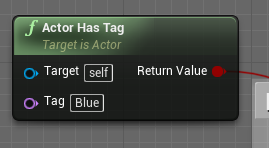
I tried this before (default "Actor Has Tag" function: https://i.imgur.com/hfVGE9y.png
But I don't know what "target" I should use
 rotund scroll
the actor that you want to check the tag of
thick rampart
Hahaha I don't even know how to work with actors yet 😄 I started today
rotund scroll
an actor is just a thing that exists in a level essentially
you can select anything in the level, then open the level blueprint and right click to add a reference in the level blueprint to that actor
thick rampart
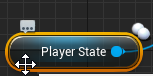
I set the tag at this in my character blueprint: https://i.imgur.com/xaYClfI.png
Why isn't that available in this BP...
 grim ore
@cunning siren maybe you just missed a step and he added one somewhere?
cunning siren
@grim ore I've combed what he did three times now - it's not a difficult process or anything. I'm just thinking it's a version issue. It's something that used to populate automatically, I guess.... However, I don't know if it affects anything important to not have one.
grim ore
my only other thought is they inherited as the parent from AActor which I believe has a root component by default.
rotund scroll
@thick rampart are you talking about the player state class, or did you create variable called player state?
worn peak
the official unreal ytb channel dont teach the basics, like interface and editors thing
I'll do the read on documents but if u guys know any good channel, please throw here : D
rotund scroll
the editor itself has a tutorial built into it
there is a hat in the upper right corner that blinks at you first time you open the editor
worn peak
was just to example
grim ore
the second link I gave you has videos on the basics and the main YT channel does as well
thick rampart
Think i'm talking about the class. I havn't created a variable.
I don't know if this help: https://i.imgur.com/D3WoqC5.png
rotund scroll
yeah so that is the class
it should be a global variable
so you can just right click and type "get player state" and it will pop up
thick rampart
Error: https://i.imgur.com/4zE6fVk.png
Maybe something on line 2?
rotund scroll
ah it's not global
my bad
so it's on your controller
as in
player controller
so if you have your character
thick rampart
I change it to player controller in the beginning ?
rotund scroll
put a reference of your player character into your blueprint, the find the controller, then drag out whatever value you had
thick rampart
https://i.imgur.com/mNKuSBQ.png ? Tell me if you get a headache 😄 Helping a newbie is not easy
rotund scroll
pretty much that yeah
if you want the tag from the player character
I don't know which tags you set where
if you're new just use the player character blueprint as your base for making new stuff
thick rampart
Should I change "Player State" in the character BP to player character to?
rotund scroll
... new stuff related to the player character that is
you dont need to touch player state or any of those high level variables
 earnest pawn
hey does anyone know why i get some weird lighting issues
rotund scroll
focus on what you want to do, and forget everything else until you need it for something
earnest pawn
Gap in the shadow of the 2 meshes
part of the shadow is completely gone
I have a modular character, for now it's just a separate body and head, I can't spot a gap between the 2 meshes but there is one visible in the shadow
anyone know how to fix this? tried messing with the shadow bias
 manic pawn
make sure you're using cascaded shadow maps for the directional lights and not that inset shadows stuff
earnest pawn
@manic pawn thank you, it fixed it, but the shadow is really blurry
manic pawn
up the number of cascades and resolution or reduce the distance
thick rampart
@rotund scroll I can't change the "Player State" in my character BP to "Get Player Character" as my new BP.
I just tried to play with "Player State" in my character BP and "Get Player Character" in the new BP, but it's returning false.
rotund scroll
👌
thick rampart
@rotund scroll Alright.. I have one more question today :D
I have created a keybind to set the tag as "Blue".
If I click at the button for my player 1: both have permissions to open it, and if I change it to something else: none of them has permissions to do it...
Short version: it's changing the tag for both players
Maybe I had to do something else if I wanna use it for multiplayer ?
grim ore
@cunning siren did you ever figure it out? I have some ideas but in 4.22 an Actor should default to the default scene root unless you remove it in the constructor or replace it at some point
cunning siren
I didn't. When placed into the world, the root is there, I'm able to perform transforms on it and what not. I guess it's just silently inherited and doesn't show up in the BP editor.
grim ore
super duper weird
cunning siren
No doubt. I mean the only drawback of that is not having a center reference if you have meshes involved....
grim ore
certainly weird, AActor should definitely have a default scene component added to it that you have to forcefully remove or replace lol
and I know this because I just spent half an hour figuring out how it works and how the default constructor was changed at some point and none of the docs seem to mention it lol 😃
 hushed hare
ugh
Originally this was a blueprint problem
but after adding in some print strings
I have no idea
so I am asking here
When I am in my character, everything fires fine, but no new chunks spawn
The SpawnActor nodes run but nothing spawns
But when I spawn in
(As soon as I spawn in)
If I have just one starting chunk to generate from
it will generate there
and then as soon as I start moving it stops generating
If I eject and move the character around, the chunks generate
Btw, the SpawnActor node is set to only spawn if there is no collision
cunning siren
That return key sure is putting in some work today, eh?
 frank iron
Unreal engine is so annoying!!! I copy and paste my code from my other project (which works perfectly) into my current project and the timers work weirdly in this. How do I solve this?
grim ore
you would fix it? We don't know what weirdly is nor the differences between projects. If I had to randomly guess I would say your projects are not named the same so the cosmic rays are causing interference
frank iron
How do I explain lol? The call function by timer speeds up when I recapture a coin on the new project but works perfectly in the old project file (The timer resets if I recapture a coin within the clock)
BlueprintUE
^^ New project
BlueprintUE
^^ old project
grim ore
so the code is not the same then?
frank iron
@grim ore it is, the timer event is the same. Everything is the same, I just got rid of add to viewport and replaced it with some Boolean
I don't get why it shouldn't work
grim ore
well one of them has a destroy actor, the other does not
grim ore
so in the new one, the timer speeds up?
frank iron
Yes
frank iron
It's meant to tick at the usual 1 second interval (works perfectly like that in old project). It speeds up if I recapture a coin before timer runs out
grim ore
you are setting multiple timers is why
you call the function, at the end it calls set timer for 1 second later and tells it to keep looping forever
the next second it calls the function from this timer, repeats and creates a new timer while the first one is still going
this repeats over and over. if you are calling the timer again from itself don't set it to loop
frank iron
Uhmm what do I set it too?
cunning siren
Native Event hybrids are blowing my mind right now. C++ shouldn't work like this XD
frank iron
It is unchecked
grim ore
oh, sorry it's hard to tell on that website
frank iron
No worries. I'm just so confused why it works in 1 project and not the other
grim ore
so you still have multiple timers running
you have one from each coin is what you are saying
each time you collect one it starts a new timer and they are all adjusting the numbers in the game mode
you can move the timer code in to the game mode itself and have it handle it. just have the coins talk to the game mode and tell it a coin was picked up, at that point you can just reset the magnet timer to the max, check if the timer is running, and if not start it. If it's already running simply resetting the timer to max should do what you expect I think?
frank iron
can I pm you?
grim ore
you can but I don't read them
hushed hare
this is getting annoying https://gyazo.com/fca1c5fb41f53b988f6049fb3bd6ad47 https://gyazo.com/2ad2c0769a0ab0cf661fe1958ff57979
Literally the same game
all I did was eject
something about me controlling the character is making them not spawn
grim ore
well it's not literally all you did was eject lol
hushed hare
When I eject it works but when I am controlling my character it doesnt
Its not collisions because when I set it to spawn no matter what, it still didn't work
grim ore
so one of them is using input and character movement, the other is dragging the character and changing the location? It's weird that when you drag the character the cameras looks different
hushed hare
I was in orthographic view after ejecting to get a better view
grim ore
the camera view in the bottom corner
grim ore
that should represent what that item shows in its camera view
hushed hare
why is it like that
uh
I know that is the character because when I eject it is exactly where I was
grim ore
yep I just tested, it shows the FPS view for me https://i.imgur.com/0zhJvpC.png
hushed hare
bruh
This is a third person character because I didn't wanna bother with the gun
lemme see what happens when I get rid of the mesh
the camera was attached to the head
still just black
grim ore
super weird, does it have more than one camera?
grim ore
I was controlling my fps character, ejected, selected him, switched to ortho top down and moved it in the editor and the camera updated correctly
hushed hare
I made the default gamemode the thirdpersongamemode
and set the character to auto possess
grim ore
it might not be an issue just weird the item you are moving is not showing what it should show if you possessed it
hushed hare
I think it is the issue
but idk how to fix it
so I have a character in the world
it is set to auto possess
I have the gamemode set
I pretty much brought everything over
uh
lemme test in a new project
 patent apex
hello, i have a persistent level that uses a few sub-levels, is there a way for the loading screen (the 3 dots) in packaged builds to only go away when all of the sublevels are loaded? because right now it shows the persistent level, which doesnt have much and the sub levels start load asynchronously and pop when they are loaded.
i have initially loaded and initially visible set to true for all of the sub levels, but it doesnt seem to make much difference
in 4.20 it worked well, but in 4.22 it doesn't seem to be doing that
hushed hare
It works in a new project @grim ore
patent apex
no world composition
with world composition it would work?
showing a different screen?
because you have the default loading screen
hum might be useful, that ufl_loadworld is a class of what?
frank iron
how would you reset a timer?
grim ore
I don't think you can reset it, you can get the handle from it when you create it then clear it and call a new timer
frank iron
oh okay, how would you do that? lol
grim ore
when you set a timer it has an output, that is a timer handle
save that to a variable then later you can do whatever you want to it
frank iron
still lost 😦
grim ore
plush yew
thx
quitting source engine is a hard than expected
but i'm quit
and found a UE4 installed on my pc
)
you know what i'm mean
yes
same
ok
i can download
earnest pawn
hey does anyone how to ignore the rotations from an animation?
I have an animation that moves the pelvis up and down and also rotates it, I want to ignore that rotation
plush yew
deleting my plans for modifying source
 bitter iris
Would there be any problems with imposters in VR?
rotund scroll
@thick rampart who are 'they'?
both players?
ah right
show me the code that you have for adding the tag
 zealous cloak
What's the best way to learn unreal engine basics, if you worked with it for two years learning by doing?
I want to improve my skills without have a project or some motivation to have one
Just wanna learn sth essential
Are there any good tutorials?
For basic or essential ue4 concepts
rotund scroll
I'd say without having some end goal in sight you're just making it harder for yourself
and what would you consider a basic concept
because for the real basic stuff you don't need a project, but then it can be learned over a couple days or max a week
zealous cloak
It's extremely hard for me to have own motivation
I learned the basics
But its more that I want to learn sth, without knowing what to do
grim ore
pick something to learn and learn it, it doesn't have to be a project but you do have to have motivation to learn or otherwise why are you doing this.
if you want something, learn how to make a landscape material that auto blends 5 materials including 2 of those materials being random patterns with noise blended together
rotund scroll
yeah there is no point doing something if it's a chore for you
zealous cloak
So I should invest the time to learn sth, when o actually need it?
rotund scroll
it's better that way yes
zealous cloak
Atm I don't study or work, so I don't have any intention to do anything :/
grim ore
you should not invest time in something if you have no plans on learning from it, without motivation to learn your retention will probably be useless
rotund scroll
if you're just learning random stuff you're never going to need it's not going to take long before you think the entire thing is pointless
zealous cloak
That's the reason I wanna learn some basic concepts
rotund scroll
but what do you consider a basic concept
because like I said
the basic stuff can be learned in a week
grim ore
I learn random stuff all the time I don't use but that's because I want to do that and am motivated to learn random crap lol
zealous cloak
Isn't there a common canon of patterns and concepts, that are commonly used in unreal?
rotund scroll
ue4 is a powerful tool and has threads going into every single direction of game development
no
there is per discipline
but then you'd need to pick a discipline first
grim ore
go read this entire website for fun 😃 https://gameprogrammingpatterns.com/
rotund scroll
ue4 by itself is just a tool
zealous cloak
@grim ore I have the print version of that book, coincidence? But I never really invested the time to read it :)
grim ore
might be a good time to read it and see if you can apply any of it to UE4 in general.
zealous cloak
Often ppl become good in things, because the have sth they wanna achieve. Not because the want to become good at sth itself. Designing a good model in blender for the upcoming pnp etc. For me it's super hard, because I don't have ambition. :/
grim ore
watch all of the videos on the UE4 channel from unrealfest and you will notice all of the devs have different patterns and concepts even amongst the Epic team heh
rotund scroll
so you seem to have interest, so why do you not have ambition?
surely if you came as far as this discord server, you must have some motivation?
plush yew
I have an issue. I made a fps hand in blender and rigged it, but when imported it looks like subdivide smooth. How can I fix this?
grim ore
start a blank blueprint project. Create your first person character from scratch. Use the geometry tools to model a basic body and a weapon. Now make a basic FPS shooter out of all of this. now make sure it works in multiplayer.
zealous cloak
@plush yew I often don't know why I should do anything.
@grim ore you mean, just expending the own project with concepts bit by bit
So for example completely ignore textures ^^
grim ore
yes but starting from scratch so you learn how it all works
plush yew
@zealous cloak ?
grim ore
like for example can you setup input and make a block move without a template?
zealous cloak
Block move would imply a character animation and an incoming attack
grim ore
by block I mean a cube, sorry
zealous cloak
Maybe I fail to give me tasks that are small enough, but still motivating and don't frustrating
grim ore
all I am saying is if you want to learn the patterns and concepts start from nothing and do it
rotund scroll
you keep mentioning patterns, but you don't have any association with them
plush yew
help me with choosing texturing software
zealous cloak
Yeah I try to come up with some basic concepts and then ask for some inspiration here what to do next and if it would fit my current skill level
grim ore
@plush yew MS Paint 3D
zealous cloak
Often concepts are bound to some genres or general gametypes
rotund scroll
yeah but they don't exist in a vaccuum
you're expecting them to exist in a vaccuum
zealous cloak
Ah fighting game needs this and a RTS this, but I should look for a genre I'm interested in and extend it little by little
I'm interested in VR embodiment stuff
So the first step would be to setup a VR core and don't use the template provided by epic?
rotund scroll
it's still pretty vague
like which discipline?
programming?
most "patterns" have less to do with genre and more to do with the systems that drive those genres
grim ore
it's a serious answer for your question.
grim ore
we don't know what you mean by texturing software
be more specific on what you want advice on. what you are trying to do.
plush yew
generating normal / other maps
grim ore
for characters? for boxes? for grass and dirt? for something custom? using existing texture libraries and modifying them?
zealous cloak
Thank you for your response :)
grim ore
if you just want textures to put onto something, gametextures.com has stuff. If you need to do stuff with them, then what do you need to do with them and how will you be using them.
zealous cloak
I will make some thoughts
plush yew
why
 spark sonnet
Hey everyone. Got a question. I just made a multiplayer game or the start of it. The multiplayer is working in the engine but not when packaged. I am using steam advanced sessions. Anyone know why?
thick rampart
@rotund scroll I'm not at my PC right now. This is the tutorial I found to make all that "tag" stuff. That's how my code looks like. Video: https://www.youtube.com/watch?v=9t5qFFFgeyo&t
Is it possible to call some kind of event or function from my character and return my tags?
Basically I wanna verify that the character has tag "Blue".
grim ore
There is a variable that is part of the Actor class called Tags, it is an Array of Names
any actor has this, you can talk to any actor and ask it for the Tags variable and you can get it
there are built in functions you can call on an actor that will go thru that array and see if there is a matching tag, that would be the "Actor Has Tag" node
thick rampart
@grim ore Yeah, but I can't set the target as "Player State".
btw. i'm trying to do it inside a new BP for a door.
grim ore
what does the Player State have to do with this?
zealous cloak
oh i have another question, is it normal to have less motivation, when you dont work in the industry yet? I mean, its obvoius that you rapidly expanse your knowledge, when you work with an engine several hours per day with a goal to achieve! Man i'm so excited to start my master in September
thick rampart
I set the tag for my Player State, and I can't get it again from another BP.
If I set the target as player character, I don't get it.
rotund scroll
as far as I can see there is no need to use player state
unless it's just because the player state is replicated
in which case you can just replicate your character class and you'll be fine
or even replicate the tag array on your character
grim ore
Where (what blueprint) has the tag that you are looking at
what Actor has the Tags array with the values you want to look thru
thick rampart
^^
rotund scroll
regardless you can do this without player state
 autumn elbow
Anyone know any construction games? I wanna study how they decided to put it together? 😄
thick rampart
Ye
rotund scroll
I genuinely think the only reason player state is included is because it's replicated
but like I said you can just create a new variable and set it to replicate
without having to mess around with it
thick rampart
Make a new variable in my character BP, and replicate it?
rotund scroll
yes
or use the tag array
if you can replicate it
I think you should be able to
grim ore
i would think the variable, as an enum type to make it expandable in the future for more types, might be easiest
then just replicate it from the server once it's set so every copy of that player knows it's team
tags would be fine as well but I am assuming you want to set the tag at some point during gameplay?
rotund scroll
I think the enum is definitely better
you can do switches at better performance as well
rotund scroll
enum is a kind of a special case
it's a variable, but it exists as its own set of data
so you will have to first create the enum asset
then assign it to a variable
thick rampart
Ok.. You would use this new enum variable instead of the "Player state" ?
rotund scroll
the player state is just a data container
it doesn't do anything on its own
the only special property it has is that it is being replicated
which means that it sends the same information to the server and the client
thick rampart
Oh! But what kind of enum should I create? I see a categori with a lot of types
rotund scroll
you need to make your own
so step into the content browser and make one like you would make another blueprint asset
rotund scroll
in the menu before that
where you select the blueprint
go down to the blueprint section
in that section you should have a few different options like struct and enum
select the enum
thick rampart
Oh "enumeraction" or something like that
rotund scroll
yes
thick rampart
@rotund scroll do I have to do anything inside that?
thick rampart
Oh maybe create one ?
rotund scroll
yes
thick rampart
Red
Blue
right now
 rotund scroll
nope that's correct
rotund scroll
are you sure it's not just a pavlovian response @compact girder ? 😉
thick rampart
@rotund scroll so I have to go back and create that variable in my character, and set the type as my new enum
rotund scroll
exactly
 compact girder
Maybe hahaha
thick rampart
and use that instead of the "Player state"
But should I replicate it somehow?
rotund scroll
yeah so
when you create the variable
you can select whether or not to replicate it in the detail pane for the variable
thick rampart
I set it as "Replicated"
rotund scroll
there you go
thick rampart
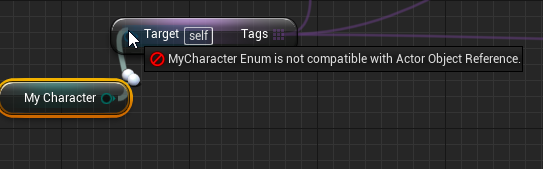 rotund scroll
lol
thick rampart
Have I fucked something up...
rotund scroll
my dude
you don't need tags anymore
instead of using tags you will now be using the enum as your tag
so you can set the enum to whichever team you want
thick rampart
Ohhh
@rotund scroll have you seen the video I showed you? I gotta know what to change. Should I just change the "SetPlayerTag" function?
rotund scroll
so just remove anything to do with tags and player state
thick rampart
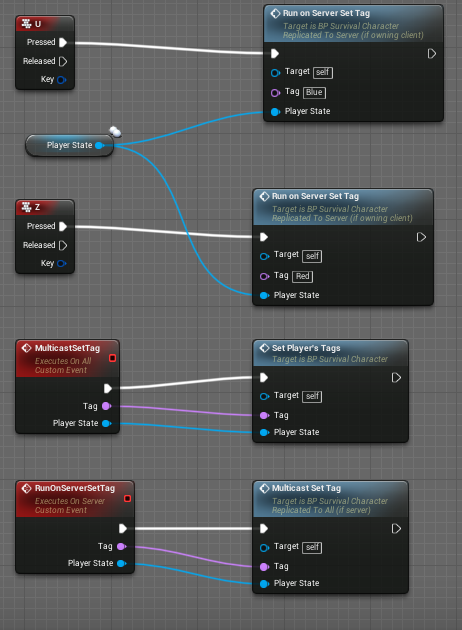
What about all that stuff https://i.imgur.com/2yYJWnm.png
 rotund scroll
whenever you want to change a player to be on the other team you just set the enum of that particular player character to the other value
you can rewrite those events to handle an enum parameter instead of the player state or tag
grim ore
I would say yes that looks and seems normal, something like a skill tree or inventory would use it
thick rampart
@rotund scroll should I just delete "player state" completely and just handle the team name?
I'm talking about all the inputs for events and stuff
grim ore
pure images should be fine
rotund scroll
yeah you have no use for it
thick rampart
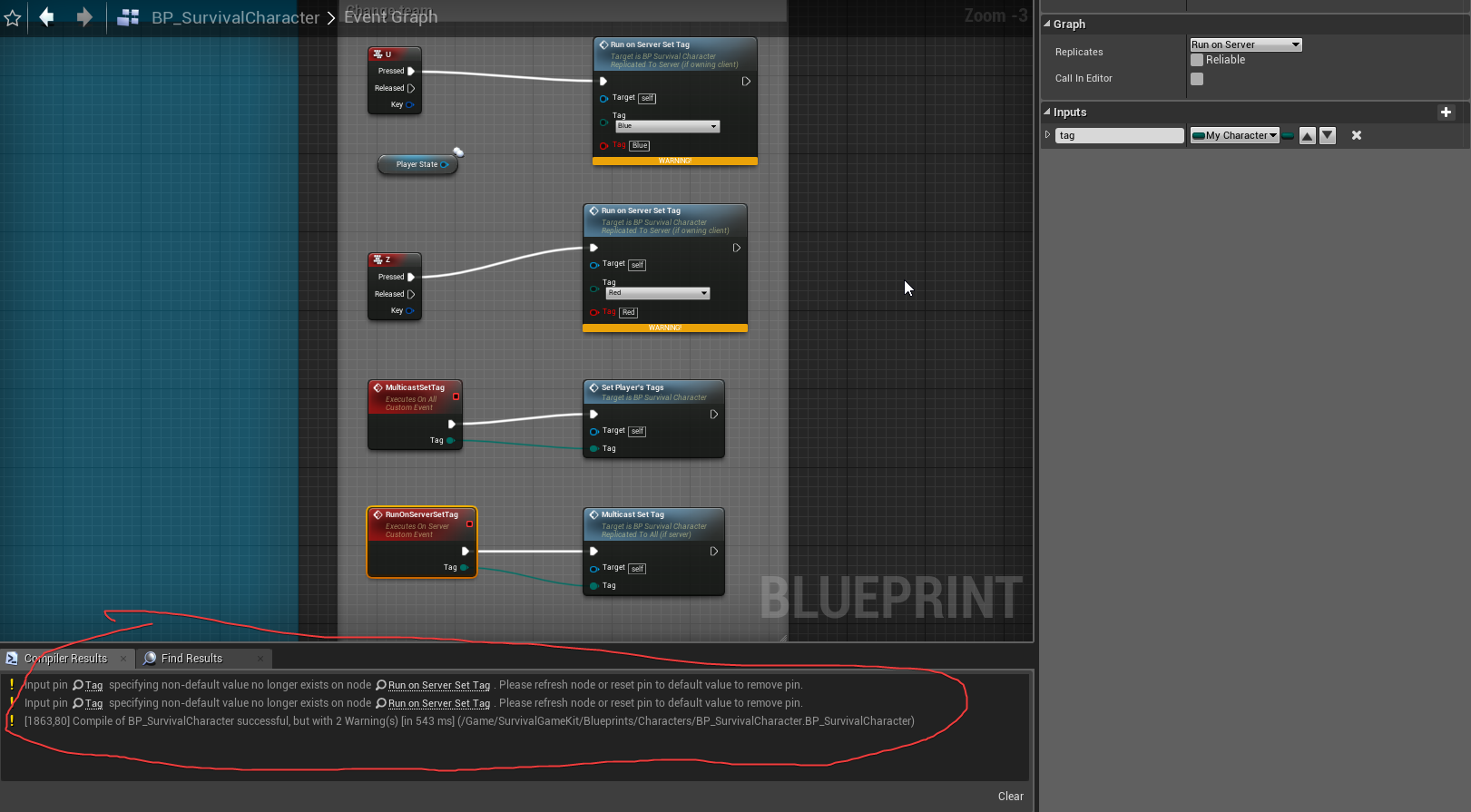 thick rampart
lol
rotund scroll
the log says things in your best interest usually @thick rampart
I would recommend listening to it
😉
@plush yew it's for nesting widgets
thick rampart
I changed my function: https://i.imgur.com/VoBMZIJ.png
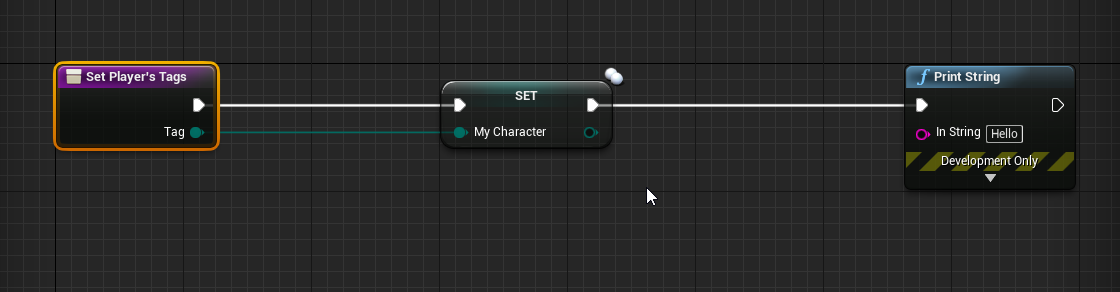 thick rampart
Hahah
rotund scroll
certainly not every game is going to make use of every feature
but that doesn't mean those features shouldn't be there for those that do
compact girder
It does for me
rotund scroll
it could
thick rampart
@rotund scroll If I get my variable from the other BP, I should get the correct info?
compact girder
Usually I keep all my UI stuff in a UI folder but with marketplace stuff for instance its in separate folders. So that window has everything not in the engine there
rotund scroll
interesting that it has further uses beyond just nesting
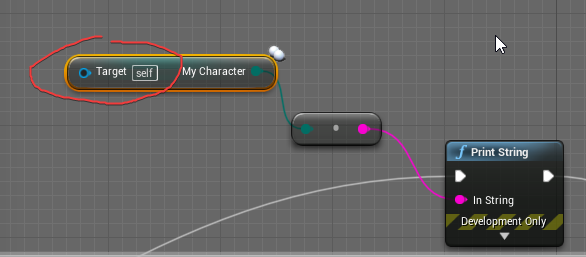
 abstract relic
Hit play and you’ll find out 😜
rotund scroll
^^^^^^^
it's like opening a present every time
except sometimes the present implodes on itself and leaves an error message with a list of memory addresses...
abstract relic
It’s like a loot box for devs
compact girder
Has anyone found where the compile successful sound is?
rotund scroll
no but every time you mention it the "the price is right" theme starts playing in my head
compact girder
XD
thick rampart
Hmm I need some kind of target, but "Player Character" is not working.
compact girder
Where is that variable located?
abstract relic
Search ‘Get Player Character’
 compact girder
Gotta cast it
compact girder
Get Player Character, Cast that to BP Survival Character
If you're expecting to cast it a lot though, I would recommend casting it once at begin play or something and storing the reference
rotund scroll
out of curiosity, in which blueprint are you trying to do this?
thick rampart
I have some kind of door blueprint
abstract relic
Yeah you need to cast
thick rampart
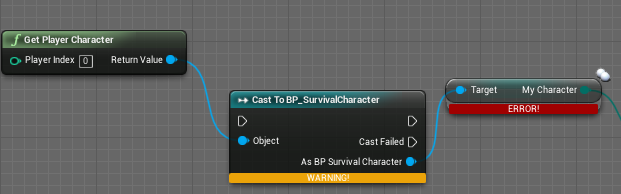 compact girder
Yeah
thick rampart
Right track ?
compact girder
Maybe you can convert to Pure Cast if you don't expect it to fail
rotund scroll
if it's a door
then you will want to make sure that all characters that enter the door are checked against their team
thick rampart
No. Just to open it.
abstract relic
Same difference
rotund scroll
so I recommend creating a collision box component and extending it around the door
and then using the box's OnComponentBeginOverlap / EndOverlap triggers to "grab" the character that is stepping into the door's area
and then you can have logic for what the door should do with it
maybe you want to have doors that one team can't get through etc.
spark sonnet
Why is this failing?
rotund scroll
try debugging and find out
man I really feel like debugging is such an underappreciated concept
compact girder
What's the difference?
spark sonnet
The destination is different
rotund scroll
so maybe your destination doesn't have enough navmesh
or your navmesh is broken somewhere
it's impossible to tell for us
spark sonnet
its all green and its working on the other blueprint
ok so its the destination thats causing it
spark sonnet
there is no show navmesh node?
 tired oracle
dragging a single navmesh volume onto my landscape adds 1gb of ram to my game. I'm using navigation invokers. Is this just how it is? Or are there settings to reduce the memory usage?
rotund scroll
@spark sonnet look through the navigation options
spark sonnet
Where?
rotund scroll
the path
note that you will have to enable navmesh in game to see the path as it only shows on the navmesh
spark sonnet
how do i get the path?
rotund scroll
you should get that when you use navmesh functions?
how else are you using the navmesh functions?
spark sonnet
Im not using any navmesh functions?
rotund scroll
how are you not when you have AI moving across the navmesh
spark sonnet
Im just having a nav mesh volume in the level and then using AI move to
rotund scroll
@spark sonnet then use get current path
on the ai controller
you could have the frame widget be the same widget
and then just nest individual tree wdgets
the frame includes anything you put into the frames
😉
I don't know
I'm generally not a fan of massive UIs
so I would keep it as simple as possible
but that's just me
look at something like the original guild wars to see how they did a mass of skills
well over 100 skills per class
I think you'll need a UI designer to figure it out beyond that
my take on UI is that if you can get away with not having it, don't have it
I mean that's pretty standard
obviously if you're trying to replicate it as a single person without the UI design experience I think you're going to have a hard time
I appreciate that, but then you know more than me
 halcyon flame
happy 4th Unrealios
does anyone know if you can add multiple item adjustments to the undo buffer? if I'm doing one action to an array of actors, that one action should be undone with one Ctrl-Z...
grim ore
keep in mind with a widget switcher all widgets under the switcher are loaded at all times. if this is an issue for performance don't use one
 icy mulch
Can some one generate me a landscape height map
grim ore
https://www.unrealengine.com/en-US/blog/new-on-marketplace-landscape-mountains , grab the one from the page and there you go
bitter iris
anyone know why this happens?
earnest pawn
hey can someone tell me how I can freeze a certain bone in my animation
so it never moves whe nplaying animations
 normal burrow
probably will want to use a Modify Bone node in your animation graph for the certain bone
in post evaluation keep a copy of that bones transform
and then pass the parent bone space broken out location, rotation, scale to the node
then when your alpha control of the modify bones node is 1
it wont move
from the previous frame anyways
earnest pawn
is there any way I can pass in a reference pose?
normal burrow
yea
earnest pawn
and use the bone transformation of that pose?
normal burrow
yea use a layered blend node
to control the one bone you want to stay in its ref pose
then use ref pose node
to selectively blend it that way
icy mulch
@grim ore the height. Map does not work when I import it it messes up
 potent wing
Do you need Kinect for windows to Mocap?
normal burrow
there are many ways to mocap, without knowing what pipeline you'll be using its hard to say.
idk of any truly stable motion capture for pc that would be affordable though
earnest pawn
hey @normal burrow can you add me as a friend
I sent you message about my problem
@normal burrow I have a walking animation for a full body character and i am trying to use that for a separate mesh which only has the chest and legs I'm using the chest and legs so that the player can see their feet when they look down, but when I play the running animations, it moves the chest forward so the player can see inside the body and its all messed up I want to stop the bones above the pelvis from moving complete
potent wing
I want to mocap, but i cant afford Kinect for Windows
Is there a way to do a mocap without the kinect device?
I heard you can use Iphone X camera for Mocaping
 silent frost
@bitter iris How did you manage that? 😄 one side looks scaled down, and the other (closer side of the middle line) looks stretched? 🤔
hushed hare
uhghghgh I still don't know what is going on
When I am not controlling my character, the SpawnActor nodes that generate rooms around it work
they spawn the actors
when I possess my character and move around as the character, the nodes trigger but don't actually spawn anything
also when I eject and click on my character, the camera preview is just black
so like
when I spawn in and don't move
the chunks load in around me
and when I start moving through the world
they won't load
and then I eject and drag the character around with the movement tool
and they load just fine
There are 8 spawn locations and it only collided with 5 of them
the other 3 should have spawned but didn't
I just tested out the spawn actor node by making a small thing in the player blueprint that spawns a room wherever you are looking when you press F
 rain coral
wot is PostInitProperties() for ?
 tiny pier
Is it possible to sort of partially LOD a mesh. So if I had a large mesh, I might want the parts that are far to have low LOD, but the bits that are up close to have high LOD?
potent wing
Guys what is the best way to make so that whenever player is moving, then set ismoving to true?
Is it by doing when W,A,S,D is pressed -> set is moving to true
That does work, but is there a better way?
abstract relic
Check current movement speed
potent wing
Thanks i figured it out, by doing get velocity from chara ter movement, then vector length, >0, set is moving to true
Thanks man
 ashen steppe
So I was looking at this low poly assets pack, it has a single material that loads a single texture with different colors palettes, then it uses that single material for everything, getting different colors for every mesh. How is that achieved?
For instance, this static mesh, this is how the material looks
 sudden agate
UVs
Purple parts have the UVs on the purple pixels
Blue parts have the UVs on the blue pixels
ashen steppe
so the color info is in the mesh?
sudden agate
Kind of
The UVs determine which color index so to say
And the texture has the actual coloe
ashen steppe
interesting
 fierce rampart
As much as I like atmospheric light vector and atmospheric light colour there's issues.
sudden agate
atmospheric fog nodes work only with an atmospheric fog. thumbnails dont have it
they are also expensive as fuck
fierce rampart
Yeah I know.
Ended up just making it a global material parameter instead.
Probably just as expensive but it probably won't hurt performance that badly seeing as all the materials are unlit and fairly simple.
 narrow lagoon
Hi everyone, for a child class, is it possible to hide property with "EditAnywhere" of parent class, so editor will not display this property?
I found a way to hide all properties in category through "UClass(hidecategories=xxx). But some properties of the category need to be displayed.
Thanks for any advice!
thick rampart
@rotund scroll @compact girder thanks earlier/yesterday. I had to go and sleep (it was night) :D
It's almost working, but there is some complications.
My character looks like this: https://blueprintue.com/blueprint/dvcou6h0/
If I click at "I" and print the "My Team" it prints "Blue" and that's correct, but if I print it from another BP - it say "Red" but I selected team "Blue".
I have to use the "server" player and not the client player - everything is working if I play as the server.
My other BP: https://i.imgur.com/WY58GgU.png
I don't know if you understand.
 frigid epoch
hey guys i need some help, i have a sphere trigger attached to my character because i use it for some stuff but when i do begin overlap event on the character i dont want them to include this sphere, is there a way i can do that?
and if you can help please @ me so i get a notification
 gritty kiln
Hello!
I need some help with installing the right version of Unreal Engine. I need to install version 4.22.2, but it doesn't show up for me. Only two versions that are the most similar are 4.22.3 and 4.21.2. Why doesn't 4.22.2 show up?
gritty kiln
Because my friend is using 4.22.2 and I need it too so that we can work on the same project.
And for my friend 4.22.3 doesn't show up, so we're a little bit stuck XD
 wary wave
you could get it from Github and compile it yourself, but I don't think you can get it through the launcher
gritty kiln
Oh great. I don't know jack shet about Unreal to begin with, now I have to compile it?
But what about my friends problem? He can't see 4.22.3 on the launcher while I can
wary wave
he may just need to restart the launcher
it (frustratingly) has a habit of not updating things without being restarted
gritty kiln
Ok, thanks for the help anyway. We'll try our best ❤
 dim arch
and have EGL detect it in the engine list
does anyone have a guide on how to copy a launcher engine install to another machine
 cursive dirge
@gritty kiln launcher only shows the latest minor versions, you can't install older one with it (yes, it's stupid)
I wouldn't recommend compiling from source tho
it can bring a lot of extra issues for you
I'd just wait for a day or two and see if the other see's the update again
or, have the other uninstall the 4.22.2 and restart the Epic Launcher
then install 4.22 again
in general tho 4.22.x assets should be binary compatible
so you should be able to work on same project with 4.22.3 and 4.22.2 mix, it's just not recommended
lament slate
Guys anyone to help me
earnest pawn
I have a walking animation for a full body character and i am trying to use that for a separate mesh which only has the chest and legs
I'm using the chest and legs so that the player can see their feet when they look down, but when I play the running animations, it moves the chest forward so the player can see inside the body and its all messed up
I want to stop the bones above the pelvis from moving completely, does anyone know how to do this? tried doing layered blend per bone but it still moves the pevlis forward and backwward, causing the whole character to move.
 next badger
I've asked yesterday on #graphics does anyone knows how to make fresnel work with ortho camera?
serene birch
honestly, I always noticed in most engines I tried that the ortho camera does weird stuff
as if it was pretty badly tested and broke lighting constantly
consider using a normal camera far away with a very strong zoom instead 😛
it looks ortho
 true leaf
Fresnel literally works based on normal vectors and in Ortho, all the normal vectors are 0 (pointed directly at camera) so .. I don't think it will work
🤔
serene birch
they are? funny
well I've seen suggestion to reimplement Fresnel manually and use PixelNormalWS as the normal
true leaf
Yeah the concept behind fresnel is you take the angle between the normal vector of the pixel and the angle of the camera and use that to determine color. So the more parallel the vertex face , the less fresnel color and the more perpendicular , the more fresnel color
It's very inexpensive but requires that there be differing normal vector angles
serene birch
well sure but I find it strange that the "normal is always in the same direction as the camera" in orthographic mode
clearly it shouldn't 😃
Unreal Engine Forums
For discussions about Materials, Textures, Lighting, Particle Systems, and Post Process Effects.
ah, they say the same thing I do
"don't wait for them to fix it, just use a super zoomed camera"
true leaf
Hmm 🤔 yeah I'm not an expert it might still be possible but I'm suggesting why it might not be working based on my limited knowledge lol
serene birch
I think it's just that ortho camera is low priority and they don't have time to fix it
 cinder beacon
Guys what to do in this issue !!, when i build the lights the buildings becomes dark !! I’m using UE4.22
plush yew
@cinder beacon Do you have lightmaps on your meshes?
cinder beacon
@plush yew how to do it ?
plush yew
oh brother
Give me a second
Im going to lay out the steps for you
Give me a bit Im loading the editor
 night pond
Hey guys, quick question - when you export your project, does it include all the stuff in your content folder, or only the stuff used in your game?
plush yew
You can select which stuff to export
- Open your mesh in the content browser
you should see something like this
- Open the LOD 0 Group
Expand the build settings group
- Check all of these options (I dont know why, but this seems to look the best for me)
- Go back to viewport
There should be something on the top left that says "Lit", click that
Go to optimization variables and click "Lightmap Density"
you should get something like this
Go back to the mesh viewport where you changed the lightmap settings
Based on the color of the mesh in the viewport, increase or decrease the min lightmap resolution and lightmap resolution.
Your goal is to get the meshes to look like a bright green color
If its blue, its too low, if its red, its too high
Then, on the top of the editor viewport, go to build>lighting quality>production (if you are building lighting for a final look) or preview (if you want a quick look on how the map would look)
If you want global illumination, go to your directional light, and increase the value of this setting
When you are done editing these settings, go back to build, click "Build Lighting Only"
@cinder beacon
A few things to note, if you dont want a mesh to be baked, either set it to dynamic or turn off shadows on that object completely
this is the color green you are looking for when editing the lightmap resolution
plush yew
yeah np
 mental hollow
All the player widgets (like health bar and collectibles) appear on all the menus do anyone know how to hide them ?
 versed spear
Choose the correct game mode
mental hollow
okay ty!!
plush yew
i wanna tag objects as walljumpable, should i use tags under actor self or gameplaytags?
ig both will work fine but what's the conventional approach?
 mossy mauve
Anyone knows when 4.23 preview 1 comes out?
grim ore
next week?
abstract relic

 midnight bolt
quick swarm agent/light building question - i have access to cloud PC, how do i set it up so i can use its power to calculate stuff? does it require sharing the project, or it will only calculate stuff in the cloud?
 sturdy breach
If there's an issue with a video in the Unreal Engine Academy is the best way to report it through the feedback form or by emailing onlinelearning@epicgames.com?
plush yew
i'm using "has matching gameplay tag" to check if the actor i'm in collision with has a tag but it returns false even tho the actor does in fact have the gameplay tag?
screw it, just using actor tags now lol
is there a way to reset jump count in BP?
or is the only way to increment jump max count and then set it to 1 again once im done walljumping?
 radiant haven
can someone tell me why they are bright under...
if i would rotate it
it´s still under ...
 visual belfry
didn't turn your sun off when it went below the horizon?
radiant haven
What?
 wary wing
Either that or perhaps it has flipped normals? Was the mesh imported?
 fringe pivot
Is it the default skybox? Are you just rotating the directional light?
I think I had the same issue, even setting both directional and skylight to 0
Not really sure how this works but I think the sun disc has its own brightness, maybe the light comes from there.
Please ping me if you figure this out @radiant haven
frigid epoch
does anyone know how to make one part of text in a UI widget change? for example "Apples X3" to "Apples X5" or whatever? i remember doing this a while back but i completely forgot how
wary wing
You could concatenate (join) two strings together using an Append BP node. So like "Apples X" + number
Or there's a Format Text node that you could use with the format Apples X{Number}
fringe pivot
Well yes, it doesn't change its intensity just because you rotate it under your landscape
 junior solstice
http://prntscr.com/ob59tw how to fix this
 rain coral
My mouse cursor keeps disappearing on Gray areas, how do i stop that ?
hushed hare
@grim ore So yesterday, you pointed out that the camera in my project was just showing black and that may be the cause
I think you might be right
I placed an actor in the world
It appeared just fine
but the actors that were spawned during the game weren't

also it's not generating from dragging around anymore
there is something about actors that were spawned in midgame
grim ore
@junior solstice it looks like you might need to reinstall the C++ compiler for visual studio
hushed hare
nvm it generates from dragging around
grim ore
@junior solstice That or you are using an older plugin that was not updated
a last option might be the folder name for the project since UE4 doesnt like . in the folder name or spaces and you have both and - might even be an issue
hushed hare
The actors that are spawning from the player moving are valid but they disappear immediately or something
I put in an IsValid node before the print string
and the string prints
 frank python
when does epic come back from vacation ?
grim ore
next week
junior solstice
@grim ore thanks ı fixed
grim ore
what was the fix?
normal burrow
@junior solstice ?
 storm venture
hey, whats the name of a thing that lets you render a scene in a texture?
or rather, the name of the thing you would combine with a render target to view a mesh in a menu
 digital anchor
a SceneCapture2d?
radiant haven
I got a problem :
The Android ES2 Previewer wont show me my mesh with animation only the normal ue perviewer
storm venture
@digital anchor that was it! thank you


 grim ore
so what does the material look like on your character that is not showing up on the es2 preview?
radiant haven
there is no material
its caused by the skeletal mesh
i searched a bit
and this problem appeared after 4.21
grim ore
super duper weird then. The default Third person character shows up fine in ES2 preview in 4.22 😦
radiant haven
idk
autumn elbow
Thoughts on Dynamic Duct Tape?
Trying to do some R&D on a VR project where the player can put together a weapon similar to the image above.
cursive dirge
@autumn elbow #work-in-progress is the right channel to get feedback
abstract relic
Only the cool kids uses #work-in-progress
hushed hare
FINALLY
I FIXED IT
BUt
idk why that fixed it
the problem was the blueprint that unloads the chunks
apparently the end overlap was firing as soon as it spawned
grim ore
thats good. weird that would be the issue but nice it is fixed
 sharp crest
any idea why randomly when working with blueprints the editor would freeze and I would have to go to task manager to force close it and reopen? happens every like 30-60 minutes or something
version 4.22
plush yew
Idk
autumn elbow
Hahaha..that's not mine... that's from Last of Us. I was just showing the tape
I'm trying to make that duct tape there in the back
cinder beacon
While packaging the Game 😭😭
autumn elbow
Whats the best place to place my HUD widgets?
PlayerCharacter or PlayeraController ? maybe LevelBlueprint?
and why?
 warm timber
wow a BSOD, I don't see one of those since the time I tried to boot my desktop with the CPU on 40% overclock and stock vcore.
At least now they come with QR 😆
cinder beacon
@hushed hare yep I connected the pc into the Samsung TV 😂
hushed hare
epic
grim ore
@autumn elbow there is no best place, it depends on the widget and it's use and how your project is set up. Something to consider is putting the handling of them in the HUD class since it's client only if doing Multiplayer and you can get the HUD from pretty much anywhere.
autumn elbow
@grim ore gotcha! thx
 coarse turtle
Let's say I have a table. And I want to place some bottles and mugs on it. I can't use End key here to place it on top of the table. What's easiest way to place objects on a table?
 fleet otter
What's the best way to learn all the macro keywords? Just studying the API docs or?
grim ore
@coarse turtle you should be able to use the End key, it should snap to the closest collision plane below it. IF not you can try lining it up in the side orthographic view, or you can make a custom editor widget or something in your blueprint to do a line trace down and move the items down to the table. if this is just for looks then eyeballing it in ortho is probably quickest
cinder beacon
🤩🤩🤩
abstract relic
Yet you choose to take a photo with a phone camera instead of screenshot 😜
cinder beacon
😂😂😂😂😂😂much better😂😂😭
Just 5 min 😂😂💔
This is not the maximum recording resolution 🤣
grim ore
size is not always needed tho, I usually do ~10MB a minute for recording at 1080p60
hushed hare
enough emojis my dude @cinder beacon
cinder beacon
@hushed hare why 😦
hushed hare
I could feel the tumor get better every emoji
cinder beacon
Hhhhhhh
storm venture
i have customizable weapons and i'd like the inventory image of the weapon to show the attachments
is there a way to do this without making a crap ton of scene capture 2d actors for each weapon and hiding them under the map?
 primal prairie
Swap the image on an enum or something?
Or I guess it will have many options.. not sure
coarse turtle
Is there any way to turn a group of static meshes from your level to or into a BluePrint?
grim ore
heh. Watching an unreal fest talk from an epic dev and he says "For once we actually have very good documentation for this feature" lol
@coarse turtle if you select all the meshes, click on the Blueprints Button Drop Down at the top toolbar, there is a "Convert Selected Components to Blueprint Class"
cunning siren
Is it better to have exterior/interior on separate maps and switch them out, or have them enterable and fully setup in one map? Let's say its a game set in a city.
coarse turtle
@grim ore Nice! Thanks
So let's say I have a house BP. And I have a separate door BP with open/close functionalities. How can I replace the SM doors in the house BP with the Door BP?
autumn elbow
is there something special i have to do to see the flow in blueprint?
grim ore
it has to be running, and you need to select the object to watch from the debug list at the top
@coarse turtle you can use child blueprints but it's really not intended for stuff like that. It might be best to redo it as one complete BP
autumn elbow
hmmm
doesn't seem to be working for me
when i push the actionbutton... nothing happens in the flow
grim ore
then that action button is not triggering would be my guess
grim ore
it's really quick, do you have it on another screen to watch it?
autumn elbow
i don't.. just side by side on the same monitor
grim ore
weird then. My only other thought is you are debugging the wrong character but that is not likely if you are sure that print string is firing. I just tested and it should show a red pulse when it fires off
autumn elbow
hmmm... ok lemme check again
grim ore
the other thing I could think of to test to see it working and to make sure that BP is firing correctly is to hook up a print string to the event tick and you should see it constantly firing
autumn elbow
i'm trying in a blank scene
works in a blank unreal project
i must have toggled something by accident
frank python
hey is it possible to have the content browser search the file path as well as the uobject name ? and also show some part of the path in the search results
sometimes i have a lot of things just named StaticMesh but in different folders, and i cant search by folder name or see which StaticMesh is what without hovering
dim plover
This might work.
In the content browser, in the bottom right, there's View Options.
Then click Search Asset Path.
frank python
https://images.sshnuke.net/2019-07-06_02-33-59_wQ3sFxCgN.png that worked for search
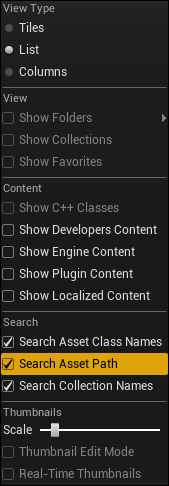

but i cant still see what folder the resultant assets come from
plush yew
Is it possible to RIP unreal engine games (just for examination) and import .uasset?
manic pawn
no
frank python
kinda ? see gildor's utilities
frank python
all the assets distributed with games are baked
and the licensee might have modified their ue4 fork to add/remove additional fields/change formats of things
baked info isnt enough to see it all in unrealed properly
plush yew
What that mean?
frank python
you can see textures/meshes/anims but most uasset info will be lost
again, gildor's umodel your best shot
plush yew
Not even blueprints?
frank python
theres no such thing as a blueprint in a baked build
all that's there is the uclass generated from it
plush yew
Well can I still see the functions in a uclass?
frank python
theres no reverse engineering tool for that
frank python
even if there was a blueprint VM code reverse engineering tool, it'd have to keep up with each engine version's changes
and nativized blueprints wouldnt even show up there
plush yew
Ok well maybe you can help me then with one of his blueprints
He has a npc that spawns at any of six spawn areas and chases you, and if it gets you, you die
How can I recreate this?
frank python
coarse turtle
@grim ore Do I have to add the blueprint actor via blueprint or in the Components window?
I think using Child Actor!
grim ore
yes child actor
plush yew
I posted in blueprint
autumn elbow
What does Set Collision Response to Channel do?
nevermind... saw Mathew's WTF is vid
ashen steppe
Is the standard UE4 save system any reliable?
It works for me for ints and bools but it doesn't seems to be the case for a FVector (player location)
I double checked and I am storing the right value, however it retrieves an empty one
grim ore
the save game system should serialize any variable, it should be reliable.
ashen steppe
I don't get why it returns empty then
grim ore
what does your code look like?
ashen steppe
// Save
UMySaveGame* SaveGameInstance = Cast<UMySaveGame>(UGameplayStatics::CreateSaveGameObject(UMySaveGame::StaticClass()));
SaveGameInstance->PlayerLocation = MyCharacter->GetActorLocation();
// Load
SaveGameInstance = Cast<UMySaveGame>(UGameplayStatics::CreateSaveGameObject(UMySaveGame::StaticClass()));
SaveGameInstance = Cast<UMySaveGame>(UGameplayStatics::LoadGameFromSlot("MySaveSlot", 0));
if (!SaveGameInstance)
{
    return;
}
MyCharacter->SetActorLocation(SaveGameInstance->PlayerLocation);
That's the relevant part @grim ore
grim ore
where in there do you actually save the save game?
and you don't need to create a new save game object if you are loading one
ashen steppe
obviously, I'm just posting the related parts
grim ore
ok so saving to the slot is not relevant?
@plush yew you need to run the VS installer and add the 4.6.2 targetting pack or you can download it from microsofts site
frank python
Not just the targeting pack
frank python
I needed full devkit
grim ore
the targetting pack is fine for this error
frank python
Search Google for .net 4.6.2 development kit
ashen steppe
void AMyPlayerController::SaveGame()
{
    UMySaveGame* SaveGameInstance = Cast<UMySaveGame>(UGameplayStatics::CreateSaveGameObject(UMySaveGame::StaticClass()));

    SaveGameInstance->PlayerLocation = MyCharacter->GetActorLocation();

    UGameplayStatics::SaveGameToSlot(SaveGameInstance, TEXT("MySaveSlot"), 0);

    GEngine->AddOnScreenDebugMessage(-1, 5.f, FColor::Green, TEXT("Game Saved"));
}
There you go
frank python
@grim ore yeah but then you get missing assembly error right after if it's not the full dev kit
Which is around 80MB
grim ore
have you checked the value of SaveGameInstance->PlayerLocation after you set it? to see if it's actually being set
ashen steppe
yes it's 0,0,0
Honestly I have heard the save system is not reliable at all, but wtf I know
I'll try storing the floats by separated
plush yew
is the latest version of UE4 stable?
grim ore
well I tested it here and vector saved and loaded properly so declaration of the variable might be bad, maybe getting a bad value from MyCharacter, maybe SaveGame is invalid
ashen steppe
it retrieve other values just fine
and the vector value is also right
doubled checked
grim ore
which means the vector itself is not valid in the save game object, or you are not getting a valid value to store
ashen steppe
Again, the value I am storing is valid
I don't know what you mean with the other part
grim ore
    UMySaveGame* LoadGameInstance = Cast<UMySaveGame>(UGameplayStatics::CreateSaveGameObject(UMySaveGame::StaticClass()));
    if (UGameplayStatics::DoesSaveGameExist(TEXT("SLOT1"), 0))
    {
        LoadGameInstance = Cast<UMySaveGame>(UGameplayStatics::LoadGameFromSlot(TEXT("SLOT1"), 0));
        if (GEngine)
            GEngine->AddOnScreenDebugMessage(-1, 5.f, FColor::Yellow, LoadGameInstance->PlayerPos.ToString());
    }
    else
    {
        UMySaveGame* SaveGameInstance = Cast<UMySaveGame>(UGameplayStatics::CreateSaveGameObject(UMySaveGame::StaticClass()));
        SaveGameInstance->PlayerPos = GetActorLocation();
        UGameplayStatics::SaveGameToSlot(SaveGameInstance, TEXT("SLOT1"), 0);
        if (GEngine)
            GEngine->AddOnScreenDebugMessage(-1, 5.f, FColor::Yellow, "SAVED GAME TO SLOT1");
}``` this is the code in my FPS character just to test saving and loading the characters positionthis is my header for my save game with just the vector in it ```UCLASS()
class FPS_CPP_API UMySaveGame : public USaveGame
{
GENERATED_BODY()
public:
UPROPERTY(VisibleAnywhere, Category = Basic)
FVector PlayerPos;
};```
https://i.imgur.com/oReM1tX.png is the result where it prints out the saved value after loading the save game

also... when the hell did Epic start putting in C++ code snippets in the docs. in the API docs themselves
grim ore
Interesting change to the docs, I knew it was coming but definitely out of the blue. Looks like they are taking code from shootergame and using it where they can
hushed hare
There is documentation for a "Get overlapping actors" node but I can't find it in 4.21
Was it removed?
If so, is there a substitute to find the overlapping actors?
nvm for some reason it appears other places
ignore this
plush yew
Im planning on doing a unofficial resident evil game
 shell compass
Something... weird... is going on for me. When I have my MoveForward Axis Event inside my player controller it works fine. But if I move it over to my character instead, it stutters, like, most of the time the scale for MoveForward is 1 (which is correct when I hold down W) but a lot of the frames frames it's 0.
They both have Tick interval (secs): 0,0 and Tick Group: Pre Physics, and I can't find any other Axis Events that take precedence
 whole quarry
@plush yew Did you like... even read the error?
whole quarry
its in the error
whole quarry
whole quarry
have a coffee ☕
plush yew
cuz i thought the UE launcher installer from the VS2017
i just got up
my coffee is on the cook 😄
Saturday morning
😴
rotund scroll
turn on collision and see if there's anything colliding that is invisible
if t's all the same modular assets then that's really the only thing that could make the navmesh different
3x3 meters isn't big in terms of game space
depending on how big the walkable section is you might have trouble with anything walking there regardless of navmesh (i.e. it looks weird)
beyond that the only other option is that hte navmesh volume doesn't extend past a certain point or that something overlapping is causing it to not build navmesh there (e.g. some sort of navmesh nullifier)
from that gif the corridors look tiny and unrealistic