#ue4-general
1 messages · Page 484 of 1
 dawn gull
 grim ore
make duplicates of the materials then for that part of the world
making a game can be hard if you want it to have personality. All my projects are just default textures or world mapped test textures because I just don't want to spend the time to make them special lol
 wary wing
What about rendering the 'special' objects to the custom depth buffer and swapping out the lit colour for the diffuse colour in a post-process material?
dawn gull
I think that this might work for me. thanks guys!
 hushed hare
um fellas
am I tardo mode
or
is my engine bugged
I am dragging an actor into the game
into the world*
and it won't appear in the world outliner
nvm I was tardo mode
 visual belfry
is there a snap to grid in blueprints or just in the overall level 🤔
 velvet latch
I never had any trouble organizing my blueprints without any fancy tools. I just organize it manually as I go.
There might be something though, idk 🤷
 plush yew
Can this cause me problems ?
grim ore
they could, the smoothing is not a biggie but your stuff might look weird. the floating bones should be fixed if you plan on using them
plush yew
how i fix this Bind Pose thing
grim ore
use the suggestion, when you import check the Use T0 as ref pose
visual belfry
oh not for code, zodiac, but for laying out components
I converted some meshes into a blueprint and it picked an awful non-grid centerpoint >.o
plush yew
@grim ore Tnx 😀 alot
 frank iron
Hi does anyone know how to code a double tap function? So if I double tap the screen, it activates an ability
grim ore
use the input touch event to track how many presses with X time and do something based on that?
velvet latch
PlayerInputComponent->BindAction("LeftMouse", IE_DoubleClick, this, &YourClass::DelegateFunction);
This should also work.
You need to define LeftMouse in project settings btw.
grim ore
heh https://www.reddit.com/r/unrealengine/comments/5nhelw/finding_a_nice_clean_way_to_do_double_click/ has both a macro for BP and the C++ code all in one post 😃
I wonder how hard it would be to expose the double click input event thingy to BP
frank iron
Wow this sounds complicated. For now I just have button lol
plush yew
....
just register the time between the 2 button taps lol
and check if the time is less than X
Touch Input
google is your frend
@frank iron
hushed hare
does the engine crash for anyone else upon stopping the simulation
frank iron
@plush yew thank you I will try it out
@hushed hare mine crashes when I use the exit commandline
grim ore
no crashes here from the engine itself
pretty much the answer to "does the engine crash when you do something normal" should be no lol
plush yew
VA: Parsing forever
hushed hare
I was wondering if anyone else was having the problem
plush yew
I love blueprints
plush yew
what do i do to stop UE4 from changing my bone transform
 undone sinew
I love BSP 😃
 viscid topaz
I am having some trouble with the automation system. I am trying my hand at automated feature tests. I have a test level with a single blueprint test in it, and it shows up in the session frontend and it runs correctly, with the test passing. However, once the test is done, even though its results are reported to the session frontend, the level does not close: I have to manually close the level's window. Does anyone know how I can make the level close when all the tests have completed?
undone sinew
Thanks. I started on Source years ago and still prefer alot of things from those days 😛
plush yew
hi any ideas for some mini project i can do that is not a whole game lol
 normal burrow
notepad?
 cunning siren
@plush yew Do a small 1 trick pony game. Something like Superhexagon or Temple Run.
 autumn elbow
If I instance a mesh in 3DS Max, import it into Unreal, does it import as 1 object, or multiple?
 radiant haven
Need Someones Personal Help UI
radiant haven
wow after need help
 sonic ruin
NEED HELP LOL so my modeler he made this and transfered the texture but there all white textures need someone to help me as fast as posible I need the textures to be colored how he had them before he sent them to me!!!???
 pallid compass
Anyone know what default reference location for bones are?
sonic ruin
there's no picture on what it looked like before but he baked textures for it and sent them
 cloud cobalt
So import them and create a material
sonic ruin
wait quick thing how do I create a new content browser so I have 2 in UE4
just like how all of them do when I get models
cloud cobalt
Create one material, with your textures, merge the material slots in mesh editor, and assign it there
sonic ruin
yeah i got rid of it before I sent it to you guys
cause it wouldn't work
but back to this do you know how I get two content browsers so than another appears
sonic ruin
ok I got it thankyou
but it's a seperate tab I want it to be together just like 2 google chrome tabs are
 rotund scroll
just drag it into your other tabs
if you want that behavior by default go into your editor settings and look under appearance
should be something where it says "main window" in the config
or new window
you can set that main window and it should by default pop it into the original window
sonic ruin
I don't see "Main Window"
hushed hare
bruh when your collision is set to block all but you still fall through it
 latent flume
in unreal if I want to take a distance of object maybe 100000 convert that to a vector distance. should i just be able to make a rotation from a angle and change that vector to the rotation equivalent around vector(0,0,0)
 primal prairie
What exactly does "build geometry" do?
 weary basalt
Does anyone know of a comprehensive list of switches that can be passed to UnrealBuildTool.exe?
 manic pawn
there isn't one, they keep adding random switches all over it
manic pawn
if you search ubt for [CommandLine( you'll find a lot of them
most of them are exposed like this, where -PGOProfile will now set the default for that var to true automagically
and there's generally a comment on them
weary basalt
Yeah i might do that. Ive chucked a thread up on the forums as well. See what that comes up with.
Unreal Engine Forums
Hello.
Im setting up some automation for recompiling editor binaries for Artists to grab from Perforce when a code change is committed.
Im running into
 maiden swift
Reminds me of how many parameters in UE4 have no tooltip. 😒
Or the tooltip is just the name of the parameter.
maiden swift
Right, I assume that's the default.
weary basalt
UBT source code is all sorts of messed up though, at least in engine code its easier to follow.
normal burrow
sqlite_int64
Is more annoying than missing tool tips
Unless I’m the only person to see it next to any float hovered
weary basalt
The most annoying bug with the editor that i get is that any dropdown box will flicker like mad if it extends past the screen bounds and needs to auto correct to fit, sometimes i have to resize the editor window in order for it to work....
So annoying.
hushed hare
hey fellas is it possible to change the center of a static mesh created by combining actors?
weary basalt
Not in the Editor no. You would need to export it to a modeling program and manually change the Origin yourself.
hushed hare
oh wow I didnt even need to
I spent 20 minutes here trying to line it up in perspective view
then realized
I could go into orthographic view
and line it up perfectly
 dark sun
RayTracing: If I get an RTX card does that allow me to DEVELOP with RayTracing enabled and the game gets the advantage of it, or does it mean if the game wants to use RayTracing, it must have an RTX card?
grim ore
the card must support DXR to use DXR is what it comes down to, for displaying/using
and I specify DXR because some 10x0 GTX series cards support DXR
DXR is real time so you as the developer need it to "see" it, you can still turn on the options you just can't see them which would be weird. The end user needs support for DXR to see it in your packaged game
 native tendon
WTF Is?
grim ore
Perhaps!
 magic scarab
I am currently having some trouble with ue4s device manager. I am simply trying to create a new device and it keeps saying "Failed to add the device!" i cant seem to find anything to debug this or any documentation online
sonic ruin
Also another question how would I change the Vehicle you spawn with so right now I have chosen the vehicle car template thing and I want to switch that vehicle to the ship i modeled can someone help me with changing the standard vehicle to a different one?
I have set up the animation blueprint and the Physics asset is complete what else do I do I can’t seem to find anything on the internet
I have chosen the “Vehicle” blueprint for my game^^^^
grim ore
the maps and modes in your project settings controls the default pawn
sonic ruin
Ok I swear I was looking at that before
grim ore
if you are using player starts then the default pawn will spawn in
if you are not then it might just have the vehicle in the world at launch and have auto possess turned on
sonic ruin
Ok thank you
magic scarab
@grim ore would you know anything about the Unreal Frontend?
grim ore
I do not. I used it once for making a build dedicated server button and never touched it again 😦
magic scarab
i assume it just worked fine
sonic ruin
@grim ore I go to default pawn class and I don’t see my blueprint??? Any suggestions?
grim ore
is your blueprint a pawn or character?
sonic ruin
How would I check? XD sorry
grim ore
when you made it you chose a parent class. you can also open it and look in the top right
sonic ruin
Ok
grim ore
I thought you made a completely new pawn or character. Yes there should be a mesh component in the default blueprint for the vehicle in the template, you can change out the mesh in there
grim ore
I dont have the template created here, I would think the one in your maps and modes for the default pawn would be the one you want to swap out
@plush yew we would have to have more info on how your stuff is set up and where you are trying to set these targets
also I assume #gameplay-ai was no help?
sonic ruin
Ok so I moved it there is no more Sedan anymore now it’s a ship but I can’t move it and the camera doesn’t move?
And it’s also not focused on the ship the camera is looking at the ships side
grim ore
so you just swapped out the mesh in the blueprint with a new one?
sonic ruin
Correct
grim ore
so this is in the Sedan Blueprint? and is your new mesh a skeletal mesh like the old one
grim ore
is your new vehicle a wheeled vehicle with wheels set up?
grim ore
then swapping will not work, the vehicle template is set up with a wheeled vehicle
is this supposed to be a flying ship or ?
sonic ruin
Or land ship
Which Blueprint should I use than?
The flying ship one blueprint I think it is?
grim ore
well that one is flying but yes it would work
magic scarab
update i can add a linux server device, but obviously cant launch it on windows
sonic ruin
Ok
magic scarab
i cant add any windows device still confused
grim ore
what are you trying to add?
grim ore
Is this another machine on the network?
magic scarab
no same machine
sonic ruin
@grim ore is there anyway I can just change the blueprint without creating a new project so I won’t lose my progress on this game?
grim ore
@sonic ruin sure you can migrate over the one you want from another project, duplicate it by hand, or just make a new pawn and set it up.
sonic ruin
So create a new blueprint than just transfer the files like level files and such to the newly made UE4 File right
grim ore
you can make the new project, like the flying one, then right click the flying character and migrate it to your existing project
sonic ruin
Ok thank you saved me lots of time
rotund scroll
a general thing you can also do is to copy blueprints and paste them into nodepad, then copy the notepad text into an editor
sonic ruin
Ok
rotund scroll
I think all of the editor UI has this enabled
so you can even do the same for stuff like brushes
grim ore
@magic scarab I think you are not going to find any help 😦 Device Manager seems to be completely unsupported and undocumented outside of epic. Even trying to add a new device matching an existing one fails
sonic ruin
@grim ore I did what you said and now there’s nothing spawning in I can just move the camera and fly around there is no ship not spaceship nothing
I add the ship in but I can’t control it
grim ore
What did you do? Migrate something in from another template?
sonic ruin
I first created the Flying blueprint than I migrated both the “Flying” and the “Flying BP”
grim ore
Ok. So in your old project you now have a flying bp you want to use?
sonic ruin
Yes
grim ore
Ok so in the map is the old vehicle in the level or did you remove it
sonic ruin
If your talking about the Sedan it is removed
grim ore
Ok so drag the flying bp in and it should show the flying ship. You can then set the auto possess option in the blueprint to player 0 and see if it works.
grim ore
That is th flying game mode blueprint, not the flying vehicle bp
sonic ruin
Where would the Flying vehicle BP be in that folder there is the ship model and the Flying game mode blueprint?
grim ore
I don't know where it is in that template, you might have to look around. Did you test that blueprint to make sure it might work for you? You can always put your mesh in it and hit play and see if it will work
sonic ruin
I put my mesh in it and when I click play this is what happens
why is it this hard to put a damn working ship in UE4 lol
Any idea you know what the BP looks like
Like an emblem?
grim ore
I don't. Maybe it might be easier to make a new pawn and add in simple movement nodes to move it around.
sonic ruin
Any tutorials on that you know how to make a lawn? And how to add nodes to move it around?
grim ore
If you look in the flying pawn blueprint or the fps character or tps character they show the movement input nodes. You basically take the input from the key as it comes in then add movement input in a direction to the pawn and it moves.
sonic ruin
Ok
 upper wasp
Does anyone want to help work with me on an unreal project I'm making?
sonic ruin
What about adding a pawn @grim ore ?
sonic ruin
nvm got it
plush yew
hi
upper wasp
henlo
sonic ruin
@grim ore thx so much it works thank you!!!!!!!!!!!!!
hushed hare
Hey fellas how can I find the size of a box collision in unreal units?
plush yew
How many branches can one behavior tree hold?
 abstract relic
Nut
upper wasp
💯 💯 💯
 wispy moon
Hi is it possible to have more than one ToolChain installed like i have v12_clang-6.0.1-centos7 installed but if i install v13_clang-7.0.1-centos7 it replaces it in the environment variables, because i have projects on 4.22 and 4.21
abstract relic
Minimum and recommended hardware specifications and necessary software for developing with Unreal Engine.
hushed hare
fellas I finally did it
I made the level generate as the player moves through it
I set the range super low so you could see what was happening
and I only did one room so far
only problem is
(I made it delete chunks behind the player too)
It doesn't get rid of the outer chunks
I can fix it though
nvm it says infinite loop detected
bruh
 hearty storm

How would you change the material on your landscape during runtime?
like the texture on the ground of the farms
 sudden agate
Material Parameter Collections
hearty storm
and footpaths and such :?
sudden agate
well, footpaths would be separate objects
hearty storm
can you change the landscape material ingame? I hear a lot about not being able to edit terrain
sudden agate
Since a few versions, Landscapes have a tickbox "Create Dynamic Material Instances"
Try getting the Material of the Landscape and change its parameters
plush yew
Hi, how to remove an actor xD
 timid pilot
Can ue4 be installed into Windows Server?
 cinder beacon
Why it stopped working
 dim arch
world settings killZ ?
dim arch
killz will destroy any actor which goes below it
dim arch
that is more complicated, bind an event to actor destroyed, send a respawn request, process respawn passing playercontroller in and spawn and posess a new pawn at a respawn point
dim arch
A How To Guide for respawning a player character through Blueprints in Unreal Engine 4.
no
cinder beacon
Ok thanks ♥️
 glacial pecan
how can I zoom precisely in Unreal?
pressing W or S once makes a huge jump
mouse wheel is even worse
timid pilot
Nobody have Windows server with ue4 installed?
glacial pecan
@cinder beacon super, thank you!
cinder beacon
ur welcome
glacial pecan
omg it doesn't work with the mesh editor
 timber glen
Hi all, is this the right place to ask about some shader math?
timber glen
thanks! 😄
primal prairie
What exactly does "build geometry" do?
 wary wave
builds geometry, i.e. for brushes
cinder beacon
plush yew
I made a mess 😰
my character now moves in T-pose
anyone know hot to fix it?
Don't u set animations ?
sudden agate
your character is showing dominance
plush yew
Hey how to spawn a simple cube what's destined to be destroyed ?
plush yew
@plush yew I tried to use animation blueprint, assets or custom and set animation but the mesh won't move
🤔
is it possible that I had destroyed the skeleton?
@cinder beacon I assume you imported the mesh assets? You need to set 'use complex collision as simple' on the meshes, your character is running into the collision box of the meshes which is just an approximate cube or other shape that surrounds them.
glacial pecan
Can I "migrate"/import an asset from a different project without opening that project and selecting migrate?
cinder beacon
@plush yew
 thick knoll
Morning All!
Does anyone know why my pixel depth offset goes black at certain angles?
This angle is fine
same position but camera moved, it has ugly black edges
plush yew
Hey, why my ue4 editor crashes ? ```cpp
UStaticMeshComponent* simpleMesh;
simpleMesh = CreateDefaultSubobject<UStaticMeshComponent>(TEXT("SimpleMesh"));
how come my stat engine doesn't show poly count anymore??
wary wave
@cinder beacon - please stop posting the same thing over and over again
it looks like you have collision of some description in the world
plush yew
what is the reason because I get bad size on the player start? 😦
cloud cobalt
Overlapping with geoemtry
plush yew
it means that player start is inside a geometry cube or something?
cloud cobalt
It collides with geometry, yes
plush yew
ty very much, I have found the 3d mesh that collide with player and I removed it : )
 vernal relic
who can help me with post processing
dawn gull
I need help with a thing. I am trying to get my friend able to work on my ue4 project but i know there is liek a server that you connect to the server through ue4 nad edit stuff. How do you do that?
 honest vale
what on earth are you trying to say? 😄
 misty stone
@dawn gull best way would probably be to use github
dawn gull
maybe? i'll try that. Is it free?
wary wave
for up to 5 users
honest vale
don't you need to self host it?
wary wave
yup
wary wave
server can be on your dev machine though, no biggie
dawn gull
yeah
but i was reading sothing about ios dev for mobile on the docs
ah darn it i gtg
 forest swallow
Anyone know how to rotate a bone for a specific animation and only that animation? My spear attack animations are too high.
cinder beacon
The building was colorful but suddenly it beamed dark !, ( The lights in front of the building should be on also !) what is the issue?
☝🏼☝🏼before
wary wave
you built lighting, right?
honest vale
I'm guessing there are no proper lightmap UVs on the mesh
wary wave
probably
...and if they built lighting, there would be warnings in the logs explaining as much
 rustic imp
anyone know how I can make it so a decal does not show in a reflection
wary wave
I'm pretty sure you can't
 junior solstice
http://prntscr.com/oa28f3 http://prntscr.com/oa28wd
How do I give the force in the direction of the arrow


 hidden aurora
Does someone knows how to use Two bone IK with aim offset in order to keep left hand on the gun?
wary wave
UPrimitiveComponent::GetOverlappingActors() has two definitions
they are identical
what manner of sorcery is this?
hidden aurora
How can i make the hand stay in the gun, i looked for two bone ik but i dont know how to set it up
wary wave
normally it's in the animation
hidden aurora
The player anims don't fit perfectly
cloud cobalt
Bone IK might be what you want, yes
Inverse Kinematic systems allow for reactive animation, such as foot placement on non-planar terrain.
This might be interesting too : https://docs.unrealengine.com/en-US/Engine/Animation/NodeReference/Fabrik/index.html
Animation node for Forward And Backward Reaching Inverse Kinematics.
hidden aurora
Yep im using fabrik
But i dont actually know how to use them, i mean i do know but not in this case
cloud cobalt
Use a socket on weapon as target, get location on anim BP tick, use fabrik to snap the bones to location
hidden aurora
I´m using that it works as it should but
Now that im using aim offset in some offsets the hands goes oof
 cyan cargo
So I use Unreal at work primarily and we just got an Azure Kinect in... I'm not a great (barely existing) C++ or C programmer, primarily a blueprints person, but any ideas on best how to get stepping on integrating the camera with Unreal?
Was thinking of trying it with Unity, but I'd prefer Unreal if possible
It literally came out days ago so not many resources out there besides the docs

Azure Kinect DK is a developer kit with advanced AI sensors that provide sophisticated computer vision and speech models. Kinect contains a depth sensor, spatial microphone array with a video camera, and orientation sensor as an all in-one small device with multiple modes, o...
 quaint hull
so I have just noticed something weird when using high walkable floor angle (80 in this case) the problem is the character walks super fast the higher the angle is, I was trying to do a simple prototype where I could walk on walls but looks like it doesn't work this way
I assume the problem is that the character movement works in the x y vector, so if it adds 100cm in the X vector independant of the angle it will walk 100cm
 karmic basalt
Relating to Vive controllers in Unreal, is Motion Controllers Thumbstick only detected when the player presses on the Thumbpad or is it launched any time the player touches it?
 gleaming lotus
I see a lot of requests for it on google from the past, but is there a way to collapse all folders in the world outliner with a hotkey?
plush yew
there is no off-topic?
frank iron
When's the game jam?
plush yew
I need someone who speaks english as main language, i have pretty random question
frank iron
I speak anglais as my main language @plush yew
plush yew
So if i name bay/gulf by someones name/surname how i name it?
If name is Darwin
or surname Hawkins
is it Hawkins Bay/Gulf or what?
frank iron
Yes like that
plush yew
Is it wrong if it is like Bay of Hawkins
misty stone
Hawkins Bay is correct either way
plush yew
Is it like Ocean of Grelance or just Grelance Ocean? It sounds weird for my but maybe because i am finnish?
misty stone
Grelance Ocean
wary wave
the latter, unless there is a place called Grelance
plush yew
does it sound weird for you?
many ocean have that ic in the end
atlantic, pacific, arctic
wary wave
Indian and Southern don't end in 'ic'
plush yew
they have N in the end
misty stone
but you don't have a Souther ocean
grim ore
if this is just a game, name it whatever you want lol 😃
We have Bay of Pigs and we have The Indian Ocean in real life, whatever works works 😃
autumn elbow
What's the easiest way to duplicate and save game mechanics ?
Say I have a FP setup..
And I would like to setup a new Unreal project and use all the stuff I made.
Gamemode , character, controller, widgets
misty stone
go into the files and copy and paste them
autumn elbow
I can migrate, but I still have to hook it up
If I copy and paste, with the dependencies hold?
misty stone
maybe?
autumn elbow
LoL... I'll try now
Well.. it does copy, but I still need to hookup everything again
I suppose I need to use Python to automate , huh?
 lament slate
Hey guys what's different between tpose and original pose in mesh mixamo
grim ore
you can look into making the project a template for future use. you can copy/paste the entire project and rename it.
 fringe pivot
@grim ore hey, by chance, do you have any tutorial about creating layered materials based on height?
 next badger
Hmm. I need some help on import. Is there some setting i need to set to import the LODs when using Reimport?
Cause now i only see LOD0
please don't tell me i need to delete the asset and import back from the scratch
grim ore
@fringe pivot I do not. Art stuff is one thing I don't really cover 😦
fringe pivot
@grim ore ahh pity, i'll keep searching, can't find anything that worth yet
next badger
@ocean hemlock um...it's on github
grim ore
yeah I wish I could do more but Art is really really not my strong area and materials, especially complicated ones, are really art driven
 mortal tinsel
Is there any good extensions to help me make giant world maps like, ten times the size of World of Warcraft
next badger
@ocean hemlock oh...nope. seems only the v2 is there...
 ocean hemlock
oh
next badger
@ocean hemlock then what about launcher?
ocean hemlock
yeah but i dont have the right engine version
 edgy lark
@fringe pivot what about a height lerp node?
ocean hemlock
to download plugin
next badger
oh...jss...they loked it up as a plugin...
fringe pivot
@grim ore well I think this is more technical than artistic, what I am trying to figure is how to display a different layer of the same material according the terrain elevation.
next badger
@ocean hemlock ok, lemme find it
ocean hemlock
thanks
fringe pivot
@edgy lark I'm almost clueless about this bro, I would need an article that cover the basics, that's exactly what I'm looking for
but I will check that anyways
grim ore
uhm.., I could swear there was a UE4 document on height based landscape
fringe pivot
probably, but UE4 docs are like WTF
plush yew
I have a .fbx model but is black because I don't have the UVmap
grim ore
is it supposed to be like 0Z - 100Z is this material then it lerps to another material at 100Z - 200Z and etc?
plush yew
there are bathroom stuff so, I want apply a white material on them
Can I apply a material on a .fbx file without a uvmap?
fringe pivot
@grim ore that sounds simple, no idea if it works like that though
next badger
@ocean hemlock umm...there are no such
ocean hemlock
what do you mean
next badger
@ocean hemlock it's not a part of the distro...probably a generated file, not sure
grim ore
damn. Normally you use a height map for layer blending in the landscape but I am sure you can use world height as well just got to find it lol
 hidden sentinel
Uh hi guys im new here how do i find one of these:
grim ore
which one, the Vector + Vector node?
drag off one of the vectors on the left, type ADD or +, and select the correct node
fringe pivot
press the plus in the numpad, not sure which one is this
right click and when the contextual menu appears press +
gleaming lotus
I see a lot of requests for it on google from the past, but is there a way to collapse all folders in the world outliner with a hotkey?
grim ore
shift clicking the folder doohicky seems to do that for me
plush yew
to check if my character is crouched for animation, should i use "is crouching (charactermovement)" or "get is crouched"?
grim ore
the is crouching targets the nav movement component (CMC in this case) while the is crouched is a boolean set by the character when it crouches. I would say the first due to the way the default TPS character is set up using the "Is Falling" to determine if you are jumping
Which is better is a toss up but the first way mirrors the way epic set up the default anim graphs
hidden aurora
How can i clamp the look up down axis?
 mint raptor
General question, if Unreal can support RTX for lighting why can't it use the same thing for Audio? I'm thinking you could get two birds with one stone here or am I missing something?
manic pawn
how does using rtx for audio make sense 🤔
plush yew
@grim ore thx
mint raptor
@manic pawn Well VRWorks Audio has used RTX cores to help processes their Path Traced audio
Since Unreal has integrated that for lighting... my thoughts are it could deal with audio too.
mint raptor

NVIDIA Developer News Center
VRWorks Audio SDK 2.0 comes with support for NVIDIA Turing RTX GPUs and Optix 6 to provide more complex and physically realistic simulations targeted at professional use-cases.
 grave nebula
hardware accelerated raycasts are way to valuable to waste those on audio.
mint raptor
but I'm thinking it is already done for lighting, just use the same casts for audio?
grave nebula
~~
mint raptor
Unless it needs to be done twice once for each?
cloud cobalt
It's entirely different
mint raptor
A trace is a trace?
cloud cobalt
Real-time lighting is extraordinarily hard, and every line of code is extremely specialized
They're not traces, as in gameplay traces
They're massively parallel ray casts
mint raptor
So you are saying because the code is so specialized it can't possibly be extended to include using the massively parallel ray casts for Audio?
cloud cobalt
It would be very different code for audio
mint raptor
can't*
cloud cobalt
I mean I don't know if you've ever written lighting equations or audio processing, but both of these things could not be more different
mint raptor
So when the trace hits for light it has to know physical properties for how the light will bounce, etc.. and the same would have to be done for audio so I guess the deal isn't so much with the tracing but the math being done once the trace hits and different math would have to be done for audio so no real optimization there.
junior solstice
how to fix this
sudden agate
Ray casting for audio is the most useless shit I've ever read lol
mint raptor
Why?
grave nebula
in current realities, yeah raytraced audio is a feast in a time of plague.
things will look a bit different in two decades, but for now.. heh.
sudden agate
Because hearing isn't that important. No one cares whether the audio reverbs realistically. It just has to sound reasonable
mint raptor
@sudden agate Sounds like personal preference, the same thing could be said about lighting... yet.
mint raptor
"great" by current standards? Lighting has been great too
cloud cobalt
No, great as in good enough for almost every player and game
mint raptor
IDK unless you say the same thing for both lighting and audio it doesn't sound like a consistent argument to me. Ray Tracing lighting is about copying the physical properties of light to enhance realism and not have the artist worry about that, like wise with Audio.
cloud cobalt
Stuff like dynamic reverberation depending on the room has been present in a lot of games for a solid decade
And no, RT lighting is not "copying physical properties"
It's just a different way to render the same equations
sudden agate
Rt doesn't omit artists either
mint raptor
from certain work yes, not all work.
They are mimicking light?
to a larger degree not perfectly
cloud cobalt
DXR (RTX) does not fundamentally bring better quality
It's important to understand that
There's no reason the lighting looks better, or different
mint raptor
I'm still confused as to how it is not about mimicking the properties of light behavior ?
cloud cobalt
Every game did that since the dawn of 3D lighting.
Almost every UE4 game has ray-tracing already
What do you think Lightmass does ?
DXR is just real-time ray-tracing (so that moving lights can get 80% of the quality of non-moving lights)
It doesn't result in better lighting, it just enables nice lighting in scenarios that weren't feasible before
The actual lighting equations are entirely unchanged
mint raptor
Sure, current Ray Tracing is in the context of real time.. not baked
I'm not sure why you bring that up though?
In terms of RTX
cloud cobalt
I'm just making sure you understand DXR doesn't make lighting better
The quality is not getting better
mint raptor
I never said that I said "great" by current standards? Lighting has been great too
Meaning old baked lighting has been great
to the point of the guy saying real time path traced audio is pointless
cloud cobalt
Old baked lighting still has better quality than DXR, and always will
That's my point
Raytraced audio won't make audio better
It will allow for more scenarios
grave nebula
The guy has a point about it being pointless.
mint raptor
So then he must think RTX is pointless too?
Otherwise I don't think he is consistent
cloud cobalt
DXR isn't pointless at all
grave nebula
Nope, that is extrapolation.
cloud cobalt
It's just not resulting in better lighting in terms of quality
mint raptor
@cloud cobalt Exactly it isn't pointless, and neither is real Time audio RT
I never used the world better btw
cloud cobalt
Let's just make this simple.
Ray-traced lighting, or audio, or anything, is useful for dynamic scenes
If your audio source doesn't move, using DXR for it is entirely useless
As in, colossal waste of resources that brings nothing
mint raptor
sure
but in the context of the new RT stuff I thought it was obvious we mean dynamic scenes
same thing for Audio
of course it is pointless to do it for static scenes
cloud cobalt
The thing is, most games aren't that dynamic
mint raptor
and?
so most old games don't benefit from the new tech? New tech isn't really being made for old games?
mint raptor
Old games meaning games prior to RTX tech
cloud cobalt
Game design isn't going to change because of DXR
rotund scroll
I mean you're probably gonna run into some processing power bottlenecks
cloud cobalt
Games are static because designing dynamic games simply isn't that great. Level design has immense value
 versed spear
anyone have info on restoring in app purchases? Buying is working but restoring is not.
grave nebula
Original question was:General question, if Unreal can support RTX for lighting why can't it use the same thing for Audio? I'm thinking you could get two birds with one stone here or am I missing something? And you are missing a point, that these are two entirely different systems, not connected in any way. Besides, in view of low demand of such feature/vs complexity of its implementation/vs availability of targeted platforms/vs bias between other features, it is pretty safe to call it absolutely pointless for consumer games in a context of overseeble future.
mint raptor
Well I think that is a personal preference between static vs dynamic on games so i won't really bite on that. Time will tell what direction games will go in
@grave nebula I'm past that
I get it
rotund scroll
dynamic games are not going to have the same quality that an experienced hand will
preference or not
grave nebula
Then quit trying to prove that it is great feature then. It is pretty clear that it is without any arguments. It is just not the time yet.
mint raptor
It is a great feature, for dynamic games, now the argument has moved that dynamic games are not as good as static ones...
rotund scroll
no that's just me saying that because you mention your opinion about them
plush yew
Is is weird to use blueprints on indie games?
rotund scroll
not at all @plush yew
cloud cobalt
@mint raptor It's not about preference. Dynamic games simply pose immense challenges, and we're way past the peak of procedural games being cool
Designers found out that no level design results in shitty levels
rotund scroll
hopefully the fad can die down eventually
mint raptor
@cloud cobalt Like I said I'm not getting into the debate between Dynamic vs Static
rotund scroll
until year 2200 when quantum AI has perfected level design
plush yew
Does anyone know Dave Microwaves Games?
manic pawn
that will happen a lot sooner than 2200
rotund scroll
2050 then
manic pawn
maybe even before that
rotund scroll
2050 range was predicted by Kurzweil
I think it's feasible that it happens around that time
but yeah it might happen sooner, depending on how much effort we put into developing quantum computers
mint raptor
On that topic I think the effort is there
 mossy nymph
And teaching the AI to properly evaluate "fun" when it comes to this subject
manic pawn
the ai will just perform learning itself
mint raptor
I'm an AI that properly evaluates fun?
manic pawn
generate 5 million games and see which one is liked most
rotund scroll
generate the concept of a "game" first though
rotund scroll
quantum AI would probably be able to do massive generational leaps
manic pawn
we just need more gpus
mint raptor
More Qubits
karmic basalt
Does anyone have any idea what the name of automatic spectator camera systems is? The kind that focuses on the most active/important part of the game?
I'm currently calling it Action Reactive Spectator mode but that's not help me to research the concept.
 wet widget
What part of this spectator mode do you need to research ?
fringe pivot
I really suck with materials.
How can I do something like this but using the whole set of textures for each layer?
fringe pivot
mind to elaborate? that doesn't really help me
sudden agate
it does
Use Material Attributes
Construct your layers in Material Functions which return Materil Attributes
you can then Layer Blend them the same way
fringe pivot
Ok thanks, will research a bit about them
 sonic pagoda
@grim ore do you know anything about this https://answers.unrealengine.com/questions/200871/deploylaunch-to-network-pc.html it seems like tim hobson mentioned adding some documentation for it last year but as far as i researched no one actually knows how to use the device manager to launch a project on another computer in the same network
its the only "true" way to test multiplayer(i know you can have various standalone games on 1 machine, but its not the same)...
on another machine
cloud cobalt
Or sync projects with source control on two machines, right-click uproject, launch
Also the only way to test Steam sessions
sonic pagoda
yeah thats what i thought, but really wish i didnt have to do that, for client projects, pushing their 30gb build to my repo
is just unreasonable
cloud cobalt
It's not like you're working without source control anyway
 frigid epoch
can someone help me with a blueprint problem im having?
fringe pivot
@frigid epoch just ask mate
 wide gorge
is there a trick to quickly hiding scene objects? I click the eyeball icon in the World Outliner and the object is hidden in Editor view but still shows up during a Play test
sonic pagoda
@wide gorge set hidden in its details
fringe pivot
untick rendering > visible
wide gorge
haha ok that did it thanks
frigid epoch
i found a tutorial now anyway
 mint sequoia
How do you disable this ridiculous behaviour when hitting PIE in new window, the window pops up on the monitor with the mouse over it, it should always be on the main monitor
 little warren
Hey guys is it possible to check for overlap event with something set to ECR_Block? Like unitys OnCollisionEnter and OnCollisionExit
or do I have to have 2 different components for that
 dim plover
There's a Hit event.
little warren
is there something like it but for exiting?
grim ore
@fringe pivot I have no idea if this is correct or performant lol but https://i.imgur.com/7LZQyRq.png was my result with the following material setup https://imgur.com/a/iwVYzns you can see the overall graph and zoom ins there.
I know it can be condensed into functions or other stuff but I am not an artist. The Tex Coords are just used to tile the materials to look better (using 0.05 for the values). The main numbers here is the Divide from the World Position is determining how high up that layer goes, so the top (dirt) goes up to a height of 5, then the next layer (grass) goes up to 300, etc etc. lol
then it just lerps it all together into one massive output
I tossed a little plane at 0 Z with a light blue transparency just to make it look like water at ground level because why the hell not lol 😛
 rich nymph
hello there.
i'm currently profiling our title in a mobile platform. reading the ue4stats file in the frontend, I see that most of the time goes to the AfterPrePass, in the RHI::Submit function. I don't know exactly how to read this, as there're several other things that seem to affect performance (dynamic shadows, directional lights, etc). anyone with some dirt in their hands with profiling stuff here?
fringe pivot
@grim ore amazing!
Will try to replicate something like that
Actually I am already trying something, what I can't figure is how to use the whole set of maps rather than a single texture.
Someone said use material functions, but then those nodes does not have an input pin so how do I connect the height data wherever it comes from?
grim ore
material functions should have input and output pins for whatever you want as far as I know
fringe pivot
They do when you are editing them, but then once you drop one of those in another material they don't.
I guess the height data don't need to pass through them? I'm clueless lol
versed spear
so apparently to restore in app purchases you must drag off the fail pin on the make in app purchases node and use a switch on Einapppurchusestate from the completion status pin on the make in app purchase node then from the "already owned" pin on the Einapppurchasestate you can set any variables you need that identify that the user has paid for an item. geez what a pain.
grim ore
no issues here with multiple ins and outs, just add more outputs
function https://i.imgur.com/s3risj2.png and new material using function https://i.imgur.com/cXcHjFf.png, still ugly but it worked
fringe pivot
good job man, I just hate everything related with materials lol
grim ore
I am glad for materials and the material editor, without it I could do nothing. I tried many many times to try and learn HLSL with Unity and I just cried with all the math and jargon lol
fringe pivot
I am skipping the height part, right now what I'm trying is to mix dirt and grass in a random pattern.
What nodes would help on this?
I'm stuck here 
abstract relic
I’d love to know this magic button too 😜
grim ore
oof no such thing as random
but you can lerp with a noise pattern
well I guess you can make a random noise and use it but performance for noise nodes suck compared to a texture you can sample
but anywhoo you lerp between the 2 textures using a noise input as the alpha
fringe pivot
cool, ....trying
grim ore
best web page for this stuff https://api.unrealengine.com/udk/Three/TerrainAdvancedTextures.html
it's for UDK but it explains the theory behind variations
grim ore
@fringe pivot https://i.imgur.com/QOIo8tK.png
obviously the better the source noise the better the result
 spark sonnet
Hi guys. How do I post in #looking-for-talent ?
grim ore
read the pinned message at the top
normal burrow
and follow its instructions
spark sonnet
Thanks
lament slate
Hey in a blendspace I closed view port and asset details by mistake. How to open it
Manually
 storm venture
does anyone know if there's an event that is only called on actors that are placed in the level?
i have an actor that can be placed or spawned but i need to know which of those it did
abstract relic
You do that in the level bp. Check actor basically
grim ore
@lament slate all windows should be able to be opened back up by the windows menu at the top
quaint hull
what's with the way the sun light works? the first cube is so much further than the other but the size of the shadow is the same?
hidden aurora
yikes
grim ore
shadows are based on direction and distance to the light source. As your directional light is so far away this is expected.
quaint hull
ah I see, it's gonna be a pain to do what I want
compositions are very unrealistic with the directional light
grim ore
don't use a directional light
grim ore
there are spotlights yep, probably no where near as powerful as you need but you can try
you can always fake shadows as well if you need something specific, like with decals or a mesh and a material
quaint hull
yea I will have to figure out a way to boost the light on those spot lights they are always so weak
upper wasp
anybody interested in helping me with an open world rpg project?
 misty creek
 real mantle
Q: if I package my game without pak (with content folder as uassets), can I just add uassets later and they will be detected by the AssetRegistry?
plush yew
If i make a armature in blender. combine it with a mesh, and import into unreal, will it import the bones also?
 ashen steppe
the meshes you paint with the foliage tool are supposed to be less expensive than if you directly drop them to the scene?
 real pasture
Quick question, besides Youtube and Udemy is there other places to go for tutorials?
 lunar palm
Not sure where to put this in any channel, but everytime I move this cube a ltitle bit (or any object for that matter) a bit, it moves by 500 on whatever axis instead of 100. Anyone know how to fix this? This is after using the landscaping tool.
I tried reducing the strength, but no luck
abstract relic
 halcyon flame
does anyone know why the list assets node isn't returning any assets in a directory full of 450+ meshes? I already checked with 'Directory Exists' and confirmed I've typed the path correctly for the containing folder.
real pasture
@abstract relic Do you happen to know any other ones?
 soft crescent
halp
how do i disable vertex snapping from a drop down menu
i enabled it by accident on a dropdown menu
 grim sinew
@undone sinew No, since brushes require a map rebuild every time you add one. Use static meshes like a normal person.
You almost never want BSP in your final map.
autumn elbow
Anyone know how I can make dynamic duct tape??
I'm trying to make the ropes and metal fastener that you see in the pics..
In vr the player will be able to put 2 parts together to build a weapon. Some parts won't snap..they will kinda just float in place. I would like those piece s to have duct tape binding the 2 objects
I'm currently looking into the Spline Tool... any one have thoughts on a better more performant way?
 rose tapir
??? im trying to make "Darts" cricked mode what the best way to make the trigger only able to be used 3 times?
sudden agate
if(field.hitcount <= 3) {
getPoints();
} else {
dont();
}```guys I keep getting these errors, even after fixing up redirectors and removing local cache, and rebuilding the whole project, anyone know how I could fix it
wary wave
what in the heck did you do?
cloud cobalt
@rustic imp Fixing redirectors is not a "fix", really, it deletes the moving/renaming information
rustic imp
our artist moved some assets around, then this happend
cloud cobalt
Moved or renamed files leave a redirector file behind to tell users of the asset the new location
cloud cobalt
You then need to resave the user assets, every single one, before using "fix redirectors"
"Fix redirectors" if you haven't resaved every asset using moved content will break them
wary wave
but also those asset names? Blabla_B_SM11111112?
cloud cobalt
Artists
rustic imp
yeah
cloud cobalt
So now - revert the renaming or moving
Or the redirector fixup alone (that's enough)
The correct process for renaming or moving is :
- rename or move in UE4
- CTRL + SHIFT + S to save everything
- fix redirectors
rustic imp
ok, I'll tell him to keep in mind next time
cloud cobalt
Fix redirectors is not a required step in any way, it's just there to not have 1KB files lying around in Windows explorer
rustic imp
can I somehow fix this without moving everything back
wary wave
no
rustic imp
cause honestly I don't think he knows all the assets original location
cloud cobalt
Revert in source control
rustic imp
well shit
cloud cobalt
If you're not using source control, then yeah, you're fucked, you'll need to reset every single reference
weary basalt
UE4 shouldnt let you open it without Source Control connected 😛 😛
cloud cobalt
@cinder beacon Your computer has a screenshot key 😃 Press alt + IMPR, and ctrl + V here
cinder beacon
Thanks 😂♥️@cloud cobalt
plush yew
What is the most performant way to implement health bars?
Should i use PostRenderFor() or use 3DWidgetComponents?
rustic imp
no we use source control, don't worry, just still sucks to do it
 polar hawk

I made an @UnrealEngine helper tool to help port Blueprints to C++ for something I'm doing. Does anyone have any interest in a #ue4 Blueprint to Doxygen-like Exporter? Unlike the nativizer, this generates more readable headers.

 Twitter
please like and subscribe and remember to hit that bell
 teal tulip
Yes please
wary wave
I am literally manually nativizing shit right now
 vocal cove
Can I use niagara in character animation just like cascade?
I can't find a notify relative to niagara
sudden agate
make your own
 next cloak
yo guys
is there any way to maximize currently active editor window?
like what f11 does in the viewport
or maybe theres a plugin for this?
cinder beacon
i downloaded this model but what is the proper way to import it to get the interior !
sudden agate
model the interior
cinder beacon
it should be like this photo
sudden agate
model it
cinder beacon
@sudden agate i can model the out surface
here is the files that was included with the download file , i just imported the first one .
frigid epoch
i keep getting the "accessed none" error when i try to call a function from another blueprint even though it works in the editor
 sharp crest
what
 cursive dirge
pro: people can't unpack the files easily
con: you can't diff encrypted files (they get fully written over on new release)
cloud cobalt
Also con : people can still unpack the files
wary wave
he means tag him, not DM him
wary wave
IMHO there's bugger all benefit to encrypting the files except for end file size
sharp crest
@cursive dirge what does unpacking mean?
they can get the whole project source code?
cloud cobalt
No, they can decrypt the pak file and extract all content
sharp crest
 really
cloud cobalt
If you're on PC, anything you publish can be extracted from its package
sharp crest
so should I do this?
cloud cobalt
If you want to make it a 2 hours process instead of 10 minutes, yes
cloud cobalt
The "extracting your content from the package" process
abstract relic
Just makes it slightly inconvenient
cloud cobalt
Extracting content from an UE4 pak file without compression is something anyone can do somewhat easily, you just need to call UnrealPak.exe on the file
Using encryption means the person needs to follow a tutorial and be familiar with debugging C++
manic pawn
restoring a blueprint would be quite a feat
I guess you could use the bp disassembler on it
cloud cobalt
Yeah, to be clear the graph will be gone
Just saying the actual Blueprint asset will be there
I don't believe anyone will ever use someone else's extracted Blueprint in a project
That would indeed be quite the feat
manic pawn
you could get something similar to when you type disasmscript BlueprintName in the editor
cloud cobalt
I would love having safe encryption on PC to release games that people can't datamine etc, but the short version is that the PC platform makes it entirely impossible by design
Hell, consoles aren't even completely safe either
manic pawn
no platform is safe
except for streaming
which would be really nice if that never went anywhere
cloud cobalt
Can you actually dump an unencrypted rom on PS4 ?
manic pawn
I can't, but I'm sure there is someone out there who has already figured it out
people rip models from ps4 games
cloud cobalt
I know for a fact the Switch is unsafe :3
Well, that's it then, no platform is safe.
One of the Destiny leads said on Twitter that they basically didn't give a fuck, and that game's datamining goes into wildly spoiley territory all the time
manic pawn
well if they package content that's not supposed to be released yet that's on them
I wonder if it makes sense to enable that pak index encryption tho
that should make it minimally more complicated to extract while having no disadvantages
sharp crest
@cloud cobalt if the graph will be empty then whats the point of doing that?
that means people can just get the textures meshes and stuff
which I dont really care about

cloud cobalt
@sharp crest I don't know really, depends on what you are afraid people will do.
If you're afraid people might steal your work and copy it in their game, I wouldn't be afraid of that
sharp crest
alright
cloud cobalt
We published all our code, a solid 120,000 lines of C++ code, and half our game's content, enough to actually kickstart a real clone of the game, and guess how many clones there are... 😃
sharp crest
if I encrypt will there it be harder to like change files for hacking?
like client side highlights and stuff (it's a multiplayer game)
lol
cloud cobalt
Changing files isn't a primary method for cheating anymore
And you can't prevent it, anyway
 cloud cobalt
Cheat prevention is mostly lots of stuff on server with very careful netcode
And a good report + ban system
 serene birch
you usually can just use Renderdoc to rip models and textures anyway 😛
cloud cobalt
Yeah
manic pawn
haven't yet seen a game capable of preventing renderdoc use
normal burrow
renderdoc, interesting
cloud cobalt
Hell, every AMD user on Linux has a fully open-source video driver and Proton.
Good luck bypassing that
manic pawn
renderdoc = supposedly a debugger but actually a fancy reverse engineering tool™
serene birch
well, you could 😮
manic pawn
there's probably a better way
cloud cobalt
There's a million ways, people who do this are usually working in the field and use the tool they're more fluent with
 zealous spear
how can i add a body aura effect to a post processing material?
polar hawk
someone should go all in and write an article in-depth on how to rip apart ue4 games
not only would it be interesting, maybe it'd be incentive to prevent it
again not that its 100% preventable but
zealous spear
how can i add a body aura effect to a post processing material?
manic pawn
it can't capture some some too old apis
frank iron
Hi if you upgrade your UE4 engine to latest version, do you lose all your projects?
manic pawn
no of course not
serene birch
I found UE4 rather resilient to upgrading the engine for your old project
providing they aren't your super super old projects 😛
cloud cobalt
Yeah, the usual upgrade is change a few lines of C++, maybe change a .ini somewhere
cursive dirge
I just upgraded a a proto from 4.18 to 4.22
took me like 30-60 minutes I think to fix ~30 errors from api changes and needing to add more includes
teal tulip
Well if you upgrade you need a fresh version install why would you lose them?
cursive dirge
but yeah, in my case, I used physx directly in the project as well, it's not typical scenario for most
 crude nova
Hi, I'm working on a scene on UE4 and I get some issues I can't deal with, what channel is the more appropriate to ask for help ?
teal tulip
Yeah the includes and header aswell cs managers are a nightmare
 brisk pebble
Where can i ask something about a error im getting?
cloud cobalt
Depends on the kind of error but here's fine
brisk pebble
Im getting a LogHMD Error Splash ovrp_WaitToBeginFrame, what is this?
Could this be something because of VR? getting this error since i have my VR Headset
cloud cobalt
Yeah, that's clearly a VR error (HMD = head mounted display)
brisk pebble
oh, okey thanks!
crude nova
I have an issue with the landscape tool : my engine freeze when I release the mouse click and everything is going down in therm of performance. Do anyone have an idea ?
I work on the same scene with the same tool yesterday and it appears from nowhere today
plush yew
is there i way i can make the objects in my 2.5d sidescroller snap to a grid?
and i dont mean at runtime, i mean in my viewport placement
nvm i found it, but can i make the snap size more precise? the increments are too high
also it doesnt really snap to a grid but just moves them around in increments, this way i can have objects overlapping which i do not want
also a completely unrelated question, but is there a way to let running momentum carry over when crouching so that it slides a bit?
plush yew
okay as for the grid snapping it's in editor preferences > viewports and to snap to grid it's ctrl+end
so just wondering how to do running momentum now
frigid epoch
i still keep getting the "accessed none" error when i try to call a function from another blueprint even though it works in the editor :/
plush yew
basically i'm aiming to get a slippery floor effect with my character, and i think i'm supposed to do it with the ground friction variable in the charactermovement component, however, whilst i do notice a difference between 3 and 0.1, i notice no difference between 0.1 and 0.0000001 and it's still not slippery enough
 ruby cairn
hey guys, does anyone know if the Facial AR Capture works with a Samsung s10, the unreal docs say it needs to be a iPhone X, bit it when it was released it was the only phone that could do it, but now the Samsung s10 is out i haven't been able to find if it works with it or not
plush yew
@plush yew on the capsule component? it's a character so physics is not being simulated on the capsule component and hence the setting doesn't make any difference (i tested it just now to make sure)
and there's no dampening component on any other component
latent flume
Does the UE4 have a accessible Artificial Intelligence Guide?
 flat idol
Hi. Launcher is apparently worse than ever, i can no longer update from 4.21.2 when i press the button nothing happens (no error box just silent nothing). I've tried this a couple of times before, restart pc etc, nothing changed. So i have to reinstall the 4.21 version i guess. Would an update actually do just the same, like delete *.* and download latest?
latent flume
Like the behavior tree. I'm not fidnding it
grim ore
@flat idol are you trying to upgrade 4.21.2 to 4.22? there is no 4.21.3 that I can see
flat idol
Hmm, maybe i am mistaken then. The button says "update" i was expecting a version update.
Like that
grim ore
it looks like your plugins have updates
undone sinew
@grim sinew its not for a final game, its for prototyping designs
flat idol
Ah. My mistake then. I'm not used to the launcher that much sorry.
plush yew
@plush yew that's what i said i'm using
it's at 0 (min value) and still not nearly slippery enough
grim sinew
https://giphy.com/gifs/perfect-make-pet-be64xAnhmra6Y @undone sinew
 plush yew
@plush yew okay that works, now i just need to find the right balance between these two values ig
what the actual duck
oh i see
grim ore
you don't even need to do any of that, get the character movement component variable from the list in the left
don't even need to cast
plush yew
yeah thats what i did now
lament slate
Can someone tell which is best software to create my own characters
grim ore
Max
or Maya
or Blender
Maybe Modo... come to think of it Fuse works
also character creator can work
... basically there is no best
the Marketplace is the best for me because I can't art
abstract relic
When was the last major update? 😜
The yearly .fbx scramble doesn’t count 😜
Bahaha
Better export and archive them. Your days are numbered
hushed hare
frig
When I drag the character around after ejecting, my chunks load. If I repossess the player and move around manually again, it doesn't load
im getting video of it rn
here it is manually

another wierd thing happened

watch the end
ill get screenshots of the blueprints
sharp crest
whats physics sub-stepping?
grim ore
there is literally a documentation page for it.... https://docs.unrealengine.com/en-US/Engine/Physics/Substepping/index.html
sharp crest
accurate and stable, however, this comes at the expense of performance is not very clear lol @grim ore
sharp crest
should I use it for vehicles?
grim ore
did you read the technical details at the bottom of the page explaining it in detail
hushed hare
thats not the full spawn thing
but it is just that looped
kinda
it does that for each grid box around the chunk
ah you know what
I thought I was in #blueprint
oops
lemme go ther
 thick rampart
I'm working on a role selection, and save the role as a tag.
Is it possible to get tags in another BP?
This is my first UE4 project, and I'm working on a door with permissions. Like you need a specific role to open the door.
 bitter edge
I have an empty landscape that's relatively small. It's over a 100 draw calls though...Shouldn't it only be 1 draw call?
rotund scroll
@thick rampart pretty sure it's possible
you might have to get ALL tags and then filter on them
but that's still possible
thick rampart
I was trying something like this... but I don't know what i'm doing 😉 https://i.imgur.com/efVtHDR.png
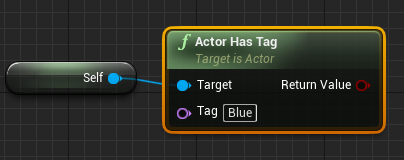 rotund scroll
gimme a sec
thick rampart
👍
rotund scroll
thick rampart
@rotund scroll thanks, but what is that https://i.imgur.com/PyJmg6z.png ?
"Find item" ?
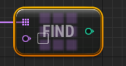


 thick rampart
Thanks! Sorry for all my questions :D
I should make a function like that in my door blueprint?
rotund scroll
tbh I think it already exists
it was at least complaining about me naming some of the things
 hoary silo
Does anyone know how I would go about procedurally generating walls on the floors I was generating
this is my code:
grim ore
the same way just with a different item to spawn and a different location I would think
or just spawn a complete room lol
rotund scroll
center + get box extents to find corner vertices
then depending on your wall pivot you need extra math
hoary silo
I forgot to mention I only want them spawning on the edges of the floors
But Im sure you assumed that
rotund scroll
... yeah
still the same method
if you don't have box sized floors it's gonna get slightly harder
also doing this in blueprint will be an expensive operation if you scale it up
hoary silo
Surprisingly it wasn't too expensive
plush yew
Hey everyone
hoary silo
hi
plush yew
Where do I ask for unreal engine help
lament slate
Does anyone why the character flickers when I play the game
hoary silo
here
plush yew
Okay
lament slate
It flickers front and back
plush yew
because I'm trying to make a racing game in UE4
lament slate
Help plz...
hoary silo
I know why
rotund scroll
@hoary silo it gets expensive if you're doing it many times over
plush yew
but the car isn't controlled correctly
rotund scroll
so if you want to make several rooms in this way, it's gonna be ridiculously expensive
hoary silo
I cranked it up to 10000 floors and it generated fairly quickly
plush yew
The car reverses on its own
lament slate
Guys help me too my character flickers from and back when Playing