#ue4-general
1 messages · Page 473 of 1
 grim ore
 remote mason
ah, figuring out a lock-on system with a HUD
grim ore
yep theres a few things that are difficult in UMG, that would be one and non square hit boxes are another
which honestly all are the same issue lol
 bitter iris
dosnt work at all for me right now
remote mason
drawing multiple targets on a HUD, had to create an array of widgets then hide them with opacity lol
grim ore
what does your code look like for the material?
bitter iris
me or lucky
grim ore
your radial widget
bitter iris
 worn cape
got it myself
grim ore
well that looks good, when you change the alpha on the if it changes the amount shown right?
bitter iris
yeah
grim ore
but that material on the UMG widget doesnt work?
bitter iris
nope
grim ore
well firstly are you sure you are using the correct material
 visual belfry
Did you happen to snag the robo sdf pack when it was free? I recall some radial progress bars in there you could look at for insight
bitter iris
Correctly?
grim ore
well there should be no way if you are outputting a circle like that using those nodes that would would get the result you showed
so I am assuming you had another material you were using before, did you swap it out correctly
bitter iris
I was using a static version with progress bar
grim ore
are you still using the progress bar?
bitter iris
yeah i put that using the material as the brush
grim ore
or are you using an image and changing the Alpha parameter on the material?
bitter iris
grim ore
You should probably be using a normal Image since the progress bar would not be correct for this now. You also need to adjust the parameter "Alpha" on the dynamic material on that image
bitter iris
that sucks
grim ore
you would do something like Getting the Dynamic Material on the Image, then Set Scalar Parameter Value on that as the target with Alpha as the Parameter Name and the new value (0-1) that you want displayed
 waxen abyss
Does anyone know how to make a rain drops on screen effect or know of a tutorial?
 upbeat crane
How do I use MakeLevelVisibleAfterLoad?
I don't want Level to be visible when its loaded so I Uncheck it and its fine but how do I make it visible later?
@waxen abyss simple google search yielded this result

Texture Link : https://goo.gl/aHkiqj Hello Everyone in today's tutorial I will show you how to make this rain drops coming down from the screen effect using ...
 torpid cape
i unplugged my usb xbox controller and plugged it back in. it still works in the editor (4.21.x), but in play mode no longer responds. it used to just work automatically. how do i nudge it to work again?
waxen abyss
Does anyone know how to fade into an effect when using post process volumes? so when I walk inside the post process volume it'll transition into the effect smoothly rather than a sudden change.
 sudden agate
You need two Volumes
A post process volume blends the material instance parameters, not the material itself
You need an outer volume with your material but with a Scalar parameter that turns it off
And the inner with your desired effect turned on with the Scalar parameter
In your material you need something like lerp(PostProcessInput0, YourPP, alpha) where alpha is 0 in the outer and 1 in the inner
Dunno if you know what I mean
@waxen abyss
waxen abyss
trying to wrap my head around that, sounds like it's a lot of work though
 thorn vector
hi anyone can help me creating minimap
i basicly followed every yt tut but none seems to be working
anyone can help?
i followed this https://www.youtube.com/watch?v=Z6qzaT4ZOh0&t=1533s

In this episode I show you how to create a more advanced minimap for your game. Part 1 handles the creation of the minimap and tying its movement to the play...

This a UE4 tutorial for SenTorious Minimap fully in Blueprint, in this tutorial you will learn how to add a minimap to your world and how you can add and tra...
the other that i found basicly rendering the world again and thats not really gonna work for my game
 gilded igloo
I have a problem, for some reason those prints dont have the same value although im basically printing the same thing. any ideas why?
remote mason
@gilded igloo, rounding or casting maybe..
remote mason
internally maybe a bug
gilded igloo
so what do i do about it?
remote mason
also check other places where you are setting that variable
gilded igloo
i am printing that variable right after i am setting it, even if im resetting it later that wont be printed
remote mason
probably better to stick with that variable instead of the return node for consistency
remote mason
like use "L Direction" instead of using the "Return Value" node
gilded igloo
i tried it, its the same
remote mason
probably good idea to submit a bug to Epic for it
gilded igloo
are they reading this?
remote mason
I dont know if this is an official Epic discord
 wary wave
This is not; but also there are thousands of people in here,so it's unlikely it's getting read even if it were
 placid arrow
what part of ue4 packaged projects causes a firewall prompt on windows the first time you run it?
ive built as shipping, as someone told me its to do with debug builds, that isnt the case. i'm thinking its part of the crash reporter?
(which i still have enabled)
 cloud cobalt
@placid arrow Check in your project settings that you have telemetry disabled for end users
placid arrow
i do, i turned that off because its against GDPR to have it on without asking first
or rather, is interpreted as being so 😉
cloud cobalt
Depends on whether personal data is recovered really
placid arrow
that wouldnt trigger a firewall prompt though? firewall prompt is triggered by a listening port?
cloud cobalt
Firewall would be triggered by a connection
placid arrow
yeah, i find its best not to wind people up who are data paranoid to start with 😃
cloud cobalt
Does your game have Steam as a subsystem ?
placid arrow
yes
placid arrow
hmm, so if the user blocks it, steam wont work?
or maybe its the steam multiplayer component
which i dont need
placid arrow
achievements mainly yes
i was going to use stats and steam workshop too, but i dont know if i have time for that
 glacial pecan
anyone else having trouble updating unreal engine right now?
I get a small red triangle in the launcher and it says it can't connect
 honest vale
it probably means you can't connect
 strange mantle
Hello fellas I'm new here. For how much VRAM usage should you go for when making games? 4 gigs?
glacial pecan
The entry iMac 4K 2019 has 2mb of VRAM apparently
honest vale
iMac
spotted the problem
cloud cobalt
Hopefully closer to 2GB
wary wave
I wouldn't bother with a Mac when using Unreal
only the newest / top end models have a GPU worth a damn
the entire previous gen was a write-off
cloud cobalt
The entire previous decade
 lusty carbon
I have a pawn with character movement for a simple vehicle in my game. it's got a movement component with Max Walk Speed param and stuff. But right now it's interpolating the speed like a curve and not linear movement
Is there a way to change that?
placid arrow
is it worth releasing a 32 bit version of a ue4 game?
i cant imagine there are many 32 bit machines even capable of running a ue4 game with any quality at all, as they'd be limited to 3gb total including the OS and everything else running, the only time you see 32 bit now is on ancient machines, really really cheap machines, or people that have wrongly installed the wrong version of windows?
cloud cobalt
Not really imho
placid arrow
lets be honest, ue4 isnt targetted at cheap machines
ive not bothered, im not even sure if 32 bit will run, as my game takes about a gig of ram
so on a 32 bit system with the max of 3gb accessible memory, it sounds like brown trousers time to me
cloud cobalt
UE4 works pretty well on cheap machines, but we shipped a few thousands Win64 only units and no one ever mentioned if we could do 32 bits, so I'm doubtful it's any more than 1% of the market
placid arrow
steam survey might tell me this, right?
cloud cobalt
Yeah
wary wave
I wouldn't even bother supporting 32bit machines
32bit processors haven't been manufactured for a long time
cloud cobalt
Steam survey is all Steam users, though, not "users who buy shitty indie games"
wary wave
32bit is pre-XP era, essentially
cloud cobalt
The problem isn't the CPU
wary wave
no, it's the OS
a deliberately gimped version of Windows that literally has no reason to exist
placid arrow
lol, 0.21% if you just include win10 users
cloud cobalt
Windows has been steadily distributed at 32b well into Windows 8 days
placid arrow
+1.14% if you also add windows 7
wary wave
but the people running that OS will be on absolute bottom-tier hardware
so they're not playing your game anyway
lusty carbon
is mipmapping handeled automatically in unreal?
wary wave
yes
cloud cobalt
Yes @lusty carbon
placid arrow
@cloud cobalt steam survey is "people with pcs capable of running ue4 games in a way that they dont degrade to lowest possible scalability"
cloud cobalt
Steam survey is 90% of people who will never buy a game in their life
placid arrow
i use a lot of particle effects, so having it scale down to lowest scalability is ick
 frank iron
Hi can Anyone please help me?
placid arrow
although, i started on this game in ue4 in late 2015... and back then, finding a pc of similar spec to mine that could even run it was a bit of a challenge, and i didnt have a massively high spec machine, just above the average ram and gpu
now its not so hard to find a machine that runs it more than capably
most machines do, for anyone thats ever installed any AAA game in the past 5 years
wary wave
@frank iron - just post your question
as for me, I have a question that some people might be able to answer
I'm trying to do a placement check for a physical object placed by the player
placid arrow
@frank iron if "anyone" could help you, you'd be able to ask on the street instead of a specialised chatroom. i'd say not anyone could help you but if your question is about unreal engine, people here can help you.
wary wave
I can't seem to come up with a decent solution to find if there's enough space to place the item
placid arrow
😉
frank iron
Guys I need help. In the endless runner game, after player turns the corner, the player can no longer switch lanes and teleport back to the corner.
wary wave
that's a problem unique to your code, I'm afraid
take it to #blueprint or #cpp, someone may be able to help there
placid arrow
@wary wave placement check how? to know if it exists at all in the world?
frank iron
@wary wave ok ty
wary wave
I want to see if there is space to place the object
I've just tested using a box trace with the object bounds
but that doesn't work for me because the bounds essentially clip through the floor
placid arrow
ah, can't you put a larger collision mesh on it, e.g. a cube, and see if it collides using hit events?
peresonally i'd divide the world into equal sized invisible squares, and know how many squares the base area of that object is, and align all objects to the grid
wary wave
haha, that is completely not an option
placid arrow
why not? 😛
wary wave
because that would require rewriting large parts of the game and redoing our existing levels
this is a 200+ man project
wary wave
plus these things don't align to a grid anyway
placid arrow
so if you use line trace, it clips the environment?
have you considered using some kind of IK?
 idle sail
Do you think or know if there will be any major changes coming to the material system anytime soon? or is epic relatively happy with where it is so its kind of low on priority
placid arrow
@idle sail im not epic, and im not sure many people here are, but have you checked their trello?
that serves as an official roadmap of whats coming up
wary wave
I'm using a box trace based on bounds
which is sound in theory but the bounds clips through the floor
placid arrow
hmm, can you combine the box trace with IK on each of the box corners?
idle sail
@placid arrow got a link?
wary wave
IK?
placid arrow
so that if youre on a slope for example it will tilt it to sit nicely?
idle sail
got it dw
wary wave
I mean, it's essentially a box
placid arrow
inverse kinematics, like what you use to place feet on a walking skeletal mesh
wary wave
slope detection is another problem
at the moment I'm doing flat surfaces
also Inverse Kinematics is for animation
and totally unrelated to what I'm doing
placid arrow
you can use the same tricks for placement, cant you? its just maths
wary wave
I want to check space
placid arrow
wheatley <spaaaaaaaaaaaaace>
silly question
cant you just make it physics controlled, drop it from like 'waist height' and let it settle?
turning off physics say 0.5 seconds after the first hit event to stop it e.g. rolling down hills?
that way the game engine and physics code are finding an optimal realistic space for you, to place the object in
if that makes sense
im also curious what kind of objects youre placing, like, crates? pieces of buildings?
do they have any need to interlock or interact with other placed items
wary wave
'deployable' objects
placid arrow
so turrets and stuff
wary wave
they do not use physics or anything like that
aye, something like that
they do not exist, until after the placement check
placid arrow
im just suggesting use physics to let them drop from deployment to the ground, just like the player let them go
placid arrow
that way if they dont place, e.g. not enough space, they'd realistically flop to the ground sideways, like you fumbled it
wary wave
I need to update the placement check
placid arrow
hmm
wary wave
and also a lot of them do not get placed on the floor necessarily
placid arrow
this is what we call a complex problem 😄
wary wave
it shouldn't be so tricky, but I'm a little stumped
placid arrow
i keep thinking its got something to do with that algorithm that splits up non-rectangular regions into non-overlapping rectangles, but im not sure why
or that sausage conjecture thing
wary wave
the box trace is the obvious approach, but because the bounds isn't reliable, the box trace isn't either D:
placid arrow
it also seems to me that the game levels werent designed with this in mind, that object placement was maybe added later, and better design of levels might have helped, having predefined placement spots defined by a level designer... but no chance to go back now and do that
 dim plover
I didn't fully read, but your problem with physics is that the turrets will flop on to their side?
You can disable that, by BodyInstance.bLockX/Y/ZRotation.
placid arrow
@dim plover as i understand it they want to be able to reliably place them and know that theres space before theyre placed
probably for highlighting them red/green @wary wave ?
 regal mulch
Since the Bounds stick through the floor, the trace would say "No Space"
So I get his problem
Also not 100% sure how to solve this
The Physics solution would try to solve the "sticking in the wall" issue.
Maybe that's the thing you should try, if it overlaps somewhere, try to move it away from it, if it starts overlapping on the opposite site too, there is most likely no space?
If you know the boungs, you could also adjust the spawn location based on that
wary wave
spawn location isn't an issue, but just the space check
I only know the bounds, because the actor hasn't actually been spawned
regal mulch
Right, what if you offset the location where you want to spawn, upwards by half the bounds?
Then you should be sure that it's not sticking in the floor
And you can perform the space check on that new location
If it still fails, you probably have no space
wary wave
sadly the bounds extends quite a lot into the floor depending on the actor that's being placed
regal mulch
So basically they are really fucking wrong?
regal mulch
And I assume there is no way to access the collision bounds?
What about grabbing the CDO
wary wave
I mean, isn't it the same thing?
regal mulch
And checking if the collision primitive is overlapping
wary wave
though the placed actor itself doesn't actually have collision
regal mulch
god damn it
You gotta need something that describes the size of what you are placing
;-;
regal mulch
I'm sadly not sure how the bounds work. As far as I'm aware, you can even adjust them by hand, so there's that?
wary wave
I'm not sure that you can?
regal mulch
You should be able to, as I remember that this was a solution to some render issues, where actors where suddenly not rendering anymore
Maybe it was just the overall scale
wary wave
trying to get an angle where assets aren't visible, lol
but yeah, purple outline is the bounds
so it's quite extreme
the box trace is 5% of object height traced from top to 10% of object height, which I'd hoped would have been enough
regal mulch
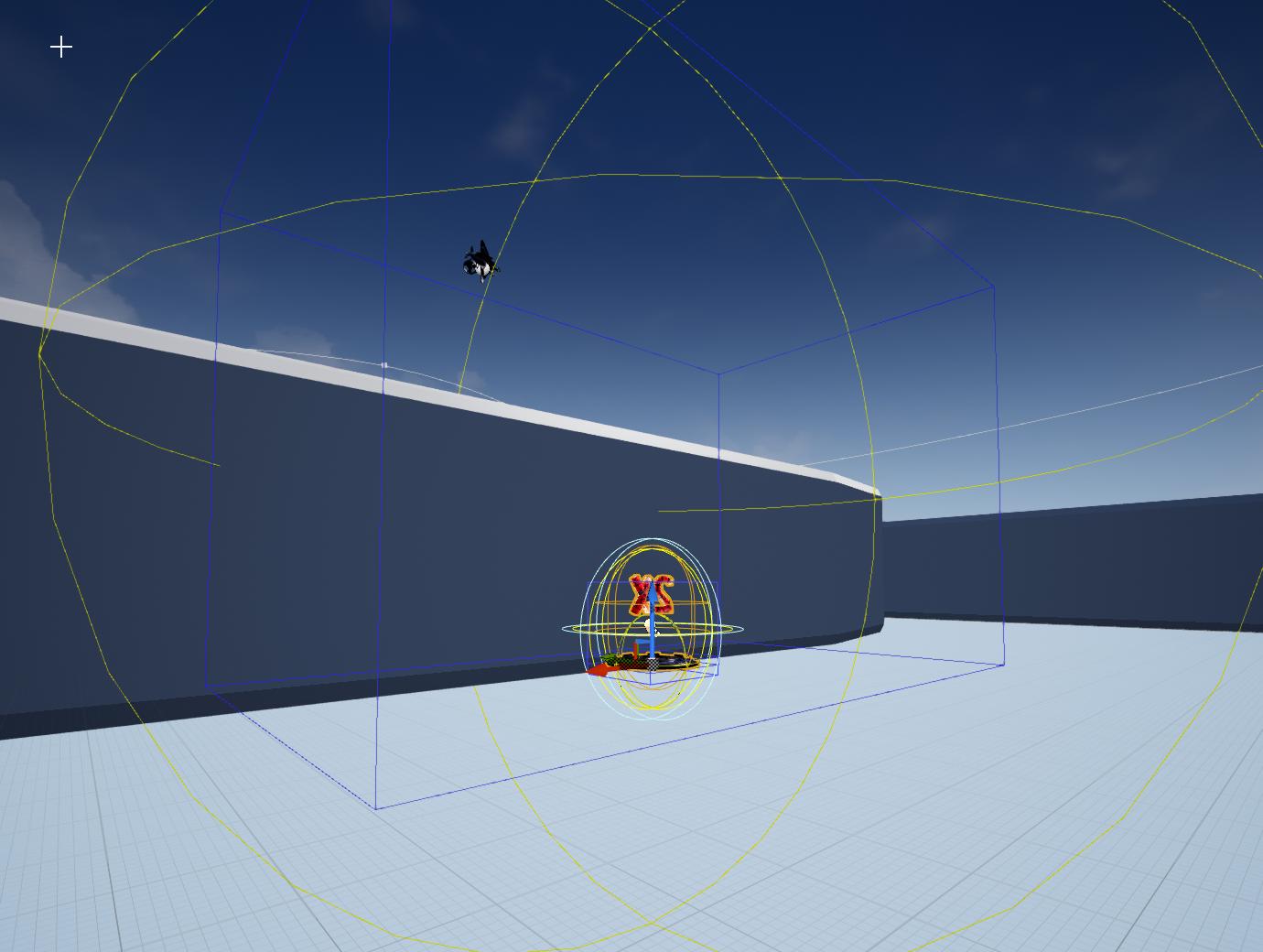 wary wave
so yeah, I guess I can look into where these bounds come from :/
regal mulch
So much for accurate bounds
wary wave
oh wow
regal mulch
Most likely the point light blowing it up
Are you getting the actor bounds
Or the ones of the component?
wary wave
that's a box component
regal mulch
Wait, you are getting the Component bounds of a box component and they are not the same size as the component itself?
wary wave
the bounds for the component / actor are one and the same
regal mulch
the fuck
wary wave
but yeah, the bounds are not reliable
the actual actor is sitting directly on the planar surface that's intersecting the screen
regal mulch
Well I guess your only real way is a few linetraces in all directions then
And mathing your way through that
wary wave
that's a lot of line traces 😦
I can do it from each of the four corners, which means I can check their validity
but it could intersect with all kinds of shit
regal mulch
I don't see a lot of different choices, as you don't have a proper size of the item somewhere
wary wave
I'm gonna look into how these bounds are being generated first, I think
wary wave
an enormous amount of traces doesn't feel like a good solution 😐
regal mulch
The "good" solution is the bounds trace
The second good solution is an overlap check of whatever has collision on your actor
rest turns into garbage solutions
wary wave
haha, well bounds are fucky and nothing has collision 😄
wary wave
I don't have access to it directly, might be able to grab it through CDO
regal mulch
Yeah that's why I mentioned the CDO
UT does that for spawning players
They create a CDO of the character and check if the capsulse size is overlapping something
 plush yew

NOT Unreal Dedicated Server 언리얼 전용 데디케이트 서버 아닙니다 Boost C++ Server A-Z develop 부스트로 처음부터 끝까지 혼자 자체 서버 만들었습니다 character eyesight(시야), move(움직임 동기화) , chat(채팅),...
 potent wing
Any of you guys have tried Procedural Nature Pack on marketplace?
Its better than the Open World Demo provided by Unreal in marketplace
placid arrow
so ive just sent this out on twitter

Attention all beta testers and people streaming #mrboomsfireworkfactory - last update changes location of savegame. If you want to keep progress move PlayerSaveData.sav from steamapps\common\Mr Boom's Firework Factory\fwf\Saved\SaveGames to %appdata%..\Local\fwf\Saved\Sav...

 Twitter
basically because ive gone from dev builds to shipping builds the location of save file has changed
now im thinking
surely there's a way that ue4 could have moved that file for me, in a cross platform way?
placid arrow
aww, sadface. 😦
yeah, i was hoping there was some nice cross-platform solution already there, rather than hard coding in some windows specific shell stuff
cloud cobalt
There's no built-in tool because you don't release dev builds generally
placid arrow
its not something that will ever happen again, i only plan to go from dev builds to shipping builds once
cloud cobalt
You don't need shell stuff either tbh
placid arrow
at least not in this game
cloud cobalt
UE4 has plenty of file manipulation tools
placid arrow
it does? i'd have thought that ue4 would keep you well away from file manipulation, and keep you within the abstraction provided by the pak files
cloud cobalt
Save data isn't in pak files
placid arrow
true, it isnt, and apart from ini's, its about the only thing that isnt?
placid arrow
do release builds even save crashdumps?
cloud cobalt
Yes
placid arrow
ive noticed that by default they dont save logs
cloud cobalt
They don't save logs, no
placid arrow
some time in the further future i'd love to come up with a way for ue4 to save remote logs
e.g. log to a linux syslog server or something
that way all my debug builds can log to a central server on my lan, when its me thats testing them, and i can aggregate the logs together
 calm sphinx
Hmm, editor menus? https://github.com/EpicGames/UnrealEngine/commit/0f668849f6f5f0106e659e600a2df4fbd48433e9
Looks like it makes us able to customize Blueprint and editor interface somehow
 ember notch
How to make a cops system like gta?
wary wave
dude 😐
ember notch
What?
wary wave
what kind of a question is that, ffs
ember notch
So if he kills 2 players/npcs he gets a wanted level how do I do that?
plush yew
How Can I do the backface culling?
i love how snow literally builds a game from answeres
answers*
cloud cobalt
Just don't answer
 boreal topaz
i just dropped a child static mesh on a parent skeletal mesh. how can i have them align together perfectly in the same location automatically
honest vale
@plush yew backfaces are culled if you use a single sided material
plush yew
@boreal topaz what u mean
boreal topaz
nm, scale is off
is there an easy way to swap materials from a skeletal mesh to a static mesh
instead of doing the whole blueprint thing
plush yew
@honest vale oh I'm stupid, I was working on a cube instead of on a plane xD
ty very much : )
 manic pawn
the headset decides that, no?
fov in vr isn't an artistic setting, it needs to be physically correct or you'll instantly get sick
lusty carbon
hmm okay
ember notch
@cloud cobalt Whom do you mean?
cloud cobalt
About what ?
wary wave
@regal mulch - so, added a new function to resize bounds that more-or-less works as needed
new fun problem: box trace does not seem to collide with stair meshes 😂
tracing against visibility, but for some reason the box can completely intersect stairs and not register a hit
visual belfry
the bsp ones?
regal mulch
Does the Stair mesh have simple collision?
Maybe it's a Complex/Simple collision issue
wary wave
not the foggiest, though I've just found a wall that doesn't either
I think it might actually have something to do with the origin point of the trace
maybe the point is inside the mesh
and when it is, it doesn't register the mesh when tracing
regal mulch
That is possible
wary wave
this seems to be the case, testing the theory I can see other places I can recreate it
box trace, not useful right now 😐
well, back to the drawing board entirely!
lusty carbon
I have a VR pawn that's blocking the movement of another Pawn vehicle moving in my scene. I want it to completely ignore you as if you were a ghost and pass through you. Set the collision to ignore but it didn't work. ideas?
wary wave
collision channels
however, be aware that if one can't block the other, the opposite is also going to be true
lusty carbon
opposite like what?
and I set one of them to ignore, should do the trick no?
that didn't work
even both pawns blocking pawns doesn't fix it.
if u stand in the way of my vehicle pawn it gets disrupted
grim ore
what is the object type for collision for the vehicle?
lusty carbon
world static
grim ore
ok so according to what it shows above this item will block anything with world static as the object type, not pass thru it
lusty carbon
yeah
i changed the cehicle to world dynamic and set the pawn to ignore it
ill test
grim ore
the other consideration is this is only going to stop physics movements since this is physics
lusty carbon
what is?
grim ore
collisions are physics based
this is more of an issue if you are teleporting something or setting it location rather than moving it
potent wing
Bois, im making a horror game, and i make 2 ways to open a door, 1 by pressing E the second one is by holding left click and move mouse (like amnesia style)
What do you guys think about this?
lusty carbon
idk man
@grim ore
The more I tweak collision settings the more other problems i get
I just can;t get my vehicle to pass through my pawn
grim ore
there is a default vehicle channel, why not try using that? put your vehicle and pawn back to normal then set the vehicle to vehicle and your pawn should be pawn then set those channels appropriately to ignore.
other wise this is what custom channels are for
wary wave
@regal mulch - came up with this in the end:
kept the box trace, but reasoned that if I can see the opposite edge and corners as the player, then it is likely the box trace did not start intersecting geometry
still clips a bit, but this above is the worst case scenario I've managed to find
regal mulch
How did you workaround the bounds being shitty?
 hidden aurora
Where did you get that material on the boxes?
wary wave
they're set manually in the actor that's going to be placed
that material is just a generic whitebox that's part of the project
hidden aurora
I really like it
wary wave
basically the meshes in the parent were tweaked
so at the moment only the test case works as intended
all the others need to be manually touched up too
plush yew
how do i make a animation play slower?xd
i feel like a dumbass
but everything i tried doesnt work
does the play rate need to be more than 1?
but if i try it,it doesnt do anything
wary wave
at this point I'm probably going to ditch the box check in favour of additional traces to the other corners
grim ore
@hidden aurora something similar here you can work with https://www.tomlooman.com/updated-mockup-material-for-unreal-4/
 flat idol
@wary wave have you try using sweep trace with the shape (box)? i think it is supposed to give you a hit location as soon as the object collides with something. You can maybe rotate it before tracing so it should align with floor or anything a preliminary line trace would be hitting.
hidden aurora
Thanks mathew
wary wave
yeah, sweeping makes no difference - the problem is that if the start and end point are inside geometry, it never registers a hit
I'm actually just experimenting with doing the box trace from player perspective, but I suspect this will have weird issues
gonna try it first tho
lol, yeah, registers hits from behind the player as expected
flat idol
start and end point are inside geometry that sounds a like an invalid circumstance anyways. But maybe i should just read the entire conversation to make it clear for me :)
wary wave
the problem occurs for example when one corner intersects with a wall
if the top left corner of the start, and the top left corner of the end are both inside the wall, no hit is registered
flat idol
id' expect the sweep to take care of that, tho i think i see what you mean and it will not be able to depenetrate. You are probably on the right track with starting the trace from a bit "earlier" location so the bound would not be overlapping.
wary wave
if I had a pyramidal / frustrum shaped trace this would work
flat idol
Also i'm not sure which bounds you are using at the moment, but the static mesh itself should have a bound that you can use (min and max extremes). I'm using that for arbitrary placed pivots to center the object in front of the camera always. It works out nicely for me.
wary wave
as it stands, the box isn't going to work, I don't think
I was using actor bounds, which were derived from the bounds of multiple meshes
but they were funky
but fixed by messing around with the assets
flat idol
Well if you have multiple meshes at once, you can perhaps calculate this by youself, by getting the static mesh bounds individually then adding up the boxes. Addition should give you the total sum of area of all mesh involved. It's implemented as such as i remember.
wary wave
the bounds is no longer an issue
the problem is now in the tracing
I'm beginning to think the whole placement system is going to need to be rewritten, because the edges cases on this tracing are too problematic
 atomic forge
Should I get Ue4 4.22.2 or stick with Ue4 4.21.2?
cloud cobalt
You should always get the latest minor
atomic forge
Ok Thanks, is Ue4 4.22.2 stable?
wary wave
as stable as it's gonna be
flat idol
Well i'd just try the same and start the trace from behind the camera so it will never colllide with things in front. On that note, i have never seen an implementation that always work nicely. There is always a case when the placement looks weird - even in high quality games too :)
wary wave
if you start the trace from the camera position, it collides with things behind the player
atomic forge
Alright thanks!
 little warren
Hi Guys is there a FMath function like clamp, but instead of clamping the values it maps them within a specific range?
With normal clamp if min is 500 and max is 1000, then 0 becomes 500
but 600 is still 600
the one im looking for is you give it 2 ranges, min1 and max1 and another min2 and max2, and it maps the value from min1 and max1 to min2 and max2
sorry if my explanation is horrible lol
wary wave
....map
 thorn topaz
@little warren FMath::GetMappedRangeValueClamped() FMath::GetMappedRangeValueUnclamped()
 fringe pivot
What could cause the sculpt tool to not subtract from the landscape?
It generates elevation just fine but when I press shift it doesn't create depressions.
wary wave
already being at maximum depression, for one
fringe pivot
how do you set that?
visual belfry
you just have to scale landscape Z
fringe pivot
it's weird, i always used flat landscapes and never had issues lowering the terrain
visual belfry
did you import from a heightmap "centered" at 0 rather than midway?
fringe pivot
mmm I don't remember, just deleted it and create a flat landscape, now I'm able to lower the terrain again
visual belfry
😛
plush yew
what annoys me is, if you minimize a folder, and you click one object i nthat folder, the whole folder maximizes
how to disable this?
thorn topaz
oh snap, it's @visual belfry
visual belfry
/o\
thorn topaz
I'm attempting to swap between input components but when I push the new one to the stack, I ensure it's at index 0 but the one at index 1 is still handling the input. Do you have to something other than push the input component to use it?
visual belfry
top of the stack gets priority
but there's also a fixed priority for some elements (pawn, player controller, and level blueprint)
thorn topaz
I'm creating both the components in the player controller
    if (InputComponent)
    {
        InputComponent->Priority = 0;
    }

    switch (NewInputMode)
    {
    case EInputType::Game:
        SetInputMode(Game);
        InputComponent = GameInput;
        break;
    case EInputType::UI:
        SetInputMode(UI);
        InputComponent = UIInput;
        break;
    }

    InputComponent->Priority = -10;
    PushInputComponent(InputComponent);
let me double check, but I think the InputComponent native to the player controller is automatically added and doesn't respect normal stack order even if you push
visual belfry
whoops disregard that last link, I was looking at pawn... but https://github.com/EpicGames/UnrealEngine/blob/7d9919ac7bfd80b7483012eab342cb427d60e8c9/Engine/Source/Runtime/Engine/Private/PlayerController.cpp#L2437 shows where InputComponent normally gets added
thorn topaz
right but I'm overriding that with my custom ones
visual belfry
gotcha, looking through player input I see nothing that'd cause an issue with that then 🤔 I was thinking it had protection against having the same input component on the final stack more than once but it really doesn't
fringe pivot
does anyone know about a heightmaps generation tool that can make realistic terrains without requiring you to spend a week trying to figure how it works?
thorn topaz
I think I found the issue 😄
visual belfry
but it is expected behavior that 1 gets processed before 0
thorn topaz
Are you sure? I believe it's the other way around
frank iron
Hi how would I implement a timer/progress bar of 10s when player picks up an item?
thorn topaz
    if (InInputComponent)
    {
        bool bPushed = false;
        CurrentInputStack.RemoveSingle(InInputComponent);
        for (int32 Index = CurrentInputStack.Num() - 1; Index >= 0; --Index)
        {
            UInputComponent* IC = CurrentInputStack[Index].Get();
            if (IC == nullptr)
            {
                CurrentInputStack.RemoveAt(Index);
            }
            else if (IC->Priority <= InInputComponent->Priority)
            {
                CurrentInputStack.Insert(InInputComponent, Index + 1);
                bPushed = true;
                break;
            }
        }
        if (!bPushed)
        {
            CurrentInputStack.Insert(InInputComponent, 0);
        }
    }
That's the PushInputComponent code
visual belfry
right but it processes from the top (end) of the stack
thorn topaz
ah yea
visual belfry
    int32 StackIndex = InputComponentStack.Num()-1;

    // Walk the stack, top to bottom
    for ( ; StackIndex >= 0; --StackIndex)
    {
``` from PlayerInput.cpp l1083but if you take out that -10 priority setting I see no reason why it wouldn't work 🤔
thorn topaz
turns out, it was something else stupid lol
 quaint bone
Is there a way to find out the date that I created my Unreal/Epic Games Account? (Sorry, if this doesn't seem relevant - didn't know where else to talk about this)
visual belfry
I think you're getting kind of lucky there tbh @thorn topaz , because the only thing that takes the Priority member into account is PushInputComponent, so when you reset the old component to 0 it doesn't reorder the stack
thorn topaz
Yea, I ended up just removing the old one
but you can't use PopInputComponent because that unbinds everything
 proven hamlet
@ebon saffron I have followed your tutorial on how to set up a dedicated server. Thanks for that!!! huge thanks.. but i am having trouble understanding what the server default map does exactly. i can connect to the server but its just a blank map not my main menu map in my game ? im kinda stumped on what to do from here on out i have followed the guide
grim ore
@frank iron what part of that is the problem? the ui part, the ticking down of the ui part? the command to start a timer for keeping track of ticking? picking up the item? the entire thing?
frank iron
@grim ore The ticking down of UI part
grim ore
You can start a timer that runs every X amount of time, 0.2 or 0.5 or something like that, then on the event fire it adds that delay value to a variable, updates the progress bar percent with the percent gone between that variable and the amount of time you want (10 seconds), and then starts the timer again. If you want it to be a smoother transition you can update it more frequently.
other alternatives are to have a timeline fire off (hard in UMG itself, fine in other actors that can tell the UMG to update) and then make it go down smoothly over 10 seconds
you can also use the tick in the widget to count down instead of a timer if you need it super duper smoother (but not really needed)
if you need super duper accurate you can always track the start time of this event and the current time and then do your math based on that instead of relying on a variable tick or event timer
frank iron
i see
however im still lost lol
can i show you what ive done and why it isnt working?
grim ore
here is another way of doing it https://youtu.be/cNxXqO_hsD4
you can post what you have in here someone might be able to help
@proven hamlet when the server is running, the server default map is the map that is loaded up when the server is running. this is the map that people will be sharing when they connect to it
proven hamlet
@grim ore im still confused on how someone is to go from the server default map to a game map that is in session
grim ore
the server default map is what the server you are connecting to is showing, it should probably be the game map
your players default map can be whatever you want, it could be a login screen or a main menu not online for example
so for example server 1 might have map 1 loaded, server 2 might have map 2 loaded
if for example all of your players are connected to server 1 and its on map 1 and you want to go to map 2 you would use a server travel command and move everyone over to that new map that is connected currently
proven hamlet
for some reason the screen goes black if i have it setup to go from my main menu
grim ore
the server or the client?
proven hamlet
server
grim ore
the server should not be on the main menu unless for some reason it needs to be?
your server should be on game map, your client should be on the main menu map
then your client can connect to the server and load the game map
proven hamlet
okay thanks matt !!! your youtube channel is kickass btw thanks again. im sure i'll be back on here asking for questions
 sacred smelt
While working on script, I noticed that I CAN'T spawn new objects / actors / components in constructor?
grim ore
this might help a bit https://www.youtube.com/watch?v=abmzWUWxy1U&list=PLZlv_N0_O1gYqSlbGQVKsRg6fpxWndZqZ it's about setting up a menu/host/lobby/settings system
@sacred smelt correct but you can call an event/function that is in your main Event Graph and have it do it
visual belfry
offhand question, but how do sessions work with dedicated servers 🤔 no player controller to host... so do you need to use C++ or are they just not used in that context
grim ore
7 days of not updating ue4 master branch.... this is gonna take a while lol
frank iron
@grim ore thanks for your help, i managed to sort out the timer. But i have one problem, The timer countdown on the UI starts from 8 even though i set the value to 10
grim ore
how are you updating that countdown #?
frank iron
event tick
grim ore
that's weird it would be 8 are you sure you are starting at 10? try changing your starting # to something like 30 and see if it says 8 still
sacred smelt
@grim ore so why this LightSwitchPushButton.cpp in constructor has create objects, etc.? 🤔
grim ore
the constructor in a C++ class is not the same as the construction script in BP
fringe pivot
https://docs.unrealengine.com/en-US/Engine/Landscape/TechnicalGuide/index.html
Does anyone know what's the equivalent size in Km2 for the 3rd on the list, the 2017x2017 one?
Technical Settings for Landscape.
or how do you even calculate it?
sacred smelt
Where can I find info in docs about it @grim ore? Im confused
grim ore
about what?
sacred smelt
What can I put t beginPlay and constructor (in cpp)
grim ore
that one I dont know, #cpp might have more info since its C++ related.
the constructor should be standard C++ tho
I thought you were talking about BP earlier when asking about constructor which is why I said you can't do it
I did notice in that code you pasted tho that they are using CreateDefaultSubobject and not really creating/spawning in new items separate from this object
 lilac wedge
is there any good solution for letting my friends play my game and being able to send them updates ??
like testflight for pc
grim ore
it would depend on your project. you can just package and zip up the project and share it on onedrive or google drive. You can upload it to something like gamejolt/itch.io and share it there. If you can package it to HTML you could even put it up on something like gamejolt/itch.io and they can play it in the browser. For packaging and just sharing updates there is nothing out of the box they would have to get the entire project each time.
oof no wonder it took so long, they branched off a 4.23 branch last week
grim ore
you can't delay in a loop
frank iron
but then it finishes the loop so quickly that it wont show on UI?
 frosty bloom
Can you even start a timer after you destroy an actor? Seems illogical
@frank iron Set Timer by Event, Time value = 1.0 and Looping = True, create custom event and insert logic
grim ore
lol I didn't even notice the destroy actor there in the middle, was just looking at the infinite loop
frosty bloom
Yeah the loop was weird.. Was just curious how he even got the infinite loop error.. Shouldn't get that far by the looks of it
 abstract relic
"polite programming"
grim ore
Compiling master branch for an hour only to realize the new stuff I wanted to play with was in another branch 😭
 orchid marsh
@grim ore lol - I have totally done that myself 😉
grim ore
If this machine didn't take 2 hours to compile I wouldn't be annoyed
but hey I guess more research while I wait 😃
frank iron
@frosty bloom sorry to keep asking but i tried what you did and it only countdowns once, to 9 and then stops. https://blueprintue.com/blueprint/dnoq33d3/
BlueprintUE
grim ore
nothing really happens there
nothing is connected to your set timer to start it, and nothing is connected to the event to do anything when it fires off
put all your code that should happen when the timer ticks in the TimerCountdown event, when it fires have it do whatever you want each second
then use the set timer by function name and have it run I am assuming after you Add to Viewport
your code that does the time value check and > 0 is true or false, the true can do your subtract and print and whatever
then it should call the timer again by function name for 1 second since you want it to be called again in 1 second since it's not over yet
the false can be for when it's 0 or less, and then you are done no need to call it again
frosty bloom
Yeah. When the branch returns false you can simply clear the timer and destroy actor if that was something you wanted to do
grim ore
this is the basic idea https://i.imgur.com/CiPes9J.png its not correct 100% since you are starting at whatever and immediately subtracting 1 so you never really start at 10
but if all you are doing is updating a progress bar it seems a bit overkill when a timer could do it
 heavy ether
sadly, my unreal project has been put on hold, so i won't be doing any work with the engine professionally for at least 4-6 weeks probably. 😐 everyone's gotta put their effort into the ugh Unity version. 😐
grim ore
work is work tho so nothing wrong with that 😃
heavy ether
i'm actually going to be spending at least several days on a backend service, so at least i don't have to touch the dirty stuff. 😄
grim ore
see, bright side to every rainy day
 storm snow
is answerhub site down? i cannot get there 🤔
oh got it open now, i dont know if my internet is just slow now for some reason.
 tawdry hedge
Hey, did anyone else encounter an issue before that caused the deferred decals to appear on NPCs
I just set some up in my example level and as they are walking over the decals, it appears on their feet ://
 loud knoll
anyone have news on 4.23 release date?
grim ore
4.23 just branched off from master last week so assume another week or two before a preview. then 1-8 previews each about a week long, then a few weeks till release. so 2ish months?
 hushed delta
Hi guys, it is just me or the launcher is extremely slow and laggy after the last update?
 dense pumice
hey does anyone use vscode with unreal?
 lime girder
Can I just say, Oculus Quest irs pretty fun to play with in Unreal
Just wish there was a good mirroring tool
loud knoll
@grim ore thanks
grim ore
look into https://www.youtube.com/watch?v=Ora7OrQHwEs scrcpy and adb @lime girder
lime girder
Ooooo
grim ore
https://github.com/Genymobile/scrcpy is the direct link, I also use another program in chrome to do it lol, Vysor https://chrome.google.com/webstore/detail/vysor/gidgenkbbabolejbgbpnhbimgjbffefm?hl=en-US but I havent tested it in the Quest yet just my normal phone
lime girder
@onyx zinc Do youknow if I can use adb wirelessly to Launch from engine?
grim ore
in theory you should be able to, once you establish the connection with adb to your device over tcp/ip I think it holds it open
I havent tried directly from the editor yet I just manually push them
lime girder
Yeah? I'm a bit of a newbie and only know how to launch from the editor. if you've got an idea of what I can google, let me know. manually push wirelessly right?
grim ore
adb install basically
grim ore
I'll see about the wireless launch from editor later today probably lol
lime girder
Let me know! Would be fun to
grim ore
I think once you set up adb over tcp and connect it will just "work" but who knows 😃
lime girder
I could have sworn i tried this on Sunday and I couldn get device manager to see it
I'm deep in another project at the moment but i wanna retry it. may have missed a step...
I was following Oculus' recommendation of setting the port to 5555
hmm
grim ore
it;s all good, I need to document it for a new series anyways so its on my list
lime girder
cool! Send me a link, ill watch what you got if you have any other up 😃
grim ore
yep 5555 is correct, theres a few steps on the scrcpy repo
plush yew
so... about nDisplay
I'm trying to set up a portrait monitor, but if I increase the horizontal resolution to 1920 it just crashes on me
now that I think about it, anything over 1080 crashes
plush yew
yeah, it's basically two FHD monitors with one being in portrait mode
grim ore
is that the setup then for just that one monitor or is it trying to set up the size for both?
and that's an interesting issue regarding differing modes
plush yew
I'm not sure what you mean
uh... okay...? I accidentaly cliked "Run" in the nDisplay launcher twice
and it's working?
grim ore
well if you have a 1920x1080 monitor and a 1080x1920 monitor are you trying to set the size as one number or are you trying to set that 2nd monitor to 1920x1080 even tho it's not
plush yew
oh, I see what you mean
grim ore
I havent used nDisplay sooo... just shooting out random at random
plush yew
afaik, it's two instances of UE with SetX/SetY/ResX/ResY
[window] id=wnd_1_up viewports=vp_1_up fullscreen=false WinX=0 WinY=0    ResX=1920 ResY=1080
[window] id=wnd_2_up viewports=vp_2_up fullscreen=false WinX=-1080 WinY=0    ResX=1080 ResY=1920
gotcha, one for each display synced up basically. so it sounds like your trying to set the 2nd monitor to the wrong size?
no that looks good, the location is weird tho for the 2nd one
plush yew
the 2nd one is at -1080 in the "desktop space"
grim ore
oh wait it's to the left of the main one isnt it?
plush yew
yeah
grim ore
ok yeah that makes sense
plush yew
forgot to mention 😄
yeah, 'cause 0 is 0 in the primary monitor space
however there's still viewports
`# Viewport is a rectangle area of game window where rendered frame is
mapped. Usually the viewport starts at 0:0 and has the same size as
its parent window but in some cases these settings may differ.
`
maybe the viewport stops at 1080, so that's pretty much that
 proper crane
Alright... I've got my Physics Asset, my Animation Asset, my Skeletal Mesh, and my Pawn Blueprint with collision and all pieces with a Collision tab set to ragdoll. I'm not sure why this object has no collision, and seems to be static?
frank iron
@grim ore THANK YOU!!! so much! Finally it works hahaha 😃 😉
plush yew
@grim ore well I'm nothing if not resourceful
I fixed it by setting the second screen to landscape and just rotating the camera 😄
 ancient lotus
any idea why im getting this when i add a widget to my viewport on beginplay for the character?
Blueprint Runtime Error: "Accessed None trying to read property CallFunc_Create_ReturnValue". Blueprint: BP_Character Function: Execute Ubergraph BP Character Graph: EventGraph Node: Add to Viewport
https://gyazo.com/308bdbea64da1d727a3ea9927a4dcf76
 plush yew
you have to plug your player controller in the Owning Player pin @ancient lotus
ancient lotus
didnt change anything, (this is on the character's BP). it works just fine as im only using it to display stats for testing, but when i press ESC to stop the game in the editor that error comes up
plush yew
you shouldn't be adding Widgets on Pawns
you should do it on the Player Controller
if you don't have a Player Controller, just create one and add it there
proper crane
"For skeletal mesh component, simulating requires a physics asset setup and assigned on the SkeletalMesh asset" it's already set up
ancient lotus
thank you
 warm timber
is there a global wind value I can adjust somewhere or it's just the directional wind component?
grim ore
@plush yew lol good to know that fixed it
 split wedge
Hello so when I launch my game in standalone editor me and my fellow actors fall through the map and then the map loads 7 seconds later, I'm using world composition. How would I fix this so that level is loaded before everything?
Dang lol cause I'm using blueprints haha
Sweet thanks I'll give it a go tonight
 storm venture
how would you guys go about storing items in a game where there are plenty of different items, (weapons, consumables, equipment, etc), but some of them can be customized?
networked
my current idea is to use a generic Struct_Item that holds all the information:
• Generic Item Data (name, weight, etc.)
• Weapon Data (blank if it's not a weapon)
• Consumable Data (blank of it's not a consumable)
• etc.
• Usage_Class (reference to a blueprint with a Item_Usage interface for items with special usages)
 harsh pike
Has anyone used their VR headset as the camera when recording into sequencer? I am having trouble getting it to record any data
storm venture
so would this inventory be a reference to the blueprints? i couldnt use class-references because i need customizable items, and wouldnt references to a spawned item eventually bog the game down?
and a data table uses structs i believe, so perhaps my original idea?
oh thats right, data tables are static
now what if some items have unique functionality, where should i write and store this functionality?
that will eventually be a very big struct haha
oh my
interesting, so there is some Blueprint that handles all of that info? So if you were to spawn any item, you would use the same Blueprint and load that data row into it?
 pure owl
What does the -noclient option do fo RunUAT? Is there a RunUAT reference or documentation?
storm venture
ah i see, not a problem
oh wow
right, that makes sense
i need the player to customize some items though, so would the item reference the "base" version in the data table and then have maybe a small struct of customizable/dynamic data attached after?
grim ore
@lime girder just tested scrcpy plugged in, worked great for mirroring. got it set up wirelessly with the adb commands on the git page, worked great. got it running thru UE4 with the normal launch options wirelessly as well so 😃
 night stirrup
hey guys,
does anybody here had problem with data tables not loading exclusively on package?
I already added the path of this data table to "Additional asset directories to cook" but nothing changed. Also tryed full rebuild flag
storm venture
interesting, im going to start digging into coding now and try it out, thanks!
ive been hoping unreal can handle most of it out of the box, it seems that a custom version of PlayerState can send and receive whatever i throw into it for networking
and i believe GameState holds an array of every PlayerState of all connected players, i hope, haha
same, its probably the hardest part in my opinion 😄
grim ore
are you sure it's loading the whole game into memory or is it an issue of using hard references for your project?
storm venture
what are hard references? just out of curiosity
grim ore
https://docs.unrealengine.com/en-US/Programming/Assets/ReferencingAssets/index.html and theres a good video on it if I can find it
basically object A (player) references object b which reference C which blah blah now your entire game is loaded
because when it loads one thing it has to load the rest if its reference hard, if its soft it loads it when it needs it
storm venture
this might be a dumb question, but if you try casting Object A as Object B but it's not, is Object B stuff still loaded?
 nimble anvil
lol
 azure shore
geometry literally right there - never touched it
whats wrong with me
oh god Im an idiot
grim ore
that's one of the issue, casting does this
theres a stupid video I just watched on it and of course I cant find it
grrr

This talk by Fractured Byte Technical Artist Roman Leshchenko breaks down the most common mistakes made by developers, render and content pipeline bottleneck...
at the correct time stamp
also... if you disable steam VR for the default VR template you lose functionality for an oculus rift.... lol
you have to have steam vr plugin enabled or it breaks rift support
azure shore
wait how do I edit collision on geometry
grim ore
you can't until it's a mesh as far as I remember
bitter iris
If I use vertex paint on a landscape instead of doing layers would that be cheaper? just a random thought but probs stupid
frank iron
How hard is it to publish a game to android play store?
proper crane
"Malixulo "TopHat Cat"Today at 8:01 PM
So, I clicked the x on my components tab in my pawn blueprint, and now I can't change the hierarchy
How do I open the components overlay? Or any of them for that matter"
grim ore
@frank iron it's a one time cost then you publish it, no real review process just lots of questions and packaging it correctly
frank iron
@grim ore oh cool that's alright
bitter iris
@plush yew how would i add more than 1 vertex texture?
grim ore
all of the windows in the editors are under Window at the top @proper crane
 normal burrow
@proper crane
proper crane
And uh, is it possible to get more than one collision object to be used by a Skeletal Mesh?
I've been trying to set it up for a while, can only get the root object to be collision
normal burrow
physics assets allen?
proper crane
I have a physics asset, it doesn't do much for collision
I'm not sure if there's an extra step after connecting it to Your skeletal mesh, but I'd assume they'd mention if there was
bitter iris
np
proper crane
Essentially, while the collisions are parented to these objects, they get sent flying as soon as the object is tested
One can only imagine what essay Highlander is typing
 sharp badger
Haha I keep rewording my question trying to make it clear
normal burrow
you may want to look into collision in general allen. learn of collision profiles and stuff to control collisions
you can make primitives child of bones though if that is what your asking?
proper crane
I am essentially trying to connect collisions to bones, yes
normal burrow
physics assets are generally used for that
proper crane
Yes
I'm just not sure how it would help since my collision objects get sent flying
And pop out of the mesh
normal burrow
find a good tutorial on physics assets, you can tell them not to collide with eachother
and then learn of collision profiles
to further control the hull of the character collisions with its physics asset
proper crane
I spent an hour trying to figure out why my blueprint object was coming out rotated, and realised it was rotated in the level and not the blueprint
But that still didn't explain how when there was no collision object connected, it would show up normal, even though it should've been tilted
I did just connect the collision to the bone, but did not work
Worse, I'm gonna have to redo all the collision
Alright... I think I see the issue here
proper crane
Am I able to connect my Construction script to multiple things? I tried to snap collision pieces to bones, and it only lets me connect the Construction script to one thing, and I need it to connect to more bones
Plus I'm doing what the guy said in the tutorial, and the collision still isn't affecting the mesh
grim ore
you should be able to run pretty much anything off a construction script, what does yours look like that is causing the issue?
proper crane
Connect one, disconnects the other
And I won't even get into that the collision object goes straight through the floor, so it doesn't even work anyway
 lime gull
What does
"Logslate: Window 'output log' being destroyed" mean? Im getting that when packaging
proper crane
@grim ore I'm assuming this is what You meant by "Look Like"?
 sturdy prairie
Hey guys. Anyone know how to get my C++ files to appear in the content window? I've close/restarted, Cleaned/Rebuilt the solution in Visual Studio, and made sure UClass() is in place, but I can't see my files in the editor.
grim ore
@proper crane yes... so uh... do you know how blueprints and the flow works?
@sturdy prairie do you have show C++ enabled in the content browser?
sturdy prairie
I did, @grim ore. Creating a NEW C++ class apparently made them both hot reload, but I'm unsure why it resisted everything else I tried. O_o
grim ore
you should probably watch / read some documentation about blueprints before trying anything complicated. Blueprints Execution Wires flow left to right thru the white arrows. you connect them one to the other in order and they execute in order.
sturdy prairie
I would have thought rebuilding the VS solution would have synced them up.
grim ore
@sturdy prairie super weird, it should have yep
sturdy prairie
Ah well. Hopefully it's a one-time issue. 😄
proper crane
I actually did try doing that, but it still only made one do the thing
grim ore
we can't really guess what went wrong since we don't know how your project is set up but calling that node twice should be no issue
grim ore
so you want 2 different items to attach to the same bone?
proper crane
Uh... Let me check
Goddamn it, settings keep changing on me before I save, that 8 was meant to be a 9
It's really easy to miss
I still have the issue where even though the collision sticks to it fine, it still doesn't keep the mesh from falling through the floor
grim ore
is this on a character or another type of Actor?
 violet obsidian
Any of you have experience with Niagara and ray tracing, I'm having a issue where my texture spite billboards show instead of my actual particle effect .
grim ore
that's why I was asking, you can't really use extra collision on a character so was trying to eliminate that
proper crane
The guy in the tutorial got it to work
And that confuses me on how to get that much collision to work if I can't use custom shapes
I'm assuming that even if I were to make a collider out of a static mesh, it would be unable to animate if it were even possible to apply to a skeletal mesh
It just brings things into question like how a massive creature with multiple limbs can be captured in one of four available shapes
grim ore
that's a good question. I was watching the sea of thieves performance video from UnrealFest and their kraken monster uses multiple cylinders for the arms
proper crane
Not to mention a game like Shadow of The Colosses (whatever, I don't know how to spell Colosess but I can spell Anthropomorphize)
I just mean, if an engine that old could do it, but Unreal can't, that seems like a pretty big limitation...
Like, I've seen people give out tutorials for making custom collisions, but every one of those tutorials is for Static Meshes, so I'm assuming they can't be animated or used in a Skeletal Mesh
I think even Blender and Unity can be rigged to allow custom collision in their game engine
Too bad Unity is the most frustrating program of 2018
Make a script, test it, it works. do literally anything; script broken
grim ore
have you seen this video? https://youtu.be/SEH4f0HrCDM
proper crane
It is the most agonizingly long video, I just couldn't finish
And it still draws the question of whether I can animate the mesh
grim ore
well if you look at the default third person character in the template and it's physics asset it's animatable and it has custom collision. You can drop the character in the world and it ragdolls based on collision
proper crane
That's a quest I have to try later
Make things that were never meant to be ragdolled do the flop
Plus, to be fair, I wasn't exactly bound to watch a video that already had the collision premade
Because than I'll assume there's some extra step I'm missing
grim ore
well i copied the default mannequin and replaced it's unique physics asset with some generic capsule for the entire thing and it worked as expected
proper crane
Please tell me there's a written version of this. This mans voice is barely understandable with the reverb
grim ore
well no reason for it I dont think since you can do it all in the engine. Have you look at the physics assets?
proper crane
I have it attached, and the bones are there, all I really cared to look for
I kind of avoided that for when I do animation with it
There was a collision piece that I'm not sure what it does
Tried the physics with and without it, didn't really change anything
I could've missed a few things, I've been on PC for 12 hours trying to get one objects collision to work right
And that's only today
grim ore
so what is the goal here, something must be missing in figuring this out
proper crane
Goal? I wanted to try physics animation, so I've been trying to rig the blueprint
grim ore
so all animation in the engine, nothing pre baked?
proper crane
I'm not exactly one for keyframes
And I didn't really see a point in importing pre baked animation since the object will need to be able to stand up in order to actually see it
grim ore
so what does the physics asset look like on this object?
proper crane
When I open the window, it's the object, with adjustable bones
Pretty much Skeleton window but with a different skybox and overlay
grim ore
ok so it has no collision set up on the skeletal mesh then?
proper crane
Only collision I have is what I have on the blueprint version
I did manage to break a capsule to shape it to fit the object in some weird way, but that had to be reset when the mesh had to be changed around
grim ore
I think the first issue here is you are trying to add blueprint collision instead of having your actual mesh collision set up properly
proper crane
Tutorials I was told to use said blueprint
grim ore
I have no idea what tutorials you watched or what you were told, I am just going based off what is in the engine right now in the template.
proper crane
I just assumed the tutorials wouldn't matter
I broke it so that there wouldn't be a big thing gapping chat, I'm polite enough to do that
grim ore
you can use the <LINK HERE> to not use the auto preview
proper crane
Discord truly is evolving
grim ore
so the issue with that tutorial is the default mannequin has proper collision already set up on it using a physics asset
you are just adding more collision to do stuff with
plus this is a character so it's not using the skeletal mesh collision to move around/stay upright
proper crane
What was I supposed to use?
The character I'm trying to use is AI, btw, not a player
grim ore
I don't know what you are trying to do
proper crane
I've already stated
proper crane
You probably just don't understand how anything I did here was supposed to do it, in which case, I don't either
 spare sun
or did you mean the actual link between <>
grim ore
yes the actual link is between <>
spare sun
ah ok
proper crane
I guess I wanted to do a sort of Landfall esque animated character, so I can't really work with locked axis or a cylinder for collision
I'll try to look for a version of "Custom Skeletal Mesh Collision" where the guy speaking can actually speak English at a volume that doesn't make me have to put the speakers on full blast
And I'm sure we can both agree that 11 minutes is unnecessary, there is probably about 5 minutes that can be cut out of this video
grim ore
it sounds like you might want to look into IKinema
proper crane
If it's a program, I can't really afford to try things that I don't know if they'll help
It's like, I know that Adobe is much easier, but I'm not paying $1000 for something I can still do without
grim ore
man I never played with the PHAT editor before this is fun
proper crane
I mean, it makes my life more hellish, but it isn't 100% necessary
It might be worth making a written version of this Custom Collision tutorial
This mans English is... His voice is just horrible
And he's really going at it with the filler video
 sonic pagoda
whats cheaper/better performance : setting a reference to an actor and accessing that reference everytime you need a variable from it, impure casting, or pure casting... and a 2nd question, if setting a reference is cheaper, why then do anim blueprints complain when I update their variables from outside of their instance (like from a character - telling the anim instance to update a bool, instead of having the anim instance check if that bool has changed via event update [anim bp's event tick function])
proper crane
Pretty sure BPs are just generally slower
grim ore
lol his poor head https://media.giphy.com/media/f5Rtv9FqqURi4kJ8ay/giphy.gif


 proper crane
Is there any simple explanation for that custom collision on skeletal mesh thing?
And by simple, I mean something that doesn't have 5 minutes or more of video that doesn't matter
grim ore
probably not
the docs for the Physics Asset editor are here https://docs.unrealengine.com/en-US/Engine/Physics/PhysicsAssetEditor/index.html but it's more than a 5 minute read
proper crane
I will read it if I'm told that it will actually help with with this collision thing
More than 5 minutes is fine, as long as everything in there is important
grim ore
I have no idea if it will or not, I am still not clear on your goal
I mean if you want custom collision on a skeletal mesh you can use the Physics Asset Editor to create that collision, it's what it does
you can either make it using default collision shapes or import a shape from another existing mesh
after that it's setting up any constraints to make it behave correctly
proper crane
I'm guessing that You need multiple shapes to animate the collision
grim ore
the shapes attach to the bones and sockets so they move with the bones and sockets
proper crane
Yeah, this here is accurate enough to work with
grim ore
you can open up the default third person character template and look at it, it's all there
proper crane
You could tell me that that video You linked gives 100% accuracy if done correctly, and I would not watch it. I can't understand a man who barely pronounces his words right with half the audio being reverb
grim ore
I dunno I figured it out and learned something. Never knew you could use an existing mesh for a collision type in the phat
proper crane
I don't know how You understood him, honestly
Someone should probably make an article or something on how to do it, because that video is agony to decipher
grim ore
well it's on my list at this point but something as complicated as this editor is going to be quite long
ooh you can auto generate collisions based on the bones using convex collision
proper crane
Alright, so Physics assets are definitely a valid option, but this doesn't seem to explain how to use it
grim ore
i bet the performance is hoooorible lol
proper crane
Like, it doesn't really go into the collisions
grim ore
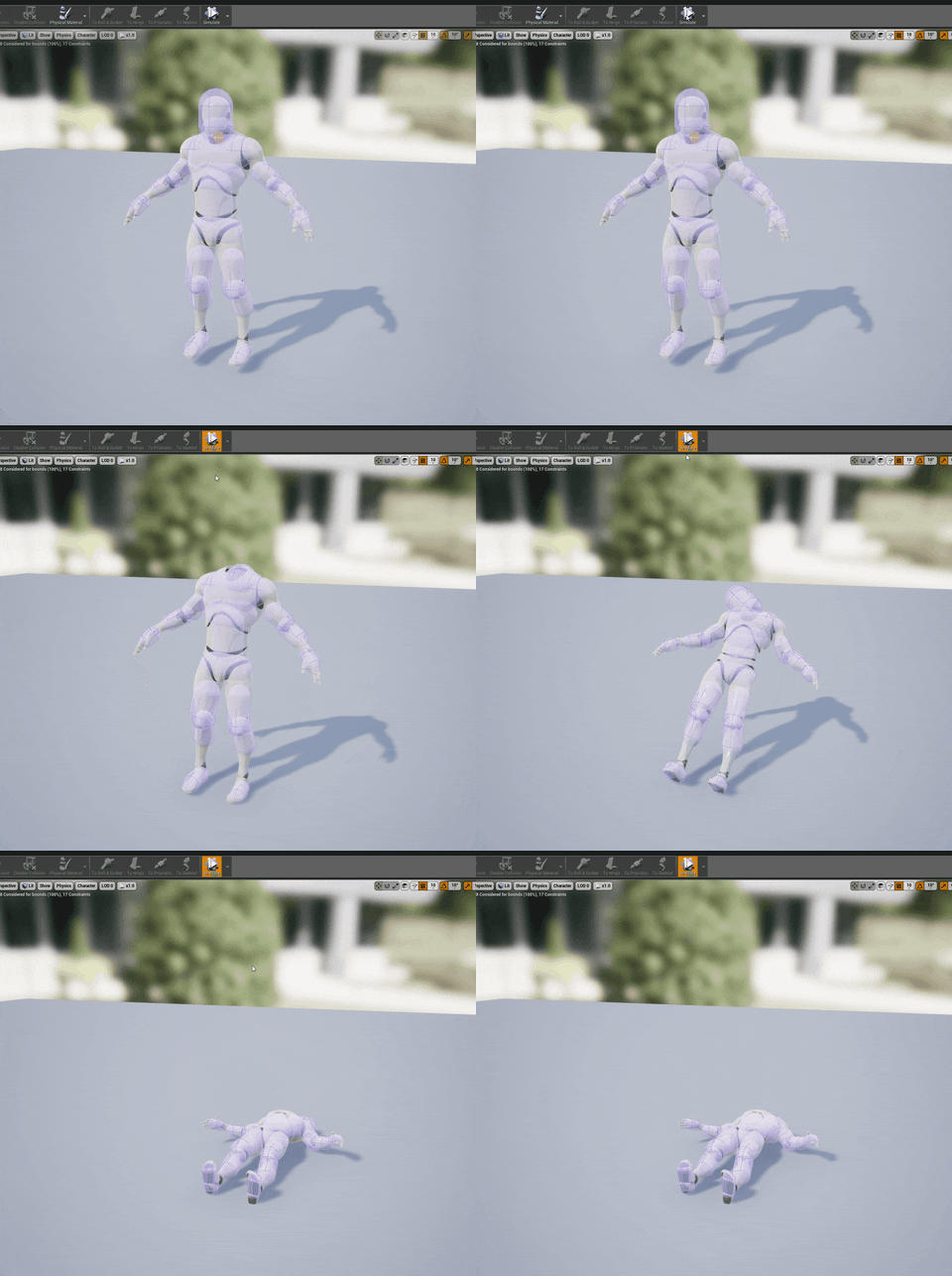
every part of the body has a collision primitive that controls collision. the easiest way to learn it is open up the default third person mannequin physics asset and hit simulate at the top right
it should fall down
then you can stop simulation and look at how it is set up. You have collision primitives then constraints controlling a parent/child relationship and how they are constrained
you can for example lock a constraint so that joint never moves or limit its movement
proper crane
My main concern right now is making a collision item and getting it to keep this thing from falling into the abyss, cause that seems like the one thing not covered here
Cause in my extremely limited experience, there's always a starting step that isn't covered
grim ore
you could right click the root in the skeleton tree, tell it tto add shape -> capsule or box -> resize it around the item, and then you now have collision around the item
proper crane
And will it work if I were to simulate?
Like. I get that there's more important things to do, but I don't want to have to worry about making the collision shapes actually react to the floor at the end
grim ore
I think there is alot of stuff that might be missing in figuring out what you are trying to do in the end and you are trying multiple things to get it all to work
 main pebble
lol @ "Make it 5 minutes or I'm not reading it". I got some bad news for you bub
proper crane
One, that was a video
Two, You try watching it, there was a lot of content in that video that did not need to be covered to know how to import the custom collider
Trimming is a standard these days
main pebble
Quite frankly if you aren't willing to dig through tutorials for information, you're not going to get very far.
proper crane
That was the one tutorial I wouldn't watch
Because 1: Reverb, You can barely understand him
2: Other tutorials actually understood how to trim videos
3: The guy just really sucked at explaining
main pebble
Then find another video rather asking the discord to do it for you.
proper crane
I've already looked through help pages and videos for a total of 12 hours within the past 36, I think it was about time today to start asking for personal help
main pebble
Well if you've spent 12 hours looking another 30 min tutorial from someone with an accent won't hurt yah. All I'm saying is you come asking for help you shouldn't be choosy.
proper crane
It wasn't the accent, it was that I literally could not understand him
It took me 10 minutes to catch one word
violet obsidian
How do you disable shadows on particles in ray tracing. I've been googling for hours.
flat idol
Allen, turn on subtitles next time
proper crane
Auto generated
You've seen how it reacts to someone speaking perfect English, so You can guess what it's like when a guy puts the contraction of one word onto another
violet obsidian
So you are telling me it is impossible to turn them off?
flat idol
Mag7spy he actually is talking to me, and not answering your question :)
proper crane
I'm not sure what in that sentence he connected to an answer
violet obsidian
"Auto generated"
Is there any way to have get more experienced advice on this here , I guess I'll have to turn off raytraced shadows in the meantime .
main pebble
@violet obsidian I would post in visual-fx or niagara
flat idol
You can try turning your particles to be gpu particles, maybe they wont generate shadow.
main pebble
People from epic browse these channels fairly frequently. It may take a day or two to get an answer though.
proper crane
God, why is there a limit to how far You can shrink a capsule?
Scratch that, why am I not able to shrink my collision pieces enough in Physics Asset?
grim ore
there might be a logical limit for collision size, if it's that small do you need individual collision rather than one item over them all?
proper crane
I'm not sure what that means, but I'm trying the Physics Asset method
Jesus, this cold is getting the best of me
Throat feels like it's bleeding and something feels torn in my right arm, can't lift it without some kind of wall of pain
At a certain angle, at least
grim ore
well what I mean is if something is 0.1 centimers radius then having collisions matter on that small of a scale makes little sense. like tracking collision on each knuckle on a hand rather than just the hand.
flat idol
MathewW yes its better to collapse tiny things into one. Also there are things like depenetration i can imagine that may actually expect the object to be at a minimum in size .
grim ore
how small is this item?
proper crane
The mesh is about 300 times the volume of a player capsule
grim ore
so in unreal units or meters?
proper crane
on average, a typical human is the 2 metre mark, so... It's big
grim ore
something might be wrong then, I can make a capsule down to 1cm
proper crane
The volume increases by 50X that of the surface areas increase
grim ore
select the collision object, in the right in the details panel under body setup you can open up the primitives and see the actual sizes of them and set them by hand
proper crane
Could I get a screenshot if possible
 visual belfry
is there a way to have a trace ignore masked sections of a material? like I have a cutaway view of a cube and I want the trace to hit the opposite side that's visible rather than the closer one that's masked out
potent wing
Guys, what do you think is the perfect intensity for a flashlight in horror game?
I kindda dont want it to be too bright or too dim
proper crane
I would focus on finding what fits the aesthetic
And yeah, MethewW, my mesh is GIANT compared to that, so I'm not sure what's wrong
flat idol
PartlyAtomic you may have to generate the mesh shape to actually look like the masked one. physx using shapes to test these traces, and doesnt look into materials. It wold be tragically slow anyways.
proper crane
I have now spent 22 hours in the past 2 days trying to solve a collision problem... Jesus...
potent wing
Dw bro you get it fixed soon
proper crane
Well, day 3 starts tomorrow, I gotta sleep for exams
flat idol
Jack Moon, the flashlight must be flickering, then go dim a little. Then back to full torch at the scare jump scene!
grim ore
@visual belfry want to see a stupid way to do it? well here is a stupid way to do it lol https://imgur.com/a/q0eKKn5
visual belfry
I mean it happens on click so stupid can be as stupid does
grim ore
basically you create a render target from your material and use that as the texture in the material actually on your object. Then you grab the collision UV and feed that into the read render target UV node which gives you an RGBA value then read the A and profit
the main issue is making sure you actually do that code on the correct item since reading the value on another item would not work correctly
but I mean hey this code works it just shouldnt be used probably lol
visual belfry
Hehe I got halfway there before deciding to use a different way to place a waypoint on a 3d map
grim ore
😃
I wanted to see if it could be done since I couldnt find an actual answer out there
I am learning render targets right now so win win 😃
potent wing
@flat idol, i make my flashlight just go dimmer as the batteries goes down, maybe i should add random flickering? Anyone know how to do that?
What i asked earlier is that what is the best intensity for flashlight in horror game? I think i put it on 50k which is real high
Idk the perfect one, because my current flashlight is just too bright, idk how much i should drop it
I currently have 3 spotlight on the flashlight, the outer, the main, and the inner. Something like a real flashlight
grim ore
One thing you might want to look into is using an IES profile for your light
abstract relic
Use ies profile so you can get the same effect of three spotlights in one. For flickering https://docs.unrealengine.com/en-US/Engine/Rendering/LightingAndShadows/LightFunctions/index.html
Lighting projected using a Material as the source.
 gusty dune
Morning all
thorn vector
hi anyone here have use truesky before
im thinking of getting a license
plush yew
Good day everyone! Looking for somebody who can help me with online connection(multiplayer). From my side I can help with: rig, animations, code, maybe with intro and others aspects.
cloud cobalt
Please don't post in multiple channels.
lusty carbon
So I want to make a cinematic sequence showing my level. However some elements in my level are triggered by a collision with my pawn. How can I trigger and time them with my camera? thanks!
 errant dagger
Hi, sorry for probably wrong category, but the question is : why part of shaders are always recompiling at project start? If I clean DDC completely its about 30 000 shaders will be recompiled. But every time I start the project approximately 3000 shaders start to recompile. Thanks!
cloud cobalt
Make sure you save all your content after the shaders have been built
plush yew
Hi everybody
I am looking for animators
Or place i can get some one to make animations
potent wing
Guys, are you putting unreal engine intro into your game? Like when you start the game a video of unreal engine will play?
If so where do you get those video?
I wanted to put it in my main menu
cloud cobalt
You have to ask Epic for permission, and presumably the video file too
potent wing
Ahh i see thanks
plush yew
why do you even want to?
potent wing
Guys, when you trying to get a reference from a blueprint into your character blueprint, what do you guys usually do?
- simply create a variable and choose that blueprint
- or doing cast to that blueprint and promote to variable
- or doing get actor from class, for each loop, then cast to the blueprint, then promote to variable
- or the other way?
Im asking this because i usually do the third one because by doing 1 and 2 usually gave me none error, also i want to ask is it safe to do it that way (3)?
@plush yew idk I just wanted to put it, but when I know I need a permission, i think i wont do it
plush yew
any idea why vscode wont open when i try to open a c++ class?
spare sun
ehh well I don't see how it could go wrong if you put the 6 second ue4 logo intro into the game
ur forced to put the logo there anyways
spare sun
hm
cloud cobalt
By the way the files are here : https://www.unrealengine.com/en-US/branding
spare sun
ah I misread, it's actually
cloud cobalt
@potent wing
cloud cobalt
It's a common misconception
cloud cobalt
Unreal is a bit more serious on this, you have to notify them on launch and obviously report sales, but the end-user stuff is lighter - credits, and proper mentions in the game EULA
potent wing
Im really confused on the marketing stuff, like you said i have to notify them and report sales, and things and such. I might need to understand ALL of them before i publish my game in the future
spare sun
sounds like they respect their image a lot
potent wing
Is there any video out there that explain what need to be done and whatever Before we publish our game? So it's easier for me to understand
cloud cobalt
Read the agreement you signed.
Look for the UE4 EULA page that explains it in depth
spare sun
https://www.unrealengine.com/en-US/release could probably help
cloud cobalt
This one is important to read, yeah.
Overall, doing business (selling a game) is not trivial stuff
I distributed my first game for free because I didn't want to go through that stuff
potent wing
Well thanks Red Stranger, for the links and stuff
I will look at it when i actually finished my game or when i have time
thorn vector
hi anyone here have use truesky before
im thinking of getting a license
wary wave
got a weird one today - going to ask in here since it's not strictly a cpp problem - I'm doing an encroachment check for the actor I wish to place (now doing it natively after blueprint options failed me)
as far as I can tell, it should work, but it's failing because it's not finding the RootComponent of the actor it's trying to test
GetRootComponent is returning null
what could cause RootComponent to be null?
it obviously does have a root
wary wave
not multiplayer
if you did want to look at source, it's failing in UWorld::EncroachingBlockingGeometry, right at the beginning
the TestActor is the default object of the class I am trying to place
cloud cobalt
And you're sure RootComponent is set to something in the base class ?
wary wave
I'll check if the native base class has something
but this is a BP class with a scene component as root, which it's getting through inheritance
hmm, native base class is Actor, the default scene root comes from the first BP class in the hierarchy
cloud cobalt
Got to go, but... I mean, RootComponent is nullptr on the actor instance, right ?
wary wave
I guess
cloud cobalt
I'm pretty sure you can have no root component on an actor