#ue4-general
1 messages · Page 470 of 1
 tardy sapphire
tardy sapphire
tardy sapphire
I'd rather buy a plugin from the Marketplace though, I'm quite in a hurry with this project so I'd rather not write my own BP haha
I'll check the MP
 plush yew
whats best way to make quicksand? so it can suck the player to the middle
 kindred viper
thats a pretty tough question to just answer without more questions, like "does it need to be realistic or cartoon-like?" and "Do you need to do it with animation or physics?" and "does it need to look different everytime?"
plush yew
thank you
doesnt need to be realistic
i dont think my friend wants animation for that
its like the super mario quick sand where it sucks you but you can walk slowly
super mario 64 i do think
yes super mario 64
kindred viper
well that is animation on both the parts of the sand and mario reacting inside it.
so you animate the sand, put a trigger around it, when you walk into the trigger, fire the reactive animation on the character
plush yew
i already have the animated "sand"
but the animated sand are you talking about the material that i can apply on the static mesh?
kindred viper
I dont know what you mean by that. You could have the sand as an object in the world. With a trigger around it
 lusty carbon
Did you know? Turning off inverse square falloff to your lights for whatever reason and then turning it back on will mess up ur lights cause the units change to unitless and reset intensity
been smashing my head against the wall what's wrong with my lighting till i found out
gotta tweak it all again now
 sudden agate
@lusty carbon make a bug report
plush yew
Is there still no way to disable Oculus and SteamVR from running the moment I open up a project?
 wary wave
disable the plugin
plush yew
This is before the project is fully opened my dude
wary wave
IIRC, if the plugin is disabled, they don't start when you open the project?
plush yew
They should all be disabled. Let me check to see if I missed anything
Looks like I missed SteamVR in my project. Spent the entire day opening all of my projects and disabling the VR plugins, looks like I missed this one plugin 😛
Thanks 🙌
wary wave
don't thank me until it works 😄
 sick escarp
I'm having a problem with an actor pending kill for no reason, the actor is referenced in 2-3 arrays so that Isn't the problem
wary wave
If it's pending kill, you've destroyed it
sick escarp
I know for sure I am not destroying it
There has to be some garbage collection error
wary wave
It's possible, but very rare
sick escarp
Also I have never had this problem before without changing anything
wary wave
It's more likely said actor is being destroyed, possibly by falling out of the world or something
sick escarp
Nono, I can see it clearly. But then the game crashes because I'm trying to access a variable from it's HUD
Let me double check, 90% sure the array is UPROPERTY
Wait it isn't
I'll try it, I read something about the fact that you should UPROPERTY everything in headers but this was created before I read that
What does just UPROPERTY do more than replication?
wary wave
Yes
 ember notch
@visual belfry You don't understand the reason
 visual belfry
ember notch
visual belfry
ember notch
...
 latent fable
I have a placeholder weapon, but I'm not sure how i should attach the weapon to the player's hand. If anyone knows how i can do it, it will be greatly appreciated.
Should i do it in the player blueprint?
wary wave
Attach to socket
sick escarp
Even arrays from the game state? I know I probably shouldn't store actor arrays in the game state but I haven't created a seperate class for it yet
wary wave
If it's not a Uproperty, it isn't a valid reference for GC
sick escarp
Oh, okay. Thanks for the information
wary wave
Unless you have a good reason not to, most gameplay bars will want to be Uproperty
*vars
visual belfry
because I want to have a templated class cries
sick escarp
Yeah
visual belfry
even then though, I think I only had to override a function that reported which UObjects I was holding onto
@ember notch well, care to enlighten us? 🤔
sick escarp
Thanks guys, it worked
plush yew
yo guys
 ornate surge
can a person legelly sale there epic acount?
ember notch
@visual belfry what?
visual belfry
you left us hanging
ornate surge
i was just wandering if anyone knows
 sleek sky
fuck you
@plush yew
and thanks for calling me a fucking retard
have a good day faggot
ember notch
@visual belfry What do you mean?
???
How to make this with the job board?
I search a developer
visual belfry
read the pinned messages on there
ember notch
Oh, I made a youtube video about gta v in UE4 and I got 5 likes and 6 dislikes and then I lost my mood with the Unreal Engine 4 on
latent fable
@wary wave thanks for the help 😃 https://gyazo.com/2de770c472d20a1d615370961320184c
 wary wave
no problem
latent fable
@wary wave my cha racter controller is an edited thirdpersoncontroller but i accidentally pressed force delete instead of replace references while replacing the jump animation and can't undo it, is this going to cause issues?
wary wave
I couldn't say, but there's a pretty good chance
this is why you should use version control
ember notch
How to make this with the job board?
wary wave
read the pinned post
ember notch
Where?
wary wave
....in the job channel
 grim ore
look at the top down example for how they do it perhaps?
but without a nav mesh you would have to basically get hit location on the ground -> find look at rotation -> rotate the player to that location -> move him forward like you would normally by giving him input automatically -> check for distance -> stop when within tolerance range of that location
ember notch
@wary wave what channel?
wary wave
the channel you want to post in
visual belfry
alternatively you could scroll to the very top 🤷
wary wave
that might take a while....
visual belfry
@wary wave shhhhh
 safe rose
Need some help with GameDev Math? https://www.kickstarter.com/projects/bentristem/math-for-games

A online course teaching the most useful math concepts in games. Insanely practical, strangely compelling, and fun throughout.
grim ore
you have something that makes the character move when the forward key is pressed? you duplicate that on something like tick and basically auto run it forward to the destination
and then only have it add input on that axis if something like "isMovingToLocation" is true which you can set when you click on somewhere to go
if you have a nav mesh of course it's easy but if not you have to fake input and movement
 gilded igloo
help, i made a laser beam using this turorial: https://www.youtube.com/watch?v=EM1MkdDW0Ic but when i ran the code the laser cylinder was being weird, anyone knows how to fix that?

If you want to help out, you can share my videos on social media, or make a donation here: https://streamlabs.com/lusiogenic This Unreal Engine tutorial show...
grim ore
correct, you would put that move forward on a tick. make it only activate when a boolean is true. and put in something like 1 for the axis value
 crisp arrow
I'm localizing a game into a couple different languages. I've never done that before. So far I've been able to use the localization features to great effect, but as of right now I'm still using command line options to switch between languages. What's the most correct way to check the host operating system's selected language and switch based on that? Additionally, where would I be best off putting that code or blueprint?
 next badger
@crisp arrow https://docs.unrealengine.com/en-US/Gameplay/Localization/ManageActiveCultureRuntime/index.html
culture=fr
language=fr
locale=fr
This page describes querying, applying and overriding the active culture. It also discusses the localization preview, culture remapping, and culture restrictions.
crisp arrow
Thank you - that's helpful! Any input on how to best detect the selected language of the OS? Or is there another route I should pursue in setting the default language
next badger
@crisp arrow https://api.unrealengine.com/INT/BlueprintAPI/Utilities/Internationalization/GetCurrentCulture/index.html
Get Current Culture
or same function in cpp
 spare sun
interesting ui you got there
crisp arrow
Correct my if I'm wrong @next badger , but doesn't that only refer to the culture that is selected for the game? I'm looking to find out what language settings the user has selected for their operating system
grim ore
you don't need anything but the forward since you are just moving forward. second.
plush yew
I am a beginner with the blueprint
how can i do a and operation?
I want to activate the print when the collision with the trigger box and the z key is pressed
grim ore
it's basically what I pasted in how to do it
IsRunningToTarget is a Boolean I created, LocationTarget is a Vector I created
the only remaining issue is the Distance check to see if you are close enough to the target does not take Z into account so its at 100 now due to the location for running to being on the floor and the location to compare to being in the middle of the player
next badger
@crisp arrow yeah, sorry - GetDefaultLocale is probably what you need
grim ore
@gilded igloo it almost looks like your cylinder is flat instead of rounded
crisp arrow
@next badger Ah thank you very much. Is there a generally agreed upon place where I would want to check for the locale and set the language?
as in, where should that code be run
grim ore
@plush yew you want it so when you are in the trigger box and you hit Z the print runs? if so make a boolean called "IsInTrigger" and set it to true when the overlap happens (you should also check to make sure it's the player overlapping later). Then in your Z input you can check if IsInTrigger is true and do your print. You also want a OnActorEndOverlap node to set the IsInTrigger to false when they leave it
gilded igloo
@grim ore interesting... ill go check it out, thx!
plush yew
thank you very much, I try immediately 😃
grim ore
@plush yew if you are looking for a fix btw for the distance check you can do something like this https://i.imgur.com/CAMOVLF.png where you are adding a number to the Z which is usually half the character height since your actor location on a character is probably the middle
it will let you make the distance check alot smaller, like 10, instead of something for like 100
yep
next badger
grim ore
well the flow is what I wrote earlier if you want to understand that 😛
next badger
@grim ore are you working on new tutorials atm?
grim ore
Nothing worked on right now but I try and do them every Friday if I am home. I have a few on the master list but nothing sounds like fun right now. I was going to try and find some more random nodes today if I have time lol
I honestly just hope people randomly ask questions about new stuff in here and I find something to do 😃
next badger
@grim ore yeah, it's better not to force yourself if it's not fun
visual belfry
do you have a WTF is Collections? 😃
grim ore
What's a collection ?
visual belfry
that empty folder everyone checks into source control 🤔
next badger
playlists probably
visual belfry
grim ore
oh organization stuff
next badger
oh
grim ore
I think I covered that in the editor basics on the academy thingy
yeah covered searching and creating collections from them
I have not done a WTF on it tho so , to the list it goes!
crisp arrow
@next badger thanks for the help! ❤
plush yew
has anyone experience screeching distorted audio when broadcasting to steam? I tried with another game in my library and didn't have the problem. But I also didn't have this problem with my game the last time I broadcast so IDK what changed
next badger
@plush yew maybe #audio or #multiplayer not sure
 bright plume
is there a way to have a "hovering" jump?
next badger
@bright plume the "late" jump you mean? like when player already falling from the cliff?
gilded igloo
@grim ore i dont think its about size, I think its about POV, look at this footage:
bright plume
@next badger like a low gravity jump or when the player jumps they are floating in air for a short period of time before falling
next badger
oh, i see
you could just add a propulsion for some time slowly decreasing its amount (if you don't want to mess with the gravity)
grim ore
@gilded igloo oh yeah that is weird, Was hard to tell from the earlier shot. That almost looks like the entire item is mip mapping which is odd
next badger
@grim ore what will be the best way to leave character floating w/o adding a jump height?
gilded igloo
so what do I do?
grim ore
@plush yew yay
gilded igloo
@grim ore So what do I do?
next badger
@plush yew compression is killing it all ;_;
grim ore
@gilded igloo actually I wonder if that is your emission looking weird, what does your material look like?
gilded igloo
@grim ore
next badger
@gilded igloo no PP?
gilded igloo
whats PP?
next badger
PostProcessing
gilded igloo
how do i do that lol?
next badger
it just looked like messed up dof or motion blur
gilded igloo
ye...
grim ore
yeah the example video looked like it had a lot of emissive color coming out of it but this has none
gilded igloo
Maybe idk i think so
next badger
@grim ore it does not have emission input, also, red value is below 1
well, it's 1
yet it glows
grim ore
@next badger man I have no idea. I was trying to figure out a good way to float but nothing sticks out. There should be a notify apex event that you can hook into and maybe turn movement mode to flying at that point for X time then turn it back on to falling but I can't get it enabled lol
next badger
@grim ore ahahah...well, thanks for tip, i never tried myself, but probably should
grim ore
well lets eliminate the material, go tho that object in the scene and changed its material from that one to the BasicShapeMaterial and see if it still happens
no it's a good question, I don't know how I would implement it but I am trying to figure it out now lol
I thought there was a way to control floating in mid air on a jump at the apex but it's just air control itself
gilded igloo
Change it to what?
grim ore
change it to the BasicShapeMaterial, it should look white
grim ore
ok so it;s not the material then, its the mesh or something else like post processing. What is your scalability settings at? https://i.imgur.com/7emXxPV.png
bright plume
@next badger sorry for delayed response went to the bathroom then had to do something but your link doesn't work
next badger
@gilded igloo we actually never seen that kind of bug...i am at least
@bright plume edited, there was slash in the end
gilded igloo
I did the same thing twice on two different computers, dont think its a bug
next badger
ok...not the bug but...this kind of behavior
gilded igloo
ill search it on the internet...
grim ore
what settings are your scalability at?
next badger
@gilded igloo can we see screenshot with standard material applied?
bright plume
oh derp im retarded ty
gilded igloo
@next badger
gilded igloo
its blured, and the turn in the middle is part of the bp
the material is the red thing in the middle
next badger
yeah, i see now, the material is not the issue at all
grim ore
wow.. ok that jumpy notify apex would work but it's a crappy way to get to it lol, go go weirdness
the blur makes me feel its some sort of mip mapping issue since it's on the material and scalability can normally affect that
whatever I still think we need to know what the scalability settings you are using now just to eliminate the editor running it all on low. also need to eliminate the rendering type and makes sure shaders are all on SM5
gilded igloo
how do i do all that?
next badger
@grim ore yeah, but it overlaps the other meshes
grim ore
https://i.imgur.com/7emXxPV.png and make sure they are all set at high and 100% and such
gilded igloo
100% and all are epic.
grim ore
and below scalability is material quality and preview rendering level
gilded igloo
high, shader model 5
grim ore
yep so we can eliminate that as a stupid reason 😦
If you make a new level which is just the blank square on the ground and put that blueprint in which is having problems does it still do it? so we can eliminate your test level and any post processing volumes
grim ore
so it's got to be your blueprint then, what does that look like lol
grim ore
it would but we don't know if yours is exact. You said it's the same issue on 2 different machines as well so that should eliminate hardware and drivers
next badger
um...is that...um...spamming the mesh every tick?
grim ore
well all of that seems fine, if you just put your Lazar Beam actor into the world and resize it does it do it as well or only when it's in the BP?
 wet berry
anyone have issues grabbing the latest 4.22.2 patch or should I start looking at my network? It's been on 'Updating 0.0 B/s 67.9 MB' for awhile.
gilded igloo
@grim ore didnt undestand...
wet berry
was able to update my source branch np, it's just the launcher version giving me headaches
next badger
@wet berry same for me...just stuck on updating
safe rose
Strange
wet berry
Oh cool. I'll let it stew then
 digital anchor
As you set the mesh's world transform, it must be setting the vertex velocities for motion blur
wet berry
....and maybe pause it.
safe rose
Seems like a thing
grim ore
@gilded igloo drag and drop your Lazar Beam blueprint into the scene and resize it so its big and roundy and long and see if it has the issue still. I assume it does?
safe rose
gilded igloo
@grim ore Lazar Beam has no code in the event graph, only a function which is remotly controlled
grim ore
yep but it's the lazar beam itself that looks fuzzy right. not the rest of the world or other objects?
grim ore
oh man someone else got it I think, the fact you are redrawing it every frame might be causing it
gilded igloo
when i put the lazar beam itself (again, no code activated) it is fine, no blur
How is it causing it and how can i fix it?
grim ore
go into Edit -> Project Settings at the top
then in the search bar at the top of Project Settings type in motion
and disable motion blur, see if it helps
grim ore
man that is weiiiiird....
gilded igloo
you made my day guys, cant thank you enough
grim ore
thank @digital anchor he got it right 😃
gilded igloo
on what chanel?
grim ore
up above lol
next badger
@grim ore it's not weird, TAA + Motion blur + flicking object = hello blurbs
i've seen it for UI only tho
gilded igloo
@digital anchor thank you so much, ur a basic genius lol
thank you all guys
im going to bed
grim ore
well weird in the fact that it's causing the motion blur itself even if the camera doesnt move was what I didnt catch
next badger
@grim ore it's actually an interesting effect...
grim ore
I always associated motion blur with camera movement 😃 learn something new every day in here
digital anchor
Teleport marks bTransformChanged as false, possibly also fixes it, not sure
grim ore
^ good point
@next badger It's really stupid but it works, you can set the Notify Apex boolean on the Character Movement component and it will fire off an event for OnReachedJumpApex that can be bound to. At that point I just set movement to flying, wait a second, then set it back to falling and it works (just looks stupid lol). The only real weird thing is once the event is called the Notify Apex boolean is set back to false automatically so you have to set it again if you want it to be called again... it's.... weird lol
you also can't set the boolean itself on the CMC in the details panel because epic
lusty carbon
what's this update?
next badger
@lusty carbon it's eternal...
next badger
@lusty carbon do not update Infinity blade assets
grim ore
man I have an hour of work and I didnt find any new nodes to cover, got distracted by everything else in here lol
next badger
@grim ore you have a list of nodes to cover?
grim ore
I have a master google doc that covers all my videos and stuff I plan on working on in the future yep but right now i have nothing in the 'oooh neato I will do these 5 videos this week' pile
I usually find something in here, like vis log last week, or I randomly just search the palette and find a section I haven't done yet heh
lusty carbon
So am I stuck in an update loop bug or what?
grim ore
cancel it, then use the drop down and repair, and then see if it can update
lusty carbon
what is this mess
I also have an update loop issue with Nvidia drivers.
Is my life an eternal loop? 😐
grim ore
... if you have the bandwith try installing 4.21 and see if it starts, if it does then maybe remove .22 and try installing it again as it should go right to .22.2
lusty carbon
uhh
don't really have the bandwith nor the patience lol
ill wait and see what happens
next badger
i've just stopped the update and did the verify
since it took more than a hour and didn't budged a little
lusty carbon
oh you just had that too?
next badger
not just me...
 abstract hawk
grim ore
abstract hawk
grim ore
😦
 obsidian nimbus
it didnt update for me either, im fine with that 😄
grim ore
whoo found 12 really crappy nodes to cover for this week but hey you can't get to 100% coverage if you don't do the crappy ones too lol
obsidian nimbus
did u do anything on converting BPs to C++?
next badger
you won't have a good taste if you wont; taste bad things?
@grim ore have you covered constraints already?
grim ore
I did a small series on BP -> C++ yep
I .... really don't like physics... but it's on the list. All of the BP Components are on the list just some I really hate
I feel like I just randomly hit buttons when working with the physics constraint till it sorta does what I want
next badger
@grim ore constraints are great, but prone to bug, also seems not all variables are bp editable
grim ore
... so many variables are not exposed to BP 😦
 obsidian wasp
How would I go about exposing variables from an object that I've instanced via blueprints? As in, make them visible/editable in the Details panel of the parent object.
The variables that I want to edit in the editor are "Side", "Position" and "Width". In DoorOpening, they're all marked as "Instance Editable" and "Expose on Spawn", but that doesn't seem to cut it.
lusty carbon
so how do I fix this update loop bug?
grim ore
@obsidian wasp so they are instance editable (yellow eye icon next to the variable in the my blueprint list) but you don't see them in your details when they are in the world?
oh or do you mean show the parent variables in your list in the child?
obsidian wasp
I need the child object's variables to show in the parent's details list.
grim ore
on the left in the My Blueprint at the top of that window is an eyeball with a drop down arrow next to search, click it, show inherited variables
also the Construct object from class node might not be the one you want if you want the object to actually be in the world
obsidian wasp
Sorry, I'm new to UE4, so I probably don't know the right terminology, but I need the variables to show up here (Red rectangles in image). Essentially, I have a Blueprint (RoomNew), which uses Contruct Object From Class to create child-objects (DoorOpen), which I need to be able to edit in the editor.
ember notch
Check the City of Lights update guys #work-in-progress
grim ore
ok so the construct object from class creates objects in the engine, they are not objects in the game world and will not show up like that so I think that is one issue
next badger
@obsidian wasp as @grim ore said, they only could be self contained references or base class objects (not existing yet), you could however make logic to autoreference some of the instances placed in the world, once the assed is placed in one (basically on construction)
grim ore
^ for what you want I think you want to look into the Construction Script. You also want to spawn in actors and attach them to this Actor then you can see them in your world outliner like you have above and edit the rooms individually but... construction scripts are volatile so we might want to know your exact goal before we suggest more
next badger
@grim ore can you spawn instances of one class from another class in the world?
on construction
grim ore
you can but you have to cheat lol
you cant spawn in the construction script itself but you can call an event in the event graph from the construction script that will do the spawning
obsidian wasp
Uuuh... Sorry, you lost me @next badger. I don't know all the UE4-related (or gamedev-/programming-related) terminology just yet... :/
@grim ore Essentially, I have this blueprint that has a few public variables, the important ones being "NumTilesX", "NumTilesY" and "DoorCount". Based on NumTilesX and NumTilesY it generates a floor and walls of corresponding size.
Based on the DoorCount, I create an array of objects, each of which has data regarding a door opening - which wall it should be on, at what distance from the beginning of said wall, and how wide it should be.
However, I have no way of editing these variables for the objects in the array.
I could achieve the same result by having several arrays, each holding one type of value. But that would be a hassle to work with in the long run.
 light vigil
Hi everyone, painting my landscape lags like crazy, each click pauses for 2-3 seconds
Anyone know what might be causing that?
grim ore
ok so @obsidian wasp the door open are just supposed to hold values and not actually be in the world?
obsidian wasp
Yup, precisely. But I need them to be editable in the Details of RoomNew
 upbeat tendon
i've placed two actors in the scene, i would like to setup a reference to the other actor, i figured i could have a UPROP of a TArray type and hoped i could select the actor in the scene from a list
grim ore
I don;t know if you are going to be able to do that. A struct is more in line with what you are looking for as that is editable in the world
next badger
@upbeat tendon if you set the property to editanywhere you will be able to pick the fitting actor from the scene, variable should be a reference to that particular class you want to add
upbeat tendon
oh thanks, that worked
obsidian wasp
Thanks a ton, @grim ore! Just what I was looking for 😃
latent fable
Does anyone know how to set game mode on a certain level?
wary wave
it's in world properties
 spark sonnet
What would be the best way to equip something from a wall? Lets say a gun hanging on the wall, then make the player equip it if he presses a button while looking at it
There is no green on the stairs
Oh
wary wave
if it's chasing you it's probably trying to find a point on the stairs to move to but cannot
it can use a nav link proxy to get from A to B, but it cannot find a point to move to outside of the navmesh
spark sonnet
move it up a bit @latent fable
plush yew
@latent fable at least the dev made millions 😄
 real pasture
Anyone here buy anything from Udemy before?
light vigil
Is there a blueprint merge tool somewhere?
 gusty dune
Hi everyone, would someone be able to help me sort out an animation blueprint issue please?
spark sonnet
I could try. Whats the issue @gusty dune ?
gusty dune
Thanks Sebb
I'm trying to get the character to show the movement animation and play an animation montage at the same time
More specifically with an example, to run whilst playing the attack animation without making the character float forwards
plush yew
is ue4 streaming exactly the same as SECTR in unity?
spark sonnet
Ah
gusty dune
I know it involves using a cache in the animation BP and setting a bone in the skeleton where it blends the two animations as well. But I'm afraid I don't know how
gusty dune
That's the one 😄 how would I get that set up?
 cinder island
I am having a minor problem with fixing a few runtime errors with a few guns that i've been working on for a game. Its in event graphs and not programming, if anyone could help that would be awesome 😙
 shell jacinth
OMG
what the
ok sorry this was a dumb question, its very late here and ... what the xD @gusty dune thx
shell jacinth
Oh ok my problem was not this, my problem is that i have 30 variables and i wanna say them if 2 of them are activated "do this" @gusty dune
i need it for these variables, 2 of them or more must be true to do the action, so do you or anyone else know what i have to add for this? maybe its NAND ?
gusty dune
Ohh
Now I'm with you
I'll have a smoke and a think about it and let you know if anything comes to mind, that's a real puzzler
shell jacinth
@spark sonnet oh thanks for the info 😃
@gusty dune Yea i mean i could do millions of add nodes to connect all but this is too much work xD 😅
spark sonnet
It is possible
shell jacinth
Do you know how ? 😮
grim ore
It's a really really really stupid way of doing it but. start your check -> Add all of those booleans to an array, loop thru the array, increase count variable for each true, break when you hit 2, check count when broken, if 2 or more execute code
 hallow sleet
how do i remove the gun from first person mode?
grim ore
you could sorta bypass part of that by making a macro/function that took in a bool, checked for it's truthyness, and outputted 0 or 1 as an integer based on that and directly adding that return to your count variable
spark sonnet
you delete it in the blueprint @hallow sleet
shell jacinth
This sounds good 😃 I think i will try it , thanks @grim ore !
grim ore
like I said really really stupid but lol. You can optimize more by creating your array on begin play so you only create it once as well.
shell jacinth
But how i can do it better?
hallow sleet
i dont see the bp for it any where just the stuff for the map itself
grim ore
is the character in the scene already, the FPS character with the gun?
grim ore
is this the First Person Template or the First Person Shooter Example
hallow sleet
neither is a custom i downloaded
spark sonnet
In your content browser, open the firstpersoncharacter blueprint
hallow sleet
its not there
spark sonnet
It has to be somewhere
grim ore
ah.. You might have to ask the person who created it then or learn more about the way projects work in UE4 at academy.unrealengine.com
spark sonnet
Could you send a screenshot?
spark sonnet
There should be a way to make that with logic gates 🤔
plush yew
how would a ball feel like if it would have a character bp?
 deep basin
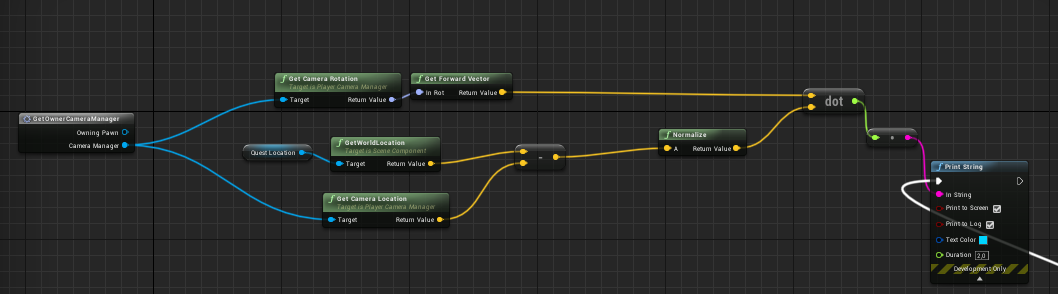
I am creating the dot product between my cameras forward vector and the distance from my camera to an object, yet my sot product never becomes negative but rather stays undefined if it goes below zero.... any idea why this happens? (and no, I am not using clamp or absolute)
spark sonnet
Could you send a screenshot?
deep basin
https://i.gyazo.com/88b01520522e2df5e29833956fea6aa5.png
sure, this is it

had to normalize it since for some reason the dot product here does not return values between -1 and 1 in the first place ... dont know why ... and now it is undefined for less than 0
it was undefined for less than 0 before...
plush yew
Why would dot product do that
real pasture
Are the Udemy courses always $10 or is it just for a limited time?
deep basin
since it is defined to return 1 for aligned vectors, an -1 for vectors that are 180° apart
 wind siren
Udemy is always $5-12 or so
deep basin
but here it returns values between 1000 and 0
when I normalize it, it returns values between 1 and 0
wind siren
They might put a given course at it's "regular price" for like 30 seconds on the second new moon of february every other leap year, but that's it
wind siren
Lynda ... er, "Linkedin Learning"... has a one-month free trial, they're good, too
deep basin
noone ever had the problem that the dot does not return negative values when the angle between the checked vectors is >90°?
visual belfry
Is Camera Manager where you expect it to be?
visual belfry
I would expect so, it may follow the player but it probably won't rotate with the camera
deep basin
mhhhhhh I see. but is there a possibility to get hold of the active camera?
visual belfry
Once you have the manager you can call GetCameraLocation and GetCameraRotation
deep basin
m hhhh still the same issue
and the same happens when i get a specific camera from my player character
visual belfry
Hmmm 🤔
deep basin
it only works when I perform it in relation to my player pawn, which makes little sense in my case
visual belfry
Top down camera setup?
deep basin
nope, its the third person one
visual belfry
Ok so you can look up and all that hmm
deep basin
I can, yes
problem is, I have to use the camera as relative point in my world, since I am building a hud indicator to an objective... in a fps this would be easier^^'
I could try and stick an actor on my camera to avoid using the camera, if that is the problem, which does sound like a bug if that is really the case
plush yew
Dot has range over whole real set... Unless the unreal version is different idk
deep basin
I found ot why
*out
the cameras coord system doesn't rotate when the camera rotates
so I might need the boom, since that guy rotates
 stoic mirage
hey guys i'm not sure if i have to say this in #cpp but, i'm learning c++, should i start in UE4 with c++?
deep basin
no, ue4 c++ is quite simplified and different to regular c++. start with a basic course and write some programs in it. when you feel comfortable in c++ and have a base start with ue4
unless you ONLY want to use c++ in ue4, then it doesn't matter I guess
stoic mirage
hm
visual belfry
My camera rotates or my character movement would be 100% broken 🤣
stoic mirage
thanks, so i'm going to learn c++ before using UE4
visual belfry
Spring arm is always useful though
deep basin
the spring arm doesn't do it as well... an attached actor does also not work... I am close to madness^^'
deep basin
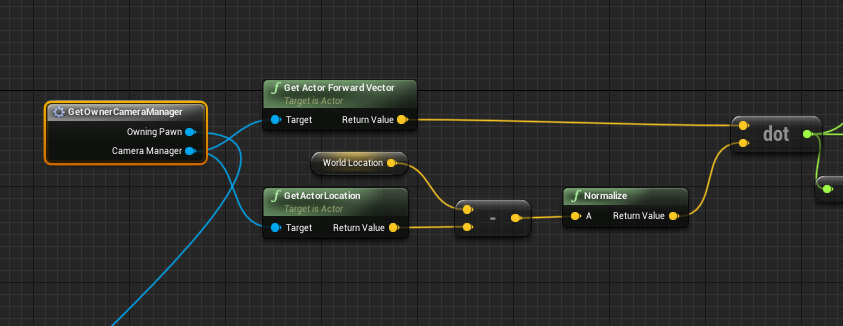
okay, the camera rotates .... no doubt, but as soon as the angle between cameras forward vector and the vector from camera to object exceed 90° it doesn't get displayed anymore - I have no clue what is going on there
plush yew
deep basin
and why it works when I simply use the pawns forward vector
 topaz tusk
Hey I hope anyone can help me. It sounds easy. I chop down a tree and an animation i made in blender plays when it falls. after the animation i want to get its location and spawn items there. I tried root motion but couldn't get it to work. Is there a better way or is root motion the best way for that
wind siren
use a socket?
topaz tusk
Never worked with sockets. Are you sure this would work? If yes I would watch a tutorial
 safe linden
trying to figure out if i should attempt to see if this course at my college is worth a damn
 split wedge
quick question, so i have a nav mesh in my persistant level and i have enemies in sublevel and their moving around just fine, my problem is that i have a npc with patrol points in sub level also but hes not moving at all lol any one know how to fix that?
wind siren
sockets give you a specific spawn point, can simply attach to it. can hide the actor and attach to the socket.
deep basin
oh darn... I found out that I cannot get the dotproduct to a vector in the world, if that location is not in my viewport. is that because it gets derendered and that location is actually invalid? if so, is there anything to prevent it?
grim ore
dot product should work on any 2 vectors, is the issue one of the vectors is not valid for some reason?
deep basin
yes, thats what I suppose is the case. I cache the location of an actor component in the world, but if that location is not in my viewport it becomes invalid
topaz tusk
Thank you @wind siren socket did the trick!
grim ore
how do you cache the location? did you verify the location is actually nothing before you use it (print or debug? )
deep basin
I printed it
now I use the actual actor component and it works
seems like the world position is removed from memory when its location is not rendered....
 ancient otter
How can i change my projects settings w/ out actually opening the project?
is that possible?
deep basin
well, you should start with the crash report from the engine
most of the time that already gives some clue, the more c++ related it is, the better the clues most of the time
deep basin
kay, it still doesn't work, with nothing.... as soon as some location goes out of my camera view I cannot get the dot product to it
deep basin
I first tried it with a regular vector that I cached from the component of the object I am tracking. then I tried passing in the actual actor and get the location from there, still not working. I tried it with my pawn and it only gets the correct dot product if my camera doesn't look more than 90° away from it, otherwise there is no value...
I first thought it is because of the camera object but its not, it happens when a location gets behind the viewport
tldr: everything works fine, if I can somehow see the location
visual belfry
there's something goofier going on unrelated to the dot product 🤣
deep basin
no idea what it could be .... only thing I could imagine is that it has to with render distances... but they are on default
visual belfry
actor position has little to do with rendering by default
deep basin
thought so
visual belfry
that's why I'm curious if it's some weird actor type
that decides to move around when you turn your back 🙀
deep basin
it is the component of an actor that I am actually tracking, so no clue... maybe. maybe it gets shifted to its parent position
visual belfry
yeah but what kind of component? what kind of actor?
deep basin
an actor that derived directly from the base class and the component is a box component
location doesn't change I just logged it
I can make a gif
https://gyazo.com/64c8fbe3788dcb9642fa325e6d8fb114
this is what it looks like as soon as it is going below 0, it doesn' return a value
 visual belfry
what doesn't return a value
deep basin
its in the gif above^^
I print it in my hud, since that one later is responsible for drawing an indicator
visual belfry
the blueprints of it
 visual belfry
from what I'm seeing there absolutely has to be some branch or something preventing the tick from executing that print rather than dot returning "nothing"
deep basin
there are two branches before that, but I would be surprised if they do stop it when I turn the camera away, wait I can send them
oh wait lol, you were right xD
AAAARGH XD
it was a branch where i switched up the condition
good lord.....
 heavy ether
what's the first thing one might go to check to see what's happening with severe fps decrease? besides windows task manager
 flat idol
stat raw stat rhi stat gpu
heavy ether
hmm. seems to indicate that it's spending a ton of time in shadow depths and screenspace reflections. i'm vaguely curious about the 6.7M triangles count too, but that number should be constant when it's running at 120fps instead of 17.
which it did until about 20 minutes ago
flat idol
stat rhi says how many draw primitive calls?
heavy ether
holding pretty constant at 1258.8
flat idol
do you got foliage? foliage.CullAll 1 makes it any better?
heavy ether
no, no foliage at all. it's really a pretty simple scene, just a few objects. i have no idea where it's coming up with almost 7M tris. i did just kill the open content browser windows, and that cut it down to 1100 draw calls.
grim ore
profile it with play in new window or build out and standalone, better safe than sorry with the PIE overhead
flat idol
MathewW is right, tho 'overhead' has a different meaning in my books, it doesnt dip your fps down from 120 to 17.
visual belfry
it does if you have material and blueprint windows open 🤣
flat idol
I'd say it's some bad content in your scene, or your GPU is blowing smoke
grim ore
it shouldnt but he mentioned he had the open content browsers knocking down draw calls so know whats what might have been open
heavy ether
i always use new window.. but.. i just restarted editor, let's see if that makes any difference. It could be something related to GPU, it is much warmer here today than it has been since i've been back to using Unreal
flat idol
in the summertime when the weather is hot
heavy ether
suspecting that i'm having some issues with this updated lighting scheme that i'm trying out. yeah got up to 20fps after i closed out all my web browsers and restarted the editor. hmm
visual belfry
and what does standalone give you? instead of just new window
heavy ether
i've never used that button... it... crashes.
flat idol
I had to restart the PC the other day to fix timing issues. Not fps but the gpu driver can be a little devil. First time for me to restart the pc because of unknown malfunctions.
heavy ether
interesting. what does Standalone do? it's crashing in a plugin.. i've used that plugin in built games, and it works.. so i'm curious what standalone does differently
flat idol
My cooked / editor pie game was running at 50% speed, like in slow motion. After restart both were running just fine.
standalone will bring up a new instance of unreal engine that has no editor window, so it runs the game more stable in comparison
Which plugin is crashing in standalone? Name it.
heavy ether
it's a custom version of a WebSocket plugin
flat idol
What could possibly crash in a socket plugin. I wonder.
heavy ether
not sure, it's dying out inside the libwebsocket initialization
flat idol
Your modifications can be the issue. Can you remove them?
Tho it doesnt neccessary explains the reason behind the FPS
heavy ether
it wouldn't surprise me if the original version of the plugin also blows up when doing that, but i'll just comment out the call that's causing the crash for right now, just to see what happens
flat idol
it is probably going to cause issues with other things. removing initialization will result in some null ptr calls
depends on the code tho
heavy ether
taking out the call in GameMode that actually triggers the library to do anything
heavy ether
ok, it runs in standalone when i remove the socket connection startup.. runs about 30fps there. interesting
flat idol
open a new empty map and see the fps is up high again. if so, then your scene has some bad content or settings.
heavy ether
yep it's the shadows, shadowquality 0 pops me back up to 90
i guess my new lighting strategy for trying rectlights where the fluorescent ceiling fixtures are is a wee bit more expensive than the previous one using point lights
i'll try something else and see if that works better. maybe one giant rectangle light. or go back to the point lights.
This does bring up a question, though... my movement code.. apparently things get really dicey at low frames.
    if (!FVector::PointsAreSame(GetActorLocation(), moveDestination)) {
        SetActorLocation(FMath::Lerp(GetActorLocation(), moveDestination, 40 * DeltaTime));
}
 sharp pelican
:/
heavy ether
am I doing that incorrectly? when i get below about 20fps, everything just jerks around
@sharp pelican ask away?
sharp pelican
I've got both of these code. And my objective to make my object spin on a rotation but it isn't working for some reason. Can you please assist me
It works but it doesn't work the way I want it too -- I don't want gravity to be applied. (and I have gravity checked in my editor) -- But my object hits the ground and spins when I just want it to spin in the air

any idea?
heavy ether
... do you need to use physics to do that?
You probably want to freeze the Z axis, I believe there's a way to do that
grim ore
if you dont want gravity applied then turn off gravity?
heavy ether
well, at startup, you're giving it a 2M unit push
heavy ether
it's been a looooong time since i messed with physics, but I think AddForce gives it a directional push, and AddTorque gives it a rotational push. Either way, if you don't freeze the axes, it's going to go wherever the physics engine thinks it should go
sharp pelican
how do i do that?
heavy ether
i suspect that physics isn't really what you want to use to do this, rather just SetActorRotation on the whole thing, probably? at least, that seems a lot easier, without knowing what your overall goal is
sharp pelican
hmm
heavy ether
sorry it's "lock" in unreal terms, freeze in unity terms.
sharp pelican
Alright
heavy ether
theoretically, if you put the position lock constraints on it, no matter how much torque you apply, it should just spin
heavy ether
figure it out?
grim ore
if you just want it to spin then do not enable or simulate physics and just use the AddLocalRotation function/node and done
 errant mist
Guys, how do you profile shipping version? At least detect your framerate?
next badger
so, Launcher updates now are broken?
there was an update to 4.22.3 but it was faulty and now there are no update
sudden agate
Epic being epic I guess
heavy ether
hmm. making that one big rectangle light actually works really well for the lighting but works terribly for the shadows.
 ember hull
How to set the editor to always keep all simulation changes ?
 whole quarry
afaik you cant?
heavy ether
i suspect that we're not likely to see a major version number change unless something really drastic happens
plush yew
lusty carbon
how performance expensive is it to play multiple media players at the same time in my lvl?
(basically looping mp4 videos from real life footage)
lusty carbon
@cloud cobalt what? don't see it
 cloud cobalt
Wasn't talking to you, someone deleted messages.
lusty carbon
okay
 blissful trail
im trying to get flex to work but idk how
cloud cobalt
What's flex ?
cloud cobalt
ok
blissful trail
i just dont know how to access the github page so i can get it working and stuff in ue4
cloud cobalt
Do you hace access to the official UE4 repo on github already ?
blissful trail
i need access to the nvidia flex github
cloud cobalt
Okay, but you didn't answer
 thick herald
Probably a daft question.. you know how in editor we see thumbnails of meshes etc in the details panel. Is there anyway to access those images? ie get the image path and use it to display it?
thick herald
Yeah, no doubt something I can't easily access. I said details panel but that's incorrect, I should have said content browser. Not that really makes much difference.
cloud cobalt
Yeah I guessed that
Look into the content browser code 😃
They're definitely gettables, as in, you could add a "save this image as a new UE4 texture"
The image won't exist in runtime obviously so you need saving
thick herald
if you mean C++, I'm not a programmer so that's out of my skill set 😃 Don't need it for runtime, it's for in editor work. I've stuck this in UMG, as it's related to the Editor Widget.
thick herald
It's not the end of the world, it would have been nice for my end users to see what they were dealing with before using it. A simple delete sorts it. But having a preview saves time and since the whole idea of an editor widget is to save time... well... 😄
 placid arrow
any idea why "compress package files" under packaging isnt on by default, when it seems a pretty stable, mature, common sense option to enable
it halved my packaged game size from 2.7 gigs to 1.3 gigs
the only place ive seen mention of it is on a page about optimising for android, do people just assume "meh, pc users have space for it"
wary wave
compressed packages would have performance implications on the user end
 serene birch
compression is kinda best done at OS level
wary wave
I suspect it's hard to measure / quantify and best looked at on a per game basis
a game that needs to do a lot of content streaming may find it problematic
a game that loads everything into memory once probably doesn't care too much
placid arrow
i'd assume its really a problem when you have a lot of asset streaming, as the pak should be arranged for efficient loading of sequential objects for streamed levels
wary wave
I wouldn't expect the pak to be optimised in such a way at all
placid arrow
but even then, compressed data can be streamed quite efficiently, thats how gzipped http works
depends on the compression algorithm though
cloud cobalt
@placid arrow Compressed packaged means every Steam update redownloads the full game.
If you're not using UE4 patching
placid arrow
related to this i ran some tests to see if its feasible to still use for example steamcmd with compressed paks, it is, a minor change is still a small binary diff, so it seems to compress each object individually, not the entire pak file as a stream
plush yew
i cant do kick/ban system without c++?
wary wave
no
placid arrow
@cloud cobalt ive found that to be incorrect, luckily...
wary wave
kick probably
plush yew
😦
wary wave
ban probably not
cloud cobalt
@placid arrow Then it's pretty great news, and it's new, too
Well, new since 3 years ago
placid arrow
i changed my entire project to compressed, it re-uploaded the entire 1.3 gigs.... then i made another small change to one checkbox of a blueprint, it uploaded 7 megs
cloud cobalt
Interesting
placid arrow
and shows in builds and depots as 7.3mb
based on that, and that my game doesnt really stream much, i may just leave it compressed for release
my game isnt the sort to be able to justify a 2.7gb install imho
even in 2019
cloud cobalt
Definitely gonna need more testing there, if UE4 actually compresses paks per-file internally
placid arrow
it seems that way, or at least groups of assets
cloud cobalt
Well, thanks for the heads up 😃
placid arrow
no problem 😃 glad it was useful
also, im using 4.14
i know, i know, its old
so if its doing that in 4.14, perhaps there have been even bigger advancements in the past few years...
 brittle gulch
why can't I update 4.22.1 to 4.22.2 ?
If I click okay, it puts UE4 in queued download, and it never start
 amber marlin
its probably a stupid question
but I merged actors (planes)
and now my character falls through them
they are my floor
placid arrow
@brittle gulch either remove that plugin or wait for its author to update it for 4.22.2
or if you have source and free time you can try and update it yourself
😄
amber marlin

brittle gulch
@placid arrow I can't remove it, it's not installed for 4.22 (it doesn't exist anymore, it's ARTV2 now ). I think I'll uninstall/reinstall the whole thing.
digital anchor
open the merged actor, click in simple collision to see if theres any, if theres not, add collision
amber marlin
Can character step- yes
Collision preset- default
oh yeah
found it
Thanks!
How do I add collision though
Sorry, Im very new
I ticked the "Simple collision" box
but I still fall throught

Someting isnt okay
It might be me
but when I enable simple collision and save it
it doesnt get saved

Oh no my bad
it isnt for adding, just for viewing
 regal mulch
You have multiple ways to handle collision. The simplest would be enabling Complex Collision, but I had parts where that caused collision to fail.
If it's for just a simple shape, you can also open the Static Mesh
And at the top left you'll have a menu (check them all, can't remember the name) where you can add different collision shapes.
You can move them and adjust size/rotation
There is also an option to create more complex collision shapes automatically
amber marlin
idk what I did
but I fixed it
but why does collision get buggy
after I merge actors
regal mulch
Probably because then new mesh has no collision?
amber marlin
I just used the default settings
The cubes I merged didnt get collision removed
nvm
anyway thanks guys!
thick herald
Can I link an actors location to another, so when the other is moved (in the editor) the first also moves?
thick herald
do you know if there is a BP node/function that does that?
Although I'm not doing it in runtime, I'm using a editor widget. It's not crucial, but it'd be handy.
wary wave
regular attach would work
thick herald
I thought that, but for some reason it's not playing nicely. I'm probably using it incorrectly.
Does the attach only kick in in runtime perhaps?
ah ha.. it might help if I was calling the correct function.... muppet brains.
 thick herald
Well, the attaching works but for some reason it changes the spawn location.
latent fable
okay
regal mulch
Still suffering randomly from this:
Attempted to access UniformBufferRHI on a TUniformBuffer that was never filled in with anything
Seems to be connected to some Particle (no new particles, happens since 4.22).
:/
Tried to look through the callstack but I can't find out what exactly is causing it.
Error also really doesn't tell me anything
Despite the obvious
thick herald
left hand side has the attached node linked, right hand side is without it.
wary wave
attachment shouldn't change transforms unless you tell it to?

 unkempt lotus
Hello! Does someone here have experience with importing rigged characters that have child meshes like a coat added to them into the engine? Because the character keeps getting imported without the coat when I try it, maybe I'm overlooking an option that has to be checked?
 thorn topaz
How can I get the camera location during a blend between view targets??
@latent fable something is wrong in your anim BP
gilded igloo
my DoOnce StandartMacro isnt working, for some reason it does not assign "IsClosed" to true at any point, even when there is a node sayin "Assign IsClosed True.
 rose frost
Hello, got some trouble... Was training on blendspace with Paragon assets, why is this happening?
(The character is shaking like doing idle animation very fast)
tardy sapphire
@wary wave I tried writing a BP for landscape spline but well, I think I'll just go back to the normal landscape spline, thing is.. in one project the END button works and snaps the control point to the ground, in another project it doesnt... I do not understand this behaviour
All I want is to snap the control point to the ground
amber marlin
cant I do it in ue4
cloud cobalt
What do you mean "leave only the outline" ?
The 2D outline on screen ?
You can make the material translucent while using custom depth to produce outlines, but I'm not sure that's what you're asking @amber marlin
amber marlin
nah
So
My idea is
I wanna make pavement easier
and if just put a cube overlapping the planes that are the road
isnt there a way to delete whats overlapping
?
and leave the shape that isnt overlapped by anything
cloud cobalt
No, that's quite involved even in full 3D modeling software
amber marlin

 hidden aurora
@rose frost check the play rate of the idle animation
rose frost
I think I've fixed it. I was trying to do an Idle to Jogging, but (I think) this speed up my idle animation to do a good blend, have to do it with a thing like this, not a blendspace 🤔
Thank's anyway @hidden aurora 😃
 boreal topaz
struggling here fellas. I am trying to do OnCLick and for some odd reason its not recognizing when im clicking that specific piece. it can see me clicking anywhere on the map just that one specific piece isn't registering the click
I set an OnCLick for that piece, it never registers
obsidian wasp
Is there any way to reset the camera/viewport in the editor?
Like, to a top-down view with the standard rotation or something?
Oddly enough, googling doesn't seem to yield any good results. I'm looking for something similar to pressing NUM7 in blender.
thorn topaz
@obsidian wasp store your camera transform, restore that transform when you want to reset it
oh I miss understood
Top left, click the box that says perspective
obsidian wasp
Thanks! 😃
obsidian wasp
Is there any way to reorder Local Variables in Blueprints other than deleting and recreating them?
Not being able to reorder them like the global variables seems so weird...
next badger
@boreal topaz are other click events work?
boreal topaz
@next badger yes
next badger
@boreal topaz then check the collision, if it's not covered by another (there's a collision view mode)
next badger
@bitter iris cause it's SSR
 bitter iris
where do i mess with SSR
bitter iris
How would I change it to make it reflect properly
next badger
Use planar reflections, or DXR raytracing
bitter iris
planar just takes up too much
digital anchor
black parts should reflect the sky, check if you have a skylight, reflection spheres
bitter iris
i have a skylight
wary wave
what about reflection probes?
wary wave
reflection probes are pretty much required for generating reflections
next badger
wait what?
wary wave
reflection probes - if you want decent reflections, you want probes
next badger
@wary wave ive never had this problem until 4.22
 bitter iris
someone told me to disable an option for SSR an now my project wont open -.- ffs
sudden agate
Error msg and we could tell you what's wrong
 hidden tendon
Hey guys, I can't get planar reflections to work with dof...
wary wave
'work with dof' meaning what?
 hidden tendon
No thats 24 fps
wary wave
it won't be out of focus because it's post process
bitter iris
@hidden tendon holy shit
amber marlin
today its 24 fps
hidden tendon
Thanks guys
amber marlin
24fps with what card? is it real time?
hidden tendon
Yes, 2070
hidden tendon
Without the planar reflection its about 30-40
wary wave
there's not that much difference between the 2070 and 2080ti, lol
boreal topaz
@next badger Not covered by anything else
amber marlin
except the gigantic difference
hidden tendon
I think those 2080 super cards are where it's at
wary wave
you're not going to get double the amount of frames out of it
hidden aurora
Wow amazing scene
amber marlin
you might, depends
hidden tendon
rumored 599 and almost comparable to 2080 ti
wary wave
(well nearly triple in this case)
amber marlin
navi is gonna be 💩
hidden tendon
@hidden aurora Thanks!
amber marlin
there wont be anything comparable to the 2080ti from nvidia super
but yea
nice scene anyway
hidden tendon
Ah I can hope
next badger
@boreal topaz if other parts work, try to eliminate all factors that make this piece different, or you could even try to clone working part and change it to this one
amber marlin
The 2080ti is just an unmatched wallet burner


 sudden agate
Me
next badger
@amber marlin not fair
amber marlin
hm?
next badger
it was hot pocket there
wary wave
whut
boreal topaz
any idea why im getting this error when i try to compile this?
amber marlin
we have a word for wallet 
boreal topaz
where is that
wary wave
Windows -> Dev Tools -> Message Log
amber marlin
Does ue4 support impulse triggers?
boreal topaz
ty
amber marlin
iirc it doesnt
boreal topaz
says it casts a shadow but no physics asset assigne
wary wave
then it needs a physics asset
boreal topaz
i took shadows off
bitter iris
does the reflection probes require the planar reflections ticked in rendering > lighting?
wary wave
no
 supple totem
hi all, does anyone know if this video from 2015 about drag and drop widgets is still relevant?

Sr Training Content Creator Wes Bunn shows you how to add drag and drop elements to your UI using UMG. This stream is a must see if your game uses an invento...
I'm wondering if there is nicer drag and drop options made in the past 4 years
 safe forge
Hey guys im getting the frame rate drop hiccuping issue. Any idea how to solve it? ive tried rolling back drivers, several versions of UE (19,20,21,22). tried closing background processes etc and nothing is working. I have a 1080 ti
next badger
@supple totem no clue, but there's new text one from epic https://docs.unrealengine.com/en-US/Engine/UMG/HowTo/DragAndDrop/index.html
Shows how you can create drag and droppable UI widgets with UMG.
it says ue 4.15, so i assume the video still relevant
deep basin
most of the things that you find can at least be 90% used
phew... I tell you ... creating a fully functional real-time object tracker was tougher than I thought lol. glad its done xd
supple totem
When my system is hitching, I just reinstall os. Start from a blank slate and diagnose from there. If that's an option for you try it. Otherwise make sure drivers are updated and maybe run stress tests, see if cpu is getting heat throttled.
next badger
@safe forge you may use Session Frontent to track the performance
safe forge
yea i been using the profiler
it just drops weirdly every few secs
no reason for it
it was working yesterday 😦
 worn cape
lol
what is a generalization of sth. like a door, a gate, or sth. that opens ??
i am missing a good word
next badger
@safe forge then try use Performance Monitor (the win tool. not ue4)
safe forge
yea i done that too
 wanton slate
Is it possible to export a quad mesh from Unreal?
safe forge
no issues
plush yew
Is there any way to implement 2 project into 1, Both contains importent content so maybe redo the blueprints to?
worn cape
i thought about BlockingVolume - but that name has another meaning and isn't precise enough to maybe open it ...
next badger
@plush yew just move all the assets in one project to named folder, then fix redirectors, then use migrate option
plush yew
Ok thanks, I'll try that
next badger
if the project is huge it may take some time, and crash the ue4 several times (4.22 tends to crash less)
latent fable
What should i do in my AnimBP To play the jump animation when i jump (Space Bar)
next badger
@latent fable a lot...
Moving on in our Animation Blueprint setup, here we set up the conditions for Jumping.
latent fable
o h n o
okay let me try this
uh am i stupid or what but i cant remember where the st ate machine graph is
latent fable
Event graph?
animgraph
yeah animgraph
jeez i just realised how weird of a word graph is
next badger
graph is math term
next badger
in my language graph and count/earl is the same word
probably cause graph word was only introduced in 1878...
gilded igloo
if i made a line trace, broke the hit result, and i want to check if the material of the hitten component is matX, how do I do dat?!?
deep basin
building your own raytracing huh :p
is it a mesh? then there should be StaticMesh->GetMaterial if I remember correctly
gilded igloo
it is a static mesh, but when im doing a GetMaterial == MatX, it doesnt work, the boolean is still false
deep basin
you sure you are using the right index?
gilded igloo
is there something im doing wrong?
hidden aurora
What its supposed to do that
visual belfry
have you tried simply printing the Get Material result?
hidden aurora
Is trace complex true or falswe
gilded igloo
true
hidden aurora
try false
gilded igloo
nah, same result
i kinda tried printing the name, and it is long and complex file navigation thing
hidden aurora
Havent used that node before
visual belfry
oooh it's a dynamic material instance, might not be able to compare that directly with a material
gilded igloo
alright, what am i doing with that?
hidden aurora
Whats more annoying than having to move that bool to the top
latent fable
I'm in the transition for two animations and I'm following a tutorial, but I can't figure out how to get the red node in the bottom left
sudden agate
its a variable in your animation blueprint
latent fable
Ohhhhh
gilded igloo
@visual belfry u know by chance what can i do?
visual belfry
nope, not something I've really attempted before
why are you grabbing the material in the first place I'm curious
wouldn't it give bad results if your component is made up of more than 1 material?
latent fable
I'm probably doing som ething wrong, but why doesn't my jump animation show up here?
gilded igloo
Im trying to make a laser beam, a line trace covered by a glowing cylinder, if the line trace goes through a color filter, the laser that comes out of the filter will only have 1 color chanel (r,g,b) i want to detect the filter so i can move on with the coloring...
visual belfry
ooooh
well, given a dynamic material instance you can pull out parameter values
and get the color that way 😃
would act roughly like using interfaces but for materials
gilded igloo
ye man thats what im trying to do, I want to make sure the material instance is the right one, how can i compare material instances?
latent fable
@plush yew It won't let me drag them in and I want jump forward not jump loop
visual belfry
I'd just grab the parameter value and check that it's not the default (black?) unless that happens to be a valid filter in your game 😒
 urban meadow
anyone having trouble updating engine? is the server side down?
visual belfry
@gilded igloo this won't work if you actually are getting the wrong material, but something like this
it looks like you are getting the right material though, it's just that you can't easily check what the dynamic material was created from perhaps
latent fable
OHH
gilded igloo
no @visual belfry, when im setting up the line trace it may hit a lotta stuff, i want to check if it hit a specific material instance, how do I do that? how do i take the hit component, get the material out of it, and compare it to a different material?
visual belfry
you'll have to do some research in that case, because I couldn't find an easy way 🤷
my suggestion above was treat the parameter value like an interface for materials... materials that don't use that parameter will return black, so you know they're not of your specific type
gilded igloo
ooh, got it. ill give it a try later, thx a lot man
wind siren
bool not equal
latent fable
thanks
visual belfry
please just NOT
grim ore
you cant find it because it looks different?
latent fable
one has a | And the other has !
amber marlin
@latent fable u steal name
latent fable
@amber marlin credit to you lol
grim ore
the old one has the ! you just can't see the dot
amber marlin

latent fable
🆒
visual belfry
exclusive or is a friendly name
grim ore
so weird question. when I drag something in UMG, lets say a new blank widget with just an image in it, the FPS tanks to like 8FPS while dragging. anyone else having this issue?
visual belfry
occasionally, is it recreating the widget each frame?
I notice that the counter on the widget name starts going crazy sometimes and I'm not really sure what triggers that behavior
grim ore
yep I think I noticed it a few versions back but havent used it since then. The details panel goes nuts with redraws. well crap
visual belfry
"Is this really the 5000th image widget, Unreal? 🤔 "
grim ore
well crap this seems like they should have fixed it by now 😦
visual belfry
are you dragging out on a canvas or other panel type?