#ue4-general
1 messages · Page 462 of 1
 dark depot
 upper wasp
 cerulean grail
okay so for my compass issue, I have done this which seems to be a little bit better but the cardinals still dont want to stay on the compass
dark depot
is the widget giving you the error because here you are checking the cast
oh wait the box
cerulean grail
upper wasp
I'm trying to end a text overlap of a sign when I walk away from the designated spot.
dark depot
you need to use the is valid on the Widget if its the thing giving the error
dark depot
so the target for remove from parent is the same as the input on the is valid?
 modern sinew
how do you get to the construction script of a volume? I can't find it
dark depot
you dont
 dark depot
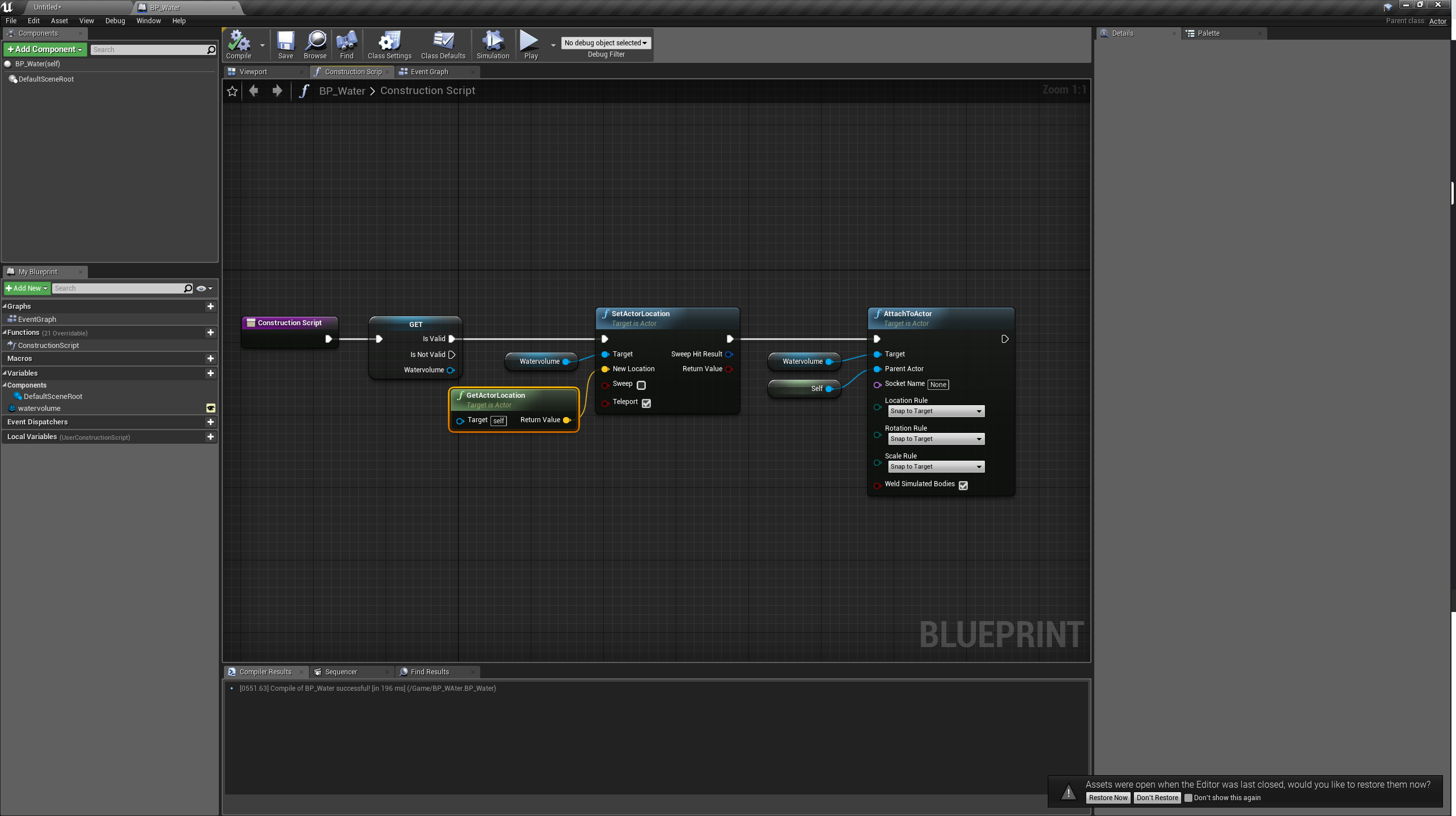
you add a physics volume into your world then in your water BP add a variable that you make editable and visible when placed in the world set the variable to the placed volume
from there you have access to the volumes settings
so you can match the size and everything else
modern sinew
add a variable that you make editable and visible when placed in the world set the variable to the placed volume This is the confusing bit here
found it I think
 light seal
So I have made a pick up system, to where the player can interact with items that have you know all the functions and stuff. However, it works with static meshes. So i can't use skeletal meshes i found online. So i found the convert to Static Mesh while looking in the blueprint for the skeletal mesh. Well when i use that static mesh, it doesn't work for the pick up system now. Any solution? It would be easier if i could show you a screen share of exactly what is happening
modern sinew
@dark depot What's that special Get/IsValid there? I searched Get Is Valid and it didn't appear
dark depot
we have already answered this
right click and make the Get Valid
i dont remember the exact words ue4 says
explore the engine and you would find it
its just a Get node with is valid built in
modern sinew
would a normal IsValid work fine?
dark depot
yeah but promoting to validated get is cleaner
thats all
instead of asking you should just try stuff
modern sinew
sorry; anyway, I tried it and Swimming Mode still isn't working. I'll go fiddle around for a bit
see if I can figure out what's messing it up
upper wasp
Do I put the IsValid widget before the Remove from parent widget?
dark depot
@upper wasp yes and make sure its the same input on both the image you shared before had different variables going into either
modern sinew
Ok, @dark depot The reason it's not working is because the varible isn't referencing anything apparently, so I'm trying to figure out how to do that
dark depot
set it to something
modern sinew
"Editing this value in a Class Default Object is not allowed"
Do I have to make an Instance?
I can try that IG
ok, that's not actually a thing you can do
I'll try when I get back
dark depot
its not that hard
you are overthinking how this works
Make a bp with a Physics Volume Variable
set to instance editable
when that bp iis placed in world you can now attach your physics volume to the bp
upper wasp
So it goes like this?
dark depot
nope
that is just checking if the cast is valid
not sure what your not getting
you need to check if that variable going into remove from parent is valid
so you use the same "Dialog Widget" in both
cerulean grail
anyone know why this float keeps putting out the desired number and 0? that 0 is messing up my render angle.
dark depot
not sure but the note the editor has right there is telling you that you dont need to cast because you already have the reference from your get all actors of class
 onyx berry
hay i have a emissive mat and i already used it on another static mesh but it wont show on the skeletal mesh

 cerulean grail
okay i fixed that. but why isn't this updating my render angle?
upper wasp
I fixed it @dark depot thank you
dark depot
did you set up the material slots in a 3d program correctly Proallday
onyx berry
yes
cerulean grail
i can tell the float is being referenced correctly but when put into the render angle nothing seems to change
dark depot
@onyx berry go back and fix it
dark depot
oh wait you said it works on the same mesh right nvm
onyx berry
yeah but its staic
dark depot
emissive works on skeletal so i think its a mesh material issue
cerulean grail
entering the variable manually works but i need this to update
cerulean grail
how should i retrieve that variable from another blueprint?
onyx berry
the mesh mat is fine
cerulean grail
this is a 3d widget btw
dark depot
casting once at begin play and making a variable
cerulean grail
this variable updates based on the rotation of the blueprint that its casting from
dark depot
Not sure whats happening pro it should work then. I would say i would just unwrap that to be one material no need for 4
 hardy flume
This may be a stupid question, but how do I detect when a line trace stops hitting an object?
dark depot
Christian having a variable to the Compass will allow you to see the changes still
Dasher there is a on hit result you can use that to see if its hitting anything or not
hardy flume
yeah I'm using Blocking Hit directly into a branch, but false never fires
dark depot
then its hitting something
might be a volume or something limit what channels/objects your tracing for
hardy flume
First of all does this look right
dark depot
it looks gross is what it looks like
hardy flume
gross? like poorly laid out or?
dark depot
no need to cast to something if there isnt a blocking hit
that is why you will never get a false on the blocking hit check
because the cast check is already doing that
hardy flume
ahh okay makes sense
dark depot
i would also look into interfaces just in case project scope changes and it ends up not being just that one object you want this action to happen for
hardy flume
interfaces?
dark depot
its a way to talk between blueprints and use the same set of events on multiple BP's that you can make do anything
Blueprint Interfaces allow Blueprints to call functions in different types of targets, if they also implement the interface.
they also have a nice youtube video called communicating with blueprints you can google
hardy flume
ahh okay thanks, in a way its like learning a whole new language
cerulean grail
how do i set that. oh okay sorry
dark depot
you need to cast to it like before or however just do it on begin play instead of on tick
dark depot
@cerulean grail no at the for loop make the blue pin coming off a variable
then you use that variable to set the target
cerulean grail
Im sorry im lost again. im new to using interfaces. what variable would I use there?
dark depot
wait are you casting to your interface?
cerulean grail
ya the interface is bpi bearing
dark depot
yeah thats not how it works
 vague walrus
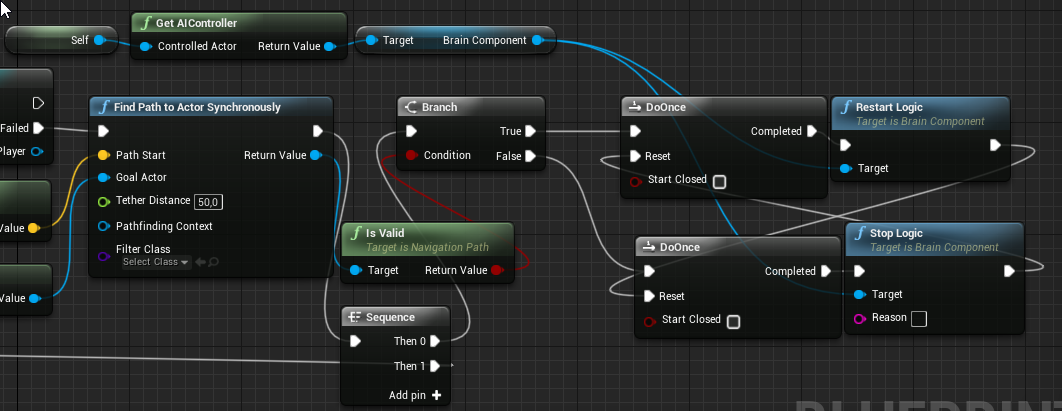
https://i.imgur.com/tZEuvQv.png it works but it throws an error from time to time that brain component is not set. Also, my shooting npc seems to get ai controller deleted after trying to move
 cerulean grail
oh
dark depot

What is a Blueprint Interface in Unreal Engine 4 Blueprints? Source Files: https://github.com/MWadstein/wtf-hdi-files
vague walrus
Any other way to pause AI logic?
dark depot
you add the interface to the actor you want to talk to you then send a message out to that actor
cerulean grail
OHHH okay i was doing it backwards
well okay so i have this in the widget with the interface added and an event from that interface.
dark depot
so wherever you are making that widget make a variable of it so you can send a message
 plush yew
I'm trying to make just a basic icy platform where player friction and acceleration are reduced when the players stand on it. How would I go about putting the acceleration and friction back once they leave the platform
is there like, an event for ending overlap?
Alternatively I could make stepping on the platform trigger a loop that checks for overlap until the overlap is ended in which case the stats return to normal?
 dim plover
Yeah.
dim plover
I'm pretty sure it's exactly like how you would do it anywhere else.
You have to put the Object you're trying to cast into the Object input.
 blissful trail
im trying to get a variable so what do i put in the float ?
 whole quarry
a float
vague walrus
where the hell is shibi in my content
whole quarry
click on that > arrow thing
vague walrus
search does not show anything
there's no arrow thing
it's supposed to be on the same level as paragoncrunch and murdock
whole quarry
there is a arrow thing
vague walrus
but I don't have anything else with 'paragon' in content browser
whole quarry
click on that arrow that i put in that red circle
vague walrus
okay, even if that was in different folder
it should show up in search
i just want to remove unused assets :D
modern sinew
I keep getting this message "Editing in a Class Default Object is not allowed"; how do I make it allowed?
 rain moss
hey guys can i run unreal 4.15 with 2 gb graphics card and 8 gb ram??
dark depot
Firefox panda.....
modern sinew
Do you know how to fix my problem? Because it’s not referencing anything and I need it to
Also I can look, but I have been
WiFi is just slow :/
Trying to fix that
dark depot
whats the issue
modern sinew
I was trying to follow that image and it wasn’t letting me set the variable to reference anything like in the image
""Editing this value in a Class Default Object is not allowed"
I'm trying to set the variable to a Physics Volume
 potent wing
@ me
dark depot
@modern sinew you just make a variable in the Blueprint by hitting the plus sign next to variables then set it to physics volume object ref
under variable types
modern sinew
That's what it is @dark depot
 round hemlock
I wonder if my optimization attempts make any sense, because my GPU is ancient and targeting 60 fps on high settings are not even possible, I mean I cannot play any new game on high settings.. lol
I could bring it up to 50 fps / 20 ms at the bottlenecks. I think that should be fine.
modern sinew
@dark depot attempting to set the Default Value
dark depot
you let the variable be public and set it to the volume in editor
place the blueprint in the world
then if you set the variable right you will see it in the details and set it to the placed volume its not this hard
if your still having issues with this maybe do some smaller things to learn more about the engine and how variables work before trying this
modern sinew
well it won't let me set the variable is the problem
There's no "public" option, but there is a "private" option which is unchecked
dark depot
sorry i said public but what i meant was what i had said earlier you should have a instance editable checkbox
modern sinew
that's checked, yes
 lilac cobalt
 errant mist
Hi guys! Has anyone issued significant UE4 performance downgrade after upgrading Windows? We've have our packaged project run about 50% slower after upgrading from win 1803 to 1903 and can't solve the problem (upgrading drivers etc. doesnt help)
modern sinew
I don’t upgrade windows because Windows 10 is absolute garbage
Does anyone know what the Swimming movement mode does? Because rn all it’s doing is slowing my movement (not my fall speed tho)
 honest vale
Windows 10 is great
 magic ermine
any on help me on dynamic lighting?
honest vale
just ask
potent wing
Anyone can figured out why this is happening?
magic ermine
@honest vale Hi,
I am using UE4 4.21 and we are some lighting bug issues. Turn on dynamic lighting and add simple cube for black scene, next add point light above cube. Add two side material for cube. enable lit viewoprt and move the camera inside cube and we are some light inside cube. Please write me why? What I make wrong?
honest vale
that's due to the fact that shadow mapping (tech for doing realtime shadows) isn't 100% precise
that's expected to happen
 prime tulip
I have a question: Is there a way to use Steam cloud save kind of like a protected client progress system (as you would with a regular database backend system) basically have the user's save file only saved online where the user can not access it and tamper with it as he would be able to on a locally saved file? This seems like something extremely handy and relatively simple for a platform like Steam to have. Was wondering if this perhaps already exists?
it would make progression for smaller games much easier to implement
 wary wave
cloud saves are entirely optional
magic ermine
@honest vale do you want to say that I can not fix it?
wary wave
and it's just a backup of a local file
prime tulip
hmm so the user can set wether or not to save on the cloud right?
yeah that's what I thought
honest vale
@magic ermine you can help it by making thicker walls and such
prime tulip
would be handy though if there was a secondary save file system developers can select that stores the save files of a game only online and never locally
magic ermine
@honest vale this is a simple example, I have a big model of train and this happend on inside my model.
wary wave
people won't like a game that requires them to be online just to save it
 pseudo swift
Hi guys, simple question, maybe im stupid but i cant figure out to scale things up and down while maintaining proportions of for example a plane
i tried changing world/relative scale, locking it, modifier keys etc
pseudo swift
yea but it changes the shape
i have an A4 sized plane which i want to scale down and it changes into more of a horizontal rectangle
it says the lock should prevent this but it doesnt
round hemlock
do you hammer in the numbers in the details panel?
pseudo swift
thats what i normally do but when working with decimals its a bit harder
ideally i would just want to drag it, affecting all axis and keeping the aspect ratio
round hemlock
maybe you dont hit the middle box correctly and it takes a side one?
pseudo swift
i am :/ anyways, i can solve it by dividing the numbers in the details panels
round hemlock
I know when you put in a non uniform number in the details scale panel and click on lock it will always scale in that ratio.
maybe you locked something wrong?
pseudo swift
i dont see how there's only one lock symbol next to the scale in the details panels
round hemlock
thats what it locks it for all three axis
if you put 1-1-2 and press lock it will scale in that ratio when you put numbers in afterwards
but I dont know make a screenshot or something
pseudo swift
im using a thirdparty tool called greenshot
its really nice for quick captures
it works as you say if I use 1-1-2, but when i use different numbers, my plane is currently: 0.2625 - 0.37125 - 1, then it doesnt maintain it
round hemlock
hmm Im building light atm so I cant test it
ohh man have you tried to turn off the scale snapping? maybe thats the problem.
pseudo swift
where can i find that?
you mean in the small icons
omg ticking the preserve non uniform scale fixed it!
thanks man 😃
plush yew
Hey there, I'm looking for some help regarding shaders and paper2D in ue4 when updating software, my issue regards lighting that doesn't seem to register / or disappears when updating the project to a newer version of ue4. It functioned in ue4.19 but onwards it doesn't display correctly. I've replicated all editor and project settings to no avail of the previous version
I can provide screenshots if needed
 versed spear
I am still using 4.19.2 and I don't think I will ever be able to upgrade. UE4 devs like to waste our time by releasing unstable builds.
plush yew
I can understand that, the builds seem to come out quite fast
versed spear
Its like tweekers trying to make a game engine. They are never able to finish anything and do it correctly.
 deep basin
I did some camera interpolation where I always did the actual movement in tick, it worked fine, no probs but it kept me thinking - isn't there probably a better way?
 rancid lynx
does the foliage paint system place 2 instances in 1 place very often ? when i do sphere traces, its returning 2 foliage actors indexes, like 50 percent of the time.
 tardy sapphire
There is currently no way to snap a terrain spline control point to the grid. CTRL-END does not work with spline points. The only way to get a control point on grid is to manually key in the values for all 3 axis for each control point.
Anyone know how to get around it ?
 radiant haven
hello, wanna make a Material, that i can use as a Character in a 3d game, like baldis basics for example, my question is how do i do it i tried some tutorials buit noone worked
 somber quail
I'm having issues building the Oculus Branch of 4.22. How do I get past these errors?
 gleaming lotus
@somber quail Try running as administrator?
somber quail
I'll give that a try, not had this issue with other builds though - just Oculus
 lunar bobcat
requested a little help in #gameplay-ai
 rustic imp
restart your editor?
plush yew
my character faceing the camera when i walk backward
rustic imp
that's a very close close-up
 grim ore
yay holo lens 2 support for UE4 on github, now I just need a holo lens 2.... oh wait... lol 😃
 kindred viper
I remember when my old hololens didn't show up because I never afforded the money to buy one. Good times 😄
grim ore
I actually looked into it but man between this and thew new google glasses which are like not for normal people it's a bummer 😦
somber quail
@gleaming lotus Reinstalling the Windows 8.1 SDK seemed to work - it told me I already had everthing but I forced a reinstall and the build went without a hitch.
*Thanks mods
 upper heart
np
somber quail
After all that, you can't even use Oculus Audio on the Quest >.<
radiant haven
Well this is Normal Gamelook:https://cdn.discordapp.com/attachments/569625892540645376/584058789452578816/unknown.png
But this is Mobile Look:https://cdn.discordapp.com/attachments/569625892540645376/584059007736479784/unknown.png
WTF WENT WRONG

 somber quail
did you preview in editor with mobile shaders before building?
Lighting and shader features are extremely limited on mobile
radiant haven
uhhh how to solve this?
@somber quail
@somber quail Yes i done
just used the Mobile Play thing
 latent moth
All, how can you scale a 3D widget with SCREEN space? SetWorldScale3D does not change anything
(ignore the missing widget in there, this is the master class)
somber quail
@radiant haven I mean the rendering preview
go to settings > preview rendering level
You won't get SSR on mobile, you'll need to rely on reflection captures and for that you need to enable high quality reflections in the material.
@latent moth Did you try enabling "draw at desired size" and changing the draw size?
latent moth
@somber quail so... here's the original:
the code:
the result:
with "draw at desired size" set to true:
radiant haven
whats this?
 marble knot
If anyone else uses VS Code, how do you configure it to attach instead of launch UE4?
plush yew
figured i'd ask this once and for all: how the heck do i open the console? i use the output log console to type commands now, but they don't work if i open the game in a new window. i want to open the console in the new window. i've set a console key in the preferences. doesn't work.
 sonic pagoda
so when looking at this graph that total slate time is the bad guy... and i shoulbe looking for the things that take up more inclusive time?
@manic pawn
better picture
im using a compass like skyrim in the game that tracks enemies locations live and adds them to the compass and updates their position as they move around, thats why its abnormal, but i guess i just need to optimize it a lot more
 frank escarp
@sonic pagoda it counts editor slate
widgets dont update at slate time, theyrun in the normal tick
 flat idol
The paint appears to be running just fine (relatively speaking) but the self takes rather long, 3-4 msec which is going to be the tick and related function calls where it is spending msot of the time.
The slate prepass also long, tho i'm not familiar with that particular entry
Are you running your measurements in standalone game mode?
sonic pagoda
yes
standalone 64bit windows
i ran it live by adding the -messaging and by also using standalone front end with -messaging
@frank escarp this is standalone, not in the editor
flat idol
The frontend matters not its just a view for your recorded data
The tick is taking too long, you can maybe reduce the number of operations or tick rate, or distribute the operations for multiple frames. Refactor the code.
light seal
What is the best way i can start making my own clothing/armor? Are there apps i can use?
sonic pagoda
ok thanks again
 flat gorge
I have this error any help would be appreciated
 lapis bronze
Did you move your maps around in file structure? or rename folders? @flat gorge
make sure your default map is set in your project settings
lapis bronze
Never used BPs to switch levels, so im probably useless here
But what are the expanded options on that BP?
(the little arrow thingy)
 devout flint
When I grab my gun, I have a Boolean get set to true. How can I make another blueprint access that boolean?
lapis bronze
@flat gorge what does absolute mean there?
I cant find anything on UE docs
Does it mean absolute file name? if so you might want to uncheck it since you dont have .umap at the end of that
nvm found this
Open Level
absolute shouldnt matter
does your name include .umap at the end? if so try removing it
lapis bronze

And for sure the map is located there?
Open Level just opens a map 'by name' at that maps folder
devout flint
@lapis bronze How can I make one blueprint trigger something in another?
lapis bronze
@devout flint casting to the other object
devout flint
ok thanks
devout flint
thanks!
flat gorge
@lapis bronze it was at different path
lapis bronze
@flat gorge ah so you solved the issue? sweet
flat gorge
@lapis bronze quick stupid question how can I change the path location?
lapis bronze
For the Open Level function? you cant
you should have all your maps in that folder anyways
Game/FirstPersonBP/Maps/... is the default i think
FirstPersonBP being the project name i believe?
Have you not cooked the maps in your projects .ini files? Or might you have changed the default directory of the maps? If you have changed the default directory then move them from your folder into the content/maps/
basically that error you got is because the Open Level function isn't finding your map in the default location
thats really all there is to it
i dont have unreal 4 at this PC otherwise i'd open it up to verify this
but that seems right
flat gorge
ok thx, Imma let you know if that works
lapis bronze
yeah its content/<projectname>/maps
I think im wrong, it shouldn't matter where the maps are located in your project
as long as they're cooked by the project.ini
devout flint
How do I make my blueprint BP_MotionController check if my variable HoldingRaygun is true? The variable originates from my blueprint BP_Raygun
radiant haven
how to fix this mobile limited lightning and shaders??
radiant haven
WHAT????????`#
can u tell me
uhhhhhhhhhhhhhhhhhhhhhhhhhhhhhhhhhhhhhhhhhhhhhhhhhhhhhhhhhhhh
what i need to google
that it looks like thishttps://cdn.discordapp.com/attachments/569625892540645376/584058789452578816/unknown.png
and not atm like this!!!!!https://cdn.discordapp.com/attachments/569625892540645376/584059007736479784/unknown.png
devout flint
scotty I made it public but it is not in my other blueprint
radiant haven
@plush yew is there anything that i can do?
smth simple
smth simple said
ok wait
lapis bronze
@devout flint I recommend watching a tutorial for how casting works
basically your BP_MotionController needs to cast at your BP_Raygun to get the variable HoldingRaygun
Depending on how you spawned this BP_Raygun into the world during gameplay
this could be as easy as getting the child object, casting to BP_Raygun class, getting that variable, setting it locally, and then you're done
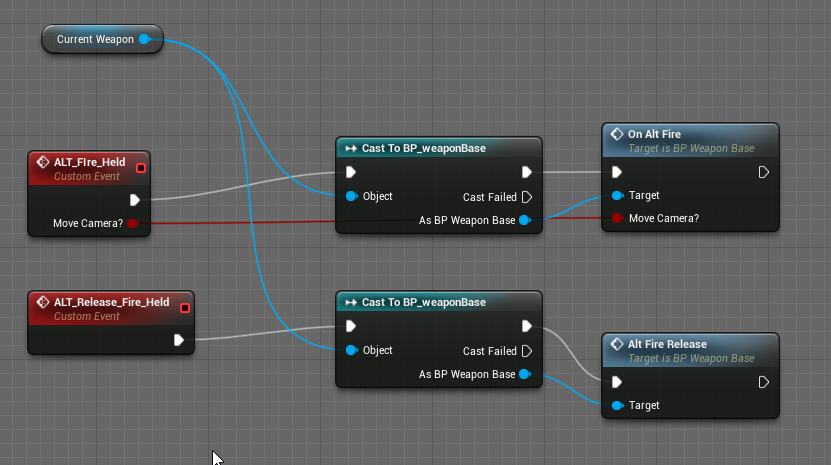
Like here, the current weapon was already stored previously when i equipped it
so i had the actor as reference so i could cast to its class
dragging off that 'blue' node there (the actor one) you can then start typing functions of that class, or variables to get them
casting should only be used as a one-off event, as doing it every frame for example will kill your performance
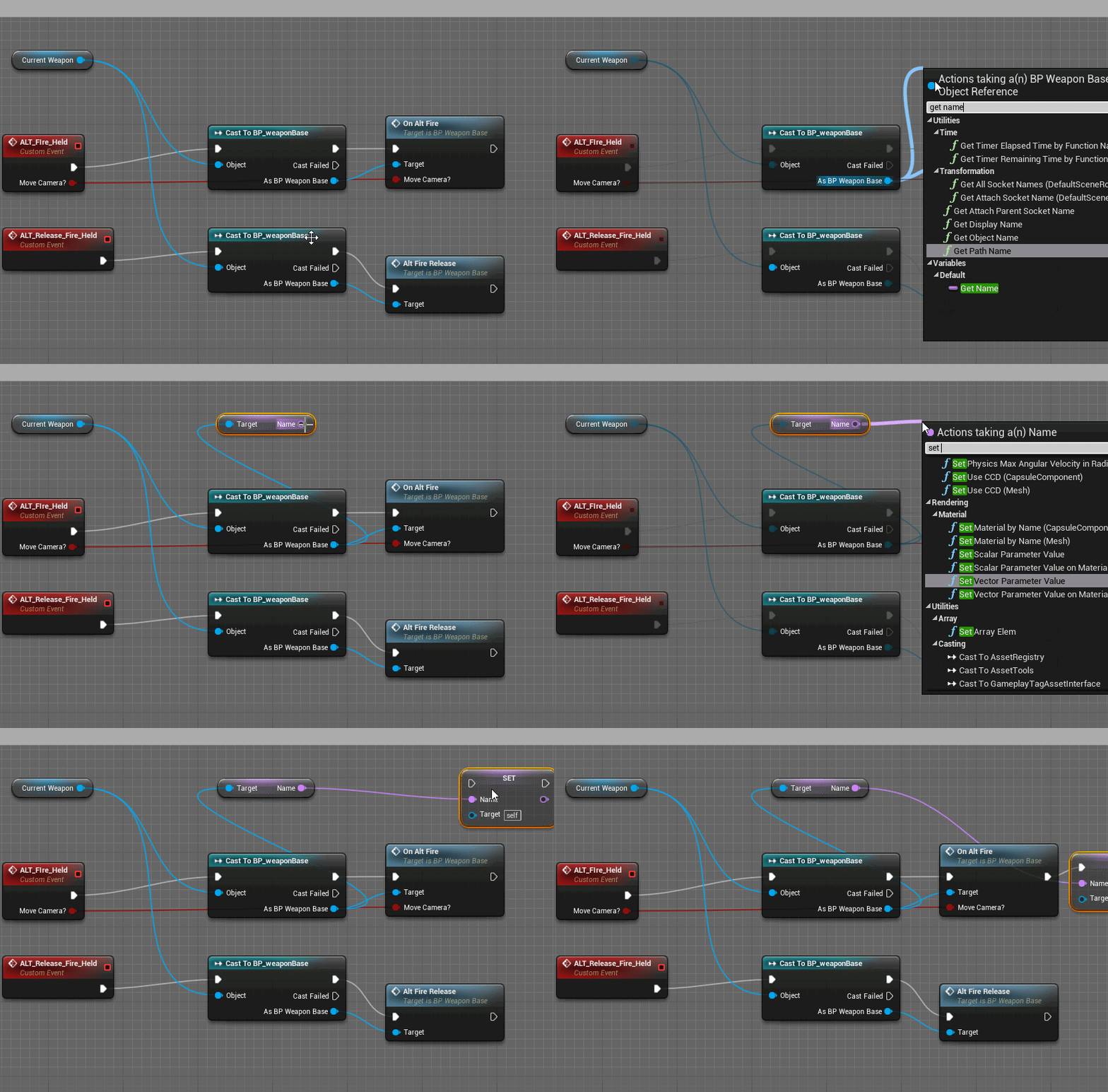
im using my weapon base variable name here as an example
@devout flint thats all i can offer
videos would be better :p
devout flint
thanks pandan
lapis bronze
np! if i was at home i could help more
devout flint
@lapis bronze what would I put into the "object" pin?
lapis bronze
Thats the trickiest part
Your BP_MotionController needs to have a reference to the gun somehow
In my game, when i pick up a weapon from the ground, its added to my characters inventory
basically its going to be different for every game, it depends on how you have it set up
devout flint
Hmmm..... when I pick up the gun it gets "attatched" to the hand
lapis bronze
You could make a funciton that finds that actor thats attached
and store it
then drag that stored actor reference into that object slot
devout flint
hmmmm.... I am very new and should have started simpler. I dont know how to do that
I am seeing ways to get attatched actors, but I can not hook them to the node
@lapis bronze I see where it attaches it, how can I make it store the reference?
wait I think I found it
radiant haven
can someone help me with Mobile Game Problem
kindred viper
sorry I only know about stationary game problems
kindred viper
yeah im not sure about lighting stuff myself. there is a #mobile channel but I dont know how alive it is
grim ore
open up the shader and turn on the platform stats and read this page for info on what is/not supported https://docs.unrealengine.com/en-US/Platforms/Mobile/Materials/index.html
you are going to have to redo your materials for mobile or use mobile switches to allow them to work "correctly" on both
we can't just guess at why it is not working ,we cannot see your shader setup or your project setup so we can't tell you what to change or fix or adjust to get your desired look or even if it is possible.
dark depot
mobile also supports fog/lighting differently
grim ore
yep and the docs... dun dun dun.... have all that info for them https://docs.unrealengine.com/en-US/Platforms/Mobile/index.html just have to read and absorb
devout flint
Yeah. But like matthew said we cant help you using screenshots of the game.
Why does this work, but not this (wait after the first post more screenshots are coming
First screenshot fires a bullet when I pick up the gun, the second should make it fire when the left grip is used, but doesnt
grim ore
have you tried debugging, is attached actor actually valid? the first one sets attached actor but is it actually set when you call the second one?
devout flint
@grim ore I do not know what exactly you mean by debugging. It stays attatched to the hand as I move my hand around...
grim ore
so grab actor is called before the grip button is called?
devout flint
yes
grim ore
so when grab actor is called the first time you play it fires it, so when you pick it up the first time it fires?
grim ore
then it might be code in the Fire that is causing it. debugging is when you check to see what is happening when it happens by using breakpoints or printing out results. you need to see if Fire is actually being called. press the F9 key on the Fire node (it should make a red circle show up) then test it again. If it does fire it will Pause the game and stop right there. If it never stops, then that part never happens.
you can then go backwards checking to see if the cast works or even if the grip left is working
and this is assuming both of those screenshots are in the same blueprint
devout flint
thanks, that is nice to know. And yes they are
grim ore
the other way is to put print strings when stuff happens but I assume this is VR and print really does not work well in VR
grim ore
it should be fine. The main issue was if the Attached Actor variable was the same one in both screenshots and it should be if this is the same blueprint
grim ore
then either the attached actor is bad or null or the fire action is never called. F9 on the Input Action for trigger and see if it stops there
devout flint
hmmm..... never called
grim ore
you can easily test it just to make sure, unhook your stuff you have now and hook up a Quit Game node and see if the game quits when you pull the trigger lol
if not then yeah you have an issue with that input never firing
does this blueprint have other input that works btw? are we sure this blueprint can take input in from the player
lapis bronze
as mathewW said, debugging it one step at a time is key
if you change everything every test you'll never know the culprit
devout flint
@grim ore It does not seem too... it has functions that other things that get inputs call. The thing is if I put it in the BP_raygun, it does not work there
someone told me it was because the motioncontroller controlls it
grim ore
your raygun is probably not set to accept input so that makes sense
but if this is set to take input (your input events in the project settings or hard coded input actions / axis events) then that should fire if that action is done
maybe check your input settings for the project and make sure that input action is set to the correct button
this is assuming you are using inputs in your project and not just hard coding an input button itself
if you are using input actions in the project settings, maybe add another key like the 5 key on the keyboard in addition to the trigger, and then press that key on the keyboard to see if it is firing that event in your blueprint. if it does then your input is not set up in the project settings correctly for the trigger. if it doesnt work then your input action node is bad or incorrect.
devout flint
I think I might see the solution I'll ping you after I check it
grim ore
yay
 near trout
Triggering a shooting animation - a full auto one in particular - would it be best to do via an Animation Montage or through the animation blueprint like most other animations are set up?
devout flint
I got it! Thanks for all the help everyone
lapis bronze
sweeet
 bright aspen
There's something weird happening on my screen
why is this ticking up?
the game isnt running
I dont remember it ticking up like a clock before
is there some setting I hit on accident?
bright aspen
thanks
Is there a way to create a useless "placeholder" node in a blueprint for organizational purposes?
 heavy ether
well now i understand why people are complaining about the lighting being totally broke when using streaming levels. argh.
grim ore
@bright aspen a comment or a reroute node should work
 autumn socket
Is there a way to make a mesh look unlit in a lit environment?
heavy ether
it seems that the static lighting is randomly missing when switching between streaming levels
autumn socket
I'm new to Unreal and I'm not quite sure why the texture is a little bit pale in a lit environment, can someone help me
heavy ether
nope persistent world is pitch black and empty, just contains a bunch of streaming levels that we switch back and forth in and out
 latent fable
I'm very new to unreal - Does anyone know why my loop isn't working?
autumn socket
I will try that thanks
 next badger
@autumn socket to use this type of texturing you have to:
- set material to unlit
or - set material roughness to 1
heavy ether
.... and i think i just lost every damn thing i've done today. fk.
next badger
@latent fable um...you not using delay at all (no input arrow)
also loop do not wait anything, it just runs in instant, to make a delay you have to use timers
https://www.youtube.com/watch?v=qc5WpNq7RFg

What are the Set Timer by Function and Event Name Nodes in Unreal Engine 4 Source Files: https://github.com/MWadstein/wtf-hdi-files
heavy ether
nope stuff is there after i crashed and restarted. whew.
latent fable
@next badger Oh 😄 i'm blind. I'll watch the vid now. thanks
heavy ether
i tried to see what would happen if i made all the levels visible in the permanent level, then built lighting.. and what i ended up with was a bunch of levels with nothing in them at all. then the editor crashed.
latent fable
good ideas 101
grim ore
did you try loading them all into the permanent level like you expect, then making the sub level you want to build lighting on the current level (double click), then build lighting on it?
heavy ether
@plush yew lol the current Nvidia drivers crash 100% with UE
so far, all i end up with after the first level loaded is dynamic lights, which is not going to be good for a demo on monday of combining dynamic and statics. 😄
when i try to do it @grim ore way, it complains that only one skylight can be used
lapis bronze
maybe you have to delete the skylights from the other streaming levels
autumn socket
I'm not sure if I'm using unlit material correctly
lapis bronze
@autumn socket nope, thats right
plush yew
Unreal Engine 4 Documentation only shows up in Chinese. I cannot find the documentation for VR motion controllers.
lapis bronze
@autumn socket im confused on what you're asking but
if the material is unlit, doesnt matter what the viewport mode is in
it will be unlit
that model preview, is it even using the right material?
check on the right side
heavy ether
@lapis bronze that might be an answer, but it doesn't really solve the problem. it should load my lightmaps.
lapis bronze
Not sure 😦
autumn socket
@lapis bronze The Texture in lit mode is kinda pale in lit mode, I was wondering how I can make it look unlit in a lit environment
latent fable
instead of it going up by 1 each time
 digital anchor
heavy ether
digital anchor
heavy ether
i think my answer is going to be re-writing the level streaming to just load the levels instead. at least until this problem has a solution that works right
latent fable
@digital anchor oh yes thanks
lapis bronze
@autumn socket It should already, that's why i was asking if your preview mesh is using the right material.
Based on what youve said, its not. Check the right side of that preview window
autumn socket
what should I look for?
lapis bronze
looks right
latent fable
it always says 1
grim ore
@heavy ether that is correct and since the skylight is more of a global thing which I assume is the same for all levels just keep the one in the persistent or disable all the others if baking it uniquely for your individual streamed level
heavy ether
it's not the same for all levels. And even if it were, i don't really want to have to go through and build all the levels through the persistent level, that's just a mess
lapis bronze
@autumn socket
https://i.imgur.com/PfqvcQV.png
sorry its on the left
its possible your preview mesh is using the old materials
autumn socket
:)) I was wondering
lapis bronze
not your new ones you made
autumn socket
actually I just modified the current materials
lapis bronze
you might want to triple check that
unlit materials always show up as unlit
thats just how they work
can you screenshot your UnityChan material pls
autumn socket
here u go
lapis bronze
like the actual material graph...
lapis bronze
also it looks like she uses like 30 materials
so you'd have to make them all unlit
maybe thats why you aren't seeing a difference
you only did it to 1
autumn socket
autumn socket
yes I was testing with one
lapis bronze
which one is that? i cant tell
lapis bronze
press "isolate"
autumn socket
lapis bronze
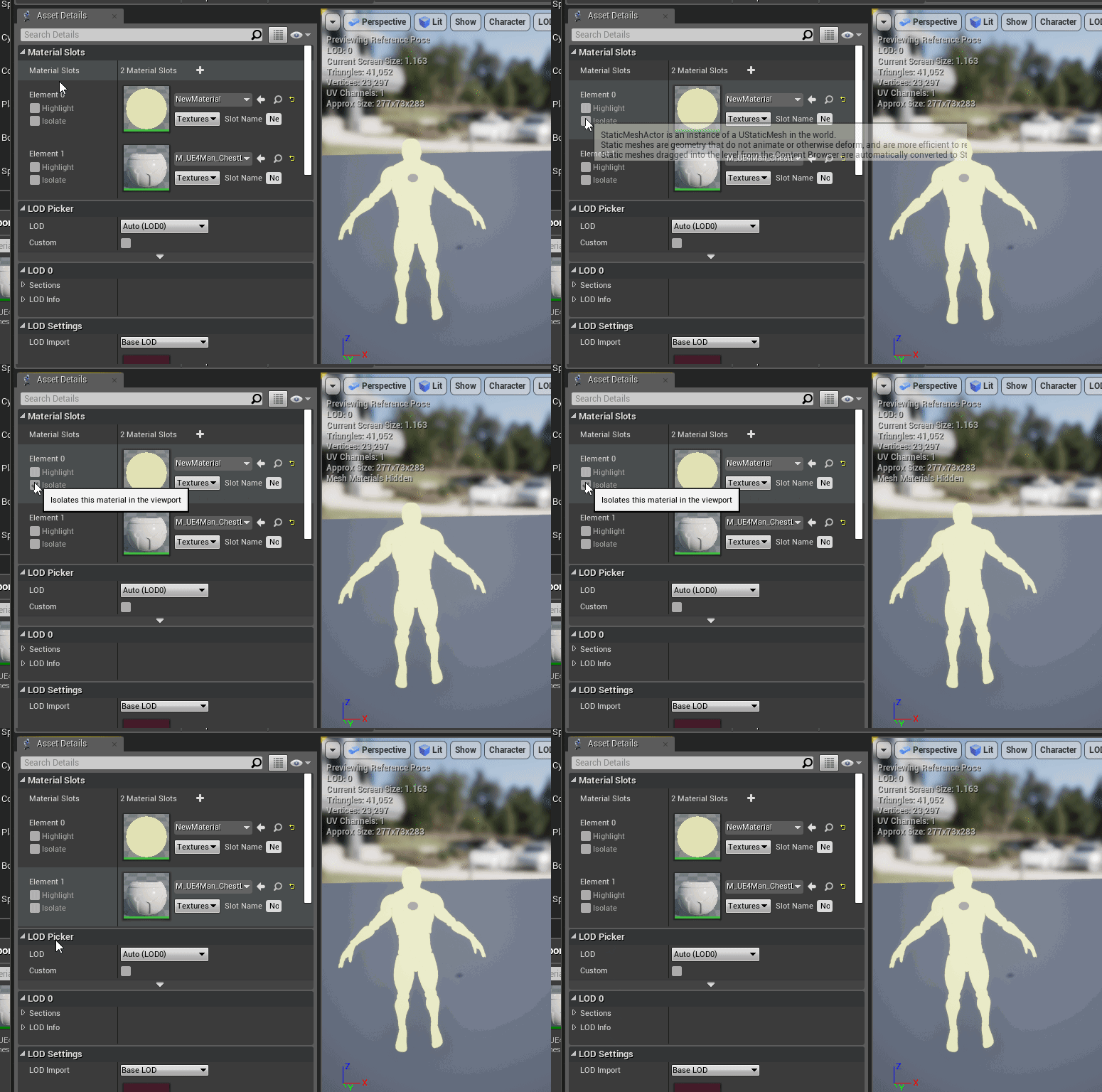
to verify its actually being used
i know a lot of those anime models have like 50 materials and like half of them are unused
no idea how that happens.. MMD i guess? I used to work on VRChat so
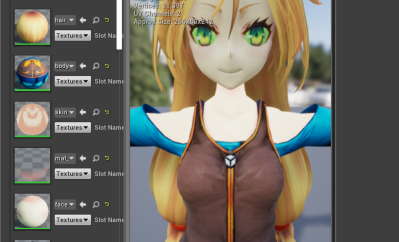
this screenshot you posted earlier
seems like its already working
that washed out might just be the post effects actually
@autumn socket
i think its the post effects
 surreal gyro
Is there any place where you can get, like free toolkits?
lapis bronze
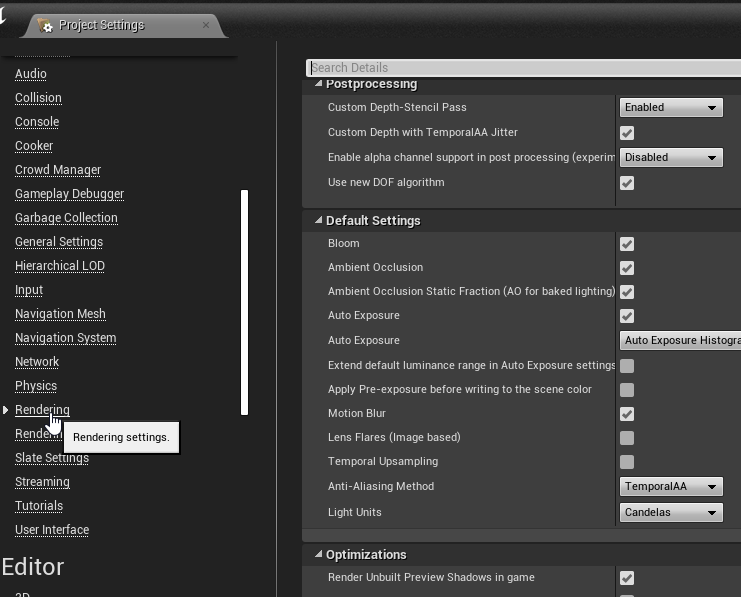
project settings under rendering
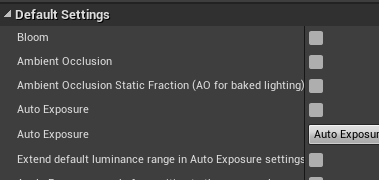
turn off bloom, auto exposure

but yeah you're right its not the same
it should be though
now its got me angry
autumn socket
relax :))
I think imma take a crash course about how this material thingy work first
u guiz know any good one?
or would the documentation suffice
lapis bronze
unreal likes to have a shit load of post effects running by default
so i'd look up examples of cell-shaded games in unreal
see how they did it
seems to be exclusive to unlit shading
autumn socket
I figure it's something like that
Unreal Engine Forums
This is the place to show, share, and link to your stuff!
here is where I got it from
in case your curiosity leave you restless
big thank anyway
 chilly sigil
There's already a Unity-chan, when will we get Unreal-chan?
lapis bronze
found some people with the same issue as you
there's a jank work-around in there if you're interested
but im sure there's a better way
if this helps
i can AT LEAST confirm its post processing bs
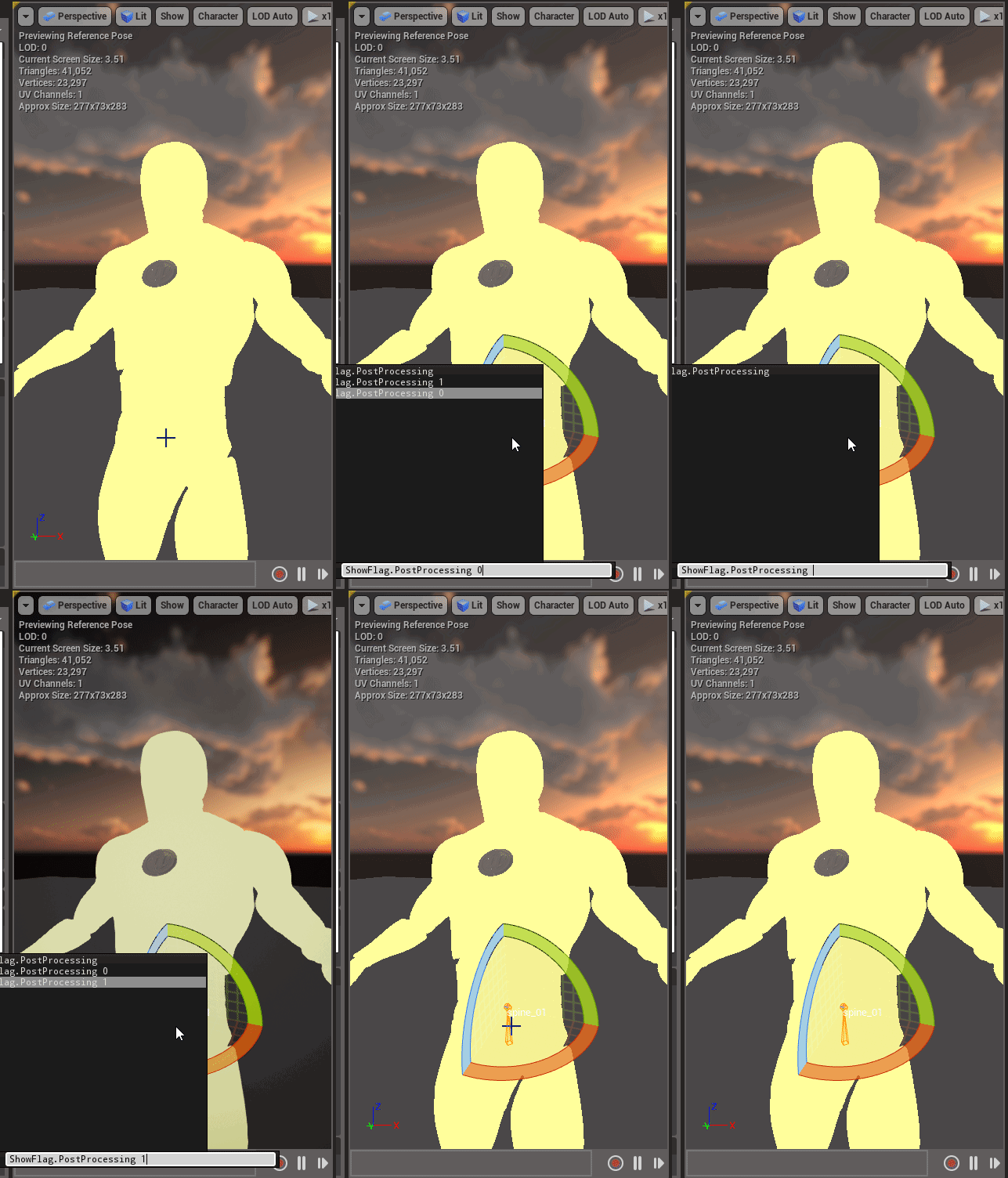 kindred viper
Anyone have a good tool for making Spritesheets from image sequences? I tried a few and they all had issues.
 frail sail
the playerstates can save data on server before disconnect? 
 shell jacinth
Hi, i must install Visual Studio for my UE4.22.2 Project (again...), can someone tell me if i should install VS2017 (i had this before) or better VS2019 ?
thanks 😃
 mellow turret
if I initialize an attribute set (from the gameplay ability plugin) with a csv data table, the max and min value will handle clampling automatically or do I still need to clamp manually after modifications?
next badger
@frail sail probably https://api.unrealengine.com/INT/API/Runtime/Engine/GameFramework/APlayerState/CopyProperties/index.html
Copy properties which need to be saved in inactive PlayerState
next badger
@shell jacinth few people using 2019 already, should be ok
but 4.22 is built with 2017
 ember notch
When will come the new free for the month assets?
shell jacinth
@next badger Mhh yea then i use VS2017 again, my Hard drive broke down 2 days ago and there was my VS2017 installation -.- Thanks for your answer!
frail sail
@next badger its worked thanks mate 
autumn socket
you guys have any idea for disabling post processing for one actor only 😃 ?
 rotund scroll
depends on which actor
autumn socket
a character
rotund scroll
does that actor happen to be the player character?
autumn socket
yus
rotund scroll
so, you want post processing for everything else, just not the player character?
autumn socket
for now, yes
rotund scroll
Unreal Engine Forums
For discussions about Materials, Textures, Lighting, Particle Systems, and Post Process Effects.
here ya go
next badger
@autumn socket it's not possible, you only could disable the PP material by embedding the custom depth pass, but that won't affect all other PP effects
PP material != PP effects
i think there was a way to overwrite the PP buffer with pre PP pass, but not sure if that's true for current UE
rotund scroll
I mean you could set the render to render an unpp pp after the pp effect at the cost of an extra AA
autumn socket
sry if I reply late, I'm having trouble processing all this terminology
next badger
@rotund scroll yeah, it may completely kill TAA or be killed with by one ...depends on settings
that's the reason i prefer MSAA...
surreal gyro
Is there any place where you can get, like free toolkits?
next badger
@surreal gyro what is "free toolkit" ?
 bitter iris
How can i work to get prepass and basepass down?
next badger
@surreal gyro for what?
@bitter iris use GPU profiler, it will tell you exactly what Prepass and Basepass are
bitter iris
oh
surreal gyro
@next badger I was thinking of RPG
next badger
@surreal gyro like https://www.unrealengine.com/marketplace/en-US/slug/action-rpg

Do you want to know more about how to make a high-end mobile game for Unreal Engine 4 (UE4) that can be deployed to both Android and iOS? Learn this and more in the Action RPG sample.
Licensed for Use Only with Unreal Engine-based Products
surreal gyro
Is it performance heavy on your computer even trying to open it? @next badger Cause that's what happened last time I tried it. I had to restart my computer
next badger
@bitter iris ahahahah...umm...you could try session frontend
lapis bronze
@autumn socket tbh i'd just multiply your emissive channel until it looks close
making a post processing mask for your character just.. it just looks like shit to be frank
bitter iris
@next badger session front end in command?
next badger
@surreal gyro not as heavy as Kite example
autumn socket
@lapis bronze lul ye thanks
surreal gyro
@next badger Kite example?
next badger

Licensed for use only with UE4 based products.
A collection of realistic assets from Epic's Open World demo shown at GDC 2015. Use them to create new levels or add them to existing ones.
 strong fossil
where is material chat?
strong fossil
thanks
next badger
@bitter iris window -> dev tools -> session frontend -> profiler
An overview on the Profiler Tool used to monitor game performance.
bitter iris
@next badger what am i looking for here never used this
 ancient lotus
alrighty weird issue. so i have 2 game modes, one for the lobby level and one for the game level. both the lobby level and the game level are the exact same as of right now. both of the game modes are even the same, but they use different game states. both game modes have the third person character set as the default pawn. when i play on the game level with the game game mode, my third person character spawns for each player just fine. when i do the same for the lobby game mode on the lobby game level, no character spawns at all and im just able to fly around. this happens regardless of the game state and i have narrowed it down to the game mode. i cannot figure out what is causing this issue, if i changes the lobby game levels game mode to use the game game mode it works just fine and my third person character spawns. nothing at all is different between them that would be causing this that i can see
next badger
@ancient lotus what are the world setting for game mode in lobby level?
ancient lotus
the same
town and lobby world settings
https://gyazo.com/5b66ed65d0c3fd459598a48a6cb33b16
https://gyazo.com/4dfd5f894ba8101e16a4a85308d4ed23


 grim ore
both those BP seem to have custom parents, not inheriting from the normal game mode or game mode base, perhaps that is an issue?
ancient lotus
their coming from my own c++ game mode, however the code inside is literally just 2 functions to detect when a player joins/leaves. ill comment it all out but nothing should interfere
......ok now their spawning, wtf hang on
alright for whatever reason, just including the postlogin function is causing this
just having this function seems to be the cause
void ALobbyGameMode::PostLogin(APlayerController* NewPlayer)
{
    UE_LOG(LogTemp, Warning, TEXT("NEW PLAYER"));
    //if (GS)
    //{
    //    ++GS->CurrentPlayerCount;
    //    UE_LOG(LogTemp, Warning, TEXT("Current Players: %d"), GS->CurrentPlayerCount);
    //}
}
yay we win
ancient lotus
lol
bitter iris
whats the thing called that gives you the ability to view textures, sizes, file sizes etc
cant remember what its called
 hidden aurora
Inside unreal? Or external
grim ore
there is the property matrix for editing multiple items, or there is the uh disk size one lol
size map that lets you see disk/memory sizes for selected objects
versed spear
Looking at the Notification of UE4 Project Release Form. Do I need my own website for the Product URL or can I use something else?
 visual belfry
@bitter iris Size Map maybe? right click on a map and select that option
bitter iris
i found it in stats
erm is there a way to automatically change texture sizes in ue4 or is it a manual job
was thinking via property matrix but dunno
ancient lotus
question, from my understanding, performing a seamless travel to another level will keep your character and its information the same as its just a direct carry over to a new level instead of creating a new fresh character on the newly loaded level. does this mean that other things such as the gamemode will also transfer to the new level as well? or is it just the players character
 past oak
anyone know why ue4 crashes when the player goes below a certain depth?
 weary basalt
@ancient lotus https://docs.unrealengine.com/en-US/Gameplay/Networking/Travelling/index.html#persistingactorsacrossseamlesstravel
An overview of how travelling works in multiplayer.
ancient lotus
thank you
 hollow junco
hello, im new to using unreal engine and i downloaded a plugin hud for an arpg im making and can't figure out how to make it work. the level that came with it is just a demo and idk where to go from there.
 safe rose
@hollow junco Start here: https://docs.unrealengine.com/en-US/index.html

Complete resources for learning to use Unreal Engine 4
Once you've read through everything, come back and ask for help, or if you are stuck on something in the docs
hollow junco
so i downloaded 4k full gui/ui and im just not sure how to use it i tried to get ahold of the creater but no luck. i added to my project but not sure what to do to make it work
devout flint
Is it better for performance to convert BSPs to static meshes?
dark depot
@devout flint 1000% better then BSP
devout flint
Are assets not ever actually called/placed exported with the game?
modern sinew
anyone know what Swimming mode does? because it's not doing anything for me. Thinking of just writing my own controls for swimming
 sudden agate
you need a physics volume with "IsWaterVolume" ticked
 leaden dust
Can I spawn stuff in Init()?
devout flint
Looking at this I do not know where to plug in the lerp. Could someone please help?
modern sinew
@sudden agate I have a physics volume with that ticked and still it doesn't do anythign
leaden dust
Anybody have any idea how to mount paks at runtime
since asset registry seems to only work with the main release pak
and ignores the dlc paks
devout flint
Sorry I can not help you, but what is on your head?
@plush yew I know you have your own problem right now, but could you he;p me reduce my terrain repetitivity?
dark depot
Au you just have to set landscape Coord size and if you want to lerp more textures use masks download some of the content examples from the learn tab of the launcher
yeah that is somewhat why i recommend the stylized example in the learn tab for most people it has a very basic setup
dark depot
yep lots of great content in there
devout flint
how so I set landscape Coord size?
dark depot
you plug it into the UV area of the texture in your material
devout flint
I see no such thing
dark depot
How to create Materials to be used for your Landscape.
devout flint
thanks
radiant haven
Can someone Help me with a big lightning mobile issue
dark depot
this the same issue you posted yesterday? or was that someone else
devout flint
him again
dark depot
not really we mathewW posted a link about features not supported on mobile
i have shipped 2 mobile games 😉
devout flint
topic you have to play around with your lighting
dark depot
yeah lighting sucks on mobile 😄
leaden dust
how does get asset return Uobject?
If I am wrong please correct me, but isn't a uobject any instantiated object?
And if I am just checking the asset registry how does it return Uobject
sudden agate
Assets are uobjects
devout flint
@plush yew Why cant you just move the player?
I dont know why it wouldnt work, but as you have seen im a total noob
woah
well I really gtg ttyl
ember notch
What vehicle system is better this https://www.unrealengine.com/marketplace/en-US/slug/vehicle-interaction or this https://www.unrealengine.com/marketplace/en-US/slug/simple-vehicle-system

This is a vehicle interaction system to enter or exit the car and basic waypoint AI

This system is a set of character interactions with the vehicle, including ragdoll. Fully supports network.
ember notch
?
autumn socket
Hmmm so a player controller is used for player control, what do we do with the Character's event graph?
Checking for environmental interaction and stuffs like that?
plush yew
how can I make an object capable of emitting a light of its own?
 tall pendant
by using the emissive channel on its material? 🤔
also check the "Use Emissive for Static Lighting" flag
plush yew
it works, ty very much 😃
radiant haven
need help have lighning/shader issues with ES
plush yew
i have tried to make a first person game but i cant get buttons to work how do i get a actor in the scene that senses when the mouse is over it and clicks
versed spear
Looking at the Notification of UE4 Project Release Form. Do I need my own website for the Product URL or can I use something else?
deep basin
I have a very weird problem. I made a projectile actor, but it only hits my player character when he is moving, when he is standing still, it simply passes through him and no hit event triggered
any ideas what that might cause?
versed spear
did you try the CCD check box ?
deep basin
CCD?
versed spear
under your collision settings you should see it if you expand that section.
deep basin
ah in project settings
versed spear
naw in your actor collision for your projectile
deep basin
cant find a setting called ccd
only in project settings, in my projectile actor it can't be found, even when searching over the input field
versed spear
maybe this will help https://answers.unrealengine.com/questions/524291/ccd-not-working-anymore.html
deep basin
I don't even see this physics tab .... maybe because my root is not my collision sphere.. I changed that up and recompile now, maybe it helps (doubt it though)
versed spear
yea the setting would be on your collision sphere
deep basin
yes, but its not there.
the only difference i can find to the epic created projectile is the root component
so to rule that out I deleted the scene root
versed spear
there should be a arrow at the bottom of the collision area to expand it so you can see the ccd setting
deep basin
mhhh, so at least I know that getting that setting back might be a step towards the solution
versed spear
let me pull my game up and look at my projectiles.
deep basin
the funny thing is the projectile does not get blocked by any static object, it is not only flying through my player when he is not moving but also through mehses in the world
versed spear
thats good because we should be able to narrow it down based on that
deep basin
lol, removing the scene component solved it!
I have NO idea why though
okay, so what did I learn now - don't use a default scene root on a projectile????
weird
deep basin
yeah you have the setting....
thats pretty werid
in the preset one I have it too, and it is not something that needs to be enabled in cpp first. Mhhhhh guess I'll take it that it works now, still it would be more satisfying to know why xP
but it could be worse
versed spear
as long as you can do what you want it to do then you should be good. I use the overlap to trigger taking hp away from the monster.
 jovial berry
Sometimes the components will do some voodoo stuff occasionally. I remember one of my characters didn't have any move or rotation tools for the component until when I deleted it and added it again.
versed spear
thats unreal engine for you 😄
deep basin
yeah I had that with other stuff too... I made components in cpp, added them, made them customizable via blueprint and the details tab was just blank, until i recompiled the whole project and created all the derived blueprints again ... what a joy^^
jovial berry
oof
deep basin
4.21.2
versed spear
brave soul you are 😛
jovial berry
Yeah i'm using 4.21.2 too since my Uni uses that version.
versed spear
cool I'm afraid to change because I'm targeting mobile and have heard there are a few bugs but I don't know because I have not tried.
last time I tried 4.20 my whole ui lost all the pictures it uses.
 carmine scroll
For projects targeting a set platform, i stick to one version. Otherwise, its not a baf thing to change
Bad *
versed spear
Yea maybe everything will be ironed out by the time I get to it 😃
jovial berry
yea
versed spear
still noone knows the answer to my question 😦
carmine scroll
Whats the question
radiant haven
need help
versed spear
on the release form it says I need a product url. my domain expired so can I use social media or something free until I can buy a domain again?
radiant haven
mobile lighning
carmine scroll
Np
carmine scroll
So whats your issue falk?
radiant haven
Wanna looks like this up
UE automaticly reduces my lighning/sshadows
and now it looks so crappy
cant let it
jovial berry
something with the build settings maybe?
radiant haven
idk tell me, wanna make a mobile game
carmine scroll
It will be either settings with the build
Or
You cant have amazing lighting because its linited by the mobiles hardware
radiant haven
YES IT IS
BUT
the mobile UE games
made it as well
and their lighning is good
so, how to
versed spear
I don't think thats what Falk wants to hear.
versed spear
I think it comes down to researching unreal engine and mobile. One thing I have found during my research is that unreal engine sucks at mobile. With the right methods you may be able to achieve the right look you want but it will take a lot of voodoo to get it to that point.
jovial berry
Yeah not many systems would work well normally on phone than they would on desktop, simply because phones don't have good GPUs to handle much of the graphical power. For mobile games it's pretty much what Mattxor has mentioned in regards to voodoo to how your player sees things.
carmine scroll
Well actually, unreal can do well at mobile games. But it does struggle with graphics.
jovial berry
yup
plush yew
do LOD's work with the foliage tool?
 tall ridge
why is there a unreal engine chat in fortnite?
jovial berry
because fortnite is made with unreal engine
 mint hill
so i just downloaded some .fbx objects and put them in a folder but their not showing in the engine
 limpid turret
i have absolutely no idea why, but none of my nav meshs will generate navigation in this project no matter the set up
it works fine in other projects, but this one just doesnt generate navigation
i even copied a nav mesh from the other project just to see if my settings for it was wrong but it still did nothing
@mint hill you have to actually import them. not just put them in the folder
radiant haven
ember notch
Free for the month items are very nice :D
plush yew
Anybody know why once far enough away, the material/light or whatever starts flickering like that and how to fix it?
 rugged bolt
Hi guys new guy here! I'm trying to follow a tutorial and i'm not getting the purple points on the corners of the cube to extrude with... it won't even let me select a face....
jovial berry
Did you add the geometry shape to the level or is it the basic cube from the left panel of the editor?
the geometry cube should look like a grey checker cube
You also need to be in the geometry editing mode found outlined below
Once you have selected a face on the shape, you should then have the option to extrude.
jovial berry
ah lol
rugged bolt
Thank you very much @jovial berry
jovial berry
No problem 👍
gleaming lotus
Any idea why auto-collision is greyed out when importing a static mesh?
Its literally just a basic obj, no custom collision
jovial berry
I believe that is for when generating collision for the bones of the skeletal mesh
you can set up your collision after importing the model by double clicking on it
once in the model viewer, you should then have some options under the "collision" tab to mess around with.
rotund scroll
anyone an UMG expert?
radiant haven
Anyone an MOBILE expert
gleaming lotus
@jovial berry Yeah, thats what I ususally do - it just gets a bit time consuming when importing a collection of 20 or so models
was hoping it could do it automatically in the import
jovial berry
Yeah by the looks of it, it doesn't seem you can atm. You can, however, use custom collision if you have that set up in your 3d modelling software, which the naming convention for collision is "UCX_YourMeshName"
Dean made a video about it a couple of years ago which you can find here: https://youtu.be/YxVFChB3oxY

You will NEED a 3D modelling package for this one! But here's how to set up custom collisions in UE4 (not complex to simple, ugh). Document: https://docs.unr...
@gleaming lotus
gleaming lotus
Thanks, I appreciate it! I think I'll just stick to manually generating the collisions. I will check out this video for future use though 😄
jovial berry
Cool and no probs 👍
 halcyon flame
does anyone have any particular tips for updating the engine? anything in particular that would get lost with an update if I weren't careful?
also does anyone know if I can copy my editor settings to the new engine version?
@rotund scroll by no means an expert but what's your question?
versed spear
When updating the engine, it might be best to update your project in stages if your a few version away from your target. Make a backup of your project and use the backup when updating that way if all else fails you can revert back to the version everything is working on.
mint hill
is there a way to change the key to exit play mode?
jovial berry
editor preferences -> keyboard shortcuts
versed spear
Configurable controls for common commands in Unreal Editor.
mint hill
ty
ancient lotus
ok im having the weirdest issue that just suddenly came about. i have a little text printed at the top of the screen to show the player count for the lobby. this reads the values for the current and max players from my c++ gamestate. in my game mode i have the postlogin function so add to the current players value thats in the gamestate each time a player connects
void ALobbyGameMode::PostLogin(APlayerController* NewPlayer)
{
    Super::PostLogin(NewPlayer);
    if (GS)
    {
        ++GS->CurrentPlayerCount;//this changes the value shown in the log below, but not in the text at the top of the screen
        UE_LOG(LogTemp, Warning, TEXT("Current Players: %d"), GS->CurrentPlayerCount);
    }
}
and heres the function in the gamestate that creates the FString for the player counter at the top
FString ALobbyGameState::GetCurrentToMaxPlayerCount()
{
    return FString::FromInt(CurrentPlayerCount) + "/" + FString::FromInt(MaxPlayerCount) + " Players";
}
now for the issue. the default value for MaxPlayerCount is 5 and CurrentPlayerCount is 0. when the postlogin function runs it does changes the CurrentPlayerCount value when i print it to the log(see postlogin function), but it does not change the text at the top of the screen as it remains 0. so the value changes but it doesnt update the text. if i change the GetCurrentToMaxPlayerCount function to increment CurrentMaxPlayerCount each time its called like this the value shown in the text increases rapidly
FString ALobbyGameState::GetCurrentToMaxPlayerCount()
{
    CurrentPlayerCount++;//this changes the value shown in the text
    return FString::FromInt(CurrentPlayerCount) + "/" + FString::FromInt(MaxPlayerCount) + " Players";
}
its almost as if the text in the widget is using a different gamestate all together. even if i change all the values in the gamestate from the gamemode at startplay the values for the text that are shown still show 0/5 Players
heres an example showing the problem
plush yew
@ancient lotus You're changing the CurrentPlayerCount variable on the server only, not on the client
The clients have no clue of any of this
Since game mode ONLY runs on the server, when you modify the value there, it will only modify it on the server
so CurrentPlayerCount needs to be replicated
ancient lotus
@plush yew i thought all gamestate variables are replicated? that doesnt make much sense considering it was working earlier yesterday but not today
plush yew
GameState itself is replicated, but the variables you create arent automatically replicated
ancient lotus
ah
plush yew
It just means that both server and client can access the gamestate
But what inside the gamestate can be accessed by the client is up to you
ancient lotus
i see what your saying now. i missunderstood the gamestate :/ thank you that explains alot
plush yew
you're very welcome
mint hill
so im following a tutorial and it seems like they changed the look of this block, do i have everything that would work the same now?
tutorial:
mine:
ancient lotus
it should work all the same
mint hill
ok ty
 umbral patrol
What is the maximum int64 value in UE4.22? I have a C++ ufunction which takes an int64 as a parameter but when putting the value 574661303034183690 into the blueprint parameter, it reformats to 574661303034183680
 worn granite
That's cause even if you follow virtus to the letter, it's not the best way to do the thing 
umbral patrol
Update: Looks like any number with values in the last 6 significant digits of an int64 in blueprint will have a rounding error
500000000000100000 auto-corrects to 500000000000099968 but 500000000001000000 does not change
mint hill
now thats weird
 manic pawn
that's definitely a bug
umbral patrol
bug submitted
 rose tapir
looking for help trying to make the logic behind cricket (darts) in udk 3 can any 1 help feel free to dm me
tall pendant
i'd say getting help for udk/ue3 needs more luck than anything else by now
mint hill
so i just completed a tutorial on how to make a pause menu, but for some reason i cant see my cursor when im in it (the pause menu) but they can?
 languid star
I am trying to export blend targets from blender to unreal engine. I have the import morph targets selected when importing, but nothing.
Under blender's export settings, I have all the animation settings checked.
I am exporting as FBX 7.4 binary
ancient lotus
set show mouse cursor to true when the menu gets opened
mint hill
ok ty
 mint raptor
Thoughts on this? https://gyazo.com/3c1eec1d6f09bda1cdd06ba9a3e3ba67 Why would it show two if I only have one Actor name NoteVolume?
 plush yew
Anybody know why once far enough away, the material/light or whatever starts flickering like that and how to fix it?
 wheat venture
@plush yew I'm no expert, but it looks like a misconfiguration of the anti-aliasing. You might wanna look into that
 lilac wedge
Anyone got 2 mins to chat. I got a problem with a moving platform. I would prefer over mic as it's a little difficult to explain the problem
plush yew
@wheat venture thank you, will look into it
ancient lotus
@lilac wedge not sure if ill be able to help but ill give it a shot
halcyon flame
@versed spear indeed. is there anything that will be deleted by the update? I know new engine code will be, so that needs to be copied. anything else have a similar concern?
mint hill
so i just downloaded an asset but the origin is messed up (not sure if its called that), how can i fix this?
halcyon flame
@mint hill personally I would handle that in Blender. unless this was a Marketplace asset (?)
mint hill
would i just look up on how to move the origin of an object in blender?
but i found it on sketchfab
deep basin
Is there a possibility to make certain actors ignore others when colliding? I have AI enemies and even though they don't damage each other, they block each others bullets. for gameplay purposes I would prefere them to have their bullets pass through each other and don't even create a hit event in the first place.
 potent violet
@deep basin check out collision channels
halcyon flame
@mint hill moving the origin in Blender is trivial, and learning how to do that will be really helpful
deep basin
can i create a new channel in project settings?
potent violet
@deep basin yup you can make custom channels
halcyon flame
@mint hill I can tell you the basics,
I don't know the name of this toolbar, but the second one on the right (the left one on the right...) which you open with the little '+', there's a section called 3D Cursor, use that to set the cursor location, then select the mesh you want to change the origin for, and with Ctrl+Shift+Alt C you can 'Set Origin to 3D Cursor'
alternatively in edit mode, you could set the cursor to a particular vertex, or to the center of some vertices (Set 3D Cursor to Geometry) if you wanted to go that route
potent violet
@deep basin search collision channels on YouTube. There's quite a few tutorials on it
deep basin
thanls
mint hill
@halcyon flame awesome thank you!
hidden aurora
Does anyone knows about a flat/minimalistic UI for unreal, if so please let me know thanks
latent fable
How do i put the first person character controller into my game? I've started working on a game but i used 3rd person character controller, but want to switch to 1st person.
halcyon flame
@latent fable you could create a new project with the 1st person content and then port over the controller
latent fable
@halcyon flame How do i port over the controller? I'm an unreal noob lol
halcyon flame
@latent fable find it in the content browser, right click, then Asset Actions -> Migrate and select your main project
(I'm closing Discord soon btw)
carmine scroll
click ok
halcyon flame
@latent fable you'll also need to change the default player controller in your game mode, and there might be more to it than that. depending on how much you've done it might be easier to port your created assets over to the new 1st Person project.
and yes, that's correct, those are all the things upon which the 1st person controller depends
carmine scroll
good point ^
or, if you wanna have fun learning, since your new. Learn how to make your own first person in the 3rd person BP. Its actually quite simple, and very good for learning new things.
latent fable
Ok, i have the first person controller in my game, but i dont know how to "change the default player controller in your game mode"
carmine scroll
you'll need to open the 3rd person game mode
or in the world settings
I think you can change there
halcyon flame
do some Googling, the answer will be easier that way. change the pawn too.
carmine scroll
please google it first lol
carmine scroll
if you get stuck during a google, then we can help
but I dont wanna type it all first lol
hidden aurora
@carmine scroll A complete theme
latent fable
@carmine scroll Im in the project settings but i dont see a first person mode
under maps and modes
@halcyon flame
carmine scroll
its not in maps and modes
carmine scroll
you can change it via world settings, or in the content browser, in the same location as the third person bp
versed spear
What defines commercial sale? If my game is free but has in app purchases does it still fall under commercial sale?
carmine scroll
No
unless the in app purchase, allows you to buy something you downloaded online that requires non commercial use
its a grey area for different things
but yeah
versed spear
ok all the assests for sale are just skins for my charaecters.
hidden aurora
I do not have the math knowledge to solve this problem: I want to use the elapsed time float as input for the progress bar, but if the elapsed is bigger than 1 it doesnt works
versed spear
the issue I am running into are these guide lines https://www.biblica.com/resources/bible-faqs/how-do-i-license-the-niv/


 versed spear
yes
carmine scroll
and want to know if its commercial ?
😂
yes you can ref the bible
no issues there
latent fable
all of these are locked
latent fable
its not there
carmine scroll
what is there then?
latent fable
cant use my screenshot software it closes the selection menu so i just used prntscrn
prtscn*
devout flint
Is there a way to get my project back to how it was yesterday even though I did not make a backup myself?
carmine scroll
it didnt import the first person one properly then @latent fable
No @devout flint
devout flint
darn
 wraith lark
@carmine scroll , it depends on, how much of the save folder that is left ofcourse, if most of the save folder is there, then it should be possibul
carmine scroll
it wouldnt have saved it all