#ue4-general
1 messages · Page 461 of 1
 grim ore
 plush yew
but why would mine be empty his not
grim ore
because the one you found is a default one that is not being used
plush yew
its the same file
grim ore
at this point tho this is support for the game maker so you should try their forums
 urban gyro
@plush yew you could try the SetInputMode function. UI only.
I wonder would a server side cfg end up on a client ?
you might be trying to do some tinkering on a file that cant do much
plush yew
there are many .ini files inside the folder of .inis
grim ore
if you look thru your windows machine you can find the same directy, my documents, in places such as one drive, public, and your personal folder. the same thing can be in more than one spot, the same file could be in more than one place but that does not mean they are the same file.
 heavy ether
@plush yew well, at the very base level, it seems that anything that receives tick, has an IsTickableWhenPaused()
plush yew
and there are two files "game.ini , engine.ini" that are not blank, the rest is blank
and in the case of my friend, there is the gameusersettings.ini file, which is not blank.
hmm i see
this is a steam game btw, idk if that changes anything
@grim ore what should i do then?
urban gyro
that ini just holds things like supported resolution, texture quality and basic settings
cant u run the game and set these through a menu?
plush yew
yes, i just want to change those stuff
but the thing is
the game doesnt offer much options through the menu
and you can make your graphs worth to improve fps
worse*
through .ini
worse than the menu ingame
plush yew
no i know its not the wrong ini
look an example
thats the settings of a guy on reddit
%localappdata%\TheChase\Saved\Config\WindowsNoEditor
GameUserSettings.ini > set the following under "ScalabilityGroups":
sg.ResolutionQuality=10.000000
sg.ViewDistanceQuality=0
sg.AntiAliasingQuality=0
sg.ShadowQuality=0
sg.PostProcessQuality=0
sg.TextureQuality=0
sg.EffectsQuality=0
sg.FoliageQuality=0
urban gyro
if this is a steam game they got loads of duplicates in their folder structure
plush yew
i followed the exact same folder
path
and those settings made his game look like this

not that i want to play with those graphics, but its just an example of how it can be changed through the ini
urban gyro
afaik there's more than one appdata folder
logically thinking ur in the wrong file, since if your game operates like everyone elses, then there's nothing wrong with the cfg
plush yew
well to make sure that im going to the right one
shouldnt i just go to steam
properties, local archives
urban gyro
so most likely you're editing the wrong one
plush yew
then i get the right folder through there
urban gyro
dude this is a topic for that game's community hub
plush yew
hmm
grim ore
well local app data would be no where near the steam folder
and like we said, support for the game this is general UE4 stuff
urban gyro
its hidden in ur user
plush yew
oh ok
so about where to find the folder, mathew
you explained above?
what if instead of using steam to execute the game, i could just go to the directory that I made the changes and launch the .exe?
grim ore
if you hit Windows Key + R , pasted in that exact folder, and hit enter it would take you to that exact folder. beyond that I dunno
urban gyro
hey Mathew is fixing redirectors still a thing after moving? or is it done Auto now?
cuz i can't see any with the filter on, and it takes a looong time to run it on the entire project
grim ore
maaaan 😦 the oculus quest is like out of stock everywhere
fixing redirectors is not automatic as far as I know
urban gyro
pity
grim ore
but if there was nothing to redirect you would get a clean move
urban gyro
yeah saw an add for the quest, have no idea what the big deal is
aight that xplains some things
grim ore
yeah redirectors are the bane of UE4 lol. even having to manually add redirectors in .ini files feels dirty
urban gyro
well, I never thought UE4 could tank my cpu on a simple cleanup
there's's a time for everything i spose
grim ore
the quest is a really good 6DOF VR headset that is completely stand alone. its a really really neato thing and I want one to dev on lol
plush yew
dude im such a noob, it was the wrong directory like you said
lol
thank you very much guys for having the patience
i appreciate that help
grim ore
😃
urban gyro
is it still forward rendering only?
plush yew
man ive been looking for a solution for 2 hours
and its just about the right or wrong directory
grim ore
I've got 44 stupid... not stupid... not stupid... unrealfest videos to watch still so I have plenty of time to help while watching lol
urban gyro
thats not that bad @plush yew , try looking for a solution for 4 hours and realize there's a checkbox that solves the problem
grim ore
I really don't know about that, its an android device so I think it might be forward in ES 3.1 but I dont know what vulkhan is
plush yew
loool
yeaa
ty again, u rock guys
now my game is looking like minecraft
and i can have slightly better fps
grim ore
yeah "Unreal Engine provides a forward shading renderer optimized for VR. " is what I find in the Oculus dev docs
urban gyro
I heard there may be a new platform on the way
yeah i know about that, i was curious if there was any movement on deferred
or if its even on the cards
heavy ether
... and there goes the creator drivers for this month also flaking out.
guess i back date
grim ore
I dont think so, I havent even see it at all mentioned just due to the high requirements of VR itself
urban gyro
dunno i can't see it working without full motion control
the tricks with the cage and all just seem super limiting
maybe in a decade it'd be awesome to have the whole package 😃
grim ore
well the quest is nice because you can disable the guardian (cage) and map your own play area
theres some videos of people literally mapping the entire house for a play space
urban gyro
yeah, slaying a dragon in the kitchen sounds fun until you realize you just busted the 55 year old antique vase 😄
grim ore
I am curious if we can get some AR/VR hybrid stuff worked out. the system uses cameras for the area sensing and turns on a pass thru for when you need it or go out of bounds. mapping your real world objects back into the headset as items would be interesting
urban gyro
afaik the scan cams that are used to get rough imports of irl objects are way too complex to minituarize
ud prolly need some crazy algorithm to approximate objects and guess what to "import" to the scene
grim ore
doesnt have to be exact, stuff like this https://developer.apple.com/documentation/arkit/scanning_and_detecting_3d_objects where you define boundaries based on the object you see
urban gyro
at runtime no less 😄 unless i musenderstood
grim ore
so you can define your "vase" as a box in the world so you can avoid it type stuff
there are examples of AR recognition that can identify items based on shape size and appearance and tell you what it is pretty quickly, its getting faster with ML as well
grim ore
it's ridiculous how advanced AR is becoming
urban gyro
but then its like how much gear do u need to wear
ive done ar and vr shooting galleries
and i tell you after 30 minutes things start getting quite weird
grim ore
heh
grim ore
I did a VR shooting for a tutorial series and a game jam, that stuff is fun to watch other people play
I really really like sense of scale in VR, like a tall shaft or building and looking up
urban gyro
no i mean ive played it in a "vr club"
ive only done some gimmicks in terms of projects
was curious what design choices they made, and it turned out they were bad 😄
grim ore
ah. I know someone that is invested in the Mobile popup and play VR stuff for events and such, those are interesting
grim ore
ah well, I'll watch the websites every day to try and find one in stock local lol 😃
urban gyro
with constant respawn
i wanted to see how vr would work in a massive hangar/warehouse
it doesn't work very well
atm
grim ore
oculus had a demo last year of a 3v3 arena game setup with the quest's that worked fairly well
grim ore
https://uploadvr.com/oc5-oculus-quest-arena-tech/ this stuff and it had AR for spectators

UploadVR
One of the most impressive VR technology demos we’ve ever seen is on display at Oculus Connect 5 in San Jose.
urban gyro
ic
thats pretty much it
thats why i don't think vr would work very well for shooters
i mean, broadly of course
it would
but I see VR as the pinacle of fighting games
and simulators
and maybe some RTS/TBS type deal
grim ore
we just need holo chess from star wars and we are golden
grim ore
the AR RTS stuff looks interesting when Apple shows it off
urban gyro
cant wait to get my HUD
first GUI skin will be Terminator
i am sure of it
with some gimmicky Matrix type filter to turn everything to green code for extra headache 😄
or imagine Warhammer 40K in AR holy crap
@grim ore dude Apple are planning an 8k resolution per eye....damn.
grim ore
There is a new one, the HP Reverb, which is getting good mentions on the resolution but there has got to be a reasonable limit just due to the need to drive those displays
urban gyro
yeah but apple's is an AR headset
like where are they gonna fit all that hardware lol 😄 suposedly its 7nm but hey, glasses only give you so much room
plush yew
Hey Everyone, is their anyone that could help me out with something in unreal
heavy ether
probably all of us
 cerulean sorrel
@plush yew wut
 static osprey
Is there any convenient way to change the log verbosity of certain or all log groups in the editor?
 rotund scroll
pretty sure I've seen that option at some point, beats me where it was though
static osprey
Haven't found anything like it anywhere. The Output Log just has options to disable messages/warnings/errors, or entires categories outright. I'm looking to increase it (to say, Verbose, or VeryVerbose) for certain levels. I do realize I can modify Engine.ini's [Core.Log], but that's a little annoying, and I'm not exactly sure which one the engine uses either.
 dense patio
<@&213101288538374145> who do I need to talk to about laucher crap? It won't let me change my email cause it keeps sending a verification code to a non existing email. I submit a ticket with the helpdesk and they said they sent emails to the non existing email.... It's a horrible loop and I can't sign up for or managey existing account due to this.
I messaged the Twitter account and got no help either
 upper heart
We aren't affiliated with Epic Games. Their support is the correct place.
dense patio
Bah, k well thier support is 0 help, time to post on the forum, thanks @upper heart
plush yew
Im just starting out on Unreal Engine, is it only used for game design or can it be used like any other render tool like keyshot or 3ds for still image renders?
grim ore
UE4 can be used for all of that yes, it supports high end rendering in real time as well as you can screenshot. If it's as good as a high end VRay render is subjective and based on your skills
plush yew
I generally work in engineering projects, and unreal seemed interesting since it has RTX support and direct imports from inventor and solidworks also my keyshot license expired
grim ore
then studio and the docs is a good place to start https://docs.unrealengine.com/en-US/Studio/index.html
 modern sinew
nvm
ok, the PostProcess says that if the parent has a volume it will stick to it, but it's not,
I have it as the parent and idk what I'm doing wrong, but it's causing th effects even when I'm not in the box
 wary wave
there's a tick box called 'Unbound'
 cursive dirge
@worldly frigate it's part of content examples
modern sinew
ok, it worked, thanks
wary wave
it would really help you to learn how to search for solutions to your problems, because that should have been easy to find
at some point, people in here are going to stop answering your questions
 worldly frigate
I did look into the content examples, didn't find it though.
cursive dirge
@worldly frigate if I remember right, it's one one of those advanced material examples
you need 4.22 version of content examples as well
it's there, I've examined it 😄
worldly frigate
I'll check it out, thanks!
modern sinew
sorry :/
plush yew
hi

NOT Unreal Dedicated Server 언리얼 전용 데디케이트 서버 아닙니다 Boost C++ Server A-Z develop 부스트로 처음부터 끝까지 혼자 자체 서버 만들었습니다 character eyesight(시야), move(움직임 동기화) test
custom server developing
cursive dirge
I actually went through all the material setups on that radial blur thing, it's pretty clever
plush yew
can you tell me about monster A* AI?
 dim merlin
Hi, question: after updating to 4.22 my models in the editor become low quality after like 1 minute (low quality textures)
anyone knows why this would happen?
 cloud cobalt
What does it look like ?
dim merlin
all textures have nearly details, its like a very ugly lod
can it be the auto lod does it?
dim merlin
its in e.g. static mesh editor, but also ingame
cloud cobalt
In game outside editor, right ? Not PIE ?
dim merlin
aint happening there afiak
i mostly debug from visual studio, see if it happens only then
actually, when i press play in editor, i can notice its low quality for a second, then it updates
is this some sort of autolod system ?
cloud cobalt
What are you scalability settings like, and do you have the auto scalability editor feature enabled ?
 ebon spade
Anyone know why viewports might be dark? Messing around in the Robo Recall mod kit
 honest vale
because you have nothing in the world?
 prisma ridge
Add lighting or change mode to unlit
wary wave
the world does look empty...
ebon spade
That's not the world it's a viewport of a blueprint with a mesh targeted
honest vale
you probably changed the viewport settings
 leaden dust
does CPU power affect intellisense parsing?
wary wave
yes
 sudden agate
No, Intellisense is parsed on the GPU 
wary wave
unlikely
 valid root
Hi, Any idea what I'm missing here? I want to have the light source (Spot light) behind the door to actually be blocked by the door. The lights effect on volumetric fog is going through the door now..
 latent moth
Can the UE4 native subtitles used for videos?
valid root
Oh.. apparently RayTracedDistanceField Shadows don't work with Cast Volumetric Shadow
 thorn vector
@plush yew is that a custom server u developing for mmo type game?
 heavy hinge
they are going to redesign the client dont worry
but yea i some times click library on the side nav xD
plush yew

NOT Unreal Dedicated Server 언리얼 전용 데디케이트 서버 아닙니다 Boost C++ Server A-Z develop 부스트로 처음부터 끝까지 혼자 자체 서버 만들었습니다 character eyesight(시야), move(움직임 동기화) , chat(채팅) ...
test version 2
mmorpg
@thorn vector yes
@thorn vector i need mmo ai help
 cyan bough
Could anyone recommend me a good guide for using SkeletalMeshActors blueprint with a character blueprint.
 flat idol
MatHatter, as far as i know Skeletal Mesh Actor is just a regular actor with a skeletal mesh component. For implementing your game characters you likely want to use the Character Actor instead.
heavy ether
i know this chat is mostly geared towards ue4, but for those of us who still occasionally poke at older engine things, i've updated the UnrealScript VS Code plugin to add default build and editor tasks. https://marketplace.visualstudio.com/items?itemName=EricBlade.vscode-unrealscript
i was a bit surprised that the older version of that has over 600 installs 😮
 harsh tiger
paragon characters look super dark, i tried to rebuild light but it done nothing. does anyone know how to fix?
cloud cobalt
Are they static or movable meshes ?
cyan bough
Thanks but I am still lost. I have a char made in a skeletalmeshactor which I got from an assets purchsnce.
I have my actor which I can play already. I'm trying to move over the components from the skeletalmeshactor to my char actor.
I'm prob not even on the right track. I'm still building most stuff from guides. Any advice would be much appreciated.
Screens below
honest vale
you need reflection capture actors on the level too
harsh tiger
reflection capture helped a lot!
cloud cobalt
@harsh tiger They are either movable, stationary or static, and this information is crucial to lighting debug
Looks live Movable here, so the rebuilding of lighting has no effect
harsh tiger
i understand that mate, but it doesnt say under transform
harsh tiger
it isn't a bp and the light source is stationary
cyan bough
Humm or not stupid fucking android beta lol
cloud cobalt
I don't care about the source
I was asking you whether your mesh is stationary, movable or static.
wary wave
select the mesh component
harsh tiger
same thing
cloud cobalt
Doesn't matter, it has the orange symbol so it's movable (IIRC)
harsh tiger
yeah the orange circle is there
wary wave
yeah, looks like Skeletal Meshes do not have mobility options
harsh tiger
^
wary wave
but it makes sense that it would be movable
cloud cobalt
This is important because movable objects don't get static lighting, so they don't get indirect lighting
Not until raytracing is here
harsh tiger
something strange with this character skin is his materials dont compile and have a error with them
cloud cobalt
Well, open the materials and fix the errors 😛
harsh tiger
it shouldnt have errors though so not sure what happened
cloud cobalt
That's hard to say until you've checked what the errors are
harsh tiger
i'll just use a different skin, only doing a prototype atm anyway
heavy ether
ue2 mmo? o.O well, if you want to contribute to that vsc extension, i'm definitely willing to maintain it. i don't really have the time at any foreseeable point in the future to do much improvement to it myself .. though i'd love to see it gain intellisense for the language, not just highlighting.
 slim oxide
I def need to do a good upgrade to my PC, but I would love to do a short film w UE4
3gb gpu, ryzen 3 and 8gb ram won't really do well to that end lol
flat idol
You can work in editor with low scaling settings for most of the time that should keep your project requirements at low. Once you export the movie it will be working a bit longer but that matters not.
 dim night
Is this where I'd ask questions referring to unreal engine?
Or where?
flat idol
If theres a specific category your question then you can choose the channels on the left pane to find the suitable place
Discord tutorial 101
dim night
I know how discord work haha
I just am not sure where my question would best apply
plush yew
hello there. I'm a student in a video games design class and i was wondering if anyone can help me will finding the "use complex collision as simple" on Unreal 4.22. I need it to finish a game, but the data is no where to be found. Anyone have an answer? or should i look somewhere else?
slim oxide
nice, thanks Robert
I am completely new to this, not even kidding
all I know right now is that Unreal Engine exists lol
got an online course to follow to get more understanding from it
plush yew
The video tutorial says i need to use that but he uses an older version of Unreal 4. The version 4.22 doesn
doesn't*
I've looked everywhere for the thing that is needed but it seems that they have removed it...
 crude vessel
I can't seem to find an answer for this, is there anything in UE4 that can help approximate sound reflections off surfaces? Obviously I'm getting a lot of search results for visual reflections.
heavy ether
@plush yew what's it do?
plush yew
it gives my instance actor physics
 radiant haven
has someone an idea how do i make this 2d character like baldis basics?????
flat idol
Its a setting in the mesh editor, usually the setting is "Default". You can also adjust this in project settings that will enable this for all mesh. Not recommended to use complex collisions tho. Generate a simple collision shape instead.
The auto convex tool produces rather good results for most cases
But a primitive shape is most prefered - performance wise
@crude vessel i dont think ue4 has such feature by default, it usually is a feature of an external library (steam for instance) that can do this kind of task for you. You can generate reflections for a static environment (eq prebuilt map) but for dynamic scenes i don't think you have much use. Don't take my word for it, never used it before.
plush yew
this is what I'm looking for
the top one is the video
and the bottom one is my version
heavy ether
yeah i did some googling, and i'm seeing where it shows the setting when you hover over a static mesh, but i'm not seeing it as an assignable setting. if it's purpose is to allow for complex collisions to act as your physics shape, that's a bad idea.
oh, there it is
flat idol
Yes it is a mesh editor feature/setting, as i just explained earlier. It was never been exposed as an actor / component setting.
heavy ether
crude vessel
Thank you @flat idol
I was thinking of situations in a ai hearing sense when a simple spherical check may not be as accurate as I'd like.
plush yew
may is ask, what version are you running Eric?
flat idol
Yeah i dont think AI would support anything like that, but you can write your own sense feature which may be doing some multiple line traces or something.
heavy ether
@plush yew 4.22.2 .. it's in the static mesh properties, i found it when i searched "collision"
it's not in the staticmeshactor or staticmeshcomponent instances
plush yew
well, I'll see what i can do. but i have to go. Have a great day!
Heya. Is there a way to turn off the inherited blue arrow on a character in the editor?
flat idol
Turn Visible off
Ah its not showing the settings. Go into constructor script, grab a reference to the arrow and set the visibility in there. It should work i guess
Well it made it disappear but it aint gonna work.
Works this way without the warning (tho it's a silent error probably)
 mental hollow
@radiant haven I think you can create them with paper flipbooks from paper 2d plug-in on the engine
 surreal tundra
anybody knows why these black dots are there?
and how to get rid of them?
ue 4.22 raytrace
has never seen this before on a material, the material is just blue basecolor
 light vigil
Hi everyone, I have a question about something that has been stumping me for a few days now.
What is the right event/callback to begin doing logic in multiplayer that ensures all of the client's pawns have been made and their controllers have possessed them? The timing is inconsistent, and I often need to put in arbitrary delays on begin play and other similar events to make sure everything works
radiant haven
Know someone how to get smth from the World Outliner into thee COntentbrowser?
wary wave
eh?
flat idol
Actor merge tool can produce you a new mesh i think
radiant haven
show me
wary wave
you can literally just convert it to a BP
but also, you should probably follow some basic tutorials
radiant haven
how
wary wave
just google it
radiant haven
uh nothing found
 silver crown
rofl
wary wave
cached version should still work though
Epic is not exactly doing well with just about any of their online stuff right now 😐
 brazen forum
h guys. I was wondering. When using inheritence with actors is the super constructor called automaticly in the child constructor?
wary wave
it is not
well, it is in C++
in BP the construction script is automatically generated if you directly create a BP as a child
otherwise if it's just an 'Actor' there is no call to the super and it must be manually added if you reparent the class later
 flat gorge
Hi guys I have made automated platform, that moves from left to right, but I can't make it to loop infinitely, it does loop once and stops (I have used spline)
radiant haven
someone here helping me pickups
flat gorge
@radiant haven normal health pickups?
radiant haven
HUD shows u how much u picked up, when u picked all up u won
indie horror game
like every one
 forest solstice
So I made a kill counter, but whoever dies gets the kill point XD. Now I'm 1 week into unreal so I've no idea what I did wrong, but maybe one you do. Picture as reference
 bright aspen
in Editor Preferences, under Color Vision deficiency there's an option to turn on a filter for the editor, it is very useful for seeing things like boolean values (I'm red blind). However, it tints the actual game play window as well. Is there a way to make it affect only the editor and not the game's window?
grim ore
probably not 😦 it's intended to be a way to test how your project will look under those conditions
bright aspen
Is there a way to just change the color of certain variable types without editing the whole editor?
cloud cobalt
It's probably implemented as a global thing on top of everything
Much simpler that way
grim ore
Editor Preferences -> Content Editors - Graph Editors -> Pin Colors -> Boolean Pin Type Color
bright aspen
thanks so much
 crisp arrow
Trying to import a .po file for a translation of a project I've inherited. I don't have much experience with the Localization Dashboard, but it reports 0 words after I hit "count words". When I import .po files for other languages (or the native one) it still reports 0. Does anyone have any experience with this?
 ember hull
Hello, is there anyway possible, to save all, level deleted actors etc.. while playing p.i.e ?
heavy ether
this seems way overly dramatic
wary wave
lol
grim ore
41 UnrealFest videos left to watch... I don't know if I will finish these before Unrealfest 2020 lol
so much good stuff tho, seeing other peoples code style and work makes me feel better about how I am doing it 😃
heavy ether
... is it possible to put a template level somewhere that it will allow me to use when I hit "New Level"?
wary wave
A) Yes.
B) Buggered if I remember how.
heavy ether
... after fixing some bugs in the Unity->Unreal conversion process, i'm really surprised. Unfortunately, I can't show off much .. but.. i think i can get away with this.
 deep basin
I have a very weird problem. Suddenly, my project stops loading at around 90%, if I had it open once and closed it down. The only solution to the problem is to restart the pc. Anyone encountered a similar problem or has an idea what that might be?
 obsidian nimbus
heavy ether
obsidian nimbus
heavy ether
isn't 90% around plugin initialization?
deep basin
I am not using any plugins beside the stuff that is already in the engine
and I havent add any since
 dry shuttle
can someone point me to the right room for getting help with respawning foliage after it is harvested.
deep basin
I just checked the log and there are no errors, only a warning which doesn't sound like it should lead to that behavior.... in any case, here is the warning part, maybe I am wrong??
[2019.05.29-22.11.42:329][ 0]MapCheck: New page: Map Check
[2019.05.29-22.11.42:329][ 0]LightingResults: New page: Lighting Build
[2019.05.29-22.11.42:522][ 0]LogBlueprint: Warning: [Compiler Ue4ASP_Character] InputAction Event references unknown Action 'Jump' for InputAction Jump
[2019.05.29-22.11.42:538][ 0]LogBlueprint: Warning: [Compiler Ue4ASP_Character] [0008,54] Compile of Ue4ASP_Character successful, but with 1 Warning(s) [in 48 ms] (/Game/AnimStarterPack/Ue4ASP_Character.Ue4ASP_Character)``` mellow turret
is it necessary at all to manually destroy emitters if they already have a true "auto destroy" parameter? im seeing someone doing it so I'm kind of confused : D
deep basin
mhhhh, maybe if you create them rapidly and need to destroy them earlier than the auto-destroy will to free up memory faster, besides that I don't really see a reason
grim ore
It's probably not needed but better safe than sorry for performance probably can't hurt. Like if your auto destroy is set to 4 seconds and you only need 2 seconds. It's also maybe just keeping things consistent as you never know for sure if that particle is going to destroy itself.
mellow turret
I guess that makes sense, since it's using the gameplay ability system, it spawns the emitter on a handler event and destroying it on the remove event
flat idol
Particle emitters have this pooling feature that should be better than destroying and creating them all the time.
mellow turret
is sphere overlap actors node the best way to get actors in an area?
grim ore
sounds like an easy way sure
Dunno about best because we don't know any other parts of your project but It's probably a good way
mellow turret
it's for a gameplay ability, click and damage enemies in a radius....
deep basin
uff does anyone know what the editor is typically loading at around 93 - 94%? is it anything particle related? since my particles did also break....
 spiral island
is global illumination and realtime ray traced shadows broken in 4.22? I set the environment variables and all but the post process volume and such don't seem to work
 pulsar fractal
Hey guys, any advice for a basic moment code where if you jump while moving forward you continue to move forward?
 lapis bronze
The default Player Controller has behavior like that, worth looking at that
you can also define if you want air control or not
pulsar fractal
Thank you, I was trying to learn how the actually code would work, I think I figured it out though. Thank you for the PC insight, I’m still getting used to when to use it
heavy ether
@pulsar fractal you do it by not changing the forward velocity 😄
mellow turret
I have a gameplay cue (from the gameplay ability system) that spawns an emitter, however if the ability that displays that cue has "instant" duration, the particle doesn't spawn (or i guess it spawns but only for an instant), how does this work... shouldn't the particle be spawned regardless of the ability being instant? I mean, the ability may end but I'm not explicitly telling it to destroy the particle...
 thorn topaz
So we turned on World Composition and now we are getting the "Nav Mesh needs to be rebuilt" message on screen. I assume it's related to World Composition. Any suggestions on how to fix it?
 near trout
Is it possible to scale an entire mesh with its armature post-import to UE4?
 light seal
So i am having a problem with placing a newly made Base Interactable. It sticks to 0,0 and does not want to move no matter how much i drag it. Any particular reason it would be doing this??
Actually no, anytime i go to move anything it just doesn't let me. Everything in the level is like static now? Is there a setting i can fix?
plush yew
lately how many players have people been able to get in these dedicated servers with ue4?
modern sinew
Am I doing this wrong? It's getting to the print statements just fine, but it's not entering swimming mode
 thorn lichen
Is this a specular or a subsurface map? this game asset's texture suffix is "_S" but it looks like one of those 3-in-1 RGB maps
lapis bronze
@thorn lichen Might have specular/roughness/metalness stored on R/G/B channels or something like that
Or roughness/metalness/AO
its a really efficient way to store that stuff anyhow
leaden dust
Attachment in c++ is not for me to understand
I don't know what it does
sometimes EAttachmentRule::KeepRelative works and sometimes for the same thing it doesnt
I don't know WTH SnapToTarget does
 real mantle
Hi there. Is there any way to downgrade to 4.22.1? After updating to 4.22.2 the editor crashes rendering with RTX and I have to finish a job for tomorrow (panic!)
 tall pendant
IIRC there is not.
 hidden viper
Unreal Crashes after building lighting at 71%, what should i look for? I dont know how to debug this. (Is this the correct channel?) plz @hidden viper me
 cinder iron
@real mantle subversions are backwards compatible.
so if you have a 4.22.1 snapshot in your hard drive you can still open your project with 4.22.1
if you don't then you can go to github and download 4.22.1 and compile it yourself
real mantle
No, I updated
cinder iron
okay then you have to go to github and dl 4.22.1
cinder iron
okay so... you know more or less how to proceed?
real mantle
Yes , I guess haha I did around 4.10, I guess is still the same ?
So I have to do it from git instead of downloading from the web
Ok will try that way
cinder iron
good luck with that job! :D
 pseudo swift
any ideas why this wont connect? im following a tutorial but it must have become outdated cause i dont understand why this doesnt work
how do i change the target to a primitive component in my get overlapping actors node?
 grave nebula
Node wants an actor. You are giving it a collision box.
pseudo swift
yes but on the tutorial they have the same node but the target is a compontent instead
how can I change it from an actor?
 tough mango
hi, so just started, and idk where to begin. Any pointers?
ive done unity for my course, but coming into ue4 is a little overwhelming
 kindred viper

Learn common workflows in a series of easy-to-follow, modular videos. Browse courses by topic, author, or industry, check your understanding with built-in course assessments, and earn skill badges as you complete courses.
learn it in chinese because for some reason, Epic thinks im chinese now
tough mango
ty, i just cut the ch part out of the url and lo & behold, english lel
can you do all your animation and asset creation stuff in ue4 or do you have to import from maya/blender/etc?
 limpid turret
i have no idea whats happened since it was working fine yesterday and has only happened once i woke up. But whenever i exit out of playing my build it crashes the whole of unreal engine
flat idol
Arceah did you start using replication graph?
limpid turret
no
flat idol
Understood
limpid turret
what
radiant haven
brick is quiet shiny how to remove this
kindred viper
@plush yew https://docs.unrealengine.com/en-US/Gameplay/Localization/index.html its come a bit of a way since then
Information about how to localize your project.
yup. its kick ass
 trim silo
Does anyone have any links to tutorials on how to setup a quadruped character animations using rootmotion etc?
flat idol
You mean setting up the entire locomotion with rootmotions? That may not going to work out for you well in many cases. But its ok to use root motion from montages, for action type of things.
 rotund monolith
Guy, i have a question, i have a project but i am not sure how should i plant it.
It is like a library, with books, and each book is an interactive book.
How i should to handle the library and each book?
i'm thinking in two ways, use a full 3D game, i willbuy a plugin, or use HUD mixed with 3D.
When i click in the book it begins to be readed, we can move pages, and some pages will be in 3D.
trim silo
Yeah, well basically i want smooth animations like in this video here

Quick try to make a root motion based anim bp and charcter class for Poly Art Magic Wolf from UE market (december free asset) https://www.unrealengine.com/ma...
i've followed this guys tutorial, ive made the movement and it works fine
but i'm having trouble with Setting up jumping animations etc
so i can run and jump smoothly
or jump in place
flat idol
You can find mesh for the book, or even an entire library type of environment. The books can be moved by many different means, if its a VR you can move them by your numby hands or use timeline based animations for flying them in the air. You can have an actor in your game (shelf) that has an array of actors for the individual books, and the play can open a book of his choosing. You can later optimize on these ideas further.
 ember cypress
@kindred viper -- was it originally in english for you?
kindred viper
yeah im in the UK. but it keeps redirecting me
ember cypress
To the Chinese website, from the english one?
flat idol
Valefor you can use the jump on the character and play inplace anim sequences for that, the rest can be ran from root motions. But dont plan on multiplayer features with anim graphs like this. While it is doable in single player, still the root motion is not ideal for movements.
trim silo
The game will be single player so it should be fine
 fringe pivot
Why is that this doesn't work with objects references but does work with classes references?
flat idol
CMC is very good for moving a character, whereas root motions are only "fake movement" so interaction with the world can be challenging. But since its a single player it may not be very hard to go with this model. It just not ideal thats all.
If you can do this with inplace then that may be a better choice for the longer run.
kindred viper
@ember cypress yeah.
ember cypress
Ok.
flat idol
Pshycho i think it because it prevents you to reference an object which doesnt exists (not instanced in editor just yet). Referencing them as classes is your better choice, and you can spawn the pickup obejcts or evaluate the logic with those.
kindred viper
I get the full thing in chinese lol.
if I try goto any other url manually, it just rewrites me back
ember cypress
Like, the whole website in Chinese? Not just Academy?
kindred viper
everything
flat idol
clear the cookies
ember cypress
I can swap with URL changing
kindred viper
clear the cookies is probably gonna fix it but then I didn't write the cookie, so its still their issue 😃
flat idol
i see your point. yes epic games is unable to create web related stuff. it is just beyond their capabilities.
kindred viper
well it started doing it once the downtime was over, so I presume its just a bug
perhaps a conflicting cookie
clearing cookies did fix it, but now I lost all my cookie settings so bah humbug to whoever caused that
fringe pivot
@flat idol QFT, the "login you in" thing at UE forums makes me sick, among another million issues with their web/forum/marketplace
flat idol
do not rage. just accept it.
kindred viper
yeah the relogging issue is crazy bad for me. Every time I search I am logging out and in again
if its for the security of the end user I could understand, but I can't see that purpose on a docs site
flat idol
There is no doc site. It is an illusion.
 blissful trail
where do i go to ask for help on ue4 related stuff
fringe pivot
you don't need to authenticate the user every time their load a page, that's a horrible implementation, that's it
@blissful trail just ask
blissful trail
i did in the multiplayer thing
fringe pivot
cool
ember cypress
Ah, cool. Glad you got that fixed, @kindred viper
Thanks for digging into it a lil
Creative.
I haven't dove into big open world stuff like that yet.
Oh I would love to make an MMO or Openworld RPG but that is a scope my busy time does not allow.
I'll stick with just playing FFXIV
 somber quail
So I restarted my project and now the editor is hung on 83%, supposedly waiting for shader compiles (there were no shaders that needed compiling?) but the workers aren't getting any CPU allocation. What's going on?
blissful trail
player 1 > https://gyazo.com/3e416133a5199a1991fbebe75a804cf2
player 2 > https://gyazo.com/61a40fcff6346cecf048d5419b1ddc5f
how do you fix ?
ive been trying to fix it myself for almost 6h
its not possessing player 1 its showing player 2's screen
how do i check ?
 pine warren
Hello I am planning to make a visual novel but instead of 2d i want to mkae all characters and environment in 3d but i am unable to find tutorial for aniem look shader i have seen some cell shading but they are not that good ?? help plz..
surreal tundra
there are shader tutorials on youtube or marketplace
a bunch
cel shader tutorials*
pine warren
yes but they dont give that aniem look they look weird
surreal tundra
yea u need to tweak them
i would suggest make it in as few colors aspossible
and remove all image textures
use only colors
you could even render it unlit
so you dont have to worry about lighting
pine warren
yes i will make environemnt and characters in few unlit colors but some games like KURTZPEL they look damn beautiful in anime style
flat idol
You can probably keep the normal texture thats for the additional details
 gleaming lotus
I just downloaded a project from github, opened it on UE4 and it's asking me to try and rebuild from source. I do recall doing this before but completely forgot what it actually is. Could someone quickly remind me what I need to do please?
flat idol
unlit colors won't look good they wont produce you shadowed areas
surreal tundra
anyone has a wild shader for me? i used pointcloud rendering in an old project and would want something similar now but cant find anything
some kind of video synthesizer look or whatever
pine warren
A guide to creating a custom light vector for cel shading characters using Unreal Engine 4. This demonstration uses UE 4.10 (sorry for the poor audio quality)
i saw this tutorial but their is no edge detection
flat idol
edge detection is going to be a postprocess effect
i mean if you mean edge strokes
around the character etc
pine warren
yess thanks i will try thnx for help
let me complete the amusemnet park then i will show you ( I only have to texture normals and colors right no need to go for metalic roughness righ??)
flat idol
set the rougness to 1 so you can get rid of the shiny surfaces it will look paper-pale
pine warren
@flat idol thnx mate your are a life saver
surreal tundra

This is a simple image effect to make the image looks like Ascii Art. But it doesn't have to be Ascii Art. You can use your custom sample texture to make oth...
is there something like this in ue4?
blissful trail
:/
 misty creek
Something like this maybe? https://www.youtube.com/watch?v=za4uvdJrRrE&list=PLK7ZBgUUeZW3fQIHA1wMYDZ8JXc4TRkPX&index=16&t=0s

Effect preview from the Chameleon Post Process for Unreal Engine 4. For more information: http://chameleon.sumfx.net
flat idol
The second video is only dots, the first one is using actual ascii character. I think i have seen that before, somebody on the marketpace will sell it. Years ago.
surreal tundra
ah that ones nice!
yes found this one

Post Process Material to turn your scene into ASCII art
flat idol
nice work, never actually know how to do this :) magic.
somber quail
I fixed my loading hand issue (and various slow shader complining issues) by turning off XGEShaderCompiling
No more useless shadercompilers not doing anything but locking up projects
blissful trail
oof i cant seam to make it owrk 😦
wait does this thing matter ?
thats for player 2's
player 1 is 0 and its second thing is 2
radiant haven
@plush yew thx
blissful trail
damn it didn't fix it
also i cant send code it will take a heap of pictures
should i show code for sprint
is this good ?
thats in the level blueprint
blissful trail
wat animations ???
im not sure if i should have mentioned this but it also does it when i press the square and the circle buttons
and the dpad i think
action
i have circle set to reload and square set to drop weapon
dpad switches between weapons
gleaming lotus
I'm running into issues whilst trying to open a project from github. It says I need to rebuild from source. I'm trying to figure out how to properly download a project from git but I cannot figure out how. I tried rebuilding project files / deleting intermediate and saved folders.
blissful trail
also if this helps sukebi these are all the controls i have set
i couldn't find any controls with the same thing
plush yew
is there anything referncing that action that's not your blueprint logic?
blissful trail
lemme check
wait if i have say input sprint on Player 1 character blueprint and player 2 character blueprint us that bad ?
ye i will
it still happens
:<
ye ive been trying to get this working for 7h now :/
i just changed the thing in the main character now i cant sprint on controller
 tawdry maple
Can somebody help me with the packaging
In the log are no yellow or red errors... but in the end it says failed packaging unknown error..... what can I do?
blissful trail
how do i spawn player 2 in the world blueprint
misty creek
Could you try spawning them like this: https://docs.unrealengine.com/en-US/Gameplay/HowTo/Networking/TestMultiplayer/index.html
Demonstrates how you can set up the Unreal Editor for testing multiplayer games.
blissful trail
im using local multiplayer lol
 potent jackal
Super easy question for everyone, My Project.Build.cs file has new include directories using System.IO. But on my other C++ files it won't see the directories, and they don't appear in properties under Nmake, and clean/rebuild isn't fixing it. What am I doing wrong?
TLDR how do I make Build.cs include the new things I added
misty creek
I know you are using local multiplayer. That page I linked is for testing multiplayer.
blissful trail
i mean like splitscreen multiplayer
plush yew
Hi all
urban gyro
Is game instance the only way to make 2 game modes communicate?
Is game instance the only way to make 2 game modes communicate?
like for asymmetric gameplay, what architecture would be best to use?
1 game instance 2 game modes or 3 game modes? Same question for states.
i have to go out for a bit, plz tag me with an answer if you have an idea
 cloud eagle
is anyone know why 4.22 ver is darker than 4.21 (lighting and shadows) all tones are darker ?
gleaming lotus
Check your scene exposures?
cloud eagle
yeah fixed it already, but thx
gleaming lotus
I'm running into issues whilst trying to open a project from github. It says I need to rebuild from source. I'm trying to figure out how to properly download a project from git but I cannot figure out how. I tried rebuilding project files / deleting intermediate and saved folders.
 sonic pagoda
how does one interpret a graph like this .. how do i know what was in that task graph?
probably shouldnt be trying to profile from PIE but i just wanted a preliminary look at the data
 sick escarp
blissful trail
sick escarp
blissful trail
when casting tho a character what do i need to do ?
 stray smelt
I'm creating decals in a construction script with a bool (render decals yes/no). I was not able to delete them once they had been placed in the world. I tried now to use "get all actors of class: worldsettings" and then get array of component class (decalcomponent) then destroy them.
it works but only deletes like half of them? i assume I'm misunderstanding how data is saved in the world settings class?
 little warren
Hi, for animation, is it possible to set a state in C++? I know I can add conditions and stuff, but I want to set the state from C++ without any connections in and out of the state
I want to do this with the death animation
Seems like this would be a good idea but I'm not sure
 manic pawn
@sonic pagoda wait for event means that thread was doing nothing
hitch must be caused elsewhere
sonic pagoda
Why that spike on the graph though?
manic pawn
check game thread
 safe rose
@little warren You can set the state and get it. I mean, https://wiki.unrealengine.com/Animation_Blueprint,_Set_Custom_Variables_Via_C%2B%2B might be what you're wanting

In this post we're going to re-create the Third Person's Template project animations in C++. Before reading on, create a Blueprint a Third Person Template project! Since we're going to use the assets provided with the specific template you don't need to include the starter co...
@sonic pagoda watch this: https://www.youtube.com/watch?v=hcxetY8g_fs

This session by Sr. Dev Rel Tech Artist Zak Parrish explores performance concerns for shipping games, focusing on how to track down problem areas on both the...
An overview on the Profiler Tool used to monitor game performance.
There was a decent blog post somewhere, can't find it now though
There was a decent blog post somewhere, can't find it now though
little warren
@safe rose Thanks I checked both of these links out, the first one isn't really related, and the second one he is using C++ for the state transition conditions
What I'm looking for is to set the current state without any condition
grim ore
@stray smelt the biggest issue I can see is you are walking thru an array and deleting items from that array while walking thru it which is a no no. This ends up with your array changing order while you are going thru it and so yes you will end up not going thru them all
little warren
something like the Any state transition in Unity
stray smelt
@grim ore what is best practice?
grim ore
dont make changes to an array order while looping over it, so make a copy of the array and work on it then put the changes back into the original or do something else but dont make changes to the order while going over it
stray smelt
ok nice, that's what I'm trying to do now. Thanks!
mellow turret
anyone knows why a particle emitted in a GameplayCue played inside an instant ability doesn't play (im not telling to destroy it anywhere)? only if the ability has a duration it actually spawns the particle
 ivory lava
is there any way to make collision on runtime generated spline meshes work on android?
 rancid lynx
does the foliage paint tool spam extra instances even when you use the "single instance mode"? when i use a sphere trace, its returning 2 meshes at a time, even if i only place one instance in single instance mode. what am i missing?
latent moth
can someone tell me why shadows are there when the dog is not on ground
but disappear when dog is ON the ground?
 pallid talon
Is it normal for selected objects in "Lightmap Density" view to appear solid pink? This makes it impossible to visualize its resolution color.
grim ore
yes that is normal, just don't select stuff if you want to see the resolution color?
latent moth
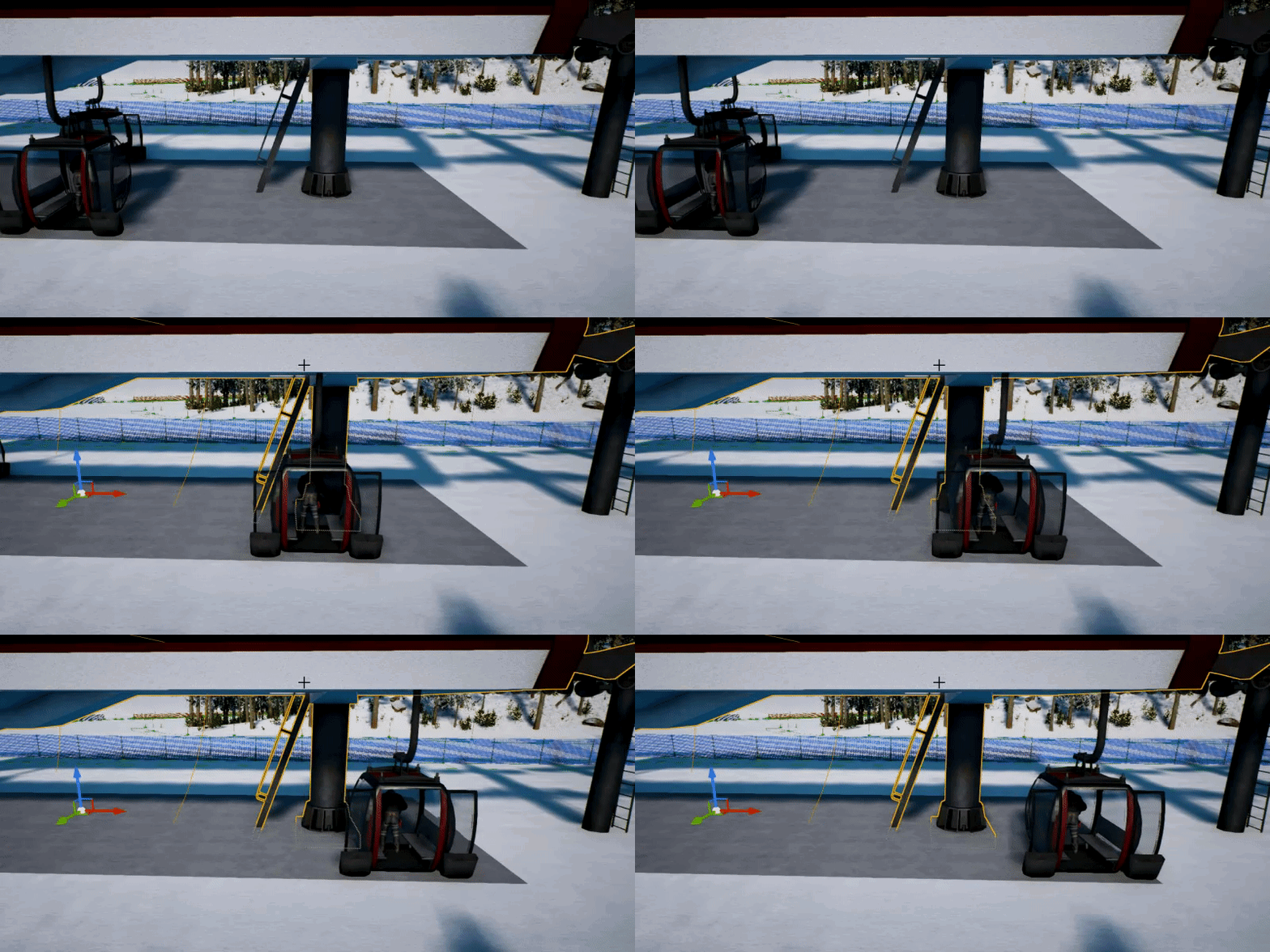
ok... another one... why is this collision not happening? if the gondola is not moving, no issues on collision
https://gyazo.com/0b5e3800e13f734f5344bca2f06a2309

same if gondola goes slowly... no issues
 safe rose
@latent moth check your collision settings
Specifically, if fast-paced, you may want to try enabling CCD
Otherwise, not knowing exactly how your logic/details are for your collisions, everyone's just going to be guessing
latent moth
Already enabled CCD... thanks anyway 😃
forest solstice
Hi anybody know why my character movement is off when running DEDI PIE, but not when DEDI Standalone or Listening PIE?
It feels like rubberbanding in Dedicated PIE
wary wave
I don't think that's new
 coral patio
Hey guys! I'm just doing an Art test for a company I want to work at and just want to render a chair on flat color but also with a shadow (about like the picture I rendered in Substance Painter but done in Unreal). However, I'm struggling with setting that up to work correctly. I'd need somebody to guide me via screen share :/ I'd highly appreciate any help!!
wary wave
it always happens when you select multiple meshes with different materials
coral patio
Is there a way to make an object invisible but other objects can still cast shadows on it? I managed to create a monochromatic background and would like to have a floor that's basically invisible but the chair should still be able to cast shadows on it. Or is there an easier way of doing this..? >__>
I really need some help here .__.
grave nebula
@coral patio No. Yes, but no.
 hidden aurora
@random heron My mind blew up when i saw the photos you posted, that is just amazing im speechless
 azure shore
hey so I was wondering, is it normal to hear a sort of popping in my headphones whilst playing in my ue4 project? the ambient sound in the background makes this popping
 random heron
thanks for the kind words ❤ @hidden aurora we just posted another weapon on our social media, I'll be placing them in #work-in-progress soon!
azure shore
oh, I dont hear it anywhere else, just ue4
would it be ok in standalone?
oh...
yeah I'll try that it just takes so long to load
kinda concerning how long map changes take too
feel like I need to do something about it but idk if I can
would it help?
oh yeah sorry I distracted myself I was still thinking of the sound thing
yeah I do use a lot of lights
but I think for my sorta themes its sorta necessary
oh, how do I do that?
oh, yeah thats another bad thing I'm doing, all my lights are dynamic because I find it generally looks better
when I set to stationary and rebuild lighting it messes it all up, then I have to change it slightly, then rebuild again, the whole process takes way too long
stupid question time; if you set a light back to static but dont rebuild, will it still sort of treat it as dynamic? because it doesnt make it look different until I rebuild
rotund scroll
probably yes
I think all lights are dynamic until you rebuild
then they get set to static
but as soon as you move them etc. they will be dynamic again
azure shore
yeah
quite a pain
one thing I also noticed is how with shadow quality set to low, lights actually go through walls
but I kinda need low shadows, considering my pc isnt exactly powerful
low shadows seem to be pretty helpful but yeah if you have a light literally inside an object it will still shine the area outside it
no I dont mean that
like any kind of solid object or wall, if a lights inside or behind or whatever, you can still see the light where you shouldnt be able to
with low shadows
rotund scroll
it's not low shadows
azure shore
so I actually have lights placed inside spotlights (spotlight meshes) and lamps and stuff, and when I set to cinematic shadows the whole room is pitch black
azure shore
wdym? low shadows is what makes light clip
azure shore
oh yeah, it is the builds sorry
rotund scroll
they have nothing to do with how light propagates through space
azure shore
dynamic unbuilt lights do it
well I'm kind of stuck here then
if I just want a lamp on a wall, I'd put the light inside that, with dynamic lights and low shadows this is fine, but then the light can be seen behind walls, but if I set to static and build, the whole room is black
its a real pain and I dont know any options here
rotund scroll
if you put light inside of something, the light can't propagate anywhere
hence why you get a black room
dynamic lights are less precise so they might still propagate
just move your light outside of the lamp bulb
azure shore
but, to where?
azure shore
the tiny gap between the bulb and lamp shade?
it seems either option has big problems
dynamic would be just about acceptable if it wasnt so costly for load times
rotund scroll
below the bulb obviously
azure shore
well, wouldnt there be a big bright patch on the wall that would look displaced?
rotund scroll
why don't you try it instead of theorycrafting
azure shore
yeah I am actually, it just takes so long to build that Im typing in between
another problem is I cant even run cinematic shadows, which means I have to playtest with low, then I get the wrong idea of how it all looks
rotund scroll
upgrade your pc then
rotund scroll
I don't know what kind of answer you expected?
azure shore
good point
urban gyro
Sentura, got a sec?
rotund scroll
what's up
urban gyro
nvm i think i figured it out
needed an idea for class hierarchy
im just trying to avoid a situation where i might have to refactor a lotta classes 😛
grim ore
line trace each tick -> see what you hit -> check and see if the actor it hits uses an interface that you create like CanInteractWith or something similar -> if it does then animate your cursor or whatever you want. Track during all of this what you last hit so when the cursor goes somewhere else (not the same as the last hit) you can shrink the cursor
urban gyro
just make sure to trace against collision channels and not visible or ull tank pretty quick
mellow turret
anyone know the difference between gameplay cue events "On Active", "while active", and "executed" ?
urban gyro
just a guess but its probably "when called" "while running" and "execution complete"
mellow turret
i guess i could test executed with a delay, let me see
azure shore
btw sentura this is the light underneath the bulb
I must have misunderstood you because the whole room is black still
 lilac cobalt
safe rose
lilac cobalt
safe rose
GIF?
otherwise, just make sure it's in the center of a folder
you should see a + sign
Not sure if there are some image file formats that UE4 doesn't take either
modern sinew
Does swimming mode do anything? because my code is going through the "set movement mode", but I can't tell any difference
It's getting to those print statements, but nothing is happening
grim ore
do you have any water volumes set up for them to try and swim in?
 steady owl
When you do a linetrace with complex collision, while it avoids simple collision in general, would it still hit the physics asset of a skeletal mesh vs the actual mesh itself?
I've seen most shooter games use hitboxes that are similar to physics asset collision, but still would have a complex trace other than that ( to shoot accurately around the world geo)
Or is there no such thing as complex collision for skeletal meshes by default (always uses the physics asset if per poly collision is false)?
safe rose
@azure shore https://wiki.unrealengine.com/LightingTroubleshootingGuide read this yet?
azure shore
no actually, thanks I'll have a look
well, there doesnt seem to be anything about why lighting builds would stick at 0
grim ore
did you allow/block the editor or lightmass from acessing the network?
Lightmass needs local network access to access the local machine at the minimum and if it's blocked by the firewall it can do that
radiant haven
hello
azure shore
nah the light building was working just fine a few minutes ago
now its just refusing
grim ore
😦
steady owl
Should a capsulecomponent for a character ever really need a Query and Physics collision object type? I'm trying to think of any situation where physics would be needed
Asking if Query only would be fine vs Query and Physics
azure shore
its safe to delete builtdata right?
grim ore
should be, I've never had an issue
grim ore
@plush yew I got to admit that is trippy, the wrapping output to input, but it works. I am sure there is a good reason why but really.... odd
intermediate in the folder? for a source/cpp project, yep
I am guessing the output node of the setter would always have to have a reference to that value, it's not just the result of the input being set, so that is why it would work. The add node gets the "default" input from the setter which is basically just the current value at the time of getting it before it's set which takes place right after in the flow lol
would make it hell on wheels for smoothly managing the zoom in and out but good info to learn
grim ore
try taking the output of your ADD, before you plug it into the set length, and use a clamp instead to clamp it between the values you want (min/max). it should clean it up
grim ore
nah I saw your stuff @azure shore , I just have no idea why 😦
does it build on a new blank map?
azure shore
idk, I'll try it
azure shore
ah ok, it worked on another map
grim ore
you can try deleting the old lightmaps but I doubt that is the issue (world settings in the map -> lightmass -> force no precomputed) checked then build
have you tried opening up the swarm agent that should be in the bottom right and seeing what it says?
azure shore
nah the thing you suggested didnt work mathew but how do I open swarm agent?
grim ore
swarm should be in your taskbar, orangeish icon, if it was loaded and trying to run
usually with the icons on the bottom right
azure shore
ah yeah, I see it
grim ore
@plush yew you should pretty much have the same numbers in both, the min and the max for your arm
I tested it here, works fine. I did 250 for min and 500 for max for both and no issues
azure shore
so is there anything useful in there?
grim ore
yep, you need the same numbers. the min is how low you want to zoom in and the max is how far out you want to zoom in. both clamps should be the same
@azure shore well the log should show any errors, or if it's running just really slowly
azure shore
I wouldnt know what Im looking for to be honest
grim ore
yep you put in a number and it makes sure it's in the min<->max range based on which side it is closest to
@azure shore well does it show that it is trying to connect and such? in the Log part of the Swarm Agent.
you can see a build of mine here on the default Third Person map https://i.imgur.com/Z4pIJ3u.png
azure shore
according to forums deleting Saved folder seems to fix it somehow
grim ore
it might but you will lose any custom configs like input
but I guess they might be thinking one of your configs is causing it so lol
azure shore
thats not as in actual game control inputs is it?
grim ore
its your input settings in the project settings, so yeah the Space Key = Jump mapping and such
grim ore
yes or just copy that folder out of there for backup, delete the original, see if it helps and if not put it back lol
azure shore
well, still nothing
800 something unbuilt objects, still it shouldnt stick on 0 for long right?
this is really frustrating me
and its just this one map
it was literally working just earlier
 spark sonnet
Whats the best way to get nearest pawn from player with blueprints?
 grave osprey
what is the white part of this reflection ? weird af
 devout flint
 magic ermine
Hi,
I am using UE4 4.21 and we are some lighting bug issues. Turn on dynamic lighting and add simple cube for black scene, next add point light above cube. Add two side material for cube. enable lit viewoprt and move the camera inside cube and we are some light inside cube. Please write me why? What I make wrong?
cloud eagle
hey everyone, is here anybody who can help and clarify smth...i'm lost a bit, i use4.22 version and it should use auto instancing but can anyone help me, will it work while i'm using different different bps with same meshes in it, or same bps (but with static meshes in it) ?
modern sinew
Anyone know why this isn't working? It's getting to the print statements when I want them to, but it's not changing the movement mode
although it's printing the print statements 3 times each, which is wierd
grim ore
do you have any swimming volumes set up to swim in?
modern sinew
Is that a specific object?
I assume from what your saying, that it is?
can't find it in Add Component
grim ore
It would be a physics volume
modern sinew
There's animation, Constraint, handle, and thruster, nothing called a "physics volume"
Currently I have two planes, a box collision, and a PostProcess thing
modern sinew
Well then how do I make it part of a Blueprint Class? I'm trying to make Water all one object
 dark depot
also unless you print t he enum of movement mode how are you knowing its not changing
dark depot
there might be a faster way but i just add my water bp and a physics volume then attach it by a public variable in the BP and use that to set its size
its a semi lazy way you could look into what physics volumes do and just recreate that
grim ore
I like that idea with linking the 2 together 😃 go go construction script
I wonder if you could somehow parent it
oh cool beans you can attach to actor 😃
grim ore
use the atach to actor node
modern sinew
In blueprints? Or?
 vague walrus
asynchronous stuff is sometimes making me angry
grim ore
its not clean but https://i.imgur.com/5nxlPkc.png in the construction script of a generic BP Actor lets it connect to the water volume I put in the level and then move it wherever. Can also resize it if you want using a public variable and blah blah magic
it's a little setup but it's "technically" one thing lol
modern sinew
Neat
vague walrus
sometime between 1 and 2 'Unit Target' dies, causing 3 to throw error that 'Unit Target' is undefined, because after dying Unit Target is set to null
modern sinew
Because I don’t like that the tutorial for water made it out of like 4 separate objects
grim ore
well it's kinda normal, volumes are part of the world and not really meant to be part of a blueprint as a component so shrug
dark depot
Red then experiment what we just said/showed is less then 4
modern sinew
Ok
dark depot
dev is always about playing around and coming up with solutions sometimes it needs a couple steps for things to work
modern sinew
Yeah I set it up as a blueprint class to put those other ones all in one
grim ore
@vague walrus use a validated getter then or a is valid check before using the variable?
modern sinew
I’m getting better at all this, just not great
vague walrus
@grim ore are there validated getters built-in or should I create my own?
grim ore
right click a getter and selected convert to validated get at the bottom
grim ore
yep it has to check to see if it's valid and return back yes or no
vague walrus
would have to change whole tree and I already added screens in thesis xP
hmm
but what if unit target is set to 0 between get node and set rotation node? :o
or is get and setactorrotation kind of 'bound' so they are executed at the same moment
grim ore
it should happen one after the other in the same frame yes
i think your problem is your unit is being destroyed on the way to the location so once it is destroyed before finishing your complete fires off and tries to rotate it?
vague walrus
It's not really destroyed, it's dead on the ground but it still exists. My units are constantly checking if their targets (Unit Target) bool isAlive is true, if not - Unit Target is set to 'unset'
because if they have target - they will (well, depending on unit class) attack it
and attacking a corpse is a sin :D
wish there was an event for variable value change with a possibility to break code execution in tick event, no matter where it is at the moment
hmm, wait a second
it shouldn't happen
look, code looks liek this: https://i.imgur.com/SqHLgrV.png
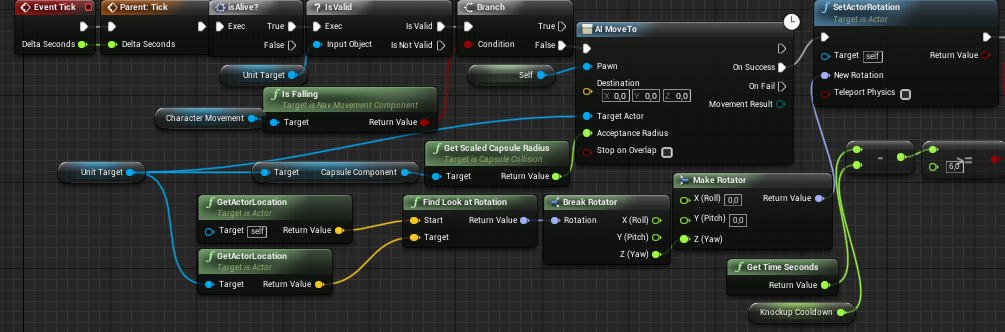
and parent tick looks like this: https://i.imgur.com/E4fwXYz.png



therefore, Unit Target is set to 0 before the rest of the code is done
so it should not pass through isValid at all, because it's 0
dark depot
that is why you have a isvalid
 untold osprey
hey some one tell me if these 2 bars are like different sizes or the same
vague walrus
@dark depot there is check for isValid
lapis bronze
@untold osprey greybar is 1 pixel longer
vague walrus
the bottom code goes in place of 'parent tick' of top one
untold osprey
@lapis bronze thanks
vague walrus
therefore Unit Target is set to 0 and then is checked if it's valid
dark depot
yeah but you were gettting the error because it then tried to rotate and wasnt valid
vague walrus
but it should not go to that node
untold osprey
this better?
dark depot
it shouldnt... the tick after
@untold osprey you can look at their size by clicking on them
just make it match
vague walrus
But i execute parent code before that code
untold osprey
oh
vague walrus
@dark depot does it mean that no matter where I put call to parent node it will be executed after child code?
dark depot
it should matter i would imagine i would have to play around to see whats happening to be honest
vague walrus
so there should not be error
unless ticks are going constantly, even if code is not yet finished
vague walrus
ok, then it can throw an error
wish I could break tick execution if if next tick I detect something xP
dark depot
just dont use tick
vague walrus
don't know other methods
vague walrus
that would make my code blocks even longer, they would not fit on screenshots
to prevent it i'd have to use tick to control end state machine
everything is baaad :C
I should have done it with pure c++, would be easier xd
hmm
dark depot
or just turn off tick when you know your getting rid of the object ref
vague walrus
@dark depot and if in code, after target dies, maybe i stop logic of ai?
rotund scroll
or use T I M E R S
vague walrus
not, that would work only for the one doing last hit, all surrounding ones will still get errors
haven't used them ever :(
and my deadlike is today so it's too late
dark depot
well read the docs
rotund scroll
they're really easy to set up
dark depot
well deal with errors then
rotund scroll
I mean it's a single node
vague walrus
if I deal with errors i don't have to read the docs :P
dark depot
just add a isvalid before the rotate
vague walrus
I turn up this project and I'm certainly done with UE :P
oh if that was only the one place where it can get errors
I have more classes :D
and 40 pages of descriptions with screenshots aready
vague walrus
promised to someone i won't end it when they are still alive :)
hard to keep that promise but i'm trying
will go a completely other way around
I will make player immortal, as of the point of this game is to demonstrate AIs, so there's no point of dying anyways. Boom, no target clearing, no errors. xP
plush yew
this server has limited slots you know?
there is a point in death, everyone will eventually become food. there is no foodchain, its all in a loop.
vague walrus
Okay, I'll quit the moment I finish working on this project, won't take precious slots
plush yew
in contrast to life death actually has meaning. I think that's better this way. Its just another obstacle in evolution to find your own meaning.
@vague walrus pls don't kill yourself
shit
shit
shit
whatamigonnado.txt
why is it easier to make people want to kill themselves than actually stay alive?
okay this is the wrong chat for such discussions
i am a complete beginner, does anyone recommend any good tutorials for visual scripting or just learning the engine in general that arent hours long
vague walrus
@weary basalt are you here?
brazen forum
guys what is the newest version of unreal tournament and where can I download the source project?
vague walrus
maybe @grim ore then. I have parent class with event On Component Overlap with some code in it. I created child class and wanted to check one condition and then call parent code. I've been told to that it's impossible and i should wrap parent code in a function, and then add check in child class, so I did, but apparently.. they are both executed. Both parent and child.
that's parent class
that's child class
I get both strings printed when going nearby child class object...
@weary basalt said it won't happen
 weary basalt
What?
 cerulean grail
Hello, I need help making a 6dof compass that will be held in VR. I have the cardinal working to where it always points north, but I'm having a lot of trouble getting the cardinals to stay on the compass itself when rotating. The problem is, whenever the compass is rotated and the z axis comes into play, the cardinals are set to stay at 0 z and this causes issues. I'm not sure how to lock it down to the compass but still find north.
plush yew
Get the projection of 'north' on the plane perpendicular to the compass local z axis
Project Vector on to Plane
cerulean grail
okay thanks ill see if i can give this a try.
okay sorry ive never done this before I can't figure out exactly how to do it
blissful trail
does anyone know a good tutorial how to create online multiplayer ?
cerulean grail
so im completely unsure how Im supposed to take the projection on the plane and turn that into a z rotator for the child component
 robust hearth
amyone wanna make a game with me i know some c++ and i can put 4 days a week of dedacation
full days
dm me if so
near trout
Anyone have any ideas as to why my imported animations are failing to show at all, even though the mesh itself is fine? Here is a single-frame animation with no movement on the mesh, it seems to show up fine:
and then I try to view an animation that actually has bone movement, and nothing shows at all.
dark depot
are you using blender i know that has some bone scaling issues if you dont rename the armature
near trout
I am, and I made sure to rename the armature
dark depot
im going to imagine its there but 100 times smaller
i think there are some other steps also
near trout
I exported a few dozen times with a million combinations of settings, and I actually can't find it at all in the previewer
its not translated off somewhere, so if it is there, it's literally to small to be rendered
modern sinew
@grim ore I can't find the construction script for it, how?
 upper wasp
Anybody know how to fix this runtime error I'm getting? Blueprint Runtime Error: "Accessed None trying to read property
modern sinew
I'm having that same problem ¯_(ツ)_/¯
upper wasp
Glad to hear I'm not the only one
misty creek
Check to see if it is valid before you call it
dark depot
look up is valid
modern sinew
blissful trail
how do i get online multiplayer working ?
modern sinew
That's my error
modern sinew
but of course it will be null if I'm not looking at anything
dark depot
so
and that is what its telling you
it cant do things to nothing
so Isvalid will stop it from continuing
modern sinew
well the branch only goes forward if it has a certain tag
misty creek
If it is NULL it can't reference Thirdperson
modern sinew
so shouldn't that stop it
dark depot
nope
modern sinew
the branch after the line trace
dark depot
so its the Bool for the branch or another variable you are asking for there
from there you can figure it out
play around learn
dark depot
yeah its because you are using actor has tag but if there is no actor it cant test that
robust hearth
anyone wanna make a game with me i know some c++ and i can put 4 days a week of dedacation
full days
dm me if so
dark depot
Purple you can posted this already no need to spam also #looking-for-talent is where most people are going to direct you to
upper wasp
Can somebody talk with me in PM with IsValid please
dark depot
no need to PM what do you neeed to know
^just walked him into how to fix it should be the same for you
upper wasp
Okay it's reading accessed none trying to read property widget
vague walrus
is it possible to check if pawn can generate a path to a location in event graph?
dark depot
Thunder then click on it and then add a isvalid
vague walrus
i want to pause logic if player is in place without reach
upper wasp
I have added an isvalid
dark depot
did it work?
upper wasp
It still persists.