#ue4-general
1 messages · Page 446 of 1
 cerulean sorrel
also is walking/running one state
this part you made is confusing too
oh now igored real nice
😩 😩 😩
no really hello
where you go
@abstract marten
 hallow sleet
i just debug my thruster controls and they are working however the thrusters are not, as far as i can tell i have everything setup correctly but they will not activate
hallow sleet
cerulean sorrel
thats it?
 misty creek
What is your roll strength set to?
hallow sleet
10,000
hallow sleet
yes
cerulean sorrel
the string
misty creek
So is the problem the activation nodes or the set strength nodes?
cerulean sorrel
it is?
hallow sleet
it prints but no movement
misty creek
None of those nodes will add movement
cerulean sorrel
um yeah i don't see any movent nodes
like to moove nodes
did you thnk activate was it?
@hallow sleet
misty creek
Does it move in the tutorial?
hallow sleet
yes
misty creek
What are the thrusters?
hallow sleet
\
cerulean sorrel
or bp
hallow sleet
yes
misty creek
Can you give me a link to the tutorial?
hallow sleet
i have also set the input under project settings
misty creek
I'll see if I can find your problem
hallow sleet

Today we create the core concepts of a space flight physics simulator: Pitch, roll, yaw and thrust with a readout HUD and engines that glow based on speed.
misty creek
Thanks, give me just a couple minutes
hallow sleet
only tutorials i can find are old
hallow sleet
i would follow something newer if there was something newer but i havent found anything
hallow sleet
the camera part works fine
cerulean sorrel
ok..
hallow sleet
how do i do that?
misty creek
Just write a big number into the set thrust strength node
hallow sleet
thats greyed out
hallow sleet
kinda works
had to increase it to 50000
to see it do anything
and only one key works
misty creek
Did you set up the gravity and linear damping like in the tutorial?
hallow sleet
yup
okay i redid everything like before but i increased it to 100000
and it is moving though slowly
hallow sleet
would the setting under physics call mass have anything to do with it?
it shows 21335.7988281
misty creek
😄
hallow sleet
changed it to 100 and i went into a death spin
misty creek
That's the way you learn
misty creek
No problem. 😃 Glad to help when I can
hallow sleet
i can make a small vr game in unity but this is like greek or something
 honest rune
you're getting a taste of what a AAA engine actually looks like 😉
hallow sleet
i can believe it
misty creek
Don't worry. XD It gets easier
 low trail
Hey guys
noob question: how can i create this:
in PS?, i made it manually but it didnt work properly in ue4 (its a tutorial for making ripples)

Buy the ue4 source project for $5 usd : https://gum.co/TTNhW Steps : -create translucent material using a ring texture -create a particle system with a mesh ...
 plush yew
so for LODs is there a way to make an Asset dissapear? like if its a certain distance it shouldnt be rendering the Asset. Do you just set the last LOD to like an empty model? or is there a better or official way of making an asset de-render at a certain distance? (other then level streaming, and world compsition level loading)
 blissful willow
Is there a reason why the lights around my doorway here are blue? I have a reflection capture that reaches the door that seems to be casting the blue onto it, but shouldn't the yellow from the smaller lights be overriding that? The reflection capture there is quite small, so I figured it'd have a higher importance than the big ones.
 wintry epoch
 raw elk
Hello! New here. I am having a major issue with ray traced translucency. It seems to break any particles I have that use the additive shader (fire, embers etc) or have translucent materials (like water drops/rain/ etc)
Any ideas? Or is this just a compromise made with RTT?
 dark depot
@raw elk the RT docs page has what it supports https://docs.unrealengine.com/en-us/Engine/Rendering/RayTracing
 severe ibex
@raw elk you got Visual Studio installed? if so I had an issue with an older version of 2017 that needed to be updated and then the C++ worked fine.
raw elk
@wintry epoch ^^^
severe ibex
Ah sorry, replied to the wrong guy 😛
 hollow pasture
hey guys, i have very weird problem
i generated something like a chessboard and then generated some pawns on it
clicking a pawn should move it forward by an amount
the grey and the blue/red spheres are the same object, only the grey is put there beforehand while the blue/red are generated by pressing a button
the problem is: the grey spheres respond to my clicks and move forward, but the blue/red ones don't
and i have no idea how or why this can be the case
 oblique coyote
@hollow pasture do they respond to click events?
hollow pasture
yes
and the move nove fires off as well
this is the blueprint
move to fires off for blue/red ones too, as it does print out the location they are supposed to go
i tested it and it's not a weird material bug either
same happens if i copy the BP into to the pawn and link it to an On Clicked node
Every Tick -> Move Forward gets the same result: grey pawns work, identical but generated blue/red pawns don't
force and velocity move the pawns fine if simulate physics is turned on, so they can be moved
oblique coyote
@hollow pasture any specific reason why you use ai moment and not just add location?
anything different from the pawns?
hollow pasture
it's a prototype and i want to latter add special actions that certain pawns can take, i felt like a simple ai would be good for this
oblique coyote
hmm what differs from ai to ai?
hollow pasture
i only use the default ai, nothing else, if that's what you're asking
(also the ai uses pathfinding, which will be useful when i put obstacles on the map or when they need to go around another pawn, but i'm open to other ideas)
(i'm still learning ue4)
is it maybe possible that somehow the AI isn't assigned to the newly generated pawns?
cause i'm starting to think that's the case
oblique coyote
did you child that actor from the other one?
hollow pasture
no, it's literally the same actor, only i put the grey ones in before starting the project, while the red/blue ones are generated with a for loop and then assigned a material
oblique coyote
i have to speculate because what you provide isnt much info xD
plush yew
does the engine compile with vs2019 yet? I tried the master branch right after 4.22 release but it wouldn't even generate projects without vs2017
hollow pasture
this is how i make the blue/red ones
i'll answer any question that might be relevant
oblique coyote
Hmmmm
severe ibex
@plush yew 4.22 supports Visual Studion 2019 but I had an issue with a bad release version of 2017 that required an upgrade.
update*
plush yew
I am also using it with 4.22 launcher build, I'm asking if it is possible to compile the engine with it
I looked at the github, but the commits are a mess ever since they moved on to the branches
oblique coyote
@plush yew im using 2019 without a issue
plush yew
so If I download the source from github I can compile the thing without 2017?
severe ibex
no idea, I never want to have to compile the engine, I'm almost done with learning another skill]
 wary wave
4.22 needs 2017
plush yew
what about the master branch?
wary wave
you don't want that
but that will also require 2017
(why wouldn't it, if 4.22 does?)
plush yew
they've forked from 4.22 about a month ago?
dont they usually completely switch to the new vs studio after a version or two
anyway, I wanted to compile master branch if it was possible, but I suppose I'll wait until I get back to my 2017 pc
thanks!
wary wave
I don't get it - what's stopping you from installing 2017, and why would you ever want the master branch?
plush yew
because I can't install it because I don't own the work pc?
I compile master branch sometimes to test new things
it doesn't always work sure, but it works more often than not
I would've went for the promoted branch, but that hasn't been updated since february
wary wave
fair enough
 tough kayak
How can I highlight a area on the ground for a spell or something like that for when the player holds X the area in front of them gets highlighted
( I don’t know if this is the channel to ask but I am guessing so )
 graceful sky
Possibly by using a decal?
 dim merlin
Hi, anyone knows any tutorial for how to use animation graph to point a hand of character to certain positon?
 surreal tundra
hey, im trying to export a couple static meshes that have animated position and rotation from cinema 4d to ue4 and i'm not getting it to work. anyone have any leads?
ive tried to bake the animation and export it through alembic but the animation and the parts of the mesh are in wrong position/the animation is a bit scrambled up in terms of position
 worthy ether
Has anyone here had an issue with the Curve Editor not working for Camera Animations? It worked for us in 4.21 but after switching to 4.22 the Curve Editor window is just pure black
 dim arch
is there some way to send console commands to a dedicated server
by that, I mean using the dedicated executable
all I can think is some kind of UDP listener which then runs it as a console command
severe ibex
@surreal tundra Are you exporting as FBX, I've seen that carry over animations to UE4
from 3ds Max though, so can't say for C4D
surreal tundra
I tried fbx but I didn't work for some reason
Alembic works but the position of the different parts of the mesh is scrambled and the animation is wrong timing
surreal tundra
Yes, did that!
Video from Philip
Video from Philip
Going from this to that
Baked or unbaked it doesn't make a difference
The mesh consists of all seperate parts
severe ibex
flipped geometry?
 regal mulch
@surreal tundra Any reason you can't use "ShareX" or similar for screenshots?
severe ibex
sorry, I'm not sure, I think you need to check the pivots in C4D, but I'm only working with 3Ds Max ideas here
it looks like one part is animating flipped so I'd assume that's related to pivot points, the x or y pointing the other way and UE4 is assuming otherwise
surreal tundra
hmm okay
surreal tundra
when i import it with fbx it seems to work aswell but the mesh is split into every single part
severe ibex
is that a positive step forwards?
I've honestly done little more than see if FBX animation carried through on something and saw that it did but never made use of it. though I know it worked and understand that pivot points and FBX can be a big deal as it sets any objects pivot point to 0,0,0 in max, perhaps the same in C4D
surreal tundra
hmm, well its difficult since they are all seperate parts
severe ibex
it might work if you attach it all in C4D and animate the vertexes but then that might be a whole other bag o fish
surreal tundra
haha
now i managed to get it all in
with animation
but since they arent attached it just explodes

 shell compass
Well this is kinda infuriating... I have an action mapping that I need to fire whenever I press either Esc, Tab or Thumb Mouse Button in a menu. But... It just refuses to fire on Esc and Thumb MB while the menu is visible.
And I have nothing else that listens to Esc or so specifically that overrides it
It's like UMG is hardcoded to ignore or do something else with Esc? I don't get it.
Tab works just fine in the same action mapping
severe ibex
@surreal tundra gravity and or collisions?
@shell compass is consume input enabled on the nodes for Esc, Tab etc?
shell compass
@severe ibex No, it's just a single action mapping with Esc, Tab and MB4 set up in input settings
Then I've bound the actions in C++, and from there broadcast out on a delegate, and the menu listens to that delegate and should close whenever it receives that signal
and it does... but only for Tab
 ruby folio
Dumb question time.
What is UE's material editor missing that Substance Designer can do?
shell compass
bake to textures? 😛
 grave nebula
Technically nothing.
 cloud cobalt
Not much at all really since you can do a crazy material graph and bake it in UE4
Substance just has a nice toolset
(UE4 does have material baking if you're ready to add some automation)
severe ibex
@shell compass I might not be much help then sadly
surreal tundra
anyone willing to help me get a c4d animation to ue4 for some money? have been struggling with this long enough that i'd be happy to pay whoever thinks they can do it!
severe ibex
years of using Max and Vray, it hurts to do maths inside a material in UE4
@surreal tundra just stick around here, someone will have a fix, or any Facebook C4D places?
shell compass
No worries. I'm just venting. Jumped into a rabbit hole full of UE4 bugs and oddities 2 weeks ago just because UE4 wouldn't let me navigate set up so I could navigate UMGs with WSAD, and it's getting kinda frustrating that every time I make a breakthrough, I encounter a slew of new bugs and oddities that I have to solve
It's like a bug avalanche
surreal tundra
@severe ibex haha okay, lets hope
shell compass
I just want to implement actual game stuff, not spend weeks implementing a functional main menu and loading screens and such -_-
severe ibex
@surreal tundra I've had problems that I've worked on for a good few days and some kind soul gives a solution.
so you need gravity or collisions in your UE4 scene? I think the FBX is working but it often automatically generates colissions when you import and that'd explain the exploding
surreal tundra
hmm okay, im just thinking if the animation will still work even though its connected to nothing
severe ibex
can only try
ruby folio
@shell compass Do that then
shell compass
No, I want to have this done and saved away so I can re-use it in later projects
regal mulch
Input with UMG usually depends on the InputMode. If you have UI Only, you are fully in UMGs input path.
Now UMG has some base navigation buttons it uses, which will consume any OnKeyDown event.
However you can usually utilize OnPreviewKeyDown to catch them @shell compass
Not sure if these infos help you
cloud cobalt
I'm very happy with my seamless mouse keyboard / gamepad menu system. I'll probably open-source it at some point
shell compass
Oh yeah, I switched to UI and Game when activating the menu. Thought it would be needed for clicking on things, but maybe I should just use Game Only. I'll try that.
@cloud cobalt If you got it working, you should be proud indeed. I have newfound respect for good game menus now. I thought making menus wouldn't be a big deal, but there's such a huge amount of edge cases that one has to account for.
@plush yew why don't you update to 2019?
 frosty bloom
Read the line above that.
severe ibex
Oh i do not like unwrapping photogrammetry assets
 spark sonnet
is there a way to not make the projectile destruct when hitting something?
severe ibex
checked the BP? there might well be a node destroying the projectile
spark sonnet
its something with projectile movement but I cant find a way to turn that off
 tribal pebble
does anyone know how to work with html5?
 ashen cape
Quick question, I would like to add background sound that will be continuous on all levels + looping, how can I do it?
cloud cobalt
Don't need any language
It's pretty trivial
Add a sound component to every level, or add it to the player controller once
ashen cape
Blueprint
shell compass
@cloud cobalt for your menu system, did you override UE4s UMG input and navigation or did you make your own by scratch?
ashen cape
I couldn´t find a tutorial on how to have 1 song that after launching the game it will play nonstop until you quit the game
shell compass
@ashen cape add a sound component to your player controller blueprint
cloud cobalt
@shell compass I don't use UMG, I use Slate. And yes I did all of it from scratch except the navigation helper
shell compass
Ah alright
ashen cape
@plush yew I saw it, it is not what I need
spark sonnet
nvm found out. Just had to turn off Simulation Enabled in the projectile movement
ashen cape
I have endless runner and I want to have same song in all levels
so it should continue where it ended in previous level
I dont want it to stop
It resets the wave
shell compass
@cloud cobalt oh damn, Helium Rain is your game? It has some sweet menus!
cloud cobalt
Previous game, yeah, the next one will be actually usable with a gamepad
severe ibex
Helium Rain perform well? I've always wondered how well single game devs work or survive. it's very admirable
plush yew
Feels to me like if you want to be indie you have to choose 2 out of 3 of social life, income and working on your game
shell compass
How do I get the income and social life combo?
severe ibex
I don't really need the social life, just the ability haha
plush yew
okay guys does anyone know anything about landscape materials, basically I have 3 landscape layers, I have an integer and on level load if the integer is in a certain range I want to set one of the layers based on this, I only want 3 states for the entire material and 2 of these could be a simple on/off of my third layer (ice)
I worked out how to use dynamic material instance and access this for each landscape component on begin play, but I don't know how I can use parameters to toggle the individual layer
If I can access the weights I have painted on to the landscape, I could do something like (if layer 3 not present choose strongest out of layer 1 and 2)
The idea is winter is approaching and the landscape is more icy towards the end of the game
severe ibex
it's edit material parameter or something?
plush yew
yes I know, for a normal material I can easily toggle settings at runtime, but I don't know how to do it in conjuction with the landscape layer blend node
 grim ore
use an if with a parameter and feed in what you want it your parameter is 1 and nothing if not, or use a lerp and feed in your parameter of 0 for one value and 1 for the other or use a static switch parameter node or uhm...
one of those should work lol
severe ibex
^trust this guy^ I'd just be spinning around with you
grim ore
oh I am horrible at art and materials but if you just want to toggle stuff on and off one of those methods should work lol
 midnight bolt
saving materials takes a long time, about 30 seconds, no matter the world size, and it's as simple as diffuse/normal/specular. via google i see it's a pretty common issue, but i haven't been able to find a solution. everything else works smoothly. any ideas?
midnight bolt
i see. well it's just really slowing me down.
severe ibex
honestly not sure, an Epic person here might help if they're on or see
plush yew
cheers its just hard to test because compile shaders is 10 mins every time I change the material lol
 spare sun
I feel you
 vale silo
Has anyone figured out how to export static mesh (or skeletal mesh) with LODs from Blender 2.8 into UE4 in a single FBX file? (so that when you import FBX, you get static mesh with LODs automatically)
 kindred viper
I have not, but then don't we do LODs in engine now?
 abstract relic
The auto generated lod is nice but you always want to have custom LODs when you can afford the time
In blender you had to have a script to export LODs in one file. LOD tags never worked for me. Not sure if you need to do it in 2.8 but give it a try https://m.youtube.com/watch?v=GpoFagTcmOI
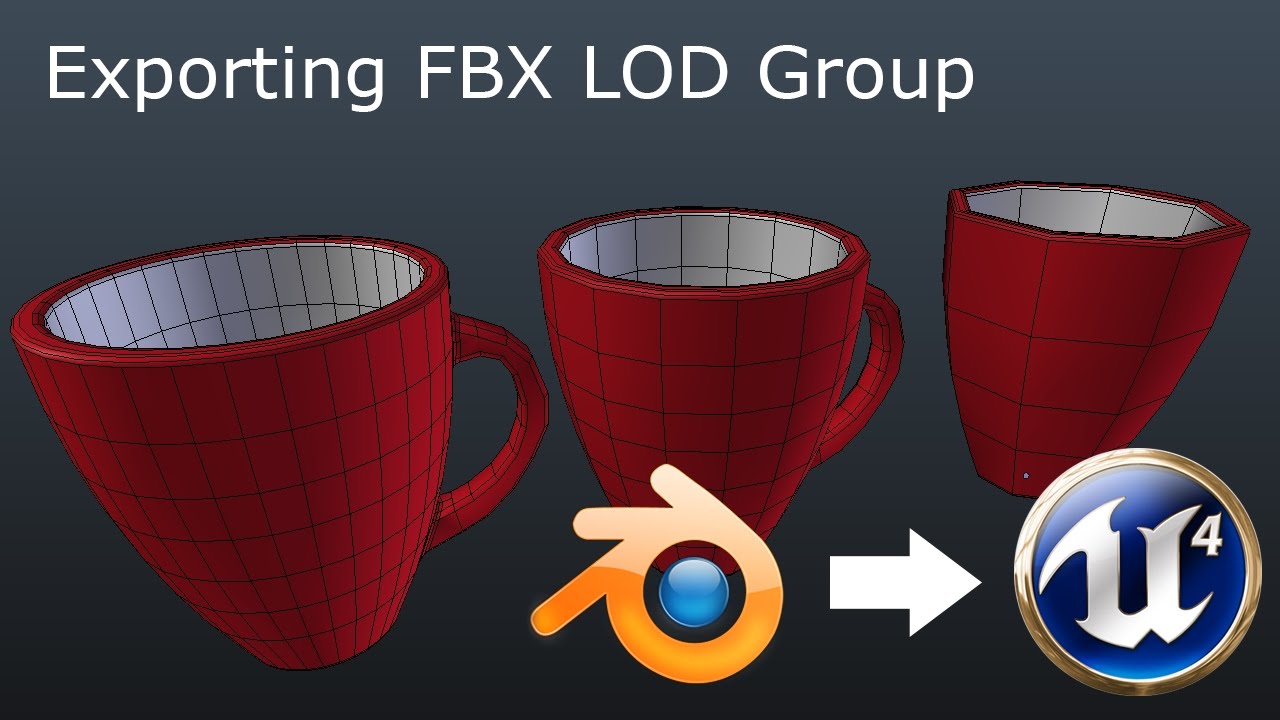
Here is solution for exporting multiple LOD objects in one FBX for Unreal Engine 4. It requires some fbx script modification which you can see at the end of ...
 pseudo swift
any idea why my rig is diplaying like this in ue?
movement is fine except arms are bent
like hell possess it
abstract relic
Wow that is a lot of bones
pseudo swift
its not my bones, i have to use that rig
its from a game
i tried with fewer, same issue
any ideas?
too little geometry for the bones to deform?
 fringe pivot
Is there a way to permanently disable "real time" in viewport editor when it's not playing.
It's supposed to have no effect however it uses the CPU all the time, I can clearly hear the difference in the fan speed when I turn off real time
 vast fossil
has anyone else have this
fullscreen mode and windowed mode have different speeds ?
like windowed mode, the gravity feels slow while in fullscreen mode its fine
vale silo
thanks @abstract relic I'll check it out
plush yew
Is it considered bad practice to play music form the game instance? I want my background music to keep playing when switching main menu level to my game level
 sudden agate
yes because it wont work
cloud cobalt
Curious as to what's the accepted practice on this.
kindred viper
seperate thread for the audio to async with the loading I guess. Unless the new loading system does anything different
 brisk pebble
I have a question, what impact does blueprints have on performance?`
and would it be worth it to do it in C++?
kindred viper
minimal. There are good practices to replace BP with C++, or use C++ in the first place, but its all relevant to the project requirements
eg. I would feel bad doing some maths in blueprint if it was moderately complex. Especially when im only a Blueprint Function LIbrary away from getting it usable as a function in Blueprints anyway
plush yew
Okay so I got to the stage where I can swap out materials at runtime but when my 'ice visibility' parameter is 0 rather than only the 2 others layers being visible everything is black. Bonus if I can also set my 'ice visibility' parameter to 0.5 and get a small amount of iciness
also guess shouldnt multiply roughness by 0 or color
 subtle arch
Hey guys, how can i connect those 2 values to the material color?, I tried with some nodes but nothing seems to work so far
 paper kernel
with any math function that takes 2 in and 1 out
depending case-to-case, usually add and multiply
midnight bolt
what is the command for materials, like for decals, to be drew on top ?
plush yew
hi, im trying to make a sand worm, thats inside the sand, and when he senses the player in a certain area it jumps. Does anyone know a good tutorial for this kind of things?
raw elk
So, I am having a bit of an issue with FBX imports. I have over 10,000 meshes in FBX format. A whole lot of them share textures/materials, which is fine. The materials are all named the same. But when importing FBX, no matter what setting I have for the FBX import, it always creates duplicate materials.
I noticed this issue doesn't occur with OBJ, however UE4 doesn't import the mtl file, so with OBJ it simply creates a material with the base color map
grim ore
that is pretty much just going to happen. the editor doesnt know that these separate FBX files all share textures. you can import them without materials and then hook them up
raw elk
It wouldn't be an issue if there was a way to merge duplicate materials :\ but when it creates like 500,000+ materials .....
eeep
crap... might just be easier to import as OBJ, then tack on the normals and such to the materials later
at least OBJ doesn't create mat dupes
damn
abstract relic
In the import window, toggle off import material and texture
 noble marsh
what im doing wrong???
raw elk
@abstract relic I'd have to create thousands of materials by hand that way and hook em up. It'll be easier just to convert them to OBJ. It may not import the normals and such that way, but at least I wont have to create thousands of materials, I'll just have to hook up normals and such to thousands of materials xD
spark sonnet
Hey. I have some blueprints that I want to use on all levels and now im putting it in the level bp but I was wondering if there are any other ways to get it on all levels without having to put them in each level bp?
abstract relic
That wouldn't work. You can't import material logic. Just the mat ID
All import material function does is create an empty material and assigns itself to the mesh
raw elk
No, what i mean is. When I import as OBJ w/ mats and textures, it creates the materials and imports their base color maps, but does not create duplicate materials. This is fine, it's just OBJ doesn't import the MTL file, so it doesn't bother importing the normal textures, roughness textures etc
grim ore
@spark sonnet you would create a normal Blueprint and re use it. a blueprint actor might be a good idea for this as you could re use it between levels by putting it into the level.
spark sonnet
The blueprint is used to possess two different characters so would that work if i put it in an actor?
grim ore
is there any reason it would not?
a blueprint actor is a blueprint that can exist in your world, what you do with it is up to you
your level blueprint is a blueprint specific to that level, what you do with it is up to you
grim ore
about the only big difference when setting them up is you can't just add a variable into your blueprint actor from the world like you can with a level blueprint. You would have to either get the items you want at runtime and save them as variables (your characters), or create variables that are public that you can assign in your actor BP.
spark sonnet
Thought it didnt work but I just had to enable input for it. Thanks Mathew!
subtle arch
@paper kernel they don`t work. It says [SM5] (Node Add) Arithmetic between types float2 and float3 are undefined
I tried with multiply, add, lerp,divide
grim ore
you have 2 different sets of numbers so you need to remove 1 value from the float3 or add 1 to the float2 so you can do math on them
subtle arch
Thats why im trying to do
grim ore
ok, what is the lerp outputting?
subtle arch
grim ore
ok so that looks like a float3, your MF_Ripple is only outputting a float2 then?
subtle arch
this is the function
grim ore
what are you trying to accomplish?
subtle arch
I want my water to have the ripple effect, but "base color" only allow me to have 1 connected, the color or the effect
grim ore
gotcha, and the Add of that material function and the lerp gives the error?
subtle arch
when i connect them to a "add,multiply,etc"
by default the engine only allow me to have 1 connected
grim ore
yes that is the way it works, the material node takes in 1 item and you set up how that item is before
now I am not saying this is right but if you take the output of your MF_Ripple (float2), plug it into an append node, you will now have a float 3 out of the append node
subtle arch
there`s anything i can do? because the 2 things works fine individually
ok let me try it
it went black, but the node didn`t send me any error 😄
i have something to work on now, thank you man
grim ore
I tested it and it does work, it's just .... really really weird looking so it might not be what you are expecting
subtle arch
ya, in my case the material went completly black
grim ore
did you plug the append output into your add or whatever and then the add or whatever into the base color?
all the append does is take the float 2 (R,G) and add on another channel to make it float 3 (R,G,B)
subtle arch
grim ore
that was not quite what I meant lol. you would use an append with the MF_Ripple in A and something like a 1 constant into B. the output of Append would now be a float 3 and you could then Add/multiply/whatever you wanted to do with the output of the lerp which is also a float 3.
grim ore
yay
plush yew
can anyone help I can't work out a way to mask a single landscape layer on begin play. I can change the material alright but it just goes black. Bonus if I can instead change the layer to something custom
maybe material function
grim ore
lol.... installed latest source build and compiled it and it refuses to start because datasmith is not found.... boooourns
it tells me to disable the plugin for the project when I just try and run the editor itself... that's... not right
severe ibex
this Datasmith is really not the alpha and omega they make it out to be
kindred viper
So these two nodes on the left exist in the StandardMacros. So why doesn't the one on the right?
grim ore
because no one at epic wanted to make it?
kindred viper
I guess. its a pretty easy add tho
grim ore
figure out where it's at in the code and add it and make a pull request 😃
kindred viper
Its in the StandardMacros blueprint. Perhaps there is a reason though. I can't see why it would be left out other than oversight but for this long?
 polar hawk
Oh I'm sure there are even more trivial things missing you'd be surprised about
grim ore
this is weird.. I compiled the engine from source, created a new BP third person project, told it to package and now it appears to be compiling missing modules during packaging. I really don't remember it doing this before or am I just confused?
apparently UnrealPak was not compiled with the engine so it compiled it, and it's working on something else now. Maybe I just never actually packaged a source engine project before lol
 azure shore
can you suddenly not import transparent image files to ue4.22/23?
Im sure you could before
grim ore
that would be odd, have an example file?
azure shore
just this
(weird recycling logo thing ik)
in ue4 it has a black background
and this is a png
weird, if I create a sprite from it, thats transparent
grim ore
maybe they changed the default import type
plush yew
is it a black background if you open it in ue4?
I know my transparent pngs always import looking black but when I open them I see the transparency
grim ore
well I drag/dropped it into 4.23(master) and it worked fine in the material editor, no changes 😦 https://i.imgur.com/cM65NwY.png
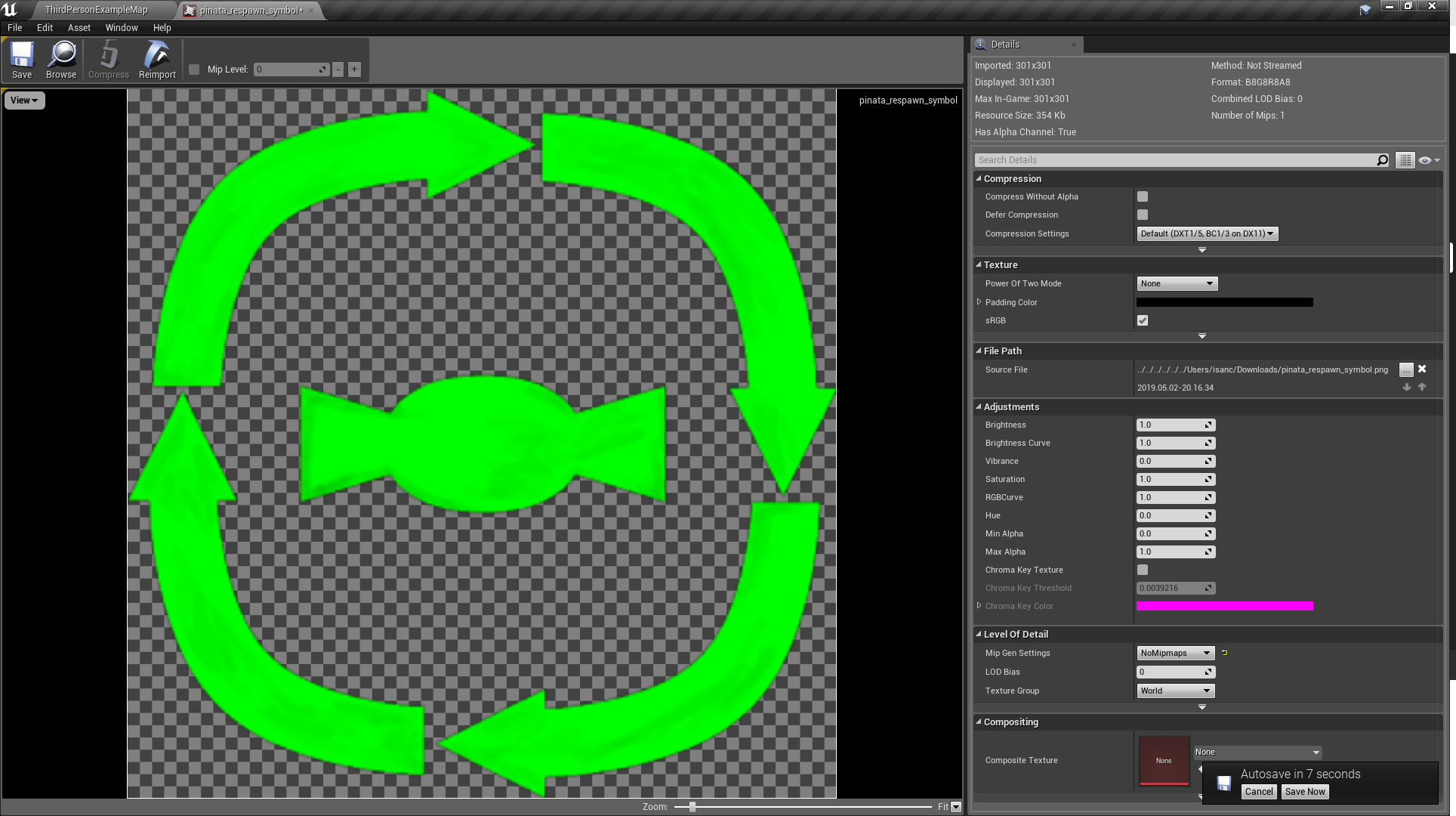 grim ore
working as expected here https://i.imgur.com/m8SKjve.png
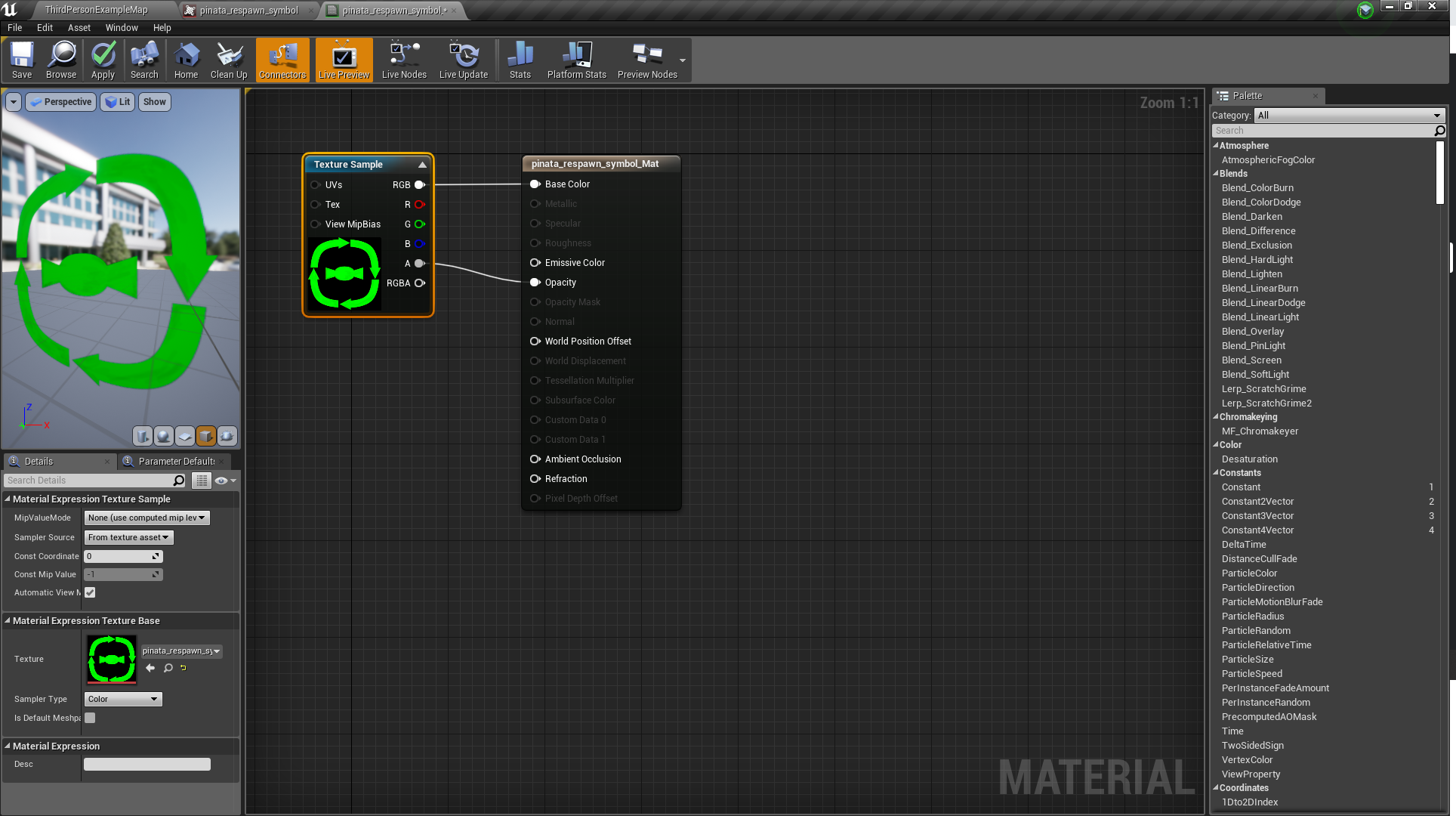 azure shore
wait what??? lol so weird
grim ore
i changed the material type to transparent from opaque but that's required of course
plush yew
I give up with this landscape stuff and will just try and overlay a noise texture of snow
azure shore
well whoops, Im a F00L
 minor rivet
Yo guys, so halfway through creating an FPS style game, I changed my mind to create a melee based game - and for those, FPS doesnt really work. So I went ahead and imported the Paragon GreyStone blueprint to my project and made some modifications and so on for him. Is it possible for me to add him as a player start to the game, and if so, how?
Like just dragging him on to my level and playing play desperately wont and doesnt help, obviously. I just want to make him a plyable character
abstract relic
Project settings >>> maps and mode
 broken stream
i need some small help on a BP i have
m gething the world location of the target
but will need to get a reverse of some type
when i click the button again

so the meters goes back to 0
frosty bloom
A bool saying "Forward?" should do, if true, add, if false (it's on it's way back) subtract
Could switch the boolean value when pressing that button with linetrace
broken stream
how do i make a subtract of that bp
frosty bloom
"addDistance" should be "EvaluateDistance" and before you set total distance travel just insert a Branch with the above suggestion connected
Then you'd simply do float - float to get the subtract node
Or just copy paste all the logic you currently have on your branch under FALSE and put it under TRUE with a subtract node instead of an add node.
grim ore
https://venturebeat.com/2019/05/02/microsofts-hololens-2-for-developers-will-get-unreal-engine-4-support-in-may/ time to try and find some money in the couch to get a dev kit lol
there is a data usage option in the editor settings, you can disable it
 zenith flower
After what happened with UWP and hololense 1?
I bought a brand new xbox one x, just to find out UWP support is broken since like 4.16
Its fine, I was just wondering what it was
grim ore
isn't it just really really old for the UWP public branch
zenith flower
yea, but the silently dropping support for it is bull
grim ore
I just got an X as well and was going to check it out but I think all the good stuff is hidden from us n00bs. There is UWP support for a newer branch out there but 😦
zenith flower
None of it works, and I believe that none of it EVER worked on the one x
grim ore
Operencia just launched and it supports UWP and Xbox One and was created in UE4
zenith flower
as the x came out after
grim ore
ah that makes sense, I didn't think about the X coming out after
 manic pawn
that's just editor analytics, it tells epic which features people use
zenith flower
What version are they running though
manic pawn
it has been throwing errors more often recently
grim ore
I think for the normal free devs we don't have any luck using UE4 out of the box, you need an official dev kit with SDK support
zenith flower
No
thats not what they were pitching with UWP
microsoft even increased the allowed ram with UWP later
grim ore
I know that and you know that but Epic does not know that
zenith flower
its epic that left it

Ars Technica
UWP first step towards "locking down the consumer PC ecosystem," says Tim Sweeney.
They never liked it in the first place
grim ore
I know which is why MS had that UWP branch but then that stopped getting updates
but all I know for sure is there is a current UE4 game on the xbox one and MS store ecosystem
actually more than one, crackdown 3 as well
hell Sea of Thieves is UE4 isnt it as well and it just launched a new version
zenith flower
Well, whoever they are, im sure they used the initial branch and ran with it and never gave back to the community
grim ore
I dunno, I bet there is normal SDK integration for official devs
zenith flower
apparently 4.19.2 is supported
I'm not talking about the SDK
with UWP you could just sign up for the creators program, and you were set.
I could test out my game on my xbox x
I spent 3 weeks trying to get it to work
broken stream
no i did not get it to work
zenith flower
Another guy, updated it to 4.20, but admitted they were using the XDK
 plush stone
Why are the VR plugins always on by default? Last jam everyone's submission launched my VR headset despite the game having nothing to do with VR
grim ore
because bacon is tasty?
it's probably easier to deal with the small amount of people who have that issue than the larger amount who would try and use UE4 and have VR disabled by default and be confused 😦
graceful sky
Would also not make sense to use the config from the previous version of the engine 🙄
plush stone
quick question, in the first person template when you start the game you auto possess the character that is already in the map, yet when I make my own character and set the gamemode to use my blueprint it just makes a new one at the player spawner. Is there a hidden option to make it auto posses like the templates do?
 fast finch
@plush stone do you want it to possess your own character which is already placed in the scene?
plush stone
I'm trying to dissect the templates and find where this auto possession happens
fast finch
If you have a player start in the scene, the game mode will create the default pawn you set it to and possess it
plush stone
thats right, yet the first person template does not do this
fast finch
The first person already has a pawn in the scene
plush stone
yes and it auto possesses, When I try to replicate this though it does not work
fast finch
If you click on the character, in the detail or world panel, there should be a category called possess
Try srtting it to 0 instead of the default disabled
plush stone
found it thank you @fast finch
fast finch
You're welcome :)
plush stone
yes the one placed in the world has the auto posses player set to player 0 with a yellow arrow
fast finch
Yup^^
plush stone
so I guess that means that unreal first checks to see if the pawn/character it is suppose to make already exists in the world and if that instance is set to auto possess, or else it would make a second instance of it
 tawdry raptor
hi
zenith flower

Sooo yeah the title says it all. 0x67d061efa8e049f7c62f1c460f14cd5ad7e601c13f3fb66f0fb090b72b721acc For 8.50 BONUS: pakchunk 1009 0x3d63309e3822ff0503...
Gotta ban em all xD
eh. nevermind its just for datamining for new stuff
 coarse basalt
Hi im new to UE4 and am creating my first game i think i may have deleted a node and im not sure how to get it back
https://gyazo.com/be892a0e775828a1c443926e7436fcc8
 zenith flower
right click and type fire
it should pop up
UNLESS you deleted the input mapping in the project settings
coarse basalt

i have that
ya im pretty sure i deleted it on accident and I've just been stuck on how the hell to get it back
does it also need to be in axis mapping
zenith flower
Depends if you want analog or 1/0 kind of input
so no, in that case. Just action mapping (1/0)
 primal karma
What is the difference between 4.21.2 & 4.22.1
 digital anchor
dark depot
digital anchor
dark depot
https://www.unrealengine.com/en-US/blog/unreal-engine-4-22-released if the docs are down for you

Unreal Engine
Unreal Engine 4.22 is now available on the Epic Games launcher and GitHub. Push the boundaries of photorealism in real-time environments with ray tracing, capture live performances and composite them in real-time, and take advantage of the fastest version of UE4 with up to 3...
tho that page doesnt cover everything
primal karma
Ok thanks
plush yew
Is anyone here like... Really good at writing and explaining things 😂
I could use some help explaining an interaction system which is the most bollox thing in the world to explain
 worn granite
how can we explain an idea in your head that you cannot explain
plush yew
😂 God knows
Ive worked on an interaction system within my game, but the different ways of intractability is so hard to explain
primal karma
Hi, how do I create a player character from scratch using Paper2d.
Does anyone know how to create a paper2d character from scratch
 brazen forum
Hi guys. I have a question. I'm looking into creating a dedicated server for my game and during research I found that you need the source built version of unreal engine. What is the difference between the source built version of unreal engine and the normal version?
dim arch
you need the source version so you can build the server exe for your project
anyone know if it is possible to assign a different playercontroller class to the player during runtime? I want the player to respawn in a different character type which has associated controls
void AGameMode::SwapPlayerControllers(APlayerController* OldPC, APlayerController* NewPC)``` this is in cpp but you cantcall it from bp?anyone know how to make ai just run from the player?
I know there's the ai move to and I can make ai that follows the player but not runs from
dim arch
slightly more difficult, try using behaviour trees/blackboad
if its running to a player it just goes to the player location, but if it runs away it has to select a random point which is outside the players field of view
 clever raptor
Does anyone know how to make a "foggy light" effect, like for a street lamp?
sudden agate
Volumetric Fog (Expensive) or some inverted cone + Translucent Material

Created in Unreal 4, though these principles can be applied to any game engine. In this quick video tutorial, I go over a basic effect which adds a stylistic...
clever raptor
alright thanks
 zealous estuary
hey guys, I'm trying to have different hit zones on an enemy. To do that, I placed another collider inside the Pawn's collider. Both are set to overlap all dynamic.
But only the outer collider ever generates an overlap event -> is that the normal behaviour? Is it not possible to nest colliders and then get a separate overlap event for every collider that a bullet passes through?
 icy bone
hi guys, anyone got advise if 4.22 is stable to use yet
im on 4.20 and it got few bugs
not sure to update to 4.21 or 4.22
minor rivet
Hey guys, so I created this small Barttle Royale game. Its a networked game. Hoever, when I jump off the plane, only Player1/server can do it properly? My client drops off backto the spawn island and is frozen
Any thing I could be doing wrong?
plush yew
Quick question, what is the best way to build my game in order for my friend to play it?
I want to give it to him through an usb to try it out
plush yew
does changing material quality in game only affect material quality switches added by me? I just reduced the quality from high to medium and its compiling 4000 shaders and I don't want some of my materials to stop working and have to change it all back
plush yew
Anyone?
plush yew
They are fine whilst within the software, but every time I tried to package it, it just breaks
cloud cobalt
Check the packaging log for compile errors
cloud cobalt
So fix them
If you see something like "default material will be used instead", that's your problem
 heavy notch
Hello, has anyone had experience with the physical animation component? I am having problems with the stiffness of the character with the default third person skeleton. It is too wobbly no matter what I do with the settings.
I have tried importing the characters and animations from Mixamo and it is perfect. I can control the stiffness very fine with the settings, but on the third person skeleton, the best I've got is this
plush yew
why not just build your game based on characters like that
heavy notch
It's too much. Certainly, I will have this also, for like a debuff, but the problem is that I cannot get it to be more rigid than this
 latent moth
All, does someone know how to trap the WIN (LeftCmd) key so that it can be used in a game without it triggering the system windows menu?
paper kernel
afaik not possible, OS specific keybind
you usually need third party software to disable it
severe ibex
Anybody got really good resources for Marvelous Designer?
ruby folio
@heavy notch Looks ready for release
heavy notch
@ruby folio exclusive for Epic Store
plush yew
has anyone experienced when they have a lot of shaders compiling it takes forever but if you build lighting or save a material it seems to speed it up?
yes I know if you save a material it waits for shader compile first but it seems if I normally would get 1000 shader compiles in an hour, fi I save a material I will get 250 after 5 minutes
severe ibex
someone yesterday was mentioning that materials take a long time to save, perhaps something changed?
plush yew
no materials do (not material instances) but it's still a lot less than compile shaders for me
@icy bone 421 is decently stable, been using it a bit, there's a few small crashes but that generally only happens when you don't save every so often. I need to turn autosave back on
latent moth
thank you @paper kernel
plush yew
Umm... Guys... Quick question...
spare sun
@sudden agate you sure volumetric fog is more expensive than having a translucent material for that 'foggy light'?
sudden agate
@spare sun yes
spare sun
and if you had more lamps
plush yew
How can I export what I have on my screen and in my content browset at this particular time, since I dont want to buy a whole new usb to carry a 20gb folder that has saved absolutely everything
wary wave
volumetric fog in UE4 is outrageously expensive
 rustic imp
@plush yew don't know if there's a good way to do it, but you could make an empty project and migrate the level to that which should copy over the used assets and then take the content folder from that project?
plush yew
I literally have a whole small game technically, do you think that would work?
wary wave
define 'export'
plush yew
As in, is ther any way to literally own just whats within the content browser and on the screen itself?
coz everything thats on my screen is maximum around 5, maybe 10gb at a push but 100% not 20
spare sun
sounds like you wanna package it to unpack on another device?
plush yew
No, I literally want the project files, but not the extra which arent part of my project anymore but they still appear within the overall project folder
spare sun
you got assets you don't use anymore and you wanna get rid of them?
wary wave
or you want to remove unused files?
plush yew
Am I seriously not speaking english or something 😂
My project has saved everything that I have ever imported within 1 folder. Out of that 1 folder, I want ONLY and STRICTLY whats in my content browser and world outliner IN ANOTHER FOLDER in order to transport just the necessaries
Is that possible
wary wave
you're not explaining it very well - you're using a lot of terms that don't really mean anything in the context of the engine, hehe
you've done it again
wtf does "transport" mean?
plush yew
😂 I just wanna cry
plush yew
I just want to take it from one computer to the other without dragging the excess which lingers in the back folders of a project folder
spare sun
now this we understand
wary wave
maybe consider using version control to manage your assets
plush yew
Like, I dont want the 20 gb which the main folder holds, I just want the 5 or whatever gb my outliner has only 😂
wary wave
you can commit / synch only the assets you want
plush yew
I have no clue what that is, I am extremely new to this software
wary wave
the outliner is largely irrelevant in this case; it operates only on currently loaded levels
version control is external software
it's used for managing project revisions
it sounds absolutely like what you want in this instance
since changes you make on one machine can be committed from there and redownloaded anywhere else
plush yew
So is there no way I can save whats here on an USB to give it to someone?
spare sun
he didn't necessarily say both machines will be used for UE4, maybe he just wants to plug a usb flash and move the project but his usb is only like 10 gigs
plush yew
Thats what I need red 🙏
I just want the few things which i have now, not the million things which i had before
wary wave
if you just want to give the map to someone, you'd be best creating a cut down duplicate project
and migrating the map across to that
but you won't be able to realistically import any modifications back again
if that person is only going to play the project, you can package it instead
plush yew
I need all the blueprints I have and everything too, Literally just what i have on that screenshot
Thats not possible I suppose
wary wave
if you migrate a map, it migrates everything that is referenced by that map
and everything else in the reference chain
plush yew
So that would be exporting the world as an fxb?
wary wave
no
that would be creating a blank project
then using the migrate tool to migrate the map to that project
plush yew
Where is that migration tool at
wary wave
plush yew
hello
my unreal crashed but i can no longer open it
no idea how to fix it
i tried searching up but no one seems to have fixed it
 dim dragon
Probably a dumb question. Playing with Niagara. I can update particles all at once via the emitter.age curve index when I'm playing with size but under Particle Update, I can't find anything for the age of individual particles, since I want these both to affect the size of particles for a flash of thrust. Is there something obvious I'm missing?
severe ibex
I believe you can use some HLSL is it? I'm rather new to it myself
best asking in the Niagara section
kindred viper
I was going to say check this page out but.....
https://docs.unrealengine.com/en-us/Engine/Rendering/Materials/ExpressionReference/Particles
severe ibex
I started to use Niagara on a little test project but my oh my there's just so much to learn
kindred viper
yeah. I started to learn the basics, then realised I needed a full investment to specialise in just the UI and doing things, nevermind being good at it. I really look forward to Chaos Physics + Niagara though. It's gonna be sick.
severe ibex
yeah I think it's great and I'll continue to use it but I'm never expecting to be paid for it haha
dim dragon
I followed the Niagara tutorial which lets you select the location of particles really easily using maps and dislocations via planes and graphs and stuff but I still can't work out how to alter a particle based on its current age so a given particle is different sizes at different points in its length - and then to scale all of them through time.
dim dragon
I did already though write a nice function which searches for booster nozzles on a machine and then adds niagara systems there and triggers them based on the surface normal and engine throttle, meaning little engines fire as it manoeuvres. Very pleased with it.
Yeah, I think the issue is I can't call particle.age in the updates for some reason.
severe ibex
you can create a user parameter for it I think.
dim dragon
Plus, I don't know how to mix two different values together -- one scaling the other.
severe ibex
you'll find it soon enough, I learnt enough to do what I wanted in a day and it sounds like you know more than me already
dim dragon
ye, I just need a way of scaling to get the nice curve I want, since it seems to just scale all of them at the same time, through time.
 scarlet birch
I have an issue with particles and I do not understand the cause. If I spawn an actor that has a particle system and projectile movement from inside the player BP the particle system is affected by movement from the player. If the player moves the particles will slightly follow that movement . I can't find the reason for this.
I thought it might be related to camera movement in the past, but in this game I'm using a stationary camera.
 heavy ether
hi all. some of my co-workers are trying out what i've been working on the last few weeks, and are finding that their nice big developer machines with 8GB Nvidia Quadro P4000's are having absolutely abyssmal performance -- like a level with only about 7 items in it, is rendering at a handful of FPS, and crashing regularly. Is this.. expected? P4000 seems to be roughly equivalent to a 1080Ti, so by the specs it seems weird af.
wary wave
I'd hope the Quadro would do better
but at the end of the day it is not a real time card
dim dragon
@scarlet birch It sounds like your particles are in localspace or are spawned as attached to the actor. You should spawn system at location, not attached.
If that doesn't fix it, the localspace issue might be in the emitter itself
scarlet birch
The particles are a component on the projectile. I've tried spawning them attached to the capsule of the projectile in begin play with the same issue
dim dragon
Then you need to evaluate the projectile to see if it is affected by the actor.
heavy ether
Seems the Quadros are running our Unity version of it at normal speed, but when they try my Unreal port of it, it just .. doesn't... do it right. I think we need to poke at it some more, though, it was just a "hey let's check it out" moment, that we didn't have much time to dig in on last night.
heavy ether
i'm using a GTX 1060 and everything's running great.. so it confused me
dim dragon
Like if you turn in at high speed and fire, the shot can sometimes curve with the projectile component.
heavy ether
i was suspecting perhaps that they might not be using P4000's, but something older. The machine the company sent me (before we were doing anything requiring heavy duty rendering) had dual K4000's, which were woefully inadequate for this new task.
wary wave
a quick look at p4000 benchmarks suggest it's really bad when it comes to real time
scarlet birch
I'm not sure how that could be the case though. Velocity for the projectile is 0 on every axis but X and the particles appear to move outside the capsule when this happens. I'll slow it down a bit and take a closer look though.
wary wave
it's coming in lower than a GTX965M
which in my own experience really struggled with UE4
scarlet birch
In this instance I'm using a fixed top down camera which helps narrow down the possibilities
heavy ether
@wary wave what site are you looking at? link would be helpful. company needs to start providing resources to get this pipeline up to date.
wary wave
Notebookcheck
Specifications and benchmarks of the NVIDIA Quadro P4000 graphics card for Notebooks.
dim dragon
If you're doing a fixed top down, the projectile component is probably overkill for what you actually need.
Just make sure it isn't inheriting velocity.
wary wave
pretty damning
heavy ether
hmm. well, these don't seem to be Mobile parts, so I don't think this is entirely right.
considering they are in a massive workstation
dim dragon
I had a similar problem, but my solution was just to write an array transform loop, using the scale as the lifetime/max range from the player and just incrementing it by delta sec multiplied by the velocity, doing a trace on each one.
wary wave
P4000 is a single slot card, so not unlikely to be in mobile workstations
dim dragon
It let me work with really high rates of fire, but the array loop in BP was the bottleneck.
midnight bolt
can somebody tell me how to fix lighting? i have big meshes, and they come out dark. when i press override lightmap ressolution, it looks good on preview - but upon building, its still dark
here is before lightmap res
dim dragon
@midnight bolt Have you checked the surface normals baked into the meshes by your 3D program?
midnight bolt
and here is after
heavy ether
ah, ok, i see the distinction there.
dim dragon
Curvature maps could also be giving you trouble.
midnight bolt
how do i check that properly?
dim dragon
idk, I work in Modo not your 3D app
wary wave
it looks like a decent enough card for workstation purposes
dim dragon
Check for Mikk Tangent Space.
wary wave
just terrible for real time, hehe
heavy ether
still, with something i know, like say Doom, running ultra at 1920x1080 at 43 fps.. i'd expect an Unreal scene with only a couple of items in it .. to run better than single digits. heh.
wary wave
it's still lower than I'd expect
dim dragon
Depends on your optimization.
midnight bolt
i'm quite a newbie, so i'll try googling. i'm fine with the preview lighting, but it goes back to dark upon build
kindred viper
why would you expect a card, not designed for realtime, to perform at all in realtime?
dim dragon
Because once you tip over the memory allowance, your speeds dip massively.
Of the GPU I mean
Also, the cause could also be your code, not just your level design.
This is why buying older GPUs for game design can make you really frugal and teach you really good optimization habits, but it can also totally bone you if your project is kinda big.
scarlet birch
I've considered just making my own system as you did. I'm trying out a few things first. If I can't sort this out soon , I'll just make something simple that will do the job.
dim dragon
Yeah. Honestly, I don't know if spawning actors or the array is faster. I'd be curious to know.
btw if you're doing BP and you run into framerate issues
I very heavily recommend you look into a plugin called multi
heavy ether
... because it obviously can play modern games, and we don't have a game here, we just have a demonstration with a few items in it. Also, have much higher detailed scenes running on the same hardware in Unity. Which is why I'm wondering if it's an Unreal problem that relates specifically to the Quadro or something else related to the machine
dim dragon

A simple plugin with blueprint functionality that allows you to create multi-threaded games
scarlet birch
Old school, I'd just use a pool of bullets. I'm just trying to slap a quick game together right now for something I want to try out.
dim dragon
It lets you delegate and make threads as you see fit.
Oh nice, you're making a danmaku/bullet hell?
scarlet birch
pretty close.
heavy ether
in any case, we know to really get this, we need new hardware. which is going to be absolutely infuriating with this company, because we haven't even put together anything resembling a product yet, and they already want us to try to decrease the costs on deploying it.
dim dragon
Just make sure you really get your hitboxes right, Mike.
And make sure you play with the FOV, since it can really mess up a players ability to know how far away an object really is.
scarlet birch
yeah, right now I'm using a 2d plane for collision and 3d meshes for the visual
dim dragon
Oh awesome, like Ikaruga or Radiant Silvergun
Good stuff
I'm playing with automation so I can push my game into a 2D plane and have the vertical movement handled by some simple AI and pathfinding.
scarlet birch
I want to see how fast some of the games that took forever to make before can be put together in UE.
dim dragon
Ah, from your previous projects?
kindred viper
I want to see someone remake Black when Chaos is released
dim dragon
Neat.
plush yew
how do i attach an actor to another actor? like a rock (actor) to main charater (actor)
Hello guys I have a problem with the collusion
dim dragon
BP > AttachToActor or AttachToSurface
dim dragon
Does the geometry have collision already?
plush yew
the model hasn't got
dim dragon
I mean, UE4 can generate it for you pretty easily.
dim dragon
One moment
plush yew
ok
dim dragon
So you have one of two options
Depending on how efficient you want to be
You can either add a collision volume to the actor (which is more effective) or if you're really lazy, you can select the mesh itself that's used, go into the mesh settings and evaluate the collision options under Details and Collision.
Bring up the details panel, type collision in search.
If you're unsure if you have geometry yet, hit the collision button at the top and show simple or complex.
You should get a green outline for simple, and a blue one for complex.
From there, go under collision presets on the right and select the type you want (probably BlockAll).
plush yew
the problem is that this model is skeletal mesh
not static mesh
because it is riggered
dim dragon
Yeah, you need a proper bounding box.
plush yew
how to do it?
dim dragon
Go into the actor, under add component, select the collision type which best suits your object and set it as the root component of your scene.
plush yew
do you know how to make animation for thix box to can open(opening and closing will be the animations)
plush yew
which actor?
dim dragon
I mean, there are guides on youtube for that.
plush yew
I placed this box on the level
dim dragon
...Okay so you're a beginner, as I understand it?
plush yew
not all
dim dragon
No, I mean to UE4.
dim dragon
...Then why aren't you consulting the documentation? These are really simple fixes...
UE4 Tutorial unreal engine tutorial Matinee Sequence tutorial Open a Door with the E Key If you find my videos useful then please consider supporting me at h...

You will NEED a 3D modelling package for this one! But here's how to set up custom collisions in UE4 (not complex to simple, ugh). Document: https://docs.unr...
plush yew
ty
dim dragon
https://www.youtube.com/watch?v=zZPyMjEWpF8 Probably the first video you should watch

How do I use Basic Collision options for making stuff interact with other stuff in Unreal Engine 4 Source Files: https://github.com/MWadstein/wtf-hdi-files
plush yew
I will check them
severe ibex
someone having problems with FPS?
dim dragon
Earlier on I think?
plush yew
but this is skeletal mesh not static that's the problem that I didn't work before
severe ibex
I had a big GPU hit because I had LOADS of items all casting dynamic shadows
severe ibex
that's something to always keep an eye on, event overlaps and colissions on things you're not worried about
dim dragon
@plush yew Then you need to make collision that's either attached to the bones via sockets or a simple navigation one one in a different scene component
plush yew
hmm
scarlet birch
I'm at a loss here. I'm going to look over the particles again. I might just move on and make a sprite or something and use that instead. I setup a zero distance sphere trace on tick for both the capsule (red) and the particle(yellow) location to be sure there was no velocity being carried over on spawning the projectile.
dim dragon
@scarlet birch You are assigning them velocity, right?
scarlet birch
Be more specific. Do you mean in the particle?
@dim dragon https://www.youtube.com/watch?v=t4eDk_3f3FE


 void raft
Hey guys. I'm starting to learn unreal - I have cpp experience, and unity experience, but never touched unreal before. Is there a recommended tutorial to use to learn the ropes?
grim ore
void raft
Thank you very much!
plush yew
hello guys again I am making cinematic with sequencer
I did it
I made the bp
but when I click on start to check what will I render
it start with the player
but it mustn't to be player
why this man? I don't need it
I haven't got character in the details like the landscape ad the place where he start
grim ore
every level has a default pawn that can spawn in, turn your default pawn in that level to none
grim ore
the game starts from somewhere? if it didnt what should it do when you hit play
grim ore
what should it do?
 odd timber
Hello there, just a quick question, maybe someone has an idea: Our level designer has the problem that shadows don't get rendered assumably based on the distance of the actor to the center of the level. Did someone encounter this or can confirm or disprove this? Thanks!!
He's using a directional light and he already tried to move the light together with the actor.
grim ore
@plush yew when the game starts it tries to spawn in a default pawn. if you have none set up it spawns in the main camera at 0,0,0. You have to have a main camera or else nothing can render. If you are playing the cinematic over this then it should not matter unless you are trying to do something else
 sacred inlet
OK big daddy dild is looking for some assistance... I need to make a controllable, rollable cylinder with realistic physics
I feel like I know somewhat how to set it up but am trying to learn blueprints
L> someone experienced willing to assist, I can hop on voice chat as well
void raft
If I want to ask fairly beginner questions about unreal, is this the right channel to do it?
Or is there another location
plush yew
it should when I click on play and selected viewport to start this cinematic that I made @grim ore
so the default pawn is set to none as you said and the camera spawns it in 0,0,0-how to change this?
sacred inlet
I am willing to negotiate some pay for this, if I can get some assistance
plush yew
where to make this main camera?
grim ore
I dont understand what you mean. that is the main camera
what are you trying to do
and if you set up your blueprint correctly the cinematic should play, I tested it and it works for me
plush yew
I want whyen I click play to start the cinematic
grim ore
where is your code at to play the cinematic?
plush yew
grim ore
you can also turn on auto play in the details for the cinematic
grim ore
you check the checkbox
plush yew
where is this?
grim ore
in the details panel for the sequence in your level
grim ore
does your sequence actually have a camera set up for it
grim ore
so does your sequence actually have a camera set up for it? the camera cuts track https://i.imgur.com/KlglmT8.png

yours is just showing a camera actor set up to do stuff, nothing to do with a camera set up to show stuff
plush yew
I have this
I haven't got camera cuts
I follow this: https://www.youtube.com/watch?v=33wwPSiwP54
Hey there DevSquad, today we cover how you can use fade tracks to ease the transition from one camera to enough, essentially fading to black. We also cover h...
grim ore
then it's not going to show the camera view. you need a camera cuts track or to set your viewport when the level loads to your camera
grim ore
yes and if you look at his video his top track is his camera cuts track
plush yew
which minute?
grim ore
you use the set view target with blend if you want to change cameras
or you set up a camera cuts track if you just want to use a camera viewport in the sequence
plush yew
ok
void raft
i'll ask the question here, seems like the right place. I'm playing around with the default level objects when you make a new project. I see how to make one object a child of another so you can move the parent and have the child be moved with, etc. But I would like to make a "blank" object that I can set other things to be the child of, so when i'm moving things as a group I can move that blank object rather then having to choose something in that group to be the parent. Is that doable?
plush yew
so when I create this cuts track how to set it?
grim ore
click the plus button on the track and add the camera you want to use
grim ore
@void raft do you just mean in general like when laying out a level or making reusable objects?
plush yew
I added the camera
grim ore
you would keep the camera actor track because that track is the one that moves your camera
void raft
Either. It's just something I was familiar with doing in unity and is curious if it is doable in unreal
grim ore
there is no equivalent to a blank game object in UE4 so that would be out. You can create a blank Actor Blueprint and use that in the scene if you want or just create blueprints to reuse (similar to prefabs).
void raft
alright, thanks @grim ore
grim ore
if you are using blueprints a "Scene Component" is the equivalent to a blank object as it is just a transform you can use to parent objects to
void raft
i'll try that
fringe pivot
What's the proper way to toggle a widget on/off?
I have a flip flop that adds it to viewport/ removes it from parent, but after I set input mode UI only in the flip then the key press is not detected and the flop is never triggered.
void raft
@grim ore I'm not seeing a "SceneComponent" in the modes menu on the left, how do you add one to the scene?
 shell jacinth
Hi a little question... Iam working with the UE 4.21.2 and world composition -> Since today (i didnt changed anything) my Engine crashes when i try to save a sub-level (heightmap x1y3) ... -.-
Is there anything i can do now except to delete this part if the map? I can load it, i can modify it but auto-save and "save" dont work anymroe
grim ore
@fringe pivot you can listen for input in a widget to pass input in from your controller, you can pass input in from your controller to the widget to do stuff, or you can just use buttons on the UMG to close stuff. The issue you are having is setting input to UI only makes controller input disabled which is what you are hoping to do. try setting it to game and ui and then disable movement on the player so they can't move but you can still accept your input such as closing the widget
plush yew
this is often meet thing @shell jacinth to crash the ue 4
grim ore
@void raft you can't, a scene component is in blueprints only. If you want a generic object you can create a new blueprint actor and just drag those in from your browser to use as generic parents
void raft
oh ok it sounds like i'm misunderstanding what "blueprints" are in unreal, i'll go read more up on that. I was understanding that to be the unreal word for "prefab" and the modes menu to be a menu for making new blueprints/prefabs
grim ore
blueprints are very similar to prefabs yes as they are reusable content that exists in your world
shell jacinth
@plush yew yea but is there any way how i can rescue this part of the map? I mean if you fix the one part in your game in this engine, the engine crashes on another part without a reason -.- this is so.... -.-
grim ore
but the stuff you see in the left, the modes panel, are just premade blueprints for quick use. similar to the way a cube object from the menu in unity is just a game object with a mesh renderer and collider on it already set up.
void raft
Makes sense
grim ore
it's a bit weird, there is a Unity -> UE4 video on the academy website that might help out
fringe pivot
@grim ore thanks I guess I'll just open it from level blueprint, and then will close it from the widget itself
void raft
I should check that out
fringe pivot
Will the widget be able to capture key down?
void raft
So i've made a new blueprint that is a scenecomponent, in the content browser section of the UI. But unlike the other blueprints in the content browser, it won't let me drag it into the scene, probably because it's an empty blueprint
how would I add it, to use as a parent for things?
grim ore
well delete that blueprint, and make a new one that is a blueprint with Actor as the class type
Actors are the base class for items that exist in the world
components are parts of blueprints, like the mesh renderer and such in unity. they don't exist by themselves they need a blueprint actor (game object in unity) to actually attach to
void raft
oh I see! Ok, so an empty actor in the viewport shows up like a small sphere with no texture, but when the game is running that isn't visible - it's just an indicator of where the empty actor is
and then I can parent things to that empty actor
grim ore
yep if you open that blueprint you will find that "sphere" is just a default scene component
and the default scene component for whatever reason has a sphere billboard used so you can find it in the world, if you dont like that you can just replace it with a new scene component so it's invisible or disable that sphere rendering.
and like unity you can replace that icon with anything you want if you wanted to know where this blank object is in the world
void raft
when I try to parent the static meshes to it it says "can't parent static actor X to dynamic actor Y"
grim ore
and yes that sphere will not show when the game is played
ok so movable is another issue lol 😃
it affects lighting, and objects need to be the same
so if you click on your new generic blueprint and then in the details panel click on the default scene root you will see it shows the mobility
if you do the same for your static mesh it will show the mobility, these need to match.
static means it never moves and static lighting is used for it, movable means the item can move and static lighting will not affect it (dynamic lighting is used), and stationary is a hybrid bastard lol
so I guess are these scene objects that won't move? if so edit your blueprint that you created and change the default scene root to static and then you should be fine
UE4 is super not as easy to just move stuff around generically like Unity =/
void raft
heh that's what i've heard
grim ore
for the most part you would probably create a unique blueprint for your "stuff" and then create it all in that blueprint so you can then edit it and move it around. It's like the new prefab system in Unity 2018+
like a house bp or whatever and then plop them down
void raft
" if so edit your blueprint that you created and change the default scene root to static " struggling to figure out how to do that xD
grim ore
I guess one way of doing what you wanted as well is to put them in folders for organization, you can easily select all children in a folder, then move them all like that. You can change the pivot/transform of a selection at anytime with an ALT-Middle Click as needed
double click the blueprint you created in your content browser to open it up in the editor
if it comes up with just words and boxes, click on open full graph editor at the top
void raft
wait
grim ore
in the full editor click on Default Scene Root on the top left in your components list
void raft
I figured it out
Well i figured out how to make a new one that's a staticmeshactor
lol
grim ore
that works as well, a static mesh actor is just an actor with a default static mesh component
so its like your other one with the added advantage of being able to stick a mesh on it by default
which is overkill if you just want a parent generic object 😃
void raft
Yeah i'm probably trying to learn to do something completely pointless
but it's helped me learn more about how blueprints work in UE
so that's a plus
grim ore
nah its trying to use your existing workflow so it makes sense
it just might not work very well 😦
void raft
mhm
grim ore
I guess an easy way of thinking about it is using Unity and you can only use prefabs for everything in your world
void raft
When you are trying to set up units as a group, where there is no distinct parent of the set in UE, is the common practice to just choose something to be the parent, rather then going for this blank object that you can parent everything to like I'm used to in unity?
grim ore
well what are you trying to make as a group?
void raft
For example, let's say you are setting up a pile of rubble, which has 10 different pieces
grim ore
is there any reason it should be a group?
void raft
and you'd want to be able to move around and transform that pile as a group, but no one piece of it is the distinct parent of the others
grim ore
gotcha, would this be something you would reuse?
void raft
Presumably
grim ore
if so make a Blueprint actor, and then add static mesh components to it (one for each rubble pile mesh)
then you can drag/drop that entire blueprint into the world and adjust it as a group/one object
grim ore
otherwise drop your 10 pieces of rubble, make a folder in your world outliner, and put them in that folder. you can then easily grab them all at once in the world outliner and even "group" them together if you want
void raft
So in my current example i'm playing with with the starting objects in the scene in a new project, i'm trying to make the two chairs, the table, and the statue thing one controlled set. I could make a new blueprint, add all of those pieces to the blueprint, and position them relative to each other how I desired. Then whenever I wanted to use that set of stuff in game, I'd just drag in my "TableSet" blueprint actor
grim ore
yep , you can actually do it now
welp nope wont work for more than one object selected, wtf epic lol
void raft
wait huh
grim ore
if you have something in the scene, like those chairs, and you click on it one of the options in the details panel is to make a blueprint out of it
I assumed it would work with more than one object selected but nope lol
but what you are suggesting is correct, you would make a table set then you can re use it.
and using blueprints you could make it automatically swap meshes at random when you drag it in if you want using a construction script or change colors or whatever.
or an example your "10" rubble pile could actually be one blueprint with an input that you type in the amount and it can spawn in that many rubble meshes in a specific area at random for you
something like that is what blueprints would be used for so you get 1 rubble blueprint and just drop them in where you want it and let the computer do the hard work. you can of course tweak it from there
void raft
Makes sense
ok so I made the tableset blueprint actor, dragged an instance of it into screen, and added a few objects as components of it. I then tried to drag it back into the content browser, thinking that would save this instance as the permanent version there that I could now replicate, because that's what you could do in unity, but that doesn't seem to be the case. How do I take the instance of tableset I have in scene at the moment and save that in the content browser?
I think I just ran into the problem you were describing
grim ore
so how did you add the objects as components? actual components using the button on the main blueprint or just adding them as children?
void raft
actual components using the Add Component button in details
grim ore
ok cool, the click then blue edit blueprint button and apply instance changes to blueprint
I rarely use that as I tend to just do all setup in the blueprint editor itself rather than in the scene. It's a weird way of working with stuff in isolation but it's the same way the new prefab system works in Unity
void raft
60 seconds of searching for the apply instance changes button later, it works!
Thank you veyr much
very much*
grim ore
lol
I would say if you have the time check out that official video on the academy, there is also a quick start guide in the getting started section of the documentation page
void raft
I'll check them out
I tend to learn best when alternating between instructional guides and "let's just change things and see what happens"
so time to go back to the videos now
grim ore
yep yep the second part is what I do every day 😃
void raft
hehe
plush yew
guys what formats support ue 4 for characters, models-fbs, other formats?
void raft
that's basically how programming works. "I wonder what would happen if I did this?" "No AI, stop building three hundred windmills, you only need one!" me a few weeks ago
plush yew
guys what formats support ue 4 for characters, models-fbs, other formats?
grim ore
for skeletal meshes you want to try and use FBX 2016 format files https://docs.unrealengine.com/en-US/Engine/Content/FBX/SkeletalMeshes#ImportMesh