#ue4-general
1 messages · Page 440 of 1
 limpid turret
limpid turret
limpid turret
well i set all the values, changed the player index to what it should be on all but the bars are all still empty
 paper kernel
why do you even have 4 different classes for characters
limpid turret
because I have 4 characters that can be controlled
the different classes are so that they have different variables
 wary wave
are they actually different?
limpid turret
no, 2-4 are children of 1
wary wave
also, you're still using 'Get Player Index X', which as I've mentioned before is not what you want
I think you really, really need to spend some time doing tutorials
it looks like you're completely misunderstanding inheritance, casting, references etc
 still moth
hey, what units are speed in unreal?.. cm/s?
wary wave
by default
 regal mulch
Cool, change something in C++, recompile -> check(!PinRef->bWasTrashed); break points.
It's not like the reason for the pin change is me changing something in C++, why does that block opening a project?
I really dislike checks
wary wave
Epic way overuses assertions
pop me up some warnings / error messages by all means, but don't lock me out entirely for something that might not even be a real problem
regal mulch
Yeah well
Apparently some random pin is breaking
:D
Fixed it.
I dared to remove a c++ defined struct.
....
 thorn topaz
Ok, I can't seem to figure out how to add more spline points to my spline mesh actor. When I try to right click on the spline, it just clicks through the actor
 cloud cobalt
@plush yew I would wait a bit before blaming hardware on 4.22 issues
Make sure you have the latest driver too
 steady owl
Can you save to multiple different save slots but on the same index?
 spark sonnet
is there a way to reset a flip flop? So that it will go to A if condition is true
nvm. I think I'll just use a branch with variables
cloud cobalt
Time to cancel it
 mint sequoia
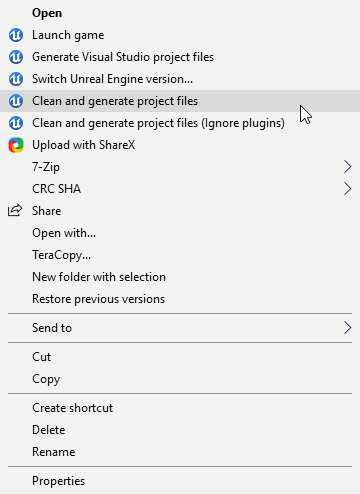
Don't even know where to ask this. UE4 likes to, as much as possible, re-write its registry values. These registry values are associated with the .uproject extension and its whats responsible for the commands that show up in the .uproject context menu.
I made my own program that adds itself to uproject context menu and it works fine. Until UE4 rewrites its registry values. I can't seem to find a way to make it play nice 😦
These two commands are mine, but they'll soon be removed by UE4 and I'll only get them back by rerunning my own installer -__- https://i.imgur.com/dJ28lUI.png
 regal mulch
WHAT IS THIS MAGIC @mint sequoia
Can't answer the question, but I want these options.
mint sequoia
It deletes binaries and intermediate from the project as well as every plugin (if you don't select the option to ignore them), then it runs generate project files. Basically you'll see very little happen, but its now clean.
And sure you can have them, but if the options disappear you'll have to rerun the installer and hit 'repair' until I fix this https://github.com/Vaei/ue4cleaner

GitHub
Cleans up Binaries, Intermediate, .sln and generates new files from the command line (with context menu installation) - Vaei/ue4cleaner
regal mulch
Thanks, bookmarked!
mint sequoia
Its really useful in general, but especially if you have artists that are running on source too
Its easier to tell them to right click and press a button than do it manually
regal mulch
Yeah def!
Now I only need to learn on how to extend that
Guess new weekend project coming in lol
mint sequoia
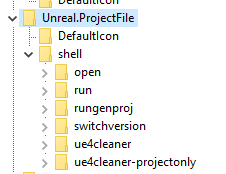
So as for the issue, context menus are created by adding your file extension to the registry in HKEY_CLASSES_ROOT like so, and it points to another registry entry in the same folder Unreal.ProjectFile, you can see the list of commands that you get when you right click as well as the two I've added (ue4cleaner). Every time you do almost anything with the engine, perhaps even marketplace content, it rewrites these values removing mine. I can't get it to look at two different places in the registry.
https://i.imgur.com/S4vVsd3.png https://i.imgur.com/aKq0kYC.png

@regal mulch If you open it up in VS it should be pretty easy to see whats going on. The only part that will be tricky is the WIX installer. WIX is responsible for adding the registry values (and installing it, obviously) and you'll want to read up on it. The commands used to generate a .msi are included in a text file somewhere 😄
regal mulch
Cool, thanks!
mint sequoia
Yeah its called BuildUE4CleanerInstaller.txt
You'll need to grab the WiX toolset from their website
That thing was gross to learn
 fringe pivot
I have an old reference that prevents me to create a bp with that name, how can I delete it?
mint sequoia
@fringe pivot Right click on the content folder and Fix Up Redirectors In Folder https://i.imgur.com/QwaIg9N.png
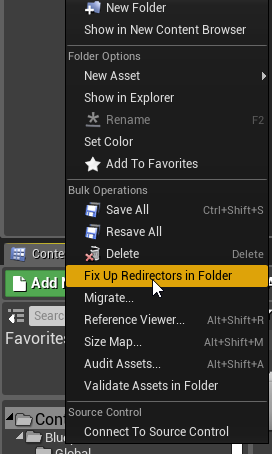
If not, then it may be present on disk, I believe this can occur from some weird string of events associated with some files marked read only 🤔
fringe pivot
@mint sequoia thank you that worked
mint sequoia
@regal mulch What did you have in mind to add 🤔
regal mulch
Not sure yet tbh
We have a client that basically has 50 different projects, but they all are based around the same template and uses more or less the same plugins.
And maybe I can find some things to add that would help with the whole process of dealing with that.
mint sequoia
Fair enough 👍
 pulsar ledge
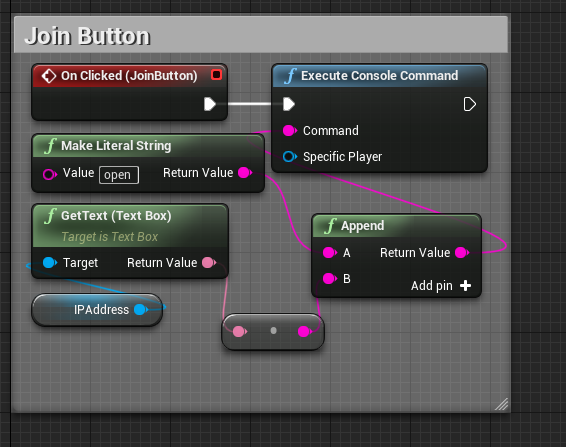
So I mentioned this last night with no answer so I figured I might as well put it out again. I’ve been attempting to set up simple UE p2p networking via entering an IP and joining someone whose hosting, but when I try to join the console just spams some warning and the client goes back to the title screen? https://i.imgur.com/0oZEdDP.png
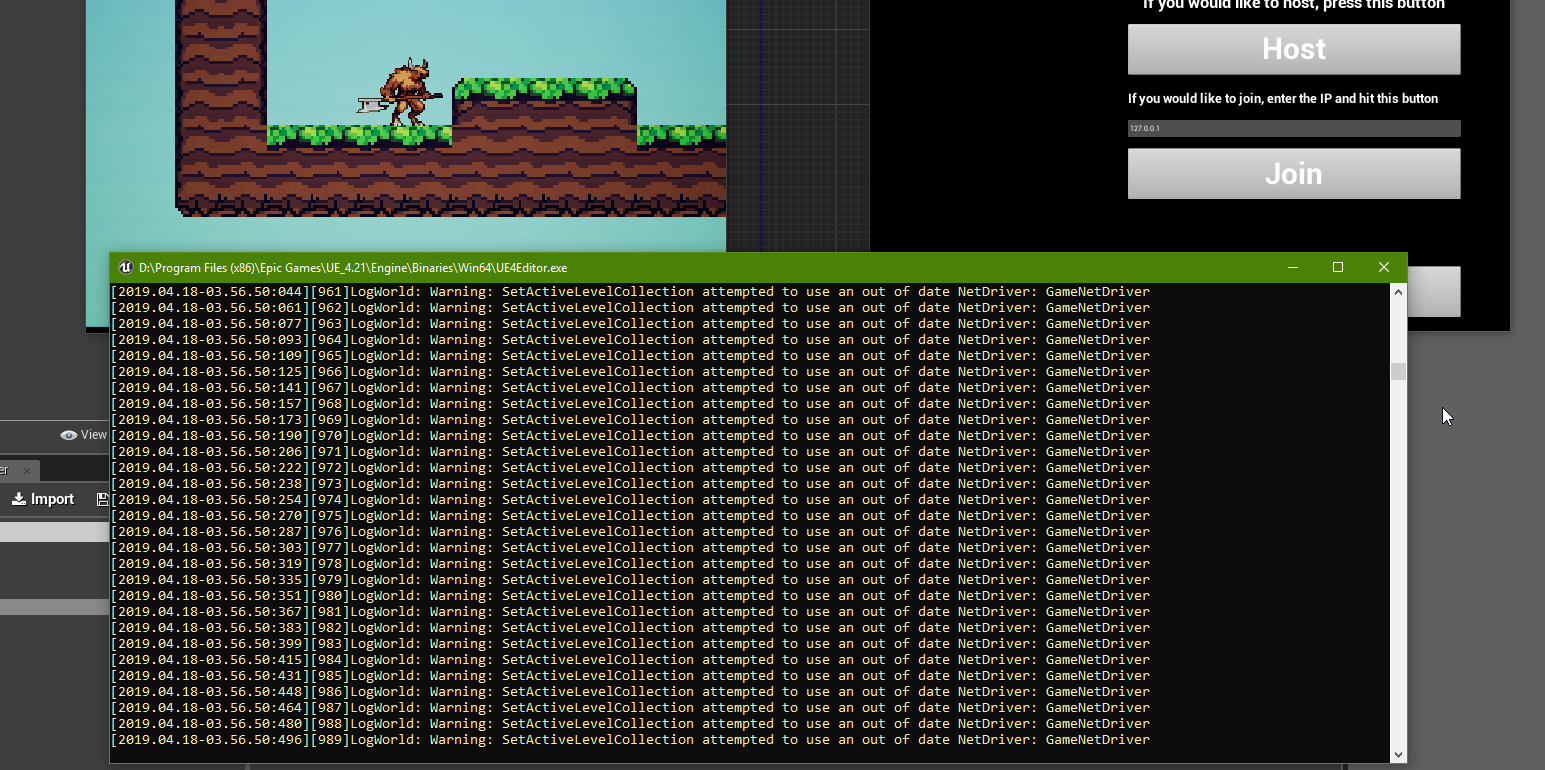
Google shows a bunch of people having that problem around 2015-2017 but nobody said how to fix it
pulsar ledge
Is that not what p2p means 🤔
 teal tulip
nope
teal tulip
p2p allow to change the host in runtime etc
pulsar ledge
Somebody suggested I have to enable/disable seamless travel, but that didn’t help
wary wave
I've never seen that error message either
pulsar ledge
Oh I never knew that
According to a diagram I saw last night, seamless travel is more intended for moving a group of players to a game together after they’ve joined a lobby together.
Lemme find my bp pics
 wary wave
bah, can't use bitmasks in structs -_-
pulsar ledge
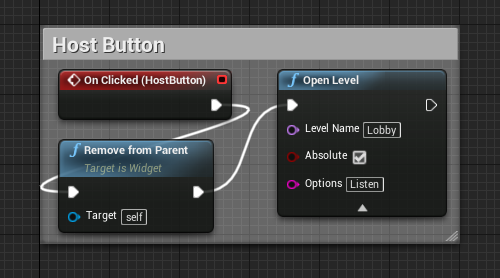
Do I need to put a question mark before the Listen option, or does the fact that that’s an option field automatically put that there?
Also I’m not home rn so I can’t test, but is there a straight up console.log command I could stick after that bp that is able to print out the variable so I know it’s being put together correctly?
 dim merlin
so anyone knows a way to import static mesh at runtime, without use of proc mesh component?
still moth
well now, that worked out very well for a missile
instead of using a timeline to go from 0 to a maximum speed (for acceleration), cant i just use "finterp to" and set the time i wish to go from A to B?
 brazen forum
Hey guys. I was wondering. How much does UE4 take care of the multiplayer stuff for you? I know they provide users with a lot of stuff like sessions, a built in way for you to use RPC with their events, and also they have a check box for replication for the variables and actors. But besides that stuff, I'm wondering how much they take care of stuff that you don't necisarrily see. Like I'm wondering if they have the following stuff already implemented behind the scenes?```built in lag compesation
client side prediction
interpolation/extrapolation
packet compression for network efficiency
delta compression (rather than full world snapshots each frame)
packet loss compensation
Server-Side lag compensation
@brazen forum CMC implements the first three for characters, for non-characters you'll basically be on your own
Bandwidth is generally very efficient in the engine, and you have access to many, many high level tools to control it
 manic pawn
packet compression for network efficiency there is a plugin for this called oodle or something like that, fortnite uses it
delta compression (rather than full world snapshots each frame) this isn't relevant as unreal does not send/store world snapshots anywhere
packet loss compensation you have reliable rpcs for this
Server-Side lag compensation you have to make this yourself and it's stupid hard
cloud cobalt
My top 3 list of stuff UE4 does not do in MP would be :
- non-character player movement (like basically vehicle movement)
- physics
- anti-cheat
These are probably the biggest things you might desire and find hard to do
Not that other engines will be better at it, tbh
 grim ore
Are there any real solutions for quadrapeds or vehicles or hell dragons in multiplayer working well?
I wonder if there is a solid reason why someone smart has not made more movement components like the CMC just fit for other collision setups and released them as plugins
cloud cobalt
@grim ore For physics, the short answer is that you really can't do it, so vehicles get way messier at that point
Well, you can't do it in a generally reusable way, since it will be client-authoritative
For quadrupeds there's no reason CMC couldn't work, I think
mint sequoia
@cloud cobalt When Chaos comes out two of those may change 😉
The reason for vehicles being difficult is the fact that UE4 runs on a non-deterministic engine (physx) so when deviations occur (and they will) in networked locations the deflection vector will vary wildly with a transform difference even to the 7th precision
grim ore
the issue for quadrapeds seem to be CMC is built around the single capsule
mint sequoia
Anti-cheat is also very game-specific so it would be hard for them to make global solution, though they could do something
grim ore
earlier this week someone wanted to just make a cube for his character but the capsule doesnt really fit that well so lol. Silly stuff like that
mint sequoia
You can have quadrupeds or even vehicles with CMC, they'll just have capsule collision (vertical)
cloud cobalt
TBF in games the player collision is often wildly unrealistic
mint sequoia
Client-side prediction with a non-deterministic physics engine isn't impossible, its just.. close to impossible (for vehicles)
cloud cobalt
As in, its role is to not go into geometry + have fluid movement
mint sequoia
@grim ore If I had to do non-capsule collision with CMC I'd just duplicate CMC, name it something else, change the capsule component to whatever I need and let the pain begin, rewriting all the collision methods etc
I bet with enough sleepless nights you'll get something workable
The awful thing will be if you get desyncs from collisions
cloud cobalt
Anyway, I think the main reason we don't see much of this around is that most devs who can actually create something like that are working on projects that don't share code
mint sequoia
Sad but true
cloud cobalt
I do have a vehicle CMC myself with "physics" and server authoritative for example
And the hovering vehicle game thing by half the Discord here does
Don't remember who exactly 😛
grim ore
@mint sequoia yep that was my thought as well so I was curious why someone else has not done it. Maybe the "actual" demand is not that much in the end
mint sequoia
Probably TheJamsh
We have some really groundbreaking stuff associated with what we're discussing but I can't even say what it is let alone share it 🤷
grim ore
off to the internet, I wonder if any other engines have support for non humanoid characters built in or assetable
cloud cobalt
Serious MP support for non humanoid characters isn't going to be that common
In generalist engines anyway
Vehicles will be the exception
mint sequoia
In the end, any dev serious about gameplay and multiplayer needs to learn to build their own client-side prediction
Otherwise you're really just skirting the issue
Making hacky workarounds or making do
grim ore
yep so it's like the grey area between "I want a dragon in my game!!11!" and "I want to make a game with dragons in it"
cloud cobalt
More like few MP games have dragons
grim ore
not enough MP games have dragons is the issue I am hearing
 valid slate
Hey is anyone familiar with utilizing WebSockets with an UE4 game? We successfully did a HTML5 export, but now want to set up online matchmaking via the web
 hidden berry
just making my rounds to remind everyone that the Advanced Locomotion System V3 pack is free for this month
grim ore
@valid slate if anyone does they might hang out in #multiplayer. I know when I messed around with the HTML web builds and networking It's not too horrible to do but you need to change to the experimental html5 net driver for the server and client to connect
mint sequoia
@hidden berry Did the dev ever fix the replication issues
hidden berry
anyone know anywhere that has regular looking characters (like civilians i guess you would call them)? i checked the marketplace, and didnt like them. Tried making my own in Fuse, but it didnt import with a root or pelvis bone (tried multiple times)
and im not sure, i know ive had no problems with it yet
hidden berry
yeah i already set it up, i also like the 1st and 3rd person POV that comes with it
i know that its currently on V3.1 , and it was recently updated, so it may be fixed
 placid dirge
Every time I launch Unreal, WMR Home auto launches MULTIPLE times automatically during the launch of Unreal. Anyone know of a way to turn this off?
still moth
i tried something different for a ballistics setup.. i used a timeline to map out the time of flight, and the bullets velocity and drop at those points in time so as the timeline updates, it updates the position of the line trace to match that of a real world bullet path
and good god was that a bad idea
from 120fps down to about 10
that was quite the performance drain
 radiant fable
anyone know what causes a strange bug where your material doesnt render on bsp surfaces?
 silver relic
Hi guys, in the firstperson template. how do i change the height of the camera?
 plush yew
@silver relic
brazen forum
Go in the first person blueprint
I'm pretty sure you are able to change the camera's z-axis to a higher value
silver relic
i dont see that, its a capsule because its first person
plush yew
🤔
silver relic
brazen forum
Yeah with the first person one the camera is probably more in the middle
plush yew
oh
brazen forum
oh no you have to open up the blueprint of it
plush yew
brazen forum
the blueprint is where you edit everything about the character
silver relic
i dont have a charecter in my outliner
silver relic
i can find my player start in the outliner
silver relic
no, you are in a third person. i am in a first person
 remote rivet
why does my Blueprint Name automatically get an _C here? What does this mean? the BP name does NOT have an _C in it where I have it saved.
 abstract relic
It’s just a postfix to indicate that it’s a generated class.
remote rivet
@abstract relic what do you mean by a generated class? If it's a BP I created... I'm getting some weird issues like it's not using my AnimBP, so I wanted to make sure this wasn't the issue.
abstract relic
It’s a child of the base animation bp. Nothing to worry about
remote rivet
Ok thanks
fringe pivot
So if I define a variable this way in my class
UPROPERTY(EditAnywhere, BlueprintReadWrite)
And the I create a bp based on this class
Shouldn't that variable appear in the list when I open the event graph for that blueprint?
still moth
of course the default mannequin can crouch
just need a crouch animation 😉
ive already learned a lot of the animation stuff, with animation blueprints, blend spaces, compositing animations on top of other animations, aim offsets, all that good stuff
that was the first thing i focused on learning what to do, and pretty much everything you need to know about adding animations is on youtube, with a huge library of free, good enough animations on mixamo
limpid turret
@wary wave i figured it out
plush yew
@still moth Thank you sir for the answer! 😃
Hopefully I might actually learn something in UE4
grim ore
@limpid turret you might want to try and unbind that if possible, binding a property in UMG basically calls that function every frame so using a get all actors every frame is a road to bad performance in the future.
If you still want to bind it, try moving the Get all Actors of Class to somewhere else in your widget, in a function that gets called once to set that as a variable perhaps, so that way you have a variable you can get your health values from that is already pointing to that character rather than trying to find that character every frame then getting the health values
still moth
hmm, is it just me, or is "print string" like the most valuable node ever?
limpid turret
alright
grim ore
is might be the most valuable node until you harness the power of the F9 key
limpid turret
so something like this?
still moth
evidently you cannot do an add impulse after a hit result because at that point your velocity becomes 0
limpid turret
yeah that works, cheers
grim ore
yeah if the character is valid on construct yep that should work
limpid turret
thanks for saving the hassle of performance issues
grim ore
it's still not as performant as it could be but a get all actors every frame is a road to madness later
limpid turret
yeah
grim ore
binding variables themselves are issues, you can even disable the option in the project settings lol, but sometimes they are hard to avoid using
 glossy ingot
Anyone know how to get ambient sound ques to render in sequencer? I've placed them inside the sequence track but that did not work and I'm kind of stumped right now. Any suggestions would be appreciated.
 desert jay
Has anyone done a Mass Effect style dialogue system?
mint sequoia
Is there a way to make it so blueprints always open with the full editor (even better: always on the viewport!)
desert jay
@mint sequoia Yes: go to editor settings. There is an option "open new windows" or something. Choose the drip down you prefer.
Maybe asset editor open location? I'm not at home.
 dawn gull
Hi, sorry to interrupt, but I've been trying to this all day. Do you know how to Put a Video/Movie on the beginning of any map, and not just play it when the game starts up?
mint sequoia
@desert jay Thats not what I'm after

I don't want it to ever open in that view
Its useless
 worthy flame
how to open the console?
grim ore
it might be useless to you but it's not for other people and as far as I know you can't change that option
mint sequoia
Lol
I honestly don't recall saying it was useless for everyone, dunno why you had to say that at all
I didn't go and post a petition to remove it
grim ore
well you said it was useless
mint sequoia
I think the context is clear
If anything I'd like it to be a uclass meta specifier
Got it!
    // In constructor - probably want to null check ClassGeneratedBy..
    if (UBlueprint * BP = Cast<UBlueprint>(GetClass()->ClassGeneratedBy))
    {
        BP->bForceFullEditor = true;
    }
😎
 mental oyster
Is this a reference to a blueprint?
mint sequoia
Yep
UObject* ClassGeneratedBy;```well not i have ballistic weapons, and missile weapons pretty much finished.. on to lasers, however, im hoping to achieve an effect a bit nicer than just spawn a cylinder with a laser beam material added to it and stretched between the starting point and ending point of a line trace
valid slate
hey guys so I got this error when trying to set up online matchmaking for my web game
brazen forum
@grim ore @mint sequoia Just caught up with the discussion from your responses since my last post. So back to the whole multiplayer stuff with lag compensation what part do you guys think would be the easiest to handle. I need a senior design project idea and if I can pull off some kind of free marketplace plugin to help with server-side lag compensation then i'm definitely excited to go for it. My original idea was to create a marketplace plugin that would implement any of the features I listed before that wasn't already built in. And looks like some of this stuff is already built in like some of you have said. So that narrows the list down to this thenclient side prediction interpolation/extrapolation Server-Side lag compensationSo can I get your guys' opinions here? Am I in way over my head by wanting to do this for my senior project? Which one of these do you think would be the easiest to implement if I were only to do one.
@cloud cobalt @manic pawn
mint sequoia
@brazen forum I don't know your skill level 🤷 A marketplace asset that solves these things would effectively do what CMC does but taking arbitrary structs for replicated data with clean/clear entry points for handling the correction of said data, instead of hard-coding everything like CMC. A production ready solution would take months. There are people who have spent a lot of time on this already and still wouldn't use it. If CMC looks like black magic to you then definitely in over your head
plush yew
F9 is heresy
brazen forum
Okay that sounds like a good idea to look at. I have a whole year to make this happen so i feel like I could maybe do it. So would you think It would be easier to focus on? Do you think I should maybe just focus on client side prediction and interpolation/extrapolation and maybe ignore Server-Side lag compensation? I feel like that might be the easiest option. @mint sequoia
mint sequoia
@brazen forum Its up to you really, you know yourself better than I do
brazen forum
True true
I already decided I'm not going to deal with these things for physx objects because thats a whole nother project lol
 golden magnet
anyone know the size of the ue4 mannequin? i want to make a reference block in 3ds
 untold stag
@golden magnet just export the mannequin from your project, use it as a reference directly in 3ds
I think it's 6'0 though, can check
golden magnet
oh right i can do that, ty
mint sequoia
@brazen forum Best to just do it as a PawnMovementComponent
Definitely forego root motion and physics, yeah
Er, I take that back
An adequate system shouldn't care how its moving
Especially if it takes an arbitrary struct
It all just boils down to vectors/rotators
brazen forum
oh your right
brazen forum
Well not just for pawns really. Like i wanted it so that like if you wanted to put it on an actor you could
lol
because the client side prediction is easy for pawns. You just read the input and display the result instantly (even though its not what the server sees), but for actors I guess it would be more complicated.
 stoic sentinel
Im not sure where to ask this, my entire project decided it didnt want to load this morning.. all my BP's are there but level appear blank in my editor.. This is really stressfull: / Anyone know whats going on here?
brazen forum
maybe u the default map in the project settings wasn't set to the map your looking for
stoic sentinel
When i change to any map in the entire project i get a black screen, then when i hit play its a blank space
doesnt show anything, but my gui
brazen forum
so your levels still show up in your content folder correct?
 blissful willow
For loading levels, if I have sublevels in individual levels and then one master level for all of them combined, is there a way to load the sublevels without their extra levels?
stoic sentinel
Yes they are showing up but not rendering anything
stoic sentinel
crap... 😦 so much work..
brazen forum
does each of your levels have a coresponding lighting data file?
brazen forum
like those grey things beside the level
stoic sentinel
Ya they are not there anymore..
brazen forum
thats weird
stoic sentinel
They were
brazen forum
check your computer's trash maybe
brazen forum
i dont even know if the built data is causing the problem but it raises a suspicion
maybe go into one of your levels and click the build button
i wonder if that generates the file
stoic sentinel
One of my levels does have the file
ANd its still does the same thing, building /compiling is doing nothing
From what i can tell the entire level loads correctly just doesnt render anything...
Not even in the editor
mint sequoia
@brazen forum There is nothing easy about doing it for pawns and there is no reason to do it for actors
stoic sentinel
This is what im seeing in my editor windows..
And when i hit play..
Jeez this really sucks.. ive just lost months of work'
grim ore
no source control?
stoic sentinel
No, i would have lost work if i had.
grim ore
it looks like you are generating your level from blueprints, are the blueprints running properly?
stoic sentinel
Yes they are.
It apears the level runs, i can even spawn actors i just cannot see anything
grim ore
so if you eject and browse the world outliner what does it show in the viewport?
stoic sentinel
black screen
grim ore
so selecting anything that should be in the level does not show an outline or even show the item in the viewport?
stoic sentinel
if i eject from the character while the game is running?
grim ore
yes, so you can select items in the outliner
stoic sentinel
Ya when i try and click anything from my outliner the viewport does nothing
I can see anything and it doesnt do anything
grim ore
weird. so is it only this level or the entire project? like a new level and hitting play shows nothing?
stoic sentinel
how do you eject from the player?
All levels in the entire project are doing this
grim ore
the eject button at the top of the screen, shift-f1 to get mouse control if you need it
I hear that all levels in the project are doing it, but does a new one do it? like File new level, select the basic level, and hit play
grim ore
ok do you have a custom game mode setup with a custom default pawn?
stoic sentinel
Yes
grim ore
try changing the default pawn in the game mode to the default pawn in the editor, not your custom one, to see if it is an issue with the default pawn. doing this in a new level of course for testing
stoic sentinel
k
brazen forum
@mint sequoia well I was going to do it for actors too because what if u coded an actor to move in a certain way
grim ore
changing to the default pawn in the engine should give you a clean camera and let you fly around. new level is a clean level. If it's still messed up at this point something else is overriding your defaults or you set up something weiiiiird in your project
stoic sentinel
Got this when trying to change my game mode.. gonna reload and try again
i changed to default pawn and could only see black screen
didnt do the blue void tho..
grim ore
did you choose the blank level or the default one with the platform and sky?
stoic sentinel
wtf.. after the restart everything is working.. ive reloaded this project like 10x trying to fix it..
stoic sentinel
ya... Thank you for the help. Thats was stressfull.. backing up everything now.
 coral patio
Heyhey! Anybody here who could help me setting up shaders in Unreal? I'm currently creating a lion and even though it's not completely done yet I imported it in Unreal already to do some finetuning. Setting up the hair and eye shaders was easy since I'm using the photorealistic character project for that. However, I'm struggling with the simplest of tasks which is just setting up the shader for the body. Everything is working well so far except for the Roughness which is a problem I've stumbled upon in earlier projects already. It always appears too glossy and not at all like it did it Substance Painter (it looks like all Roughness values are reduced by like 0.2 or something). Does anybody know why that happens and/or how to fix that?
grim ore
sooooource connnntroooollll
coral patio
I'm still pretty much a noob to Unreal - what exactly is Source Control? >__>'
blissful willow
Keeps a working copy on a server so that people can check assets out and work on them individually without messing up other people
Then you check them in at the end of your work and other people can update to receive those changes
coral patio
Ohh
So, like, two people can work on the same project seperately without interfering with each other?
coral patio
That's pretty neat!
blissful willow
So I built my lighting......does anyone have any ideas?...
 vagrant cape
So I have an idea that i want to know how possible it is. I want to figure out how to make time stopping a thing in my multiplayer game. I was wondering if you could desync the time stopping character from the server then resync them, if that would allow you to move while everyone else was not moving.
or maybe there is another way
grim ore
the biggest advantage of source control is you can always go backwards to a working copy of the project if you break it or lose something
still moth
hmm, im trying to get a particle system i created to spawn between two points.. i have the source and target set up as actors so i can set parameters in blueprints but all i get is a ball of lightning
im trying to stretch it between the start and end of a line trace
 drifting beacon
Going from Maya to UE4 and after building lighting it creates dark shadows. Any ideas? This has got to be common since I'm just starting out. Any help would be GREATLY appreciated. Thanks!
abstract relic
Bad lightmaps
drifting beacon
Ok, so I got high resolution models to generate those from substance. I assume that'll work?
I actually have it loaded and don't see issues in substance
abstract relic
It’s a uv map. Substance wouldn’t do anything for that
drifting beacon
Thank you 😃
spark sonnet
is there a way to make AI see my characters flashlights light?
abstract relic
There’s pawn sensing component
spark sonnet
i know but is it posible to make it sense light?
abstract relic
Out of the box? No. You’ll need to do some modifications
spark sonnet
I thought of maybe making a static mesh with the same shape as the light radius. Would that be the easiest way?
ok nvm . it only works for pawns it seems
spark sonnet
sure. what do you need help with @plush yew ?
 random nacelle
Hi guys I am new to UE4 I am learning and I have a question I'm a single guy attempting to make a large open world like a survival game ect I'm confused do I just make large map and fill it with plants trees mountains ect or do I need to USE WORLD COMPOSITION and then fill in the world ect I watched a few videos and none seem to get to the point ect
grim ore
you build it based on your needs. "large open world" for you might be small enough to fit in a single level. If not yes you can use world composition to stitch multiple levels together or manually use level streaming to load and unload levels as you move around the world.
random nacelle
I assume without using world composition there is limit to size as it would not be able to load it all at once ect
 steady birch
Anyone had any decent success getting UE4 running on a lower performance machine? My rig apparently got stolen in my move across states (never hire someone to move your crap btw) and i'm left with my school workbook till the insurance comes through.
 broken shadow
Made my guy move!
Now to make him rotate
3rd person template rotation is very floaty and doesn't appear actually connected to movement, i.e. he has no turning circle
So, starting from scratch
- I'm overdue to understand just what exactly game state and such are for
Things I've been neglecting in favor of character-related scripts
grim ore
UE4 does have size limit defined by the World Max in the code, but it is pretty darned big. This might be a good video to watch to see if you need composition or not https://youtu.be/FrcNClb6KUI along with the docs
plush yew
could anyone screenshot the top down character default blueprint, I changed something in it I didn't need to and messed it up
random nacelle
@grim ore ty I'm about to watch it all without skipping a single second
Also I say big because the plan for me it would be a online multiplayer game like ark or conan exiles ect so I want there to be plenty of space and freedom without being clustered ect
grim ore
if multiplayer then yeah composition might be needed but multiplayer and origin rebasing is an entirely different monster
there is actually info about that in the docs and basically you have to handle it yourself 😦 https://docs.unrealengine.com/en-us/Engine/LevelStreaming/WorldBrowser
random nacelle
Thanks I read the article it seems confusing as I'm new to UE4 but I will now just focus on making the map ect I'm not worried right now how to set it up for multiplayer i just want to be able to make a large world and that its playable 1 step at a time and by looking at the video and reading the link world composite is the way to go to help with large maps ty
 swift rose
So has anyone recently had any issues getting Unreal Engine to start? My windows updated recently, and unreal launcher updated, but every time I try and open a project or launch the engine, it'll do it's little preloader till about 71% then the preloader disappears and that's that, nothing else happens. Was working just fine a week or two ago.
worthy flame
i cant get my health bar to show
nvm
what does this mean
Input Axis Event references unknown Axis `FaceExpression_2` for InputAxisFaceExpression2
is this missing a input button so i can make this do these expressions?
still cant display the hud
 zenith flower
How do you tell the difference between listen server, and the server "client"
Like, I'm hosting a game right, how can I tell its MY character.
This is great an all, until you want to bind some events locally...
If I use listen server, then it will bind the event for everyones character on the server
Do listen servers "have" Autonomous Proxies of the local client?......
 robust steeple
I am pretty new to vectors in UE4 but from what I understand, this should give me the angles of the actor, ActorRotation being current rotation and TargetRotation being the rotation after facing the target in AiMoveTo with RandLocation being the destination, right?
For some reason the current rotation during next check doesn't match the supposed TargetRotation. Am I doing smth wrong?
or should I use ActorForwardVector (instead of world location)?
zenith flower
@worthy flame check your project settings, and make sure the input is still valid
if you change the name of an input in settings, you HAVE to go to every blueprint, and RECREATE them.
worthy flame
i dont have the inputs for the expressions yet. so no need to fix that yet. ive figured it out what the problem is and its wwhatr you said
but i cant figure out why my healthbar wont show up
even the most basic one
zenith flower
networking or single player?
worthy flame
singleplayer
zenith flower
okay, "create widget" -> add to viewport
worthy flame
ive tried adding it to the viewport and the player screen, wont work
zenith flower
show me the blueprint
worthy flame
all of the widgets work
ive even followed the tutorials
to check
ok gimme a sec
zenith flower
slow down
Also, do you mean HUD as in the type of blueprint, or just some widget you are calling HUD
worthy flame
im not sure
i named the widget blueprint HUD
well i tried renaming it to H_U_D to see if that would fix it but no
zenith flower
Show me what the widget looks like
worthy flame
that all you need?
zenith flower
put a print string in the begin play, of the char, and press the down arrow, and change it to 20 seconds or something.
Make sure you see "hello" when you spawn the character
worthy flame
dont see the hello
zenith flower
I need to see what the map is set to
Top left menu : Window : World Settings
Each map, can have different game modes
zenith flower
Does it say hello?
zenith flower
show me the world settings
worthy flame
zenith flower
Okay, what have you customized in the game mode?
Anything like "get default spawn point"
or "Find spawn point"
zenith flower
hmmmm
worthy flame
only thing i touched was change the caracters mesh
worthy flame
ooh no not that
zenith flower
hmm
zenith flower
open the game mode
and open the even graph
and show me
I want to see the functions/events too
zenith flower
Okay. so I'm noticing a pattern here. You really should watch some more tutorials about the basics of unreal
There is a good series from mathew w
worthy flame
i wathced a ton but all of them were on import this and follow the code
zenith flower
forget importing
worthy flame
everything
 pallid compass
go through it again if your this stuck
zenith flower
you need to understand just basic functionality of the editor
worthy flame
i said importing is what the tutorials were all about
zenith flower
How game modes work
worthy flame
nothing else
zenith flower
how characters are spawned
world settings
player controller stuff
And, im sure you were able to import the character
the issue with specialized tutorials, is they skip everything else
worthy flame
also a funny thing
zenith flower
I promise, everyone on here, when they first started, probably took a week of non-stop learning about unreal before they could even move a character across the screen
swift rose
I just wish my unreal editor would open today >.<
zenith flower
Downloading an example, is a great way to learn, but it doesn't count, until you can do it on your own
robust steeple
got anything nice explaining vectors etc?
In detail, with what function returns what etc?
zenith flower
@robust steeple You didn't give enough info, I don't see where you apply these calculations.
worthy flame
i paid a teacher for 25$ and he had a bad pc and he taught me how to make materials and all of the other classes were like 2hours + waiting for him to load a character he sent me to so we can continue. and by the time thats done i need to sleep since of work. and we had 3 lessons and today was the last. we were 2h in a call all silence and he said his pc died and he said. well the time is up since ive even done it a day after so if you want more be i would be glad
im there sitting and ROFL
robust steeple
F
swift rose
not sure if I'd want to pay someone who isn't even willing to invest in the proper tools to be able to teach well....o.o
zenith flower
I've never paid for a class.... ever... in 3 years..... google, google, youtube, download examples, download more examples, try some stuff, google google, youtube ect
 zenith flower
@robust steeple can you explain more
swift rose
I paid for a couple of Unreal beginner basics on Udemy so I could learn lingo and the basics of Unreal
But other then that I use google and youtube.
zenith flower
Also, break down your blueprint, into smaller chunks,
And make sure you use the same wording as your variables
as current rotation, is the players current rotation, and shouldn't change, unless you rotate the player
unless you mean, some variable
ping me if you answer back, as im working on my game
robust steeple
Ok, so my goal is to get an angle between 2 vectors: current direction and the direction to the location/destination (generated by getRandomReachablePointInRadius which is later supplied into AiMoveTo)
My idea was to use GetYawPitchFromVector and compare those
But doing some testing rn and I can see that actorLocation alone is not enough for the yaw
while I believe the worldLocation won't work due to being (1,0)
Any suggestions?
zenith flower
one question, why do you need to know the angle between the two points?
AiMove to, should just move the character, and rotate it for you?
robust steeple
Yes but I want to limit the target location, I don't want it to be completely random
I want it to only be within a certain angle from the current direction (so for example the target can only be 15 degrees to the left of the actor)
Although I believe that at this point it would be faster to get that point myself instead of just rerunning the generator
zenith flower
Actor -> get rotation ---
- Get look at rotation -> compare to actor rotation?
Random location ---/
yea, then you can check if its in range of what you want, if not, get another random location
worthy flame
ok about the hud not showing up. everything works. its simulating while playing it, but it doesnt show up
zenith flower
@robust steeple sure thing
robust steeple
btw how "expensive" is getRandomPoint in terms of performance etc?
Since right now I just rerun it in case the difference is too big and for smaller tolerance angles it can call out...dozens of times
(and it has just crashed my game because it ahs run into a corner and can't turn...time to add some checks for area available)
yep...
 dry moon
How do you attach an actor to an actor, such as an elevator button on a rising platform
adding it as a child doesn't expose the variables
 kindred viper
use components to do it. ie. spawn scene comp at location, attach to scene comp
spark sonnet
why is the button an actor and not a component?
dry moon
Weird, not sure why you can't just drag it on top of the actor and it attaches
and I have it as an actor so I can place it onto of multiple things to be kinda modular
golden magnet
anyone know what I should use as the object wildcard for casting to a level sequence blueprint?
spark sonnet
cant you use get all actors of classs @golden magnet ?
golden magnet
i have a small blueprint in the level sequence blueprint to skip a cutscene, then from the HUD im trying to cast to it
spark sonnet
can you use this instead?
spark sonnet
np. I dont know if its bad to use but it works and I never know which wildcard to use except player character. So this node comes to the rescue each time 😄
spark sonnet
why?
 spark sonnet
you need a socket
dry moon
Its attached in other ways
dry moon
Yeah which is how I'm doing, I get the actor, get the scen component that I can move, add a custom tag
 spark sonnet
then you need a target
dry moon
ya still nope
spark sonnet
oh
dry moon
One thing I miss about Unity man
just drag the prefab onto of the prefab, it maintains relativity and works fine
spark sonnet
they both have advantages and disadvantages
could you send a screen of your attach again?
spark sonnet
what if you use this instead of tag?
dry moon
No it gets the actor fine, it just won't maintain the space I placed it at
spark sonnet
do you have a static mesh?
dry moon
ya gimmie a sec, I'll show you what I mean
VS is loading and being slow
So I have it like this BEFORE play
Then I press play
But it doesn't follow with it
when in play
spark sonnet
ah
dude
i think i found out
or are you using scene component?
its a different attach tocmponent node

 spark sonnet
oh
spark sonnet
this shouldnt be this hard
dry moon
ya ik, it shouldn't be
spark sonnet
what about attach toActor
dry moon
Yeah I was using that before

the thing is here
like why can't I add the child
and be able to click that and edit the blueprints
when you click it, it unselects
WHY
JUST LET ME EDIT THE FUCKING VARIABLES
spark sonnet
hmm
 spark sonnet
hah. maybe restart?
dry moon
ya I've tried, its how it works when you place it as a child actor component


I should be able to just
select it and boom variables here
I even have them checked as expose on spawn
spark sonnet
I dont like child actors ;/
spark sonnet
ugh im stuck myself. When I kill an enemy, the enemy beside it dies (:
dry moon
now that is something, how did you manage that
spark sonnet
i really dont know 😃
should i make child actors for multiple enemies of the same or duplicate the actor?
dry moon
Most likely child actors, since you'll be able to edit the parent and have the edits work throughout
spark sonnet
Ill try
Ah I know why its messed up. I have the killing blueprints inside my character so it didnt knwo which character to kill
dry moon
How were you killing it then, not by detecting?
spark sonnet
because the integer was set to 0 which is the first enemy placed in the level
dry moon
Ahh
spark sonnet
I am trying to takedown enemies and I dont know which blueprints that should be in the enemy and which should be in my character :/
ok now both of them died 😄
i am confused
is there a way to make the blueprint know which of the child actors i am dealing damage to
spark sonnet
i am just setting its health to 0 when i press a button
when i am wwithin a distance
dry moon
That's a weird way to deal damage
dry moon
You can just set a deal damage within radius, and it'll output the actors in question rather than getting specific ones in a loop
dry moon
Apply Radial Damage
spark sonnet
oh
dry moon
and then in those actors, just use the event node damage or something, forgot the name
spark sonnet
apply damage?
dry moon
yeah
 fathom bridge
Or just have an overlap volume on the character
dry moon
and then do what you will with the variables you push along
spark sonnet
how @fathom bridge ?
fathom bridge
You put a sphere component on the character (not a sphere static mesh) and use OnComponentBeginOverlap node for the sphere
From that node get the other actor and cast it to the correct type then deal damage to it
Or store it in an array for later damaging
spark sonnet
would it work to set an integer when that actor is overlapping?
fathom bridge
Make sure the collision presets are set tp generate overlap events both on the sphere and on the other actors plus make sure theybare set to overlap each other
You can yes or a bool
Or just have an array called OverlappingActors
spark sonnet
hmm
fathom bridge
There is also OnComponentEndOverlap for when your character mpves away
spark sonnet
ok how do I make an array to tell the bp which actor it is`?
fathom bridge
Sorry for the typos
Create a variable of type ThirdPersonCharacter
In the details panel there should be an icon next to the variable thst lets you turn it into an array
Then you use an add node to add it to the array
spark sonnet
shouldnt it be the enemy?
fathom bridge
I assumed your enemy is of type ThirdPersonCharacter
Because that id what you casted to
spark sonnet
thats the player character
fathom bridge
You want to cast to whatever type your enemy is
spark sonnet
its overlapping the collision behind the enemy
fathom bridge
That OtherActor is whatever overlapped with your sphere
spark sonnet
yes. the sphere is inside the enemy bp
fathom bridge
Oh okay, you can do it that way too. So then drag off of the cast node, As Third Person Character to access the array
spark sonnet
what?
fathom bridge
You must create the array variable on the character class like I said
fathom bridge
Sorry I assumed you put the sphere on the character. That's what I was imagining
fathom bridge
But once the enemy overlaps the character, you can access the array on the character and add 'self' to it
So from thr cast to ThirdPersonCharacter drag off and get the array
Then add 'self' to it
spark sonnet
but I wont get the array within the enemy from the cast node
fathom bridge
I was saying have an array of enemies on your character. Sorry
spark sonnet
ah so the array is inside my character?
fathom bridge
That's what I was thinking yeah
spark sonnet
hmm
fathom bridge
Then when you press a key, use a for each node to loop through the array and kill each enemy in the array
It will only kill enemies that are close to the character
spark sonnet
I need the array to be inside the enemy since its got child actors
fathom bridge
What would you store in the array then?
I'm sorry I don't think I understand wjat you are trying to do
spark sonnet
sorry I just suck at describing it today
 hidden aurora
Is this normal lmao
spark sonnet
I just need to think for a bit now
fathom bridge
No worries sorry for making it confusing
spark sonnet
ok this is what ive got so far
is there a way to set the variable from the overlapped actor variable?
spark sonnet
?
hidden aurora
I dindt understood your question
spark sonnet
I need to get the actor that my character is overlapping. then i need to set a variable from that actor
hidden aurora
try from the overlaped actor cast to the actor you want
spark sonnet
wait. maybe i dont need all this? Let me try somethign
hidden aurora
The other actor from the overlap node is checking what actor is overlaping with
spark sonnet
omg !!
I am so stupid
it was so easy and i was thinking too much
Ty for helping me but i figured it out I think
hidden aurora
Let me know if you did
zenith flower
Wanna hear a joke?
spark sonnet
my unreal engine skills 😄
zenith flower
How do you silence a channel?
Just ask a question that a noob can't answer
hidden aurora
lol
spark sonnet
yep its working now
hidden aurora
noice
 frail cliff
I am having an issue. My vehicle wheel colliders are located around the root bone. I am not sure what is going on?
What idiot thing did I screw up?
Apologies if this goes somewhere else
kindred viper
I dont think you bone rotations are correct. They should all be the same direction iirc. Those are every direction at once 😄
its been a couple of years since I messed with it tho
 sand vessel
HEYYYYY
sorry fdor caps
could someone help me
FortniteClient_Win64_Shipping
FortniteClient_Win64_Shipping
FortniteClient_Win64_Shipping
FortniteClient_Win64_Shipping
FortniteClient_Win64_Shipping
FortniteClient_Win64_Shipping
FortniteClient_Win64_Shipping
FortniteClient_Win64_Shipping
FortniteClient_Win64_Shipping
FortniteClient_Win64_Shipping
kernel32
ntdll
fortnite crashes for my friend all the time
 vale silo
UE4 is driving me nuts.. In the viewport and in PIE my project looks like it should look on mobile ES3.1 (I disabled tonemapper). However, when I render stereopanorama using plugin that comes with UE4, the output image looks like SM5 with tonemapper - dark. How do I disabled tonemapper for good?
sand vessel
does anyone know what this means
 dark depot
this is an area for people doing gamedev with Unreal engine not a place for help with fortnite @sand vessel
imagine something on your pc is making it crash
kindred viper
Mystery values kill me. Why lord. Why? I have an array that has 4 entries, but has a length of 0. GG.
manic pawn
probably just the bp debugger malfunctioning
pulsar ledge
Is there a console command for simply logging a string you give it?
Like the usual javascript console.log(variable)
manic pawn
most likely not, the console is not a scripting language so there would be no point
plush yew
How would one fix this issue? https://i.gyazo.com/ca7385fcd197c3e3cc27d214c30bb118.mp4 (I press build lighting it opens for a few seconds and closes its self with no warnings)
kindred viper
@manic pawn you were right. Just the debugger not playing fair.
manic pawn
I always debug bp with print string nodes because the tool is so unreliable
kindred viper
yeah this was a strange one. perhaps the debug visualizer needs some work on it
ive had issues before with it but not for a while
manic pawn
I've been wondering if it's possible to optimize bp by not re-running pure node chains for each connected input
pulsar ledge
...isn't there a setting somewhere to be able to change the default/working port for a UE project?
manic pawn
but can't think of a way to make work as expected inside a loop where you do expect it to update the value every time it polls it
pulsar ledge
still can't figure out why I can't join the servers I host
I'm opening two clients. One, I hit the host button which executes a command open levelname?Listen
Then another client right now just opens the console and does open 127.0.0.1
And it just sits at the menu, doesn't load the level or nothin.
I've heard multiple times that opening an IP is supposed to auto-load the level. Is there any possiblity that isn't happening, so I'm connecting but it's not putting me in the level?
manic pawn
check the logs of both
pulsar ledge
The logs don't seem to say anything like "yo this didn't work, abandoning"
manic pawn
there has to be something in the log when you try joining, on both sides
pulsar ledge
okay actually here's another bug that, Idk, may be related?
Sometimes when I hit the host button on one client, it gives an Error 'Failed to load package '/Game/Scenes/MainMenu''. Exiting. message for the other client?
The logs are beneath their client
am I supposed to set the "defaultmap" to the level the host enters when he begins hosting, so the player is put in the game room?
Is that how that system works 🤔
pulsar ledge
oh sweet sugary goodness
I deleted my /Scenes/ folder and moved the main menu level to another folder
And I never realized that doesn't atuomatically remap its references
I had to re-add the level in the Maps and Modes preferences
And now it works like a charm
 leaden reef
hey guys how make shadow more transparent than default? i mean skylight
 toxic hatch
theres a setting for skylight bounces that might do that but it increases your build time a lot. Someone else probably knows of a better solution but thats something to tinker with if not.
leaden reef
many thanks
plush yew
Hello would this place be suitable to ask about a crash error im getting in Gravel ue4
 tall pendant
Gravel the Game? If so then No. This is a developers community.
 radiant haven

Trees and buildings created by Evermotion. Open description for links to some assets. Music by Bethesda - Intro song and Green and Grey. If you would like to...
How?!?!
worthy flame
ive watched that a dozen times by now
can anyone help why my HUD isnt showing on when I play. It's working and set up correctly. I just can't figure out what is wrong with it
silver relic
I want to do a simple animation loop of some bottles bobbing in water. Is there a way to animate that in unreal? or should i do that in maya? 😃
 sick escarp
Isn't it possible to just create a component that changes their location and use a sin curve? Not exactly sure how I would do it but a sin curve should be able to give you a smooth bob
spark sonnet
@worthy flame Have you selected the right hud in project settings?
spark sonnet
hmm ok. Is it a hud or a widget bp?
worthy flame
i am trying to make a new project and reimport everything and make the hud again to see if it works
widget bp
brb
worthy flame
i added it to the viewport ive even tried to add it to the player
spark sonnet
and its not showing?
worthy flame
no
i tried changing the gamemode in world settings
still nothing
ive even tried attaching it to the guy who starts at the begining, but couldnt attach the thing to it for it to show
and then i tried simulating. and once i clicked play the game it was showing to me that it was simulating all of the things
but didnt show on screen
spark sonnet
coudl you send a screenshot of the bp?
worthy flame
yes once its done reimporting this new project
nearly done
ill open that and make the SS
worthy flame
ok my import is done
making the SS now
@spark sonnet
last one is the widget, first one in the player bp
worthy flame
yes
spark sonnet
is the progress bar showing?
worthy flame
nope
worthy flame
ive even tried adding some text on the scene didnt work
spark sonnet
ok. where are you adding it to the viewport?
worthy flame
how do you mean where?
 grizzled condor
what is this problem i keep stuck at 45%
worthy flame
you men the event graph from the blueprint widget?
spark sonnet
no. You need somewhere that tells the widget to be added to the viewport
worthy flame
i dont quite understand
i know what you are trying to say but i cant figure out where that is
spark sonnet
then it wont be added to the viewport
worthy flame
is that this
progress bar has a function and its casted to the character?
silver relic
how can i make an object unclickable? i'm constantly selecting my landscape by mistake.
worthy flame
you cant make it unclickable, just be a little patient when selecting
silver relic
😦
worthy flame
what do i need to do so its added to the viewport
spark sonnet
you need to make what i posted
but use event tick instead of beginplay
you oculd make it in the level bp
spark sonnet
send a screenshot*
spark sonnet
hmm
spark sonnet
skip?
worthy flame
evem of i do it tells me its unsaved but since its nothing there added ill exit it
i dont have a level bp
spark sonnet
you do
on the bar where yo u can press play is also one callled blueprints
click on that then level blueprint
dim merlin
so, anyone knows its ever possible to load a static mesh at runtime, without using proc mesh?
spark sonnet
so you fixed it? 😃
worthy flame
yes. it shows now
spark sonnet
good to hear
worthy flame
1
spark sonnet
oh
spark sonnet
no
1 is great
I did 100 wihtout dividing and didnt understand why it didnt work at first
so now i am using 1 instead
worthy flame
float right?
worthy flame
its not filled at all
spark sonnet
are you changing the health var anywhere?
worthy flame
widget bp is empty only has the pre event, event....
and the ss comes
im guessing thats all u need?
worthy flame
spark sonnet
hmm. everything seems to be as it should
worthy flame
i know
thats why its odd
maybe bcs the health variable is in the character bp and the event to show it is in the level bp?
since its calling the variable from the character
spark sonnet
but the progress bar is getting the var from your character so it should work
you could try this instead of cast to character
worthy flame
what class do i connect
spark sonnet
the character that has the health variable
spark sonnet
when you select the class
worthy flame
says cant connect
worthy flame
still doesnt work
spark sonnet
That works but it would easier to find the error with teamviewer
spark sonnet
i understand
what if you try to make a new variable in the widget bp to test if its the progress bar thats not working
 terse pike
Hello guys, I have a question related to legal doc.
Quote:
Any public Distribution (i.e., intended for Engine Licensees generally) which includes Engine Tools (including as modified by you under the License) must take place either through the Marketplace (e.g., for distributing a Product’s modding tool or editor to end users) or through a fork of Epic’s GitHub UnrealEngine Network (e.g., for distributing source code).
So in short correct me if I am wrong
- If I would like to create an open source game I could just create a new repo and upload the source for the game there and it will not violate any item from the license
- If I would like to create a simple plugin then I could just create a new repo and upload the sources there, no problem also
- If I would to create a plugin that will extend the engine itself, I should create a fork from ue4 engine and work there?
- If I want to create some extension for the engine itself I need to create a fork from ue4 engine and work also there?
robust steeple
Does anyone have a nice breakdown of what activites should go into what types of blueprints?
For example, into which gamemmode should I put functions handling spawning of the enemies? Level blueprint or gamemode blueprint?
spark sonnet
if you are only going to spawn an enemy in that level only you should use level bp
spark sonnet
ok then something is messed up in the progress bar
could you make a new progress bar?
 keen stream
hey, i'm wondering if you can use level streaming when joining a server to make the process look seamless. is it possible?
cloud cobalt
@terse pike
- Correct (though the game won't technically be OSS since UE4 is not)
- Sources for the plugin only, sure
- No need, but it's okay too
- Engine modifications would require a fork
golden magnet
is it possible to set the viewport to cinematic in blueprints?
spark sonnet
lets go to dm so we dont spam everyone
terse pike
@cloud cobalt You are the MAN! Thanks bro!:)
cloud cobalt
The important part is, no redistribution of binary UE4 editor except EGS
And no redistribution of source UE4 editor except GitHub fork
still moth
UE4 source code for the editor?
cloud cobalt
The UE4 source code, basically.
Since all of it is protected, not just the editor part
 proper quiver
how do I get UE4's source control (with git) to push?
if I can't, how come in git bash it says I have nothing to push, even though the remote (github) has no files?
I also tried using a git replacement plugin https://github.com/SRombauts/UE4GitPlugin however I can't get it to use my ssh key, and it can't access a private github repo

GitHub
Unreal Engine 4 Git LFS 2 Source Control Plugin (beta) - SRombauts/UE4GitPlugin
hidden aurora
@worthy flame you have a widget that has a progress bar that shows the player Health right ?
Cause that get actors from class isn’t the way to do it
fringe pivot
is there a way I can use a 4.21 marketplace plugin if I only have 4.22?
hidden aurora
I think you cant
cloud cobalt
You can, you'll just need to update it yourself
hidden aurora
But its hard af
fringe pivot
update myself how, I can't even download it if I can't add it to a project
cloud cobalt
Create a new 4.21 project and add it
fringe pivot
As I said, "f I only have 4.22"
cloud cobalt
If you only have 4.22 and never had 4.21 installed then yeah
Or download a sample project
Like get the content examples for 4.21 specifically and then add it
Or wait a few more weeks for 4.22 to have more support
fringe pivot
I will do that I guess
it's a shame there is such limitation, users report it works just fine with latest engine version
cloud cobalt
@fringe pivot Seriously though you can get the "Blueprints" project in the learn tab, install it for 4.21, and then add to project
 carmine umbra
General enquiry... If any UE4 vets in here have 5 minutes spare at any point I'd love to actually have a chat with someone so I can ask a few questions, I'm trying to make my first game and just feel I'm going about things in the wrong way, so yeah if anyone's interested drop me a PM or something 😄 it's more workflow questions than anything, also if you know about blender that'd be helpful 😄
fringe pivot
is there a heightmap generator for like....an 8 years old kid?
plush yew
What happend to the channel for lighting
what channel would i use now for any questions regarding me not being able to build lighting <@&213101288538374145>
plush yew
thanks soz must of been thinking of somthing els XD
 upper heart
np
 primal edge
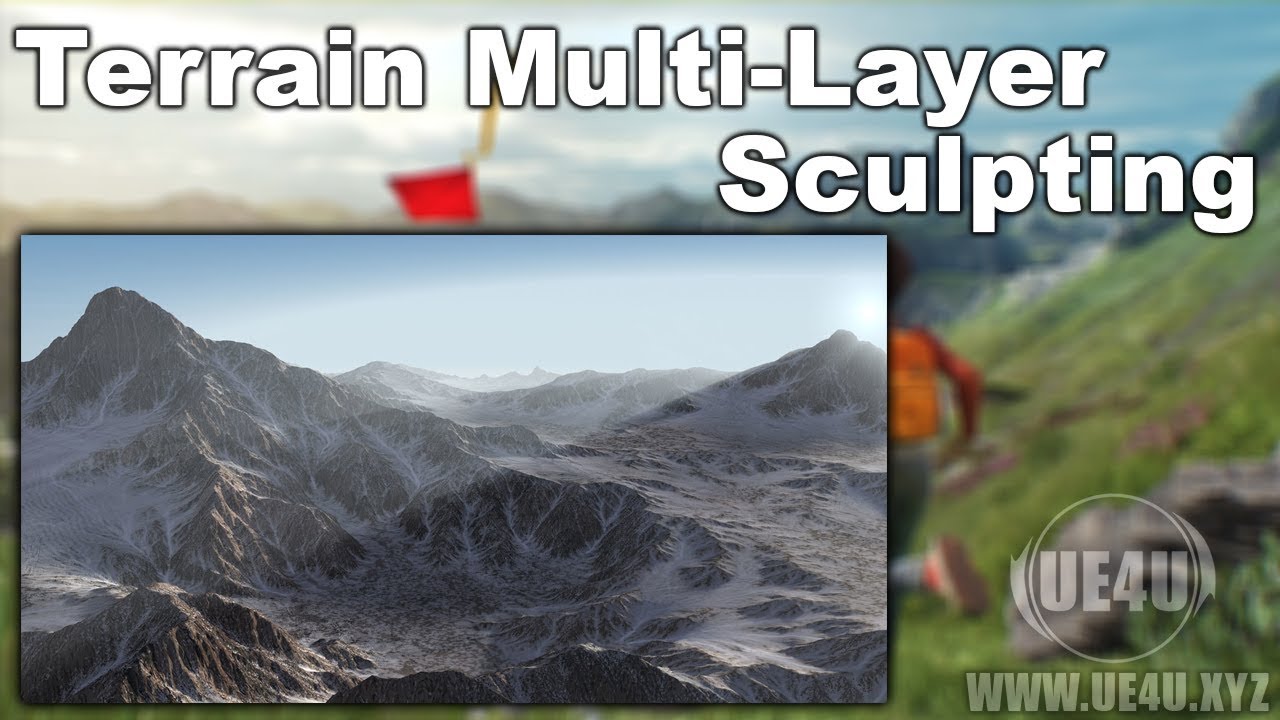
A quick video showing one of the hidden gems of the Unreal Engine editor, where you can sculpt the terrain in several layers, and use them either as versions...