#ue4-general
1 messages · Page 433 of 1
 cerulean sorrel
 spark sonnet
Im still an unreal noob and I always try to make these huge projects. Well atleast I learn alot
cerulean sorrel
yeah your not recmened to go huge right away....
but
one question does UE4 hande the line part
 grim ore
lol my current project is just making a door so, start small and stay small is my motto 😛
spark sonnet
good motto!
spark sonnet
I even tried to make a ww2 single player game. Then I imported a mesh or something and everything was ruined
spark sonnet
hah yes
But I will make it one day, just maybe not alone and not with blueprints only
The most complete game I made was a sidescroller game where you had to jump over obstacles while getting chased by a guy
spark sonnet
cool. Let me know if you want any help 😃
cerulean sorrel
yes plz
spark sonnet
Do you have an idea that you want to make`?
cerulean sorrel
how do i make level scroll forever with blueprints
hahaha
wait i don't think that
oh no could work
then i'd have to spwan patfroms forever
spark sonnet
you could make a bp that spawns a block infront of your character
but I would rather make the entire level unless its an endless runner. then you need to generate a map somehow
 restive basalt
Is there a community stream today?
grim ore
Streams are on Thursdays, so 2 days from now
cerulean sorrel
@spark sonnet i wanted to make endless runer but maybe not
restive basalt
They don't do Tuesdays anymore?
grim ore
they do not
cerulean sorrel
just map is fine
spark sonnet
I would start with that @cerulean sorrel
spark sonnet
Thats very easy. Just duplicate your character, delete the blueprints inside. Then have an event tick connect to AI move to and hook up your character for reference
I can send you a screenshot of mine
spark sonnet
thats it to make him chase you
spark sonnet
just one more thing. You need to add a nav mesh bounds volume to your level. just scale it to cover the entire level
cerulean sorrel
yes i khow this
spark sonnet
ok nice
spark sonnet
just set up an integer variable called Lives or something. When he catches you, restart level and subtract 1 from the Lives integer
I think it would work. You could also just teleport both you and the AI back to start when he hits you
cerulean sorrel
ah
i would link on succss
right
restart level or something
lose one life then restart level
spark sonnet
I think you should use teleport instead becuse I think the variable resets when you restart level
cerulean sorrel
oh
ok
lose life then teleport
i'll just make game over UI when life <=0
@spark sonnet
spark sonnet
yes
 buoyant meadow
@cerulean sorrel it would be a good learning experience to do the same thing in bleuprints then behaviour trees
I used to only use BP if I was doing any ai in blueprints buy behaviour trees make it easier to structure my AI imo
buoyant meadow
I can remember exactly what tutorial I used to learn, but before learning I had a good grasp of bps
spark sonnet
haha yes. Trees are better but for a project like this you dont need it
buoyant meadow
So maybe get comfortable with BP first
buoyant meadow
An endless sides rolling map wouldn't be too hard to implement. You'd need to have set obstacles and spawn an obstacle every X seconds
Give the obstacle a random elevation
cerulean sorrel
yes i know how to do this
buoyant meadow
And spawn it a certain distance in front of your character
cerulean sorrel
just learned it yesterday lol
buoyant meadow
Oh, nice
restive basalt
Anyone know what happened to Clayman's content? Its all gone from the marketplace 😢
cerulean sorrel
@restive basalt RIP
 jolly haven
does anyone have google APIs?
 frosty bloom
@restive basalt https://gyazo.com/171d4d8e43858efc991d8301a4f648eb
You should still have any previously bought Assets in your vault though
 restive basalt
Yea I do, I was just checking his store for the end of the sale and noticed it was gone
grim ore
if you are looking for endless side scrolling don't forget there is a tappy bird mobile example on the learn tab
 marsh swallow
does having duplicate file names in different directories cause issues?
 sudden agate
no
marsh swallow
when packaging and whatnot? or say i have 2 blueprints (i dont by the way, its hypothetical) and they are both the same name, but obviously in different directories. would the node Get All Actors of Class cause an issue
grim ore
well get all actors of class gets only active actors in the world so thats the first step
marsh swallow
I figure it wouldnt, but a team mate seems very concerned that it will/would cause issues
mainly we have some marketplace assets where textures and whatnot are divided into 512/1k/2k etc folders but same names.
good. i figured as much. just wanted to verifym
we have never had issues yet, but hes a vet programmer of 35yrs, so when he says something i tend to have open ears. ^_^
 void blade
hey all, can you access vertex position from a morph target? we are trying to spawn particles on a facemesh (using ARKit) updating as you move your face. right now our particle spawn doesn't get the morphed information, how do you access that?
uploading a video right now to show what the problem is
grim ore
@marsh swallow I also just checked and the get all actors of class node treats each blueprint/class differently if they are in separate folders even when named the same.
void blade

 modern sinew
The tutorial im watching is asking me to make a new State Machine, but it's not appearing when I search it
how do I do it
grim ore
Where are you trying to make it at?
modern sinew
@grim ore https://youtu.be/RPdPmys9JWY?t=389

Today we take a look at how we can import a customer character and set up the animations. We go over step by step how we can begin creating the animation blu...
grim ore
I mean where in your blueprint(s) or project? State Machines are in your Anim Graph in your Anim BP normally
grim ore
are you in the Anim Graph or the Event Graph?
modern sinew
event graph?
grim ore
State Machines are part of the Anim Graph
Look under the Graphs section on the My Blueprint in your Anim BP
modern sinew
found it
 plush yew
does anyone know why my lights flicker on mobile when I move the camera?
marsh swallow
@grim ore I do think at one point a long time ago i did name 2 BPs the same and it did come up as separate.
thank you for confirming ^_^
grim ore
yep yep and no one should ever do that because its bad and you will catch on fire 😛
marsh swallow
lmao, yes bad practice regardless
but we have like 4k files named the same in diff directories which are textures, materials, etc.
grim ore
yeah for resources it should be ok
marsh swallow
he wanted me to rename them all
XD
i figured asking was less work. HAHAHA
even ran a little report out of P4 to get duplicate files. lol
grim ore
unless you are generically somehow loading the assets at runtime I wouldn't expect an issue, if you right click any asset and copy reference you get a unique item like "Texture2D'/Game/StarterContent/Textures/T_Chair_M.T_Chair_M'"
so they shouldn't conflict
marsh swallow
yeah when working with ARK dev kit back in the day i know the engine recognizes that pathing
however the newer versions all pack it into a .PAK and i wasnt sure if it was some large file or just an encrypted file the .exe decrypted if you will to read it like a ZIP.
grim ore
I would assume it still holds the file structure and reference info in the pak, good question tho lol. If you choose to build it non pakked it's in the original structure
void blade
does niagara support blend shapes on a skeletal mesh? i just found a post from september '18 where somebody said it wasn't supported at the time
plush yew
why i cant change screensize?
grim ore
it looks like it's due to being auto generated, possibly the LOD Group or settings below? ah yes look at the Auto Compute LOD Distance option in the LOD Settings and make sure it is false
plush yew
it was 'auto compute lod distance'
 sullen wraith
is there a way to edit the navmesh ?
for some reason it doesnt go in these areas
grim ore
I would assume not enough navigable area in there, or something blocking (less likely). you need to adjust the level layout or adjust the meshes from blocking or reduce the agent size so it thinks your character is smaller and can fit
 summer turret
how do i get unreal engine version 2.21? my projects wont work coz apparently they were made with version 2.21
grim ore
the number don't seem to be in the right order. 4.21.2 ?
and the minor should not really matter, only the 4.XX part so 4.21? If you need an older version click the + next to Engine Versions in the Launcher->Library and install it
summer turret
ye sorry type
*typo
its because i cant open my projects they say i need another version of unreal for some reason im reinstalling epic launcher hopefully that will fix it
grim ore
you can always right click the .uproject file and open it in notepad and see what version of UE4 it wants.
summer turret
oh damn thanks i did not know that
 fathom bridge
I didn't know that either
@grim ore are you self taught? Or do you have industry experience with unreal or something? You know a lot
Just curious
grim ore
UE4 is self taught, everything else before that is self taught and contractor work. I've been doing this for over 30 years so I've had a long time to play with computers lol 😃
fathom bridge
Haha nice. Yeah I've learned a lot of stuff from your YouTube tutorials
grim ore
😃 glad to hear, I do them for myself as much as everyone else
I've had to refer to the sphere mask one more than once and I should feel bad about that lol
fathom bridge
Haha nah, many people take notes, that's the same only better
summer turret
omg you are that guy
fathom bridge
That's partially why I do C++ tuts too lol
summer turret
i literally saw a video last night lol and i didnt know it was you
i seen so many your videos lol they are so helpful short and direct so thank you
fathom bridge
I agree thank you
grim ore
lol they are short because that just makes them easier to make heh
"Do I want to spend 3 hours making a video or 15 minutes and then play Division 2" is not a tough choice for me most of the time 😛
summer turret
lmao fair enough i played so much division the first two weeks now im burnt out lol how you liking the game so far?
grim ore
Loving it but I only play it an hour or 2 a day so I don't get burned out. Log in, chat with a friend, do a mission or 2 or whatever, and go back to other stuff. prevents burnout for me 😃
It works great for UE4 for me as well. I don't miss spending half a day in front of the screen anymore. If I can break it up into smaller sessions I feel better in the end.
 unborn fractal
Hey guys, I am wondering if any of you could help and give me suggestions on a good Unreal C++ tutorial(Paid or Free).
summer turret
@unborn fractal literally the guy above you, look at his youtube
 manic pawn
I really like how not useful the size map tool is
fathom bridge
@unborn fractal also if you wabt to learn C++ for unreal I have a Udemy course. If interested use this coupon: https://www.udemy.com/draft/1741584/?couponCode=FELLOW_MECHANIC

Udemy
Learn the basics of C++ to prepare you for programming in Unreal Engine!
summer turret
how do i rebuild project from sourse?
unborn fractal
@fathom bridge Do you have any more intermediate courses on Udemy?
summer turret
okay thanks coz i still cant open my project
fathom bridge
Yes I have an intermediate course on programming in UE4 with C++ it's just been submitted and is in review now
unborn fractal
Oh nice! How long does the approval process take?
fathom bridge
About 2 business days. Today is the second so it might be up today!
unborn fractal
I'll make sure to keep an eye out for it
summer turret
i still cant launch my project this is so annoying i tried rebuilding from source it says that now
fathom bridge
Sweet!
Find your .uproject file, close unreal and visual studio, right click and generate visual studio prpject files
If it asks you to generate .dlls click yes or ok or whatever
summer turret
okay will try that thanks
fathom bridge
Sure. If it doesnt work trydeleting your binaries file and saved and then try again
summer turret
wont that get rid of all the stuff in my project?
 scarlet charm
all the stuff in your project resides in the "Content" folder.
fathom bridge
No it wont
summer turret
oh okay thanks didnt know that
grim ore
@fathom bridge man that is commitment, you replied to almost every review on your course.
fathom bridge
Haha yeah almost :)
summer turret
do i have to wait for visual studio to parse the 200k files before rebuilding?
fathom bridge
I would wait
 lean marten
Hey guys! 😃 I'm new here and I was asking myself a question, I want to know what you fellow devs think
summer turret
okay thanks
lean marten
What is your point of view on using a TP controller and tranform it into a FPS instead of using the actual FPS controller?
summer turret
thats literally what i am doing lol though i dont know if i should since i am new to this stuff but iam just following virtus tutorial and thats what he did
lean marten
same here!
Are you having problems with your strafing animations? Like the arms go off camera frames?
the camera frame*
summer turret
yep but i am gonna polish those at the end of the project
probably use completely different skeletal mesh and animations since the ones he provided is so bad
lean marten
Have you thought about what you are gonna do about the legs?
like when you're looking down
and rotating so fkin fast that the legs can't keep up?
lol
summer turret
still wont work
and @lean marten im not worried about animations for now lol my project wont open
summer turret
i didnt make backups 😦
i guess im gonna have to restart over
with first person controller this time
grim ore
that error is normal since you are trying to launch the engine from your project, not the project
your project should be in another folder which I don't see it
summer turret
yeah but after i build it and then try to open from unreal engine it still says missing modules
lean marten
@summer turret Just found a way to make the animation stop lagging
grim ore
if you opened up the solution for the project and it was correct you should have a folder on the right called Games with your project name
what does your .uproject file look like inside
grim ore
yep that looks fine, did you regenerate the solution fight (right click .uproject and general visual studio project files)
modern sinew
https://youtu.be/ftLBejDtlqc I followed this tutorial, and his legs are moving, but mine isn't
In today's video we check out how we can finish up our animation blueprint, setting up the conditioning and logic to determine the player's speed and directi...
help
grim ore
with Visual Studio closed
summer turret
yeah i did that then built the visual studio
i also deleted the 2 folders before that
saved and intermediate i think
grim ore
your solution file should look more like this , https://i.imgur.com/UEoUBIq.png
with the Games section having your module/c+code/ project specific stuff
summer turret
oh lemme take a look
grim ore
if all else fails, and your .uproject seems fine, delete the Binaries/Intermediate/Saved folders and the .sln file. right click the uproject and generate the VS project files again, and re open the .sln file
summer turret
let me just move the entire folder somewhere else i think it might be an issue with my admin access and sutff
grim ore
if this still fails then your build targets are bad
summer turret
and i did that already and also reinstalled unreal engine
grim ore
that would do it as well but normally it would still show up just not available heh
summer turret
i checked the folder it was empty
@modern sinew i had the same issue tho i fixed it i think i used wrong animation when moving in the animation dot thingie
make sure you have the walk_forwardInplace in the middle like him
i had idleaiming in the middle
 hidden berry
what are you trying to do watchdog?
summer turret
I am trying to open my project but it wont open
i tried all the solutions i found on google
im just gonna restart the entire project for practice i think
hidden berry
mine literately just did that a couple days ago and i had to restart the whole project, i was big mad
modern sinew
very middle is walk_forwardInPlace @summer turret
summer turret
yep im in the same boat
fathom bridge
I jave had the same issue you can get it back, I would just delete all the stuff mathew said and generate it again. Something in there is conflicting
hidden berry
i opened mine, and it was fine at first , then i clicked restore now for the assets that didnt restore, and it went all black and my thirdperson map and all my assets were gone
and you dont want anything in the very middle red panda, you want that at the top
top middle*
summer turret
@modern sinew make sure your horizontal axis is Speed with minimum -180 and max 180 values and vertical axis is Direction with minimum 0 and maximum 600 value like him
modern sinew
it is
hidden berry
oh sorry i was mistaken
modern sinew
summer turret
can you take a screenshot of your anim blueprint?
modern sinew
what specific part
hidden berry
what is wrong with whatcha got redpandas? what isnt it doing
summer turret
controlling your walk animation
coz i remember i had that issue and it was something simple
hidden berry
what do you mean controlling your walking animation?
modern sinew
hidden berry
do you have all the white sections between your states coded too?
modern sinew
oh that
summer turret
not vectorlengthsquared like he did
and go through that part
it has to be something in your speed variable
hidden berry
is your guy just not moving a5t all, or is he just floating in a t pose
modern sinew
he was in a tpose. Now he's just floating in id;e
summer turret
modern sinew
hidden berry
yeah either your variable is messed up or the transitions between states arent coded/setup right
do you have those white dots between the states coded?
summer turret
yea can you screenshot your animation rules? your variables are good
most like the rules are setup badly
since thats the only thing left lol
hidden berry
ahh i see
summer turret
there you go
modern sinew
lol
summer turret
now I have to redo this entire project coz mine just wont open lol
hidden berry
alright, now that we got that figured out, i have a question, this shits been aching my brain for over 3 hours
plush yew
summer turret
i made it to episode 20 with gun fire effects and impact holes in walls 😦
@hidden berry what is it
hidden berry
im trying to import a real-life topography for my level, but everytime i do, it doesnt load in correctly, and spawns outside of my skysphere
summer turret
nope thats out of my league, MathewW would be better off answering it lol
hidden berry
ive been following every video down to the T, out side of the exact location they pick (i pick my own) and i dont know what it could be
i think one of the videos were actually by MatthewW
one was Twiz, one was Virtus, one maybe my Matthew, and one was by underscore. tried everything and nothing
summer turret
are you doing the first person project by virtus?
hidden berry
im using it as a reference, but right now im just trying to load in a map, so i can have a place to spawn other than that ugly square with walls lol
summer turret
do you have a landscape set?
like try making a manual landscape from landscape tool and try it again
 rustic panther
what are the alternatives to MORT for mass renaming assets?
Here's what I want to do specifically though, I have Skeletal Meshes that all have material instances like skin, hair, shirt, etc I want to duplicate all the assets and rename them to a different character
and it would be nice if it could update the SKM's source location automagically too
anyone know if Asset Assistant is good?
does it even do what I need
 quiet roost
Hi, I'm currently working in Windows and the UnrealDeploymentServerLauncher seems to be eating up a lot of CPU.
Is there away to permanently disable this?
grim ore
When does it start up for you? I don't have it on my launcher version
quiet roost
when I start Unreal Editor
manic pawn
why does adding a landscape make the .umap file ginormous (> 100MB) ?
wouldn't it make sense for this to be stored as a separate file
 swift rose
Not sure if someone could help me with this or not. I have rocks from one of the free packs from Unreal. I've resized and used these to create cave borders and borders along rivers and such. Thing is when they are resized the collision is resized and stops matching with the rock. For instance when you run at the rock, because I made it so much larger you hit an invisible wall a good distance away, or standing on it and suddenly the character is over a foot in the air hovering. How do I fix the collision in this particular instance? I keep trying to do youtube but my search has to be wrong cause I'm not finding anything pertaining to this particular issue. I'm sure it has a name I just don't know of yet. Thank you in advance anyone who's able to help me figure it out. (I'm very new and trying to teach myself UE4 with no prior schooling so if this is a super easy fix I apologize)
plush yew
Hi guys I asked this in audio but hardly anyone posts there. Basically I have some destructible meshes that play a sound when they fracture, I have an audio sound wave bound to 'on component fracture'. My debris are at level 1 with the original mesh at level 0. Problem is when the debris time out (after about 5 seconds) there is this awful noise as if all the 150 pieces of debris are playing the same noise at once. I wonder why they are doing this (is 'on destroy' the same as 'on fracture'?) and how I can possibly disable it.
@swift rose if the rocks are stationary especially you should go into the mesh editor and check 'use complex as simple' collision
Basically they will have approximate collision which is good enough for most stuff but not precise
swift rose
YEah they're stationary. They don't move at all. Is that all I need to do? Change it to 'simple'?
swift rose
Ok. I'll give that a go. and I wish I could help you with your issue but I have no clue. Hopefully someone else is able to help you out.
Thanks btw
plush yew
np
 hoary pier
@plush yew It does sound like its triggering per destruction. I don't know how to prevent that offhand but you could just unbind the onComponentFracture after the first call
hoary pier
welcome
unborn fractal
@fathom bridge Your new course is up!
fathom bridge
It is??? Woohoo!!!
modern sinew
How do you duplicate a folder in the content manager?
hoary pier
The hard part of this is if you want it to move references to new versions of the same assets
 brazen forum
guys how do I transition to a new animation state on a key press?
I have the space bar setup as an inputcomponent event so is there a way to transition states when the space event is raised?
fathom bridge
Create a Boolean and use that as a condition in the anim BP state machine. Simply toggle it with the space bar
brazen forum
Ok. So where should I make that boolean? I'm trying to keep things organized so yeah.
@fathom bridge
grim ore
You should probably put it in the same place you are checking the input, the player is a good place since you can check the player for variables and set them locally during the animation update event in your anim bp
modern sinew
It's not letting me chose the socket for an item
"Cannot change socket on inherited items"
but the guy in the tutorial does it..
nvm
brazen forum
@grim ore Ok. So lets say I store the bool in my player like you said. So to access the bool In the animationBP I would have to cast to my player in order to get the bool right?
grim ore
correct, you would use the try get pawn anyways in your event animation update to make sure it's valid before doing anything with it anyways so then you can cast to your exact class and get the bool, set it locally in the animation BP and then use that to transition your states
the default templates use this setup for things like is jumping
brazen forum
So your saying to cast every frame? I once heard that casting is an expensive operation
grim ore
check out the default third person template and see how Epic handles checking for animation changes like jumping
brazen forum
Ight thx
 unkempt reef
hi guys. is this where i ask a question about unreal engine?
fathom bridge
Yes what Mathew said. You can create a variable of the type you cast to, and only cast the first time. You do this by checking with the IsValid node, and if not valid you cast. And if valid, then you don't.
grim ore
just one, you only get one. wait.. you already asked one, damn 😦
fathom bridge
After casting, set the value of your variable. So it checks every time, but after the first time your vRiable will be valid so it wont cast over and over
unkempt reef
im still new the editor and trying to figure some things out. but one this is annoying trying to fix. when i move an object in perspective view it only moves the bounding box then the object snaps to the new spot. how do i make it move the object in real time without the snapping?
grim ore
Is this a geometry brush?
fathom bridge
Turn off snapping. Icons in the top right of the viewport
unkempt reef
yes.
grim ore
then you cannot, that is the way they work.
fathom bridge
Ahh
grim ore
the "bounding box" is the actual brush, it adds or subtracts when you stop moving it
unkempt reef
ok how do i turn off the brush and go to object mode?
grim ore
well the brush is a brush, if you don't want it to be a brush anymore you can convert them to static meshes but then they are static meshes and you can't change them anymore
unkempt reef
hmmm ok i guess i have to work around it then. still getting use to it. thanks guys.
grim ore
brushes are mainly meant for blocking out levels and stuff, temporary stuff. They should be replaced with proper meshes at some point. They do not perform as well as an actual static mesh for example.
unkempt reef
yeah i havent figured out how importing works yet.
grim ore
click the add new button, or right click and add, or drag drop
unkempt reef
only been about 2 weeks since i started.
i can put static meshes in the scene from the content window. just dont know how to convert my models in blender to be used in the engine.
grim ore
oof.. good luck with that. Last I heard it required some magic, luck, a little worshiping to any god you believe in, and then more luck. Also something about an FBX format 😛
grim ore
howdy ho then
fathom bridge
@unkempt reef export them as .fbx. You do need to know that thr scale will be off my a factor of 100 so you must set the world scale appropriately. You may need to check or uncheck checkboxes regarding which axis points up... Experiment with it
Then in unreal simply import it as fbx I do it all the time
unkempt reef
oh ok fbx. i have worked with those before.
fathom bridge
Yep
grim ore
yep axis and scale seem to be what I hear alot lol, I think you can fix the scale in blender itself as an export setting but shrug I don't art
unkempt reef
i was using unity for a long while. but unreal seems to open up a few more possiblities
grim ore
I think the easiest thing to do is just make your game using only flat planes that the engine comes with and really good textures 😛
grim ore
See there you go. Real good textures and normal maps and then who needs real meshes
 still moth
im going to be starting my own game fairly soon with unreal, i have independently worked out and tested many of the game mechanics already
sullen wraith
how do you all manage large scale ai? think ai in city skyline, total war games.
unkempt reef
oh good question. what maps do i need to add....
rustic panther
is there an issue in 4.22 with view modes? My Player Collision and Visibility Collision are both solid black
and Mesh DistanceFields is black in Lit, but it works in Unlit
fathom bridge
Just upscale regular airline
Ai*
Big nav mesh
You can also have different nav meshes and even spawn them dynamically
modern sinew
Ok, so I got Crouch+Shift to turn off friction, but slopes don't seem to effect it. How do I get it so I can slide down a slope?
sullen wraith
this is working for items i make, static actors and such
however it wont work for pawns
 soft crescent
did epic release that chaos tech demo?
plush yew
Quick question, Are there any places to get free heightmaps?
 keen dirge
could you guys please help me?
I need to know how to export a particle i made in maya (in this case water foam) and then import it in unreal engine 4.
modern sinew
Anyone know why my BP isn't working
It's supposed to stop movement from being affected by the camera when you're sliding
modern sinew
@regal mulch Do you know why it's not working?
 gilded plinth
I just got my first 4k monitor, and um, wth, ue4 ui editor ui doesn't scale by default? I read about the developer tools widget / scale option, but that also doesn't save with my project. Would anyone mind telling me the proper way to get the editor looking right on a 4k?
 regal mulch
@modern sinew Buddy, please read the #old-rules (specially rule number 1). I'm not here to be pinged all day long.
modern sinew
ok
regal mulch
You are calling UseControllerRotation on the Pawn I assume.
Have you tried setting that on the actual SpringArm or Camera?
modern sinew
It doesn't give me the option to choose...
 lost niche
Hey all, I'm trying to understand the multiplayer/replication basics and have some questions. As I understand this should increse the value for each player controller (this is the player controller bp) connected to server. When I launch lobby from first game it prints 1. When I join to lobby from another game, it prints 1 again on the server and 2 on the client (second game). Can you please lead me to the point that I'm missing?
lost niche
So what does a replicated variable means in a player controller?
 cloud cobalt
Blueprint graphs are also per-instance - each player his own graph, so the variable should only go to 1
PCs exist for the server + remote owning player if any
On a client, you don't have PCs from other players
If you want to count players, just count player states, which are replicated
If "Variable" is replicated, it is normal that it goes to 2 on client and 1 on server
For each player
Server will set it to 1, replicates to the client, which also increases it by 1
Replication being one-way, server stays at 1
lost niche
To be honest my aim is totally different than counting. But I failed miserably so I wanted to start from basics again. I watched tutorials about this but the replication system hasn't clicked on my mind yet. Tutorials feels like they do the same thing over and over again without explaining the technical aspects. I can't go out of their scope to do my own things
Oh that makes sense now
cloud cobalt
Replication is a very simple mechanism : when you change the value of a rep variable on the server, it sends a message to all clients (you can set conditions) to set the new value.
That's all of it
It literally doesn't do anything more
lost niche
Okay, so with this logic, if I write a custom event that replicates on server which does the increment, should it be changed on server too, and next player should make it 3 right?
I tried something like this and I get 2 from server which is good, but it prints 1 again just before 2. I'm lost at that point
cloud cobalt
Your Blueprint graph is not shared across different objects.
You have one PlayerController on server for each player
All of them with their own Variable
Each client additionally has one PlayerController, with the replicated Variable
lost niche
Oh so it won't work because other pc's can't see or reach the variable
They'll just increase the 1 that server increased first and stuck at 2
cloud cobalt
Yes.
If you have 15 players, you will have 15 PCs on server with var=1, 1 PC on each client with var=2
plush yew
my mom told me not to talk to strangers so i won't talk to you @cloud cobalt
lost niche
So should I carry this kind of logic to GameMode/GameInstance? As far as I know they just exist on server
cloud cobalt
If your goal is to count players on server, GameMode is best
Beware GM doesn't exist on clients
lost niche
One little problem (for me) with GM is I tried to add each PC to a list that I get from OnPostLogin, but it gives me the same PC. Is the reason because it doesn't exists on the clients? If so what is the reason of putting a PC parameter on that event?
cloud cobalt
Should be each new PC.
lost niche
I try to set a nick before joining and try to read it from the PC I get from OnPostLogin. And it always gives me the nick I typed on server. Is this because I forget to replicate it where I store it?
cloud cobalt
The nick does need to be set on server, sure
I'm not familiar with the login process myself.
lost niche
Okay. I feel like I have some new perspectives to the problem. I'll try new things. Thank you very much
regal mulch
@lost niche "I try to set a nick before joining and try to read it from the PC"
When are you doing that? And how are you passing it?
lost niche
I have a main menu level. I get a username from GUI and set the text to a variable on GameInstance. Then I launch/join session and call function from PC that I get from OnPostLogin to return that variable
regal mulch
Can you show that function?
Because you are probably doing this wrong :P
@lost niche
lost niche
Yes I am :(
Sure let me find it
Is it okay to post multiple pictures here?
This is the GM
And this is the PC
What I intended to do is put the widget bp on viewport upon joining lobby (InitializeUI), then calling SelfDeclare to give the GM the player controller of new player. When there is a second player joined (2 player game) it should call UpdateEveryone to give players the info of other player
Hmm okay, currently I can't call SelfDeclare because GM returns null, I believe this is caused because clients doesn't have GM?
Okay I'm able to fit these 3 in single picture. The left is my MainMenu widget, where I set username upon hosting or joining game. Middle is my gameInstance, getter and setter for playerInfo struct which holds playername. And right is my playerController. Again a getter and setter that calls the getter/setter from gameInstance
When I try to add new PC to playerControllers array on OnPostLogin and try to get nicks through PC.GetInfo -> GameInstance.GetInfo -> SplitStruct -> PrintString(Nick) with foreach loop it prints same name for both which is what I typed on server
I just figured there is a seperate Multiplayer and BP section, sorry for using here
regal mulch
Hmm okay, currently I can't call SelfDeclare because GM returns null, I believe this is caused because clients doesn't have GM?
Correct. RPCs that are called on the GM make no sense.
Also Replicated Variables make no sense.
This one for example
This stuff you can just do OnPostLogin
Without the SelfDeclare
What you should do is just utilize what Epic already gives you.
Players have a Name via their PlayerState. If you want to use your own setup, add a new Replicated Variable to that.
When a Player connects, you are only using BPs, make sure to retrieve the Name somehow from the Client and then set it on the PlayerState of the Client.
If your UI uses the PlayerArray of the GameState
As well as the PlayerState, the Names should then be replicated automatically.
You can also use the Function "ChangeName" that exists in the GameMode
It requires you to pass a PlayerController and a Name
That will effectively change the name variable that already exists in the PlayerState
That way you don't have to create any extra variables.
So the correct way would be:
OnPostLogin -> ClientRPC on the PlayerController -> In the RPC, GetGameInstance and get the saved Name -> ServerRPC inside the same PlayerController (cause this is hte only one you can call it on at that point), passing the retrieved PlayerName.
-> In the second RPC, GetGameMode (cause now you are on the Server again) and call "ChangeName", passing SELF for the PlayerController reference and the Name.
 hallow frigate
Hi, I'm pretty new to unreal. Can someone explain this error and how to fix it?
regal mulch
That is not an Unreal specific warning.
It's a C++ inheritance issue.
You are trying to cast the type of "OverlappingComponent" to your custom badguy class.
OverlappingComponent is of class "PrimitiveComponent"
Badguy on the other hand is probably not inheriting from PrimitiveComponent or any of its children.
So if you try to cast to it, it would always fail.
You might want to cast the "OtherActor" to badguy.
@hallow frigate
regal mulch
@prisma sorrel Please try again without all-caps :P
cloud cobalt
You don't need to put it in caps
Your question is also completely impossible to understand
What's izes ?
Sorry, I don't get it.
Unreal works in Unreal units
You might look in project settings or editor settings if you can map that to inches
🤷
 valid pewter
I thought unreal units follows the metric system. I think it defaults to cm or mm. I don't remember.
 fierce tulip
cm yup
plush yew
But how many unreal units in an ell
plush yew
ok that was very handy thanks
 delicate turtle
Finally a unit of measurement that is easy to work with. 👌
jolly haven
so
Is there a way to move objects in a way in which they are placed directly on the floor
 abstract relic
Place it in the scene and push End. It’ll snap to the ground
 odd osprey
do you guys use blueprints or cpp more?
 misty creek
It completely depends on the person
I like using blueprints because they are very easy to tweak
abstract relic
I use bp because I’m a dumb artist
cloud cobalt
Blueprints are very recommended to dumb artists, dumb programmers, and people who are not dumb
They're meant to be used as an interface between code and design
cloud cobalt
Gonna need more infomation than that
jolly haven
it simply doesnt work
cloud cobalt
What doesn't ?
abstract relic
Still not enough information
cloud cobalt
What are you doing, why, what doesn't work
jolly haven
I can neither get a heightmap working and I also cant place roads on them
cloud cobalt
If you want to import terrain from a height map, there is documentation on that.
jolly haven
At ths point I have spent at least 5 hours on this
cloud cobalt
Okay, so what did you try, what does it look like, why is it not good, what isn't working
jolly haven
there are issues
basically
I have the modular road tool, but it simply is way too inefficent to have to move the points manually, i need something similar to the road plugin in unity where you can just place points by clicking on the terrain
 noble plume
Sup
New Animation Features in Unreal Engine (Presented by Epic Games)
Where i can find this session from gdc 2019
?
manic pawn
it wasn't uploaded yet and no one seems to have recorded the stream
noble plume
=((
fierce tulip

ICYMI: every single one of the @Official_GDC 2017 lecture videos (500+ of them) are now free on GDC Vault: https://t.co/IdiUye7NrV
Retweets
137
Likes
279

 Twitter
 midnight mauve
Hi.. does anyone know Composure well? I have a couple of fairly "yes/no" questions and could REALLY use the help.
still moth
can you change the default units?
sorry, was responding to a message about unreal units being metric that was evidently an old post
 dawn vessel
@fierce tulip Do you know exactly how long until the sale is over? I'm currently speeding through the lists of Items to buy 🤣
grim ore
spring sale? https://www.unrealengine.com/en-US/blog/save-up-to-90-with-the-unreal-engine-marketplace-spring-sale April 10 at 11:59PM EDT which is 12h 52m minutes from now
 kindred viper
I wonder how many times I can sell my body for some marketplace cash between now and then.
grim ore
You only need to sell it once to the right person
kindred viper
probably none but im fine with that. 😄
yeah knowing my luck I would sell it to a medical student going into pathology and looking for a cadaver
but if it gets me some plugins !!!!
fierce tulip
ill give you tree fiddy @kindred viper
kindred viper
I can't even afford the change from a fiver
fierce tulip
ouch
kindred viper
which means I should get my ass back to work really. been sat here trying to decide what to do next
just finished a slot machine and hooked it up to niagara to do the rng and throw some particles around for laughs. Do you think people would want a tutorial of some kind for that?
sullen wraith
for space ai, whats the best way to get something to move from point a to point b? ive only experienced with actual characters thus far
kindred viper
depends how you implemented your ai icejaff
regal mulch
If it should move freely in 3D space, then it gets tricky :p
At least as long as there are obstacles it has to avoid
grim ore
@kindred viper I wouldnt complain just to see how you handled the slot machine payout algorithm lol, that's where I am stuck with mine... well less stuck and just don't want to do it
regal mulch
If it's just from A to B, straight line, then it's easy
kindred viper
@grim ore in terms of longterm RTP ?
grim ore
oh I guess I assumed it wasn't a single line machine lol, how many lines is it?
kindred viper
well its setup for variable but im using a 10 line slot
grim ore
yeah ok then the method you used to check for winning lines. I did one in unity years back but it was server based so someone else handled that part I just make the reels show the correct results so my part was easy
sullen wraith
@kindred viper @regal mulch I haven't even started yet, there are no obstacles it would have to avoid though
grim ore
now that I have to handle the math... meh
regal mulch
On Tick do:
CurrentLocation = CurrentLocation + Direction * Speed * DeltaSeconds
Where
Direction = (B.Location - A.Location).Normalize()
And speed is how fast it should move per second
And stop doing it if CurrentlLocation == B.Location
+- some error
Direction can also be defined as
Direction = (B.Location - CurrentLocation).Normalize()
Should technically be the same, but well
sullen wraith
i use blueprints primarilly, so would location be teleport?
what node do I use to initiate the move i mean
or is it just setting its position?
regal mulch
Well Get and SetActorLocation
kindred viper
@grim ore I just started writing it all down but I figured I will write it up as a tutorial and post it back. What I did was a prototype I threw together though and I know how to do some things better now. If I say it used an Array of Plane Structs, then you can understand there is some explaining to do
regal mulch
Can also activate Sweep on it
To register hits
But if you say there is nothing between it
Then well
grim ore
@kindred viper yep yep I gotcha 😃 There is one "slot" machine asset on the marketplace I tore apart and it is literal shit. It doesnt work like it should, some of the variables do nothing, and it's hard coded even tho it shows you can change it. It's one line also and doesnt even check for winning just spits out meshes for the items that it stopped on.
my slots work fine I just stopped at making the algorithm for payout checking because math is my enemy and I started working on a series about making the ultimate door 😛
kindred viper
Ahh I have the advantage of being a slot fanatic. So this is kind of my jam 😄
yeah the payline check was the most confusing part for me. I had to do some pre-planning to get the data right. jotted down a matrix and figured out how to implement it
grim ore
yep yep I am sure there is something clever, the actual code I had access to before was a node.js script and it was really really small for the actual payline checking. I have literally no idea what it did and I lost access to it 😦
it definitely did some magic with arrays lol
kindred viper
I did this in blueprints/UMG so I know it can be done better in C++ for when performance is key, but its really lightweight anyway in terms of everything but the animation, and thats a case by case
grim ore
same here, UMG and Blueprints using images lol
kindred viper
yeah . Did you use the animation timeline in UMG ?
grim ore
nope I just moved the reel vertically and "warped" it back down as needed to simulate spinning
that way I could adjust the spin speed dynamically
kindred viper
same. I tried that with the timeline and it kept going wrong
seems like its a bit restricted
grim ore
yep its a simple thing once you get the math worked out for the positions and offsets
kindred viper
maybe I did it wrong but I am used to manual animation anyway so it was quicker to just do that
grim ore
nah the animation system is fine for static stuff, maybe effects like a button pulse and such
glad to see we had the same way of doing it tho 😃 it worked great in unity using nGUI so I figured why not in UE4
kindred viper
yeah. I was thinking about doing a serious setup, fully compliant with UK gambling license regulations and making it a modular template system so you can throw out slots with just artwork requirements. Not sure if I should, it requires certain permissions from Epic to sell but it 's a highly profitable business
grim ore
it would yes
kindred viper
it would be nice to have that 3d edge too and the pixel streaming is gonna help security issues a lot
grim ore
same with unity, special license if you need to use it for real gambling. fake gambling in fine.
Unity is really popular for slot machines
kindred viper
yeah I should probably set it up as a Fun Casino for freeplay coins
but legit at a switch of a var
grim ore
😃
well if you do make a tutorial on it I won't complain. I planned on doing the same but once it comes to math it becomes a ton of work for someone like me to make it easy to understand and do
kindred viper
Luckily its not got a great deal of math in mine. Just cycling data a lot. When it comes to non-deterministic RNG though, the Unreal setup is good enough or you can just slam in a premade C++ class
sullen wraith
am I able to lock something in the editor so that i dont click on it in the viewport?
grim ore
don't get me wrong I can do the math and I plan on still finishing at some point but then I plan on using it as a beginner tutorial I need to make sure that I fully understand the math and can explain it in a simple way and find the least complicated bit of code I can share so it just takes a while
I don't believe you can lock anything in the editor but you can hide it @sullen wraith
kindred viper
I never doubted that 😃 But I expected more math than I found in mine
sullen wraith
dammit mathew
grim ore
More than 1 maths is 1 more than I want lol 😂
sullen wraith
very inconvenient to keep clicking on sky sphere :3
grim ore
I know locking things and disabling them in the editor is a feature that a lot of people ask for
sullen wraith
epic dont care?
kindred viper
thats actually crazy that there isnt a lock in the world outline
there is a lock on the scale of an object in the detail panel, but not the location nor rotation
grim ore
okay I take it back you can lock an item but you can't disable it from selection it just prevents it from being transform changed
in the viewport right click on the actor go to transform and you can lock it you just can't disable selecting that's what a lot of people have been asking for
One of the biggest problems is most of the things that you want to manipulate actors aren't actually in the world outliner but in the viewport itself when you right-click it's really weird
And to be honest I always forget I can right click on items in the viewport
And all the lock on the scale does is make it a uniform scale as far as as I know
kindred viper
oh yeah
i dont spend enough time in the viewport tbh but it still sounds a bit crazy. If I couldn't lock things in UMG I would go mad. In 3d it's 1 dimension worserer
sullen wraith
@grim ore can I set an actor to face another actor?
grim ore
Use the find look at rotation in the construction script to do it and then remove the code LOL
Or you can always pilot the actor and then move it around like you would normally look around the viewport and then leave it at that position
sullen wraith
its more of on spawning an actor i want it to face another actor :3
begin play same as construct?
hidden berry
anyone use quixel megascans here? im thinking about signing up for a subscription at 29 a month, but i want to know if itd be worth it . I like the textures and the live link function
grim ore
Begin place the same as construct yes
But the cool thing is you just gave me an idea for a really neat utility widget I can use in a good example
hidden berry
i have a neat idea for you that maybe you could help me figure out how to implement @grim ore lol
sullen wraith
@regal mulch I'm trying to do what you told me
CurrentLocation = CurrentLocation + Direction * Speed * DeltaSeconds
im stuck here
hidden berry
you could convert the X to a float maybe? that would allow you to hook up speed
or drag out of the X and creat a float link (dont know what its called
 wispy raven
Quick question
I have a sprint bar, when I sprint, it looks choppy
Is there a way to smooth everything?
sullen wraith
hey luke it'd really depend on lots of things
from the animations, to the settings
it's hard to tell without more info
wispy raven
Ok, I’ll give you more infos
sullen wraith
@regal mulch i've finished it already 😃
regal mulch
Alright :P
sullen wraith
I used a timer function instead of ontick as well
it made it a lot easier to control
wispy raven
I use an event tick to lower down the bar (default value: 100) by one, it looks choppy, I’d like to smoothly lower the bar
regal mulch
Can you show the logic?
sullen wraith
no expert by far, but my experience says delays dont tend to work to well in ontick?
wispy raven
I delayed for making the reload a little slower
sullen wraith
im very new to unreal luke, dont act on that, wait for more feedback
if you want a delay, try setting a new variable with the delay time
then for another branch
wispy raven
I’m new too, that’s why I’m asking simple things like this
sullen wraith
if delay
wispy raven
A branch for a delay?
sullen wraith
im just suggesting removing the delay from the ontick completely
wispy raven
Hold on, I’ll try that
sullen wraith
ill show an example quick
wispy raven
It’s smoother, but the reload should be slower
sullen wraith
ill show you
1 sec
make a new integer or float called delay
then after the branch
true/false etc
go set delay (desired time)
and do something like this ontick
that's just how i'd do it, im new though.
wispy raven
Ok
sullen wraith
then you can do a branch before the one you current have
if delay > 0 fail
etc
if that makes sense
wispy raven
wait a sec
And how is that supposed to make the reload slower?
Hold on, got an idea
sullen wraith
just set the delay to a higher time depending on how long you want
 gleaming isle
If you are going to just do it in tick, why not define regen and drain as a value per second and multiply that by delta seconds when applying it
hidden berry
are you trying to make the actual in game reload slower, or the animation?
sullen wraith
if i have speed or the "on tick" time set to anything besides 1
wispy raven
The reload
sullen wraith
it just teleports into nowhere and crashes essentially
wispy raven
But I think I found the solution
I have to change everything
I changed from integer to float
Yes!
I did it
sullen wraith
good job
wispy raven
Actually, the solution was pretty easy
sullen wraith
did it fix the buggyness?
sullen wraith
delays dont tend to work in onticks from my experience, as it's being fired numerous times a second
wispy raven
i simply removed the delay and changed the -1 to -0.5
Btw, thank you @sullen wraith 😃
sullen wraith
all good man
plush yew
Hello folks, I'm trying myself on the top down template, and I encouter a really basic issue, I can't figure out how to make an hack n slash diablo style, from the top down, how would you go about clicking on an ennemy and once that ennemy is reached, play a montage to attack
?
I tried to check the distance on a while loop but it's a infinite loop and UE doesn't like it at all ^^
Also tried to check the distance with a timer by event, but can't get it right
fathom bridge
Are you familiar with overlap volumes and OnComponentBeginOverlap?
By the way, instead of a while loop you can use the Tick function. It is basically like a while loop, it gets called evert frame
plush yew
Yep, but you mean adding a sphere collision to the player and when the ennemy is in the sphere set a bool "inRange?" for example ?
 deep basin
quick question, what is the smartest way to get hold of a specific child actor that was set in a derived blueprint?
fathom bridge
Yeah that is a way that should work
Or you can have the sphere on the enemy
Then the enemy can attack too
Either way works
plush yew
Ok I'm gonna try that way, but i would like to add the attack mechanic after the move to mechanic of the topdown template (not sure i'm clear there)
fathom bridge
You can do that. Once the moveto is done, attack, etc
I'm interested in how it turns out
 maiden sundial
Why is UE in VS trying to connect to the internet ?
Since I'm having no internet on my Pc ATM I noticed that I get some failed connection messages inside VS
plush yew
Yes that's the thing, how do I know when the move to is done as there is no OnSucces pin 😃 ?
fathom bridge
AIMoveTo does
maiden sundial
Is UE trying to steal my code ? xdd
grim ore
it is yes
plush yew
I tried it and AiMoveTO seems not to work in a player controller
fathom bridge
It does require an AIControllwr
maiden sundial
@grim ore was that referring to me ?
fathom bridge
Are you using blueprints or C++
grim ore
yes it was
maiden sundial
Yikes, was that a joke or does UE really upload my code ?
grim ore
if you are just trying to see if you are near, why not use the overlap when you are near?
fathom bridge
Okay. I mean you could use an AIController instead. I assumed the top down template uses one but I guess I was wrong
plush yew
The top down use a custom controller
But i could try to get all the logic in the character
fathom bridge
But yeah you can just have the overlap tell you.
grim ore
@maiden sundial it was a joke, visual studio probably sends crash reports and other logs as needed. I doubt its specific to your UE4 project if it's in UE4
maiden sundial
Well, the error message is pretty specific that it failed to connect to an epic games site
grim ore
inside of VS or inside the editor?
fathom bridge
If he doesnt stop the moveto there is a StopMovementImmediately node
maiden sundial
Inside Vs
grim ore
trying to replicate it, is it in the project or engine source and when does it pop up?
maiden sundial
It comes when I run the engine via VS.
After some seconds I see the info messages
grim ore
oh so the debug messages from the editor?
maiden sundial
Could be since I'm running it as debug
grim ore
yeah that makes sense as its the diagnostic data from the editor I would assume. You are seeing it in VS because you are running it in VS in debug mode
you can disable the diagnostics stuff in the editor preferences in Ue4
sullen wraith
hey mathew, im going off what eXi told me to do earlier and im having an issue
CurrentLocation = CurrentLocation + Direction * Speed * DeltaSeconds
anything besides 1 stops it working completely
maiden sundial
Alright, but I'll just stay with it.
Was just a bit scared that UE is really trying to get my top secret code 😆
grim ore
they might be but would they want to take the risk?
sullen wraith
maiden sundial
Depends how worth the code is, I guess 😄
grim ore
even if it was the next greatest thing they would risk a lawsuit and court over it which for a large company doesn't make a ton of sense
maiden sundial
That's true.
Iirc you actually have to show the code at some point to show that it's not some code with copyright
 dim plover
That doesn't sound right.
maiden sundial
i know, could be also wrong with that.
I saw that from an series, yikes.
But in some way it make sense to me
fathom bridge
You fill out your own copyright notice, but I don't think they go through anyone's actual code
maiden sundial
But how else could you prove that someone stole your code ?
grim ore
if it got to that point yes you would compare code and hopefully you have a history showing when you created it compared to theirs
for most people tho you will just be re using existing systems and code anyways so it's not an issue, most problems have been solved for most people. higher end work for higher end code, like Machine Learning or Autonomy is stuff that might be more trade secrets and if you are at that point you already know what you need to know about keeping your code
maiden sundial
That's true 😄
grim ore
Well this is a weird one, Landscape Layers for painting. The project I was in had a Dirt_LayerInfo already in it so instead of me creating a new one for this new landscape it used the existing one. There does not seem to be a way to now create a new LayerInfo object for this new landscape for this layer. Any ideas?
You can't even clear out an existing LayerInfo unless I am missing something
 azure shore
so guys how would I make a 2d sprite change the sprite depending on direction
or how would I make this exactly https://www.youtube.com/watch?v=Qd3TFue0648

i fell sick the last couple of days so i decided to mess with ue4. i was surprised to find that there hasn't been any doom-style, 8 direction sprite asset ei...
cus thats pretty much exactly what I wanna do
fathom bridge
This is why clients often receive the binary instead of the solution with all the code in it
azure shore
?
hoary pier
@azure shore Get the direction/rotation(Yaw) of the facing direction vs the camera direction. Convert that 360 degrees to an int to choose which sprite sheet to use
hoary pier
I think so, I think the camera manager would still give you the debug camera if that was current
azure shore
messed up already havent I
hoary pier
Taking a step back, this will require some decent knowledge of vector math if you want to make it from scratch.
fathom bridge
I think you wanna get the camera from the camera manager
hoary pier
You can just get the ActorRotation of the CameraManager
fathom bridge
All you wanna do is use GetLookAtRotation from the character to the camera, then zero out the pitch and the roll
set that as the rotation each frame
hoary pier
Not exactlyDruid, he also needs to takeinto account the movement direction of his pawns
fathom bridge
Or actually get its forward vector and the look at vector and take their difference and rotate it by that much
fathom bridge
Well the pawns will move each frame, but if you get the difference and correct it then you're correcting for it each frame
hoary pier
Not to make the sprites face the camera, but to get the proper animation to play
I think that is his major issue
azure shore
so, these two?
fathom bridge
Oh okay. I thought it was only about making the sprites face the camera
azure shore
yeah Im just using billboards
deep basin
no possibility to get a child actor in c++?^^'
fathom bridge
Kanna what exactly are you trying to do? Get a child of an actor is kinda vague
 lime gull
How would I go about making an actor that the player goes up to, holds an input, and a progress bar linked to the actor fills up, like how repairing generators in dead by daylight works
hoary pier
@deep basin I think you have to use getAttachedActors maybe. Which doesn't help if they are no longer attached
azure shore
but can billboards not use pitch
hoary pier
@lime gull Which part of you having trouble with?
@azure shore I think you will need to avoid billboard and manage the rotation of a plane instead to get the exact effect you want.
fathom bridge
By child are you talking about an actor that's attached like Goose said, or a component
or are you trying to cast it to a child class
hoary pier
I assume he means ChildActorComponent but I could be wrong
azure shore
damn ok
lime gull
I need to link a variable from and actor to a progress bar widget, but i don't know how to cast, AND I dont know how to get an input from tha character to be called in the actor
For the second one, could I get the player controller?
hoary pier
@fathom bridge Can paper Sprites be directed to only face camera in a single axis (yaw) by default or would he still need to manage the rotation? I've not worked with the paper sprite system really
fathom bridge
@lime gull I just released a Udemy course on C++ game creation and I cover exactly how to do this
I think he would have to make it face the camera himself
lime gull
Im not familiar with C++ at all, and doesn't udemy cost money? Cause I'm broke
plush yew
hey, i have good understanding about physics so is it possible to create full robot only in ue4. Robot would be physics based and doesnt have animation. Moving would come from mechanic parts in the robot that will move by something.
fathom bridge
Because he would have an Actor and the actor will have a sprite component. So the actor still needs to be made to face the camrea
lime gull
Im a 16 year old with no stable income
hoary pier
@azure shore So yeah, as DruidMechanics points out a PaperSprite may be better for handling the 2D portion but you still need to rotate it how you would like.
azure shore
ok, Ill do that
hoary pier
@lime gull Simple way to get info to the UI from a non-pawn actor would be to pass that to the UI when you create it
fathom bridge
brb gotta do work stuffs
hoary pier
When the UI is created, set a variable on the UI called somehting like MyTargetActor and set the actor as the reference
azure shore
so Ill have to use an event tick for the rotation?
hoary pier
The Pawn/PlayerController would handle the input and check if it was near an interactive object (Something you need to define a system for). If it is, then call some interaction on that object to spawn the ui and handle sending it progress
lime gull
hoary pier
@azure shore Probably
lime gull
Its messy but maybe it makes any sense
azure shore
it does seem ever so slightly delayed
if you flick the mouse around its really not fast enough
hoary pier
@plush yew I wouldn't say it is impossible but would be an interesting feat. Would be much easier without physics but if you need it to react in some very physical way then it could be possible with constraints/etc.
@azure shore In the actor default settings try changing the tick to PostWork (I don't remember the exact name of the variable, just search for tick)
plush yew
@hoary pier i want to do it physics based because it would be very interesting to work with.
lime gull
I need this but without the timing events
azure shore
thanks
lime gull

If you're new like I was and are wondering why the generator keeps exploding or when u do a task and someone screams here's the proper way to do it. When I s...
hoary pier
@plush yew Then yes, you could do it but I am not certain of the fidelity of the results. Would be a fun project for sure, but if it needs to be 100% successful you may want to consider a different approach
@lime gull I think we understand, i gave some pretty good direction above your first drawing you may have missed
deep basin
@hoary pier thanks, I got it working!!
plush yew
@hoary pier what do you mean?
lime gull
When binding th variable to the widget, how should I do the casting
deep basin
childactors are a weird thing... I feel like they can really throw a wrench in your project
lime gull
Cauae i need to cast to the actor and get the variable, to be the output, but idk what to do for the object
hoary pier
@plush yew Well i think as an educational exercise, making the Robot entirely in physics would be fun and you would learn a great deal BUT if this is a school project that you will fail if it doesn't work (or some situation like that) then I would go with a more bone-driven solution
@deep basin They ARE weird. They used to be very buggy as well. I usually just spawn an actor at runtime.
@lime gull So on your UI create a variable called myTargetActor. When you spawn the ui, call set myTargetActor and pass in the actor. In the UI, cast myTargetActor to the type you want and do your business 😃
 rare axle
Any good tutorials for possessing AI pawns? Say a character is walking around doing his own patrol thing, and you want to run up to them and switch to possess them [disable their AI and take full control]
 sonic jacinth
is it worth upgrading to 4.22?
hoary pier
@rare axle You should just be able to call Possess on the player controller and pass the pawn in
Note: I think this will garbage collect the AI controller
lime gull
Somethinf I should add is that I'm working witg multiplayer servers as well, and want multiple people to work on one objective at a time, which is why having the variable in the actor would be better than the ui.
hoary pier
@sonic jacinth I would not recommend it right now. I usually wait till the next preview is released at minimum
@lime gull My previous comment does exactly this
sonic jacinth
so rn is in preview?
hoary pier
rn?
lime gull
So the ui variable will stay the same for everyone?
hoary pier
@lime gull The UI exists only on the client so you pass the reference to the actor on the client when the interaction starts. The UI can just read a value from that actor reference each update to change what it shows
lime gull
So rather than casting the actor variable to the ui, you cast the ui variable to the actor?
hoary pier
@sonic jacinth I'm not certain what "rn" means for what you are asking. My meaning about preview is to wait till 4.23 preview comes out. That means Epic is done interating on 4.22
lime gull
Rn typically means right now
hoary pier
Ah, no there is no preview yet for 4.23
sonic jacinth
and I noticed my engine version is outdated
hoary pier
sorry, the context seemed to mean something else, I'm silly
I would not upgrade right now unless some new feature was a must have right now
grim ore
I love having source code access to the engine, What does something do? Let's find out!
sonic jacinth
still confused why they written so much at character when I can do it in a fewer lines
might have a good reason, idk
hoary pier
@lime gull So the confusion may be in my assumption of making a modular system. If you just want a very hardcoded way to do this for now then you can go either direction. Either create the ui on the actor and call each update or spawn a UI and pass the actor into it and have the UI ask each update
lime gull
My small brain doesn't grasp what you said very well, but I'll try my best to figure it out based on what I think you said
hoary pier
@lime gull I can see how it can be confusion, don't feel bad. I'll try to state it clear and specific. On the Generator, make a variable called myProgressWidget of the class(Whatever your progress widget is ). Make a function on your widget blueprint called setProgress with a float input. When the generator is interacted with, CreateWidget(YouProgressBarWidgetClass) and set it to the myProgressWidget variable (Also add it to the viewport, etc like normal). Each tick that progress for the generator changes, use your myProgressWidget variable to call setProgress on the widget)
plush yew
Any1 from you guys have problems with the new pak format? or can help me with it
rare axle
@hoary pier so would I make my moving NPC a character or a pawn? because pawns are there specifically for possession, I want this AI to be able to roam around, attack things and just generally do things of his own accord until I run up, interact and take over.
hoary pier
@rare axle I would use Character (Character extends pawn but has extra helpers for movement, physics/collision, etc
rare axle
Ok thank you
hoary pier
Welcome 😃
 reef kayak
Can some1 help me? im trying to build lighting but right at the end while encoding textures , my unreal crashes.
i get no errors
azure shore
so this works fine for facing the camera, but how do I detect which angle its at and change the sprite accordingly?
sullen wraith
how can I make a player character where there is no physical actor?
just a camera you move?
abstract relic
Make a character bp >>> delete mesh
sullen wraith
you cant delete the mesh of a character bp
rare axle
@hoary pier Okay so I have a character that roams around now, I can run up and posses, but going back to possession of my default character disables the AI as you said before... How can I avoid this?
dim plover
You can "delete" the mesh* of a ACharacter child in C++. DoNotCreateDefaultSubObject or something like that. *SkeletalMeshComp
regal mulch
StaticMesh != StaticMeshComponent
Simply leaving the StaticMesh at null/empty should be enough.
regal mulch
Angle between stuff is usually done via the DotProduct of directions
azure shore
what does that mean
regal mulch
That means, if you throw two directions (normalized vectors), into the DotProduct function, it returns a value that tells you if they are the same, 90° off or 180° off.
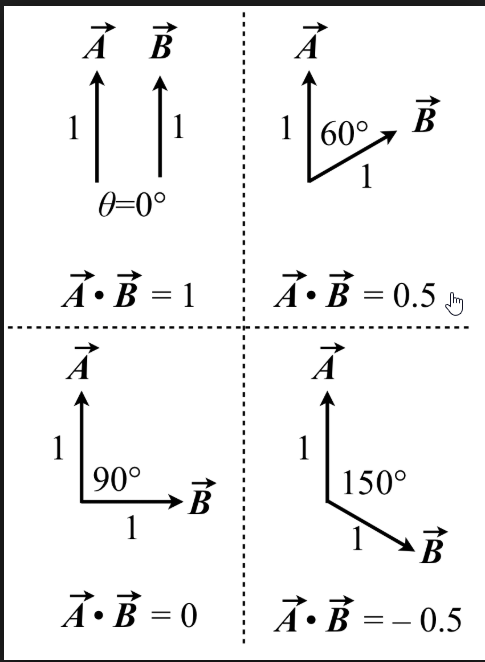


Or something between
The result is between -1 and 1
An ACOSD function on the value gives the actual angle
Won't tell you if left or right though
I assume the PaperSprite sits in an actor or?
@azure shore
regal mulch
Right it's a pawn
So the Pawn has a ForwardVector
And the Camera has a ForwardVector
If you get the angle between them, you kind now what sprite to show.
If they face the same direction: Back of the Sprite
If they face opposite direction: Front of the Sprite
If they are 90° to each other: Either left or right of the Sprite
And that stuff I just explained above.
If you don't know yet how to do, use google to find out more about the key words:
- ForwardVector
- Normalize
- Dot Product
- AcosD
Vector math is pretty powerful and requires in gamedev :P
regal mulch
Multiple ones I would assume
I can't type
Also I type "Multiplayer" so often that I can't type "Multiple" anymore -_-
grim ore
azure shore
really not sure which images Im meant to follow here
grim ore
there is alot of info in there, might be best to just read what you can and see if you can understand the concept
its alot of theory crafting and adjusting as it goes on, the 2nd thread is someones implementation of it and a video showing it
azure shore
I mean for a start I cant even get the forward vector with the three coord floats
kinda need that
nvm split pin struct
they do hide things like this
 marble shoal
HI all.
abstract relic
You can also use Break Vector node. Same thing as pin splitting
sonic jacinth
in a professional project whats the ratio between blueprint and c++
in my projects currently c++ dominates
 frank escarp
@sonic jacinth depends on the game and the project and the company
it even varies within Epic
Robo recall is 90% blueprints
unreal tournament 4, and fortnite, are like 99% C++
Paragon was C++ but some of the spell behaviors done in blueprint (high level), so... 90% C++
dim plover
I heard Paragon was 100% BPs.
sonic jacinth
what computer could handle to compile a game of the size of fortnite frequently?
marble shoal
I Haver been having an issue with a VR GRENADE system I created. Where I pull the pin with the secondary hand . But is only working PROPERLY when the grenade is facing a certain world direction .
sure this bit is the issue , but not sure what I diod wrong
did
dim plover
Guess I was wrong. I just vaguely remembered a Reddit post about it.
sonic jacinth
for example whats the ratio for tiny builds
still moth
well if the pin of a grenade is facing away from the direction of your other hand, wouldnt that make it more difficult to pull?
marble shoal
I would like to remove the grenade actors rotation from the equation, So it doesn't care what its world rotation is. Currently it only works in the x vector
still moth
unrealpak?
plush yew
Unreal Engine has a tool called unreal pak to build/extract pak files
fierce tulip
afaik thats not an official ue4 tool
plush yew
lol it is?
Its in the binaries folder of Unreal Engine
If you build your project it uses Unreal Pak to make pak files
fierce tulip
yes, but not unpacking
marble shoal
Brief: the first hand to pick it up is assigned the primary hand, and the second attempt is set as the secondary hand, , the transform in inverted for the other hand so the pin always face the secondary hand. the issue is the actual grenade pin only works correctly if I face it in the world x vector. not sure if this is making sense?
fathom bridge
this sounds like a case where you would want to alter the local rotation, not world rotation