#ue4-general
1 messages · Page 424 of 1
 bitter iris
 plush yew
you mentioned sdk
bitter iris
yeah
plush yew
whats this have to do with reinstalling vs?
 grim ore
his picture showed he had the required files for VS and UE4 installed, his computer just does not have the correct registry entries set up for it
plush yew
I tried this
plush yew
tried this after each restart
grim ore
I found plenty of google results showing how to fix the issue
plush yew
also replaced hard drive
just to be sure
ok could you point me to one of these links
I don't use google in my country
thanks
grim ore
bing then? duck duck go? alta vista?
plush yew
I tried duckduckgo
grim ore
i think yahoo has a search still
plush yew
but maybe you get different result
 grim ore
no one will be able to read that
the moderators will have to approve it before anyone else can read it or reply
plush yew
looked deeper
this issue goes deep
its not to do with my install
its just a shitty engine
thanks for the help anyway
 delicate turtle
of course
delicate turtle
sure
grim ore
when you come back it will probably still be an error tho so maybe not coming back?
grim ore
I don't think anyone wants to see you using something you don't like, Unity seems to do what you want and it might be best for your happiness if you continued to use it.
delicate turtle
As an observer, from the outside it looks more like something is fishy with your system. It is not the engines fault if your system has problems.
plush yew
I tried across 3 different systems
grim ore
well you feel it is shitty and no one should have to do stuff they feel that way about.
plush yew
using different components and installs on each change
its definitely something to do with unreal according to the forums
its true
I mean its nothing personal
if the engine dont work for me it dont work
grim ore
it's your feelings, we get it, you don't like it and no one here would want to see you doing something you don't like which is why we suggested to go back to what you like.
plush yew
ok thanks bye
bitter iris
back to unity he goes
grim ore
as long as he is happy is what matters, people shouldn't have to do stuff they dislike if they have a choice 😃
grim ore
not if the plugin is source based?
 sacred lotus
why dont we all create a game together so we can have people from all over the world working on it and much more content to be released?
bitter iris
@grim ore i mean i installed it from marketplace, dunno what the problem is
 spare jungle
@sacred lotus we making this game already, and it is named 'life' 😉
sacred lotus
took me a while to get it
grim ore
is this a c++/BP project or BP only?
sacred lotus
but seriously
 manic pawn
amazing idea, so we can have 20000 different ideas on how to correctly do xyz
sacred lotus
no different people work on different parts
bitter iris
@grim ore bp dude
bitter iris
theres too many opinions for everyone here to make a game together
sacred lotus
what if we all assign a piece of work which doesnt overlap so no one can complain about things they dont like
grim ore
@radiant loom is it possible you had the plugin installed to the project before and now its installed to the engine? if so remove it from the project?
bitter iris
remove them before i try clone?
grim ore
well you should be able to clone it like you did then remove the plugins directory for substance from the project itself once cloned
grim ore
if this is a BP only project then it should not be trying to compile. what is in your .uproject?
bitter iris
 grim ore
ok so that says you have a module which means there is some C++ code in there somewhere
plus it says the substance plugin is disabled so lol
bitter iris
i think i did some a while ago for dedicated servers
bitter iris
ill try load it again
this is what comes up when it says rebuild manually https://pastebin.com/05vrRxEE
 azure shore
hey can someone help me with my question in #design-chat
grim ore
yep that's the error due to the module(c++ code) being out of date when you try and load the project
bitter iris
welp
grim ore
that screen you had before where it was parsing the headers and then you said it failed, what was the error in the window in there?
grim ore
when you hit yes it tries to rebuild right? then it errors out in it but I don't see the error when trying to rebuild it
bitter iris
yeah i hit yes, then it goes through the rebuilding (the log i shown) then this
 fair onyx
One message removed from a suspended account.
grim ore
what version are you coming from upgrading to 4.21?
bitter iris
4.20.3
grim ore
oh weird, the target files should be fine. what does your target files look like in the source dir?
bitter iris
grim ore
nah 1 folder back, in the actual source should be 1-3 target.cs files
bitter iris
ahh okay
grim ore
it seems to be complaining there are no valid build targets
bitter iris
grim ore
what is in one of them, the editor.target.cs for example
I have a feeling you should probably just regenerate the solution file and compile in VS tho
grim ore
uhm... maybe your VS is broke lol?
try right clicking your .uproject and generate visual studio project files
so they are up to date for 4.21 then open up the .sln file in visual studio
and isnt VS 14 2015?
 fast finch
I must admit you guys, I need some help
I made a thread on reddit explaining my issue, can I link it instead of repeating it here?
Anyone around? Been stuck for over a day on this

reddit
Hey, The main reason I think Im struggling is because of the pivot point (Scene Root). This is how I am rotating the Tetris Cube FQuat...
grim ore
really don't understand the problem based on that post
fast finch
Yeah I thought so, thats why I said if you have more questions, or are willing to do it over screenshare, Id be grateful
I tried my best putting it to words
grim ore
you have 4 meshes all with 1 parent (root) and you want to rotate the 4 meshes around the root and it does not work?
fast finch
No that works
I want to
Like
They make a tetris block, right?
I want to rotate the block In place, just like how tetris works
grim ore
so you make the 4 children meshes in the correct spot around the root?
bitter iris
Its VS 2017 Mathew
grim ore
I know it's 2017, but that error when you tried to open it says 2015 lol
fast finch
Yes Mathew, I could do that, but as I said, that requires me to manually assign their position, and I gotta calculate stuff
bitter iris
oh doesi t? lmao
fast finch
is there no better way?
grim ore
technically you could create the meshes in a separate program in the correct shape and center the pivot
or you could get the bounds of the meshes and get the center point from that and use that as the rotation point
or just set it up once in the mesh using the parent root and be done?
fast finch
Can you elaborate on the last point?
oh
I did download a 3d model of a lego block from turbosquid
to try out that
but it still had the same issue, I guess it didnt have a pivot?
grim ore
what you are doing seems to be the easiest way. If you have them set to a fixed size for each block then calculating the offsets manually should be easy enough and accurate
fast finch
It is easy enough, but another problem comes up, regarding grid limitations
Grid starts at 0 on the X axis, so the blocks cant go past 0
But if the pivot is at 0
half the block has to be below zero
does that make sense?
grim ore
it makes sense if you are calculating the movement based on the pivot
but you can always check collisions and stop based on that
grim ore
yep sounds like a design problem to overcome
 storm venture
hey im having trouble with the multi-user editing plugin.
i've port-forwarded 7777 and provided a friend with my ip:7777, and they place it in the project settings for multi-user editing, specifically within Default server URL, then they try Session Browser and nothing shows
grim ore
you can cheat and follow this for some examples 😃 https://www.youtube.com/watch?v=MI4N7lXMJpA
grim ore
blueprints are just C++ with a pretty face, there has to be C++ code behind the BP node.
fast finch
The video you sent is 2D though, no?
grim ore
I dunno I did not watch it, was using it as an example of something you could check out for ideas. Movement code should still be similar and his solution to checking out of bounds movement might work.
grim ore
but if you know the bounds of the playfield and you know the bounds of a piece and it's origin when you move an item you can check to see where it is going to end up and if out of bounds you can just stop the move and not do it
fast finch
Currently Im checking the location of each individual statiac mesh
and make sure it doesnt go outside the grid
If the grid is between 0-375, I loop around my static meshes, and make sure they cant move past 370 or under 0
grim ore
that works as well
fast finch
Would you recommend making the model in a 3d software, rather than having 4 static meshes?
grim ore
it would be the more accurate way for sure but it's a simple game in the end I doubt it matters
fast finch
Accurate how if I may ask?
grim ore
well it's 1 mesh to your exact specifications with the exact pivot point compared to 1 blueprint with multiple meshes with a pivot point that you set up in the editor in the blueprint. accurately i doubt the original game used individual sprites for each cube and then pieces them together to make shapes but instead used different sprites for each shape.
fast finch
If I create a block in blender, and set the pivot point in the center of the block
When I go to add it as a static mesh
Wouldnt hte pivot point still be in the root scene?
Or would I make the model the root scene
grim ore
pivot points in 3d programs are at the origin, not where you set it so that is important to know.
and in blender would you be creating the "block" or a "shape" ?
fast finch
Shape
grim ore
then you can use the mesh itself, the shape you created, as the root and it would have the pivot for that shape based on where it was when you exported it out
fast finch
What about the fact that when I place something as a root, it doesnt have a location or rotation anymore? Like, On the editor
and it also seems to shrink
grim ore
it does have a location and rotation when it has a place to have one, like in the world
if you are editing the blueprint itself then the root has no place in the world so it has no rotation or location, just a scale
the location and rotation of the item will be whatever you tell it to be when you put it into the world
internally it can't have one because it does not exist anywhere that it could have one (it has nothing it is relative to, no parent or world itself to be a location or rotation in)
fast finch
That makes perfect sense. Ive never really used blender before, but it cant be hard creating an I-Block can it? Its the Tetris block thats just a stick
straight line
grim ore
nope it's just a block thats more vertical than horizontal is all
fast finch
And since in blender the pivot point as you said is origin, a.k.a (0,0,0). I'd have to make sure that the block is made with the origin being its center, correct?
grim ore
yeppers
fast finch
Mathew, I dont know you, but you are a hero, thanks for the help, I'll see what I can do
 abstract relic
Yep. Push N when you open blender. You’ll get a property panel that holds the coords
grim ore
I don't use Blender so other people are way better suited for the specifics 😃 #graphics if you get stuck probably
abstract relic
You will know him now. https://m.youtube.com/channel/UCOVfF7PfLbRdVEm0hONTrNQ/playlists

YouTube
This channel is dedicated to exploring Unreal Engine 4 and the Blueprint programming language that it uses. You can think of it as a companion to the API doc...
grim ore
😃
abstract relic
lol
grim ore
I've made a lot of videos so that makes sense 😛
fast finch
Random question, did you get the title idea from total biscuit?
abstract relic
Everyone knows matt
grim ore
nah it was more along the lines of "WTF does this do" is what I said over and over lol
grim ore
yeah it tends to come up alot when using the engine for the first time and I wanted to make it casual 😃
 novel summit
anyone know how to make an auto realistic landscape material
 fierce tulip
follow along with the official unreal showcase about it, create superb pbr foliage, create superb material, create superb terrain
abstract relic
Substance designer is a good start
 austere badge
I have a question. I'm going through a tutorial on how to use UE4 and I keep getting this message. Whenever I create a new landscape the whole thing turns black and has no tiles across it like the one in the video I'm watching.
fierce tulip
under build options you can update the reflection captures
austere badge
Where do I find build options
fierce tulip
next to play in editor button at the top of your editor screen
austere badge
So do I click on "Build lighting only"?
austere badge
Build reflection captures ?
fierce tulip
but in that same list it says something like rebuilding/recapturing reflection blabla
yea
austere badge
It then gives me an error that says Lighting needs to be rebuilt
abstract relic
Ask the question. There 5000+ people here 😜
 keen frigate
@austere badge Click on build on the left of the Play button.
Make sure you have a Lightmass Importance Volume in your level covering your level.
fast finch
@abstract relic I figured it out dont worry, thank youuuu, and thank you @grim ore It worked making it in blender around the pivot point!
austere badge
How do I do that @keen frigate
fierce tulip
if only there was a search engine to solve problems
 hoary silo
and you drag in this:
First drag in the lightmass importance volume , then build your lighting (Click on build)
 frosty copper
^ make sure it covers everything the player can reach and then some. Importance volume will basically nake every light bounce once outside of it.
austere badge
So is there any reason why my landscape looks like it does and not like the other guys?
hoary silo
You need to set your light source to moveable, (the sun thing with and arrow on it)
austere badge
How do I do that? Sorry I literally just started learning today.
hoary silo
grim ore
left looks like lighting is not built, hence the black tiles you see, you don't want to see those so yours is already better
hoary silo
yeah, I was just about to say that
frosty copper
@austere badge if you're only just starting, may i suggest watching epics intro videos first: then jump into experimenting and asking ;p
austere badge
I was watching Game Dev Academy
frosty copper
🤔 fair 'nuff~
austere badge
And it just looked different so I thought I'd ask
frosty copper
Aah... Yeh... Engine changes do that to videos 😂
austere badge
So it's just a different version and that's why?
bitter iris
@grim ore Managed to get it to open on VS get this now though ```D:\SX\Project\PF\SX\SurvivorX3 4.21\Intermediate\ProjectFiles\UE4.vcxproj : error : The project file could not be loaded. Could not find a part of the path 'D:\SX\Project\PF\SX\SurvivorX3 4.21\Intermediate\ProjectFiles\UE4.vcxproj'. D:\SX\Project\PF\SX\SurvivorX3 4.21\Intermediate\ProjectFiles\UE4.vcxproj
D:\SX\Project\PF\SX\SurvivorX3 4.21\Intermediate\ProjectFiles\SurvivorX3.vcxproj : error : The project file could not be loaded. Could not find a part of the path 'D:\SX\Project\PF\SX\SurvivorX3 4.21\Intermediate\ProjectFiles\SurvivorX3.vcxproj'. D:\SX\Project\PF\SX\SurvivorX3 4.21\Intermediate\ProjectFiles\SurvivorX3.vcxproj
so need to create the paths then hopefully itll be fine
frosty copper
Almost always, yeah~ see what version they're using i the top right
Its not too bad recently. The location and aesthetics slowed down with major changes after 4.10ish i think
austere badge
I'm using 4.19.2
hoary silo
dude, you need to get 4.21 BAD!!!
you don't want to use older versions of unreal
If your not sure how to do that, Ill show you
frosty copper
Upgrading mid project is only nessecery when it's... Well... Nessecery :p
austere badge
I know how to install them yeah. I'm using the older one because my friend (who I'm going to be building a game with) is using that and can't update due to his internet.
I'll try to convince him to switch .
abstract relic
How would you collaborate then? It doesn’t sound like he’ll be able to use source control
frosty copper
I doubt most people would be committing changes more than 100mb often.
austere badge
He said that we have to use the same version to be able to collaborate.
And his was 4.19.2
He said to install that one.
Does 4.19.2 not use the source control thing you mentioned?
frosty copper
It's been integrated in ue4 since the start
Source control can also be used outside of the engine (sometimes easier)
abstract relic
I’m sayin you need at least decent internet to set it up
bitter iris
can anyone help with this
frosty copper
Starting with a blabk project doesnt need a decebt internet
abstract relic
That is true
hoary silo
Can someone help me plz. On my custom mesh have capsule shadows, they wont work for me 😦
austere badge
Thanks for your help guys!
frosty copper
Plus, judging from tge fact he doesn't know much abouy it leads me to believe he hasnt been using it; and if they're using gdrive or something, the person with better Internet can do the initial commit :p
abstract relic
Trial by fire. They’ll find out soon enough 😜
hoary silo
sure
hld on
I have light on the right, and indirect capsule shadows checked
I also set up the shadow physics asset
frosty copper
🤔 dont you want capsule direct shadows?
hoary silo
no, just indirect, and those dont work either, just FYI
frosty copper
Huh
frosty copper
http://timhobsonue4.snappages.com/lighting-capsule-shadows
Tried following this?
Unreal Engine 4 tutorials, Tips & Tricks, and other curiosities!
frosty copper
There's usually some checkbox somewhere, or something else mundane being the problem 😂😂
Give the page a quick read over~
hoary silo
okay
frosty copper
It looks like something that needs to be set up, so may have missed a step
hoary silo
I went through the unreal docs, and I'm sure I haven't missed anything
frosty copper
Can ya throw a screenshot of the mesh editor?
frosty copper
Okay, see how in the pages mesh viewer theres capsules along the limbs? http://cdn.snappages.com/t02va2/assets/2692195_2881013_1461299478.png
 hoary silo
yes
frosty copper
I'd assume that's whats used for the shadows, and what you're missing
hoary silo
I know Im not missing them:
frosty copper
Huh 🤔
hoary silo
It might be a bug
frosty copper
So it's behaving in the mesh editor but not in the world
abstract relic
Is dynamic shadows on?
hoary silo
yes
frosty copper
Could always restart the editor. Beyond that I'm stumped: would have to just fiddle with it in person at this point
 dry moon
I think your fog might not be reaching to the end correctly
bitter iris
maybe overlapping skys
 summer turret
ye thanks it was overlapping
keen frigate
@bitter iris nice catch 😃
bitter iris
done the same a few weeks ago lol
anyone know a fix to this? its stopping me from going to 4.21
grim ore
is the .uproject correctly targetting the correct source version of the engine? if you aren't using dedicated server you could always remove the module.
bitter iris
delete the SurvivorXServer.Target.cs for now?
grim ore
you would remove the module part of the .uproject so it does not try and load it or any other C++
bitter iris
ahh i think its just let me build
WOO
========== Build: 1 succeeded, 0 failed, 0 up-to-date, 0 skipped ==========
wtf is wrong with this, it lets me build but still says rebuild from source
ugh
 heady bridge
Could be a dumb question, but should weapons always be Actors? or can they be pawns if you want to have input in them?
 cloud cobalt
Players can only possess one pawn at a time
heady bridge
Oh okay, since Characters are pawns, that'd mess everything up, thanks for the reply
cloud cobalt
Pawns are meant as the physical representation of players
heady bridge
Okay, that's what I thought, but I just wanted to make sure, I read the description of both and thought maybe it could be possible since Pawns can have input, actors don't say anything about it
cloud cobalt
Actors can't have input but it's very easy to pass player input to one
Have the pawn handle input and call a function on the weapon
heady bridge
Yeah I figured that out the other day, I never used custom function until then and realized how helpful they were, i'm trying to do things in C++ but dang it's hard lol, might do first draft in BP's then see if I can translate to C++ after
austere badge
Can someone tell me what a heightmap is in basic laymans terms?
heady bridge
It's a greyscale image that dictates to the engine what the high and lows should be on a mesh based on the color
like creating landscapes with mountains and valleys for example
austere badge
So like a 3d outline from top down? If that makes any sense
cloud cobalt
Imagine a real map color-coded to altitude.
austere badge
So when the textures are applied it knows where to put them? Or is that entirely different?
cloud cobalt
Height maps are used for terrain
austere badge
I mean terrain textures.
heady bridge
The textures don't nessicarily match the height map, unless you made a terrain and textured it then baked the height map with others, it'll definitely match that way
cloud cobalt
(The height map is actually a texture)
heady bridge
But in all terrain editors, you get a texture painting tool
...all the ones I've used I should say
cloud cobalt
Let's just say height maps are representations of terrain
Texturing the terrain is unrelated
austere badge
So it's like the first step in building terrain?
cloud cobalt
It's a storage form for terrain
heady bridge
Yeah the values of a terrain are stored for use later
austere badge
So a heightmap changes the geometry of a terrain basically. Do most games built in Unreal use custom Heightmaps or templates?
cloud cobalt
Everyone has its own way, I guess
Like, not everyone need terrain
Some people buy pre-made landscapes, some people sculpt it themselves, some people generate a heightmap outside UE4 and import it
 silver relic
Hey guys (noob alert), i have this material and i have painted my landscape with it.. looks cool.. but i realized i need to turn on and connect the tessellation for it to be awesome. So i tried doing that (with flat). but Unreal crashes when i save the blueprint. is this because unreal freaks out about all the different UV's at ones? or? - through tutorials i made this BP to be 1 material, instead of seperate ones, i don't know how to make brushes from different mats. help plox XD
austere badge
What are some programs people use to create heightmaps?
And thanks for your guys' help.
heady bridge
Personlly I'm going to see how Unreals landscape tools are, if i'm not a big fan, then I'll use Zbrush and blender or just blender, because you can have a lot of control with sculpting
but world machine would be easier for less experienced people in 3D art
cloud cobalt
^ everyone has a different way
heady bridge
Yeah exactly 😃 there's always a technical way and an artistic way 😃
austere badge
Another question for you guys. I am following a tutorial and am trying to sculp a landscape. I added lighting by pressing build but when I go to sculpt this happens.
cloud cobalt
Not sure what's wrong here.
austere badge
vs what this guy has
grim ore
The black lines are indicators that lighting is incorrect and you are using static lighting. It is possible the person you are watching is using movable lighting
grim ore
change the lights in your scene to movable
silver relic
click your light, and under the position stuff choose movable
austere badge
So click on lightsource?
heady bridge
Yep
on the components panel on the right just under transform there should be moveable in a row of 3 options I believe
silver relic
quick question, can i use tessellation/displacement on a landscape paintbrush?
austere badge
Seems to have fixed it. If I change it back though, it doesn't seem to have the lines anymore though, Weird.
heady bridge
No problem 😃
 mental shale
you know how you can press the enter key or spacebar to press a button in HUD?
How can I make it so that I can also press any key to do that?
like the Z-key
abstract relic
Blueprint interface
mental shale
what class would use it?
mental shale
umm.
im not too sure what I would actually do with the interface tho
that's for like, communication between different blueprints
abstract relic
Scratch that. Can’t you use keypress directly in umg?
mental shale
there's OnClicked, but I dont know how you could set it up to use different keys to activate it
 dark depot
you can also override the on key down event or listen for input action
mental shale
would that work with inputs?
abstract relic
yes
dark depot
listen for input action does
abstract relic
that's what action mapping ia
mental shale
ah
do I use this with event tick or something?
wait
would that work for multiple buttons?
dark depot

What is the Listen for Input Action Node in Unreal Engine 4 Source Files: https://github.com/MWadstein/wtf-hdi-files
 lavish hedge
Okay so
I built a game in HTML5 But
It didn't include an Index.html
what the hell gives?
Did i package it wrong?
Did unreal fuck up?
I need to know how to fix this.
please help
 finite slate
Try packaging it instead of just building it
lavish hedge
I did package it though,it wasn't built
this is gonna make me mad if i dont figure out what went wrong,search engining the problem didnt help
austere badge
I have a question about textures and normal maps etc. Keep in mind I really may not know what I'm talking about because I'm very new so if my question is stupid sounding please forgive me. So my question is, can you go from taking a picture, turning it into a diffused texture and then creating normal maps and roughness maps off of it? I am wanting to understand how the process of creating textures works. In the tutorial I'm following, we're just taking pre-built ones and putting them into the game. I want to understand what the process of creating all of them is.
 ocean frigate
Does anyone know how to possess a pawn client-side and have it update for everyone?
finite slate
Ok, I'm mad
After making literally no changes
My app doesn't work on my phone
All I did was change it to "For distribution"
Thought it was strange that it was only 40mb compared to the 68mb it was before
None of my UI bindings work
wtf?
I restarted and it started working
nvm
That was just a different version
I think the issue is that the save game isn't being created
azure shore
I hate it when things break without you doing anything
finite slate
I uninstalled both versions
Oh
Yeah
It was because I had 2 versions of it
Trying to read the same save game
Reinstalling to see if that fixed it
azure shore
would anyone know how to search for key inputs in the 'find' bar, it's impossible to search for it when it's just a letter
(good luck)
austere badge
Anyone know about creating textures?
azure shore
I'm currently putting comments on most of my key inputs so I can find them easily but I didn't for older ones
finite slate
hm
azure shore
@austere badge well what textures
austere badge
I'll copy/paste my question for ease of use.
I have a question about textures and normal maps etc. Keep in mind I really may not know what I'm talking about because I'm very new so if my question is stupid sounding please forgive me. So my question is, can you go from taking a picture, turning it into a diffused texture and then creating normal maps and roughness maps off of it? I am wanting to understand how the process of creating textures works. In the tutorial I'm following, we're just taking pre-built ones and putting them into the game. I want to understand what the process of creating all of them is.
austere badge
Well I'm trying to understand how the process works from the very start to where you get a diffuesed texture, normal map and roughness map.
 worn granite
@austere badge Uhh okay I'm not an artist but I do kinda understand all these maps
worn granite
If you're starting with a final texture, eg a picture of tree bark, you can't directly rip maps from that.
For example, a normal map is the XYZ direction vector (of length 1) at any given UV coordinate.
azure shore
oh I thought a program could do that damn
 pallid compass
did someone say maps?
austere badge
So this first image is digitally created?
And then converted into a normal map and then a roughness map?
And you use all these three to use in games?
worn granite
I'd say the maps (textures) are all created at the same time.
azure shore
I'm glad I'm not making a realistic game
pallid compass
Depends how your creating them really
Photogrammyness is a whole skill in its own
worn granite
I'll defer to Rei cause > not an artist
azure shore
same
finite slate
My phone is 18.5:9
azure shore
ouch
worn granite
muh black bars
finite slate
It still goes fullscreen on my phone
azure shore
o u c h
austere badge
So when do you use real photos over the photogremetry thing
pallid compass
If you lock your game to aspect ratio, you gonna have a bad time
worn granite
Real photos can help you with the base texture and stuff
or even the other maps (to some extent)
pallid compass
Full screen got nothing to do with aspect ratio
austere badge
So what is a diffused texture? Is that like a real photo?
finite slate
What would people mind more
Black bars or stretched textures
I personally don't mind black bars
Stretched textures are awful on my game because I use a simple 8 bit artstyle
Kinda
worn granite
I love that I say I'm defering to Rei and then Rei doesn't answer shit
worn granite
Anyway the diffuse is the color that would appear under unlit shading
pallid compass
Your problem is your anchors and UI setup.
worn granite
And the normals, rough, AO, etc that's all used for shading it
pallid compass
learn2umg
worn granite
You hate **UI
finite slate
No, I hate UMG
pallid compass
try slate
finite slate
Which includes UI
pallid compass
its better than umg
worn granite
Kay, go try wxWidgets
finite slate
Oh here let me just redo my entire game's UI
austere badge
So you take a picture, create a diffuse off of that, then a normal map and a roughness map. Instead of taking a picture you can use photgrmetry?
pallid compass
here let me refactor my UI and try and get better each time
worn granite
Photogrammetry is a technique that leans heavily on tech
finite slate
I would rather just fix this issue in UMG than redo everything in slate
pallid compass
where is zero when we need him
finite slate
I don't even know what slate is
worn granite
basically you take 1000 pics from any angle you can think of and the 3d geo will be reconstructed by an algorithm
pallid compass
Slate is the underline framework that umg wraps
worn granite
and then your maps and such are generated from that.
(but you normally do a clean pass between)
pallid compass
Yeah delighting pas and such
worn granite
So most of the maps would be from a thing called baking
worn granite
Your color maps can be sourced from anything directly -- its your geo/shading maps that you can't easily take from a pciture
worn granite
You'll have to construct the geo you want to bake into the maps ANYWAY, may as well model the thing.
pallid compass
Because of how your UI is setup
worn granite
That being said, sometimes you want a globally tilable texture with bump offset.
I've given you enough bs for you to source search terms from, now, so I'll stop pretending I know how this works
flees
austere badge
Which thing comes first? The picture / photgremtry? And then you create all of the other maps etc from that?
finite slate
You aren't telling me what I am doing wrong, you are just telling me I am doing something wrong @pallid compass
pallid compass
How am i meant to know?
finite slate
"your anchors are bad" is the most detailed thing I am getting
pallid compass
I cant see your UMG setup
finite slate
You clearly know something
pallid compass
Your anchors are bad
gives you at least a hint
to what might be wrong
I cant read your mind or your project.
pallid compass
2 lazy
Not really in the mood to debug someones project, pretty tired
UMG is an art, and it takes awhile to get good at crafting UI's that work properly.
lavish hedge
Found it,had to zip the solo contents together
can't believe nobody here could help
grim ore
I'm sure some people here could they just didn't want to.
lavish hedge
that's pretty mean
lavish hedge
Guess not
grim ore
Helping takes time from what they might be doing and effort away from current things. Some issues are just not worth that effort or time if it's a simple issue that has been solved and the solution is out there.
lavish hedge
Well i did say i tried searching for it and couldn't find an answer,so it wasnt out there
grim ore
Was this a user error in the end or a system issue or just a lack of knowledge?
If it's a system issue maybe post the problem and solution on the forum or Reddit for others in the future, pay it forward.
lavish hedge
that's kind of what i'm here for though,for more instanteous responses
pallid compass
il give you instanteous responses for $$
lavish hedge
You've given me responses that you'd have to pay me for already.
grim ore
You had a problem you couldn't find the solution to and hope someone could help. you found the solution to the issue now you should take the time and effort to put that information out there for someone else who may have the problem when they want to find the solution and I looking for an instantaneous response
grim ore
So the problem is you package to HTML5 project but you don't know how to run it because there's no index file?
lavish hedge
Yes
grim ore
Are there no other HTML files or HTM files in there?
lavish hedge
Well more that i'm having trouble uploading it to a site and having it actually work
finite slate
Can you launch it?
lavish hedge
every time it gets stuck on processing so i believe that's just wrong
pallid compass
Try asking me
lavish hedge
i can launch it within the engine
pallid compass
What is your issue?
grim ore
Well the engine isn't HTML or chrome or edge or Internet explorer or Firefox so it's going to work differently
lavish hedge
Yeah,it works when i do that, but i'm saying when i upload it somewhere and wait like a day it's never in a playable state
finite slate
What state is it in?
lavish hedge
just "processing" forever
finite slate
I know
pallid compass
Launching pushes a temp engine ver too the target
finite slate
So what files are made when you package?
yaay my stretchy UIs are gone
unrelated
carry on
grim ore
Now the problems are different than when you first posted so who knows now
lavish hedge
as such
finite slate
What happens when you launch that HTML file
lavish hedge
as such
finite slate
It shows that in chrome?
grim ore
Yep and when you connect to localhost:8000 in chrome what happens?
lavish hedge
I get the listing
grim ore
Weird, no issues here. What did you rename?
lavish hedge
I renamed the zip file itself to index.html, was hoping that would work
grim ore
Delete the folder, repackage, run the .exe to load the local web server, load chrome and go to localhost:8000 and does it work?
finite slate
I hate how they limit the aspect ratio to 16:9 in Google Play when you are uploading screenshots
I am trying to get black boxes for the screenshots
and I can't
lavish hedge
Gonna repackage now
Okay now the file structure is completely different,what the fuck
worn granite
eh?
lavish hedge
it literally built only that folder content i showed you before
worn granite
That's your regular project dir?
lavish hedge
yeah,i packaged as html5
worn granite
And that was the output?
lavish hedge
yes
worn granite
wow. okay. Yeah, that's weird.
grim ore
what you see there is your project, not the built HTML 5 package
lavish hedge
So which part of that is the build,because that's what it spit out as my package
grim ore
so you told it to build in the same folder as your project when it popped up after you chose package?
if so you should have a HTML5 folder
grim ore
run the html5launchHelper.exe
go to chrome and localhost:8000
click on the MyProject2.html file
and it should load
worn granite
Okay so, next step would be to always pick a different directory to host your build
And then do what MathewW said because I don't do HTML5
lavish hedge
it works,now my only question is how to upload this
grim ore
and if your data file is 500mb and your upload speeds suck then it's gonna take a while to push that to a 3rd party
lavish hedge
do i just zip that entire folders contents up again?
lavish hedge
Okay,rebuilding to a new subfolder called "build"
grim ore
if the project runs on your local machine when you run it on web server (HTML5LaunchHelper) and browse to the .html file then uploading this entire directory to a website and browsing to that .html file will let you run it on a remote web server
lavish hedge
I'm trying to upload it to a game site to test something is the thing though
gamejolt
grim ore
if your browser supports index.html as the default page then yes renaming MyProject2.html to index.html will have it load it by default as well
well what does game jolt say to do?
You must upload a .zip file with the game's contents. There must be an index.html file in the root, as it will use that when running the game in a brower.```so in that case you would rename the MyProject2.html file to index.html, zip the entire folder, and upload it
if i could remember my game jolt info I would test it but nope, locked out lol
lavish hedge
ah that sucks
grim ore
well I give up on that, I made a new account but it takes forever to even try and upload a test version. The instructions are there and they should work. I have put a HMTL5 app on itch.io and it worked fine.
worn granite
If the instructions do not work, maybe reach out to their support
grim ore
https://matheww.itch.io/html5-ue4?secret=GADESrXa6tqChwq7gFHSTCDXD9U is an example of a HTML5 UE4 project following the instructions given above uploaded to itch.io, it should be the same process when using game jolt
so yes it does work, the instructions that Epic gives you are fine and work, it's an issue of just not understanding how they work.
worn granite
why do you need the black bars anyway
grim ore
Make it look more cinematic !
ocean frigate
Has anyone here ever made a multiplayer online game (Through steam) with the ability to change characters?
 lament coyote
Anyone know how to solve the windows-icon problem? The exe file has my custom icon when viewed in explorer, but when you run the game, it shows the unreal logo in the taskbar and in the window.
What could be done?
abstract relic
Going off memory here: Project Setting >>> Platform >>> Windows >>> game icon
lament coyote
that leads to the situation i have described
abstract relic
Make sure it’s an . ico file and a Power of 2 resolution
lament coyote
Please read my issue again
abstract relic
I have. If you lack the correct file and 5 res size, you’ll get that result
lament coyote
I'm using a 32x32 .ico file
lament coyote
ah ok, thanks!
abstract relic
Don’t thank until it works 😜
cloud cobalt
IIRC Windows caches this stuff
 leaden dust
why is this happening?
abstract relic
Yep. 95% chance it’s a Windows problem
leaden dust
@cloud cobalt I haven't created the mesh
I plan to choose it in blueprint
I can build it
without error
if I press continue button
but it is annoying
cloud cobalt
You're calling a method on Mesh, which is uninitialized and thus a pointer to the address 0 on your machine
It's supposed to crash
Or Mesh is initialized and the stuff you call on it isn't
Get the engine debug symbols, build your game as DebugGameEditor, retry
You'll have more information
leaden dust
ok
I am not calling a method on mesh though
I am just creating default subobject
and assigning it to my pointer
cloud cobalt
What's the AttachToComponent line like ?
Seriously though, debug symbols & debug, you'll have the answer literally displayed
leaden dust
@cloud cobalt sorry for not replying was testing something
I am trying to lean cpp using the sparse resources which are there
so I don't know much
Mesh->AttachToComponent(Box, FAttachmentTransformRules(EAttachmentRule::KeepRelative, true));
leaden dust
whats debug symbols?
cloud cobalt
Launcher -> Engine options -> Debug symbols
Should be a 10GB download
It's mandatory for C++, you're in the dark here. C++ is very hard to debug.
cloud cobalt
Your checklist for debugging C++ crashes :
- Engine symbols
- Unoptimized code (compiler drastically rewrites your code to make it better in everything but Debug)
- Call stack window in VS
leaden dust
Call Stack?
cloud cobalt
Yup
cloud cobalt
Great question
They're a map of addresses in the executable to symbols, aka method names, variable names
So that the debugger can be way more accurate
leaden dust
Ok
cloud cobalt
They're big because well, UE4 has millions of symbols
leaden dust
So the conclusion is I should go learn c++ and visual studio first
And then come to UE4
cloud cobalt
While you download you can check out the call stack window, local variables window, and check in debug
leaden dust
the download is not that big
2.7 gb
2.7 gb
But I am getting 20 KBPS so will take a while
cloud cobalt
Try again just in DebugGameEditor in the meantime, might have some answers already by using the local vars window
You'll probably find something that's null and shouldn't
leaden dust
ok
I'll see how to use debugging tools
IF I go to engine content and change anything in there will it change for only that project or the entire engine?
cloud cobalt
Entire engine obviously
manic pawn
don't change the engine content
make copies of things in there and change those if you want to modify default things
leaden dust
This might be too large of a question to fit here
but I can't find any other resources for it so I am asking it here
If I use plugins for modding in my game
according to this
How do I get a list of plugins and their content at runtime
to implememtn it
IN this example
the guy loads a map
but I just want to load static meshes and behaviour scripts
from the plugin
is there an way to that
I just want to use the original game world
and add additional content to it
cloud cobalt
There is a way
Asset registry basically
However, mod support in UE4 comes with heavy restrictions, such as not being allowed to release your editor anywhere but the Epic Games Store
cloud cobalt
There isn't any
leaden dust
this works for plugin content and classes also?
cloud cobalt
Blueprint classes are content
 coral patio
Heyhey! Anybody here with experience in creating small animations/videos/turntables in Unreral?
 sick escarp
When do you guys use multiple graphs?
cloud cobalt
Multiple graphs for what ?
 restive fern
Does anyone know if i can use ue4 default character mesh ANIMATIONS (like running etc) with my own model IF I name my bones the same ?
sick escarp
I mean in blueprints, you can have multiple graphs for organization
When would that be used?
 sudden agate

 wild ginkgo
it's a good question imo, there's no intrinsic logic to organization within a single class
 wary wave
if your BP gets big enough to warrant it, you may want to examine whether it's worth breaking it down
wild ginkgo
I think as a rule of thumb, I would create a 2nd graph if I would like to derive a class simply for organization, following srp
cloud cobalt
Same way you can use two cpp files for a class
sick escarp
Atm I've used it once to have one graph for only hud events
 thorn topaz
Is there a way to do dynamic asset tooltips in editor?
 silver crown
Which tooltips exactly @thorn topaz ?
thorn topaz
when you hover over an asset in editor
 dim merlin
Hi, anyone knows what CriticalSection is, and knows how to fix this:
Cannot open include file: 'CriticalSection.h': No such file or directory (when packaging game)
 paper kernel
ok I think it's time to warp up for the day
I'm seeing several seconds of function execution delay
not even sure how that is possible
leaden dust
I have spent the past hour reading and trying to make DELEGATES in cpp
and haven't made an inch of progress
wild ginkgo
UCLASS()
class USomeClass : public UObject
{
    GENERATED_BODY()

    FMyDelegate MyDelegate;

    void func() { MyDelegate.RemoveAll(this); MyDelegate.AddDynamic(this, &USomeClass::func); MyDelegate.Broadcast(); /** infinite recursion */ }
}```ue4 cpp delegates
needless to say you can add any other class as well
MyDelegate.AddDynamic(obj, &ObjType::FunctionWithMatchingSignature)
Likewise you can also remove the binding again MyDelegate.RemoveAll(obj)
to expose it to bps you declare the delegate UPROPERTY(BlueprintAssignable)
@leaden dust
finite slate
Do I have to change my AndroidManifest.xml for ads to work?
I was going through the Android Developer documentation
and it said I have to have this in it
Mine didn't have it
so I put it in there
Was that the right thing to do?
It just seems like something that UE should already do automatically
I added it directly into the file and if that causes any errors I am also trying it added into the "extra tags for <manifest>"
wild ginkgo
I don't think ue4 wants to encourage putting ads in apps
finite slate
Its not an annoying ad
It is a single banner ad that has plenty of room to be there
This game is more of an experiment than an actual project
Just to get the ropes of app development down
wild ginkgo
I'm not sharing my opinion, just saying why it likely needs some tinkering and is not doced
finite slate
I am now realizing that I shouldn't have been able to edit the manifest directly
It failed to package immediately
swapped out for the backup and it is wroking
working*
added the tag in project settings
successfully packaged
 scarlet birch
Anyone know if I can compile the live link plugin for Maya 2019? If so can someone point me to where to find info on what I need to change to set it up to do so? or if 4.22 has a precompiled 2019,?
bitter iris
Hey guys, wondering if I could get help. I can not create a C++ project at all. https://pastebin.com/rLGCWu6G
grim ore
Please update to version 15.9. - update the C++ compiler in VS
delicate turtle
Is there any way to make the output of the DrawDebug functions (for example DrawDebugLine and DrawDebugArrow) a bit more crisp other than disabling motion blur for the camera? It's fine if the game is paused or when there is no motion but in motion it gets a bit blurry, even with disabled motion blur.
I mean, I can manage, but, you know, maybe there is a neat trick I do not know about. 😉
grim ore
run the VS installer, update the main program and update the VC++ compiler here https://i.imgur.com/2htTYHT.png
 bitter iris
how do i get that up
grim ore
run the visual studio installer
grim ore
oh crap it's april 1st in some parts of the world, time to ignore everyone for 2 days lol
plush yew
with streaming can a map be as large as you want?
wary wave
streaming allows you to stream content in and stream it out
you can use it to create the illusion of a larger player space
world composition and origin resetting can allow you to get around the limited size of coordinates
so in theory you can use those two things to make very large maps
but you will still have to respect the limitations of those systems
plush yew
that virtual texture stuff has an upper bound too?
 steep garnet
Is there anyone upgraded UE to UE4.22 Preview7? Just I'm facing some lags in editor and compiling become more slow and I think that its because of updating. Anyone else having such issues?
wary wave
@plush yew - UE4 doesn't support virtual texturing
 tall pendant
Well, there is the experimental one for lightmaps.
plush yew
you just can't have unlimited textures with streaming?
tall pendant
No.
austere badge
Could someone explain the difference between a constant and a scalar parameter?
Constant would be a constant state as far as I am aware but why would I want to use a Scalar?
grim ore
are we talking in a material or where?
austere badge
Yes a material
I'm just going through a tutorial and thought I'd ask about the difference between the two.
grim ore
and do you mean the Scalar Parameter?
austere badge
yeah
grim ore
it's the same thing, they hold a single float, but the scalar parameter is a parameter and can be adjusted outside of the material in a material instance. making it a constant parameter would just seem weird since you could change it
if you right click a constant and choose convert to parameter it changes it to a scalar parameter
austere badge
So a constant is not a parameter?
grim ore
correct
a constant is fixed in the material and can not change by outside forces, it has no input basically
austere badge
So they both are a single float but with a constant it cannot be changed whereas a scalar can be?
austere badge
And I know this is going to sound stupid but is a float just like a value or a state?
grim ore
value
grim ore
say value where?
austere badge
Like instead of calling it a float, why can't they just call it a value. Just complaining lol
grim ore
well what would you call a vector or an int or a boolean?
like an int is a value without a fractional point
grim ore
correct, it's math for stuff like that
fractions decimals etc.
vector being something that represents more than 1 value, usually directions like X Y and Z but in materials it represents R G B
austere badge
ANd a float just represents one value?
grim ore
a float is a float, its a numerical way of representing a number with upper and lower bounds and having a decimal precision
 broken nimbus
sigh, perhaps one of you guys can help me with this little issue, My disk letters have recently changed. Engine still on same drive nothin has changed but after adding 2 new drives this ones letter has gone from D to F resulting in epic games launcher not being able to locate the engine.
Is there any way i can repoint where epic games looks for an installed engine
grim ore
you can use the unrealversionselector.exe file to let windows know where engines are installed but.... its moved in newer versions lol
austere badge
Thanks for your help Mathew!
grim ore
go to here on your machine \Launcher\Engine\Binaries\Win64 and find the UnrealVersionSelector.exe file and copy it
then paste it in your \UE_4.21\Engine\Binaries\Win64 directory where that is where your engine is at now and run the file
it will ask to associate that directory with the engine
azure shore
anyone know why actors are just frozen in place when spawned from another actor?
specifically enemies
grim ore
should the enemies be doing something?
restive fern
@grim ore real enemy dont wait
azure shore
well I mean they dont even have gravity when theyre spawned
as in its as if theyre not activated or something
grim ore
are these AI or just normal actors?
austere badge
Can someone explain to me what the circled area is doing? I'm watching a tutorial and we're trying to change the size of the grass textures. I understand that we need a multiply node in order to make the grass smaller or larger, and that we need a Scalar to be able to set the values for that but why do we need a LandscapeCoords node?
austere badge
And what is a UV? Sorry new.
 cobalt scaffold
texture coordinate
wary wave
kinda vital information:
https://en.wikipedia.org/wiki/UV_mapping
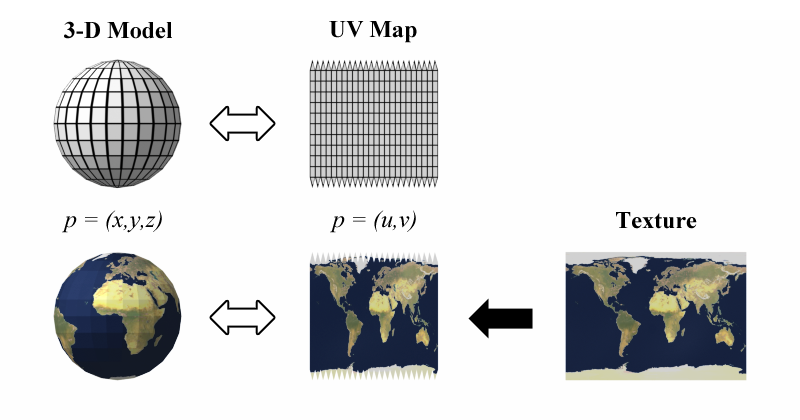
UV mapping is the 3D modelling process of projecting a 2D image to a 3D model's surface for texture mapping. The letters "U" and "V" denote the axes of the 2D texture because "X", "Y" and "Z" are already used to denote the axes of the 3D object in model space.
plush yew
Hi people a little confused. I had some platformer logic set up in 2 level blueprints, since this was identical apart from some scene components I decided to move it into my platformer game mode. My pawns are now variables of type character - actor reference. Problem is my pawns no longer receive input. Wondering what the problem is. In the pawn variable in my game mode there is no option to enable input.
grim ore
@azure shore are you using the spawn AI node or the normal spawn node? Are they set to auto possess when spawned in or just place in the world?
azure shore
spawn actor from class
plush yew
And in my level BPs I just set the scene components.
azure shore
oh I just read something about possessing actually
grim ore
there is a special node for spawning AI and you should make sure they are using their black boards and such plus yeah by default they wont use the ai controller when spawned into the world
azure shore
ah that did it, thanks
 crude patio
ok som im very new to this and no almost nothing. i tried to follow a video but ran into issues, anyone know how to import a heightmap properly?
austere badge
@wary wave Oh okay so why do I need a landscapecoords now when we just applied the texture with the diffuse and normal maps to the landscape before?
Like didn't we apply a UV to the landscape already just by wrapping the texture with the diffuse and normal maps? Why now do we need a Landscapecoords node to tell the landscape what to do?
azure shore
ok this is weird, when I enable input to other actors and have an enter input, my player bp cant use enter input, or the other actors
can player controllers not control multiple actors?
wary wave
@austere badge - you're telling the material which coordinate system to use
in this case, the Landscape texture coordinates
austere badge
But isn;t that just the normal ladscape?
wary wave
this isn't about the landscape, it's about the material
austere badge
@wary wave So without the landscapecoords node, the multiply and scalar grass scale nodes don't know where to apply the changes to the sizing?
plush yew
just read that input doesn't work in game mode, what a stupid rule
azure shore
oh fgs how do I even despawn all the enemies
I cant cast to them, and enabling input on them does nothing
grim ore
why can't you cast to them?
azure shore
I never know what to get for object
I tried a get all actors of class but it does it one at a time
grim ore
if you want to destroy all the enemies then get all actors of class , loop thru the result, and destroy actor
azure shore
idk how to do the looping part
grim ore
ah
azure shore
so I want it to remove all of them at once
eh Ill just use a for loop and set it to a kinda high number
grim ore
or you get all actors and loop thru them and remove them
azure shore
idk what you mean really
grim ore
get all actors of class -> For Each Loop -> Destroy actor
azure shore
oh I didnt realise I could do a loop for that
thanks
so would you have any idea how to clear all decals? if I dont then you can just make a real mess
if you just keep killing monsters and respawning then itll get way too laggy
 hoary pier
@plush yew Input doesn't work in game mode because input is client only and gamemode is server only
austere badge
If a LandscapeLayerCoords node generates UV coordinates that can be used to map Material networks to Landscape terrains why do we not need them to apply a diffuse and normal map texture to a landscape?
hoary pier
@azure shore Typically you would clean up your decals/characters/etc in the system that spawned them. Caching them as you spawn them and signing up for events to clean them up as they die off/etc
azure shore
ouch
hoary pier
@austere badge The LandscapeLayerCoord just gives you a landscape specific UV gradient. It has some extra information in the node to help you get a consistent UV layout for any size/section count/etc landscape you make. A standard UV coord node would just stretch your texture across sections and not be as consistent across different landscapes. You typically do use the landscapeLayerCoord on your diffuse and normal/etc.
@azure shore It's not hard to clean up decals separately but a system that just destroys all decals will typically begin destroying things you would want to keep (like level placed decals or decals for other effects)
When cleaning things up you would usually want to clean only the things related to the current cleaning task
azure shore
yeah I thought about that
austere badge
Okay so like why before adding the coords node does the normal map and diffuse node not need a coords node to be applied to the landscape?
hoary pier
If you create your own specific actors for these decals you want to clean it would be easiest. GetAllActorsOfType(YourDecalClass) and the loop and destroy them
austere badge
Like with just the Normal, Diffuse and Scalar, I am able to put the grass texture on the landscape.
hoary pier
@austere badge Any Texture node by default will use the default CoordUV node internally unless overriden
austere badge
okay
austere badge
So by default when I did the first few steps, it used a standard UV and by using a landscapecoords node it will be able to have a better looking landscape?
hoary pier
It's just changing the logic for how the texture repeats. You can get the same look with a normal UV node or the Landscape UV node but the Landscape UVs are just built to be frtiendlier for giant landscapes
austere badge
This is the answer I've been looking for thank you. It makes sense now.
hoary pier
Hoozah!
 small silo
Speaking on some landscapes, hoping someone had some info on this. When I create a LOD on a landscape I'm getting this along the edges and not sure why.
hoary pier
IS this trying to scale a large texture across the entire landscape or is it repeating across it?
small silo
This is generating a LOD from a level within my world comp. 1024x1024 texture and just hitting generate on it. I've followed a quick tutorial and theirs work out fine without this edge.
just not sure what is introducing it on the generated texture
austere badge
So I'm painting in some textures and am trying to add rock but the shaders won't compile. Doesn't matter how long I wait. Anyway to fix this?
wary wave
you may have too many textures on those segments
I can't recall what the limit is per section of terrain, but IIRC it's 11 or 12
austere badge
How can I increase the limit?
wary wave
you cannot
avoiding three or four way blends between surface types on a single section is generally adviseable
and reducing the number of textures in each surface type
hoary pier
Yeah, there is a hard 16 texture limit for the vid card and the landscape material already has some other texture info it reserves.
grim ore
The first thing to check tho is to make sure you are already set to shared for the texture sampler so you have access to the entire amount
hoary pier
Also, combining your grayscale metallic/spec/rough/etc into the RGBA channels of a single texture will help
hoary pier
On your textures in the material editor, there is a Sample Source, change it to Shared:Wrap (or Shared:Clamp if you don't want wrapping)
This tells the video card to treat it as a single sampler
May not be necessary if you haven't changed them previously from the default though
austere badge
Can't seem to find it. I'm probably just blind.
hoary pier
Have to select a Texture Sample node
If the Stats windows says you have the same number of textures as you expect then it should be fine. But if you duplicate a texture sampler node and the TextureSamples stat goes up, they aren't shared
austere badge
shared wrap or clamp?
grim ore
yes, it depends on what you want. chances are wrap
austere badge
What does clamp do?
hoary pier
grim ore
prevents the texture from wrapping
austere badge
And do I have to go into each of my individual textures and set it to shared? Or just all of them within my landscape?
grim ore
you would change each of the textures in that material
austere badge
So 12 of them
grim ore
technically the texture sampler nodes as you are not changing the texture itself
austere badge
Or just the diffuse ones?
 honest dagger
Hello.. Is there any tricks to fasten lighting build time? I have used preview quality and it took me 1 hour..
grim ore
I would assume all texture sampler nodes should be changed
get a faster pc, make sure you have a lightmass importance volume, use less lights and meshes, lower the size of the lightmap resolution on meshes
hoary pier
MathewW's point on size of resolution on meshes is a really prolific issue when starting out. People tend to up their resolutions to large resolutions to help out poor lightmap UVs and end up with huge lighting times and level sizes
grim ore
the linky is nice because it has all of that and shows the lighting build info dialog so you can see what should be targeted for optimizations 😃
honest dagger
@grim ore thanks for the links, I do need that
I'm using asus rog G502vs if I'm not mistaken, i7, gtx 1070 6gb, ram 32gb, ssd 256gb. But my engine and my project is in internal hdd not ssd. Is that affecting build time?
If I'm not mistaken, light building is using cpu, not gpu isn't it?
grim ore
lightmass is CPU yes
cloud cobalt
Regular Lightmass is CPU
grim ore
since that is a laptop you want to make sure it is not thermal throttling during the builds, just open up task manager when building and watch it. it should use all cores and keep at max speed
cloud cobalt
Yup, GPU Lightmass. Free and available on the forums
Not open source though, and a single guy's work, so it's not like a production tool
honest dagger
@cloud cobalt oh yes, I found something like that, is it evermotion gpu lightmass? Or is there something else?
cloud cobalt
It's also miles better than Lightmass by any metric
tall pendant
it's neat even tho it's missing some features you might want to have in a production.
honest dagger
Yea I heard there are some pros and cons, is it the evermotion gpu lightmass? If I use it, can I back and forth using the standard or the gpu according to my needs?