#ue4-general
1 messages · Page 422 of 1
 dapper idol
 grim ore
@ember phoenix you would edit your default game mode and you would change the default pawn. Project settings -> Maps and Modes -> Default Game Mode. If you want it to spawn in a specific spot you put a Player Start in the level. If you want to skip all of this you can put your new character/pawn in the level and set it to Auto Posses Controller 0 in the details panel
dapper idol
like this?
 regal mulch
Yop
dapper idol
okey great thanks
 sick escarp
How does interface inheritance work, is it only the specific class's override that's called or will the parent one be called as well?
grim ore
if you override the parents events you probably have to call Super to have the parent activate as well if that is your goal
dapper idol
do I have to click on that? or does it have to show?
sick escarp
Okay thanks
 ember phoenix
@grim ore that player posses thing did it, thank you. Didn't have a new "game mode" in the project settings btw so I guess that has to be created apart form the pawn
but yeah I just deleted the old camera and placed my new "character" class
grim ore
the default game mode has a selected game mode drop down below it with all of the properties for it, you would change it in there when editing it in the Maps and Modes settings tab
 leaden dust
ember phoenix
leaden dust
ember phoenix
Had this but still wouldn't spawn at VrPawn
leaden dust
has anybody read this?
If I want to add a custom weapon how would I do it with this?
grim ore
that is the correct setup, now you would need to make sure you had a player start in the level for it to spawn from
and that the level was not overriding the default game mode
ember phoenix
yeah but if I have player start it can't be over the pawn I have (the character class I created)
grim ore
you would only have the player start, that tells it where to spawn in your default pawn
ember phoenix
oh so I don't even need to place my VRPawn in the level it's auto used by the Player Start component?
grim ore
correct, that is what the default pawn does. if the engine needs your default pawn to use it gets it from your game mode. If you have a player start(s) in the level then the game mode will find them when it spawns in your default pawn when the map loads
ember phoenix
Awesome, thanks a lot it's all working now
 restive fern
Oh man i love ue
Did so much in just 2 days and im new
Prefer this than unity and gamedev frameworks/libs
grim ore
we love you too ❤
 plush yew
MathewW did you used to work in games?
grim ore
Nothing super professional, contract work and solo work
plush yew
ok
ember phoenix
Gotta say this is a fun final year project. Never had anything close to unreal in my time at uni so it's a nice change of pace. Greatly appreciate all the help here!!
plush yew
spent all my time on this hobby project instead of earning cash
grim ore
Hobbies are fun, hopefully this one is cheaper to maintain than your alternatives 😃
plush yew
more productive than playing wow
grim ore
I dunno.... WoW is a great way to waste time, you could be doing that while compiling your code or materials and doing 2x the time wasting
multi task those hobbies!
plush yew
yeah but it would be too slow and i would lose at everything and just have to farm instead
grim ore
lol yeah that is what I used to do in WoW, just farm stuff while watching learning stuff
It's fine for overviews and live streams and keynotes but then you try and pay attention to the video and your game logs you out for being inactive
plush yew
ah lol yeah dont think you could do pvp stuff like that!
grim ore
you could waaaaaaay back in the day with like Alterac Valley and just mindlessly farm in the back field but not nowadays with the twitch PVP stuff 😦
I just try and follow along with tutorials and learning now to get the muscle memory trained
 wild ginkgo
good on you 😃
plush yew
download taking forever lol
restive fern
excuse me, im trying to get thirdpersoncharacter boolean variable in anim blueprint
and it says cast failed all the time, is there other way to do it?
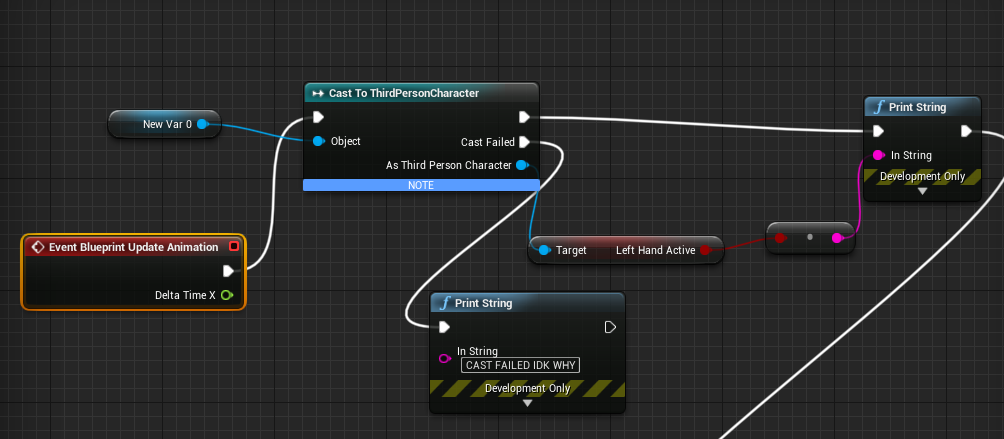
ohh nvm got it working 😄
 fluid stag
anything below 15k is spilt milk 😛
plush yew
think my pc would just say nope.
plush yew
hmm moving to 4.21 seems to have broken my top down level
grim ore
oh no, burn it with fire and start over
plush yew
spaceman dont move
 hoary charm
Is atmospheric fog the best way to fade a background in the horizon?
 maiden sundial
I'm trying now to make an object with the player and the npcs can use.
I'm having no problem with the interaction system for the player, but i can't imagine a way how to let the NPC's call the function of object x
I'd have a way to let the npc get in range for it, but not using it :S
restive fern
is it proper things to do if my left animation is different from right animation or is there easier way to do it? https://i.imgur.com/pgSTvPy.png
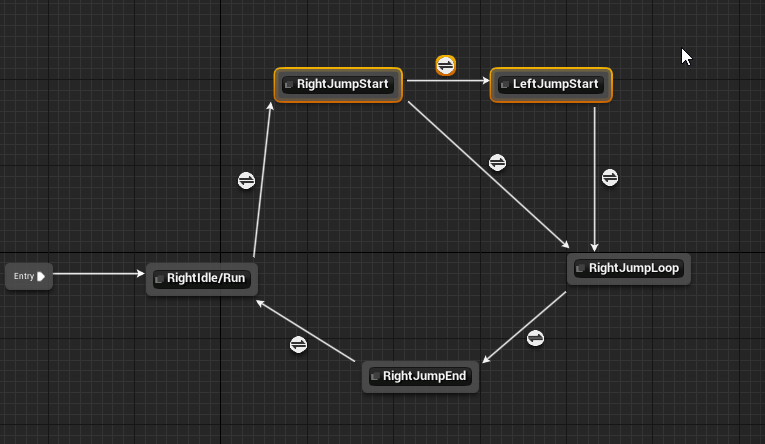
(this checks variables , if left then left if right then right)
grim ore
@maiden sundial what makes the NPC's interacting with it different than the players?
maiden sundial
The user has to look at it and press a key for the interaction.
But i don't know how to do it with the NPC
 thorn topaz
Any idea why I'm getting this weird nav mesh generation?
grim ore
Why require the NPC to look at it? if you can move towards it and you are in range call your interaction? if you want it to look right you can always have the NPC rotate to face the object
maiden sundial
Seems like the best way ,ty
 snow crown
👍🏽
grim ore
aww I missed it
grim ore
it might have been interesting spam atleast
snow crown
do you speak russian?
 abstract relic
Just a bunch of server invite and nonsense
snow crown
and attempts at at-everyone
 modern sinew
what file formats does UE4 accept for 3D models?
modern sinew
ok
I'm just making really simple walls and floors to try and code a building builder like planet Coaster has
how do you determine the scale of things?
grim ore
1 unreal unit in engine is 1 centimeter
adjust your model to your desired look and goal
modern sinew
well for a different game I have planned for #2, that has to change somehow as I want to have a whole solar system. So I have to figure out how to make the camera really small
 frigid adder
Quick question guys:
Is there a way to avoid having to manually edit lightmaps to avoid the "seams" visible between modular meshes? I am looking for a workflow that avoids me having to tweak the lightmaps and wondered if there'll be a way to make that happen
 sudden agate
batch them together
maiden sundial
Is there a plugin which makes the copy and paste of components easier ?
It's pretty anyoing if i have to rewrite the whole name again after a copy and paste
frigid adder
have a single texture map and lightmap?
sudden agate
@frigid adder i meant the meshes
Meshes are processed individually in Lightmass. By merging the meshes Lightmass processes them together and the lighting is more likely to be smooth
frigid adder
ah okay, gotcha
 daring sedge
anyone have a parkour map
restive fern
oh man
took me few hours to do simple thing
and im not that sattifiied haha but not bad
gonna create sword now 😄
grim ore
Next time you do it tho it will be quicker 😃
 dusk steppe
Can anyone explain what's going on here? I've got 2 master materials. When I create an instance from the one and change the textures, it seems to be merging the parent textures with the instance textures - I don't get it.
Top left is using the same textures as the material instance at the bottom, but because the parent material is using that lizard texture or w/e, it's causing it to change the way it looks.
 blazing topaz
Can any one explain pls! i cant add nothing in my widget
grim ore
how are you trying to add nothing to your widget?
blazing topaz
i add image , but when i try tio add another it blocking cursor
grim ore
what are you trying to add it to? what is the parent panel type
blazing topaz
grim ore
you have no parent panel, your parent is an image
you are trying to add an image to an image and an image cannot have a child
when you created the widget the default panel was a canvas panel which can have multiple children
you need to add a panel that can take more than 1 child as the parent in that widget (the top item in the Hierarchy)
blazing topaz
Wow thanks !
restive fern
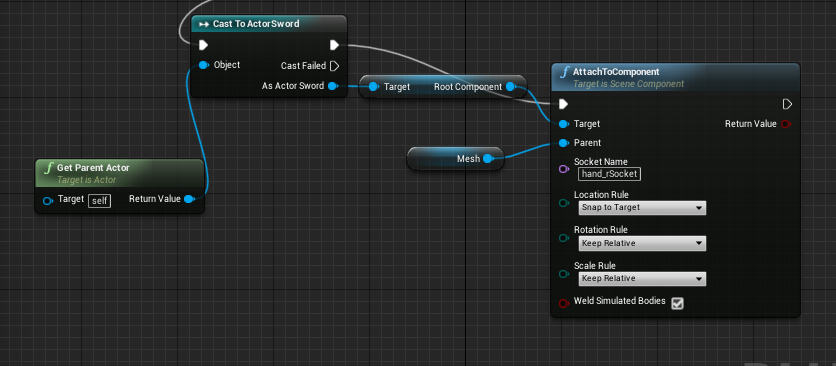
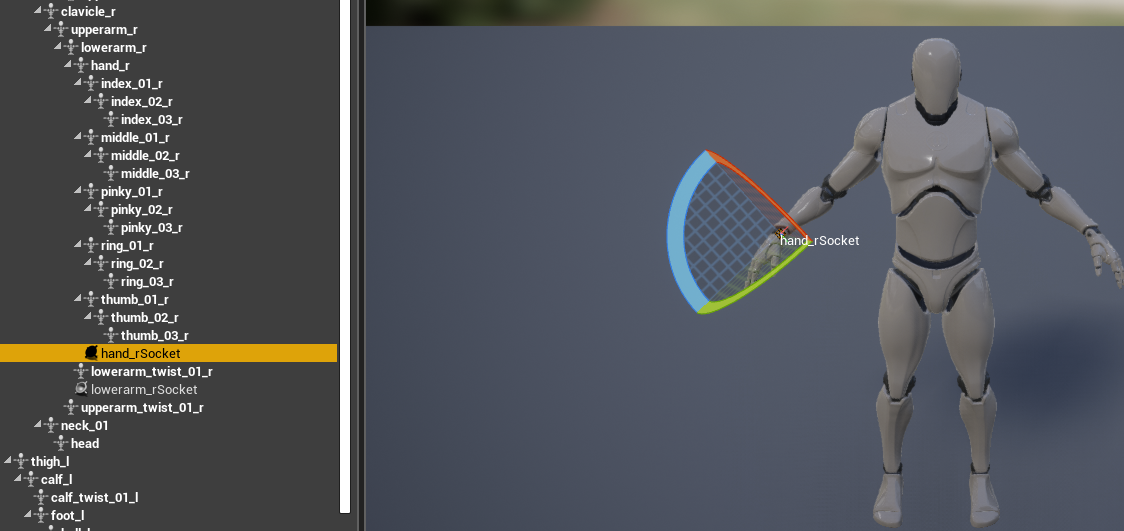
what could be wrong, i try to attach actor (weapon) to socket in my hand, and i can only attach it to character but not to hand
grim ore
how are you trying to attach it?
 dim plover
What part feels sluggish?
grim ore
is it the acceleration itself or the feeling of speed from the animation?
restive fern
@grim ore i put actor on map then right click>attack>character
grim ore
you want this weapon to be a part of the character?
restive fern
i want it to stick to hand
grim ore
in/on the character?
restive fern
yes
grim ore
you should add it to the character itself then, the character blueprint. either in the components section or using code to add it to the mesh and the hand socket
grim ore
you added it in the map or in the character blueprint?
restive fern
map
grim ore
ok well... that's not in the character blueprint
you should add it to the character itself then, the character blueprint. either in the components section or using code to add it to the mesh and the hand socket
if you want to do it correctly you would use the attach to component node in your blueprint with the weapon as the target and the mesh as the parent and then the socket as the socket name.
restive fern
in my char bp or in my weapon bp?
grim ore
Character
restive fern
what could be wrong? https://i.imgur.com/cDaOjA9.png
 dim plover
Is the socket name "hand_rSocket"?
restive fern
yes
dim plover
You sure it's not just "hand_r"?
Is the Parent Actor ActorSword? i.e. Does your cast fail?
grim ore
My guess would be the cast is failing because the meshes in that blueprint which means he's probably in the character which means to get parent actor should be the character not his sword
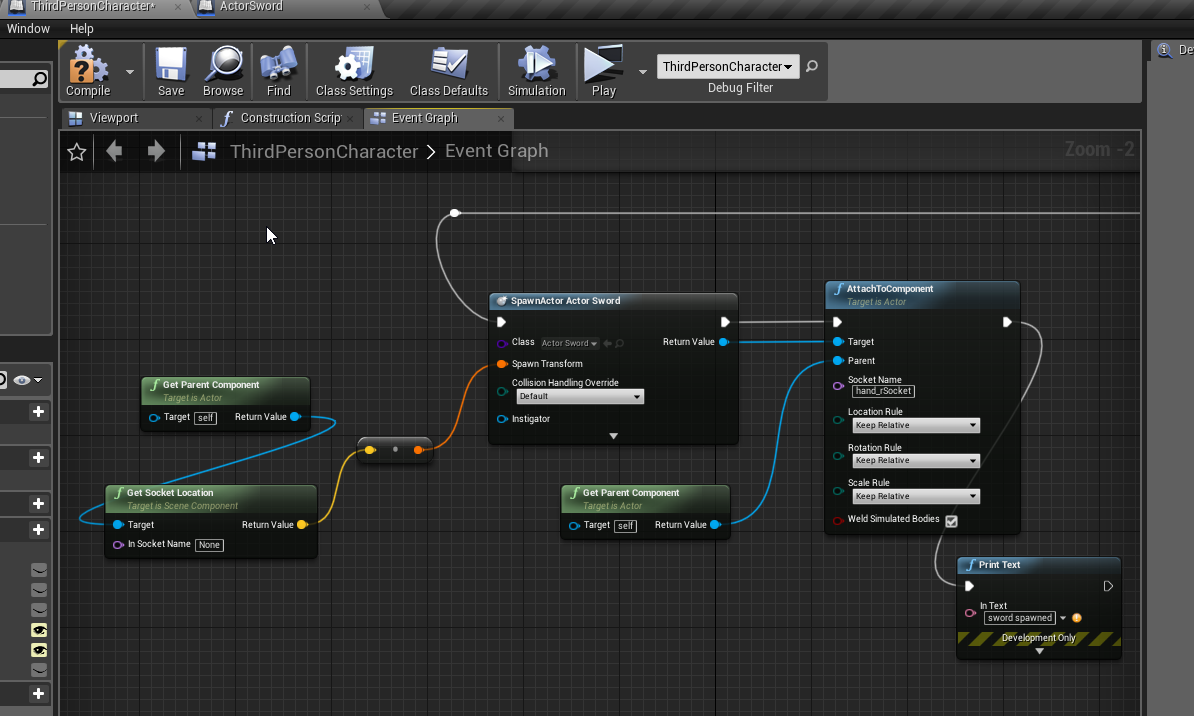
 restive fern
alwaysSpawn
grim ore
Ok so that is not the collision or mobility. Collision such as colliding with stuff or overlapping or ignore. Mobility such as static or movable
What you should do now is while the game is running check to see if it's actually spawn in the sword in your world outliner it just might be somewhere else and not attached
restive fern
is this related? https://i.imgur.com/dfhfRvn.png
 grim ore
sure why not
grim ore
ok so chances are the collision or mobility is causing it to not attach
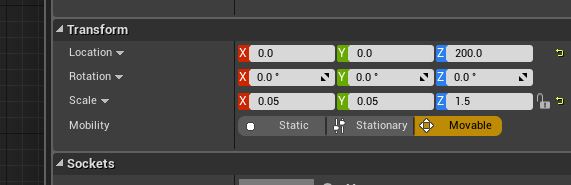
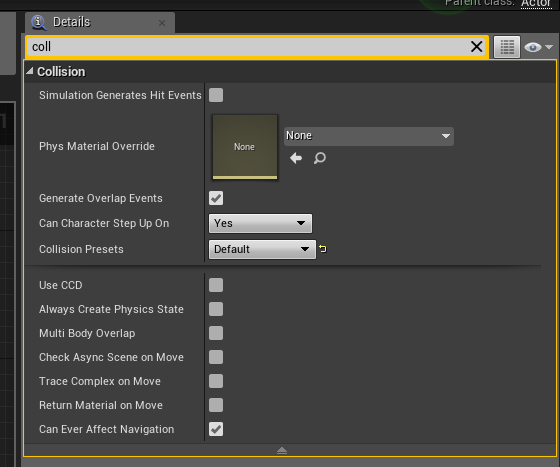 grim ore
well it has collision enabled probably so it could be colliding with your player when you try and attach it
and you trying to attach it to your character blueprint and not the mesh soo.... that's a problem
set the collision preset on the sword to no collision to test.
change your parent on the attach to component to the mesh in your character blueprint (you had it right the first picture)
grim ore
set all 3 of the rules on the attach to component to snap to target
restive fern
nothing
grim ore
show the blueprint now that you have changed all of that? and there are no errors in the output log when you stop playing?
restive fern
well i cant get socket location
grim ore
you can spawn it at 0,0,0. it really does not matter where you spawn it since you are attaching it and snapping to the socket
 grim ore
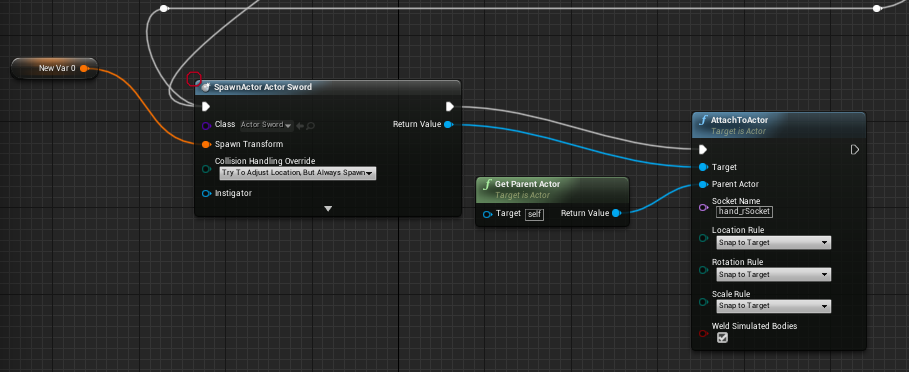
still getting parent actor (character) for attach
restive fern
oh
grim ore
i assume you want to attach it to the mesh
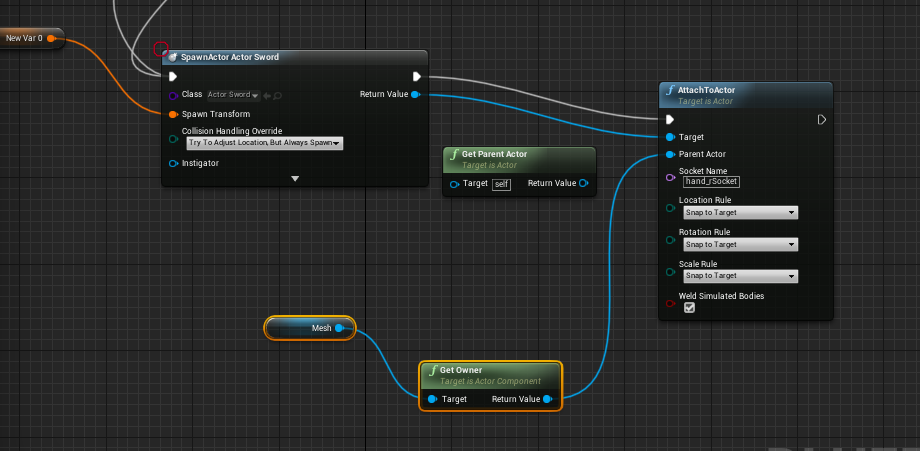 grim ore
just... mesh
grim ore
yes soo....
restive fern
i cant plug mesh directly
grim ore
you ..
randomly changed stuff yay
you are using attach to actor, not attach to component like you had in the first screenshot
restive fern
ommggg it worked
thank you <333333333333333333333333
i love you
man so much confusion
 mint yacht
So i'm sorta creating a tile based game, which each tile being 3 meters by 3 meters. Is there a plugin or built in feature to help with assembling tile based maps? Like say i could designate a tile as a "wall" and just drag it out and it'd automatically select the correct shape, like a corner or T-section?
 merry gazelle
I think this system would be useful
https://unrealengine.com/marketplace/en-US/slug/touch-build-and-inventory

Build, Inventory, Crafting, Equipping Items and more using Touch.
grim ore
what you are describing is what construction scripts and blueprints are good at, you can create your own system to do just that but there is nothing really built in
mint yacht
any tutorials i could look up? I figured it wouldn't be too hard to build myself, i designed the tiles to be pretty simple.
grim ore
here is the page for the basic content example https://docs.unrealengine.com/en-us/Resources/ContentExamples/Blueprints_Advanced/1_2 and you can pick that apart from the Content Examples project on the learn tab. Beyond that I picked up my info from a video somewhere that I can't find anymore 😦
basically a bunch of math and variables and it can generate what you want. the math and systems from any engine or examples should apply here as that is the hard part.
 azure shore
hate to say it but I imagine most devs here would be for free
like I hate getting recommended things that look really good and useful but they cost more than a kidney
mint yacht
well $30 isn't bad, but i'm between jobs at the moment, so i shouldn't spend any money at all, even though owneprescott's link looks pretty close
plush yew
any idea why my top down character does not respond to input after migrating 4.20 > 4.21?
grim ore
well what does or does not happen? have you debugged the input nodes to see if they are firing?
plush yew
I was just using the default top down character movement, which I actually don't understand since it just set the position of 'cursor to world' and didn't update character position anywhere but it seemed to work before
 frail jasper
Try replacing the move to location node.
grim ore
so all you did was make a top down in 4.21 then opening it in 4.22 and converted it and it does not move now?
plush yew
nope but this was 4.20 to 4.21
grim ore
oh yeah lol read that wrong
plush yew
well i set default player controller from 'top down player controller' to 'player controller' and now at least it fires a print string when I click
frail jasper
Did you delete the move to location then add it back?
plush yew
I remember I disconnected the stuff about VR since I don't want it. But I don't think there was ever a move to location thing I assumed it was built in somewhere else
I remember being confused by the BP ^^
grim ore
the move to is in the top down controller
the character handles moving the target you see on the floor. it's a weird setup
does the cursor move?
plush yew
yeah
Could be something to do with my mesh which on the blueprint was different to my mesh in editor
grim ore
well if the mouse moves check the input touch event in the controller and see if it is firing then just debug from there each step to see what is failing
 woeful thorn
Guys is anyone up for a quick support on a simple AccessedNone error? at the moment i'm so tilted that i can pay whoever solve the problem. (Even if i know it's something really stupid)
grim ore
best is relative and also based on your skills. can you use a 3d modeller? is it an organic humanoid? etc.. make human is a 3d character creator, so is poser. Maya is a DCC program, so is Max. Then you have sculpting software to consider. Also does it need to be rigged
post your blueprint that is failing and also have you debugged it to see why it is none instead of what you expect?
woeful thorn
@grim ore Locally, everything works fine, when i host the dedicated server it will brake
I'll post the bp
grim ore
yep multiplayer your gonna have a bad time
woeful thorn
grim ore
is it the game mode perhaps?
woeful thorn
This is where it fails
dim plover
What is CharacterWeapons? Does that exist on the Client/Server?
grim ore
is it set to replicate?
plush yew
is a top down controller a type of player controller?
grim ore
it is of class PlayerController yes
dim plover
Psycho, does the component get replicated later on? Maybe the client is trying to access it before it has replicated to them.
woeful thorn
Uhmm i don't think so let me see
So you mean
Ac Character weapon
needs to get replicated right?
dim plover
I'm not very familiar with Child Actor Components, but I don't think the child actor needs to be set to replicate if the parent outer replicates. But try it anyway.
woeful thorn
All functions inside are replicated on server
grim ore
@plush yew I can say that making a fresh top down from 4.20 -> 4.21 has no issues so its definitely something you changed
woeful thorn
But honestly i never replicated an actor, just the function inside it
let me see because probably i found an error
Gamemode had My_Character as pawn and the server was trying to spawn ThirdPersonCharacter
plush yew
ok
dim plover
Gamemode had My_Character as pawn and the server was trying to spawn ThirdPersonCharacter How was the Server trying to spawn ThirdPersonCharacter? Normally the server just uses the pawn class in the gamemode.
woeful thorn
UWorks Dedicated server logic
i hope this was the problem since inside thirdpersoncharacter there was not Character weapon and other stuff
Nop it doesn't work
dim plover
Does My_Character replicate?
dim plover
What was the problem?
woeful thorn
Basically
i need to change the target of the server function
since i created another controller
But i don't understand how to change targets
restive fern
do unreal engine objects have set any built in speed variable?
so i know at what pace object is moving?
dim plover
Velocity, I think.
restive fern
like when they are threw by physics, then there must be some speed variable i think
oh yea maybe gonna try
tommorow:)
woeful thorn
Ok no way this was not the problem too xD
dim plover
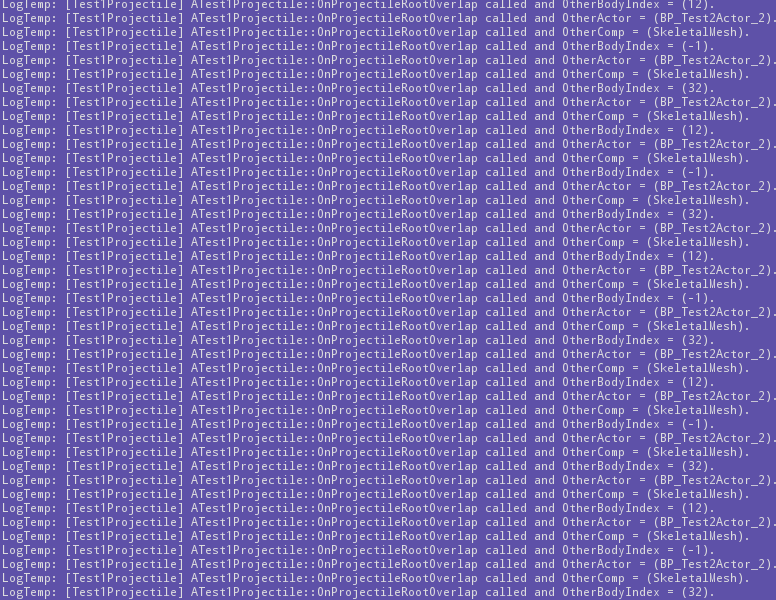
Why does BeginOverlap get called many, many times when a root SphereComponent(Primitive) overlaps another actor's SkeletalMeshComponent(Primitive)?
This guy has a similar problem but it was never answered: https://answers.unrealengine.com/questions/471067/no-uskeletalmeshcomponent-collision-with-uprimitiv.html.
This gets printed pretty much every frame of overlap.
https://i.imgur.com/d5k40DH.png
Also, what does OtherBodyIndex = -1 mean?
 tight sun
ok now this is a really dumb question, but there was this great website I found that has free "sky spheres" you can download. Basically he takes 360 photos. I just can't think of the correct term for it, and I can't remember the name of the website.......
 paper kernel
index -1 is not valid usually
 heady bridge
@tight sun Do you mean Panoramic?
And there's a site called <hdri-skies.com> that might be what you are talking about
plush yew
Wtf. I just deleted my navmesh and put in another one and now everything works.
dim plover
Are all the Unreal GDC 2019 videos up? I remember there was one about Fortnite Character animations.
grim ore
the new animation features does not appear to be up
https://www.unrealengine.com/en-US/events/experience-everything-unreal-and-more-at-gdc-2019 seems to be updating as they post them tho so 😃
the chaos one is missing as well so we wait!
 vagrant sapphire
I have successfully created a tiny level with skybox and directional lighting
amazing
i am goodest
heady bridge
Good job Handy dandy dood (your new nickname...if you dont mind)

 vagrant sapphire
somebody give me the next tutorial to do
 dry moon
Looks good to me
vagrant sapphire
please
i have no idea where to go to next but i desperately want something to do
grim ore
running around your level and collecting coins before the time runs out and the coins are scattered around the level in hidden places
plush yew
@odd hornet why are the other trees okay?
 odd hornet
they are blowing quite hard. I think its just the tree dont like being the direction iv placed it. not a real problem and something iv already fixed but sure was funny seeing the forest suddenly start jumping about
 midnight sonnet
Question for people here, what made everyone pick UE4 versus another engine, e.g. cryengine
odd hornet
cryengine will make you actually cry. -friend that used to work for crytek
midnight sonnet
lmao, I used it for a bit and I wasn't a big fan, that being said I loved level design in cryengine
I feel like off the bat it looks much nicer
odd hornet
its the programming thats a pain in the ass. and thats what he did when he worked for them 😄
midnight sonnet
lol
yeah
i like UE4 blueprint system, but off the bat holy shit when you compare the two.. CryEngine wins 😂
(graphics wise)
and again someone might take this the wrong way, im saying off the bat. Like give me a few minutes in CryEngine then a few in UE4, and CE will look better
grim ore
Looks are great but if you can't do anything actual useful with them in terms of a game then... woops
midnight sonnet
lol yep
odd hornet
I mean its up to the end user how graphicly pleasing your game looks in the end
heady bridge
You can get same quality in both engines, just saying
midnight sonnet
no ik someone would say that, and i agree. I'm just saying though, I feel like one has to put more time into UE4 for it to look as good
midnight sonnet
Really?
I found CE in that aspect much better
UE4 makes me want to smash my head against a wall
odd hornet
I cant say much about that I downloaded cryengine some years ago and gave up instantly.. but we talking 5-6 years ago
heady bridge
I'm using unity right now and it makes me want to smother myself with a pillow lol
midnight sonnet
lol im so sorry
@odd hornet heard CE was trash a few years ago, getting much better tho
company also seems more involved
odd hornet
yea im just saying like on general usage of the two I cant say much. anyway im heading off cya guys
midnight sonnet
cya
heady bridge
Cya yukzx
vagrant sapphire
darn it's hard to get attention ina server this big
heady bridge
I've used Cryengine on and off since 3.2, and Unreal since UE3, I've also used a lot more engines as well lol
heady bridge
Hi handy dandy
midnight sonnet
hi handy
vagrant sapphire
can anybody answer my questoin above?
vagrant sapphire
like anything,whatever people would recommend as the next/first tutorial to do
midnight sonnet
lol dont ask me, im new too 😛
heady bridge
What kind of game do you want to make?
vagrant sapphire
a friend said he was having trouble unreal engine porting to htm5l
I want to know how i can do that
midnight sonnet
wait so ue4 to html5
vagrant sapphire
yeah
heady bridge
I just typed "Ue4 to html5" and a ton of tutorials popped up
you have options to choose from 😛
vagrant sapphire
sure but i don't know what one to choose,just like any other tutorial,that's why im asking
what did other people use
midnight sonnet
same
google is ur friend
google is ur wife
google is ur best friend
lol google is everything
heady bridge
Shiii, what I do is just pick one and find out if it works for you
midnight sonnet
gotta be honest, most of them look really shitty
vagrant sapphire
yeah that discourages me from using those
and instead asking here from pros
there's over 4k people here,somebody has to know how to help me
vagrant sapphire
I don't know though
dry moon
Just really google what you wanna do though. What interests you the most in future projects
vagrant sapphire
like if i don't have somebody to help me through this i feel like i'm gonna mess up
dry moon
Such as inventory system
heady bridge
Just dew it
dry moon
and more
heady bridge
I thought i'd mess up, but I had no one to turn to in 2012 when I started
I can do big stuff nowadays
Just dewit
heady bridge
Yes but not like that
vagrant sapphire
I don't understand
heady bridge
We can help with specifics, not google tutorials for you and choose them for you
dry moon
We help when we are knowledgeable in problems you might have, people are good at specific things
heady bridge
You have a good start, earlier you said you made a scene, it's a good start, just grow from there
dry moon
but you are just asking blindly for what to do next, you are the only one capable of knowing what you wanna do with your game
vagrant sapphire
Alright,i'll try to follow the tutorial but if i encounter a problem i'm gonna come back here and talk your ear off
dry moon
Its not wrong to problem solve as well, try and fix things if you can. If its something you really don't get after trying ya its good to vent and go wtf is going on
most of the time it might be some silly dumb mistake someone points out
try yourself first, and push yourself to find new ways to solve things
midnight sonnet

A C++ multipayer first person shooter template project which loadout customization and other modern FPS game features.
vagrant sapphire
Gotcha,i'll try first to do the one off the unreal website itself
midnight sonnet
I wish assets had a build that one could download and play
sometimes youtube vids just dont cut it
 proven oxide
What are you trying to do?
dim plover
Did you check your logs? Maybe it has something.
 sullen wraith
doenst say anything :\
dim plover
Hmm, I don't really remember that happening to me. Perhaps you have to use the debugger.
wild ginkgo
if you crash and you get no meaningful output or log, you need to install visual studio and the debug symbols (in launcher) then run your project from within vs or attach vs to your app
that will give you the whole vs debugger which is quite decent
 mental shale
proven oxide
mental shale
proven oxide
ok wierd problem, everything was working fine, someone else changed the map, but now the gamemode is not being selected properly and i am getting an error every time i try to run
LogStreaming: Warning: Failed to read file '../../../../../Development/Unreal/SectionNine/Saved/SaveGames/Player1.sav' error.
then i get some OnlineSession Warnings no game present to join
and I get the GameModeBase and not the existing GameMode
when running up its saying "GameMode Is GameModeBase"
 willow stratus
Hey i have a final major project comming up and i'd like help creating a parkour game
Or help with animations / level design
proven oxide
but in the defaultengine.ini it says to use SectionNineFreeForAll
 summer turret
can someone help me please, I am trying to switch between third person and first person, but instead of holding right click to transition to first person, I want to right click once for first person and right click again to exit first person
proven oxide
wouldnt you need to toggle it
so set a flag / boolean that you toggle whether in first/3rd
i did somethintg like that in my C++ UE4 course
where it opened the door until it was open then toggled off
so essentially i have a if(!first) { goto first} and in the finish pin i call Toggle()
summer turret
thanks again this helps
proven oxide
My toiggledoor is literally IsOpen = !IsOpen;
and the logic is in my tick event
void UOpenDoor::ToggleDoor()
{
isOpen = !isOpen;
}
but the way other people do the switch from one camera to the other is have 2 cameras on the player
Today we take a look at how we can setup a basic iron sights system, going over how we can get the engine to switch to a different camera when they're holdin...
so not having to move a camera
but I guess it would be like onPressed normally you goto aim camera, on release you go back
what you want is on pressed if aiming then come out otherwise go in
so you need to add an if to the BP
check whether aiming or tpp
if aiming then goto tpp else goto aiming
leaden dust
What is live++?
restive fern
Dunno
sudden agate
@leaden dust it incrases your life count by 1
 cloud cobalt
live++ is better hot reload
 ruby wren
Hi! 👋
I just moved my project from the 4.19 to the 4.22 preview to try the new auto - instanciation, but there are somes missing assets including the main map of the project. The UAsset is still in the folder in the explorer, but i can't find it from the content browser (and some othere maps looks missing too). Does anyone have an idea or should i report it to epic game? 🤔
leaden dust
@cloud cobalt Is it being integrated in UE4? If so, in which version?
proven oxide
4.22
it was at gdc
in the keynote
State of unreal

Live++ is there as Live Coding

Watch Epic Games’ 'State of Unreal' presentation from GDC 2019. Learn more about Epic MegaGrants, Epic Online Services, features shipping in Unreal Engine 4....
leaden dust
this is some code
C:\Users\drvku\Documents\Unreal Projects\HelloWorld\Source\HelloWorld\HelloWorldCharacter.cpp(131): error C2664: 'float UGameplayStatics::ApplyDamage(AActor *,float,AController *,AActor *,TSubclassOf<UDamageType>)': cannot convert argument 1 from 'TWeakObjectPtr<AActor,FWeakObjectPtr>' to 'AActor *'
1> C:\Users\drvku\Documents\Unreal Projects\HelloWorld\Source\HelloWorld\HelloWorldCharacter.cpp(131): note: No user-defined-conversion operator available that can perform this conversion, or the operator cannot be called
1>UnrealBuildTool : error : UBT ERROR: Failed to produce item: C:\Users\drvku\Documents\Unreal Projects\HelloWorld\Binaries\Win64\UE4Editor-HelloWorld.pdb
1> (see ../Programs/UnrealBuildTool/Log.txt for full exception trace)
1>Total build time: 20.61 seconds (Parallel executor: 0.00 seconds)
and I am getting thi slog
How do I fix this
plush yew
i got a ai working but how do i make them stop following me when i hide bejide ojbect
behind object*
anyone got a vid
need it quci kas wifi turning off
sullen wraith
ryan laley did a good vid on this

This episode carries on from our previous one and we improve the enemy AI so that it will chase the player more accurately. Watch the next episode where we b...
you want to make it so instead of running to your location
they run to your last seen position
thorn topaz
So I know the HideCategories class specifier hides stuff in the object's details panel but is there a way to hide categories in the details panel when that object is selected in the viewport?
 mental yarrow
Hey guys! anyone ever experienced that mesh particles collision only works in the viewvport and not ingame?
 fierce tulip
in the collision module you can set radius, if you are outside of that, collision wont happen. (thats generally the problem)
mental yarrow
@fierce tulip where do i find this radius value? in the particles actor collision tab?
fierce tulip
cascade > the emitter that has meshes with collision > collision module
mental yarrow
@fierce tulip thanks but i can not find it :/
 dire salmon
Im stuck whether installing the Visual Studio 2019 or keep it going with 2017, 2019 is coming next week, but the Unreal engine doesn't support 2019 version right now, and the update of the unreal engine which supports 2019 is in very soon too
paper kernel
How are input devices assigned?
ember phoenix
So I've noticed my scene gets lighter and lighter over time. I've built a box with no light inside so it should be completely black but when I place my start position inside it's lightly lit at the beginning and after 5-10 sec it's crazy bright. Any idea what that is?
 wary wave
ember phoenix
wary wave
ember phoenix
yeah I looked into google but they suggest to check the min/max brightness which are disabled for my FP camera for some reason
will check graphics cheers
wary wave
it's Eye Adaptation
this question has been coming up every damn week at least once for years :/
fierce tulip
hehe, by now you wonder why they enable it by default :p
 restive fern
i plan to divide my game structure for components for easier modularity and editing. instead of doing work from character blueprint, i will do it from weapon blueprint // car blueprint // etc but i will have to use casting because of that to get some character variables/options etc
Is casting a lot detrimental to perfomance?
fluid stag
no
regal mulch
Just don't cast on tick everywhere
Cause then it makes more sense to cast once and save the casted result
Anyone an idea why a mouse would lock to viewport after Alt+TAB out of and into the game?
InputMode is GameOnly with no MouseLock
Yet, after going out and into the game, the invisible mouse gets locked to the viewport
 mortal grail
this guy claimed that he made about $20k in ads revenue with a game he developed using UE4 but hasnt paid a dime to Epic, how does he get away?
regal mulch
Not having reported it to Epic?
mortal grail
damn, that's awful
regal mulch
It's hard to keep track of every little game made in UE4
mortal grail
i thought epic has some automated system that can detect ue4 engine-made apps/games
regal mulch
I know that Epic often lets their peeps walk through Gamescom to find UE4 games
Cause most of them aren't advertising it
mortal grail
should i report him xd
regal mulch
Feel free?
mortal grail
if its the right thing to do hah
mortal grail
:/
 grave nebula
There is a good deal of difference between claiming earning 20k and earning 20k though.
 dim arch
He should pay, then again Apple should pay their taxes
regal mulch
Maybe he's not aware that this counts as earning money from the game?
Even Kickstarter counts into that
(with limitations)
I would assume if Epic notices one day, the person will see pretty big numbers coming up
:P Let's hope he spend the money already
mortal grail
indeed lol
dim arch
if he doesnt pay his licensee fee he gonna have a lot of shit come to him in the long run
guess its his choice, if he needs the money so desperately then maybe its his only option
dim arch
yep seems like selfishness mostly
regal mulch
Why the f*ck does clicking back into the game not keep the mouse unlocked
Freaking UE4
dim arch
i am sure karma will pay epic back.. or something
restive fern
ads ingame kill the game
worst monetization
imagine smashing enemy in pvp and boom ad pops up
regal mulch
If Ads would kill the game, Mobile Games wouldn't be full of them.
cloud cobalt
Ads are terrible imho, but the market has spoken
Mobile games will be ads for the foreseable future
regal mulch
Latest game I'm playing is Mini Metro
Everything else has ~4 to 4.5 stars
And at least one rating that says "It's full of ads"
cloud cobalt
Well, ads do suck, and they're truly terrible, I'd rather pay $60 if the game is good
But 🤷
If something like Monument Valley gets shit reviews for being paid
regal mulch
Bought both MV games
And the Reigns game
As well as Mini Metro
All no ads
And all massive fun
MV2 was a bit short though
 languid shard
MV is great
you always want more with good games like these though
really like "The Room" games too
cloud cobalt
Alright, come on Epic - let's release 4.22 right now ! I need the content examples.
🙏
 glacial pecan
if Monument Valley 3 becomes Apple subscription exclusive, I'll flip a table though 😛
mortal grail
let's not forget that i've also heard people money launder through ios and android app stores
dunno how it works tho
dim arch
When Epic MegaGames released Unreal in 1998 it was an absolutely monumental title for PC gaming. Let's take a nostalgic look back at Unreal and its expansion...
grim ore
@cloud cobalt p7 came out this week, almost 0 chance final will be out as well 😦
 silver crown
They said it would be though 
sudden agate
Previews are the new Major releases
grim ore
they said it would be but it's not so shrug
this is pretty much why no one gives out release dates because if they do and miss it people go "they said it would be though" heh
on the plus side it looks like .22 will be a nice big release for the year with only the sneakiest of bugs left in 😃
leaden dust
is there a way to modify landscape height data at runtime in c++ or blueprints?
wary wave
no
 supple totem
The answer for runtime and landscape is usually no
leaden dust
Ok
one other question
difference between Procedural mesh component and custom mesh component
silver crown
?
silver crown
First time I hear of the custom mesh comp
leaden dust
how do I call this function in the constructor of a cpp actor
leaden dust
how do I make a call in editor function in c++
grim ore
make a node you can call in blueprints?
leaden dust
@grim ore I already have a blueprint for the functionality
but it lags the editor
I think its because of the blueprint performance issue
So I wanted to try it in c++
grim ore
ok. and how/where do you plan on running this code in the editor?
leaden dust
I am making an actor
I don't have any experience with c++
so I am just following stuff for now
The actor has a fucntion
which changes the landscape height and bakes it to a render target
grim ore
ok so this is a C++ actor? will you be putting this in the world as a blueprint or getting it into the world somehow?
or is this meant to be a static function called from somewhere else at some point
grim ore
chances are you want to create a UFUNCTION that is exposed to blueprints so you can call the blueprint function from somewhere while the game is playing https://docs.unrealengine.com/en-us/Programming/UnrealArchitecture/Reference/Functions
 delicate needle
It launches and then shuts down.
leaden dust
the world context object would be the actor itself?
delicate needle
Anyone know how to run the TURN server that comes with unreal
leaden dust
or get world
grim ore
the world context object changes depending on how you are creating the function but it is generally the thing that ran the function in the world if it needs access to the world or anything in it
so get world can work, or it can be passed in from the caller if its in a library
wary wave
anyone seen problems where a Timeline doesn't seem to work in multiplayer?
I have a Repnotify bool, that when true plays a timeline forwards, and when false plays it backwards, but it only works on the server 😐
grim ore
is the timeline set to replicate?
wary wave
I don't want it to replicate
grim ore
I know but that's like my go to answer for anything networking lol
so the timeline just doesnt fire on the client?
wary wave
yeah, nothing happens
grim ore
it should work, I've used it before but not like that 😦
proven oxide
WHY IS MY CODE IGNORING THE CONFIG!!!!!!!!!!!
[/Script/Engine.Engine]
GameEngine=/Script/UnrealGhosts.SectionNineEngine
LogNet: Welcomed by server (Level: /Game/Maps/Port/UEDPIE_1_Port, Game: /Script/Engine.GameModeBase)
Why is it suddenly doing this
i wouldnt mind if there was an error i could work out but its just ignoring what I have and doing its own thing
cloud cobalt
Because your level overrides it ?
proven oxide
???
cloud cobalt
Look in world settings for a gme mode override field
 opal coral
Can someone help me understand the profiler here? Seems like everything is just stalls and sleeps, even without vSync?
proven oxide
@cloud cobalt where is this?
cloud cobalt
World Settings tab
That's normal @opal coral, all your threads should spend time stalling ( = not doing anything)
"Wait for event" means it's doing nothing
You need to find the thread that does not stall
That one is responsible
proven oxide
Why would that have been set is there any way it can be accidentally set?
cloud cobalt
Check it first, ask later
opal coral
Hmm I see. I want to find out which things cause low FPS. It never happens in the editor window. Either way when profiling both it seems to be very hard to navigate.
Isn't there a more streamlined way to find the culprit?
proven oxide
I have checked it was set and messing everything up
SO i am trying to work out if the other person working on the map is trolling me or maybe did it by accident
cloud cobalt
@opal coral No, profiling is always hard and time consuming
That's why it's done nearing the end of projects
 topaz wadi
Hello everyone!
What is the proper way of exposing sound to be tweakable by music guys?
I mean, once I compile everything, I want someone else to be able to, for starters, swap audio files freely and tweak some other music stuff I might not know about yet.
 fallen flower
https://www.youtube.com/watch?v=ErejaBCicds this is the 2017 one

Aaron McLeran, Senior Audio Programmer, Epic Games gives a technical presentation of the new multiplatform Unreal Audio Engine. Starting with a brief archite...
and this is the recent one

During GDC 2019, Epic’s Aaron McLeran walks through the Unreal Engine team’s development process for the new audio renderer, which includes balancing live Fo...
topaz wadi
Thanks a lot! ^^
fallen flower
There are some cool synth demos near the end. I'm not sure if anything is actually relevant to your issues though
topaz wadi
Just wanted to know if it's possible to play sound from file, that's all.
Shouldn't have to go through 2h worth of videos to have an answer for that.
That's like a basic feature of a game engine, so I'm surprised.
fallen flower
I'm probably misleading you then
topaz wadi
Nah, it's cool, man.
topaz wadi
It's basically music
I want my sound guy to try different things without having to constantly bug me to give him a new build.
 patent hornet
can you guys give me any ideas for tools that might be helpful for the workflow within UE4?
I'm trying to practice making tools as a Technical Artist but I can't really think of anything
proven oxide
if you have it load from a file can't you just tell him rename it to xxxxxx
topaz wadi
@proven oxide Would that break the project?
proven oxide
well you use finders with like /Game/..... if you did /Music.wav wouldnt that just load it from the current folder as the exe
do a dev release for him to try it
( i dont know for sure but it sounds feasible)
topaz wadi
I don't know how it works, so that's why I'm asking. XD
I had the impression that the sounds are packed into the exe when built.
proven oxide
1
Here is what I got working for importing a WAV file into a USoundWave during runtime.
i think thats just what you want
 pseudo swift
sorry if this is off topic but im looking for some advice when it comes to working with cloth in unreal, is there anybody who have experience with this?
i posted a video of the issue im currently running into in the animation channel, any tips much appreciated!
 scarlet birch
Do any of the live trainings or sample projects go over flinch reactions? or even a tutorial that anyone might recommend? I'd like to compare how I've approached it to what others have.
restive fern
is there other way to make animations than the system that ue4 walking/jumping etc uses?
oh i noticed i can play montages
 untold estuary
Does anyone know about a free and good tutorial website or videos on yt on how to make basic games?
grim ore
the official channel and documentation site have info on how to use the engine
abstract relic
YouTube is also pretty nice
grim ore
technically this is official and a basic game? https://www.youtube.com/playlist?list=PLZlv_N0_O1ga0IoRrpI4xkX4qmCrhGu56
abstract relic
Considering you can find them in steam. They certainly thought so 😜
grim ore
if you want written stuff http://shootertutorial.com/ is a UE4 shooter tutorial site and https://ue4resources.com/ is a site with some basic template/games to pick apart
 stiff crow
I might be missing something big, but how do I open the sequence window for the Actor Sequence Component?
I want to make some animations for my duck and noticed someone mentioning the actor sequence plugin
but I have no idea how to summon the sequencer ui
willow stratus
Hutty your project looks good, would you show me what you got (sorry if im no help)
sudden agate
@stiff crow you are better off using SkeletalMeshes
stiff crow
@willow stratus
I'll look into skeletalmeshes
looks like skeletal meshes require importing stuff from outside unreal
these ducks are just cubes stuck together I don't want to lock them down as a single mesh
grim ore
@stiff crow yours looks different than mine, in 4.22 I have a button that says Sequence and Open in Tab, yours seems to have an animation section instead
stiff crow
I'm in 4.21 atm
grim ore
yeah checking it out in 4.21, maybe they changed it
oh yeah its changed for sure in .22 weird
ok figured it out 😃
there is another plugin that is disabled for some reason in 4.21, the actor sequence editor, that you need to enable and then it will have the correct button to add a sequence. It looks like it's enabled by default in 4.22 to fix this issue. @stiff crow
stiff crow
Ohmy, thanks so much, It would have taken me ages to find that.
grim ore
it might also need you to delete and re add the actor sequence component after you restart and enable it, it doesnt seem to create the sequence internally unless the editor was enabled first
this is cool tho, I had no idea this existed so on the tutorial list it goes!
 glass ingot
hey Mathew learnt a lot from your videos during my rookie stage of unreal
grim ore
yay 😃
restive fern
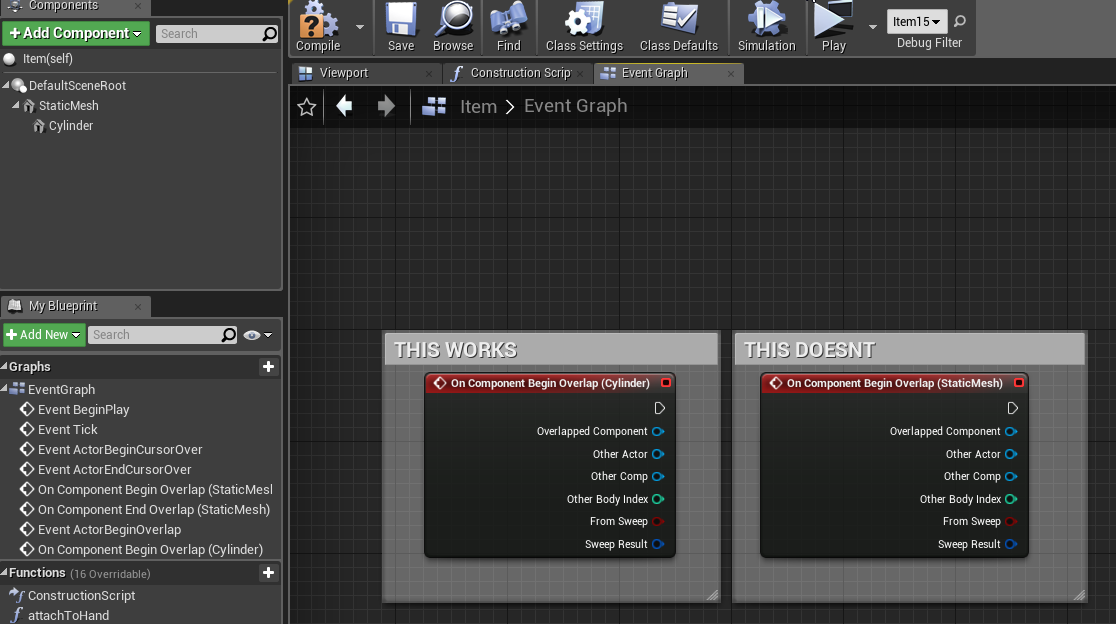
I am creating Item Mother blueprint that is parent of all items (weapons etc) so i dont repeat creating same bps. this is how it looks https://i.imgur.com/Dp7cx36.png . my problem is that I cant get this event to work, because it uses static mesh instead of cyllinder, but cyllinder is a placeholder for item models, how can i get it to work regardless of what modell will be there (in place of cylinder) ?
 stiff crow
can you cast the cylinder to a static mesh?
restive fern
oh i checked, thing is that static mesh has no static mesh 😄
stiff crow
@grim ore got it working
restive fern
@stiff crow but what in case when I will not know what cyllinder is?
grim ore
yay! looks awesome
sudden agate
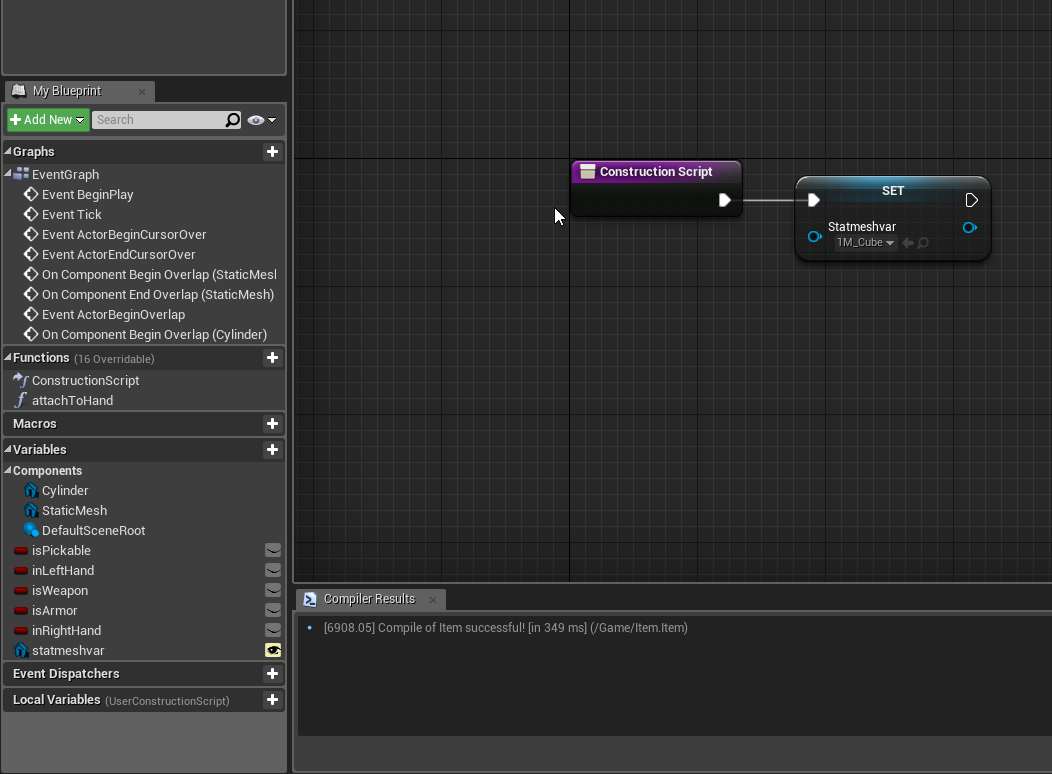
@restive fern Make a Variable of type StaticMesh and set the Static Mesh in the Construction Script
make the Variable Exposed on Spawn
and Instance Editable
plush yew
Evening everyone, quick question. I am watching a youtuber, and he made a border using something, I have no clue how he made that or if it was made outside of Unreal? Could someone advise?
Thats how it looks like in his thing
grim ore
looks like a texture?
restive fern
like that? @sudden agate https://i.imgur.com/B7mUol1.png
 grim ore
so a simple image in a 9 slice format probably
plush yew
I genuinely have no clue what that is 😂 or how he randomly got it
sudden agate
@restive fern almost. you set the Mesh of Cylinder with the Variable
grim ore
he probably did not randomly got it but imported it from somewhere else
any chance there are resource files included with the tutorial?
plush yew
Would it be the same if I simply made a PNG in PS and import it?
None at all, he didnt include the resources
grim ore
I don't know how he created it or what he is using it for but yep Photoshop can create images like that for sure
plush yew
I will give it a try and see if it works 😃
grim ore
based on the name and type I would assume it's a texture and he has it set up in the ui as a border for the draw as
topaz wadi
Question: Is there anyway to play raw wav files from blueprints?
Secondly, is there way to use C++ for UE without having to use Visual Studio?
restive fern
got it thanks raildex
plush yew
Indeed it was Mathew, it was just a simply PS import :), I thought he has done within Unreal in some way I wasn't shown as of yet.
grim ore
gotcha
@topaz wadi you can use VS Code if you want instead of Visual Studio it's just not as robust
or technically I guess Xcode if you want to use OSX macOS or the toolchain on Linux if you want that
daring sedge
Hello I'm new on Unreal Engine I just want to know what is wrong plz say in private
grim ore
you are doing a line cast and not hitting anything and trying to do something with the result perhaps?
topaz wadi
@grim ore Does VS Code cover commercial use?
grim ore
https://code.visualstudio.com/license yes it should be free to use for private and commercial use
topaz wadi
@grim ore Yay! ^^
I also found this, where they say it plainly: https://code.visualstudio.com/Docs/supporting/FAQ
The one last thing I'm super frustrated with is finding a way for my musician to easily swap music in my game. How do I do that?

Visual Studio Code Frequently Asked Questions
grim ore
you would probably have to have some custom C++ code that would load in the assets from outside unless you let them use the editor itself to swap in items
topaz wadi
That would mean sharing the project files and I'd like to avoid that.
 digital anchor
you can share only the binaries
topaz wadi
@digital anchor That's what I want to do, but I also want him to work on the music. What's the most sane way to enable him that?
digital anchor
the editor binaries, he would be able to open the editor but not have any assets/code
topaz wadi
Just say that it's not possible to swap sound files as easily as in other engines?
How does that work?
digital anchor
They won't need every binary, but they'll need every binary that isn't prefixed with UE4Editor except for anything that is Debug or Shipping. You only need Development UE4Editor binaries for your artists to work without issue, and Development binaries aren't tagged with any name.```they would still be able to export from the editor but it would be useless without code, so i wouldnt worry about that
topaz wadi
I'd seriously need to see a tutorial on this.
restive fern
@grim ore ITEM need to be 'simulate physics off' to attach it? because when i have it ON i cant attach
i need to turn off
grim ore
when you simulate physics there is a chance the collision is causing an issue when attaching
restive fern
meh
azure shore
ik this is super ambitious but I really wanna make some kinda like procedurally generated planet thing
but there are no actual tutorials even out there
grim ore
make a sphere, find the edges of it, add stuff to it, planet?
 sullen temple
is there a way to change the location of the Project output log?
sullen temple
that sounds complicated
grim ore
it looks like there is a command line argument for the log, LOG: When used as a switch (-log), opens a seperate window to display the contents of the log in real time. When used as a setting (LOG=filename.log), tells the engine to use the log filename of the string which immediately follows.
azure shore
right nvm then
grim ore
there are a few tutorials out there on procedural terrain in UE4 from just a quick google search
some plugins as well, paid and free
plush yew
is this discord related to UDN? UDN needs account verified by phone to talk there
 fleet cedar
I'm super excited to play around with the Chaos physics system
grim ore
this discord is not official, we are all un officially UE4 devs or admirers of fortnite
fleet cedar
All the demos I've seen look awesome
azure shore
but no tutorials on the actual planets
grim ore
planets are just terrain? or do you mean like no mans sky where you can fly around and land on a terrain?
restive fern
@grim ore that node set simulate physics work only on constructor for me
grim ore
what are you trying to do?
restive fern
https://i.imgur.com/IMDePUm.png this doesnt work for me, in debugging code it just goes through these nodes
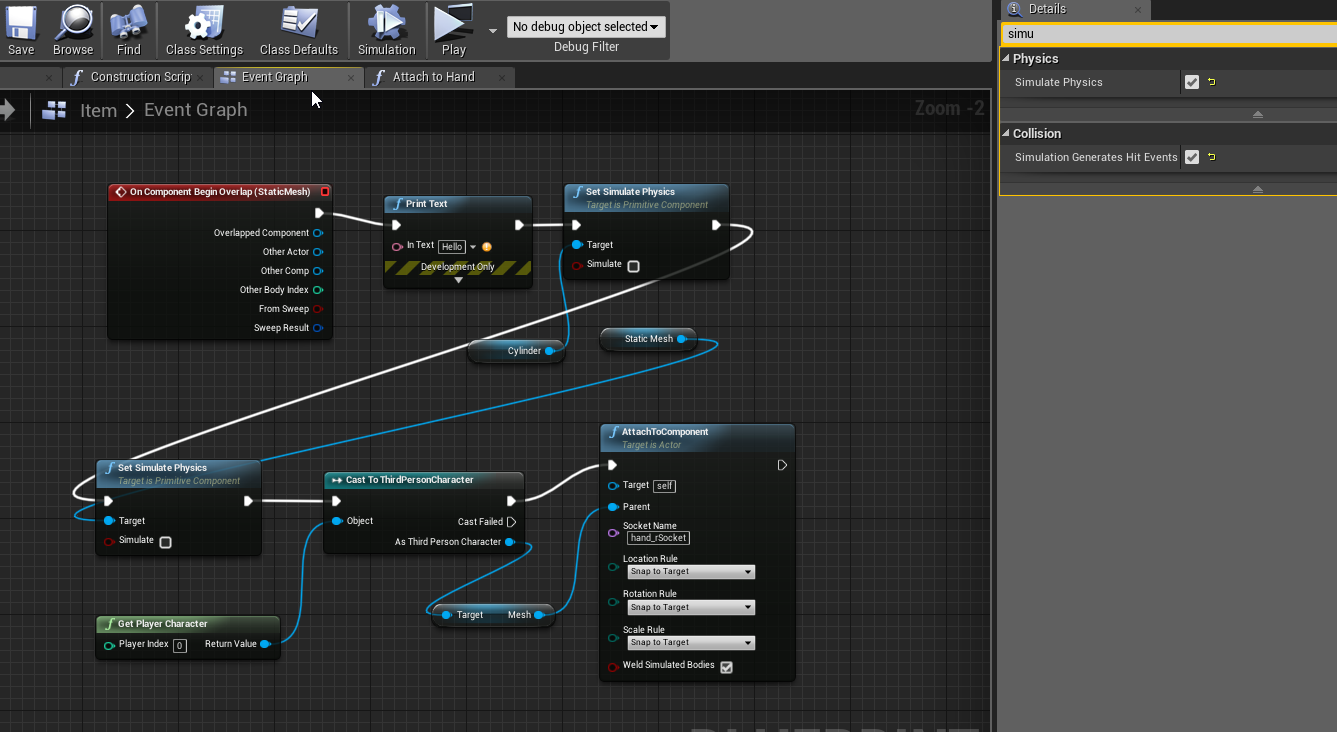


but they wont set simulate physics to OFF
i mean they will do but only in constructor - dont need it there
i tried to add it to press 5 button
and other events
never worked, only constructor
grim ore
no issues here when testing. If you want simulate physics off why not disable it on the actor BP itself?
grim ore
so they are simulate on until you pick it up, then you want simulate off?
restive fern
when i go walk to them they are simulate on, on the ground etc
then i pick up them and attach to hand
but to attach i need simulate off
meh
grim ore
I dont really know where yours does not work. I just tested with an actor with a mesh and its simulating physics. when i tell it to attach i turn off physics and it attaches fine and I can check physics being disabled as well and it says it is. I do make sure to disable collision or else it causes issues with my character
I even just tested it by doing it just the way you have it and making sure my actor in the world was set to ignore player for collision and movable by default and it worked without issue
https://i.imgur.com/V3DY5aV.png the code in my character, it gets the actor BP I have in the scene and does stuff with it when I push 1 or 2. https://i.imgur.com/L1061jT.png you can see it saying true when i check simulate physics then false after I attach it and check


 brave lark
I like the overridable behavior of blueprint interfaces
i want to play with async
wondering if theres a way to define a blueprint interface that runs async
or even just a way to make an overidable async function that I can call from anywhere like the interface allows
restive fern
@grim ore
ok i unsimulated it
but now cant attach
xd
meh
i have to delete everything and start over
idk whatsup, i have like your
azure shore
yeah mathew I meant sorta a no mans sky thing
I wanna actually be able to walk around the generated planets and leave them too
abstract relic
Better hunt down these guys and ask for their secrets https://blog.marekrosa.org/2015/11/planets-because-you-wanted-them_12.html

Today is an important day in Space Engineers history. I am very happy to present the biggest and most challenging addition we have ever mad...
azure shore
how the hell do you even optimise something like that
restive fern
i had parent mesh 'static mesh'
above cylinder
that swhy
when i put cylinder as root it worked
but i had same settings for static mesh parent that i had for child so idk why
anyway thanks
fierce tulip
Unreal Engine Forums
... or a juicy bank check for his mini tutorials.
He has a zillion of short videos that make from unreal to best place. https://www.youtube.com/channel/UCOV...bRdVE
restive fern
lol
 finite slate
I hate buttons
Jeez
I just revisited my old project
I am redoing all my UIs with Vertical and Horizontal boxes
so that it works on all screens
The text is ruining the button
azure shore
ikr widgets can be a nightmare
 next badger
@finite slate why not to make them same size and just center align the text?
finite slate
Everything about them is the same
One of them said something else before but I changed it just to see what was wrong a bit easier
next badger
i can't see the difference between them, except the height...
 surreal root
Noob here. Is there a reference I have to add so that UPROPERTY holds up? Thanks!~
This should have been enough... r-right?
finite slate
Why did you stutter
grim ore
@restive fern gotcha, and awesome, makes sense since having more that one colliding physics item might be a problem
restive fern
@grim ore i also had to replace root with cylinder
grim ore
@fierce tulip thanks for the link man, I appreciate it. I rarely have time to browse the forums so that was nice to see 😃
@restive fern that makes some sense too as the root should almost always be your colliding object if possible
 bronze lichen
If anyone can help me out here im new to this i would appreciate it. So i downloaded the engine, opened up a third person, downloaded the paragon assets, opened up the ParagonSample map. Now when i open it up it, i added a light scene with the blueprints(before it was just pitch black). So now i can see, but when i press play to try and move around the camera is inside the model and doesnt move at all. What do i have to do to fix this?
grim ore
@bronze lichen check and see what the default pawn is set up to use for that map. either in project settings -> Maps and Modes or in the world settings for that map you have loaded. IF you imported them into a third person template than maybe make sure its set to third person game mode so it uses the third person character and controller
bronze lichen
both are already set to that
it only lets me jump but then i teleport under the map and fall into the void
has anyone else downloaded the paragon sample map and opened it up?
if so did you get any problems like this?
also falling through a lot of areas besides the center, do they not have collision on them? i cant find an option to turn it on anywhere
vagrant sapphire
I got my game ported to HTML5
Yiss
only problem now is the site im uploading to is picky and has an upload limit
so i cant test it there
anybody know a good test site for that?
 dark depot
shouldnt you be able to just open it in your broswer
vagrant sapphire
Yeah,but i want to see how well it runs for other people
i want to send it to them
dark depot
or just dropbox or something
dark depot
it used to im not sure i havent done any html stuff in years
vagrant sapphire
I weill try then
vagrant sapphire
nope,does not
and downloading it my friend does not know how to run it in browser,neither do i
how the hell do you run an htlm5 game from a download?
grim ore
@bronze lichen is in the paragon: Agora and Monolith sample?
you can't just run an html5 game from a download due to cross site scripting restrictions, it has to be running on a local web server which UE4 provides as far as I know when you package for html5
bronze lichen
yes thats the one
in that download there is assets and a separate folder with the sample map
grim ore
here is the getting started with HTML5 and yep it has a helper .exe file for hosting the project locally for testing, https://docs.unrealengine.com/en-us/Platforms/HTML5/GettingStarted
Im downloading the map but I would not be surprised it some of the meshes don't have collision
grim ore
zip up the entire folder and send it to them?
otherwise upload the shipping build to a web server that supports it
vagrant sapphire
I did send it to them,they dont know what file to click
the webpage link gave them an error
 carmine cave
Need help, I made a blendspace animation for my AI from Idle to Walk, what is the proper way of setting up it's speed that when it reach 0 speed it will go to idle and gradually increases as it walk. Thank you! My Maximum walk speed in my AI controller is currently 300.
 sonic tinsel
@carmine cave I'm trying to figure this out right now and if I do I'll let you know
carmine cave
I was thinking of getting variables that will have minmum and maximum speed that if my AI reaches those certain ammounts it will go to idle to walk sooo like 0 = idle then it will gradually increase to it's max speed
grim ore
that sounds like a normal 2d blendspace? is there a reason it doesnt work on the AI?
carmine cave
I tried putting one animation (which is the walk) the AI roamed okay. However when it stops to a certain location I want my AI to reach idle state and walk again. I've put a 4 seconds delay after it roams.
If you have any suggestions I am happy to listen.
sonic tinsel
kaad dm me I'll show you how I did it
grim ore
you should be using a 2d blendspace just like the character uses. 0 would be the idle and higher speeds would be the walk or run, you get the AI speed to determine what should be playing.
its how the character is set up by default, the AI would be the same assuming it is a character as well
sorry lol, 1D blend space not 2d since you just want to get the speed
carmine cave
Will do @sonic tinsel
@grim ore Okay I will try to check on my blendspace again.
sonic tinsel
How would I check to see if a box collision component on my character is intersecting with geometry?
dim arch
in bp or cpp
 sleek spear
in 4.22 preview 4 or 5 i think, raytraced global illumination denoising was refining the image every frame, without loosing previous frame information, like a large temporal smoothing. if view didnt change for a while, the image became very clear. this behavior changed in later preview builds. does anyone know how to recreate this behavior? i tried with temporal aa and various temporal console commands but didnt do the trick
sonic tinsel
@dim arch BP
vagrant sapphire
anybody help me with that?
plush yew
Hey guys, hope everyone is having a good night/morning 😃 I have a quick question.
Why is one of my casts displaying an error even tho I have been able to compile the BP chain?
It just isn't disappearing and it isn't giving me any errors
vagrant sapphire
shit i'll try tomorrow
plush yew
Oh wait, it just disappeared randomly after a few minutes. 😃
dim arch
@sonic tinsel there should be an event "on overlap" you can use that with a printstring to see when the collision component collides with any geo
sonic tinsel
on component begin overlap?
bronze lichen
@grim ore i figured it out! thank you very much for trying to help!
the map is so beautiful
sonic tinsel
@dim arch When I click play it prints true, then doesn't do it at all
 silent narwhal
My bad! Shadows are actually compatible with PDO for materials using POM!
sonic tinsel
it prints its own name
grim ore
@bronze lichen what fixed it?
dim arch
try the other actor pin
sonic tinsel
it gives the character's mesh's name
I'm doing this from inside my character blueprint
bronze lichen
@grim ore i had to go to the SM_SkyFloor and turn off collisions for it, then i went to the SM_Plane and went to collision, collision complexity, use comlplex collision as simple
now camera works and you can walk around entire map without falling
a couple assets still dont have collision turned on so you have to go 1 by1 to turn it on
sonic tinsel
@dim arch Ok I changed the size of it so it no longer intersects the character and it doesn't trigger from intersecting with environmental geometry
dim arch
does the object you are overlapping have "generate overlap events" enabled?
grim ore
@bronze lichen i was going to suggest that collision on the skysphere was the issue but I didn't expect it to be messed up in another project lol
dim arch
the collision system is pretty expensive, its turned off by default
bronze lichen
yeah well the maker of the map don goofed and gave me a headache lmao
grim ore
It's the same issue on the firelands example map for the IB assets
 distant loom
is visual studio free? because its telling me i need to sign into an account.
grim ore
Community is free for individuals and certain income
 spare sun
^
You'll have to sign in though. At least for the first time you use it afaik
 iron sparrow
I realized I should have probably asked this here first but I dont see a Epic Online Services chat channel yet so I will post this here: https://www.reddit.com/r/unrealengine/comments/b6tewt/i_might_be_missunderstanding_something_in_my/

reddit
0 votes and 0 comments so far on Reddit
really hope i am missing something
spare sun
the question isn't writing a hook, it's delivering it and making the user run it. There's plenty of games running without steam yet requiring authentication.
carmine cave
Hi, what are "Bad Cast Node"/s , In a BluePrint? I opened a different folder from a different project and I saw this.
iron sparrow
but they arent your epic account which would be tied to many other games as well?.....at least on all those sites i know to have independent passwords etc
@carmine cave #blueprint
spare sun
it could be, but with same result you could attempt hooking onto steam launcher or simply setting up a key listener once it opens
iron sparrow
the only time the steam clients password is entered is on its login, not in game or when steam isnt running
you never log into steam inside a game via username and password
iron sparrow
no, one is a closed tight application the other is a game that i and millions of other people couldwrite and release and use the Unreal API to sniff for peoples passwords and then log into other games with that
or emails or submit to a user/password database for all other intentions
if i make a stupid mobile game, sniff passwords then attempt to use those on other games would i not gain access to other peoples accounts? i see no other way this service verifies them locally like the steam online services does
spare sun
ah you mean not taking it as 3rd person but taking the data as developer
iron sparrow
yeah, this system requires the player to enter their username and password into a form field inside the developers written game
where steam requires on PC for you to be logged into steam already and verifies you through its service running locally OR if on console uses the consoles account ID
 keen frigate
Morning everyone 👋 😎
 ruby folio
Blargh... I just typed *8000000 in a volumes x size
keen frigate
ouch
keen frigate
😦
 thick knoll
I have been messing around with packaging multiple masks into a single texture, I usually see RGB.... but why do people not also use Alpha for 4 total?
Is this a bad practice for some reason?
wary wave
big increase in texture memory, basically
alpha tends to get packed into some other texture, like the normal map, or bundled with other masks
cloud cobalt
It's best to have a RGB texture with no alpha channel
wary wave
there are times when you might (compression algorithms), but often you want it empty
if you need an alpha channel, I would consider either a single channel texture, or packing it into the G in a normal map
cloud cobalt
"A Texture that has an alpha will cost 2x as much as one without as alpha channels are not compressed. " as per Epic's Sam Deiter
thick knoll
sweet, so as long as its a blank input in for example substance designer, it should be deactivated?
fierce tulip
if you have an albedo, and four grayscales, i'd put the roughness in an alpha as that benefits a lot from the much crisper result.
pack the the other three grayscales.
you can also disable alpha in the texture viewer in ue4
but it all depends on workflow, and where in the end you might have bottlenecks
if you can avoid using alpha, thats always best
wary wave
aye, there's no real "correct" answer
thick knoll
currently my usual setup is AO-R-M in a mixed
wary wave
just know that it is a lot more memory
thick knoll
I think the usual answer would be to avoid it, I think it might be rare to even need 4 alphas in 1 location anyway
thanks for the tips! 😄
fierce tulip
or in my vfx-case, if I only need one grayscale, i save it as an alpha only texture, and reduce its size by quite a bit as even on lower res, its still quite crisp
fierce tulip
partially
more like how directX/alpha in general works
id practie without alpha for a while nontheless, as it helps coming up with neat ways to pack things
thick knoll
so as long as the input remains empty, is that classed as not being used?
or can it say be a solid white/black and count as not being used?
just trying to make sure I know when it is and isnt a problem
wary wave
if it exists in the texture, it's there
thick knoll
ok thanks!
sudden agate
ahem
PUT ALPHA CHANNEL INTO A SEPARATE SINGLE-CHANNEL TEXTURE
thick knoll
what do you mean sorry?
plush yew
Has there been any info when a "non-preview" build of 4.22 might get released?
cloud cobalt
Supposedly this week, so today, but probably next week
thick knoll
any exciting announcments for 4.22?
cloud cobalt
Quite a few really
Initial support for raytracing is probably the most obvious
Personally I'm more excited for the new auto-batching feature that had mesh rendering re-implemented from scratch, and the wheel motion blur sample material
plush yew
Hello unreal people. I've come here to see if I could ask the experts about the problem of under mesh exploits. See over in the Ark Survival Evolved community right now there is a lot of drama and crying over the fact that the devs have not fixed many of the major exploits of players glitching under the mesh to cheat. Is it something that is really hard to fix? Part of the real problem is the devs just don't talk to players about what they can or can not do. They really don't communicate well with the players. So maybe some you you guys who know what you're talking about can shed some light on the issue for me. How hard do you think it is to fix?😃
wary wave
it's an Ark gameplay problem, and probably not
it stems from their own gameplay team's incompetence
thick knoll
Rust has procedural generated terrain and never heard of that really happening there (not saying that it doesnt though)
cloud cobalt
Ark's developer doesn't seem to be the quality-oriented type
wary wave
they have lots of really dumb, obvious problems they've never solved
like when you place something like a foundation or a pillar, it shows a 'ghost' or outline of where it will place it
but when you click and place it, it ends up somewhere else
100% down to shit replication
could be fixed in an afternoon by doing it properly
fierce tulip
wanting money vs spending money.
wary wave
given the quality of some of their most important BPs, I don't want to know what their actual code looks like tbh
things like their day night cycle make a lot of the Blueprint Hell posts look pretty tame
I completely redid it a while back for my own map work and in the process found out that somewhere between half and a third of the graph didn't even do anything
there were a couple of cases where shit like variables being set, then set to something else in the same sequence, before it used occured
it was just a mess
thick knoll
damn
wary wave
if people submitted stuff like that on my own projects, I'd be having stern words, if not firing them
thick knoll
why do I bother to label everything xD
fierce tulip
@wary wave amen
plush yew
Hmmm its as bad as I thought then.😦