#ue4-general
1 messages · Page 408 of 1
 regal mulch
Drag and Drop is a visual feature
regal mulch
Follow the UE4 tutorial
 plush yew
so how will it paste?
regal mulch
(: Follow the tutorial
plush yew
:(((((((((((
how many times do I say that they enjoy classes and I do not want classes
regal mulch
C++ is build up on many classes
Get used to it
Nothing just works with one class. Neither is it adviced to place everything into one class
plush yew
yes i know but I don't code now in C++

 dry shuttle
does anyone know if I can take assets from 4.9 and downgrade them to 4.5 or where there is a tutorial on how to do this
regal mulch
You can't downgrade afaik
regal mulch
What minute in the video?
regal mulch
So you swapped to the Docs instead of watching the video?
regal mulch
I assume you created the variable in the wrong class
regal mulch
You do see the pattern here right?
You instantly asked again instead of trying to solve it yourself by properly reading first.
regal mulch
Then read again. You are basically spamming by now.
plush yew
okay
can someone get on a dm call with me? i need help but this might require screenshare
one silly question
I want to move the item wood from one slot to another-so the question is I must to drag the slot or the item?
hmm
regal mulch
The item gets dragged. The slot receives the drop
plush yew
yes
okay
ty
so the wooditem will be dragged and the actionbar slot will be dropped-yes?
 graceful sky
Visuals for what it should look like, and payload for what it should contain
regal mulch
The main thing to understand is that the drop event should update your backend
And then you just refresh the bar
So the item you drag needs to know its slot index
 abstract relic
Mate, that’s the same kid who’ve been asking to be spoon fed all week, he just changed his name 😜
regal mulch
And then you tell your backend to swap the item to the slot index
plush yew
when we make the dropped function we m,ust to set it to which slot to be pasted?
regal mulch
I will issue spam infractions if you keep asking about this while not watching the video. You already got removed from a different Discord Server for asking question after question.
 light thunder
@plush yew Why don't you just take one of the Unreal courses on Udemy?
plush yew
the reason isn't this that I ask question after question
light thunder
What's your hurry in terms of learning this stuff
plush yew
 abstract marsh
Anyone checked out reef?

Reef is a gaming platform by Squid Networks, a UK based firm striving to create a globally recognised platform. Reef will be the most innovative platform to ...
It's a gaming platform.
oof
regal mulch
@light thunder I posted him a probably 3 hours long stream that fully creates the drag and drop stuff he needs.
 spare sun
-Watch the tutorial
-Okay, I read the documentation
regal mulch
So if he keeps posting instead of watching it, ping me
light thunder
@regal mulch lol where is my video for how to simulate this thing no one has had to simulate before? I will totally watch it
plush yew
ok so currently i am working with conditions, but i dont understand where the tutorial got this set node
what is this node called?
which?
set
plush yew
yes
oh ty
Can I say I made this in the documentation about drag and drop but it doesn't drop in the actionbar but I made the drop function in the actionbar ?
 weary sun
Hey is there still no way to listen for input actions in UMG while paused?
weary sun
Would be mapping needed stuff inside player controller + setting them "ExecuteWhenPaused" and retargeting them to widget a good solution if so
regal mulch
(: So you watched the full video yet in which they fully explained how to do that?
Cause I clicked through the video and I saw that fully working for them
plush yew
what's the problem with the documentary?
I followe their steps but where I am wrong idk
regal mulch
The problem is that I linked you a tutorial that explains this
You yet you ask questions instead of following it
plush yew
yes I know
he linked you a video and you haven't watched it
I will watch the tutorial later not now
regal mulch
Also, do you happen to ahve a Youtube Channel (:?
regal mulch
Is that "TheCrusherOffical"?
plush yew
yes why?
regal mulch
Cause you are currnetly ban evading
plush yew
I am sorry for the ban
regal mulch
Have a nice day
plush yew
omg
 pallid compass
What a thing to tab in too
plush yew
it's not going to be the first time he's been banned from a discord and won't be the last
be aware that he has multiple aliases
regal mulch
If someone with a different nick comes in here and asks for drag and drop over a time of multiple days, let me know :D
pallid compass
Exi rn
plush yew
lol
pallid compass
When you think you have a fan, but you get a cane up the butt
oh that is that guy who never reads anything and only askes questions constantly
regal mulch
Yus
plush yew
oof alt tabbed to some beef
regal mulch
Na I had my fun. Didn't expect them to answer the youtube question
plush yew
https://www.youtube.com/watch?v=sjAJW9l1c6w&t=278s ok so i watched this video but they didnt explain how to make something happen once all of the pads are blue, at first i was like, "maybe i use on event hit" but then it hit me that i cant use that because i want a "if all pads are blue, then do X" can somebody help me out with this?

specifically i want help with substituting on event hit for something that triggers something when all pads are blue
and yes i can call if this is too complex to explain with typing
plush yew
yea all of them are single actors
regal mulch
Okay, first, I would suggest wrapping this stuff into one Actor then
The Actor should have 9 Meshes, or two Instance static Meshes (which would be more performant but not so straight forward)
When the Player Hits one of the 9, the HitEvent in the Actor should call
And technically also passing you which of the MeshComponents got hit
So that way you can find out which mesh got hit inside of one single actor
The good thing about this: That one Actor can save the state of how many are blue
And if all are blue, can execute something
You can even place 10 of them next to each other and each of htem would have their own state
plush yew
i dont think that would work, look at 4:50 in the video, the problem with one actor (if im right) is that i cant do the whole adjacent pads thing (i dont think)
regal mulch
Why not?
plush yew
wait
regal mulch
A little bit of brain power and math and you get the same effect
plush yew
oh so the whole array thing i did so that "on event hit the adjacent get triggered thing"... i could just make it a single actor and it wouldnt affect how this puzzle works?
ok brb lemme do a quick google
also ty for the help
regal mulch
Yeah, you can do a lot within one actor
plush yew
sorry i just started unreal a week ago, completely blind to programming. there were no results of this on google but how do i wrap all of that into one actor
oh wait is it group?
regal mulch
@plush yew Öhm, yeah, do you mean Tutorial or Documentation?
What would that entail?
You mean an API?
Unreal Engine API Reference
Example: https://api.unrealengine.com/INT/API/Runtime/Engine/GameFramework/APlayerController/index.html
PlayerControllers are used by human players to control Pawns.
plush yew
ok so its not group, that just seems to quite literally group without combining the actors
regal mulch
https://www.dropbox.com/s/1eo3gxp7agnagi2/hgZeX84k2x.mp4 @plush yew WIth a little bit of math

You can easily create this
plush yew
holy crap did you just make that?
regal mulch
Hm yeah
spare sun
crusher4o#6544
welcome back I guess
regal mulch
Just some stuff in the construction script
That isn't the puzzle yet of course
You'll most likel ywant to make use of a Map, where the key is a StaticMeshComponent and the value maybe a boolean
And then add each of the created mesh components (see image) to that map.
THe boolean would then be if it's blue or red
And based on that you can always check the state of a mesh
regal mulch
Is that this puzzle where nearby tiles turn color too?
plush yew
yea you tap one tile and the adjacent flips color, you have to get them all to one color
plush yew
yup
i put a teleporter in the door, that the gamer wont see that they are teleported, what u people think ? good or not ?
or is there something bether ? 😄
regal mulch
@plush yew https://www.dropbox.com/s/qfeuiby869cc2wv/i4BLT9uVyb.mp4 Tada

If you have a 4.20 Project I could probably send you the uasset of it if you want
 wet berry
Oh, it's a lights out thing.
Another thing to mention: you can easily make those unsolvable
So when you generate it, start with them all one color. And randomly 'trigger' a bunch of them to randomize the start point of the puzzle
If you manually allocate colors at the start, you can create a puzzle with no solution
regal mulch
Yeah and the base layout is easy to solve
As shown in the video
However mine works with all sizes i think
haven't check more than 3x3
but I didn't use any hardcoded values
dry shuttle
Does anyone know the process if any that will bring assets from a newer ue version down to ue 4.5 as i need them to be in ue 4.5
 fierce tulip
you cant
if its objects, export all the meshes, textures, recreate the materials
blueprints, recreate from scratch
dry shuttle
okay thank you
plush yew
@regal mulchhow would i go about you sending me that uasset?
also sorry im a bit late, i fell asleep on my desk
unreal really tires me out
fierce tulip
try adding particle lod's for 6 days :p
 silver crown
lol
regal mulch
@plush yew Can just dm you the file
plush yew
oh tysmmmmm
plush yew
Anyone know how I can create a regen health function
 woven cliff
Hey, I have that question of which idk how to google
if u have a master material where your inputs are low resolution solid colors placeholder, (64x64 pixels res ) for example. will that give u a worse result when u use an instance material with bigger resolution textures? will it be better if i used the target texture resolution in the master material ? or it doesn't matter?
regal mulch
@plush yew When you apply damage, check when the health is low enough for your regen function to start
Then make a function that adds x health to your currentHealth
When the regen function should start, call "SetTimerByFunctionName"
 sudden agate
@woven cliff it doesnt matter
regal mulch
Don't* set it to looping and give it the timer in which interval it should call @plush yew
Then make sure that in the function itself, after you added the health, you check if the the health is at max and only if not call the timer again
woven cliff
@sudden agate thx for confirming ❤
plush yew
@regal mulch i want to go to the next level when i reach within the red circle with my top down mobile character, just like pokemon, you know how i should do it ? shal i do layering and stuf or what does it calls?
 true leaf
Hey so I want to make cinematics for my game but have no idea how to even begin. I have gimp and blender but what is good software for putting together a cinematic for unreal ??
 wary wave
true leaf
wary wave
true leaf
okay i mean is that the best way ? what about prerendered lol
 tall pendant
if you want prerendered cinematics and already have blender you could theo. make your cinematic completely in Blender. (it's huge task which takes quite some work tho)
 pulsar fractal
So I pasted this blueprint in after parenting the BP to a blueprint that had the exact same nodes, so the functions were inherited
Yet this happened.. any ideas?
 hidden aurora
I didnt understand
pulsar fractal
The whole BP worked in a separate character BP, and I copy and pasted it into a different event graph for a different character and now I get those errors
And I did reparent the blueprint
abstract relic
Click on the underline word, it’ll take you to the problem node. You just need to refresh the reference
hidden aurora
You can inherit the events
pulsar fractal
I refreshed it and once I compile again it gives the same error
abstract relic
No, you literally need to go to the node and repin
pulsar fractal
Okay thanks I’ll try now
But could this being unchecked be a problem?
Is it supposed to be checked
hidden aurora
You need to have the event in the parent class
pulsar fractal
So it doesn’t error now, but the blueprint doesn’t work. Basically I downloaded a character with this blueprint and I want to use it with a character of my own, so I parented my character to the downloaded character
So, the picture I took is of my character because I just copied and pasted the new blueprint in (after reparenting). Should I only copy the parts that call the functions?
abstract relic
Why not duplicates the bp and change it’s mesh?
pulsar fractal
I have events from my character that I’d like to keep, I’m just trying to figure out how to merge my events and the ones I downloaded
I’m stumped as I thought copying the downloaded BP from the parent (downloaded) into the child (my character) would work
The blueprint is basically a bunch of custom events for movement (climbing)
Here’s what I’m thinking if it helps:
The level is based off of 3 character BPs. Before I downloaded this new one, there were 2. One CoreCharacter with basic functions of interaction/damage, and a BattleRoyaleCharacter that inherits the CoreCharacter but has additional functions for that specific game mode such as viewing the name of their teammates.
Now I downloaded the new character BP, and want the functionality of the new character in the BattleRoyaleCharacter, so I tried parenting it in between the existing two so now the hierarchy is CoreChar>NewChar>BattleRoyaleChar
And then I copy and pasted the new character’s blueprints from the event graph into the event graph of BattleRoyaleChar, the one that is selected to be played when I play. So I thought this should work, but it doesn’t. Could the movement events be conflicting? **when I choose to just play as the NewChar (which inherits CoreChar) it all works but I need to play as the BattleRoyaleChar
 azure shore
can anyone help me with spawning actors. for example if an enemy is spawned whilst playing its just like inactive, it has no gravity and doesnt do anything
feel free to ping me any replies
pulsar fractal
Edit : it actually doesn’t work if I just skip the BattleRoyaleChar and play as NewChar, it does weird stuff
light thunder
does it matter if this trace interactor (mitch vr example) if it is setup on the motion controller - he has MC on the VR pawn, whereas my setup, the VR pawn spawns the MC and I have this contained there on the controllers themselves
wary wave
depends on what you want to transfer, but generally speaking, no
 storm venture
hey so how does ue4 modding work? can i allow users to create custom levels using only specific assets?
true leaf
I think you can either build an editor into your game all custom or ask permission from epic to use their editor for that purpose
Like how Squad does it ?
 halcyon flame
...are Unreal units actually centimeters? the scale of the 1st/3rd person character seems to be built as if they're meters...
 manic pawn
yes
halcyon flame
ok. just to confirm, if I want a 1m³ box in unreal, I need to scale up the box in blender by 50 (since it starts as 2u³) if I want accurate sizing?
 next badger
@storm venture if you want ARK way of modding you need a special agreement with Epic
 grim ore
can you change blender to be cm units?
halcyon flame
I made a basic placeholder model that was supposed to be about 2m long and in the Unreal preview it was absolutely massive, dwarfing the platform to display static meshes
grim ore
did it export it out in the correct units?
manic pawn
blender appears to default to 1 blender unit = 1 meter
halcyon flame
didn't seem to. I didn't apply any scaling on the export.
manic pawn
so you'd need to scale the default cube by 0.5 to make it 100 unreal units in diameter
halcyon flame
ok. that explains a lot. but when you get a distance in UE4 it returns in cm?
manic pawn
yes
grim ore
well I was just curious on if you change the blender units to CM then it wouldnt be an issue you just make it the size you want in blender and export it out at the right size?
I use Modo and that's what I do so was hoping you could do the same in Blender
halcyon flame
I like Blender units in meters, but you can change the default unit apparently. I've read multiple sources online saying Blender units = UE4 units = cm, but my experience completely contradicts this.
you can change the default units/scale as well

O’Reilly | Safari
manic pawn
it seems like we've changed the unit to cm in our .blend files with animations
there may be a reason for this
idk
next badger
by default Blender uses none as unit of length
manic pawn
which has the same unit scale as meters so 🤷
pulsar fractal
does anyone think they can scroll up to 5:02 and take a look at my problem? I’d appreciate it a lot, I feel like I’m missing something simple
next badger
5:02? umm...is it in future? or it was yesterday?
manic pawn
time zones exist
 pulsar fractal
That’s where my question starts (or at least the unsolved part)
manic pawn
silver crown
Pretty damn useful right?
🤔 could you hide a discord invite through that? https://discordapp.com/channels/212250894228652034/342045559768481802/525444451271966730
manic pawn
has anyone used godot for a real game yet
silver crown
#offtopic
manic pawn

 next badger
@pulsar fractal sorry, we can't answer on questions like "i've copy pasted half of the blueprint from downloaded project and it does not work"
 weary basalt
@silver crown @manic pawn Stop please
silver crown
kk
plush yew
hey so
Does anyone know how to extract animations from a PSA
Like
Ik u can do It through blender but ig it isn't working idk
pulsar fractal
@next badger that was in a conversation to someone who already understood the actual question, in context they understood. Rule 1 please, thanks
It’s perfectly clear in #blueprint and from where I said to start reading if anyone wanted to help in this section
 dawn acorn
I'm trying to make a 150x100 level with cellular automata in unreal and it seems like paper2d tilemaps wont work for it because they dont work right when packaged, is there any way for me to reduce the performance cost of about 10000 cubes that are on screen at once, or another way I could construct the map?
weary basalt
Procedural mesh?
 quaint spear
does anyone know how to take a screenshot of the ui in ue4?
quaint spear
Well Im trying to basically have a button that capture the frame of the game
but I cant get UI to render
its only the viewport
UMG disappears
😦
silver crown
Hum
quaint spear
Highresshot 1
silver crown
How are you doing it?
 polar hawk
just try
weary basalt
PrintScreen? lol
polar hawk
neat
polar hawk
bugscreenshot
it'll put it in a different folder though
and probably doesn't work in shipping builds
polar hawk
if you have c++ you can invoke a screenshot with the include ui flag to true
quaint spear
hmm
polar hawk
FScreenshotRequest::RequestScreenshot()
quaint spear
I actually need to do it on mobile..
just to take a selfie basically
imagine u enable AR mode
polar hawk
probably FScreenshotRequest::RequestScreenshot() then
quaint spear
and take a snapshot of the ui+3dscene+cameraimage
I dont know how to access that function
if any of u have experience with this
I would appreciate the help
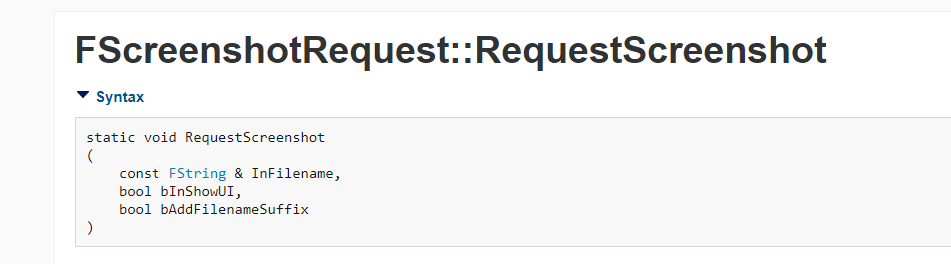
this is what I need
I dont know how to use this function inside blueprints
 slow socket
Got this initializer list not found error when packaging android astc, could use some help, thanks ! 😃
halcyon flame
a question for you
I have essentially a matrix of static meshes used to build levels in my world, like Lego bricks. does anyone know of/can anyone think of a way to assign the static meshes based on a few variables (length, width, height, slope, slope direction) that doesn't involve building out an insane and increasingly complex system of gates based on the variables?
I can't just apply scale to a single mesh because the mesh has things like a bevel or slope. basically I need to apply a 3D grid of variables (as well as other options on top of that) to script which will select a mesh based on file name? am I having a massive brain fart here or is there truly no convenient way to do this?
light thunder
if I have a 3D widget with a widget set as it's object, do I have to create that widget still in BP?
I'm getting null references when I try to access the widget BP itself
even though I can see the widget on the 3d Widget component (in the actor itself, not in the real world because I'm toggling visibiilty)
 worn granite
Yup, can confirm, I see text
It's not just you
Check nothing else manipulates that visibility - other than that I cannot help ya
halcyon flame
all, after thinking about it for not too long, I realized I just need to make a 3D array (an array of arrays of arrays) with pointers to Static Meshes, and then have code determine the index for each array. the only trouble, which is relatively slight, is building out all the arrays on that third level
plush yew
I’m sure I’m wrong, but networking in Unreal is way easier than Unity
I’m an Unreal rookie
worn granite
Yeah I've heard there's more outta the box
plush yew
Yea and plus it’s server/client by default as apprised to Unity’s p2p
worn granite
Ofc , if you need something different you're in for pain
plush yew
Opposed*
Well because of Fortnite, they already have great support for the session based game I want to build eventually
I’m in love with everything about the engine except for cop. It’s so weird and unintuitive compared to c# in Unity
C++
worn granite
You don't need it yet, might not need it at all
plush yew
Possibly, but I feel like I may as well learn it now in case I do need it
worn granite
Barring super cpp people, I'd recommend starting with BP and transitioning to cpp when needed by profiling or by graph complexity
Just faster to learn the basics of the engine that way
plush yew
Very true
BP are ideal for action based code, correct? I.e. player movement, weapon firing
worn granite
Ofc once you're uber comfy in vs, it's pretty easy to navigate through UE4 code
plush yew
Well do BP reflect C++ code in Unreal at all?
worn granite
But you won't start that way, and it'll only serve to annoy you
The names can match fairly alright
Working with the same stuff, there are some API differences but you can use anything BP calls from code
Zeb, you got VS open?
plush yew
Okay cool
worn granite
You'll have to learn some more advanced concepts that BP will just handle
No prob
I don't have VS in this state yet
 novel ember
for postprocess materials, what node do I need to be using to isolate "background" space that doesn't actually have a depth?
i.e. void beyond skyspheres etc
halcyon flame
@worn granite if you were talking to me, yes I am. do you know what reference type they should be so that every mesh isn't loaded for a single instance of the actor?
worn granite
Oh that sounds like pain
Just StaticMesh/Component/Actor should be fine.
It won't have to load every asset from disk, just what it directly references
light thunder
I have that widget component attached to my Camera, (so it is nice and follows player's vision) but for some reason something in the VR pawn BP I am using is setting it's visbility back, even though I JUST made this item new, so it's not like it's old code...
halcyon flame
won't all the SM references in the mega array be loaded regardless since they're referenced?
halcyon flame
I think I'm thinking of using the soft object reference type.
 lost meadow
Anyone here know a reason Shift+F11 might not be working? My editor is stuck in Fullscreen mode and I can't get out of it.
Never mind it seems to have fixed itself, thanks.
plush yew
Alright
anyone have an idea how I can get this to lock root motion
Without the model doing some weird flip
whenever I try to lock root motion it does this
Nvm got it
 surreal viper

 brazen forum
Hey guys. I'm kind of confused why it seams like all class names start with the capital letter A. Like for instance I was looking at the documentation on the website and I came accross this
class AMyActor : public AActor
{....
This is correct.
Unreal uses different PrefixLetters for it's Header and Build Tool.
F - Structs
U - UObject derived Classes
A - AActor derived Classes
S - Slate based Classes
So if your Class should be "AnotherClass", it's Class that derives from Actor would actually say "AAnotherClass"
graceful sky
Pretty sure i know the answer already, but thought i'd ask anyway. Is it possible for a class to initialize values, pre-spawn?
Specificly from a data-table
regal mulch
@graceful sky Pre-Spawn not really. You need an instance of it to actually set values to be different than the Class Defaults.
In C++ you can spawn deferred, that allows you to set variables before the actual spawning process is marked as "finished".
graceful sky
I dont wanna change values per instance tho. I want to change the class defaults
regal mulch
In Blueprints you could expose the Variables and set them on the SpawnActor node, that however won't allow calling functions
graceful sky
I just want a collective place to do it
graceful sky
something like materialparametercollections i suppose, just for actors 😛
regal mulch
Or just a static place somewhere?
graceful sky
Defaults of one class and all of its childs
regal mulch
If the Children don't change the default, changing the parent would override the children
regal mulch
Well you can try to mark all the BPs
graceful sky
I figured i've done a bad job balancing them,
regal mulch
And the go to "Asset Actions" (rightclick menu)
graceful sky
and need to adjust all claymores ..
regal mulch
And hit "Edit Bulk Property Matrix" or so
regal mulch
Yus
 bronze cedar
on hit , how to make that hit object go in random direction on X or on Y axis, or side
 oak tulip
I'm having problems enabling ray tracing in the 4.22 preview could anyone please help?
 honest vale
do you have an nvidia 2000 series card?
 gloomy aspen
hi there :)
i'm new to unreal engine 4 and i would like to create a quiz "game" to test people about their knowledge.
so there would be a score board at the end of the test.
now... how would you normally do that in UE4 because in a quiz there are no real levels. it's more like an interactive powerpoint presentation ^^'
do you make a default 2d scene and make a UMG widget for each question slide or so?
thank you for you answers 😃
 dim plover
You would just need a UMG or really any class that looks up questions and answers from some container like an array, map, or datatable.
 crisp fable
Yeah make a dataasset that contains the question and answers
Put that in a set
And your umg widget binds to that asset type
gloomy aspen
thank you for your reply :)
and how about mixed question slides?
like one is a "choose the right image" next is "drag and drop the right object on the right spot", "true/false question" and so on?
regal mulch
Would all need different setups
You could technically make a DataTable (Struct) per Question Type
A True False Question needs a Title, the Question and if TRUE or FALSE is the right answer
A 4 Answer Question needs a Title, the Question, 4 Answers and what answer is correct
From that you can create 2 Structs and from these two DataTables
These can hold all questions of each type
Later in the actual process of choosing a random question, you can pick a random dataTable (so random type) and then a random row out of the dataTable
Since each DataTable or question type needs a different UMG widget, you might want to create a Map somewhere, where the key is a DataTable and the Value is a Widget Class
Then you can grab the correct Widget class to spawn for the random dataTable you got
gloomy aspen
alright i will give it a try thank you 😄
polar hawk
lets get that late night asmr ue4 voice chat going
fierce tulip
@polar hawk its 12:45, late night isnt for another 12 hours
fierce tulip
IT WAS A JOKE
 velvet finch
Hey guys so i have this mesh
in the game i'm planning there will be projectiles that would be small enough to pass through inbetween
in this case is it worth to use complex collision?
would it affect performance if say there were like 100 of these in one scene?
most of those windows though won't be targetable though
maybe 4 at most the player would be able to launch a projectile too
 digital anchor
you dont use complex on the mesh
you use Complex on Move on the projectile
and it will text against the complex on everything
wary wave
^
might make the projectiles a bit expensive, but it's what I would expect
otherwise you could try generating a simple enough collision hull, but tbh it's probably not worth it looking at the mesh
 languid shard
fierce tulip
languid shard
fierce tulip
I remember Hourences publishing a ut2k4 map and one window did not have collision. map was amazing but everyone was complaining about that one window.
So when I met Hour for the first time I asked him about it, and he made a massive rant on a blog XD
 sturdy star
hello, weird dumb question, how the hell can i get thumbstick 'direction' and convert that into a world direction for use on a 2.5d game character - i want to treat the screen as a flat plane and just have an arrow that spins around and points in the direction i am pointing the thumbstick
 daring tide
Hey guys, I'm curious why do we have to build from source engine to build a windowsServerBuild for a dedicated server?
regal mulch
Yop
DedicatedServers require the Source Version of UE4.
@daring tide
@sturdy star ThumbStick has two Axis. X and Y
Both go from -1 to 1
So get the X Axis and Y Axis
And plug that into a Vector's X and Y, while leaving Z 0
Then normalize the vector
There is your direction
Might need to invert (* -1) Y or X, but you'll notice if it doesn't match :P
velvet finch
@digital anchor @wary wave thx for your imput 😮
so i'll just leave it as default collision settings
daring tide
@regal mulch but why? on the project launcher there is an option for "WindowsServer"
velvet finch
as project default
sturdy star
@regal mulch thank you i will investigate immediately!
regal mulch
@daring tide Cause the Launcher Version doesn't have the required files to build that
I mean, I haven't build a Dedi Server in ages, so maybe they allow it by now, but doubt it
sturdy star
ah nah, i didnt give enough info, imagine i am rotating an arrow on a character that can face left or right, not tryign to use thumbstick direction to MOVE a character, but rather to get the direction i am holding the thumbstick so i can do various things like shoot in a direction etc
 limpid horizon
Is there any way to cast to a UI widget? I don't know what to set as the object.
 paper kernel
...a widget reference maybe?
limpid horizon
If I'm casting to a UI widget, isn't it already being referenced?
hidden aurora
Use widget reference
 teal tulip
Unreal engine collecting wood on the action bar 🤔
sturdy star
minecraft yeh?
abstract relic
This is the most one can deduce when the only information you provided is, “my project doesn’t work, why?”
regal mulch
One would think you would stop trying to avoid your ban
abstract relic
Start debugging mate. Game concept isn’t useful information.
And use source control next time
sturdy star
"there is a collusion as if it stops you" - start looking here, maybe you added somethign new, try pressing Alt+C to show collision in the editor
dim plover
Honestly, though, the wood and actionbar thing is so funny.
regal mulch
@dim plover Sounds familiar, doesn't it
dim plover
I just don't understand why he has to bring up wood everytime.
regal mulch
I already knew it was him when he first posted, but the wood/actionbar stuff is just ....
abstract relic
Is this the same kid spamming drag into inventory issue
regal mulch
One would assume so
New user with the same sort of problem solving skills, same topic, similar way of writing
 abstract relic
Interesting, changing his name wipes user info. I used to have a list of bad behavior on there
fierce tulip
he keeps resetting his IP
regal mulch
It's not a changed name. It's a new account.
regal mulch
Welp, now he actively posted about the drag and drop. Case solved!
abstract relic
How many bans has he ran through? 😜
light thunder
the sad part is, he thinks it's everyone here giving him a hard time
if you could just magically tell him the single sentence answer to his development problem, he would leave you alone
plush yew
@regal mulch what his ID? I’ll keep a look out on the Virtus hub server
plush yew
Yeah I know just wondered what his last one was. He’s evolving and not using chrusher as his name
Thanks
regal mulch
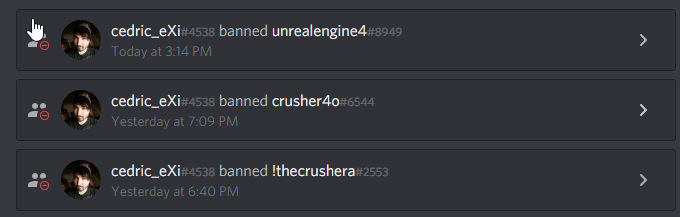
@abstract relic 3 more so far
Idk what the start number was
If you peeps notice someone asking recklesly for help about ActionBars, Pickups, Wood, Stone, Inventory etc.
And that without properly using grammar, let me/us know.
plush yew
He’s up to 7 bans on our server
abstract relic
Jesus
light thunder
Would I be better off using a timeline to spin a wheel (automatically, free in place rotation using addlocal) or should I use a tick event that's bool controlled?
abstract relic
Timeline
wary wave
I'd just use tick personally
wary wave
aye
light thunder
I'd forgotten it was technically tick based
abstract relic
Whatever floats your boat basically
wary wave
but if you want to diddle with settings etc a lot, I'd make it variable driven, not timeline
not a big fan of timelines tbh
regal mulch
If you need to actively modify it, then yeah
wary wave
I only use them for cosmetic effects
light thunder
that's what this is
regal mulch
If it's a static rotation, then timeline is fine
You can however also change the playrate of a time line in code
So if it's just a 360° rotation you can easily use a timeline with length 1
And then change the playrate
light thunder
I want it to spin for a few rotations
like they just activated a hand crank and it's now free spinning to show you opened it
regal mulch
Yeah then just use a timeline
light thunder
so I just need to make my end keyframe be 720, if I wanted 3 rotations?
regal mulch
Yeah if it's really always the same rotation you want
Then yeah
Otherwise you can also do 360 and then play it 2 times :D
light thunder
weird.....it rotates great but first it rotates the actor to a different axis ...granted, this is a component of an actor so I think that's the issue
that's supposed to be facing to the left
but the moment the timeline starts, it jumps to that, then rotates correctly
regal mulch
Make sure you don't mix up relative and world
It helps putting a SceneComponent between what you don't want to rotate and what you want to rotate
light thunder
pretty sure that's what I did
regal mulch
And have the mesh you want to rotate at 0,0,0 rotation
Then just rotate the mesh relatively
And use the scenecomponent to place it where you want it
light thunder
I had the mesh rotated -90 on one axis....so I just added that to my set relative node...seems to work now
a bit hacky but whatever,
fierce tulip
hey @regal mulch can you tell me about the actoinbar
regal mulch
Accidentally bans Yoeri
fierce tulip
:p
GUYZ how to move wood!
something something inventory!
omg, for april fools day we should auto-wrap all names into TheCrusher
 fierce tulip
i smell it
regal mulch
Haha
fierce tulip
can I exi?
it would soothe me
one sec
@latent pivot you are not welcome here.
We will find you, we will ban you
over
and over
and over
regal mulch
@plush yew For your records
fierce tulip
here goes
takes about 10 minutes before a new crusher appears
funny how the crusher gets crushed constantly
regal mulch
Well doesn't he have to sit through the same annoying like 30 minute pause before he can even post?
fierce tulip
oh right
sudden agate
what did he do tho
fierce tulip
we banned him multiple times (crusher) for spamming, not following rules, annoying/harassing users, and trying to circumvent being banned
Ian was just his xth account
 shadow juniper
but why, doesnt that person have anything better to do with his life
fierce tulip
i could suggest some reasons, but id be breaking rules because of curse words and bad mouthing
manic pawn
phone verification is good at making those people stay away
wary wave
anyone familiar with the scene rendering debug output and know what 'RenderViewFamily' is specifically referring to?
tall pendant
In the case of Unreal Slackers as an open to everyone community. Phone verification would serve no positive purpose. You could also convert it to an invite-only server with portfolio/track record checks...with the same outcome... Not being an open community.
fierce tulip
about half an hour later
 thorn vector
hey i wanna do a dodging system
how do i make when char press w 2 times it will dodge
fierce tulip
@thorn vector try #blueprint
light thunder
did I miss something in my understanding here - is it that if I have that checked, it overrides any future attempts to set these scalar parameters (that's what I want)
plush yew
lol thanks @regal mulch
regal mulch
He's most likely back again
You can figure as much I guess
@light thunder Doubt it blocks
It just overrides the parent material
plush yew
helped on his way
regal mulch
Anyway, let's not spam the channel that much
weary sun
Watched that Better Blueprints live training and the guy was talking about some new naming conventions naming blueprint interface as "iInteractive" Is there some place to look at these conventions?
 stone fjord
Anyone good with cables? I can't seem to figure out how to attach a sphere to the end of my cable. Essentially I'm making a fishing rod and want a bobber at the end, and there can only be one in the scene so I want it to be something that's part of the blueprint that becomes visible on cast
Unfortunuuately in construction it doesn't work as I can't attach a skeletal or static mesh there
 wise rain
Cheers for the heads up on the crusher situation guys, the staff over at the Virtus Discord appreciate it ❤
stone fjord
I searched google high and low and none of the answers seem to be working either o_O
 jovial lynx
Mind if I suggest turning on email verification? I doubt he's using registered emails so that could stop him
manic pawn
that is already included in the option to require 10 minutes in the server
light thunder
I have a mesh component with several elements with their materials - is there a way to target a single material element and change it's scalar parameters? right now I have to change all
manic pawn
use different dynamic material instances for each slot
light thunder
I am but they all have the same parent material with the same scalar parameters
fierce tulip
or rename their slots, and tweak them trough blueprint targeting that slot
light thunder
slots....hmmm
manic pawn
how is them having the same parent relevant
you need to be changing the parameters on the instances, not the parent
light thunder
yes but I can't seem to select the specific instances of that Plate
err, of that mesh component
regal mulch
Well Materials are in an array
light thunder
I just want to set it for a single element
grim ore
@weary sun https://wiki.unrealengine.com/Assets_Naming_Convention or https://www.tomlooman.com/ue4-naming-convention/ or< https://github.com/Allar/ue4-style-guide> or < https://docs.unrealengine.com/en-us/Programming/Development/CodingStandard> if using code or.... just keep it consistent is the key 😃
regal mulch
If you mesh has 2 Materials
Then 0 is the first and 1 is the second material
Is that what you mean? @light thunder
Jesus @grim ore xD
manic pawn
put links inside < > to disable the preview
light thunder
no, I mean I want to just change the Scalar Parameter on a single Element of a mesh component
fierce tulip
infracts Matthew for posting too much good information :p
regal mulch
@light thunder Define "Single Element"
light thunder
regal mulch
Yeah that's what I just explained though
oak tulip
@honest vale yes, I have a rtx 2080
regal mulch
Create a Dynamic Material on that specific index
grim ore
lol sorry I didnt know it auto expanded all links now
regal mulch
You can call that directly on the mesh comp
grim ore
aww man we banned Crusher 😦
 fierce tulip
 light thunder
why is it asking for source material?
 grave nebula
@wary wave Time spent in RenderViewFamily_RenderThread, mainly resource updates and actual Render call.
wary wave
cheers - useful to know, but not sure it narrows things down much
is there a decent way to take a deeper look into where things might be taking time inside there?
it feels like the problem is on the CPU side of rendering, but it's hard to tell
grim ore
oh maybe I meant the other one, I was trying to catch up and saw something about the crushera getting banned
fierce tulip
lol
grave nebula
@wary wave You can search STAT by its visual name, and later search where the counter for this stat is placed.
grave nebula
Ayep.
next badger
stat is defined in Runtime\Engine\Private\UnrealClient.cpp
grave nebula
Usually it is something obvious and readily identifiable, like draw calls being commonly the culprit in that counter.
wary wave
we have about 3k draw calls, so I'm not sure that's it
grave nebula
Could easily be.
Gotta keep in mind scope of counters when strolling through the code though.
wary wave
aye
next badger
@wary wave why not to use logger from Session Frontend?
wary wave
I'm not sure that would reveal much tbh
wary wave
aha
looks like occlusion culling isn't working
like, at all
it's rendering everything in the camera frustrum xD
grave nebula
stat InitViews give culling statistics
wary wave
cheers
I can see it failing quite visibly' froze rendering whilst looking at a wall, then moved the camera away
yeah, 2k primitives, 1k frustrum culled, 180 occlusion culled when looking right at a wall
that ain't right
grave nebula
Depends. Might be shadow relevant primitives
180 only occlusion culled is indeed a bit low, if you have whole scene behind a wall
wary wave
it's much lower than I'd expect
a significant portion of the level is behind that wall, including small props etc
 versed girder
Hello there everyone. I'm having a bit of a technical quandary and I haven't been able to find a solution for it. I have an actor blueprint with a skeletal mesh component inside it. That skeletal mesh has a looping animation. I want that animation to autoplay and continuously loop indefinitely, what's the best way of doing that? I tried ticking the Playing and Looping boxes in the blueprint window which worked in the viewport, but doesn't work when I press play
 heavy notch
if(GameIsAboutToCrash)
{
Dont();
}
versed girder
Ahh, I got it
I was using the wrong node in my level blueprint
You need to use Play Animation, not Play (Skeletal mesh)
 copper flicker
yo ninjas
any idea why my code only works in a BP, but not inside a Function.. in that BP?
and in the function..
so I'm sayin.. Index - Check = 0. if yes, ignore sound
if I change the Index, Index - Check = not 0, for 1 tick
O o
maybe for the same reason why timers don't work in functions?...
only in local functions...
george + 1 = george
dunno why, but that doesn't work
 chrome lintel
Someone knows why an overlap event could be triggered at distance? the event is triggered a few meters from the actual box i used to determine a overlap. I use a cast to character to filter the overlapped objects.
regal mulch
If you really filter it for the Character, then I would assume something of your Character causes it
Print the Component and Actor name
Then you probably know more
@chrome lintel
fierce tulip
 regal mulch
xDDD
 cobalt scaffold
i think i just crashed trying to comprehend the original questions
fierce tulip
<_<
regal mulch
Who says that this is a "who"? xD
fierce tulip
the fact you react to it says enough
regal mulch
You should just stop.



 regal mulch
Do you have an actual bookmark folder with these?
fierce tulip
:p yes
 frosty bloom
Gotta love them
fierce tulip
https://i.imgflip.com/zh32e.gif
i think this is crushers desktop wallpaper

 regal mulch
@copper flicker Well, it looks like that's a function library or so?
copper flicker
yes
regal mulch
What is that Check Variable?
copper flicker
it's a local index
regal mulch
And why do you set it if you never use it again?
Local Variables only exist during the call
Afterwards they reset
Also is that to make a UI Button Hover Sound?
copper flicker
so basically they can't exist inside a function from a lib?
regal mulch
Are you doing a Gamepad Menu System?
regal mulch
You should really look into Focus and Navigation
copper flicker
how did u know
regal mulch
Because you have ButtonIndex and a Sound
copper flicker
Focus doesn't work for me...
copper flicker
I had to ignore focus
because it was wrecking everything
dunno.. it was showing the mouse
and the UI had issues
copper flicker
well, it didn't work
regal mulch
Our menu in hoverloop is full focus
copper flicker
I mean I dind't wanna fix that
regal mulch
Fair enough
Well the thing with Functions, any function, is that Local Variables only exist in the scope of the function
In Blueprints it's a bit more confusing
copper flicker
hmm... so basically, I don't understand why Index + 1 = Index doesn't work in a lib function
that seems to me like an essential piece of code
and I can only make that work in local functoins
which are useless
cuz I need functions to work across objects
regal mulch
But in C++ you'd realize it:
void MyFunction(int32 MenuIndex, USoundBase* HoverSound)
{
    int32 Check = 0;

    Check = MenuIndex - Check;
    if(Check != 0)
    {
        PlaySound2D(HoverSound);
    }

    Check = MenuIndex;
}
This is what your code does
From top to bottom
In pseudo code
copper flicker
ok
regal mulch
Check is always reinitialized
It's a local variable
Once the function is done, it doesn't exit anymore
Doesn't matter if function lib or a function in a Widget, Actor, Component, whatever
copper flicker
ye
regal mulch
Local Variables don't keep their state. If you need a variable to keep their state, you need to create it in the Actor/Widget etc. as a Member Variable
copper flicker
hmmmhmhmhhhh. I see
regal mulch
You then have two options
copper flicker
I'm trying to not duplicate code as much as posible
atm I have every widget being duplicated.. and I don't know how to clean this up
regal mulch
- Either you do everything in the same Actor/Widget/etc., then you can reference the Check Variable inside the function and edit it.
- You put the function into a FunctionLibrary and pass the Check Varaible in.
copper flicker
part of the code I saved it as a fucntoin
but for this hover I can't
I don't understand part 2
regal mulch
If you do 2. You have two options to update the CheckVariable
- You make the Function return the new Value and then just set it after call it.
- You pass the Check variable as a Reference and use "SetByRef" (or so) to update it.
Well as far as I understand, you need the Check Variable to update or?
regal mulch
Yeah, either way you need to create that Variable in your Blueprint as a Member. Otherwise it won't keep the value you set it to inside of the function.
copper flicker
sounds programmish and complicated 😄
regal mulch
Gimme a second, I show you what I mean
copper flicker
hmm... yeah, so oy mean I set a value inside the WIdget
regal mulch
Might be easier than words
copper flicker
but that defeats the purpose of making a Function or Macro
I end up with duplicated code anywya
in fat I wish I could have just 1 widget parent
like I did with the Player
regal mulch
First question is, does the Check Variable need to persist?
Well you can do that too
Widgets can inherit
copper flicker
and a bunch of BP children as the actual widgets
regal mulch
As long as the parents don't add any actual designer stuff
copper flicker
well, my problem with the check is simple, I just need to do a DoOnce
cuz atm I'm using Tick for Hover
and I'm updating the UI on every tick
which is dumb but I have no idea how else to communicate between Player and UI
so because of Tick, I need to make a DoOnce so I get just 1 sound
not 1 per tick..
anyway, widgets can inherit yes.. but it's complicated... : /
regal mulch
Okay here is what you would need to do
- You need your own base widget that implements the hover stuff
So basically something that plays a hover sound and maybe changes color or so
That widget should have a boolean for "IsHovered"
So that you only play the sound if IsHovered is false
copper flicker
yeah, that Bool, IsHovered, getting that to udpate correctly is the problem
regal mulch
e.g. "HoverButton -> IsHovered? -false> IsHovered=true -> play sound
regal mulch
Well the integer is just for finding out which element you hovered
copper flicker
meaning... I don't know how to get a Hover state otherwise
the Check is actually for making a 1 Tick .. hover
I can easily get the Index otherwise
but I cna't get a Bool state of that index
I need a DoOnce kind of thing...
but a DoOnce needs to be reset
regal mulch
The general layout of this should be:
- W_Widget_Base
-- Has Hover State System
-- Has FX stuff like Sound and Color for Hover and Normal State
-- Has an Index Variable that can be set from outside. - W_SomeWidget
-- Has Multiple W_Widget_Base (or a child of that)
-- Sets up the Indizes of these Widgets so they are all unique
-- Has one "CurrentIndex" variable
-- Updates HoverState of W_Widget_Base if the CurrentIndex is == their Index
This is all you need for the Hover State System
Well and that Integer that is currently no in the screen
Make sure the Index is editable
copper flicker
it's easier said than done//
1 problem I have is this
each widget has unique code
copper flicker
so I don't know how to make that unique code exist.. without all the other code
I never used dispachers...
O o
and I heard of problems with them..
regal mulch
copper flicker
basically I'm afraid, without knowing what they are 😄
copper flicker
maybe I can use custom events....
regal mulch
I put 3 widgets of this base widget
Into a vertical box
First one has index 0
next one has index 1
last one (in the picture) has index 2
That's the event dispatcher I added in action
Looks exactly like your default "Button Pressed" thingies from normal widgets
regal mulch
Gamepad support like this isn't simple
copper flicker
I jsut hate that I can't make it clean
regal mulch
What I post you is more or less clean though
You just have to setup a few things first
copper flicker
yea, I just don't understand it
regal mulch
Which part don't you understand yet?
copper flicker
and I'm worried that using dispaches will crash on certain devices
like.. it works fine on PC
regal mulch
It won't that would be really weird :D
EventDispatchers are essential to UE4's coding language
They won't crash on other devices
copper flicker
but not on other devices or not with online multi
regal mulch
Widgets don't care about online stuff
copper flicker
I saw people complaining about them on the forums
regal mulch
Those people seem to have no idea how to use them then
 knotty storm
there is a weird glitch where when i play my game, i randomly start flying. help
copper flicker
maybe you're right
regal mulch
Well I'm using them everywhere I can and I have 0 issues
copper flicker
@knotty storm you have to set your movement mode back to falling or walking
regal mulch
Well you have two ways to do this:
- Use the Focus System, then UE4 does all the navigation for you.
- Setup your own system with indices and stuff.
Focus System is less headache
Specially if you need more than just a vertical list you go through
regal mulch
Only thing I can tell you is that you should, either way, make a base class for your Widgets that you interact with
copper flicker
yeah.. I should
copper flicker
atm I'm updating them like a moron
with each update, I have to go to every widget
and fix the code
it's absurd
😄
regal mulch
:P Yeah inheritance
copper flicker
yeah but inheritance is pain
regal mulch
It's not. It's love.
copper flicker
it limits what you can do
regal mulch
It doesn't limit you at all. It removes duplicated code.
copper flicker
and it's much more difficult to plan it
regal mulch
Well UE4 is based on C++. BPs and Widgets are C++ Children.
If you want to use this Engine you have to use C++ or at least the abstract idea of Object Orientated Programming
copper flicker
I understand inheritance, basically... but applying it in practice is complicated
regal mulch
Which includes Inheritance
copper flicker
I have to go rummage some more
regal mulch
Inheritance does this:
Gives all the shit from the Parent (Variables and Functions) to the Children.
When to use it? When you have multiple classes that do the same thing.
But what if one Child does it different? Then you "override" the function in question.
That's all.
copper flicker
yeah the overriding is the problem
XD
especially with UI
cuz every single widget is going to be different
so if things are so different... it's easier to make em unique
but then there's duplicated code and pain
and wasted time
either way
regal mulch
Example:
BP_Rifle
BP_RocketLauncher
Both are Guns, both can shoot. So best thing is to create a BP_Weapon Class and put all the Fire, Damage etc. Logic into them.
And then in BP_Rifle and BP_RocketLauncher you override the "FireWeapon" function to either do a LineTrace, or create a Rocket.
true leaf
Try an entity component architecture if you can
regal mulch
UE4 isn't really based on entity component arch
true leaf
But it kind of can be in some cases :/ but I agree
regal mulch
And someone who struggles with UE4 inheritance won't win much with learning something that UE4 isn't even build for
true leaf
Its tricky acrobatics for sure . I use entity component for my Character and that's simple but using it for other things is tricky
regal mulch
I guess when I have less tress I'll make a tutorial on how to setup the basics for a Focus based Navigation
Cause you have to make some widgets to fully make use of it
But once that is done, it just works
Way easier than fiddling around with an index or so
 glad stone
can somebody help me understand the curve editor better in Niagara