#ue4-general
1 messages · Page 403 of 1
 thin stag
Hi! Im Working on a Lightsaber Combat game and ive ran into an issue, right now i have multiple saber modes: Double Saber, Single Saber and Saber Staff, ive setted up so that the actors get destroyed depending on which mode i switch to, i can switch to saberstaff no problem but when i try to switch back to previous mode from saber staff, the actor isnt getting destroyed and i got three lightsabers, when i close preview i get an error telling me "Actor is pending kill" or whatever its called, how do i set it up properly? Hope this makes sense.
 lament saddle
@bitter iris Type "stat unit" into the console, and figure out whether the drain is coming from GPU, "draw" (CPU draw calls), or "game" (CPU game logic).
If it's GPU, you can type ProfileGPU while looking at stuff and compare the results
lament saddle
yeah, from there you just have to compare stuff and figure out where the drain is coming from
there are a lot of tutorials on Unreal Engine GPU profiling on YT
 sullen wraith
my build lighting is stuck at %0
i did it earlier, and it got to %100 eventually then crashed
now its stuck at %0 :3
 whole quarry
did you use a Lightmass Importance Volume?
 waxen marlin
Hello guys, I'm new to UE4, coming from the dated Infinity engine (so I have basic knowledge about programming, modelling and stuff) and would like an up to date guide for UE4. The Virtus channel on YT looks good but is from 2014, I'd like something more recent of possible, any advice appreciated, thanks!
whole quarry
check the UnrealEngine YT channel
thin stag
When i switch back to previous weapon i get an pending kill error, how do i setup so that the previous actor get destroyed when switching to the other weapon?
sullen wraith
i've got a bunch of actors in the world, is it possible to add them to some kind of table?
so ai can randomly pick between them?
 plush yew
You can assign each one a different int
Then do random int in range 1-n or 0-n and pick one with the random number
Depends how many you have or if they are spawned at runtime or pre existing could be complicated depending on situation
sullen wraith
thank you
also my game wont build lighting
i ran swarmagent
and its stuck on skylight radiosity
anyone had this issue?
plush yew
idk anything about lights except you should use lightmass importance volume
sullen wraith
my games just not building lightign :3
plush yew
could be that its big and you have no lightmass importance
sullen wraith
what is lightmass importance?
plush yew
it tells (swarm agent I think) what places to light more
Otherwise when you build lighting it calculates it for the whole scene which takes ages
Something like that
Just a cube that you put around the places where you care about lighting
plush yew
If you have a lot of lights outside that volume it will do still
DO you have a lot of static lights?
Have a volume around every static light you can have multiple
sullen wraith
litterally have none :3
plush yew
It could be your problem is something completely different
Can you give a few screenshots?
sullen wraith
i changed the polygon setting
now im not even getting errors
saying i need to rebuild lighting
sullen wraith
it was in the light thingyou told me to add
plush yew
Did you change to 'separate'? I changed mine to 'merge' and it got stuck at 0% and I think mine was 'separate' before
plush yew
oh lol idk then no idea
 fierce tulip
the more lights you have, and the worse your ram/cpu, the slower itll be
sullen wraith
hey guys, im going to implement countries into my game now, i want countries to hold a bunch of data, money, alliances etc
what is the best way to go about doing this?
and in terms of the variable in the ai, is there a way i can make a drop down to select what faction it belongs to?
or easier just to use bool values
fierce tulip
you might want to check fo4's editor thingy, on how to set all that kind of stuff up
 tall pendant
game state
fierce tulip
or reduce bloom/auto exposure
 primal prairie
strange
i just made a C++ blueprint library, and now my project wont open anymore because
sullen wraith
@fierce tulip fo4's?
primal prairie
sullen wraith
@tall pendant cany you explain?
primal prairie
it doesnt rebuild, because it says it cant be compiled
fierce tulip
fallout 4
or 3 forthat matte
though NV would be better in that case, more factions
sullen wraith
how would I retreive information from the gamestate while ingame?
fierce tulip
4.22 has editor utility widgets
that will be a lifesaver


Editor Utility widget is here in #UE4 4.22!
We can now create editor windows that do basically anything in editor, all using BP and a nice UI editor (no onGUI code)
Here's an ugly example with a box to toggle a shader, but sky's the limit!
@TheRealSpoonDog you'll ❤️ th...
Likes
121
 Twitter
sullen wraith
Twitter
sullen wraith
is there a way for me to make some kind of table in blueprint which stores bunch of info, for example
england - 100 gold - peaceful true- etc etc
plush yew
make a blueprint class 'country' with editable variables like gold and 'peaceful/hostile' bool etc
sullen wraith
hmm
fair enough
can I use numeration to make a dropdown menu to select faction?
enumeration*
fierce tulip
you know, you could google that information.
while we gladly help, we arent your personal google.
sullen wraith
I'm trying to create ai, and it only chases the player if the faction is different
im having trouble figuring out how to get the enum from the ai
and then comparing it :3
i have the enum in the character for the ai
something like this?
would that work?
plush yew
hey guys, i plan to make my own dancing game like just dance and i wonder if there is a way to make the movements work with wiimote plugin
fierce tulip
sullen wraith
i feel like im so close, i just cant figure out how to get the ai character :\
plush yew
ask it on #blueprint
sullen wraith
oh i got ya
plush yew
back to my question, is it even possible to make a movement file with wiimote plugin? when the player comes close to the axis of the movement file, they should get a score like perfect, good, ok
fierce tulip
you might be better off asking in the wiimote plugin thread. odds of finding people using it is very low
 manic bluff
is it worth trying to make something like FPS-ish if you have never touched programming, beside editting valuables in the past? 🤔
fierce tulip
good learning experience imho
 frozen hinge
any one can tell me examples that their/their studio did as a modification to UE4 source code ?
🤔
fierce tulip
material node for each platform, cascade module for each platform, additional notifiers in animation editor, disable features not needed, yada
 gleaming creek
Are you using CSG Geometry?
 graceful kraken
uh ....
gleaming creek
Set the second cube to subtractive if so
graceful kraken
I did unly create a cube
gleaming creek
Otherwise, make a model in your 3D software
gleaming creek
Details panel on a CSG brush
graceful kraken
ok I 'll try
gleaming creek
Did you create the cube from the Geometry section on the left?
 high citrus
guys is that normal that if i reference child class in a data table, it starts to reset any variables in it to default ones? (at editor restart)
plush yew
Hello guys I want to ask you I need textures but which person need to make them? the designer or the 3d moddelist?
fierce tulip
generally the modeler
plush yew
Hi is there any way I can edit game mode variables in my editor
gleaming creek
Your question is a bit vague
plush yew
custom variables
I have a few levels with the same game mode, when a certain event happens I want to set a new view target to an actor which is level dependent, I have made a custom variable of type 'Actor' in my game mode blueprint
any good site where I can find good and beautiful textures for wood and stone? FREE
waxen marlin

Textures.com
Textures for 3D, Graphic Design and Photoshop 15 Free downloads every day!
 azure shore
ok great I got bad issues
ue4 has decided to do a thing where its running "at 40fps" but it goes all choppy then just freezes entirely but I can still hear game audio in real time, then maybe a few seconds later itll come back to really choppy for about another second then another long freeze
 narrow magnet
how do you create your own character instead of using the marketplace?
azure shore
b r u h
 abstract relic
Use a 3D modeling tool of your choice
plush yew
@narrow magnet
You can download Blender, learn howto use Blender and create a game character.
But you'll also need to learn how to add bones, learn how to skin and animate the character.
Not something you'll learn and do in a week.
If you want a detailed character, you might want to get into Zbrush.
Or pay someone else to make you a character.
azure shore
so any help?
 silver warren
you got the logs?
azure shore
wait where are logs again
stupid question but can I still find logs without it crashing
 digital anchor
<@&213101288538374145>
azure shore
ue4 it literally unusable like this
it feels like its against me EVERY DAY theres SOMETHING it does like is it me or is ue4 really glitchey?
 wary wave
it's you, unfortunately
 ashen brook
azure shore
ashen brook
azure shore
but like, when does it create logs
 maiden swift
It was a misleading link @ashen brook. Deleted it and dealing with the user.
wary wave
there is a problem with Nvidia graphics cards and UE4, but it's not super common and manifest as specific types of crashes
azure shore
after its closed or what?
plush yew
@azure shore
Where are you coming from. What is your background or experience in game dev.
What is your current hardware?
What are you trying to do with UE4?
azure shore
I have a radeon thingey
no literally ue4 itself the whole viewport is just doing the freezing thing I already said about
it was fine the other day and I havent changed anything since
plush yew
At what frame rate do you run UE4 games normally?
azure shore
around 40
plush yew
is that at lowest settings or max?
 bitter iris
welp
azure shore
I typed `stat fps and it was showing around 40fps
plush yew
make sure your windows is updated, radeon cards are more peculiar about that than nvidia, dont know why
azure shore
well I always have to use lowest settings to run ue4 but still
plush yew
In UE4, there is a setting named ''Smooth frame rate' you can turn that off.
esp if you are at win7
azure shore
but like, it was fine just the other day
plush yew
Scalability, is it set to the lowest?
plush yew
I dont care about the other day. i care about now
plush yew
Your current scene, what is it based on?
bitter iris
is there a way to visualize the draw calls?
bitter iris
thanks dude
azure shore
wdym
bitter iris
Mesh Draw Calls = 1800 ish, Sattic List draw calls 1150 ish, jeez
I really gotta figure out how to optimize opacity
bitter iris
How many meshes are on your scene?
azure shore
it doesnt matter how much of anything is in a map my pc is shit, but normally I should get at least 50fps when the res is that low
bitter iris
umm okay
plush yew
@azure shore
There are several options that you can turn off to increase your FPS.
My PC is 10 years old with a 5 years old GPU and I can easily get my FPS up to 300-700 fps. Of course, that's with an empty template. A fully meshed map would drop to 60-110fps.
If you get 40 fps at the absolute lowest settings, then I wouldnt recommend UE4. Maybe try Unity.
or get a new PC
 vagrant pasture
Hey everyone .I'm new to unreal engine 4 ,can anyone suggest me some intermediate to advanced blueprints tutorials please!!!
plush yew
Hello guys I have a problem with my model I put it textures and made the materials
but there are places where the textures aren't rendered why?
how to fix this problem?
fierce tulip
bad unwrapping
plush yew
?
vagrant pasture
Hey everyone .I'm new to unreal engine 4 ,can anyone suggest me some intermediate to advanced blueprints tutorials please!!!
fierce tulip
decoy, please stop spamming same question over and over
plush yew
never trust classmates (joke)
you are new and you want for advanced-the fuck? @vagrant pasture
what to tell him? @plush yew
vagrant pasture
just did twice bro!!!
vagrant pasture
@plush yew I'm new to unreal but has been working in unity for quite some time now...
plush yew
a okay
vagrant pasture
I just want to switch to unreal
fierce tulip
@plush yew
- does the mesh look good without a material?
if yes, its probably the material - does it look good with the material?
if no, its either uv's of the mesh, or the way the material is set up. so check the uv's. if they are right, check the shader.
etc
 dusky hound
Anyone out there do much World Machine LAndscape work?
wary wave
ugh, turns out the UE4 Prerequisites installer has dumb fucking bugs in it
I can't launch any UE4 games because of this
it's not updated the XInput DLL because it has the same file size as the old one
 proven oxide
is there any way to make the system suto load a specific level no matter what level you are trying to run if certain flags are not set
or would you have to add that to ALL level blueprints?
could i put it in the BaseGameMode.cpp that if certain flags are not set to true it will instant load the starting level so it will load that level which sets the flags when run
 bleak copper
@bitter iris >110 FPS is still pretty good of course lol.
bleak copper
Ah
bitter iris
which isnt good as there is bearly anything on scene
bleak copper
Riiight forgot that you were on complexity view.
bitter iris
lol
just noticed my landscape is 8,128,512 Tris and there is 16 tiles
4 loaded at a time
so thats 32 million tris loaded with just landscape
bleak copper
Oh 8 million per tile?
bitter iris
yeah
plush yew
there used to be a bug with landscape that it showed the lod0 tri count in stats, not sure if it is fixed
as long as you have good lod scaling on the landscape, it shouldn't be that much tris
plush yew
doesn't it auto generate lods and switch to those seamlessly?
are you forcing lod0 for all components?
bitter iris
how can i check how many LODs a landscape has
plush yew
there is an lod visualizer for the landscape, it changes wireframe colors for the landscape
bitter iris
this?
plush yew
I haven't worked with landscape for a few years, so can't remember if you can see how many lods it has, but you should be able to set the amount of lods in landscape settings
also you should be able to override lod bias per component, ie give this component higher detail so it preserves it shape better etc
yeah I think so
azure shore
but I thought... 40fps was good...
plush yew
I'm not sure if they fixed it after all this time, but stats always showed lod0 tri count regardless of the landscape lod state
azure shore
and you get 60 - 110 on a 10 year old pc damn
bitter iris
either way landscape is showing 8 million tris
azure shore
also Im quite familiar with what general settings affect fps by now
bitter iris
is there a way to display tris on screen instead of in the statistics
plush yew
if you check the wireframe, you can clearly see it reduces its tri count pretty effectively
azure shore
usually have to use commands in games to set settings lower than default values
 earnest pawn
please can someone help me, i have been trying to package the ARCore example app for android
and i get this error ERROR: cmd.exe failed with args /c "...\gradle\rungradle.bat" :app:assembleDebug
bitter iris
plush yew
@azure shore
yeah, that's my 10 years old PC, but my GPU is a AMD R9 290x.
https://youtu.be/SBtcQehBa3s
if you are getting 40 fps on an empty project, as you get further with your project... it might quickly become unplayable as you keep adding stuff.
bitter iris
So guessing that landscape has its own LODs setup
plush yew
I can't tell the scale from the gif, but if it is 3-4k heightmap with landscape scale at 100 (ie 1 quad is 1 square meter) then it should be fine
plush yew
you can fiddle with lod distribution and max lod for further reducing its count
azure shore
yeah Ive found I can spawn a lot of stuff without fps drop
azure shore
that looks sweet though
azure shore
but yeah tbh 40 - 50 fps is good for me, I cant even imagine over 100
plush yew
whats your gpu?
azure shore
is any of this helpful
plush yew
that should be r7 240, which is slower than my old 7770
I'd say 40-50fps is normal for that card
problem is, unreal editor uses gpu a lot, compared to say, unity
so you'll get slow downs more windows you have open
azure shore
I thought ue4 was optimised better 🤷
bitter iris
lol
azure shore
thats what I heard before
fierce tulip
that also depends on your own optimization skills
plush yew
well, ui wise, it is, its just that it is optimized for the gpu
r7 240 is a very low end card
azure shore
yeah I get that but my game isnt exactly demanding I guess so
so Im not making it worse at least
plush yew
your fps should be much better in a cooked game run with the binary
things get slowed down significantly when run in editor
lament saddle
I get the impression the UE4 editor was made for workstations in mind. It chugs on my laptop a bit.
lament saddle
yeah, so I tend to do just blueprinting whenever I'm using UE4 away from my desktop workstation
(or some performance profiling on the laptop, heh)
plush yew
UE4 is heavy to run compared to Unity.
However, when it comes time to open big scenes... I always had issues with Unity. But UE tech does it just fine.
proven oxide
so where should i be loading a level in the gamemode or in the player controller?
azure shore
yeah you're right it does run better when I open standalone
plush yew
loading a level as in, changing the map?
proven oxide
yes
plush yew
that shouldn't really matter then, both player controller and game mode is going to get destroyed while loading a new level
proven oxide
in particular i want to catch any level loading and redirect the level to another one if certain flags in the worldstate havent been set
plush yew
my rule of thumb is to keep only bare minimum game mode related things in the game mode, but that is a rather multiplayer focused approach, and it isn't a correct or wrong approach
well, iirc only gameinstance survives a level change (non streaming level change that is), so it'll probably be better to check for flags before level change, rather than afterwards
proven oxide
i want to try and catch any level that doesnt have say the username set, and if so send the user to the select username level
 regal mulch
Why would a Level set a username?
proven oxide
so if someone tries to go straight into the game level it redirects them to the main menu
thats just one check
regal mulch
Well, then do it in the GameMode
OnPostLogin
Check all the stuff of the PlayerController nad PlayerState you need
And if everything is correct, leave them, otherwise send them back to the mainMenu
proven oxide
so they can't go into the actual game unless they have a team name username, character selected and online
plush yew
how to make in unreal to change his username? when he click on the button to can change the
username
who know how to do it let's tag me
and to describe me here or in DM me
regal mulch
Make a Widget with a TextBox and the put the result of that TextBox into the "ChangeName" function of the GameMode.
 thick herald
Which channel should I use for a world lighting issue?
or it might be a camera issue. I don't know
thin stag
How do i make so that when i press a button i spawn a particle emitter on my player that has Procedural Lightning on it?
wary wave
"procedural lightning"?
thin stag
you know, lightning that emits from source and hits random points on the map
isnt that what its called?
 serene nest
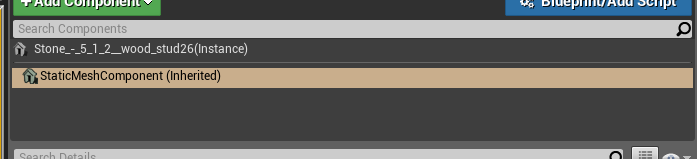
can someone confirm that I'm understanding the hierarchy of objects in UE4 correctly? I have this actor, "Stone 1 5 2 wood stud 26" https://i.imgur.com/w2vXOHF.png

It has a StaticMeshComponent component, only a single one. https://i.imgur.com/MR2uJZI.png
it is the static mesh component which has the materials assigned to it: https://i.imgur.com/rHe5VJS.png
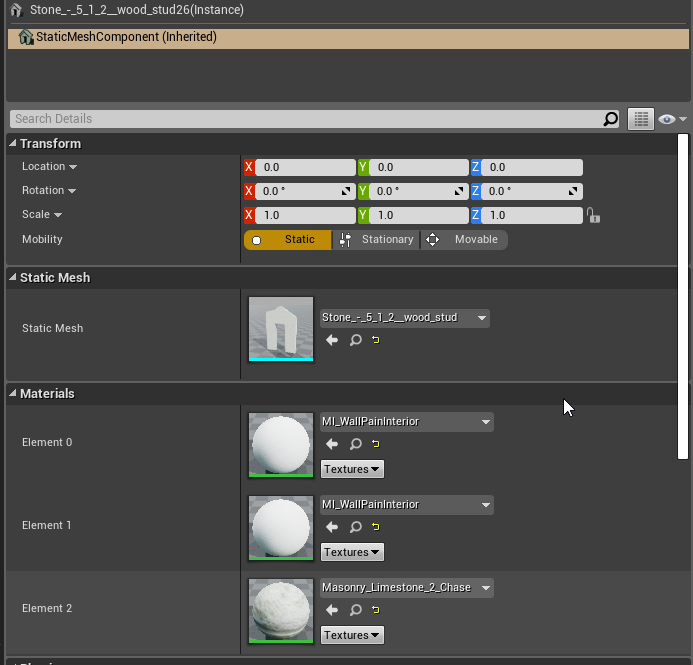
am I understanding that correctly?
regal mulch
Yop
serene nest
Thanks!
 tranquil bone
Anyone know any good ways to do spaceship movement?
fierce tulip
you might want to define what kind of movement. 2d, 3d, 6dop, first, 3rd, etc
what kind of spaceship
etc
plush yew
Guys if I have two branches in parallel, each of which execute on different button presses, and on one of them I cast to something (in this case my game mode), can I then use the reference to the game mode I get in that branch, in the other branch? At the moment I have this but it feels like such unnecessary repetition
Suppose I could just make the cast and call one function
 dawn linden
Wrapping in functions is generally better.
You shouldn't do what you suggested as then if the other branch is triggered the first time, the cast won't have been executed and the value will be null.
It's confusing and a sure way to introduce bugs.
 tawdry wyvern
hey
tranquil bone
Is there a way to get kph in unreal or to measure the how fast something is going?
plush yew
of course output velocity
output speed, do a get velocity and then a vector length with a print string
 craggy kraken
I just added a umg color picker I bought from the marketplace and two .uasset files are not showing up???
Like they are there in the file explorer but unreal engine does not see them at all
 unkempt delta
Hey guys
I want to do a game where the rooms/enviornment change as the user walks around an object and/or when the user isn't looking
would this be accomplishable with blueprint? and if so, how?
 silver crown
@unkempt delta Check if the bounds of the object intersects the camera view frustum
unkempt delta
oh, okay
silver crown
Just how I would do it 😄
unkempt delta
gimmie a sec
 storm venture
anyone here remember that game reveal on some E3 where the eyeball had the needle hovering in front of it? trailer was mostly black with tentacle stuff going on
wary wave
Dead Space 2, probably
 novel ember
just had a very silly realization
if you want short sounds to play at an actor's location even at high velocities without directly attaching the sound to the actor, just use the actor's world location + actor's velocity for the location input as opposed to just using the former
 primal parcel
hi all, i was talking yesterday with a community member and i got a bit confused. Are the skeletons root required to be named "root" ?? It is required to be at 0,0,0 of the model ??
 silent narwhal
Hi there
Im in a bit trouble if anyone has any clue I'd love to hear, been reading much threads about it nothing came up as a fix for me 😦
Blue screen of death when loading levels..
primal parcel
looks a montage problem or drivers related
silent narwhal
Yeah, can't put my finger on what :/
If it was montage issue, would I be able to run other 3d apps? (I used a game on max settings as a test earlier)
primal parcel
it can be caused for diferent reasons, but if you are on a new PC provably is not related to UE4
in this post are some things to test https://forums.tomshardware.com/faq/how-to-fix-windows-10-error-page-fault-in-nonpaged-area.2752299/
Tom's Hardware Forum
The Windows 10 error Page Fault In Nonpaged Area usually results in a BSOD and can be quite frustrating to troubleshoot. The error is caused by Windows not finding a file within memory that it expects to find. If you need to fix the Windows 10 error Page Fault In Nonpaged Are...
try the last one the first one, and reverse the changes if it doesnt works
is my bet, but i am new on w10 anyways 😅
 craggy helm
Hey all! Having huge issues with my lightmass build
I have a modular wall setup from 3ds max, but the walls have seems in them
Any help would be very much appreciated! 😃
 sonic pagoda
if anyone was suffering try to follow the ue4 cpp tutorials because of the new IWYU stuff, try this instead https://unrealcpp.com/, the necessary header files are all there in these tutorials
A tutorial site dedicated to using C++ in Unreal Engine 4. This site is meant for game developers wanting to learn how to begin using c++ in UE4.
 grim ore
Third person or first person?
And using the crouch function? If so weird as first person should drop down to the crouch height in your character.
And is the can crouch checkbox checked
Well sure if you want but making sure the can crouch is checked and your using the crouch function is important.
silent narwhal
@primal parcel thanks
 velvet finch
I'm getting less lightmap errors since upgrading to the current version of UE4
not sure what they did to the auto lightmap system but its going pretty well!
 sick meteor
can i ask someone for assistance? i would like to get my Third Person character working somewhat like they do in GTA 5, with guns and melee as a start, i also would like some help making pedestrians that i can kill. can someone message me and help me out a little bit maybe
proven oxide
Ok I am still having problems with compiling
Vs is showing as red error but manually compiling on command line works fine
Interesting the output is being set to blankprpgram
So it seems that vs2017 enterprise doesn’t like building
I just told it to build shadercompileworker and it’s recompiling the whole engine
proven oxide
Interesting checking vs installer they have an unreal engine installer support module
regal mulch
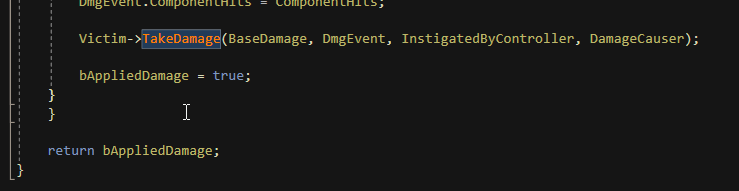


If people ask you why you use C++ over BPs
ApplyRadialDamageWithFallOff literally has the Actual Dealt Damage available, but chooses to return a boolean to just say "Yeah we hit something."
(╯°□°)╯︵ ┻━┻
Welp, time to expose my own version
proven oxide
Ok looks like for some reason none of my vs2017 c++ projects will compile any ideas why?
 cloud cobalt
Post the build output on cpp
proven oxide
I did earlier it just says object reference undefined object or something similar
But when doing manual compile it seems to work fine
So what I need is the folder and name for the compile command
Ie what param to the build bat file
thin stag
i have a problem, i have a combo system and when i attack with two weapons it goes up to 2 skipping the first animation and goes directly to the second animation.
 sudden agate
wait for the first animation to finish
thin stag
it cant even do the first animation, i goes directly to the second animation
i think the problem is that the weapon on my right hand is also used in the one handed mode, but i dont know how to make two weapons which is the same actor
plush yew
Hi I am having a hard time understanding how parent/child BPs work
I have made a child blueprint classed based on a default character class and I have this:
The 'bool' is a variable inside the parent class which is true when it's the enemy's turn. There is some logic executed and a 5 second delay, and then bool is switched off again.
When that logic is executed I want this child class to do the same as the parent but also perform the function 'decision'.
probably something to do with the delay node and the logic still ticking when delay is running...
its ok I just used event dispatcher
just a question though how does the 'delta seconds' in event tick work? Is it just added to parent: tick, so that if there was something in the parent BP that relied on delta time and child took on average roughly 0.2s to tick and parent took 0.5s, it would take delta time as 0.7s?
frozen hinge
thinking of a way to implement planetary gravity but without modifying engine's source 🤔
i know i can just apply a force to every actor in the direction i want
but i think this would require a shit ton of work to implement a character with animations that work with this
cloud cobalt
If you want something like point gravity you're probably going to need lots of character work
I'm not sure ACharacter supports not being aligned
cloud cobalt
I mean, the problem is probably not applying forces to every physics objects
It's more like 3D gameplay is complicated and needs quaternion everywhere
frozen hinge
that's why i think that just changing the world gravity in the engine source would solve all this 🤔
frozen hinge
There is a gravity vector variable that someon exposed through UE4 source mod that i seen somewhere ( can't remember where though)
cloud cobalt
Meaning that, generally, gameplay classes have the same assumption
frozen hinge
🤔 i guess Unity handles this a little better than UE4 (no in the sense that it's ready out of the box but more of its more modular which makes it easier to implement such thing )
cloud cobalt
For example, the FRotator type assumes vertical gravity - you can't use it in a point gravity context, ever, and FQuat isn't even exposed to Blueprint
frozen hinge
i don't use BP any way but i am talking like games like astroneer , how did they do it by UE4 ? 🤔
cloud cobalt
Additional force on every object, and a character class that orientates toward gravity
Camera etc
No FRotators anywhere, lots of care on rotations to avoid gimbal locks etc
frozen hinge
did you have any insight on their source ?
cloud cobalt
No
frozen hinge
dude that's awesome 😃 keep up the good work
btw so all adding forces to actors in the direction of the point your want the gravity to be into is enough to make actors (not character) work with gravity point 🤔
cloud cobalt
It's enough to make all physics actor go toward that point
It won't affect particle system gravity, or player orientation
 opaque salmon
I'm having an issue where materials aren't displaying right on custom meshes made in blender (they're really simple geometry) but they work fine on the built in basic shapes, I'm probably doing something basic wrong
it's like it's a solid color instead of the material/texture, I tried to upload a screenshot but apparently the bots thought a pointed cone was explicit 👀
opaque salmon
you're right, thanks 👍
fierce tulip
good luck!
plush yew
hello guys I want to ask you how to make when I click one the button for editing the nickname to enable change my nicname and then to save it-how to do this in unreal engine 4??
velvet finch
slowly weeding out my unconscious incompetence and narrowing things down for myself
plush yew
what? is this for me? @velvet finch
velvet finch
ah nah
velvet finch
just that i've been trying to decide on a project for awhile to learn
velvet finch
and get my foundation sorted in game dev XD
velvet finch
to answer your question just right click your name > click change nickname> enter the desired name and click save
velvet finch
oh
plush yew
okay
velvet finch
a BP or root?
plush yew
I created only the button
wait am oment to open my project
I work with bp only for now
velvet finch
so you made a button mechanic?
velvet finch
oh
velvet finch
ah nice
plush yew
but then idk what to do
lol
em
have you an idea?
I don't know how will happen this process
for the process I need a variable but idk what type?
text maybe? or string?
velvet finch
that part idk haven't got into widgets much only briefly
will be learning that in more detail soon
plush yew
okay
so you can't help me ? @velvet finch
and I have a question is there a way when you work on a project for example o nversion 4.18.3 to transfer the project to 4.21.2?
velvet finch
when you update the engine and try to open a project from an older version you get an option to open a copy
that copy would be converted to the newest version of ue4
plush yew
so
how to do this that you describe to me?
so to install the new version and start the project?
velvet finch
yup
plush yew
okay
velvet finch
bear in mind converting your project might lead to complications though
velvet finch
i had some of my bps no longer able to function
plush yew
😦
velvet finch
because the nodes that were formerly used were changed or no longer exist
and i had to go back and fix them
velvet finch
eeyups!
plush yew
 gilded rock
lads
plush yew
? @gilded rock
gilded rock
dont flame me for the most basic question
gilded rock
but i want to get a broken car into my project
plush yew
okay
gilded rock
and i can only make stuff with like cubes
gilded rock
and spheres
how do i get more advanced stuff into my project
like a broken car
for example
velvet finch
are you modelling a car in UE4?
gilded rock
uh i wasnt going to, ngl i wasnt even aware there was modelling in ue4
is it difficult to use?
gilded rock
nah nah
is there like a place i get migrate it from online?
sort of like a website with a bunch of assets
velvet finch
so if i get what you mean you found a broken car asset online
and you want to import it into ue4?
gilded rock
close, id like to find one
would there be stuff online?
i looked yesterday and couldnt find anything
velvet finch
turbosquid or the unreal marketplace
velvet finch
if you go to turbosquid some formats may not work with ue4
gilded rock
how could i get it in my project?
velvet finch
i found fbx and obj works best
once you get it
just drag it into ue4
below at your content tab
and import it
gilded rock
any of them free?
gilded rock
cool ill have a look around
velvet finch
or at least between 1-5 bucks
its a car
a pretty complicated model
so hard to find a good free one tbh
gilded rock
broken one probably even more so ha
velvet finch
cars aren't easy to model a good one will cost you
anyways i see some decent ones for 15 bucks
velvet finch
yup
plush yew
yes there are free-good bro
velvet finch
or model it yourself
just look at some grosteque russian car accident
and find the model and start doing it with reference
plush yew
for what are you talking about? what russia what five levs
velvet finch
he wants broken cars
aftermath of russian roadrages are great references :3
the internet is in no short supply of them
plush yew
a okay
velvet finch
i gotta make a broken car soon too for my hard surface class
already did the none broken one
velvet finch
i don't use 3ds max can't comment on that it should work though
i only work with fbx and obj
at least for now
cloud cobalt
You need a FBX for the mesh, individual TGA/PNG textures for texturing
Make sure the textures are PBR too
Assets like this one might require significant work in 3DS
This is why the UE4 marketplace exists
cloud cobalt
You won't
plush yew
okay
will I have problems with this?
so the model must to have which formats? to can import it into ue 4?
cloud cobalt
You want FBX + PBR compatible TGA/PNG textures. JPG is lossy, so it's an obvious non-starter
wary wave
instead of asking for every asset, why don't you just download them and find out?
cloud cobalt
It's jpg, so it's worthless to start with 🤷
cloud cobalt
Step 1 : look for "PBR"
Step 2 : check the mesh is FBX
Don't look at anything that doesn't fit that bill
 misty creek
You can also take a look at the documentation for importing textures https://docs.unrealengine.com/en-US/Engine/Content/Types/Textures/Importing
plush yew
ty
cloud cobalt
It's your job to find a place that provides models with PBR textures
The UE4 marketplace exists to make that easy
plush yew
ue 4 marketplace is all paid
I can't give money for everithing the fuck
I am under 18 how t ogive money?
misty creek
I don't know. I've managed to get a lot of good free assets online. Also the market place is going to have free content every month, so you can get good assets.
gleaming creek
If you can't afford to buy good assets, you can learn how the make your own
sudden agate
Free Assets
Good Game
Choose one.
plush yew
i want to be good with ue 4
gleaming creek
There's also some decent free stuff on some of the model sites, like cgtrader for example. Most of the good stuff will be paid, though
grim ore
there are a ton of free assets in the learn tab on the launcher you can use for your projects for free
misty creek
Well, you won't be able to get only awesome free assets
gleaming creek
Photoshop is paid too, go Krita or Gimp
cloud cobalt
The elephants in the room are that
- games are not made by single persons
- assets you didn't make yourself or ordered for this specific project will often look bad
misty creek
That would depend on the type of game
I make games without anyone else
Small games, but fully functional.
cloud cobalt
It does, but no one is a great 2D artist, 3D artist, sound artist, composer, programmer, designer, businessman and writer
plush yew
okay I want to make big survival game with assets like LastDayOnEarth
misty creek
Yes, that is very true, but it is possible. Just a lot harder. 😄
You will find that is very hard to do
plush yew
I want to make a big project now to waste my time with small p rojects like flappy bird subway surfe or super mario
 muted apex
does anyone know how to import animation data of a .fbx onto an already existing armature in blender?
cloud cobalt
@plush yew The problem with big projects is that you're going to need content, and you won't be able to do everything with online assets, not if you want anything that looks special
misty creek
Okay, firstly you are going about it wrong. If you think working on smaller project is a waste of time. Working on smaller project gives you experience, and you are much much more likely to finish it
gleaming creek
You need to learn the skills to make the big project
misty creek
Especially if you are trying to make it alone
You could try and find a team in #looking-for-talent
gleaming creek
If you have no interest in a game like flappy bird (for example) then start with something simple that has some aspects of the big project
Then you can learn how to do that and maybe have something you can reuse later
plush yew
yes I know where I need I will pay for some asets but not for all @cloud cobalt
misty creek
Yeah, I wish I could make a little project like Super Mario. 😄
plush yew
cool
lament saddle
original Super Mario Bros.?
plush yew
I haven't got interest in the small project sorry
misty creek
I've made a game that is somewhat similar, but it is nowhere close to being as good as Super Mario
plush yew
my idea is to make a big p roject and you will learn a lot of how to do every thing that is in the game
my idea
cloud cobalt
Flashnews : single devs don't do large projects 🤷
plush yew
xD
misty creek
Just saying Super Mario is not a small project
cloud cobalt
Even Angry birds is not that small a game tbh
It's not a one month work for a newbie
misty creek
Before making a large project you need to know how to make a small project
cloud cobalt
Pong is a small project, Tetris is a smallish project
Flappy birds is... small too I guess
plush yew
yes
I understand
I make a game l ike Subway Surfes already
and it catches me to make a survival game big like LDOE ❤ I love it!
cloud cobalt
Here's my advice : start with empty levels with grey blocks
misty creek
Well, if you are planning on making a bigger game I can only suggest that you try and find people to help you. You can make a post in #looking-for-talent and you could also try on the UE4 forums
cloud cobalt
Get your game fun to play, working well
And then investigate how you can push into production
cloud cobalt
Art is 90% of the work and 10% of why people play the game
Well, for a game like LDOE anyway
plush yew
I have a little team
2 designers and 1 modelist and me
xD
cool @cloud cobalt
so I have a question about the game mechanics because Ican't ask the devs-lol
cloud cobalt
I don't do DM
plush yew
yes
I remembered
sorry
lol
what is the reason that you don't DM? @cloud cobalt
I have a question about the mechanics like how to make this: how to make when I click one the button for editing the nickname to enable change my nicname and then to save it-how to do this in unreal engine 4??
cloud cobalt
I don't want people DMing me three weeks later while it's 4AM here
Which part of your feature is your problem ? You need a UI widget with a button, a nickname variable in your playerstate, and a game save system
plush yew
aha okay
which is playerstate?
thirdperson game mode or third person bp?
so when you sleep close the discord and turn to red like me e
grim ore
ooof..... this is why you make smaller games, to learn how the systems work.
plush yew
I am in 20 servers if I was like you online I will be mad with the sound of discord when I have notification
okay stop talking about this @grim ore stop repeating it is annoyng man 😡
cloud cobalt
You're asking questions you should find the answers to by making small projects
cloud cobalt
That's great
The other thing is that people here won't teach you the basics of game dev step by step
No one has time for that
cloud cobalt
You're asking beginner questions, so people rightfully suggest you do beginner projects
plush yew
okay
misty creek
You can also try googling
misty creek
Should be on this page somewhere: https://docs.unrealengine.com/en-us/Programming/UnrealArchitecture
plush yew
so I will google what is playerstate @cloud cobalt 😃
about thus
to understand that the pawn is use to be bot not human?
misty creek
You can make the player be a pawn
 plush marsh
and pawn is a child of an Actor
cloud cobalt
Just take a week to go through all UE4 starter tutorials and docs 🤷
misty creek
If you are making a humanoid character I would suggest that you use character
Yeah, that probably would be best
plush yew
okay I read already the docs man @cloud cobalt and I made the beginers tutorials
 thorny cipher
But it is returning "block" to "WorldStatic", would that trigger an object response?
cloud cobalt
@plush yew You're doing it wrong then. I'm not going to harp on this while at work - just take a month to experiment everything with the engine, build two small games with UI and saves - like Pong with score display and high scores
That's my final advice
You won't need anyone's help after that
 stark lava
@plush yew do you know anything about vr errors?
plush yew
I'm sorry, no.
stark lava
Know of anyone else who could?
misty creek
I'm sure someone here would know
If I were you I would just post the error and hope someone answers
plush yew
okay I will test
stark lava
Well, the hands show up but I can't even teleport or grip the hands
plush yew
I made save the record in my slmall project in SUbway Surfes when he runs to save him record
but this with the editing the nickname is maybe simillar? @cloud cobalt
I will continue read the docs and try to do that you say me 😃
misty creek
And this is why he doesn't DM
He's at work right now, and he said he was done
But yes, it should be similar
plush yew
okay
he can answer me whne he can it isn't need to answer me suddenly becaus e he is working or what he is doing
grim ore
[7:36 AM] thecrushera: thirdperson game mode or third person bp?
7:47 AM] thecrushera: okay I read already the docs man @Stranger and I made the beginers tutorials``` These do not match? @grim ore smis?
I didn't know what is playerstate and then he sent me link to informate myself
😃
grim ore
You said you read the docs. The docs contain the information about the player state. you asked about the player state. the conclusion is you did not read the docs.
plush yew
ok
grim ore
people in here don't mind helping, "hey I tried to do this and I am stuck" is ok since you tried. "hey how do I do this" without even trying is annoying and seems to be the majority of your questions in here. You will end up causing most people to ignore you this way 😦
 red thistle
Having problems with animation from Maya to Unreal, this happens when i import. It happens for all my animations. It does not look like this in Maya, and the skeleton looks fine.
azure shore
ugh Ive had that on my own meshes and its so frustrating
sudden agate
10/10 would recommend Unreal Engine Support
dusky hound
Anyone know where the setting is to keep distance field shadows on for farther distances from the camera to avoid this kind of artifacting?
 grave nebula
@sudden agate Which issue is that though ?
sudden agate
baked shadows / shadows in general on Translucency
baked shadows are always low res on Translucency, regardless of the Lightmap Res
They kinda work with Cascaded Shadow Maps, but also non filtered (jagged edges) and I do not use CSM
gilded rock
if im looking to make a target fall down when i shoot something at it
what would be a suitable guide to watch
like what category does that fall in
if that makes sense
or if theres a basic answer anyone can tell me ^^
dusky hound
Oh sorry, I should have clarified more. I am using "distance field shadows" with my landscape. At a certain distance from camera the shadows fade away. I am trying to find where the setting is to keep the "Distance field shadows"
grim ore
@gilded rock define fall down? A skeletal mesh that collapses? A square block that falls to the ground and bounces around? a balloon that pops and deflates slowly using an animation?
gilded rock
like
fall back 90 degrees
im trying to recreate the mw2 training grounds if you know what that is
as like a starter project
and in the game you shoot the target and it just falls on the floor
backwards
grim ore
so its a target that falls backwards when hit, 90 degrees?
gilded rock
nono, when the bullet hits the target
it falls backwards onto the floor
like 90 degrees
just like if you pushed something over
just falls flat on the floor
plush yew
Set the origin to a point on the floor and dont allow movement of the msh but allow rotation
movement*
grim ore
your easiest solution is to probably have the target use a timeline to rotate itself on the correct axis over the amount of time you want from the standing position to the falling position
gilded rock
its the part where it only happens when the bullet touches it
is whats mainly confusing me
grim ore
well what is your bullet? a line trace or a physical object?
grim ore
you are looking for physics hit or collision or overlap in that case
gilded rock
hmm
seeing what you said ill probably make it a line trace actually
makes more sense than a projectile object
grim ore
depends on the game 100%
grim ore
if you use a line trace then you would talk to the item you hit from the line trace and tell it to "die" or "rotate" or "whateverjustfalldown"
the end is the same, how you take action on the target would change. the target would have a function that would rotate it and "kill" it
the line trace would tell the target to run that function if it hits it, the physics object would collide with the target and the target would then know to run that function
gilded rock
oh okay i see what you mean

Email: Mrfantasticghost@hotmail.co.uk BUY the Horror Development Kit: http://bit.ly/2a2Mo3H Patreon ►https://www.patreon.com/Mrfantasticghost Twitch ►https:/...
do you think this would be a suitable guide for the blueprint?
grim ore
it's a suitable video yes if you want to interact
gilded rock
oaky ill give it a go either way
grim ore
https://www.youtube.com/watch?v=EM_HYqQdToE this one is pretty defacto standard for learning BP communication types

Announce Post: https://forums.unrealengine.com/showthread.php?101051 This Training Stream takes a look at Blueprint Communication. We find that Unreal Develo...
gilded rock
cool ill give it a try thanks
grave nebula
@sudden agate There is no issue with shadows on translucency. Lightmass ones work fine. Jagged edges from CSM are more than expected but that is fixable with 1 line of shader code. What you are seeing as always low res on Translucency is not static lighting. It is dynamic translucency volume.
sudden agate
@grave nebula nope, it is low res with Forward Shading
wait a minute, Will build a test scene :D
dusky hound
@honest vale thank you so very much for that 😄
sudden agate
@grave nebula Left Translucency Volume, Right ForwardShading
the low res for Volume makes sense, but not for ForwardShading
All Lightmaps are 1024, which should be more than enough to have accurate shadows
this shadow doesnt make any sense at all
As if the Translucency Volume is used for ForwardShading but instead of smooth transition, it's a threshold
grave nebula
@sudden agate I can't reproduce that one btw. I remember you mentioning it before in graphics.
sudden agate
yeah, a few months ago :D
this issue is really stupid and I always had it
I am on 4.22p2
but it was on all other verions prior that
can you reproduce this scene? would like to know how it looks on your end
grim ore
@azure monolith you need to find a reference or set a reference to the other BP, casting just makes it one type or another if possible but does not get the reference. using find all actors, or saving a reference after you create something, or the return from a hit if doing a line trace are common ways. How you do it would depend on what you are trying to reference and why and where.
grave nebula
@sudden agate http://prntscr.com/mpytzm
 sudden agate
this is really weird
grave nebula
I can't think of anything that would cause it too look like that, apart from DF shadows.
red thistle
@azure shore Have you solved it?
sudden agate
@grave nebula do you use CSM?
 azure monolith
@grim ore im trying to make a box move up in space after i jump off a different blueprint
but i'm not sure how to get the reference
azure shore
Im about to load up ue4 now, I juust have to hope its ok
grave nebula
@sudden agate nope, static light
sudden agate
wtf. I thought it was because of my light being Stationary. So I switched to static but even that doesnt work
wait, it was it.
So My Light has to be static :/

Download- http://www.mediafire.com/file/x39185whd8aprtz/OOF.mp4 ---------------------------------------------------------------------------------------------...
grave nebula
😃
grim ore
@azure monolith so what makes this box special? is it always going to be this box when you jump off or is it a random box?
if it's an exact box, like a door that opens type thing that is fixed, then you can make a variable in your first blueprint of that type (whatever the box is, static mesh or blueprint or whatever), and set it to Instance Editable. This will let you connect that mesh to the other blueprint in the editor
azure monolith
i have a floor that kills you @grim ore , i want to rise up after i jump off the floor
i already have the floor changing to lava
i just need it to kill you
but only after you jump off it
grim ore
ok so you are on the platform, you jump off, and now you want the platform to change?
there are a few ways. Since your player is not in the world at start more than likely you can get a reference to your platform in your begin play on your player by using the get all actors of class and your blueprint for the floor.
then you can save that for later when you want to talk to the floor and change it
vagrant pasture
So I'm making an infinite runner game and there is problem that whenever an object is deleted the object shows in component window as deleted object and the game lags when the object is deleted..............can anyone suggest whats wrong?
grim ore
deleting an object normally does not delete it immediately, it flags it for cleanup later internally and then the garbage collector might clean it up later. Depending on the size and # of items it might lag. The question is do you really need to delete the item?
can you instead reuse it for later, keeping a pool of the objects so you don't bother with deleting and cleanup.
vagrant pasture
yeah that would be cool ,but I have no idea how to do that...I'm pretty new to blueprints ....
grim ore
look into pooling objects. Making stuff come into the world and removing them from the world are some of the heavier things you can do based on the item.
pooling is basically making your items all at once, usually before the game can start, like 20 or whatever coins and then just hiding/moving them as you need them or collect them
grim ore
yep yep. what you are experiencing is common for that type of game
vagrant pasture
but the tutorial I was watching did not have any lag and did not even mentioned about pooling
grim ore
yep it differs based on the machine and specs and blah blah computer magic
grim ore
what you are describing tho sounds like the garbage collector doing it's thing. It tries not to be harsh but say you create 100 items then try and delete them all it's going to hitch if your machine can't handle it all quickly.
plush yew
Hello guys I want to ask you when I make a variable for editing a text it must to be text the variable? or string?
 glacial pecan
@grim ore have you done a wtf is physics handle video?
grim ore
I have not but I have played with them, they are evil if I recall. Tried using one for the hinge on a treasure chest
plush yew
which variable must to be the name text or string? @grim ore
grim ore
no wait that was a constraint... lol, nope I have never tried the handle. Guess I can check it out
plush yew
Will you make a series how to make survival game or multiplayer game or networking tutorial MatheW?
grim ore
nope, yep, yep
azure shore
ah, thats where I recognise that pfp, you havve a channel right?
plush yew
can you say yup for which and no fror which and what variable to create for text that will be changable?
grim ore
it was the order you asked in lol. and I don't know the answer for your question because I don't think it's clear enough.
@azure shore yep
glacial pecan
@grim ore I have a hell of a time figuring them out, because all physics handle videos only use one with the first person template, but I want to use two with the motion controller blueprint template, and well I’m stumped
plush yew
okay I will type you again what I want to make
to make when I click one the button for editing the nickname to enable change my nicname and then to save it-how to do this in unreal engine 4??
I know already how to mke it but I have a question about the variable what must to be? @grim ore
grim ore
@glacial pecan ah, damn yeah I couldn't even help with that as I don't have any VR gear set up to even try 😦
@plush yew the variable must be whatever it needs to be for what you are doing. Text is used for output normally, what you see on the screen as it can be localized. String is used for text internally normally as you can manipulate it easier. Chances are the Editable Text widget which takes in text uses Text so you would use that but you can convert Text <-> String without any issues so either one works.
regal mulch
Aren't they using physics handles in the VR template?
glacial pecan
@grim ore ah, dangit
@regal mulch not in the blueprints I looked at... is there a way to search for a node in the content browser?
glacial pecan
@grim ore awesome, thanks, that worked!
And no, no physics handle in the Epic VR template 😦
plush yew
so to create a text or string variable? @grim ore
grim ore
yep no handle in the VR template, it just attaches 😦
@plush yew yes, you can use either one. pick the one that works for you and for what you are doing. both will work in the end.
plush yew
in the end? smis?
regal mulch
I'm a bit confused as to why the VR Controllers are different for you in terms of using them with physic handles @glacial pecan
It should be exactly the same code
- OnOverlap with your Controller, save the Reference of the Actor you overlap. That's the same as Tracing it in the Wiki entry.
- Then you have your GRIP buttons. Here you check if you are overlapping an actor (the saved reference is valid) and call "Grab Component", while passing in the RootComponent of the Actor you overlap.
- Now you need to update the location of the Target by calling "SetTargetLocationAndRotation" of the Handle on Tick. Here you pass in the location and rotation of the Controllers GrabLocation (can be a scenecomponent).
You can use another Reference variable "GrabbedActor" and set that when you perform step 2. Then use it in Step 3. to block the EventTick from calling if the additional variable is not valid.
And on releasing the grip button you can set the GrabbedActor variable to null/nothing and call "ReleaseComponent" on the handle
It should be the exact same thing
plush yew
I wrote you what I want to make so whaich variable to choose? @grim ore
regal mulch
UE4 already has PlayerNames
They are saved on the PlayerState and can be accessed via "GetPlayerName".
You can change a PlayerName by calling "ChangeName" on the GameMode, passing the PlayerController of the player you wish to rename.
A Player's name is a STRING variable. They aren't localized (makes no sense. You wouldn't translate your own name into another language either).
UI Elements, like textboxes use TEXT. So if you let the user enter the name into a textbox, you then simply convert the resulting TEXT to a STRING.
That's all you need to know. @plush yew
 dry moon
What I always wondered
why is there so many of the sort of same thing
Name, Text, String
regal mulch
String is coming from the default String stuff from C etc.
It's mainly used for stuff you need to be able to modify.
Like a Username, That you might want to cut off at the end
Text is used for Localization. Everything you throw at the Screen for the player is a text.
You can later use UE4's localization system to go over all the texts and add your translations
Name is mainly used for identifiers
Such as a DataTable Row Name
@dry moon
dry moon
Yeah I know they all have their own purposes, but from a different perspective it makes sense to try and merge as much as you can into one so you don't need to convert to get data between them when they almost do the same thing
 frank escarp
Name gets hashed
so its a "Static" string type
String is basically C++ string
TEXT is for user facing-localization. It supports full unicode and all that crap
regal mulch
Yeah they are different and you can't really merge that all into one
Specially since you really don't want all your strings and names popping up in your localization step
 cyan burrow
Hi. I'm importing a height map I exported from World Machine, into a 3rd person project, as terrain. And when I do, the center point is off on the terrain, making the terrain way too low. Also, when I press play, the player character will disappear if I go too far from the player's starting point. How do I fix these? Thanks.
glacial pecan
@regal mulch thank you for the explanation! I was halfway into trying to adapt a 1st person physics constraint based tutorial, so I will digest your answer after I’ve tried this one. 😃
thick herald
Any procedural foliage volume experts in the room? 😄
 honest vale
just ask
thick herald
Came across an issue with a colleague. Using either from scratch or copying a known to work procedural spawner and foliage types correctly referencing the right static meshes. For some reason it would only use one of the allocated foliage types. I can't for the life of me see what's different in his settings from mine, and they are they same file.s
tranquil bone
https://www.youtube.com/watch?v=eIHJoxsAmFI Anyone know how to create an effect similiar to this with the crosshair

Huge unknown capital ships warping in? better take a closer look! Link to Discord server: https://discord.gg/rfez3Bq Link to Facebook page: https://www.faceb...
plush yew
What would be the best approach to having a song loop in the background then fade out when it's time to play another song? My game is pretty much pure UMG and I switch through widgets a lot, so ideally I'd like to not have to keep track of what song is playing inside all my widget BPs
Should I do this in the player controller or something?
glacial pecan
@regal mulch wait, I said I wanted to use physics handle or physics constraints... so why should I update target location and rotation on tick when I want it to be driven by physics? feels as if I'm missing a vital piece of info here...