#ue4-general
1 messages · Page 401 of 1
 plush yew
 maiden swift
Ah OK. That's much clearer.
The player is the one triggering the overlap correct?
If so, do what Redirector said. Other Actor should be holding a reference to the player in that case.
 next badger
Create 3D meshes from scratch in Unreal Editor using a new suite of polygon modeling tools. Easily subdivide your model with customized edge crease weighting using technology from Pixar's OpenSubdiv. We plan to release an initial version of this feature with basic functionality, and then continue to expand the feature set over time.
 abstract relic
Would suggest reading up on bp communication before you go further
This is a good start
plush yew
oh im not really sure, i just added a On Compnent Begin overlap to the box collision
maiden swift
@next badger That's been on the roadmap for a while now. Sooo looking forward to the mesh editor.
You can actually turn it on and play with it now, but it's quite unstable.
@plush yew If the player is the one overlapping the actor, then Other Actor will be a reference to the Player.
Other Actor is a reference to whatever actor triggered the OnBeginOverlap event.
plush yew
can i do that for generic character, because i want to use that for all characters
like this?
maiden swift
Yes.
plush yew
oh thank you :D
ive made so many complex and advanced mechanics, but i was struggling with this. Lol
@maiden swift are you a worker at Epic Games?
maiden swift
Nope, just a game developer/musician who uses Unreal.
plush yew
oh, i want to talk with someone who works at epic lol. Unreal Engine is soo great. it is such an amazing engine
maiden swift
If you're struggling with this, I recommend taking a pit stop to dive deeper into Blueprint communication like Redirector said. Though I have a different resource to recommend.

Announce Post: https://forums.unrealengine.com/showthread.php?101051 This Training Stream takes a look at Blueprint Communication. We find that Unreal Develo...
plush yew
Thank you, i will watch that. I want to get better at BP communication
maiden swift
He covers all 3 types of Blueprint communication very thoroughly and shows examples of each.
And it's Zak Parish. He's one of their best instructors.
plush yew
also. is this the offical unreal engine discord?
maiden swift
It's unofficial, run by and for the community.
But plenty of Epic staff hang out here from time to time.
 glacial belfry
You guys, anyone having luck getting DRX(RTX) stuff working in the 4.22 preview? I have the engine started with the -dx12 argument and the project settings correctly up and running. Seems like I cannot get RTGI to work
 livid haven
o7
plush yew
well for an unofficial server, it is darn helpful
maiden swift
❤
plush yew
ohh thats cool
maiden swift
So glad to hear that @plush yew
livid haven
Nein
plush yew
😃
abstract relic
Nothing public
maiden swift
Nope. This is it basically. It's unofficial, but the de facto server for Unreal.
plush yew
oh damn
livid haven
We use Slack internally.
plush yew
well i gtg eat guys so cya later. I'll show some pics of a project ive been developing when i come back
maiden swift
Great! If you ever want to just show off your work or get feedback, check out #work-in-progress and #released.
They're dedicated for that purpose.
#work-in-progress = Share stuff in development, get feedback. #released = Share finished projects / released products you worked on.
@livid haven This started out on Slack, too. Hence the name. I don't remember if you were around back then.
livid haven
I was not.
Don't remember how long I've been on here. Maaaybe like a year and change?
I was still a contractor back when, so at least several months before April of last year.
maiden swift
Ah OK.
Man, I can't believe our 4-year anniversary is coming up.
And we recently passed 20k members.
next badger
wait...4th since slack or discord?
 grim ore
05-28-2015, 10:22 AM
Join a thriving community chat where over 1,400 Unreal Engine users come from all over the world to socialize, get help and share their work. All skill levels & backgrounds are welcome.```but that was edited so that was when we were on slack
lol... 09-27-2015, 09:57 AM Over 300 members already! You rule Nick!
maiden swift
@next badger Since Slack, since the community was first founded.
abstract relic
Cute 😜
maiden swift
@grim ore Hah, throwback!
 prisma dagger
I am sort of beginner , so is it ok to have overlapped faces in one mesh as long as they are separated elements?!
abstract relic
Yes
livid haven
Overlapped how?
prisma dagger
 livid haven
The only issue with having two polygons coplanar and overlapping is that you can end up with Z-fighting. If the faces aren't visible, then no, it doesn't really matter.
 chilly gale
Whats the best, safest way to duplicate a level and move it to a new folder please? I like to make a _Data folder and put ALL my stuff into that, That sai if I wish to mess with a level provided with an assets I like to duplicate that in a new folder leaving the orginal level in tack. Should I just copy the level over, OR is it better to make a new level then copy ALL the contents of the orginal and paste it into the newly made blank level? thanks for your time
grim ore
man this change , "Scaled Camera Zoom and Pan", to 4.22 is why my viewport feels broken half the time now lol
 dire sentinel
Which kind of tree do you perfer? (ignore the roots in the last one). There are very subtle differences in the texture styles, but the leaf outline in the last one would move with the wind
plush yew
i like the second one
prisma dagger
I'll go with the first option @dire sentinel
grim ore
@chilly gale if you happen to be using 4.22 there is a new advanced copy feature that copies the assets referenced in the level to the new location automatically. Otherwise you need to do it all yourself as copying the level won't copy the data as well and point to any new ones (you have to replace those by hand right now)
prisma dagger
thank you @livid haven and @abstract relic
chilly gale
@grim ore 4.21.2
grim ore
yeah then you need to copy the level, copy all the things referenced by it to the new place, then replace it all in the level. Another alternative is to migrate it out of to another project, rename/move all of that, then migrate it back in lol
dire sentinel
the last one has an outlie of leaves
that would move with the wind
the plane would be camera facing and would pivot arround the center of the treetop so the tree would always have the laves as the outline on top of the black outline
chilly gale
@grim ore thank you, I'm not seeing a 4.22 in the launcher so I guess your doing bleeding edge
Maybe from Git
grim ore
its on preview right now in the launcher
but the migrate option should work in a pinch, migrate out the level into a new blank project. move the stuff around how you want it to be in the old project, then migrate it back to the old project and it should maintain its structure
chilly gale
I'm just after using it as is to build on and test without using the orginal so a strat migrate is fine by me. Thanks for you help BTW
 uneven glacier
hey i just made pawn with camera but i cant seem to find how to rotate the camera in angle way with the mouse can anyone help me?
grim ore
are you using a character movement component or just a pawn with a camera?
if just a pawn you would set up your input for your mouse axis in the project settings. then you would use the nodes for those axis settings in your pawn and add rotation to your actor based on that input value
uneven glacier
just a pawn with camera
grim ore

When we create a new default project with Unreal Engine, it uses the DefaultPawn which is a kind of free camera, i.e. we can move in all directions without being affected by the gravity. In this mo…
uneven glacier
yes i just wanna change the camera view in angle way with the mouse
to this
last picture is from video on youtube he clicks on something and he able to rotate the angle view
grim ore
you want to edit it in the editor? if so that is the QWER keys or the buttons on the top right of the viewport (the first ones for move/rotatte/scale)
grim ore
if you are trying to make the camera an exact position then there is an easier way. Right click the camera in the viewport and choose to pilot it. Then you can fly it around and eject when it gets where you want it. Eject is in the top left
uneven glacier
thats*
 sterile bison
@dire sentinel I adore those trees - how did you craft tree #1 ? Mostly when it comes to the texturing
dire sentinel
drew the texture on a green paper with a darker green pencil
then smeared it a bit
and did it again but harder and with even darker
any elaborations on which parts you like more than the way they're done in the other ones? I'd like to improove and combining only the best parts seems a good way to start
i like the branches in the last one

kinda look like his fingers
 wary wave
yup :/
 fierce tulip




I get it, I really do.
But on other hand, stares at all the ad-blockers installed
grim ore
I like it, I got a free game this morning
fierce tulip
first thing I thought was, dafuq? virus?
grim ore
nah I am used to the free games every couple weeks so I was like whoot new game
I apparently gave GMG permission to send me notifications at some point in chrome and finally figured it out after like 3 months. I thought that was virus or something I had installed on accident lol
grim ore
one of the audio programs I had does it and I noped out and uninstalled it after seeing it a few times
fierce tulip
same with the corel one, ill install it when I need it XD
chilly gale
Is there somit I need to turn on to see previews of UE4?
fierce tulip
should just be available in the launcher
 sharp crest
chilly gale
sharp crest
chilly gale
weird I don't se a selection option and the + button give me older version,.. found it, it dropped me 4.17 BUT if I select the dropdown arrow I can get preview, thanks for helping
plush yew
is there a help channel
 pallid compass
many help channels take a look
plush yew
idk where i should post something that i need help with regarding texturing
plush yew
ok ty
 fierce merlin
Any recommendations on tutorials to start with if the next thing I’m working on is keybindable action bars (like WoW) that can be rebound easily during gameplay? I know generally how to do most of those things but not sure what part to start, and I have very little experience with UMG in general.
grim ore
anyone using 4.22 preview 2, what does it show for your build # in the top right when you hover over your project name when it's opened?
@fierce merlin go thru the documentation for UMG to start with. Doing that is going to be fun tho as the keybinding system is fun to work with 😃
there are a couple dozen videos on YouTube tho for making action bars in UMG tho
plush yew
I can't tell if you are being literal or sarcastic lol
 sullen wraith
has anyone here tried the community ocean project?\
 stone fjord
Looks beautiful but no not yet icejaff, you mean the one on github yea?
sullen wraith
yeah
sullen wraith
hey all, when I ctrl+alt select thigns in editor, it doesn't select everything
do you know why?
grim ore
what things?
grim ore
are you trying to select the transparent parts?
plush yew
Is there a way for my anim BP to tell my player BP to change a boolean? I want the IsRolling boolean to be set to false once my roll animation finishes but I've only ever made changes to the anim BP from the player BP, not the other way around. Is that possible?
sullen wraith
theyre not transparent
its just blatantly not selecting some which should be highlighted
i have to move the selected ones out of the way
and then select them
grim ore
@plush yew look into using event notifies, https://i.imgur.com/dvQixz7.png
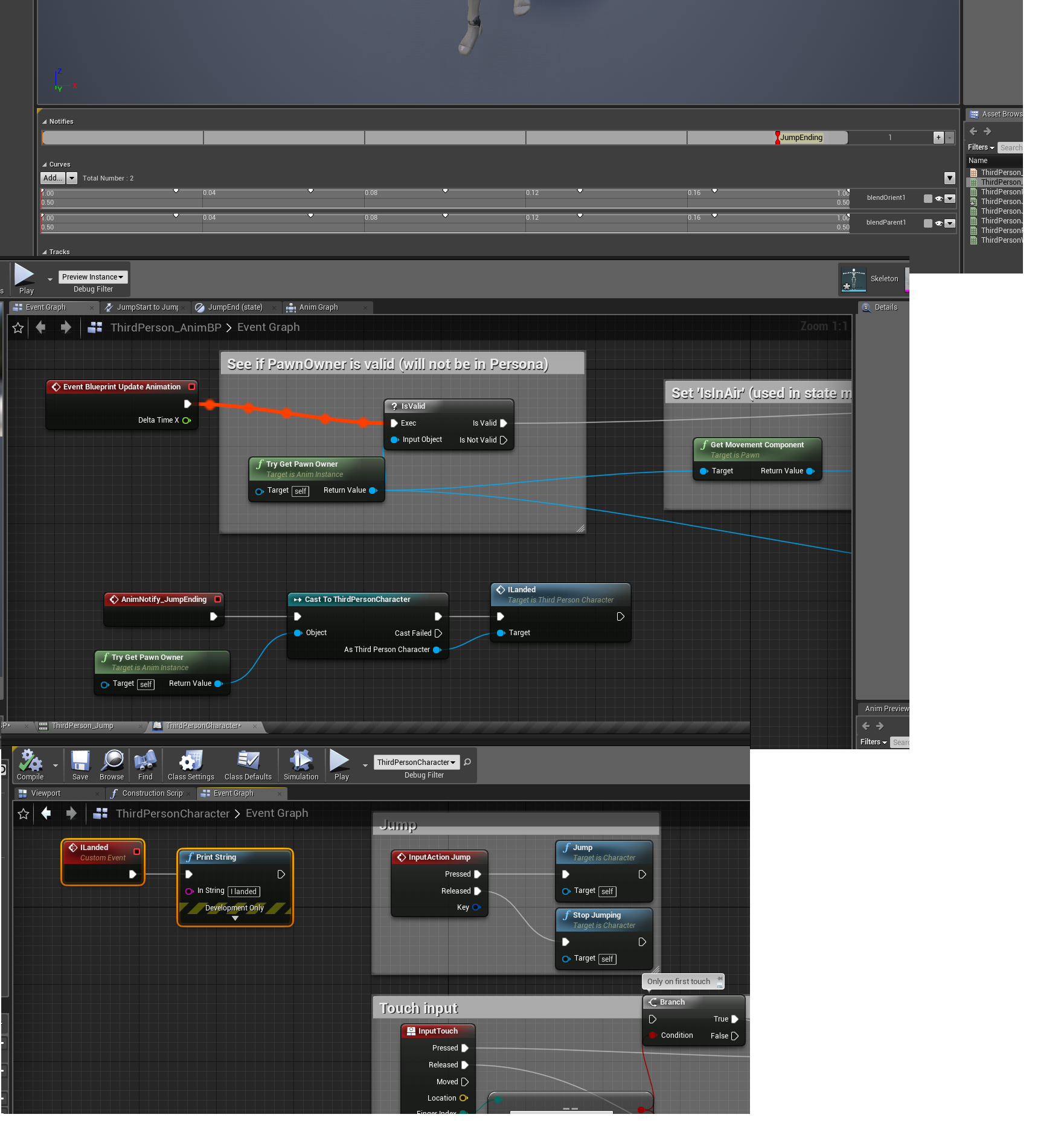
the animation has a notifiy, that notify is fired in the anim bp, the anim bp tells the player it is on that is fired and then the player does whatever
plush yew
You wouldn't happen to be the same MathewW that makes all of those awesome youtube tutorials would you?
grim ore
you can skip the last part of the talk to player and notify if you use an event dispatcher and have the player listen but the result should be the same
I would be that same one
plush yew
Hahaha wow! I'
grim ore
also this could totally not be the right way to do it as I am not well versed in animations but I did just test it and it worked so who knows lol
plush yew
ve been using your tutorials for like a year and a half! That's awesome, thank you so much your tutorials have helped me so much so far. I'll check out the anim notifies, thanks for that too!
grim ore
awesome, glad to hear 😃 always good when someone finds them helpful
 swift elm
UE4 keeps crashing...
T_T
Whenever i'm changing my actor pawn, adding ships to my hangar and positioning them
 dim arch
so I am thking of making an RTX rig
anyone know if there are any new GPUs on the horizon?
 grim sinew
Probably in another 6 months
 vague walrus
Dynamic navmesh with actors affecting it causes my actors to shake intensively, any way to fix this?
sullen wraith
is there a tutorial anywhere for managing render distance?
 sonic pagoda
@dim plover "FlossFarmingYesterday at 1:37 AM
Can't you just do FText::FromString()?
Though, you could probably just do some conversion from Int to FText." that worked!
thanks
sullen wraith
and will ai continue to operate outside of render distance?
vague walrus
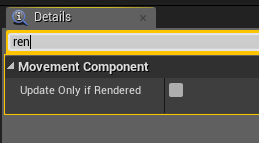
@sullen wraith as I recall there's a checkbox in the properties about his
about computing while not rendered
@sullen wraith https://i.imgur.com/zOrZD4a.png
 chilly gale
AnyBody have both Advance Locomotion System and Quang Phans characters at all?
Can sombody tell me please if the first tutorial video works ok with Qaung Phan's female without turn them into malewalkers they have all their own animationa and physic's so I'm feared chahnging the physic's asset will break stuff
Its seems to be retargeting the new character to use the mannequin's animation unless I'm wrong
https://www.youtube.com/watch?v=SA4xgZiqsLI&feature=youtu.be&list=PLAR8Kc1ZLLKZjnKI_idX7Ik7mN0VORSm_
His latest character can be swaped out with the earlier one making for great options, would love to be able to use ALS for these without breaking stuff
https://www.unrealengine.com/marketplace/ghost-lady-s1-assassin

This video demonstrates how to work with a character that was built around the mannequin skeleton (same bones, proportions, etc). Futuristic Soldier Pack - h...

Female Assassin character for RPG games
sullen wraith
Has anyone here used the community ocean? i need a litlte help
 sick socket
Hi, Im trying to Set my player controller ID, for a multiplayer game with dedicated server option,
i have a PlayerCounter Variable in the ThirdLevelExampleMap, i want to use that variable to set the ID for each player, I add 1 to the Count, but every player window shows this mesasge: Server: Player ID: 1
i expected the value to grow for each player, but it seems its a variable for each player
Sorry, i can't print screen the whole diagram
 digital anchor
the map's beginplay will only run once on server, so it will increment only once
for the players they will run but wont go past switch authority
assuming the authority of the map is the server, if the client itself is, it will go through, but if the variable is not replicated it will increment once per client anyway
sick socket
Hmmm, you are right, I had the idea that for every player, it will run Begin Play on Server,
If i understand the second statement, i should increment the variable on the remote, so it runs once per player, but check the PlayerCount variable to replicate?
digital anchor
you should do that stuff on the gamemode, which exists on server, OnPostLogin for example...
but on your case, it would be easier to just use GetNumPlayers i belioeve
or GetPlayerState -> PlayerArray -> Num
sick socket
GetNumPlayer retrieves the total of players right?, It does not seems to help me indexing my Player, but I will check the last option you mention.
thx!
 worn granite
@sick socket There's already a unique net ID on playerstate's for the purpose of tracking players.
not sure if that's your intent or not
plush yew
Q: what does UE "see" when a character has multiple layers of clothing on? E.g. if my char has a t-shirt and sweatshirt on, will the GPU/engine only count for the sweatshirt and not the t-shirt, or even the chars body?
digital anchor
it will cost a drawcall, vertex shaders, animations, but wont cost pixel shader, lighting etc
if i understood your question correctly @plush yew
plush yew
So for example, there's a wall in front of you and behind that wall is a player, would that wall decrease the drawcall of the player?
grim sinew
If the player is completely hidden behind the wall, the player will not be rendered. However, if the player has 10 layers of clothing, you pay for all 10 layers since it's 1 object.
digital anchor
only if a visibility occlusion kicks in
grim sinew
Just not the shader cost of all the layers, only the top most one. But you pay for all the polygons and such.
plush yew
Ah okay ty
sick socket
@digital anchor , yes that is my intend, didn't know there was an ID, i was trying to get Player Controller ID, but it always return -1, will look for that
worn granite
Wrong tag :P
digital anchor
xd
worn granite
Well if you're just trying to index them that might be a different story
The only thing the NetID does is be unique.
Not contiguous, nor in order.
You could, though, add each net ID to a replicated array on the gamestate, and find the element index of a given playerstate's net ID within that array.
sick socket
mmm, that may be a problem then... here is what i need to do.
1-. Create a Multiplayer Game with 4 players
2-. When the game starts, the first player should have a Flag (it can be anything over their head, a sphere, particles, or a text) just to imply they have a flag.
3-. For every second they have the flag they gain points
4.-. If a Player shoots the player with the Flag, they steal the flag
worn granite
Oh that's no big deal and wouldn't involve player indices or IDs
You could use them, but it'd only make it more complicated.
The gamestate has an object reference to a playerstate - marked replicated - and that tracks the current flag holder. When a new player joins and there's only one player, assign that one player to be the flag holder (on the server).
You could mark RepNotify so you can move particles and stuff too
#multiplayer is a good resource, too
sick socket
I have a doubt, because i ran the game with 4 players, in my computer, with the option, Run dedicate Server, but everything is in my local computer, so all the players instantiate at the "same time", do that still works for assigning the flag to one player?,
worn granite
there is no "same time"
one will always be first
Think of it like if you tossed a stack of papers onto a desk
Yes, they all left your hand and hit the desk together, but one touches the desk first (and maybe only one ever does touch it)
sick socket
That resolves my doubt, i will study try the game state then, THX!
 wet berry
I manage to do this a lot, but can someone tell me how to restore the graph/input/output on my details pane?
Details Pane Missing graph/output
vague walrus
Guys, any ideas why the overlap events are not firing on every swing? If i move to a different position they sometimes all fire, but in some positions only one fires. https://streamable.com/0t2xv

 latent moth
All, some of my material parameters do not remain after applying and saving. I close the project, reopen it, same thing. This means every time a project is opened I have to re-tick them and recompile shaders. Anyone has seen this?
sick socket
@worn granite Trying to check that every player connects 1 after another, i did this flow, where Event Begin Play, runs on every Client only, Then every client calls an event that runs only on the server and adds 1 to the Local Variable that Replicates Over the Network (Which i understand it instantiates only on the server, or which is the same,.. it is the same value for everyone), so i thought if everyone alters that variable. I expected the counter to sum up, but it stood as 1 again.
 azure shore
hey, is it possible to make particle effects flat on surfaces, like decals, but they're still particles, so is it possible to do that with them or do they always face the camera no matter what?
 charred cloak

 keen frigate
Good morning morning everyone. 👋 😃
Btw, Anybody here attending the Vienna UE4 MeetUp? 🇦🇹
plush yew
Anyone else have a thing with certain channels here just disappearing temporarily?
Physics channel has just gone for me
 proven oxide
Arrgh I am following a tutorial and its not working
I have a C++ Class and I am trying to drag onto the level - in the tutorial its showing a box, in mine its not showing anything, what have i missed? or has it changed from the older engine versions
keen frigate
@plush yew Nope looking fine here.
proven oxide
I am following a C++ version of the Battery Collecter Tutorial but I cannot drag the spawn volume onto the level - Why?
its adding the class just not showing the box on screen
so i can't change the size of it
or location
ok so Zero help as usual
how can i learn anything when the tutorials cause the game to crash
I copied the code line for line but the class I have is not creating the draggable SpawnVolume?
I am creating a UBoxComponent so what is not happening
proven oxide
anyone?
wary wave
we can't really help you because we don't know what you've done
#cpp is the place to ask though
azure shore
nobody can answer my question?
 meager dove
@azure shore pretty sure you can change particles to not follow/face camera
so yes you can make them "flat"
 bronze plinth
Can someone tell me the pros and cons of UE vs Unity
Sorry for asking this in an UE server but all the info i find online is so shallow
fierce tulip
con: both are different
pro: both can be used to make games.
con: you have to pick one
pro: you have choice
:p
 fierce tulip
actualy.. not so much
in the end it doesnt matter what canvas you use, as long as you can paint
but it also depends on what you like to do, and which engine makes that the easiest for you
bronze plinth
After reading a lot
It felt UE is a bit better just a bit
But when u think about it
Epic games have a ton of cash now from fortnite which is built on their engine which they sell
So the logical way of thinking is that epic is now capable of dishing out a lot of financial support in order to make UE the superior engine
But the thing is, i'd rather type C# instead of C++ anyday
And UE has the blueprint thingy
Which wont let me dive right into it
I will have to learn Blueprints and then transition to code
Sorry for forcing u to think about it with me xd
I know i have to do the decision at the end and no one can do it for me
grim sinew
Asking which is better is like asking if a hammer or screwdriver is better. They're both tools. Pick the engine based on the type of game you want to make.
bronze plinth
3D RPG
grim sinew
They both have things they do better than the other, there is no universal answer.
fierce tulip
as someone who has worked with unreal engine almost as long as it exists and only just starting to learn blueprints, once you get the basics a new world already opens up, once you get good at it, its amazing.
and while learning a new (or getting better at) another language is annoying, learning is always good.
fanboy me says, pick ue4. dev in me says, just choose one, play around with it for a few days, weeks or so and see if you like it, or feel like trying the other engine
pallid compass
You get full control with c++, and you cant just start with coding anyway even if your proficient in c++
Because you need to learn the engine architecture and framework.
You try and do that in c++ and your gonna have a bad time
Much faster to fuck about in BP majority of the time.
bronze plinth
Makes sense
 sudden agate
UE c++ is a macro clusterfuck
pallid compass
BlackMagic*
plush yew
has anyone got any advice or can help me make a lightning trail in unreal engine 4 like from the superhero the flash. it wold be awesome
pallid compass
There called VFX ribbons i think
plush yew
but im really bad at particles and all that stuff
pallid compass
Well you should look up ribbons and VFX then, that is a good start.
plush yew
kk thank you
sudden agate
Things, science cannot explain:
Heightmap Dimensions for Landscapes
fierce tulip
lol
keen frigate
@bronze plinth
Pros:
Huge amount of tutorials that take your hand and teach you to build an entire game with Unity.
Way bigger and more active community than Unreal Engine 4.
Way more assets available for Unity.
Unity is way lighter and runs on lower end machines well.
Best HTML5 game packaging from the two.
Cons:
You have to buy the Pro version.
They still haven't decided how to implement advanced shaders. It's still an experimental feature. There is Shader Forge but mneh.
Optimisation is a pain compared to Unreal Engine 4
Navigating their creator pages on their website (be it as a game dev or asset creator) is weirdly way more complex than it should be. Not to mention they have a weird facebook like profile page among other things.
On a side note.
Although UE4 is harder to master I find it more user friendly and easier to deal with.
bronze plinth
@keen frigate woah thanks
However if unity runs on lower end pcs it wouldnt need optimization would it now ?
Or you meant something else by it
keen frigate
I mean that as an editor it runs better on low end machines. Not the games you create. The games always need optimization no matter the engine used. 😃
pallid compass
Wth you on about sutorcen the ue4 community is massively bigger than the Unity one
Unless i am missing something obvious, then feel free to point that out and correct me.
keen frigate
There is nothing to correct. Unreal Engine has a huge momentum and will surpass the Unity commuity in the near future but still there are more tutorials (and complete at that) for Unity than they are for UE4. Unless there are numbers I'm not aware off.
As the de facto game engine for indie devs Unity had a huge community way before UE4 was a thing for indie devs. Only the past few years Epic Games has made Unreal Engine 4 popular when they decided to make it free for everyone. It's not a competition it's just the way things are.
That doesn't make one engine better than the other.
pallid compass
never mentioned learning content, never said it had before hand, never said it was a competition, never said one was better than the other, from what i have seen from forums, discord and general chatter ue4 seams to be much bigger.
wary wave
you seem to forget that UDK was a thing
keen frigate
Sorry I love ue4 as you guys but numbers don't lie.
Unity has a huge appeal with the masses, for some reason. Beats me.
2004 to today...
fierce tulip
XD its us ue4 people talking slack about unity :p
 dim merlin
Hi, anyone knows there's yet a solution to import .fbx at runtime?
keen frigate
Added some more UE4 related terms and topics still the gap is huge.
wary wave
I don't think those keywords are necessarily working
keen frigate
give me some more efficient keywords
wary wave
I refuse to believe Moldova is the #1 searcher for Unity game engine stuff
keen frigate
Still it's weird and interesting at the same time.
I fiddled around with this the previous weeks. Rephrasing the keywords, trying to increase the UE4 numbers... I just couldn't.
 twilit hill
Epic could tripple ue4 users by implementing a c# code base
wary wave
there is literally no point doing that
keen frigate
hehe UE4 is so powerful and good lookiing it intimidates people away 😛
I tried Unity three years ago and last month again. Not my thing.
twilit hill
Yeah the ide is really oldschool
But at least it runs with more than a single thread in the render pipeline
Ue4 will be the last engine with single threaded rendering
keen frigate
Come 4.22 they are trying to change that if I'm not mistaken.
 lofty hollow
if i disable friction on the frame i land on the ground and then jump on the same frame i should lose 0 velocity right?
 fossil socket
do you still have to buy all the useful features off the asset store?
 copper flicker
so.. I have an interacting [water] volume.
if I shoot bullets into it, they're supposed to change color and stuff.
all goes well from outside the vol
but when I shoot from inside it....
sometimes all goes well, sometimes they don't touch the volume
any idea why?
when an actor spawns inside a volume it's supposed to always touch it, and be aware that it's inside that vol.. right?
does it check per tick?
or only once?
keen frigate
@copper flicker If you are using Begin/End Overlap it checks only on those two occasions and ignores the rest. If you are using On Hit it should register every tick your actor stays inside/interacts/hits the volume.
copper flicker
I'm using an On Begin Overlap
keen frigate
That's why it ignores your volume, try using hits.
copper flicker
but why does it work tho? most of the time
and then every 20 times or so it fails
inf act... even weirder. after 5 seconds or so.. it starts to fail consistently
some bullets go well, so fail
some
 ember hull
Guys I tried to make an rts open world, and connected the navmesh invoker to the camera, but it dont update the navmesh area when I move the camera, is there anyway to make it update every time I move ?
I know its meant for AI, but it will be amazing if there is a way to make it update when you move to diffrent locations
 waxen ivy
Hey guys, I'm trying to get NPC's into my game. Ofc I#d like to have an animated Placeholder, where do I find the mannequin which u can control when you start a 3rd-person project? I started a blank project, and cannot find it
thx
fossil socket
might be a longshot but anyone here with UDN access having trouble logging on?
 misty creek
@waxen ivy In the "content browser" go to "add new" ant then at the top of the list is "Add feature or content pack" click on that and a window pops up where you can select which template to import. That will let you import the third person template into your project.
 graceful sky
When it comes to delta time, is that a thread value and will return the same in any bp, or can it be different in the various bp's ?
ember hull
Fixed it, by Project Settings -> Navigation Mesh -> Runtime Generation
waxen ivy
@misty creek thank u!
misty creek
No problem. 😃
keen frigate
Lose their materials?
 thorny cipher
no adds random material slots for no reason
keen frigate
Ohhh. Wow. Never came across that one before.
azure shore
@meager dove would you know if it's possible to make them go onto the walls/floors well?
meager dove
im not super familiar with particles
azure shore
ah ok
it's just that somehow it can run thousands of em just fine but about a hundred decals lags the shit out of it
bronze plinth
Guys i tried to load pargon's map
My 16gb for ram got fully used
And the UE crashed
Do i need more than 16gb ?
graceful sky
sounds like it yes
bronze plinth
D:
graceful sky
you could try a clean restart, close everything except ue4 and try again 😛
you might be on the brink
meager dove
it should load fine
oh wait probably not
if they didn't include a ddc, then ue4 has to rebuild all the assets when you open the map
which is probably why it crashed
fierce tulip
@azure shore thats because decals are heavy af when used a lot
meager dove
you can't do anything during that period
 cedar snow
anybody knows of a (built-in or plugin) asset importer that splits the imported file into multiple ue4 assets?
i'am wondering if it's possible to do that, replace the assets on re-import and obv keep the references intact
plush yew
Hello, new to UE here....may i know difference between physical asset and skeletal mesh
sudden agate
Skeletal Mesh Contains Vertices, Weights, Materials
Physics Asset contians COllision Data
meager dove
no7hing, whats assets?
plush yew
@plush yew im new too
fierce tulip
well, not new. youve been here for ages, just not working on ue4 :p
plush yew
@sudden agate thanks, i figured it
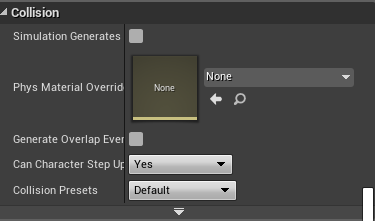
is this where we add collision to a skin? https://i.gyazo.com/baf8632d90cc8252864a48ba8f0dfd8c.png
@fierce tulip yes but i have made attempts
and in fact working on it now
just something else
cedar snow
@meager dove would it matter? e.g. big wav into sfx clips
 gaunt spindle
hey is it possible to simulate Realtime local weather in unreal
azure shore
yeah I kinda wanted at least quite a bit of blood in my game so I think decals aren't a good idea
are particles always unlit? not sure that would be a problem but well just wondering
fierce tulip
particle materials work the same as regular materials, just depends on your setup
azure shore
oh yeah oops, completely forgot that
I think just all the particles I've used are set up so they're unlit for some reason so that made me forget
plush yew
@bronze plinth run the editor as priority realtime and change pc power settings to high performance
 maiden sundial
Is there any way to connect the bottom of this geometric object again ?
It's literally making every other geometry object under it to nothing
fierce tulip
dont use bsp :p
maiden sundial
I have to
Otherwise i can't finish my building. There is already like one day of work in it 
Worked also pretty good so far, but the roof will bring the bsp to his limit 
grim ore
do you mean make a new face for the bottom edge?
grim ore
well you can select the vertices in the geometry editing mode and use create to create a new face from selected vertices
maiden sundial
So selecting the 4 vertices on the bottom and then click create ?
If so, it doesn't work ._.
waxen ivy
sup guys, i wonder, whats the best way to animate a chest in blender for use in ue4? I want to make it so that when i activate the chest the lid opens while i browse its contents, and when I leave the chest that the lid closes
maiden sundial
Ow wait, it worked. There is now a new face, but this face is only inside of the object
abstract relic
Why are you torturing yourself
 frosty copper
🤔
grim ore
yes the normal direction is based on the order of the vertices you selected when you clicked create so next time just do it the other way 😛
maiden sundial
Problem solved, thanks for the help 👍
fierce tulip
making houses out of bsp, feels like the late 90's
lofty hollow
how do i do so physics in unreal is always consistant no matter the fps?
grim ore

Víctor Ávila
How to achieve physics framerate independence by correctly using UE4 substepping.
plush yew
which plugin is better? truesky or ultra dynamic sky?
grim ore
Some people can't afford Blender 😦
plush yew
@lofty hollow when you do stuff in event tick multiply by 'delta seconds'
maiden sundial
To be fair, blender is not starter friendly
 whole quarry
it is very starter friendly??
maiden sundial
It's also literally shit to move inside the blender world when your muscel memory is trained for moving inside the unreal world
misty creek
I found that they basics are pretty easy to learn
Yeah, the movement is terrible if you are coming from unreal
whole quarry
try switching back and forth, will be fun
misty creek
And that is why I generally use premade assets
maiden sundial
-was not even in this world in the 90s
-using 90s techniques

misty creek
And even if you have to put in the same amount of work to learn blender as to use BSP, you will get better and faster results in the future
Basically just a time investment
maiden sundial
I'm still having blender, but it was a pain in the ass when i tried it for the first time
lofty hollow
@plush yew what do you mean
maiden sundial
I'd prefer to work only on the game logic, but for my current project i'd have to learn some 3D program
I really should start with blender today again
plush yew
for example, if you add an impulse on event tick, add an impulse and multiply it by delta seconds. Of course you will need to increase the impulse to get the same result
So someone with higher fps will get roughly the same force applied over time as someone with lower fps
azure shore
guys, does anyone know how to optimise decals for showing hundreds of them on screen at once?
plush yew
Someone getting an impulse of (20 x 0.02) units 50 times a second is the same as someone getting (20 x 0.04) units 25 times a second
azure shore
or is that just impossible in ue?
plush yew
It's worth learning Blender.
You can also get your hands on Houdini Apprentice for Free.
And MODO Indie is affordable on Steam for like $16 a month or less. (subscription) It could fee more user-friendly than Blender for modeling.
Coming from 3ds max and then Modo, I do find Blender to be a bit difficult to learn. it works a bit differently.
I should have read the manual first (lol)
XD
azure shore
so does anyone know
grim ore
I am sure someone knows, they just might not be on now or even in this channel or discord.
azure shore
well, you know what I mean
grim ore
https://forums.unrealengine.com/community/work-in-progress/117813-high-performance-decal-system-100-000-decals-at-60-fps popped up in the search and the decal page itself has some suggestions but as is the default system is not designed using decals for large amounts of decals
Unreal Engine Forums
Building something cool? Tell us about it!
azure shore
I was just looking at that actually, but I dont have 64 quid...
I swear some game engines can run like millions of decals and not lose a single fps
grim ore
they might not be decals but other systems like in that post
azure shore
yeah I guess but I just cant find how at all
apparently somehow spawning textured planes would run better than decals
what is it with decals ue?
meager dove
blender UI was awful before 2.80 and it's still not that great
proven oxide
I have a question, How can you change a GameMode for a different one on the same level?
ie I want to use the same map but have different gamemodes
plush yew
@whole quarry
whole quarry
why do you tag me?
plush yew
because you can help maybe?
whole quarry
im doing other stuff
whole quarry
just google it
 flat marlin
Hey guys is it normal that the FPMANNEQUIN I'd facing left instead of forward?
Is that a UE4 thing or an error someone made in our project?
proven oxide
Its how the Engine does the default FP Demo
i think its due to the Coord system, X+ or Y+ or Z+ for forward
(Minecraft/LibGDX is Z+)
plush yew
okay I didn't remember thank you remco
but I didn't see a result
anyone can help me with the problem that I said upper? I have a problem with my project
I want to remov eteh mobile controllers from the HUD
these are the resutls but they are not useful 😭
azure shore
I wouldnt say millions, more like hundreds, and its just for blood
but if you point blank shotgun an enemy you know its a decent amount of blood
plush yew
can anyone help me? please
azure shore
well as soon as theyre off screen such as if I look away the fps goes right back up so respawning wouldnt make much difference
@plush yew is there not a hud spawn script in the main bp?
plush yew
nope
I spanwn my hud
but I want to remove these controllers from the HUD but I don't know how
wait a moment
these I want to remove but I don't know how
@azure shore
azure shore
oh, well yeah they still dont render whilst off screen
can I see the player bp @plush yew
plush yew
smis?
whole quarry
its under Input in Project Settings, Display Mobile controllers or something
whole quarry
then maybe in the player bp or something
plush yew
third person character bp to show you or?
whole quarry
no, go search for it, its somewhere else enabled
whole quarry
maybe in the playercontroller, maybe in the gamemode, idk
plush yew
😭
whole quarry
i dont know your project
plush yew
😭
azure shore
idk I just thought it may look a little ugly
plush yew
can you send me good sites where I can find cool textures free?
because I am looking for textures for road for asphalt
 dry moon
Anyone use ZBrush?

Whenever I draw one out I can press T and edit it
but when I draw multiple ones and click off
I can't edit
plush yew
I want to ise it but I can't crack it from zamunda.net I don't know why @dry moon
dry moon
what?
wary wave
sounds like he wants to pirate it :/
grim sinew
@dry moon When you draw multiple, you're just using 2.5d mode, not 3d. Instead, draw one and then duplicate the subtool.
grim sinew
Yes. Just append it as a new subtool
You can only work with one tool at a time, but you can load a tool as a new subtool.
dry moon
Because I have multiple rocks I want to merge into one giant one
grim sinew
ZBrush documents are weird, don't be afraid to go to the manual a ton
grim sinew
You just need to take some time to read up on the difference between tools and subtools.
dry moon
you saved me the most giant headache
grim sinew
It's annoying, zbrush handles documents/files differently in terms of terminology, but once you get used to the terms it's easy
 honest rune
As a workaround to force assets to cook that are only loaded dynamically when needed, would creating a dummy level and just dropping the assets into the level but never actually loading the level at runtime work? I know there is object libraries which I would love to use but I can't seem to find a reliable way to conditionally force all FAssetData to load only during a cook
I figured maybe doing that will give a hard reference to each of the assets in question so they're forced to cook by packaging the level and then I can use object libraries as per normal to load at runtime where they will actually be used
dry moon
I'm not answering the DM for topics like that
wary wave
piracy is not tolerated in this group
plush yew
I know
 craggy flax
hire an art student for ramen noodle money ;p
plush yew
you have the original buy version? @dry moon
whole quarry
@plush yew unless you want a perm ban, i recommend not to discuss any form of piracy here
plush yew
okay
whole quarry
See #old-rules
maiden swift
@plush yew I hope you're not still asking about Zbrush. You've already received a strike for discussing this. Don't push it or you will be banned without warning.
 tall pendant
as if those people would read the rules lol @whole quarry
 whole quarry
@tall pendant i got a kid now, im getting used to the anarchy :P
tall pendant
it's quite common on slackers not to read the rules 😄
 plush marsh
what rules ?
whole quarry
There are topics??
plush marsh
rules were invented to break them
maiden swift
You guys are hilarious. 😒
whole quarry
We love you too Nick 😄
tall pendant
@whole quarry congratz on your fatherhood btw! 😛
 polar hawk
where can I get that gbrush
I had this instructor who'd always call it
gbrush
every time
gbrush
maiden swift
Hah.
plush yew
lol
maiden swift
Now someone needs to make a freeware app called GBrush.
plush yew
so @maiden swift can you help me with the problem
maiden swift
@plush yew Not if it's getting ZBrush for free.
maiden swift
You asked for free textures earlier, right?
maiden swift
There are loads of resources for that.
plush yew
I have a problem with my project
polar hawk
it costs too much money?
plush yew
I want to remove these mobile controllers from the HUD but I don't know how
dry moon

Textures.com
Textures for 3D, Graphic Design and Photoshop 15 Free downloads every day!
Is probably the best place for free
you can download 15 each day at like 1024
maiden swift
Don't those only show when you do the Mobile PIE? 🤔
Is your project based on a template @plush yew?
plush yew
what is PIE?
plush yew
the project is mobile because Virtus made it this but he is playing the game on computer so is there a way to play the game from computer and to remove the mobile controllers
and then to send me links to good sites for textures?
I will save them
maiden swift
So you're following a Virtus tutorial?
polar hawk
gg abort
maiden swift
lol
polar hawk
woah 0 to hate real quick
maiden swift
I don't see what the problem is.
plush yew
same
maiden swift
I was laughing at Allar. 😛
maiden swift
First I'd check the project settings.
maiden swift
Project Settings -> Input -> Mobile -> Default Touch Interface
polar hawk
why are you following a mobile tutorial for a desktop game
maiden swift
Make sure it's set to None.
plush yew
or to write you in DM?
plush yew
that's the problem that he is making mobile game and he is making for dekstop-the Virtus
maiden swift
Please link the tutorial you're following.
plush yew
okay
polar hawk
if hes making a mobile game for desktop
and you don't want a mobile game for desktop
I'd suggest not doing that tutorial
worn granite
but its virtus
plush yew
I want to make his game ut to be differen with my style and resources

If you've ever wanted to create an Endless Runner Platform game but weren't sure where to start, this is the tutorial series for you. You'll learn everything...
thsi is the tutorial
worn granite

In this video, we discuss the type of game that we're going to make and begin by setting up the player controls.
polar hawk
Especially with endless runners, I feel like theres 100 tutorials about em
oh look theres another one
worn granite
Its for desktop, even
maiden swift
Oh duh, of course.
@plush yew Project Settings -> Target Hardware -> You'll see "Mobile / Tablet". Change it to "Desktop / Console ".
You may need to restart the editor. Don't recall.
plush yew
okay
I will restart it then
I changed it and it is restarted
everything will be okay ?
plush yew
yes
thank you
❤
so can you now send me link to good sites for txtures or materials? free?
maiden swift
Textures.com
Textures for 3D, Graphic Design and Photoshop 15 Free downloads every day!

Welcome to Free PBR where you can download 100% free PBR materials and texture files. Our free PBR, or Physically-Based Rendering materials offer the metalness/roughness as well as the metallic/smoothness workflow. These 2K texture maps can be used in Unreal Engine, Unity...
plush yew
thank you man ❤
polar hawk
texture? I hardly know her
 supple totem
hi all, if I wanted to buy a game controller that might represent the typical controller a PC gamer might have around, should I get an xbox 360 controller? or an xbone? Or something logitech?
polar hawk
360 or xbox one
supple totem
looking to do split screen on my game, one keyboard+mouse one controller
polar hawk
for sure
plush yew
from these links that you send me for the textures I can't find textures for the road
@maiden swift
plush yew
stop joking @polar hawk
polar hawk
I'm not, I could probably use some road textures
 lusty vigil
grim ore
lusty vigil
grim ore
SpatialOS: the cloud platform for real-time multiplayer games, built with any game engine
plush yew
i have no clue what this means
grim ore
Which word?
plush yew
cloud platform
like, why would i host my mmo on it
instead of normal dedicated server
grim ore
That means it's a platform in the cloud instead of in your house
plush yew
smh
grim ore
So if your house burns down it won't shut down the game.
grim ore
Where is the dedicated server at?
Does your dedicated server handle multiple levels loaded
You know the website does a good job of explaining it right on the front page. https://improbable.io/games

Improbable
SpatialOS provides managed cloud services for developers that solve common technical and production challenges when creating, iterating on and hosting multiplayer games.
grim ore
@lusty vigil your character does not persist thru level changes yes, it would lose all it's settings that are not default.
grim ore
Well the improbable stuff is all the server stuff but running somewhere else all set up
plush yew
seems legit
but i will host at home
:3
but seems mmo coded for dedicated is made differently than mmo coded for spatialos
abstract relic
I don’t believe there’s an mmo our there that uses dedicated. It wouldn’t be an mmo
honest rune
shenanigans
plush yew
@abstract relic
there are private tibia servers hosted at home that often have 100 players +
but yeah mostly are hosted on dedicated servers because if someone can put this amount of work needed to create mmo then he can afford dedic server
plush yew
idk if i should ask for help here - it would be nice since i'm right now using unreal engine 4 for university stuff
i'm not sure if discord chats are valid references if i wanted to use discord, and this is my personal account (which i don't want my professional sphere of life to be aware of)
whole quarry
Not sure if there is a question in there or if its just a statement
abstract relic
Sounds like a sleep deprived statement
plush yew
sleep deprived? it's only 9pm here
but yeah, should i ask for help here?
at the same time though, i want to keep this discord account strictly for personal matters
whole quarry
Depend on the kind of help you seek
We cant help with fashion
No idea how to bake a bread either
plush yew
ok. it's about unreal engine 4 but i feel like that i'd have to reference you guys if i sought for your help
graceful sky
Depends on the type of help. If you hire someone or pay someone for something, sure.
plush yew
very well but i don't want like university knowing of this discord handle i use
graceful sky
Nobody will cry if you mention them :p
abstract relic
Why would they care?
whole quarry
So many students that are "cheating" then
abstract relic
Gotcha
graceful sky
There could probably be situations where teachers consider it cheating
plush yew
i don't want uni and work being able to find out shit about me outside of uni
and yeah, academic honesty and that other stuff
graceful sky
If you 'cheat' you do most dmg to yourself imo
Asking questions and learning from it is not cheating
Getting answers served and not trying to understand them can be ..
whole quarry
Find the support/help is no different than finding the needed information
abstract relic
No one is going to do work for you (for free) here anyway. We’re all grumpy farts
plush yew
i should probably dismiss this conversation and hop on to my other discord account then, and ask for help through there
plush yew
i guess that's what i'm most worried about - protecting my online identity
whole quarry
lol
graceful sky
When it comes to these things i think its better to get your name / nick out there.
Being known (for positive contributes and whatnot) is nothing but positive for your future career paths
plush yew
this i admit is my more cancerous discord account
people will at least know of my unique discord number and use that against me for the shitty things i've said in the past
i've been permabanned from one server and kicked out from countless others
and i've left them as well
graceful sky
General rule for public interaction - dont be a dick.
fierce tulip
and wording.
plush yew
eh, i'll try and keep my talk related to UE4 on this server, but otherwise, this account is my cancer quarantine. i'm not letting it seep into my professional life where people can see me in person
fierce tulip
dude stop with the cursewords
abstract relic
Right here’s an advice for your career and as an individual
plush yew
🍿
abstract relic
There’s no such thing as a good person. You can only be a “better” person. The former implies there’s an arbitrary quota while the latter requires you to continuously grow. Learn from your mistakes and don’t stop growing. There’s enough garbage in the world, don’t add to it.
plush yew
Amen
whole quarry
One can always choose to recycle though
grim ore
I recycle my old computers to little kids. I leave mcafee and avast installed on them just to watch them suffer... Mwhaahahahaha
fierce tulip
bit too evil there Mathew, have a snickers
grim ore
... I was just watching this reddit post when you said that lol https://www.reddit.com/r/funny/comments/ati6di/the_more_snickers_the_better/
 fierce tulip
lol
grim ore
recompiling source again for the 3rd time today =/ Had to reinstall VS to fix a previous issue and apparently you have to have the right combination of .net SDK's and windows SDK's or a file is missing and it doesn't fail the compile till the final part lol
fierce tulip
one of those days huh
I spend 4 hours last night trying to get a scrolling texture to speed up, totally forgetting that the "speed" input of my mat function is multiplied inside it. so it gets the time multiplied jitter issue.
the moment I go to bed, I realize my stupid mistake
 cerulean nova
was reading abit more up ...some people shakes his head
@plush yew Your from Washington.
plush yew
Washington? no
cerulean nova
was a blind shot 🤷 ^^
plush yew
eh, less people know where I live for right now, the better
cerulean nova
but its easy to find out if someone would want to via SE
 rich nymph
hello guys.
I need to do a fight sequence in an elevator, like this one in GoW. thing is, I need it to give the sensation of an infinite movement until the last wave of enemies is cleared, yet I'm not even sure how to approach it. do you have any pointers so I know what to look for implementing this? I was thinking about using a shader or something like that, but I'm not that knowledgeable about it.
https://www.youtube.com/watch?v=z8LP7ZfHRsg
 plush marsh
move walls , not elevator. Move->Spawn->Despawn
rich nymph
yeah, that's what I was thinking for a prototype. but if I needed to keep in mind performance and stuff, I could spawn a set amount of walls, then repositioning rather than despawning them (or that's what we did in the last endless runner I've collaborated with). any issues with doing it like that, or would the idea of doing it with a single spawned wall with a shader animation arise more issues than it's worth for?
fierce tulip
you cannot add the amount of detail in a panning texture compared to spawning and despawning parts
plush marsh
you can reposition it ofc , but I think it is too much of a hustle and it can produce bugs
rich nymph
@fierce tulip I was afraid so.
@plush marsh yeah, back then we had to handle it with care. for now I'll go with your suggestions for now. thank you, both of you 👍
fierce tulip
it should be fairly cheap if you keep a rather tall elevator piece. good luck 😃
plush marsh
for example, you can look at Metro Last Light main menu . It seems like you are riding through endless tunnel , but is just animations and spawning despawning piece of a tunnel. When Player chose something , sequence activates and you are doing something
grim ore
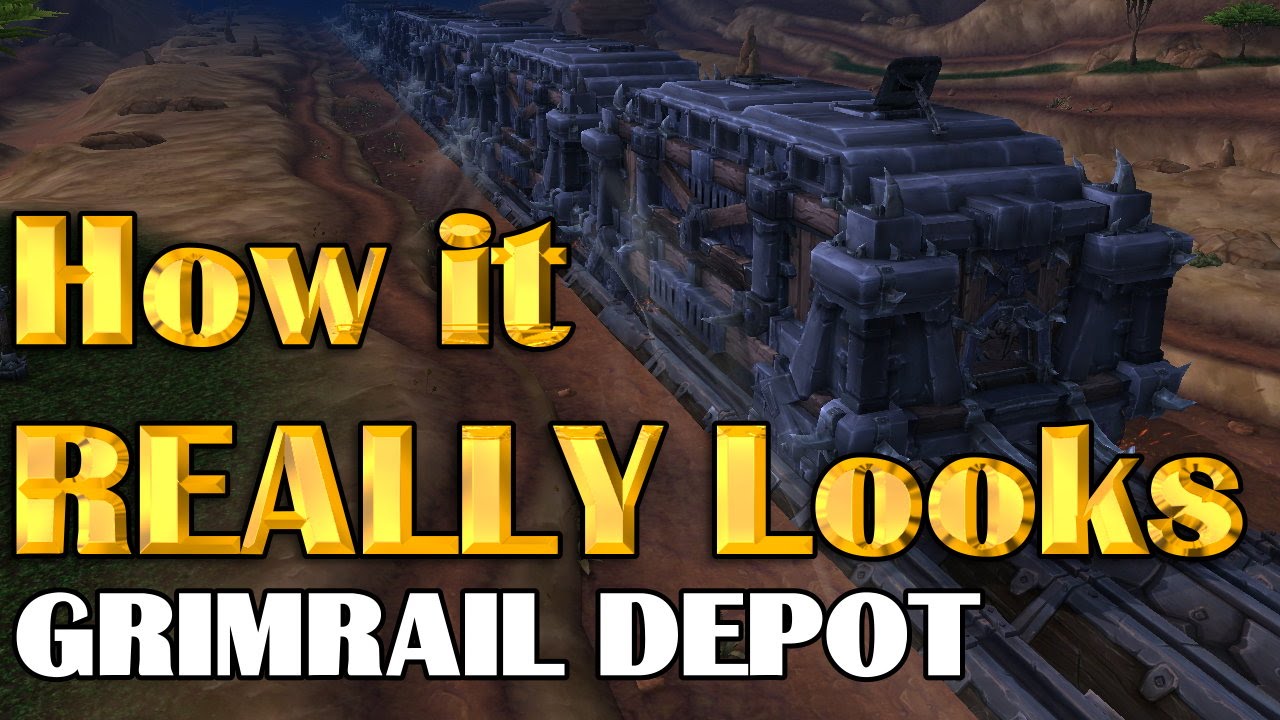
In this episode of How it REALLY Looks we are taking a look at Grimrail Depot, one of the most interesting maps in Warlords of Draenor. Are you really moving...
plush yew
They also did that with the latest boss encounter (Jain's)
Jaina
But that's only a boat lol
 coral shoal
General system design question, if there's a character with multiple variants as child classes and there also should be an AI class variant for each charater child class, what setup makes the most sense? Making a version with modifications for AI class that inherits from each child seems ineffecient work wise. Does making the AI modifier into an optional component somehow make more sense? Would just editing the base class with a branch for AI make more sense even though it's bundling more complexity into a single class?
wary wave
is that AI for each variant really all that different?
I would hazard a guess that it's not and that you can just special case the unique behaviours in a single AI controller
fierce tulip
just lost an hour of unsaved work 😦
coral shoal
single ai controller, but each pawn needing a few AI related modifications. Imagine each variant can work with the same AI with just some numbers swapped
but still needing some changes for the ai
(versus player controlled version)
multiple inheritence would make this easy but that's not really a thing is it :p
maiden swift
Anyone know how to increase the brightness from the console? I found a r.Gamma command but setting different values doesn't seem to do anything.
 lament saddle
not offhand, but the console command reference seems to have some items for exposure... https://digilander.libero.it/ZioYuri78/
sullen wraith
anyone know a tutorial somewhere for ship ai?
using community ocean project and I want ai ships moving around
abstract relic
There’s a bunch of live training on the topic

Announce Post: https://forums.unrealengine.com/showthread.php?88199 In this multi-part series, Ian Shadden and Alexander Paschall show you how to use all of ...
plush yew
ok so i have been browsing the internet for a while and i cant really find any solutions but, how do i loop a song after a certain point
so basically, i want to loop the song but i want all loops after the first to start at a certain point
how would i do that
grim ore
you would have to do it manually, once it stops you can then seek to the new start point and play from there
grim ore
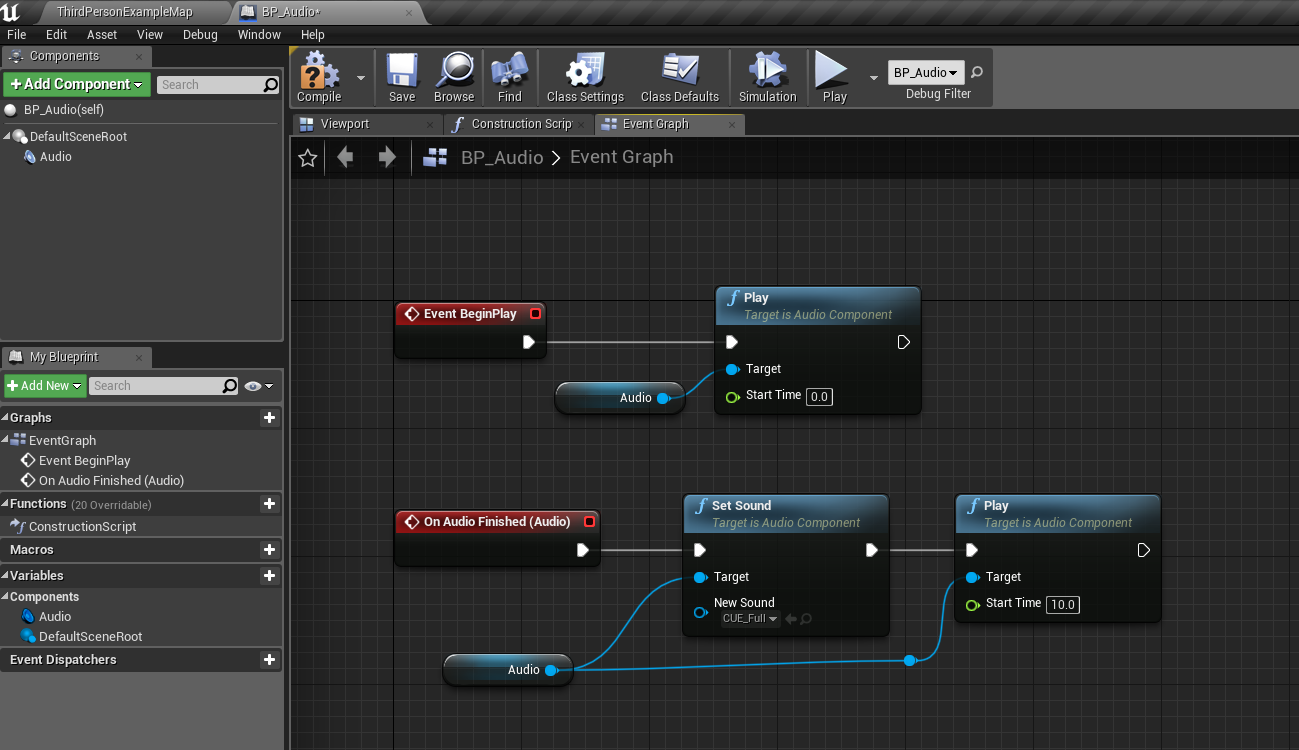
yeh you would play from start in a normal way then you would bind to the on audio finished if using a component, then when it finishes you play the sound again in a new event, like uhm PlayNotFromStart and that one would have the start time set to where you want it and that one you could always just auto loop
I also want to say you Might be able to find a start position in an audio cue itself and you could use those, one for each type you wanted
grim ore
aww.. well nope a cue can't seem to set it's start time but can still use a cue that loops and just call it once the first one stops. damn.. but the looping one loops back to the start lol... I guess you could just keep infinitely calling the on stop event and having it start at that new time, that does work I just tested it lol.
plush yew
can you send me a pic of the map or something? i have no idea where to start
grim ore
 grim ore
Audio is an audio component on the BP. The On Audio Finish is an event from the audio component. It just plays the audio cue with the default settings then once it stops the first time it calls the stop event then plays it again from the new sound start position.
the set sound in the 2nd part is not needed as I was trying swapping in another cue lol
plush yew
what is that play node called?
grim ore
it's just called play with an audio component as the target
 manic pawn
use fix redirectors on the root after moving
plush yew
ok im really confused, where are you getting that audio node, all i can find is this
manic pawn
they already have an audio component and dragged a wire off a reference to it
grim ore
Look at the top left of my blueprint, I added an audio component to the blueprint
sullen wraith
wheni dod that it crashes my game zeb?
manic pawn
it doesn't crash for me
plush yew
ok next question, where is on audio finished
because i cant find that either
i have this so far
yea looked everywhere i cant find that node
grim ore
click on the audio component itself, then in the details panel it will show up as a valid event for it on the bottom under events
or if you have it selected you can right click in the event graph in a blank spot and at the top will be add event for audio and call function on audio
What you want is the event dispatcher under the Add Event for Audio -> Event Dispatchers -> Add On Audio Finished
You can also drag off the Audio variable in your level and bind to On Audio Finished but that is more mess than the previous way
 sonic tinsel
How do I get a variable from my character into my anim blueprint?
plush yew
thereeee it is
grim ore
You don't @sonic tinsel , you do it the other way. In your Anim BP in the main event graph you ask your character that it is running on, assuming that is what you mean, what the variable is and then set it locally in the Anim BP
sonic tinsel
Yeah, I'm saying how do I use the variable from the character, for a blend pose from bool
by bool*
in the animbp
abstract relic
use Get Pawn Owner
sonic tinsel
one sec lemme try that
abstract relic
or cast if you wanna be lazy 😛
sonic tinsel
what should the return value be?
grim ore
 sonic tinsel
I already use casting to my character for getting the speed and direction for my walking blendspace
how could I use it for the blend pose by bool?
sonic tinsel
Ok I did that, and it gave me an error, also it wasn't using my blenddspaces correctly
It played the idle animation with no speed or direction and nothing else
The blendspace references themselves in the animbp says it uses a potentially unsafe call?
grim ore
we would have to see the code where you are going wrong but https://docs.unrealengine.com/en-us/Gameplay/HowTo/CharacterMovement/Blueprints has a walkthru on how to set up the anim bp and blend spaces for a character
abstract relic
it's a bit difficult to visualize what you're dong
sonic tinsel
I already have the animbp and blend spaces set up, it's putting 2 blend spaces together from a bool that I'm trying to do
hold on I'll take screenshots
sonic tinsel
abstract relic
oof
grim ore
eep
sonic tinsel
what does caching do?
abstract relic
bad mate
abstract relic
that's fine, gimme a moment
grim ore
you can check out that link I posted it shows the expected way of getting / saving variables in the anim bp and using them in the anim graph
sonic tinsel
k I'll take a look one sec
abstract relic
I'd definitely look at the doc and watch a live training on it.
but your first problem
grim ore
I'd never even thought of trying to get the character from the anim graph lol
sonic tinsel
It's a bit complicated but I might be able to replicate it, but I'm bad at adapting those premade guides to what I need lol
I can try ig
abstract relic
you need to set up the bp communication in the ani bp's event graph. Right now, you're using the AnimGraph
grim ore
the warnings btw tell you what you are trying to do does not work, so it not working is expected
sonic tinsel
So should my character reference be in the event graph?
abstract relic
here's a basic and simplified set up. Note, casting isn't good practice but this'll do for simple projects
sonic tinsel
Lmao I just did something and unreal fucking imploded on itself
basic and simplified
lol
abstract relic
next, in the anigraph. You'll need to make a state machine (node). From there you'll put the actual animations and blendspace in the state machine
sonic tinsel
So what exactly is going on there? I can see it's using a try get pawn owner instead of a cast
Which makes sense, since a cast is every frame, right?
abstract relic
and that's about as criminally simplified as one can explain it. Watch tutorials, you'll be going down a rabbit hole 😛
grim ore
everything in that graph is pretty much every frame
sonic tinsel
yikes ok
grim ore
if you go thru the link on creating the character it covers all the basics for the anim graph and bp
sullen wraith
whenever i move folders it breaks all references
how can i move it while moving references?
does anyone else crash with fiox redirections?
grim ore
My projects do not crash when doing that and moving it doesnt leave the original folder.
sullen wraith
what do you mean?
im trying to move a folder "sky" into "mapfeatures"
when its done, it leaves a copy in the main content folder
which i dont want there
when i go to delete it, it breaks all references
if i try to fix references, it crashes
grim ore
I move a folder from one place to another, it moves the folder and all the contents to the new location and it does not leave an original folder. Cleaning up redirectors doesnt crash as well
so something is off in your project, do you have a map loaded when you try and do this?
grim ore
yeah I was going to suggest a blank map but if you still have the issue 😦
but it should not crash
maybe try moving one thing at a time, maybe one item is not working right for some reason.
sullen wraith
half the folders crash it :3
when i try to delete it
you get
"not all objects are compatible, soreplace references is unavailable"
im gonna guess why thats why i crash when I try to replace references
okay
i've finally got an error message
by doing it 1 by 1
"CRITICAL FAILURE:
One or more assets were partially consolidated, yet still cannot be deleted for some reason. It is highly recommended that you restart the editor without saving any of the assets or packages.
Affected Assets:
BP_Sky
BP_Sky_C
Potentially Affected Packages:
/Game/Sky/BP_Sky
/Game/ShipsAndExamples/CustomThirdPerson/Blueprints/ThirdPersonGameMode
/Game/ShipsAndExamples/UI/WB_Sky_HUD
/Game/ShipsAndExamples/CustomThirdPerson/Blueprints/TP_HUD
"
polar hawk
I can't tell if I'm being more cynical and more of an asshole
or if the unreal community has had a slow influx of assholes
or both
plush yew
@polar hawk why?
polar hawk
Iunno
I've had an increase in the number of encounters related to UE4 that I'd classify as just "stupid"
Being ignorant about stuff and trying to learn it, thats cool
But lately I've had a lot more of "no it doesn't work like that thats not what I want fuck you help me but fuck you"
Maybe I am being overtly aggressive in some cases, iunno
¯_(ツ)_/¯
plush yew
Lol ok? What were you looking to get answers for?
polar hawk
I'm not really looking for answers, I'm trying to give them
plush yew
Ah okay.
I'm not sure how someone can say something doesn't work if it's supposed to
Probably a problem at their end?
Maybe you didn't mention all the needed details? Idk
 flat idol
people often talk shit out of frustration and later they regret
 uneven hearth
Anyone ever used Ue4 Voxel Plugin?
plush yew
So I have a Q: does anyone know if there's a chart for 10 and 20 series GPUs against UE4 and max poly count for FPS measuring?
Could we get a list going?
flat idol
Skyrip the polycount depends on what the scene has to render, with multiple shadow cascades you get more triangles etc. also the workload of the VS has a significant impact on the counts vs FPS, so its kinda obsolete to think about polycounts that way i think
plush yew
Well I've experimented and found polys are most of the issue
flat idol
I have a 1070 and rendering foliage with 10 mils of triangles usually peeks at 60fps for me - but it depends on the shaders to be fair
plush yew
So it's a good estimate/start point
flat idol
number of drawcalls has usually the worst impact on fps
stat rhi i use to check with the numbers
plush yew
I mean before FPS drops though.
I know the 1070 does 4.5ish mil and the 1080ti if memory serves is about 8mil
flat idol
there is also this cool little tool called renderdoc (now its part of the engine as well) you can use to diagnose a particular frame to see which task took the longest for the gpu to render
tracking down and fixing things that bogs down the gpu you can get decent fps for the same scene
thats my experience with optimizing things
plush yew
Yes but as a start point if a group of people could get those numbers for 10 and 20 series it could come in handy for max fps and polys
flat idol
you can get more then that, i had 10 mil tris with 60fps probably managed to get more too... with a 1070 asus dual gpu
plush yew
No no... the point is to keep max fps though
Like to find the tipping point
I was going to estimate it off the GPUs clocks and stats but I'm not sure If that's relevant with other gpus, though it looks like it with the 1070
If you multiply the processor clock by memory and divide by 3? Maybe?
So for instance like I said I tested the 1070 and had 4.5mil max fps. 1070s processor is 1683... x8 / 3 = 4488... think this is comparable with other GPUs? But does that make sense?
flat idol
not really but you can try to come up with estimates that's alright
plush yew
Idk surely if that formula represents other GPUs then it can be used... But I need the data lol
polar hawk
You could easily render 100 million triangles
that were just flat gray
well, maybe not in unreal
but hell it wasn't uncommon for Crysis 1 scenes to have 1+ mil polys on screen
 dark depot
hell i have done nearly 100m on my 1060 testing hlods
plush yew
@polar hawk that doesn't fit my definition of easy lol 100mil... 1070 can handle that?
dark depot
its everything else that matters
polar hawk
@dark depot in ue4? lol
Yeah for real a 480 could handle 10 mill polys for sure
I know this because back in the day I was a fool and was trying to write my own engine
 crisp fable
has nvidia swapped out its 'make something look good and we'll give you a GPU' competition that ended last year?
dark depot
yeah let me find it i have a picture of 1million pieces of cheese somewhere they were like 98 or so verts
dark depot
 polar hawk
ahaha
polar hawk
im pretty sure I was running like
100fps
10 mill polys
on a gtx 480
those triangles though, they had nothing
like
we're talking no uvs, no normals, nothing
dark depot
tris are the fastest thing a gpu can make its everything else that is going to slow you first
plush yew
*30 meters

:no_upscale()/cdn.vox-cdn.com/uploads/chorus_asset/file/8335867/Screen_Shot_2017_04_13_at_2.25.21_PM.png)





 polar hawk
imagine 10 mil polygons
completely flat
each poly taking like, iunno, a pixel
every pixel a triangle
plush yew
Wym
flat idol
you can have 2 mil pixels on a fullhd screen
polar hawk
^
now imagine not doing any depth culling
or really any culling
and that shit has layers
What I'm saying is triangle count means nothing
plush yew
In ue4 if you setup a certain amount of meshes and move away from the your fps increases
polar hawk
or, here is another answer
1 million polys.
You should ever have 1 million polys max
ever
plush yew
Yeah for a 3gb 1060 lol