#ue4-general
1 messages · Page 394 of 1
 wary wave
as it happens, I don't think there's an easy way to do glowing text in UMG
since it isn't subject to things like post processing
 ruby folio
@plush yew You need to plug in the opacity
 plush yew
damn im actually dumb lol... thanks ._.
 next badger
@wary wave i think it does work for 3d widgets, no?
 graceful sky
widgets can have materials so glow effects is quite possible afaik
even in screenspace
plush yew
Hey, do anyne know how i can make the camera stay still at the players head. im trying to make a first person in third person
 regal mulch
You can apply material effects per character
As well as outline materials
But as said, my Material skills are non existent
graceful sky
Epic had a live session about it in 2017
next badger
@graceful sky only if manually added...pp is applied before 2d/umg/slate pass
graceful sky
if that can be of any help
next badger
i think it may be faked by blur widget
graceful sky
link to the live in 2017 https://www.youtube.com/watch?v=gyqi-Yd3iuI

Announce Post: https://forums.unrealengine.com/showthread.php?132915 Happy 2017! We're welcoming back the Unreal Engine livestreams with a special feature wi...
 tribal frost
anyone into Blade and Soul here? working on a fan-made UE4 port and want to see if there is any interest 😃
 pallid compass
hope there is no plan to release that
 quaint fox
I want to make some animated turrets, but I've little experience with skeletal meshes and animation and I'm wondering how best to implement this logically. The turrets should be able to rotate their pitch and yaw to aim at a specific point, but is this best done by using multiple mesh components and rotating the turret mesh component in regular tick while e.g. playing some rotation animation on the turret-base, or should i keep the entire turret and base as a single skeletal mesh and have the animation blueprint rotate the turret bone to a heading set by the code?
 fierce tulip
many turret tuts online
 floral rampart
Does anyone know if I would be able to install the launcher and engine on an external SSD and store the project files etc on there too. Then use that on two different PC's?
Scratch that... I should have googled first 😅
 bronze cedar
How to get this kind of view, I mean camera view. 😃
i do have more questions about Arkanoid game or Breakout game, what do i do , make a forum post or ask here haha
wary wave
it's just a camera in a fixed position?
plush yew
Hi guys, is there a way to easily change game mode when I create a new level? I am only allowed to choose a few modes (one being my default which is top down - but I want a flying level). Or do I need to make all the logic from scratch :/
wary wave
what do you mean by when you create a new level? in the editor?
plush yew
yes
wary wave
each level has a default game mode in the details panel
plush yew
I know but I am very limited in what I can pick
wary wave
you can pick any game mode that is in your project?
plush yew
My options are only those game modes which are quite similar to my original project settings game mode which is top down
Well it's not in my project but its one of the UE4 default ones
UE4 has a default flying game mode which I want to select
wary wave
you need to add that mode to your project
I believe you can add them as if they are content packs, via the content browser
plush yew
In project settings?
wary wave
no, in the content browser
plush yew
Ok I see
wary wave
you will probably need to set up the input though, because this is normally a project setting, and those will be missing for the new game mode
 glad stone
hello
whats the most optimized way to channel pack
RHA: Roughness Height AO
or HRA: Height Roughness AO
ive heared couple of people claim the green Y channel contains the most info
so should be used for roughness
 vale silo
neither ?
pallid compass
Height what
fierce tulip
Green channel is a bit more, but eye-wise unless its actually green you dont see much difference. only in very specific situations that one bit will make a real difference.
pallid compass
Height as in parralex occluson mapping?
vale silo
why does it even matter ? You are putting totally different (and grayscale!) images into different channels, so that you can use each individually in the material editor. The order doesn't matter at all, as long as you remember what channel contains what
wary wave
it can cause some odd unexpected effects sometimes
vale silo
technically, but is it something the eye can see ? I doubt that
wary wave
I recall a version of lightmass that was making things too green, once upon a time
fierce tulip
unless its an actual shade of green, you wont notice it unless very specific occasions
 cloud cobalt
It can be very obviously visible, for example if your roughness map has smooth gradients over low values
But it's probably not really a problem 99% of the time
fierce tulip
and in the end, 99.9% of people playing your game wont notice
cloud cobalt
It's just the kind of stuff that costs absolutely nothing
fierce tulip
still waiting for the first tweet or reddit post going "OMG Y THEY NO USE 1 BIT EXTRA FOR THIS GRAYSCALE!"
vale silo
or just use individual textures 😃
 digital anchor
you do that for clamps vs saturates 🤔
vale silo
and bc7 compression
 leaden kindle
hello, i have small question. is it possible to edit cpp pawn components inside unreal editor? it's quite troublesome to write all that code
fierce tulip
@digital anchor because saturate is cheaper, and was only told later that under the hood a clamp 0-1 is replaced by a saturate
digital anchor
:p
fierce tulip
and, I was a much more angry person backthen :p
cloud cobalt
I don't use rougness maps myself - red channel from albedo, lerp node, done. 🤐 Don't tell my family.
fierce tulip

 vale silo
unless you are doing it for console or mobile, what's the reason for packing texture nowadays ?
cloud cobalt
Lower game size
vale silo
like what, 1Gb vs 2Gb ?
vale silo
I really doubt that using individual texture will prevent a game running on lower end spec machines
cloud cobalt
Less blurry texture while UE4 streams them
Runtime performance will be the same
Packed will just be faster to download, smaller on disk, more efficient in VRAM, faster to load, and less prone to blurry textures because streamer has had enough of your shit
vale silo
again, we are in 2019... Unless your game is 100Gb vs 10Gb, then it doesn't even matter
plush yew
is there any way i can get this alpha to work this well inside a material (its a timer bar so its a UI material)
wary wave
the size difference between compressed and uncompressed textures is enormous
fierce tulip
speaking of uncompressed XD
wary wave
the fact that they're compressed in memory is also kinda important
plush yew
XD
vale silo
they are going to be compressed @wary wave regardless whether you pack RHA into one RGB image or have them as individual textures
 gleaming creek
I remember spending too long trying to figure out what the best way was
I ended up using ARM
vale silo
and VRAM is plentiful nowadays
fierce tulip
unless consoles :p
plush yew
unless Tamagotchi
vale silo
that's what I said earlier, if it's for PC then better focus on making game than on how to pack your RHA into RGB
wary wave
different compression types have widely different file sizes
gleaming creek
That's foolish, though
wary wave
some formats reduce it as much as 8:1
cloud cobalt
Optimizations that cut your memory usage in two for basically zero effort are pretty great if you ask me
gleaming creek
Doesn't take any extra effort
fierce tulip
alpha for all them grayscales
gleaming creek
make Substance Painter configuration: use this configuration in future, bang
vale silo
I don't use Substance Painter
wary wave
the difference between a 10MB texture and an 80MB texture, hehe
gleaming creek
And just drop the three textures into an instance of a material already hooked up to split them
also less hassle to import 3 textures than 5
(and match them to materials and so on)
also also you have a limit to how many texture samples you can use in one material
wary wave
IIRC, an 8k texture uncompressed is 256MB
digital anchor
well sometimes packed gives a really bad result (unpacked vs packed)
https://cdn.discordapp.com/attachments/221799195806400512/504131938194292736/unknown.png
https://cdn.discordapp.com/attachments/221799195806400512/504131966044602379/unknown.png

 cloud cobalt
And while disk space & VRAM are plentiful, most gamers won't put your 50GB game on their SSD, and you'll have loading times limited by the physical speed of a spinning piece of metal
gleaming creek
I wonder if DOOM (4) is so big because they didn't pack their maps 😄
fierce tulip
@digital anchor I had that with a massive lightning flipbook. packing it gave horrible results. so one channel it was, and less variety
cloud cobalt
Have fun waiting 30s for that level to load because 50MB/s bandwidth on 1.5GB of textures 😛
fierce tulip
those are rookie numbers
gleaming creek
I generally wouldn't install games onto a non-SSD at this point though
fierce tulip
same
gleaming creek
Though most people probably don't have a lot of SSD space
cloud cobalt
I see plenty of people build new gaming rigs with mechanical disks today tbh
Though maybe more for series etc
wary wave
I still have mechanical disks for the most part
fierce tulip
series, downloads, backup. everything else ssd
gleaming creek
^
wary wave
3TB audio library ain't going on an SSD
gleaming creek
And I put most of that externally
cloud cobalt
I have three SSDs and like four mechanical disks, so same
But not everyone puts games on SSDs today
wary wave
I just have the one SSD, which usually has one or two games and Windows
granted, the machine is probably about 5 years old at this point 😄
fierce tulip
ill keep this pc (still a beast) as a backup/drive thing and to render out video/sim, and next pc needs a mobo with a shitload of nmve or faster ssd's
fricking loading times
gleaming creek
tbh I didn't notice that much difference between SSD and NVME even though the NVME is way faster
but between HDD and SSD is huge
fierce tulip
because ssd is already fast af :p
gleaming creek
^
gleaming creek
And I thought Doom4's 60GB was bad
vale silo
well, you can bash the disk space they take and unpacked textures, but those games sold crazy well
so, it's either get all technical and get lost in those details, or just brute force it and get it done 😛
I doubt an indie game with unpacked textures will be anywhere near 60Gb
fierce tulip
try fallout 4 with its high res tex pack + mods
wary wave
I worked on Xbox 360 games that were larger than 60GB unpacked
with all the relevant compression they fit on a DVD
 glacial pecan
any way to directly control the size by dragging a box reflection capture?
or do I have to use scaling like an animal?
fierce tulip
XD I think I just hit a limit in how much colors you can save in the color picker in one catagory
gleaming creek
as in, remove them all? Cast to int first
there's a... I think it's called Truncate? node
 plucky socket
@unreal spoke Hi there. If you use "ToText(float)", you can select the rounding mode , the number of digits, etc etc
set the maximum fractional digits
(then toString it if that's what you want) - i prefer to use that node for more control on numbers shown in UMG
 unreal spoke
@plucky socket @gleaming creek Thanks I did it with Truncate 😃
plucky socket
😃
fierce tulip
https://i.gyazo.com/f48b8803cebcc0ff6999e5b250a45379.mp4 hmm might change the red to white-ish, feels a bit out of place
 frosty copper
XD. Enjoy!
 wispy raven
do you guys also get this weird shadows?
gleaming creek
Looks like someone has been biting into your shadows
wispy raven
yeah, i always get this weird effect
the quality of the building is set as production
and the graphics quality is set at cinematic
cloud cobalt
Is that a static light ?
 grim sinew
Looks like a stationary light that simply doesn't have enough resolution
Light quality means nothing if your lightmap isn't high res enough
 dry moon
Normal might be wrong compression or flip the green layer
fierce tulip
yup, check the texture > flip green channel
glad stone
ah
yes I just tried it
no change O-o
its so weird that it shows up correctly when introducing just even a slight blend
im like 😅 🤔
fierce tulip
4.22 preview is out
cloud cobalt
Not even on the forums yet
vale silo
they said release notes are coming soon
dry moon
I'm wondering if it has that draw call optimizer
cloud cobalt
Unreal Engine Forums
PREVIEW!
Preview 1 of the upcoming 4.22 release is available now on the Launcher and GitHub. We are making this Preview available so that our developer community
 grim ore
yay editor widgets did make it into 4.22 😃 ooh and the audio engine turned on now, finally no more futzing with command lines
grim ore
Oh there is a ton not in the notes so hold out hope or test away!
 plush marsh
This refactor will make the upgrade process more time consuming than normal for licensees who have made custom modifications to private rendering code.
Refactor adds auto-instancing at runtime and more efficient renderthread mesh drawing```how did that ever get set as default I wonder
plush marsh
isn't this a dynamic instancing ?
dry moon
Yeah is that in there?
plush marsh
yep
wary wave
seems that way
dry moon
Yeah kinda like how foliage tool works but automatic to static meshes at runtime
wary wave
where possible, anyway
dry moon
So that can seperately cull still
wary wave
it probably won't cull them
wary wave
because it's more expensive to cull than it is to render
foliage doesn't cull, as an example
 tawdry basalt
man really starting to hate the ui designer
dry moon
What does foliage do then? When you freeze rendering they dont show when you turn around
wary wave
there's a console command
dry moon
Type freezerenderer
wary wave
but in my current project it's there when you turn around, hehe
 sharp crest
Anyone knows how to implement Discord Rich Presence with a UE4 game? Ping me/DM me please if you answer
wary wave
A) Acquire integration.
B) Implement integration according to instructions?
Discord Developer Portal
Integrate your service with Discord — whether it's a bot or a game or your whatever you wildest imagination can come up with.
seems pretty straightforward
 abstract sand
hello guys I have a problem with my project. I want when I start the project to show me the menu(this works) and when I click on "Start" to transfer me to other level but not to thirdpersonexample map, to new map which name is "gamemap". How to do this. Anyone can help me?
pallid compass
il walk u through it for $$ 😃
glad stone
so I managed to get Vertex Material Blending to work on objects ... but on terrain it doesnt work ?
pallid compass
@abstract sand Look up ue4 basic map travel on google, should be doc or wiki on it
@glad stone Not sure if this is any use to you but afaik Terrain has its own blending system and painting that requires the use of the landscape material nodes and such
glad stone
so if I understand it correctly you "can" use heightbased vertex painting on landscape ?
or you use a different method of blending ?
i do know about texture painting but I need to heightblend based on heightmap
pallid compass
Well for painting landscapes you have to use landscape material setup with the landscape nodes
For height
You can drive that with a height map
glad stone
what I try to understand is if I import a custom Terrain
it becomes a mesh ?
but once its a mesh i cannot edit it as a terrain anymore, correct ?
pallid compass
Correct
You can still use it to walk on and such
but a terrain is a different thing
Actual name is slightly different
Look up Landscapes
 frank escarp
for the fellas
abstract sand
hmmm @pallid compass
frank escarp
the new mesh renderer does auto-instance everything
if you use modular meshes, you will see a huge gain
and even if you dont repeat the same mesh a lot, you will still see very considerable gains anyway
due to the refactor
glad stone
where is the "use with landscape" checker in 4.2 ?
pallid compass
right in front of u polygreen
pallid compass
Oh
glad stone
cant see
frank escarp
no
just -dx12
do you have an RTX card?
its -dx12 plus a setting in the project options
 hasty flax
Apex legends has a target fps display setting that lowers/raises settings during gameplay to keep the target frame rate. Can this be done in UE? (I’m sure it can, but are there any write ups to look at?)
wary wave
Frame Rate Smoothing is already a feature
you just have to turn it on / off as a project setting
hasty flax
Yeah that looks like what I want to read about! Thanks both of you.
 tall pendant
only works on consoles tho
grim ore
this is the PITA tho yeah Currently, the Xbox One, PlayStation 4 (excluding PSVR), Nintendo Switch, and Oculus VR support Dynamic Resolution. Additional platform support is planned for future Engine versions.
tall pendant
well yeah and Oculus 😄
 sudden agate
@frank escarp thanks :)
vale silo
@gleaming narwhal @elfin jacinth @wicked tiger thanks for posting 4.22 preview notes 😃 Quick question about 4.22 - is Niagara supported on Android in 4.22 ?
 maiden swift
Anyone else downloading 4.22 Preview 1 to check out the new goodies? 😎
Looks like it's going to be a delicious release.
grim ore
donediddly done, already noting stuff I have to cover that made it into 4.22 release 😃
maiden swift
Yeah I saw quite a few rendering updates. Ray-tracing, render graph API, mesh renderer overhaul, etc.
Quite a bit of stuff!
I'm excited to try the audio stuff, and so happy the new audio engine is now on by default. ❤
bronze cedar
on by default , so that means it use to be off before
never worked with audio in UE4 until now , just learning it haha
maiden swift
That's right. Currently the new audio engine is off by default, still marked as early access.
Sounds like it will be stable and ready for production in 4.22. 😄
bronze cedar
oh nice and good 😄 )
maiden swift
Yeah. Hopefully we'll start to see some great audio tools on the marketplace once it's out.
bronze cedar
oh nice and good 😄
is it possible to add some other 3rd party components or something like that, addons
i was thinking to ask this, but never get the time to ask , now i just thought to ask from you or other friends
grim ore
the editor utility widgets is what has me happy, glad to see them in 4.22. making editor stuff with UMG is finally getting some parity with Unity on the Editor Utility front. Still missing a ton of BP nodes to help out (native file saving) but considering we can make new nodes in C++ and expose them to the editor it's good nuff
maiden swift
Yeah I'm excited to play with that.
 manic pawn
what is this about editor widgets?
maiden swift
From the 4.22 Preview 1 release notes:
"Editor Utility Widgets are based on UMG, so you can modify the layout of the Editor user interface, and set up Blueprints for logic just as you can with a UMG widget."
dry moon
Yeah if someone can show off the editor widgets, I love to know how they work
Cant use the preview for like 13 hours :(
grim ore
lemme find my tweet
manic pawn
wtf I must have skipped that section
grim ore

its a crap gif but the interface at the top is UMG and its manipulating stuff in the editor using BP code
dry moon
Oh god that looks amazing
I can use it to display debug code too without the crappy print to screen too
grim ore
they've been exposing alot of editor utility nodes the last 2 versions, like getting stuff and manipulating stuff in browser and editor, so this just lets you dress it up fancy 😃
and yep you can use it for output probably as well
I am hoping we get some file access nodes so we can do some silly stuff like making a level editor in UMG and save/load out the files to disk
maiden swift
A little clunky to get started, but building and adding the widget to your layout is very straight forward.
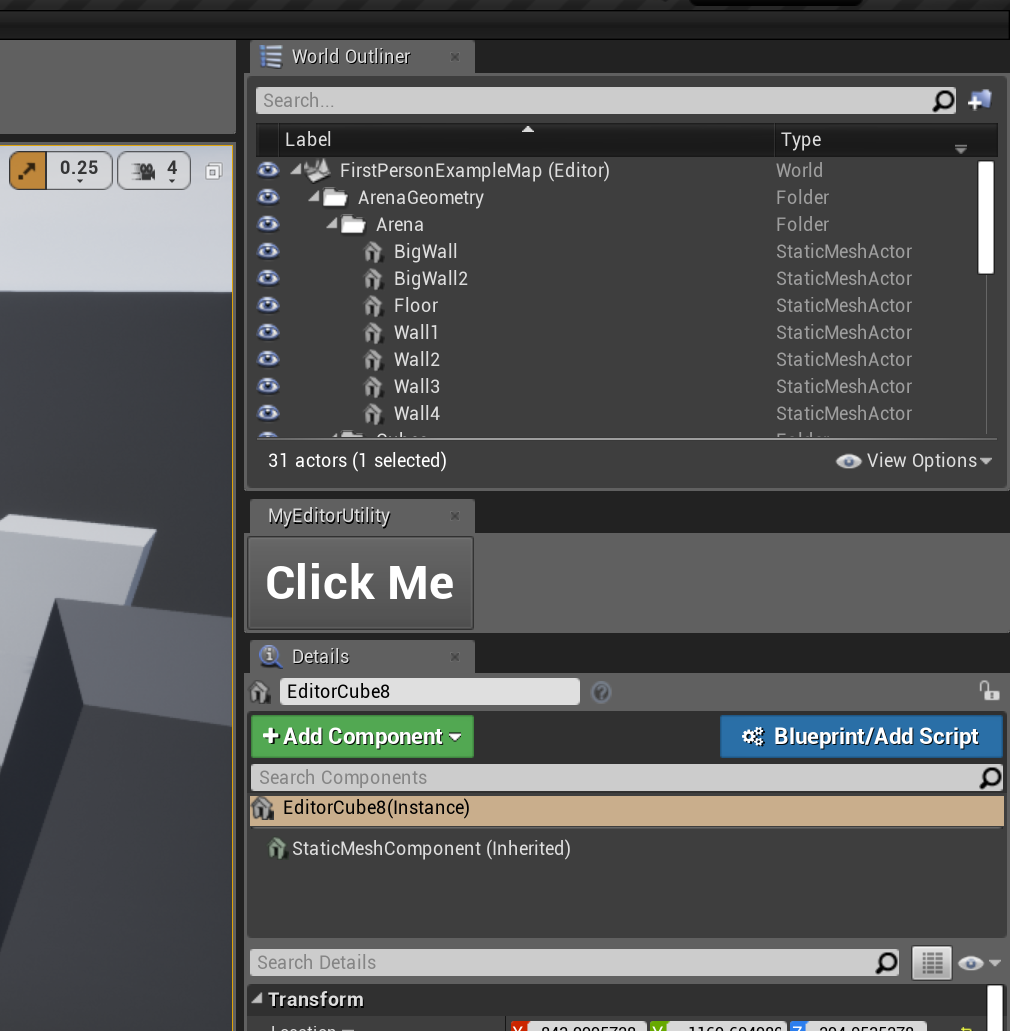 grim ore
yep the only issue I ran into was trying to remember which nodes affect the viewport and items in the world and which ones work on the content browser items lol
maiden swift
It feels just like any other draggable tab in the interface! This is so promising.
grim ore
15 minutes later... damnit wrong nodes again
maiden swift
I haven't found any of the editor widget specific nodes yet. Is it just using the same Editor Scripting category as the other editor scripting stuff?
grim ore
yep
maiden swift
Great. Intuitive. 😄
grim ore
this just lets you have a UMG interface is all
maiden swift
Yeah, that's really powerful.
This makes a big difference in the utility of that stuff.
grim ore
i want to test it completely with drag and drop and other stuff but source is compiling still lol
maiden swift
Another cool thing: we may start to see some awesome editor widgets on the marketplace.
grim ore
stuff like what I was showing is a good example, exposing stuff like snapping and orientation in a toolbar is the bees knees
maiden swift
Always happy to see more avenues open up for marketplace content.
Are you doing video highlights for these features when the stable version comes out?
grim ore
I should be, I did the last 4 versions 😃
maiden swift
Sweet! Always enjoy those.
 hybrid scroll
"Editor Utility Widgets. Editor Utility Widgets are based on UMG, so you can modify the layout of the Editor user interface, and set up Blueprints for logic just as you can with a UMG widget." - finally! Can't wait to try that
grim ore
hopefully we can get preview final before GDC tho or else they will be delayed lol
maiden swift
Epic isn't always the best about explaining exactly what a new feature is/is good for in their release notes, so seeing a visual example is super helpful.
grim ore
yep yep that's why I do what I do. because one line with "implemented this awesome feature" is only helpful to the dev who did it lol
dry moon
Yeah the problem I had a lot with the inspector stuff is that it doesn't allow for too much control. You have to click on an object to do something specific with it
at least this way you can now edit multiple things without selecting it
just have the debug window on another monitor
grim ore
it's got limitations for sure but it's more in what's exposed right now than in features so that atleast can be worked on 😃
honestly this and the Audio Engine being turned on are my happy features. No more needing to fight with getting the audio engine enabled is nifty
bronze cedar
my Unreal Launcher is kinda scrambled , what happen
 worn granite
Remembering that my expandenums change ought to be in 4.22 reminds me that I can still make that more BP friendly.
grim ore
with RTX officially being in the engine and going into Unity shortly I might have to break down and get a RTX card 😦
ooh. with oculus quest support in 4.22 I wonder if we will see some demos using UE4 at GDC this year.
maiden swift
That would be nice.
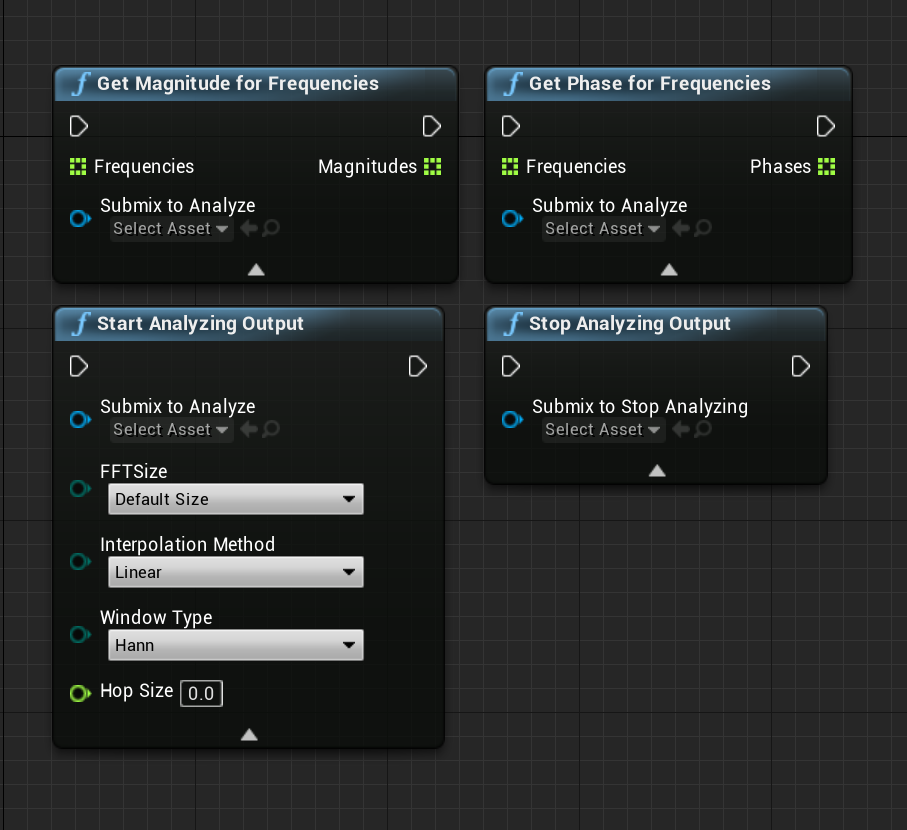
Omg I'm going to have fun today. https://i.imgur.com/STUjpRH.png
 dry moon
wait what be that
maiden swift
Spectral analysis nodes for audio. ❤
grim ore
I wish I knew audio well enough to cover the audio stuff 😦 It all sounds greek to me... lol
frosty copper
Still think the entire rtx is another nvid marketing sham and nothing more 🤔
grim ore
it's always a sham for the first version of something, then someone figures out a good use and they iterate till we have the stuff we have now 😃
frosty copper
Debatable. Also not a huge fan of locking things behind proprietary hardware, but ya know
digital anchor
what
 honest vale
@frosty copper why would it be a scam?
digital anchor
RTX is the door for like 20 features
frosty copper
Sham, not scam.
honest vale
oh
😄
well, RTX is a marketing term, it's DXR or Vulkan ray tracing extensions the games will use
frosty copper
Like physx and hairworks and every other "shiny" performance destroying marketing crap tbing they pump out
shrug
hybrid scroll
Well, they want to sell hardware so they are trying to market is as the coolest thing possible.
But you also have to try a lot of features to see which ones are actually good.
frosty copper
Oh im aware of that, just tired of the same old people bending over backwards every time nvid throws some new crap out 🤔
And slightly irrelevant, but i also like my game engines to be vendor independent, but that's wishful thinking obviously 🤔
hybrid scroll
Sure, that would be nice.
digital anchor
grim ore
well we already have features in UE4 that run on CPU only without GPU accelleration due to trying to keep things fair so 🤷
frosty copper
shrug :>
grim ore
lol. there is a big VR MODE button now in 4.22 on the toolbar, don't click it unless you know the hotkey to get back out heh
frosty copper
... Fun. Though tbh i turn on small icons on every project.. 🤔
hybrid scroll
UMG bluetilities
frosty copper
👍
grim ore
oooh... the multi user editor plugin is actually in 4.22....
frosty copper
Gonna have fun exploring everything since 18. :o
grim ore
if you are playing with the editor utilities don't forget to enable the editor scripting utilities plugin as well 😃
hybrid scroll
One thing that is missing for me right now is to be able to edit details panels for actors / structs using UMG / BP, without code / slate.
maiden swift
Totally forgot to enable that @grim ore. I think I assumed it would be on by default now since the editor utility widgets are, but it's separate.
 cerulean nova
whats so new about the new soundsystem in 4.22 any documentation on that? ^^ 😃
maiden swift
Actually I don't think the new audio engine is documented yet.
Last I checked the audio docs were still for the old engine, and there's nothing under the Early Access section (where it should be).
There are some helpful guides on the forums, though.
Unreal Engine Forums
Discuss and get help with the new Audio Engine, sound design, third-party tools/middleware, and share what you're working on!
cerulean nova
Thank you for the Link i will take a look 😃
Unreal Engine Forums
Discuss and get help with the new Audio Engine, sound design, third-party tools/middleware, and share what you're working on!
this one seems to be it right?
grim ore
you are right, I was thinking of that thread and some of the components but yep no real documentation 😦
maiden swift
To answer your question about what's new about the new audio engine: multi-platform from the start, DSP effects, third-party integrations, real-time synthesis, audio analysis, the list goes on.
@cerulean nova ^
grim ore
so either my install is broke or 4.22p1 is broke. New third person template project, BP only. hit play and it crashes lol
grim ore
yeah but.. uh... not being able to hit play is a big bug to miss
maiden swift
🐛 🐛 🐛
grim ore
and of course I don't have debugging symbols or source installed so lol
maiden swift
Good news, everyone. The first person template does the same thing! 🤦
grim ore
oh... well... you can test the editor utility stuff atleast
maiden swift
Yeah.
grim ore
yep I figured it out
maiden swift
I wonder if it's one of the new plugins.
maiden swift
lol
grim ore
sooo... to the thread I go
maiden swift
I wish they'd make a bare bones template with only the required plugins enabled.
grim ore
and it's already posted lol
maiden swift
At least they know heh.
I don't think Magic Leap should be on by default. 😦
Ah, there we go. Works for me too.
Plugin disabled, smooth sailing.
grim ore
yep it shouldn't be but.... steam vr is and other crap most people don't have so who knows
atleast I can go back to testing, I thought it was the new widget crashing it heh
maiden swift
I'm tempted to put my plugin config on GitHub so people who share my pain can just copy/paste it into their .uproject files and be done with it.
grim ore
ah ha, that's what it is. The magic leap camera plugin which causes this crash also adds the VR mode button to the toolbar
manic pawn
does new audio engine being on actually do anything by itself or is that only if you want to use those plugins like the bp nodes shown above?
grim ore
deleted the project, remade it due to crashing. spent 20 minutes trying to get the editor scripting stuff working without any luck. remembered to turn on the plugin.... damnit I even mentioned this earlier
maiden swift
😆 On a roll today @grim ore
dry moon
LOL
grim ore
ffs tell me about it. Master finished compiling but it's in a broken state so that was an hour wasted lol
hybrid scroll
If anybody else is looking at those new scripting functions with widgets: Is there a way to launch a specific script from another script? Like If I wanted to make a button in the details of an actor (with a normal "run in editor" event) that would open a widget window specific for that actor.
graceful sky
What was the multi user you mentioned @grim ore ? Couldnt see anything in 4.22 notes?
grim ore
I don't think you can create/spawn in editor widgets right now
@graceful sky experimental multi user plugin, it's not in the notes because it's not in the preview notes yet lol
graceful sky
Hmm, ill have to test that out !
sudden agate
I have no idea what this tool is telling me
hybrid scroll
That they all have the same structure and you should use a maste rmatrial?
next badger
New Unreal Audio Engine now on by Default for New Projects
hybrid scroll
like, if you have 10 materials that simply use textures for base color, use a texture parameter and make instances instead of many materials?
@sudden agate
 bright plume
how to make my robots head follow the mouse?
grim ore
find look at rotation between the mouse location in the world and your robots head
 abstract relic
Or use aim offset
 tawdry sierra
how can i create inputs/action inputs in UMG blueprint?
grim ore
you would use the listen for input action nodes in the UMG blueprint if you want it to listen in to action/axis inputs
but the input mode has to still be one that allows game input for the input to pass to the widget, setting it to UI only will prevent that.
grim ore
Yep
tawdry sierra
you helped me a lot <33
abstract relic
Lol
tawdry sierra
great videos
grim ore
man the utility widgets are nice but without a way to get them <-> between other blueprints is 😦
maiden swift
What do you mean between other blueprints?
grim ore
well like someone else was asking, if I wanted a blueprint to pop open a window or I wanted data to go back and forth. I guess more for debugging or output purposes. game runs, bp spawns the editor windows, you can feed that window data on another screen
still fun, I can now easily toggle the lighting mobility on all lights in the scene with a dropdown lol
maiden swift
Ah I see what you mean.
Yeah, I can think of a bunch of useful utilities to build with this.
grim ore
my main issue is getting data in a format that I can use somehow. like with Unity I could make an in editor level editor for a simple game using grids and save them out to data objects or text files. No real way to create stuff for storing data I can find yet.. there is promise with the asset utilities but I keep crashing the editor lol
damn you can't seem to execute console commands in editor widgets lol
 steady owl
Is there a checklist of things to test in your migrated project from earlier versions of the engine to newer versions of the engine to make sure nothing broke?
I know 4.22 is only in preview but I really need some of the features on my game, would there be any hidden things breaking that I'm not seeing? The game appears to work exactly the same in 4.22 after an hour of testing
steady owl
Many of these are also broken in 4.21 though right?
grim ore
that I have no idea, it should say
steady owl
Ok thank you! Are there any general steps that you would go through to ensure your project is still working the same way when migrating to a new engine version?
grim ore
I would say the same steps to make sure it's working on the older version, lots of testing
most larger projects have unit tests of systems to make sure they work
even then bugs are bugs lol
steady owl
😄
Good idea
There isn't even that much in the game, it's mainly clean blueprints so it isn't as scary as migrating a C++ project
Last question- if it does work nicely, the preview builds are all based on the same exact binary that the final release will have, correct? There will just be bugfixes in the exact same way as 4.x.1, 4.x.2 has etc.?
grim ore
it's honestly hard to say unless you plan for it and even then it's hard to say lol. a simple playthru of the base features is a good enough check but even then going from 4.22p1 to p2 to final could still break crap
steady owl
How come?
frank escarp
4.22 has so many changes in the engine code that its likely extremelly unstable
grim ore
I disagree, YOLO that project and enjoy the day cleaning it up 😃
maiden swift
Don't use a preview release for production, period. If you want to test your project in a preview release, make a copy instead of converting it.
steady owl
From my tests it has fixed the issues I had needed fixed with 4.22 with no other noticeable changes, but do you mean just the preview or the whole release altogether?
That's fine, I'll hold off until the production
But even then should I avoid the upgrade?
frank escarp
never upgrade
maiden swift
Test your project in 4.22 with a copy throughout the preview releases. When 4.22 stable comes out, test your copy against that and if it's all good, then upgrade your real project.
frank escarp
unitil its t least a .3
grim ore
every version of the engine has problems so you find one that works for you and stick with it if possible. This is the normal way of thinking
the more fun way of thinking is just do it, keep backups, and enjoy working on the project 😃
maiden swift
You can have fun in a copy of your project. 😄
steady owl
Great advice thansk guys!
@frank escarp do you mean preview 3 or all the way to version .3 of stable?
That could be months and the game timeframe is shorter than that
grim ore
keep in mind the normal way is for people who have real project or money/time matters or the size and scope. If you are just working on smaller projects and time/money is not a biggie then just do it
frank escarp
stable .3
steady owl
Ok I will hold off as long as I can
It’s funny because in terms of my game working, 4.21 is more broken than 4.22 preview
With the specific bugs
But it does make sense to wait regardless
grim ore
but does making sense make sense?
steady owl
That’s the question of the ages
grim ore
😃
 grim juniper
So what exactly are these Editor Utility Widgets. It sounds like something I want to use
grim ore
they are UMG widgets that run in the editor in their own window. You can use most editor utilities nodes with then like getting selected assets/actors and then doing stuff with them
like I can click a button and grab all lights in the scene and change mobility or brightness or whatever. You could select meshes and then align them to the ground or move them or rotate them all for example
I am not very creative so.... lol
next badger
....there is no 4.21.3
i just hope they will not re-introduce bugs in 4.22 (like happened with 4.19)
grim ore
well we all have source access so we can just fix those pesky bugs right quick! 😛
steady owl
Is it common practice for games to upgrade along with stable engine releases so they aren't stuck on 4.6 when 4.22 comes out?
I guess it only matters if they need the feature upgrades or bugfixes
But I'd imagine it makes updating and adding new content a bit easier when you have the countless latest improvements
But also increases the chance of bugs
cloud cobalt
Depends on the team
steady owl
It's a tricky balance of wanting to stay working with the latest performance and tool features but also have a stable place for your game to be at when in development
I would maybe not upgrade after the initial release to then ensure it stays on a consistent base from that point forward
Well, 0 build warnings or errors, and 0 project issues with my duplicate project in 4.22 preview
That's a good sign at least
I'll do the same tests on each preview
But it looks like the upgrade will be painless
gleaming creek
Do make sure to check in your code project before doing that
so you can roll it back if something goes wrong
steady owl
BP only thankfully
I love BP projects as they are all nicely contained in the project folder and super simple to backup
steady owl
I backup the entire directory every day as the project size is only a few GB, it's the only way I feel I've done a failsafe backup after many woes with version control
gleaming creek
or the other thingy, preforce
steady owl
I keep notes and still track all improvements and changes
But don't check each asset in individually
gleaming creek
Are you making new copies each time?
steady owl
I just have had so many nightmares or issues with version control that this way is 100% consistent
Makes backing up easy
I completely see the benefits of a typical version control setup though
Just choosing to do it the overkill way for now
grim ore
lol to answer the question a ton of teams stick to one older version and fudge it along, ARK is a good example 😦
steady owl
ARK is a gigantic steaming mess. They didn't upgrade to newer versions?
It makes me sick to see the amount of crazy decisions in that project
grim ore
I think it's less of an issue tho as you end up being custom engine builds at a certain point and you can then just get changes and add them to your custom version over time even if the base is old
steady owl
You can do that but I prefer to stay with binary releases for again failsafe reasons
Keeping it as simple as possible
grim ore
yep yep 😃
tho I would really really figure out how to make source control work again for you
like... really really lol
steady owl
I mean entire project backups with well documented change logs is working great for me so far, I work solo though
grim ore
atleast you are backing up your project so 😃
steady owl
I do it daily or twice a day
Even after doing anything major there's a full backup
Takes 30 seconds on a fast ssd
grim ore
as long as you have an offsite backup you should be ok. I've read too many stories of "the laptop with all the code got stolen" or "the house caught on fire and our backups were all on site"
grim ore
kudos
steady owl
Unless the house burns down and the internet breaks, I should be good
worn granite
How detailed are your changelogs?
steady owl
I screencap every day the work session and include it with my changelogs with timestamps
So if I need more detail I watch the video
Great to double check things and get specific values
Especially if something crashes and I need to replicate the setup
worn granite
Hrm.
I think that's the first time I'm hearing anything like that.
Well, if it works.
steady owl
I mean it's crazy sure and overkill
But never again will I have problems with the server not working, assets not syncing, and countless other problems I've had with version control
Simply because I'm not a version control expert
This way just works great for me
I'd rather spend the time making the game and not debugging why things didn't sync or curse at the sky for accidently reverting assets that shouldn't have been
For teams of more than 1 person though I can see why it's essential
grim ore
I just like source control due to being lazy. Once it's up for me I just have to type words on what I did and hit push and I can use it anywhere else since I have more than 1 place to work from.
grim ore
I use github so it's always running
well github for the public stuff, bitbucket for the private so I always have access to it
steady owl
I'm just always sketched out a bit especially for old projects that I go back to
The entire project approach guarantees to open exactly the same
An old project where the server isn't active anymore or things got moved can be scary
But I suppose you can always back up the entire project as well as github and it should work the same?
grim ore
as long as the correct stuff is somewhere yep
it's more about making sure you keep the right stuff and ignore the temporary stuff lol
like I opened a 4? year old Unity project the other day off bitbucket and besides having to update some older assets it worked fine still lol
 spiral island
unreal has a "zip up project" menu which exports only your code and blueprints and stuff
excludes all the compiled junk
steady owl
Very useful thanks for the tip
Can I safely set the HUD class of the gamemode to "none" if I'm not using a HUD class?
grim ore
if you can set it to none in the game mode then yes
grim ore
and just to make sure since I didn't know I tested it lol. No HUD returns back no object without any apparent problems when you try and use it so if you don't use it then 😃
steady owl
Great thanks for confirming
 dawn vessel
Anyone know If it’s possible to take the physics part of UE from a certain version and paste it to any other version? The reason I ask this is because there’s some physics changes in an older version that actually worked better than the newer version, as it stuffs my game up.
Greatly appreciated for any response
dry moon
Its usually easier to go from older and porting over newer features
Because there is going to be a lot of stuff that is going to require the newer stuff
dawn vessel
How do you port?
dry moon
And youll have to end up rewriting to get certain things from the old to current
Like clothing will probably need fixing as well
dawn vessel
Porting over would be best yeah. As I would be updating everything except for the physics side of UE
That’ll be nice. But just needa find out where to start this porting
 mint umbra
Hey guys. I've got an instanced static mesh child BP where I spawn a leaf VFX at each tree in my game, controlled by wind etc. I'm having issues copying the same logic to a dusty VFX for my pine forests. The particles simply dont want to move with the wind parameters, and the same thing happens if I attach them to the player. They stay in the orientation of the actor they're bound to; how do I make it "free" so to speak?
fierce tulip
are they set to local space?
mint umbra
With an Acceleration module in Cascade, using vector particle parameter distribution
paramater name is correct, min/max is 0/1 for the out and inputs. The param modes are using DPM Direct. Always in World Space is on.
fierce tulip
did you tell the blueprint to do this for the new particles as well?
mint umbra
the Parent BP (which is working with normal leaves) is getting the vector parameter value in BP, the child is only altering the emitter.
fierce tulip
might want to try #blueprint I know my emitters, but blueprints i am still learning :/
mint umbra
hmm yeah definately, i think it might be something tied into the emitter though. i can try with another VFX to see if that works. i'm using the dust VFX (small white dots floating around) from starter content
 lime gull
Is it possible to space out umg buttons so that i can still use my arrow keys to move
Right now it looks like this
 misty creek
@lime gull Could you use spacers? They are in the primitive section.
dry moon
Is there a better way to do landscape grass

That you don't just subtract the layers for the specific layer you want
wary wave
what in the heck
there's almost certainly a better way
without knowing exactly what's going on it's hard to say, but I suspect layer blends etc might be what you're after
dry moon
Yeah but the problem with that
I have different type of Landscape Grasses for each type
so using layer blends means I gotta duplicate the thing for each input
and set the one I want to a constant 1

to me this sort of feels clunky as well
dry moon
Oh well I'll just do it this way
vale silo
I have a static mesh, material, material instance and a few textures (all in different folders). How can I package those into a single .uasset so I could share it with another dev ?
grim ore
I don't think you can, uassets are representations of stuff in the engine and as far as I know 1:1. You could always export out the items into a new blank project then share that project in a zip file
 native tendon
export all of them and make a zip.
 pearl mango
Hey I just had a question because I'm trying to free up space on my system drive, is it good or bad to store unreal projects and files and stuff on an external drive?
native tendon
bad, no. slower though.
pearl mango
I'm thinking of doing it but Idk if it will mess up projects or anything
native tendon
the folder can be anywhere you want.
pearl mango
Like for kite demo, paragon assets and stuff
grim ore
I have the same project in multiple places on multiple machines and it doesnt care as long as it can find the engine to open the project
pearl mango
Ah ok
 maiden sundial
Had someone also such problem when using visual studio code as IDE ?
native tendon
you need VAX.
maiden sundial
VAX ?
native tendon
intellisense is just sucky with unreal because of the immense size
pearl mango
So prolly better to just store them off the machine, and put the project and any assets I need on the machine itself, right?
native tendon
well and intellisense still sucks lol.
@pearl mango you can put the WHOLE project on another drive or anywyere, you cannot split up the project.
pearl mango
Well Ik I cant' split up the project, I didn't wanna do that. I was just asking because I have an external drive, but sometimes the usb cable has issues with disconnecting randomly. It's rare but it sounds like it could be bad if it happens while using UE4. Just asking for more professional advice, so to speak
native tendon
you'd be better to just get another actual drive for your machine
especially if you have flakey hardware
if anything, unreal itself may not have problems, but the data could get corrupted when saving if the cable comes out for example.
and external USB storage is massively slow
pearl mango
Ooohhh ok. That makes sense, it explains why sometimes a project will crash when the cable acts up and I have to rebuild projects and redownload assets and stuff
pearl mango
Oh trust me, I'm pretty strapped for cash or I'd have just gotten another ssd and been done with it lol
That's very true. Ok cool some great tips, thanks a bunch!
native tendon
well you could get like a 1TB WD Blue for like 50 bucks, and use it as storage, slower but better than USB lol
 dim dragon
Well, I couldn't figure it out on my own . https://pastebin.com/raw/qunfegn8 Here's the compile log of the project. I've not been able to get any programming work since Saturday because of this and have taken a crack at audio assets but now I actually need to implement them and to do that I need a working project :x
native tendon
you have a bogus #include
something like #Include "Runtime/
without a file.
but need to see the actual error from the output window, not the summary
native tendon
your screenshot is from the error summary window
dim dragon
Please use small words so they can fit in my small blueprint brain.
native tendon
not the other window that says output
dim dragon
Okay
native tendon
the exact error will be in the output window
dim dragon
Googling where the output window is...
dim dragon
2>D:\GameDev\RobotGame\Force\Source\Force/MagicNodes/TestScript__CPP.h(15): fatal error C1083: Cannot open include file: 'Runtime/': No such file or directory
2>UnrealBuildTool : error : UBT ERROR: Failed to produce item: D:\GameDev\RobotGame\Force\Binaries\Win64\UE4Editor-Force.dll
2>                        (see ../Programs/UnrealBuildTool/Log.txt for full exception trace)
2>Total build time: 87.55 seconds (Parallel executor: 0.00 seconds)
2>C:\Program Files (x86)\Microsoft Visual Studio\2017\Community\Common7\IDE\VC\VCTargets\Microsoft.MakeFile.Targets(44,5): error MSB3075: The command ""C:\Program Files\Epic Games\UE_4.20\Engine\Build\BatchFiles\Build.bat" ForceEditor Win64 Development "D:\GameDev\RobotGame\Force\Force.uproject" -WaitMutex -FromMsBuild" exited with code 5. Please verify that you have sufficient rights to run this command.
2>Done building project "Force.vcxproj" -- FAILED.
========== Build: 1 succeeded, 1 failed, 0 up-to-date, 0 skipped ==========
Ah. I was trying a plugin called MagicNode and it seems to have backfired.
I was learning just the very beginnings of C++ and had it all setup and working. Had a brownout that cooked a drive. Replaced it. Project wouldn't run. Dumped binaries and started again. Won't compile.
Horray.
dim dragon
Yeah its Runtime/
native tendon
deleet that line.
dim dragon
oki
Let's try building again...
Also, I didn't know you could double click something in the error list and go right to that file.
Like I said, literally started learning c++ on Saturday. Its really powerful stuff from what I gather.
native tendon
also it's a plugin, and it appears you copied it to the wrong location
if Source\Force\MagicNodes is where you put it
native tendon
i guess the marketplace version has an example or something
GitHub
Custom Kismet Node System that enables C++ code to be written on Blueprint Graphs - BrUnOXaVIeRLeiTE/Unreal-Magic-Nodes
i assume that's it
dim dragon
So I should install it locally to the project.
native tendon
it goes in Projectdir\Plugins\
dry moon
Does the C++ access UE4's api fully?
native tendon
well the engine is c++ so of course.
dim dragon
Do I have to do anything to make VS see the pasted files or can I build ?
dry moon
well just didn't know if you can only do small stuff in it
dim dragon
Here I was shitting bricks thinking this was a references issue or something which I've been told is pretty scary.
 polar hawk
native tendon
polar hawk
native tendon
for VS, you need to generate the project files by right clicking your .uproject and click generate visual studio project
dim dragon
Yeah, MagicNode is crazy.
dry moon
how is the performance on it?
native tendon
im not so sure if that's really a good way to "learn" c++ though lol..
dim dragon
given that TestScript_CPP was me farting about and it has errors in it, is there a way I can remove it and the project not get mad at me?
Also yeah I think I'll just VS it next time instead of MN
dim dragon
Regenerate project?
native tendon
[9:59 AM] omega: for VS, you need to generate the project files by right clicking your .uproject and click generate visual studio project
dim dragon
Ah. I thought it meant something different.
I don't actually get a prompt to generate project files when I rightclick the uproject.
lime gull
Is it possible to have a umg that goes up to down and left to right
native tendon
native tendon
apparanetly it has the wrong associations too.
dim dragon
I can run the editor just fine on its own, just not with my project.
Ah. I'll take a crack at changing it.
Odd.
Very odd.
And now I get those options.
Good.
Thank-you @native tendon
grim ore
yep the blue one is the version selector thingy you want,. it breaks sometimes when updating
dim dragon
Mmm.
I like your hat, Matthew. I used to have one just like it.
Attempting build...
Fingers crossed.
grim ore
I found one this weekend at the good will that has the arms hanging down 😃 little glove things to put your hands in
lime gull
Is it possible to get a umg that has 3 options in an L shape
dim dragon
That's adorable. I had one that was like a wolf's head with a funny nose that I used to wear on our games nights.
lime gull
Like up to down and left and right
grim ore
Grid/Uniform grid panel?
lime gull
Thak you so much Matthew, exactly what i needex
grim ore
when you right click the uproject and switch engine versions make sure it's on your correct version that works?
 dim plover
dim dragon
dim plover
dim dragon
You were not doing that five minutes ago, mister. Time to reinstall you.
What a farce.
Life lesson: Get a UPS with surge protection. Brownouts are nasty bad news for harddrives.
grim ore
ouch
dim dragon
Inverters get low current and suddenly decide "hey let's make a lot of voltage" and lots of bad things happen.
 cerulean harness
So I finally told myself to get off my ass and learn how to develop a game, What do you guys prefer? I just learn things through blueprint or should I learn how to develop it through coding with C++?
dim dragon
Thank-you tremendously for the help guys and this has been something of a learning experience for Visual Studio which until now was kinda alien to me and intimidating.
cerulean harness
I'm not sure if I should place this on #career-chat or not seems weird
lime gull
Is there a way to have multiple on clicked events
Cause when I try to add more they conflict eachother
dim dragon
How do you mean?
I mean, there's mouse down and mouse up. You can trigger multiple events from that.
dim dragon
Right.
lime gull
And when you hit enter its supposed to press thst button
dim dragon
So when you hit enter, you want multiple things to happen?
Or is this looking for the release of the key instead of the press?
lime gull
Hold up lemme check one thing, but basically I want it so enter gets linked to multiple buttons
If thst makes sense
Yeah I only ever had 1 button set up at a time
dim dragon
So basically, you want the buttons to listen to if enter is pressed while they are active?
native tendon
why do you need more than one in the same object
lime gull
Cause i have multiple options
native tendon
for the SAME button?
lime gull
Its all under a widget
native tendon
you've lost me, you have one button, on one object, and you want to bind the single event multiple times. why?
lime gull
Wait i may have got jt
Ill get back to you in a few minutes
OOOHHH
Yeah I got it
I just didnt understand fully about events
My problem was i was trying to bind the same event under the different buttons
native tendon
that's why i asked why you were trying to bind the single event multiple times lol.
lime gull
Last question : How can I change the color of text with blueprints?
 hot drum
Can anybody tell me why this is happening?
(ignore the auto exposure, that's not part of the problem lol)
This happens with every actor that crosses into that area
even the character and what not
Or hmm
auto exposure might be the problem
I'm entirely not sure
 dim arch
Unreal Engine Forums
PREVIEW!
Preview 1 of the upcoming 4.22 release is available now on the Launcher and GitHub. We are making this Preview available so that our developer community
vs19 yeee
and RTRT
lime gull
How do I set keyboard focus to a uniform grid panel
Im trying to set keyboard focus to a button but its not working, do I need to remove the focus then set it to another one?
dim dragon
Project crashes at launch. Going to install debugging symbols.
hybrid scroll
@hot drum Make sure that actor is inside reflection capture volume.
hybrid scroll
move it and rebuild lighting?
on the gif the change looks gradual. Can it be something within the material?
plush yew
Can someone animate one thing for me?
lime gull
What is it
And does anyone know how I can switch the keyboard focus to a different group of buttons (horizontal box, vertical box ect
Set keyboard focus isnt working
lime gull
Yea
plush yew
a 10 second hand to hand fight sequence
lime gull
Is it like a 2d drawing?
plush yew
No 3d
lime gull
I could attempt, 3d animating isnt really my strong suit
plush yew
I have the characters
lime gull
Do they have bones?
lime gull
Are they fbx models?
plush yew
yes
lime gull
I could try, like I said animating isnt my strong suit
plush yew
Cool
lime gull
Most ive animated was a fist closing
plush yew
I'm dogshit with animation
hot drum
@hybrid scroll It happens with all actors, even my character
So It can't be the material
also doesn't building the lighting cause some weird stuff to happen to your level
hybrid scroll
Building the lights causes lights to be built. If your lights are weird it might look weird.
Usually it will get a bit darker for example.
When lighting is not built you get those "preview" texts on shadows.
Try the same meshes on a new clean level.
That will rule out few problems.
 azure monolith
hey i need a little help with a concept in my BPS
is anyone around able to give me a quick pointer
hybrid scroll
sup?
dim dragon
https://pastebin.com/raw/6Sqs8myS So this is the response I get back with debug symbols. I'm really really lost.
azure monolith
So i've been following along with virtus's side scroller tutorial
in the video he often has an actor cause the players health to drop below zero and in response they then tell the player to die, but I was wondering where and how I could just set a more global condition that whenever the player hits 0 for any reason at all he dies?
dim dragon
I think my project expects something to be somewhere and its not.
Like it thinks UE4's editor is at some location of D:/ or something?
hybrid scroll
@azure monolith Dunno this specific tutorial, but if other actors do damage to the player, use the "apply damage" from the interface. Then in the player character decide what happens whe you get damaged
thats a more universal system
azure monolith
interesting
the damage thats being done in this game
is more in the form of effect a single widget
the healthbar
i dont know how to use the apply damage nodes though i get the feeling they are a much more dynamic way of dealing with damage
hybrid scroll
Look up a tutorial on interfaces.
hot drum
@hybrid scroll wait if I build the lighting rn will there be any things affected in the future when I'm making the rest of the level
hybrid scroll
No. It will just update lights. You can continue as normal.
It doesn "change" anything.
it will change how light looks on your level.
but its not "irreversible" or something
 elfin stream
some days compile is instant, other days... so ... slow....
hybrid scroll
@dim dragon the with with d:\build++ue4 is temporary, for building
thats automaitc
dim dragon
Ah.
hybrid scroll
and normal
dim dragon
https://pastebin.com/raw/6Sqs8myS I am deeply confused.
hybrid scroll
but I have no idea whats wrong 😃
dim dragon
Neither do I
hybrid scroll
Ask on answerhub
dim dragon
oki
hybrid scroll
More permanent place
dim dragon
Mm.
hybrid scroll
here it will just get lost in a stream of messages.
dim dragon
True
native tendon
its not that it's "automatic" it's that's where it was built on epic's side
dim dragon
Ooh
 true leaf
Hi so im having a very bad time trying to get blender models into Unreal with animations... I cant even export a working model into FBX , into blender, and back... it just gets allll jacked up.
Without me even touching it, the import errors like crazy and breaks old anim BPs, says wrong number of bones etc etc..
this other model when I import the FBX the animations are like.. blank? The mesh disppears
So how do I go about learning the blender UE4 pipeline o.o
I need to get some inkling of a start at it
dim dragon
Have you looked on Youtube for tutorials?
Generally that's how I got into Modo > UE4
https://answers.unrealengine.com/questions/873923/new-install-crashes-loading-old-project.html Okay, query is up. Wish me luck.
abstract relic
@true leaf 1) you can't import and export back out without having a bad time 2) when you export the rig you most likely forgot to untoggle 'add leaf bones' 3) rename the rig in blender to anything BUT armature. It tends to make your animations disappear
true leaf
those are some good tips ! thanks. I guess ill start making a doc with like... rips and tricks
tips*
rules
abstract relic
I call mine the book of bs
true leaf
lmao well hey after renaming the armature now the anims work!! then it was the wrong way so i just changed the Up direction in the FBX export settings to 'Z' is up instead of 'Y' and now it seems like its great ^^
(the quaternius sheep model lol )
still doubt i will have luck with a more complex model at this point but hey thats a start
ty
abstract relic
Baby steps. You'll get there. You just need to kick the software like it's an old NS cartridge from time to time 😄
 delicate tusk
Hey guys, I'm trying to damage and kill an enemy AI actor, I've been using a for each loop to apply damage per actor hit, but when he destroy function is called, all spawned enemies die at once, if i don't fire the for each loop then one will detroy even if multiple are hit. Could anyone point me in the right direction for destroy indiviual spawned actors? Or is create individual actors the best way? Thanks!
delicate tusk
Ok, so far my logic is -> for each ai hit do damage, then for each hit with 0 heatlh destroy
native tendon
you're hitting every single ai, and probably killing them all
which is why they all die.
delicate tusk
Okay I think i see the issue, my hit actor refernces all instance at once, so how might I create unique ai instances?
native tendon
your hit actor?
it depends on how you';re trying to hit them
are you doing a trace, and hitting something? overlaps? what?
elfin stream
you may have some fundamental concept issues here.
delicate tusk
Im doing a trace by object and comparing against the AI CBP, Then storing the actors as an array and calling it in the do damage bp
I assumed the array would only store the hit component, but i realise it will refernce all instances at once
so it does damage to every instance of AI CBP
native tendon
Just do the damage when you hit instead of an arrayed
delicate tusk
Im trying to spawn multiple AICBPs and do damage to each one individually
native tendon
Bloody autocorrect
delicate tusk
My hit detection is in two parts, intial impact then explode, so a sphere trace on explode
native tendon
Qh so youte doing am overlap
And then a gorilla loop on the resilt
Omfg. For loop
delicate tusk
haha yeah
native tendon
Well that makes sense for a radius damage
You would damage everything that is overlapped
So likely they just dont nave enough gelato to survive
Rofl heath
I think i need some gelato.
delicate tusk
okay cool, am I right in thinking that each CBP spawned should already behave uniquely?
 timber python

 tepid dragon
does anyone know when InstaLOD will be available for UE4?
tepid dragon
@vale silo InstaLOD looks amazing, but they'll never let indies license it, only AAA studios.
tepid dragon
Yeah, on Gumroad
i bought early access for $70
and then they just stopped it altogether
vale silo
once they secured funding, they just killed license server and no one, who were basically funding their development, got their copy working
f@ck them
tepid dragon
i agree
i sent them countless emails, and all i ever get in reply is "We're still working on an indie license"
that was 2 years ago
vale silo
they should have at least let people keep their indie version and update it to current UE4..
tepid dragon
you could still download it, but you have to use the old version of ue4
vale silo
but really, why would you want to buy another indie license if they can just cut it short at any time
tepid dragon
i think there's also a way to update it to current version, i've done it before, but it's literally not worth it
cause what they're offering is amazing
tepid dragon
Doubt they'll come up with anything
vale silo
and UE4 already has decimator for static meshes
tepid dragon
They're working on Skeletal Remeshing and LOD creation, but not imposters and stuff like that
 copper wing
Question, im plannig to make a prototype demo of an rpg i have in mind, problem is that once i figure out the look of the boss and what not or enemies, how do i setup ai for npc, enemies that follow you to certain part then stop and most importantly boss battles? like how would i construct an boss mechanic like in the dark souls series by adding the multiple phases?
grim ore
Behavior trees can do it. You would just pick the right path based on phase.
 old summit
has anyone here looked into the "bad_module_info" crash introduced by the windows 10 fall creators update? i'm looking for technical info, but all i can find are "reinstall windows" solutions.
maiden sundial
I'm havin here a problem with Visual studio code. It doesn't find namespaces like Super:: and other stuff
 weary basalt


 maiden sundial
I think i need a step by step tutorial for this 😨
I'm fariy new into visual studio code
Normaly i work with the Qt-Creator
copper wing
@grim ore OH OK, HOW DO I GET THE BEHAVIOR TREE?
sorry about caps, io tend to hit them by accident
spiral island
you can edit the message lol
dawn vessel
Can anyone refer me to a tutorial or something to port new UE features to an older UE?
Haven't found a single thing.
delicate tusk
@native tendon turns out I was trying to remove health from each spawned character, instead of just calling the function on self once aha
glad stone
anyone knows why my vertex height material is going crazy with flickering ? Oo
like back and forward like mad
😅
 whole quarry
can you show it in a gif?
glad stone
yes sure
this is my custom heightlerp function btw
maybe somethings wrong here
i disabled all layers except the first 2
it wont let me vertex paint anymore either
i really need a good GIF program
they are 30 mb
glad stone
but that would be 200mb or something