#ue4-general
1 messages · Page 389 of 1
 grim ore
 wary wave
{
    float SizeX;
    float SizeY;
    float OriginX;
float OriginY;```boring
time to make a custom engine branch I guess
 left mica
So now, how would I make it so that I spawn as the FIrstPersonCharacter blueprint and not separate as before?
wary wave
change the default game mode to the correct one
left mica
ah, thanks!
 tawdry sierra
hello, im trying to make an animated material. Basically a circle zooming in loop from the center. Any ideas how can i do it?
wary wave
maths
grim ore
lots of maths
wary wave
also you need to be much more specific?
grim ore
with sin and time maybe?
wary wave
this kind of thing is usually easiest to do with smart UVs
then you only need a panner
grim ore
Im guessing he wants like a ping effect, large circle going down to a small one then looping
tawdry sierra
lemme find an examle
example*
omg i cant find any examples
its like a water droplet
wary wave
right
well the first step would be to draw a circle
you'll need a mathematical function that draws a one pixel wide circle
tawdry sierra
a circle expanding from everywhere and another one appears from the center
wary wave
this is also unfortunately the hard bit
tawdry sierra
i see
wary wave
depending on what you want to do, texture based effects may or may not be easier
tawdry sierra
i need to for a post process effect
wary wave
without knowing precisely what you want it's more or less impossible to give an answer
tawdry sierra
alright ill make an animation to show
 gleaming narwhal
@flat scroll I approved your post
 plush marsh
what can be a cause of changes in c++ are not reflecting in editor?
i sync with OneDrive
 vale silo
@regal mulch were you able to get an answer or figure out patching on Android per your question here https://forums.unrealengine.com/development-discussion/android-development/1416325-how-to-properly-patch-mobile-applications ?
Unreal Engine Forums
Hello everyone,
I'm currently struggling to understand how patching of mobile applications is supposed to work.
Now to give some information upfront:
- I used
 fierce tulip
@tawdry sierra you want something like this?
https://i.gyazo.com/7b1f20f1ce9bdfff036de7acae2e9c69.gif
 tawdry sierra
@fierce tulip yes but with just 1 cirle
fierce tulip
that depends on the texture you'd use
grim ore
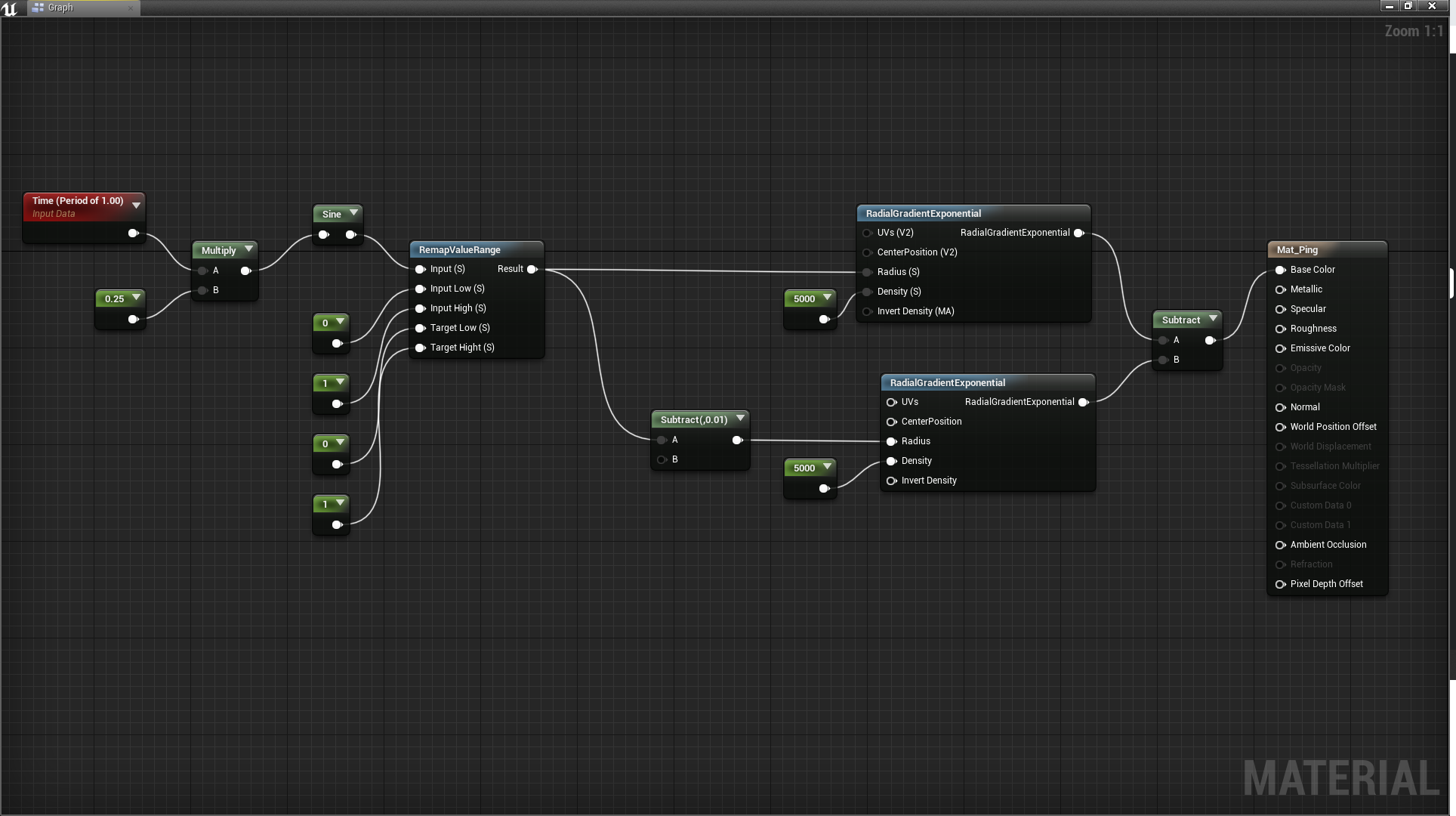
https://i.imgur.com/c8ObxIn.png this is a start to do it programatically
 fierce tulip
 grim ore
I have 0 guarantees on quality or performance or lack of performance but it's something lol
tawdry sierra
thank you will try now
grim ore
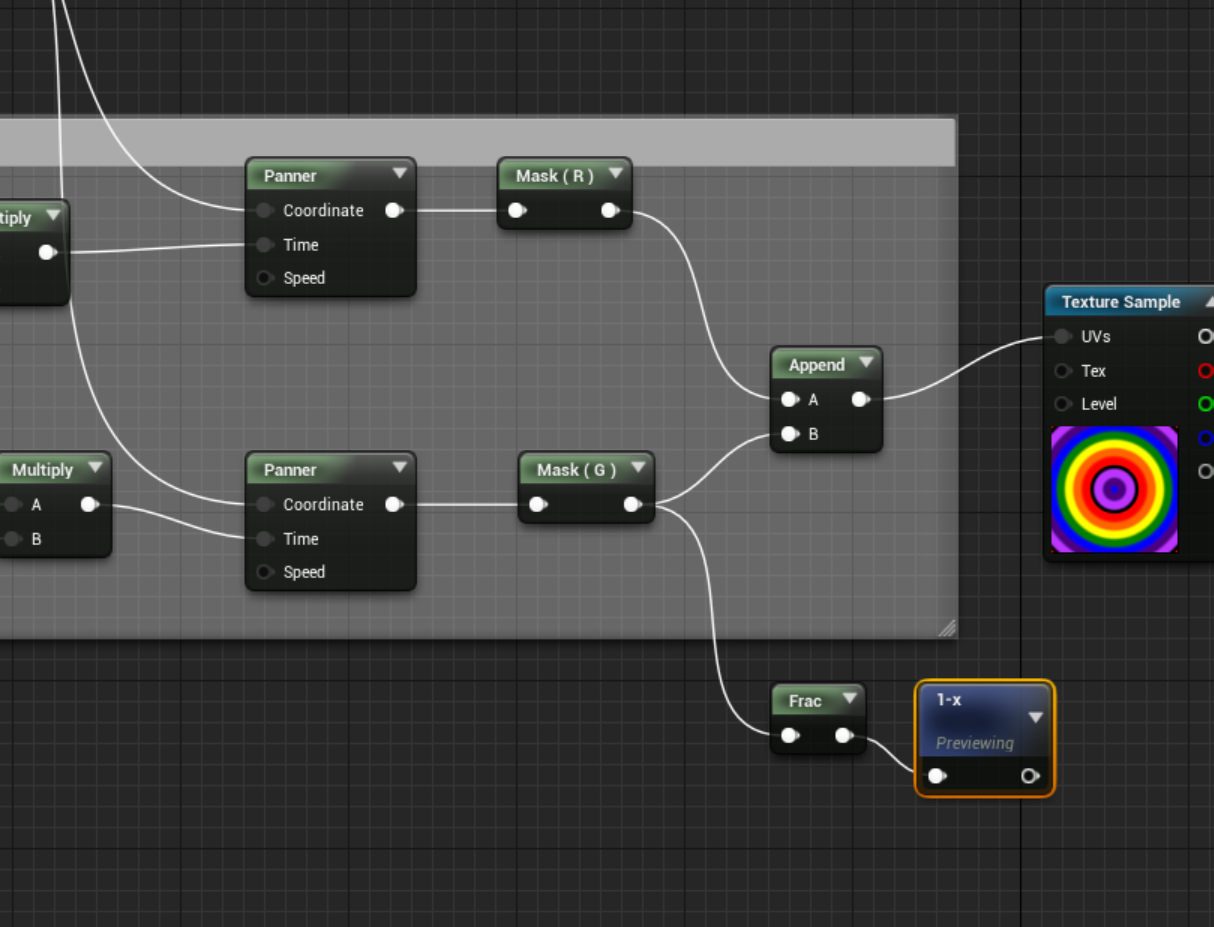
if you try mine the Multiply on the left is for adjust speed and the remap is to allow you to determine how much of the ring is shown. they arent needed they are just for tweaking

 pallid compass
luos put that black magic away

 next badger
the roof, the roof, the roof is on fire...i mean floor

 grim ore
yep I think of it more as a ping than a water drop lol
fierce tulip
love how there is a million ways to make a circle hehe
next badger
 grim ore
more sonary https://i.gyazo.com/b1f7754e272985dd02bc4a5ba4b55f00.gif lol
 fierce tulip
@grim ore can you give me a gif of it fading out fully before it starts again? for shitzngiggles
grim ore
yeah, also trying to make the sweep effect get bigger as it gets bigger for giggles
tawdry sierra
it doesnt work i did everything on point
fierce tulip
it should work in that case, show us the material
tawdry sierra
fierce tulip
if you change the X and Y speed it should move?

Epic's Support A Creator
Creators will receive rewards when players support them in-game. Sign up now!
not solely for fortnite anymore
wary wave
I didn't think it was?
tawdry sierra
it doesnt move
 maiden swift
@wary wave It was until the Epic Games Store was announced, at which point they opened it up to every game on the store.
grim ore
https://i.gyazo.com/2df51b4c2eb20a9b9af5cb7de5931198.gif @fierce tulip
 fierce tulip
@tawdry sierra set the top panner to Speed X 1
bottom to Speed Y 1
@grim ore cracks knuckles
grim ore
man gyazo sucks for that lol
https://i.gyazo.com/2df51b4c2eb20a9b9af5cb7de5931198.mp4 for the actual MP4 if it helps lol
next badger
@grim ore you can drop gif on discord directly
grim ore
wtf discord can play mp4 files
pallid compass
yes
grim ore
yeah I could if i had a gif to share, just lazy and use gyazo to capture and share lol
well neato now I know to use mp4 it's a ton cleaner
pallid compass
close enough
next badger
wow, avant garde
grim ore
that's cool, looks like an 80's band rock cover
tawdry sierra
oh shit
fierce tulip
hence the trippyness
grim ore
lol
fierce tulip
dafuq, it was 1:1 sound video in premiere
grim ore
sir we have contact!
fierce tulip
must be discord
next badger
@fierce tulip nah, i've downloaded and its still lags
 flat scroll
Is there a way to organize the stuff in the vault?
next badger
@flat scroll no =)))))
grim ore
see that was perfect timing on that video 😃
tawdry sierra
i have one more request please :3
can another circle appear before the other one fades out?
fierce tulip
add a 2nd line to the texture
fierce tulip
divide the area into 4, this gives you 3 lines (5 actually if you count top/bottom) and put the lines on the first and 3rd line
tawdry sierra
alright i got two problems
they are clearly visible
alright i solved the first problem which is the direction they are moving in
but i cant figure out these lines
the texture is pixel perfect
grim ore
what compression is it using?
fierce tulip
oh the line?
set the texture (in the material editor) to absolute mip map
and sampler source: shared wrap
and the texture itself should probably set to alpha compression, and try to keep it small as its always loaded at highest res
tawdry sierra
it gives errors on alpha compression
fierce tulip
thats normal, click on the texture and set "sampler type" to alpha
ue4 doesnt do that automatically (annoying i know)
tawdry sierra
finally
thanks everyone
ive been usin ue4 for 2 months heres what im working on 😛
tawdry sierra
haha yess
im ready to put some years into ue4 and im really glad there people like you guys helping out others like me <33
 plush yew
how did you make those particles
tawdry sierra
the kamehameha or the aura?
fierce tulip
hamehameha?
https://i.gyazo.com/c8693181b6dd0d0d27576eb276528489.gif :p

 ruby folio
@quartz bane Are you still adding features / improving the Ocean & Sky Project?
 quick dirge
does anybody know the fix to this?
 thick knoll
Hey guys! I want to ask a question about an issue I am having in UE4 (Blueprint Coding) is this the place to ask or is there a different chat more appropriate?
fierce tulip
#blueprint should work
tawdry sierra
this is the place ma dude :DD
next badger
@quick dirge it means file is opened, close it first
thick knoll
I just scrolled down further and saw Programming #Blurprint, I shall post in there!
Didnt realise the list carried on so far down! xD
quick dirge
@next badger it worked
nvm it doesn't work i have nothing open
except visual studio
grim ore
go into that folder where the bad file is and delete it. if you can't delete it then.... fix the problem
next badger
have you guys heard of ODRoot ?
ODRoot The software knowledge resource tool for creative minds
vale silo
how would you make UT3's Link Gun beam in UE4 https://youtu.be/QbGC-CFPpj0?t=48 ?

No copyright intended. All rights go to there respected owners.
vale silo
how does one deform spline in runtime ?
 gleaming creek
The same way you shape it normally
Using the appropriate SplineMesh functions
It might be expensive though, especially if the model is complicated
grim ore
is the beam gun in UT4 right now? if so pop it open!
next badger
iirc there was an ue4 stream about lightning effect, that used dynamic splines
fierce tulip
not really a spline, it basically does a trace to where-ever it hits (and a homing thing for when a target is close)
then it used some stuff to control vertex offset and what not to make it all bendy
it just tiles the texture/shader depending on length
and I think it was a gradient that masks out begin and end, and offsets the rest semi-randomly
vale silo
@next badger got a link?
fierce tulip
but yea, check out the one in ut4
vale silo
Does UT4 come with all the assets readily available ? Is it a project in the Vault ?
gleaming creek
Oh, you asked how to deform a spline not a splinemesh. Same thing, you can adjust the spline points' coordinates and tangents
vale silo
I am not UT series fan, so I didn't follow development of UT4
@gleaming creek and all that available via Blueprints ?
fierce tulip
yea, all the assets are available after you download it
gleaming creek
Yes, should be
IIRC it's set location at spline point and set tangent at spline point functions on a spline
fierce tulip
the blueprints are insane, especially since the link gun can hook onto enemies and teammates, or use the biogun blobs to make a "web"
wary wave
tbh, UT3's particle beam based approach is probably sufficient?
next badger
@vale silo https://www.youtube.com/watch?v=6gp1ECkpCDc
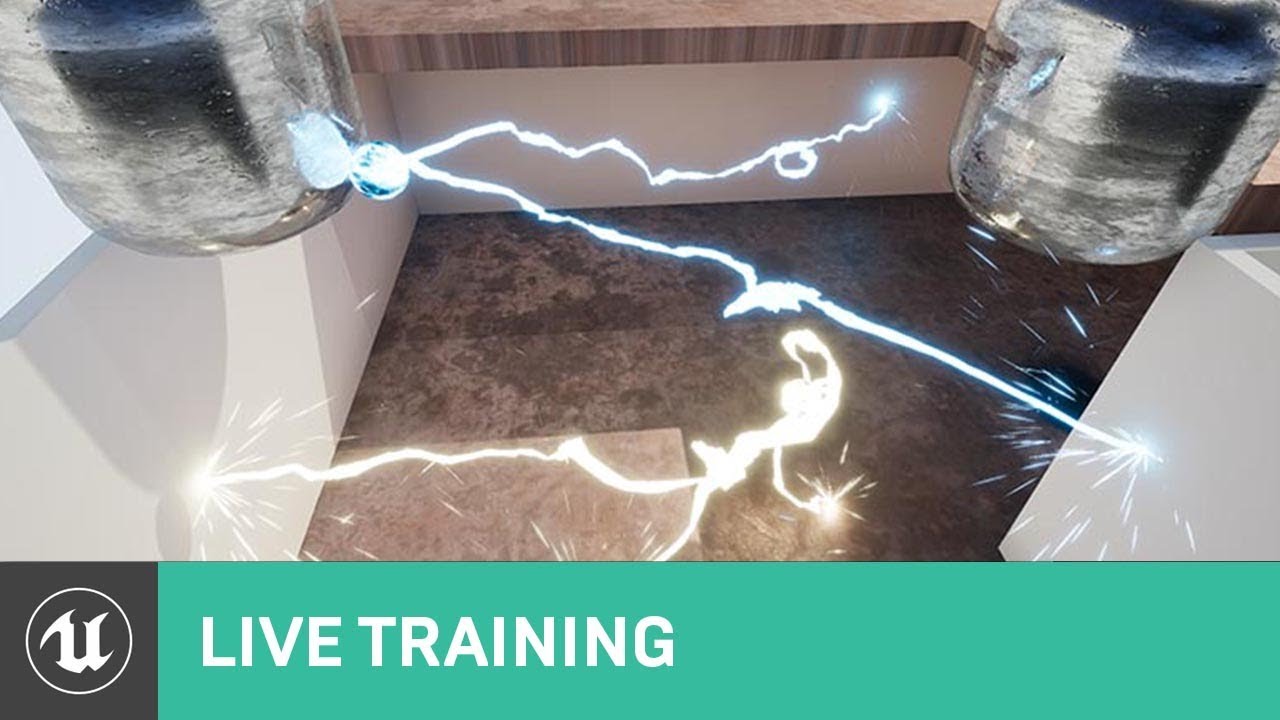
On this week's livestream, Alan Willard demonstrates the creation of complex in-game effects using Blueprints, particle systems, and shaders. He shows how th...
fierce tulip
I think they did the same thing in ut3 iircc
fierce tulip
so is this, but with a shitload of blueprint instead of kismet
wary wave
tiling sprite beam type thingy
vale silo
mind boggling o.O
fierce tulip
visually, id go with ut4 version, beams are fubar in ue4
the only thing I truly hate in cascade
beams
vale silo
is it performance taxing to modify splines via BP in runtime ?
 cloud cobalt
I've tried Niagara and holy shit, it's intense
vale silo
I generally hate messing with VFX, especially in UE4
wary wave
@vale silo - a little, but it shouldn't be too bad so long as you're sane
next badger
@cloud cobalt try Niagara then...
cloud cobalt
I meant Niagara, sorry
vale silo
aye, thanks folks..
cloud cobalt
Cascade is... approachable, though bugged as hell and basically untouched for a decade
Also no @vale silo, modifying it shouldn't be expensive
Though the spline itself is
gleaming creek
From my experimentation with it, making a small change to a spline is fine
but if you e.g. recalculate an entire high-poly corridor made of splinemeshes, it'll lag a little
wary wave
a low poly mesh tiled along a spline with few points is likely to be much more expensive than particles, but still pretty cheap
vale silo
well, I want to have something following spline, while modifying spline as that something travels along (a projectile)
and that's going to have to work on Android too
unless it's not how I should be doing this
wary wave
ah, I'm not sure real time splines will work on android
you're gonna want to test that
vale silo
will do, if I figure out real-time splines 😛
and if they don't, how'd I send a projectile on a random "path" toward the target (static or dynamic/moving ) ?
(probably hell of a complicated BP code to make that happen)
wary wave
bevier curves would be a sound bet
good for multiplayer too because they can be deterministic
pallid compass
SPLINESSSS
 grim sinew
@vale silo To be clear, UT4's assets are available to look at, but you cannot use them in your own projects
grim sinew
Hey, just making sure 😛 It's confusing, since it's one of the only projects on the launcher you can't use
 versed tulip
Hey, how would i make a flash lightning trail like in https://www.youtube.com/watch?v=TmWk651c248&t=1456s tecosauyrus's game

Hey everyone, it's the final development update video ever! I plan to release in the next month or two which makes this the last chance to show off everythin...
grim ore
the trails look like fixed meshes to me, if you slow it down you can see they are just trailing him and they don't actually change. they are like a tail following him. so just static meshes attached to bones around/on the character and using some fancy material effect. I would assume you could even scale it out from 0 to 1 or longer based on the velocity as well to get that effect
 bright plume
 spiral island
on Mac, is there a way to launch UE4 without having it launch the epic games launcher as well?
on my laptop it chews up cycles and a significant amount of battery, and while I can close it, I'd rather it not open in the first place
 abstract relic
You can open up your project directly within the respected folder you saved it in
spiral island
I open the project directly from the finder (opening its .uproject) but it still launches the epic games launcher
 west quarry
I know I asked before, well I just try again in General Restriction is said "or for military use in connection with live combat" can RTS game be considered a connection to live combat ?
 storm burrow
no.
west quarry
how is it not, when it is straight forward to argue that AI decisions developed in epic engine can be used in live combat ?
grim sinew
It's not live combat because nobody in the real world is getting killed
Unless you personally work for the military, developing games for them, it doesn't apply to you
west quarry
@grim sinew your answer even more confusing now, where is said that developing games for military is prohibited ?
grim sinew
"General Restriction is said "or for military use in connection with live combat"" Your own quote.
west quarry
exactly and question is in definition of "use in connection"
grim sinew
If someone's not getting shot in the face, stop worrying about it.
This isn't difficult
That type of clause is in almost every game engine EULA there is
And RTS games still exist
It's solely to stop governments from using the engines to make training simulators for their militaries without getting a custom, expensive, license from the engine company
west quarry
you realize that stop bleeding simulator can be defined as connection to live combat ?
grim sinew
No, I don't realize that, because there is not a physical human person, with an actual life, on the operating table about to die
As proud as you might be of your AI, they are not a real human life.
west quarry
forget about AI, stop bleed is gov training for everyone in case of active shooter people can save lives, but it also developed by military and in general directly connected to military
same applies to active shooter training.
grim sinew
Alright, there is no point in arguing with this. You're not listening. Fine, I guess it's impossible to make videogames, we should all pack up and go home.
Videogames are over, nothing can be developed anymore.
 grim juniper
Aw poop I just noticed something which is going to make my life a little more difficult...
The get section node wasn't updated to include multiple UVs, and it also doesn't have a Vertex Colors output if I decide to use those...
This is 4.20, so I don't know about 4.21
I think the additional UVs were added in 4.20. Maybe 4.19. I can't remember exactly
The API documentation shows the same thing, so I assume that means it's the same in 4.21
 merry gazelle
Random question but is it possible to create textures dynamically from a URL? Ideally without relying on plugins if possible
grim juniper
You mean like stream them in?

Have you ever wanted to dynamically update content in your UE4 project, like textures and videos, but have no idea where to begin? Maybe you wanted to allow ...
merry gazelle
Kinda yeah, I know it's possible to stream media from links so I wondered if I can do the same with images.
Interesting I'll take a look
grim juniper
It's the same story with the Static Mesh node too 
spiral island
do you want to do everything in blueprint or are you OK with doing some work in C++ and raising an event into blueprint with the necessary data?
grim juniper
I only work in BP. Don't know C++. It's fine though. I know a way I can work around it. It's just not as straight forward as I hoped
Or are you talking to the other guy
spiral island
to you
I think C++ is worth learning if you want to do game development, especially in Unreal
grim juniper
Also, performance doesn't matter as this is for an in-editor tool. I'll be converting it to a static mesh
merry gazelle
It's worth learning but so is animation, modelling, music production, story writing, etc 😅
I'm getting along nicely with BP's so far, you just have to keep tabs on performance
I don't disagree by the way
spiral island
I do as much as possible in C++ and then hand off engine things like sound playing and spawn actor to blueprint via event raising
but that could be because I'm a programmer who has some knowledge of art and not the other way around
also not disagreeing
 worn granite
Bit odd you'd call into the graph just to do a sound or spawn an actor
spiral island
avoids hard coding the paths, unless there's a way around that
worn granite
I can see providing the hooks for designers to do whatever they want
merry gazelle
So us designers can make shit hit the fan 😂
worn granite
You can expose the properties to the editor, either through subclassing or some other means (project settings)
spiral island
but if you decide to move something, it breaks
in blueprint if you move something, it stays connected
 dim plover
Sometimes BPs break super hard when you move stuff.
Also, sometimes, upon ... hotreload ... BPs will lose the selected class fromt he property menus.
spiral island
I've had blueprints screw up my event headers when changing computers but I haven't experienced that yet
dim plover
What are event headers?
worn granite
Hot reload should put all BP into a read-only state.
spiral island
the Custom event thing when that starts your blueprint nodes
merry gazelle
I've got a sound cue with 1000 sound waves, I bet that would be more efficient in code 😆
dim plover
Hot reload can super destroy BP related stuff.
worn granite
Event node/parameter list/inputs
spiral island
when you declare them with UPROPERTY(BlueprintImplementableEvent,BlueprintCallable,...) and it makes a little brick that you can attach your blueprint side to
worn granite
Or if you wanna sound technical entry point
dim plover
How much are BPs used in Epic games? I heard someone say that Paragon was entirely BPs.
spiral island
They probably have an engineering team that does just C++, and programs the underlying stuff, and then an art team which uses blueprint
dim plover
Another thing I remembered, it's not just hot-reloading that destroys BPs.
If you have a Struct made from the editor (not C++), and you change it, it could destroy all the references to that struct made in other BPs.
Like if you had a MyStruct variable or function parameter, they would just stop existing.
spiral island
seems like a frustruating system to use
dim plover
Sometimes you would just lose the connection, and before 4.16, there were no orphan pins.
So you wouldn't even know that your BP nodes were unconnected.
merry gazelle
What do you mean by change it? I've only started using structs / datatables
spiral island
blueprint is kind of frustrating for source control because they're binaries and therefore don't highlight changes nicely
dim plover
I'm not sure if the problem still persists, but I remember very clearly changing the default value to a property causing such havoc.
Also, I remember that this problem was experienced by many for a couple years. With regards to structs breaking.
grim juniper
I've had that happen before
worn granite
adding/removing, renaming members, generally glancing at the struct in the content browser.
All things that can set off a struct rampage.
spiral island
if you define the struct in C++, is more resistant to breaking?
I've defined a few for blueprint to use and never had them break
worn granite
its almost impervious.
dim plover
Hot reload might fuck them up, though.
worn granite
only thing might be if you for some reason tried to hot reload a struct change.
Which, in general, you should never hot reload and expect to continue working.
spiral island
I've had the editor get confused sometimes during hot reload so if it does, I just close without saving and restart, and its all good
worn granite
Hot reload -> enter tight iteration loop on the C++ code -> reload editor
merry gazelle
Is there a way to set up structs etc with a debug to check for breaks?
worn granite
no
spiral island
your debug is when you start your game and it's a horrifying mess 😛
you could check for some data to be present on load, and if its not there, then the pin probably broke
grim juniper
Could look at the reference viewer for the struct, then open each BP where it's used to see if connections are screwed up
merry gazelle
Assuming it's not already a horrible mess 😄
worn granite
Or save yourself some headache and learn the basic C++ and Ue4++ concepts to decl a struct type
I dunno why there's such a purism movement
spiral island
or learn C++ and avoid blueprint whenever possible
worn granite
the best is a healthy mix
spiral island
probably what people prefer to use
spiral island
C++ can seem daunting to learn, and blueprint can seem clunky to people used to programming traditionally
spiral island
when I export my game as a package, it seems to want to go to full screen by default
can I make it go to windowed by default?
grim ore
You would use game settings class or ini changes or a console command when it's running on load or uhm a shortcut parameter
I usually just use the r.setres console command on the main level load begin play.
vale silo
is there an option for character's collision capsule to tilt when going over a slope ?
(so that it's on average perpendicular to the surface and not always aligned on vertical axis)
 weary basalt
No, the Capsule is permanently set to being upright.
plush yew
Now how would I create a Kid Icarus: Uprising style in-flight battle system?
vale silo
@weary basalt I see.. What if I tilt mesh instead? (I am guessing by checking normal on tick in BP)
weary basalt
Mesh can move however you like
 chrome yew
@vale silo you can rotate the capsule, "Capsule component" ....... "set world rotation" also look at "get unit direction vector" and "rotationfromXvector" from the surface to align pawn to surface, I did a similar thing but also using a projective component on the pawn for a floaty in space bounce off and tumble around level feel.
vale silo
not really understanding how you are aligning it to the surface :/
plush yew
I think not.
Is it character?
If so - tilt only mesh
define angle of slope, then tilt mesh
chrome yew
Well it would be easier to rotate the root bone, 😃
but you can definitely rotate the capsule,
for getting the slope for either method you could do a raytrace down and get "impact point" pin drag-out a "get unit direction vector" this will give you the direction the slope is facing, and you can use this for setting rotation, you can spilt the output so you only change yaw, you would also be adding or removing this from the pawn forward direction so character still faces correct direction only tilts back whatever amount you decide on, and use a Rinterp to change rotation over time, make the transition smooth.
plush yew
will it affect physics?
plush yew
i'm so bad at unreal engine 4 i need to get somebody to walk me through it
abstract relic
In this free Unreal Engine 4 for beginners tutorial video you will learn all of the basics of creating an environment in UE4. This includes setting UE4 up pr...
spiral island
I can't seem to get MoveTo on the behavior tree to work
I have a nav mesh, my pawn has an AI controller, the controller is valid, Path Exists passes, the location it should move to is also valid, the behavior tree is running, but the pawn does not move
it looks like the moveto is failing immediately despite all the conditions being true, since the wait 5 seconds after it does not run
 sudden agate
does it have a MovementComponent?
spiral island
It does not
I will add one
does it require that I have a specific movement component?
sudden agate
A class that inherits from UNavMeshComponent
sudden agate
tawdry sierra
what color should the texture be for a postprocess material?
next badger
@tawdry sierra set material to PP
tawdry sierra
black parts need to be trasnparent
next badger
next badger
@wary wave pp does not have opacity, you have yto preblend them with scene color
tawdry sierra
i created some materails my self yes but im few months into ue4
can i use a scene texture node?
wary wave
ah right, then yeah, you'd need to blend with scene texture
tawdry sierra
but it gives errors
wary wave
exactly which post process input I wouldn't recall
next badger
HDR scene color is PostProcessInput0
PostProcessInput0 provides the HDR scene color, PostProcessInput1 has the SeparateTranslucency (Alpha is mask), PostprocessInput2 has the low resolution bloom input
tawdry sierra
it gives errors
next badger
@tawdry sierra most of devs here not yet completed their Daily use of Telepathy in Support course
if you want answer - we need question (with details)
tawdry sierra

Broly transforms into the legendary super saiyan on the new planet Vegeta.
2:54
you can see the black and white circle effect
 digital anchor
but what the error is
tawdry sierra
next badger
@tawdry sierra have you blended it with the scene texture already?
tawdry sierra
[SM5] (Node SceneTexture) Coercion failed: Local16.rgb: float3 -> float2
when i connect the uvs to scene texture and that to the emmisive
this happens
next badger
@tawdry sierra that means you plugged 3 vector in 2 vector input
as example color in to uv or something like that
 unreal spoke
Can a mesh(skeletal mehs in fact) generated on runtime (with meshmerge), be exported as an fbx? If so, how?
wary wave
a) probably
b) probably not without some code
 lusty carbon
Anyone has a magic fix for the D3D crash? im lost 😦
wary wave
sadly not
we've been getting it a lot in the office on about 10-15 machines, for about a week :/
wary wave
we just restart the editor
next badger
@wary wave FSkeletalMeshMerge is code already...so 😃
lusty carbon
whats crazier is than it happens sometimes and sometimes just doesn't
wary wave
true story!
lusty carbon
cant keep track of it
lusty carbon
you're an epic games employee?
wary wave
I used to contract for them, in around 2011-2012 xD
wary wave
no worries
hopefully someone will work out what started it
it must be a recent Windows 10 update
next badger
D3D crash = device being lost?
next badger
yeah...it's per device issue...even overclocking matters
i've read some people managed to solve it by underclockign their gpus
wary wave
it's not drivers
next badger
i've only had it on my old radeon gpu...not yet happened on 1080ti
wary wave
and it's happening on a large number of different machines here, and also people all over the Internet :/
the fact that it started happening to loads of people, at the same time, suggests to me it was caused by Windows 10 forcing an update
and said update was botched
started happening a week or so ago to just about anyone running games / game like things :/
wary wave
mostly UE4 it seems
 languid shard
strange
wary wave
but it's happening in games too, e.g; Atlas
https://steamcommunity.com/app/834910/discussions/0/1778261844035468294/
next badger
atlas is usign ue 4.5 ...have no clue how many of commits they are pulled in since
wary wave
Dead by Daylight, PUBG, Tekken 7, all affected
lusty carbon
I get it randomly but quite frequently on a 2X 1080ti machine
latest drivers installed. crash started happening just recently
seems like it has to do with my HTC VIVE pro that im working with
next badger
@lusty carbon last post on answers tells that that killed his gpu
lusty carbon
what did?
next badger
D3D error
lusty carbon
killed his gpu? as in literally killed it?
next badger
lusty carbon
mine doesn't overheat and no overclocked
next badger
scroll to the bottom
 wary wave
Microsoft C++ Redistributables
lusty carbon
here's what I get
wary wave
that would make sense
those did get updated recently
practically every game on Steam had a small update (sometimes more than once) the past few weeks, for new MSVC++ redistributables
 wary wave
and yeah, that's a different error than ones we've seen, but it's coming from the same kind of place
almost always slate UI
 jolly maple
pretty much everything that has any hover stuff is broken, and its running insanly slow
wary wave
couldn't say unfortunately - is that the launcher verison?
jolly maple
ya
 manic pawn
slate will show up in these callstacks 100% of the time since slate is responsible for calling present()
jolly maple
im not super familiar with unreal
manic pawn
doesn't necessarily mean something in slate is broken
wary wave
not all of ours have come from Slate
manic pawn
I guess it can also hang in other places than present()
wary wave
quite possibly
manic pawn
that you get them elsewhere would suggest slate not being related to the problem at all
wary wave
just digging through the call stacks I have on reference - one comes from FParticleSystemProxy, but once again it's going through the RHICommandList
lusty carbon
someone in that post says quote "Long story short, it is related to the Nvidia Garfikkarten that are already overclocked from house !!! The so-called Nvidia OC graphic cards!" which makjes sense in my case. I have Aorus 1080ti and it's overclocked from house
wary wave
seems unlikely it's the card - most of the machines we have here have been running fine for a long time
manic pawn
if I try overclocking mine by even 50mhz unreal dies immediately
wary wave
for it to spontaneously appear on around 15 machines simultaneously seems off
manic pawn
while other games continue working just fine
wary wave
it's not even all the same project
manic pawn
if you want to test if gpu overclock is stable, just run any unreal game for more than 5 minutes :D
lusty carbon
@wary wave Well, if it's a new issue caused by a recent driver update / Windows10 update or whatever, it's possible
wary wave
it won't be drivers because people were running in different driver versions, but it could be Windows 10
something they changed which triggered it 🤔
manic pawn
there was a windows update last week wasn't there
wary wave
probably
manic pawn
I know it installed one for me
wary wave
they get installed silently here which is a PITA
lusty carbon
@manic pawn yes there was
manic pawn
I wonder how you use this gpu crash debugger that unreal recently added
aftermath
there's like no docs on what it is
 shell jetty
for insider ring fast there was windows update
wary wave
yup
that would be pure madness in a production environment
I know nothing about the GPU crash debugger
what version was it added in?
unreal spoke
@wary wave , @next badger I understand you guys answered my question. So it's possible to export the merge, but can it be done without coding?
manic pawn
4.19 I think, it caused the massive memory leak when they added it
wary wave
@unreal spoke - I think you'll need at least some code
manic pawn
but they never told anyone how to actually do something with it
wary wave
hah
do you know where to find it?
we're on 4.19.2 internally, so having it might be handy
manic pawn
I know the library is called "aftermath" and there are a bunch of cvars related to "gpucrash"
wary wave
cheers
manic pawn
but that's about it
next badger
@jolly maple it was not happening on prev versions of ue4?
jolly maple
i used 4.18 fine a while ago
i got this file from a client to export textures out of it
and its unuseable
next badger
- test different projects
- test different builds
wary wave
@manic pawn - looks like Aftermath has been in since 4.15!
wary wave
you can enable it in ConsoleVariables.ini
manic pawn
was 4.15 released around the time where people started getting these hung errors?
wary wave
possibly
next badger
that's nice to know actually...i was not fond of vendo specific features but i like this one since it's mainly for devs not customers
manic pawn
maybe they added it to try and debug this
wary wave
r.DX11NVAfterMathEnabled and r.GPUCrashDebugging=1
not sure how useful it's going to be looking at the documentation
next badger

Unreal Engine
We’re adding NVIDIA Aftermath technology to 4.15.2 in order to collect better data about GPU related crashes so we can more quickly address them in Unreal Engine. Here’s where we are and what to expect.
Where you come in
Sometime around 4.14 Preview 1 (October), we began to see a lot of reports come across regarding a specific D3D crash but have not had the appropriate information to act upon. We have been tracking this issue with the ticket UE-42280.
next badger
lusty carbon
3-4? you're a lucky guy
fierce tulip
@wary wave I solved it by shrug downclocking my gpu
wary wave
I'm not sure we're overclocked tbh
fierce tulip
mine wasnt either
wary wave
D:
wary wave
I'm not sure I want to underclock already strained 970s 😦
fierce tulip
i did so many tests, io stresstests, benchmarks, etc all worked fine, > ue4 > device was lost
epic: its not our engine. only thing that crashed my gpu was ue4, but noooooo not their engine
wary wave
"not our engine"
https://issues.unrealengine.com/issue/UE-51650
at least 142 people say otherwise!
fierce tulip
had to buy a new one amidst all the crypto-craze, took a big chunk of my money
gleaming creek
Exactly what I've cone to expect from Epic at this point
 livid timber
Hello guys, sorry the interruption, may i know if there is any asset or plugin to animate with bones 2d in ue4?
wary wave
bones 2d?
livid timber
Yeah like spine
 spare sun
think he means rigged 2d characters
wary wave
sure, but you wouldn't need anything special for that?
gleaming creek
They haven't marked it as won't fix yet though?
wary wave
yet
unreal spoke
@wary wave Thanks
wary wave
it's been there since 4.14 though :/
livid timber
Hmmm not sure, im just searching a substitute for spine due to... special circunstances
 atomic sandal
Yo anyone know how much cost to host the game on(steam/origin/site/...)
spare sun
you mean publish?
atomic sandal
Yep
cloud cobalt
Steam is $100 + 30%
Origin probably means publishing deal with EA that will have dedicated terms for each game
You're not paying the hosting, generally, you're paying the platform
Hosting on your own site wil cost you next to nothing
But no one wants to download every version from your site
atomic sandal
I mean and if you check epic games XD
cloud cobalt
What ?
atomic sandal
Epic games have fortnite on their app
cloud cobalt
Yeah ?
atomic sandal
So you think its smart to put on steam and other platform
cloud cobalt
Well, yeah, sure
jolly maple

im getting these errors across the entire interface
been trying for hours to fix it
somebody else had a similar problem in 2017, and the only "fix" was reinstalling windows
any ideas?
languid shard
welp
jolly maple
im not doing that
 static viper
that is very unexpected
i cant believe you wont
how dare i think that
ofc you dont uninstall and reinstall windows bc of this tiny error XD
 graceful sky
I will have to do that because of Git -.-
static viper
you can technicly only override windows
languid shard
you could also use the reset feature
graceful sky
I tried reseting windows to no avail .
languid shard
its gonna uninstall every software though
spare sun
reminds me of that deleting My Computer meme
graceful sky
same setup works on any other pc. on the same network, different network etc , superstrange
jolly maple
im at my wits end on this shit
i dont use unreal engine for my work
but a client wants me to convert an unreal scan to something else
and... this happened
i litterally just need the textures from it
jolly maple
its unusuable
static viper
whats unusable
jolly maple
those glitches occur across all windows and content in said windows
like resizing a window cuases artifacts that persist across the whole enviroment
jolly maple
the launcher and anything opened with the launcher
and on multiple versions of the engine
4.18, 4.21 and 4.16
jolly maple
the are just glitching the same way the launcher is
and none of the menus pop up
i think they are technically there, but the rendering glitches are cuasing them to remain invisible
static viper
well is it always that laggy?
jolly maple
no, the lag has something to do with the gltiches i think
like if i click the file menu, when i hover over spots i would expect parts of the menu to be
black boxes appear
jolly maple
it worked on the exact computer inthe past with 4.18
static viper
the past is how long ago?
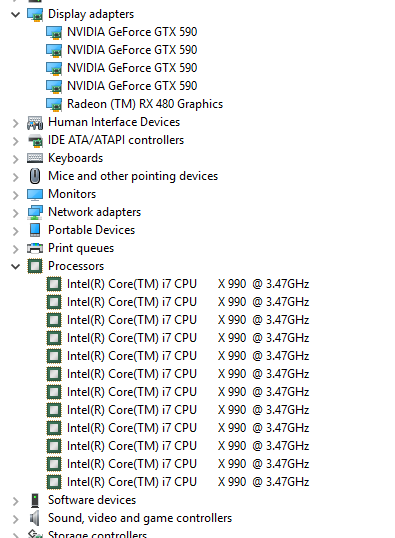 graceful sky
errrh
static viper
wow
graceful sky
mix of nvidia / radeon ?
jolly maple
i suspect it is the vive software
its poping up with steamVR
even tho its disconnected
jolly maple
and i dont know how to get it to stop without any menu interactions
graceful sky
but are you really mixing grafics cards?
static viper
using iferior vr hardware ...
graceful sky
doesnt sound bulletproof
static viper
use oculus
jolly maple
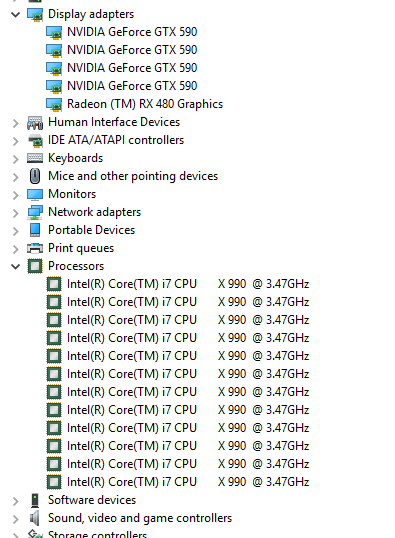
ya, the 590s are for compute rendering
languid shard
dual gpus, havent seen that in a while
static viper
that radeon will likely drag your gtx down
you cant have 2 different gfx card in there like that.
not unsupervised...
jolly maple
they are not being used for anything but ray tracing
static viper
were they already there with 4.18?
jolly maple
ya
static viper
mh
well they wont do raytracing either
XD
mh sad. i thought this was more obvious
jolly maple
if you like the setup, you should see the monitors i use
static viper
i dont like the setup
jolly maple
static viper
are your drivers up to date?
static viper
after the glitches?
static viper
and the drivers for the gtx?
jolly maple
those are custom
static viper
custom?
jolly maple
for all intents and purposes they are pretty much disconnected fromt he system
other then for blender rendering and cloud stuff
static viper
well clearly something is wrong
jolly maple
i dont think they are the problem
 dim merlin
hi, i used to use the console command 'stat RHI' to check the triangle count, anyone knows how to debug vertex count?
 sturdy star
sup peeps, any idea the best channel for font-related localisation questions, i just want to see if anyone has translated their game into japanese.
epic's very own example: https://docs.unrealengine.com/portals/0/images/Engine/UMG/UserGuide/Fonts/Overview/ExampleFontLayout.png
blatantly shows that setting different fonts for different styles does literally nothing lmao, like i don't see a difference between bold regular or italic in the preview at all

 vast pine
anyway to get top perspective to actually show bloom and stuff
editor window
a top perspective, b looking down in 3d mode
i guess i can photoshop my heart away but just curious 😉
next badger
@sturdy star they do...it's just roboto font is like that
sturdy star
@next badger you can see they specify different fonts for the japanese subfont, it is not using roboto but the japanese chars are identical regardless of font or style
i think japanese just falls back to Default font
next badger
@sturdy star no, the one that is defined in the japanese font family is Unicode Subset...the font is still Roboto
no, my bad
sturdy star
yeah sorry i am all a bit unsure exactly what's going on, trying to decipher it and seeing very different results, like regardless of unicode character range i select it refuses to recognise any japanese letters, all very odd
next badger
it's Source Sans Pro...and it does not have characters for japanese range
sturdy star
interesting, so their example is actually pretty lacklustre, interesting
 sturdy star
i like you, very helpful, pointed me in exactly the right direction of where we were goign wrong. many mega thanks
fierce tulip
<_<
https://i.gyazo.com/5d2cc3d2f9905cafd7abdf6e3ed0df23.png
same mesh, same material, only difference is the bottom one is inside an emitter
 sturdy star
man i had some crazy stuff like that before and spent a day trying to get it to work correctly and just gave up in the end and approached it differently, if you ever find a solution, shout it loud and proud
fierce tulip
prolly has to do with the way splinethicken works, but cant be bothered to find out :p
next badger
@fierce tulip show the wireframe look
 next badger
@fierce tulip i mean the viewport wireframe Alt+2
fierce tulip
that is the viewport wireframe
next badger
really? looks weird...well ok
fierce tulip
also its 2019, why does CTRL+Z still not properly work
edits a particle > ctrl + z > random reverts a material node i moved
next badger
oh...cause you need to make proper logic for each action to be undo-ed -_-
it looks like ue4 have no solid framework for that
i've tried it once...and failed miserably
plush yew
It's just me or unreal got really glitchy and crashy?
For example to have my game work properly, I need to compile in order
manic pawn
ctrl z has never worked
it's even better when it somehow magically loads an asset I haven't even opened today and undoes something I did days ago
where does it even get that info from
next badger
compile in order ?
plush yew
yeap, if I don't compile playerPawn last, a lot of things malfunctions
not sure if thats cause I used a lot of c++ or this is the engine
 sleek hearth
Can I use paragon characters in a mobile game? Or is there a way to downgrade them?
next badger
@sleek hearth i wouldn't...you can use Simplygon, afaik they are maintaining their plugin again
 frail sail
what does mean 
Fatal error!
Unhandled Exception: EXCEPTION_ACCESS_VIOLATION reading address 0x00000000
0x00007ffa8414a388 KERNELBASE.dll!UnknownFunction []
0x00007ffa608311e9 clr.dll!UnknownFunction []
0x00007ffa6083121b clr.dll!UnknownFunction []
0x00007ffa60831225 clr.dll!UnknownFunction []
0x00007ffa012205e6 UnknownFunction []
when pressed "play" button
next badger
@frail sail means you tried to access something not exist...
sleek hearth
Alright, thanks! @next badger !
gleaming creek
It most likely means you've been using C++ code, most likely pointers, incorrectly
next badger
@sleek hearth should know....
gleaming creek
Indeed, I was just noting that name
sleek hearth
welp, I think that's the first time someone read my name
As Alexey said above, you're accesing something that doesn't exist
gleaming creek
Most likely one of:
- You are attempting to access a null pointer
- You are attempting to access a pointer that points to memory that no longer belongs to your program / has been deallocated
- You are attempting to access a pointer that points to some random, erroneous memory location
next badger
in case above it probably was nullptr, cause "reading address 0x00000000"
 true leaf
I read that in the SpongeBob narrators voice
 sharp crest
lol
true leaf
Yeah I run ue4 on a hdd and anything having to do with the file system is quite slow
sharp crest
Same I have it on HDD, I got a free SSD but my project is so big it will take most of it of not more 😂 and I use a source built version so
ok sorry
that was my second nightmare
but my first nightmare is
having to wait for loading after a random compile crash 
specially after you don't remember what you saved 😂
atomic sandal
Rip
next badger
You can have vault on hdd and ue4 on ssd
I recommend this setting, as it decrease the strain on ssd and saves a lot of space
ofc of you can afford 1tb ssd it's not the issue
gleaming creek
I had to buy a 1tb SSD because every unreal engine update was painful on 120GB 😃
Has to clean up enough to have two versions of UE4 available at once during upgrades!
I keep the vault and projects on other drives, though
next badger
4 builds of ue4 are 140gb (one of them is source)
and the source one is 108gb
i assume you'll be around 60-70gb per build if use debug symbols
next badger
i still don't get how tbw warranty works...not even sure it is legit in my country
vale silo
it's not really a warranty
it just says how much data can be written before it fails
for 512Gb 970 Pro it's 600 TBW, while for 1Tb 970 Pro it's 1200 TBW. Meanwhile 1Tb 970 Evo is only 600 TBW.
flat scroll
Is it possible to get a current value of an UI widget? Basically I want to check what value is set to currently without casting to character or anything
vale silo
so for gaming, maybe 1Tb 970 Evo is more than enough. But when you constantly write to SSD, I'd say 1Tb 970 Pro is what you need.
flat scroll
ok found it
gleaming creek
Eh, I think there's a slight flaw in your logic
If the SSD wears out, buy a new one! It'll be much cheaper by then
Rather than buying the much more expensive pro in the first place
gleaming creek
Tbh I haven't noticed any SSD wear out yet
fierce tulip
pro > evo > much longer lifespan
vale silo
has anyone used https://www.unrealengine.com/marketplace/post-process-shader-pack-vol ?

Collection of Very Customizable, Stylized and Retro Post Processing Materials.
next badger
what's the purpose of long life span for an ssd?
vale silo
I can't get the damn thing to work in my project (cel shader with ink outlines with custom depth)
fierce tulip
as in, it allows for much more writes and such
wary wave
I have not, but since when was that free 😄 ?
vale silo
dunno, but support is spotty to put it mildly
gleaming creek
I get the idea in theory, but haven't had any SSD that had issues yet
wary wave
you could say that about 90% of marketplace assets tbh
vale silo
😦
wary wave
I have very little faith in the marketplace 😦
vale silo
I actually bought that damn asset and it worked ok in 4.16, but I didn't really have use for it.. Now it's 4.21.2 and it works on its own level, but when I try using in in a different scene (but in the same project) it just doesn't work :/
 grim sinew
People tested SSD lifespans. It takes hundreds of terabytes written to kill one
vale silo
with moderate day to day use, maybe.. When you are constantly writing on it, I think it's safe to say it will die sooner
grim sinew
No average user will manage it.
vale silo
but building UE4 from source often?
grim sinew

The Tech Report
What does Gloria Gaynor have to do with solid-state drives? You'll have to read the final chapter in our SSD Endurance Experiment to find out. After 18 months of testing, the last of six drives is finally dead.
vale silo
(and building projects)
grim sinew
Does not matter.
We don't work with files large enough
The final casualties in their test took on average 700+ TB written to kill it
next badger
i'm rebuilding ue4 few times a week or a day
gleaming creek
I must also admit that I didn't notice that much difference when I replaced my old Samsung 120GB with a 1TB NVME one
It benchmarks much faster
next badger
considering it's 100Gb of data
gleaming creek
But didn't really have much effect on actual usage
grim sinew
700TB is a ton of data
vale silo
but what mode are you running it at @gleaming creek ?
grim sinew
And even then SSDs don't "die", they just can't be written to any longer
vale silo
It can run in PCIe or in SATA mode
grim sinew
They still operate, you just can't write more. You can read the files off it and get them all back
gleaming creek
Can't remember offhand, I'd image I put it on the best one
grim sinew
And all that testing is from SSDs in 2015, in 4 years they've gotten even better
gleaming creek
The benchmark put it at something like 4x the speed of the old one IIRC
vale silo
well, on ASUS mobos BIOS value is counter-intuitive - if you switch to PCIe mode, it actually sets it to SATA mode.. I don't know why they did it that way.
gleaming creek
Hmm I do have an Asus
vale silo
also Samsung has an app that tells you what mode it's running at
leave M2 setting at "express SATA". That will ensure M2 is set to use PCIe lanes
 vale silo
that's not what NVMe values should look like
vale silo
yeah, that's more like SATA SSD
gleaming creek
Argh, I know the file is on that server, but I don't know the filename and directory listing is disabled 😄
 vale silo
that's more like it
manic pawn
what ssd is that?
graceful sky
My guess is a samsung 960/970 m.2
graceful sky
Using these beauties for unreal?
manic pawn
of course
manic pawn
if you already got a m.2, probably not
graceful sky
Nah its a regular ssd
graceful sky
So i'd get 6x the speed with a new m.2 , in theory
But i figure it dont really shave off much of the loading time :p
manic pawn
unreal wrote 40TB to this drive so far
graceful sky
Over how long ?
manic pawn
supposed to last for 400TB
wary wave
tbh you can burn through 400TB of data read/write pretty fast
depends on what you're doing with it
manic pawn
yeah I'm not doing the kinda work that moves 100GB around every day
manic pawn
but the 2TB one is so expensive still
graceful sky
Pro or regular ? Usually not so bad here in norway
 analog blaze
Expensive is subjective
 latent moth
All, how can I kill my GPU particles on collision?
https://gyazo.com/9a5ddf2a68cc03000e8d9a9e49b10702

They are still going through meshes
digital anchor
Its a translucent particle, colliding with opaque objects right?



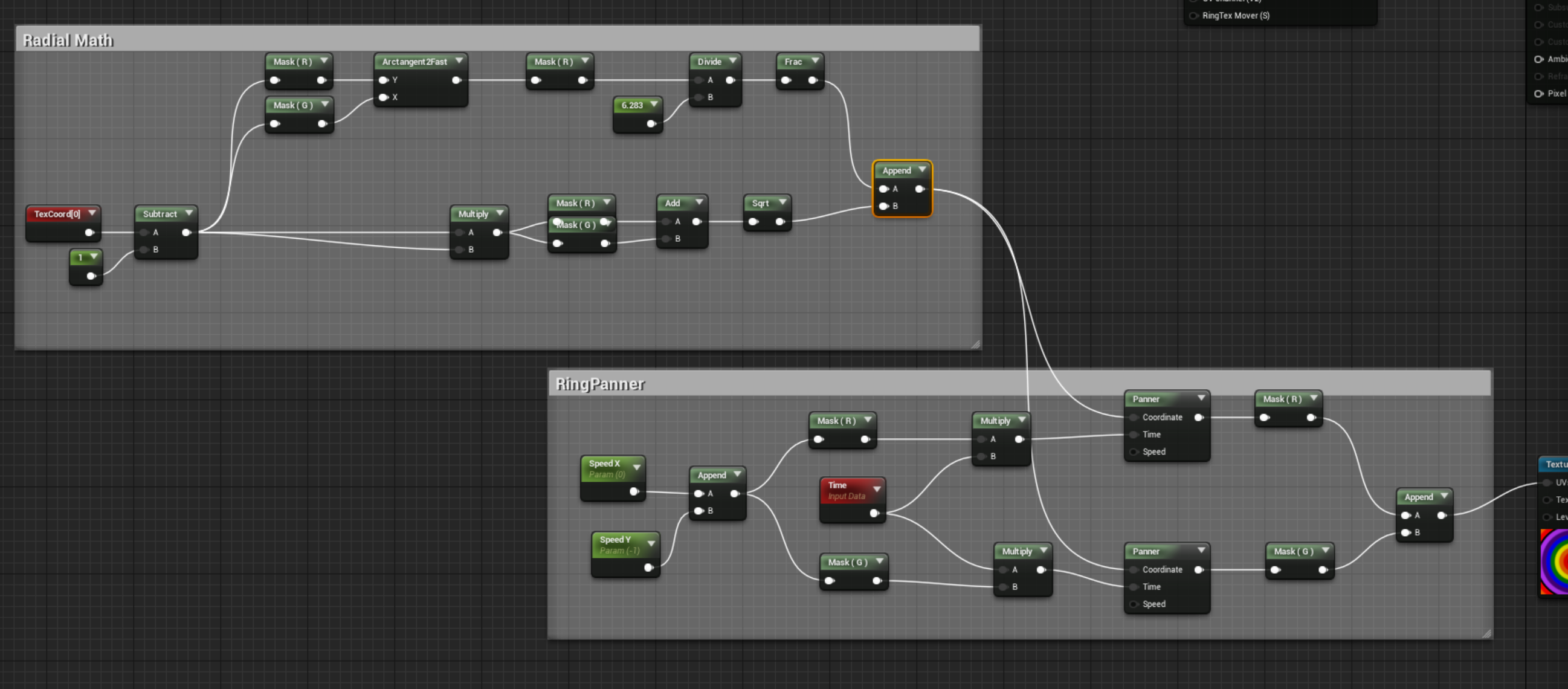

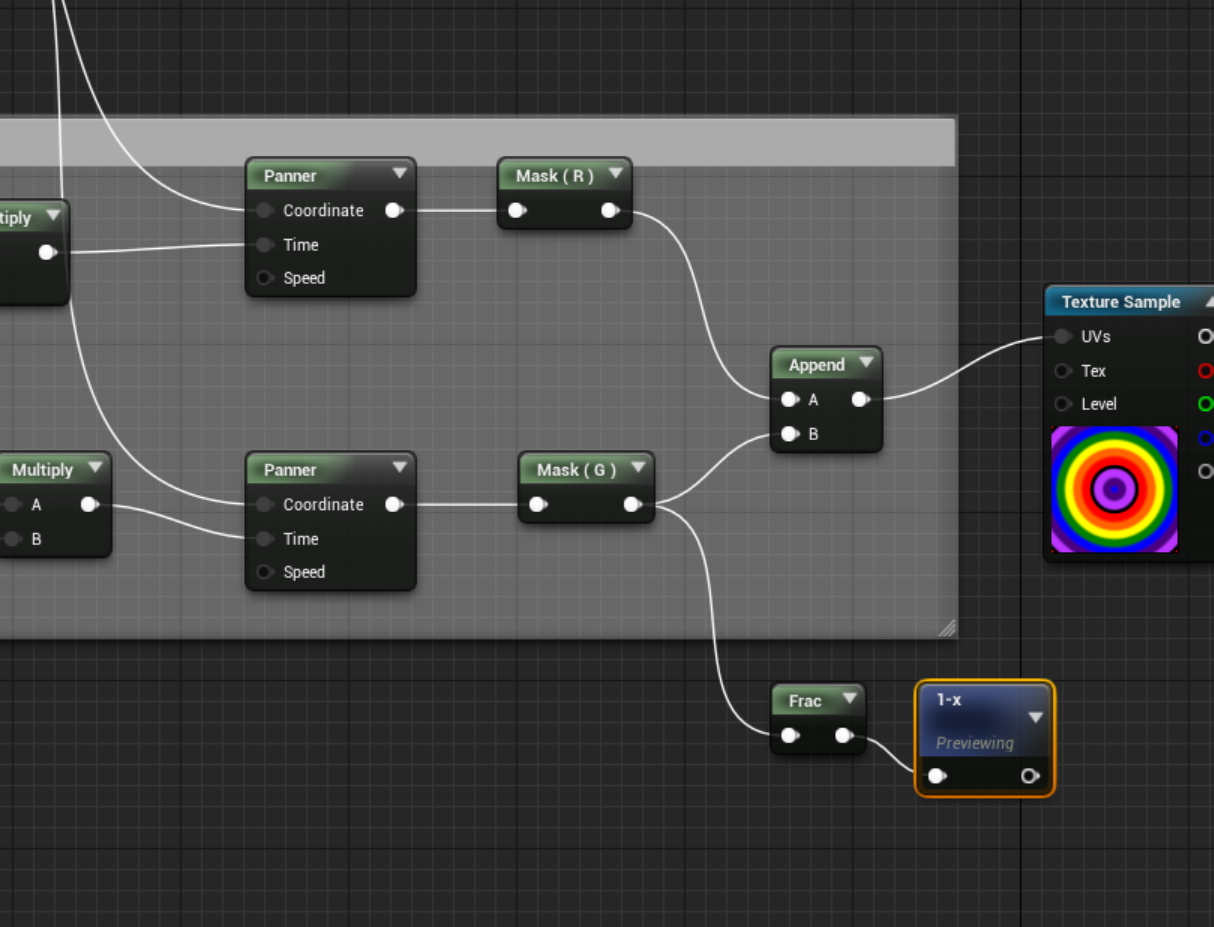
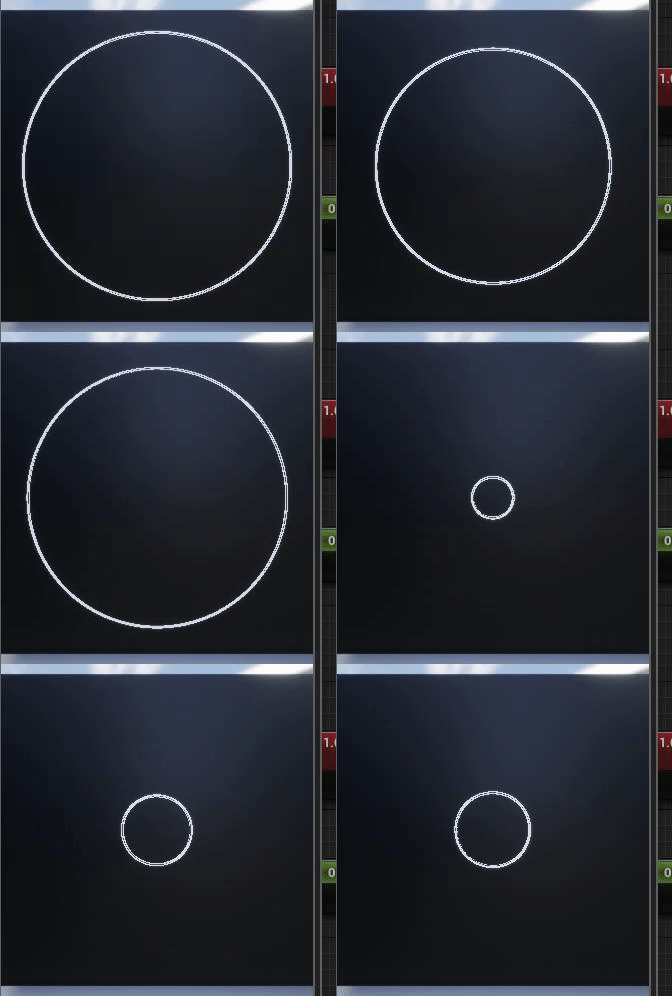








 digital anchor
i dont see a reason to not be working
you know that the objects must be visible for it to collide?
as in, if its hitting the roof, but youre not looking from above the roof, it wont collide
latent moth
AH
no, i didn't know that
basically I'm in a ski gondola
and it's snowing inside
digital anchor
oh thats expected
digital anchor
it uses the depth buffer to know the distance between the particle and the world
latent moth
I mean, what are my options
digital anchor
sorry i never used distance fields/vector fields,
but i know they are much more flexible
latent moth
I'm seeing this reply from Eric
https://answers.unrealengine.com/questions/252337/how-do-i-prevent-particles-from-entering-a-water-v.html#comment-252337-form
"A more elegant but more setup intensive would be to add a volume aligning with your water volume and in your emitters setup a Float Parameter in your Alpha Control then in a BP setup a relationship with Particle COllide with Volume to begin a fade of the Particle itself to 0"
However I don't get what this "relationship with Particle COllide with Volume" means...
 nocturne knot
Don't know where to ask this but does anyone know how I can track down what's causing a crash ?
digital anchor
@nocturne knot If youre debugging with visual studio, just check the callstack, and the output log
if its on a packaged game, check the appdata logs and minidump for the callstack
if its on a launcher version, make sure you have the debug symbols
nocturne knot
yeah it's a launcher version
this is what it gives me : Assertion failed: Mesh.VertexFactory->IsInitialized() [File:D:\Build++UE4\Sync\Engine\Source\Runtime\Renderer\Private\PrimitiveSceneInfo.cpp] [Line: 47]
 willow stratus
Can someone give me advice
I have rain particles in my game
However, they go through objects
 fair pulsar
help me pls
willow stratus
@upper heart
grim ore
4.13? if you need the base branch without any revisions you need to get that tag from github directly, the launcher will always have the latest revision of each version. @fair pulsar
gleaming creek
@manic pawn yes, 960 evo 1TB SSD
And while it's much faster on paper, I didn't notice much difference in e.g. actual Windows boot time or program launch vs the old SSD
fair pulsar
@grim ore 4.13.0
 long comet
Hi guys , whats up ?
can i post here a link for KS campaign or should i post in other channel?
fierce tulip
@long comet check the rules 😃
long comet
@fierce tulip , rules say : Don’t message about the same thing repeatedly in different channels.
i understood that is possible to post the link 😅
fierce tulip
"This rule also applies to your crowdfunding projects on Kickstarter, IndieGogo or the likes. We understand how hard it is to get funding for your project, but keep it professional. People here will gladly give you feedback on your pitch or campaign if you ask for it, directly asking for money is unprofessional and your message will be removed"
 safe rose
So basically...
You can post links
Just don't be like " Yo people, come throw down some fat cash on this project for me"
Be like: "Hello everyone, I've just posted my Kickstarter Project here: asdfasdfsadfasd.com , I'd love to get feedback on the structure of it"
ezpz
grim ore
but what if they want it for like 200 coffees to keep them fueled for the project 😃
plush yew
does anyone know how to turn on automatic update on ue4
grim ore
to make the editor Update or like for your project? if so I don't think either is an option lol
plush yew
It doesnt update when i move a geometry assset
 keen frigate
Hey everyone 👋
Any suggestions about assets on the marketplace that could look like being on a ship/boat? Thanks. 😃
 teal tulip
@plush yew there is a setting in the editor but don't rememner where
plush yew
oh
teal tulip
auto update on move or something on the editor settings I think
plush yew
ok im gonna try to search for it
grim ore
Do you mean when you drag you want it to show or it doesnt update when it stops? if during dragging I don't think you can
the geometry brush won't update it's faces until you stop any operation you are doing on it.
plush yew
when i stop dragging the asset it wont go where i dragged it, only a shape of it goes there
flat scroll
Does "ease" work when used inside a function? I want to smoothly transition from one value to another
grim ore
ah yeah then it's a checkbox in editor settings called Update BSP Automatically under Level Editor -> Miscellaneous but it should have been on by default.
long comet
@wary wave @fierce tulip @safe rose @grim ore Thanks for your reply
 unreal siren
Heya, I've got a quick question
I'm trying to figure out a lil script for changing materials and I stumbled upon the problem having to change different slots of materials for the different meshes.
Is there a way to figure out when a ray hits a mesh to tell me which material it is using on that particular location?
next badger
I'm not sure if he was talking about cascade, since it's probably impossible to set value per particle in the bp for it.
but that what "relationship" means...you trigger the fade out by collision
wary wave
is LocalPlayer gone in 4.21?
manic pawn
no
wary wave
I can't seem to get at it
where is it referenced?
hmm, only function I can find that returns one now is GetOwningLocalPlayer in Widget
manic pawn
isn't there just a GetLocalPlayer function
manic pawn
are you in an object that doesn't have a world context?
I'm not sure what could be going on there
wary wave
that's from Actor
manic pawn
wtf
wary wave
created a Character, can't get it there either
(4.21.2)
note that it is also not context sensitive search :/
manic pawn
I haven't used it from blueprints so idk what should be available, but it's definitely still a thing
wary wave
it used to be accessible D:
digs through source
still exists, just not exposed for some reason
it's barely referenced any more though, might be being phased out or something D:
weird
grim ore
are you sure you arent used to is locally controlled?
manic pawn
that's not "barely referenced"
 spare steeple
@wary wave did you just update your engine and forget some plugins by chance?
im on 4.20 and my only option is from that plugin
wary wave
Last time I did this kind of stuff was in 4.15 / 4.16 - never used that plugin, hehe
I've just gone and made the necessary changes locally
tawdry sierra
im trying to make a lit particle but it doesnt seem to work(i basically trying to make rain that reacts to light)
 lime gull
Hey when I import an image to a widget it appears blurry and after a few seconds it looks clear
 buoyant mulch
Hmph
 grave nebula
@latent moth Don't bother killing particles such as snow or rain or w.e. Just hide them, when inside.
latent moth
i was trying but how
what’s the link between “inside” and setting alpha on particles... i don’t understand how to do that
abstract relic
Don’t change the alpha, toggle actor visibility instead. How you trigger it is up to you.
 stray smelt
anyone here familiar with collision and Spring / camera collision? https://answers.unrealengine.com/questions/871500/view.html
grim ore
@lime gull change it to no mip maps and set its texture compression to ui interface and see if it helps
 glacial pecan
how do I reset a view in an editor?
I created a niagara emitter and managed to zoom out so much that I can't get back
I've even scaled the emitter up like crazy but I can't find it in the viewport
ah, "show bounds" helped me to navigate back...
abstract relic
Press F
glacial pecan
that's the first thing I tried, and weirdly it didn't work... but now that I'm trying it again, it does work
thanks for making me try again! 😃
 kind mural
Hey guys, trying to use the wiki "time of day" tutorial to create a day/night cycle. I want the player to be able to grab the sun and move it to change the time of day (will be in VR) any clue how I can go about implementing this?
 indigo viper
any good tutorials on soft body physics to do something like this (i'm making a city)
 winged crypt
Anyone here using AWS?
@glacial pecan "F" only works if you have an object selected. So if you're too far from everything, click on one in the top-right viewer then press F and it'll travel to it.
 dry moon
@indigo viper That would work sort of like cutting down a tree, look into that
just apply the same technique
glacial pecan
@winged crypt I was in a niagara particle emitter viewer
so not sure how to select anything in that
but worked the second time around
 last echo
Anyone know a fix or workaround for my GPU getting destroyed when i try to take 4x or 16k High Res Screenshots? As soon as i take one 16k shot my editor becomes unusable and i have to restart it.
spiral island
Why does your screenshot have to be that big?
last echo
marketing purposes
spiral island
Could you take four 4K screenshots and stitch them together?
oof my math
but you get the idea
last echo
heh yea it would be hard to line them up properly, would have to create a camera rig
maybe there is an easier way to render a still from a camera that wont screw up my engine?
spiral island
how much video memory does your GPU have?