#ue4-general
1 messages · Page 388 of 1
 grand kayak
Hi guys! I hope I'm in the right channel to ask my question.
So though I normally use WebGL directly my client wants me to package our UE project as WebGL.
I tried exporting and it worked ok.
But besides just running the app in the browser I need also to call outside JS functions.
How to do that without much effort? For example, if I click some 3d object I need to call some JS function to show a popup or open a webpage.
 plush yew
that is the code I made for when I press F
 grim ore
ok so a simple check, on the anim BP in the bottom right is a anim preview editor window. it should have check boxes for is flying
check then and see if your guys animation changes in the top left
 earnest cape
There is a java plugin, but I've never used it before lol
plush yew
when you say "on the anim BP" do you mean my flying bp, or third person anime bp?
earnest cape
@grand kayak https://www.unrealengine.com/marketplace/unrealjs

Javascript runtime built for UnrealEngine
grand kayak
thank you !
earnest cape
:D
plush yew
i changed the default to "is flying?"
and it does the flying animation
was that what you were talking about Mathew?
 north shale
how do i set terrain collisions i.e. how do i make terrain
grim ore
yes so you know the issue is the variable is not being set then in your anim BP
so then where is the rest of the BP on the left showing where you are getting your is flying and is falling from? maybe its checking the wrong thing
earnest cape
You can also download the content examples project from the learn tab in the launcher
 wary wave
I wouldn't recommend looking at the landscape example tbh
north shale
thanks
earnest cape
There are also tutorials on youtube
north shale
ya i've been looking through them...
plush yew
mathew, could you rewrite that in another way or explain it to me
I am not sure where to go
 copper wing
Is the first template non designable and only a level is playable? And how do i switch between the levels and template?
north shale
before i spend 1 hour looking for it is there a way to generate terrain around a sphere?
earnest cape
I haven't looked into that but I would search for keywords like UE4 planet terrain
north shale
kk thanks
wary wave
if you need to ask a question like that, you're probably not going to be able to manage it
UE4 landscape / terrain is built for planes, not spheres
if you want spheres, you're talking lots of code
earnest cape
There's this custom gravity plugin that'll get you started at least
The marketplace has a few other versions with solar system rotations and physics
But yeah, I wouldn't recommend that for someone who just started learning UE4
plush yew
Does anyone have 5 minutes to spare and get on a voice call with me, and I will share my screen and explain my issue with my animation. You don't even have to talk back, you can type, but it is easier for me to show you with voice and screen share....
earnest cape
I haven't used animation bp much
plush yew
If anyone could help me solve this issue, I will give him credits in my game.
or her...
is anyone willing to help me with an animation issue in ue4. I just need 5 minutes, and a voice call so i can explain the issue and show my screen
 keen frigate
@plush yew Not near a pc. 😞
grim ore
@plush yew do you know how to debug or watch your blueprints while they are running? I just tested what it looks like you have set up so it should work, something is just not hooked up right on your side. you need to live debug your anim bp to see if the "set is flying" node is being set correctly when you hit your fly key
my guesses would be it's not getting the Is Flying from the right place (char movement component from the pawn) or your transitions in/out of the flying state are not right for some reason
the problem is based on your screenshots those all look correct.
plush yew
I think it is an issue of the blueprints I used
it seems I used 1 skeleton, but the blueprint of a different skeleton
so the animation is there
but it is feeding in the wrong character
Mathew, if you ever have time to do a chat with me, i can screen share and you can help me
would really appreciate it
meanwhile I will try to do what you just told me and see if it fixes
Gonna take a break now. 9 hours of straight trying to figure it out gets to you
see ya later everyone. Thanks for trying to help
north shale
is it posable to make an actor the landscape?
 wooden thistle
Anyone interested in a paid freelance job? Has to be fimiliar with UE4, retargeting animations. Blueprints. Material setup etc. Contact me 😇
wary wave
 stray smelt
 flat scroll
Unreal keeps opening new tabs in a separate window even after I checked the option in the editor settings and made it as default.
I did find a solution that involved editing an ini file to open new tabs in the main window. However my PC died since and I cannot find that post again.
Whew, managed to find the solution
BaseEditorPerProjectUserSettings.ini
Find the section labeled [/Script/EditorStyle.EditorStyleSettings]
In that section you want to add a new line with the following: AssetEditorOpenLocation=MainWindow
 safe rose
@flat scroll good find
 inner abyss
hello guys after taking a starter course from joseph azzam i decided i'll be starting a new project, i'll try to remake vr training from mgs 1 from scratch
inner abyss
can you guys suggest me a roadmap like i started with setting up unreal for android
i got ue4 mobile mannequin
im setting up controls
 pallid compass
Yeah if your new, you really dont want to start with android or any sort of mobile sdk platforms.
or even consoles
Would advice you just stick to PC platform.
inner abyss
but i wanted to focus on mobile, first making it for pc then optimizing for phones sound worse than making things mobile oriented
i know i wouldn't be free in level desing as pc platform but i choosed my project for that
have you played mgs 1 before ?
grim ore
There is no real roadmap, you would figure out your game and system then design them for your target.
so every project will be different beyond the thinking part
pallid compass
If you have no exp, you are out your scope totally to even consider mobile development
 lethal breach
Hey guys, anyone able to refer me to a good 2D Content Creator, particularly focusing on Skill Icons that is both skilled at what they do, and reasonably priced?
north shale
how do i make the angle of my camera relative to the angle of my character e.g. my player rotates the camera rotates with the player even if the player doesn't rotate the camera?
 fierce tulip
@lethal breach please read the rules next time :)
#looking-for-talent read the pinned message 😃
 abstract relic
Was he asking for a human?
pallid compass
Anyone had this before?
not too sure where to post it
UPROPERTY in a UWidget derived class
Top 3 are UWidget*
lethal breach
@fierce tulip I read that, I actually checked there first. But as I am ok with using content created and placed on the marketplace, or other websites I felt that speaking to actual people was the best route as opposed to posting a request.
 timber python
hello
fierce tulip
ah, Iread that as looking for a content creator only
 true leaf
Btw I had a really frustrating bug and I realized it's because clients will never be able to replicate a command in an actors BP unless they OWN the actor.
I had a door switch and it had code in it's BP that would replicate from the client to the server when triggered by the client (press E when facing it)... And it would never replicate the command to the server 😅 I moved the replication piece into a component of the player character actor and now it works like a champ
That was never immediately obvious to me when I learned about replication
 raven nest
is there an easy way to get the total number of polys in a scene?
 grim sinew
stat rhi
plush yew
when i try to package my project in the new ue4 version 2.21 this error shows up in the log
PackagingResults: Error: The NDK API requested 'a' not installed in C:/NVPACK/android-ndk-r14b/platforms
help please
raven nest
thanks @grim sinew
true leaf
Ooo oo. Also I have a question. Lets say I place a static mesh in my scene, Tree13442. How do I reference that exact object in a blueprint to say... Delete it with code ?
(preferably without doing a loop on every single object in the map ...)
grim ore
why would you want to delete that one tree?
true leaf
Based on a trigger, I want to delete a bunch of meshes ... Like a player hitting a switch
It seems it's impossible and I HAVE to loop thru every actor at least at Begin Play
And cache them in an array
grim ore
ok so why those tree(s)?
true leaf
I guess I could also make a sphere
grim ore
if it's specific ones already in the editor you can just use an array in the blueprint and store them at design time for later use
true leaf
And delete the meshes that are touching it's collision sphere
Oh I can ?? That's what I don't understand is.. how
grim ore
is the blueprint in the level and is the tree(s) in the level?
true leaf
They don't have serial numbers or anything. Ohhh I know what you mean yeah I've done that
Hmm
grim ore
yep if they are specific just expose a variable and set them up ahead of time. If not then yes your collision/overlap/line trace that points to the ones you want to remove can be used
true leaf
Expose an actor input property of a placed actor ... Hmm okay I'll either do that or I'll use a sphere mesh as a collision sphere
And delete all the trees that intersect the sphere when the trigger happens
🤷
grim ore
just depends on your goal, if its fixed at design time like say a batch of trees in front of a door then having it tied directly at design time makes sense.
true leaf
Yeah
grim ore
if you are just blowing shit up at random with grenades then you would use the collision
true leaf
😂
grim ore
you could even make it easier and make the "trees" that are being removed in their own blueprint that you plop down and then you only have to reference/remove that one item
grim ore
BP_DoorObstacle for example yeah
this is a neato addition to the engine coming soon, https://i.imgur.com/C4KlIYX.png now you can easily tell when working with sub levels what map you are in and where the item is you are working with
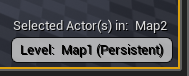
 dry moon
Can you switch it by clicking on it?
I feel like that would make switching way easier as well
grim ore
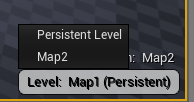 grim ore
yep yep I saw it in the notes and assumed it was on the level panel itself, kinda nice being on the viewport. now to see if I can shut it off lol
dry moon
Where is the notes?
grim ore
github
grim ore
 quick dirge
can someone help me through how to sync your visual studio script with your github repository?
grim ore
commited 5 days ago, they upped the version in master about 5 days ago.... so 4.25? 4.26 😛
.. they renamed one of the nodes from Point to Location and deprecated the old node.... made the new one non pure as well.... I know it's for cleaning up and making things uniform but... damnit
dry moon
I'm glad they are making it easier for people to enable, biggest problem I seen when people wanting to play is not knowing the command for it
 twilit plaza
what does it do? what new features did they put?
grim ore
it's a FPS limiter, it limits the FPS in your game to between 20 and 25 😛
 gleaming creek
I used to have to do that manually in the editor to stop it just spinning the GPU fans needlessly
dry moon
I guess the thing that reduces draw calls is called dynamic instancing from the seems of it
stray smelt
any idea why my camera collision volume just pushes the camera to the ground rather than stop it?
 hoary silo
how do you fix jaged edges on stationary light builds
plush yew
guys i really need help with that ndk error
grim ore
what version do you have it set to use in your android settings?
grim ore
which version are you installing of codeworks? 4.21 comes with 1r7u1 which seems to install 14b
 echo totem
my scene is dark for some reason, and i cant figure out why, anyone know anything about this?
grim ore
damn, all I could think is it's not set right and its looking for version a because that is what is wrong with that error, should be the version # not a letter, which is weird
I don't have UE4 android installed on this machine lol so I can't even set it up in the editor
your SDK Config all looks stock normal?
plush yew
do you know someone who is similar with android things on ue4
i really wanna solve this cuz this error slowed me down so much
yes
do you know what "a" means
grim ore
have you tried forcing a version instead of latest?
plush yew
what version
grim ore
well it should say a version # in there, like 24 or whatever you are compiling against
plush yew
ok what i must write here
grim ore
in your SDKConfig section, the NDK and SDK Api Level defaults to matchndk and latest
try forcing it to something like android-24 instead of latest
assuming you have android-24 as one of your installed platforms
grim ore
it's my only thought. the error is basically saying it can't find android version a which is not right
maybe a bad or corrupt install but if you installed multiple version then that would be off
plush yew
the same error shows up again 😣
grim ore
but it's showing android-ndk-r14b for the path since you have that set right?
grim ore
yeah that sounds like your system is telling UE4 the wrong information, bad install or something. It could be 4.21 but I have no idea 😦
the last time I built to android was in 4.20 so I can't even say 4.21 works for sure
plush yew
i saw someone wrote something like that as an answer
he said that i must transform some files from their place to another folder because ue4 get some wrong informations
anyway thanks for help
grim ore
wish we could have figured it out
abstract relic
I had that issue over a year ago. We simply wiped the sdk and did a fresh install. Packaged it out on a slightly older version too. Never did figure out what was causing the issue specifically though.
 oblique sorrel
What are other major and notable visual programming languages besides Scratch and Blueprint?
I need to write a short paper on their history
grim ore
uhm. Construct is one I use, the original one was.... something funky on a mac
ooh apparently google has one called blockly
hypercard, that was it
but it was more of a visual front end with scripting on the back but it was like one of the originals visual ones
 dim dragon
Its time I started looking at laptops specifically for UE4 on the go and I've got my eye on the Levono Thinkpad P50S.
4K display, 16 (up to 64) GB of RAM, i7-6500U, 256GB internal storage (little bit anemic but upgradable) and a Quadro M500M.
Suggestions?

eBay
With its advanced architecture and 2GB of VRAM, the ISV-certified NVIDIA® Maxwell M500M GPU has the perfect balance of power and battery life - enabling you to be in the field and still get your work done. | eBay!
@grim ore Just saw your latest video. Just want to thank you again for making these.
plush yew
Why... would you want a 4K display on a screen that is small enough to where its just wasted pixels? hmm maybe I just dont get it
Actually nvm I should shut my mouth cause last time I got in trouble for talking about it (in a diff server) 😔
gleaming creek
Well, it's made a broken function that cannot be fixed... but at least I can choose not to save it
 spiral island
I use blueprint as little as possible because of that
C++ is so much easier to control
gleaming creek
I guess at least in C++ you can manually fix any garbage your IDE might produce while trying to refactor
Funny how Blueprints is basically a higher-level language like Java or C#
yet the IDEs for those languages can happily refactor everything without doing things like this
 dim plover
BPs, I thought, are based on a scripting language.
spiral island
I never use auto refactor
It makes a good demo but in practice it just makes a mess
good planning > IDE tools
gleaming creek
Never make a single mistake?
spiral island
I prefer to refactor it myself
because when I screw up, its me that screwed up, so I can more easily undo it
gleaming creek
Refactoring works fine in any good IDE, never really had any problems with it in e.g. Eclipse or IntelliJ
dim plover
You ever work with VS?
spiral island
you could also just pseudocode beforehand
makes it easy to create a good structure on the first go, rather than rely on auto refactor to fix it
gleaming creek
Probably because of the language, I found VS for C++ to be terrible at doing anything intelligent
But the Java IDEs do such tasks without issue
Hah this one is even better
dim dragon
@plush yew Because it means I can read the blueprints when I pull way back out to look at them and fit more crap on my screen.
@gleaming creek What on earth...
Wh..What am I looking at? It hurts.
gleaming creek
I had some functions that were part of an interface
Removed the interface and told it to copy them to the class itself
It did that
gleaming creek
I made new functions and copy-pasted the code into those
dim dragon
wew
I'm just getting into C++ after learning BP myself. This new plugin (Magic Node) lets you just load it into any node and hot compile it whenever you like. Its kinda pornographic.
gleaming creek
Adding/removing interfaces is extremely buggy in general, stay away from that
dim dragon
Got it.
gleaming creek
Yeah, you're probably smarter to be using C++
dim dragon
Its more a holdover so I can very gently ease into it.
gleaming creek
Handling the memory is a bit of a pain
dim dragon
Does UE4 play well with VSCode or just VS201X?
gleaming creek
Think it needs the full VS
dim dragon
Ah. Its pretty intimidating.
gleaming creek
Though I have no idea how that would work in the Linux version, since it does run in Linux
dim dragon
The suffering is real.
gleaming creek
Anything on Mono tends to be... imperfect at best
gleaming creek
Mostly thinking of my favourite git tool
gleaming creek
People in here are generally nice
dim dragon
Mm.
gleaming creek
(Unless all the nasty ones are hiding in those extra channels I don't dare go near)
plush yew
@dim dragon Well I guess but your face would have to be 2 feet or less from the screen
dim dragon
Or y'know, sit close and have 20:20?
 oblique stream
Let me start by saying i dont see a BSP, or 3d modeling support channel so I wasnt sure where to post this:
So i have made a fortress using BSP's. The fortress is using 4 different materials. I converted the fortress into a static mesh. Everything looks fine in my computer. But when someone else views the fortress static mesh in their computer, only the first material is applied.
here is my pc
here is my friends pc.
and it is an issue that has occured on 3 different machines. I thought maybe it was gpu related. but they all have 1050s or later.
When viewing the static mesh 4 different elements:
and it looks like only element 0 is being applied and basically overriding the remaining materials
this screenshot was taken from my pc.
i have seen their machines. one was a laptop and we showed of the project at an event. All elements are present in the same order in their static mesh viewer
but still only element 0 is applying
Have been trying to solve this for about a week now.
raven nest
err, isn't Control MiddleClick supposed to orbit a selected object? It wants to give me a radial menu for the viewport camera now.. wtf?
 tribal frost
how come no special emotes for this place 😦
plush yew
Hello guys, can anyone tell me how i can get the camera to ignore collision on some assets? its kinda annoying if the camera zooms in on you just because there is something infront of it.
talking about this: https://i.gyazo.com/f56178682dcf3c55e356d0bc211d9183.gif

 paper kernel
your assets don't have collision or are not blocking the camera probe channel
Question: with procedural mesh, flipping triangle orientations turns the mesh normals upside down. why does this happen?
mostly curious, is there a rule on which order vertices need to be presented? since modifying normals doesn't seem fix it
 next badger
@plush yew if you disable the collision on the camera it won't collide, but you will be inside the mesh
@paper kernel Face Normal are product of vertices order in the triangle (rule of thumb), so the order of verts define where normal will be pointing
there's also Vertex Normal, which is used for shading (not visibility)
for more info look "Winding Order"
paper kernel
oh I see, I was wondering why it had to be ccw
next badger
@paper kernel it is set by the engine, opengl(probably dx too) can change this order, but i think for consistent results you have to stick to one setting, so epic decided to stick to CCW (probably since ue1)
wary wave
nice ^^
I still need to dig into doing more stuff with proc meshes
I did a terrain generator a while back, but it was pretty basic
paper kernel
ye I gotta look into terrain generation as well
wary wave
basic level is very easy, it's just triangle strips into a grid, then arrange verts by height based on what is effectively a heightmap
I generated my heightmaps using layered noise
paper kernel
ye it doesn't have to be super detailed in my case
mountain-side, which is covered in trees
most tricky part will probably be flattening the heightmap at road locations
 regal mulch
Anyone here create a TextureCube/Cubemap asset yet?
I struggle to even find the fricking option to create the asset in UE4.
echo totem
anyone know how to fix this dark map?, so i can see what im doing in landscape mode
regal mulch
Skylight?
paper kernel
@regal mulch if I remember correctly, Allar did something on the subject
echo totem
it has one
its the default scene, just with a diffrent tile
i tried adding a lightmassimportancevolume, but thats didnt seem to fix it either
regal mulch
@paper kernel He's probably still sleeping
I have the CubeRenderTarget at hand
And that does render a nice image, but no idea how to use it
I hoped it was similar to how the normal RenderTarget stuff works
@echo totem A too dark map is usually caused by Directional/SkyLight missing or not properly being setup.
echo totem
ty :), ill see what i try and do to it.
next badger
@regal mulch cube render target is not "cubemap" actually, it's a spherical map (cubemap is assebled from 6 square sheets, but spherical map is just a rectangle texture)
regal mulch
Yeah we used the capture to export it and reimported it as a cubemap thingy
Works now, thanks though!
next badger
@regal mulch when you export cube capture - it's a cubemap?
next badger
ok, ty
 polar hawk
yo cubemaps are cheeky
 atomic sandal
Hello anyone know how to make Not a proper circle for map
next badger
i've just tried an it's just a spherical map...
polar hawk
You take a circle and you squish it
atomic sandal
So if i say i want map like fortnite
regal mulch
I would post a tutorial by spongebob, but that would be too much offtopic
next badger
*inappropriate circle
atomic sandal
Yeye what ever so i just like fortnite map
next badger
you may use spline, but the reasons it is a Circle are far bigger than just a shape
next badger
since you have to test if the pawn is outside the wall, and simple way is just make a distance check...but that won't work for different shapes
especially for concave ones
atomic sandal
O
Yo just asking if you want or not its ok
So would you like to help me create map
@next badger
next badger
i'm confused we're talking about eye of the storm or the actual landscape?
atomic sandal
Landscape
next badger
oh, ok...then, what issues do you have with it?
it has no limitations on the shape (except it's a single Z value function)
atomic sandal
So we chould say i would like have map or floor like fortnite
next badger
and?
atomic sandal
How chould i make that floor
 abstract marsh
Sculpting and procedural generation is my bet.
next badger
@atomic sandal https://www.youtube.com/watch?v=gMKjIZMPJ0Q

Announce Post: https://forums.unrealengine.com/showthread.php?133824 Andrew's Materials/Resources: https://cdn2.unrealengine.com/HostForForums/2017/Landscape...
abstract marsh
Look up procedural landscape too
next badger
@abstract marsh FN map is a premade landscape (not counting the building capability)
atomic sandal
Ok i will check
abstract marsh
Yes but he may be able to procedurally generate something to begin with, and then sculpt the finer details. Then he can save that and work with it.
That is what I'm doing.
I'm using voxels though. And not the square kind.
wary wave
all voxels are the square kind :p
next badger
ahahahah
abstract marsh
Marching cubes but not represented as squares, visually smooth voxels.
wary wave
aye, voxels, but with a generated mesh
next badger
let's summon Phyronnaz =))))
i think i've read articles on tetrahedral voxels or something like that
atomic sandal
Yo look if i would like to make sand floor do i need to use blue print
next badger
but not for games
atomic sandal
paper kernel
but isn't tetrahedral just ½ voxel 🤔
next badger
@atomic sandal it's a material...you need one ofc
next badger
@paper kernel no they were like comb stacked
paper kernel
oh right
abstract marsh


I meant like this.
+meme for reference
What might you call this kind of voxels?
@wary wave is this what you'd call voxel with smooth mesh or whatever?
wary wave
voxels are the data structure, the mesh is generated from there, so yeah
atomic sandal
Yo its possible to sand map on other pc so i sent file
abstract marsh
We read that earlier @atomic sandal
abstract marsh
What's that?
plush yew
since im doing a low poly game, do you guys think i should do a toon shader or would that rather not look good and i should try something else?
 unreal spoke
The ttf fonts I manually added work in general but they don't show up in a TextRender component. how to solve this? The component works, if I select the roboto font then it works.
paper kernel
@abstract marsh procedural mesh
abstract marsh
@plush yew you have to test, we can't really decide of a toon shader would or wouldn't look good for you.
I suggest looking at low poly toon games, and then low poly non-toon games.
That question is just too broad
You can always turn the toon shader on or off
For my project, it won't look very good without the toon shader on.
 dim merlin
Hi,. anyone knows its just possible to put umg ui in a thread, so i can have a throbber for my level to load?
right now, the game thread is sometimes hanging and thus the throbber to.
dim merlin
@cloud cobalt so what if i have my own procedural loading system? is it possible to just 'ignore' the game thread for UMG ?
ive seen the loading screen stuff before, however it might not be suited for me
i dont have to load a map with assets, my game is mostly procedural generating assets like a city builder
 cloud cobalt
No, you can't just "ignore game thread" - UMG is updated on that
Loading screen system works by having a fairly independent loop going on
However, you can use the loading screen system too
GetMoviePlayer()->SetupLoadingScreen(LoadingScreen); can be called any time
The only work required (probably engine change) is forcing the movie player to stop manually, only per your request
There isn't support for that right now AFAIK
 latent moth
Is there a way to manually call the update of an animbp?
 violet goblet
do you guys uses subdivided meshes for game-characters? or is this even a nogo?
grim sinew
Nope
Most game engines don't support sub-d surfaces to begin with
and tessellation is more expensive than just a higher poly base mesh
violet goblet
na i really meant ingame stuff
grim sinew
Everything in game engines is triangulated, quads don't exist. It's good to make deformable meshes out of quads anyway so they get skinned more evenly, but when the actual game is running, everything is triangles whether you want it or not
violet goblet
yes thats true
i am reading a book
http://pushingpoints.com/v2/the-pushing-points-topology-workbook/
where the guy is always reffering to subds
grim sinew
And he's right. But that's not a thing in games. As I just said, it's still good practice for characters so they deform better, but that's the extent of it
pallid compass
also another good point
imagine modelling in fucking tri's
trying to make any adjustments
lmfao
trying to do something with edge flow
pls no
grim sinew
I model in tris all the time, that's zbrush in a nutshell
Dynamesh makes a ton of tris
violet goblet
do you mean sculpting no?
grim sinew
Yes
violet goblet
than retopo comes for help :p
 whole quarry
||  ||
||
grim sinew
Yep. If you're making a character you're going to need to retopo it no matter what anyway
So I just don't fear messing up the high poly's topology
plush yew
Hi everyone. I am new and I would like to make 2D game(probably RPG). My purpose? Learning/Hobby/Money.
Could you please advice me how should I start and how it looks like I mean whole process of creating a game?
grim sinew
If you want to make money, you're in the wrong industry.
violet goblet
oh wow
grim sinew
Especially as a solo dev
plush yew
Additional optional Money *
grim sinew
50+ games come out on Steam alone a day. You get buried. Less than 0.5% of games released are successful enough to sustain a living.
pallid compass
Making any money**
violet goblet
xD
plush yew
So
pallid compass
I am not joking
violet goblet
thats a quite big question you have here
grim sinew
If you want to be a 2d artist, learn to draw, then join a company that needs 2d artists. Doing it solo is insanity in today's climate
pallid compass
and its not like im a maxium potato
plush yew
I know basics of programming - ES6, C++ and a bit C#. I would can do pixel sprite ad well
grim sinew
Learn to draw properly. Anatomy and all that.
pallid compass
Aint nO basics gonna help u here fam
plush yew
I think I would be able achive succes of Witcher 3 - I need only 7 years of developing and your advices guys
grim sinew
If you're that delusional, my best advice is to give up now before you're bankrupt.
violet goblet
you are so bad....^^
grim sinew
Witcher 3 had hundreds of devs, working full time, for years. The man hours alone exceed your lifespan as a human being.
wary wave
I could do it in 7 years
pallid compass
than 70 alot more
wary wave
...with a budget of around 20 million
pallid compass
gtfo amber
 grave nebula
Pff, give it 6. Ez gg wp.
wary wave
nah, Eastern European labour ain't so pricey
pallid compass
oh lmfao
wary wave
also farm out most enviro assets to Thailand or Vietnam
plush yew
So you are telling that community isnt very friendly?
grave nebula
Just open your office in Bratislava and you are good 😉
wary wave
Bratislava is crazy expensive
grim sinew
You went from beginner to insanity kind of fast there. Your goal is literally impossible for a single person.
pallid compass
I tried it once
remember zero
and i ended up having to rebuilding the paper2d system
in the engine
and build a ton of functionality in
grim sinew
If you want to make something on the scope of the Witcher 3 solo, there is nothing anyone can do to help you besides dissuade you and say to do something smaller.
plush yew
It is possible, my friend will help me he is junior 2years on frontend
wary wave
'frontend'?
pallid compass
u still fucked fam
grave nebula
Front end friends are always nice.
grim sinew
I am not going to say this a fourth time, and I say this with the best of intentions. Pick a path, whether it be programming or art, study it, and join a company if you want to make games. What you propose right now will only lead to ruining your life.
It can't be done without millions of dollars investment and a massive team behind you.
 velvet finch
i'm pretty sure his trolling haha
grave nebula
most likely
pallid compass
No hes not, hes just got 0 scope
plush yew
Ok, seriously I dream about game 2D something like wizard legends, dead cells or hollow knight. Me, my 2 friends - we need at least 1-2 years for good product
grim sinew
No, you need significantly more than 2 years for a good product if you haven't made a full game before. Everything you do, at every turn, will take longer than you expect it to.
pallid compass
Theres no way you and your friends will pump out a semi decent product
Maybe on your 5th attempt it be semi decent
grim sinew
All you're going to do is work yourself into debt, then release in silence because you have no publisher to help market it.
You -need- experience before trying to do this on your own or it's financial suicide.
pallid compass
"me n my friends r gonna make a new car, we dont know noffin but all we need is 2 years"
wary wave
Stardew Valley took 5 years
plush yew
Guy was alone
wary wave
let's use that as a decent benchmark - and the guy who made that knew what he was doing
one person who knows what they're doing is worth 5+ people that don't
pallid compass
does ur game have multiplayer shumi?
plush yew
nope
velvet finch
btw guys anyone knows any place to network with VAs?
pallid compass
VAs?
velvet finch
voice actors
plush yew
but I heard that ue4 has handy dev tools for multi
pallid compass
Ah no sorry
velvet finch
alrighty
pallid compass
It is, but you need to know what your doing
plush yew
How should I start?
plush yew
well, programming
pallid compass
I am a generalist, and im only "okay ish"
grim sinew
Pick something to specialize in, study it like your life depended on it, and make small projects that are within a good scope
The smallest you can possibly imagine.
pallid compass
and iv been hammering it for 14 hours aday for the past 4 years and that is no joke
grim sinew
Like... pong.
Start with pong.
Even that may be too complex to start out
Because physics
plush yew
I couldnt do sudoku in JS once
velvet finch
i tried making pong
pallid compass
pong is bad, maybe some basic shit with blueprint?
velvet finch
it was a lot harder than i thought haha
pallid compass
Yeah it is
velvet finch
and riddled with bugs for such a simple thing
pallid compass
Btw pro hint
grim sinew
I just mean like, to set up expectations. Not the Witcher 3.
plush yew
Blueprint - gameplay?
velvet finch
i spent about 5 weeks
pallid compass
ue4 is not good for 2d
velvet finch
to get it right haha
pallid compass
not unless your going to tear the 2d system apart and put it back together like i did
plush yew
What about 2D paper?
pallid compass
Put it this way
Theres no auto tiling
I think i am the only person i know of who has auto tiling for paper2d
velvet finch
after that 5 week pong i was like yea fk dat lol
plush yew
I am not sure What is it auto till
 frosty bloom
Godot is good for 2D
velvet finch
i'm gonna stay focused on hard surface
pallid compass
Not having to place every single tile by hand
velvet finch
and join game jams in the future and get to know ppl
already have a small group i met recently
grim sinew
Because they take time
 vale silo
The Siege and the Sandfox is made using Paper 2D
velvet finch
i'm learning with 7 other students in another discord
pallid compass
That does not mean paper2d is a good system
and thats coming from me who knows the system inside out
vale silo
It means commercial games can be made with it
vale silo
Meaning it's good enough to make and ship a game?
pallid compass
Then you can say that about any framework or engine ever
Just because you can
does not mean u should
grim sinew
Cryengine 2 should be the next engine Rei tries to use
pallid compass
Paper2d is like making normal amps in ms paint
velvet finch
i heard bad things about Cry
pallid compass
Its fucking awful
velvet finch
liek they sued their own devs
cloud cobalt
Honestly I've never heard anything good about Paper2D
velvet finch
that's kinda messed up
pallid compass
Because paper2d was made by 1 game on epic fridays
plush yew
It feels scary for me if I think about Unity and C# or any other engine than UE4
vale silo
Then use Unity I guess :)
plush yew
I thought there is no better choice than U4
grim sinew
Don't play favorites. Different tools for different jobs.
Don't use a screwdriver as a hammer.
Use a hammer.
vale silo
Best choice is not to be making games at all 😝
grim sinew
Engines are tools, nothing more
velvet finch
haha
cloud cobalt
As a die-hard UE user (been using it for more than a decade), I would advise either Godot or Unity for 2D
Or your own engine, fwiw
vale silo
Good luck releasing on iOS or consoles using Godot
velvet finch
oh yea
cloud cobalt
velvet finch
When games say they are porting to consoles
i don't suppose its as simply as just remapping the controls for consoles right?
cloud cobalt
No it's not
velvet finch
what exactly is done in a port?
grim sinew
If it was that simple, porting would take all of 30 seconds
velvet finch
indeed
cloud cobalt
The entire underlying framework is different on consoles
pallid compass
Not even close
velvet finch
so a completely different set of code for the same functions?
cloud cobalt
Files, memory, graphics API, sound, networking, all of that is usually custom stuff
pallid compass
Porting is a nightmare
velvet finch
so its basically remaking the game from scratch
cloud cobalt
The foundation is literally 100% different compared to PC
Not the game, but all of its lower levels
pallid compass
no
velvet finch
gotcha
pallid compass
alot of stuff shits a brick
cloud cobalt
You'll change game code for trivial stuff like gamepad vs mouse
pallid compass
same for android and such
velvet finch
glad i'm not trying for consoles haha
at least not for now
would like to just make a hobbyist game and tend my group's understanding
ragdoll sumarais haha
plush yew
What games did you develop guys?
velvet finch
i made mods before
with 2 friends in udk
well not really mods, just maps and guns in ut2004
fierce tulip
if I had time I so would like to make a new ut99 and 2k4 map
wary wave
UT3 be like 😢
fierce tulip
ut3's editor looks so spartan compared to ue4
velvet finch
the prototype i'm making to learn was this weird ragdoll dojo
i made back then in ut2004
it was pretty simple
plush yew
Anyone here was working on AAA games?
velvet finch
katana/block/transcalator
wary wave
was and is
velvet finch
i partially want to learn vfx low key
i know i won't have time to learn ue4 vfx but
i've seen some really awesome vfx showcases
its like magic
plush yew
looks like playing games is easier
cloud cobalt
No shit
frosty bloom
lol
velvet finch
there's this course on UE4 vfx in chinese here
grrr i'm tempted to go for it bh
tbh*
plush yew
Still I will try to do game like Witcher ... 10 years guys.
whole quarry
as a single dev?
pallid compass
LMFAO
grim sinew
Don't quit your day job.
plush yew
I did already @grim sinew
grim sinew
RIP
cloud cobalt
Witcher is a 300-team project @plush yew
pallid compass
the one true god allar couldnt make the witcher 3 if u put a gun too his head
whole quarry

velvet finch
allah* :3
grim sinew
Allar =/= Allah
pallid compass
you could put err
whole quarry
Allar > Allah
velvet finch
LOL
plush yew
I will show them
pallid compass
Allah, luos, Sion, cedric, roy, vblanco, amber, me, zero, VictorLerp, and more
and we couldnt do it
velvet finch
alrighty boss
plush yew
Honestly guys I was looking for advices and more motivation here. Now I left with depression
pallid compass
Welcome to reality.
cloud cobalt
Advice : don't try doing a huge commercial game alone
Motivation : go do something realistic !
plush yew
thanks, I will keep it in mind
wary wave
for your first game, think about the smallest possible game you could make
then try and make it - and make it good
pallid compass
Your a box that goes around collecting coins
wary wave
not the one you want to do, but one you can do
pallid compass
That is actually a tough challenge for new people
wary wave
only when you try and make something small and good will you realise just how long making games takes, hehe
it is indeed
pallid compass
Box collecting coins sounds simple
cloud cobalt
BTW @plush yew , The Witcher 3 had 1500 people working on it, not just 300 like I jokingly said earlier.
wary wave
I usually recommend looking at old arcade games like Missile Command or Centipede
making a polished version of one of those in UE4 can still take a newbie months
atomic sandal
Is anyone free here to help me make map just floor
plush yew
Maybe I should stay with Phaser...
cloud cobalt
Depends if you want to create 3D games, I guess
plush yew
Phaser is only for browsers and it isnt the best for 2D developing
pallid compass
Try RPG maker
plush yew
I mean - it wouldn't be good idea making Dead Cells in phaser?
cloud cobalt
If you want to create 2D games, Unity is a pretty universal choice
Unreal is decidedly not meant for 2D
plush yew
C# 
next badger
unfortunately -_-
cloud cobalt
To be honest, the technical barrier for 2D is low for even super high quality work. You need scripting, shaders, a collision system, animation system, basic sounds.
It's nowhere near the complexity of a modern 3D renderer
 graceful sky
Time is money Streaky.
cloud cobalt
atomic sandal
That for someone who know i think its 10 mins
pallid compass
hire me, im Chinese labour rates
 ripe pecan
Hey everyone. I'm wondering, does everyone has hard time to export a ForestPack grass with datasmith for UE4?
wary wave
I'm not sure many have tried, but if it's cooked content, you won't be able to export it
next badger
datasmith is for importing to ue4, so i assume it's maya->ue4 export
or 3ds max...if ForestPack from itoo
paper kernel
oof, still struggling with the UV projection 😓
next badger
@paper kernel procedural mesh?
paper kernel
yea
sec
it's Z projected, I need to fix this distortion
it's UV Y coordinate issue
next badger
@paper kernel you may scale the V coordinate by Tan between Z and normal
sorry, tan of orthogonal component of normal
paper kernel
 nvm, I already have the coordinate data in the function
paper kernel
👏
grim ore
nice
ripe pecan
Ya I'm trying to export from 3dsmax to UE4... but it take a lot a lot a lot of time. Wondering if it's normal?
cloud cobalt
What's the triangle count ?
true leaf
So I am experiencing what I think is a bug... I built a house using about 200 static mesh pieces and i tried to convert it to a merged asset but then the lighting baked all glitchy and the roof was like gray for no reason ?
 digital anchor
you probably have to repack the lightmap uvs
true leaf
So then I deleted the merged mesh BP and now my building is just the 200 separate actors. It looks fine in the editor but in the game a bunch of the walls are invisible and only the collision works
Hmm
😫
Most times in situations like theae I realize it's my fault tho lol
Ok I'll try that
 lime gull
Is there a way to stop text from going oht of the text box?
Actually nvm i thought of something
flat scroll
For some reason when I export the unreal character the left shoulder gets dislocated when I export the maneqin and import it into blender. Any idea how can I fix this?
keen frigate
@flat scroll Just search "unreal mannequin blender" on YouTube you will find some very nice guides.
flat scroll
The problem is that the skeleton gets borked on blender import
 bright plume
Blender Powa!
keen frigate
@flat scroll I know, the UE4 mannequin does that in blender. Unfortunately I've imported once into blender and saved that file. So whenever I need to work on the UE4 I just use that blend file. I can't remember the.guide.I followed, hence my answer to search YouTube with the words "unreal mannequin blender".
flat scroll
So there is no way to properly export animation into blender? That kinda sucks
atomic sandal
Is there anyway that i make item in unity and then transfer file to ue4
wary wave
not really
grim ore
depends on the item, textures sure but assets probably not
keen frigate
@flat scroll check this it might help you. https://answers.unrealengine.com/questions/512914/solve-the-mannequin-mesh-glitch-in-blender.html
grim ore
sonova... lol. I was going to cover exposing missing C++ snippets to BP's and now epic is planning that for thursday lol. talk about timing.
flat scroll
Is it possible to use a blender model with weight paints, but without the skeleton in order to get around the importer issue?
next badger
@flat scroll there is no weights when there is no skeleton (at least in terms of ue4 import)
flat scroll
Odd, because the weights are just vertex groups, so in theory you could have models that are completely separate from a skeleton
next badger
i'm not sure what "vertex groups" term means
skin weights are attributes(parameters) of a vertex
but they are bound to a bone index
flat scroll
not really, its just a group of vertex data with specific bone name
flat scroll
and that float value is assigned by paiting in the vertex group influence, that is how rigging is done in blender, and its only 0-1
next badger
and you can assign this vertex group to any bone?
flat scroll
rather you can assign vertex to any of the groups, it stays even if if you delete skeleton
vertex groups are animed after each bone if you parrent them mesh to armature (rig) with empty weights
next badger
after you deleted the skeleton and added new one, completely different it is possible to assign this group to a bone?
flat scroll
you can keep any vertex groups that are present on object and add whatever new ones you want. They are not tied to the skeleton, but rather are part of the vertex data
next badger
but how the vertex will know which new bone to follow?
digital anchor
its by the name
flat scroll
yup
next badger
@digital anchor so they are bound by names of the bones?
that's convenient
is there are some indicator that bone does not exist in current skeleton? (i.e. there's a name set for group but no such bone)
 charred cloak
is there any tools other than jenkins for continuous integration ?
flat scroll
@next badger not really, but there are addons that let you delete empty groups
flat scroll
vertex groups can be used for other purposes as well, but it all depends on what. For example they are used for both rigging and creation of named selection of faces (so you can reference something like "pants" etc).
next badger
@charred cloak sorry, most people stick to jenkins afaik (at least on forums)
flat scroll
in theory it could be possible to import only the mesh without the borked skeleton into UE4, using only the vertex data and then assigning the skeleton in the UE4 itself. ie. you make only the mesh, paint in the rigging weights and you don't need to use the skeleton in blender (unless only for getting the bone names for the groups)
next badger
i need to find some time to learn Blender rigging pipeline, there are many questions regarding it and i'm only familiar with maya one
flat scroll

Alimayo Arango teaches How To Rig A Mech In Blender 2.77. This tutorial shows How To rig a Mech In Blender 2.77. This tutorial teaches you how to build an ar...
charred cloak
It would be nice if epic games would focus on devops a bit
next badger
i don't like how blender shows the bones, they are so weird compared to max/maya -_-
flat scroll
IIRC you can change that.
charred cloak
Maya is really life saver
next badger
@digital anchor i'm not talking about "stick" etc, but the dotted lines...they are all being bones after all...no?
flat scroll
oh that is just relationship display, it can be turned off
next badger
can it be shown like...*classic one ?
https://docs.unrealengine.com/portals/0/images/Engine/Animation/Skeleton/MayaSkeleton.png
 digital anchor
if you dont have any disconnected bones it will be like that
flat scroll
digital anchor
idk how maya shows when theres a disconnected bone
next badger
if it's disconnected it won't be exported in ue...but it shows up the same way...just floating around
@charred cloak iirc Galyonkin mentioned on one of the last podcasts that they are looking for DevOps
flat scroll
Ok I figured out how to properly import the animations from UE4 to blender
it is only the issue with the orentation
if on import you set the up to Z and forward to X then the animation will import proerly, without the weird dislocated shoulder
next badger
oh, that may happen even with maya...it's hard to work on some projects when they are using Yup in maya...Zup works like a charm
 flat scroll
What exactly do you mean?
digital anchor
he said disconnected bones cant be exported, but sometimes i find i need them disconnected, wondering how he manages with them all connected
well, this example could be just another bone between the two, tbh
flat scroll
oh, they are not disconected from the skeleton, only not directly conected to the parent bone
next badger
@digital anchor oh, it's possible, just by selecting the needed bones, but i've never did that...i prefer them to have single root
grim ore
whooo 4.22 branch popped up on github
next badger
@grim ore yeah, 2 days ago or so...master now at 4.23
grim ore
yeah I saw the master change, never saw the 4.22 branch actually show up till now. now to see how broke it is compared to master lol
flat scroll
I was wrong about the blender import, its not the orientation
next badger
@digital anchor the benefit of having a single root is that you could scale it and set root motion
digital anchor
this setup still works as one root
flat scroll
To get a properly working skeleton you need to export the "preview mesh"
digital anchor
the hierarchy will be correct, the only difference is the point of the pivot rotation
flat scroll
digital anchor
the dotted line points to the parent
@flat scroll if youre importing from UE4 to blender you gonna have a bad time
i dont think you will be able to export to ue4 again
next badger
@flat scroll oh...yeah, ue4 only imports skeleton meshes when they have geometry...but iirc you can import animations when you already have skeleton imported by exporting just the bones...i may be wrong
digital anchor
^thats correct
fbx support in blender is not official, and some things are broken
next badger
@grim ore dare to compile? 😃
digital anchor
it supports gltf perfectly, but UE4 decided to make a prototype gtlf importer then completely abandon it 😤
 zenith flower
@next badger You can import a valid skeleton with "invalid" geometry
Thats how I made my "modular" body part system
next badger
@digital anchor https://c4gio.itch.io/gltf-for-ue4

itch.io
Import all meshes in gltf file into UE4. https://github.com/code4game/glTFForUE4
that one is supports animation
digital anchor
oh nice, gonna check it
grim ore
@next badger lol already compiling
flat scroll
@digital anchor seems to have been imported just fine back into ue4
flat scroll
oh, I think it created a new one, but I didn't fiddle around with the import settings
digital anchor
ah yes
zenith flower
I cut my skeleton into attachable pieces, and then attach static meshes to each body part as a blueprint actor. Then I take those "body parts" and built a "build your own" skeleton system.
digital anchor
i tried that cuz i wanted to have marketplace animations from the default skeleton, but still be able to animate in blender, but i didnt manage to keep only 1 skeleton
zenith flower
It also allows me to control animations individually or just have them all synced
A cool setup was being able to get the total height from both legs, and adjust the torso to move up and down. Gave a very natural camera Bob effect
next badger
@zenith flower keep in mind that each part is animated by own skeleton, and each skeleton ticks
zenith flower
Yes
However, I'm not using that kind of modular character
I'm not copying pose
Either
 static light
how do game developers work and collaborate remotely? Where do you store all the assets? Unlike web developers, you can store everything on Github, but unreal development is more complex than that
zenith flower
I animate both legs I. Blender as a whole, but import them separately. They have their own animations
So, I don't have to copy pose
Just start them at the same time
No geometry either (used an invalid line)
next badger
@static light setup own p4 repo...free version is up to 5 logins (may be used on more machines than 5, but you have to share accounts)
zenith flower
Just static meshes attached to the bones
next badger
@static light some users use gitlab afaik
static light
Thanks for that info! what is p4 repo?
next badger
perforce
static light
most game companies use this?
flat scroll
@digital anchor I managed to import the edited animation so it uses the existing skeleton
next badger
i think perforce now even have onw git repo free for small teams
flat scroll
It only imported the animation only, no extra stuff
digital anchor
nice
flat scroll
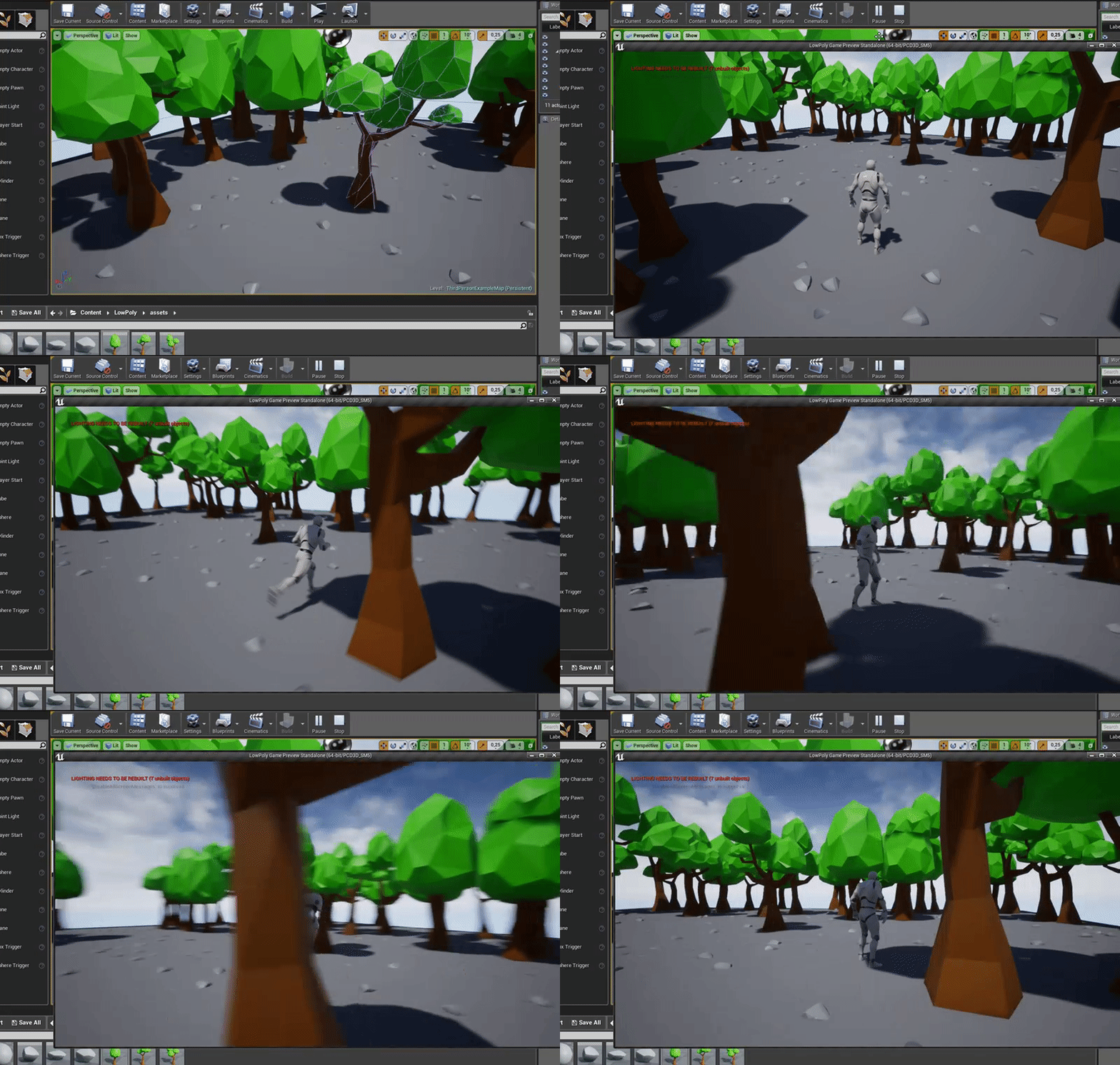
The import settings are show in this video:
https://www.youtube.com/watch?v=RpzKsZzLjXw

In this small video I will show you how you can: Export from Unreal, Import into Blender and create an own animation ( Holding an Flashlight ) (Comments on t...




 dim dragon
Oh nice.
 lusty carbon
what can I do?
wary wave
I assume the bottom collision was not imported?
wary wave
was the collision mesh imported as a UCX collision hull?
lusty carbon
yes with a UCX_ prefix
wary wave
gotcha
lusty carbon
any ideas?
wary wave
unusual
lusty carbon
do you use blender ?
wary wave
no
 manic pawn
each of those sections needs to be a separate mesh
digital anchor
_1 _2 _3 (got that from google, not certain)
lusty carbon
if I have SM_meshName and UCX_meshName
so SM_meshName for the main object and then UCX_meshName_1 , UCX_meshName_2 , etc?
digital anchor
i would try
wary wave
in-editor generated collision doesn't tend to be great
at least not for anything but the simplest meshes
lusty carbon
Yeah obviously I tried that but I need a specific one
to seamlessly connect to the other pipe modules
flat scroll
In short, it is possible to export animations from UE4 into FBX for editing in blender and then exporting it from blender to FBX and back into UE4.
- When exporting the animation from UE4 use the "Preview Mesh" export option (IMPORTANT!)
- When importing the animation into blender, just leave all of the options on default, there is no need to change the orientation/forward axis
- Export edited animation from blender into fbx (default settings worked fine)
- When you import the edited animation back into UE4 make sure to:
- select the skeleton used for import, so it uses the already existing skeleton
- check "import animation"
- uncheck "import mesh"
dim dragon
Dumb question, does ue4 have something equivalent in BP to an IsColliding? flag for capsule components or are we just working with OnComponentHit events? I came very close to trying to make a not gate tied to event tick to know when my player character isn't colliding with an object.
digital anchor
now we only need a way for the skeleton to not look completely broken when imported into blender :p
flat scroll
@dim dragon Yes it does have tat, I think its on collision event or something like that. Events can be found when you select the collision shape
dim dragon
I have OnComponentHit but there doesn't seem to be anything for an event when a hit terminates.
digital anchor
yeah
next badger
@dim dragon you need to enable generate hit events in the properties of the asset
flat scroll
well, its better that than nothing I guess. You can also add IK drivers and hide the bones altogether
next badger
@dim dragon or even read this article https://docs.unrealengine.com/en-US/Engine/Physics/Collision/Overview
dim dragon
@next badger I have them and it fires when the collision is happening: What I'm looking for is one which fires when a collision ends and the player character is no longer touching something. I'm a bit amazed there's no flag for it.
I did, Alexey my collision works no problem I just need the state.
Not for when IsColliding but when IsNotColliding
dim dragon
Odd. It never fires.
Everything's enabled, ticked and the channels are all setup properly...
flat scroll
@digital anchor On importing FBX into blender check this option: Armatures > automatic bone orientation
dim dragon
BSPs should be worldstatic so this should be working...
flat scroll
next badger
@dim dragon generate overlap events too?
dim dragon
Yeah, neither fire.
digital anchor
@flat scroll wooooo thanks for the findings
dim dragon
Its all ticked.
Or should I make a second capsule to trigger overlaps?
Damn peculiar.
flat scroll
I think I will post them on the forum or something. I never found a solution for the blender importing/exporting
dim dragon
This is going to turn out to be something so simple I'll feel like an idiot.
flat scroll
also the automatic bone orientation isn't perfect, but its better than nothing
next badger
@dim dragon you need to set it for both of colliders
dim dragon
Right, so one needs to be for the collision and the other an overlap test?
next badger
Overlap If the other Physics Body is set to Overlap or Block this Physics Body's Object Type, an Overlap Event can occur.
keep in mind which one will generate an overlap event
 sleek hearth
does anybody know how to solve that?
it might be because I updated visual studio, not sure though
next badger
it may be...just delete the intermediate folder
you may also clean up the project in vs
sleek hearth
how should I do that?
next badger
it's under build
sleek hearth
after the deletion of the intermediate folder I should "Generate Visual Studio project files"
right?
next badger
yep
dim dragon
Weird. Overlap just refuses to fire.
At all.
BSP is worldstatic, overlap is setup properly, CCD, multibody is running, trace complex...
I even made sure the capsule was offset from the regular blocking collision volume so it would definately have surface contact.
THERE WE GO
So I'm a moron and I forgot Collision Enabled was a thing.
Life protip: Don't lose your glasses.
grim ore
rubber ducky test would have figured it out 😃
Hey rubber ducky, why does it not work. Did you turn it on? oh... yeah 😁
 gleaming narwhal
We should make a rubber Manny that we can talk to, maybe even poke when things are very wrong...
grim ore
Don't feel bad tho, I spent an hour wondering why my stuff was not replicating before I remember to actually turn on replication...
flat scroll
Is there some wait time for new users to have their threads show up on the unreal forums? I started a new thread in the animation section, but it didn't show up when I pressed "Post"
dim dragon
Yeah, I think I should fire mine, Mathew.
grim ore
@gleaming narwhal lol I might try printing one out once I get my rubber spool of filament, might make a good stress reliever
@flat scroll I am pretty sure the first post(s) get moderated and need to be approved when they go thru the queue.
wary wave
@grim ore - I've done that so many times....
gleaming narwhal
@flat scroll I'll have a look for you
grim ore
replication is a funny one because your default template replicates the character out of the box so you don't think about it until you run your head into the wall with other stuff
flat scroll
I'm just making sure, if there is moderation required then its fine.
wary wave
there's a moderation queue, yeah
it's rare that it takes more than 24 hours for something to be approved
usually a lot less
 left mica
Is there a way to add in a player character with default First Person movement in my level after building my level?
wary wave
easiest way is to create a new first person project, then migrate your level into it
not the most practical, but it is the easiest
left mica
Ugh, was hoping I could pull in an "Empty Character" and throw defaults on it
Thanks though
wary wave
sensible way would be to migrate the First Person game modes into your project, but then you also need to manually set up the input configs etc
grim ore
you can add the FPS feature pack if you want the character , it should work with the TPS inputs if you started with that.
wary wave
there's an FPS feature pack?
grim ore
there is a feature pack for all templates 😃 the green add new button in the content browser at the top, then add feature pack
left mica
Ohh nice indeed!
grim ore
its not identical to starting with them, the FPS does not have the projectile for example, but most are the same
dim plover
In the editor or launcher?
wary wave
editor