#ue4-general
1 messages · Page 387 of 1
 tawdry basalt
 fierce tulip
@latent moth while not really a nade shot, there are some nice water particles in the infinity blade vfx free pack on the marketplace.
@proven oxide while there is still a place in cascade, its better to focuss on niagara from now on, while knowing cascade might help a bit, i'd focus more on learning how to set up textures, shaders, and meshes for vfx
 fallow ginkgo
Is there any other way to install UE4?
fierce tulip
either install binary, or from source
fallow ginkgo
Which site?
fierce tulip
you are only legally allowed to download it from unrealengine's own website
 latent moth
thank you luos i was looking at those but haven’t seen anything re a splash, more like dropping water or such
 honest rover
Can I ask for tech support in this channel, or is it just for discussion?
 frosty copper
You can, but anything lengthy or specific would be best aksed in the channel most appropriate
honest rover
Alright, I think this question is pretty general. I keep getting the Texture Streaming Pool Over xxxGiB Budget message.
Every solution on the forum is to increase the pool size, but it keeps growing, so how do I reduce it?
frosty copper
🤔 does it need to be reduced?
honest rover
It went from 600MB, to 800MB, to now 1.103GB over budget.
Like if your sink is plugged do you buy a bigger sink or do you try to unplug it 🤔
frosty copper
Unreal Engine Forums
Talk about Level Design, Static Meshes, Physics, and more.
Non power of two textures will cause issues.
And the "never stream" checkbox is arse upwards apparently; unchecked means its only loaded when needed,checked : its always loaded
fierce tulip
no
unchecked it means it gets loaded whole before its shown, checked means a lower mipmap is loaded and shown while a higher mip is being loaded
honest rover
Ah yeah, I saw this thread, but didn't know how to find where those options are
honest rover
Hey Yoeri, I follow you on twitter 😄
frosty copper
Power of two isnt an option, its the pixel dimensions of the texture
And, if i had to guees, id imagine the never stream option is found inside the texture viewer window
fierce tulip
yup
and there is a power of two option, but it just adds black edges to a texture to make itpower of two, instead of just resizing the texture. which.. i find odd
frosty copper
.... Well, that's new to me. XD
fierce tulip
been there for ages :p
frosty copper
Ive not been using the engine for ages unfortunately
honest rover
Could I also just disable this instead of going into every texture?
fierce tulip
if you want massive longer loading times, sure
frosty copper
Life has pulled me away from it, and ive been trying to code a launcher for Linux in the mean time :p
honest rover
Well thank you, I'll try unchecking the 'Never Stream' options.
Also, is anyone familiar with the image I posted in #cinematics ? Not sure how to google this problem.
frosty copper
Making sure all textures are Po2 will help a lot more afaik
honest rover
@frosty copper All textures are from a pack, I don't think I should edit those
frosty copper
Any non Po2 texture is always loaded by the look of it 🤔
The power of fwo option luos mentioned.
But that will be the biggest contributor to your pool size issue
 proven oxide
@fierce tulip I am using the latest engine but it appears to be using cascade, how can i learn the niagra if its not in the engine?
and I am using a texture for fire, but its coming out as squares, how do you make it look like fire, all the video tutorials load up pre prepared materials they never show how they are done
 grim ore
IF you want to use niagara you turn it on in the plugin manager
https://docs.unrealengine.com/en-us/Engine/Niagara the first guide is literally called "Enable the Niagara Plugin"
fierce tulip
@proven oxide I have a plethora of tutorials on youtube, but it'll take a while before you get the hang of making shaders for vfx. its not just a few sentence solution, and yea, you need to enable niagara first
 true leaf
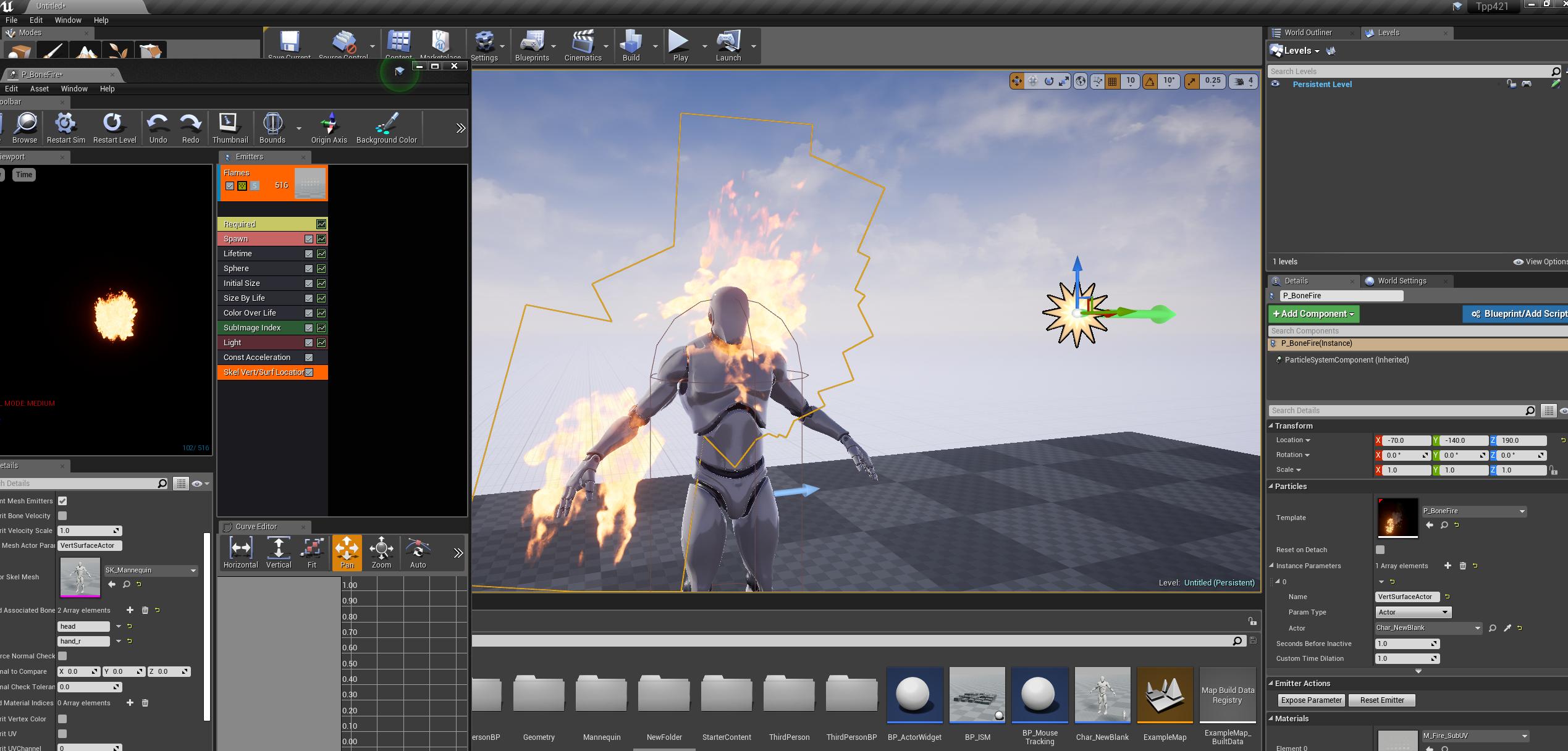
also im running into an issue here... Im using a skel/vert type emitter for the first time but the 'Associated Bones' field is not working at all !!! even if i make it blank , the particles spawn ALL OVER the actor and if i make it a value bone name, the particles spawn ALL OVER the actor
what is up w that :[
fierce tulip
https://www.youtube.com/watch?v=-pyTw-45Mfw that should help somewhat.

I explain how you spawn particles on the surface of an actor.
true leaf
yeah i followed that
to a T
what in the world
how is that possible >.>
no valid bones
grim ore
well no valid bones because you didnt set it, it's none by default so nothing wrong there.
true leaf
if i put in a crazy bone name like crazy_bone_name55 then it still works
fire all over the dude
😐
grim ore
I dunno man that is weird for sure, I just tested it and it worked fine here https://i.imgur.com/7phM23k.jpg
 fierce tulip
poor mannequin
grim ore
It's his jorb to get burned alive!
 hot drum
I'm so confused rn
This code right here is in a class BP for a cannon that fires some fire balls
I also have another separate BP That is a mushroom, that bounces the character up when he hits it
For some reason
the red outlined thing, right after I added them
caused the mushroom bp to launch the character every 4-5 seconds
playing the mushroom sound
I have nooooo idea why this is happening
the mushroom is not linked to the cannon at all
I've also looked in the BP during gameplay for both, no activity is happening in the mushroom
 inland lintel
attach a new event called anything, dont attach beginplay
hot drum
will it just automatically start when I play?
inland lintel
yeah, beginplay sets up the timer and if its looping, the new event will loop
inland lintel
it's just the red line that goes on the new event
the white still goes on beginplay, to start running the timer
inland lintel
there's something else running the mushroom code
hot drum
I've checked it up and down
nothing connected
ok
so now I just found another enraging problem
whenever I teleport to the cube so I can get to the room I need to get to
the cannons just
stop
and so does the bouncing
oh wait no
inland lintel
sounds complicated
inland lintel
the white is the execution, follow it and you find your problem
maybe you didn't put the spawnactor function on the new event, the event that should be run with every timer time
inland lintel
that's the problem, the spawnactor goes on the white line of ea Event
your mushroom code must be somewhere else
hot drum
yay so uhm
it works again
but I'm still bouncing rip
here lemme send pic of the mushroom code before I go
inland lintel
it's looping the animation. when BeginPlay happens is at the beginning of the Play, when the game starts, so it's looping all the time
correction, BeginPlay happens when an actor is spawned, in this case, the actor exists at game start, so it's happeneing from there
actor = the mushroom
wait, now I'm not so sure
maybe it's about the overlaps
right, so the actor, the mushroom, must be overlapping any other actor to play the animation. you must check that the overlapping actor is actually the player
in this case, instead of having GetPlayerCharacter, connect the OtherActor
to Object of the Cast
 spark wolf
So I got a model made. Animate it then import into Unreal for results?
 pallid compass
sure
 calm sphinx
Anyone here have knowledge about epic's new physics engine: Chaos ? Has anyone made it work successfully from source code of master branch?
I only got new blast destruction plugin working with chaos, but other physics systems were failing to work with it. I don't know if there is a plan to support an only chaos mode for 4.22 .
 plush yew
whats a good beginner game to make other than pong?
 zenith flower
Answer to my own question:
If the match is put into InProgress before the second client can get its controller, it wont have begin play called on it.
grim ore
make a simple collect game. Make a level, put X items in the level, you have to collect the X items before the timer ends and get to the exit. Teaches you most basic game loops you need.
plush yew
so what would a tutorial be called
spark wolf
Hmm
https://www.youtube.com/watch?v=VJj6rQpktyI&list=PLZlv_N0_O1gYdhCvvMKGpCF6LCgBz9XeS Not quite the same

This video gives us an overview of the Blueprint Time Attack video series. Here we illustrate the end result and discuss some of the topics that we will be c...
But it's a time trial checkpoint system game
Or you could try to remake the first Super Mario Brothers in side-scroller. lol
Has all the necessary elements beyond collecting all coins but that's a minor tweak
 novel ember
did something happen to Submixes in UE4.21.2?
I had to verify my engine and now the submix references have a gray thumbnail instead of an orange one and my listener delegate doesn't seem to be getting called
zenith flower
Why on earth do I keep finding weird issues
How the hell am I supposed to work with this?
 manic pawn
what's the issue
zenith flower
All my clients are calling begin play on the first players controller
manic pawn
makes sense
clients only know about their own controller which will have id 0
without the context for these 6 log messages its hard to say anything more
zenith flower
You are right, im looking in the wrong place
@manic pawn
Thank you, this was running on the server (I forgot to change old code)
grim ore
Yeah that screenshot is correct no issues there.
zenith flower
im like 99% done converting my game into network compatible code, so i'm just weeding out the few places I forgot to "multiplayer"
manic pawn
oof that doesn't sound like a fun activity at all
novel ember
okay well i'm one step closer i guess
zenith flower
I've kept the game "barebones" and "modular" over the last two years, because I knew this would come. I've only spent about 3 weeks getting this all working with replication and all
novel ember
why would the new audio engine crash the editor a couple seconds into a game starting?
by game i mean simulating or new window / standalone game etc
it's been fine this whole time and then yesterday it just started crashing even without the events actually being called in-game
pallid compass
Did you update recently?
 severe glen
hi there
I m working with material editor on unreal but compile shader is not working fast. it is slow
I dont know what happened
it was work faster then now
novel ember
I updated around this past monday to 4.21.2 i think but this issue didn't show up until last night
i verified the engine version and it specifically seems to be the new audio engine that makes it crash
it can play fine using the old one
trying to use the envelope listeners for the current build though
uninstalling visual studio doesn't appear to fix it either
true leaf
okay well i am getting closer to solving this particle emitter on surface issue !!!
That same test worked for me too, i can make an emitter only appear on a single bone of an actor
The issue is .... my actor has a sub-component which is a Skeletal Mesh
and I am trying to put the fire just on the one bone that is in THAT skeletal mesh
and I cant figure it out for the life of me...
its a sword
pallid compass
Attach Particle emitter to a socket on the bone
you need to add a virtual socket for that
 storm burrow
Not getting messages like "Compiling Shaders" or "Lighting needs to be rebuilt" in my viewport anymore (top left corner)
pallid compass
I doubt it
storm burrow
anyone know how i can fix this?
true leaf
then its just a single point of emitter spawn
: |
hmmm
OH I GOT IT
I had to attach the emitter TO the actor as a subcomponent
the emitter couldnt just be in the world
it cant scope down into the actor's subcomponents without being a subcomponent of the actor itself
maybe -.o
novel ember
@tulip vault did you accidentally DisableAllScreenMessages or something?
alternatively try the drop down and make sure nothing's unchecked
@pallid compass I've got debug symbols now but I still don't know what to make of this callstack
although bizarrely now the game survives for a few more seconds before crashing
novel ember

Pastebin
true leaf
welp i gave up for now. Im not sure its possible to do a vert/surface particle emitter on a bone thats in a subcomponent of an actor's mesh (weapon) so i am just 'cheating' and making a regular old cylinder emitter to make it look like the swords shape is kinda glowing >.>
pallid compass
Il take a look now
@novel ember Your AmbisonicsMixer is not valid for some reason
So something is not setup right
 abstract relic
Jesus, how long have you been playing with unreal Toast? I’ve never seen someone learn a new engine this quickly.
novel ember
currently i'm only worried about getting it running on Windows
what do I need to do though? i'm confused as to what between last night and the time before would have caused it to just give out like that
 lunar bobcat
put in a request for help in #blueprint
 storm venture
so im stumped, been at this for a while now.
im using a cel shader in my post process material, and when the viewport is moved to anything other than the default size, this happens:
(left is normal, right is when i move the viewport's side in a bit)
novel ember
do you have TexCoord plugged into your UVs?
it's something to do with preservation of the aspect ratio it looks like
storm venture
it looks like all the UV coords plug into this:
this is a cel shader i purchased on the marketplace.
it used to work, but one of the newer updates caused this to start happening
true leaf
@pallid compass yeah ill have to come back to it
indeed its quite an advanced topic
lol
storm venture
one other person had this issue before and they solved it by adjusting quality settings back and forth, although that didnt work for me, unfortunately 😦
true leaf
so some part of the processor is not considering the viewport size ?
severe glen
ok I found a video about my problem which unreal is not do fast shading compile on my pc

Recent versions of UE4 has made it unbearable to edit materials. "uploaded to post in a bug request"
how can I solve this? I have ryzen7 2700x
true leaf
@abstract relic yeah to be fair ive only been using unreal for 6 weeks so i cant expect to understand everything so fast 😛 but ive come really far really fast im happy. Im a programmer tho so, mostly javascript/ruby. My computer does pretty slow shader compiling too btw, are you sure that isnt just normal ?
 shy silo
So I’m a beginner and I was trying it think of a small project just to get me to use the engine and was wondering, how hard would it be to make a game that loops in blueprint
true leaf
you can make an impressive game with just blueprints , esp if you use some plugins
 north shale
is it posable to set the walkable floor angle to be calculated off the pawns Z instead of the world Z in blueprint
fierce tulip
@true leaf ofcourse
novel ember
well now that i've been backed into a corner trying to get this demo out i finally had to use my brain and figured out a simple workaround for the audio visualizer
instead of a progress bar tied to amplitude envelopes I just make an image of the .wav file's amplitude, turn it into a 1D texture and pan it based on how far into the song it is
obviously a loss of precision but it works for now
 hazy sparrow
So, I'm not sure if this breaks the rules or not but I've got a team together but none of us know how to work Unreal Engine. We'd really love someone with some experience to teach us how to use the program and get to work on our first game.
hazy sparrow
Ok, thank you for the help!
shy silo
can someone tell me how to add the first person character to a blank template?
abstract relic
Import >>> add packaged content (or something similar to that name)
shy silo
import in the content browser?
shy silo
ohhh add new, not import got it thanks
abstract relic
Whoops 😅
shy silo
no worries
true leaf
i get this a lot when packaging /cooking my project... the fix i think is to just rename my structs. is this a bug in unreal or what
zenith flower
beginplay is useless trash once you go networking.
true leaf
abstract relic
bug it is
zenith flower
@true leaf From my experience, I would go into each of those referenced blueprints and:
Do a search for the referenced structure: Delete the structure pin/node
Re-create the structure pin/node, and reattach.
Then refresh all
A possible quick fix is to just "refresh all" in each of those blueprints
zenith flower
It usually happens when you move the structures or rename them
abstract relic
Look at how old the issue is 😜
zenith flower
they don't like updating the references correctly
 dry moon
Yeah I get that issue as well, never renamed or moved it
zenith flower
(if you store a structure in a blueprint as a variable, and then cross reference it between blueprints, and then move one of those blueprints, or rename, you can get the same effect)
It will also happen if you add/remove pins to a structure (sometimes)
abstract relic
What’s the point of a redirector then?
zenith flower
I just usually, "refresh all nodes" in the effected blueprints
That will usually "error" out the stubborn pins. Then I just manually delete and re-create those pins/nodes
yea, they will fix it as soon as they get MAP variables working over the network xD
dry moon
I still can't get fucking images uploaded to trello
is it just setting a httprequest content as string as the JSON paramaters for the file
so confusing

I can add a file with a simple POST through a URL here with the correct params
just won't work with HTTP requests
I sent it as {"name":"bugreportss.jpeg","mimeType":"image/jpeg","file":"FILE BYTES HERE but it cuts off
shy silo
one more question, I want to destroy a sphere when It hits a specific wall, so I have the on actor hit->destroy target actor, but it only works when I run into it, not the sphere, how do I fix this
im sure this is very basic sorry
 clever kelp
hi guys, my homing projectile (sphere) looks like an egg :D, does any one knows why it's possible?
this is how it looks inside
plush yew
guys i need help
i uploaded a game to google play
and ads still not shows up
zenith flower
HOW IS THIS POSSIBLE!?!?!
manic pawn
bp debugger is weird
they're not actually different
unless you called these from different places and managed to change owner inbetween ...?
 weary basalt
Remember that non execution pin Nodes get evaluated when they are called by an execution pin node, so the value they hold may go stale or not display correctly.
Honestly, i never use the BP debugger, its to buggy 😛
manic pawn
I wonder how bp debugger even works
if you pause like a blueprint event called from a native method
weary basalt
If you want to debug Blueprints, use PrintString.
manic pawn
it would have to freeze the main thread for that to not die
but then how can the ui run 🤔
severe glen
does somebody know how can I increase the number of ShaderCompileWorker.exe ?
manic pawn
what?
severe glen
my shader compiling is working so slow
when I check it from task manager I see that ue4 spawn only one ShaderCompileWorker.exe
north shale
does anyone know how i can create a calculation to check the angle of the surface my character is on
severe glen
@abstract relic Finally I found the problem and I solve it. the problem about a software which is Incredibuild. I just delete it.
 fleet cedar
Does anyone have good recommendations for ways to check the performance on C++ code?
I want to compare the vehicle physics code that I wrote to the UE4 ones
pallid compass
Check how much ms or how long it takes to execute?
 delicate tusk
Hey, does anyone know a good method for ensuring struct values remain updated across various BP's? My idea was to send them all to the game mode BP, and call references from there, will this work or is there a better method? Thanks!
proven oxide
depends where its needed
i was reading, if its global then gamemode, otherwise possibly playerstate
delicate tusk
Thanks @proven oxide , I'll check those links out
 fallen gust
@north shale you're going to need two raycasts from the character and some math.
 grim sinew
I don't think a single user would call a bug they report anything but high priority
 dawn vessel
Personally, I choose high priority all the time when Bug Reports come in with that Button 🤣
Fix the damn thing ASAP! 😃
dry moon
That's why I got it set to Low Pri as default so I don't get spooked if its like "rock is floating above ground here"
grim sinew
"Yes, this bug that affects me is low priority and I don't mind if it never gets fixed" - Nobody
dry moon
Well game breaking stuff should be first 🤔
dawn vessel
What we're all trying to get at is... No one is going to use Low Priority 😃
dry moon
Well I'mma hope people use it correctly
grim sinew
Also, expect high priority to be a bunch of troll reports too
"High priority issue - Your gun doesn't shoot waffles"
dry moon
I'll just move it low when I check the list, no biggie
 maiden swift
I don't think you should have a priority dropdown at all on the form. The developers should set that, not the user.
It's likely you'll have to change it after the fact anyway. Most users will assign an incorrect priority.
dry moon
yea ik, its pretty much a few of my testers trying it out so really only for them
I'm hiding it in public demos/builds
maiden swift
Ah I see.
fallow ginkgo
Ue4 uses c++ right?
dry moon
Yup
plush yew
Do you guys know how to automatically brighten a map without lights through usage of a sort of fullbright technique?
 opal spade
Looking for help, I'm not sure exactly where this falls under but I'm having trouble with a level. I made a landscape and when I add foliage the performance takes a hit, frame rate drop, etc. It's any kind of foliage. It happens exactly when I begin painting on the foliage using the foliage tool.
- The level is size is at the maximum space allowed (could be the problem)
- I'm using foliage from several different sources on the market.
If this isn't the correct place please let me know and I'll move it to the correct channel. Thanks for all the help!
 toxic hatch
I was wondering if anyone else has had glitches with the newest version of unreal engine where you bake your lights, click on something and it looks really weird/wrong. But then sometimes it goes back to being correct if you do stuff like changing the intensity of a light.
 cerulean nova
@opal spade Lower your Editor Preview settings could help. Dont forget that making games often takes a more powerfull computer because u tend to see alot more then ingame however it depends. Whats your GPU ? Mine for example is also quiet old and gets in Trouble with foliage quiet easy because of the shader complexity (to dense foliage) because the engine "masks" out the foliage and the more layers are on top of each other that are "invisible" the more complex does it get Therefore more performance hit. Try to make it not to dense i know i know it looks awsome and all that but performance always comes first ^^ The most beautiful game is still shit if it doesnt run smooth 😃
fallow ginkgo
Hello, I want to dowbload UE4 but for some reason my epic games launcher isnt working. Has anyone got this problem before? I tried giving it administrator priviledges but It wouldn't work. I also tried repairing and reinstalling it but it still isnt working. How do you fix this issue? Help will be appreciated.
opal spade
@cerulean nova I'll definitely try that next. I am due for an upgrade, I'm using a 1050Ti and it's done me solid work until now. I'll PM whether your solution works or if I find a different solution. 😃 Appreciate the help!
cerulean nova
1050 should be fine tho i would then say its either the density or there is something wrong with the foliage. Quick Tip : Hit "Play" in the Editor and when ingame Press F5 that may give u a look on whats maybe the problem ^^
fallow ginkgo
Can anyone help me?
weary basalt
You need to provide more info man, just saying "its not working" helps no one.
HOW is it not working.
fallow ginkgo
I downloaded the installer for the epic games launcher. It work fine. But when I tried to launch the game it doesn't do anything.
The first time I tried launching it, it starts updating then it closes.
Is this enough?
fallow ginkgo
No, its the epic game launcher for ue4
weary basalt
So your Editor isnt opening is what your saying?
You may need to check if its crashing. There will be some crash logs in the Saved folder
fallow ginkgo
Editor? I dont think it is
Wait
Epic game launcher cant open
So since i cant open it i cant download ue4
You still there?
toxic hatch
what happens when you try to open it
fallow ginkgo
Nothing happened
The firsr time it says it updating then closes. Once i open the launcher again it doesnt open ever again unless I reinstall it. And after reinstalling the same thing happen
grim sinew
Running as admin doesn't help? Letting it through your firewall?
fallow ginkgo
Running as admin doesnt help
grim sinew
C:\Programs Files\Epic Games\ no crash logs you can find anywhere in one of the directories here?
fallow ginkgo
Wait let me check
grim sinew
It also has a debug mode that I found out about through 5 seconds of google you could have tried
that will output all the info to a log and probably say what went wrong
fallow ginkgo
Can you give me the link?
grim sinew
Forums
Not sure what you did, but I am unable to even launch the game after the v6.10 patch, every time yields the same message (see uploaded screenshot)
Running on
grim sinew
fallow ginkgo
Ok thx once I finish ill let you know
fallow ginkgo
Ok the diagnostic startup doesnt work
fallow ginkgo
Ill install ue4 with github
 next badger
Is anyone here who uses VisualAssist?
north shale
@fallen gust what do you mean?
 abstract marsh
Hey people can you DM me your game pitches please?
fierce tulip
lol
 tall pendant
🤔
 ionic oxide
Unreal Bot has good game pitches
 fading cobalt
hey guys, is there a way to limit the amount of ram ue4 can use?
 outer prawn
http://prntscr.com/mg0yp3 my towers seem to be light resistant, does anyone know how to fix that?

& sorry if I posted under the wrong chat/section, I'm kinda new here
fierce tulip
@outer prawn do you know what lightmap uv's are? and if so, does the shader use emissive/unlit?
outer prawn
I'm almost a complete beginner so sadly I don't know what lightmap uv's are, but if that is causing the problem I'll read up about them
 desert lava
Android app on ue4.21 crashes with googlevr plugin. Does anyone know how to fix the bug?
fierce tulip
@outer prawn you already win a cookie for mentioning you look it up!
 buoyant mulch
Yo
outer prawn
aye, thanks for telling me what I need to look up tho, I was completely lost 😄
north shale
@fallen gust you said i need to ray cast and do some math ok but doesn't ray casting uses a lot of the computer calculations i.e. its expensive
 atomic sandal
sup anyone up
north shale
does anyone know how i can get the normal of a given 3d plane my character is on?
 tribal pebble
any cheesters that use Html5 Packaging in ue4 .-. ?
atomic sandal
hello anyone can help me with floor
frosty copper
That's... Vague.
atomic sandal
hey
north shale
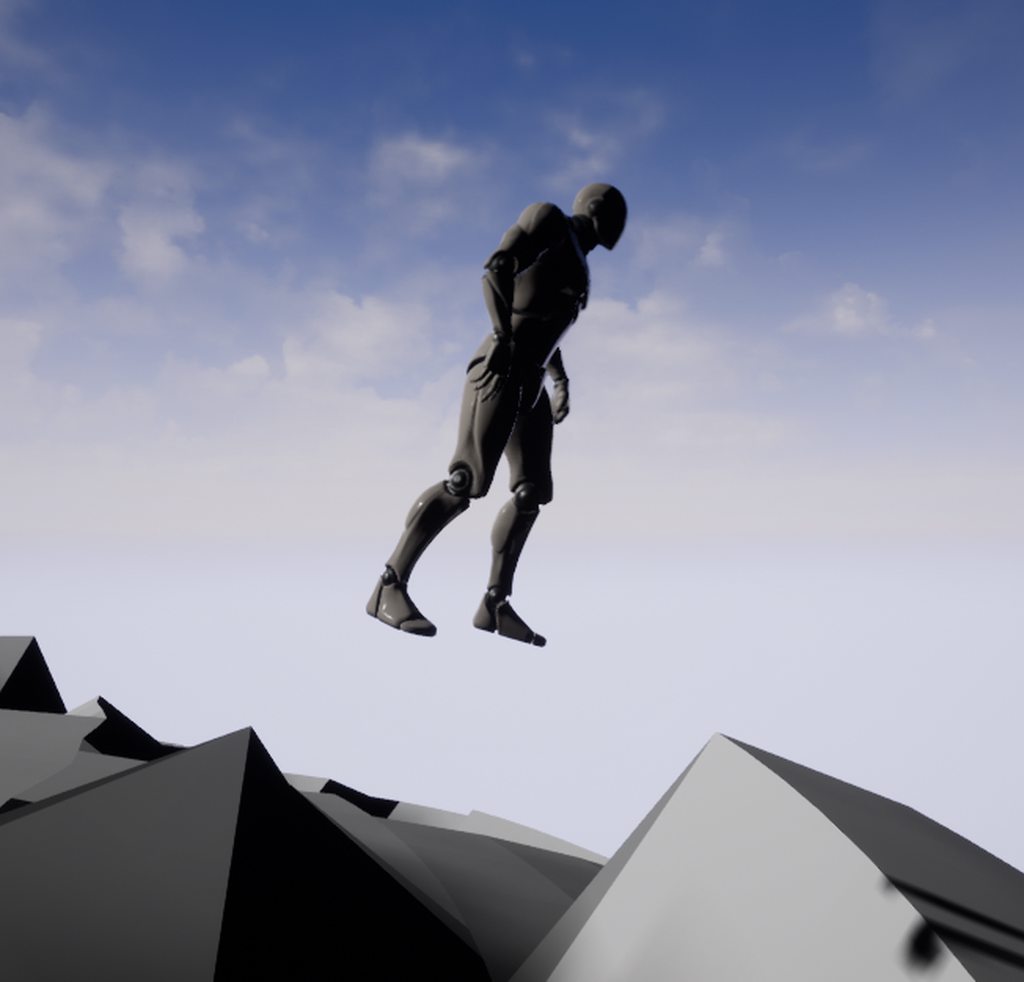
how do i get my guy to walk on the surface instead of floating https://imgur.com/a/w0ZscWw
 grim ore
any reason why he is floating?
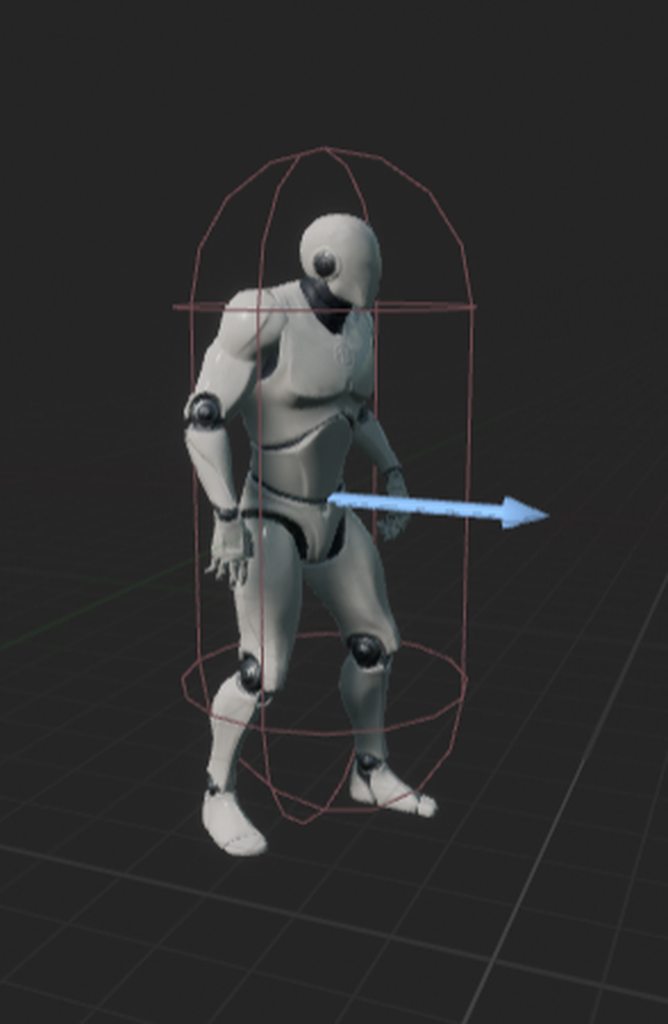
his capsule should be way smaller than that gap and I assume the collision on the terrain would be way closer to the visible mesh
 runic fern
put the player in the middle of capsule
north shale
the reason for him floating is cuz thats where the collision mesh is i don't know how to make it more accurate thats what i m asking help with
he is
runic fern
Hello
abstract marsh
Not sure why everyone found it weird for me to ask for game pitches
 tawdry sierra
i want to change a character i spawned with a buton
north shale
 tawdry sierra
basically i want to transfor my character/ change actor
runic fern
make capsule littlebit bigger and try
@tawdry sierra you wanna change the button or the character ?
grim ore
@tawdry sierra that code would never work because when you hit your E button nothing happens, nothing is hooked up to the execute wires on the Flip/Flop
north shale
i imported a blender .obj sphere and when i walk on it the character floats even though its in the mid of its collision box
tawdry sierra
i want to swap an actor with another one
runic fern
connect flipflop with the branch
tawdry sierra
with a button press
tawdry sierra
what about the event play?
tawdry sierra
ooo emud
grim ore
@north shale what does the collision lok like on your surface then?
 grand knot
i have a animaiton set to play speed on velocity
but i want to make sure max play speed is 100% not higher
so i need a math equesion that limits it to 100 while still using velocity
any ideas?
north shale
what do you mean
grand knot
i have a custom running animations play speed set to play depending on characters forward velocity
tho i dont want it to play over 100% speed as the velocity can go as high as 25000
north shale
the collision looks like its bigger and out of place from the visual mesh
runic fern
Emud im not sure about your question but you wanna set the player walkspeed 100 limited
but with velocity can be more than 100
with velocity value
 inner mountain
@abstract marsh at first, you have to decide what's your target for pitch. Is it publishers/investors? Or gamers? developers?
@abstract marsh also here is an old but good article about pitching http://www.tinybuild.com/how-to-pitch-your-game

tinyBuild GAMES - Indie Game Developer And Publisher
tinyBuild is the indie label behind games like Hello Neighbor, Clustertruck, Punch Club, Party Hard and more
grand knot
ns it can be more then 100 thats the problem
hence we need a math solution that still uses veloity but limits it to 100
runic fern
you can Set the max walk speed at 100
but you can use Add to the variable of walkspeed
or you can use condition when velocity reach for example 1000 the max walk speed will increase
if the velocity reach 1000 set max walk speed to 500 and if velocity decreased set max walk speed to 100 again
north shale
is there a way to visualise the collision mesh?
grand knot
i dont think you understand man
runic fern
navigate your worldoutliner @north shale
grand knot
i want the animaiton speed to allign with a custom run event
runic fern
oh i thought the movement speed xD
grand knot
so if character is walking 1km i want animaiton to play at 10% and if hes flying at 25000km i want the animaiton to play at only 100%
north shale
your saying walk around?
inner mountain
@grand knot use Clamp node
runic fern
@north shale no i mean check the colliosion on the worldoutliner maybe its box not visible or something
north shale
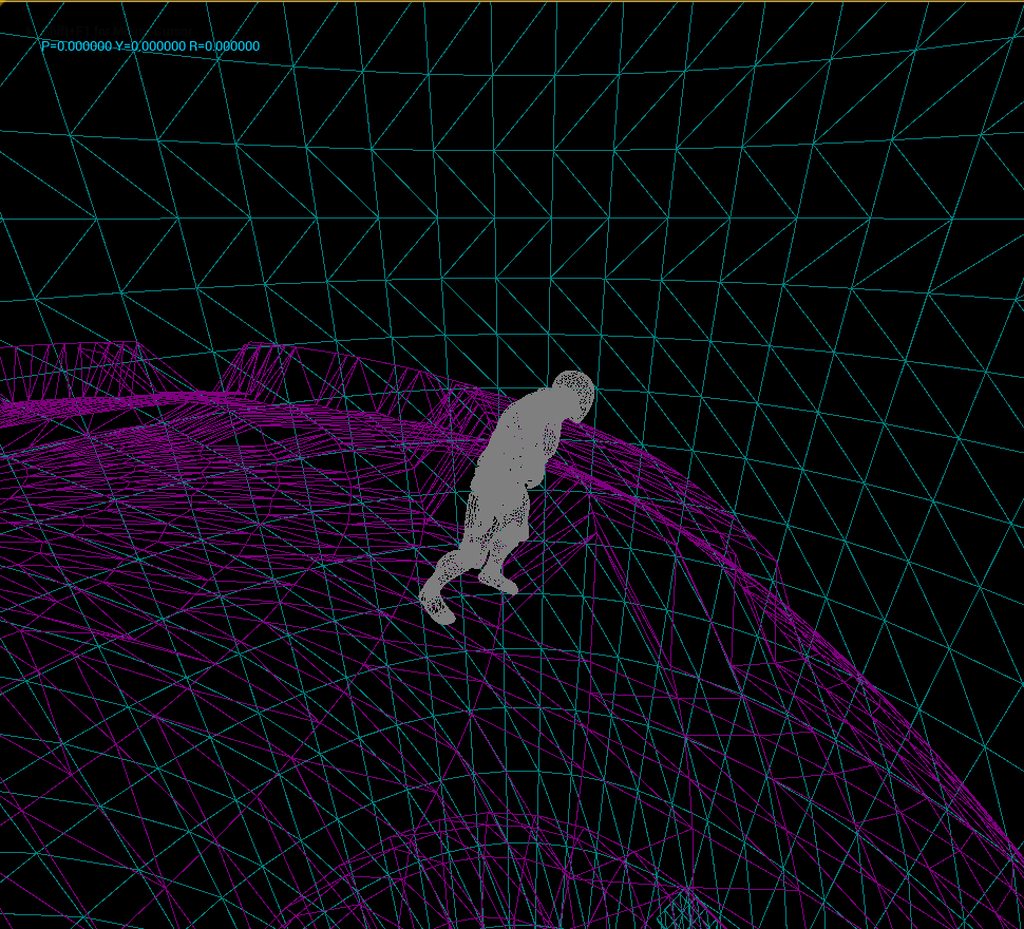
when i say visualise i mean like this https://imgur.com/a/VBn5MRg
 light bobcat
how to undo XD
north shale
ctrl Z maby?
grand knot
still how would i use clamp for animaiton play speed to be same in percentage as character velocity
light bobcat
okay thanks I forget it ever time XD I starting to make my own game like 2 mouthXD
@north shale
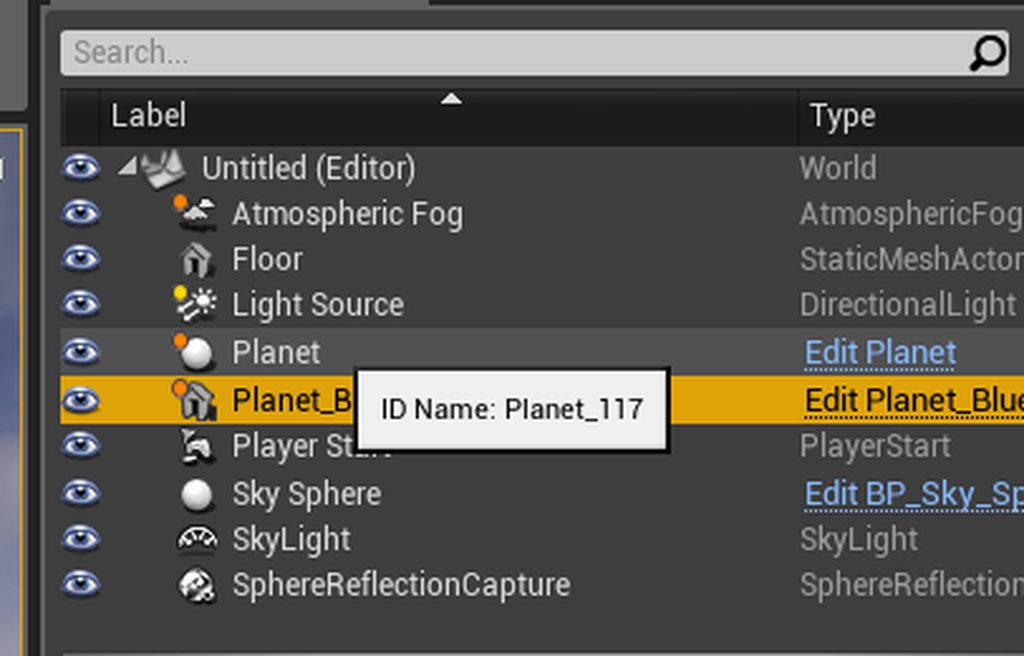 inner mountain
@grand knot how are you playing your animation? Are you using an Animation blueprint?
runic fern
thats weird
north shale
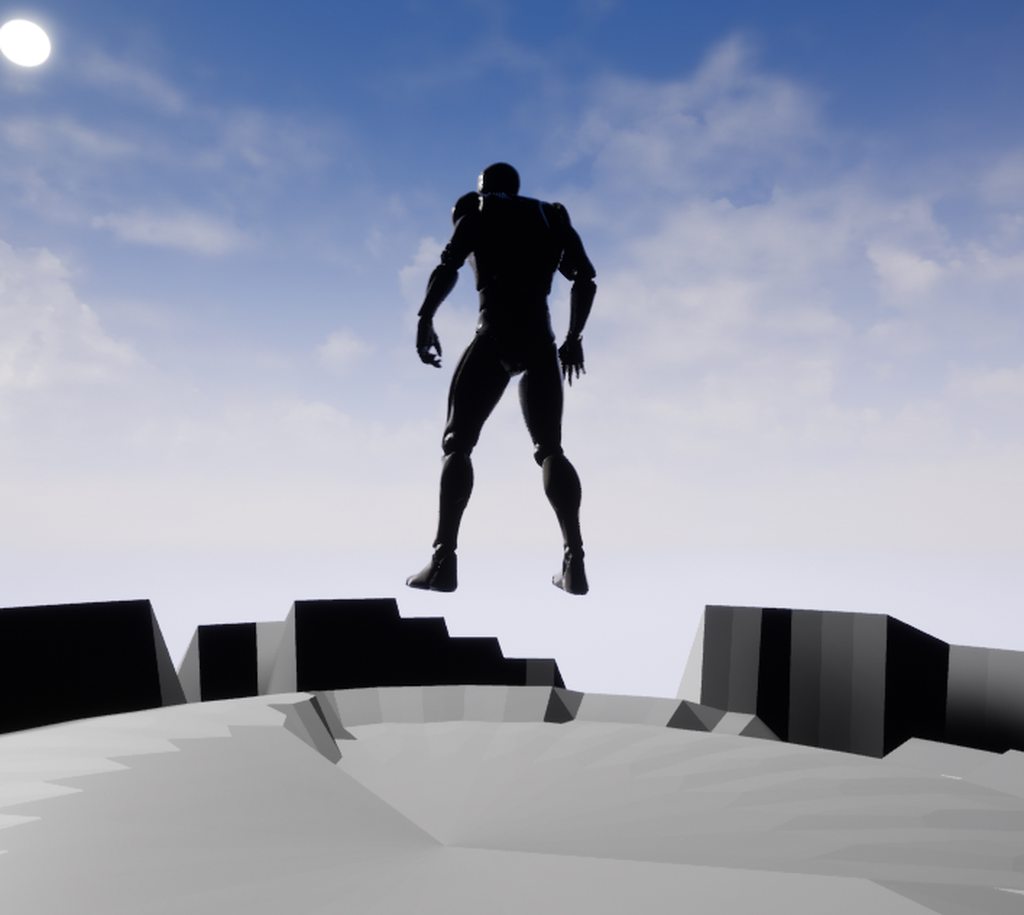
what im wanting to know is why my guy is floating above the visible mesh
what ist like is as if the mesh as been estimated then thats the collision so it goes down a bit in the dips and up a bit on the peeks https://imgur.com/a/xxN927A
 grim ore
the visibile mesh is not always the collision
open up the mesh in the editor and click on the collision button to view the collision
north shale
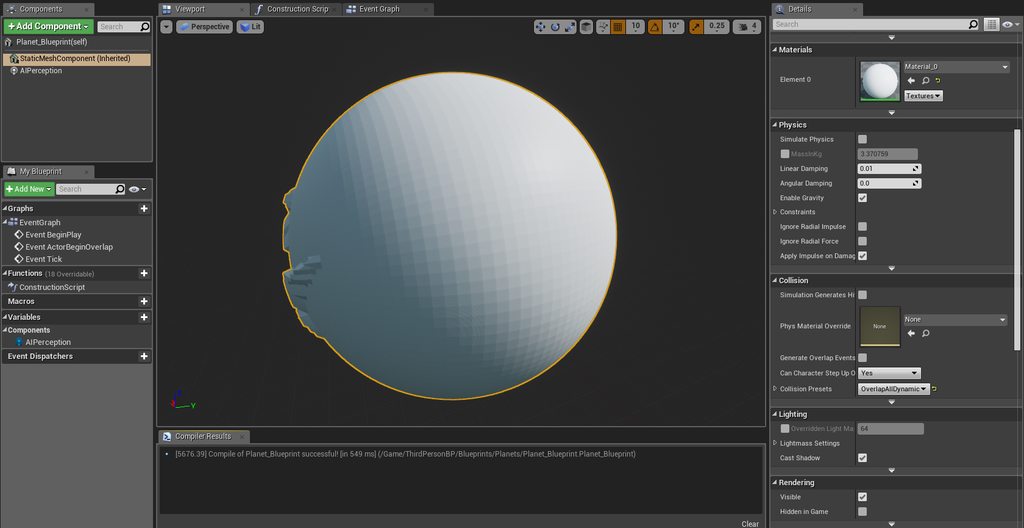 grim ore
find your mesh in the editor, double click it to open it up in the mesh editor, click the collision button at the top
north shale
when you say fined the mesh you mean is the components tab?
grim ore
no I mean find the mesh in your content browser, that above is your blueprint
tawdry sierra
question: How can i make a mesh that doesnt recieve light from a specific point light?
grim ore
change it's lighting channel?
tawdry sierra
how do i do it? im only 2 months into ue4
north shale
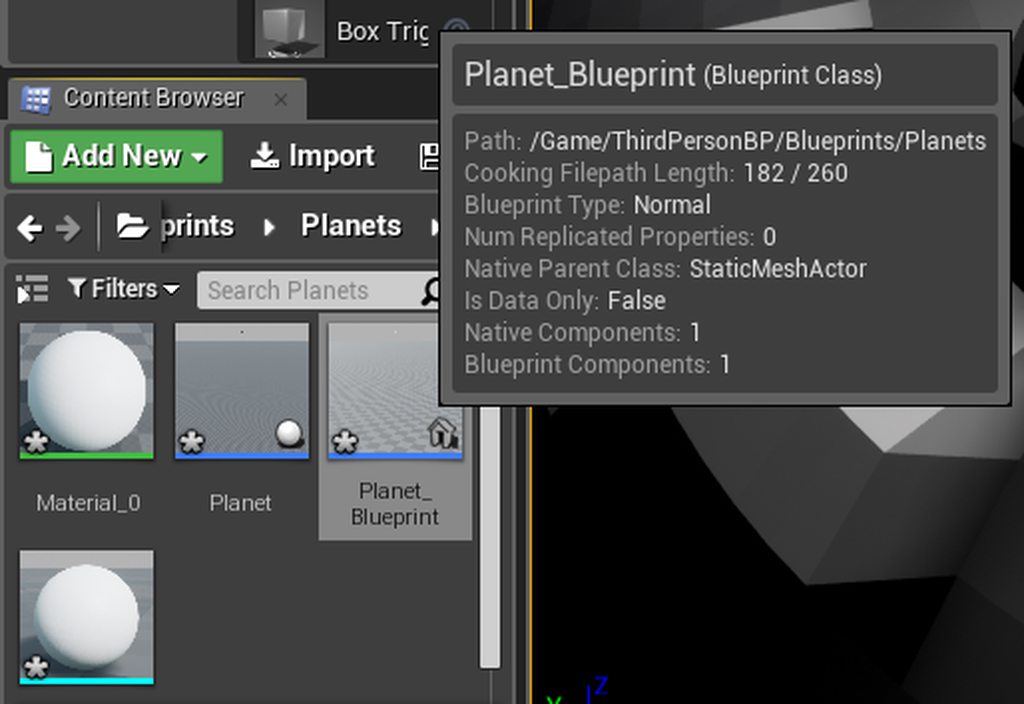 grim ore
on the mesh type channel in the search details, or go down to the lighting section and open up advanced
grim ore
@north shale that is the blueprint, is says blueprint class at the top. I would guess the one to the left of it that says planet is the static mesh
now what? The light emits light on a channel(s), the mesh accepts light on a channel(s).
north shale
no thats a nether blueprint
grim ore
if you want the mesh to accept light from everything else but that one you need to set that light on another channel and exclude that one mesh
and then tell everything else to use that one channel as well
north shale
aha
grim ore
then I don't know. You imported the mesh so I don't know where you put it. Use the filters at the top of the browser to turn on Static Mesh if needed
 grim ore
I want to say offhand that the mesh is super duper tiny
north shale
yes it is 😄
i was just wanting a quick mesh i could check to see if a peace of code worked on
im trying to get the angle of the surface in on because the default wont work
in= im*
grim ore
firing a line cast down then getting the normal would do that but your collision might get in the way if it's this broken
grim ore
click collision then simple and it should show your collision
north shale
kk thats so simple for me so i put it to complex now how do i apply this to the actor?
grim ore
complex is not going to work for that, simple is what your character is going to use. if simple is not correct then you need to fix it
north shale
gree is simple https://imgur.com/a/WRYBKYg
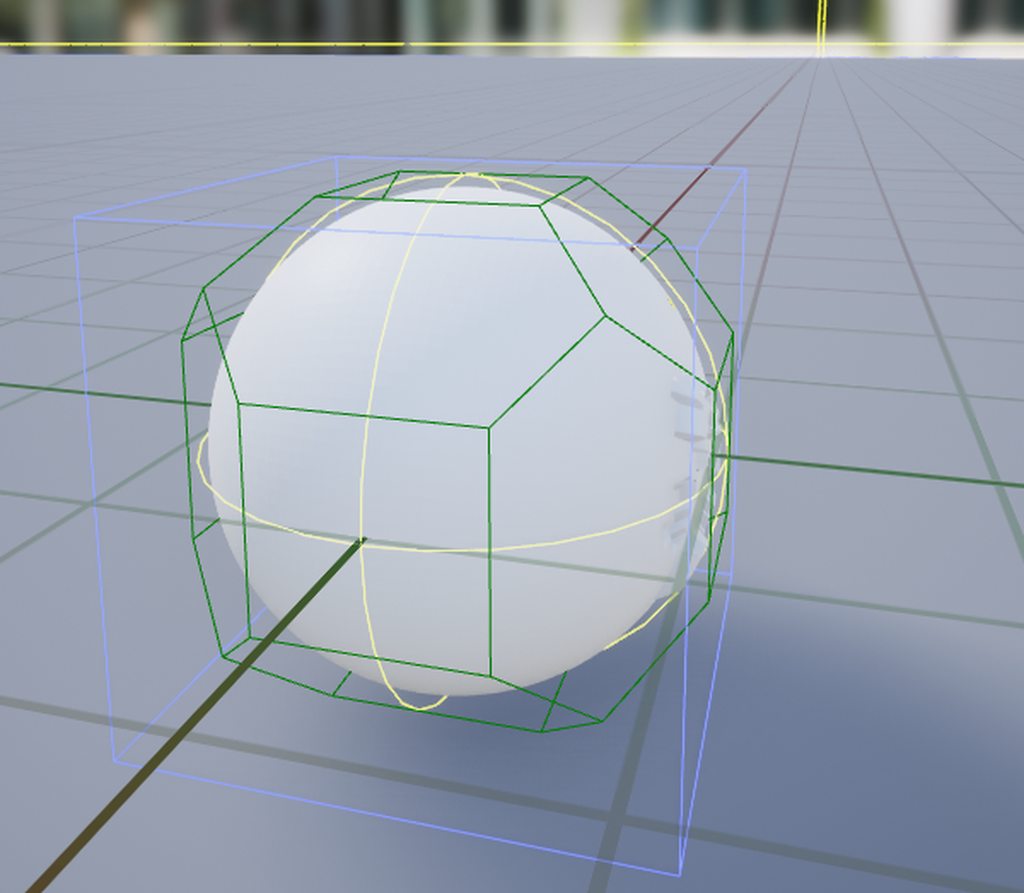
green
light green is the complex https://imgur.com/a/LtPgFOa
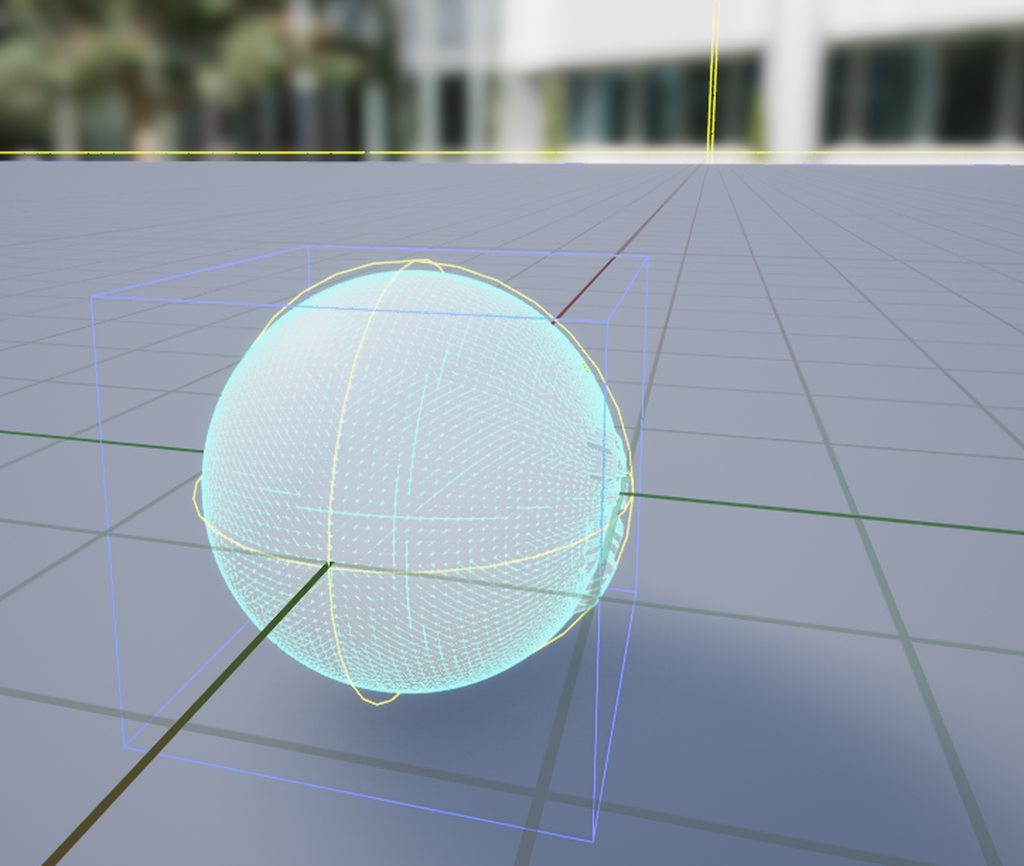 grim ore
yes that top one is what you are colliding with so you need to fix it in your 3d program or create new collision in UE4
atomic sandal
So is there possible way in Ue4 that i can sent file
 lofty hollow
Hey moving around in the editor is extremely slow for me, anyone knows how to fix this?
north shale
so? fix it hum... thats going to be a pain cuz i dont know where to start XD
grim ore
@lofty hollow top right corner of the viewport is the Camera Move Speed if this is the issue
lofty hollow
oh thank you!
grim ore
@north shale fix it however you created it in your 3d program or use Collision -> Delete Collision then Collision -> Auto Convex Collision the hit apply on the panel that pops up and see if it can make you a new one
north shale
have you used blender?
grim ore
nope I am not an artist
grim ore
try having UE4 create a new one then like I listed above
north shale
kk
 honest vale
now this is cool https://www.unrealengine.com/marketplace/spline-mesh-solutions

Spline Mesh Solutions - Fast easy and powerful spline based mesh generation solution.
north shale
kk its made me a new one and its not 100% perfect but its tones better, but now how do i apply this to the actor?
@grim ore
grim ore
the world or the player? the player doesn't need it
the player just checks the collision of the item it is on so fixing it on the planet should make it better
north shale
i was wondering how to applt the changes on the mesh to the object that uses the mesh but it doesn't mater now because iv realised it does it automatically
so whats the difference between the complex and the simple mesh other than ones more complex and doesn't appear to work
is there a way to make the collision super accurate to the visuals @grim ore
fading cobalt
hey guys, is there any way to avoid a huge memory leak while importing an alembic file?
true leaf
So let's say I make a house using about 1000 little actors (walls pieces floor pieces stairs etc) for my level and I want to clone that house around the map. What's the best way to do that
Seems like grouping the actors is not .. ideal. Maybe converting to a static mesh w collision ??
Is that the 'right way'?
pallid compass
You could use a BP actor as a wrapper for it
Design the house in bp
little overhead
But easy af
plush yew
Had an idea for a game. What about a game where you play as a super hero. My idea is, you have your secret hideout to yourself, but when you decide to leave, you’re thrown into a massive world full of villains and heroes. You can find NPCs which will give you missions to increase your strength and unlock new abilities. In your hideout, you can also participate in “simulations” which throws you yin to another map where you can fight against other players
Just a random idea I had.
where i can download visual basic c++ tools ?
i need to build a project
pallid compass
The instructions are on ue4 github repo
lofty hollow
Unreal closes down when i stop debugging in visual studio, anyone knows how to fix this?
north shale
@grim ore ok i did a line trace to the ground and it works except the line trace is parallel with world Z not my players Z do you or anyone else know how to fix it
frosty copper
🤔 something along the lines of local vs world stuffs
abstract relic
I saw. My apologies 😜
north shale
NP 😄
 static viper
you cann that a line trace to the ground?
you know you can just sorta... world location z - 10000
as end
and world location z as start
XD
north shale
because the up vector is the position im trying to work the line trace off i.e. i get the up *-1 to get the invers and set that as the direction the line trace will be in
fierce tulip
or you know, read the rules
north shale
does anyone know how i can create a Collison mesh = to the object not like the green in the image more like the actual visible mesh https://imgur.com/a/oREGe43
 fierce tulip
either make it yourself, try that collision generator inside the mesh viewer, or if it needs to be 100% accurate but most costly, set the collision to "use complex as simple"
north shale
ok i figured it out all i had to do was change this https://imgur.com/a/5LYQYnZ

 placid arrow
Is there a place where I can find information on how to create a tutorial level in my game? I've already created one without needing to refer to any other source and want to compare what I've done to how others do it
The problem is searching for "how do I add a tutorial level to my game" or any similar query just brings back a million and a half results of "unity tutorial for how to create a game". Google really does not understand this concept...
If I adjust the query to remove any results including "unity" and only show those including "unreal" I really get little of relevance still.
 whole quarry
is there even a standard way of making a tutorial level?
dry moon
uhh not really
people like less intrusive tutorials though
instead of holding hands throughout the whole way
whole quarry
Dark Souls 3 has one of the best tutorial levels
dry moon
just a pop up "hey you can do this' and let people do what they wish with the info
whole quarry
and it doesnt tell you anything
thats best indeed
and maybe some clever level design for the first few levels
grim ore
maybe someone here has an idea. I want to somehow use UMG in a parent/child relationship. I want a master UMG that has data I can set (parent) and have maybe 10 children that are all identical just differing in the data (children). The problem is they are not all the same "class" so I can't just reference them all the same when trying to process data on them 😦 any ideas?
pallid compass
Interface
grim ore
how would that work?
pallid compass
If your struggling to just reference them, or / and keep track of alot of mixed references
Then ref too there interface pointer should do it
Interface with a base set amount of functionality all the classes will have to process the data
Assuming you can get a classes interface ref in bp
grim ore
say I have 10 UMG widgets and I want to add 3 of them to the screen. Unless I hard reference widget1, widget2, widget3, etc. I can't generically reference them as say widget
grim ore
Master widget, it has a panel. I want to add a couple widgets to the panel. The widgets are say CoolWidget1, CoolWidget2, CoolWidget3, etc.
meh... I think it's just the issue with child/parent
grim ore
yeah its complicated lol
pallid compass
Then i dont see the problem
grim ore
yeah lemme explain it better. 1 master widget, a playbook. It holds a scroll panel that is supposed to show plays. The plays are all widgets that visually represent data.
the first issue is I can't make a master "play" widget and then make children from it that all inherit from the parent
where the children just have differing data
north shale
is there a way to have complex collisions on and physics?
pallid compass
let me reword that
phone went full potato
Why does your playbook and play widgets have to be related
grim ore
they don't, the playbook just holds the plays
the plays should be designed visually in UMG and are just different representations of data
but I completely forgot I can use new blueprint and subclass a widget...
pallid compass
No matter what the class there sholdnt be any problem at all
just reference it as a UWidget
or UUserWidget
The same way you can pass around UObjects
 spiral island
I think he wants to have a single generic widget which can hold data representing something, but he wants to be able to create them or reference them dynamically
grim ore
yeah It's a confusing mess, I forgot about just pure subclassing widgets as it's not the normal workflow for them
pallid compass
Well if thats the case just have a data struct and a base class with a function you can override to drive the widget data display
spiral island
if you're willing to use C++, then the solution should be much more trivial
pallid compass
It shouldnt even matter RAV
grim ore
yeah the data struct was the next idea but then you can't visually set up the system you have to data drive it
grim ore
2d vector data
spiral island
are you making a replay browser?
grim ore
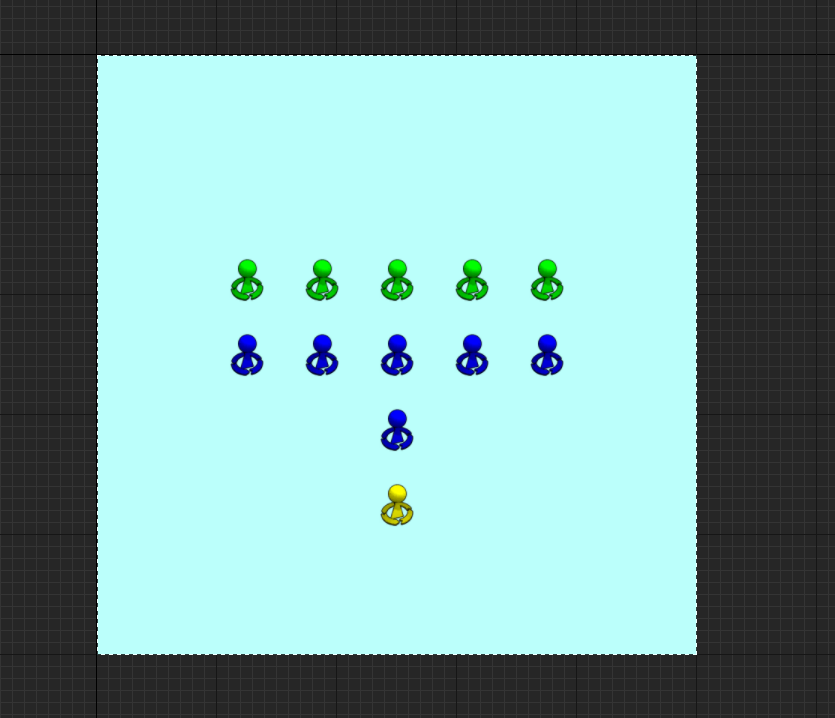 pallid compass
You need to display FVector2D?
grim ore
each icon is data I want to be able to pull out later, it's position
so I am visually displaying the data as you can see here and later I want to get access to that data thru the widget
pallid compass
Still confused as fuck, try again
Give some solid details
grim ore
I've given all the details lol
thats a widget, it has some images and those images have positions in the widget.
spiral island
maybe you can make a class which has pointers to all the onscreen objects, and then can generate the widget as needed?
pallid compass
Thats better, keep going
grim ore
I want to make say 10 of these widgets all with different positions on those images
now say I want player 1 to only have access to 3 out of the 10
pallid compass
You want 10 of them Widgets that had little image widgets inside of them correct?
grim ore
I want 10 of what you can see in the picture
the only different is the images, the little blue/green/yellow icons, will all be in different places
if I wanted to do it in just data then it's an array of V2D and its no issue but I want to visually store this data in the widget basically
pallid compass
So yes then
 dark depot
might be better to just use 1 widget that you create then set the images
grim ore
yes that was the other option but then you visually can't set the images at design time
pallid compass
TArray<TArray<FVector2D>>>
An array of arrays of pos
or you can even use a struct wrapper for it
to include extra info
grim ore
how would I define the positions, like where?
I could make a data table with the positions and feed it in sure but then that data is in a data form and not visual when editing/setting up
pallid compass
no data table very bad, dont do that
Okay so the first question is, ignoring everything else
How are you going to keep track of 5 green, 5 blue, 1 yellow
grim ore
visually lol
pallid compass
No you need away to store the actual data
grim ore
and internally in the widget they are in an array
pallid compass
Putting it all in 1 array would get confusing
grim ore
nope it's 12 icons 0-12
spiral island
would an array of structs work for you?
grim ore
It's literally simple the problem is I am trying to figure out how to make it more dynamic instead of fixed and it's stuck
pallid compass
maybe im dumb af but this seams trivial to make flexible
grim ore
yep the problem is having to not keep a hold of it as "widget1" which is of type "widget1" and "widget2" which is of type "widget2"
spiral island
that's what arrays are for
unless there's some part of your situation that I'm not understanding
pallid compass
Display Widget
Display Widget Struct
TArray<what ever these things are>
TArray<FVector2D> Mirrored to above array
SomeDataType Reference to me
SomeWidgetRef Reference to my owner/creator
grim ore
but each widget would be it's own unique thing and I don't think I can get around that if I want to do it visually.
unless I can make some sort of data object to just hold data and then visually make up that data object in a separate thing =/
spiral island
what are all the things you need to store?
grim ore
just positions, vector2d but I want to be able to visually set it up
pallid compass
What do you mean own unique thing
grim ore
not just "oh look here is a struct with some data in it"
spiral island
and the best thing I think is to store the data in one place, and then have a separate system which can visually represent the data
pallid compass
THey would be instanced, why would that matter
Its not static data
you keep a Array ref too all the play things you make, then the play things contain that stuff i posted above
grim ore
ok let's try this. Say I wanted to have 2 widgets on the screen
each widget holds 1 image
each image is different.
this would require 2 widgets that are unique unless you created them at runtime and passed in the unique image right?
pallid compass
Nope, you just pass the image u want for it during a constructor or some way to init
Because obviously, you need to know what images you want
If u want it at design time
grim ore
... I said unless you created them at runtime... that would be using the constructor or init
spiral island
as long as you design it as a flexible generic class, then you should be able to do it at runtime or design time
pallid compass
You can expose a property that you can set an image ref too, and have it populate at run time from that, similar too data blueprints
grim ore
but visually was the key 😦
pallid compass
You can have it populate visually in design time
1 sec
let me boot my engine up
You want this stuff at editor design time right?
grim ore
I think I am overthinking how to do it is the issue
spiral island
is there a reason you want to do this at design time visually?
because it seems harder
grim ore
I would still need a ref to all of the individual layouts somewhere so using that to populate unique widgets would be fine
pallid compass
nah its good reason to do it at design time
Why dont you use data assets then
If u want that
grim ore
if you look at that image it's a layout of stuff, doing it at runtime or in code or with data means you still need to visually figure out what goes where but then you just convert it to the data separately
yeah I think I am overthinking it is the issue, maybe trying to abstract it down to a layer that is just not doable
something somewhere has to keep track of "this widget = this class" or something similar so you can keep track of what player knows what from that list for example.
so I still need to create a master list of the plays somewhere, I think forgetting that I can manually subclass a widget is what caused my tangent lol
pallid compass
wat "this widget = this class"
u dont need to track that
you should know or u can even get the engine too tell u
what class something is
grim ore
say I have a list of 10 plays, 10 widgets.
and I want the player to know they should show 3 of them when the playbook is on the screen.
spiral island
store in the struct a hashset of which players can access the data
spiral island
rip
pallid compass
Mirroring arrays can slove that problem though, or mirror lists
But that is unrelated
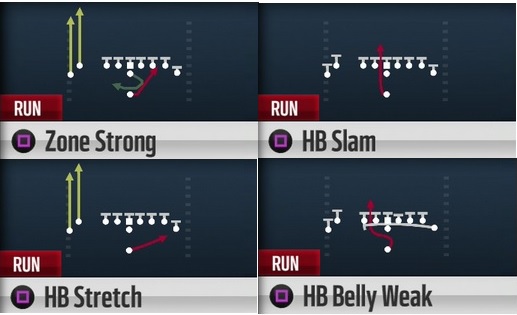 pallid compass
Yup i follow
grim ore
you have a potential of 10 plays total that "could" be shown
the player has unlocked 4 of them
each "play" is a separate widget that contains the data for the play that the designer set up
pallid compass
Yeah
grim ore
so internally the player has to store something that knows what they have unlocked. Either a simple list of values that are mapped to something that shows which class to spawn in
or something else.
pallid compass
Well you would not separate the different plays in too different classes
Your just loading some sort of data set in too a Generic display widget
pallid compass
These data sets would have some sort of reference
ID, FGamePlayTag, FName, what ever u want really
grim ore
doing this without data driving the display but the display driving the data
pallid compass
Displays should never drive Data
grim ore
each widget has positional data already in it that can be used for data purposes, the position
requiring a designer to layout a visual representation of data without doing it visually is just not right
pallid compass
Your Data should be driving your displays period, how you create that data is another story.
Your asking for away to serialise the data in from some sort of design system right?
grim ore
well I don't have to if I just use the widget itself, it has all the data in it.
north shale
is there a way to push or pull an object with physics disabled?
grim ore
@north shale you can just change the location of the item when you touch it to simulate that effect
pallid compass
Yeah you can do that, but that is super bad practice imo
But u can just yolo fuck it
and subclass a base one
Set it up
then give it a FName or tag
or some way to track it
or u can class track, but then u will struggle if more than 1 of the same class
But yeah this is what i mean
grim ore
yeah I think I got it now. I never said this was smart but I am trying to work around limitations of the editor tools we have access to now in UE4. Once we get the new editor utility widget I think this would be a ton easier
pallid compass
system is flawed already doing it that way,
Im actually about to make a pullrequest
That would let u do this
for UMG customization
grim ore
it's super simple in Unity, just realizing how much more annoying stuff like this is in pure BP in UE4 right now without being able to do editor utilities easily
pallid compass
But no idea when it will be in, or if epic will accept
north shale
ok what im wanting is for my character to be drawn to an object but i cant use Add force or add impulse because if i have physics on the player cant walk he just hovers
pallid compass
Yeah the editor is complex, thats why its hard to do
But its complex for alot of good reasons
grim ore
well 4.22 should have the editor utility widget which will let you design editor utilities using UMG, works quite nicely.
pallid compass
jfc that sounds gross af lmao
grim ore
this is basically getting the location of the item this code is on, finding the player, figuring out the direction from the player to the item, and adding input on the player to push it towards the item
@pallid compass thanks for the help btw. I never thought this was a good idea just an idea I was trying to do 😃 The chat helped me remember I could subclass directly so it was helpful.
pallid compass
There is actually a ton of dodgy ways to do what u want
But i wouldnt recommend it
I do it all the time for my UMG splines plugin
lmao
Dodgy designer stuff
grim ore
yep yep. It was a silly project idea for the superbowl, designing plays in UMG and having a display you can click on then having the characters on the field below moving to that position. Just to show off stuff like event dispatchers and some basic AI and interaction between UMG and other objects thru BP communication. I kinda got fixated on making it super dynamic and robust rather than just working lol
pallid compass
Really need a custom data type and data editor window for it tbhg
grim ore
yep I agree which is what I was trying to use the UMG editor for lol
I am so used to full file and data access in Unity
spiral island
is there a way to force the engine to drop frames?
on my tower PC my game runs at 120fps, but on my laptop it runs at about 40
this is fine, except that instead of dropping frames on my laptop, the game just runs more slowly
everything moves more slowly
grim ore
drop frames or run at a lower frame rate?
spiral island
I want the events to happen at the same speed, and drop frames to keep up
grim ore
t.maxfps XX in the console where XX is your max Frame Rate limits the frames
you can adjust that in the project settings as well
you might be having actual bottlenecks or hiccups and I have no idea how to simulate that
spiral island
I'd record it but my laptop is so slow that recording the screen would make it look like it's doing the right thing lmao
pallid compass
If your dropping frames and shit is running slowly
Your game is 100% setup wrong
Sounds like your doing stuff on tick
and not compensating with delta time
spiral island
is there a different event than tick I should be using?
 celest creek
Hello all - I'm looking for a way to have a ship rotate around its own axis no matter what way its facing. Seems very simple but I'm missing something I'm sure..
I've explained it (hopefully) well here: https://forums.unrealengine.com/development-discussion/blueprint-visual-scripting/1563525-ship-rotating-around-its-own-axis-project-download-included
Unreal Engine Forums
Hi all helpful souls,
I've bumped into a problem I'm really struggling with and without fully tearing my hair out I've come to the conclusion I'll need some
grim ore
@celest creek how do you rotate it now?
celest creek
I just tick up rotation values per axis
maybe a naive 'solution'
a project is available to download to show it better but that's it
pallid compass
@spiral island Its not reallt to do with Tick, the problem is tick fires every frame, so more frames = more ticks
So you need to compensate for this
spiral island
ok
spiral island
so I would use this to scale the amount that my stuff moves
but what about things that I don't control directly, like a physics object where I set the initial velocity?
pallid compass
Prob wouldnt be setting velocity on tick
spiral island
I set it when its fired, but it still seems to move tied to the frame rate
so even if I scaled my control speeds, the projectiles would still move more slowly
spiral island
one sec
ok i forced it on fixed framerate and it seems to work
but when I use smoothed frame rate it runs slower
spiral island
I'll update my movement logic first and then see if I missed something in my projectile
north shale
is there a reason why the player cant walk when you enable physics?
pallid compass
because your trying to drive them with physics?
north shale
how does the gravity work without physics can i change its direction?
north shale
afaik?
pallid compass
as far as i know
north shale
kk
thats a pain i really need to have it changeable
im trying to make a character who walks on a planet
pallid compass
Yeah that sounds like c++ stuff
spiral island
this is what I mean
I'm recreating the unity tanks sample in ue4
https://streamable.com/xul2b
https://streamable.com/i6j9n
in the 20fps recording, the bullet seems to take longer to get to its destination
ignore the fact that the tanks themselves move more slowly I haven't put the deltatime scaling in yet

 grim ore
yeah it all seems to be running on tick or on axis for movement so it's fps limited, your not really taking into account the frame rate on the input
spiral island
i know that for the tanks
but why is the bullet moving more slowly
I left that up to the physics engine
grim ore
what's the actual code for your bullet?
spiral island
its got basically no code
a tank gives it an inital velocity, which it just hands off to ProjectileMovement's initial velocity when it is created
then the bullet has no code running except on BeginOverlap, where it spawns an explosion and destroys itself
north shale
is it posable to do a few things with C++ and the rest with blueprint?
spiral island
you can call events to / from C++ and blueprint
north shale
is it worth learning C++ i only know a bit about C#
spiral island
yes
pallid compass
You need to learn general c++ before u touch ue4 c++
north shale
kk thanks
spiral island
unreal vs the throttlebook pro
 gilded plinth
Any ideas why my skeletal mesh decided to stop casting shadows in some places?
so confused : P I recently triangulated in maya and re-imported, but not much else
I'd post the avatar, but the bot blocked it i guess cause it's a naked avatar : / tried a new basic opaque material, but still a no go
appears to have something to do with the physics asset : / wtf
if i remove it, i get better shadows
ah answer is that unfortunately i have to re-create my physics assets after skeletal mesh re-import cause the physics bounds were off
 native cradle
Just curious
Do we need to install Unreal engine on the mac we want to use for remote building ipa from windows machine?
I have done this in the mast mindlessly. It really came up just as I was about to set up a diff mac machine
 regal mulch
What's the practice if you have different SkeletalMeshes with different AnimBPs that technically all need to do the same thing (and have the same named bone affected by it)?
They all have the same "basic" bones, but each of the meshes might add some extra bones for some unique parts of it.
Don't want to copy paste code 10+times
 weary void
Hello ! I don't know in which channel in should ask this
I hope this one will be the right one
I've been working on a video game for the past 3 years
I today I wrote a publishing document using google slides
I wrote it in english in a matter of comprehension for every one I could send it to
However, I'm french
which means, my english is very baguette pain fromage
the document is checked and complete, but I would still need someone to help me fix the wrong sentences
could anyone please help me ?
There is ~10 slides like this one which need to be checked 😊
plush yew
hey, how to load object in runtime? I tried to use StaticLoadObject, but failed, it always return nullptr
regal mulch
@weary void That would technically also fit into #looking-for-talent
 polar hawk
@regal mulch I know someone is trying to do this with anim subinstances and stuff
but
going through all that shit
it caused some problems and they switched back to 2 anim bps
<_<
There is a smart way to do it, but
¯_(ツ)_/¯
regal mulch
Yeah if it would be 2 BPs I would just not care.
But we have a handful, one for each weapon.
Might just find a way to modify it from within the WeaponBP instead of AnimBP
light bobcat
why you bully me
 bronze cedar
why there is a spot , that light spot
i am using directional light, and making this light like on the top,so that i get shadows but not that much long , but than this aura or light area is coming, i understand why it's coming, but is there a way to make it invisible
when changing the angle of the light, that spot go away but i get some bad shadows what i don't want, i want shadows but very little
 wary wave
could be specularity, but tbh it does look like a pointlight
bronze cedar
it's a directional light, yeah might be a material problem, like reflection , but how to get right from that
wary wave
change material roughness values
bronze cedar
oh ok , thanks for the help guys 😄 😃
OMG it's go went and gone, haha thanks guys @wary wave and @static viper
polar hawk
@regal mulch I wonder if you could like
procedurally generate an anim graph
right
like oh man
regal mulch
It feels like it's the same shite as with UMG Inheritance
You kinda could just inherit from a parent class, but then feature XY breaks it
fierce tulip
 merry gazelle
I've noticed that linetrace seems to bias towards (0,0,0,0), can anyone explain to me why this is the case?
In my example, the arrow(start of trace) is pointing directly down. In spite this, most of the line traces seem to generate towards the middle of the map
 digital anchor
well because end is a world position
and 500 randomly from the center of the world, is still near the center of the world
merry gazelle
can I convert end to a relative position?
digital anchor
yep, just End + Arrow.GetWorldLocation
merry gazelle
ok cool got it, so are all vector pins by default world location
digital anchor
humm.. they are a location but what kind depends on the context
if you add to a actor location, they are relative to that actor, if you subtract that actor they are back in world position
merry gazelle
ok thanks 😅
 mental salmon
Help, My shader is not compiled for GLS_ES2, no error, nothing, it's just not there 😦
fierce tulip
you enabled es2 preview in the shader?
mental salmon
It's not an Editor shader, it's a usf file. Pretty basic
#include "/Engine/Private/Common.ush"

void MainVS(
    float2 InPosition : ATTRIBUTE0,
    float2 InUV       : ATTRIBUTE1,
    out FScreenVertexOutput Output
)
{
    DrawRectangle( float4( InPosition, 0, 1 ), InUV, Output.Position, Output.UV);
}

float4 MyColor;
#if (COMPILER_GLSL_ES2 || COMPILER_GLSL_ES3_1)
    TextureExternal InTexture;
#else
    Texture2D InTexture;
#endif
SamplerState InTextureSampler;


void MainPS(
    FScreenVertexOutput Input,
    out float4 OutColor : SV_Target0
    )
{
    OutColor = Texture2DSample(InTexture, InTextureSampler, Input.UV);
    OutColor.r = OutColor.r + MyColor.r;
}
If i set r.ShaderDevelopmentMode to 1, and run in vulkan mode, i see my shader compiled in Saved/ShaderDebugInfo/VulkanSomething, but i want to run it on android
north shale
does anyone know how i can set an actor to calculate complex over simple collision every tick in BP? ik how to get the character to do it if its walking but i want other actors to have it
merry gazelle
Anyone know of a reason why this black plane "substrate" component is seemingly being hit, yet the "oncompnenthit" doesn't trigger anything
grim ore
on component hit in the bp where the black thing is? if so a line trace is not physics it's not going to trigger a physics hit, you need a collider for that
digital anchor
alternatively, do your stuff after the line trace result, instead of OnComponentHit
merry gazelle
the line trace is fired from a child actor and the parent actor has the plane I want to hit
I'll take a look
grim ore
yep the line trace is just a line trace, a representation of a thingy checking for colliding layers but not using physics so no physics interactions (overlap/hit)
this is a good use for a blueprint interface, after you hit with the trace you just tell the object you hit that you hit it and trigger an interface event on the thing you hit to do whatever.
merry gazelle
I was watching one of your tutorials that involved using BP interface with linetraces but I can't remember what it was called 😅
grim ore
well I won't remember either so I am no help lol
grim ore
yeah I was going to say it's probably in the FPS one. I dunno what's actually in the interface one lol shrug
 earnest cape
So I know that currently the only way to access these variables is if you are using a C++ project, but it would be great to have them exposed to blueprints
grim ore
vote for it on the answerhub as a request?
north shale
how do i get the actor to use the complex over the simple collision?https://imgur.com/a/YAU3HGb


 merry gazelle
got imy HIT stuff working now 😄
 vale silo
someone needs to make a plugin for split screen multiplayer for the Marketplace 😉
plush yew
Hello everyone! I am brand new to this server. I have been working on a particular part of a game I am developing in UE4 for the past 4 days or so. I made lots of progress, but am currently stuck on a specific part. Been trying to figure out for the past 5 hours. Could anyone please help me?
 cloud cobalt
Ask your questions
grim ore
Restart the PC, it will probably fix the problem. If not it's a good time to make some tea and reflect on the problem away from the PC.
plush yew
Would anyone be willing to hop in the voice chat with me and try to help me?
cloud cobalt
Just explain what's going wrong, what you're trying to do etc
plush yew
Ok... so I have been trying to add a flying animation to my character
I have retargeted the animations from the animation set i wanted to use, and now I have the animations and the blend space
grim ore
maybe we can convince Epic to hire someone to just expose every missing BP feature as their primary job 😃 that would be so nifty.
plush yew
when I apply the blend space to my animate graphic, and created the proper event graph with the right variable, and then added the function of button "F" to start the flying, everything works right besides the fact that the space blend animation for flying is not triggering !
it flies with the walking animation.
north shale
ya that would be so good @grim ore
plush yew
I never used UE4 before last week, and have worked in it for about 70 hours already
if anyone could help me with this, I could even live screen share and show you what I did.
grim ore
so how are you checking to see if it is flying?
plush yew
I pressed the play button, pressed my assigned key of F and it is going in the air
and it is moving with the camera as my direction as I set it as such
so the flying is proper
 plush marsh
there is a plugin for a proper flying
plush yew
I am in the GENERAL tab for voice chat if anyone could hop in and help me
would be easier to explain it via voice
plush marsh
without it , or custom code, flying is not supported properly iirc
grim ore
ok so that's how you are making him fly, but how are you checking to see if they are flying. You said you created the proper graph with the right variable.
plush yew
mathew one moment, a is helping me
plush marsh
Nope, I'm bad at animation
So, the issue is that animation is not switching for a proper one when char is flying.
As i understand there is a bool var to check if char is flying
plush yew
Yeah I have it set
grim ore
where are you setting it and how are you checking to see if they are flying in the anim bp?
plush yew
I am not sure what that means Mathew
If anyone could hop on a voice chat with me and try to help me, I will forever be greatful to you. I will even give you credits in my game!
grim ore
well the anim bp determines what your animations do, somewhere you have to tell the anim bp that you are flying so it can use the flying animations. where are you checking to see if it flying
plush yew
Let me check quickly.
earnest cape
grim ore
yep I was reading that and it's still a missing default node 😦
plush yew
Mathew, where would I go to tell my animation bp that I am flying?
earnest cape
D:
wary wave
seems weird Epic would do a split screen category when you can't properly do split screen in BP 🤔
grim ore
usually in the main graph when it is getting variables like speed you would set a is flying variable or something like that so you can then later check that as part of your state machine
so epic needs to fix splitscreen in BP first! I had no idea it didn't work that's.... weird isnt it?'
earnest cape
Yeah it seems like that should have been exposed a long time ago
plush yew
Mathew, is there any way you can hop on a call with me for 5 minutes
I think you are on the right track of what is wrong here.
grim ore
I am at work so nope
grim ore
the basic animation tutorials on the docs pages walk thru how it works
earnest cape
At least I can do a lot of things with local multiplayer right now, just not that lol
@plush yew yes
plush yew
so this is my flying bp - called "travel_bp
and my ThirdPersonAnimation has this anime graph created
the travel bs there is the flying animation
and from there...
i made the variable is flying?
grim ore
and you set that where?
plush yew
and assigned to true and not treu
grim ore
where do you go "IsFlying = true" in your flow
grim ore
and if you say on the character then.... lol
plush yew
grim ore
the character != anim blueprint
plush yew
in third person animation bp
i have this line
and "is flying?" connects to the speed
when I play test it
and press F
grim ore
ok then I take it back you are doing that right atleast
plush yew
everything seems to work perfect
besides 1 thing
the flying animation is not playing on pressing F
it just keeps walking
grim ore
when you hit F do you change the movement mode on the character to flying?