#ue4-general
1 messages · Page 368 of 1
 manic pawn
just report every game on steam and see how quickly they will stop caring about this
reading random parts of this document it just looks like since using the chat is not the primary purpose of the product (game), none of this is relevant anyway
 vale silo
does anyone know if Niagara works on XBox One ?
 static viper
Mh
I feel like this is bad
But not in a bad way
I just think that you cant make every game accessable
For the sake of the product
The description is ultra vague and extremly easy to be overturned
 grim ore
Niagara CPU Simulation now works on PC, PS4, Xbox One, OpenGL (ES3.1) and Metal. At this time, Vulkan and Switch are not supported.```from the 4.20 release notes, I believe switch was added in 4.21
vale silo
thanks @grim ore
although I was told that it doesn't work on ES3.1 on Android (I don't know where else ES3.1 exists)
grim ore
I think we can still run the engine in OpenGL can't we?
definitely weird if 3.1 is supported but not on android, especially if metal is supported
vale silo
no idea, but wouldn't it be OpenGL 4.x or 5.x and not ES3.1 when running on PC ?
grim ore
nope it would be, you are right
I always forget OpenGL is as wacky as Direct X now lol
so serious question regarding Paper2D if anyone has used it. Is it usable in the base form if you wanted to try and recreate some simple 2d RPG from the 16/8bit era? Tilemapping and layer ordering and such atleast?
 fierce tulip
yea switch added in 4.21
 light thunder
How do I replace a key in a Map (but not it's value) ...
static viper
havent we literally yesterday talked about struct arrays?
and now you are onto maps?
light thunder
pardon?
static viper
sry if not XD
light thunder
heh
static viper
i cant remember
light thunder
so, I have a series of valve actors with their respective data held in structures - to customize those valves, that data is added to a widget as part of an array and works back and forth with the data flow, with one issue - I have to construct a String Combo box with the name of the Valves ....and that works fine too, except I need to be able to change the choices if they rename the actual valves themselves, but I need to keep track of which actual valve is being changed as well as updating the Combo box menu
even is trigger from valves (typically upon begin play )
the map at the end is what I am concerned with
The Event there is when you change which valve you are selected, and it takes the index as defined by the valve (when the map was created)
However, if the user changes the valve name, that String Map will break and the combo box won't know which index to use for a given new string
so I need to figure out how to change the key on the map (but not the index) ....
@static viper What do you think?
grim ore
as far as I know you can't replace the key, you can only replace the value. You would probably have to remove the previous key/value pair and add in your new key/value pair
light thunder
I'm looping through the array of keys....if one matches the option I want to replace, can't I just that, and just preserve the value as a variable?
grim ore
are you trying to find the key value when you loop?
light thunder
grim ore
you can just use the Find node on the Map to find the key/value pair
light thunder
it's a bit confusing because it's like a reverse array
so I want the actual value (which in this case, is the index of the valve)
grim ore
and you use the Add node on the map to replace the value in a key/value pair
light thunder
add doesn't let me set the value it seems
Here is a problem - I'm overwriting the map when I am creating it
grim ore
yep I just tested, add replaces the value as expected.
light thunder
That works the first time but it is immediately overwritten...can't believe I missed it
 plush marsh
generate array from keys and values , empty map, replace value in keys array , fill TMap with new values
light thunder
Would you mind showing me that @plush marsh
 pseudo parrot
@vale silo a bit late to the question, but from my experience niagara has problems with xbox one, we've had trouble with ribbon particles causing crashes
that's in 4.20 though
vale silo
hmm..
pseudo parrot
it is worth noting its still considered experimental however
plush marsh
@light thunder you can generate array from keys or values. I will check , but you have this option in cpp
vale silo
but, are you using that public repo for UWP or actual private XB1 console branch from Epic ?
pseudo parrot
private branch
vale silo
😦
pseudo parrot
well, the private additional files
vale silo
right, the one you get access to when you get XB1 dev kits
pseudo parrot
yeah
vale silo
ughh, I sure hoped devving for XB1 was a smooth sailing
plush marsh
@light thunder Well, when you getting the keys or values from map that will create an array
@light thunder so you can create 2 arrays , assign keys and values from map to them , modify values of arrays, empty map and then fill it with values from your 2 arrays
light thunder
I will play with that, thank you @plush marsh
 digital anchor
Is physics separated from the engine? can i disable physics? like completely ditch it
static viper
Depends
Physics has q word in almost everything movement based
The cmc for instance
Shutting down physics would mean to forbid any physics
I mean how does it disturb you?
Its a engine core feature
Like
Right next to the cores origins. 8000degress hot
Removing that would be pretty heqvy
digital anchor
yeah, im using some custom physics, so no CMC, no physics at all
i could leave it there tho, not really a problem
static viper
Its better if you leave
You can downgrade it if you wish
Project settings
But if you dont use it...
I would not fiddle with it
 restive seal
Hi, does anyone know how I can fix a bug where translucent objects aren't rendered in the correct order?
 worn granite
very painfully :P
static viper
just send dem noods here
restive seal
yeye
fierce tulip
@restive seal that isnt a bug, limitation of the renderer.
in cascade the order of emitters affects it, if its a mesh, you can set the sorting order in a blueprint or when you click on it in viewport
static viper
how do you already know!!!
worn granite
I'm magical.
restive seal

different meshes
not z fighting
worn granite
The orb is one mesh
fierce tulip
lol
restive seal
yah, the orb is one mesh, 2 sided material and it dies
fierce tulip
the cube is masked?
restive seal
There's 2 cube meshes
one is 2 sided translucent
the other is 1 sided, translucent with lighting mode set to Surface ForwardShading
fierce tulip
make the metal one masked, make the glowy one 0.05 smaller on x/y/z
restive seal
the glowy one is smaller
the metal one is supposed to look like Ice, its translucent
I experimented fine detailed masking to fake translucency but it didn't work
I have a similar problem with applying 2 sided translucent materials to spheres
fierce tulip
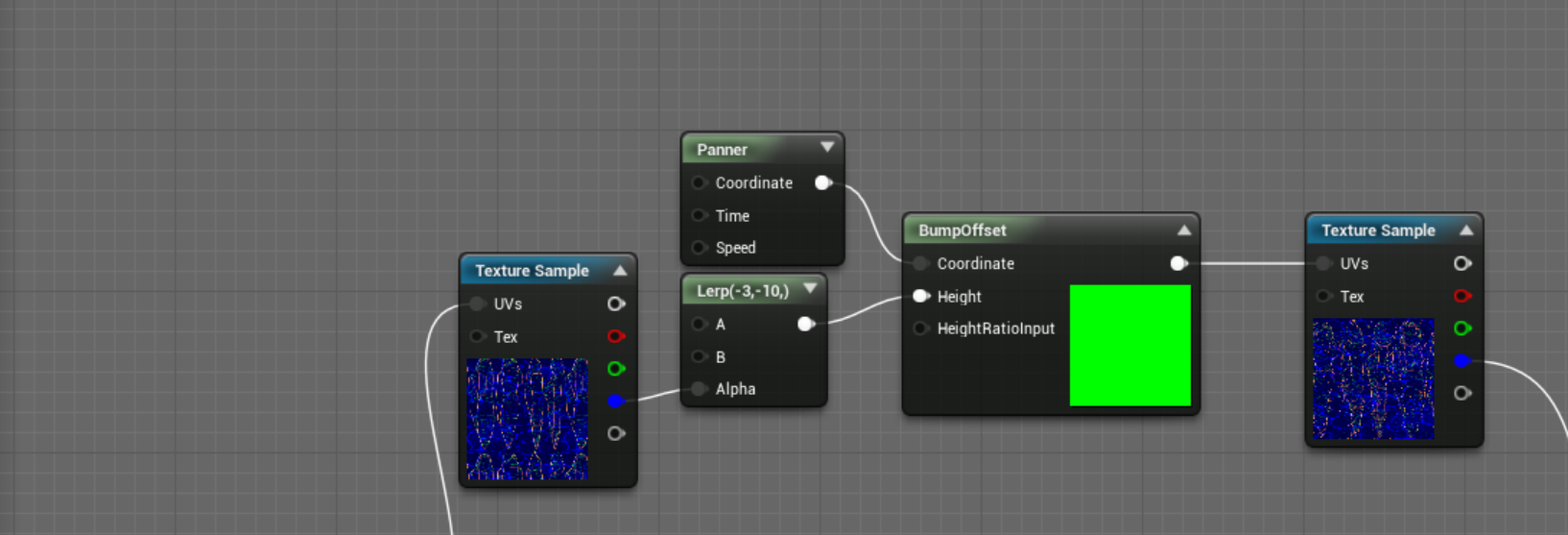
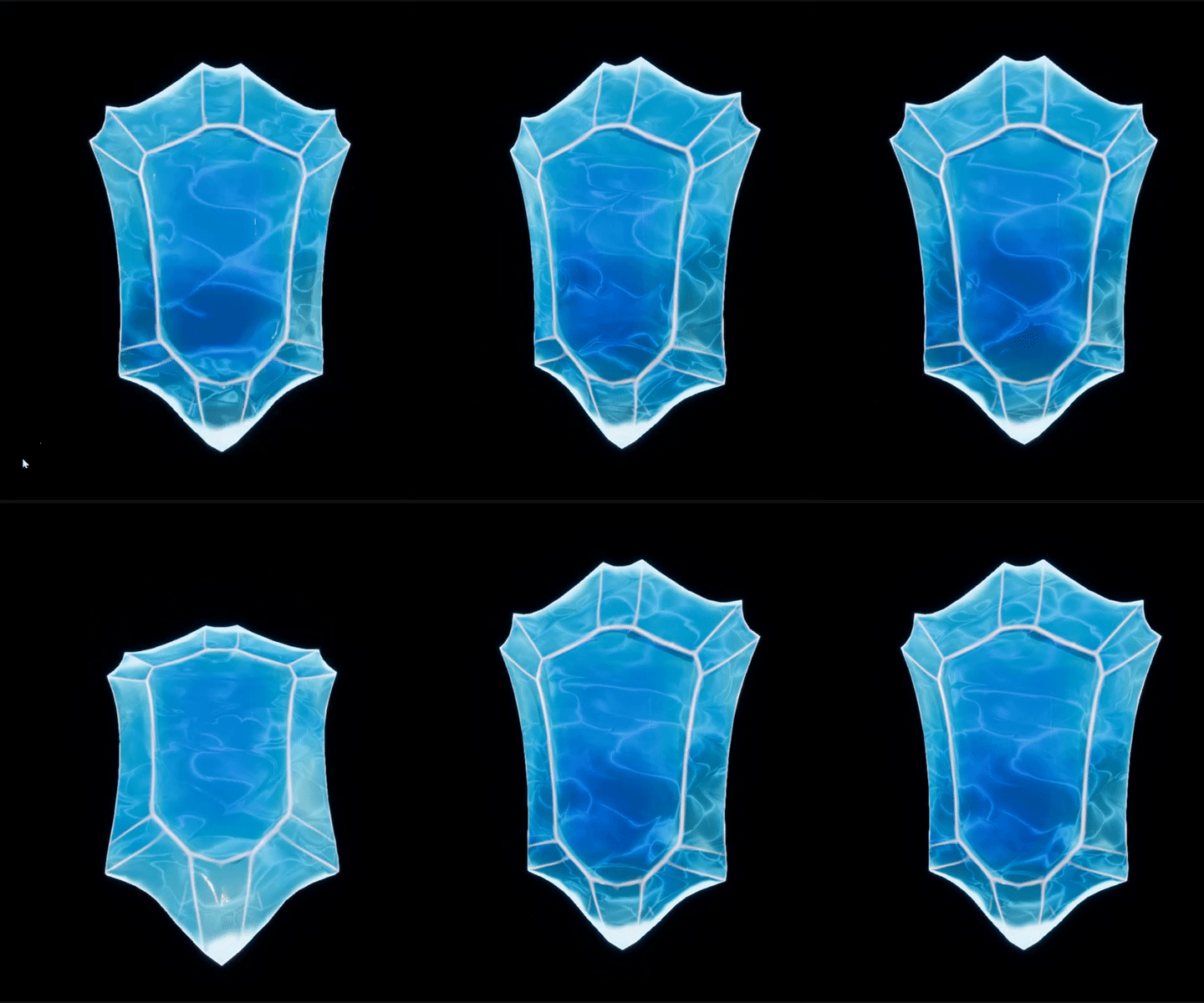
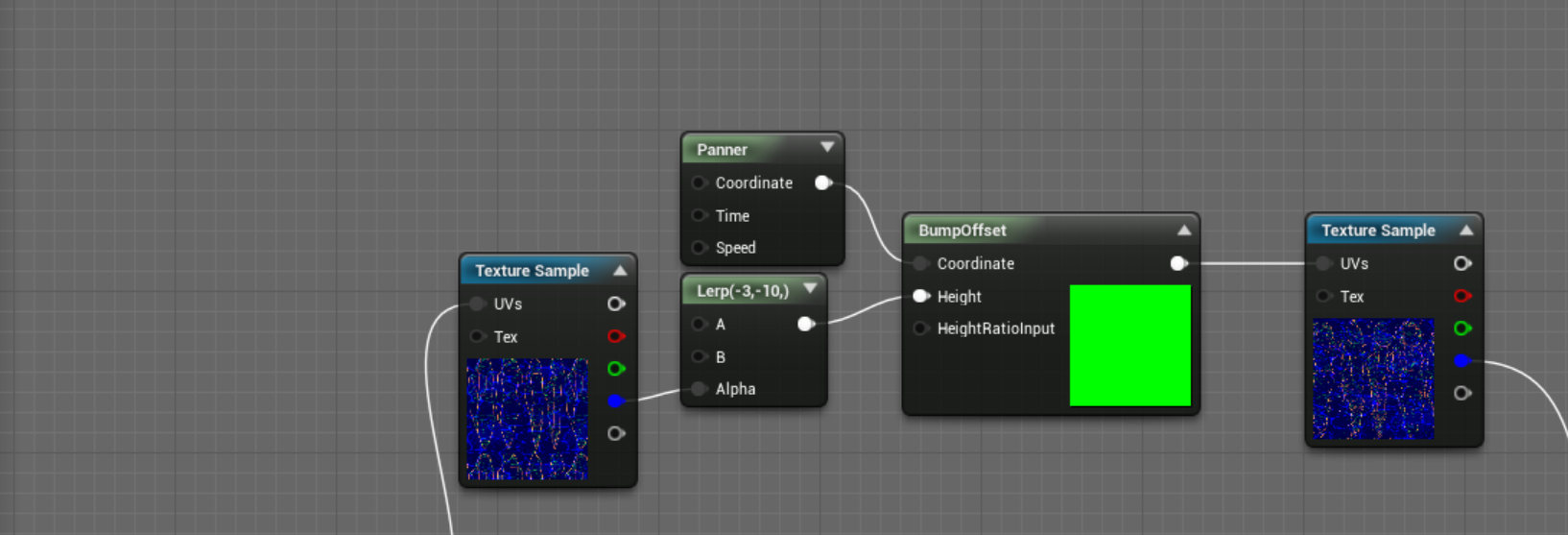
bumpoffset can help with it being opaque/masked and still look somewhat translucent, especially with subsurface
 cloud cobalt
@digital anchor There is physics, and there is collision. Physics is entirely opt-in all the time. As long as you never hit the "simulate" box, it's not happening.
I use collisions, but all physics are homemade
fierce tulip
its a limitation of ue4 with its rendering, unless you change it to differred or whatever its called. but that opens up a bleepload of other probs
digital anchor
hmm, im not using collisions eighter
restive seal
thanks @fierce tulip, good to know. In what way do you use the bump offset to fake translucency?
digital anchor
but yeah theres no reason to try to strip that off
fierce tulip
@restive seal well, if the bumpoffset is a negative value, the texture it affects will look like its a bit behind the actual surface. that can help with faking ice and whatever
lemme load up a project with an example
 delicate needle
cats
fierce tulip
^ only reason im helping :p
restive seal
you watching my cats?
delicate needle
Kitten Stream Extreme!
Is that an animated desktop?
Novel, never seen that on windows. Never looked for it either. 3rd party app?
fierce tulip
https://i.gyazo.com/ee5a617ac926b1eaa88e27aebdbb724a.gif
https://i.gyazo.com/a9f9e99145c779781aba61dec177550d.gif
can be less stylized depending on shaders ofcourse
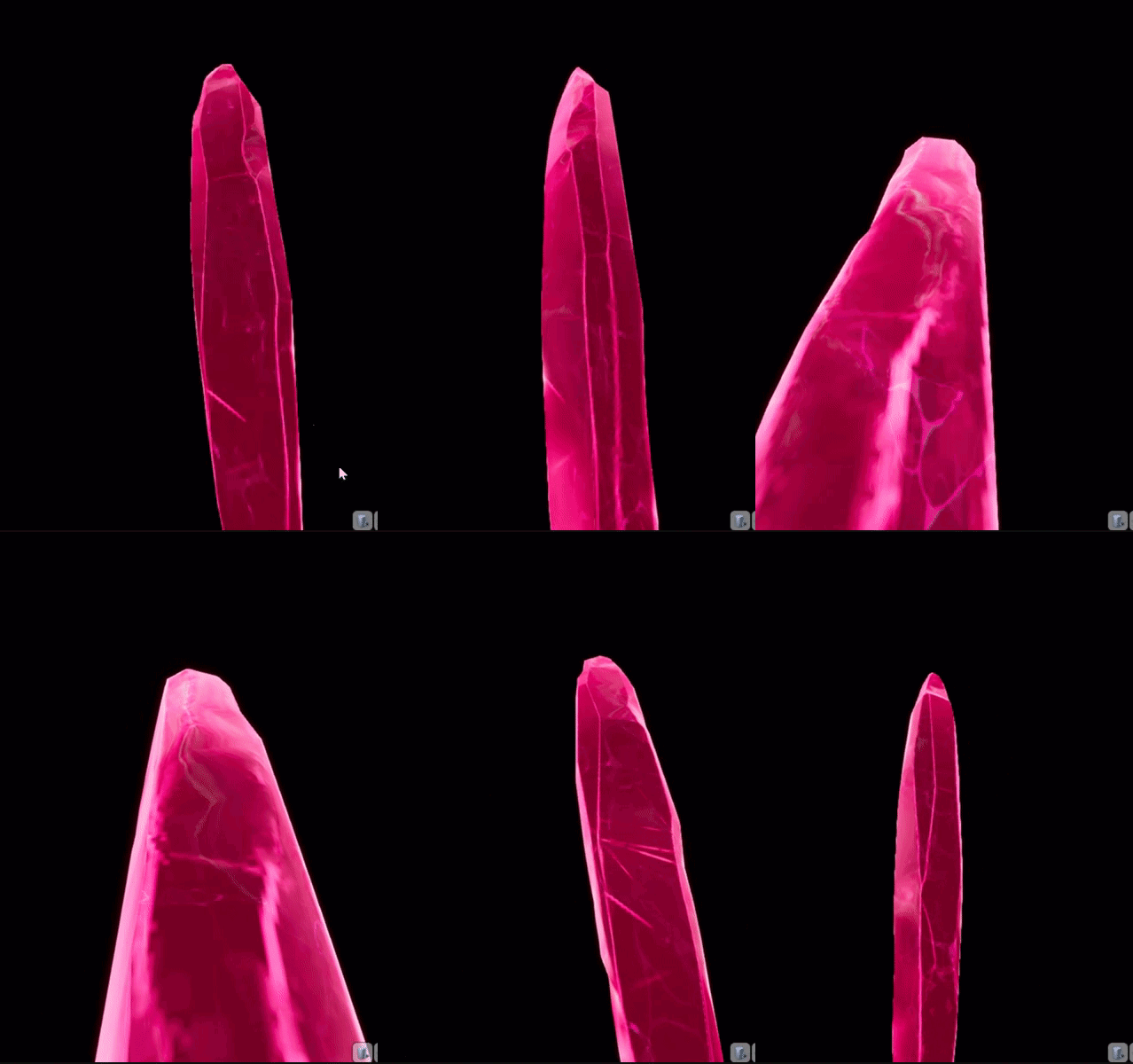
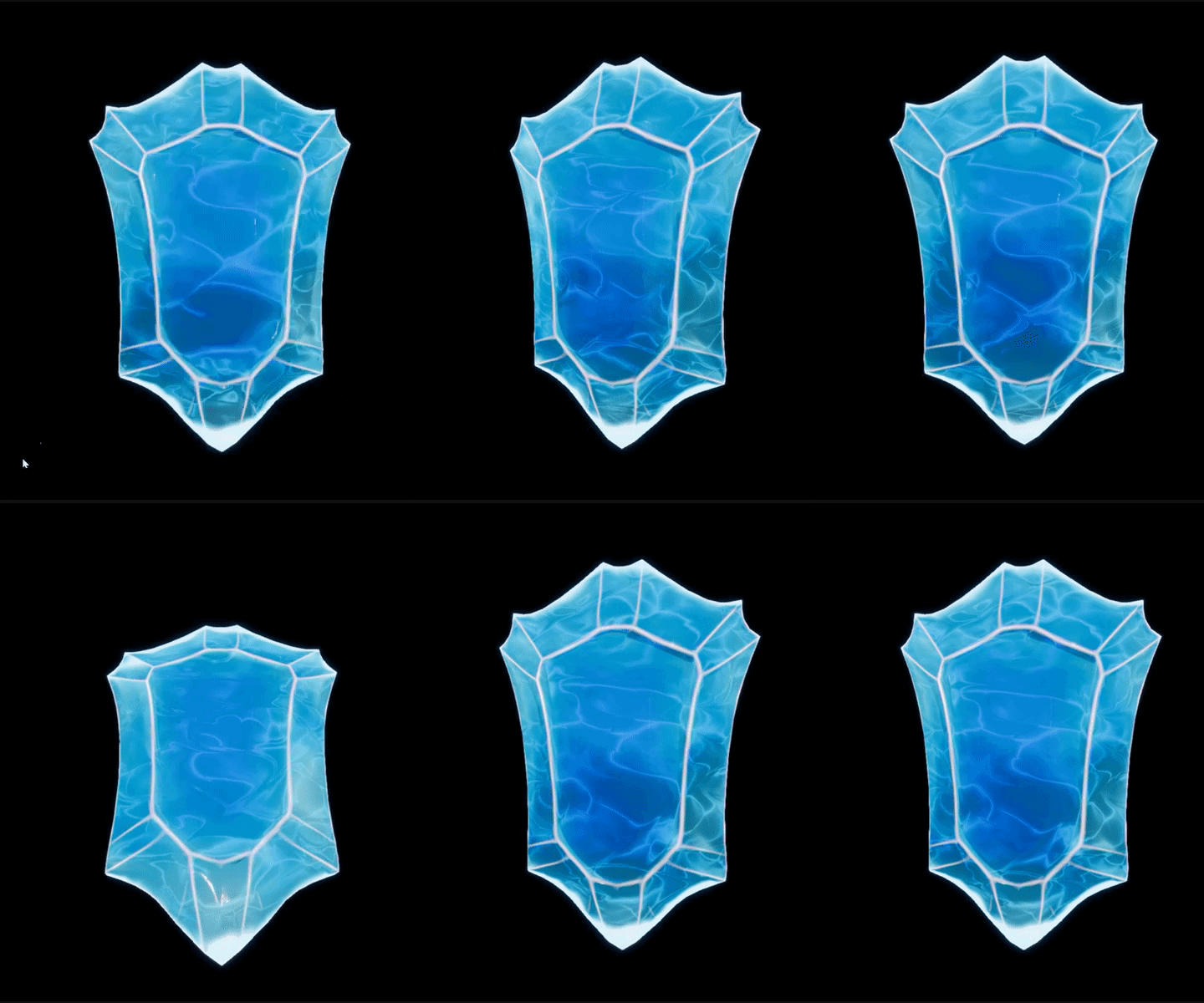
 restive seal
ahh very nice, I like implementation, sneaky
 sudden agate
Bump Offset does wonders. Ice is really good looking with Bump Offset
fierce tulip
can look good for fake far away snow/rain as well
few bump offsets with snow texture, so each layer looks further away
 abstract relic
Oh my good I love it
 copper fable
is there a way to have my enemy rotate to its target without enabling UseControllerRotationYaw?
or a way for the object not to snap to the rotation with UseControllerRotationYaw enabled?
grim ore
I would assume rotating to a new location would be instant unless you lerped it or manually adjusted it over time.
 gilded plinth
Hey all, does anyone have experience with the rigid body node? I'm finding the docs confusing because they say you can set bones to simulated, but when i right click on bones i don't get that option. only on physics capsules so i'm assuming that's what they meant. Also just can't get the rigid dynamics under control : P
 gleaming spoke
Hey so! When I want to import a character model I made in Blender, to Unreal Engine 4, do I have to have the bones for the model made in Blender before importing? Or can I just do it in Unreal 4?
gleaming spoke
Right. Thanks!
 merry gazelle
What do you think is a reasonable filesize for a demo?
I just don't want the filesize to be to excessive it puts people off downloading it
 grim sinew
896gb
 amber plinth
x)
grim sinew
No more, no less
amber plinth
It depends on the game actually
grim sinew
Make the demo fun first, target a file size second
People will put up with anything if it’s fun
amber plinth
When I DL a demo, I generally delete it after use
So the size doesn't really matter.
And with the great connections nowadays, even 1 or 2 Gb aren't an issue
- Vr gamers are used to DL heavy games, even for 10 terrible minutes of gameplay ^^
merry gazelle
Ok cool so 1gb per minute gameplay should be fine 😅
amber plinth
thaaat's it x)
I think there is a high fixed memory cost, and a small variable memory cost on such games.
That is to say a short game, or even a demo, would have to be quite heavy compared to game duration.
But as you extend gameplay with maps and scripts, you don't drastically increase the size of the files (except if you have a lot of different environments, characters, voice acting...).
 amber plinth
good point ^^
grim sinew
If it’s not precisely 896gb it’ll flop
manic pawn
that would have to be an incredibly good game for me to buy a new ssd and then spend a full day downloading it
 dim arch
anyone know where Ican find a free landscape material which blends on the face normal
the cliff/grass blend method
gilded plinth
I'm having the dumbest camera issue. I have a very simple level which is basically a default with no asset scenes. I added a character BP into the scene (which is using an anim BP). if I hit play from the level my first person fly around default camera spawns wherever it was in the editor (which is great), but if I hit play in the anim BP my camera view always spawns in the same place which happens to be in the middle of a cube im using as a floor and under my character bp. Any idea why? : /
guess i'll jus add a player start, but odd the BP play doesn't account for wherever i am in the main editor view
 rigid saffron
Hi all 😃 Does anyone know if there is an exported for Maya that centers the mesh and sets that as the pivot point? i have lots to export so trying to find a simple way to do it
 sonic pagoda
for "for loops" that run through other for loops, so for instance, line tracing to a point in each square in a tile 10 x 10 grid (while also making that grid with aforementioned loops) will be immensely quicker in c++ than bp's?
 winter fossil
spawning is significantly faster in C++ than BP
sonic pagoda
sorry i meant line trace , im not actually spawning anything so that term is incorrect
winter fossil
it's my understanding (I forgot where in the doc i read this) but if most of your code is handled in built in nodes and your actual bp node graphs are small, it's still fast
so if your loops outside of line trace are very simple it's still pretty fast
since the line trace node itself's logic is c++
it's still faster to do everything in C++ but I don't know how much
sonic pagoda
ok, im just asking cause the whole bp is super laggy now.. but i could be because i placed the whole loop logic in the construction script, so i can visualize it before play
 weary basalt
@sonic pagoda Construction Script isnt designed to handle heavy logic.
Its for setup.
winter fossil
that too
sonic pagoda
ah ok thanks guys, i guess ill have to test it in gameplay and actually see if it lags there.. its a super cool ai grid system where im running line traces to the ground to see if the area is navegable, and then another line trace if true to the player to see if the enemy can hit him from there, and then send the ai there
 shrewd gorge
Hi
For an asteroids clone, I want to keep track of levels, asteroid counts, spawn them and update score accordingly.
It sounds logical to me that this script should not be a part of any specific actor.
Where would I code this in C++?
I don't see that I can add a C++ class to a level
I think I could create a C++ class "LevelManager" and call its functions from actor components when required. (ex. if asteroid hit, call level manager to check asteroid count and start new level if required)
 crisp fable
I wonder if you work for epic if you're allowed to work on your own projects outside work or there's a conflict of interest clause
 split wedge
does anyone know how to set up an invtory system like guild wars 2
split wedge
mostly just the backpack slots, different sized backpacks
static viper
the slots would be just a number really
so every backpack has a number inside them
and the sum is the amount of slots
split wedge
kk so how about being able to hover over an item and see a description,
split wedge
cool thanks 😃
i got 1 more question i had my currency hooked up in my update numbers function after my level in this
and i had it set up here as well in my save game file
hooked up to my AI bot my exp and level remain saved but my currency wont save at all it keeps resetting
static viper
resetting to what?
split wedge
to 0
split wedge
yea its not saving for some reason
static viper
you sure it is the saving?
split wedge
i have a shop set up and i can use coin to buy items and if i run out i cant buy anymore
static viper
there is not much to help
you either save wrong
or load wrong
make sure that you actually save the coins
and not 0 coins into the save
and on load
print out what is inside the save
split wedge
kk i'll give that a try thanks again
 soft crescent
are there any confirmed features for 4.22 yet
are we finally getting the mesh tool
cloud cobalt
Sounds like radial motion blur is coming
 languid shard
static viper
languid shard
static viper
scared???
split wedge
i figured it out lol it was casting to my player character on the hud instead of third person game mode
lol well it was saving for a min now its not
or nvm its saving awkwardly it doesnt save for 4 times then it save about 50 less then what you quit with then it saves with what you quit with for about 5 times then back to not saving
shrewd gorge
APlayerController* ShipController = GetWorld()->GetFirstPlayerController();
Keeps crashing really don't know what to check.
It's executed upon pressing space.
 wary wave
you put a breakpoint in and see what's wrong
it's almost certainly GetWorld returning null
shrewd gorge
I think it's because i'm using it in gamemode.
Not sure on what level would I use general level scripting - highscore, level up or down (asteroids game).
I need things like... if no asteroids spawned in the world, spawn asteroids.
Etc.
Not something I can tie to a component, I think.
 unreal spoke
Is possible to add info (tags?) into a static mesh? (not talking about a instance, I'm talking about the static mesh resource.
wary wave
I don't think so
unreal spoke
I just saw the static mesh has an "Asset User Data" but the possible types are Datasmith and some animation user data. And it doesn't seem to be possible to create a new asset user data type from the editor. Is it possible?
shrewd gorge
Regarding above, I guess I will try level blueprint C++ somehow.
shrewd gorge
Does anyone know where to apply general level scripts in C++? (unrelated to actual objects)
unreal spoke
@wary wave I'm trying to store some info per asset. Those assets will be used by an editor I'm doing and the idea is to use that info for cataloguing, sorting and grouping of the pieces. So a static mesh of a window could have a few tags like window, wall, glass, flat, etc.
wary wave
right, well user tags already exist for that purposes and are used by the editor for that purpose
unreal spoke
Another question. I'm adding components into an actor in runtime. Is possible to save those changes into the actor? Now, when I press ESC the actor comes back to the previous state.
@wary wave But I cannot find where usertags are in a static mesh. I suspect they are only there for actors, not meshes.
wary wave
they exist for all asset types
I've never use them though, and can't find the documentation
they probably have some other name
as for saving stuff at run time, it'll be doable but require native code changes
unreal spoke
@wary wave Thanks
wary wave
np
unreal spoke
hmm, but collections seem to be used during editing, not on runtime. The idea was to group/sort, etc during runtime.
 lusty carbon
Any good VR template that's free, for version 4.2?
static viper
whats wrong about epics?
 vast pine
i'm gyessing ue4 cloth verts collide with themselves. i made a test because never used cloth before. its a flag and it stays errect when it should drape i guess. see the following
I can only guess its like paper and supporting itself
not sure which channel might help but here is a gif ping at me if you seen this and got around ir or know which to start tweeking ive played with the cloth config and doesnt seem to ever act likea flag 😃
digital anchor
i was looking for the masks
the actual paint
i believe theres values there to set the max distance it can move
vast pine
looking to see al i had to go with is the white/pink brush color changes
100 is where it moves zero does not - sorry if its not super helpful again never played with this but of course watched some quick vids and had a different result 😃 i can keep digging on my own if no one has anything offhand
digital anchor
100 means 100 centimeters
vast pine
oh hmmm
right you are then isee some obsurd ammount made it dip alot more
thank you much i never woulda thought for some reason..
ma ybe it was just can't even half-staff tuesday hahaha
 upper sluice
Hello everyone. So i have a problem with my scene. Even though i have no lights build, the scene still remains lit
Any tips on how to fix it?
static viper
that is actually a thing tho
tho
show screenshots
you prolly just broke everything
abstract relic
Auto exposure on?
abstract relic
True
upper sluice
static viper
show me an editor overview of the map
abstract relic
Folders are your friends mate
upper sluice
@abstract relic yea thats true
static viper
they eat like all the fps
upper sluice
is there a better way to build though?
abstract relic
They’re for white boxing.
abstract relic
It’s too early for puns
upper sluice
static meshes are all the models from blender
i should use them for general building?
static viper
can we get back to light?
 peak vigil
Hello
abstract relic
Lies and slander
static viper
I PROMISE
peak vigil
How do I open Constraint mode for phat?
upper sluice
Where to i show you the editor overview? 😛
static viper
here
with snipping tool
just zoom out of map
and copy me a screen of your entire editor
i dont need our windows 8 task bar
upper sluice
static viper
yee its a skylight
did you press g?
is there nothing else in this map except brushes and static meshes?
upper sluice
yea G is the grid. And no nothing
static viper
oh
upper sluice
i deleted the skylight since the beginning
static viper
thats a baked skylight then
you need to clean the level out
ok i will give you a set of tasks in order now.
click on the level tab
if you dont have that, its under windows - world settings
oh god i cant remember the name anymore...
anyways!
there is a tab called lightmass
it has a small arrow beneath it
^ like this but v
you are searching for
upper sluice
wait
static viper
force precompute light
upper sluice
static viper
no wrong tab
world settings
that was the wrong one
i am hailing the shit out of satan for a while now.
static viper
AHA!!!
upper sluice
got it
static viper
purrfect
after you ticked the bool
build your light
just press build
then it will go
daaaarrrkrrkrk
static viper
what is phat
peak vigil
Physics Asset Editor
 wet berry
@upper sluice if that doesn't work check your mesh materials and make sure you aren't plugging anything into emissive
upper sluice
@static viper i love you
static viper
oh hail satan
abstract relic
Welcome to the void
upper sluice
so what where you saying about brushes?
static viper
ah yes

Example of how to build with the Mansion Hall's modular pieces. Available on the Unreal Engine Marketplace: https://www.unrealengine.com/marketplace/mansion-...
wet berry
the constraint tools for all windows, upper right hand corner
static viper
this is real power.
upper sluice
@static viper how tf does he build so damn fast??
wet berry
to be fair it's a modular set he's built and is showing off. he's probably built that exact scene multiple times
static viper
a good example
upper sluice
anyway why are the brushes that bad?
vast pine
Baked light, static like basically burns a new texture on the mesh for shadow.
static viper
bc they eat fps away like crazy
you can try ourself...
select all your bbrushes at once...
even that is an issue
and they behave odd
upper sluice
then why do they exist 😂
vast pine
Owl. You get the difference. I challenge get you to make a short video
static viper
bc they are 20 years old
abstract relic
Again. For white boxing
upper sluice
oh xd
vast pine
Showing dynamic vs baked
vast pine
I can even challenge Satan
upper sluice
most of the tutorials are ancient man :/
wet berry
They are basically meant for level designers to work in engine. They built shapes, play test, iterate
wet berry
When they have a level they like they export the brushes and artists turn them into real assets
static viper
i will not get a hellmachine
wet berry
which can just be dropped in
static viper
i am glad if i get food the next week...
vast pine
Just instance your current food into millions of clones
static viper
i would like to clone my 50 euro papers...
like
10 times
wait
i said 100
sooo
5000!!!!
vast pine
Gonna do it once ight as well be millions
static viper
i get 5000
abstract relic
Just keep adding 0s
vast pine
Because the overhead is ez
vast pine
Wait meme here if you add dyanmic physics to each clones dollar it gets real fast
static viper
also
i just think you can get almost all light right with dynamic
it clearly doesnt work for realistic scenes
like archviz
but fantasy scenarios, scifi, horror with a artistic style
those are easy matches
vast pine
It's not perfect but dynamic light and use of distance fields is dope
upper sluice
so i should stop using brushes
i guess i have to redo the whole level 😛
@static viper right?
static viper
yes
vast pine
i need a new pc too rebuilding ue4... gonna be most of my day :<
static viper
atleast you have the mon mon
vast pine
i only have what i get from my doggies ma ma
she don't always pay her doggies support man! ;D
vast pine
I build my game for shippibg
Woops shipping and it builds all the way till it is going to archive it to a folder
Then says bull reference error and never completes
upper sluice
you can copy everything into a usb stick and go to a friends house and do it 😛
 primal prairie
Can you rename a packaged .exe without any issues?
fierce tulip
Shadowriver sometimes took over my pc late at night so he could rebuild/build on my pc instead of his own pc. (before he got a dev-grant)
upper sluice
Why cant you do what i just said owl?
static viper
i need a devgrant :c
vast pine
Lou's after a post somewhere by you about UV maps I sat down with my level guy who is super green
Explained a lil bout UV maps
static viper
just send me your pc luos!
vast pine
And show how he can make cool effects if you know how to layout uvs and pan. I'm excited to see him@dive down that hole, glad you mentioned it for me to want to inform him
 vast pine
Male duck face
fierce tulip
aww neat stuff @vast pine
upper sluice
Owl you cant just finish the game and then finish building and extracting to another pc?
vast pine
finsihgame.exe
fierce tulip
if he has any questions throw him into this channel, can always email me too, but I prefer people asking here :p
vast pine
i agree its best answers are in public so others can learn
but yeah i do push him to ask in slackers anything
funny when you drag uv shells in say maya and watch the checkerboard move to explain... see what you can make happen??
😄
fierce tulip
oh god, my previous max install stopped doing that untill you clicked in the 3d viewport again
nuked that install into orbit
vast pine
woof
shrewd gorge
I'm trying to spawn blueprint actors each time none of them are in the game.
The flow only seems to be getting up to here.
vale silo
I have a dilemma - I need to have a different shape collision in player character (box instead of capsule, because my player's model is not a bipedal humanoid). Apparently it's not a trivial task even when making things in C++. I am wondering if I can just add a box collision to character actor and then on overlap with anything collidable on the level, stop player movement. I assume "Stop Movement Immediately" is the BP node for this. If so, how to I resume movement ? (this way player isn't permanently stopped on the first collision)
static viper
@shrewd gorge do you not see it?
shrewd gorge
First time doing something like this in Blueprint, until now I was using C++ 99%
I don't, no.
vale silo
lol, you node isn't connected
static viper
dont use tick like this
and yes...
you have not connected actuall code...
you just sorta stopped adding code
getting all actors of class inside a tick is a mistake you must see by the way..
how many days are you doing c++
peak vigil
What's Linear Limits in physic asset, and how do I tick them in Unreal Engine?
shrewd gorge
Be specific and to the point, we are not debating my experience here. Nor should we.
If you wanna help, help. Otherwise, talk to whoever accepts your tone. I don't.
static viper
then noone can help you XD
peak vigil
I reckon their use to be a Body mode button that'll let me switch to Constraint mode, and that's a meter under it
shrewd gorge
@static viper What do you mean by code is not connected?
static viper
shrewd gorge
Thank you, let me check. There's something with the spawn actor too.
static viper
4.21 has alot crash issues
upper sluice
i am using 4.20
static viper
4.20 too
shrewd gorge
Only crashes with bad references in my editor 4.21
upper sluice
i am just gonna save each time i do something 😛
peak vigil
How do I enter constraint mode of physics in 4.21?
 tribal pebble
mmh is there a way to export UE4 VFX to Blender 2.8??
upper sluice
@static viper the texture glitches that the player cant see are a prob i should fix or not?
static viper
no
upper sluice
Arent the brush boxes essentialif I want to make the block invis for doors etc?
 plush yew
where is emudshit
 wise flame
plush yew
wise flame
plush yew
Hey Yall
static viper
invite link is in the welcome channel
upper sluice
But how can i make a block invis without being a brush
static viper
plush yew
hey people
upper sluice
I want to make a block invis so that i can then put the door
static viper
then turn it not visible?
grim ore
if you just want to block something invisible use a blocking volume or a box collider
upper sluice
@static viper doesnt work. What i am trying to do is put block and turn it invis so that it creates a hole in the wall
for the door
grim ore
^ geometry/bsh brushes are good for blocking out but at the minimum convert them over to static meshes if using in a final game.
 frail sail
the Vulkan API work on 4.20?
static viper
should
grim ore
and if you have an existing static mesh you want to punch a hole in, you cannot do that in engine, you need to use a separate DCC program
static viper
if not 4.21
light thunder
I have a master panel, where I have setup an event by timer, to simulate using an event tick - the purpose is to monitor different valve pressures and their data (which is a struct of a few struct, mostly containing float, integers, a string and color enum for example) There are about 10-15 of these valves - Right now the only thing the valves do, event wise, is update their open/close percentage to the Master Panel. (that event is a user activated (when the user physically grabs the valve, a variable becomes valid and allows tick event to proceed, note there can only be two valves grabbed at a single time) When a valve is released, the variable is cleared and no longer valid, so the event ends, and the Master Panel continues calculating based on the now set Valve Position>
Does this seem like a good, performant approach?
 eager ruin
Hey guys, I want to work in level editor using the "Game View" mode, to hide debug gizmos etc. However after turning this mode on far plane gets do close that some objects dissapear, even from a really close distance.
Is there a way to adjust this?
primal prairie
Can you package to Mac from windows?
upper sluice
@static viper have you made any games yourself?
 lilac ether
Anyone knows how to center level in world composition?
upper sluice
How are you a useless trash you know a lot of shit about ue4
static viper
i feel like that doesnt matter.
i neither created a mp asset, make money or created something with a release...
so yee
i did not create something great yet...
i am here sobbing my eyes out bc i am so useless
that i am still better then alot of people is not my problem XD
upper sluice
I'm not sure if I should be sad for you or myself @static viper
like
I'm just a fcking starter
each day I learn something new
most of the tutorials are just shit or outdated
and it time I ask something I feel like a stoopid idiot bitch when I find out the answer was that simple

static viper
the bigger issue is motivation really...
you are rich of it right now
but soon learning will become tedious and then you want more
it takes alot of hits to make a good game
so alot of fails to actually make one...
upper sluice
I guess so. For example I redid the whole house that I made cause I used brushes
I guess I learned from my mistakes smh
static viper
do you have the gameplay done?
upper sluice
Small house just like the original
 slow python
Hello
upper sluice
Well I need the basic map so yea
static viper
bc art is turning fast into a burden
you will be more worried about modelling actuall objects
then having a space to place them
upper sluice
OH NO
The thing is I have a friend that makes the models who actually wants to become a model designer
using blender
the models are not my concern
besides most of them are actually done
static viper
thats ok
slow python
So umm have you guys sold your soal to EPIC GAMES
upper sluice
ok.
static viper
wasnt that obvious?
upper sluice
pretty obvious
slow python
Ok
static viper
so back to house discussion.
 regal mulch
@static viper What keeps you from investing the time you spend here into something for the marketplace?
static viper
oh right now i have no machine to run ue4 😄
regal mulch
Besides that
static viper
my drive...
regal mulch
I mean you aren't half bad with art and BPs afaik?
slow python
Well I am working on a game
static viper
i tried marketplace assets once didnt got accepted
slow python
Called
static viper
but ducky got
slow python
INFINTE
regal mulch
Marketplace is weird in that regard. Did they tell you what was wrong?
regal mulch
Well, depending on the asset, you could use the marketplace to kickstart your pc
Or rather could've
static viper
its not ok. but ii think i must go througgh this like this
regal mulch
Any other plans?
slow python
Oh don't get me started on the marketplace I bought something and wasted my money
slow python
I was scamed
static viper
i got a job application running for educator
regal mulch
@slow python You can always ask Epic for a refund if the asset you bought is really "scam".
regal mulch
But since you didn't, I assume it was either not expensive enough for you to care, or not scam.
regal mulch
Explain them exactly what is the issue. They will task the creator to resolve them if they are reason enough for a refund.
If the creator resolves them, then you are fine, if not you get the refund.
@static viper But I assume you have no way of getting there?
static viper
i am almost tthere
but the country may not allow it
regarding the job errr
die stelle wird wohl nicht genehmigt
nicht von mir aus, allgemein
regal mulch
Germany is tricky. You kinda have to exactly go from A to Z to do something.
Or rather to be allowed to do something
Like studying
static viper
yee i have a pretty awesome chance here
static viper
i would be "dozent"
slow python
I haven't made any progress on INFINTE lately because I need some programmer to continue and yes I did the lft and still waiting it's been a long time
static viper
well thats closest one can get really
for prof with student you need work experience
at least 3 years.
regal mulch
@slow python Programmers (good ones) cost a good chunk of money. Even on fixed price projects.
Free and Royalty stuff is pretty much impossible.
static viper
so even if i am better then every applicant ever... i cantt teach ue4 with only 2 months oof work experience...
regal mulch
@static viper Ah right, I stopped my study after reaching bachelor.
Could have done teaching job or stayed at uni but well, UE4 with company works
static viper
its a bit odd
slow python
Yeah anyway you don't have to ping everyone
regal mulch
@slow python I do this to make sure that you peeps know who I'm talking to.
slow python
Ok good reason
regal mulch
It's not like I'm pinging you every time. it's only if it cuts in between the discussion with owl
regal mulch
@static viper I'm not sure yet. The company is just at the starting point.
Full time UE4 is fun but also not. I would love to do my own stuff, even if my Client's project is fun.
regal mulch
I actually went from Freelancing to founding a company
static viper
everything has to be written down
regal mulch
But more due to tax and legal stuff
regal mulch
And a company looks better on paper :D
lilac ether
Is there a way to move entire map without loading levels in world compositor?
static viper
networks are the way togo
regal mulch
Na, just a normal company
slow python
Any of you guys have a job on looking for work
static viper
well they are companies in the end
regal mulch
@lilac ether Define "move" here
static viper
they just work together on large jobs
i worked at one of those...
was pretty horrifying
regal mulch
That is a lot of extra work though. I would love to get an employee at some point for the art stuff
Currently we are just two programmers haha
slow python
Hmmmmmmmmmmmmmmmmmmmmmm
static viper
yee 3d modellers
static viper
tho you just have to put up a call
regal mulch
Anyway, I'm also drifting a lot into offtopic. G2g get someone from the driving school. brb
lilac ether
@regal mulch I have large world map, but it's not centered
slow python
Any you guys willing for profits
slow python
Okokok
regal mulch
@lilac ether What's the issue with it not being centered?
lilac ether
I have large world made from tiles. I want somehow place player on one of islands and Player Start only spawns at Persistent Level location and i can't do anything with it. But it's not main trouble! I want to place Day\Night Sphere BP and global water level somehow. I read that it's all can be placed in Persistent Level, but it's not helping me to see changes in world levels.
regal mulch
Well the spawn point should work in the sublevels too
And if the spehere is big enough, the day and night should also work
Are you actively adding new the tiles during gameplay?
lilac ether
It's completed map of world
regal mulch
Static though?
lilac ether
Yes
slow python
I have a problem for my game can I have help when I am in menu the crosshair shows up this did not happen until I package the game to windows what can I do
regal mulch
Does that happen when moving from gameplay to menu?
Or just directly when yo ustart the game?
slow python
Just directly
regal mulch
Are you sure you aren't creating the crosshair somewhere?
slow python
Yea
Just in case you need specs of my pc
Ryzen 5 2600x
Rtx 2070
32gb ram
500gb sdd
3tb hard drive
fierce tulip
people thinking mentioning their specs will help
lilac ether
Is 4km x 4km is large?
plush marsh
half of fartnite
slow python
Yeah pretty large
lilac ether
....I have world map with 1351 level 4x4km lol
slow python
wtf
static viper
why not do 64
i dont understand
4km should not be a big trouble
what are you building
lilac ether
Hmmm.....I want to make world like WoW or alike. But work on one island for start
Still, have issues with spawn and world water level
slow python
Check errors in log
lilac ether
Also, levels acting strangely
lilac ether
Thanks for suggestion
fierce tulip

There is a special place in hell for dev's that dont set their "texture groups" up properly.
save devs, keep their sanity in check, set this up properly so quality settings actually work properly.

 Twitter
shrewd gorge
Twitter
shrewd gorge
I know it's why I love you
static viper
i get sick
static viper
denied
static viper
i assume that has something todo with your coding skills
shrewd gorge
Not everything has to do with coding 😃
static viper
friend
lilac ether
Okay, even if i load first level with PlayerStart in it, FindPlayerStart still not see it
UE4.Difficulty: Hard
grim ore
nothing wrong with doing it all in a tick, kinda like doing it all in a main loop in C heh
light thunder
Is there any way to put a comment in a Curve Asset?
grim ore
It does not appear to be a way to do that besides naming it well
 nocturne ocean
Has anyone used the unreal extension for visual studios before?
light thunder
I have a cad file (IGS extension) .... right now I can only import it into Unreal Studio, not the engine itself? I"m confused. (it says unknown format when I try to import to engine normally)
grim ore
That is one of the features exclusive to the Studio version of the engine really
light thunder
ah, too bad
I can open it up in Maya and convert it I guess
Does the studio version allow a workflow that can import in mass?
like if you had 2000 cad models and you'd like to import them into a project and come back the next morning?
 south ridge
 sonic gust
Hey
Any clue how I can visualize the Audio Sphere of a BP while in-engine playing?
I have audio radius selected in show -> advanced flags -> audio radius
but I'd love to get something like this
grim ore
you could always use the "Draw Debug Sphere" node to replicate it at runtime
sonic gust
that's an interesting idea! thanks!
restive seal
Anyone know if there is a way to trace against physics channels.
like doing a box trace sweep test.
sudden agate
@fierce tulip uses world for everything
restive seal
linetrace or box trace by channel uses "trace" channels, I'd like to do a physics sweep test so to speak
to trace against collision channels
plush marsh
Sweep a shape against the world and return all initial overlaps using a specific channel (including blocking) if requested, then overlapping hits and then first blocking hit Results are sorted, so a blocking hit (if found) will be the last element of the array Only the single...
restive seal
Thank you
is there a reason this isn't exposed to bps?
 visual belfry
Multi*ByChannel?
plush marsh
then i really don't remember
visual belfry
the difference is the C++ function takes a shape by argument, but the blueprint fns are differentiated by shape
restive seal
I think, I was just being dumb lol
though that UWorld::SweepMultiByChannel is going to help too
 modern sinew
So I was watching a tutorial on setting up Visual Studio for UE4 https://www.youtube.com/watch?reload=9&v=D4UM73O7Zxs and they right-click on a file and it gives them the option to "Generate Visual Studio files" and that's not appearing when I do it, neither are all those options with the UE logo next to it

Learn to make games in Unreal Engine 4 C++ today with Tom Looman in this step-by-step video! In this intro to C++ tutorial I will quickly take you through th...
grim ore
does your uproject show the UE4 logo?
modern sinew
yep
grim ore
but you dont havre generate project files or any other UE4 specific options?
modern sinew
nope
grim ore
ok do you have an engine version installed?
modern sinew
I installed it from the launcher last night ¯_(ツ)_/¯
grim ore
did you launch it at all? it might not installed the pre requisites and associated itself
modern sinew
launched it, it's running now. I thought that might be it but it's still not working
grim ore
oh crud They moved the file you need to run in the later versions of the engine or else it would be a quick fix
grim ore
ok so wherever you have your epic games folder you should have a launcher folder and a version folder for your engine like UE_421
so like for me it's C:\Games\Epic Games\Launcher\Engine\Binaries\Win64 for the launcher, and you want to copy the unrealversionselector.exe file
and drop that in the C:\Games\Epic Games\UE_4.21\Engine\Binaries\Win64 directory for your engine you installed
and run it to associate, that "should" work lol
grim ore
ok well theres the launcher, now you need to figure out where you installed the engine lol
modern sinew
ugh, one sec
grim ore
if you go to the launcher, click the droppy down arrow next to the engine version you installed, create shortcut on the desktop, then open file location on it you can find it
I put all mine in the same folder, I want to guess the default is going to be just program files or something if you didnt change it
modern sinew
ok it's in Program Files for some reason
grim ore
yeah sounds right. move that file and run it and it should associate that engine directory correctly
grim ore
...\UE_4.21\Engine\Binaries\Win64 directory for your engine you installed
or UE_whatever if you didnt install 4.21
grim ore
yep for whatever reason they removed the file from the later versions of the engine and run it from the launcher instead. you copy it over and run if it its broken and hope
modern sinew
the Version Selector?
 bitter iris
When merging meshes, how do I merge duplicated materials?
grim ore
yes the unrealversionselector.exe file
modern sinew
it said registration sucessful
special options for the UProject file still not showing up @grim ore
grim ore
oh well pooooop. well try the old trusty restart?
modern sinew
I can try. one sec
grim ore
yeah it should have fixed it, I guess the other alternative might be to reinstall the engine. This happens when it cant run the extra stuff at the end of the install
and might be due to being installed in the program files dir which is evil
modern sinew
BSOD on startup RIP
grim ore
oy
modern sinew
Ok it’s rebooting
grim ore
honestly if I was in this situation, and had unlimited bandwith like I do, I would uninstall the engine and reinstall it in another directory NOT program files or the like, like on the root in epicgames or something, as that tends to fix most permission errors.
modern sinew
I could just copy it all over and run version selected again, right?
grim ore
you would think that would work lol. You could try
grim ore
I guess the other options is to manually do the open with when you right click and selected that version selector which should work as well
bitter iris
mesh proxys take soo long lol
modern sinew
@grim ore Still nothing
grim ore
well crap. Try the right click open with option?
modern sinew
I've got a Blue UE and a Black UE
grim ore
the blue one should be the version selector you want
modern sinew
click it?
grim ore
the icon for your uproject should be blue if it's setup correctly
modern sinew
The I con is black
grim ore
yeah if your .uproject is black then it's not associated correctly when the engine was installed. the right click open with might help then.
modern sinew
hey, the options are there now 😄
modern sinew
I got a crash when I tried to generate files, but yea, progress
grim ore
oh lordy lol
modern sinew
also the blue UE logo just looks goofy XD
grim ore
might just need to check the logs then, might be a VS install issue or something easy
modern sinew
Discovering modules, targets and source code for project...
Binding IntelliSense data...
WARNING: Exception while generating include data for UE4Editor: Visual Studio 2017 requires the Universal CRT to be installed.
WARNING: Exception while generating include data for FPSGameEditor: Visual Studio 2017 requires the Universal CRT to be installed.
Binding IntelliSense data... 100%
Writing project files...
Writing project files... 0%
ERROR: UnrealBuildTool Exception: Visual Studio 2017 requires the Universal CRT to be installed.
@grim ore
Help
ok apparrently it's a SDK problem
grim ore
yep read the errors lol
run the VS installer, go to the modify option and the manual install for components and it will be in the list to add
that was something relatively recent that was starting to be required and of course old instructions miss it
bitter iris
For some reason merging actors are taking so much longer than they used to :/ its taken 30 minutes and it hasnt moved from 0
 celest creek
hola
So my game is starting to slow down after I've played it for 20 mins or so... I destroy lots of actors throughout the game, could it have something to do with things not getting destroyed properly?
Is there a way to troubleshoot these things?
grim ore
run the debugging profile stuff during gameplay and you can troubleshoot, it's super detailed and complicated https://docs.unrealengine.com/en-us/Engine/Performance but you can either monitor it live or get snapshots during slower moments and see what is taking so long
nocturne ocean
Tfw you just wanted to make a generated.h file but broke everything instead...
celest creek
@grim ore Ok great, thanks
 ancient otter
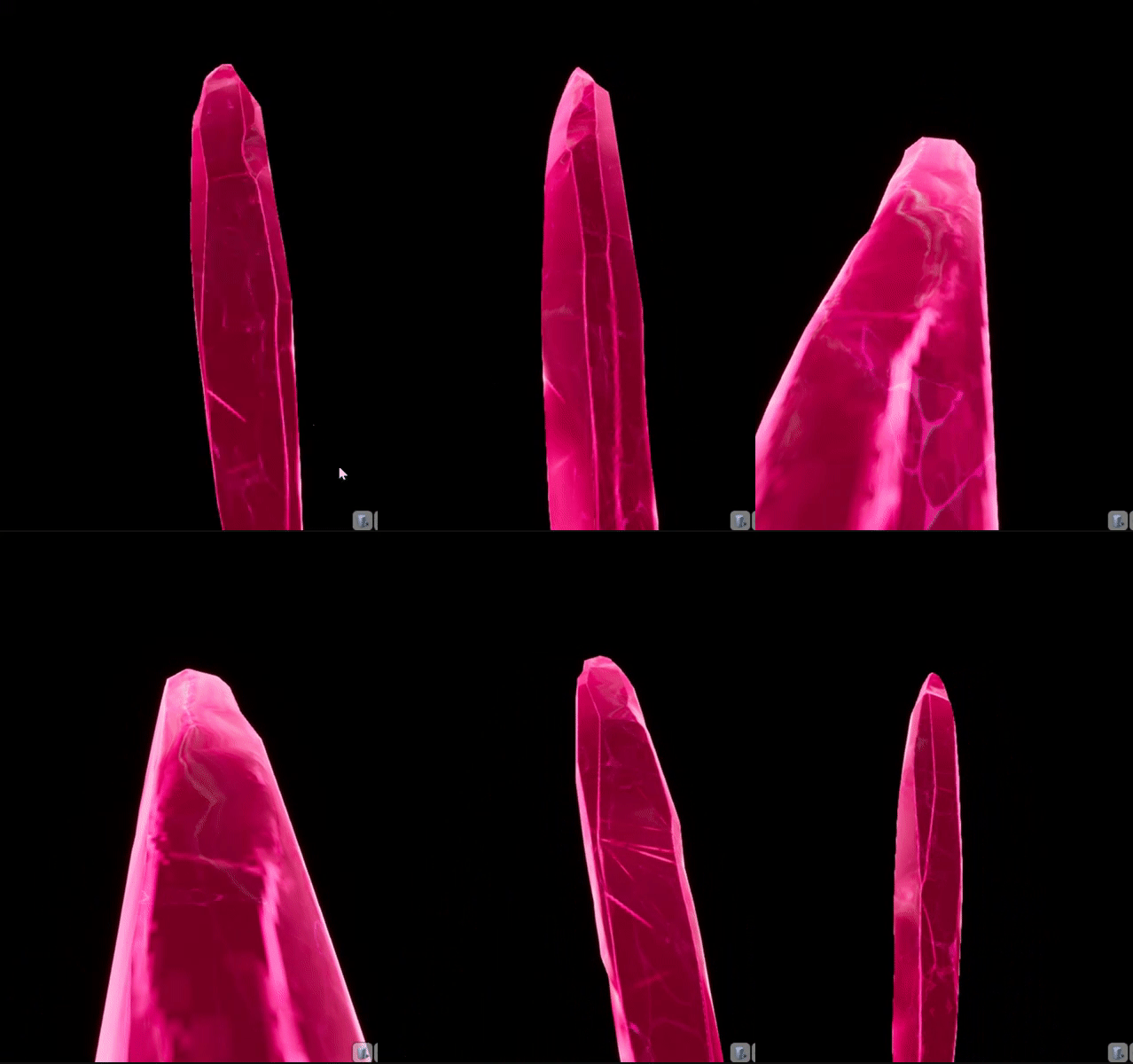
how can i do this type of emmisive? https://gyazo.com/960d5a87734a7b30178042ecc5c38f1a?token=4fd699631dc0776cc4c9003dc535e22d

 livid haven
What do you mean by "type" of emissive?
grim sinew
Just go paint a color texture with a black background and plug it into emissive
livid haven
I think you need values beyond 1.0f to get it to radiate quite like that.
Maybe multiply the values in a material, from whatever painted texture.
grim sinew
Yep
livid haven
Either way, that's just emissive, I don't see anything special about it.
grim sinew
And pray DXT doesn't kill your texture with compression
 unborn crest
Is there anywhere I can find a good tutorial for turn based stuffs?
light thunder
Playing with Curve Editor...any trick to make it slope like this:
ignore the arrow, I just mean that general slope
Mine doesn't look the same...but I guess it doesn't matter
grim sinew
Try using tangents
light thunder
I did, but even when using broken ones, it's not very easy...thanks though
grim ore
it looks like just 2 points with the poionts set to auto tangent
light thunder
the white one?
grim ore
for the most part yeah, 2 points, right click on each one and set it to auto so they are curved tangents
then just drag one of the tangent ends to adjust the angle you want the curve
light thunder
Yeah, kinda works but there are so many points (necessary) that is not worth it, was hoping there was a magic curve bias tool in there
grim ore
oh you need all the points on the curve?
like you are going from fixed point to fixed point or you need to sample between them as well?
but even then making all your points where you want them then setting them all to auto should smooth out the connections
light thunder
This is for flow rate for a given nozzle for a fire pump panel - I'm taking the flow graphs directly from the manufacturer, auto did help, it doesn't look like the drawing but no one will be able to tell that, we generally pump fire nozzles at a rated set to obtain a rated pressure, like 75 psi for 150 gallons per minute
grim ore
and do you do anything with the in between? if not it seems weird to use a curve since you are basically just using set points and not caring about the in between
light thunder
I care but not enough for the difference to be noted, it just has to behave realistically as you scale up pressure, so if you have a 75 psi nozzle at 150 gpm, you don't want it to be at 20 psi and getting 100 gpm, the relationship isn't linear exactly ,hence the curve
grim ore
maybe there is some math formula that is being used to generate the values that could be used instead of a graph?
light thunder
Probably is, but it's not something I'm aware of, and it's only necessary in the lab, not a fireground training simulator
grim ore
but yeah if its not a linearly even graph then you might just have to settle for the weird curvy one with auto lol
grim ore
"close enough" 😃
light thunder
literally they teach in fire pump school, the "ish" approach
light thunder
Thanks for your videos btw man, they are my go to resource for learning wtf I'm doing
grim ore
awesome 😃 always hoping they are of some use to someone other than myself
light thunder
how many people recognize Ralph Wiggum in there? I feel that there is a newer generation who probably just thinks that's a random sound byte
grim ore
If you mean the intro for the videos then that would actually be my youngest LOL
light thunder
wat, it sounds just like ralph wiggum
grim ore
Lol. Yeah it's close
modern sinew
According to https://www.youtube.com/watch?reload=9&v=D4UM73O7Zxs I should have code pop up when I open that file in Visual Studio, but nothing happens
Learn to make games in Unreal Engine 4 C++ today with Tom Looman in this step-by-step video! In this intro to C++ tutorial I will quickly take you through th...
@grim ore ?
you were able to help earlier ^-^
livid haven
@plush yew Weird. Uh, well... I mean, there's a whole FAQ for this program, so try there?
UE Viewer FAQ
You'd need to import the PSK or whatever into a 3DCCT that supports that format (probably with a plugin), then export to FBX.
Looks like you deleted a native C++ class that was used as the parent class for that BP.
Or maybe you disabled a plugin that contained its parent class. Or deleted the BP that was its parent somehow.
modern sinew
According to https://www.youtube.com/watch?reload=9&v=D4UM73O7Zxs I should have code pop up when I open that file in Visual Studio, but nothing happens
Learn to make games in Unreal Engine 4 C++ today with Tom Looman in this step-by-step video! In this intro to C++ tutorial I will quickly take you through th...
 grand knot
If anybody needs some help feel free to DM me
sonic pagoda
what would be the right way to code a function, where you have an actor's center, you can make a grid around him, for example 3x3, so 9 dots around him with him at the center
whats the maths for that
i seen to have had it in blueprints, but now im trying to do it with an ai task but its causing an infinite loop...
basically 2 for loops right
1st one has the offset value, so if player location = X... the first point will spawn at X - offset, 2nd will spawn at origin, 3rd at x + offset... and then that loops thru the 2nd loop right
am i making any sense
make grid around player function
 whole quarry
I would say get grid tile size multiplied by total length / 2 = center
Without the dividing you have the offset start location to spawn the grid
upper sluice
Guys adding 2 static meshes instead of one box brush is better? I want to make the wall have different textures from both sides
sonic pagoda
@upper sluice do that with 10 of each ... run stat fps and see which runs best
or do with it 100 of each
more dramatic
you'll also see more peformance effects
 earnest pawn
hey can someone please help me
im trying to get the acceleration of my player movement component relative to the direction of the player
anyone know a way to do this?
upper sluice
@sonic pagoda will try when i go home. I am asking because the box brushes are far more convenient for some uses
sonic gust
Hey, quick question: I'm developing a game for mobile and trying to use the accelerometer to determine if the phone moved left of right. Thing is, the accelerometer is pretty sensible and I'm also getting a reading every frame so I often get readings like : R R R R R R R R L R R R L R R L L L . While this all was a "simple" right movement in human terms. How would you go about determining what is a real movement, and the direction it is in? Currently, I'm only considering it real if I get X consecutive values of the same type and then set a small delay while you "can't" move
 tired bramble
I am very new to ue4 because i want to create a mod for a game, mainly a map however the dev kit (which i know is like an altered version of ue kind of) for the game is not released yet
So my question is whether it would be possible to already start in ue4 and then later on import that work into the dev kit once it's released?
wary wave
I would not count on it
plush yew
I need a Bot with KI.
wary wave
eh?
 placid arrow
hi, how long does a version of ue4 remain supported for officially?
ive been using ue4.14 for quite some time now for my game, and i used to upgrade regularly, when i reached 4.15 i had a problem with the ACES colour system, bloom and emissive materials, it messed with the way i was (ab)using the emissives in my game. rather than spend ages rewriting all my materials etc to try and get them looking the same i 'locked' my version for that game at 4.14
whole quarry
Until a new release comes
placid arrow
will this likely become a problem for me? and secondly, was the ability to override ACES and use the old system ever officially solved?
whole quarry
4.14 doesnt get patches/fixes/updates, so.. there is that
placid arrow
true, i wish they would do an LTS style release, so that new features dont come in with the fixes that break stuff
whole quarry
sometimes things are handled differently in newer versions so other (new) stuff work or are being improved
the "bugs" you expierence after that are just stuff that needs to be updated
placid arrow
i can see how the ACES stuff is an improvement, but i dont have time to migrate to it and also finish my game within a reasonable timeframe, its one or the other. im planning on using the latest UE4 on my next game
i think basically the way i was doing emissives for bright coloured glowing effects was considered "wrong"
placid arrow
yeah, however looking into the forums it didnt completely fix the issue
whole quarry
just a google search of "UE4 ACES"
placid arrow
the emissives were still washed out and tended to 'go towards white' at high values
thats the original problem i had in 4.15 after running that command
also they did state that the r.TonemapperFilm value will be completely removed in some future version, so it isnt to be relied on?
whole quarry
then just use the ACES and accept that if emissive increases, things get brighter
a bright dark blue thing isnt realistic after all
placid arrow
yeah, next time (next time gadget, next time) :-)
ACES duplicates how a camera works though, am i right?
rather than how an eye works
so, if a bright green firework went off in the night sky the eye might see bright green light, where a digital camera might 'clip' the value and interpet it as white?
do i understand correctly?
placid arrow
yes, however that is a photo
placid arrow
youre right, in photo and film it does, and thats the medium ACES is emulating, in that respect is completely 100% correct
i think if i made my game's fireworks look like that, it would see a bit .... boring. its purely an aesthetic opinion i think
whole quarry
you could try to, in a new temp project, to play with the emissive values in a dark nightsky
i.e. 2 instead of 10 to 100
placid arrow
brb