#ue4-general
1 messages · Page 346 of 1
 turbid escarp
 smoky tapir
further testing showed that the ai con only walk in the first level that the player spawns in, if i spawn in the second level with the editor, then die, and go to the first level, the ai won't walk there
i think it has to do with the nav mesh
turbid escarp
i remember having to activate something for ai controllers to work when i coded the movement in the tick code
ah yes
theres like an option in the editor so controllers are activated when dropped AND spawned
and the default i think is dropped, so if you spawn them through code they wont move
but maybe it has nothing to do with ur issue
smoky tapir
where is it?
turbid escarp
one of the million properties in the object blueprint to the right
where physics is etc
maybe if u search for controller
turbid escarp
it doesnt work when u change the lvl?
the option i was talking about before is in the Pawn menu
Pawn -> Auto posses AI
u can see it here
 keen shell
Hey everyone! I'm having an issue with retargeting some animations to my character. I have no clue why my pose is getting messed up. Ive never had an issue retargeting anything before and would appreciate any help! I have also made an example project with the 2 skeletons and 3 anims for each to see if anyone could get it working. If anyone can get this working, it would make my day :D
unreal post: https://answers.unrealengine.com/questions/852969/animation-retargeting-issue-2.html
example project download: https://drive.google.com/file/d/1ziq6XiA9f5fz0A8xeIYQAbJevalrAtP9/view
Google Docs
 tough zephyr
Just a quick issue I'm having guys. So I am working on creating a simple top down ARPG, and I'm working with the Top-Down blueprint with clicking to move. It's nice, but I decided to switch out the character and create my own blend space which I started working with. Also created a new animation controller and copied over the scripts. Everything seems to work except for the animations, and I'm wondering as to why. I assumed maybe it's not reading in my speed and I tried checking for speed variable which seems to only read 0, however it also only reads 0 in UE's blueprint default ... so I'm stuck back at square one. Wondering how I can check the current speed of my character accurately? Since it seems watching the variable does nothing ..
turbid escarp
it reads 0 even while moving?
turbid escarp
i seem to recall speed wasnt exactly what i expected
i know my speed variable activates some other stuff
like velocity or something
tough zephyr
Well
it doesn't "activate" it
it more or less receives a value from velocity
which sets it
that's how you get your "speed"
turbid escarp
do u do blueprints or c++ too?
tough zephyr
Nevermind I got it to work
I haven't worked with UE C++ yet
Still very new to everything and learning as I go
turbid escarp
i asked because my animations are essentially just flags that i activate in the code, ones or zeroes, then its much more simple to do the animation blueprint
tough zephyr
hmmm I see
turbid escarp
but my animation blueprint is a mess to be fair
tough zephyr
haha
Yeah well I seemed to narrow the problem down
Copying over the blueprint scripts seemed to have no effect on getting vectors
Since when I "watch value" it just returns "no debug value" compared to the normal animblueprint (the one that comes with the template)
which gives me proper vectors
basically something's not being sent
turbid escarp
i see
tough zephyr
Should be a fair issue to tackle then
boom figured out the issue xD. Guess when you have no idea how to work something out you just brute force random trial and error till you get it to work somehow
Basically needed my event animation start to connect to my speed set node.
 golden idol
feels sad man all the ocean plugins that are free dont work with latest ue4
 plush sky
Ask for update
golden idol
the one i wanted is discontinued which was the oceans simulation
cant even download an older version
as the github fails at around 300mb
 tawny nymph
Hey fellas, I am just curious about how the polygon count works when landscaping? I have this scene where I made the largest landscape I could and it's around 33,000,000 polygons but doesn't seem to lag the game, but if I were to import a mesh that had a super high poly count then that would cause insane amounts of lag.
How does this work?
tough zephyr
I'm sure this would be a vague answer but maybe in the right direction, when creating a landscape in UE it automatically calculates ways to improve performance (being made within UE's landscaping engine)
Compared to your mesh which was only imported, UE doesn't have the tools to improve performance?
It's just a theory but perhaps something to look into
Also triangles in meshes tend to skew performance negatively as well
 silver crown
Landscape lods are really efficient
 plush yew
i know
if i ask something about a other engine
ill get warning
so im trynna keep it on topic
plush yew
its just a cs error
tawny nymph
Explanation makes great sense, thanks!
tough zephyr
Np. I hope it gets you somewhere. I watched a UE tut on world building which mentioned something of the like
Thats how I remember it
 whole quarry
Also triangles in meshes tend to skew performance negatively as well
uhh
 cloud cobalt
Yeah, no
@tough zephyr There are only triangles in UE4 meshes, quads get converted at import 😃
whole quarry
no wonder ue4 runs bad then? 😄
cloud cobalt
Anyway, quick question : has anyone had success attaching an actor or component to another actor, with collision on the attached object ?
Can't seem to get that to work.
whole quarry
did you try enabling collision after attaching it?
cloud cobalt
After that ? No, can't say I have
I tried attaching the actor or the root component, with collision already enabled, using auto weld
 fleet jay
Is there a way to render an object with multiple material ID on mobile ?
whole quarry
Add more materials to it
 dense sparrow
Hi guys, quick question, I have an event on my game, on click (anywhere) , it drops the item im holding, which works fine, however if I click on one of my UI buttons (mute / pause) , it still fires the other event and not just the code for the UI button, is there an easy way to stop this? thanks
 iron wadi
Hi, my UE4.21 generates generated cpp files to the wrong location.
There's PROJECT and PROJECTEditor folders, the generated files are in the PROJECT folder, but the NMake include paths point to the PROJECTEditor folder.
I found a bug in UE https://issues.unrealengine.com/issue/UE-62042 that seems to be fixed, but also affects version 4.21?
iron wadi
for those having the same issue, the fix was adding this line to target.cs right under the class declaration:
BuildEnvironment = TargetBuildEnvironment.Shared;
 heady quartz
Does anyone know how to hide a touch interface setup and show another one ?
iron wadi
remove widget from viewport and create + add a new widget?
 long sedge
hey nebody know how to trigger mouseover tooltip text to appear from the keyboard in visual studio?
plush yew
Hey guys, can some1 help me?
dense sparrow
with? I can try but im pretty new myself

 wary wave
because one is an array
plush yew
Do you use a Scalar Parameter for the UV Input of a Texture Sample Node?
Cant find Integer
dense sparrow
Kaan, I think on the "Out hits" you need a foreach loop dont you? then use your break hit result within that
something along these lines - https://screenpresso.com/=hOkLe
 plush yew
So it seems the only way to change a UV index in a material instance is with a switch workaround but that's really unhandy
You can lerp between them
 zinc nimbus
I have a question about Collision mesh, i made a Hollow cilinder (ball have to go thru) but the collision is wrong and i can't get thru it? 😮
cloud cobalt
@zinc nimbus Hollow collision is a problem generally
As in, game physics don't really handle hollow collisions, not efficiently anyway. You have two choices :
- create your own collision mesh in your modeller and import that
- use the "per poly" (complex) collision mode
iron wadi
Hey, what is the relationship between AdditionalDependencies in uproject and PublicDependencyModuleNames in build.cs file? Thanks
Should they be the same?
plush yew
@cloud cobalt Afaik own collision meshes "UCX" dont support concave shapes so you'd have to make a bunch of separate boxes in shape of the cylinder
cloud cobalt
Yes, absolutely
plush yew
@zinc nimbus With your static mesh open under Collision -> Collision Complexity you can set it to "Use Complex as Simple"
cloud cobalt
Which isn't really ideal at all
The best course of action for collision is generally to author it yourself
 versed spear
…… not again....
plush yew
@plush yew I think a lerp doesnt work with TexCoord nodes or does it?
cloud cobalt
You can lerp two texcoord nodes, sure
You can lerp any float, float2/3/4 value - TextureCoordinates returns a float2 for the UV coordinates of the current pixel for a given UV index.
 timid seal
ok so i'd like to render a blocky environment (think minecraft, lego, etc), HISMC seems to be the smart way to do it, but literally the only PerInstance material parameters are Random and FadeAmount.... can't i even get the instance ID? ok i mean i could get the world coordinates and then keep a "coords to texture atlas id" lookup texture updated but that kinda seems a bit ugly 😛
zinc nimbus
@plush yew Thank you very much!
plush yew
Yw but as Stranger said it is not ideal
cloud cobalt
To be clear, the "complex as simple" approach is A) bad for gameplay because very small geometry details will impact movement, and B) bad for performance because the collision is unnecessarily complex
Use it sparingly
If it's a stylized low-poly game, it's probably fine
timid seal
ok my first help: actually tell us your problem 😛
 forest orchid

but i can't combine SSS with Opacity in materials
I want snow to let in light and have transparency.
timid seal
are you sure though?
forest orchid
timid seal
i mean snow doesn't really seem like a complex enough thing to faciliate SSS?
sounds like a thing you could achieve much cheaper using reflection, translucency or emissive channels?
probably the first 2 of those, unless you want to define magic areas to emit in
forest orchid
But then the snow will glow at night.
timid seal
that's why i corrected myself to say probably not emissive, unless you want magic or radioactive snow 😉
timid seal
but what for?
snowflakes aren't even big enough to fake subsurface layers that do anything 😛
timid seal
yes very nice photos, but what's that to do with subsurface scattering?
yes, on people, not on snow usually.
forest orchid
snowflakes skip the lights and glow
timid seal
exactly. snow is essentially glass. subsurface scattering is used to fake the blood and muscles you have below your skin.
timid seal
why do you keep spamming pictures instead of reading what i say and then replying? i know a picture can say more than a thousand words but sometimes words are actually useful 😂
you do realize btw your snow does exactly the same as the one in the picture above? it's bright in the light and dark in the shadow
forest orchid
my snow is black in the shadow
timid seal
as is real snow
forest orchid
real snow have opacity)
timid seal
but i think yours is just way blacker because it's way too opaque
timid seal
you can totally make it a translucent material and use the opacity channel as long as you then stop saying "but omg it doesn't let me do SSS anymore" because snow doesn't have SSS.
aaaaand there we go with the useless picture spam again... do you want help now or not?
if you want to practice SSS so hard just do something that isn't snow.
you wouldn't complain how your ocean isn't on the UI render pass now would you?
forest orchid
then why does the snow shine through the light?
timid seal
because it's a crystal!
 sudden agate
@forest orchid because light is reflected
forest orchid
okey) how can i make the same effect?
timid seal
by the way you can totally set a material to translucent+subsurface, dunno what you were looking at when you said you can't, but still doesn't change the fact it's not how snow works
by. as i said a million times now. setting. the. material. translucent. and. working. with. it's. specularity. like. every. single. one. of. those. glass. shaders. the. starter. content. throws. at. you. all. the. time. already. does. period.
forest orchid
because opacity it like from 0 to 1, but sss it is white to black, black its full sss
timid seal
for all intents of purposes snow is glass.
forest orchid
i will try
timid seal
oh my goth.... so you're not just abusing sss for the wrong objects, you're even abusing it for emissive -_-
 steep mantle
Guys i wanna create a terrain using 4x4 blocks
something like minecraft but not prodecurally generated
is it possible?
 leaden dust
sorry to sound out of topic and interrupt , but i am having fun reading this chat
@steep mantle very easy
timid seal
@steep mantle sure, it's even easier if you don't want procedural stuff
leaden dust
unless you talking bout voxels
steep mantle
how?
timid seal
just put 16 cubes down, done.
 regal mulch
Welp, I would suggest taking a step back before you actively start getting mad at him @timid seal
forest orchid
@timid seal okey) i will not use sss.
regal mulch
@forest orchid Question: Why are you using ")" instead of a "." to end sentences?
timid seal
@regal mulch sorry, you're right, was just very hard to talk to someone who keeps repeating the same line that doesn't make sense
steep mantle
the world need to look like its made of small pixels/cube
plush yew
I think it's a russian keyboard thing?
wary wave
all worlds are pixel worlds - what are you specifically trying to achieve?
timid seal
well 4x4 cubes is easy, plop down 16 cube actors?
regal mulch
@steep mantle Tip: Try to maintain a specific word that describes what you want during explaining it.
steep mantle
think of a minecraft world but with much smaller blocks
regal mulch
It's not Voxel, Block and Pixel.
Choose one and stick to it so you don't confuse others.
steep mantle
ok
wary wave
minecraft with tiny blocks is still voxel really, just much higher resolution
how do the game mechanics work?
this will affect what kind of techniques you might be able to use
wary wave
so it's just an art style - no terrain editing etc?
should be doable with just geometry, I think
steep mantle
the terrain is made of small blocks
regal mulch
If it's not procedural I would assume you want to just model that stuff in you 3D Software
And import it
timid seal
or actually even a geometry shader ontop of the default landscape?
wary wave
yup
geometry shader might be possible, but I think you will get much better results exporting from your 3d editing tools
timid seal
@steep mantle well is the terrain made of small blocks that can be interacted with (e.g. dug up) or is it just supposed to look like small blocks while behaving like the "immutable" terrain you see in skyrim etc
regal mulch
Yeah well if you say it's not procedural, then it has a given form and shape right off the start.
Instead of forcing that in the engine it's way better to just model it in Blender or so. And import it.
wary wave
yeah, this is a 'model it like that' from the start job
timid seal
yup
steep mantle
ow crap
timid seal
just dunno if it'd work in large distances
steep mantle
but i like have the smaller cubes individually modelled and textured
wary wave
though if this is not a top down game with fixed camera, it's gonna look terrible at distance
lots of artifacting, I think
timid seal
i imagine this kind of geometry moireeing the living shit out of pretty much any AA algorithm 😛
wary wave
hehe
wary wave
my honest advice would be "something else"
like nonchip has also figured out, long view distances + tiny cubes = horrible artifacts
timid seal
that's why i thought geometry shader maybe
wary wave
it's going to be pretty ugly without something clever
steep mantle
i mean, its ok if it looks like minecraft
cloud cobalt
Minecraft works well because it's quite low-res
steep mantle
my things are also super low res
cloud cobalt
It's not too noisy
timid seal
so you can have the regular skyrim terrain in the distance but as soon as it's near enough for cubes to be actually visible you tesselate and clamp their edges to worldspacecoord%4
steep mantle
those are the advanced stuffs
timid seal
@steep mantle not really. minecraft is lo-res as in "a cube is 1 meter". yours are 4 cm.
wary wave
yeah, could work, but I think it'll be quite tricky to make look good
the transition between no cubes to cubes is the hardest part, that blend needs to work
timid seal
cough render twice and fade cough
cloud cobalt
@steep mantle Basically, your game could look really cool at a Captain-Toad like scale
As an open-world game it will look very noisy
steep mantle
gotta check captain toad
cloud cobalt
steep mantle
and if i use voxels do i still get that level of artifacting ?
ow okay, no, my game is not like that
timid seal
omg can they stop making their cash sinks look so cute /o\
cloud cobalt
Your problem is that tiny details at a distance look like shit in 3D, mostly
timid seal
especially tiny details that are all 90degrees corners and reflect light in odd ways
steep mantle
i wanna create a world like this
cloud cobalt
See, this looks good
Imagine this with 4cm blocks
You wouldn't see blocks
Just noise
timid seal
those blocks are approx 5m big 😉
plush yew
@steep mantle Maybe this could be of interest: https://www.youtube.com/watch?v=1sfWYUgxGBE

Atomontage Engine features an extremely efficient data model. It packs a typical voxel to less than 1 bit in the memory. Future games will require this funct...
cloud cobalt
^ Atomontage looks like shit because of exactly that problem
Noise, noise everywhere
steep mantle
ok what what level smaller than 1m can i go with the noise?
timid seal
@plush yew aren't that the "unlimited detail on a wristwatch calculator" guys who keep claiming to have "invented" sparse voxel octrees and sine functions every 3 years or so?
cloud cobalt
That's him alright
@steep mantle What's the scale of your game's action ? Is a god game ? City builder ? Action game ?
cloud cobalt
Skyrim is a huge realistic-looking game
plush yew
@timid seal I thought you meant the Euclideon guy
steep mantle
yeah what happened to Euclideon?
cloud cobalt
It never happened because it always was a joke
steep mantle
lol
timid seal
@steep mantle the actual size isn't the issue. the issue happens as soon as you start having block faces that cover less than about 2x2 pixels on the screen, because of https://en.wikipedia.org/wiki/Nyquist–Shannon_sampling_theorem
 steep mantle
okay..
timid seal
@plush yew yup that's them, but it does look very similar as a concept 😛
hey euclideon was a nice idea for a piece of fractal art, but then they sniffed the wrong paint and decided to sell it as a game engine that "does everything" and does it "better"
cloud cobalt
@steep mantle Basically, your voxels need to be at a size of 0.1 - 0.01 x the size of things in the game
Look at your previous screenshot of a castle
steep mantle
okay?
cloud cobalt
Your castle was like, 100 blocks high at most
This density of voxels looks good
So if you want a Skyrim like scale, you shouldn't go for anything lower than Minecraft density
timid seal
actually why are we talking about the theory that much, i'm gonna set up a quick test to show you, i'm literally doing a HISMC test anyway 😛
steep mantle
HISMC?
timid seal
hierarchical instanced static mesh component
a way to render a lot of the same thing (e.g. blocks) without killing your framerate
cloud cobalt
@steep mantle Sometimes, game ideas are not compatible.
steep mantle
ok what if i can scale down the blocks to say 50cm?
regal mulch
@timid seal Minecraft with HISMC has already been made
No reason to put time into this
And mid_gen has a noise plugin iirc
But then we are back at procedural generation
steep mantle
okay?
regal mulch
You can read more about it here: https://forums.unrealengine.com/showthread.php?102870-I-ve-created-an-Infinite-Voxel-World-similar-to-Minecraft Here you hav...
steep mantle
yeah i checked that vid
timid seal
@regal mulch sure there's a reason: as an exercise :3
regal mulch
Thought you wanted to just show him
timid seal
e.g. "how to do it without hacking the engine really badly"
wary wave
credit where credit is due Atomontage is actually a working game engine, albeit one with strong caveats
cloud cobalt
Ogre3D is one too
steep mantle
ok here is the thing
timid seal
no i was just showing the moiree thing going on
steep mantle
what if my textures are monochromatic?
timid seal
then you have monochromatic flicker 😛
single pixels being white or black all the time and ugliness like that
wary wave
D:
timid seal
tl;dr: https://www.intmath.com/math-art-code/img/moire-shirt2.jpg all over your world
 cloud cobalt
@steep mantle Have you played Witcher 3 ? Specifically, Novigrad city
timid seal
@steep mantle but it is exactly like that.
cloud cobalt
@steep mantle If you know where to look, you can see every building has very different versions with much less detail
performance is half of why
steep mantle
yeah LODs
cloud cobalt
The other half is : detailed stuff looks like shit from a distance
Because of how 3D works
cloud cobalt
No matter what happens, you can't show stuff smaller than a pixel
If you want it to look good
Minecraft looks okay because it doesn't
Witcher 3 or Skyrim too
timid seal
i'd do the world kinda low-poly but without the pixelated stuff then do the pixelation in a tesselation shader in the vicinity of the player.
cloud cobalt
Something like Astroneer handles this well because it's not cubes
steep mantle
tesselation shader?
cloud cobalt

Explore and exploit distant worlds in ASTRONEER: A game of aerospace industry and interplanetary exploration. Coming to Steam Early Access: http://store.stea...
timid seal
a special shader that takes your low-poly stuff and (where you want it to) adds more polys to it that you can then using a bit of gpu math "snap" to the 4x4x4 grid to make it look like cubes
disclaimer though: i just made it sound a billion times easier 😛
timid seal
yeah you could make the world without the cubes, even with the landscape tool etc
and then just have it fake the cubes in on the parts that are close up to the camera
steep mantle
yeah that works very well for me
i just need to trick people to think its like high res minecraft
can anyone give me a reference image of the shader at work?
timid seal
then you also don't get issues like "why can't i walk up this ledge" or "why is the thing being tossed all over the place instead of lying on the ground" because your physics just wouldn't care about the cubes
timid seal
essentially take a look at https://docs.unrealengine.com/en-us/Resources/ContentExamples/MaterialNodes/1_11 ("tesselation" and "world displacement" are the important keywords here) and then use the "world position" input and some math to find the nearest 4x4x4 corner to snap it to. and then debug for about a year because tesselation shaders are notorious for not doing what you think they should 😛
steep mantle
;_;
timid seal
is there a blueprint facility for writing to textures? "writing" as in "write to memory" not "draw text"... i need to set a material parameter array essentially.
 earnest cape
Is there a way to get the amount of slots a uniform grid panel is currently using? I can only find a variable to get the child count, which doesn't account for empty spaces.
timid seal
shouldnt that be "max number of slots-child count"?
or are empty spaces still children?
timid seal
yes um you set that at some point, dunno what its called
you were talking about slots being used
so if there's slots being used and some being free, it stands to reason there's a max number available
earnest cape
Yeah like if this is my layout
timid seal
probably rows*cols if it's a grid 😛
earnest cape
Neither of those have results
timid seal
yes because i was talking about a concept, not a function call 😛
and probably the wrong concept too, so what do you wanna do with that layout you showed?
earnest cape
I need to append x and y dimensions grid navigation for the navigation to work
regal mulch
Isn't that an actual pixel number?
regal mulch
Well are you adding the children dynamically?
earnest cape
Yes
regal mulch
Then you should have some variable that defines the slot
earnest cape
I could just add empty buttons in those spaces
regal mulch
Well if you create them dynamically
Then you have some sort of for loop or so
So you kinda know what the last index of the loops are
regal mulch
And if you place them by hand, then you can read the slot out of the children
earnest cape
These are currently static for basic menus
timid seal
well if it isn't yet, then you definitely know it, you just put them there 😉
earnest cape
I guess if I add objects to the grid, it would give me the right children count
timid seal
if you add objects to the grid you already have it because you can count them while you add them
earnest cape
and when I do it dynamically I could add breaks for each time it adds a button
Yeah but then I would need to update the number every time I add or remove buttons
timid seal
yes. and?
versed spear
you and stranger brothers?
timid seal
i mean if you wanna be able to do anything with the buttons (like remove them again) you should probably keep references anyway
which means you can count those.
earnest cape
I'll just add the buttons to the blank spaces and toggle vis
cloud cobalt
@versed spear I don't have any brothers
timid seal
and how do you remove them?
versed spear
ah ok
timid seal
@versed spear i have a brother but i'm not one.
earnest cape
Wouldn't need to remove them, just gotta edit vis toggle and text
regal mulch
The Dimension Question is answered already:
- Either you put them by hand into the slots -> Then you obviously know the Dimensions of the Grid as you put the buttons into the grid yourself
- Or you place the Buttons in dynamically -> Then your code, that places the buttons, has to have an integer somewhere for row and column, and that can be used for the dimensions.
timid seal
oh so you're planning on flooding your grid and leaking objects?
earnest cape
More like using the dynamic part for other things in the future like inventory slots
timid seal
i see 3 possibilities:
- either you keep references so you can add/remove them dynamically
- or you keep references so you can change vis, text and event binding on already placed ones
- or you just invented the world's fanciest
for(;;)malloc(1024);
versed spear
#2 seems good.
timid seal
in which case cedric's solution 1 would apply.
 naive basin
 atomic hull
I wish we could add comment to properties in editor. like bookmark. my project has grown and I forget why I set a property to X.
you guys need such a feature or not?
 unreal spoke
Using BPs is possible to have a Timeline which length can be changed with a variable?
versed spear
@atomic hull not really there is many ways to do that depending on how your workflow is set up. There should be something you can reference to figure that out if you document as you go. You could event just make comment section in the blueprint that holds that info.
 static viper
i think the only real thing you can do to timelines is setting a playrate
atomic hull
@versed spear actually I created a comment section in my bp but its so ugly. 😃
versed spear
haha yea
atomic hull
there are lots of actor and component and each of them have properties
plush yew
anyone made a shader with hsv control for an rgb color?
I dont know how to make the lerp alpha default
I thought of something like this
But the Hue, Saturation and Value parameters would need the right default values
timid seal
hmmm is OnCanvasRenderTargetUpdate supposed to never tick even if i run UpdateResouce each frame? 0.o
unreal spoke
Can you clamp a rotator?
static viper
<@&213101288538374145>
timid seal
@novel wraith i think that was an autocomplete mistake 😛
 novel wraith
Lol, probably
unreal spoke
@timid seal 😃 How?
timid seal
@unreal spoke should have a Clamp Axis function. https://api.unrealengine.com/INT/BlueprintAPI/Math/Rotator/ClampAxis/index.html
Clamp Axis
static viper
a rotator is just a set of floats anyways
you can split it
and then shove a massive clamp in
timid seal
you probably have to break it, get the axis you want, clamp that, and put it back together
 glacial pecan
how do I copy transform values between objects in unreal?
timid seal
get transform on one of them, set transform on the other.
glacial pecan
Oh, now I found that you can right click on the Location and select Copy
timid seal
oh you meant in the editor? yup.
versed spear
I am new to level design. Is there a proven size for each map that I should follow. Each map does not have to be very big and will be connected by portals.
timid seal
well there's a certain size you can't go over because of floating point inaccuracy
but as a rule of thumb just make them as big (or rather small in your case) as you feel comfortable, depending on the amount of stuff it has to load it's gonna get slower etc
essentially make it, then test play it and see if it feels right.
versed spear
Ok that sounds good. I will pick a size then build the level smaller on that plane if needed. I have one map set up with the basics in it and want to duplicate it for every map while it is clean.
timid seal
and if you have really fancy stuff you don't want loaded all the time because it would be too slow and the player can only see it from certain areas anyway (e.g. the nice exterior design should be hidden indoors or vice versa etc) you should take a look at Level Streaming
unreal spoke
@timid seal @static viper thanks I did break it and it seems to work.
versed spear
yea it is top down view so there is only so much a player can see. I would like it to load stuff when it is just off screen that way everything looks right by the time it is on screen but not loading the whole level. You got me worried about loading and unloading things out of vram so I am going to have to see how it goes.
timid seal
essentially you got "level streaming volumes" in the editor (which are just trigger areas bound to a certain streaming level) and load/unload functions in blueprint, and the "streaming levels" are pretty much like layers in a painting program that can then be loaded/unloaded at will
timid seal
the docs have a pretty nice explanation with an example project in the learn tab in the launcher
versed spear
I will take a look thx
timid seal
not just "can", actually "must". streaming levels are just parts of your map
versed spear
see I was confused. I thought it was to stream levels together. I didn't realize you could use it to stream sections of your map.
timid seal
and they don't actually care where they are, just what they contain. so you don't have to line them up etc. which also means you can use them to put different things like geometry, lighting, etc into them and load them all in order with a nice progress bar if you want to use it as a loading screen etc
but the usual use case would be: put in all the interior of a building in a streaming level and only load it when people get close to the building
versed spear
cool
timid seal
that way you could e.g. build a city with a bunch of really fancy houses with lots of "expensive" stuff like reflective surfaces inside, but it only has to take care of them one at a time once you actually get close to one of the houses. just make sure you put in some low res versions in the persistent level (=your "main" map content) in case people want to peek into windows from afar
versed spear
haha yea I don't want it to not have texture in some random cases.
plush yew
I still try to do HSV operations on Vertex Color, any ideas?
timid seal
@plush yew except for HSVtoRGB and reverse?
plush yew
There doesnt seem to be an HSVtoRGB anymore. Also I tried to do RGBtoHSV but it doesnt seem to work properly
timid seal
there is in my editor.
plush yew
plush yew
Take the Vertex Color and manipulate its Hue, Saturation and Value
But the Vertex Color is just a constant
versed spear
is there a way to set the grid size on a plane. I want to set up sections so I can visually see the space I want to design in. Looking at the plane from a distance I can see the spacing that I want but when I zoom in there is a grid within those squares.
timid seal
well there is HueShift and Saturate, and there's this: https://wiki.unrealengine.com/Branch-free_HSV_to_RGB_conversion_in_shader
plush yew
Yeah I found those, though it seems as Saturate just does a function, you cant use a slider or something
timid seal
@versed spear the grid you see in editor is rendered for grid snapping, so it directly uses the snapping value for its spacing
plush yew
@timid seal I found this link too but didnt give it a try yet, thanks though I'll try it now
timid seal
if you want a custom plane actor with a grid on it just give it a material using CheckerPattern and scale the tiling approprietely.
versed spear
nice thanks
timid seal
still no idea why my canvas render target doesn't want to update, any ideas?
 tribal pebble
guys do you also experience FBX import taking too long?
like on the lines of 10 hours
static viper
if an fbx takes 10 hours to import
tribal pebble
its exported from blender..
static viper
i would ask myself why am i still doing this...
tribal pebble
but the simple answer is that Ue4 has amazing Visual Effects ,while blender has only Sh*tty emitter simulations
so i can't say no to ue4 😦
static viper
it should not take 10 hours for just 3000 frames

Blender 2.80 Beta is coming! Available soon on https://t.co/KDPfIoq7Sd #b3d
Retweets
114
Likes
290

 Twitter
did you check dat?
tribal pebble
 high stone
Ah Blender.
tribal pebble
like this goes on for ever
static viper
you cannot speed this up like this
tribal pebble
2.8 ain't an improvement on FBX exportatio lol
static viper
show me what you try to export
tribal pebble
i deleted all the trash animations , i removed all the other characters and things int he scene
yet its still heavy af
static viper
and how big is the fbx?
tribal pebble
11.098 kb
static viper
or character?
tribal pebble
both
cuz its got SHapekey animations
i tried exporting separately, and its the same deal
high stone
First run a test case. Cut it down 90% and see if the time matches the lengthy port. If the times still match, you need to find reduction methods. If it got faster, you need to find ways to cut it 25%-50% for ports.
static viper
ok
tribal pebble
how lol
cuz if i export and import the mesh only it takes no time
its the animation part
i gtg right now i might ask you later for sum help so iìm adding u
high stone
Ask away anytime. I'm on daily.
tribal pebble
also when i untick Export All actions (for animations) it exports no animations
so i have to click that @high stone
and keep it on
so it exports every single trash animation
high stone
I start small and work up. See if times are comparable for porting.
tribal pebble
mh?
high stone
Also... Blender.
tribal pebble
thing is it takes less tiem to import in blender on around 20 mins
ue4 is just going cray overboardy
well les than 20 min
 misty raft
This probably gets asked a lot so apologies in advance but google isn't getting me the info...
Are Epic still working on advanced mesh / geometry editing tools that used to be on the roadmap?
Something similar to probuilder
high stone
With that said. Good for you. The more people moving to Blender. The sooner Autodesk can go under, and we can eventually get quality 3d tools dirt cheap.
(It is working. They did a 50% price drop.)
tribal pebble
sure but get ready to get frustrated with fbx an other formats
if it wasn't for ue4 free visual effects ,i would stick to blender only
blender has shitty emitter bs
game engine effects are amazing .
and its not even resource expensive as well
high stone
At this juncture Blender devs can copy/paste Maya code into their engine. Autodesk won't even notice.
static viper
wait what
 frank escarp
being unable to use the official FBX code is why blender FBX sucks
and it will always suck
and thats 100% autodesk fault, they made sure that FBX can be used on most 3d softwre except blender
and it worked so well
 burnt vault
you guys watching the Vray Unreal Webinar?
its on righ now
you may have needed to register
timid seal
um stupid question maybe i've just noticed the git integration now allows to specify a remote, but can it pull/push from and to that? or do i still do that in the terminal and it just did a "remote add origin ..." for me?
high stone
@frank escarp That's why my plan is so valid.
high stone
I know. Would be funny if they tried. I'm confident they could get away with it for a while.
frank escarp
some japanese did
high stone
Just rename all the code //property of Blender.
frank escarp
there was a sketchy blender fork that had official FBX
timid seal
nope they'd get their asses sued off. they are a legal entity after all
frank escarp
if you are a legit game studio
actually doing the integration yourself is doable
of course, you would need to keep the implementation private
high stone
There's still hope. Autodesk, "It was a bit of a rocky road to get here, with revenue falling from mid-2015 to mid-2017 and net losses still piling up, including $415.1 million in net losses over the past year."
They only pull in $2 billion each year. It's flat line.
timid seal
autodesk is just trying to milk their IP dry while the open source alternatives get improved all the time.
timid seal
same in the electronics sector, bought eagle, fucked up the payment scheme, and now everyone uses kicad 😄
high stone
Yeah. We will see this train stop. Could be a couple years, decades. But it's inevitable.
The only way Autodesk gets out of debt is getting more customers, and uses their revenue to pay it off for 2-4 years. Instead they are promising investors tens of billions in revenue by 2020. This is why you don't play stocks as a software dev.
 honest vale
"New: UE4 now defaults to symmetric mouse horizontal and vertical sensitivity. (Previously, pitch was 70% less than yaw.)"
wat
it was?
oh dog
 digital anchor
when using something that requires you to include copyright with your software (a model under cc4 for example), is creating a license.txt under the game folder enough?
static viper
yes and no
there are forms for that
like a third party agreement
its usually good to include some of it in the game itself
so that you cannot just change it willynilly
but including it all is pretty much regulated by the license system itself
so a text prolly is the bare minimum
tough zephyr
nvm compile didn't compile for some reason /shrug
 vale silo
@frank escarp Autodesk's Fusion 360 and HSM caming software for Solidworks are awesome. Inventor is good too.
timid seal
can i somehow force the editor to rescan the content folder? on the disk i see all the starter content's uassets in the right places but in the content browser all it shows is Content/StarterContent/Maps/Advanced_Lighting_BuiltData.uasset. triple checked my view options and filters and that doesn't seem to be the issue
 grim ore
If you guys have not checked them out yet the animation stuff that Epic uploaded to youtube from the dev days is neato if you are an art noob like myself.
 supple totem
 spring sleet
in ue4 .. is there any limitation of the number of components that u can put in one actor ?
static viper
yes there is one
its defined by the limitations of the engine and computers
but in general
i saw actors with over 400 components
huge car systems
and robots
you have to be very careful with those things
and using the blueprint system as a prefab is not the same as in unity.
you will get issues
plush yew
Hey
 cursive dirge
updated my merged 4.21 GameWorks branch: https://github.com/0lento/UnrealEngine/tree/4.21-GameWorks. It now contains UE 4.21.0, Nvidia Blast, Flow, HairWorks, HBAO+, TXAA , VXGI2 and additional physx usage options (fixed timestepping for physics, physx contact modifications wrapped to ue4 format)
no FleX for the time being as I don't really have time to sit and wait ue4 compile for few days to fix it 😄
tribal pebble
does ue4 not understand japanese or something
because everytime i import this mesh in ue4
it does that .. while its always normal in blender
 raven ledge
hey, i was curious about something and wanted to know if it's at all possible.
so, I had an idea for making a really nice cartoony lighting solution using old style baked lighting method
but i wanted to know if it's possible to use baked lighting to act as a controller for gradient color mapping
static viper
show images
raven ledge
I... don't really have images.
basically the idea is having gradient coloring for light level, so say one for well lit, one for midtone, etc. then blend between each based on light level
if this works like I think it should, you can control how regular diffuse/albedo textures are colored so there's no ugly black spaces
I just... don't know enough about the engine to be sure if it's even possible '~'
(I just don't want to have to make a bunch of very specific transition textures for painted textures to look good)
 dry moon
Isn't there a celshade model made by the community, you should check that out
Unreal Engine Forums
Building something cool? Tell us about it!
raven ledge
this is super poorly representing
but yeah
basically i want to get the color tones of traditionally painted backgrounds by controlling gradient maps based on light level
so that i don't have ugly dark spaces or whatever
partly i just wanna recreate the look of anime background matte paintings
a standard cel shader can't really do what I want.
plush yew
@cursive dirge Cool I hope I can convert my 4.20 gameworks project to it
plush yew
I do :/
cursive dirge
and I don't have estimate on when I have time to work on it again, FleX will require a ton of changes, it'll probably take me days to fix it
I'm secretly hoping Nvidia will update it 😄
they did push VXGI2 for 4.21 now but that's the only one
Volumetric Lighting is also missing, it didn't make any compilation errors but it made everything flicker like crazy
that's my lowest priority tho as not many actually use it (especially now that UE4 got it's own volumetrics)
FleX would be nice to get working again
plush yew
Alright I'll check the Github for it fingers crossed
timid seal
i think i just encountered a OSI Layer 8 issue...
my cat prevents me from using my PC 😂
tough zephyr
Hahaha
grim ore
https://youtu.be/YjQRBHvltOk?t=1544 /hug tick
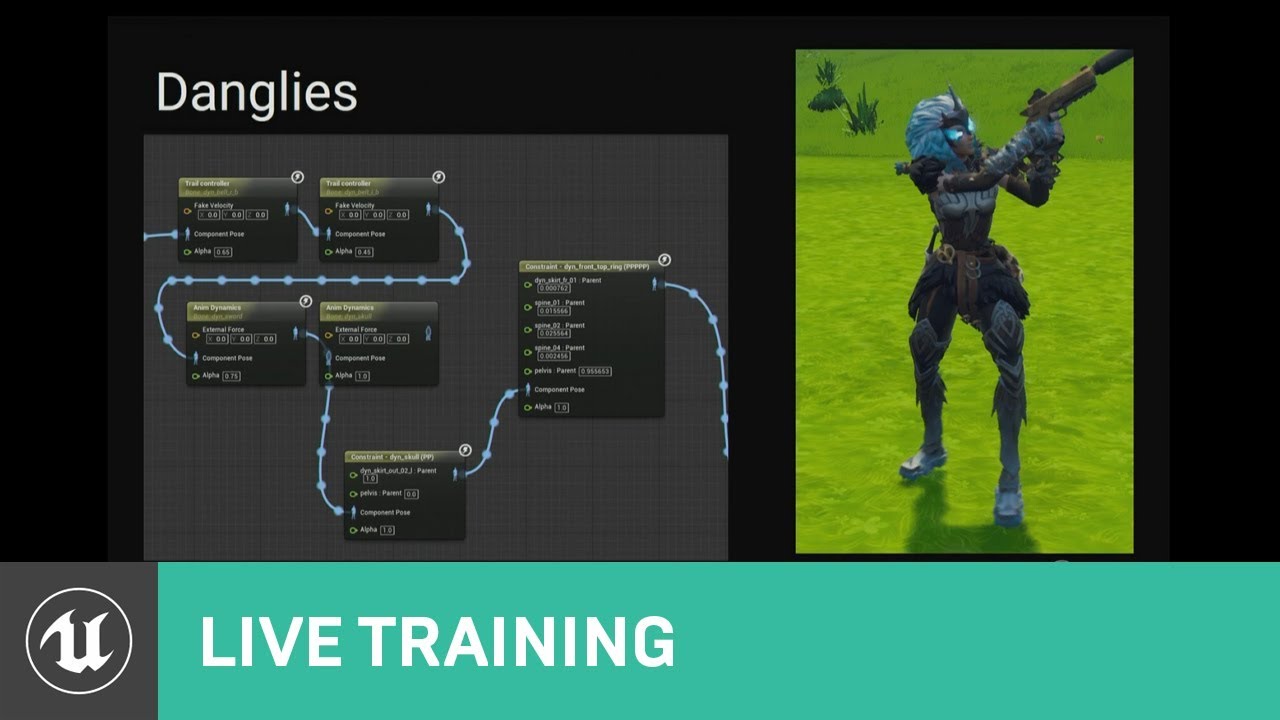
This talk covers Fortnite’s use of animation Blueprints including the use of Blueprints for gluing together character parts after retargeting, dynamic soluti...
 safe rose
@grim ore is that a good talk overall?
I think I saw the Mobile/Performance Optimization ones
Those were alright, most of it is well-known stuff.
grim ore
well I don't know much about animation so this is good for me. Nice to see how a real game uses the system for future info.
 paper kernel
yea I'm sure watching this, I kinda struggled with the physics blending and I've already got 3 tips how to make it easier
grim ore
They talk about how they have to set it all up for fortnite for stacking anim bp and skeletons
 spare steeple
is there a valid way to simulate a client?
 broken shadow
I believe if you have 2 players in PIE and you have not set Run Dedicated Server to true then player 0 will be the host and any players after that will be clients.
Unless you're talking about simulating client in a different sense
spare steeple
i mean in a packaged game
spare steeple
trying to make bots for a multiplayer deathmatch game and ideally they use the same controller + pawn that players do
but so much of it is set up assuming its a connected client and not controlled by the server machine
versed spear
anyone know why I would not be able to walk on half my map. The nav mesh covers everything but I can walk fine south but there is a line going through the middle of my map that I can not seem to walk on or past.
sigh sorry I clicked show and realized my nav mesh bounds was set differently.
tough zephyr
Hey just a quick question and google searching didn't really solve my problem. My AI doesn't seem to return any velocity when moving (using MoveTo). I assume MoveTo doesn't return vectors but I'm unsure. I also checked nav as acceleration in my blueprint which did nothing. Any advice? I can post images if need be.
timid seal
what do you mean by "return a velocity"? AIMoveTo is a latent task, so when it returns will either be before it starts moving or after it's done. also the only thing it returns is an EPathFollowingResult
tough zephyr
Well, when using normal movement functions on a player character you can get velocity and speed allowing for blendspace and animations to work based on that.
However I assume it's different for AI?
timid seal
it shouldnt be nope
tough zephyr
My animation is stuck on idle but it moves, using the proper blend space
timid seal
that's why i'm asking what you mean by your AI returning a velocity, where are you expecting it to be returned from?
tough zephyr
ohh.
Well within the animation blueprint
I check the speed but it's not returning anything other than 0
as it moves
well I watch the value is what I mean
timid seal
afaik those attributes aren't intrinsic to the controller but have to be set somewhere
tough zephyr
Well it does work on my normal player character while watching the value but it doesn't work for the AI.
timid seal
so if e.g. your playercontroller sets its animation's variable "speed" but your AI controller doesn't, that might explain it
timid seal
ok can you take a look at the animation and see where that speed is coming from?
tough zephyr
For my AI or my player?
timid seal
there should be only one animation
tough zephyr
So you mean where is my speed variable being set?
timid seal
well to be 110% sure you could show me both the animation where it's being used and the blueprint that sets it
tough zephyr
I'll PM you I suppose so that I don't flood the chat with images or anything
timid seal
feel free
versed spear
it would help other haha
They want to get the velocity of the actors then set the speed of the animation based off the velocity?
tough zephyr
I got it working, for anyone else I suppose: My issue was when I was having an isValid check, I didn't put in the current Pawn and put nothing into the isValid target. So it returned NULL and prevented my speed nodes from getting and setting
grim ore
so when you copy pasted it was checking against something else and not your AI?
tough zephyr
I copy pasted but my code was built for player character at first. So it was actually copying all animations of my player character.
Then I removed it and used a Try Get Pawn node but I failed to actually hook up that node to the isValid node
grim ore
makes sense
tough zephyr
for reference
I'm new to this stuff so it's interesting to learn what nodes do what and why things don't work at such a noob level xD
 void geyser
this is probably pinned in a channel but I can't find it, so... what's the best 3rd-person tutorial for UE? I've been following the official one by UnrealEngine on youtube, but... it's not really explaining anything?
tough zephyr
I just go and google what I need typically
void geyser
I work as a software dev so coding isn't really an issue for me, but it looks like he's just flying through all these different blueprints connecting things without explaining what's happening underneath or why he's doing that
yea, I wasn't sure if there was one that most people here used
tough zephyr
I'm not sure there's really a specific tutorial "everyone uses"
Everyone learns things differently whether it be big tutorials or small "how-to's"
The way I do it, is just think about what I need and then google how to do it.
Like AI, or movement, or setting up characters, or creating a system etc
unless ofc I know how to do it lol
grim ore
well what's a third person tutorial ?
tough zephyr
probably how to create a third person game or camera angles?
void geyser
i was just starting small and wanted a character that can move on a plane
searched it on youtube, clicked the first tutorial b y UnrealEngine
 orchid reef
is there a way to export everything in a level individually
void geyser
been following along, it just doesn't explain things well though - was wondering if there was a good starting point most people recommend
grim ore
also @tough zephyr this series, while old and the blendspace has changed, is a good one to follow for learning the character setup including animations. https://docs.unrealengine.com/en-US/Gameplay/HowTo/CharacterMovement/Blueprints It covers in one part the get pawn owner and casting which might have helped you earlier for example.
grim ore
Templates!
tough zephyr
^
That was the word lol
You can use the third person template and build off of that
it doesn't really hinder you
then you can learn how it works by taking it apart
grim ore
Always use a template because if you don't you are just using Unity 😛
void geyser
sounds good, I'll check out the templates
grim ore
the templates are what pops up when you launch the editor, third person template, win at making a game!
tough zephyr
I'm using the top down one
I love it
I was able to switch out the character to my own as well and got that functioning 😄
versed spear
Learn variable types to set values and reference of objects, casting to an object using a reference, functions and adding input and outputs to those functions, macros and bindings for ui.
then there are creating custom events to that are good to know.
 ancient otter
How can i make a sign that is affected by wind? I searched on youtube and found this https://youtu.be/bo3eCEii10g?t=402 but he does not tell much info about it. I mean, if you see the full tutorial you will see how to make it affected by wind BUT what i dont get is how he does it so the chains are moving with the wood. He said they are constrained but i dont undertand that.

This video explains how to set up actors with static meshes to receive wind https://www.unrealengine.com/marketplace/ambient-wind-system
orchid reef
does unreal engine have something like this similar to unityy
export all meshfilters in selection to separate objs
orchid reef
im guessing it's like staticmeshes
dry moon
If that's the case, wouldn't they already be seperate?
orchid reef
no when i do export all
it exports everything into one file
but i want separate objs
dry moon
and yeah with editor scripting you can do asset stuff
and no, when you do export, it'll let you do each
dry moon
If you do it from the top left File > export all I think it'll merge into one
but if you go to it in the content browser
and export it there, it exports each one
dry moon
That would be pretty hard I would think without merging into one
orchid reef
right now
dry moon
does the Unity one export with the location?
orchid reef
im manually selecting each one
and exporting it
it's in an obj format so i'd assume so
dry moon
You'd have to check to be sure, but I'm not sure its possible because then it'd move the pivot
orchid reef
what do you mean by pivot
dry moon
because when you merge in Unreal, the only option is center the pivot to the last selected(I think) or move the pivot to work origin
orchid reef
i mean im doing it manually right now and it works
dry moon
you are exporting from the content browser?
orchid reef
no im selecting a mesh from the scene and exporting selection
but that would take hours to export an entire map
dry moon
You'd need make a script for that I would guess then
orchid reef
yikes i dont know any python
dry moon
You can try C++ then and use UnrealEd code
I think
and create a for loop for each selected actor so it exports each selected one
not quite sure
actually this might be it
orchid reef
thing is, i don't know any c++ either lol
dry moon
since its level
dry moon
yea
you can make a for loop for each selected actor, and execute the UnrealED level OBJ export

 dim arch
Yup
 weary knoll
 plush yew
cool im working on exhaust particles rn
dim arch
good, in nia?
plush yew
nope i am using marketplace cascade particles - when i updated to 4.21 my niagara particles had an error
so i have to go back to fix it - in a short while
dim arch
yeah same, my personal project had a few bugs moving packages over
seems like if you customize any of the default node behaviours it wont move them over
also they changed event binding for sequencer
plush yew
i see
well - the good thing is that you are using version control now right?
and you updated all the way to 4.21 latest?
dim arch
yepp
plush yew
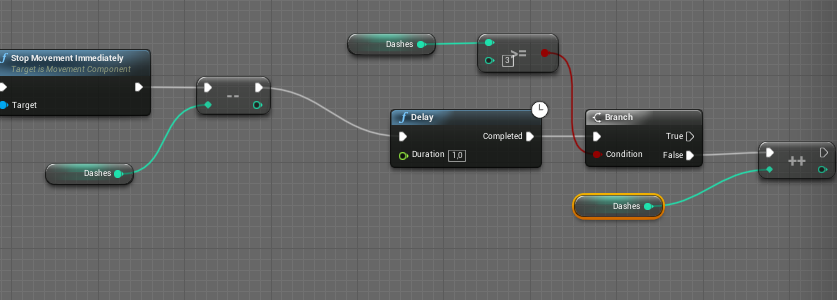
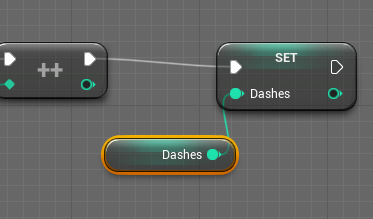
Hey guys, i have this dash BP inside my project and i have a little problem. I have a maximum of 3 dashes and once a dash is used, i get another dash over time (1 sec). however, if i use all my dashes, i only get 1 extra dash instead of it filling up to 3.
For example, i have 3 dashes, use 2 of them. i only get back to 2 dashes instead of 3 or i use all 3 of them i only get back to 1 instead of the max 3. Would really appreciate if some1 could help me.
Here is the BP: https://i.gyazo.com/34ff9575339470887071e5f0c52cb364.png

sorry for all the "dashes" 😄 sounds kinda funny now that i read it 😛
dim arch
you need to set dashes again after you increment it
@plush yew here is some wip video of it: https://www.youtube.com/watch?v=zXvCNRLPVVw
 plush yew
like this?: https://i.gyazo.com/b2b65b0f56c12479f1b60e811d91af32.png
still only goes up to 1 and not all 3
 dim arch
I taking care of some other stuff at work so havent managed to do much, the icons are placeholders
plush yew
uhh POE style game?
plush yew
@dim arch the yellow enemies are neat
hold on a min
i have a great marketplace asset thing to recommend
let me check if i already sent it
ill DM u one sec
any1 got a clue on my problem? i set the dashes yet still doesnt go up to maximum
dim arch
so if you are on 1 dash charge and want it to tick up twice, that event needs to fire twice
when does the event fire? when you press dash?
plush yew
no. i get 1 dash back every second
dim arch
basically you press dash, it delays for 1s and adds one, doesnt add any more until you press dash again
plush yew
but it stays at 1 and never goes back to the max amount i originally had
wait ill make a gif
maybe like set dash = dash + 1?
or something lol
maybe ur ref isnt working
dim arch
so if you have 1 dash charge and wait 2 seconds it should go up to 3 ?
dim arch
your delay doesnt loop by itself
plush yew
yeah
might need a for loop
oh so i have to put a loop on the delay?
see top left corner: https://gyazo.com/18e7ca5212951677a2a990c808868ca7
try something like that
plush yew
or that 
dim arch
I just clamped the value so if you spam dash it doesnt go into a negative value, you prob gotta add logic to branch the dash event if charges >=1
loop will process before the frame is updated so not good idea to use that
 unique spire
this is a little off topic but has anyone or does anyone have any problems with their graphics card drivers and windows 10? I get weird line all over my screen and it deletes my driver
plush yew
@unique spire could be windows update
unique spire
yh i think so too
i had to reinstall the driver and restart the system and worked fine for 5 mins then fucked up again can windows do an update without letting me know, im going to disable the updates and see if that fixes the issue
 novel ember
i've gotten the line things before but it has to do with memory leaks
one of my RAM cards was dying iirc
 cerulean nova
So im abit on a edge i want to make a Openworld that doesnt take place on a island but i dont want to outside world to feel dead and dont want to use 2D Sprites for the "outside" world and i dont think placing million of trees around it will help either any good solutions?
 honest rune
blocking volumes and clever level design 😃
and a kill-z that will really show 'em you ain't playin' 😉
cerulean nova
the base idea allows me to put a fence or wall around it
no need of a killzone
but even if its a wall that is quiet high there are still higher places that would allow to look out of the map...
making tons of trees instanced without any animations since they are outside could be a option 🤔
void geyser
has anyone had an issue with using a gamepad, where the controller works in the preview to move the camera, but as soon as you click play the controller inputs don't seem to be working?
i'm just using the standard third person template
honest rune
try mouse clicking into the window first to make sure control is captured by the window
right after clicking play I mean
void geyser
yea i definitely do
saw one post about it online saying it works after a computer reboot
next time i reboot i'll try it out 😃
glacial pecan
In the unreal content browser, I only see the .uasset files it seems
But they are created from .png files in the same folders which I dont' see.
What happens if I rename those .png files?
Will the connection to them be lost?
Is there a connection at all?
cloud cobalt
@glacial pecan The .uasset stores the path of the source
If you rename the png, and click "reimport" on the uasset, it will prompt you for the new file
The content browser only shows .uasset since that's all UE4 can use directly
Your content sources should be outside /Content, for example /Content-Sources
regal mulch
Soo, anyone ever tackled proper splitscreen UI and maybe knows about some resources/talks regarding that topic?
Not really finding much about what the go tos are for converting normal UI to Splitscreen.
You can't just scale the UI down, as that kills readability etc.
e.g. you can't just scale down the main menu to 1/4 of the screen if you have 4 player splitscreen.
So I guess one solution here is to not have the screen split in the main menu, but just add 3 more cursors.
glacial pecan
@cloud cobalt thank you!
cloud cobalt
@regal mulch I haven't, but that's an interesting topic anyway. As far as the main menu goes, for local MP it would be fine to not have it handle MP at all
Depending on whether it does gameplayu
 kindred viper
I remember someone doing a voronoi splitscreen example in UE4. ILl try find the link but I might not have bookmarked it
regal mulch
We just need normal splitscreen
Voronoi is not needed
The MainMenu needs at least some sort of input for the players
Because they can choose how their drone looks like
I'm currently just scaling everything done, but reading the garage UI, scaled down by .5, is annoying
And for Gameplay I probably go for a mix out of two different HUDs.
One is created per player and one per game
Game would hold the Timer for example
 torpid compass
Hey i can talk now
kindred viper
I found a link, but its not the link I was thinking of. https://forums.unrealengine.com/development-discussion/rendering/109228-efficient-voronoi-split-screen
Unreal Engine Forums
For discussions about Materials, Textures, Lighting, Particle Systems, and Post Process Effects.
regal mulch
Yeah James did that for his game
RL for example has these "two" sorts of huds
One that is player unique and one that is game unique
And then they seem to scale down
torpid compass
Do you guys have any good lighting presets? like, ways to make lighting look GOOD?
 grim sinew
Uhh... well a directional light intensity of 3 and skylight intensity of 1 is physically correct... but beyond that, there's nothing preset about it, just training yourself to have a good eye for color
torpid compass
hmm, ok thank you!
glacial pecan
Unreal complains that a texture filename is too long, but I don't use that particular texture.
How can I make the packaging to ignore that texture?
(I can't remove it, because it comes with a Datasmith import, but I replace it on the mesh in the level.)
cloud cobalt
Not sure you can do anything but remove it tbh
If you provide an explicit list of levels to cook, and it's indeed never used, it might not be packaged
glacial pecan
well, I know in Unity, it always get packaged because a script might decide to include it at any point
I was just wondering if Unreal had an explicit "exclude in package" option
cloud cobalt
Not that I know of
digital anchor
Is it possible to change the tick group of a object with FTickableGameObject ?
kindred viper
I would have thought that would be applied to the object directly
glacial pecan
is it possible to see how many ms per frame Unreal requires to draw a certain mesh? or group of meshes?
does such a fine grained performance analyzer feature exist?
 teal tulip
yeah with the GPU tool will check the tick groups well
cerulean nova
Does level streaming include players in MP ? i know i could test it quiet fast but if someone has a quick awnser to that i realy appreciate it 😃
glacial pecan
@languid shard thanks. how strange that it's only available via a keyboard shortcut
 languid shard
'cause it captures it for a single frame :p
that way you can get the exact values for the moment your press the shortcut
glacial pecan
mhm... but I can't see each object in the scene... only passes, it seems...
languid shard
well
thats "one" of the tools you can use
you can also use
in the console :
stat rhi
stat scenerendering
to see if your computer has to render too much drawcalls
where the framerate drops, means you've got work to do with assets in the camera frustrum
cloud cobalt
Before you get into that, be sure to run stat unit to confirm if your GPU is actually the one that's slow.
languid shard
if you want to check mesh complexity, you can use the statistics window to show texture memory usage and triangle count per asset
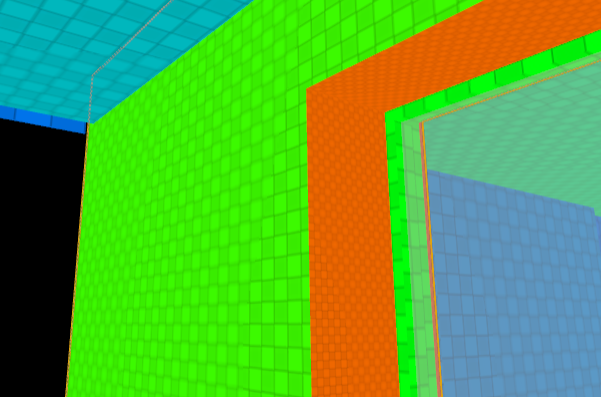
I wish the unwrapper they use would make uvs with the same density on the whole mesh though
teal tulip
@languid shard I use a Blender automatic thing
the problem just generate UV for non lightmaps, I mean are overlap
🤔
what takes more to bake a single big mesh with small parts into the same mesh or different small meshes ?
languid shard
@teal tulip going back to a 3d editing tool would be too long
I've got thousands of meshes to prepare
I need a way to do it within UE
and automated too
glacial pecan
@languid shard err... how do I turn off the stat displays? 😛
glacial pecan
ah, thanks 😃
teal tulip
@languid shard I will try to make all into a single mesh
then reimport when is need
no BSP thats the solution
glacial pecan
@teal tulip I just used the merge actor tools to bake 1500 meshes into one in Unreal
that's why I asked for the frame render diagnostic tools to see if it actually made a difference
because right now, I don't know
teal tulip
problem is that then all share same lightmap so
plus you have later 0 control to reverse
languid shard
say bye bye to your lightmaps when you merge lots of meshes together
teal tulip
yeah exactly
languid shard
with realtime light though you can save quite a lot of performance
because instead of say, having 10 shadow casting meshes
you can have a single mesh
teal tulip
do you named that the 4.21 baker don't work outside of RTX ?
teal tulip
you posted something this morning
languid shard
almost
teal tulip
oh okay
teal tulip
well if then a GPU without RT cores can do that is a decent start
teal tulip
I was worried cause thought was limited to RTX
languid shard
nah :p^
teal tulip
I remember to turn the computer for 1h in order to bake a map for 2007 games on the CORE 2 Duo
now you can do the same on the i7 for 5min
😂
teal tulip
but yeah in UE4 in 5min you don't even bake the first mesh
yeah you named before from 20 to 5min ?
languid shard
around that yeah
with higher quality settings too
I was baking with preview settings
on cpulm
production and higher bounce and quality counts with gpulm
teal tulip
yeah I read that aswell
still don't know if will use the DFAO or the baker
for this project
languid shard
well if you go for a pancake project
DFAO is fine
for VR or Archviz though, baker is a no brainer
teal tulip
yeah just need some more of the default planar white skylight in realtime
 thorn vector


 cerulean nova
any quick tips on creating Modular Stuff? (Walls and other stuff) ^^
leaden dust
why does my grass look dark from one side of normal and light from the other side?
cerulean nova
look at it up close ... have u forgotten to give it a backface?
leaden dust
@cerulean nova do you mean 2 sided material? Yes, it is 2 sided
cerulean nova
or is it just light 😂
static viper
it might be two sided