#ue4-general
1 messages · Page 344 of 1
 supple totem
 dawn vessel
Is Simple Grass Wind or SpeedTree Wind expensive to use?
If all Meshes in my area have it.
 dry moon
Speedtree and simple wind are pretty decent with performance
I think its safe to use
I got it for my trees, and a custom wind for my foliage and I'm getting great performance even for my ok rig
tons of trees and grass
 honest rune
I'm trying like hell to find out if Milestone ever did any talks or papers about the engine mods they did to correct physx vehicles implementation in UE4. The only one I've found so far is https://www.gamasutra.com/view/news/296681/Game_Tech_Deep_Dive_Reworking_the_Unreal_Engine_for_racing.php but would love to find something in greater detail. Looking at https://devtalk.nvidia.com/default/topic/917201/physx-and-physics-modeling/how-to-handle-wheel-on-wheel-interaction-with-physx-vehicles-/ it seems like raycasting is the primary culprit but it hints at that it is on UE4's end rather than physx.
Anyone have any related references to this?

Milestone duo�Ivan Del Duca and Stefano Lecchi discuss how the racing specialist transitioned from its�in-house game engine to Unreal, breaking down�the technical tweaks�implemented�along the way
It does sound like they rewrote almost the entire vehicle module but most of it sounds like preference and only early portions such as suspension raycasting was actually required
 glass roost
Thanks for your help @plush yew & @misty creek ! I forgot about having the player controller set to ui only. It is now fixed. Thanks again for both your guys help!
 plush yew
yey
 misty creek
Glad you got it working 😃
plush yew
No problem
glass roost
😄
 sly willow
Hihi anyone know how to get controller in multiplayer network client through UI widget blueprint?
 barren delta
Rpc?
 sudden agate
rpc what
 regal mulch
@sly willow #multiplayer
 livid lantern
Does anyone actually sign up for [Unpaid] jobs in #looking-for-talent ?
If yes... Why...?
sudden agate
I can imagine that it is a good practice.
 ruby folio
https://cdn1.epicgames.com/ue/product/Screenshot/23-1920x1080-294e0218e961aa807b32f662c4334053.jpg
I can't decide if I should do my cliff meshes like this. With a grass mesh on top. Instead of using a blended material like I have done.

Or should I use vertex paint for them
If I use vertex paint I can guarantee the grass will only ever bee on the top. O wherever I want it
 static viper
my advice
dont use vertex paint on massive open worlds
you are lucky if you get to finish placing all the rocks...
and even start with details...
extremly lucky
dont create more work
finish the one you have
ruby folio
You can save vertex paint though. So you wont need to paint each individual mesh as you place it. Or is there another reason not to use it?
ruby folio
Ermm... You can save vertex paint in UE
sudden agate
Vertex Painting means you cannot instance the meshes
solve the painting procedurally with a material
static viper
i mean that i dont think you can paint instances
what you can do is paint individuals
but you cannot save that
there is internal vertex paint
and external added one
ruby folio
How do i even instance meshes anyway?
I take it just dragging them from CB to level isnt instancing?
static viper
maybe in the final render
but in the actually creating you are placing an individual actor
you can instance them via foliage
tho i dont advice that with large rocks XD
ruby folio
nooo
So all my cliff meshes are gonna be placed by hand
Will they not be instanced?
static viper
they are as individual as any static mesh
i really cant tell if there is another way. i never saw one
the system makes logic
is logic
XD
static viper
i hope you are fine 😄
you are making this awfully complicated
just place your rocks already
ruby folio
Im not making it complicated. I assumed thats how it worked which is why I asked, and I was correct....
 fierce tulip
ahh, owl being as unclear as ever :p
static viper
i wasnt clear about what he was trying todo at the first place XD
 tardy sapphire
Quick question guys... I don't understand the logic behind this blueprint, actor is destroyed, and immediately after that a particle effect is spawned using the actor's location, how is that possible, since the actor is destroyed, shouldn't it location return a null value? I'm new to Unreal so bare with me please. 😄
static viper
yee you should spawn particle before destryoing the actor that spawns it XD
i saw this behavior too in umgs
but in umgs its making sense
tardy sapphire
Just to test it, I tried both ways, before and after DestroyActor... but it makes no difference
Same result, particle effect spawns
 wary wave
@ruby folio - unless you need the grass geometry distinct from the rock geometry, I would use projection in the material
it's just infinitely more convenient
static viper
yee it might be that it waits for the actor to complete actions
ruby folio
@sudden agate Are you saying that if I had a single mesh, with saved vertex paint.
I drag two copies into the world. They are instanced.
But if I alter the vertex paint on just one of them, they are no longer instanced?
@wary wave Yeah I think thats what I will do for these meshes.
wary wave
if you alter the vertex paint they're no longer instanced; they have differing geometry
ruby folio
Excellent. Cheers for clearing that up ambershee. That is how I understood it after all.
 manic pawn
destroy actor doesn't immediately delete it
it'll sit around for a while waiting for gc
so I guess you can still read position
static viper
yee gc is the likely answer
same for umgs
they wait
but are reduced from gameplay or screen
 icy bone
at any case cant rely on the gc being nice
 merry gazelle
I'm creating a game series that has physical table top collectables (e.g. cards) and a story line I want to explore as a VR interactive story. One of my ideas is that in the VR game you can complete missions that provide the player a redeemable code ( coupon ). They can then enter that code in the games website (or VR web browser) to build their own deck / collect virtual items.
Just curious what you guys think about this, does it sound convoluted using coupon codes?
Example: Player defeats boss [ gets unlock code for boss card ] > opens the website externally (or in VR > enters the code in the game websites shop collecting the virtual item in their account
wary wave
why have coupon codes when your software can literally just do it all without a middle man?
doesn't make much sense to me, you can just give them the virtual item, no need for the coupon code
manic pawn
people who don't realize the coupon exists will continue to pay the full price
people might not be bothered to use it since it takes extra steps
all results in more money than it giving everyone the thing by default
wary wave
whilst probably true, seems like a sketchy line of reasoning
manic pawn
well, it being sketchy is the whole point of that stuff isn't it
 polar hawk
When you write an FText::Format and realize you wrote all of your format arguments as{0}

 copper tangle
 spare sun
doesn't destroy actor simply queue the actor for deletion, not instantly destroying it?
afaik it happened in certain intervals
regal mulch
Yop, the GC cleans it up
 pure stratus
@merry gazelle I really like breaking 4th wall in video games, as long as it is a nice (best surprising) addition, not a side effect nor annoyance.
It can be pretty cool for the first time, but if you plan to force user to do this every boss and have like 30 bosses, then a good thing can turn into annoyance.
merry gazelle
@wary wave The series also includes livestreamed table top games where players earn "scrap" currency. I think it helps to manage all the currency / virtual item inventory through the site since it ties into the experience outside of VR
pure stratus
If I've found, let's say, a secret boss, and it would drop a single (eg QR) code instead of ingame item, that would be latter redeemable for some collectibles, I think it could be really cool experience.
merry gazelle
I've looked into using something like VaRest / HTTP requests in game but that's also a little to technical for me😅
@pure stratus Yeah I also thought about QR codes, there's a couple plugins in the marketplace I might use.
 thorn topaz
Is there a way to disable texture building when launching the engine?
 cloud cobalt
@thorn topaz Shader building ?
thorn topaz
no at 73% while the engine is loading
LogTexture: Display: Building textures: Katana_Black_AO (G8, 2048X2048)
cloud cobalt
First launch of the project ?
thorn topaz
nope, happens every time
cloud cobalt
Did you successfully launch the engine and then exit it cleanly ?
I know we had broken textures with 4.20 and we had to manually rebuild all of them once
Basically put a texture filter in content browser, select all , right click, rebuild
thorn topaz
We're in 4.18
I'll try that and close and reopen
only 10,000 textures to rebuild, awesome
 somber condor
guys! what's wrong with 4.21 ?! I migrated a project and when I select a BP actor in my outliner (from persistent level) it crashes the editor! I can't even replace/delete that actor cuz it crashes immediately...
static viper
like
everything is wrong with 4.21 XD
i had the same crashes
you can stop trying. just go back to older version XD
somber condor
ow shit
regal mulch
Owl upgraded her daily rage against UE4 from 4.20 to 4.21? :D
static viper
well i didnt even used 4.20
XD
but 4.20 was less worst
actually compared to 4.21 20 was ok
regal mulch
Me, and a lot of other have no problems with 4.20 or 4.21
Specially not "Crash on Selection"
somber condor
haha ... but cmon this bug is so silly you don't even want to workaround
regal mulch
Check the Crashlog
static viper
checking the crashlog on multiple crashes is ... weird XD
regal mulch
I mean Alless
static viper
you cannot argue that 4.21 is fine after multiple different crashes XD
regal mulch
I didn't have a single crash caused by UE4 itself in 4.20 or 4.21
cloud cobalt
4.20 crashes all the time too
static viper
what crash info is he gonna get from "i selected a bp"
regal mulch
I call stack for example
 safe rose
Quality of UE4 Releases has gone down considerably since 4.10
cloud cobalt
@regal mulch To be fair, I have two easily reproduced crashes in engine, 4.20, just clicking on regular engine buttons
static viper
i am just sayin his errors are very weird
the same as mine
and it makes no sense that new projects just work fine
regal mulch
I'm not saying its perfect, but I also find it bad to just tell everyone who experienced a crash to not use 4.21
somber condor
I was totally fine with 4.20 ... but seriously I was maintaining the project version to version and never had editor issues at least. but will see
safe rose
But Epic's priority is Fortnite, and they have a crapton of engineers to fix their source when crashes occur for Fortnite
regal mulch
There is a enough people who don't have problems
safe rose
If it doesn't affect fortnite and no one reports it properly...don't expect it to get fixed
So, report your damn bugs
regal mulch
It has always been like that
cloud cobalt
My experience with 4.20 :
- selecting the player pawn from the outline view in editor raises an assert that freezes for stack collection, and doesn't crash
- clicking the "preview mesh" options for a material function very often crashes
I suspect no one simply tried these
regal mulch
Before Fortnite it was Paragon
fierce tulip
having variables/parameters inside material functions.. inside material functions.. make them not work in the instance
safe rose
And they are making the most money from Fortnite, not devs
regal mulch
Well, most of the devs never ever release anything
cloud cobalt
Epic making more money from their game is a terrible situation for developers
I wish Fornite tanked
static viper
i am sure this is just an out of season joke
regal mulch
If Fornite goes done, they work on the next game
They already have other projects at hand
Pretty sure they aren't gambling with what we do here
static viper
they have more projects?
regal mulch
Yes
static viper
and fortnite can go away? 😄
i feel like fortnite is gonna be there very long
why would they discard
regal mulch
The other projects are on hold atm
static viper
what are those?
regal mulch
A mobile game for example
cloud cobalt
Frankly, I've never got the engine to crash in the material editor before 4.20
4.19 broke DLC support, of all things
static viper
actual projects*
safe rose
They keep adding llots of stuff from fortnite
regal mulch
And then some other thing that I can't recall what it's called
They had JJAbrams for that
Or whatever the guy is called
static viper
oke
 frosty bloom
Isn't Epic games creating that "Battle Breaker" and "Spy Jinx"?
static viper
what
regal mulch
Spy Jins the other thing


But it's not gonna go anywhere with Fortnite making money of course

 glacial pecan
If I right-click to edit a StaticMeshActor, and switch materials in one slot, I can see the change in the popup window, but not in the main world. Why not? It's the same static mesh used in the world!
fierce tulip
you editing it in the mesh viewer? or just one thats placed in the world?
glacial pecan
I have no idea, I right-clicked to edit, and my edits show in the popup viewer, and if I click browse to asset, I can see the previw has updated, and if I right-click from the content browser, it's also updated.
But not in the world.
static viper
bc the world very likely has a unique version of your rock
you might have change the material there
overriden the parent
you can fix that easy by placing the rock new
glacial pecan
Ok, I can actually see that the world actor also shows the material slots and the element hasn't updated. But why? how can I remove the override, and where does the override come form?
glacial pecan
I can't replace it, because the placement is imported, and I have a couple of hundred of these
static viper
you edited an instance
glacial pecan
No, I specifically tried to not edit an instance, but the source mesh
cloud cobalt
Import the asset as a new asset with a different name, remove the old one, ask the engine to replace with the new
If selecting all of them isn't feasible
glacial pecan
YES, thank you!
I don't know how to write your nick, but thanks, the yellow little arrow did it!
I wonder why they were all overriden... Datasmith issue, I guess
static viper
^^
thorn topaz
@cloud cobalt by rebuild do you mean reload?
cloud cobalt
Yeah
thorn topaz
ok thanks
wary wave
4.19 4.20 onwards has been increasingly unstable tbh
lots of core features stopped working around that time
DLC support being one, DPI scaling being another
one of my own projects is on indefinite hold until they fix the latter
then there was the dumb bug in 4.20 where you couldn't even rotate the FirstPersonCharacter mesh in any way
how did that even ship?
 grim ore
Well when they are done they click the big "Ship It" button and then go out for a snack.
dry moon
I'm hoping for a giant "spring cleaning" update where its fixes and optimizations rather than more features
grim ore
I think we have been hoping for that for a few years now 😦
wary wave
but not at the expensive of the existing ones!
dry moon
Well at this point it has the features I need, I just want some optimizations on handling alpha overlaps :(
wary wave
I wouldn't expect that any time soon - not given what's already there
it's just the nature of the renderer they've gone with
grim ore
Dreams and Tears sounds like the last 3 weeks for me working on this multiplayer stuff lol
"yay it works" turns into "but only for the server" turns into "ok fixed" turns into "and now only on the client 1 and server but not client 2" and repeat lol 😃
 cinder iron
When doing player based networking it is very important to analyse the context - this means who is sending the message and from where it is sending it - It is important to understand what you are doing and understand aswell why something is failing, going through the basics is essential when doing networking.
grim ore
yep yep and I try so hard to visualize it before the head explodes lol
so far the biggest issue for me has been trying to determine who should do what and when they should do it and why. Single player is so much easier when you just go screw it and have no concern over ownership lol
 latent moth
All, I'm adding a BP Actor which has a SPLINE as a root component. In the construction script, i have a HAS AUTHORITY switch and in there I add the Spline Mesh Components. The BP Actor is set to replicate, so is the SPLINE and the Spline Mesh Components.
https://gyazo.com/1962d176e2b0f5d96f4490c6f0905a53


Why is it that the clients do NOT see the spline mesh components?
dry moon
Hmmm no clue, try to bring it into an event?
And you can always merge the mesh, since splines are easy to plop down again if the river isnt very long
 paper kernel
I dunno can you even replicate generated spline component
sounds like a lot of data
and if I'm totally not mistaken, component replication does not create the component on client side
unlike with actor replication
latent moth
merge the mesh,
can this be done?
dry moon
Ahh I have 0 clue about network stuff, yeah just merge it
latent moth
my issue is that this mesh component is used in hit events that get replicated, so the components have to be too
dry moon
Yeah you can, the merge tools merges the blueprint into a single static mesh
paper kernel
hit can occur only on server, you just replicate the required data to clients
latent moth
yes, but if the component is not replicated then the hit data is obviously invaid, since the component has a different ID
latent moth
I don't think you get it. If the component is created client side, it will not have the same network id.
this is why i'm creating it replicated in the first place.
paper kernel
server should be authoring the hit anyway
latent moth
yes, but all of the decal impact and such are generated locally, and if the component is invalid (because not replicated) then you cannot attach it to them.
You will get a LogNetPackageMap: Warning: FNetGUIDCache::SupportsObject: DecalComponent /Game/Maps/Levels/UEDPIE_1_OSA_Level_Test.OSA_Level_Test:PersistentLevel.BP_OSA_RiverWater_2.DecalComponent_6 NOT Supported.
paper kernel
yea, then create the spline on clients too
I don't reason why you can't do that. references will get solved when you pass the RPC
paper kernel
then save it to separate reference on begin play and use that reference
latent moth
the hit event contains a COMPONENT, which is replicated from server so it has a specific ID, but if that component is not replicated then the clients go "I don't know the component".
Ok forget it 😃
paper kernel
then write a bug report and roll thumbs
latent moth
eheh ok will do that
 autumn turtle
Any idea why my radial force isn't moving my character or any other objects?
autumn turtle
nvm, created an explosion actor and added that
but not destroying destructible objects... or moving other objects
just pawns
nvm, force wasn't high enough
😛
manic pawn
make it a habit to hit ctrl s after every 2 changes
unreal crashes way too often to not do it almost automatically
supple totem
yeah I hear that
static viper
obviously we try to not get microtransaction going in ue4 XD
maybe you should ask this question in the forums
static viper
no idea XD
grim ore
well something like fortnite is all custom code on a custom backend
the game sends the request to the back end, it processes the request with the payment processor, the results come back and they give you credits or an error. There are a few services out there you can use to do that but it's a legal thing or you can use a third party like steam to handle it. It looks like something like Gamesparks has a UE4 plugin as well.
 spare steeple
does anyone know how to solve the bug where child actors get all their components reset
if i set any values they just reset again when i restart the editor
they wont save
static viper
i had this yes
you will have to recode your system
and just spawn the actors with data from a datatable
its much safer
spare steeple
i guess that would work
doesnt seem like the proper solution as much as a workaround though
but i might have to
static viper
well it gives more powers
a datadriven system will make your system much more flexable
 molten birch
Hi Im curious what the best workflow is for level steaming is for lighting consistency and optimization. Do I build the entire level first, and then break it down into smaller sublevels (then set the streaming volumes)? Or would I start designing a level with all of the sublevels in mind from the get go?
spare steeple
ok i got my data back
made a change to the parent and reversed it
then recompiled
then restarted editor
dunno what actually went wrong internally though
grim ore
you know I love the engine but when it's a checkbox for a dedicated console server in Unity and a giant pain in the ass for one in UE4 it makes me go "Unnnghhhhhh" 😿
cloud cobalt
It's not like dedicated server is something to lightly consider though
You need dedicated if you're doing competitive games, basically, and if you're doing a competitive game, you've got worse issues than building dedicated
 wet zenith
steam i cant find any documentation for steam in app purchases for ue4 or any thing ,,, it just handels the payment ,,, needs a payment server , , and i have no idea what is that
@grim ore
does game sparks do iap on pc @grim ore
plush yew
just got unreal yeet
cloud cobalt
@wet zenith Have you looked at he steamworks SDK ?
Not sure if UE4 provides an easy C++ interface for that
(it doesn't)
wet zenith
yes it doesent
cloud cobalt
You'll need to use the steam SDK directly then 😃
manic pawn
dedicated server is really common in sandbox games and others that let players run their own servers... there isn't much that needs to be considered, you just give people both options
the way unreal requires me to build a separate exe for something that should be a -dedicated is really annoying
cloud cobalt
Yeah, that's true. Still, I wouldn't expect that to be a first choice as an indie.
wet zenith
@cloud cobalt When a user wishes to buy something in-game, your game sends a purchase request to your -------purchasing server---------.
regal mulch
The Server itself is not the issue
wet zenith
whats purchasing server ???
regal mulch
Hosting them is
cloud cobalt
^
manic pawn
it isn't if you have the players host them
grim ore
my comment was just on how annoying it is to need a separate install/setup to create a dedicated server compared to unity was all 😛 I still chose UE4 over Unity for this current MP project just due to how quickly I can iterate in the engine.
cloud cobalt
@wet zenith Sounds like you need to create a server system to handle the microtransactions, and Steam only does payment
regal mulch
Well the seperate install is a pain but that's main due to the target stuff for servers missing
Technically Epic could put that stuff into the binary launcher version too
wet zenith
i defiantly don't have one of those ,,,is there any documentation for that somewhere @cloud cobalt
regal mulch
However despite some extra work, it's not hard to create a dediserver
wet zenith
😅
grim ore
yep not hard just not as easy as a checkbox 😛
regal mulch
Welp, Unity has other negative points
 sleek mango
If you create a custom event in an event graph and call it, does the event execution begin next frame by chance?
cloud cobalt
@wet zenith No I don't believe so. This isn't exactly something you'll find tutorials for tbh. Look at the guide entirely to see if you understand better
regal mulch
The purchasing server can be any service entity that your game system has for handling purchase requests. It could be a web server or your authentication system. The server will need to communicate with the Steam billing servers over HTTP. Your purchasing server can also request the user's country, language, and currency from the Steam billing servers. You can use this data to adjust your pricing as needed.
It's literally the next sentence
cloud cobalt
@wet zenith Basically, this is something you'll need to create yourself from scratch outside UE4
And connect to your company's accounting etc
regal mulch
Yeah, it's basically a web service that communicates with Steams Billing Server via HTTP Requests
cloud cobalt
If this sounds too complicated for you, it probably is, no offense. Doesn't look like anything amateur-level
wet zenith
yaa
its just something to relay info from ue4 to steam ,,,
like ask steam take 10 usd
regal mulch
That's not how it works.
wet zenith
and when it return successful it reply to the game ,, its done ?
regal mulch
UE4 implements Steams API. You have to implement the API calls and in addition have a Web Service actually handle the Requests.
grim ore
someone somewhere has to be legally responsible for handling the money and steam is like "nuh uh you do it"
regal mulch
Correct
wet zenith
does any one know a ready some service provider for that ?
grim ore
can't generate project files..... need C++ toolchain installed.... hug UE4
It's like I am not supposed to be working on this project at real work 😛
https://answers.unrealengine.com/questions/661396/need-a-pc-in-game-real-money-solution.html this was a post about the PC transaction stuff and it went as well as this conversation lol
your gonna need to find a payment processor out in the real world and set it up on your back end
and your gonna need some super safe setup or your gonna have a bad time. probably C++ integration for sure as I wouldn't trust any of the http stuff in blueprints to do it
regal mulch
The steps are:
- You need the API setup in your game. So the steam header etc.
- When your user wants to buy something, you need to get their data. E.g. SteamID, Country code etc.
- Together with the Data of Step 2, you need to fill in a lot of other data, including what currency and item the user uses and gets
3.1. This is a POST HTTP request. It will return successful or not.
3.2. This request goes from YOUR Purchasing Server to the Steam Billing Server. - If successful, the user will get a notification and can then accept the purchase
- Now your Purchasing Server comes in. It has to use a specific API Call "FinalizeTxn" to complete the transaction.
5.1. this is up to you. If you report that the transaction worked, without actually handling any money at that point, yo ubasically gave stuff for free.
Whatever happens in step 5 is up to your purchasing server
cinder iron
bookmark that somewhere
grim ore
lol here is a Unity thread that devolved into a mess if you want to read it, might be some info in there on providers. https://forum.unity.com/threads/pc-iap-dlc.434013/

Unity Forum
Hey guys, curious, what services are available that offer IAP's for PC/Mac/Linux games?
I haven't found a single one yet and I've been looking for...
regal mulch
No. This is their docs. You can literally read that.
wet zenith
Sure
regal mulch
Actually, one step is wrong. gimme a sec
regal mulch
Fixed it
In Step 3 it basically goes Game/Player -> Purchasing Server -> Steam -> Player and P-Server
I think steam handles the notification of your player for you
wet zenith
so why steam,,, i see it can be ignored in that process
regal mulch
as long as you send everything correctly
No one says you need steam for ingame purchases. They hust offer a service for you.
autumn turtle
Having a weird problem... I am spawning a sphere into my game whenever I right click, but each one I spawn disappears after a couple seconds. I didn't set anything up for this to happen. Any idea how to stop it from disappearing?
cinder iron
check the lifespan
autumn turtle
lifespan is 0 (infinite)
regal mulch
Yeah, coding everything yourself for example
wet zenith
3rd?
autumn turtle
actor, yes
regal mulch
Otherwise, google is your friend @wet zenith
 dark depot
yeah make it yourself or ship to a mobile platform where they handle things for you
wet zenith
thank you @regal mulch
regal mulch
You gotta put some effort into this. InGame purchases aren't something easy
You are actively handling peoples money
So you have to code a robust WebService for that
wet zenith
ya ,,it took 3 weeks of my schedule
regal mulch
And if you find something 3rd Party, be aware that they probably cost you
dark depot
since there is more then one option IAP on pc is a wild beast
regal mulch
@autumn turtle BP or C++?
autumn turtle
BP
regal mulch
Are you saving the spawned Sphere in a Variable?
wet zenith
@dark depot like?
regal mulch
Or are you setting LifeSpan or calling DestroyActor on it somewhere?
autumn turtle
nope, LifeSpan 0, and not calling DestroyActor
cinder iron
mind sharing the spawning bit of code?
dark depot
i was meaning buying something isnt locked down like mobile so there isnt a 1 thing fits all thing setup you have to make it yourself then pick a 3rd party to process the info it will involve you having to code alot
regal mulch
Well, how likely is it that this happens every 30 seconds +-? @autumn turtle Cause it sounds like the GC cleans it
cinder iron
that would be actually pretty weird
wet zenith
ya ,, i figured that part 😅 @dark depot
grim ore
add the on destroyed event to your sphere and then maybe look thru the stack trace to see what might be happening?
autumn turtle
Sorry, new to UE4
grim ore
er set a print string on that event and then breakpoint it lol
autumn turtle
playing around a bunch trying to get more familiar
cinder iron
so when you said that lifespan was 0, were you speaking about the lifespan of the actor that spawns the spheres or about the spheres themselves?
grim ore
Visual Studio does not like 128GB SSD's lol... poor thing
regal mulch
It prints an actual call stack, like the one in C++
grim ore
you can use the new BP debugging window as well for the stack 😃
regal mulch
Yeah, just saying
Ah man, that reminds me of my 2 M2s that are laying here
Can't install them until I get my new mainboard and Cpu -.-
grim ore
aww
regal mulch
They were on sale, so I had to buy them early
grim ore
I bought the wrong M2 for my install so it could be worse lol
plush yew
im having a problem with rotating a camera
grim ore
nice
grim ore
I would love to upgrade from my 850 normal to a newer evo
regal mulch
You might wanna check atm? Idk if they are cheap everywhere
plush yew
regal mulch
They are still 44% off here
manic pawn
that's cheap
grim ore
I just spent a months income on holiday gifts or I would have loved to get myself something 😃
regal mulch
Yeah original price is 219 per
manic pawn
normal price appears to be ~114€ for one
regal mulch
@grim ore Give your loved ones a hint what you want ;)
grim ore
it was a new cpu/mainboard/drive or the family got gifts and they gave such nasty looks when I suggested the first lol
plush yew
nevermind it was lagging
grim ore
yeah $378 US here for the 1TB, I would have to get that to replace the 1TB I have now.
grim ore
yeah it's a bit but it is really nice not having to worry when installing stuff or using stuff. I just offload finished projects to the external drive and /hug the ssd whenever I do work
regal mulch
2TB us 430€ excl vat
but that's madness
Yeah that's why I just bought two 500 hehe
Was cheaper than 1 TB >.>
grim ore
welp building source on an i7-2600. time to go take a few hours off for lunch lol
regal mulch
Buy new CPU. Earn more money with it. Buy better gifts next time.
Win.Win.
Your kids will understand
manic pawn
buy even better cpu next time*
regal mulch
Psstt
 strong mesa
why can't i change the sun height in the sky sphere ?!
cloud cobalt
@manic pawn That's pretty much done forever now
manic pawn
can't we have some fancy new material that allows faster transistors or whatever
more cores is still useless for so many things
regal mulch
@strong mesa Isn't that done via the Rotation of the Directional Light that is linked to it?
 lusty knoll
Hello everyone It's so great to be here.😊😊
 night chasm
hello guys
guys who can giw me free assets? 😄
im new in unreal engine
but in marketplace not enoght assets
 delicate lintel
hey there
cloud cobalt
@night chasm Assets don't grow on trees
delicate lintel
i did some reading, and it seems you can't use bitmap fonts in unreal
night chasm
i wanna make good game 😄
delicate lintel
is this really true?
night chasm
yes
cloud cobalt
You can import whatever is in a TTF file
A TTF could represent something as in a bitmap
Even though it's not
Archive of freely downloadable fonts. Browse by alphabetical listing, by style, by author or by popularity.
These are TTFs
delicate lintel
but ttf files converts the font into vector
cloud cobalt
TTFs are vector, sure
Let's say you take a bitmap font as a TTF, designed as 8x8
Just use that font at 8 size in UE4
It will be exactly like the bitmap
Because TTFs are rendered as a bitmap at some point anyway
The key is keeping the scale
delicate lintel
i tried to make a .ttf font from a custom pixel art letter but it ruined it while transforming it into vector
cloud cobalt
My point is, take this : https://www.dafont.com/vcr-osd-mono.font it's 21px high, so use that in UE4 at 21px
VCR OSD Mono Font | dafont.com
It will be looking like a bitmap
 teal tulip
Tbh I didn't noticed huge changes in common tasks with the SSD vs a HDD that is 7200RPM
grim ore
heh I have the 5820k at home for real work, this 2600 is the work machine for business stuff in C# so no need for a faster rig
I want a freaking overclocked thread ripper for compile times but those cost real money 😛
cloud cobalt
@delicate lintel An additional point is filtering - depending on how you render the text, you should be wary of texture filtering set to something "modern" like linear, and stick to nearest
delicate lintel
yea i know bitmap fonts are resolution baked so you need a version for different resolutions, that's not the problem
the problem is bitmap fonts arent compatible with .ttf
delicate lintel
well, i just tried and it got converted into vectors
cloud cobalt
Vector is not incompatible with pixels
Every 2D pixel game on a PC is rendered with vector art
That's how GPUs work
delicate lintel
i guess it could be replicated, all i saw is that the picture changed
cloud cobalt
Just render your vector font at its design size and it will be exactly like as designed.
delicate lintel
i used some online font creator, maybe theres a better way
cloud cobalt
Don't use font creators, pick fonts that already work well like the one I shared
Designing fonts isn't easy
 burnt vault
hi everyone
cloud cobalt
@delicate lintel Crafting TTFs and using them isn't the same. I know you can use a TTF font to represent pixel fonts, and you can render that fine with UE4. If you only have pixmaps right now as an input, no, that won't work with UE4.
Like I said, this https://www.dafont.com/vcr-osd-mono.font will render fine in UE4
VCR OSD Mono Font | dafont.com
delicate lintel
so how can you add your own custom bitmap font?
night chasm
me?
cloud cobalt
@delicate lintel I have never designed TTFs so I don't know
If you don't have a TTF, you can't use it
There are thousands of pixmaps TTFs on the Internet though
strong mesa
@regal mulch yeah but when you link the directional light to the sky sphere you can control it
cloud cobalt
Try to pick one here : https://www.dafont.com/bitmap.php
Archive of freely downloadable fonts. Browse by alphabetical listing, by style, by author or by popularity.
strong mesa
and i once was able to do that but that was long time ago
delicate lintel
those are all monochrome tho
 heavy prairie
anybody know if it's possible to modify via blueprint/c++ the velocity of already spawned particles coming out of a particle emitter? I can successfully change the initial velocity, but having trouble figuring out if I can change the velocity of an already spawned particle.
delicate lintel
aka just one color, aka not bitmap lol
cloud cobalt
Okay, I give up
manic pawn
fonts are always monochrome
cloud cobalt
^
manic pawn
if you want to convert text to an array of colored images that is outside of what fonts are meant to do
cloud cobalt
I've actually implemented TTF support into a game engine so I kind of know a thing or two about this
delicate lintel
yea they're called bitmap fonts
well it seems you don't know what bitmap fonts mean
classic example: https://imgur.com/a/vstsvhJ
 cloud cobalt
Right, I don't even know what a bitmap is
Ask someone else if you don't like the answers
 versed spear
does anyone here know about input touch event?
manic pawn
that font in your image is colored by multiplying it with the color you want it to be
static viper
something is happening again XD
static viper
hermit are you trying to copy that from the screenshot?
delicate lintel
yes, i created a similar font
delicate lintel
how can i import bitmap fonts in unreal?
cloud cobalt
@delicate lintel If your bitmap font has grayscales values, you can rasterize a Truetype vector font and get exactly the same thing
cloud cobalt
lmao
static viper
ue4 has guidelines for this
cloud cobalt
You can't and you don't need to
burnt vault
has anyone every built a virtual tour and exporting as HTML to be view on the web?
cloud cobalt
TTFs are bad, mkay ?
static viper
they are bad?
cloud cobalt
You specifically said I didn't know what a bitmap font was
Which is pretty fucking funny
delicate lintel
you said they're monochrome
versed spear
removed
static viper
what is going on here
versed spear
lol nothing
static viper
why did you say that
versed spear
because he is being rude
static viper
remove it.
versed spear
ok
static viper
jeez
grim ore
I've got to admit I am confused by the picture personally. What was supposed to be a font with a picture in it? I saw some text with some of it being colored but no actual pictures in the text?
static viper
i thought this was about richtext
cloud cobalt
Anyway, bye
static viper
cya
versed spear
good
delicate lintel
so you could you turn this into a .ttf ? just curious https://upload.wikimedia.org/wikipedia/en/4/48/AmigaColorFont.png
 delicate lintel
or lets say, a greyscale version, thats ok too
delicate lintel
ok i will try, thanks a lot
static viper
with a greyscale you can just turn it into a color
delicate lintel
i was confused, because i tried to convert something like this into a .ttf and it converted it into some weird vector monochrome version
static viper
you should get just this without color
tho real ttfs are just black.
every of mine are black
you are doing some hockus pockus stuff...
delicate lintel
its just custom looking letters
delicate lintel
thats what bitmap fonts are afaik
static viper
how do you convert it?
delicate lintel
in unity theres a plugin called shoebox
static viper
i had a college who created a new font all by herself... in a day. without my guidence
she just used a website and photoshop
so
it isnt hard at all to get right
well ok shes a 2 ...
so no wonder
delicate lintel
😁
plush yew
Bitmap fonts are more of an oldschool thing. Much more flexible to use grayscale version and just do material stuff now
grim ore
There is nothing stopping you from making your own bitmap sprite sheet and then coding up a system to use that for your font system if you wanted. It's a bit weird and oldschool but hey why not!
delicate lintel
coding skills? 😄
grim ore
that's not stopping you, that would be delaying you a bit is all.
burnt vault
sorry folks i dont want to interrupt 😄 I'm in the process of using UE4 more regularly and was curious is it post to create something similar to this example but in UE4 and export it as HTML?
possible**
grim ore
yes it is. There is WebGL export as well as the new Pixel Streaming plugin
It would be much heavier to load tho, this is just 3d pictures
burnt vault
right so level 2 question haha
plush yew
K I'm really getting annoyed
And I definitely need help as to why this.. whatever it is happens
burnt vault
is it possible to wrap a two image and then build the tour to keep it light?
lite?
and i suppose from there you can build an HUD to have more interaction?
grim ore
just for reference there is https://www.unrealengine.com/en-US/tech-blog/capturing-stereoscopic-360-screenshots-videos-movies-unreal-engine-4 supported so you could do the same thing and use the panoramic plugin and export out an image from UE4

Unreal Engine
Here I'll walk you through Ninja Theory's particular settings and workflow for capturing 360 stereoscopic movies like the one we just launched today for Hellblade: Senua's Sacrifice. Read on to learn more about using the "Stereo Panoramic Movie Capture" feature which works o...
plush yew
Alright, nav mesh. Placed it down after I put down some labrynth maze thing.
Works fine.
But when I adjust the size of the labrynth, the entire nav mesh system no longer works, even if I place a new one down.
Usually opening a new level works but its tedious.
What gives
grim ore
How are you adjusting the size?
grim ore
up or down? if down is the min width for a nav system too small
plush yew
X and Y value
Width and length
The nav bounds is enclosing the entire thing top to bottom
burnt vault
yeah i was using panotour from kolor.com (owned by GoPro) and it was discontinued back in September. so if it possible to take the dev. into UE4 im pumped
grim ore
Are you scaling it up or down?
grim ore
and if you reset it back to the default the nav mesh starts working again?
plush yew
Lemme check
Nope.
The entire nav mesh system will not wanna cooperate anymore
Basically it doesn't work.
versed spear
you try rebuilding it?
 worn granite
There's probably a setting to have it rebuild automatically
versed spear
😃
 foggy raft
Has anyone had issues with the near clip plane seemingly culling entire objects?
grim ore
check out the build menu there are a few items in there 😃
worn granite
it's anything specific to that map that can be "baked". So lighting is the obvious example, but it can be navigation or even stuff you wanna build also.
plush yew
Didn't know
foggy raft
ah, sorry, didn't mean to butt in, thought the issue was solved.
worn granite
it basically was, nw - also no
foggy raft
okay
I don't feel as though this is the appropriate chat, but I don't see a better one.
To my understanding, the way that near clip culling is supposed to work, is that objects that get too close, parts of it disappear as the object clips through the plane
however whats happening is the entire object is losing visibility at once.
no progressive clip through, just on/off
foggy raft
google has so far turned up no results that tell me to do anything other than modify the clipping plane, which I set to .5 and it still was causing issues... I could set it even lower, but that seems like a very poor workaround
and everyone who has had the issue has had the progressive clip, not binary on/off
plush yew
Could be a bounding box issue. Tried increasing it?
grim ore
I definitely wouldn't set the clip too low as that will cause some weird stuff to happen just an FYI
worn granite
on top of only moving the problem anyway
foggy raft
Its a skeletal mesh btw, so I'm taking a quick look at the bounding boxes
versed spear
I need some direction here. My input touch is breaking. Pressed and release is triggering. My character walks around but then some times the pressed does not trigger but the release always gets triggered. What could be causing this.
delicate lintel
btw your videos are top notch, Matthew!
grim ore
Thanks 😃 Hopefully something in there helps out
delicate lintel
a lot. i remember learning collision and level streaming from you, among many other things
 turbid escarp
guys something really weird is happening
versed spear
So if I click supper fast my input touch breaks and will not move my character and if I click in random spots slower it will move my character. WTF is wrong with Input touch!
turbid escarp
is there a way to recompile all blueprints?
manic pawn
there is not, that would be too easy wouldn't it
versed spear
it would be to easy if input touch would work correctly.
manic pawn
never used touch input so I have no clue
versed spear
its a unreal thing they fail as programmers
manic pawn
maybe it's thinking your fast taps are attempts to double click or something like that
grim ore
have you tried it on another device to eliminate that as an issue?
versed spear
yep
it acts the same on every device
in pie and 3 other devices
the pressed just breaks and then works again off and on
I need the press to be reliable
grim ore
so how are you handling the press? on like the screen in general or on an object or on a widget?
turbid escarp
how come i need to close and open the unreal editor to see my compiled changes?
versed spear
it works fine my character moves the problem is the pressed just stops workin then works again if I change press locations
turbid escarp
what is this black magic
versed spear
when the pressed stops working the released is still getting triggered so I do not know what it just decides not to trigger the pressed.
grim ore
if you remove all your code after the print strings and just test with touched and released is it still broke?
versed spear
it works off and on depending on how much i am tapping the screen. Seems like it breaks when I tap fast in one direction so I think it is just getting overwhelmed if that makes any sense.
grim ore
it does, does a moved fire when that happens possibly?
versed spear
nope it will not even trigger the print after pressed when it locks up so I start clicking a new location and it will fix itself and start triggering again
grim ore
the other option is to skip the input touch node and do the down events themselves. I am assuming you have nothing else eating input as well possibly like other objects set to absorb input
versed spear
see i would understand if it just didn't work but it works fine
it is the input touch node that is broken
ok so above that code i have the code for mouse input
that works find and does not break ever
this is strait from the top down template nothing changed it should just work as intended.
ok i will see what other nodes i can use to avoid this. That might be an option if there is any.
I just don't see why I have to pay royalties to epic games when their engine has so many short falls like this.
icy bone
my works fine, i have multiple touch detection with flicking, pressing and dragging.
versed spear
hmm im using 4.19 what you using?
versed spear
see that is weird that the pressed works fine then it don't click other area works fine it is total random so it is so difficult to debug
icy bone
hm... u doing bp only? my is in c++
versed spear
yea bp only
icy bone
but tested bp first and worked
grim ore
remove all the extra stuff to debug it. just a blank scene with nothing in it and the input touch node with print string on all 3. make sure 100% it's your node causing the issue
doing it in a blank new project as well would eliminate more issues
versed spear
ok ill try that
grim ore
alternately you can look at the code for the match 3 project and see how they do it
versed spear
from what I was reading it could be due to some collation issues so a blank project may steer me in the right direction
supple totem
hi all, anyone know why using splines on my landscape causes all my procedural foliage to get erased on those tiles?
 vale silo
is it about time for 4.21.1 hot fix release ?
merry gazelle
@wet zenith For my VR game I'm planning on using Wordpress e-commerce with a coupon / QR system. If the player earns an item in game they get a code redeemavle through a browser.
manic pawn
baked lights
manic pawn
you could certainly make it one
burnt vault
How so?
manic pawn
when you click the arrows, it seems like it's just interpolating from the current camera position and rotation to a new one
- the click-to-rotate-camera that happens by default if you enable the cursor
grim ore
Its a rotation around a fixed point, like a FPS camera with on screen controls. Then you click and are moved to other fixed points by lerping the camera or using something like sequencer for a camera playback or even just a track on a spline to move the camera.
it also looks like it's running in the editor for that video lol
manic pawn
I haven't used sequencer before, can you use the current camera rotation as a start value with that, like he's demonstrating in the video?
burnt vault
Oh cool. Do you know of any tutorials that explain a simple setup?
grim ore
yeah sequencer can take real info from objects at runtime but to be honest I would set up an array of transforms and just loop thru them all using the controls setting a new view target for each one
burnt vault
Hmm okay good to know! I’m clearly new to UE4 Im an archviz guy and coming away from VRay to learn real-time I love what this platform can do I suppose I need to take some baby steps haha
grim ore
I could swear I did something like this for someone on a livestream but I can't find the video. The keys you need are the set view target with blend node (swapping one camera for another with interpolation)
and then uhm UMG for the interface and an array for holding locations or cameras to swap to/from
burnt vault
Yes!! That makes complete since
This will help to replace the kolor tool I used - panotour pro.
grim ore
yep you can make it as fancy as you want. Just going from one camera to another for example or fancier using splines as a camera track to have sweeps between locations for example. the core concept is basic 😃
burnt vault
Yes!! Haha take a look at this example I built the interface but know that GoPro killed off the software I need to adapt to new things
Recreating this is the goal do you thing it’s possible
Again it’s image base but effective
grim ore
that one is even "easier" in theory as you don't even need to track items in an array for back/forward due to the map
the map is a UMG image, the hot points are well hot points you can click on and each point can simply reference the camera it needs to and move your view to that.
each hot point could be an easily re usable item that could be set up individually with the correct location to go to
burnt vault
To keep everything lite is it possible to take 360 image maps can create a system that navigate through each one
Map the images to a sphere for example
grim ore
lots of options. Just as a point of reference tho when using UMG (ui stuff) you can't directly reference items in the world in the editor so you can't just say "hey umg widget I want you to go to this camera here in the world" because the UMG does not exist in the world till runtime.
it should be possible, sure. The default sky sphere is basically that already.
burnt vault
Yeah
grim ore
you would just make a custom material with that 360 image and wrap it around the player
manic pawn
using unreal for that is going to be way heavier than the original thing
burnt vault
So creat a level with multiple spheres with different images mapped to each on and a target view for each and create a system and can navigate through each one with a simple camera transition
Yeah
But the software isn’t available
It was discontinued in September
manic pawn
even if you don't render the whole scene (which would be crazy compared to this viewer), just unreal rendering an empty scene and coming up with black will be orders of magnitude slower
burnt vault
Hmmm yeah I see what your saying
ie krpano - which is the base frame work for my work example above
Or is there a better idea
manic pawn
unreal has a webgl export but it will create a finished self contained app thing that is also huge
manic pawn
if you can render the sphere views somehow, it would be a lot more efficient to just make a clone of this viewer with js
I'm not sure where you would start with that though
manic pawn
considering there's a js framework for literally everything today, there's probably also a thing that can display spherical captures and let you look around
burnt vault
To run a web base ue4 project on the web is it complete dependent on the end users gpu?
burnt vault
Got it
manic pawn
if you have infinite money, you can also try this new pixel streaming thing where it will render on a server and stream video
grim ore
the other alternative but it requires a server somewhere is the pixel streaming plugin but yeah exporting out the 360 pano capture of the area then putting it into another webgl js player is a lightweight option
burnt vault
Yeah panotour pro was that original solution ahh GoPro and I are not friends at the moment haha
Okay good information much appreciated. I’ll keep you guys posted on further development and discoveries
manic pawn
I'm kinda curious what a real-world use of pixel streaming is
burnt vault
Yeah same here
grim ore
well lets say you walk into a car dealership and want to preview some cars, high end shit. You can do it all on a touchscreen. Now doing 1 of those with a machine per might be overkill when you could set up a server/server farm somewhere else and have it just stream to dummy clients
same with say art installations or other stuff that you want to be interactive but not need a computer in the open or hidden.
manic pawn
🤔
grim ore
now I never said these were good ideas but hey it's a start. remote rendering with interactiveness basically.
manic pawn
I guess that might save some hardware if you have multiple screens but don't use all of them at once
grim ore
another weird one is stream your game with a custom ui interface for people to watch and they can interact with you on.
people can chat with you easily, they could click button in the web ui to spawn stuff or vote etc.
manic pawn
huh
grim ore
and it's all just rendering out once locally and being sent out into the webs
grim ore
sure it is
grim ore
I had to read them all lol
there is even a matchmaking server you can run for distributing viewers
manic pawn
so its like multiplayer but weird
grim ore
imagine twitch but with a custom interface on the website for interacting with the streamer as an option
manic pawn
I guess it will make multiple local player things like if it was split screen?
🤔 I kinda want to mess with this now for no reason
if you can run it from the editor, that would be super useful for showing people a specific thing without having to wait ages packaging the project and sending it to them
 vast granite
Hey everyone, I'm new to all this but going to fullsail and in an unreal level design course. Where should I go for some help?
vast granite
I've got the infinity blade pack and I'm supposed to use it to block out a level. The problem is I can't figure out how to get at the assets
manic pawn
there doesn't seem to be much difference in practice, I'd just get the cheaper cpu
@frosty torrent
 dusty cypress
@vast granite Hey there should be a folder on the main directory on UE4
Named the thing you downloaded
Are you having trouble finding the exact location inside the folder?
manic pawn
https://cpu.userbenchmark.com/Compare/AMD-Ryzen-7-1700-vs-AMD-Ryzen-5-2600/3917vs3955 maybe useful site

Based on 96,851 user benchmarks for the AMD Ryzen 5 2600 and the Ryzen 7 1700, we rank them both on effective speed and value for money against the best 1,137 CPUs.
 tough zephyr
Wouldn't you just drag in your assets?
Into the content browser
then it should give you an import screen, just hit import all or import individually if you want
Your assets should appear right there ready to use
unless it's via marketplace and that's done differently I've never worked with marketplace assets
vast granite
I think their already imported
dusty cypress
If you installed Grasslands, click through the folder and try out each one until you find a folder containing them. What you said is the right one. I got the snow one from the marketplace. But yeah just try out different folders and there'll be a big folder containing a lot of other folders that have types of assets
You can try clicking in the folder and taking a screenshot and we can try to direct you
Not sure what it'd be called tho xD
dusty cypress
I think it's Environments
 tulip vault
!gameidea
plush yew
Want game ideas? Send me a DM!
tulip vault
ah hey they changed it, interesting
dusty cypress
Believe environment has other folders containing all of the cool stuff
Won't confirm tho because I never used Grasslands
But that's what it is for the rest of the things I use
vast granite
It was in evrionments. Just jumbled in a lot of folders. Can I change the folder structure or do you think that might break some of the textures?
dusty cypress
Yeah that's what it is for me
vast granite
Is there a hotkey to duplicate an asset?
grim ore
Ctrl-d ?
vast granite
Ctrl+W just found it
grim ore
If not it's ctrl-w lol. If not it's ctrl-c then Ctrl v. If it's in the editor it's alt drag on the transformer move widget to drag out a duplicate.
manic pawn
which i7 is it
there isn't a "bias" on that chart really, those intel cpus are just better than the ryzens they were compared with
if you put your old cpu on there it would score much less than all of the others
you can always return it if it doesn't end up being as good as you want 🤔
I would expect it to run faster than your current cpu
grim ore
I've got an i7 2600 at work and comparatively my 5820k at home smokes it. I would expect the ryzen to perform similar to that at least so a 2600 -> ryzen to be a nice upgrade for the cost.
Assuming you get a 6 or more core ryzen that is.
An i7-2600 tops out around 3.5ghz so it's not like it's got screaming single core speeds as is.
Yeppers
manic pawn
not really, since its single core is also much worse
the new one will just be all around better
grim ore
I paid 25 bucks for the i7 at work so for the price the old ones still work great for raw processing if needed it's just at this point it's been yeaaaaaaars of upgrades to compete against
manic pawn
have to be careful with the ryzens though, appearantly not all memory works right with it
grim ore
Memory is love for a ryzen for sure. They love speed and compatibility
manic pawn
if only the new memory wasn't so ridiculous expensive
plush yew
hi
manic pawn
all seems pretty slow
I got 3200mhz cl16
anything more was too expensive
wtf the prices seem to have dropped again since I bought it
nice 👍
I got 32
i7 7820x
at 4.6ghz
I'm clearly cooling it wrong tho, because this happens when compiling intensifies
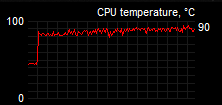




it continues working fine at this temp so I decided to do nothing instead
grim ore
holy hell that's a high temp
grim ore
oh interesting the 4.21 branch on github is flagged as 4.21.1 now
grim ore
the poor 2600 pretty much gave up when I tried to compile the engine at work earlier. between it and the mechanical drive it was futile
manic pawn
oof
grim ore
yeah I would think soon. I had to compile it for a dedicated server and just noticed the release branch for 4.21 is .1 now
manic pawn
wait do you mean the .version file or whatever
that's been at .1 for a while now
the longest engine compile I have heard of is 12 hours
it was done on... a cpu, I guess
versed spear
Feel like I am never going to fix this. I tried with a blank level and still input touch press stops working. 😦
grim ore
I was at 4 hours with about 300 of the parts compiled. the cpu had less to do with it than the compile trying to murder the hard drive with 8 processes compiling at once =/
manic pawn
the build actually becomes much faster after around 50%
but ye non-ssd isn't gonna work
grim ore
yep I just wish I could have dropped the thread count down to lower the hdd thrashing but nope I think epic broke that lol
manic pawn
just edit ubt to fix it
grim ore
didnt want to get that deep into trying to fix it. the build config xml file seemed to do nothing now =/
thorn topaz
So i installed an NVMe SSD yesterday and installed VS 2017 on it but now in the launcher when I try to create a C++ project from template, it says I need to install VS 2017. Any ideas how to get it to recognize?
manic pawn
to <1 to scale it down
grim ore
yeah I did that and the maximumprocessors but it ignored it
grim ore
did you install the VS 2017 C++ toolkit? or just VS 2017
manic pawn
I'm actually not using that thing anymore
thorn topaz
yes, when it pops up in the launcher it says "install VS 2017" and everything it has selected there is installed
 novel ember
quick question
novel ember
let's say i have an arbitrary range between 1 and 0, i.e. 0.55-0.65
along the lines of a progress bar widget, how would i go about displaying this in a way that scales, as in via horizontal boxes / grid panels?
manic pawn
it will download about 5GB of stuff
grim ore
@thorn topaz run the visual studio installer and make sure the C++ toolkit is installed. If all else fails reboot?
manic pawn
then you compile a few targets and suddenly you got up to 100GB of intermediate garbage
thorn topaz
@grim ore
grim ore
@novel ember so you want 0.55 -> 0.65 to represent a 0-1 range?
yeah that looks like it should @thorn topaz 😦
thorn topaz
I feel like it's an issue that the unreal launcher is installed on my C drive but VS is not
novel ember
no, i'm saying within a rectangular box (think border widget), i want the range 0.55-0.65 within said box to be visible, and the range outside that to not be visible
but in a way that scales independently of specific resolutions
grim ore
that is a very good possibility, I have only ever had to install VS on the C drive
about all I can think of for that @novel ember since I don't play with UMG much anymore is an image using the box/border setting and leaving that inside area open
novel ember
actually I think I found an okay workaround
grim ore
maybe show a picture of what you are truing to do lol?
manic pawn
there are many ways to achieve that
novel ember
i set up a grid panel with 3 columns, and columns 0 and 2 have the bottom of the range and the top of the range while column 1 has a scale of 0
manic pawn
if you want to use widgets you could use fill ratios on 3 widgets inside a horizontal box
or a material
or whatever
novel ember
and then i just manually set the scale to be 1px x whatever within that column 2 border widget
grim ore
that might work
manic pawn
came up with a simple example for my first idea
the first image is the background, the 3 in the box are all set to fill horizontally with ratios 0.55, 0.1, 0.35
novel ember
i don't know that the method using those direct values means the orange box physically occupies a range of 0.55-0.65 though
manic pawn
you have 0.55 to the left, the range is 0.1 wide, and you have 0.35 right to reach 1
thorn topaz
@grim ore yea no luck
grim ore
ouch. All I could guess is to reinstall it on your C: drive like it expects and see if it works. I don't know if the engine is hard coded to the directories or not but I have a feeling it might be =/
thorn topaz
It works on my other projects, just not new ones from template
grim ore
were those created before you installed VS on the other drive?
thorn topaz
yes and i uninstalled all other versions of VS
 wary ferry
i am having trouble (still) getting anything unreal related to work today. website opens really slow for me or even doesnt even load and now even the epic launcher constantly tells me, that "i might have trouble with my internet connection". While I am STREAMING. While I am surfing and searching for solutions. I´ve barely ever had anything like this with any software so far xD Its just weird. Anyone experienced this before and knows a solution?
I have the taskmanager open checking my up and downloads, my connection is perfectly fine. Theres no traffic going on atm
grim ore
@thorn topaz no luck out there on the web that I can see either 😦 I am out of ideas besides removing VS completely and reinstalling it to the default. I also have never used the UE4 installer stuff in VS just the default launcher from Epic and the default installer from MS
thorn topaz
yea that's what i'm using. default launcher and installer
wary ferry
I cant even open the frigging issues page to search the forums for solutions. Every other website works xD What is this Oo
grim ore
maybe a rogue proxy in the way on your machine?
grim ore
all UE4 sites? wiki, forums, docs pages, and answerhub?
wary ferry
https://www.unrealengine.com/en-US/support/report-a-bug
this one i got running. The redirect though to "issues" didnt work and the answerhub is not loading either
Thanks for reporting a bug with the Unreal Engine 4. Here you will find information on how to submit a report and what you can expect afterwards.