#ue4-general
1 messages · Page 340 of 1
 fierce tulip
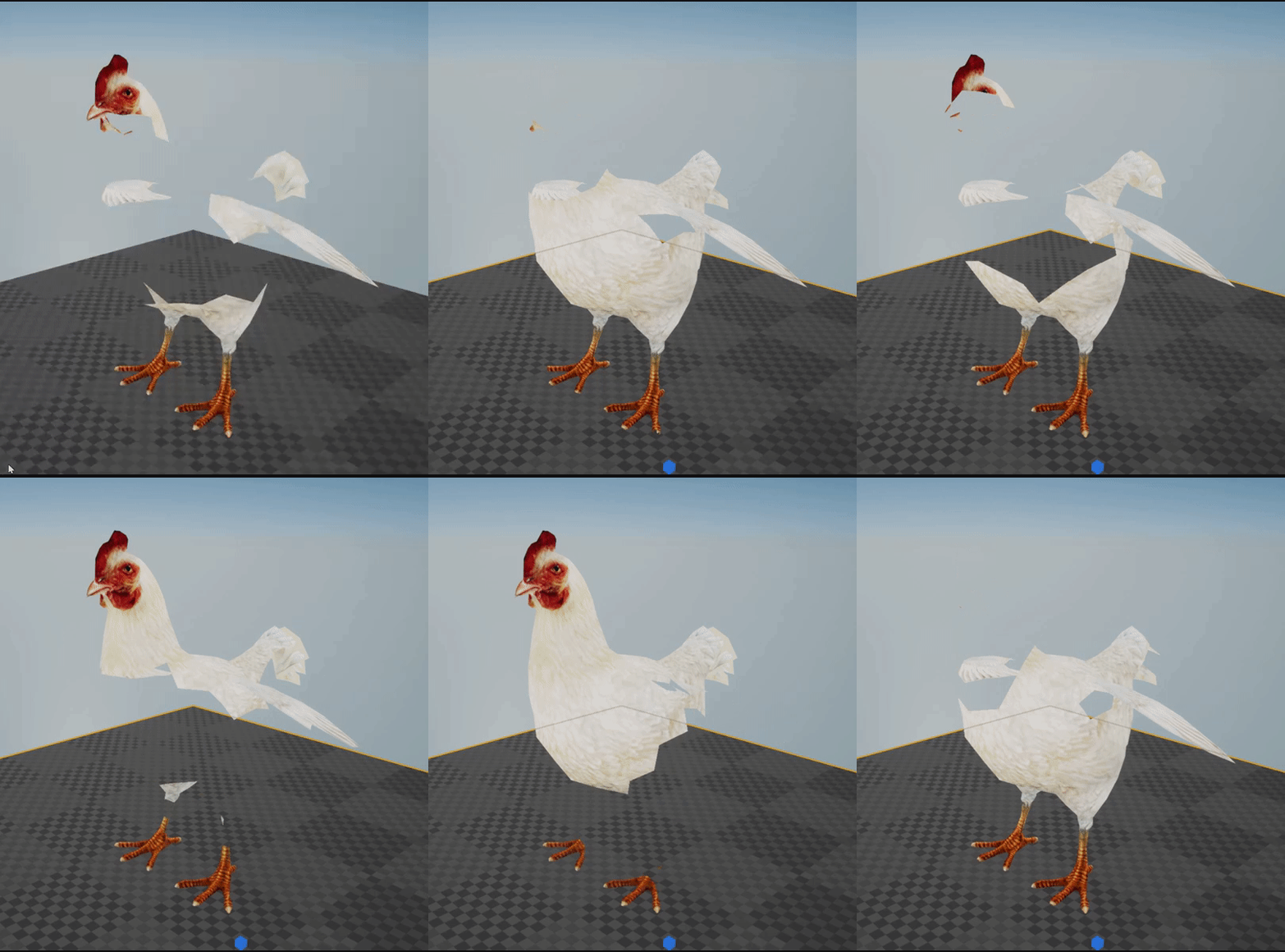
nah there is some shader-math at work to some additional oomph
 wary wave
you sure? it looks like it just uses a world space sphere mask
fierce tulip
you can see the verts move semi-randomly and blow away
fierce tulip
yea hehe
 fiery harbor
I can't log into answerhub... always get "There was an error contacting the remote service" when trying to sign in
does anyone else see the same?
 hot drum
Hey guys, simple question
is there anyway to have 1 half of the viewport a camera where you can explore the game and the other half the gameplay itself?
fierce tulip
yes you look good in a clowns costume
hot drum
because I'd really like to see my game from the outside perspective
fierce tulip
you can do splitscreen yea
 plush yew
myball doesn't move in forward camera directin -.-
 zenith pewter
hello, i want to remake this in ue4
https://www.youtube.com/watch?v=eJDaOl2lvcA
any suggestions ?

 grim ore
Pay ILM to remake it for you?
 static viper
Remaking this is... A massive task
we can show you a few things with ue4 but...
this will highly end into us telling you to google...
bc its such a massive topic. bigger then ue4
plush yew
If to think of it there are a lot of things ppl want to remake in ue4
static viper
you will need 3D 2D rendering animation
plush yew
What's the point of remaking this clip?
static viper
yee
luckily ends up with the same
a very hard thing to create
i see ue4 could render that yes
but the animation will be the main thing
and then sequenced material fades
very tough bone
 grim ore
look in the content examples and there is one of using mesh animation to remake a building from pieces, you can use the same setup.
static viper
he is actually 😮
plush yew
XD no way
grim ore
I am not lol
static viper
its your youtube job tho...
grim ore
not for this, I get paid for doing some stuff for Epic in terms of video content
plush yew
but that would be a thing? a official helper in discord. would coust them 4000 usd per month. that is nothing
grim ore
Epic plays it very tight to the vest in terms of money going out so smaller "frivolous" things like that wouldn't happen from what I have seen.
static viper
coding level payment
grim ore
It's smart tho, expanding too much too fast can cost you too much
plush yew
It is a casino game though. Helping hundreds per week. And some of those hundrends could make epic some money. More than they spend on the 1 helper.
grim ore
If you consider the cost as a "cost of doing business" then yes from a customer service perspective it is good but not many companies are that customer focused
grim ore
yes but outputting money without direct inputting money is where the "cost of doing business" gets lost for some people. It's hard to say "Spend some money now and later you will get some back maybe"
plush yew
that is a very good way to invest
 high stone
Companies have this temptation of automating a lot of processes.
high stone
I bet $5 Activision will charge money for their help desk in 5 years.
grim ore
It's honestly like coffee for your employees. Some companies understand providing things like coffee is a cost of good business while others do not. It can go either way
 frank escarp
my office from pubg has free cofee, free drinks, and free sweets/chocolate
its good
high stone
I'm a water guy. /:
frank escarp
becouse they buy stuff as a whole, its not like it even registers on the cost of the office itself
sub 0.1%
grim ore
yep I try and bring in donuts when I can for the office even tho I am just an employee here. It helps morale when your having a shite day.
frank escarp
but ups morale
 worn granite
vblanco can I just hangout at the office and occasionally provide code?
I can get down for some free coffee
high stone
I tried encouraging my employees to eat healthy by making home made pizza. The pizza helped them gain a few pounds. So... I need more practice.
worn granite
You....
high stone
It was good pizza.
worn granite
wut
high stone
I'm Italian. We have a problem.
grim ore
UE4 livestream right now if you aren't at work and can watch it 😛 https://www.twitch.tv/unrealengine
 worn granite
also mathew you're paid by epic? TIL, though it makes sense
grim ore
I do contract work for them for videos from time to time. Some of the academy learning stuff and the new release highlights
worn granite
Ooh
grim ore
all the other stuff is 100% my time 😃
worn granite
Grats
grim ore
Thanks. It's been fun but I would love to do more if time permitted
worn granite
do they work with other UE4 yt educators?
plush yew
https://answers.unrealengine.com/storage/attachments/54495-quick.png i do not have this code in my game, but the ball still moves in forward direction of camera. why?
 worn granite
just looked at academy again, they're really focusing on this stuff eh?
grim ore
They seem to be yep plus a manager position opened up to make it more robust I think from the description
@plush yew what do you have for your code now?
plush yew
what is the site for saving bps online called again?
maybe it moves in forward direction of camera cuz u r using "get forward vector"?
perhaps i am missing something
@plush yew there is no forward node
worn granite
........ wut
static viper
ITS RAWWWWW (╯°□°)╯︵ ┻━┻
plush yew
he literally says no idea what in the blueprint kek
plush yew
Only the top most I don't know
worn granite
print the value of axis value
plush yew
with what?
static viper
multiplay with like 100
and then
clamp axis 0 1
and multiplay that aswell
so when not pressed nothing happens
maybe not clamp ok
if you wanna roll backo
plush yew
i know.. but nothing i understand
static viper
mh
plush yew
yes. i watched many tutorials
plush yew
i watched all epics tutorials
plush yew
i just am not the coding guy 🤷🏻
static viper
wait
static viper

This is just a small demo I made in Unreal Engine 4 (UE4) version 4.12.5. I deleted the ball that came with the Rolling Blueprint Template and implemented my...
static viper
and read the description
plush yew
i dont think that is relevant to me
and added camera control.
whta is that
i already am using pawn control rotation
worn granite
Okay so if its -1 and 1, then you can expect to see movement... and I bet if you run the numbers on that top bit (the math you don't understand) it results in cancelling out the left/right motion and moving your guy forward.
Best bet is to cut out the bits you don't understand.
plush yew
so.. the whole top comment code
😉
i already added this https://lh3.googleusercontent.com/-lVPwrZp4LJ8/W-3IMteOUhI/AAAAAAAAFU4/5KI2VAVtU6M7ZP-x2QHLmp9nbxJxy6aTACHMYCw/s0/UE4Editor_2018-11-15_20-25-32.png
 zenith pewter
@grim ore thanks.
plush yew
still no idea how to make my ball rolling camera forward 😄
plush yew
_<
 charred tapir
Hey guys, I am looking for a graphic designer for a game. anyone know anyone who might be interested? Just pm
 cloud cobalt
fierce tulip
cloud cobalt
fierce tulip
"Fixed! UE-57086 Material Instance values lost when using Material Parameters inside of multiple Material Functions"
that was 4.19.2 and isnt actually fixed, just tested it. anybody could try this on 4.21?
grim ore
This is open now and ue4 supports Magic Leap so go for it. https://www.magicleap.com/grant-program
hot drum
I would like it so one view port views the gameplay from a different perspective
and the other one the game itself
but as you can see
the character is at the right door on the gameplay screen
but It's still the editor on the right
 ruby folio
Just curious. What do you lot use for backing up source assets? Models and such.
fierce tulip
my work/dev drives are backed up in its entirety to a server
ruby folio
Hmm.... I have been using gitlab for my source art folder. Its typically just .blend files. But for some reason, GitKraken no longer recognises the local folder as a repo
@fierce tulip When you say a server, can you elaborate?
An in house server? What sorta size is your assets folder?
Oh, and can I have your cave package?
XD
fierce tulip
basically just cloud storage, but for two of my drives.
I do have a backup drive as well, just in case
and you can have the free one :p
 unreal spoke
I want to have all my used assets in the Art folder, is there a way to know if a used asset is in another folder? I have plenty of stuff from the marketplace and those folders are ignored in my git so I want to move all the used stuff to Art so git can track them.
 idle sail
Was epic games going to realease any more paragon content or is that it?
unreal spoke
How to report a bug?
edit: found it
grim ore
@idle sail That was it according to the last post
 polar hawk
I'm trying a thing. If @maiden swift would approve it as #unreal-news I'd be really thankful. Obviously its not proper #unreal-news though. https://www.gofundme.com/new-source-control-system-because-the-world-sucks&rcid=r01-1542334191-946407bba60742ae&pc=ot_co_campmgmt_w
gofundme.com
My name is Michael Allar. I code stuff really well. I do marketing terribly, which is why this is a terribly made GoFundMe. I don't have any pretty pictures or anything. Source control is not sexy. Most game developers in the trenches, as well as producers responsible for pu...
 vivid girder
Any idea why the navmesh is creating surfaces inside my blockall collision volumes?
 sharp trail
does this guy have a name?

 weary basalt
Haha thats crazy. No idea why thats happening lol
weary basalt
Just remember that the Green mesh is only an approximation and doesnt represent it at all.
Does it still function correctly?
 oblique sorrel
Well, the enemies aren't moving anymore, so I assume not
Okay, changed cell size, moved the bounds, it rebuilt itself.
 swift spindle
anyone know where I can get a list of the console commands for ue4 and their defualts ?
oblique sorrel
Docs?
swift spindle
not giving me the ones I need
 honest rune
for something like that, you're probably going to be best off looking through the engine source for available commands
did you try dumpconsolecommands already?
oh sweet! actually, check this out too:
I'd never seen that before
just clear out the r.* in the filter at the top to view full list
oblique sorrel
Looks like my shader compiler got a bit overzealous
 manic pawn
the shaders are being decompiled
 lean junco
@idle sail What is missing? I thought they released all the characters
idle sail
@lean junco nothing missing I just wish they'd released some of the BP's and such
so that you can play the character in an empty level, I saw the tutorials they did on it but
the actual assets woulda been cool
i MEAN
BP's
lean junco
yeah, i would love them to release it so that we could just bring it back to life on the original map
plush yew
hi there how can i post work in looking for talent>
static viper
theres a pinned message
plush yew
OKAY
oops caps
this bot is annoying
it cancels after 30seconds
but im stil trynna type
 paper kernel
I'm pretty sure the bot says it's only valid for short time and tells you to write everything ready and copypaste it
 potent kraken
Hey my dudes, is there a difference between duplicating a material instance versus creating an instance from an instance material?
If so which is preferred? Cheers!
potent kraken
yeah I guess so, but ultimately it references the same master material
so I thought it should be the same as duplicating it? Not sure if one is breaking anything
 languid shard
yeah I guess so
not sure that if you change some values of instance A it will change the same values on instance A²
 digital anchor
it will change unchecked parameters iirc
potent kraken
Interesting, I guess duplicate the instance just to be safe
languid shard
so it'll act like the master then
potent kraken
Sure yeah, if I duplicate the instance it's gonna have the master material as its reference
I was thinking maybe instancing that instance, so I'd have Master Material > Instance > Instance, would be better?
This is what Im not sure, which is proffered
 golden locust
can anyone help me with some borderlands 2 texture stuff 😄
i wanna learn to remake the textures to my own
i think i understand how it works (RGB texture then change the values of R G and B to their own colors
or am i in the wrong channel?
 brittle gulch
Hi guys,
How something like in the gif below could be achievable?
I've heard of baking animations within a vertex shader, or creating instantiated skeletal mesh so there would be only one SK mesh and multiple instances.
I admit that I have no Idea at all of how to start and where. Have you got any idea or any direction about this subject?
 icy bone
@brittle gulch ask the dude who made ultimate epic battle simulator
digital anchor
I dont think ue4 supports instanced skeletal mesh, but vertex shader shouldnt be hard, just save the vertex pos difference into each pixel of a texture and play back on the material
obviously it will have a fixed animation, you wont be able to control that after baking
 sudden agate
@brittle gulch https://youtu.be/l9NX06mvp2E?t=300

In this 2017 GDC talk, Giant Squid Studios' Matt Nava offers insight into the unique art style of Abzu, and the processes that he and the team at Giant Squid...
brittle gulch
@digital anchor Is there a tool out there to save the vertex pos into a texture? And does that mean a texture per vertex or not at all?
I guess the animation, as it's baked, cannot be changed later. But I think it's still possible to offset it (like in the gif), or switch Material (So animation)?
@sudden agate Hey thats good stuff thanks! Abzu is a good reference, didn't thought about it
digital anchor
there is for blender and for maya i believe on foruns
i think they save Time on the X axis and Vertex count on the Y, or something along these lines
so you can have like 8k vertices in 8k frames (max texture size)
im pulling all that from the back of my head, gotta research a bit more if you wanna be sure
brittle gulch
Ah cool, it seams coherent, I'll do some research from what you told me. Also gonna watch the Abzu video
digital anchor
and as the vertex position is a difference you can easily stack one on another like on the abzu fish
brittle gulch
Yeah sure, I'm more thinking about terrestrial creature like ants and such
 obsidian ore
i'm at a loss. does anyone have a clue as to why this RedrawViewports entry could only show up in packaged builds, murdering my performance?
in-editor everything is fine, packaged it stutters
fierce tulip
@potent kraken
instances are for tweaking values on the fly, if you create an instance of an instance, and you tweak the first instance those changes are passed to the instance of that instance.
and thats generally not a good way to go.
on the other hand for instance (pun intended)
If you have a static switch in your master, (mask on, mask off) its better to make two instances of the master where one has the switch set to "masked on", and another with "masked off" and create instances from these two so you dont have to constantly change the switches per instance which would result in a bleepload more instructions and overhead.
obsidian ore
weird, the whole "GameEngine Tick" stat group does not even show up in the profiler when running in-editor. does that make sense? i feel like i'm missing something obvious
cloud cobalt
@obsidian ore I wouldn't bother with profiling in editor
Things are very different in that situation
For example, the built-in UI framework powers both the game and the editor UI, so the profiling entry for UI also profiles the editor
obsidian ore
i see
can you think of anything that could cause the game thread to be much slower in a packaged build?
cloud cobalt
No, it should be way faster if anything. Have you profiled the packaged build ?
obsidian ore
yes, it really is the "redrawviewports" entry, the same as the one that shows up in "stat engine" (see screenshot above)
cloud cobalt
Sounds like vsync blocking the thread.
Or the GPU thread
Since I don't see a 60.0fps here
obsidian ore
the target is 90fps (VR)
but does that mean the game thread finishes in time, and simply waits for the GPU?
cloud cobalt
Well, if you're targeting 90fps, it looks like you are there
So the entry you highlighted is very likely just vsync
obsidian ore
but in many other frames it goes over 12ms, and this causes the stuttering
i screenshotted the wrong frame
it also happens if i disable drawing of everything: static meshes, landscape, particles, etc
even when nothing is on the screen this happens, and only in the packaged buidl
cloud cobalt
Well your CPU thread looks fairly relaxed, what's the GPU like ?
obsidian ore
the GPU is fine, almost always renders within 8ms
vr.pixeldensity to 0.1 doesn't even change anything
cloud cobalt
Can you show me a missed frame in the profiler ?
Like one where the frame time is too high
Is it also RedrawViewports ?
obsidian ore
the bulk of it is redrawviewports
but i have no text or scenecapture things going on
cloud cobalt
Did you chekc other threads for time spent on something not "stall" ?
 regal mulch
Isn't there a way of putting VS on the packaged project and then profiling the code of "RedrawViewports" itself for what takes how long?
That might get you closer to what exactly is causing it to spike so hard
Is there really no way of forcing an override of a function in BP to be a function even with no return value?
I'm so sick of my overrides sitting in the EventGraph, not allowing for LocalVariables etc.
obsidian ore
@cloud cobalt every other thread seems to be >90% stall
cloud cobalt
Weird
obsidian ore
i'm not sure i understand the Inc Time column. i should read more about how the profiler works
regal mulch
Shouldn't "self" then be equal to the excl time for the function itself?
cloud cobalt
Dunno what excl does tbh
regal mulch
e.g.
RedrawViewport Incl 9.9ms Excl 8.2ms
Self Incl 8.2ms Excl 0ms
Hm
Me neither, I find that whole graph often very confusing
What is "self" in that regard anyway
The function "RedrawViewports" itself?
regal mulch
Does that include or exclude function calls inside of that function?
obsidian ore
maybe i should set up some extra stats myself within that function
polar hawk
it includes the entire functions scope
and it means
that function is not calling anything else that is stat tracked
what I do on the job if I run across something like that is open up engine code
and start making a fuckton of quick scope stat blocks
theres a macro you can use somewhere
regal mulch
Wasn't there this ability of showing the % of and ms of how long the Function took when debugging with VS?
polar hawk
VS profiling is weird and I don't fully understand it
imo its just easier to add the scope stats and let ue4 do it
regal mulch
Fair enough
However if you work with a launcher version it's probably maybe easier to get that VS debug to work
If that properly tells you "Function Call XY took 5ms of the total 9ms of this function" then that helps already
polar hawk
aye
regal mulch

Take a brief look at the different diagnostic tools available in Visual Studio.
@obsidian ore If you have easy access to the source of UE4 do what Allar says
Or, spend some time to check if the profiling tools of VS help you finding out where the ms come from
obsidian ore
i'm using the source version now so i'm going to add the stat counters
but i'm interesting in using the profiler as well so i'll take a look at that too
thanks for the help, everyone
 versed orchid
is there any way to parameter-ize a Mesh for a particle with mesh typedata?
brittle gulch
Hey, when I import the mannequin Idle animation into 3ds max I get some displaced bones, do you know why?
brittle gulch
😄 he sure is tired! Everybody makes him do everything. Poor thing...
brittle gulch
I think... I import the mannequin first. everything looks normal.
Then I import the Idle animation (exported from ue4). And boom, the animation takes place in the scene but some of the bones are nor correctly placed
plush yew
Hey can anyone help me with removing reflections (world reflections) thanks.
unreal spoke
a radial force generates damage all around even if it's triggered when the actor (a grenade in this case) hits a wall. So it would damage actors behind the wall. Is there a standarized way to solve this issue?
 signal compass
Do a ray trace check for line of sight?
unreal spoke
@signal compass with a radial force? hmm, getting somehow the list of affected actors then tracing one by one?
signal compass
Basically, yeah.
If you would trigger and apply damage with your "grenade", do a line trace before applying it. If it succeeds, apply damage.
fierce tulip
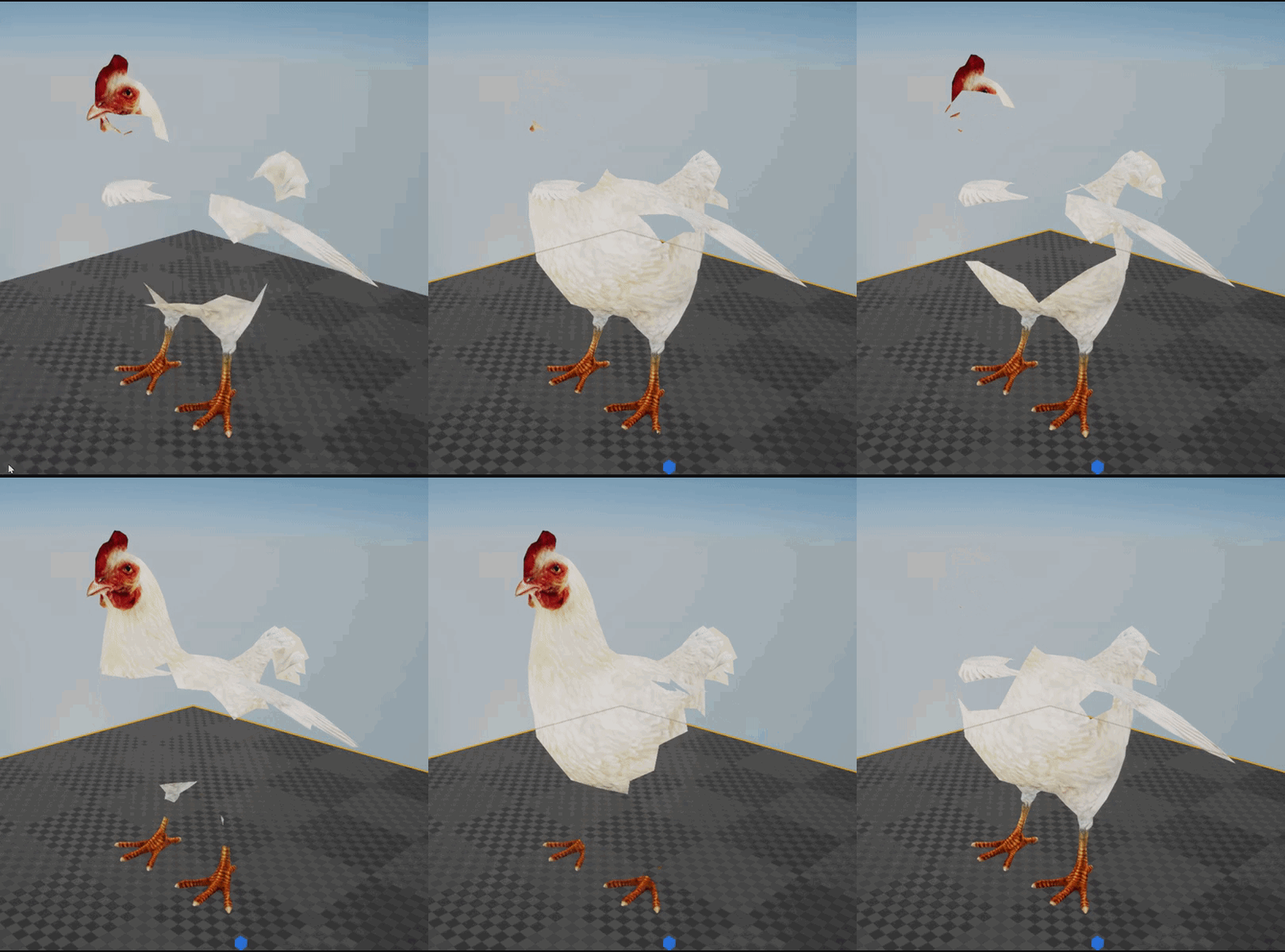 fierce tulip
I do like unreal stuff
 shell jetty
Tim is awesome right aka @elfin jacinth
 elfin jacinth
Dammit, Luos. You were not supposed to see that
fierce tulip
im everywhere :p
elfin jacinth
Any how, we are super honored and humbled by all of the work people put into Unreal Engine
I wanted to share some really humbling news: https://www.unrealengine.com/en-US/blog/unreal-engine-wins-technical-and-engineering-emmy-for-animation-production

Unreal Engine
The National Academy of Television Arts and Sciences has awarded Epic Games with the first Technical and Engineering Emmy for Unreal Engine in the 2017-2018 category, “3D Engine Software for the Production of Animation.”
shell jetty
need to shoulder tabs for that
right luos all people who work for Unreal Engine need shoulder tap
fierce tulip
yup, and a hug
 frozen crater
Hey guys, can anyone recommend a good tree asset pack from the marketplace? I searched for hours, but couldn't find a high quality/good looking one, it's for an open world game, so they should not be too heavy on performance and look great even from close distances, any suggestions are really appreciated! 😃
grim ore
Check out the open world examples from learn tab and the ones in the kite demo along with the content examples. You could always use the higher quality ones and lod them down for performance
brittle gulch
Has someone already used the Vertex Animation Tool in 3ds max?
I'm trying to use it with the mannequin but it doesn't work at all. It gives me a dull animation instead of the walking animation that I try to bake with the tool.
Exact same settings with a character of mine and here's what I get : (the result is exactly what I have in the animation, animated with mixamo). The only difference I see is that the UE4 mannequin is pieced appart, my character is not. Could that be a problem?
Just in case, here's my material :
fierce tulip
@brittle gulch make sure the animmap is set to the right settings, that the mesh has "use accurate uv's" enabled, and if you want to use the normals you need to disable "normal tangents" in the material.
golden locust
is anyone able to help me out with some borderlands 2 texture editing?
fierce tulip
its best to explain your problem, what you tried, and what you want to achieve and hope people answer 😃
frank escarp

Simon Trümpler (aka Simonschreibt) explained how he created the river simulation in Houdini & Unreal and shared some valuable notes.
simon has been talking a lot on the houdini discord
as he was learning the software
golden locust
its not really my problem, i just need a way to edit the borderlands 2 gun textures
i think i can do the whole make it only r g b and then chnage values to make the r g and b different colors
but idk what values are where and what i need to change
plush yew

Hey Friends, for the past year we've been hard at work building Artificial Intelligence that will redefine how we build, interact with and express ourselves ...
languid shard
Congrats on the prize @elfin jacinth !
fierce tulip
god, spyro does look amazing
unreal spoke
@signal compass Thanks
signal compass
Worked out well?
 spare sun
good question
regal mulch
Theoretically, no.
Pros:
- New Features
- Bug Fixes
Cons:
- Possible new Bugs
- The need to adjust existing project code to match possibly changed engine code
- Chance that something breaks by the update
But it depends on the size of your project and if you are open to fight the cons
Chances aren't high, but also not low enough to discard them
If you don't need any features or bug fixes of 4.21, then stay on 4.20.
You can obviously also update to stay "uptodate" so if 4.22 comes out and you want something from that you don't need to jump 2 version
Note: I never really had issues with updating a project, not even with 10+ versions in between.
Changes to Engine code are usually minor and easy to fix.
Code should not break if you coded properly.
Only issue that I fear is the introduction of new bugs that could break the game.
So, create a copy of your project. Update it to 4.21. Check if everything still works after fixing changes that came up.
If something really breaks or you find an engine bug. stay with 4.20 for now
 supple totem
thanks for the write up
and if a marketplacet asset was made for 4.20, in general will it work with .21?
regal mulch
No. It falls under the same rules.
It should work, but there is no guaranty
But yeah, you can say in general it should work
 unkempt isle
hey guys
would you use a website that gives you free assets?
because i want to make a website with free assets made by me or others (copyright 0)
regal mulch
There are a lot of these already. They all lack the quality that paid assets have.
unkempt isle
i know
regal mulch
I would use them, but only for temp stuff and throw it out before release.
unkempt isle
ok thanks
fierce tulip

Today there is another Humble Bundle of interest to game developers, especially RPG game developers. This bundle contains a huge collection of sprites, tiles...
grim ore
yeah I saw that and a tweet from Kenney about it. They company replied they are going to change it.
regal mulch
The license is crap even for people who use the GDM itself
But good they gonna adjust it for the humble people
grim ore
yep was not expecting a buy it once use it once license for sure
fierce tulip
hehe design 5-10 games, spread the licenses over them, making sure that each piece of content only appears in one of them.
especially mix each pack over all games so itll will drive em crazy to be 100% sure if you did or did not use the same sprite twice.

 vagrant iris
https://youtu.be/Dc2hwLBD7b8 I find this to be pretty informative and well researched. Didn't know where to spam I

Learning while screwing around is valuable. Sometimes when we are not working hard we can learn good things. http://teknoaxe.com/Home.php https://streamlabs....
Wait what?
Well what a coincidence.
fierce tulip
no need to spam twice
grim ore
grim ore
I think a bunch of the stuff was moved from the wiki to the main pages or the other way around, I found alot of the missing docs stuff on the wiki when I went looking for it
pretty much all the missing docs files are there somewhere
 rain pagoda
well if its not packaged it requires the editor to power it sort a speak imagine a bunch of tubes interconnected pumping water now imagine one tube has a hole in it, itll spill everywhere
 dim arch
anyone know the main cause of a 'failed to save' error
I deleted a function out of a BP graph and now it wont save
 earnest cape
Is there a way to change the color space ue4 uses?
plush yew
@dim arch for me 2 editor instances running 99% of the time
icy bone
Hello Unrealers, anyone familiar with how to get level contents from a blueprint loaded level?
except for using GetallActorsOfClass and checking tags
plush yew
Are you trying to set a variable as a blueprint from a level?
icy bone
im in persistent level, and need to retrieve actor location from streamed level
i have put Point Actors in each of my streamed levels
plush yew
Oh I don’t have experience with that sorry
icy bone
ok thanks
 sonic pagoda
Aryyya made a question ive always wondered
Why are there no 5 star books about ue4
Sometimes i just want to read a book, get the hell away from my pc, can someone write a good book please
 tardy sapphire
Hey guys
This free for the month section, if I get these now do they stay with me forever? I don't quite understand how it works as a lot of people told me different things
sonic pagoda
Yes
tardy sapphire
sonic pagoda
As long as you press the button
To add to your account
Its kinda like amazon prime/twitch free games
Or ps plus/xbox gold
If you missed the content, you lost it, but if you got it
Yours forever
tardy sapphire
Wow haha
So I just add to cart and checkout
So there are a number of these assets every month?
I'm new to Unreal
tardy sapphire
Awesome, thanks 😄
sonic pagoda
👍
 fleet jay
 tall pendant
probably. as i didn't noticed any significant decrease in lightbuild times on my 4.21.x branch
 static viper
thats not a bug actually
this is going on for a while
ue4s tonemapper is at fault here.
plush yew
THEN FIX IT OWL!!
static viper
there is no bug tho
there is nothing wrong
ue4 just interprets colors different
that doesnt mean that you cannot have your set colors
plush yew
i cannot have orange colors
static viper
not with that low effort.
plush yew
and my taskbar doesn't show up when going to it and when in UE
this is UE, of course everything low effort here.
vivid girder
Y'all have any standard setups for collision?
Like what presets you typically give your projectiles, enemies, players, buildings, environment, etc
plush yew
@static viper how do i get orange?
vivid girder
@plush yew You sure that's not an sRGB difference?
plush yew
srgbpreview is on as you see
vivid girder
correct
plush yew

red == orange 😄 ?
the circle is correct. it's the organge. but the right bar is wrong
it works i supose 🤷🏻
thread /closed
⭐ ⭐ now to todays MOST FAMOUS USER ON THIS DISCORD ROOM @vivid girder
JosephToday has a Question for you!
Y'all have any standard setups for collision?(edited)
Like what presets you typically give your projectiles, enemies, players, buildings, environment, etc
@static viper
@plush yew I usually just use spheres at the boundary of missiles and lasers, works well usually. For more advanced custom collision check out Dean Ashford's tutorial on youtube (UE4 - Tutorial - Custom Collisions)
vivid girder
Well, i'm more interested in the block vs overlap choices for things
The sphere here could trigger overlap or hits
tall pendant
i'd say a simple col sphere should be more than sufficient for projectiles
vivid girder
Yea, i avoid tags completely. Kinda prefer enums, just a personal pref
plush yew
i had some rudimentary coding practices when i started out. still learning 😃
vivid girder
np 👍
plush yew
i have like 3 enums right now lol
in an entire steam game
well i think its more probably
nm
lol
plush yew
++___apply changes in material editor TAKES SOOOOO LOOOO0000NG
paper kernel
throw more money at the problem
 fossil ore
Is there a way to disable "key" option in level sequencer?
 glass roost
I was wondering if anyone could help me figure out my issue here.
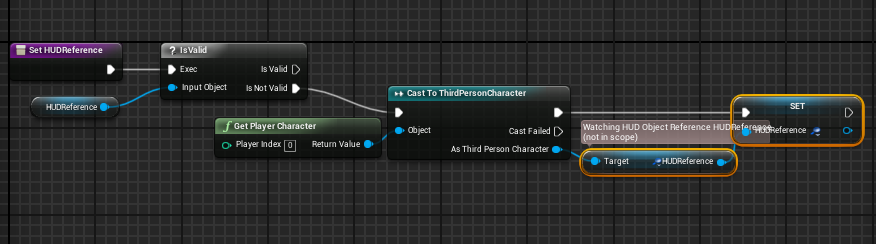
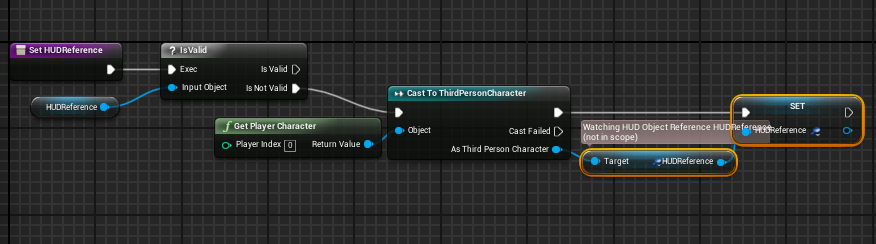
It is saying that the variable is not in scope, and so I cannot get the function that relies on this function, to work. Any thoughts?
 undone phoenix
Hello
I'm using unreal for broadcast and I'm curious if there is a way to control the engine and feed live data in to it.
Any help is appreciated.
plush yew
@paper kernel more money throwing?
 sharp crest
 charred raptor
Can someone help me with setting up a blueprint?
I am working on a small project where you suck up ghost similar to how Luigi Mansion does it
plush yew
Hi guys I was wondering if there was any downside to just using blueprint. I understand someone familiar with C++ would naturally use that rather than look up unfamiliar nodes but I have done everything so far without feeling the need to learn C++. Are there any roadblocks where you absolutely have to use code, or it is much more efficient? Or for example is there some performance lost if you use blueprints?
 hot ledge
Hey guys I want to create a camera actor object reference instead of class and I’m using TSubClassOf is there a way to make an object reference in c++
hot ledge
@here please help
spare sun
there is some performance lost if you use blueprints, so I'd avoid doing loops in them
plush yew
You mean only for each loops?
static viper
the only thing you should avoid is: working dirty and working inefficient.
Once the game is packaged it doesnt matter anymore
ue4 by now can translate blueprint to a large portion
tall pendant
bp's are also more prone to breaking entirely compared to code
static viper
well you cant really break something that is data driven XD
c++ in ue4 is almost always the right answer
but not always the only option
spare sun
well yea, there are games out there made entirely in BP
tall pendant
large complex games soley with bp i think thats just epic's marketing talk tbh
i dont know any bigger project using only bp's tbh
static viper
we have different definitions then
i am clearly not talking gta
more like
singleplayer games
skyrim
god of war
cod
those kind of games
ofc ue4 is invalid with netcode XD
tall pendant
skyrim with bp's 😄
static viper
well good coded ofc.
not a direct clone
i mean even if it would still be better
but the general idea that ue4s engine is much more stable then skyrims
XD
People are usually just scared of working clean and thinking out of the box.
thats the downfall of most projects...
spare sun
Im pretty skeptical about bps in large, complex games nonetheless. The more complex it becomes, the bigger the cost for doing it in blueprints.
static viper
on the large run tho... we arent talking huge numbers
ue4 can pack quite a punch
the cleaner you work the less it matters. It might take a few seconds longer... but it will not fail you
grim ore
Man the BP vs c++ debate is almost as frequent as the what game engine or unity vs ue4 debate now.
static viper
its better tho XD
grim ore
And you never really hear the problem from devs who make games they just use what works and get it done.
static viper
id rather have this then unity vs ue4
yee
gettin it done is also my favorite
what ever works
ue4 is really flexiable.
tall pendant
actually you hear a lot of devs talking about exchanging their bp's with c++ code
recently epic did a few talks on that
grim ore
If your making a game and you get to that point to ask and you've done games before then you don't ask you just do it and determine the answer yourself. Your projects needs determine the answer.
spare sun
here's ur answer I guess @plush yew
grim ore
I'm using unity right now for a small project as I need webgl pc and Android all connecting to 1 dedicated game server and for the life of me I can't get that working in ue4 :( it's what fits my needs lol
plush yew
Ok the impression I got is it doesn't matter unless you're a pro or working on something really big 😃
plush yew
i've got one player reporting that theyre playing a game of mine with Mouse+KB but with an xbone controller which they always have plugged into their computer, and theyre saying that the xbone controller causes the camera to move on them sometimes. Outside of their controller having some issue or something specific to just their computer does anyone have any leads as to what might cause that?
static viper
yes
this the movemehnt is a known issue
you cannot fix this
its a controller thing.
mechanical
tell em to decide. either controller or mouse+KB
plush yew
what keywords could i google to learn more about this phenomenon
plush yew
yeah they dont use the controller to play this game, they just have it plugged into their pc 24/7
tall pendant
or is it related to how ue4 reads controller input? who knows... 😛
static viper
maybe "random controller" movement
i had this error with a setup too
you cannot fix this
plush yew
hehe okay thanks. yeah that will definitely bring up broad results but i appreciate your insight
static viper
its all hooked up to axis
and that ofc gets input of 3 or 4 sources
he has to unplug the controller like every normal beeing XD
plush yew
i remember on N64 if you were holding the joystick in a direction when the console was turning on it would glitch out
i actually cant recreate the issue when I connect my wireless xbox controller and turn it on when my game is running, while playing with mouse+kb, so it's a mystery
I think his is wired, might make a difference
tall pendant
nah. i have an wireless one. still the same issues..
and i'm almost sure it's how ue4 reads input data...
plush yew
¢:
plush yew
WTB epic staff comment on subject
static viper
a simnple lowpoly pack takes so many ressources
plush yew
ss or didnt happen
 solemn ocean
Hi everbody
static viper
you can activate collision on the camera boom
and then you let it touch blocking volumes
i think you can even set up collision channels for the trace
 uncut forge
ok ima give it a shot thanks
plush yew
hi. when I learn something. is see everything double, when i let my eyes relax. but when I do something easy like watch a movie, my vision is normal..
 pallid compass
using too many brain cells
uncut forge
so i think i may be almost solved but the boom is not reacting to the block volume. or maybe i got it all wrong XD
 hidden cairn
hey friendos, anyone give me an idea what the problem might be on a build for a large level Im working on thats constantly stuck - literally for days - at 0% until I cry and eat the mouse. I tried resetting cache and I have a lightmass importance and that good stuff. All my other levels seem to render fine too.
I realise its ambigous as a question however Im happy to elaborate on my sad time
uncut forge
whats the last thing you added before it was stuck
hidden cairn
Well theres the problem really - my system was on an earlier version and crashed so I had to port the files to the new version from a backup
tall pendant
how long did you wait for the lightbuild? lightmass usually stays at 0% for quite some time as skylights aren't included in the % preview iirc
hidden cairn
its never built since last version when it took about 30 minutes
about 3 days Disco
tall pendant
ohh. well thats odd then
hidden cairn
I checked all my meshes for problems and my lighting stuff
its for VR so lighting is static
 obtuse wagon
Help on NavMeshBoundsVolume. Anyone can help me?
tall pendant
but theo. its possible if you made changes to the lightmass ini files or using very highend settings
hidden cairn
perhaps the new version doesnt like too many lights
its possible actually Dizco
how can I check?
I have the project open, should I close it up ?
Map check complete: 0 Error(s), 0 Warning(s), took 744.126ms to complete - its loaded up
I could reset the lightmass.ini - just going to hunt it down
tall pendant
as for .ini changes only you can know if you edited them. For the other option look up the Lightmass -> World Settings window
actually it's World Settings -> Lightmass
hidden cairn
I'll check - Im pretty sure I never changed them
uncut forge
https://www.youtube.com/watch?v=gaSGBsOsFfk answered all my problems !

⬛📷🎥⬛📷🎥⬛📷🎥⬛📷🎥⬛📷🎥⬛ This is a new version! ⬛📷🎥⬛📷🎥⬛📷🎥⬛📷🎥⬛📷🎥⬛ - add First Person Camera and attach it to the head - MultiGate with 3 options 1. Zoom in (with time...
 azure geyser
Anyone know of any intermediate/advanced UE4 tutorials? Preferably a video series, I used Virtus in the beginning, he did a 50-video series tutorial on making a basic FPS, but looking to upgrade my skills further
supple totem
hi all, is it possible to copy and paste nested folders in the content browser and keep the folder structure?
I just copy and pasted a bunch of folders, and it just dumped the contents of the folders into the pasted dir
nvm got it, just did it through windows
 polar sierra
Hi do i need a thousand dollar pc b4 i can make games like fortnite
Or my low end pc will do the trick. Specs: i7 cpu and gtx 430 gpu
cloud cobalt
You need a great computer, and you won't do a game like Fortnite
manic pawn
lol
cloud cobalt
Well take the kind of game you want to do, does a similar one runs maxed on it ? If not, then no
You need a gaming rig + a great CPU + loads of memory and disk space
 cloud cobalt
A game engine editor is just a game, except much heavier
polar sierra
Thanks i guess I'll just go and play minecraft to chill up
Getting a gaming rig is impossible for me
 gleaming creek
Well, at a minimum, your development machine will need to be able to actually run your game
And the editor will have some overhead on top of that
azure geyser
A 1050 is more than fine
plush yew
How to remove C++ class from UE?
I delted .h and .cpp files
but it still in content browser
 bright plume
is ue4 more cpu taxing or gpu? and if gpu whats better a workstation gpu or a gaming gpu?
and is this the right location to discuss this if not please link me to the right location
grim ore
it taxes both based on what you are doing and gaming is probably better for the engine.
building stuff in engine like lightmaps or shaders or compiling C++ is CPU bound, pretty pictures are GPU bound
bright plume
sooooooo????? if im making a game that has lots of shaders and such cpu is taxed more than gpu??
and if i have say... HD textures???? then its the gpu?
bright plume
well you see im building a pc dedicated to game design
grim ore
Then put in the most ram, CPU, fastest SSD and gpu you can afford. Oh and the monitor of course should be higher resolution and refresh rate and size.
But this assumes no budget
 rose bison
you can't go wrong by focusing on cpu, ram and ssd
you can make games that aren't graphicly demanding and still benefit from faster compile times and everything in the editor should be faster and more responsive
bright plume
does a build like that also aid in modeling as well a running the engine?
grim ore
Sure why not
Your gonna need to figure out your specific requirements and go from there if you want real info tho
bright plume
define specific requirements?
grim ore
What software you are running. What you are doing with it. Expected results such as timeframe and responsiveness.
Otherwise sure we can guess and say get something fast with a ton of cores and some fast memory and an SSD along with a high end gpu and you will be fine.
bright plume
any suggests for sub1k budget?
grim ore
Like sure get a 5th gen 4 core 8 thread I7 and it will work fine. Most projects should work well and compile times are 40 minutes for the editor. Most shaders shouldn't take long to compile. Stuff like that.
But if you want 25 minute compiles and no delay on shaders your gonna need more.
rose bison
go by the minimal gpu requirement you have for games you want to make, then spend rest on cpu/ram/ssd
grim ore
So your requirements determine your requirements lol. And 1k requirements is a start.
rose bison
if you want to make tetris2d, you can get a 1050 for 80bucks
if you want to make crysis, you better get a 2080ti
grim ore
^^^
16gb ram, SSD for windows and your projects. After that get at least a quad core with hyperthreading, the faster clock the better. After that your gpu is based on your target project.
bright plume
lets say
grim ore
1k is gonna be tight so go for older generation if you can so you don't skip on ram or drive size
bright plume
i want to combine crysis and tetris together :3
plush yew
maybe a 1080ti instead of a 2080ti
rose bison
I'd honestly start with a 1050 for a gpu and focus on CPU*
you can always upgrade gpu later if you find a nice sale
grim ore
Go in the order I suggested. Your ram and cpu is gonna be the big bottlenecks for annoyances
A 1050ti is nothing to sneeze at for the price either if you get lucky.
I've got a work machine with an SSD, 1050ti, i7-2600 and it's slower but was cheap and does the job
And I paid $300 USD used :)
bright plume
for the whole rig?
grim ore
250 for the machine and 50 for the SSD yep. Got lucky but it's out there. The older i7s are strong still for raw performance
plush yew
@bright plume
''well you see im building a pc dedicated to game design''
Did you mean Game Development?
bright plume
i guess
grim ore
I've ran the engine on everything from a 3rd gen i3 to a 7th gen i7 and the biggest complaint is not enough cores, no hyperthreading, then slow as suck mechanical drives.
plush yew
Game designers could just need photoshop and a wordpad.
So, I assume you meant game dev 😃
I need to swap over to an SSD sometime soon
bright plume
my current rig consist of amd 8350 , rx480 ,16g ram ddr3, and a 256ssd
plush yew
Next time, go with Intel CPU and Nvidia GPU
go with what your softwares work best with
And sometimes those software devs give you a list of the hardware they use to do their testing
grim ore
Keep all that but the cpu and replace it with the fastest i7 you can slap that memory in
bright plume
what im working on is kinda high graphics wise not exactly crysis level but its also has lots of mutiple highly destructible objects
plush yew
Why?
Fully destructible map or worlds? Like minecraft?
Fortnite?
Battlefield?
maybe like Red Faction guerilla?
bright plume
ehhh Characters :3
plush yew
@bright plume as in dismemberment?
bright plume
its a mech game :1
plush yew
oooooh
bright plume
the mechs will consist of lots of pieces
as of now i have around 300 parts on them may go up
plush yew
Do you have to make it all physics?
bright plume
think of car simulator but for mechs
well i wanted to have the parts fall off and stuff
but if it at the level im invisioning it becomes to much for anything i curently have to handle then which is why im asking for advice to upgrade
even now it does not run so i need to upgrade
grim ore
Well most physics are run on the CPU but even then I don't think most Sims are multi core so raw speed would win on that.
plush yew
Sure
plush yew
No pressure
icy bone
hi all, this is prolly a stupid question, but is it true that GameMode and GameStates are destroyed whenever a new level is loaded?
looking at the actor lifecycle i see that all actors are destroyed when level changes or is loaded. Since GameMode ande GameState are derived from actor, i assume this is true as well?
will it then be most logical to store cross level stuff in the gameinstance?
static viper
you cant
and you should not ask this question
there is no help here for this.
were not helping with piracy.
sudden agate
Is there a way to paint Vertex Colors in an automated way, i.e. can I change them in the editor via a script?
static viper
i asked myself the same already
there seems to be a way to paint it automated
in bp so also in c++
sudden agate
those are the only functions i found...
sudden agate
it only paints in a single color or along an axis...
static viper

Explaining new Unreal Engine 4.13 feature which is the ability to paint into rendertargets using blueprints.
found dis
 frail sail
Hello, the enum data does not support with nativization?
 latent moth
Guys, I've got an issue with the fact that the forest "colors" my guns, characters and other objects, for instance see the first image the gun is the real color:
This second one, the gun becomes "green", and that's when I am closer to the forest ground
it's even more visible when lights are trimmed down:
what can I do to avoid this? There are no reflection spheres in the scene
static viper
yes
latent moth
what should i do
static viper
but what color is your skylight
latent moth
this happens only when it's closer to ground BTW
static viper
search for green
there must be something green in your scene
other metallic objects should be green too
latent moth
a little, often none though (like in the pictures)
latent moth
wandering if any of those can avoid world reflection https://gyazo.com/afd336326e711947b9b7575626ac42e2

like "indirect light"
static viper
did you try yet?
 static viper
that looks 100% good
static viper
50% of that gif is just black
 torpid sierra
change lower hemisphere color? but im not sure
 latent moth
ok
latent moth
do i need to try point light?
static viper
nah
latent moth
(good catch!)
static viper
this error was abvious from the start
latent moth
ok 😃
static viper
your skylight is working better then you expected it too
latent moth
lol
static viper
it actually captured your green somehow perfectly
your system wont work anyways...
you cant have tod with a static skylight.
you will have to use something else or it will always stay one color
and rebaking skylight dynamicly at runtime for large worlds is quite bad
if you get the skylight in with a dark scenario
latent moth
it is dynamic anyway
static viper
you will see the green go to dark blue
latent moth
nah it stays green at night
latent moth
so what can i do
latent moth
my skylight is completely dynamic
static viper
i ofc have a solution but that is specific
the other solution tho has todo with the sky_bp
latent moth
(movable)
static viper
that thing can actually adjust skylight actors
so you should be able to create a system to adjust your skylight auto
tod scenarios
but first you need to get rid of all the colors in your skylight
i never saw it going green tho.
no idea what you did to your light
mhmhmhmh
latent moth
😄
latent moth
yes
static viper
your sky plugin doesnt take that into account?
latent moth
take what?
latent moth
yeah
well
i will turn down intensity to 0 at night anyway it seems like a good thing to do
 crisp fable
guys im incredibly stupid and need help
im trying to work out price/performance
if i buy a $500 GPU that takes 100 minutes to bake
its the same as a $1000 GPU that takes 50 minutes to bake
but i cant work out the formula that would spit out an equal figure
500/100 = 5, 1000/50 = 20
static viper
it doesnt work like that
prices have nothing todo with that XD
and they change on season
crisp fable
yes i know im saying in principal
if i can get those to spit out the same number then the formula should be correct for the actual data
paper kernel
except performance isn't linear in real world
price isn't linear either
but they are somewhat mirrored of each other, thus intersection point results "best bang for buck"
 dawn vessel
What is this 'Replication Graph' thing in 4.21.0?
Just saw that in the notes of the update and never really understood correctly.
latent moth
is for great MP numbers
it allows you to have finer grain control over how objects are replicated
used in fortnite to allow 100 players or so
@static viper gotta ask, what are "tod scenarios", because that damn green is bothering me
static viper
crysis did time of day right 2007 already
you should look it up ^^ its the min you should have
latent moth
i did...
Honolulu TOD Scenarios | UrbanFootprint
The Network TOD scenario | Download Scientific Diagram
😄
latent moth
aaah! time of day!
i have that, using a plugin of the unreal marketplace for it
what I'd like to understand is what options do I have for eliminating the green reflection on the guns
maybe the gun material itself then
but it's also on characters
it feels like glowing aliens+
 hasty mortar
Guys when I activate Generate Overlap Events on my collision, the actor stops moving around with the one it's attached to. Why is this and what should I do to have a collider/trigger follow my player around that causes overlap events?
latent moth
@static viper FYI I just had to disable the "Lower hemisphere is solid color" 😃 Thanks for the help
 pale obsidian
plush yew
pale obsidian
plush yew
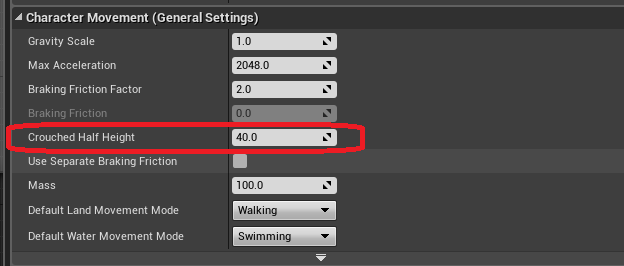
How is the character crouching? And how it knows whats my camera, and move it?
ruby folio
@plush yew There are loads of examples of that on the marketplace or learn tab
The Animation Starter Kit for example. Shows exactly how to crouch.
Lots of info on the documentation site for it also.
plush yew
The problem is I know how to crouch but does the crouch function know to move my camera, I havent specified it anywhere
 sage bough
if somebody know well the AR here please check the thread about it I have a question ty
 livid timber
hello guys, i have a problem with the spawning system and the levels, i do belive it has something to do with the fact that im missing something from my own inexperience, but i dont know how to solve it, and google didnt provide much help
i recently added the level thingy to put some order in the actors, and after this
my player just spawns in nowhere all the time, even when i change the player start. but i must say, is not exactly that the player spawns in air, is more like that the entire geometry just dosent appear, because when i go back to the editor, the camera clearly shows that the character was near the level
what it could be?
it is for sure something silly, but i cant find it
icy bone
set levels to always streaming
livid timber
oh, that might be it! i remember that
icy bone
:)
icy bone
yes
livid timber
where is that option if i can ask?
icy bone
Blueprint means u gotta call a bp function to show the levels
livid timber
oh, ok
icy bone
always loaded will load for u

 echo onyx
lol, sup
 steep token
How your project lookin', homeboi ?
You need to program us out of the hood, tired livin' among these folks
echo onyx
Meh, it's overrated anyways



 maiden swift
With what exactly?
 silver crown

high stone
It's that time of the year when everyone starts going on vacation. ):
 long comet
Hey guys! what tool do you use for vertex snap to make levels?
grim ore
UE4 has vertex snapping in the engine or just use a fixed size for objects with proper pivots and the default snapping if you want to piece together levels
unreal spoke
Can I access the level blueprint from a regular actor blueprint?
I mean to call a custom event there
frozen crater
@unreal spoke I dont think its possible without digging deep into c++
unreal spoke
@frozen crater oh, well thank you
frozen crater
just try to put the event in a different blueprint, for example "event handler" and drag one of them in each level
then you can get all actors of class "event handler" and get the first index to reference it
unreal spoke
can try that. Thanks
frozen crater
Hey guys, maybe someone here can help me... I am unable to build UE4.18.2 from source, I completely reinstalled VS2017 with all necessary componenets (C++ Desktop, UE installer, ..), and downloaded the source code from github again, ran the setup.bat without issues, ran the GenerateProjectFiles.bat without issues, but I get tons of errors when trying to build UE4 in VS2017 after opening the .sln.
Full output log: https://pastebin.com/suKC0gd8
Full error log: https://pastebin.com/51Ycsbkr
Any help would be really appreciated!
 long comet
@grim ore thanks for the answer 😃
vivid girder
How do you allow a material instance to keep animating off a time node in the viewer?
It only seems to budge while panning
vivid girder
The Material viewer works fine, not the material instance tho
manic pawn
this option
vivid girder
Gotcha
 amber sedge
Anyone know how to add a pose from another animation to an animation, and basically have an animation from pose 1 to the pose you added?
 pure stratus
Hello, @spring blade. Don't ask to ask. Just ask.
※ http://sol.gfxile.net/dontask.html
 spring blade
ok, i have 0 experience with online and would like an expert to answer multiple of my questions, thank you
 tawdry storm
you still haven't asked your question...
 dark depot





 south ridge
@spring blade I would like an expert to answer multiple of your questions too