#ue4-general
1 messages · Page 337 of 1
 grim ore
well houdini is free for 2 months right now as part of the UE4 Jam so maybe a good time to test it out?
 wispy comet
and it's got like a watermark and limited features and stuff
that's not a bad idea actually :)
 tall pendant
that version is comp. with hengine
 plush yew
Ill just build low poly's in UE4 thank you..
wispy comet
how can i get it for free?
plush yew
I only have 100 Grand..
 rigid anchor
There's other examples but this was the first one I found
https://vimeo.com/152437236
rigid anchor
(Destruction using Houdini)
wispy comet
wow, that's pretty impressive
is it worth it learning a completely new software though?
plush yew
no
rigid anchor
I think they use something similar to blueprints
Connect stuff together. Or is that Substance?
rigid anchor
Man, I build a system like that back in 2005. Plugging modules together graphically to get functionality.
rigid anchor
I was 3 in 1976
wispy comet
i feel so young all of a sudden
plush yew
Wait ur 16..?
wispy comet
15
plush yew
oh
wispy comet
for 5 more days
plush yew
Okay ur basically 16
grim ore
yep other than the procedural mesh stuff Houdini has a good particle and physics sim you can abuse like in that video
wispy comet
is it advanced enough to generate stuff like houses?
rigid anchor
ya
wispy comet
because honestly, that's what i'd use it for
rigid anchor
and blow them up too
grim ore

This tool was created for an Oculus Rift VR game/demo for Side Effects Software, as a part of my Games Tech Art internship in 2015. The tool was built in Hou...
wispy comet
ooooohhh
 steep crystal
Yeah it's advanced enough to do pretty much what you can imagine
plush yew
'-'
rigid anchor
Matt, you'd think we were getting paid to promote them hehe
wispy comet
i'm liking this more and more
plush yew
Daggone it I hate being poor.
plush yew
FRIKN BLENDER
grim ore
I've got a compatriot who LOVES houdini and swears by it so I hear about it a bit 😃
plush yew
Has so many hotkeys
wispy comet
and substance painter is pretty cheap in comparison to other software
and it's a godsend after texturing in blender
plush yew
I cant buy anything aight
plush yew
Welcome to the frikn poor club.
wispy comet
well, i'm not technically poor, my family is pretty well off
plush yew
Welp.
wispy comet
but only this generation really, my parents had a rough childhood
rigid anchor
I guess I should promote my own technology, eh?
Here's what I did:
https://nocturnal.one
 wispy comet
and don't think i get money handed to me just like that 😅
rigid anchor
Right now it's free for select devs who will actually work with it.
wispy comet
Jin i'm sorry we're making fun of your name
plush yew
oh.
wispy comet
what does it do....
rigid anchor
It lets you cluster UE4 servers to make one large space with a lot more actors than you could do with a single server.
plush yew
...what?
wispy comet
so like say i wanted a multiplayer open world
i could run it on DAT?
and it would perform better than if it was just one server?
rigid anchor
You can use DAT to get your multiplayer UE4 game to go far beyond what you can do with one server.
Like MMO-level
wispy comet
that's quite cool
rigid anchor
The main benefit is that you can have much smarter AI and lots of them.
plush yew
...reaaalllyyyy??? OwO
wispy comet
that's cool
rigid anchor
Right now, multiplayer games either have no AIs or zombies cuz zombies don't need a lot of CPU
wispy comet
so.... forgive me for being ignorant about this
but what scale map are we talking about here that a normal server can't run well?
rigid anchor
My demo videos show about 100 AI in an online cover-based shooter demo.
wispy comet
like CoD map (i'm assuming it can handle this fine)
rigid anchor
Yeah easy
rigid anchor
If UE4 can do it, DAT can do it
plush yew
FBI
wispy comet
or like GTA level size
plush yew
OPEN UP.
wispy comet
if we're talking about what DAT would be required to do
plush yew
Oh.
rigid anchor
And BTW, it used to be called DUET (Distributed Unreal Engine Technology) but Epic never got back to me to say it was OK to use their copyright in my name.
rigid anchor
You were teasing me about the name. I think DUET is a bit more elegant.
wispy comet
as long as the product is good, the name can be whatever it wants :)
yeah, it is
and i'm sorry for teasing you :(
plush yew
We got carried away. As usual teens do.
rigid anchor
So whatever level size UE4 can handle can be done with a DAT cluster too. I don't know how big the maps are for each game though.
plush yew
Ahh
wispy comet
yeah, sorry about that 😦
rigid anchor
DAT uses double-precision coordinates so it could do even larger spaces. The limitation is in UE4.
wispy comet
so hypothetically, in the future
rigid anchor
Like I think DAT would be perfect for Star Citizen. They need lots of players and AI in a very large space..
wispy comet
it can expand with the engine?
i've heard that game doesn't run too well, maybe this could help
rigid anchor
What do you mean by expand?
And Star Citizen doesn't perform well because they only use single servers. 50 players at one time is pushing it..
They plan to do what they call "server meshing" and that's pretty much what DAT does.
wispy comet
like if the engine could handle larger levels/environments
then DAT could expand with it to handle them
rigid anchor
Yes
wispy comet
cool!
rigid anchor
DAT also handles origin shifting so you could make even larger worlds than one UE4 server, but with a few caveats.
It's the future but nobody seems to really care yet.
It's not the first revolution to have that problem.
rigid anchor
I like it like DAT
rigid anchor
Thanks
rigid anchor
Mine finally built. Now I'm building my shooter demo project...
plush yew
3,792 shaders compiling..
rigid anchor
Then the shaders. And then I can watch videos again lol.
rigid anchor
That's because the shaders aren't build yet
rigid anchor
Welcome to the majority then 😃
plush yew
the what
rigid anchor
Majority -- most of us have seen the checkers
plush yew
Okay well
Shoot.
Ive seen checkers too but
not as the sky..
Idk why, but its kinda freaky.
rigid anchor
The shaders built more slowly this time so you caught it before the skysphere material was handled.
plush yew
I know that..
Sorta.
Okay maybe not as much as others but yeah
Hey whats the console command for showing the navmesh during runtime
can anyone tell me how i get the same texture as that small wall? 😄
rigid anchor
oh you want to debug the AI then. Aim at an AI and hit the ' key
plush yew
Ingame or editor mode
rigid anchor
ingame
rigid anchor
it shows you the path the AI is taking thru the navmesh
rigid anchor
One you hit ' then the numpad keys turn on and off the different AI visualizations
plush yew
Ahhh
rigid anchor
One of them is nav -- if it isn't on by default
plush yew
Probably isnt.
rigid anchor
I think it might be. I see it a lot but I don't recall needing to.
plush yew
Hmmmm
Oh wait I found my issue.
Nvm xD
Its another daggone simple issue.
Actually I think I mentioned it before.
oops
Daggonit shaders
Takin forever.
rigid anchor
It looks like the problem isn't with the extra procs spawned to handle shaders. I turn that off and the main proc locks up my machine.
rigid anchor
My first post earlier. Compiling shaders uses too much CPU. Forget stuttering videos. It's even locking up my OS so I can't see what I'm typing for a second or two after I type it. My mouse won't move even.
plush yew
You must have a crap laptop
rigid anchor
It's not that bad actually.
rigid anchor

Buy DELL Inspiron i7559-2512BLK Gaming Laptop Intel Core i7 6700HQ (2.60 GHz) 8 GB Memory 1 TB HDD 8 GB SSD NVIDIA GeForce GTX 960M 4 GB GDDR5 15.6" 1920 x 1080 Windows 10 Home 64-Bit with fast shipping and top-rated customer service. Newegg shopping upgraded ™
plush yew
Oh I dont have money dont tease me mannn
Btw this isnt my computer its my dads
So yeah
Idk why I say its mine.
rigid anchor
See? It's a bit old but it's still not too shabby.
plush yew
'-'
I wish I had my own.
But I guess this Christmas is gonna be "very special" for me so..
There might be hope.
Or rather special for everyone.
For the family anyway
 radiant fable
gonna try set up a resource repo, a place where blueprints and snippets and mtls reside so they can be found grabbed and brought into a project rather than being strewn across prjs
any tips on how to do welcome
grim ore
well the safest way is to migrate them from one project to another so if you create that repo as a project and use it to migrate it might work. The alternative is to keep things as raw but that doesn't work well with blueprints.
keeping the raw assets and trying to use them by just dropping them into the content folder can have issues
uhm... another way would be to create them as templates to start with or feature packs you can create and add in
radiant fable
thanks MW! yeah i figure i'm just gonna build upon an archviz fps template, and really trim the fat and optimise where i can
appreciate your tuts
grim ore
😃
rigid anchor
Tomatos!
 abstract marsh
Hey, I'e got $10 and I need someone to make my game for me.
Any takers?
Nah I'm only being silly.
I do want to know where to find nice coders though.
I know I can go in #looking-for-talent but I don't think many people go there for fun.
 fierce tulip
no, they go there for work
abstract marsh
Where might people go for work, @fierce tulip ?
I mean, for fun.
I just need the help of someone who knows how to do blueprint stuff, I'm too busy with work and making animations for the project to learn code at the moment.
 candid cypress
Shadow help, So there are good shadows, and then there's the super pixelated shadow. The light map is 128 which is pretty big for this object. Yet we still have a sharp shadow within it. Any other idea as what could cause this?
 digital anchor
preview means its a movable shadow, waiting to be baked
 fringe pivot
lol this free environment tree, 60K vertex, is that even viable for a game?
editor has been frozen for the last 15 minutes after i selected it, quad core @ 4.5GHz 😆
 hollow junco
Anyone know of a good animation pack with melee combat animations? Looking at making a brawler RPG with inspiration from the Avatar universe, but I can't animate for the life of me
digital anchor
if it got nice lods its ok
 primal ember
hi im new here and im extremely new to unreal. Im professionally a unity vr applications developer and would like to ask some unreal engine related things 😃
is there a way to export a post processing object in unreal to another unreal project?
plush yew
Ctrl+C, Ctrl+V
 autumn turtle
How can I spawn a character at mouse location on left mouse button release?
primal ember
@plush yew really?
plush yew
If you're talking about a Post Process Volume, yes
primal ember
like from an unreal project to another unreal project?
can you give me a step by step list on how to do this?
basically I have a scene made using the fps template
and I'd like to convert it to the vr template
how do I go about doing it?
im very sorry I have not touched the software at all 😃
plush yew
That's a different question from your original. To copy an object that's in your scene, all you have to do is Ctrl+C and Ctrl+V
And yes it works across different projects
plush yew
What type of object?
primal ember
lets say an entire environment on my scene
plush yew
There's a Migrate function to copy assets
primal ember
with the lights and the post processing
plush yew
Yes in that case, use Migrate. Right-click on an asset or folder and select Migrate. That will copy over the asset/folder and any dependent assets
primal ember
can you give me a screen shot of this?
primal ember
im not yet familiar with the user interface im so sorry. . .
so the scene that can be seen in the viewport is a file in the assets directory?
plush yew
Yes
primal ember
will that also include the fps template?
I just need the environment fully setup with the post processing volume and the lights
plush yew
It'd be easier to just add the VR template to your FPS project using Add New\Add Feature or Content Pack
primal ember
thank you @plush yew we managed to get it working
autumn turtle
How can I spawn a character at mouse location on left mouse button release? I'm able to spawn in an actor, and I am able to drag an image from a bar... but I cannot get an actor to spawn at the location that I dragged my image to.
 minor creek
how is 4.21?! 😄
 languid shard
👌
 icy bone
wow ccdik, a new ik solver with constraints finally
 ancient oak
Seriously Epic Games is amazing, the new content they've just released for free is super great. Finally a company that cares about their customers lol
languid shard
Thats another Fortnite benefit for us devs for sure
 dim arch
engine is crashing whenever I load a map file, deleted
\saved
any idea if I can do anything else
icy bone
and before u know it they gonna release fortnite assets for free XD
wispy comet
eh, i prefer the kite demo assets for free
the fortnite ones are good, don't get me wrong
but not my style
wispy comet
oh yeah, definately
i wonder if once that zombies mode thing becomes free we'll get something like that
languid shard
not sure it will ever be free
 bitter iris
4.21 worth the update? Or not?
languid shard
try it ¯_(ツ)_/¯
 jaunty quest
Has anyone experimented with Facebook ads to drive traffic to Steam?
 unreal spoke
Is possible to make a texture atlas in ue4 in runtime?
 wary wave
morning folks - looking at some basic profiling stats - can someone tell me exactly what world tick time is?
fierce tulip
this one guy is spamming on all kinds of social media that he wants some things because he is already prepping for the upcoming ue4 gamejam

 paper kernel
without bringing the jam into context, a perfectly legit question
paper kernel

fierce tulip
facebook, answerhub, even the realtimevfx forums
paper kernel
@wary wave is it not just the sum of all ticks?
paper kernel
🤔 I would wanna know too how to do particle text
wary wave
there's a 'tick time' and a 'world tick time'
paper kernel
UWorld::Tick probably?
Update the level after a variable amount of time, DeltaSeconds, has passed. All child actors are ticked after their owners have been ticked
wary wave
possibly, but then what's the difference with 'tick time'
 earnest cape
So is vulkan built in to UE4 now or do I have to install the sdk to get it to work?
wary wave
hmmm, do we know where the session front end binary lives? want to open it manually
think it might actually not be compiled -_-
lol, trying to run the profiler tool is crashing
earnest cape
Looks like vulkan just works now lol
 regal mulch
@wary wave Should be in the Binaries folder of your Engine
wary wave
ta, yeah, I thought so too but it isn't there
was able to launch it from the editor though
no idea where it lives in this project
languid shard
@earnest cape it crashed apps in 4.20 right ? On mobile at least
autumn turtle
How can I spawn a character at mouse location on left mouse button release? I'm able to spawn in an actor, and I am able to drag an image from a bar... but I cannot get an actor to spawn at the location that I dragged my image to.
languid shard
cant you raytrace your mouse cursor when you release your mouse button and spawn your actor here ? @autumn turtle
autumn turtle
I'll try
digital anchor
there is a get hit result under cursor or smth like that
languid shard
yeah
autumn turtle
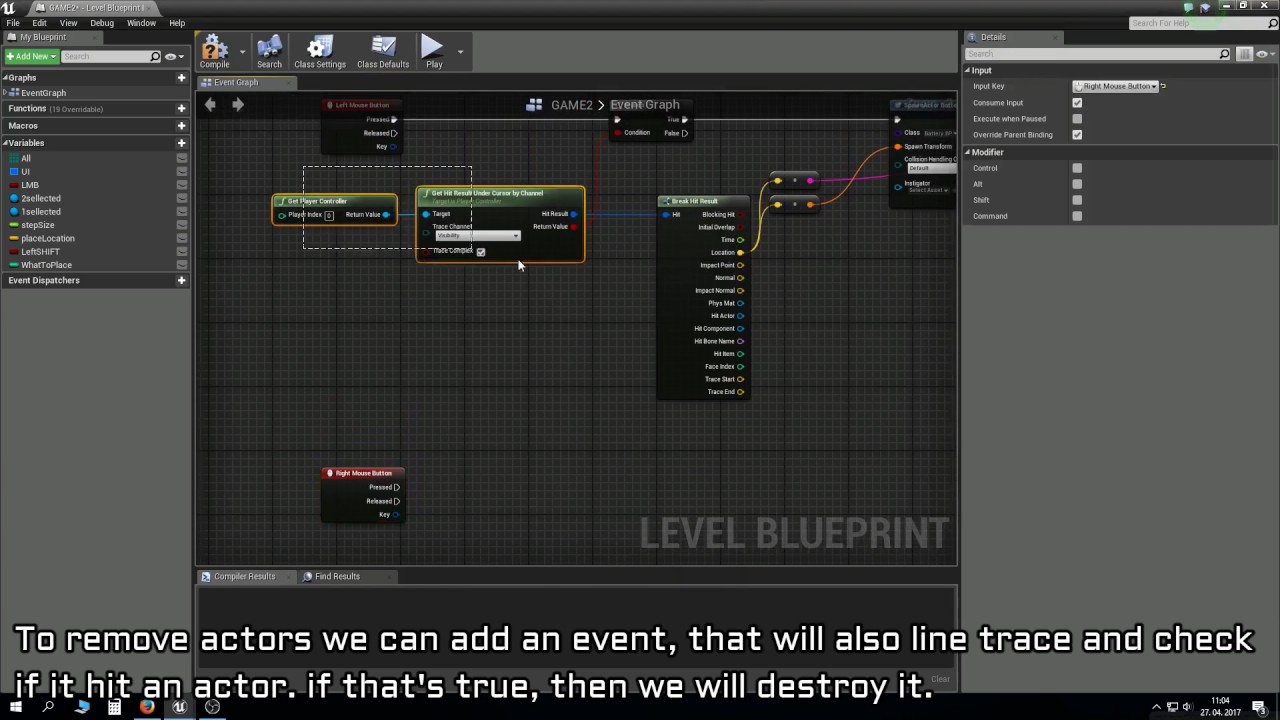
tried this... https://www.youtube.com/watch?v=XA-NThUPuug
If you liked this tutorial hit the thumbs up button and subscribe if you want to see more of my vids. If you have any questions tell me in the comments. Patr...
didn't work for some reason
languid shard
are you sure you aren't raytracing into your widget ?
instead of behind it ?
and by widget I mean your dragged image
 hasty mortar
Is there some kind of map or flow chart depicting the engine structure? Something that displays access, for instance that BPs inherit from C++ and C++ can't use Blueprint variables. Or that C++ can access certain systems or engine functionality that BPs can't.
fringe pivot
how expensive is foliage in UE4, will it make my game unplayable if I paint a lot of grass?
autumn turtle
hmmm, I am now able to spawn actors at my cursor location when pressing F... can't get it to work with left mouse button release.
 leaden patrol
Hello guys, i just wanted to ask why when i set the DirectionalLight to "Movable", shadows are cut like this :
languid shard
@leaden patrol your cascaded shadow distance is too short
leaden patrol
Oh how can i change it pls
leaden patrol
it is set to the max already : 20000 and i can't go further
oh nvm thank you
I changed it manually and it works perfectly thx a lot man
 fallow cliff
could someone with a 4.21 release binary build installed (from the launcher) tell me its changelist (CL) number? it's shown in Help -> About in the Editor. I don't have access to my pc right now, thanks!
 fallow cliff
@languid shard yep, awesome, thanks!
autumn turtle
hmmmm my spawned actors (just using topdowncharacter atm) aren't falling when I add to the z value to get the to spawn in the sky. Any idea?
also, mouse clicks/releases don't spawn actor
nvm, got physics working
now I need to figure out how to get them to spawn on mouse release
grim ore
unhook the other ones that are mouse pressed and F?
autumn turtle
If I only link mouse release, it still does nothing
grim ore
does mouse pressed work? just mouse pressed hooked up
if not then you might have something else taking the left mouse button input away from you, like mouse down or some other input mapping. possibly in the character controller
autumn turtle
I checked the character controller. There doesn't appear to be a conflict... I started with the topdown template if that helps at all...
grim ore
I am not near the engine so I can't check the template. put a print string node in after the left mouse button press and see if it even fires off. If it doesn't then yes you have something else blocking input. I would assume your character is not set to take input at all but if your F key works then that is not the issue.
autumn turtle
ok, I'll try. ty
so only when I add print string to that upper section, I get messages.
grim ore
yes the input action set destination is probably an input that uses the left mouse button
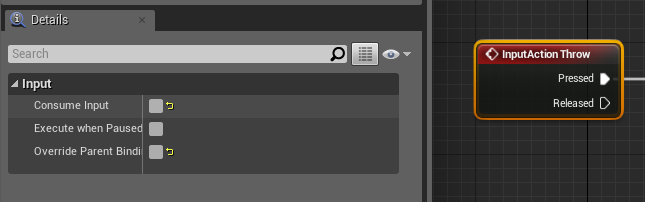
and it's probably set if you click on the red input action set destination to absorb the input and not allow it to go anywhre else
http://i.gyazo.com/e36ee7bf04cbf5e77378c49c3f173140.png , you might have consume input turned on that node so it stops it from getting to the character
 autumn turtle
you were right
grim ore
but you probably don't want the movement code firing anyways so might be best to just remove the node or the input
autumn turtle
So all I needed to do was use input action set destination instead of hit event
it works now
 rapid plume
Hi there 👋
Don't think I've talked here much as I've had a long break from things. Pondering on starting up a new little project so I'm not sure how to best get help from this server so I'll start here.
I want to look at options for using UE4 to create something similar to the style of a Visual Novel. Where would it be best to ask for help, advice or anything related to UE4 and text boxes?
Note: I'm using blueprints
grim ore
text boxes are part of the UMG system so that would be a good start. https://docs.unrealengine.com/en-us/Engine/UMG/UserGuide
and the #umg channel should be able to help if needed
rapid plume
Thanks MathewW 👌
fierce tulip

Unreal Engine
Dozens of developers across games, film, VR, enterprise and more to receive no-strings-attached cash assistance
grim ore
I think there is a VN marketplace asset for UE4 as well
I am super disappointed to find out that I was not in that list as I could use the $800k to finance a trip to vegas for the UE4 Discord channel. Oh well, I guess we all don't get to go to Vegas now 😦 Sorry guys.
fierce tulip
¯_(ツ)_/¯
leaden patrol
Sorry if it seems to be a stupid question, but how can i change in game camera movement? like i did change viewport inputs but this does not affect the ingame test and i can't find the settings for it :/
rapid plume
I see. I'll have a search on the Marketplace too then
leaden patrol
My goal isn't to move a character just the camera btw
grim ore
so is this camera attached to anything?
leaden patrol
it's the basic camera that you have when you start a new project and test your game
grim ore
in the viewport? if so that's more of a spectator cam for the viewport itself or when you play it's a default pawn spawned in for that so it's a ghostish camera.
You can't really override that you need to make your own actor and use it for your default pawn
you would make a new pawn, add a camera to it as the only real component, set that up as your default pawn in your game mode, then hook up your inputs in the pawn you just made to have it do what you want
leaden patrol
would it be like a freecam?
grim ore
well it would be whatever you want as you would set up the input to do what you want. You might be able to find the actor for the spectator came and copy it out of the engine content.
leaden patrol
ok i'll try it thank you for the answer
bitter iris
@grim ore Hey sorry to bother. Do you know how often dev grants are given out? I know it's not a guarantee but I'm working on making a gameplay video at the moment and I would like to apply to improve some aspects of my game. Thanks.
grim ore
They seem to be announced out ~3 times a year, sometimes 2. No real cadence but I do know that the actual giving out and the announcement are not the same. Many of those devs may have received them months ago before this was announced for example.
wary wave
the whole process is more or less a mystery tbh
you can send an application in, but everything else is a black box
plush yew
Okay what the hell does this rotation rate thing even do
In a character pawn theres a rotation rate
And its changing absolutely nothing no matter the values and what I tick
Im just trying to get the AI to rotate slowly, not snap it's rotation
 keen frigate
Evening 👋👋👋 everyone 😏
plush yew
That doesnt help me.
 worn granite
wow so nobody can greet the chat if you've an issue?
grim ore
Chances are the rotation rate is from the controller. How are you rotating it?
plush yew
I wasnt tryna make it seem that way..
Well Im not sure how to explain it tbh
The only thing Im just fooling around with is this Orient Rotation to Movement thing
Obviously that isnt working.
And Im just not sure how to set up this RInterp thing to just generally give it a slow rotation.
Oh wait
I think I got it
No I dont.
Wait yes I do
Nvm
Im good
@keen frigate and hi. Sorry about that.
worn granite
Yeah so character rotation, how that interacts with the pawn class and the character movement component, and the "distance" between relevant settings was one of the biggest snags I hit in UE4 so I get it.
IIRC orient rot to movement won't use the rate.
You can calculate the angular offset from the velocity vector and apply it as controller rotation input (yaw, pitch, roll - they're separate nodes) - rotation input should use the rotation rate.
plush yew
Or I just uncheck Use Controller Rotation Yaw,
Check Orient Rotation to Movement
And then fool with the Z Rotation rate..
Cuz that worked.
 split stirrup
Anyone know how can we save in cache the HTML 5 package, in that way the user does not need to download the game every time?
keen frigate
@plush yew
No worries, it was me who just
Popped up. 😆
autumn turtle
So I was able to setup a 2d image of my character so I can have each character type on an action bar and drag that character around the screen. The only issue I am having now is dropping them in the map. Thanks to help from MathewW, I am able to click anywhere and drop a character in, but I want to be able to drop an character by dragging it from my widget.
The CursorToWorld variable with my topdowncharacter helped me with clicking to spawn at whatever location my cursor is at, but I don't have that variable option in my widget to do the same thing. I've tried get playercontroller and converttoworldspace, but that doesn't spawn in the correct location. Also, it only allows me to drag in one character only one time.
hasty mortar
Hey guys I know intellisense is pretty garbage for UE. I can live with the squiggles, but now my autocomplete stopped working as well, any advice?
 manic pawn
🚮 intellidense and buy visual assist
hasty mortar
I know it's better, but it's not an option in this case. Any other advice though?
grim ore
restart the project until it starts working again =/
 turbid wave
tall pendant
turbid wave
tall pendant
 cerulean coral
good evening
autumn turtle
still having trouble finding anything helpful on my previous post, what ways can I grab cursor location?
fringe pivot
How do you hide all those extras while visualizing a static mesh?
That building UE show behind, I want to display the object and nothing else
 whole quarry
What?
 vernal scaffold

 static viper
that building likely is a cubemap
fringe pivot
I think so, w/e that means, I set that to none and now it show some kind of skybox
plus a plane below the mesh
Is there a way to hide all that?
whole quarry
Dunno, never needed it to
 hollow crescent
Any card game tutorials?
don't see any in the learn section of the epic launcher
I also don't see any way to search
wary wave
fully dynamic lighting in 4.20 - seems shadow casting is a bit off?
i.e. things aren't casting shadows when they should be, e.g. from the main directional light
diddling the light gives me the 'preview' shadows, but force no precomputed lighting is checked :/
hmm, works in 'Standalone Game' at least, just not in editor
 cinder iron
do someone have the command list cheatsheet by hand?
wary wave
lol, found a new bug
if you add a HISM component in construction script
the old ones don't get deleted every time it runs
but only if you store a reference to them in a public array
if the array is private, it doesn't
sigh
plush yew
hey can anyone link me to the site where a guy made an entire environment using only 1 texture?
nevermind i found
 fervent kiln
Hey people
anyone got this while upgrading by any chance?
I have no idea what I'm missing, but something clearly is
it's 100% not an operating system error
plush yew
check that unreal isn't already running in another instance
fervent kiln
no, it's not
 hard gulch
The docu states: Right now world origin shifting is not supported in the multiplayer games. .... But afaik this has been implemented since 4.14? Am I missing something or is the documentation off?
Ah documentation states 4.9...
plush yew
hey again, um how do i layer a texture on glass to make it look like its dirty etc.
plush yew
never mind as soon as i asked i did it lol
unreal spoke
I upddated (copy in fact) my project to 4.21. When I try to play the game the "default pawn" is not generated. It works fine in 4.20. Any know bugs or breaking changes related to pawn/character or gamemodes?
 earnest hornet
My lighting building is abnormally slow. Running 91 fps but almost 20 minuets to by and only 1% built on a decently small map
Any reasons this might be happening
unreal spoke
ah, my bad. I'm loading a savegame that doens't exist yet in the 4.21 folder 😛

 south ridge
@fierce tulip making a 90's music video generator?
fierce tulip
ikr
autumn turtle
having a hell of a time with this... just trying to get something setup where I can drag images from a widget and my character spawns on the location that I release the image on... can anyone help with this?
fervent kiln
in case anyone having the problem I described above
I was missing DLLS
1fd0:3578 @ 04231500 - LdrpProcessWork - ERROR: Unable to load DLL: "UE4Editor-ReplicationGraph.dll", Parent Module:
check out this guide
it will print out what you need. And remember to turn off the option when you're done
in my case
{
"Name": "ReplicationGraph",
"Enabled": true
}
in my uproj file
 scenic geyser
hello im new here
fervent kiln
welcome
scenic geyser
thx
plush yew
hi
hey any of you guys experience UE4 crashing instantly when importing a tiled landscape?
fucking happens every time i import a terrain, with or without a material. im using an .R16 image format, with a 12x12 tile setup, at 1009x1009 resolution.
🙂
really getting a bit infuriating lol. its kinda holding my progress back by a lot. i have no idea whats causing the crash.
unless UE4's memory requirements have shot up exponentially, and i need 64GB of RAM or something.
 honest rune
anyone here do a lot of work in current versions of the engine using vehicles? I'm hoping to find some more complete learning resources than the current docs
The official documentation seems like it might be missing a fair amount of info and possibly more modern approaches
 thorny cipher
@fiery harbor Hey mate, did you figure out the DMP files from 2017 in visual studio? 🤔
Unreal Engine Forums
A few weeks ago I noticed that I suddenly could no longer open any of the generated .dmp files in Visual Studio that are generated when the packaged game
Getting this.. I assume this is what you were posting about?
 fiery harbor
@thorny cipher I still use the workaround described in the thread
fiery harbor
yeah
fiery harbor
do you have the correct DLLs?
thorny cipher
Used the ones that someone anon dumped
fiery harbor
and obviously, it only works with DMP files that were generated after you copied the dll files in there
thorny cipher
Oh weird, so you put them in your projects binaries or engine?
fiery harbor
so are you sure youre using a new DMP file?
thorny cipher
No I just added these, that must be it then
These dmp files are from other people's computers
fiery harbor
you can trash them now
you need those dlls first, dmp files generated without them are worthless
thorny cipher
Do I need to ship the dlls with the exe, or are they referenced during build?
fiery harbor
you need to ship them with the exe
thorny cipher
ew why isnt this fixed
fiery harbor
I agree by now it should have been fixed
thorny cipher
Did you submit a bug report to epic?
Also "I'm not 100% sure about if you're allowed to ship your game with copies of microsoft dlls inside" did you research further into this?
fiery harbor
I didn't submit any report, but someone else surely did, I think theres a post on the AH somewhere
if you look at other software, you'll see a ton of software ships with those 3 (or even more) dlls
so I assume its fine
thorny cipher
True, do I need to build with these, or could I send them to someone having issues and it'll use these for the dmp
 fickle topaz
just got Zbrush time to learn it never thought I would say this but a 3D software has worse ui then blender
thorny cipher
Also John: what engine version are you on?
fiery harbor
@thorny cipher you can also send then manually to people, only thing that matters is the .exe loaded them before it crashed
and I'm on 4.19 at the moment
back when I wrote the thread I was at 4.15
thorny cipher
@fiery harbor i gave it a bump, maybe theres some updated methods other people know about
 amber sedge
Is Begin play for when the level opens or when an individual player joins?
thorny cipher
When that actor is born
amber sedge
Ohh yea that's right, it's in the actor blueprint, thanks.
 idle sail


 fringe pivot
any idea how can export a static mesh to png including its material?
thorny cipher
@fiery harbor Nice got it debugging, thanks mate!
fiery harbor
@thorny cipher great, no problem 😄
 zenith pewter
hello, getting some error after update on 4.21
Linear color curves now accurately handle RGB values > 1. If you were relying on HSV clamping, please update Dark_Color_4
what does it means
 little helm
does anyone know if their is a way/plugin that can place multiple static meshes at certain locations on a landscape so you don't have to place them manually?
 zealous harness
Like the paintbrush?
plush yew
is anyone using UE under Linux? I'm considering switching over to a distro
 vivid girder
welcome to the jungle
vivid girder
I wouldn't wish this code on a real jungle
plush yew
why not use a select?
vivid girder
I am now lol, this was in the middle of both a refactor and a migration
you can see the select on the left
 graceful sky
I've heard selects are less efficient 😮
altho switches easily turn into spaghetti code..
vivid girder
Probably not by much tho, the c++ equivalent is probably a long list of if/elses
Started with a switch because I didn't realize i could cast to the base class before a spawn in order to expose the instance editable variables
graceful sky
Yeah if you're using inheritance, that can make your life alot easier
I found using them on the PC saved me alot of work, being able to just cast to the base class and it would be true for all of them etc
.... I felt brilliant when i figured it out lol .. didnt even know they could be inherited.
vivid girder
You using a lot of different PCs in the same level?
vivid girder
Interesting, I haven't had a situation that needed different player controller classes in the same level yet
This is all that other shit cleaned up
plush yew
thats alot of classes
vivid girder
Yea, gonna be a fun time for my hard surface guy
vivid girder
How did you have different physical materials for 47k mats?
plush yew
We assign physical materials to let us have different footstep sound effects and bullets hitting different material sound effects
graceful sky
sounds like there should be some master materials
do you really have 47k different sounds to play ?
plush yew
Each material has different texture sets
vivid girder
I wouldn't even hand assign materials when we had 50 different lumber meshes
Wrote a python script to do it
plush yew
I think you misunderstood
We dont have 47k sound effects
the file size for that would be impossible
graceful sky
I got that you most likely dont have 47k sound effects ,
meaning alot of them will share the same physical material (with their sounds and whatnot) , correct?
vivid girder
oh hell no
graceful sky
That's where i thought the master material came into play : )
vivid girder
I'd be all over the python script on that one
plush yew
Even then, each material has a different texture set
graceful sky
so you'd assign them to 'categories' or whatever makes them have the same physical material
yeah true, alot of work by hand in any case
graceful sky
GJ ! daym
graceful sky
Was it a good payoff?
plush yew
oh god yes
graceful sky
In terms of immersion and game experience
plush yew
it sounds amazing
graceful sky
good good
would be sad to spend a week on something that barely sounds like steps 😂
and bullet-hits
plush yew
actually what makes it sound super good is the projectiles
not the footsteps
we made a concept of what it sounds like to pitch it to other people before we worked on it
that's a good way to spend a week, I spent a week injecting Doom into my UI so you can play Doom if you get bored of the game
graceful sky
I havn't played much with physical materials, Can you assign different vfx aswell for the bullets ?
graceful sky
sweeet
plush yew
also thats what it sounds like ingame usually
vivid girder
import unreal, sys

#Instantiate class to use for getting user Content Browser selection
@unreal.uclass()
class MyEditorUtility(unreal.GlobalEditorUtilityBase):
    pass

editor_util = MyEditorUtility() # Only works on an instance of GlobalEditorUtilityBase
dir_assets = editor_util.get_selected_assets()

#**INPUT ARGUMENTS***
try:
    material_slot_id = int(sys.argv[1])    # Try getting the material_slot_id
    material_to_assign = unreal.EditorAssetLibrary.load_asset(sys.argv[2]) # Try getting the material_to_assign
except(ValueError, TypeError):
    print "Material or Id incorrect, format should be py \"FileName.py\" material_slot_id material_to_assign"
    quit()


#********************

#Actual logic to modify materials
with unreal.ScopedEditorTransaction("SetMaterials.py") as trans:
    for asset in dir_assets:
        mesh = unreal.StaticMesh.cast(asset)
mesh.set_material(material_slot_id, material_to_assign)```you hear a sniper, projectile flies by, misses, hits metal and makes that clank sound
really good
vivid girder
That's all it takes to automate setting materials
Same thing would probably work for setting properties on a material
plush yew
The only problem i see is i cant get it working on landscapes for some reason
for physical materials
graceful sky
That's odd. Thought it was much of the same..
You dont happen to have some "grid" experence by any chance? 😄
plush yew
nah
graceful sky
with a heightmap then yes
plush yew
alsoo
vivid girder
The perlin could be used as one, but we're not doing it like that
plush yew
some of my vertex colors wont import for some reason?
like I import the model, and I click "show vertex colors" in the model viewer, but when assigning the materials they dont work even though I set up the materials the correct way
graceful sky
I assume you're using c++ aswell ? Joseph
plush yew
blueprint
vivid girder
Just for the intense generation
I prefer blueprint for most things
Faster iteration
plush yew
I've done almost the entire game off blueprints
ik, makes me look like a total noob
But I suck with C++
 vapid sable
lol wut
vivid girder
switching over to instanced static meshes and it went down to 100
graceful sky
yeah im using instanced aswell
plush yew
wait
graceful sky
gonna do it all in blueprints tho
vivid girder
@graceful sky you're not doing noise gen are you?
plush yew
Im just wondering because i have ALOT of ai on the map at once and I need to find ways to reduce draw calls
vivid girder
that'd be a shit show in bp unless you're using a basic random noise algo
vapid sable
well you can reduce draw calls if they use the same mesh (and material?)
graceful sky
Not yet atleast. I'm gonna look for some algo's to insert,
plush yew
Most of them use the same mesh
graceful sky
trying to recreate a settlers 2 map generator
plush yew
I have maybe 6 different AI max
vapid sable
@vivid girder can you confirm? Do you need to have the same material as well or is the mesh enough for instancing?
graceful sky
afaik the instances share material
vivid girder
Hmm, not really familiar with settlers 2. I'm using a perlin-like algo, but any gradient-based noise you'll want to do in code
vivid girder
ISM all have to have the same material, that's the whole point
There's also a big difference between instances and ISM
You can have an instance of a ISM in the level
vapid sable
what's an ISM
graceful sky
instanced static mesh
plush yew
I think the only time i use instanced meshes were on forest maps
graceful sky
the lesser of a HISM , altho i quite frankly dont get the difference 😛
vivid girder
For ISM, you add children to an array. Each of them can have a unique transform, that's about it
plush yew
Speaking of which
I should probably get to working on the next map
last time i worked on a map for this damn game was like 6 months ago
vivid girder
Hierarchal can render different LODs i think
vapid sable
right. so for foliage and trees and such
vivid girder
bingo
plush yew
yes
vivid girder
ISM is different than instances
You can't use ISM for anything but meshes
It's in the name
graceful sky
even with instanced , when you reach a high number things get real shitty really fast tho 😄
plush yew
Whats a good excuse for why the player cant jump '-'
graceful sky
lack of input
static viper
a weak spacebar
plush yew
No like
vapid sable
@vivid girder well ISM is an instance, just that they're static
vivid girder
^
plush yew
Cuz I have it set up to where he doesnt jump.
static viper
common softwre bug
plush yew
Hes not suppose to for a reason.. to fix a loophole..
vivid girder
@vapid sable They can be movable
vapid sable
..
then by definition they're not static
unless it's just that they're not animated meshes
vivid girder
In unreal you can have movable static meshes
vapid sable
or skinned meshes
vivid girder
Epic is out to get you
But actually, what they mean is that the vertices don't need to deform
plush yew
At least you dont have my habit.
I dont name anything that I place. Or even group them.
I just place it down.. and pop a material on it..
Unless if we're talking about somthn else.
vivid girder
Nobody names instances, that'd be weird
graceful sky
very weird actually
vivid girder
We mean code
plush yew
ohhh.
vivid girder
Class names to be more specific
plush yew
Gotchya.
graceful sky
I tried a 3d grid once to create a "dungeon" with instanced meshes ,
but reaching z=40, with X and Y above somethinglike 50 made it pretty slow
steep crystal
"Static" in static meshes usually just refers to the fact that a mesh cannot be vertex animated.
vivid girder
That's really weird, i instanced 65k meshes in a ISM and was running 120fps
@steep crystal sounds more accurate
Think we're saying the same thing
graceful sky
Sounds like it 😛
steep crystal
yeah, just to clarify what the word has meant in the industry in most cases ^^
vivid girder
I didn't say vertex animated because a lot of SMs have materials that animate the vertices
But everyone is on the same page
vapid sable
I might take the opportunity to ask, do you guys usualyl have like a master material with a ton of settings or do you make tailored materials for each mesh type?
I know there's cases for both, but in general
vivid girder
For our last project it was targeting photo-realism and we wanted to vertex paint a lot of stuff in the level. The solution for that was creating a material library
So we had a bunch of tileable master material functions
Then we'd create materials for whatever use case we needed
So we'd have stuff like M_VP_Wood_Dust_Paint
steep crystal
Very project-dependent imo
vivid girder
^
steep crystal
for some scenarios, like stylized, it can be super handy to have one or a few huge materials
I usually prefer splitting it up at least a bit
graceful sky
I guess that goes for all inheritance aswell
if you've inherited alot, it can be really fragile to tweak the supermaster class...
vivid girder
I've found that a BP with a lot of references is wayyyy slower than one with a lot of derived children
I guess anytime you reference another BP in a class it includes it's headers or something, no clue really
graceful sky
I prefer interfaces* (was still stuck in our instance talk )
vapid sable
I've seen some project structures where they use instances for promising functionality, but then just include the specific class anyway
graceful sky
and so does Conan Exiles i believe
vapid sable
so it's like, what's the point
graceful sky
its early here ok, give me a break 😛
vapid sable
did I miss a whole conversation here
vivid girder
ISMs
vapid sable
oh we're back to that now?
vivid girder
oof
graceful sky
Was just me, fucking it up. I typed instances instead of interface
which instantly triggered Josephs response 😛
vivid girder
I generally use inheritance for most things
plush yew
has anyone here gone from the ryzen 1700 to the 2700?
vivid girder
Interfaces for a specific thing that i'll need across very different classes
Interaction stuff i generally do through interfaces
Also came up with this really fantastic foundation for animation/interactions in my last project
I'll snip
graceful sky
yeah same, interaction goes through interfaces here aswell
its just so simple to setup
vivid girder
Interface for everything that tells the character what transform it needs to lerp to before the interaction
Then enter/perform/exit montage sections
This is inherited by most things that can be interacted with
And in the ABP I just play whatever animation is needed
Made it so new interactions/animations were a 1 minute hookup
But yea, 90% of the time I use inheritance for the solution vs interfaces
graceful sky
This looks pretty sweet
vivid girder
That procedural head system was cool too
Just can't just it this month
ayyyyyyyyyyyo
graceful sky
This is what im basing my grid/generator on btw http://www-cs-students.stanford.edu/~amitp/game-programming/polygon-map-generation/
Gonna be interesting to try and do it in blueprints. Any RTs with some self respect should have random maps so i might as well get it out of the way early 😛
not sure how the material will blend when using ISM's tho
vivid girder
We're 2 weeks into our current project and this map looks similar to our minimap
Minimaps are fun asf if you have a solid tech art background
graceful sky
what i'll use for a map/landscape, you use for minimap x)
vivid girder
graceful sky
Ahh cool stuff!
graceful sky
This is what im aiming towards
graceful sky
altho abit prettier, the concept is the same
vapid sable
but for something like an equipment system, would you model interaction through interfaces and then use a base "equipment" object?
vivid girder
i'm unsure how you'd do the roads
vapid sable
and should the interface be shared by both interacting objects
or one for equipper and one for equipment
graceful sky
roads will be overlaying i believe
vapid sable
I've tried a few varieties and can't say I'm too happy with my outcome
graceful sky
so ill poke the instance, inform the array
vivid girder
But some of the curves seem to tie into the height
graceful sky
yepp
it will be interesting to try and make it tbh
also the build symbols,
there's no easy way of finding out how they're defined
but it looks to be related to nearby empty tiles along with slopes and no slopes
vapid sable
heightmap?
vivid girder
Build symbols?
vapid sable
bread?
vivid girder
They're just on the tiles, not sure what you mean
graceful sky
nvm ^^ Was merely saying that im not sure what defines them
vivid girder
I also have no idea how this game is played
vapid sable
looks like settlers, but also not
vivid girder
not familiar with settlers i mean
vapid sable
ah, well, RTS
vivid girder
Are build flags just every tile you can build on?
vapid sable
not surre about the older ones, but I don't think you really had tiles like that
you had "suitability" blobs where you could put buildings
and they needed to fit in between obstructions of course
but stuff like mines you needed a prospector to find out where the mineral types were
idk about those icons, looks like it might be the older one
vivid girder
It'd be a nightmare without
graceful sky
yeah exactly
vivid girder
are you creating the polygon graph?
graceful sky
yeah i believe so
vivid girder
I mean like...present tense
vivid girder
So you haven't implemented it yet?
https://en.wikipedia.org/wiki/Fortune's_algorithm looks crazy fun

Fortune's algorithm is a sweep line algorithm for generating a Voronoi diagram from a set of points in a plane using O(n log n) time and O(n) space. It was originally published by Steven Fortune in 1986 in his paper "A sweepline algorithm for Voronoi diagrams."
graceful sky
correct, i have not done it yet
vivid girder
I really dislike Math-focused pseudocode, their variable names are always shit
let T be the "beach line"
There's not one T in beach line
graceful sky
Im not sure if its the right way tho
will it not complicate things in terms of nearest tiles and whatnot compared to a linear grid ?
vivid girder
I'd say the polygon grid is purely cosmetic
graceful sky
I was thinking about doing it first, making the underlaying map , and at the end refactor it into the grid
just to make the maps abit more diverse.. but im not sure if it will work^^
Anytime i've come to a map gen algo before, i've given up and done something else
Hopefully i wont this time lol
vivid girder
Looks like you're already trying to make it more complex, maybe that's why
wary wave
haha, math and engineering focused code is like that in reality though too
it's a nightmare trying to debug something complex and mathematical when absolutely everything has meaningless one or two letter variable and function names
vivid girder
It's almost like a dick size thing
Who can have the most unreadable engineering code
vivid girder
I'd just turn in a nativized blueprint 😉
wary wave
obfuscation through bad programming standards 😄
graceful sky
Im trying to do a step by step approach so i clearly see what's getting done, and can disconnect them for troubleshooting etc
problem is i cant c++ 😄
vivid girder
Only I know what var Axx01847; is for
graceful sky
and havn't cared to learn it so far
it makes you special 😉
I've heard that tying yourself up to a company in that way is a good way to secure your job lol
"Ey George, what does function XX77ETA do? It's in all of our games! If i remove it, it breaks!"
"Dunno, ask Joseph! He made it"
wary wave
#define tt ts
vivid girder
Like a Wix website template
graceful sky
We'll see how it goes anyways. Gonna work some more on it today. Keeping it steady
vivid girder
i'd kill a man over that wargarbl
languid shard
wargarbl sounds painful
vivid girder
Not sure who you're replying to, but holy shit
vapid sable
Imgflip
vapid sable
thanks ❤
vapid sable
@languid shard #shameforlife
vivid girder
These are not the channels you're looking for
languid shard
boo
vivid girder
you in the complete wrong server? damn
languid shard
F
vapid sable
@vivid girder did you happen to read my equipment system question?
large N for Nphasis
vivid girder
You were asking about how to structure inventory management/interactions
Kinda depends on what you do with the items
graceful sky
I use a switch on item type when using items from the inventory
assuming your equipment go via the inventory
vapid sable
well for putting the item on the character, visibly as well
currently I have some monstrosity that keeps them "alive" when picked up, just hidden and childed to the player, and when equipped just snapped to the attachment point
vivid girder
That can work
vapid sable
but I feel like I should throw the whole item is the equipment idea out the window and just use a structure for the details of it
vivid girder
Did a 1 week prototype 3 weeks back with that exact same implementation
DO NOT
Use a struct in BP if you're going to need to make changes to it after created
Or even more so if you need an array of structs and to make changes to structs in the struct array
plush yew
Im a unreal game creator
vivid girder
nah, u a bear, bear
vivid girder
ayyyyy
vivid girder
If you can't bear it
vapid sable
right
regal mulch
Put your Structs into C++
Even in BP only projects
One simple Header File. and small bit of learning how to write them.
vapid sable
what I wanted was to decouple the effects logic from the player and keep it on the item itself. Like the sword would have an "onActivated" function that would modify the return value
regal mulch
Doesn't even need much programming knowledge.
vapid sable
@regal mulch I'm not looking to optimize my code now, but noted
regal mulch
That's not about optimization
vivid girder
This is always the conversation
regal mulch
It's to make sure your Project doesn't fuck up cause of breaking Structs.
Small structs that are barely used and probably never modified (The struct asset itself) are fine
But if your project depends on a lot of structs, the potentially get modified (still the asset itself), you are asking for it to break
But well, back to coffee x2
vivid girder
"Do this thing that will require you to be mind fucked for a few hours but make things way better"
"It'd be cool if I kept things sorta shitty to just make a little progress"
vapid sable
lol
regal mulch
Getting Structs into C++ will most likely, for the first struct, take you 15-30 min.
Every additional one is just copy pasting and giving it a new name + different properties
Given you never did C++.
vapid sable
well I happen to know C++ so that's not the issue here
regal mulch
It's really just to save your Struct Heavy Project from rbeaking. You are free to stick with BP structs
vapid sable
what causes the structs to break?
regal mulch
No one clearly knows, otherwise it would be fixed.
It's in the engine for ages.
People usually open up their project one day and the struct has the GUID behind each property and suddenly reports errors everywhere
Or when modifying the actual struct asset cause you add another property later down the road
Can break, doesn't have to, however did it often enough to give the advice to put structs into c++
Cause fixing that "error" usually requires you to recreate teh struct and swap it out everywhere
By hand.
vapid sable
and this issue doesn't pop up with structs in C++ i presume?
regal mulch
Never had it pop up with C++ Structs, correct.
You should also almost never split struct pints
But rather break them
even if it's one annoying node more
(same with "make" instead of splitting)
Idk if that's fixed, but that can cause it too
vapid sable
you're making it sound like Unreal is a rangely bundle of sticks
🤔
"throw these sticks at it an you'll make a game" - Epic probably
regal mulch
I haven't heard anyone confirming that this is fixed and doesn't happen anymore.
Also the only thing I can really suggest, next to Fixing up Redirectors if you move or rename a file.
static viper
Structs break in higher definition when you change their structure. Adding a var and then restarting the project
Its a very old bug
And can sadly go horrible worse
vapid sable
yay..
vivid girder
Or just use source control and YOLO
regal mulch
What does SC help if you can't update your Struct anymore?
You can go back to the "working" state, but if it always breaks at that point when altering the structure, it won't help
It's of course always good to have source control
vapid sable
I'll put my structs in c++ then
static viper
C++ clearly is a valid solution
As soon as you get struct arrays in bp... You are in hot water
vapid sable
I'm always in hot water 😉
vapid sable
it's getting steamy in here
vivid girder
ooof