#ue4-general
1 messages · Page 318 of 1
 south ridge
Grab the child and run
 grim ore
grab your variable for your Canvas Panel you want to move and use the Get Slot node, read the tool tip
the old way was "get slot" -> Cast to Slot Type but now it's just the shortcut for slot as type
I guess the older way made it easier to understand but annoying to cast all the time lol
This is about the same amount of help as I gave but maybe better explained? https://docs.unrealengine.com/en-US/Engine/UMG/UserGuide/Slots
I have a video on how to do animation using slots and how to use the animation system if it helps, it's old and it uses the older casting method but uhm it has moving pictures lol
 plush yew
actually the link you posted was very helpful
thanks again!
actually, one more question
I have the slot now, but how do I access it's position?
grim ore
once you have the slot you can get and set position
that link actually shows you an example of that at the bottom
 radiant fable
i have a bunch of models in my scene i want to be able to tag/class (without inserting them into a blueprint) and have the level blueprint find the arrays of these classes/tags and rotate them. I've never done it before, is this possible?
 lament briar
hey how i can have new animation sprint only when i press touch for sprint ?:p
grim ore
have a new animation in your Blendspace that kicks in once your speed is above a certain amount which is your Sprint speed
radiant fable
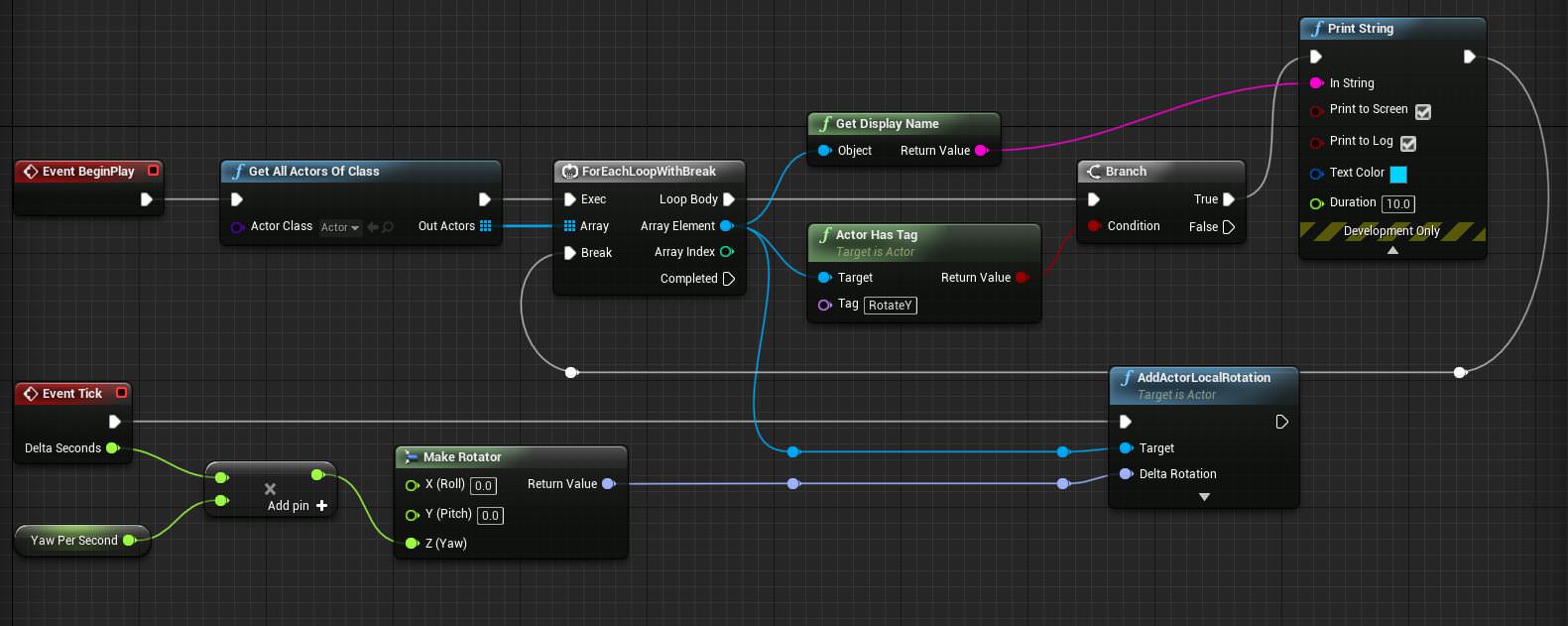
sorta getting there, but have seen no rotation. the print function prints out all my tagged objects fine so its targeting them
(this being the level blueprint)
radiant fable
oh... i had to set them to moveable, all objects in the array, or the logic fails for all
now to find out why the last in the array is the only one rotating
 supple totem
do objects have a position relative to the sublevel they are in? Or are positions always relative to the master level?
For a specific example, an object in a grid made by world comp, can I manipulate it by position in cell?
even more specific, looking to easily place objects in the center of my sublevels.
 tawdry raptor
I need to know if it's possible to have ai that can jump without the need for proxy nav links. For example how can I get the ai to dodge by jumping up into a ledge 20 feet high
What's the process for this
 high stone
Probably something like if AI near box && taking damage, move up.
I remember it being a pain coding AI to do more than navigate.
 woven furnace
could i get some help please
Basically, i downloaded some of the paragon assets;however,when i add shinbi to the project and open her animation blueprints, there are errors and i havent even changed anything
im really trying to learn animation and blueprints but i dont know why im getting this error or how to solve it. this happens in 4.20.3 and 4.19.2
 digital anchor
Input actions and axis are set up on
Just create actions and axes with same names
woven furnace
you mean remap wasd? @digital anchor
woven furnace
makes sense. youre talking to a newb tho. do i have to name the mappings after the mappings in the blueprints for it to work? for example do i have to name the mapping for jump "inputaction jump"? @digital anchor
 winged crypt
Got a quick question about how the engine might handle lights in relative space .. If I have a blueprint of a train car with an interior and inside the blueprint, I set up a few lights - would I be able to bake the lights into the inside of the train while still have the train as a whole move in world space if the baked lights/shadows are relative and not moving themselves?
Or will the lights have to be dynamic just because the actor itself is also moving, even if the lights don't need to affect anything outside of the actor?
south ridge
@winged crypt hah, that's pretty much the case for our game
We use full dynamic light in the cars, but will be using lightmapping. You cannot use UE4's built-in lightmapper, that is only for static meshes
You can however bake the lighting for the train and feed it as emissive channel, making it seem lit up without a performance cost
So the answer is, you can have static baked lighting in a moving object - but it has to be done outside of UE4
winged crypt
@south ridge How costly would it be to use dynamic lights but without any shadows?
Compared to actual baked static lighting
(In general)
south ridge
Moderate expense, can be very feasible with the right setup (and no shadows)
Dob
Oops
Don't use point lights
Only spot lights
Well, it doesn't matter as much for shadow-less lights though
But if you DO want shadows here and there, do only spot light shadows
winged crypt
Interesting, I've heard about the spotlight vs point light comparison - I can only assume the fact that point lights are omni and cover more area that they're more expensive
 manic pawn
what's wrong with point light shadows, other than them covering more objects?
is the projection slower or something?
winged crypt
aside from a stationary directional light and a stationary skylight, I'm only planning on using like 10-15 lights throughout the entire level so I'm hoping it isn't too heavy. Most of them won't even have shadows (if any at all)
my only issue so far has been foliage and its shadows .. can't seem to bake them properly for foliage that isn't moving.
south ridge
CSM shadows can only be rendered up to 180 degrees FOV
Point lights are omni
So it has to use more CSM's to cover the area
manic pawn
wouldn't it need 2 then?
south ridge
You can't have 180 deg
Only 179.999 and it looks super distorted past 120 degrees
Basic perspective projection issues
I might be wrong that it's four, but I remember it being four
Not less, not more
 valid copper
So I'm trying to migrate some of my unconventional visualization work over to UE4 from Unity, to take advantage of the better rendering options. I am pretty lost about how to implement some of the external event driven logic to affect properties of objects in a level. I'm interested in learning more about how things are driven during UE4s event loop
In my Unity implementation, I had a UDP socket which called an async even handler, parsed the data, iterated through game objects which had a certain attached script, and modified some parameters about their material configuration. It was less than 100 lines of code all told. I can't seem to find an equivalent code path here
 cursive swift
Hi guys i'm looking for a PBR validation tool for unreal 4 ^^ anyone got one around ?
 sudden agate
read
 tall pendant

 bitter iris
Is there anyway in engine to figure out how big a map is?
 plucky reef
so what should I do?
is buyying more ram will fix this 100%?
this only occur when packaging?
 teal tulip
@bitter iris in the 2d views from the viewport ?
there is a ruler
@plucky reef how many ram you have now ?
plucky reef
8gb
so when I package i need more ram? how about when I play it aftter packaging? do I need more ram like when I was packaging?
@teal tulip
teal tulip
that is rare I think that is the minimum
but if you have other things open that will happen
plucky reef
I got drive space lol
bitter iris
@teal tulip theres actually a measuring system in the viewport?
plucky reef
I don't have anything open
teal tulip
@bitter iris at the bottom left like the maps
teal tulip
and if you press middle mouse and drag @bitter iris
plucky reef
i really don't know
 static viper
scroll up!
plucky reef
@static viper
static viper
show
teal tulip
well the browser ?
static viper
show errors
plucky reef
I don't have any browsers or any app that is running
teal tulip
you can check the windows task manager to see what is using it
you can even try to disable the UE4 realtime viewport
but yeah you should need like 12GB or 16GB
if nothing of that works
static viper
how big is your project that you need so much ram O.o
plucky reef
it should be a warning right? not error
static viper
accessed none is a critical error
plucky reef
I don't know, maybe I got huge map that is not in streaming volumes
plucky reef
they are always loaded and I got dynamic day and night cycle
plucky reef
mostly yeah
plucky reef
Only 30gb I think
static viper
great.
plucky reef
looool
static viper
only 30
plucky reef
ohgod
static viper
is like saying... giraffe in fridge
packaging a project like that ofc needs tough hardware
plucky reef
it's not yet optimized I mean I got assets there that I don't need so yeaaah
I see 😦
plucky reef
thanks! I should really optimize everything every now and then
I should practice that work attitude
plucky reef
so If I got 9gb content folder it'll trow errors?
plucky reef
so when I got 64gb of ram I can't go over 64gb content folder size?
plucky reef
I got space at harddrive
static viper
packaging works in chunks
i can package 4 gb or 5
but itll take hours
bc the chunks are small
ue4 tries its best
those accessed none errors for instance make it worse
it needs to complie all your code
you cannot allow it to have failed states
that could crash your game at runtime
or worse
you need to keep your log clean
i usually only have a few warnings
but no errors
or crits
and you need to package regular
plucky reef
I got error that says applearrkit?
static viper
show the line
plucky reef
everytime I open ue4
plucky reef
I'll send later, currently packaging other project
yeah, I think I should turn off the arrKit plugin
for iphoneX
static viper
well
with 30gb
you are definitly not making any mobile game....
XD
sounds more like god of war dlc
or vr application XD
static viper
good that you say it like that XD
plush yew
Hey guys! Does anyone know how to add a touch input for moving a object left and right. So for example if i have an object moving Y at all times, How do i add a input where i move my finger at the bottom of the mobile device display left and right moving the character Left and right
 dim merlin
anyone knows what happens to the wiki, every single wiki page is broken.. (wiki.unrealengine.com)
it says We have temporarily disabled editing while we working on a new Wiki! for months now
plucky reef
yeah haha @static viper
plush yew
Hello guys I want to ask you for teh Conan Exciles Dev Kit-when I install it on HDD, and when I reinstall my computer I can't start it -I haven't got the launcher to start it-is there a way to can use it when I reinstall Windows?
static viper
this is ue4 discord
not conan support
so any answer you get here is not approved by the devs.
you should contact conan devs directly for questions about the kit
 idle sail
Am I imagining things or did Epic games just release some kind of RPG template recently?
tall pendant
they released an GAS template thingo yes. (Action RPG whatever)
idle sail
@tall pendant got a link? I cant seem to find it 😦
tall pendant
idle sail
Ahhh just found it tyty
tall pendant
np 😄
plush yew
@static viper I before asked people for the Conan Exciles dev Kit and the people answered me-
question: is there a discord server only for Conan Exciles dev kit?
plush yew
I found it
but thank you
and one more question How to add these bots in this group in my group: "AAICharacter Bot and UnrealBot"
Can you send me links to them to invite?
 queen bolt
Anyone here with a 4K monitor? The editor is driving me nuts with incompatibilities
Nothing I read online seems to solve the issue
plush yew
I found the group for conan exciles mod
 south edge
does anyone know how tf i get this
plush yew
NOT boolean
static viper
swearing helps alot
 sage hinge
Hello everyone .. who knows how to create fighting style games
south edge
what do you mean exactly?
 icy bone
like tekken?
radiant fable
https://i.imgur.com/dbZoV0S.jpg i made this blueprint but it's only affecting the last actor in the array of tagged actors. any ideas where i'm going wrong?
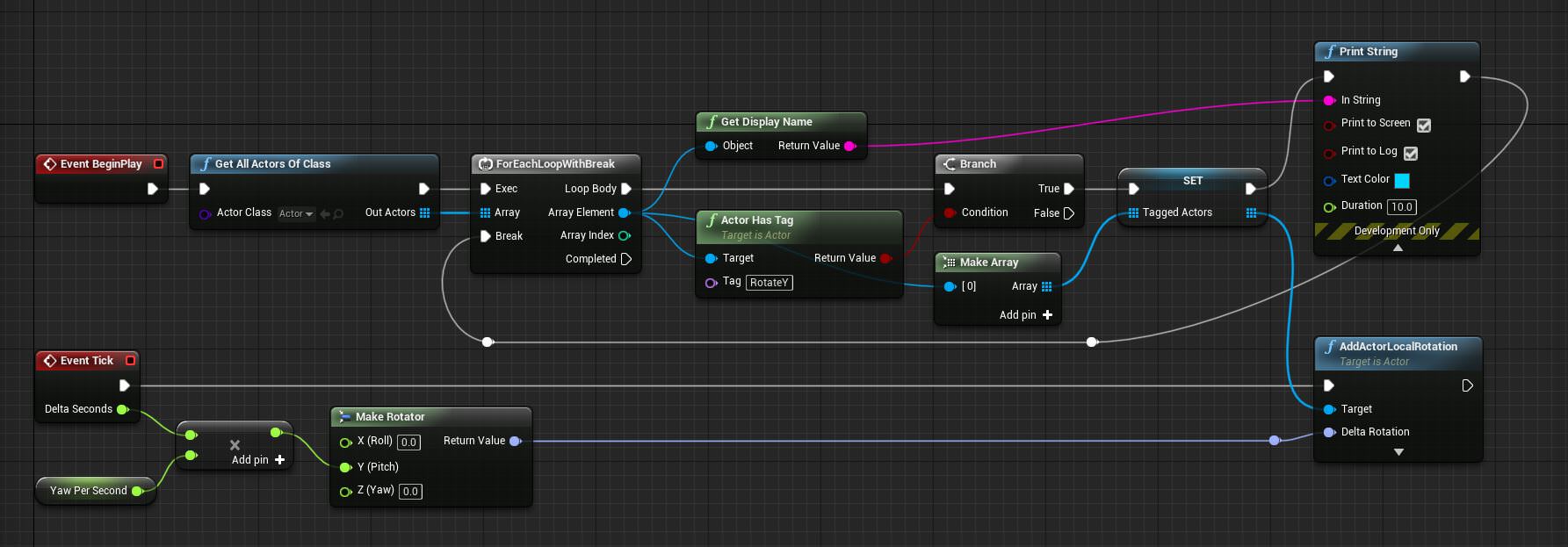 radiant fable
thankyou muchly! seems my 'break' was affecting logic too, i wonder if its even necessary, i'm guessing it was meant to be there so the code doesn't keep searching again and again
https://i.imgur.com/NhLkMVl.jpg the functioning code
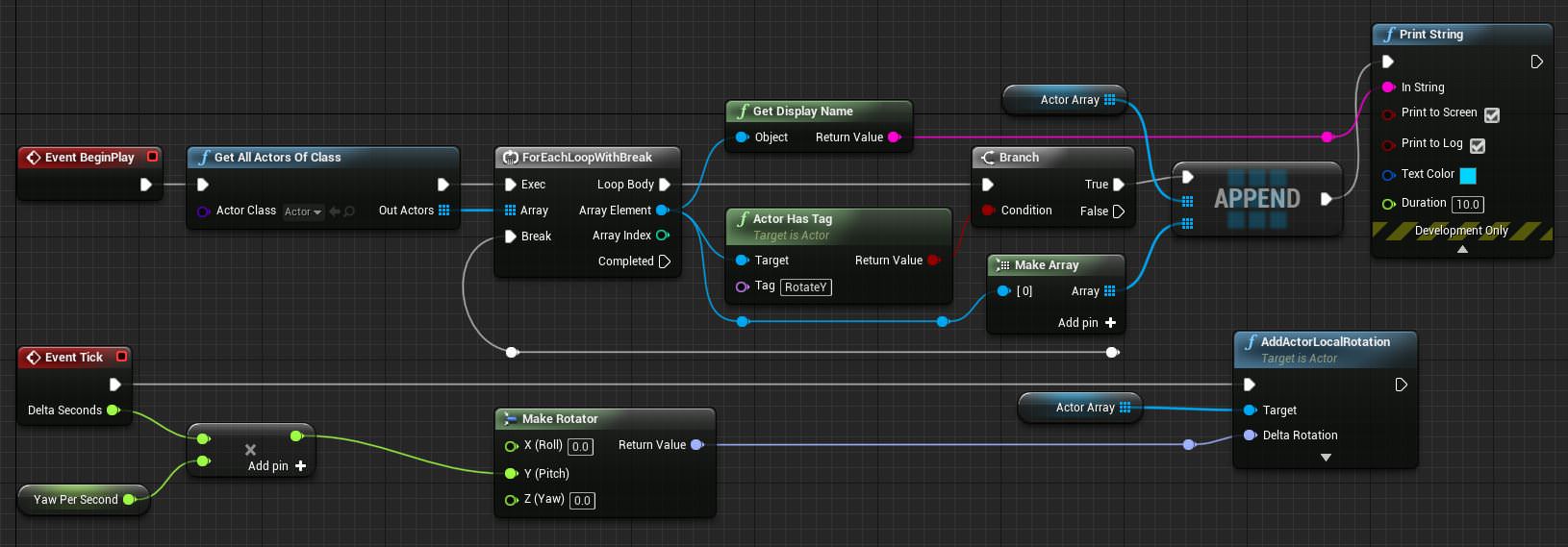
 wet dome
how can i launch uncooked standalone via cmdline so that i can see log etc.?
iam too dumb
 fair violet
any advice for fixing a corrupted fbx file that crashes the editor when a map using it is loaded?
the fbx worked flawlessly before, but sometime in the last week or so without using or touching it, it crashes the engine as soon as it's even right clicked
wet dome
nvm i figured it out
 paper kernel
best you can do is remove the uasset files from content folder that use the corrupt asset
then manually import&override the asset, and put uasset files back
paper kernel
do backup before trying
 spare kernel
https://gyazo.com/c0f74915a4724127006171efc49f2ebe how to rape your new processor 😄

 waxen fjord
I think you need more cores.
spare kernel
shoulda gone threadripper
plush yew
I have a question.
If I create an itch.io manifest file in the same folder as my game's .uproject, is it possible to have Unreal copy that file over to the root folder of a packaged build?
(in case you don't know, an itch manifest file is just a file called .itch.toml that tells the itch desktop app how to launch the game and is basically required if you want to get profile info for the user playing your game)
 tropic oracle
@queen bolt have 4K connected through wall to TV. Can act like monitor. What is the ask?
 maiden swift
@plush yew Don't know of a way to specify a single file, but you can put it in a directory and tell UE4 to copy that directory during packaging.
tropic oracle
@spare kernel what are you doing to spike the CPU so high? game compile, export to standalone?
maiden swift
@plush yew Project Settings > Packaging > Packaging, click down arrow to reveal advanced settings > Additional Non-Asset Directories to Copy
plush yew
@maiden swift The manifest file has to be in the same folder as the executable. Can't be in a subfolder.
plush yew
I'm not even sure how the multiplayer part of the game will handle being played in editor tbh
spare kernel
@tropic oracle moving assets 😄
tropic oracle
ah, hah
plush yew
@maiden swift I mean for now I could just directly talk with itch's butlerd to get profile data but that makes the process less seemless since the user would have to log in to itch using the in-game UI.
(that and butler would need to be in their PATH)
maiden swift
Yeah, ideally you want the itch app to just take care of everything since they're already logged in.
(butler is awesome, btw)
plush yew
(I know, it's how I release my game)
maiden swift
😄
plush yew
butler also seems to allow local storage of game-specific data for a given itch user which could be useful for user-specific things like achievements
maiden swift
Oh interesting.
I've always wondered if itch would ever do more backend stuff like achievements, similar to Steam.
plush yew
That stuff isn't really well-documented but the documentation does seem to imply it.
maiden swift
Will be interesting to see if Discord does that now that they are launching a store. Huge opportunities there since it's tightly integrated with a popular chat client.
Achievements could be in a user's profile, and devs could maybe create their own badges. But I digress. 😅
plush yew
yeah, I had rich presence working (before I ported to UE4) but everything else went through itch. It'd be fun to see if I could get the game on discord store and have everything done through that.
Given my game does have a discord server, it'd be neat to do things like show achievements, player skill, etc on each player's Discord profile in that server
My big concern is, when I do figure out this itch manifest thing, how the hell am I gonna a: get the data passed from the itch app to my game about who's playing it, and b: talk to butler from within c++ and blueprint.
maiden swift
Yeah, I'm not sure how to go about that part.
plush yew
I'd probably have to roll my own UE4 plugin for that
maiden swift
I'm assuming so. Definitely sounds like plugin territory.
 slender veldt
How are in-game purchases conducted typically? Is there middleware or do people roll their own solution?
I see in-app purchasing for mobile is built-in
plush yew
Middleware. For example, with itch.io, you'd probably use butler to do all that since the itch app does the same thing with butler thus butler has all the functionality to carry that stuff out
It'll let you do everything from search itch.io for games to even upload your own
Steam SDK might also do that, when it comes to PlayStation and Xbox they probably have that stuff in the devkits, etc
slender veldt
Ahh ok so it depends on your publishing platform, what middleware they support?
plush yew
Yep, depends on the platform. The platform you're publishing to should most likely have their own SDK you can use to interact with all that stuff so you don't have to roll your own.
So basically just see if your platform has any documentation for gamedevs and see what they have to offer
slender veldt
That makes sense, for some reason i wasn't able to get that bit of information from google searching, thanks for clarifying that for me 😃
plush yew
It really depends on how "open" the platform is. For example, itch.io is EXTREMELY open and you don't have to do anything extra to become a developer. You basically just create an account like usual and they'll ask you if you're a dev. Tick that box and you get to do dev stuff.
And they have a lot of documentation for how to integrate your game with their APIs, and basically anything that the itch.io desktop app can do, your game can theoretically do as well.
(and most of it is open-source so you can look at the code if you wanted to)
but for something like PlayStation Network, the dev stuff is a walled garden so you won't find detailed documentation on how to, say, integrate PlayStation Store into your game's UI, through a simple google search
slender veldt
got it, I found the documentation for steamworks and microtransactions and I think that is a good start for me
queen bolt
@tropic oracle At 4K when windows is at 150% scaling, the editor play window is "mapped" wrong for the mouse. Like there's a mismatch between what's rendered and where the mouse can go
When windows scaling is at 100%, the editor play windows is correct, but the UI is too small to comfortably work with
plush yew
@queen bolt You could always use the Windows Magnifier to zoom things in while editing if all else fails
 tame delta
Hey! I was wondering, could you use UE4 to make VR demos to showcase products to prospective clients in house and still benefit from the free licence? (Since the actual demos wouldn't be sold)?
Or do you need a special licence
plush yew
that's what I do - mostly because I'm visually impaired and even 720p at 100% is hard to read
tropic oracle
where is the scaling happening? As far as I was aware just setting resolution to 4K on a monitor was still 1:1 w/e offset issue on mouse
gotcha, yea that'd be an issue then
bitter iris
anyone know why from sketchup to ue4 this happen
tropic oracle
is 4K actually helping in UE4 editor for you? I would have thought it more of a hindrance personally
queen bolt
I'm not sure where the scaling is happening. Probably has something to do with windows, because if I don't have the windows UI scaling set to 150%, everything works fine
maiden swift
I work in UE4 on a 4K display and I love it. Tons of real estate for organizing windows and tools.
queen bolt
Right now it's a hindrance but only because UE4 seems to have issues
tropic oracle
I guess, I don't care for smaller icons and toolboxes/etc. I run 6 monitor setup for screen real-estate instead
bitter iris
Could use DSR to mimic the 4k res
tropic oracle
found it easier to just toss an object editing, c++ editer, etc to seperate screens
I'll test the 4K from here in a sec. Need to turn TV back on
queen bolt
After having 4K for a while I also prefer 2 monitor setups, but unfortunately I'm stuck with it for now
tropic oracle
yes, of 6 only 4 controlled on this side, 4K tv and VR headset on other 2 conenctors. Seperate machines for other 2 screens
was what I wanted for years. Price-point finally came down far enough and put it together
queen bolt
Another weird thing is that inside the editor, different things have different scalings
The main window is scaled differently than if you open a blueprint
static viper
Some people have to much money.
plush yew
@tropic oracle you should get Synergy to control those other two monitors seemlessly with only one mouse and keyboard despite being on separate systems
tropic oracle
4k as 3840x2160 OR 4096 x 2160? want to test like-for-like as your case @queen bolt
queen bolt
3840x2160
maiden swift
My biggest gripe with working in 4K is that some icons in UE4 are not high-res, so scaled up they look nasty and blurry.
queen bolt
And thanks for your time!
I don't mind the blur, just this weird bug that actually affects functionality
tropic oracle
I have synergy, great program. Though it's Symless now on open-source. Paid Synergy is good till latest parts where they try to force the cloud-based solution. the more secure keys is a nice touch though paid+open-source both have it
and the de-synce of client-server every now and again where you sometimes have to reconnect them to be able to left-click is annoying. In bug repo list for Synergy still for a while
I believe that is
@queen bolt just curious, which UE4 version are you working with. Booting up 4.20.3 currently but have other versions can test with later also
queen bolt
I'm using that one as well
tropic oracle
okay
<KaosSpectrum> 's cpu setup is making me research the new cores. Still running quad-core and feeling it on compile/package times, hah
seems to be tracking still 1:1 on 4K. What scaling have you applied @queen bolt ? Trying to reproduce your issue
queen bolt
I have 150% in windows
tropic oracle
where did you set that?
paper kernel
I have 90%
queen bolt
Latest version of windows you can type "scaling" into search and it should show "Make everything bigger"
Silly microsoft...
paper kernel
I don't quite follow why they don't allow sub100%
so I had to make a custom resolution that is 10% larger than the actual pixel count
queen bolt
I'm an old man at 31 and could never see anything below 100% on 4K lol
tropic oracle
hmm, I went from 100% to 200%, 300% and it all resized fine. still 1:1
queen bolt
How are you testing it?
queen bolt
No I mean in the engine
My issues is only when I play the game, either in the viewport or in a new window, the mouse isn't mapped right
And it would probably not be noticeable on a FPS game or something, where there's no mouse location input
tropic oracle
maybe there's some calibration code-wise to latch it to the proper windows display scaling?
only been looking at FPS and VR stuff of late. Nothing with a GUI where I need non-relative mouse x,y
hmm, wonder if any of the Epic game demos would have what is needed to test
here we goi, does StrategyGame work fine for you on 4K or same issue?
queen bolt
I don't think it's only related to windows. Because when starting the editor with windows at 100% and then changing the Widget Reflector scale setting also breaks things
tropic oracle
guessing you need to hook to the display and see what scaling is being applied to align it to your ingame
likely just a different API call to UE4 get the scaling offset
queen bolt
Huh I don't have a StrategyGame project
tropic oracle
it was in the learning area after much scrolling last I looked
looks like a top-down isometric game. Right beside ShooterGame in Learn tab
tropic oracle
hah, yea some of that stuff is well hidden till you start exploring
also some of the older demos are culled from the Learn tab but can find snapshots of the files needed to run them online elsewhere
queen bolt
Welp, this works fine
tropic oracle
yea, so I suspect you need to do an API call to find relative scaling you need to deal with ingame
but now you know what to look for at least
queen bolt
No clue how to do that
tropic oracle
just rip open StrategyGame
queen bolt
but thank you, now I know it's not UE4's fault
slender veldt
what kind of CPUs are you guys running?
tropic oracle
quad-core here. From 2013
queen bolt
6700k
 storm venture
TR1950x
slender veldt
anyone using Xeon?
 pallid compass
nope, TR
slender veldt
I got some sample AMD EPYCs at work, was thinking about doing some benchmark with those 😁
storm venture
holy shit, i havent seen those before, they just gave some to you?!
slender veldt
im a systems engineer during the day so yeah we get all kinds of enterprise hardware samples
 analog blaze
Dual core
storm venture
thats awesome, which models are you getting?
slender veldt
i built a sweet Xeon based rig from sample hardware
analog blaze
😃
storm venture
thats insane, nice!
slender veldt
yeah i was curious to see build times on that thing
storm venture
i havent looked at epycs before, but i keep seeing references to servers, are they built for just servers?
id be curious as well to see how they fair with build times
even just watching the shaders compile at light speed
storm venture
😍
pallid compass
Takes me 700 ish seconds to build a clean engine on my rig
slender veldt
thats sexy
pallid compass
yeah 2950x at 4.4ghz, pulls about 300 watts
3466mhz ram
and m.2 nvme
is pretty much what u need
(oh and custom cooling solution ofc)
pallid compass
actually mine runs silent
well basically next to slient
i only have 3 fans cooling my TR with custom water cooling solution
tropic oracle
well if 2950x is good then 2990WX with double cores should be wonderful. Water-cooling required unless you like the sound of jet engines? hah
pallid compass
well TR & mtofus blocks too on the mb
u cant even cool a 2950x properly on a AIO
nvm air cooler
not properly anyway
2990wx is good but
memory issue
and lower speed for single core stuff
tropic oracle
mostly cooled via throttling to keep it down?
pallid compass
yup, air and AIO dont work properly on 2950x if u remove the default power cap
slender veldt
nah you just need bigger fans lol
pallid compass
no it just does not work
you cant move heat away fast enough
there is DR on fans
slender veldt
GPU compute clusters with 8 sockets and 8 GPUs are fan cooled, but it literally sounds like a jet engine
tall pendant
anyone of you guys tried subzero cooling? 😛
slender veldt
ah
pallid compass
yeah its abit odd tbh
slender veldt
thats pretty low
pallid compass
its really low throttle point
slender veldt
ya
pallid compass
but u need to consider how much wattage is going in too
alot of heat very fast
well a afaik
slender veldt
well my point was that server grade CPUs draw more power and all use fan cooling, but they have really high throttle thresholds
pallid compass
if u go manually overclocking
the throttle is higher i think
but PBO which works better than manual
seasm to be just under 70c
tropic oracle
hmm, slower on single core stuff due to base frequency 2990WX 3GHz compared to 2950x 3.5Ghz?> or is there another bottleneck?
pallid compass
2990wx has memory issues too
really fucking bad memory issues
2 of the dies run through the other dies
tropic oracle
like what? intrigued
pallid compass
to access memory
slender veldt
oooh block diagram
pallid compass
die 1 and 3 dont have direct access to memoryt
tropic oracle
weird design choice on that flow. Thanks for diagram
pallid compass
the main reason i didnt buy it for ue4 work
 turbid plover
so am i the only one getting weird results trying to build 4.20 from source? the zip takes FOREVER to open and then fails to unpack
pallid compass
zip wat
tropic oracle
4.20 base or the new 4.20.3?
pallid compass
Pull it using some git software
turbid plover
i was just downloading from github manually
pallid compass
would not recommend doing zip download stuff
turbid plover
well i figured when it says 4.20 int he drop down for the engine version
its the latest patch of that version
so i assume its 4.20.3
pallid compass
im no git expert but i use git GUI to checkout a tag branch
so i check out 4.20.3 for example
to make sure i get what i want
tropic oracle
how are Widgets in 4.20.3? Recall some large issues while they were experimental in 4.16.3 and moved on to learning other things for a bit.
pallid compass
Widgets are totally fine
tropic oracle
awesome, thanks
queen bolt
@tropic oracle after some digging, it seems like it only appeared like the problem was with some kind of mapping, but it now seems it's something with the UI of the game
I thought it was a "mapping" issue because the cursor kept jumping out of the window, but when I reverted to the default cursor it didn't do that anymore
UI elements are now just appearing in the wrong place
tropic oracle
interesting
queen bolt
So the custom cursor was itself a widget, and I couldn't click anything, but now with the default cursor I can click things, but for example the target reticule is in the wrong place
queen bolt
Interestingly enough this goes towards your question about widgets! 😄
tropic oracle
heh
pallid compass
set everything in the cursor widget to hit test invisible and try it again
queen bolt
I don't think it's about that, Rei. It's a problem with scaling using a 4K monitor. I think I set something up wrong
tropic oracle
just debug the x,y coords of the mouse and maybe print the corner of the widgets you're trying to click. Maybe it's relative vs absolute positioning or somehting like 0,0 vs center of Frame. Lots of possibilities for mis-match
queen bolt
Yeah, thanks. I'll keep trying.
pallid compass
You should be building your UI default at 4k, dpi 1
then scale down
let the engine do everything else
scaling up is always a nightmare
queen bolt
thanks, I'll keep that in mind
tropic oracle
another option is to take the mouse as overlay and ray-cast/project it out onto the scene. Would separate dependance on resolution as it would all be relative then automatically
pallid compass
That will cause a fuck ton of issues
tropic oracle
code-wise the StratgetGame uses that trick to figure otu which quadrant to pass a click check to find more granular position only on quadrant found
pallid compass
I would not do that for general UI stuff.
tropic oracle
fair, StrategyGame is an isometric RTS-ish game
wherein the UI is the elements you can click on within view
pallid compass
Yeah that makes some sense for that
tropic oracle
and overrides with a menu at top-most layer as needed for options/exit/etc
queen bolt
I'm new to gamedev. So far it feels like getting beaten up by an angry fractal.
waxen fjord
What what?
plush yew
There is a lot to learn to make games, but it's worth it.
And it's just getting easier over time.
15 years ago, 3D modeling was painful. It's not so bad these days.
When i was a kid, i remember watching my dad modeling a scorpion and animating it to create his company logo and intro video. So painful... took him forever. These days, we would say it was low poly lmao.
tropic oracle
hmm, 15 years ago there was Maya, 3D Studio Max, movray/povray. First 2 were pretty simple for 3D modelling even when learning self-taught
granted there was PLE versions
issue way back then was keeping poly count pretty low due to GPUs. Nowadays it's still considered but not nearly as annoying
tropic oracle
same
tropic oracle
that timeframe pre-dates Audodesk buying Maya to have alongside 3D Studio Max. And more recently the late 2016 (I think) switch from perpetual licenses being purchaseable to the now license /mo model
lightwave was a very different animal though!
tropic oracle
lol yea and the cost
now you can just rig skeletons and purchase/create mocaps for animations
modelling tech in Maya/3D Studio Max pretty much stagnated once Autodesk got them for a decade or so
whereas Blender keeps re-iterating and adding features
plush yew
Well, I used 3ds max between 2005 and 2014 and what pisses me off abotu that software is how poorly designed it is. Notably the interface. Which MODO fixed for me.
Every year i hope autodesk will finally update 3ds max and fix that crap. but they never do.
tropic oracle
similar to what Photoshop has done compared to opensource photo programs like GIMP, or cheap solutions like SAI
hah, I recall when you needed a $500 plugin to do hair and now it's in the most basic versions of the software
plush yew
lmao
tropic oracle
hoping the workflow from Blender to UE4 is well polished when I get to that part. UV mapping was fun sometimes way back 15 years ago. Appears to be a lot simpler now
tropic oracle
learning mostly. Hobby status. Did some basic stuff in VR in Unity then learnt a bit in UE4. Got busy with life and took a break. Back into it learning the C++ side of UE4 instead of visual blueprints this time around
way back 15years~ I was self-learning 3D Studio Max, Maya but had to give up that side for school. Years later coming back at it as hobby as something different than regular work
intrigued that there are hooks into almost everything with Python these days
plush yew
Nice!
tropic oracle
and yourself?
plush yew
I'll PM you, will be much simpler. lol
tropic oracle
lol k
teal tulip
@tropic oracle "hoping the workflow from Blender to UE4 is well polished" you have then too much hope
queen bolt
what could be the reason for a custom widget cursor behaving differently than the default? When I use a custom cursor, the mouse position is all messed up
Custom Widget Software Cursor
Notice the position of the cursor is as far down-right as it goes, it thinks that's the edge of the window. And this window is actually 1080p
tropic oracle
@teal tulip just need a proper way to get obj, fbx and motion files in/out. Is it really that bad right now?
teal tulip
@tropic oracle Export from Blender to UE4 is ok
Import static FBX to Blender ok
Import animations or skeletons ? nope
tropic oracle
ah okay
plush yew
how is it to export animations and skeletons from MODO to UE4?
I have yet to explore this
winged crypt
how do I speed up the 'collecting scene' part of a light build? Is it just based on how many things are in the level and will always take this long no matter what?
storm venture
hey so shift+tab doesnt work in my game but the steam overlay is popping up, any ideas?
 late remnant
guys im trying to import a few images to ue4 and a couple are good but the rest are completely black no matter what i do, how can i fix this?
 proven ivy
is it me or is it harder and harder to find what I'm looking for on google?
late remnant
i agree
 opal ocean
Argh! I had a simple AI bug that wandered back and forth between two points working before, and now he doesnt wanna work properly
On a new blank map, I've finally got him going back and forth, but if I bump into him (which causes him to go back the other way by design), he'll just loop back and forth in a small area
Hm. its skipping the delay on the retry after a failed move
woven furnace
anyone on to help with some difficult ai things?
basically i want to know how to make ai enemies identify and attack the player character in blueprints
help plz?
opal ocean
I cant seem to get my bug working with simple AI MoveTo
when he collides with my character, I have it change direction, but he doesnt go all the way to the target, only partways in a tiny radius now
Aha! got it.
When he succeeds in a movement, there is a delay, then it calls for another move. I had the fail to use the delay and move as well. So it was going back and forth cause the stopping movement was a fail
Now to delete the 50 print string nodes...
high stone
Max has issues, because it's one of the first 3d engines. I recommend Maya, which is an overhauled version.
opal ocean
ok. AI doesnt work on the sidescroller example map 😦
opal ocean
I moved the map back so that the player and everything is centered on X : 0, and now the nav data is offset behind everything
the nav volume is in the right spot
 latent salmon
is there anyone willing to help explain the markeplace stuff to me, iam trying to figure out what enviroment packs taht come preset for just a kidna plug an play as i figure all this out?
 dim arch
So I rebuilt the engine
from 4.20.2 to 4.20.3
and now my framerate is halfed in the project
any ideas? is there some outdated cache data in the engine/project folders?
plush yew
hello all
looking for unreal tutorials, sure I could google and I have but I want to know what helped you.
been using unity for three years, been with unreal for two months.
winged crypt
Any way to see which actors/objects fall under the 'dynamic' category in the GPU profiler? Almost nothing in my scene casts shadows & almost everything is static but somehow I have a dynamic bottleneck 🤔
winged crypt
😂
I know the difference between static / movable meshes, this was more-so a profiler issue considering it doesn't tell you specifically what it refers to and I'm assuming sifting through all the actors in my scene one by one isn't the right approach.
grim ore
That message was not towards you, it was for the person who posted before you.
manic pawn
use renderdoc and see what meshes got drawn in dynamic pass
manic pawn
it's a great tool for understanding how unreal is actually rendering your game aswell
storm venture
Okay so this works, but i feel like it's wrong, it seems like a bad method of accomplishing replication.
Are properly made games actually supposed to constantly stick these events in between everything?
I'm perfectly happy if this is THE way of doing things, but I can't help but feel that it's sloppy or bad convention
For example, look at all the bulk added just for replication:
south ridge
@storm venture that's why I use C++
I was annoyed by those events and stuff so I did the same in C++ (it's much easier to do with plain text)
storm venture
but is the logic still the same?
if this is the correct way of doing things, I don't mind doing it, I just want to make sure before I spend hours adding these everywhere, lol
paper kernel
I would still be cautious using multicasts
if there's an option to do a replicated status variable, use that instead
storm venture
@paper kernel is there a reason multicast should be a concern? is it heavy on the connection?
paper kernel
reliable ones, yes
iirc the engine can delay variable replication in case the connection is saturated, causing minor delay but keeping the data flow somewhat manageable
storm venture
interesting, i havent used reliable RPCs yet but i'll keep it in mind for when i do
manic pawn
"proper" way is to add these things to the custom movement component in c++ so you can have client side prediction for these actions
if you tried to use the above thing in real network conditions, it'd feel like 🚮
paper kernel
for crouching, you can't predict it anyway. you just do it on client side and hope the packet arrives on server
manic pawn
don't have crouching in our game, so not sure if that's a special case somehow, but we made a similar prediction for switching to flying mode and it works perfectly seamless
paper kernel
this is also one benefit of using replicated status variable too, you can set it on client before sending it
-> instant feedback
manic pawn
trick is to add your custom stuff to the moves it sends to the server
instead of trying to do it separately
storm venture
I'm not sure how to go about the whole prediction thing, and from tests between a friend and I, these methods havent caused any noticeable lag
My custom movement component is just an extension off of the standard CharacterMovement component, just encapsulating some movement state stuff and handling speeds with stamina, so it still functions off of whatever epic uses, and afaik, they have built in prediction?
south ridge
CMC sync is based on inputs, so as long as your movement code is same on client and server (it will be if you're just extending the movement state stuff), all the prediction stuff should work just fine
storm venture
Awesome, that's good to hear 😄
plush yew
hello guys I have a problem with my packaging for my project
when I package it it shows me this:
\
what to do? I search it in google but I coudn'tfind link to download this version-if anyone has the link please send me to download it
tall pendant
you could try to download/install the missing Windows SDK 8.1 here: https://developer.microsoft.com/en-us/windows/downloads/sdk-archive
manic pawn
install windows 8.1 sdk from vs 2017 installer instead of separately
 gray zenith
When i migrated 3 maps from my friends project to my project a few assets simply dissapeared and the landscape lost material
static viper
was it the same unreal version?
gray zenith
well when he simply opened my project on his computer before migrating it worked fine
static viper
but was it same unreal version?
gray zenith
yes
static viper
pls show more log
static viper
mh
can you show your entire game path
to project pls
this looks like an external issue tho
tall pendant
as long as you have Game development with C++, Win 10 SDK, Win 8.1 SDK, perhaps Unreal Engine Installer installed it should work.
 fiery harbor
I'm having a weird issue... suddenly I can't open my project any more, in development editor config it crashes in engine code when doing some path string operations, and in Debug Editor config it crashes in StaticFindObjectFastInternalThreadSafe with a stack overflow
static viper
i remember when you started coding...
fiery harbor
what I have tried is deleting engine and project intermediate folders, didn't help
static viper
ERROR: No 32-bit compiler toolchain found in C:\Program Files (x86)\Microsoft Visual Studio 14.0\VC\bin\cl.exe
bitter iris
why does rendering depth mask always have a blue line? anyway to hide this?
 oblique trench
I assume that, it is outliner of editor except custom depth buffer. @bitter iris
Edit -> Editor Preferences
https://answers.unrealengine.com/storage/temp/5756-selectionoutline.jpg
 bitter iris
@oblique trench Ahh cool thank you
 still island
Hi. I have some issue. When I run unreal on linux, ready server cooked etc. It works perfectly but when I run it with sudo, I get: "refusing to run with the root privileges". And I would like to be able to run it with root privileges, because later platform I use to run servers does that. Anyone knows ?
bitter iris
@oblique trench That method didnt work
oblique trench
Is your outliner occurs in run-time or in viewport? I'am not certain about that.
bitter iris
viewport
 ocean basin
hello
bitter iris
im trying to use the hi res screenshot using a depth mask
oblique trench
So you don't need to check Custom Depth Pass for object.
bitter iris
I do if i want a transparent background
oblique trench
fiery harbor
getting that crash when trying to open my project
actually that callstack is super long
maybe unusually long
its calling FLinkerLoad::VerifyImport when loading the map
and then after FLinkerLoad::VerifyImport theres just hundreds and hundreds more verify calls
until the stack overflow
so this is where it starts after map load:
plush yew
Hey guys, i'm a complete noob, I have just followed a tutorial and tried to mimic the guys explanation of what I should do. But I have this problem. And I was wondering how I could fix it.
okay I will install this for creating games with C++ but I have already installed this visual studio 2017-where to go to install this patch?
 gleaming creek
Here's an odd one, what am I doing wrong here?
I have a static mesh component inside a blueprint (it has some other static mesh components as parents); when I try to access GetRelativeRotation on this component, the value changes based on the rotation of the actor itself
In other words, it appears to be giving the world rotation not the relative one
 west fulcrum
I'm a bit sad UE4 is not participating more in this field https://www.engadget.com/amp/2018/09/26/deepmind-unity-ai-machine-learning-environments/

Engadget
DeepMind and Unity will develop 'virtual environments' for testing AI algorithms.
static viper
we are more participating in the fields
graphics
and quality
and money....
XD
thats why we are here
BC Epic games actually makes GAMES
compared to unity devs...
tall pendant
also who says Epic doesn't is into DL stuff...
static viper
who sit on their asses all day
bitter iris
https://gyazo.com/448ab6c66784e8c4e4801c033d1df04a
How can I have the same texture for the stat bar?

Like use the same texture as the progression bar instead of it looking blocky
 leaden dust
@bitter iris I am not good at the engne, but I guess you will hae to make custom material and progress bar
it isn't hard
it just involves ifs and linear gradient
and a noise texture maybe
I am not sure though
plush yew
It looks like a stroke of some dirt brush for photoshop
 dawn vessel
Anyone know of any good Marketplace Animations for Running and Walking animations that are rigged with the Epic Skeleton? I am in need of some. Thankyou 😃
paper kernel
I'm fairly certain 3rd person template has idle-walk-run-jump animations
 hidden berry
so i have a question: can i create some in unreal that sends and receives items off a network?
something*
plush yew
anyone can help me? for my problem
 sonic pagoda
@plush yew trying to package for 32bit windows or 64bit?
static viper
@plush yew
ininstall both vs you have
and install windows sdk
and only vs 2017
the old stuff is messing with your game
valid copper
Working on an arch/viz project. Didn't start with the VR template. Any way or package I can buy to import those features?
static viper
do as i said
grim ore
@valid copper You should be able to click the green ADD button on the content browser, go to Add Feature or Content Pack, then add in the VR feature pack to get those features. You might have to rejigger a few things like setting up the new game mode to the VR one.
valid copper
Under the add button menu, I don't have anything called Add Feature or Content Pack
Maybe I need to verify my install


 valid copper
Still re-verifying install
static viper
@wraith bridge i managed to rework your settings menu :3
you did nice work on that stuff
static viper
i told you to follow my instructions...
plush yew
okay
how to reinstall it because it shwos me modify, which to install new pakets
say me the steps how to reinstall it
static viper
you need to download the vs studio installer
static viper
first remove vs 17
then and only then you can safely install it
it will override the broken vs15 systems
 zealous cloak
Hi how are you :)
plush yew
I started to install the vs aain
zealous cloak
Just started with unreal a week ago or so
valid copper
@plush yew Okay, got the editor fixed, package imported
There are still a bunch of warnings and my motion controllers don't work, but it's a start
plush yew
I install again the vs and the "game development with c++" then what to do?
valid copper
wait, @grim ore Okay, got the editor fixed, package imported
There are still a bunch of warnings and my motion controllers don't work, but it's a start
static viper
then you try out @plush yew
static viper
if it doesnt then i have another help
zealous cloak
Where is the best place to introduce myself and explain what I'm working on?
static viper
good
plush yew
in #introductions @zealous cloak
 worn granite
^
zealous cloak
Ups:)
plush yew
worn granite
can also do #work-in-progress
plush yew
omg @worn granite
worn granite
that's what its for, barring an initial thing explaining who you are
zealous cloak
Yeah my problems aren't that big, it's just that I'm not really experienced
static viper
what is installed already?
plush yew
again this error
why?????????
I reinstall the vs that you said me and again nothing
help me to fix it
plush yew
visual studio 2017
static viper

GitHub
Visual Studio Uninstallation sometimes can be unreliable and often leave out a lot of unwanted artifacts. Visual Studio Uninstaller is designed to thoroughly and reliably remove these unwanted arti...
just use dis
and wipe your system from everything related or vs.
clean your system entirely
plush yew
what is this about?
static viper
that things forces an uninstall
after that you can safely install vs17.
😉
here a wink.
bro
plush yew
are you crazy can't clear everything from the system I recently reinstalled my computer
static viper
did you read what i just said?
no i am not gonna say it again XD
scroll up and read
you made the same mistake i did
and now you too have to suffer.
i fixed my issue.
static viper
you donjt need to login
plush yew
okay
static viper
there is a download link
plush yew
static viper
no further down
static viper
look
plush yew
static viper
tell me when its done...
plush yew
now which?
I downloaded the first and extracted it
now what to do?
@static viper
zealous cloak
i would need some help with the robo recall modkit :/ when i test it, there are no laser pointers. Do i have to activate it manually?
radiant fable
i'm at a loss of a way to rotate a valuestep 90°
 dire zealot
Hey, I am trying to do research for my own realtime liquids in unreal engine. But there is only one page that scratches the surface about NVIDIA cataclysm and basically nothing else
Anyone got any pointers on how to tackle such a thing?
 scenic chasm
@dire zealot Do you have Houdini? Because, with the Indie version and Houdini Engine you can get that into the engine.
dire zealot
Baking vertex animations didnt work out without an indie license. But thats not what im after
I want to do the simulation in unreal
scenic chasm
k... I thought I saw something that was done on a weekly stream... i'll search.

Liquid simulation, transfered from Houdini into UE4 by baking of the normal and transform data into 2 .exr files by using Game Tools.
dire zealot
thats just a baked animation 😃
dire zealot
I guess i should do something like this in 3D: https://www.youtube.com/watch?v=5FRH1oJHOvA

Join Epic Games for a look at creating interactive 2D fluid simulations to add a new level of physical realism - or just fantastical effects - to your enviro...
scenic chasm
that might be it... just remember something about fluids... sorry couldn't be more help.
dire zealot
lol
tawdry raptor
help my unreal is bugging I cant control the 3rd person character anymore even on a new game set up I just see the cursor
i think its the project
plush yew
@dire zealot
https://www.youtube.com/watch?v=QGIKrD7uHu8
https://www.youtube.com/watch?v=CWzPP5FAYAg
https://shaderbits.com/blog

With the ability to script drawing to render targets through Blueprints, content creators can now create and prototype advanced rendering techniques that wou...

https://forums.unrealengine.com/showthread.php?143716 Ryan Brucks returns to the livestream and this time he's got brand new content to show off. Ryan built ...
plush yew
Hello guys, I realize that UDK (UE3) is no longer supported by Epic Games.
Unreal Development Kit is the free edition of Unreal Engine 3. We no longer support UDK, and recommend beginning new projects for free using UE4, which brings you all the latest engine features as well as full source code access.
But what does this mean for us game developers if we would like to use it to develop commercial games?
Is it ''FREE'' of use 100%? no royalties, etc.?
 sleek solar
it still has the license
but there is no point using it
if you are asking about UE3
plush yew
Yes, I'm asking about the latest UDK (UE3) build.
From 2015
Personally, I didn't have a great experience, on my hardware, with the latest UE4 games. The frame rate has been very unstable and for shooter games, unless I could run those games at 200+ fps, the mouse input just doesn't feel good.
UDK would work prefectly for the kind of project that I would to develop on Windows.
I'm just wondering if it was affordable or worth it.
sleek solar
you can make games run the same on UE4 in terms of fps
 astral rain
I wouldn't put in the effort. If something goes wrong, engine side, epic won't help. It's no longer supported, meaning any firmware updates on hardware etc probably won't work and unless you have a massive project, team, marketing etc, the 5% isn't gonna break you.
Ue4 editor is heavy, but the deployment is probably more lightweight than udk.
Epic uses it too, for their stuff.
sleek solar
in a long term, developing on UE4 would be cheaper for you
plush yew
Seems that way
Doesnt fix how bad my performance are or how crap the mouse input feels.
Unless running it on Vulkan can fix that.
astral rain
Doubtful.
sleek solar
1st you need a development machine
astral rain
Yeah.
plush yew
All I'm looking for right now is a decent game engine that will give me a decent from reate on a fully meshed map and a decent mouse input for a competitive multiplayer FPS game.
sleek solar
2nd you can make very lightweight games with 200 or more fps
you just need to know how to optimize assets, levels and other stuff
worn granite
If your machine is struggling to run the editor, I've heard unity's editor runs better.
that is, if you can't upgrade your hardware
plush yew
my problem here is upgrading my hardware won't fix my issues with UE4.
astral rain
My project is one I made on gamemaker and am remaking on ue4. It's much more lightweight on ue4, even with all the effects, shaders etc, it's just a bigger package size.
plush yew
I sure can ''tolerate'' those issue if I cannot find an alternative.
sleek solar
If you are serious about making a game, find a side job, earn money for new hardware
that's how a lot of indie developers do
plush yew
I'm currently doing the opposite, been a dev for a decade and now making games I want at home while having a different career.
 dark violet
In my case, I have been working as freelancer 6 months and saved money and i spend another 5 months with that money just to learn unreal each day
astral rain
Unity's editor is probably more lightweight than UE, but I think it'll still give you problems if your hardware is weak.
dark violet
But when you believe in your dreams and objectives, you can do it
plush yew
As much as I enjoy coding in Unity, I dislike everything else about Unity.
I really like UE4. I'm just disappointed that there is no setting I can turn on to favor mouse input over graphics.
So far, all the UE4 games I've tried... the mouse still felt floaty with everything optimized. And I don't know enough about game engine programming to get that Quake 3 or CS Source feel.
I wish it was built-in, no idea why it's not
LOL
sleek solar
there are a lot of mouse settings in the engine by default
also code is open
so you can change everything
plush yew
Yeah, that's definitely a plus. Big time
I might find a unicorn that can do it at some point.
astral rain
I've not had issues with the mouse, but I'm making a 2d game, so I dunno.
plush yew
It's been asked for years, since 2007 and players still complain about how floaty the mouse input feels in Unreal Tech.
Well, if you go ask the UT players, they can all tell you the mouse input in UT4 feels off
no matter what setting
astral rain
Weird. There's a few games made with ue4 and the mouse seems fine to me.
plush yew
It's tolerable.
astral rain
Have you tried the fps template? If so, what's wrong with the mouse input?
astral rain
Well, yeah.
plush yew
It's difficult to pin point exactly what the issue is.
All we know is that, because of how UE4 renders graphics, there is a significant amount of mouse input latency.
astral rain
But the mouse movement seemed okay, and it's as basic as it gets.
sleek solar
they have weird default settings
dark violet
I think the problem you say is more complicated, and there was a video about this
1sec
plush yew
For the average user, they probably won't notice. Ever.
But for FPS players like me, I can barely land a flickshot accurately in UT. It's just totally inconsistent.
dark violet

Subscribe! http://bit.ly/1PQ61ek Portuguese subtitles available now thanks to Marcelo Marques. Muito Obrigado! Street Fighter 5's 8 frames of lag has caused ...
bitter iris
From this, how can I make the door open both ways? So if I'm facing 1 side itll open outwards and same with the other side
dark violet
I think after they change the engine the pro players have noticed a quite different input lag
But may be because of how the game was made
plush yew
Quake Live: runs at 150 fps, without a GPU thread or threaded renderer, this puts their input-to-photon time theoretically at 7 ms. Note that this is possibly capped by the refresh rate of the monitor and your computer may run Quake Live even faster than that.

Unreal Tournament: runs at 150 fps with a GPU thread and a threaded renderer, leaving our input-to-photon time at 21 ms to 28 ms.```
However, this is before the latest updates. I know Epic recently updates UE4, for consoles at least, to reduce the baseline input latency. But this isn't my field of expertise.
And UT Pre-Alpha hasn't been updated since 2016.LawBreakers also had this floaty aim
https://www.youtube.com/watch?v=6AbrEG_cpfc

TEAM DEATHMATCH - Clash (Beta map) 16 kills / 2 deaths / 15 assists
But it was built on UE4 4.13
From the ShooterGame Template
astral rain
I almost feel like that's an internet thing. I do the forbidden and run my game on the tick system, split into the 4 tick groups, and I grab input prephysics, and I'm not seeing any lag.
plush yew
All we need (talking about FPS devs and players) is either a good samaritan or Epic to fix this once and for all.
plush yew
@astral rain
How can I put this. You can get a really good mouse inut feel in UE4 games if you can maintain like 250+ fps. If you run stat FPS you'll see like 3ms latency.
However, that 300+ fps and 3ms latency is basically how the mouse would feel in Counter-Strike Source at 45-300 fps.
So, unless you have a beast PC, playing FPS games developed with UE4 will always feel ''off''.
dark violet
One reason may be because of how big Unreal is, and can't be compared to how fast can be a dedicated engine.
plush yew
@sleek solar
A hell lot of people agreed that it's an issue with UE4, but no one knows how to fix it.
dark violet
Unreal is made to do everything for everyone
plush yew
If you read the link above, the UT devs were investigating what was possibly causing the issue. They thought that with DX12 they could reduce the latency
This mouse input latency is a new issue since game engines started to become more graphically demanding.
Overwatch has this issue too.
astral rain
Makes sense. I don't really play first person shooters, I don't develop 3d, and I always cap frames at 60fps. So, I'm not valuable on the subject lol
plush yew
usually, the two options we have are r.OneFrameThreadLag 0 or r.FinishCurrentFrame, but both make the frame rate very unstable.
Which obviously isn't great for aiming 😃
--
Anyway, thx a lot for the input.
Seems like UE4 is the obvious choice despite those issues. All things considered.
(I just profoundly hate C++  )
)
astral rain
Oh, c++ and source code is what drew me in lol
plush yew
I'm an experience designer/artist, but am new to programming. C++ is currently overwhelming.
And i don't want to use blueprints.
I mean, the less the better.
astral rain
If I could get away with just art, I would.
plush yew
I tried CryEngine, was like hey it has C# that's amazing .I run the editor, was getting like 110-180 fps steady. I was like hey that's amazing. Then I run the actual build -> 40 fps. WTF... damn...
dark violet
Blueprints are fun!
plush yew
Don't get me wrong, I love blueprints.
But I want to code. I've done nodal scripting for 5 years.
dark violet
This was my first tutorial, and this drawings was helpful for me 😄
plush yew
I just want to code
astral rain
But having source code is amazing. I can get rid of things I don't need, add svg rendering to bypass texture limits, use a single 64x64 texture (plus instancing) to mask the vectors. It's been invaluable.
plush yew
I'm sure once I get used to C++, I'll love it as much as you do.
Not quite there yet lmao
sleek solar
svg... code textures directly with hlsl 😉
plush yew
Im a baby programmer! 😛
astral rain
I use a texture for material reference, to mask the svg area for lighting etc
plush yew
Anyway, I'm thinking if the community makes more FPS games that demand lower mouse input latency, at some point Epic will just have to fix it.
So, to use Unity or else wouldnt really help here.
astral rain
Does unity have the same problem?
plush yew
All engines do, pretty much.
The only one that might not is Source 2 which isn't available
And I suspect that Counter-Strike Source didn't have this input lag, because its graphics are prehistoric.
As an analogy, with most game engines these days... to set my graphics settings to Max is equivalent to turning ON Vsync.
dark violet
lol, that is so true
plush yew
The funny thing is, I don't remember that this was an issue before game engines started to use PBR.
So at some point in history, graphics reached a treshold.
Where mouse input latency slightly increased
Like it doubled
I embrace graphics like everyone else. That's why I just freaking love Witcher 3.
But when I play Unreal Tournament (Pre-Alpha), it's that damn mouse input latency that makes me stop playing. Shots just don't land where they should.
For us devs, it's a big issue
sleek solar
Old school shooters aren't making money anymore so no one bothers with that
sleek solar
Fortnite is a different game
sleek solar
I was talking about games like Quake or UT
 weary basalt
@plush yew Your issue is highly specific to a small subset genre of games. UE4 is probably not the tool designed for the job, if you have a specific requirement for your game, a custom solution (engine) maybe demanded. UE4 is now a General Purpose engine. You cannot expect it to perform all functions perfectly to your exact requirements, its just not feasible to expect that.
Choose the tool that best suites the job.
plush yew
Personally, I'd say as game developers, gameplay should be the very first priority.
And considering that Unreal Engine is the top commercial engine out there and that this issue has been reported since 2007, by now it should have been fixed OR devs should have an option. UT 2k4 had ''Check Reduce input Latency'' as an option by example in the game menus.
The kind of fix everyone else would benefit from
 broken shadow
I've never heard of this input delay until now.
Is there any "Scholarly" information on the topic?
Well, as far as that can go for video games as a topic.
weary basalt
Your assuming that the "fix" is simple and easy to implement.
It maybe a product of the tech and not something simply fixed.
plush yew
It is ackowledge here by the UT devs
https://www.epicgames.com/unrealtournament/forums/unreal-tournament-discussion/ut-development-bug-reports-qa/16532-mouse-input-investigation