#ue4-general
1 messages · Page 315 of 1
 winged crypt
But the Skylight is causing the leaks. Nothing major but I can see GI on objects closer to corners of the room etc. which should otherwise be pitch black.
Visible on the walls as well. I can get around this since I'm lighting the room anyway and this won't be visible but if I can eliminate it altogether that would be best
 south ridge
@plush yew the hardware you're connected to has better power supply than you do 😛
 crisp turtle
Is it better to create a lower body set of movement animations that dont have any z bounce on the pelvis, or is it better to use something like layered blend by bone to get the same result since I need two animations one for upper body and the other for lower body. The key is since its first person with full body rig, I cant have upper torso bounce on z hence clamping the hips?
Is it even possible to clamp the pelvis from bouncing on z axis through script?
 vale silo
So, no one knows about root motion?
 tawdry raptor
can we edit the 3rd person character that comes with unreal a a new model?
can we edit the unreal character to change the way it looks?
add stuff to it?
 astral rain
Yes.
Pretty much the only restrictions with using assets provided by epic is that they have to be used with unreal.
E.g. you can't use then in unity.
Them*
 livid haven
AHUD isn't a class for making UI.
But it should be how you spawn your UMG or Slate based UI
 plush yew
ok
is it possible to include enumarations from unreal (as uassets) and use them in my c++ code (conversion of BPs)?
tawdry raptor
how can I add stuff to the unreal maniquin
like I want to add a new face and cloths
 worn granite
@plush yew its infinitely easier to just remake the enum and move things over.
worn granite
that's what I'm talking about, yeah
plush yew
and include it in every c++ class that's gonna use it
althought for some reason
everything is in red
enum E_UIC_ContainerType
{

};
UENUM(BlueprintType)
enum E_UIC_ItemSubtype
{

};```enum class ETheEnumName : uint8
 hushed grail
Does anyone have any experience with unity?
 weary basalt
Why are you asking in an Unreal Discord about Unity?
hushed grail
Sorry nvm
 fossil ridge
hey i put a question in the blueprints page can someone take a look at it
 novel ember
Does anyone know what the issue might be with my model here?
I've got a pretty basic material setup for WorldPositionOffset where it does a VectorTransform from Tangent Space to Local Space. It seems to work fine on the default engine sphere, but with my meshes it splits at the edges
 uneven fractal
plush yew
uneven fractal
plush yew
my UE4 crashes when i try to open a BP
 paper kernel
corrupted asset probably
plush yew
that's impossible
i add the project from the store
and then i open it and it crashes
it worked 5 minutes ago
i changed NOTHING
paper kernel
nobody really knows how the corruption happens ¯_(ツ)_/¯
you could try making a duplicate out of it
if it lets you right click it
plush yew
so basically it crashes on:
trying to open it
clicking on it with right button
trying to delete it
and trying to move it
unreal is so corrupted it's insane
paper kernel
then try and delete the uasset from content folder
plush yew
i did
and then i re-imported it
same thing
i restarted my PC, closing all unreal and everything
i open it - fatal error again
it worked like 5 minutes ago
i closed the BP by mistake and it never wanted to open again
what the heck is wrong with unreal?
plush yew
Hey, anybody knows what does joining the steamworks distribution program gives me?
 regal mulch
I assume you want to ask that on the Steamworks Group :P
 low wadi
How long do you guys usually work on a game in one sitting?
south ridge
A work day, lol
south ridge
Humans are limited to like 5-6 hours of useful work each day, which is about what I do. The rest of the time is human things like organizing everyone and chattering on the internet
south ridge
I mean we are limited. I'm human and I have all the human organs
In correct placement and proportions
 waxen fjord
Are you sure? Have you physically checked?
paper kernel
if current status is "functional" then I would say close enough
 naive basin
hello guys
it seems like my planar reflection only works in editor when i dont press G to hide it
however it doesnt seem to work on PIE
any solution for this?
 olive yew
Can anyone help me with opening a door with 'E" ?
 static viper
only #blueprint can
 fallen tundra
hey guys, I made a ai enemy tarantula who patrols and attacks the player once it's in sight. my problem is once the ai enemy comes close to the player it doesn't attack, but when the player steps back little then the attack plays. what could be my problem?
plush yew
Hey I'm new to unreal, and I was wondering, if I wanted more than one person working on a project how would I go about doing so?
fallen tundra
@plush yew making threads on the ue4 forum works out pretty well!
I've made several collaboration threads so that my team can help other game devs with level designs and modelling in turn for their help with programming etc etc
plush yew
um
wdym
oh
well
Im trying to make a loading screen
and Im trying to set this var to true
but it doesnt work :/
set the var to true when you click the button
What's the error?
I've tried to breakpoint, "Cast to PlayerCharacter" works, and then the "SET" doesnt work
doesnt give me any error, its just doesnt work
It's
right
there
Bottom right
?
oh
there's no more
its just when I've tried something
oh wait
Click show message log when it comes up again
there is an error
yeah yeah
one sec
SetInputMode_UIOnly expects a valid player controller as 'PlayerController' target
what's that?
oh its because I've used another gamemode
 vale jasper
Can a 3D modeller dm me please?
plush yew
so what is it?
 sudden agate
it literally says whats wrong
plush yew
...
sudden agate
Read it
plush yew
I'm guessing you don't actually have a PlayerCharacter in the world
well I did, my English sucks lol
vale jasper
@everyone if you’re a 3D modeller can u dm me asap 😃
plush yew
PlayerCharacter needs to be the UIGamemode
(nothing, just to show cursor)
wat
one sec I will show ya
there ya go
its all there, except from "HUD", changed it into "MyHUD"
Your Default Pawn isn't a PlayerCharacter
wait wut
lemme see that
So Get Player Character will never return PlayerCharacter
ooooh
nonono you got me wrong
"PlayerCharacter" is the character itself, I wanted it to be set after the HUD
got it?
after the Menu
you are clicking on OpenLevel, and then its setting the gamemode to the FPS gamemode
This is never going to succeed: https://gyazo.com/5d5e69b4c70b8eb86e54d4baadf9b0cf

wait a sec, so if that's like that, I need to do the loading var and other stuff in the UIGamemode, and not in the PlayerCharacter right?
Yes
oh wow Im so dumb
lemme do that real quick
PlayerCharacter doesn't exist yet so you can't access it
yeah lol
wait a sec, but I didnt acutely create the thing like I did with the PlayerCharacter
so
where do I put it?
oh nevermind found it
wait wait wait
so I need to cast that to something else, not the PlayerCharacter
um
😦
@plush yew can you plz help 😃
?
Get Game Mode
omg you are a legend
thank you so much for helping a noob out 😃
um
nevermind, it didnt work 😦
doesnt give me any error, but I cant see the loading screen
 narrow cave

 light thunder
Can you build HLOD's on individual levels without any issues? Very little documentation on this
 lament kraken
lol
 kindred crag
Quick help here
Will anything happen to my current projects if I delete my old UE4 versions?
 cloud cobalt
Not if you moved on.
 timid flame
Any info/documentation on the volume texture asset in 4.20? For example encoding noise to it via render target
 vapid sable
anybody having issues with Unreal 4.19 on macbook pro?
 uneven spoke
 vapid sable
I can't seem to open my project since I changed it to use metal v2.0 to get my shaders to compile
uneven spoke
anyone know what im doing wrong
vapid sable
Yeah seems like Unreal just freezes on startup when metal v2.0 is set in project settings...
 elfin hawk
UE4 4.20.3 crashes on my new laptop (Aero 15X v8) when i try to create a new node on material window in battery mode with this error DXGI_ERROR_DEVICE_REMOVED DXGI_ERROR_DEVICE_HUNG anyone who knows what causes this crash?
 sacred snow
Hi! I'm new to UE4- anyone have any tutorials they like? ^^;
 polar hawk

How to get hired at Epic
 tribal pebble
does anyone know how to make these Shaders?
worn granite
you've been down too long in the midnight sea?
tribal pebble
oh what's becoming of me!!
 tawdry storm
@polar hawk it says "MLG PRO" in the title, but there wasn't one airhorn. very dissapointing 😦
 marsh swallow
so i found a list awhile ago but i lost it
what is the load order for the basic BP files in Editor and in Packaged?
because my map is working in Editor but its not setting the variables in package in time for the PlayerController file to read them
My level file sets variables in Game Instance which Player controller reads to set the map settings like size and map image
 rocky tendon

 grim ore
make sure your near clip place is not 0.0
novel ember
What show flag in the PlanarReflection component do I need to enable to show billboards?
My billboard's material has planar reflections enabled
nvm, figured it out
was an issue with my custom planar reflections actor
novel ember
on a related note, I'm trying to achieve something kind of odd
the best way I can describe it is a billboard with inverse normals
that is, something one-sided that's always facing away from the player
is something akin to that possible using either billboards or meshes?
here's a rough example of what I'm talking about
one-sided material with standard normals through a planar reflection that renders two-sided:
same thing, but with the normals reversed
although in my example i literally just flipped the normals on two of the sides, so it only works from one angle
I'm trying to do something where the effect in the second photo can happen from all 4 sides
plush yew
Hey, anybody available right now?
static viper
no
plush yew
well I'll be kinda embarrassed because that's a noob question
so that's why lol
anyways
if you can help a noob out that would be great
Idk what to put in the object XD
that's an AI, dont know what to put there
for the player, its "Get Player Character"
lament kraken
C++ better
static viper
opinion
lament kraken
true
plush yew
@plush yew,tried that, didnt work. (lol get player character is the player)
@lament kraken are you trying to annoy me or something? Do you even know how to program in any way? Don't even try to chat with me unless you gonna apologize.
lament kraken
what
I said something to you?
@plush yew
I am writing report or we can say small doctorate so please don t ping me for stupid reason
lament kraken
yes
chill
but I can t chill because I need to finish my report for tomorrow and I get pinged for no reason
static viper
you can always mute the server XD
if he pings you again for no reason make a report
plush yew
Stop being offensive tonk
Thats not funny
Btw OvO you dont know the all story so please don't disturb us
static viper
take it to dms guys.
lament kraken
Now let me write report
plush yew
I've tried to. I've even apologized, tried to make things better, but ue didn't respond
static viper
ok
plush yew
Listen Tonk, if you dont want to be in touch, dont, but I'm trying to stop that fight and make us chlling both.
lament kraken
I see
plush yew
So..?
static viper
i have to call the mods on you if you guys dont take this elsewhere XD
 oblique trench
@plush yew No
plush yew
spreadsheet?
static viper
you can do these things yes
but not without c++
if you google ue4 sql
you will find stuff
plush yew
well im pretty much doing everything with C++ right now
oblique trench
DataTables don't include any structed query language. But you can use branch nodes after breaking the struct
So there is no any query language that fetches/edits/deletes on datatable on Unreal
oblique trench
DataTable is not a database. İt is just a spreadsheet.
plush yew
yup
i know but i don't need a spreadsheet
or do i?
for an online game i think everything is put into databases
not spreadsheets
static viper
did you actually listen to what i tell you XD
are you interested?
XD
ue4 sql
plush yew
ok
static viper
the first link is literally sql server plugin
oblique trench
In todays, a online subsystem(Like steam) serves user data integration with game server handlers like GameSparks
plush yew
hey ppls
i have a question
why is my project lighter in fullscreen?
where as, when it is in windowed mode it is darker
ah, seems to be a gpu thing. When i take a screenshot, there is no difference in brightness between both full and windowed
paper kernel
adaptive display brightness
fairly common power saving feature these days
- adds more artificial contrast
 trim tusk
Has anyone else got a problem with unreal that it doesn't fit on The screen
 upbeat dune
Hiya, just wondering, so as I'm studying games development in college at the minute, what other courses / subjects would be considered useful in helping me get further with games development in the future?
static viper
gordon ramsey is for team building good
and you need anime
err
well
good english
coding
and keeping order in chaos
art is extremly hard to order.
learn it 30 yrs ago
 pallid compass
@upbeat dune Mathematics, Structuring's, Engineering, Perspective, Anatomy, English, etc
 lost ember
hey guys, is there a good alternative to Visual Studio for C++?
pallid compass
no
 pure stratus
Visual Studio with Visual Assist.
 daring saffron
i keep getting this Severity Code Description Project File Line Suppression State
Error C2338 Visual Studio 2015 Update 3 is required to compile on Windows (http://go.microsoft.com/fwlink/?LinkId=691129) AmericanConflict_UE4 e:\documents\unreal engines\ue_4.19\engine\source\runtime\core\public\Windows\WindowsPlatformCompilerSetup.h 19
At Microsoft our mission and values are to help people and businesses throughout the world realize their full potential.
when starting a new project 4.19 ,
static viper
pls stay in this channel
Visual Studio 2015 Update 3 is required to compile on Windows
do you have that?
i am very cautious here...
daring saffron
No idea, ive read you can use 2017 with 4.15 and after
i used to have 2015
but now ive got 2017 vs
 manic pawn
did you install the required packages for vs 2017
static viper
Did you install the update
daring saffron
there is no update
manic pawn
did it create a vs 2017 solution, or does it say the projects are for vs 2015 in the solution explorer
daring saffron
i got newest 2017
static viper
ok.
daring saffron
I opened source using 2017
manic pawn
nonsense
daring saffron
UE4 say anythign after 4.15 can be used by visual 2017
static viper
but unreal is literally telling you what todo
manic pawn
it is not
daring saffron
i had same problem when i had 2015 launch it too, same error
manic pawn
ubt likes to get confused when you had multiple versions of vs installed once
daring saffron
so i uninstalled all 😅
static viper
oof
daring saffron
I wanna try one more thing
static viper
this is too tough for me XD
daring saffron
which folders can i delete again to rebuil from source?
i cant remember
in the project
manic pawn
oh are you trying to build the engine
manic pawn
you'll also need c++ for desktop, .net for desktop packages then
manic pawn
and since it's 4.19, you'll need windows 8.1 sdk from individual components
manic pawn
so you've had vs 2015 installed on this pc once, but it's not anymore?
daring saffron
ill try create a new project
ye i used to
i feel like its something to do with that
manic pawn
how are you creating a project if you haven't built the engine yet?
daring saffron
I used the UE4 launcher
it created the project but cant build the editor
so it gave me the option to try compile from source
manic pawn
did you switch the project over to your custom engine then?
daring saffron
but cant produce .dll
manic pawn
you can't build the engine from the launcher install
manic pawn
so you're not actually trying to build the engine, but a project
daring saffron
sorry ye
wording 😅
Im trying to build the project
but wont work and gives that error
manic pawn
let's try the usual fix for pcs that once had vs 2015 installed
manic pawn
put this
<?xml version="1.0" encoding="utf-8" ?>
<Configuration xmlns="https://www.unrealengine.com/BuildConfiguration">
    <WindowsPlatform>
        <Compiler>VisualStudio2017</Compiler>
    </WindowsPlatform>
    <VCProjectFileGenerator>
        <Version>VisualStudio2017</Version>
    </VCProjectFileGenerator>
</Configuration>
in appdata/roaming/unreal engine/unrealbuildtool/buildconfiguration.xml
daring saffron
where i deleted 3 or so folders and rebuild
manic pawn
then regenerate the project files
daring saffron
ill try that
 silent lintel
https://puu.sh/BzGsX.mp4 bugged or why can't i edit that one? oO
 / 10
silent lintel
/ 10
silent lintel
I reopened that
manic pawn
🤔
daring saffron
like a year ago when i had problem with editing blueprints xD, i used to completely rebuild projects by deleting its binaries and stuff
silent lintel
The clickable class is there for a longer time
daring saffron
also @manic pawn it works thanks haha
silent lintel
after i encountered that problem i closed ue4 and opened it again
still just a blank edit window
manic pawn
does it work if you use the normal new blueprint window and then chose clickable as parent class?
silent lintel
Nope
its not only when I inherit from Clickable
even a newly created blueprint does not open after first time
😐
manic pawn
does it print anything interesting to the output log?
I've never seen an issue like that before 🤔
vale silo
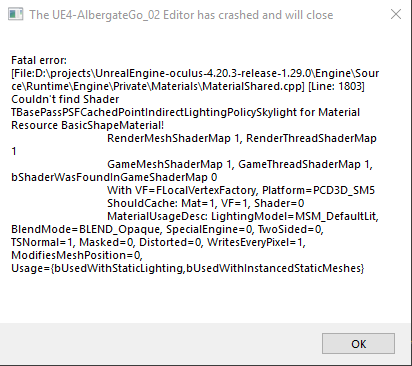
has anyone experienced this issue https://i.postimg.cc/k5p8y6yc/4203_crash01.png

I am using 4.20.3 built from source
vale silo
any way I can fix it or work around it ?
vale silo
no, it's BasicShapeMaterial - UE4's stock material
static viper
and you get the engine when doing what?
vale silo
I loaded my project, selected Ue4's stock Cube mesh with that material and bam! - crash
static viper
ah
i understand
yee
that is actually an 4.20 error
in 19 you only get a hiccup
err
you should not use that material XD
vale silo
well, I guess I have to go back to 4.20 and make new mat
I actually converted one of the 4.19 projects to 4.20 and had no such issue
also converted 4.11 (!) project and also had no such issue
winged crypt
How is this type of design achieved (landscape)?
Whoever did this did it on a huge scale so I doubt every hill was done slowly and carefully with the limited tools available under Sculpt
 karmic thistle
guys, cant package to windows 32bits 🤔
UATHelper: Packaging (Windows (32-bit)): ERROR: UBT ERROR: Failed to produce item:
UATHelper: Packaging (Windows (32-bit)): ERROR: Command failed (Result:5): D:\EpicGames\UE_4.18\Engine\Binaries\DotNET\UnrealBuildTool.exe FPS_Coop_Shooter Win32 Shipping -Project=
UBTMakefiles -remoteini="C:\Users\PedroTC\Documents\Unreal Projects\FPS_Coop_Shooter" -skipdeploy -noxge -NoHotReload -ignorejunk. See logfile for details: 'UnrealBuildTool-2018.09.23-18.41.05.txt'
grim ore
See logfile for details: 'UnrealBuildTool-2018.09.23-18.41.05.txt'
plush yew
Just curious if there are people here who would help with logic for this thing https://www.youtube.com/watch?v=JRHJRzchSZY

I'm trying to make this game. You can use the Level Editor. Roll through mazes, battle others online. Feedback? Write in comments.
plush yew
game logic
plush yew
what is dead
static viper
cant believe you still work on dis
plush yew
you were in the server?
static viper
server owl
plush yew
there was no discord server for this game?
silent lintel
@manic pawn figured it out... somehow it just hid all windows inside the editor
manic pawn
🤔
silent lintel
i can just show them via window -> click on what i want
manic pawn
no
 hasty lintel
Hello all
Wondering if someone could help me with a problem I am having. I have foliage in my scene (ivy) when close up it is fine but when it's in the distance it seems to be really bright and contrast with everything else.
My scene is completely dynamic and I'm using volumetric lighting if that helps?
Help would be greatly appreciated :)
 lilac cobalt
I scaled Character x7.. so now I feel it move so slow..how can modify it ?
grim ore
your character is not moving slower unless you changed it's movement speed, it just seems that way. make it super small and it will feel it is running faster.
if you want to change the movement speed however change the max walk speed on your character movement component
grim ore
in the character blueprint on the left is all of the components, click on the character movement one then the details panel for it will have the walk speed. I think it defaults to 600
lilac cobalt
yes
manic pawn
target fix: never
vale silo
mind blowing.. I can't even blame it on Fortnite anymore
vale silo
but Fortnite BR wasn't even around when 4.16 came out, was it ?
manic pawn
🤔
lilac cobalt
@grim ore : nothing change
grim ore
are you using the default map? maybe you have a character already in the scene and you have to edit that instance instead of the base blueprint.
 dim merlin
hi, just quessing: is it possible that actors are spawned without being inside the world aligner?
grim ore
not very likely unless they are part of another object
dim merlin
nah indeed. seems like they were in a different level,. just to know 😃
lilac cobalt
I have problem here... I have an object inlcude 3 mesh.. now I want generate single collison for each obj...Can I do it?
like this
 grave spruce
set collision advance as basic collision
 gentle ivy
you mean simple collision as complex? that's going to take a lot of performance.
In #graphics I recommended they simply look at why they are needing to put 3 meshes into one.
as this isn't typical asset behavior.
 rich sparrow
whenever I load my game, r.DepthOfFieldQuality = "0" LastSetBy: Scalability - but my scalability options in Settings are all set to high. Any ideas?
hasty lintel
Anyone know why changing over to FXAA all I get is flickering shadows and a lot of noise?
rich sparrow
oh I see, someone's buggered around with the DefaultScalability.ini
hasty lintel
This kind of noise and distortion when changing AA to FXAA
Can't find anything online about what may be causing this
Found the main issue, contact shadow seemed to be causing majority of it ! Still flickering and my foliage especially has linear shadows across it
 grim sinew
Contact shadows are noisy and rely on TAA to blur it. So... don't use contact shadows.
silent lintel
So regarding the bug with the empty blueprint editor i made some further tests:
Is that normal behavior i was not aware of or is that really a bug?
 sleek solar
looks like a bug
grim sinew
That seems like a bug
sleek solar
for sure
silent lintel
Submitted it but wanted to make sure
hasty lintel
Any ideas about how to apply my FXAA ? It seems when I change within the project settings it doesn't really do much. Do I need to bake it or build it before I see the full effect?
grim sinew
FXAA is applied the moment you click on it. If you change it to none and then back to fxaa you'll see the change immediately
vale silo
soo, any idea why navmesh is f#cked up in 4.20.x ?
novel ember
Have you guys ever caught a bug early and known in your heart that it would have taken like
hours and hours to fix if you hadn't prematurely?
because I was about to go on a crusade trying to fix these reflections before realizing the planar captures were getting the collision box too since I had it on, lol
 leaden garnet
enjoy scratching your head, might i suggest having a water bottle or...red bull maybe
 sly dawn
I have a water bottle nearby to hit my head with
To be honest though, I was hoping someone could help me out a bit
grim ore
With what? Getting started the ue4 docs have a section on that including videos. Something else? We can't read minds so ask away. The meaning of life? 42
sly dawn
Ok, so, I'm trying to make a concept map for one of my favorite games. It's gonna be mostly medieval themed with lowpoly models. For this, I'm looking for someway to get these models or someone who can provide them to me
A medieval style city is what I'm going to be making
grim sinew
The marketplace. Get your wallet out, find something you like, and buy it.
Nobody will just give you enough art to make a whole game for free.
 inner yacht
anyone have a link to a simple enemy radar? or can tell me how to stay with the size of a widget on screen?
grim sinew
Credit card would work, or you can make a paypal account. Alternatively, you download Blender and learn how to make 3d art yourself.
sly dawn
I'll try the third option since I don't have a credit card either
inner yacht
you can buy a reloadable card at store
sly dawn
My parents won't let me do that
inner yacht
awwwwww
sly dawn
I really hate living at home
sly dawn
Anyone can pretty much agree with that statement
grim sinew
You'll change your tune as soon as you have bills to pay
inner yacht
get blender look up fbx script fix files to download gets rid of extra root bone for ue4
grim sinew
"Okay, I paid for all my base living expenses to get by. I have $5 left in my bank this month to actually enjoy life with!"
 mint raptor
Anyone encounter Runnable thread AudioThread Crashed before? All of a sudden my packaged game crashes when I load the map. Log here: https://hastebin.com/zehorequcu.md did not occur previously and works fine in the editor
mint raptor
is it possible to go back a hotfix?
 surreal kite
I am trying to create random procedural meshes in a for loop. But, each iteration produces the same mesh even though Ive verified that the random numbers are actually different each iteration. Is there something cheeky Im missing? Im just calling create mesh section and add collision convex mesh
grim ore
Without checking your code we can only guess and I am guessing you did something wrong?
tawdry raptor
I have removed folders from a project and I am trying to move some other files in the project to another project but the files I removed still show will this cause issues?
plush yew
Morning guys, anyone here who could help me out with a problem with blueprints?
Ah thx
plush yew
how to set texture offset?
I made texture, but it's bigger than i want, so i reduce it's size with texcoord node, but it shifted to the left-up
 twilit hill
anyone knows about an ocean water pack with absolutely zero visible tiling (even over long distances)? i dont want to fiddle with it tbh
 whole quarry
@plush yew panner ?
 sullen wraith
No matter what I do, the actor isn't being destroyed, no errors in output.
it does print "done"
so its acting as if destroy actor worked
whole quarry
#multiplayer @sullen wraith
lilac cobalt
I can see through Material... How can I fix it ?
sudden agate
@lilac cobalt make it masked instea of Translucent
sudden agate

plush yew
http://www.hobby-test.de/wp-content/uploads/2017/01/20161230_141834.jpg seeing this. how big should a straight track block be in blender?

standard 2x2m block?
does it even matter if 2x2m of 2x2cm?
balls will use physics
does ue calculate physics different if a object is smaller or is everything same when not changing settings?
 round ivy
hey guys, one question: what do you think is the best way of adapting hands to weapons? hand+weapon in one mesh, weapon+animation for each weapon? any other posibility? Thanks!
 iron wadi
New: Master pose component will now ensure slaves are using ref pose for the missing joints.
can somebody explain this to me?
missing joints from where?
- Slave missing joints in relation to Master
or - Slave having extra joints over master (meaning missing joints on Master)
paper kernel
means if master pose skeleton has less bones than slave, unlisted slave bones use reference pose
lost ember
Should I use Pawn or Character for my character
Sounds dumb but I wanted to know if I had any advantage by using one over the other
sudden agate
Character already has a MovementComponent with Gravity and proper Floor Collision.
However only works with the inherited Capsule.
With Pawn you need to create your own MovementComponent in C++.
lost ember
So Character is the goto alright
How do I override movement? I use a PlayerController, and I'd love to understand how to change what Character->AddMovementInput() does
paper kernel
AddMovementInput is inherited from Pawn baseclass
and is consumed by CharacterMovementComponent
lost ember
Should I make my own movement functions or is there a way to override the one from CharacterMovementComponent, or make my own CharacterMovementComponent?
lost ember
Is there a base to derive from?
lost ember
How would you make your own character movement component?
Floating one is made for floating tho
paper kernel
well, I have a tutorial for blueprint one
surreal kite
My goal is to spawn random meteor meshes. But, whenever I spawn this actor the meshes end up being the same, even though I verified the stream is giving different values each iteration. The flow is: Get a new random stream -> make 6 random vectors -> multiply the vectors by a random scale -> set the procedural mesh component's mesh section -> set collision -> set mass. Any ideas why Im getting the same mesh each time this actor spawns?
Cross posting this question here since I think it might be a general "procedural mesh" question than a BP one
iron wadi
god damn that's a lot of blueprint code
 wary wave
not really
iron wadi
do you seed your random number generator?
surreal kite
spade in my game instance I start out with the default seed, then keep seeing it with a random value from that stream, it works out and I get different numbers each iteration (at least it looks like i do from print statements)
@iron wadi
iron wadi
have you tried just debugging the BP, stepping trough it and watching the values?
surreal kite
Ill give it a whirl, maybe print statements arent good enough ;p
@iron wadi So in the debug window it doesnt look like the values are changing. Why would my print statements give different output but they dont change in the debug window?
iron wadi
are you printing the same values in the same BP you are debugging?
surreal kite
Yes
You can see the values printed in the PIE, but the value in the debug window stays the same
I wonder if this is a "purity" issue?
Print is "impure" and might see the new value whereas other parts of the BP might be treating the random stream function as pure and thinking it returns the same value every time due to "referential transparency" and all that pure goodness 😛
I didnt mark anything pure though
iron wadi
no idea then, sry
can I have hierarchical master pose component?
Like Master Body
Slave to Body is Head, which is in itself Master to Helmet
Slave Helmet to Head
Torso
  - Head
      - Helmet
  - Arms
  - Legs
Like this
surreal kite
Do actors cache values of functions when they get created?
Cant think of another reason why the value doesnt change in the debug window but print shows different values
Yeah I think thats the issue. I set a breakpoint on one of the function calls in the Meteor actor and it only breaks once
Not each time the actor is spawned
surreal kite
Can I force the call to spawn actor to get a new reference?
Well, to get new references inside the actor
pallid compass
I dont think so, execution order is important and im not 100% sure of your problem or setup
It sounds like your passing outdated snapshots
But if its an actor ref and u are getting a var from it
It should be up to date
surreal kite
Anything I can do in here to make the spawned actor refresh its internals?
pallid compass
well
that looks
dodgy af
is that a custom for loop?
You want to spawn a meteor every 10 seconds?
If so try the errr cant even remember the name if ut
Event Delay
or w/e its called
oh i think its called
Event Timer
or something
it will fire an event every X seconds
surreal kite
Ok, ill give that shot
pallid compass
U can store the handle for it, "nice little blue output thingy"
and u can use that to turn it on and off and stuff
whole quarry
timers... timeline..
pallid compass
Timeline is overkill for it
surreal kite
@pallid compass Same issue, the properties arent updating on successive spawns
pallid compass
Can you explain what your even trying to do?
all i see is Spawn 100 actors over 10 seconds intervals* all at the location of the actor that is doing this
surreal kite
This is the actor I am spawning:
https://media.discordapp.net/attachments/225448446956404738/493765149002301442/unknown.png

A random procedural mesh. Problem is the internals are executed once and then cached, so the same mesh ends up getting spawned
If I put in print statements I can see the values would change if they were reevaluated.
But the debug window/breakpoints show they dont get reevaluated each time the actor is spawned
pallid compass
then if its not different
then u prob got an issue with your stream
i dont have exp with procedural meshes though
but if its always the same then its a stream issue most likely
surreal kite
@pallid compass If I put print statements in the blueprint, like where it gets the random float, it prints out different values each iteration
But if I watch the values in the debug window the values do not change
If I put a breakpoint on components in this actor, they trigger once and then never again
pallid compass
because your using the same stream i think
errr if u drag off the stream
u should be able to do something with it
like
change the seed
or something
surreal kite
That doesnt explain why breakpoints arent triggering more than once
surreal kite
https://media.discordapp.net/attachments/225448446956404738/493769938289426433/unknown.png
This shows the print statements giving different values each iteration

I put a print statement at the get random float in the bp making the mesh
But the value in the debug window never updates.
pallid compass
are u switching the instance of the meteor you are looking at right?
also u need put print strings on cast failed
and stuff
to catch anything going wrong
surreal kite
I cant seem to figure out how to switch instances, and google is letting me down ;_;
pallid compass
Normally u dont want your gi to change mid gameplay
surreal kite
Ok when I switch instances they do infact have different values
In the debug window. So for some reason the mesh isnt changing
pallid compass
Sounds like a stream issue to me, but im not sure what is going on tbh
switching GI does not sound healthy to me
surreal kite
Im watching the array that gets put in for the vertices in the procedural mesh and there are different values for each instance
surreal kite
By GI do you mean game instance? Not sure what you mean by switching it?
Theres meteor26 and 27, you can see the streams they have use different seeds
pallid compass
I thought you ment when u said switch instances you where changing GI
grim ore
ignoring all of this, the issue is when you create the mesh section it's the same data right? have you confirmed that on the create mesh section node it's taking in different data or the same?
pallid compass
Yeah hes running it in self contained instances.
If you scroll up you can see screen shot of the code.
surreal kite
@grim ore The problem is that all meteors looks the as the first spawned one, even though each instance is using different values for the procedural mesh section creation
surreal kite
Whatever the default is for a procedural mesh
grim ore
I was just trying to eliminate the obvious. If something looks like something else it would seem like it has the same settings between them and I was just confirming that even tho you are making random numbers and trying to feed in random numbers you are actually using those random numbers when you create each section and make the mesh
the fact there is no actual array stored anywhere has me concerned is all
polar hawk
ah yes
surreal kite
@grim ore The array is made with Make Array. I watched the return value and it does look different each instance where it gets fed into the create mesh section of the procedural mesh
grim ore
^^
so eliminating issues and using a fixed stream any amount of items from 1-100 all end up looking identical and change based on the stream put in?
polar hawk
I didn't read much of this but
sounds like a) you're creating multiple streams with the same seed
or b) you're using a stream incorrectly
surreal kite
I watched the stream I get, and each instance of meteor has a stream with a different seed
In my game instance I have a function that sends a new stream seeded with a random value from the previous stream, this appears to be working, all meteor instances look to have a different seed in their stream
polar hawk
so problem solved? whoo
surreal kite
No, problem is not solved
The meshes look the same, even though the array going into the create mesh sections are different
grim ore
but they do look different each time you run them right? like run one they look like X, all of them, then run two they look like Y but all of them look like Y. so each run your thingy does look different they just all look like that one object
grim ore
well i mean it does sound like they aren't broken if it is making something, he is just making the same thing over and over lol
surreal kite
Two different instances, with the watch on the array going into the create mesh section
surreal kite
Yes you can see in the PIE the meshes all look the same
Ill look more closely at the meshes, maybe they are just really really similar
grim ore
are you setting a random seed at some point or do you expect each run to make them all the same (assuming your per item randomness was working?)
I say this because if your expecting randomness on the size and shape and randomness based on a random seed it certainly does not seem to be giving you that first part regardless of the seed which makes me think your code is definitely not using those numbers
I want to go on record as saying I think it has to do with the array being fed into the node not being a real saved variable and only a temp one, if that is not the case then I never said this
I also want to go on record saying I have never used the random stream functions so that shit is voodoo to me
surreal kite
Yeah, models are same, but inputs are different according to the watcher. Maybe I should move this thread somewhere else? It might be a bug.
 lofty solstice
Has anyone here got a grant from Epic? How easy is it to obtain?
static viper
very easy
you just have to steal a bunch of assets
call yourself cryzen
and be friends with trubones
...
regal mulch
Well, all jokes aside, it's not easy at all if you aren't known.
You'll need an already pretty far deved project, pref with a working demo build.
And in addition a properly worked out plan for the future.
And then Epic needs to actually like the game and see the potential
static viper
yee. It should be worked for
regal mulch
You won't get a devgrant by just asking for it
static viper
something that shows alot of time and passion.
and epic cant let everyone win. Thats why you will most likely not get in
But its worth a try
cloud cobalt
@lofty solstice TLDR : you won't get a dev grant, unless you have an exceptional story, like building the next game of the year, or some incredibly epic Blueprint asset on the marketplace, or the most amazing archviz scene ever
Work on the assumption you'll never get it like 99,9% of applicants
regal mulch
The Grant is meant to support you, not to make your game.
It's to pay a few rents or some hardware/software.
It's also not a lot, compared with the dev costs of a game.
lofty solstice
Well I wouldn't say I'm well know but I'm certainly qualified enough to make my own games. I've been switching my project over from Unity to Unreal so I just had the thought about the grant xD I didn't think it'd be so easy
regal mulch
It's basically a "Hey you aren't a big studio and you are making an awesome project? Let us help you a liiittle bit."
cloud cobalt
The grant is more of a marketing tool by Epic Games to push some apparently great projects forward, a few times a year
So you're competing with millions of projects
static viper
or like a few hundred XD
regal mulch
It's Already Awesome Project + DevGrant = Sped up Process
And not Okayish Project + DevGrant = Awesome Project
lofty solstice
yea, my project is kinda humble in that it doesn't look amazing but I think it's pretty fun, I've only focused on the programming side (even though im supposed to be a professional artist lol)
cloud cobalt
The most important metric for the dev grant is how good for Epic's PR your project is and will be, so if you're not doing an exceptional game that went viral on Twitter last week, you're out.
regal mulch
Everyone thinks their project is pretty fun
lofty solstice
true
pallid compass
also dont forget qualified != good game, or even the ability to make one, never mind grabbing the grant
regal mulch
My project's wouldn't get the grant. Doesn't mean that they are bad on the other hand
Always in the eyes of the person looking at them
cloud cobalt
We also didn't get the grant
regal mulch
You are better off applying for the grant when your project is quite far in dev, but don't hope for it
I did get a grant, but it was an educational grant
lofty solstice
well when I say it's a humble project I do mean I'm not making anything huge or the next big thing;

This is level 21 of my unrelease game, I've introduced the orange bars for the first time that automatically turn without your input...
(it's a video in unity but I'm switching it over to unreal)
wary wave
setting up a new project in UE4.20:
Step One - disable one hundred and forty six thousand redundant plugins...
regal mulch
Means I got a grant for what I did and will do in terms of teaching people
That is probably a lot easier if they still give these out
 kindred viper
I always thought that there should be a download with the minimal UE requirements, minus a lot of the plugins. Save some time messing around with it at setup
regal mulch
It would help a lot if the Engine would make more use of the Plugins
And give you a base version where you can add plugins to if you need
lofty solstice
I guess theres no harm in applying for dev grants either way so long as you're serious about the project which I am
cloud cobalt
@lofty solstice You've got nothing to loose asking for a grant, but in your current state there is zero chance to get one
regal mulch
@lofty solstice Only harm is if you need the money and plan it into the cycle
wary wave
there's a lot of plugins enabled by default which make no sense unless you're working with / on specific obscure platforms
lofty solstice
Oh the money would help but I wouldn't be expecting it so either way im good
static viper
make a list ambershee
cloud cobalt
I'd say a game has a shot at a dev grant if it's the most inspiring UE4 game you can see on Twitter for a week, and clearly not a shot at it if that didn't happen
Like that Way to the Woods thing that made the rounds across the Web for a week before the author got a grant
lofty solstice
I guess im not really trying to get my game out there trending, I just enjoy developing it 😄
that and breaking peoples minds as they try to get through my complex puzzles (the video was only an early level)
cloud cobalt
It's okay to get your game out there ! If you want people to play it, and maybe buy it some day, you'll have to get people to know it
zero marketing = zero sales
lofty solstice
that is very true
I've always been the worst at marketing my own stuff
The most attention or biggest audience I get is only from Artstation which isn't really a platform to announce game releases and dev blogs other than for artwork
 prisma spindle
Networking (like you've done with Artstartion) can lead to marketing. It's good to have an audience anywhere that's supportive of you.
Unrelated moral dilemma: There's an unresolved issue in UE4.20.3 where simultaneously having Event Driven Loading and BP Nativization turned on can cause CDO crashes on custom widgets. If you had to choose between EDL or Nativization, which would you choose?
The target fix is 4.21 but I plan on launching before then.
pallid compass
Do you really need native though?
cloud cobalt
So I would drop that first
prisma spindle
Great question. The vast majority of my code is in C++ only with a few designer/art scripts in BP, as well as the UI which is all in BP.
cloud cobalt
Don't enable nativization until you know you need it, and you have profiled before/after to ensure you do need it
prisma spindle
There's definitely overhead to all of the BP data assets that would be eliminated if it was statically compiled, but you're probably right that I'm overthinking this.
I really wanted to use nativization since I first played around with it back in 4.12, though. I really thought it would have been production ready by now.
pallid compass
native is a pain in the ass
bulks the fuck out ur .exe
and also stops u being able to do data only patches
and all sorts of shiz
prisma spindle
I wonder why they turned it on by default in the most recent version.
(default to Inclusive)
prisma spindle
I'm at tip. 4.20.3
pallid compass
odd
prisma spindle
I can double check. Maybe I turned it on early on in the project with premature optimism. Hahha
The last game I worked on was designer heavy so like 75% of the game's logic was in BP. It was a pain in the ass and I ended up having to constantly rewrite some of it in C++ to keep our perf competitive.
kindred viper
I never really find many performance issues with BP. Obviously its a case of requirements but its never been a bother to any requirements we had except for missing functionality
prisma spindle
It just doesn't scale super well. We had 16 players with hundreds of AI enemies and thousands of items in a single map so any BP ticking would just tank the CPU, particularly on the servers.
paper kernel
well that's what you get for using tick
 maiden swift
Tick isn't off limits entirely, but in Blueprints, you should avoid it as much as possible. Sometimes you need to manually do something on every frame, but if not, don't use it.
Generally speaking, if your Blueprint class will have many instances, use timers and events instead of Tick.
I highly recommend checking out Epic's guide on balancing Blueprint and C++. Full of great Blueprint tips, whether you're writing C++ or not.
https://docs.unrealengine.com/en-US/Resources/SampleGames/ARPG/BalancingBlueprintandC-
vale silo
but, doesn't timer work on tick, under the hood so to speak?
worn granite
its the hop from C++ to the VM that kills it
if you're going to just have a timer at the same frequency as your framerate, there's not a lot of benefit
prisma spindle
That's a great resource @maiden swift. Probably a controversial opinion, but I personally wouldn't ship a game with BPs that aren't just data assets again.
worn granite
Also you can use UMG without BP at all
prisma spindle
with slate?
worn granite
the event graph will always be there, but you don't have to use it.
subclass UUserWidget, then have widget ptrs (like you would components) and drop meta=(BindWidget) in there
There's also OptionalWidget
And then the designer view has to drop a widget into the heirarchy
prisma spindle
Yah. I'm trying to imagine how much of a pain that would be for my designer. He likes to write most of the UI logic / animations himself and doesn't know C++.
worn granite
any widgets inheriting from your custom UUserWidget won't compile in UMG until you have that thing.
Ah.
prisma spindle
There'd be a lot of thrash with me having to create so many hooks for him.
worn granite
Well I'm mostly given all the UI impl work for myself.
Oh, we've got a gameplay guy on the team - he can impl the UI all on his own
prisma spindle
Ha. I'm sorry to hear that.
paper kernel
speaking of timers, I noticed very large spike on cpu wait events
worn granite
But if you're in that sort of position then UI can be BP
paper kernel
is that normal?
 dire zealot
maybe
paper kernel
and the wait time didn't seem to correlate on the timer delays
worn granite
Anyway, if you're already writing UButton subclasses in UMG (for the styling), I'd consider moving all that to C++
prisma spindle
Yah that's a good call. Any shared widgets used everywhere could probably be brought into C++.
 keen birch
So this is underwhelming
vale silo
there are games that were shipped to consoles made solely with blueprints
dire zealot
there are blueprints that were shipped to games made solely with consoles
prisma spindle
Yah for sure. I'm not saying it can't or shouldn't be done. I just wouldn't (personally) do it having shipped a BP-heavy game and now working on a C++-heavy game.
maiden swift
It's very project specific. Do what works best for you and your team. 🙂
vale silo
🤔
dim merlin
Hi, any one knows what type of asset the terrain editor of ue4 created, and how optimization is done?
Does it generates LOD?
grim ore
https://docs.unrealengine.com/en-us/Engine/Landscape/TechnicalGuide and yes you can adjust the LOD settings for landscapes
 main stirrup
inner yacht
main stirrup
inner yacht
Why isnt this working? Anyone Know?
worn granite
It'll only ever remove the final widget added because the same variable is used to store each spawned widget.
You don't get an instance of the event graph for each call - not that it'd matter, as you're using an object's member variable.
Also this is just really an awful way to do this
inner yacht
thx for info
i changed it to clear children but i think x and y for position is different from my player movement
i get backwards results weird
surreal kite
Is there a way to decrease the physics time delta? AKA speed up physics? It seems increasing time dilation isnt affecting gravity of my procedural meshes
south ridge
Yes
 primal prairie
hey guys where is the help channel? gonna guess its here
south ridge
Enable substepping
@surreal kite if you mean you want to have more physics steps per single rendering frame, the feature is substepping
Or you mean make everything just go faster?
surreal kite
Possible to enable/configure in a blueprint?
south ridge
It's a project setting
primal prairie
https://gyazo.com/2e70783b00c727f41da53ddc9ef26194 what is this issue and how do i stop it from happening?




its in the mesh preview window thing
surreal kite
So I want to toggle it on keypress
south ridge
@primal prairie disable either the grid or the floor, it's z-fighting
You can't render two objects in same flat 3D plane, since they have same depth and start fighting over which pixels will end up on screen due to minor rounding errors
primal prairie
@south ridge why does the default grid floor have z fighting? 🤔
south ridge
Because they didn't make it very well
surreal kite
Increase when I press button, go to normal when depressed. I didnt see any options in any dropdowns in my BP for anything dealing with substeps
south ridge
Substepping is a global thing that changes quality of physics, but not apparent speed if that's what you're looking for
surreal kite
Yeah just looking to speed up the physics simulation, since time dilation doesnt seem to be affecting it
surreal kite
Lets say I want to add random bumps to an icosphere. I should just be able to multiply the vertices by some random positive float right? If its center is 0,0,0? Im getting really warped models when I try this. Lots of tearing
Gnarly
I thought the vertices on my icosphere consisted of a single point, seems theres actually 3 vertices clumped together, that would do it
My model in blender has 42 verts, but in ue4 it has 240 🤔
 smoky stream
subdivision?
surreal kite
Seems ue4/fbx doesnt like sharing vertices between the triangles?
manic pawn
is it a flat shaded mesh?
surreal kite
Yeah its basically just open blender, create icosphere, export to fbx
manic pawn
flat shading requires different vertex normals for each face, so they can't be shared
surreal kite
@manic pawn thanks! Changed it to smooth and it works as expected.
 high stone
I'm not sure if blender still has the vertices flaw. But whenever we ported that into Maya we selected the model and merged all vertices at 0.001 tolerance. Did the trick.
surreal kite
Does anybody see anything logically wrong with setting a procedural mesh's collision convex mesh to have the same vertices as its mesh?
I did that and my dude floats on these meteorites
surreal kite
I suppose I might be better off baking a grip of these meteors in blender instead of procedurally generating them
Yeah its simplifying it a bit...
Looks like I want a "concave" version haha
But, Im just going to procedurally generate a bunch of these in blender, the collision should be better that way yes?
inner yacht
If someone can explain this please do I finally got the radar working. Still needs work though lol
Can anyone tell me why i had to divide by a 100 offset? Would that be like a Zoom offset?
manic pawn
how is anyone supposed to know without reverse engineering all of your blueprint 🤔
inner yacht
its just a scene capture component above the character with little squares for icons
its way easier than what i found on the net just was sharing really
grim ore
I think it's just hard to read the blueprint flow let alone even know where this divide by 100 would be or why you needed it for your code.
inner yacht
ok thanx anyways i just wanted to help anyone who wanted same result
grim ore
but they might not have the same code or problem, do you know why the 100 was needed?
inner yacht
i figure because my Z location for the scene capture component 2D is like 10,000 or so above the ground
grim ore
move the component down to 1000 and is it still needed? It could atleast help out someone in the future if you confirmed that was the problem and solution
I am sure someone here might appreciate the random comment about your problem but if we can figure out the actual problem and cause and solution it might help more people 😃
inner yacht
yes its confirmed the 100 is for 10,000 above ground to match the map size at that height
grim ore
gotcha, makes sense then. soo 100 above ground would be 1 which means no division then I would assume and you can go from there
inner yacht
and for the information the radar is size 200x200 on the hud anchored to the top right
thx matt now i can promote the variable
What it looks like
surreal kite
dope
inner yacht
Thx my son is my motivation for the project
 lost shoal
@inner yacht what are those 1970 graphics lol
inner yacht
haha im not the best artist and yes im on a lenovo t430s
lol
thats an overlay on the landscape with textures
I hurry the models so i can blueprint (the fun part)
😃
novel ember
Holy shit I'm glad I was around to catch that flat shading bug
I've been having issues for almost a year with WPO exploding my Blender-made meshes
I'll have to try that in the morning
manic pawn
it's not a bug it's just how it works
deforming flat shaded meshes in the material isn't easy because you'd have to fix up the normals too
novel ember
So I'm guessing if you want flat shading + WPO you have to do the tangent space normal trick or the DDX / DDY thing?
manic pawn
depends on what it's doing
novel ember
Most of my WPO targets are unlit anyway so it doesn't really matter but still
manic pawn
if it's rotating any triangles in some way, normals gonna be messed up
 languid flax
Heyho, in which channel would I most likely find people with IKinema Orion experience?
 languid shard
@languid flax I think some people in #virtual-reality have used it
dont they have a discord or forum chat though ?
languid flax
Hm, haven't checked that (Discord). I know their support couldn't really help me.
The forum is pretty much dead.
languid shard
argh :/
thats the problem with closed source stuff
shame 'cause their IK tech is really neat for VR and mocap
languid flax
Yeah, so it seems. Just when I want to stream it into UE4 it doesn't connect properly.
Works once on startup, then the stream is gone... some network problem they said.
languid shard
firewall ?
languid shard
😅
languid flax
I have the same problem on a different PC and with the beta version too >_>
languid shard
:/