#ue4-general
1 messages · Page 313 of 1
 fierce tulip
still shrudder
 static viper
the path is too long ther
C:\Users\Jon's PC\Documents\Unreal Projects\BattleRoyale1.7\
 uneven spoke
thats the problem?
static viper
ue4 max path length is 255 or so
so this "C:\Users\Jon's PC\Documents\Unreal Projects\BattleRoyale1.7"
will be converted into signs...
will be more then digits
static viper
and the path extra signs here
uneven spoke
ill try moving them to C:\
uneven spoke
i had that problem before with unity
static viper
that path will bite you one day
uneven spoke
it already has
static viper
C:\Folder\BattleRoyale1_7
luos doesnt want to explain to you
bc its so basic
everyone needs to work clean
youre welcome
uneven spoke
i think its working
tysm if it does
https://ibb.co/dKjCSK you can have my custom background as thanks @static viper
 uneven spoke

 teal tulip
lol
uneven spoke
y dont gifs work
static viper
its just yours
 static viper

 grim ore
so far all the errors I have seen have been due to user error. Not installing things the correct places (plugins) and not understanding how UE4 works (compiling). Did you learn the basics of UE4 before jumping into using a template and making a Battle Royale
static viper
 uneven spoke
@grim ore all the plugins are in the correct place
grim ore
well the last errors were about plugins, what are the new errors?
uneven spoke
they're about plugins but the plugins are the pal
place the guide i followed
said to put them
grim ore
the guide might be wrong, what do the errors tell you to fix.
uneven spoke
Error1 LNK1181 cannot open input file 'C:\Program Files\Epic Games\UE_4.20\Engine\Plugins\AdvancedSessions\AdvancedSessions\Intermediate\Build\Win64\UE4Editor\Development\AdvancedSessions\UE4Editor-AdvancedSessions.lib' CardinalMenu C:\Users\Jon's PC\Documents\Unreal Projects\BattleRoyale1.7\Intermediate\ProjectFiles\LINK 1#
a missing libary
 whole quarry
@static viper 
grim ore
the missing library is due to the source files missing/not being compiled for that plugin
 sleek solar
- Make sure that plugin matches the engine version;
- Do not touch the engine folder unless you are using the full engine from the github;
- Some plugins do not work with pre-compiled engine from the Epic launcher.
uneven spoke
by AdvancedSessions folder is completely different to the one mentioned there
my*
ill download latest one
these plugins came in a zip file i donwloaded from the guide
sleek solar
you are using 4.20 while plugins could be for 4.1x
grim ore
It's also super funky that it's looking in the engine folder not the project folder for that plugin
so at this point your actual project might be hosed from all the messing around
uneven spoke
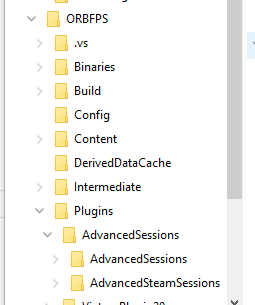
on the latest AdvancedSessions theres 2 folders
AdvancedSteamSessions
and AdvancedSessions
 velvet ravine
 uneven spoke
its building in vs
no errors yet
it said ready
so i went back
and tried to double click on the file
and click yes
and its building

didnt work
@grim ore @sleek solar
static viper
you need to read the log
uneven spoke
it goes to fast
it was going up
i was watching it
it went
95$
95%
96%
then 100%
static viper
it gives out a log
static viper
whats that link
static viper
can you send a list of plugins you use?
 static viper
i know
but i like to toy abit more
he will evtl find out on his own
@uneven spoke google the dlls in the top of the log
failed
thats my hint.
uneven spoke
ok
 karmic thistle
guys, i get a Fatal Error with a fps in my second laptop when I try to open the recent packcaged game
windows 64 bit
what should I do? I only see post of steam version of Ark and nothing related to ue4 problems
karmic thistle
I made a First Person Shooter with Online throught Steam Plugin on UE4.18.3
I tested it on my main PC and It worked
but in my second laptop it gives me fatal error
static viper
you need to find the crash log
also this sounds not like an ue4 issue
clearly it is working
just not on your laptop
drivers
karmic thistle
how can i find the project logs on an packcaged game?
static viper
i just gave you a link
karmic thistle
yeah I see on google that a lot of ppl had this issue with ue4 . 17 +
its the same error
karmic thistle
Forums
So it began with crashing mid game and now it progressed to not being able to launch the game. I keep getting the screen before loading and then suddenly the
a lot of people have the same problem, its look like Unreal has problems to start games since the 4.17 version of the motor
static viper
are you using plugins
karmic thistle
i used the plugin for Steam
its the fastest way to make a game online to play throught steam friends
karmic thistle
sure, i added some code to the ini files
and all is working fine on my main PC where I created the game
but when I packaged for windows 64 bit and tried to open the game on my laptop to test if the game works fine with the online, the game doesnt want to start
the log says "LogWindows: Failed to load 'aqProf.dll' (GetLastError=126)
LogWindows: File 'aqProf.dll' does not exist
LogWindows: Failed to load 'VtuneApi.dll' (GetLastError=126)
LogWindows: File 'VtuneApi.dll' does not exist
LogWindows: Failed to load 'VtuneApi32e.dll' (GetLastError=126)
LogWindows: File 'VtuneApi32e.dll' does not exist"
and this is the same problem that had a lot of people with Fortnite and other games like Ark
static viper
you do know that fortnite has the same problem?
karmic thistle
this started when Epic Games upgraded Fortnite to UE 4.17 +
static viper
it looks very much like the engine was updated to a higher stand
karmic thistle
a lot of people talking about the same problem, same windows log fail/missing/doesnt exist files
static viper
regardless
i hope someone can help you
this looks like simple user error
your laptop clearly misses some software
karmic thistle
🤔 sure but I hope I dont have to change my project version 🙏
 vale silo
how about this one https://www.udemy.com/unrealengine-cpp/ ?

Udemy
Unleash the power of C++ and Blueprint to develop Multiplayer Games with AI in this Epic Games-approved course.
by former Epic engine dev
vale silo
the rumor has it that people eventually want to add MP support into their Sp game and that doesn't work like that - you have to build your SP game with MP in mind
 tall pendant
dont do an MP as first project period. 😄
vale silo
and since the goal is to learn UE4 and C++, my guess is that Epic dev should provide a decent tutoring.. I might be wrong about that 😃
fierce tulip
static viper
"by former Epic engine dev"
vale silo
make multiplayer ping pong using UE4
static viper
Estimate: $458,893,924,742*
vale silo
small scope and SP/MP game
are you making a commercial indie game or just learning UE4 / C++ ?
static viper
the upper one ofc.
fierce tulip
udemy 😖
vale silo
learn Blueprints instead 😃
tall pendant
visual basic is best for ue4 tho
vale silo
how so?
maybe for some high performance projects or when you need to fiddle with custom integrations C++ is the thing.. Otherwise BP gets the job done
aye, if the jobs requires it, then yes... For indie projects you definitely don't need C++ at all (unless you need custom integration or working on Fortnite killer)
static viper
oh skill does imply more then just a few years coding
tall pendant
if you want a job at CDR/Techland you might want to learn actual C++ (not the UE4 flavor of it) first.
I dont think they're using UE4 😄
static viper
but ue4 is AAA sort of
vale silo
yeah, they use in-house custom engine
static viper
so its good to know how things work around here
its important that you know the ruleset
if you know that
you can hire everywhere
vale silo
that's what they use http://witcher.wikia.com/wiki/REDengine

Witcher Wiki
REDengine is the engine for games developed by CD Projekt RED studio for The Witcher 2: Assassins of Kings and The Witcher 3: Wild Hunt. It replaced the Aurora Engine originally licensed from...
static viper
yee i think one of their games uses ue4
but
you dont want to go with just that
you need to be more flexiable
yes it is :3
a start.
the pure skill imply experience
i hope you are making ready for a project
one that isnt ping pong in multiplayer
finally!
karmic thistle
where should I go to ask about my error? @static viper I can`t fix it
static viper
i want to see an answerhub post.
vale silo
I am guessing Owl is one of the authors of that C++ course 🤔
static viper
no i am not

 plush yew
Hello everyone!
fierce tulip

 olive yew
can someone help me with a game?
need someone to team with
i want to make a battle royale game
grim ore
There are the #looking-for-talent and #looking-for-work channels as well as maybe posting what you have in #work-in-progress to see if anyone wants to join. There is also the forums which have collaboration sections
 gleaming creek
Is there a way to do a trace for just one location?
Seems silly to have to trace between two locations, slightly offset, just to check if a space is free
(Possibly a question for #blueprint, though I'd imagine the same question would apply to C++ too, I just haven't checked)
There's CapsuleOverlapActors and CapsuleOverlapComponents, which sound like what I'm looking for, but don't seem to work as I'd expect
 worn granite
in those cases, I'd lean for whichever you're most comfortable getting the answer in. In general... I never use either. In C++ we tend to just use the world functions (actually what that function internally calls). Nothing realy wrong with doing things by calling the kismet statics, though.
And I actually don't use OverlapMultiByObjectType, so not sure what typically goes wrong with it.
gleaming creek
It's basically that I'd expect these to do the same things:
Ah the wires aren't the clearest in that shot, but both have the same inputs, but one works (boolean is true if there's something there) and the other doesn't (boolean is false)
I guess it doesn't matter; just a trace for no distance seems "wrong"
worn granite
so is the array also empty?
gleaming creek
No, it has WorldStatic, WorldDynamic, PhysicsBody, Destructible
With the trace it even hits non-entities like BSP terrain
 twilit hill
anyone here ever had the problem that when you add an adjacent landscape via the world composition window, it randomly tells you that the newly added landscape is overlapping with another one?
.. which clearly isnt the case btw
 viscid canyon
Do decals not work on BSP brushes?
 idle sail
Hey so im genuinely curious how do people make the hacks for games like pubg and CSS hacks that can detect other players/aim lock im definitely not interested in making them just curious as to how its done?
 carmine wind
can someone help em with this
viscid canyon

reddit
1 vote and 0 comments so far on Reddit
 boreal night
Why the building I imported from sketchup with datasmith have no collision? How to turn it on?
Also, I can not simulate physic on them
boreal night
Edit: I got it, manually add the collision
 languid shard
Hey lads, do we have a timeframe for 4.21 ?
 sturdy star
hi guys, i need to add brightness control to our game, best practice? parameter into power node in a post process? that won't affect brightness of umg widgets or any hud stuff - so what is the recommended Epic strategy?
 paper kernel
brightness rarely affects UI anyway
sturdy star
that's my thought, but i mean, what do epic do
whole quarry
Did you google it?
plush yew
Hey, I'm developing the Steam multiplayer, I'm pretty much done, but it doesn't work, can somebody help me please?(edited)
I can Share Screen in DM
I know it needs to be in #multiplayer
but its relevant here because its done
@plush yew try using advanced sessions plugin?
I dont know that plugin
Im using Steam plugin
what's wrong with that?
native steam support in ue is limited unless you get uworks or advanced sessions for things like friends lists and custom servernames.
oh
but still
its only for the testing and stuff
can I show you in dm my problem please?
just hopped on for a second - if you ask in multi then can possibly help you ok. im sorry.
ok np
thx
😃 good luck to you.
thanks, you too
uneven spoke
anyone have steam that can test my game out for me
i wanna see if multiplayer works
 south edge
I can tonight (still at work)
 dire moon
hey, I closed and saved my project yesterday - today I opened the same project and some assets are missing in the content browser..
the uassets are still in the right place in the windows file explorer
what is this?!
anyone got the same issue or a solution?
(how is this even possible? never had issues like that with other engines..)
south edge
did you change anything to the folder structure after you closed the project?
uneven spoke
 otReload -ignorejunk
UATHelper: Packaging (Windows (64-bit)):   ERROR: No 32-bit compiler toolchain found in C:\Program Files (x86)\Microsoft Visual Studio 14.0\VC\bin\cl.exe
UATHelper: Packaging (Windows (64-bit)): Took 33.3286171s to run UnrealBuildTool.exe, ExitCode=5
UATHelper: Packaging (Windows (64-bit)): ERROR: Command failed (Result:5): C:\Program Files\Epic Games\UE_4.18\Engine\Binaries\DotNET\UnrealBuildTool.exe AdvancedSession Win64 Development -Project=C:\uproject\BattleRoyale0.5\AdvancedSession.uproject  C:\uproject\BattleRoyale0.5\AdvancedSession.uproject -NoUBTMakefiles  -remoteini="C:\uproject\BattleRoyale0.5
" -skipdeploy -noxge -NoHotReload -ignorejunk. See logfile for details: 'UnrealBuildTool-2018.09.18-10.47.14.txt'
UATHelper: Packaging (Windows (64-bit)):        (see C:\Users\Jon's PC\AppData\Roaming\Unreal Engine\AutomationTool\Logs\C+Program+Files+Epic+Games+UE_4.18\UAT_Log.txt for full exception trace)
UATHelper: Packaging (Windows (64-bit)): AutomationTool exiting with ExitCode=5 (5)
UATHelper: Packaging (Windows (64-bit)): BUILD FAILED
PackagingResults: Error: Unknown Error
LogSlate: Took 0.012269 seconds to synchronously load lazily loaded font '../../../Engine/Content/Editor/Slate/Fonts
anyone know how to fix
 versed spear
You might be missing something? https://answers.unrealengine.com/questions/538803/error-no-32-bit-compiler-toolchain-found-in-visual.html
dire moon
@south edge nope, as I said I saved my project and closed it
south edge
Hmm bizarre
dire moon
yup
south edge
Check your files once more and if not there then: Do you have source control (Git / Perforce?). If so then check the history in there. If you don't use Source Control, I suggest looking into it to avoid problems.
and if both of those arent the case maybe your recycle bin
otherwise It's lost i suppose
versed spear
in the project folder check for backups in the saved folder
 torn acorn
Hi guys does changing scale of the character help wkth optimation
For example the character i want to use is 5,6
But what if i reduce the caharcter and the game environment by half
Does this help with optimization
versed spear
I don't know what it is with 4.20 but I had the same issue with a uasset being there but corrupt.
south edge
then aside from checking your project folder again I'd have no clue
dire moon
as I said: the files are still in the same place in the windows file explorer
they just don't appear in the content browser of UE
@versed spear im using 4.19
versed spear
that happened with my map with the build file. I had to delete the file in my project folder and replace it with one from my backup folder located in the save folder
versed spear
nope
dire moon
I'm actually glad this happened to me now
because it shows me that UE is not reliable
if this would have happened in a further development stage.. daaamn
versed spear
I am trying to deploy to android and it crashes on me all the time. I have kinda learned to work with it.
versed spear
Yea but it is good for small games to make a quick buck then move onto bigger and better things
south edge
crashing all the time? and we're not talking about 3dsmax?
dire moon
lol..
If your engine deletes your assets then it's not suited for any development at all.. Doesn't matter if the game is small or big
anyway there is a big difference between occasional crashes and an engine that deletes your files
uneven spoke
fixed it
dire moon
I can easily crash the engine by coding crap
versed spear
sweet
 void lantern
Hello, Setting fullscreen or changing resolution in fullscreen gives me some weird behaviours. Sometimes it will tab the game window down and i will not be able to bring it up again. Im using gameUserSettings to SetFullscreenMode, SetScreenResolution and ApplyResolutionSettings to do this in c++. Anyone had the same problem and have a solution? Im running 4.17
I also get this problem where it will change the game windowsize and put it in the top left corner.
 tribal snow
Can somebody please test if socket snapping in the editor is working ? Seems to be broken since 4.18 ( which was unnoticed for me until now).
sturdy star
@whole quarry yup but i found numerous responses and wanted to know if anyone else has done it in a way that ships on consoles
 iron wadi
what is the current go to way of doing modular pawn with physics on the modular hands / body / legs etc
I currently use master pose component, and I want to know if it is possible to drive physical animation using rigidbody or animdynamics on top of it
if not, how feasable is copy pose? I heard it's much slower then master pose
sleek solar
In the editor when you double click on the node it starts opening the visual studio, how to disable that?
uneven spoke
Why isnt my steam advanced sessions working
when i search for a game it doesnt find it 😕
plush yew
Can somebody please help me in DM? I've programmed it all, but I need help
please please please
fierce tulip
@plush yew those calls for help dont work all too well, its better to post the actual problem in the right channel.
#cpp for instance, unless its not programming ofcourse
 wet dome
when will the unreal wiki be fixed? is there an ETA on that? 😦
languid shard
@plush yew which is a shame really
fierce tulip
¯_(ツ)_/¯
iron wadi
didn't ask the question
expects answer from someone online
eh?
dire moon
anyone knows how I can import a uasset file manually?
fierce tulip
place it in the project folder
dire moon
doesn't work
fierce tulip
lol, Fearkills chat history is a goldmine
it works if the uproject is same ue4 version or older
dire moon
no it doesn't
"hey, I closed and saved my project yesterday - today I opened the same project and some assets are missing in the content browser..
the uassets are still in the right place in the windows file explorer
what is this?!
anyone got the same issue or a solution?
(how is this even possible? never had issues like that with other engines..)"
fierce tulip
are they 1kb?
dire moon
no static meshes
the files just disappeared in the content browser that's why Im trying to import them back manually
fierce tulip
so they are the correct filesize?
which ue4 version?
do you have version control to revert em that way?
 astral rain
You can't just copy it from explorer?
dire moon
yes correct file size, UE 4.19, no version control
ohhh
dudes
again: I saved my project and closed it
next day I open it the assets are missing in the UE content browser
but they are still in the right folder according to windows file explorer
fierce tulip
dude relax, we are trying to help with the bare minimum ffin information we are getting from you.
dire moon
so, no copy them back from explorer doesn't work
I feel like you don't get the point of my problem because the problem is soo weird lel
@astral rain
it's all good
fierce tulip
try one of the older saved files in the backup folder
astral rain
I mean open file location to the asset. Copy. Paste it where it needs to be, while still in explorer.
dire moon
huh?
fierce tulip
/saved/backup
dire moon
@astral rain I don't understand what you mean?!
@fierce tulip there are some backups in my backup folder
@fierce tulip should I copy them to my normal content folders?
fierce tulip
copy one of the meshes there to where it should be, see if it works
dire moon
kk
astral rain
Copy/paste entirely in explorer
plush yew
anyone know how to randomize vectors? im trying to randomly spawn instances of an object on a level
dire moon
@fierce tulip i hope this helps, it's really a pain to find all missing files and reimport them...
fierce tulip
thats why you have version control
also what panick button is saying, is dont try to import them into the content browser, that does not work. you need to place them in the right location inside windows explorer
dire moon
@astral rain as I said, UE4 doesn't recognize any of the files - copy, paste or anything doesn't work! the files are still in the correct location in the windows explorer! UE just don't recognize them
astral rain
Yes, thanks.
Cut them, move them somewhere and then move it back?
I don't know, though. Never came across that problem.
dire moon
@fierce tulip sure, version control is cool but perforce is not the best thing for a single dev and GIT sucks with some files
@astral rain same for me.. this problem is so weird..
astral rain
Random vectors can be done pretty easily via random float in range
dire moon
my project destroys itself lel
fierce tulip
perforce is free for one person, and with digital ocean its cheap as well.
saves you a bleepload of headaches down the road
there is no excuse to not have version control
dire moon
lol
there is also no excuse for an engine that deletes files
never happened to me in unity or something else
astral rain
I just duplicate the project as version control
iron wadi
or svn at least
dire moon
@limpid star yeah, I guess that's the best option
iron wadi
my project folder is 200GB tho
fierce tulip
yuck
astral rain
Jeez
dire moon
thx for the source control recommendations but If I can't fix this problem I'm gonna drop UE anyway I guess
so much files.. It would be days just to get back all the files
astral rain
Mine is like 250ish mb
iron wadi
i mean sure, the engine fucked you now
but you are just shooting yourself in the long run if you go back to unity
just saying
dire moon
why?
iron wadi
so its actually 280GB but 110GB of that is SVN shit
66GB is binaries, derived cache etc
so only about 100GB of content
fierce tulip
unless 4.20 the only way that happens is if you open the project in an older version of engine, you didnt save properly, you moved files around, windows decided to swap drive letters, or some random inexperienced mishap.
but sure, blame ue4 :p
astral rain
I use 4.20 and I don't have that problem.
fierce tulip
luckily not everyone has the issue, but there where some reports with ue4 being rather... odd
(4.20)
dire moon
who should I blame if my files are gone? I guess the engine right?
astral rain
I run below system requirements too.
iron wadi
yourself
dire moon
I would also blame unity if this would happen with unity
fierce tulip
so you tried moving back the back-ed up file yet?
astral rain
I think unity is fine.
dire moon
I'm using windows for like 20 years now.. I guess I'm able to save a prject and shut down my pc without changing drive letters or something
lel
fierce tulip
has nothing to do with you in that specific case, but one of the win10 updatess about 5 months ago had a chance to mess up drive letters if you had more than a few drives
astral rain
Good call
fierce tulip
^ didnt even think of that one
dire moon
@fierce tulip might be possible in some rare cases, but I would know if my drive letters changed
anyway no windows update etc
@iron wadi no filters
can see all other files
iron wadi
can you show us screenshot of your content browser in that folder and the folder itself?
dire moon
ya
astral rain
Yeah, man. I'd at least try to import(copy/paste)a missing asset in a new project and see if that will even work.
astral rain
If it does, might be time to start a new project, import stuff, and start over with a lesson learned.
dire moon
lol..
I tried yoeris solutions but UE doesn't even recognize the uassets from the backup folder
wtf
fierce tulip
need to rename it
astral rain
A lot of c++ programs rename backups like "this file.asset.bkp" or something
astral rain
I dunno, man.
 limpid sandal
Hi
astral rain
Heyo
limpid sandal
Math expressions on graphic books look terrible on kindle :<
dire moon
@limpid star no effect.. UE still can't find the files
thx for your help @all
gonna post some screenshots
 manic pawn
what happened?
iron wadi
hey my physics assets are falling trough the floor when I simulate
wtf
afaik pelvis is the reason, because that falls trough the floor
dire moon
@manic pawn "I saved my project and closed it
next day I open it the assets are missing in the UE content browser
but they are still in the right folder according to windows file explorer"
iron wadi
if i simulate everything except pelvis, it stays in place
dire moon
same
manic pawn
is there something in the log maybe?
dire moon
I mean it wouldn't even matter If I could import the uassets back or let UE index the files again
I dunno something like that
iron wadi
there must be a reason why it wont import
dire moon
But right now I can't do anything beside starting over
iron wadi
for example it thinks its imported
try removing the file, save all, open ue4 and THEN copy the file into the folder
astral rain
I've been messing around with converting svgs to meshes via blender and it's working out nicely for level art, but animation with characters is probably gonna require swapping meshes (which I have a simple system in place to do that atm), would that be bad for performance?
iron wadi
and refresh assets
dire moon
@limpid star yup tried fixing up redirectors
manic pawn
you don't "import" uassets
you just load them
there must be a reason why it's not detecting them
maybe it printed an error to the log
dire moon
I know that's the problem actually
If I could import them, I would be able to fix my problem
manic pawn
if the problem is that the assets got corrupted somehow, that would not help you
dire moon
I tried copying backup files from the backup folder, UE doesn't recognize them
the backup files shouldn't be corrupted..
astral rain
Have you tried importing an asset into a new project yet? That should determine if they're actually corrupted.
astral rain
Oh, cool.
dire moon
maybe i could try to create a new project and migrate the complete content folder from the old project
astral rain
Might just wanna start a new project. Import your content folder and press on. Seems like it would be the surefire way to get back.
Yar.
dire moon
I hope..
astral rain
Anyway, do you guys think rapidly swapping meshes would be a terrible idea in regards to performance?
E.g. could android handle that?
dire moon
the size is correct in relation to the others
I'll check permissions
permissions are correct
maybe fate is telling me to not use the assets 😄
I dunno..
@limpid star moment
"there is no data validation"
the missing file is not stated in the log at all
but I noticed a thing
only files that should be in my level are missing
i mean the last level I worked on before I saved and closed my project
all the files missing are related to the level in some way
sturdy star
anyoen know if it's possible to add a child to a widget switcher dynamically at runtime?
grim ore
I would assume so as they are just children of the switcher widget but I have never tried
plush yew
hi
does anybody here have this plugin - https://www.unrealengine.com/marketplace/don-s-dynamic-mesh-effects ?
I want to check something before buying

Rapidly create visual effects on characters/landscapes/props or boost gameplay with Pixel Collisions. Multiplayer, Saving/Loading, Decals, UMG Text, multiple UV workflows all supported out-of-the-box with just one Blueprint node and a super-easy workflow.
 upper quartz
hi guys, is "World position offset" not support on mobile ?
plush yew
Can anyone help me with a master material? I want it to be completely non reflective
 grim sinew
Set specular to 0. Done.
plush yew
Theres nothing called that
grim ore
non reflective I would assume would be roughness 1 and metal 0 ?

We cover the basics of art content creation, some of the reasoning behind various PBR standards (without getting too technical), and squash some common misconceptions.
plush yew
It's still kinda reflective
grim ore
well that's the way the world works unfortunately 😦
plush yew
:/
grim sinew
What do you mean there's nothing called that?
grim ore
It's old but https://polycount.com/discussion/154488/are-materials-always-reflective-with-pbr-rendering

polycount
I'm working in UE4 and I would like to have my material without any reflection, so I set metallic and specular to 0 and roughness to 1.
 warm tree
@grim sinew Where do you see it?
grim sinew
Always a shame when I need to block new people to the discord on their first message
warm tree
haha
plush yew
@grim sinew I said it's a master material, I was making an instance of it.
grim sinew
Then add it to your master material.
"Master material" tells me nothing, anyone and their grandmother can make a master material and they'll all be different.
If it doesn't support it, add support.
plush yew
dude i have no idea how to do that kind of stuff, i didn't even make the material myself
grim sinew
If you aren't willing to look up how to add a scalar parameter to a material, something that takes literally 1 button click and then naming it, I can't help you.
plush yew
i don't even know what 'scalar parameter' means dude, i said i'm new, how do you expect me to look it up?
grim sinew
The UE4 docs are so good they may as well be a picture book, I would start on the material documentation.
You need to be willing and able to find out this kind of stuff or you won't be able to use the engine in any real capacity.
plush yew
I'm just trying to create something, people on reddit said that's the best way to learn stuff
grim sinew
If you want to learn, you'll get a lot further without using stuff like master materials other people made and gave to you. It's incredibly user friendly if only you're willing to read the manual.
https://docs.unrealengine.com/en-US/Engine/Rendering/Materials/MaterialInputs For you, I would start here.
https://docs.unrealengine.com/en-US/Engine/Content/QuickStart There are also things like this that get you through the basics very quickly.
plush yew
Do you know how to paste stuff into materials? Also thanks, i'll check it out
astral rain
Ctrl+v
plush yew
Just open the blueprint window and press ctrl+v?
astral rain
Assuming you have something copied, yes.
grim sinew
The material editor* And yes, ctrl+c and ctrl+v both work in any UE graph editor.
astral rain
Some nodes won't be compatible, depending where you copied them from.
grim sinew
The material editor, blueprint, etc all work
plush yew
oh okay, it just says some nodes conflicted, i'll have to figure that out
grim sinew
But yeah. The documentation will be your best friend, it's really good. Next to that, on Epic's youtube page, they have literally hundreds of hours of training material, and they add more every single week.
Where they have people go through basically every single feature, step by step, and show how they use it
astral rain
Yeah, reading docs is pretty amazing. I've only been using UE since the beginning of August and my project is coming along nicely.
I'm pretty ignorant as to what all you can do with materials, but I'm doing 2D, so I learned what I needed to and stopped there lol
tall pendant
rtfm. always.
astral rain
There's like... A billion tutorials for just about everything too.
Except 2d. No one does 2d in UE. They all say use unity lol
grim sinew
Well they aren't exactly wrong.
Unless you have a very compelling reason to use 2d in UE, I would say the same
 steady sequoia
Only reason I use Unreal for 2d stuff is because I like the engine and don't feel like touching Unity at the moment
astral rain
I have good reasons, I think. I already know c++, and I like UE's business model better.
I mean, I got a pretty decent start in unity but here's the major turn offs: The BIGGEST one, though it may seem small to most, is that it's too bright and you have to pay a monthly subscription for the dark theme... Which is really dumb, but I can't stare at white for long periods of time. 2nd is that the few questions I asked on the forums were answered with "buy suchandsuch from the asset store".
steady sequoia
This might just be because I suck, but after I hopped onto Unreal a few years ago after using Unity, Unreal immediately attracted me because of how sophisticated it felt. It felt like it already had numerous useful systems in place that of which in Unity I had to create on my own.
astral rain
Yes!
steady sequoia
So far the one thing I've ran into that I like better in Unity than in Unreal is that I don't think Unreal allows for saved modular components on your actors with Blueprints whereas in Unity you can freely use prefabs wherever. I think you can do it with C++ but I haven't looked into that yet
astral rain
Building from source is a pain, but everything else has been going smoothly. Everyone was warning me about project size and stuff and I've added almost all of the assets from a game I started in gamemaker over and it hasn't really increased in size. I'm still at 350ish, so I don't expect a massive size increase.
350ish MB, that is.
steady sequoia
Yeah and there are multiple things you can do to shrink the package size
It is still quite fatty for something 2d if you're doing that though
A compressed 2d game I made for a game jam a while back was shrunk down to something like 200 mbs and 60 mbs when compressed
But people still told me they thought it was a bit big
astral rain
Right, but I made monosvg render in UE (which is probably the hardest thing I've done so far) but if I duplicated my assets 10 times, I highly doubt it'll jump above 5mb. Svg files are super tiny.
Really?
I mean, cupheads is a few gigs.
steady sequoia
I mean for a game jam game
Since i think some game maker games and such were less than 20 mbs
astral rain
Yeah, that might be kinda big.
Yeah, the game I'm remaking in UE was 50mb in game maker.
grim sinew
In the year where the smallest hard drive you can even get is 1TB usually, 60mb isn't something to worry about
astral rain
But I also really pushed the limits of game maker. The UE version will run on a crappy phone, the game maker version cannot run on a lower end laptop. So, the way I see it, size is a small cost for running on everything.
steady sequoia
Yeah it wasn't so much a worry from the people downloading the game but rather conveinience
astral rain
That's just some crappy game my kids downloaded. Its 266.
MB
I dunno. I think UE is pretty great for 2d so far, just needed some proper set up to get it going. It natively has all and more functionality than gamemaker, and I made that work out, and this is working out pretty well.
Only thing I wish UE had was an option to package as a standalone exe.
As in, not an installer, but a single exe that handles the game with no directories.
I imagine the the need for that is probably nonexistent, seeing as how everyone (mostly) uses UE to make big, beautiful 3d worlds and such.
 livid haven
Wait, the Game Maker version can't run well on a low end laptop, but the UE4 version is running fine on a crappy phone? o_0
Also, you can probably trim a lot of fat relatively easily.
astral rain
Gm is terrible at swapping texture pages.
 wary wave
UE4 doesn't really support 2D all that well at all though
rudimentary features for managing 2D elements are for the most part missing entirely, and those that do exist have been rotting for a long time :/
astral rain
It's not really an issue with pixel art games, but if you have several 2048x1024 raw images, gm needs to swap but more than a few swaps per 1/60th of a second creates glitches.
UE seems fine for 2D to me.
 broken shadow
I have confidence in Panick, he seems to have a plan :P
Sounds like he needs UE4's 2D for handling very large textures that need to be swapped between regularly
worn granite
if it works for him, that's great. Not saying he can't possibly use UE4 for 2d
wary wave
sure, you can use it
grim sinew
Nobody can possibly use UE4 for 1d.
wary wave
I've seen a 1D game in UE4 😄
I'd be wary of using Paper2D though, it's not been updated in a long time, and as time goes on, things are just gonna stop working in new versions
astral rain
Well, I made a svg render (rather ported tinysvg) so I can use 32x32 textures as masks for emission etc
grim sinew
"I made a svg render" And with those 5 words, you convinced me you can make it work
wary wave
if you don't mind maintaining your own engine version in future you might be fine, hehe
broken shadow
SVG as in scalable vector graphic?
It's possible to do stuff with those?!
astral rain
Yes.
grim sinew
Apparently
astral rain
Only engine that is actively maintained that supports vector graphics is uh.
grim sinew
flash
astral rain
Well yeah, BUT
Starling
That.
And that is 2d and requires coding in as3
I want to make use of 3d stuff.
Another option I considered is importing the svg files into blender, converting to a mesh and moving it to UE.
livid haven
It sounds like you could make an importer for SVG to meshes for UE4.
astral rain
Possibly. I haven't looked into how to even make a plugin yet.
I'm like a little over a month into UE.
plush yew
How do i make a material transparent?
astral rain
Select transparent on the details. It's like... Maybe the 3rd drop down?
You'll also need to set the opacity.
grim ore
Unity has added in support for SVG finally and it's beautiful
livid haven
Oh, uh, then yeah, don't go about trying to add a complex feature like this to UE4 after a month. XD
astral rain
I looked into it.
Their svg is just monosvg, same as godot etc and it still uses a png texture.
Their svg is just monosvg, same as godot etc and it still uses a png texture.
Oops.
static viper
student?
grim ore
 sacred snow
Yep
broken shadow
Or a thin shell, more like it :D
sacred snow
Ba dum tsss
static viper
did you really change your avatar to that
broken shadow
Your eyes do not deceive you
I'm a simple man. I see a jello gif, I make it my avatar!
sacred snow
But yeah I got into coding fairly recently and it's probably my favorite thing to learn about now oTL
static viper
blueprints are great.
sacred snow
I tend to like to input code manually actually ^^" (assuming we're talking about what I think we're talking about??)
static viper
dangerous
static viper
your choice
but the amount of errors you can make
is less with blueprints
so
maybe dont
the mountain will be more huge then youd imagine
but
ofc
you can start with manuall
astral rain
Oh!
I just looked again, unity DOES support true svg, as of August 14th.
I was looking around about a week or two prior.
Mine is still more diverse and can be used on textures and with flipbooks etc, so my effort is isn't wasted.
 lilac cobalt
hello guys
I have two obj use same Textyre
but when import it into UE ... two material was generate
They not use same material
 heavy falcon
Delete one and throw the first on the second ?
heavy falcon
delete 49 and throw the first on the other 49?
 leaden garnet
Might be a thing in your import settings.
I'm fairly confident you can import a model without its textures
grim ore
pretty much that, don't import materials so you can create you own and assign it. UE4 doesn't know that you have the same texture for different objects so it creates a material for each object for it's textures.
lilac cobalt
I have one idea
First I import texture and create material
then I import 50 obj without option Import Material and Texture
grim ore
that should work yes
heavy falcon
lol
astral rain
Is there some secret black magic spell to use flipbooks in umg, or is it just not supported?
livid haven
That still seems like an usual workflow to have to do.
I would think there's a better way to do it than that.
Because then you won't have any of the default materials setup on those meshes.
 hot ledge
Why the hell is this on steam
https://store.steampowered.com/app/861290/Shooter_Game/#app_reviews_hash

Shooter Game is a Multiplayer FPS . Fight in various maps with different weapons in both single and team death matches .
Price
$8.99
heavy falcon
@hot ledge y?
hot ledge
What
livid haven
A drama, in 3 parts.
 mint raptor
wow, they added stuff but didn't bother to change the name or intro screen. https://gph.is/2cpbE6Y

 wary wave
this isn't the same page? I thought it was the same one
nah, this is the same one
it's been there since May
I guess now it's 'released'
fierce tulip
sad part is, they might make more money with that than some of us in a month XD
astral rain
Oh, it's just an asset flip.
I seen the shooter template gun.
Don't recognize the rest of it, though.
Oh, nm. Some of the hands are the stock mannequin thing.
 cinder pasture
A simple question. If I change the skeleton of a mesh would the old morphs of old skeleton be still there?
Anyone who could answer me. IK it's silly, but still I wanna know.
 pallid compass
No they wont
It requires some weighted base data
i guess is away to think of it
and in general all animation data is attached too the skeleton
cinder pasture
Ah okay. But can we shift morphs from a skeleton to another skeleton in 3d software like blender or 3ds max?
@pallid compass?
pallid compass
Maybe
It depends on the software
If i remember correctly, been awhile since i used themn
as heavy as morphs are in the actual mesh
the track data is written in to your life
file**
but it still required skeletal mesh bind data
so u might have issues shifting it
However
U could bake it down in to keyframes maybe and copy it
but thats a tiny bit time consuming
Dont quote me on the first half of that though, its been awhile
cinder pasture
Ahh okay
 novel ember
What's the easiest way to see if an array contains an item from another array?
Do I have to ForEach it?
 digital anchor
Array.Contains(Array2[item])
viscid canyon
Is there a way to get a video that is being applied to a material to be sized down to a specific side and also in a particular corner? I have an emissive texture that has the screen in the corner for a TV but my video is of course all the way across the texture. I need to be able to size it down and move it.
or if its possible to somehow have it size and move to the white part of my emissive texture
 sullen wraith
anyone know how to fix, when you go walking over an item with gravity, character going flying?
 tropic oracle
Anyone know what this is all about? Appears that previous forum posts on this were closed without giving details as to why the Editor is sending out data
 queen plover
completely spitballing here, but maybe to let Epic keep track of games that get published but don't pay Epic their fair share
tropic oracle
possibly, found a section in Privacy - Usage Data as follows
and forum posts alluding to when an Unreal game is bundled it as a stand-alone also sends data to these URLs
which would lend to your spitballing
manic pawn
it's just sending some normal analytics
the part that ships with games has been deleted in 4.20
probably because gdpr
sullen wraith
anyone know how to fix, when you go walking over an item with gravity, character going flying?
 tawdry raptor
yeah its a collision thing
 fossil ore
Is there a way to get decals on skeletal mesh?
I want to apply a ball on character in order to create a decal
tawdry raptor
how can I fix this issue?
basically the inside of my mesh doesnt have collision
its a vent and I need to be able to walk inside of it
I tried putting a blockingvolume but the nav mesh wont go on
sullen wraith
How can you make it so objects are only visible for all players within a certain distance?
tawdry raptor
the inside is not missing its a vent
sullen wraith
can you set that for each individual object? @whole quarry
tawdry raptor
this is what the vent looks like
why wont unreal give it the inside part so I can walk in it
static viper
How is that a vent!!!!
Oh no
You are expecting a nav mesh to work inside of that??
It does not even have an inside!!!
And have you checked if the player can even fit inside a tiny space?
 sudden agate
Well, A Mesh usually has Collision automatically generated which is a convex shape.
You either use Complex Collision (Per Poly) or you make a custom simple collision where open parts dont have a collision
 latent moth
all, what is the best way to apply radial damage to pawns but at the same time:
- block trees and walls
- not block small foliage elements
 crisp fable
guys why does saving materials take so long
i have a not very complicated material, on a 1080ti, and its taking at least 2 minutes every save
the project is on an ssd
 cloud cobalt
Materials are compiled before saving
So the speed of your CPU is the most important
crisp fable
if its multi-threaded i should be set - 32 cores & 128gb ram
crisp fable
ok
im following this ill see how it goes

Medium
Reducing shader permutations to make testing and iteration faster!
cloud cobalt
Yeah
 stark rivet
so uh is it possible to render an animation with a transparent background?
 ashen brook

Epic Games wishes to issue a slight correction.
Unreal Engine does not support “Volumetric Dog”. The statement was made in error.
Retweets
132
Likes
777
 Twitter
😄
fierce tulip
the replies are just as funny
 fierce tulip
slow as usual, but works for me @velvet ravine
 opal coral
any way to edit the tangents of multiple overlapping curves (such as a vector)?
fierce tulip
@opal coral cascade?
opal coral
yeah
fierce tulip
left of that tangent thing you can enable and disable seperate channels
https://giphy.com/gifs/espncfb-l2JhKUupdSKPfEgZG
when ue4 opens the wrong animations tab in persona since there are two versions, one being depreciated and a new one..

 opal coral
hmm yeah, I can turn each channel off and on. but can I edit all of them at once? if I select them with box select, I still only drag a single of the tangents
fierce tulip
ctrl + alt + drag makes me select them all
paper kernel
still getting Accessed None errors after explicitly checking validity before calling location for scene component

opal coral
yeah, you can select them all with ctrl alt, but can only seem to move one at a time still
fierce tulip
ahh, i tend to manually adjust the values instead of moving that thing, which never worked in ue4
i just alter the generic things like curve, curve clamped, etc
then tweak values in the module itself
 regal mulch
And today on "Shit the Launcher does.": Updating Fortnite in the Background, even though the Launcher itself is closed.
 silent lintel
Hey, I cant make a click event work in c++ with OnClick.AddDynamic
    ClickableBox = CreateDefaultSubobject<UStaticMeshComponent>(TEXT("ClickableBox"));
    ClickableBox->OnClicked.AddDynamic(this, &AClickable::OnClick);

    RootComponent = ClickableBox;
    [...]
void AClickable::OnClick(UPrimitiveComponent* actor, FKey key) {
    GEngine->AddOnScreenDebugMessage(-1, 5, FColor::Red, "test");
}
and in the CharacterController constructor i got
bEnableClickEvents = true;
Tried to get if I forgot something from the CPP Puzzle example but couldnt manage to find something
wet dome
is OnClick a UFUNCTION?
silent lintel
just saw that on a help thread, it wasnt, currently trying with it added
wet dome
yeah you need it
silent lintel
still does not work 😐
wet dome
eh? can you post your header file?
silent lintel
nvm
I done goofed, added a cube to the component rather than setting the UStaticMeshComponent to a cube
and as i clicked on that cube instead of my meshcomponent that one didnt get the click x.x
wet dome
👀
silent lintel
But ty 😄
wet dome
np
wet dome
Does anybody know what happend to Unreal tournament? Still on indefinite hold?
manic pawn
the entire genre kind of died
wary wave
it was never going to be successful because it failed to really do anything new
this is the big problem with arena shooters as a genre
they stagnated and failed to move on from Quake or UT roots
if you want to make a successful arena shooter, it needs to be based on a new / different paradigm
to an extent, RTS are in the same place - nobody has built a big budget game to compete with Company of Heroes or Supreme Commander for quite some time
there have been some solid indie games in the case of RTSs though
cloud cobalt
I mean, I'm pretty sure the arena genre is still fun, but obviously re-releasing UT3 won't cut it
I'd probably play an arena shooter that had a well-thought-of progression system, lots of customization, maybe RPG elements
wary wave
UT3 in itself is just the fourth iteration of the sme formula
wary wave
I'm not sure an arena shooter can have a progression system or RPG elements
I'm not BR games qualify, since they usually have emphasis on large open environments, inventory management, and feature tactically orientated mechanics
arena shooters tend to eschew tactical elements entirely in favour of heroic individual play
cloud cobalt
In any case, the core UT formula is probably not viable these days
wary wave
aye, it had it's day
cloud cobalt
The new UT didn't really had a shot. Distributed with a forked engine source instead of working with binary releases, and a botched community relationship where Epic didn't lead the project, but did enough that the community didn't feel like they had to do it
I tried it a few times, the menus were incredibly confusing
It didn't feel like an UT title at all
wary wave
I tried it a bit, and didn't get on with it, the core mechanics just didn't feel great
 honest vale
I couldn't even play it because of the keyboard acrobatics required for all the movement features
 ruby folio
A while back there was a new feature added for material layers. Anyone know what it was called? Im sure it was something secondary to actual material layers...
ruby folio
@fierce tulip Noone used it?
sullen wraith
congrats
vale silo
should I just cherry pick commits from 4.20 branch (fixes that are going into 4.20.3) and merge them int Oculus 4.20.2 fork or should I wait for 4.20.3 (which isn't coming out any time soon) ?
@frank escarp congrats! So, does it mean VR career is over ?
 frank escarp
nah
im also still waiting to see what happens with the last offer
wich is on Playgrounds, as Engine developer for a microsoft next gen action rpg exclusive
4 year project
vale silo
I see
frank escarp
on pubg is gameplay programmer, but the importance of the possition is huge
after all its implementing modes and stuff for a game with millions of players
vale silo
and I am sure PUBG will be still bank rolling, while MS can shut down the project at any time
ruby folio
@fierce tulip Seems it hasnt been removed.
https://forums.unrealengine.com/unreal-engine/announcements-and-releases/1442375-unreal-engine-4-19-released
fierce tulip
@frank escarp I know, it was probably mainly about me not wanting to be working at the office every day
@ruby folio its in experimental, and afaik wont go beyond that
 ruby folio
Unreal Engine Forums
We're excited to announce that we've added support for Material Layers in Unreal Engine 4.19 as an experimental feature. Below is some basic documentation to get
haha Just linked to the same post
OK cool. Thanks for the clarification @fierce tulip
fierce tulip
np, sadly losing paragon resulted in losing that atm
vale silo
@wicked tiger with hurricane hitting NC hard, do you guys have an ETA for Epic resuming work on 4.20.3 / 4.21 at full force and an ETA for 4.20.3 release ?
 supple totem
hi all, is this the proper place to ask questions about using the engine?
astral rain
Sure
regal mulch
@supple totem Yus, just make sure to grab one of the sub channels on the left that fit your topic
plush yew
So i have a low poly water material, how do i make it kind of translucent but still have the reflections?
If i put it to 'translucent' it just becomes one blob of blue
plush yew
Where do i turn them on?
cloud cobalt
@plush yew Look at the different options in the material
Somethig like lighting mode, pick surface per pixel
If it's still called that
plush yew
There's one under 'translucency' called lighting mode, but there's nothing called surface per pixel
nvm i think i found it
 midnight yoke
Soooo
Can't launch the engine after latest 4.20.3 update
I don't understand why bother creating an error code if it's not in the documentation
static viper
Its very likely auto created
opal coral
having some trouble getting mesh emitters to change the alpha over time, even if I use the Particle Color node in the material's Opacity Mask. any ideas?
 wicked tiger
@midnight yoke - Were you able to get it to work?
midnight yoke
Nope @wicked tiger
Only workaround I found is to open projects directly. Or create a new project from within an existing 4.20 project editor.
versed spear
well
Right-click on your Epic Games launcher desktop shortcut Select “Properties” In the line labeled “Target,” add the following to the very end (after the quotation mark): -SkipBuildPatchPrereq It should look something like this: “C:\Program Files\Epic Games\Launcher\Portal\Binaries\Win64\EpicGamesLauncher.exe” -SkipBuildPatchPrereq
Click “Apply” Double click the shortcut to run the launcher and try again and make sure to add the space between the quotation and dash
 lament kraken
midnight yoke
lament kraken
midnight yoke
Thank you @versed spear it's helpful. But I would prefer to know this alleged new prerequisite so to fix it and avoid any surprises
versed spear
The problem is most likely your just not getting the permission needed to install it. https://answers.unrealengine.com/questions/605360/necessary-prerequisites-have-failed-to-install.html
grim ore
it works here so weird bug for sure 😦
versed spear
From what I am seeing is that it is trying to install it so it has the file. The problem is it is having trouble writing to to folder location it is trying to install to.
midnight yoke
It's not like this is a fresh computer or something. I have 6 versions of UE4 currently installed, and up to 4.20.2 there were no errors. The 4.20.3 introduced this
grim ore
were you at the machine when it finished the download?
I know before I have had to allow the pre reqs to reinstall and if I was not there it would fail silently
I've had it install the pre reqs after the install and first launch as well, which while weird did work
 rancid violet
how much money would this cost
grim ore
between none and everything
rancid violet
excuse me i dont understand what u mean
grim ore
You did not say what you were looking for a cost for unless I missed it
rancid violet
i mean can i make this game without spending money
grim ore
If you have the skills then yes, money just pays for things you don't have or can't do
rancid violet
i have never made a game in my life so i have no skills
grim ore
then you need to pick time or money. Spend the time to learn and do it yourself or spend the money to pay someone who has to do it.
There is no way of knowing how much a game will cost unless you have exactly what you are looking to do down to the detail including time
 unkempt isle
hello guys
i want to make a day counter
every 2 seconds it adds a day
how can i save them
like after closing level and reopening it to be at the same day
with int
grim ore
You can use the save game system to save stuff to a file
unkempt isle
i tried with save game but then the counter doesn t work
grim ore
the save game system should work for it, what part of the system does not work for you?
grim ore
no, I don't do DM's but you can post it in here or blueprints and someone might be able to figure it out. Have you followed the documentation for the save system?
unkempt isle
i made an int variable called int and in savegame file a int variable called daysave
grim ore
ok so first thing why are you loading the save game repeatedly?
and 2nd you are not saving anything, your node is not hooked up and your save game object is not hooked up
grim ore
and another issue is you never load the save game when the game starts again so you will always default back to your default save game settings
plush yew
okay guys i gonna build a computer for unreal engine should i need 32 gb ram? or 16 gb is enough?
grim ore
if you want to run just the engine with nothing else, 8gb is fine. If you want to use other things at the same time, 16b is "fine" but both of these depends on the project.
I personally run 64GB on my main machine because I don't want to ever run out of memory lol
example: third person project, 8gb is fine. Infiltrator demo? more than 8gb. Kite demo? 16gb is probably minimum
grim ore
so buy the most you can afford based on the project you will be working on
yep with that said I have ran the editor on a 4gb pentium machine and while it sucked I could at least do basic material and BP work if needed
plush yew
my current system is enough for sample projects
like third person
8 gb ram i7 3630qm and radeon 7670M
grim ore
I would personally aim for 16gb as a base for any new machine I was working on for some headroom. 32GB if I was planning on streaming, chrome, and UE4 all being open at once and I wanted to not stress
plush yew
but when i use assets like kite demo i got 5 - 15 fps
grim ore
well the kite demo eats Titan cards so it's less the memory and more the GPU
I can run the Kite demo on a 5820k and a 1080 with 64gb ram and its not 30fps steady for example
plush yew
ty for your advice
grim ore
yep yep
plush yew
i will buy 32 gb ram
grim ore
well one thing to consider is how long you plan on keeping that machine, a 3rd gen cpu is getting fairly old
grim ore
and my guess is that is a laptop soooo
plush yew
yes my current machine is laptop
but i will upgrade to desktop
R7 2700X + gtx 1070 or rtx 2070 maybe
grim ore
ah yeah then thats a good 6+ year machine, 32gb ram might not be a horrible investment if you can get a good deal
@unkempt isle well what do you have now. Why do you have delays in there btw?
plush yew
6+ years thats sounds good
grim ore
ok so your trying to get a number, add to it every 2 seconds, then save that so you can use it later?
grim ore
where is this code at? in the level, or in a special blueprint or ?
it looks like in a umg widget
unkempt isle
yeah
in a umg widget
maybe it was easier if i did it in the savegame file and then i cast it
?
grim ore
the construct part is partially right. You want to check for a save game first tho and if it exists load that number into your variable and use that save game object for later. If it does not exist you create a new save game object for later use. this is your first issue because right now you won't be loading the save game
unkempt isle
ok
grim ore
the tick event fires every frame and you probably dont want to use a delay in it. If you want something to just count every 2 seconds and do something you can use a timer, have it add to the number, then save your game.
so after you load/create your save game in the construct you would start your timer. the timer event would get the current number, add whatever you want, update your save game with the new value, then save it out. this might not be the most efficient but its the basics for what you want
unkempt isle
so the check one goes after the construct
and then i link the delay
and in the final the save
i got it
grim ore
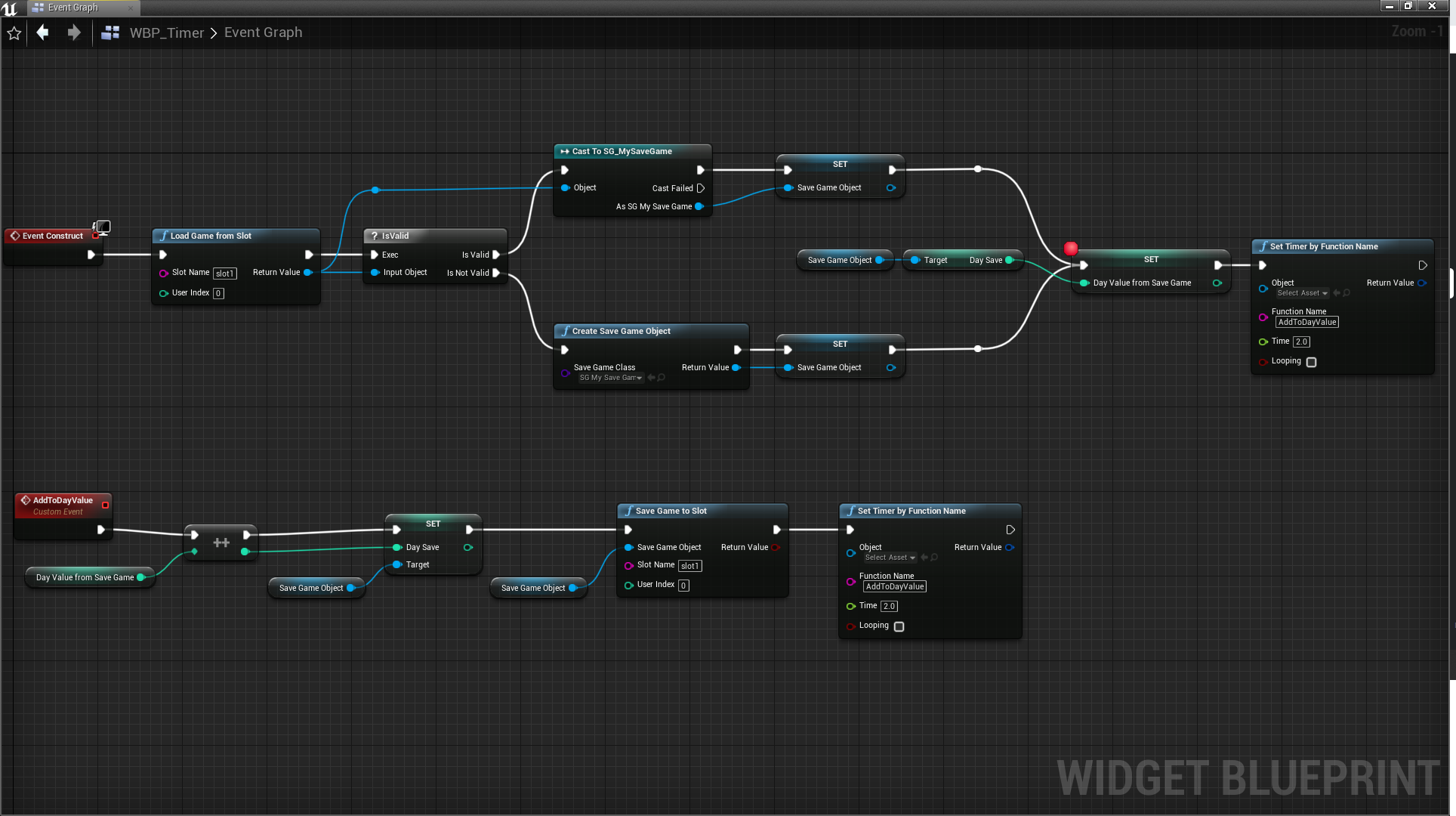
awesome. Here is a way to do it using no delays if you were still using them or tick. No real biggie either way but avoiding tick when you dont need it is a good thing to try and do. https://i.imgur.com/w1UolsL.png







 glossy elm
? Why not make the timer loop? As he wants it to run each 2 seconds instead of calling he timer again?
grim ore
It's just the way I prefer to do it so the function controls if the timer fires again or not. It lets me put in extra logic if needed to not fire it again later if I wanted, like if the number hits a certain value or perhaps the timer needs to get extended out to a longer time for some reason.
plush yew
Why does Unreal Engine lock up literally every time my bluetooth headset connects or disconnects?