#ue4-general
1 messages · Page 293 of 1
 earnest pawn
where is the best place to assign default values to your member variables in your class?
like should it be done when declaring the class in the header so like Float somethingsomething = 1.0f
or in the constructor afterward like somethingsomething = 1.0f
 storm venture
from what I understand @earnest pawn, you should set those in the constructor, in the .cpp
so like MyActor::MyActor() { somethingsomething = 1.0f; }
earnest pawn
i noticed that sometimes when i set them in the constructor, when i compile, the values in blueprints get reset to the defaults
 weary basalt
If you initialise in the Header, you need to keep in mind that if you want to modify the default value it may cause you to have to recompile alot more code than with initialisation in teh constructor.
Header is compile time, constructor is runtime.
Something to also keep in mind.
I typically always Init in the Constructor.
earnest pawn
ok thanks
can someone explain to me why you need a UParticleSystem* to spawn an emitter
and why do you do this
ConstructorHelpers::FObjectFinder<UParticleSystem> ArbitraryParticleName(TEXT("ParticleSystem'/Game/Path/To/ParticleSystem/PS.PS'")); if (ArbitraryParticleName.Succeeded()) { MyParticleSystem->Template = ArbitraryParticleName.Object;
why do you need to use .Object when setting the template?
 pseudo solstice
ok this might be a bit silly because im on mac, but - VR preview is greyed out for me. i'm not actually trying to use vr but trying to set up the magic leap simulator - so again, aware its pretty alpha, but im just wondering if maybe the limitation is just that VR preview will never be enabled on mac UE4, is that true?
the sdk plugin is supposed to use vr preview mode to simulate the magic leap in an emulator living room...
i have set up on windows just fine but would prefer to use on my laptop for mobility which is mac
 dire storm
My favorite part of Unreal and game dev in general. Buying a plug in that does almost exactly what you want so you can open it up and figure it out. Then realizing you its beyond your current ability to understand and you need to invest a ton of time and/or get help figuring it out 😃
thats what I'm working on. Trying too see the how everything interconnects with hex grid generation. There's so many moving plates its hard for me to figure out where to start following the flow
dire storm
Hmmm I just ran into an interesting question. I've seen a few tutorials where devs scale down all their assets (units, buildings ect) by 50% for strategy type games. I'm assuming because its not required that they have the same level of detail in an isometric or somewhat top down view. Is there anyone familiar of the pros/cons of keeping everything standard sizes over shrinking assets?
 polar hawk
imo size is always arbitrary and there is zero reason to shrink down assets
infact I believe its better to purposefully not shrink or enlarge assets
because there are hardcoded values in certain systems that are meant for certain scales
 plucky reef
so I got question, I got my character and I want to add 2 more bones, can I export it in unreal and import it to maya or blender along with its bone and weight painted ?
 vivid girder
@plucky reef yes, just right click on the asset and export
Anybody know what the best way to add an animated material to a pause menu would be?
https://www.pwrdown.com/wp-content/uploads/2018/04/Controls.jpg Similar to this, expanding out and warping around while the menu is up
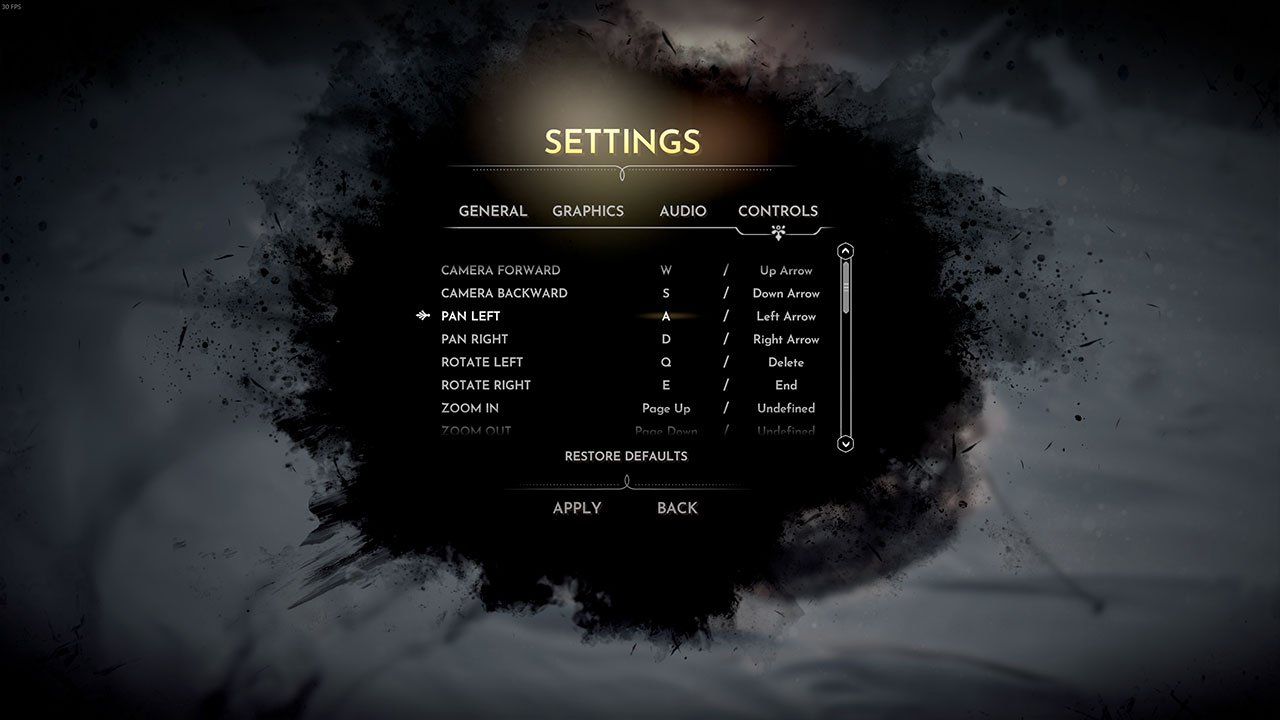
I'm guessing an image on a Canvas panel?
 oblique sorrel

Unreal Engine
Mastering Unreal Engine just got a whole lot easier! Our new online learning platform features video tutorials, industry tracks, and downloadable tutorial files for a variety of UE4 workflows. And it’s open to everyone, for free!
An entire portal of official Unreal tutorials, all in one place, all for free
 sturdy star
@vivid girder just add an image object in UMG and assign a material, do some warping in the material
 unborn mantle
can anyone recommend some analytics plugins for PC? found Google Analytics and GameAnalytics, maybe there are some more to compare with?
dire storm
hmm I'm looking at gametextures.com website on their huge awesome library of materials just for funsies. It has a clause that says only if you make less than 250k you can use their normal license (for like indies and whatnot). So what happens if you accidently make a huge indie success. Are they gonna send lawyers after you and go for more monies? I can't find anything on their site about what happens if you make more than 250k on their site and I'm so intrigued
 tall pendant
@dire storm I'd say in such a case you'll work with your/an Account Manager to talk about license upgrade options. (Similar to how it works with other Vendors like Allegorithmic or so).
dire storm
Just seemed odd to me because I've seen alot of "if youre AAA, you pay this much" kinda jargon on other sites which is fine. Weird that they don't outright say what happens if you suddenly have a revenue of 250k. I mean for me thats a hypothetical situation but I like details 😃
This all started because I was chasing the stylized material rabbit.
 cloud cobalt
Depends on the full license text I guess
You're fine if you're done working and you make 250k
I would expect that after the year you've made 250k, you can't keep using the license anymore / have to buy the enterprisey version
Unless it's explicitly royalty, working on a product as a poor company / single person, getting huge sales, shouldn't put you into trouble
 south ridge
I would expect a penalty to be defined
Or something like that
If it was a contract and not a license on the website, it'd say what would happen in the case above
cloud cobalt
Usually the requirements as a company are pretty clear and based on finances
Like if you made revenue above X last year, then it's this license
So you make the game, you become a millionaire, and the day after the exercise closes, you pony up for the license
tall pendant
A good company won't outright penalize you, when you contact them as soon as you hit the rev limit and ask to work on a solution with them.
dire storm
I agree on that! On another note I was looking at speedtree and around the web looking for stylized goofy looking "Medium Poly" type trees 😃
Pretty much the fortnite trees... I have been looking around at trees for a while and once I actually looked at fortnite I was like YEEEASSS I love those digital trees
dire storm
I'm reading about PRB materials. I've seen the brown colored materials in the editor that says PBR. Whats the difference between that and a Normal material with base color, roughness, metallic and spec?
 ancient sandal
Does the engine autosave when I compile in BP? Or should I hit save as well
cloud cobalt
You should save
@dire storm PBR isn't an attribute of the material
PBR is how the internal rendering works in the engine
We talk about "PBR materials" for materials defined with albedo, roughness, metal
But the PBR part is in UE4, really
dire storm
ohhh... Do you know what I'm talking about when I say the brown nodes. I can't find one at the moment but its like physicals material maybe? I think thats what it is.
cloud cobalt
Physical materials are unrelated to PBR, they're used to derive sounds or special effects when hitting surfaces
Nothing to do with rendering
(They also define friction etc)
dire storm
ahhh okay so I don't really need to stress about shopping for materials and making sure they are tagged with "PBR" on the marketplace?
cloud cobalt
The UE4 marketplace ? All materials there will be "PBR" - if they work with UE4, they work with PBR, since UE4 only does that
dire storm
TY for that feedback.
Thats exactly what I wanted to know. I was just making sure.
every time I learn something theres 10 more questions from it and then I forget what I learned yesterday lol 😃 Its gonna take me 4 years to learn the basics
cloud cobalt
PBR is a catch-all marketing term for basically many things in one
For materials, usually, it means it's albedo + roughness + metal (or albedo + glossy + metal) + normal
That actually has nothing to do with PBR, really, but marketing
dire storm
now I gotta google albedo again 😃 TY for helpin me stranger
cloud cobalt
== base color
Let's keep it simple : UE4 has a PBR renderer, and expects albedo + roughness + metal 😃
By the way, don't use specular until you know what you're doing.
Since you mentioned spec
dire storm
okay. So google says albedo is kinda like reflective surface properties?
It determines what gets reflected and what doesnt kinda?
cloud cobalt
Scientifically, albedo is basically a measure of how much materials reflect light
dire storm
so whats the difference between that and metallic. More research for me is def needed 😃
cloud cobalt
Albedo in a PBR material is color + amount of light reflected - basically how "dark" it is
Usually an albedo map is very bright, because most materials reflect quite a lot
Albedo is right, here
dire storm
awesome. What kind of stuff do you work on as far as projects. Any work you can show? You're always helping me so I would love to see your work.
cloud cobalt
Metalness is typically a value of 0 or 1 and defines if the material works as a conductor, or a dieletric, scientific word for isolating - plastic, skin, etc
Conductors and metals color the reflected light differently
You should rea dup on this stuff if you'r einterested : https://academy.allegorithmic.com/courses/b6377358ad36c444f45e2deaa0626e65
Learn everything about the 3D texturing software tools Substance Painter, Designer and B2M, with free video tutorials, courses and documentation.
dire storm
Nice. I've looked at normal maps and bunch of others but I don't think I've actually paid attention to the albedo before.
cloud cobalt
PBR is a very technical approach but it's not that hard, it's actually easier once you understand
By the way I work on a game called Helium Rain, it's on Steam 😛
dire storm
okay cool. I put it in my queue for studying. My goal is to eventually be programming but I really want to get a feel for how everything connects so thats what I'm doing with all my free time in the next year. Building up the base knowledge and vocabulary of how everything intertwines.
What did you do in the game? Art/environments?
cloud cobalt
All of the art, UI, and large parts of the code, it's bene a huge multi-year project
dire storm
Nice work! 😃
 tiny pier
How do I customize my install to make it smaller? A while back I was able to uncheck localization and a bunch of astuff I didn't need in order to drastically reduce my download. But now I can't find that button. Anybody know?
dire storm
I know its really early but I cannot wait until the holiday sales. Being a college student after having a career is tough times lol. There's so much I want to buy and tear apart to learn from.
 plush yew
@tiny pier you mean lessen packaged size?
tiny pier
Yes, exactly.
plush yew
two things i do, create compressed pak, manually go in and lower texture res.
for things like secondary textures.
finally you should look at your audio, wavs are large files.
tiny pier
Oh wait, you mean something else to what I mean I think. What I mean is about actually installing the Ue4 enging from launcher.
A while back I unchecked all the language packs, which meant I didn't have to install them.
plush yew
im talking about packaging the game to binary.
tiny pier
And some sample projects and stuff.
Yeah, that's not what I mean.
I'm talking about the actual ue4 download in the epic launcher.
plush yew
those are standard sizes, you'll just need to check what you're doing for your library cache. delete unused library assets if you don't need them from vaultcache. otherwise, consider installing engine versions from launcher to a different drive. i install engine versions to my archive drive actually from launcher, but i use source building so it's a different story for me.
tiny pier
In the engine versions panel there was a drop down, with an options/settings/preferences, I don't remember the word, but there was a drop down with that.
I don't think that's true.
At least it wasn't 3 months ago.
tiny pier
Where is it?
I have a drop down on the engine version, but it doesn't have anything that looks like a preferences option.
cloud cobalt
Well I don't have UE4 here but I guess it's still where it was ? On the engine "button" marked 4.19 4.20 etc ?
tiny pier
Weird, I just don't have that option in that menu.
plush yew
select options
cloud cobalt
Are you on Mac or something ?
plush yew
@tiny pier you can also do this
when you are installing a new version, there should be an options button to the right so you dont have to download the stuff in the first place
plush yew
thats because its actively bveing downloaded
or still in progress
you need to finish dl
and then set
or set before you start.
thats why you have a "Resume" button there 
tiny pier
Waiting for download would defeat the point, but how do I do it before download?
plush yew
my previous pic
click install on the engine version
click options
ill actually make a vid for you hold on. im bored lol
tiny pier
I see the pic, I just don't see how to get that dialog up. When I click install it just starts installing.
lol, nah, don't got to all that trouble, I'm sure I can find it.
There it is, got it.
I was using the plus button to install, but when you use the big button on the left, it works.
tiny pier
Yup, got it. Thanks man.
plush yew
one more piece of advice
if you ever want to record a screen capture - ScreenToGif
😃
tiny pier
Ah, cool, thanks.
plush yew
Guys does anyone know how can I make not-in-landscape road (but rather as object/actor) ? i want the road to connect buildings, which are objects
and their position on landscape will not always be the same as they will be dynamically generated depending on player position
@plush yew that sounds liek a good thing for spline component roads look for unreal spline path road on google and click the youtube link from Unreal Tefel. good one
thx !
dire storm
Its so hard to not push the buy now button on the LowlyPoly MegaPack. I think those textures/materials would be so good for my hex map project.
plush yew
@dire storm you're doing a game now? already started?
i remember you were asking about reference material earlier.
dire storm
I mean I'm tinkering and playing with stuff. I wouldn't call it a game yet 😃
not gonna learn anything just reading the instructions. Gotta slap some legos together once in a while 😉
plush yew
im lucky, i ran onto the MP during the summer sale and bought $500 worth of material
well yeah the only way to do a cool thing is through experiment
you will be wrong, but your goal is to be less wrong over time
iteration is the only way
my beta version of game will have noob graphcis and if people play it i will upgrade graphics
plus you just feel like you're not bored when you iterate on stuff. i always feel mentally sated
dire storm
I'm still making slow progress on the hex grid stuff. I did alot of time researching it this week and reading over and over and watching vidoes. So I kinda have an understanding of how its supposed to work. Just gotta implement it. I bought a hex plug in so I could try to see how he does the C++ part. He has some loops in the blueprints but all the math and stuff is in the code. which is fine since I want to be a programmer I gotta learn how to decipher and read other people's code and not just tutorial along blindly.
If anything I always just feel overwhelmed. I cannot go 2 minutes without running into 'wtf do I do now' or "how does this work"
plush yew
that hex stuff scares me lol
i have floating pawns in my game that fly around and shoot things 😃
and i didn't even write the code for ship impulse.. i use a code plugin from the MP for that.
and happens to everyone by the way
in response to feeling overwhelmed
gotta go through the iteration until it's solved. basically.
only thing that separates you from those less fortunate
dire storm
Like I opened up his plug in at first and had no idea what I was looking at. Watched his rundown a few times and read through the code like 5 times and I have a slightly better understanding... it took him 2 years to make it from our discussion so I can't be pissed I can't figure out wtf it does exactly in 2 days
plush yew
i think i know what plugin ur talkin about btw
i saw it briefly on the mp
looked coo
lol it took him 2 years? wow
i also want to implement grid in my game
not hex
in terms of raw isometric movement my fav was diablo 1. what a great game right? 😃
dire storm
well not everybody just sits on their computer all day on UE4 and VS like me.... Its really important to me that I learn this. I've even considered uninstalling discord because I spend to much time in here asking questions instead of googling and trying to figure it out myself.
plush yew
lol i do that
all day
but i leave on fridays
to see my "friends" lol
how are you liking UE so far? good?
im glad you're looking into VS. that's good too.
hopefully you have 2017 installed..
dire storm
I left a well paying job and moved out of state to be near family. I'm completely restarting my life and I feel like its taking me forever to learn anything now.
plush yew
as well as visual assist to help you do your code
i almost bought it but decided not to since i dont heavily code in CPP yet. i will soon probably.
gothic
how old r u
well money doesn't make you happy. and you should know the entire system of money itself will be abolished once we have automation. so you aren't missing much. trust me. broken system.
33
dire storm
yeah I gotta spend alot more time learning to code and actually coding. I do have a class in the spring for that so I was gonna put it off for now a little bit and focus on learning the ins and outs of the engine mostly but I gotta refresh my C++ because everything I studied before my summer semester has almost completely faded. It was all making so much sense before I crammed 4 classes in and erased my programming knowledge lul
plush yew
@dire storm i got some advice to learn CPP if you like
 ruby robin
Hey guys. I start PIE with 4 clients. How do I close just one window?
dire storm
I love advice 😃
plush yew
if you look at https://www.sfml-dev.org/ and try to make a game using the simple fast library, you can do a 2d game and go through all the prep work. should help with CPP
hi to all here. I have a problem with compiling custom UE4 branch with nvidia gameworks (blast). I had VS Enterprise 2017 version 15.7, and when i tried to compile the source (i did setup.bat -> generateprojectfiles.bat -2017), i got 65 errors and very big amount of warnings. So i decided to reinstall VS, installed 2017 Community 15.8 (don't ask why not enterprise ^^), and after installing finished i got error that it can't install Microsoft.Net.CoreUWP package, of course UE4 compiling still getting errors, later i deleted this VS version. So i wasted 2 days of time and now looking for help with my problem...
Cuz i really need Blast for my game
@plush yew cool. my game: https://i.imgur.com/TlhloZT.jpg

Or i need to ask this in nvidia community?
dire storm
not my style. I follow a few really good C++ tutorials on youtube (real C++ not unreal) and then I'm slowly working on learning unreal's style as well as randomly picking up my giant and incredibly boring C++ from the creator himself
plush yew
@plush yew looks cool but the walls are completely skewed with textures, you can try to fix it if you like
i didnt see option to unstretch
@dire storm ah ok. just an idea. you can also look at the ben tristem's stuff on udemy if you want.
dire storm
I have his course
plush yew
who can help me with nvidia gameworks compiling?
dire storm
Ive actually watched the whole damn thing but I'm very hesitant to start it as a project. Like I probably will do one video a day or something and in 10 months finish one of his projects 😃
plucky reef
@vivid girder when I export like that, it's just exporting the mesh not bones and not weight painted
vivid girder
did you export the skeleton?
plush yew
@plush yew the pipeline i usually use for textures and stuff, is rather than do them natively with BSPs or static meshes in unreal, i first UV map stuff in 3ds max or another tool. if you are importing from blender, first do your UVs there and then import. this will fix your texture skew and make the texture stick.
vivid girder
I've encountered bugs trying to do this too
@plush yew you use world position for your UVs?
plucky reef
@vivid girder, I just want to add 2 bones and I don't wanna go to the painting weight process all over again, so is it possible to extract the character already weight painted because I deleted their file in blender
the skeleton I used is the default unreal engine skeleton
plush yew
@plush yew have you followed this setup guide? https://api.unrealengine.com/INT/Programming/Development/VisualStudioSetup/index.html
Tips, tricks, and techniques for setting up Visual Studio for development with Unreal Engine 4.
plucky reef
if I export the mesh, then the mesh then it's just the mesh not painted and no skeleton at all
plush yew
@vivid girder here's what i use - box mapping it's automated and saves me time - i will later go in and manually unwrap the stuff and do it that way later once i do a detail pass.
that's for a level i did
vivid girder
This is an automatic unwrap feature in Max?
Guessing the colors are different materials?
plush yew
@plush yew im using just ue4 actor editor
not blender
for instances where you extrude exact distances, and have relatively cubic structures, yes.
i didnt do a manual paint at all
EXCEPT the colors
the colors happen to be mat ids
vivid girder
Ah, so they are
vivid girder
How's the texel density?
plush yew
Visual studio when compiling getting errors like don't have permissions to access file, and so on
And im running it as administrator
@vivid girder i set the textures to be about 512 or 1024 in the material itself, and then apply it. it seems okay.
@plush yew did you double check you selected windows 8.1 and windows 10 SDKs on installing vs 2017 communiuty?
vivid girder
you mean in max?
plush yew
nope, UE
vivid girder
how you setting textures size in ue?
plush yew
thx bro
i had the material, and then set the compression factor down to 512 or 1024 depending
Yes, and with enterprise, and with community i've installed all sdks, c++ libraries/components and so on
vivid girder
shitttt, you doing per-asset textures for these walls?
plush yew
Enterprise installed/opened/compiled with errors
plush yew
Community didn't even installed properly
vivid girder
he said in the material
plush yew
yep thats the one i used as ZN said
i use in that one
i meant that lol
not the actual mat itself
sorry
vivid girder
oh, gotcha
plush yew
yeah
i basically select a bunch of textures, and set the compression down in that same box to 512 or 1024
saves my packaged game size a lot
the version i tried to compile is 4.19.2 (with nvidia blast)
@plush yew you might want to uninstall your VS versions again and do a fresh install following the guide exactly, unless you're sure you can't just go to the start menu and add back in the SDKs now
Ok, ill remove all VS data from disk and registry
and try again
I'll install Enterprise with offline cache
it didn't got UWP package error
thanks a lot for helping btw ^^
@plush yew here's my options on modify if that helps any
@vivid girder useful tip if you ever get into texture scaling - if you have a bunch of textures and want to scale them down just go into the bulk property matrix editor after right clicking on the textures. this is what i usually do for multiple textures.
but you get how i did the pipeline in my level right? i just applied the MAT ids in max, had the materials ready in unreal, and basically plugged in to the material elements of the static mesh in UE. each of the materals is a square aspect ratio so it fits. the thing i was talking about with the texture scaling was only to take in some imported textures and lower total packaged size to make it more downloadable by people on steam.
vivid girder
no joke just used the bulk edit matrix to fix half our game's assets a few hours ago that were imported incorrectly
plush yew
is that your sourcetree? lol
vivid girder
Had to write a python script to set the materials tho, can't do it in the matrix for some reason
plush yew
my first commit took me soo long
only started up the repo recently actually. been migrating the project around alot.
vivid girder
I wrote a semi-popular article on it https://forums.unrealengine.com/community/general-discussion/121068-version-control-git-lfs-vs-perforce-vs-svn
Unreal Engine Forums
General discussion about the game industry and the Unreal Engine community.
plush yew
ohh you use git lfs ?
someone i know was asking about that
Allar
you should message him or DM him if he needs help, he's trying to set something up regarding that
 grim sinew
While we're on the topic Joseph, do you get the problem too in sourcetree where if you're commiting files for a long time, the size of the git log starts to make sourcetree lag?
polar hawk
Like
grim sinew
Even a 5 minute commit seems to start breaking sourcetree's UI. It still commits at the same speed according to the task manager, just the UI breaks.
vivid girder
polar hawk
How do you not want to kill yourself using Git+LFS
Also, what are some best practices you've found for set up
And more importantly, how did you figure it out, i.e. fucking with it or did someone write docu somewhere
Basically
I want to know both the implementation details and how life is for a Git+LFS + UE4 user
ESPECIALLY if you're hosting a fucking engine source build
vivid girder
I personally love it
polar hawk
Any chance you're hosting an engine source build
vivid girder
@grim sinew how big is your repo?
plush yew
here's my version control guide if that helps.. @vivid girder if you look at this guide can you think of any way i can make it better? is the process of implementing LFS a complex one for you? i'll try to read your post earlier as well.
vivid girder
Or project at least
grim sinew
Repo size appears irrelvent. If I'm commiting only a single 6gb file to LFS on a new repo, which can take a few minutes, that alone starts breaking it
 cinder iron
vivid girder
cinder iron
vivid girder
you're committing 6gb files to the lfs repo
that's your problem
gotta respect each other
polar hawk
Also, everyone be like 'ignore binaries' but like that won't work unless every person on the team is compiling <_<
grim sinew
Substance painter files are big. Nothing I can do about that.
I used to host engine source, on another repo, but that turned out to be a nightmare. I only host a zip of it now, like 200mb. Everyone unzips and compiles themselves.
cinder iron
If you are an engine programmer working on a studio, you don't want to ignore binaries.
 wary wave
everyone compiled binaries at Bohemia, that's just how we did it
vivid girder
^
polar hawk
using Git?
wary wave
Subversion
polar hawk
ah
wary wave
also Engine and Game were separated
cinder iron
but what if you have ot modify the engine?
will you have every single worker
compiling it?
vivid girder
we're not building the engine
vivid girder
also, we rarely go above 100mb for any one file
grim sinew
This is the folder, currently. Including hidden folders so that .git folder and a ton of stuff it made got caught up in it.
wary wave
only people who need to compile the engine accessed it via SVN
polar hawk
Yeah thats bullshit lmao
cinder iron
what if there is a change on the engine on mid-development
polar hawk
not the compiling but that folder size
wary wave
then you push an update and those not using the engine SVN use the batch file to pull the engine
it's not rocket science, heh
grim sinew
There's a ton of stuff in there I have in .gitingore, like any obj files for high polys
polar hawk
@wary wave Aye, thats all doable if you got someone managing that shit
grim sinew
So it's not actually that big
cinder iron
but you need someone managing that shit
wary wave
it's not even that much to manage, tbh
polar hawk
I'm trying to get ahold of anyone using Git+LFS who actively maintains a Git+LFS UE4 Engine Source build, because I'm told non-stop that people are actively working in that environment because its better than Perforce
cinder iron
bash script pulling seems okay, however I would not recommend too much even using native Git with ue4
vivid girder
Git LFS has been great for us because we have <5 users that need access and the two main umap changers are in opposite timezones (Cali and melbourne)
polar hawk
Because I would definitely prefer an SVN-batch setup compared to it
cinder iron
If you are looking for a free solution, use svn
vivid girder
nah, if you're looking for a free solution read my post
plush yew
what i do for this stuff is i just like do local builds and prevent cloud costs. i don't use cloud repos at all and commit locally for everything. but once i have to collab with anybody i can understand the need.
then i just backup once a month
cinder iron
git lfs isn't the absolute right choice
the last Git update improved it a lot, but it still has its problems
vivid girder
we use 100gb of cloud storage and pay nothing for 5 users
polar hawk
I'm not looking for any convincing, because my mind has already been made up, I just want to see someone doing it
cinder iron
cloud storage is not the topic rn
vivid girder
yea, it's had checkout features for a couple years, just zero recognition of it
 sleek sky
guys, i need help with something
grim sinew
So is there an actual problem with storing 100+gb on LFS, regardless of hosting problems?
Like, if hosting wasn't an issue at all, is there something about Git itself that makes that a bad idea?
plush yew
@sleek sky what's up?
polar hawk
Most implementations I've seen that weren't custom are like
max individual file size is 100mb
and other dumb shit
vivid girder
Just depends on what files you're tracking in LFS really
And that the connections tend to timeout for large pulls/pushes
sleek sky
i wanted to ask that, when i downloaded fortnite then i wanted to play but it say unsupported OS, what does that mean?
polar hawk
And I've heard horror stories of UE4 not recognizing what files are under LFS and all kinds of diff/corruption/nonsense stemming from that
cinder iron
use whatever is comfortable for your team.
polar hawk
@sleek sky you're on an unsupported os
cinder iron
but my point still stands, svn or p4
polar hawk
And yall are actually comfortable under that setup?
Like
How many times do you have to resolve two people touching the same map file
sleek sky
is it because im on windows 7?
sleek sky
shit
grim sinew
Well we -think- it's comfortable for the team, but at the same time we probably also don't know better if one day it'll just suddenly break on us. The main advantage is we're mooching off of VSTS's unlimited repo size, so I don't need to upload massive files from my home server every time someone wants to pull.
vivid girder
pretty good track record
sleek sky
looks like i need to uninstall it
grim sinew
So far we aren't stepping on each other too often, only once in a while.
polar hawk
so
cinder iron
where I work at we use Git, and we do have a bot to lock files. @polar hawk
polar hawk
aye, is more custom nonsense to add on top of it
cinder iron
basic commands, but again I am not on the Git's side
polar hawk
and that overwrite happening even once is still absurd to me
cinder iron
XD
vivid girder
overwrite?
polar hawk
two people touching the same un-diffable file
and having to basically undo ones changes for another
vivid girder
yea, that's because we choose not to use the checkout feature
cinder iron
so you have to be deterministic under conflicts, use theirs or use yours
polar hawk
but you have to opt-in to check out every time don't you
vivid girder
discarding changes is a very fast process
cinder iron
there is not a diff possibility
polar hawk
discarding is always fast
re-doing the discarded work isn't
can you enforce checkout required on a git, is that a thing?
vivid girder
I believe the ue-git implementation tries to check out the files automagically
polar hawk
but if that fails
cinder iron
don't get me wrong, I am super used to work using Git, and it is not so uncomfortable, the thing is, at least where I work at, the bot is a very important part of the version controlling and every co-worker should use it appropiatedly.
plush yew
UE-git auto stages files to my source tree.. i have to manually unstage them
vivid girder
Again, we rely more on people communicating than the software shielding us
polar hawk
That definitely doesn't scale up though
vivid girder
Like @cinder iron said, it's about what's comfortable for the team
polar hawk
at all
polar hawk
No but you can enforce checkout required
cinder iron
our bot posts the redlighted files on discord, and updates the message every time a worker redlights/greenlights a file
grim sinew
This seems to be what kills Sourcetree, btw. When this messsage list in the full output goes on a long time, whether or not it's even being shown, Sourcetree will slow down to a crawl and eventually freeze entirely until the commit is finished.
polar hawk
yeah sourcetree went from being great to trash
vivid girder
@plush yew that's a sourcetree bug
plush yew
ah
cinder iron
not very keen to ST, I prffer using TortoiseGit or GitKraken... at least lately.
grim sinew
Is there anything better? I haven't had much luck with other git clients
cinder iron
I use more git bash
cinder iron
tortoise git has the charm of being integrated on the windows explorer
so you get these cool green and red ticks on the files
which is handful
polar hawk
tortoise* has a lot of randomly useful things actually
cinder iron
so I always install TG no matter what
vivid girder
@cinder iron we use discord for team chat so I wrote a webservice to post in the chat when a new version is commited
cinder iron
^ we do have that aswell
cinder iron
vivid girder
Skyhook?
cinder iron
we have a bit of processing on the top of the commits
vivid girder
I know those colors
cinder iron
I have no idea, we have persons handling that and I never cared enough to ask them
🤷
vivid girder
looks like bitbucket, right?
cinder iron
no
polar hawk
usually its done with a post commit hook that posts to a webhook
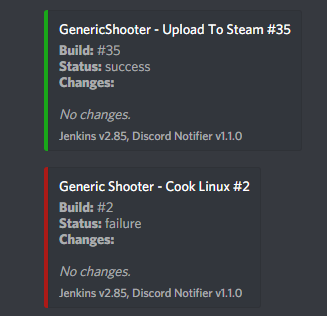
lets you do any integration into anything
whether git, perforce, jenkins, trello, etc
cinder iron
probably, but we do post process the messages for the public log, erasing url's and stuff
thats why the message looks so clean
cinder iron
that's all I know, don't ask me about this stuff, our devops and system engineer worked together on having everything pretty
cool guys
good people
vivid girder
I believe you
cinder iron
ofc I won't show here the internal git log, I shown something public I am able to show.
dire storm
What time does the game jam kick off? I can't wait to follow along and see how everyone's doing
plush yew
migrated over to gitkraken. not bad. gonna try to get some assets done in UE now.
dire storm
well when you fall asleep binging on C++ videos its time to lay down. 16 hours was enough for 1 go
Good luck on the jam people
 unreal spoke
I know that fornite is not mesh-merging the pieces that compose the characters, but do they use LODs for those pieces?
grim sinew
Probably.
grim sinew
Yes
plush yew
i am trying to look into this. not sure i fi want to enable. will try to report details if i enable later.
grim sinew
I know nothing about git other than not using LFS on massive files is a terrible idea.
 honest vale
gitkraken is bad
It can't handle UE 4 repo for example without freezing and crashing
plush yew
in multiplayer games where people usually put player stats? in level blueprint or character blueprint?
plush yew
@honest vale you mean ue engine source build or ue game build?
i want to be able to roll back if needed
grim sinew
I keep forgetting level blueprints exist.
plush yew
yeah i mean a game build. that work okay for diffing and stuff?
it seems to work okay for resetting master to commit and reverting.. at least for plaintext files
 forest steppe
For multiplayer game with multiple maps, where do you put the persistent data of the game?
plush yew
just tested a text file
forest steppe
multiple maps with multiple game modes
plush yew
i set variables to public to use them in other blueprint but i forgot how to to be honest. what to do now?
my memory is so bad
i wonder if someone knows
@forest steppe gamestate
thats an example of replicated arrays i use for kill counts etc. in my multiplayer game. and i have multiple maps with mult game modes, one game mode for my main menu, and one game mode for my games, called GamePlayGM while in levels
plush yew
can someone tell me why is my blueprint not incrementing variable plox https://i.imgur.com/IivR3ax.png
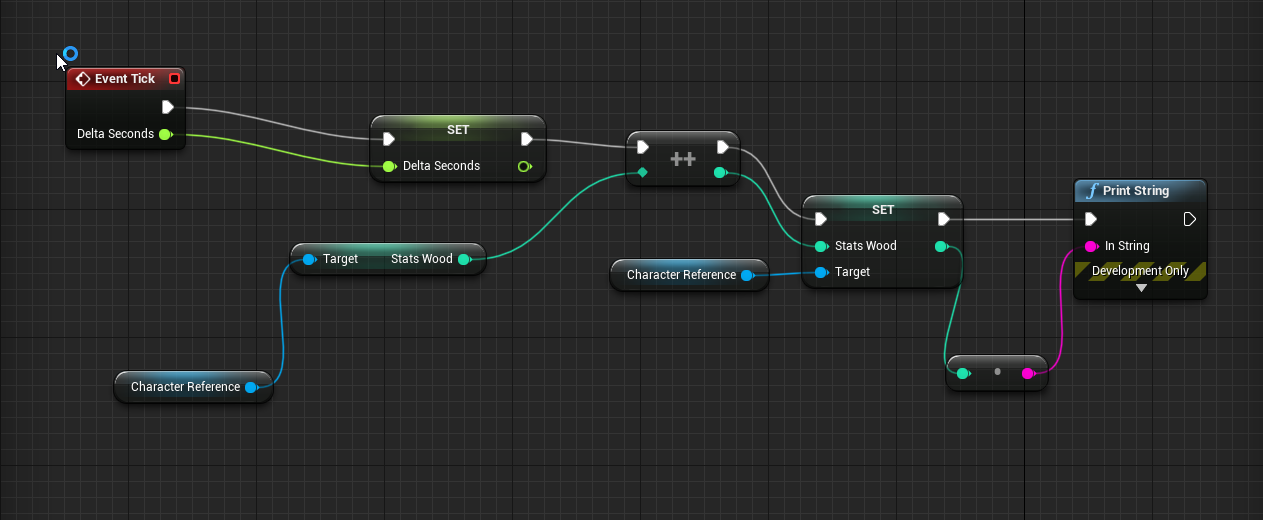
it prints 0s only
instead of incrementing it and printing 1,2,3,4,5
 frosty bloom
This looks like a #blueprint question
plush yew
ok thanks
forest steppe
@plush yew thank you, doesn't the game mode and game state gets recreated when you change the map?
forest steppe
oh, seamless travel
it always carry the game mode with it, including the game state and player states it contained
 flat trail
game state can be included without the seamless travel i guess?
and player state
AND game mode
but stored variables or information no
forest steppe
By default, these actors will persist automatically:

    The GameMode actor (server only)

        Any actors further added via AGameModeBase::GetSeamlessTravelActorList

    All Controllers that have a valid PlayerState (server only)

    All PlayerControllers (server only)

    All local PlayerControllers (server and client)

        Any actors further added via APlayerController::GetSeamlessTravelActorList called on local PlayerControllers
GameState is owned by GameMode, and Player States are owned by GameState
flat trail
ahh multiplayer
its accualty smart to keep this logic even tough its not multiplayer haha
forest steppe
hmm... I think it is not necessarily for multiplayer only
even for single player game like skyrim, you can specify some npc, like Lydia, to travel with you to the dungeon
while the others are serialized to disk
maybe, I don't know, but I am eager to test it
the others as in the wolves that are chasing you all the way to the entrance of the dungeon 😃
as far as I know, even if we are making a single player game, ue4 will always use this client-server architecture, even though the player and the server is in the same computer (the same game instance)
 tawdry raptor
I finally fixed my project after 2 weeks
I think unreal has bugs
because if its not one thing its the other
cloud cobalt
All software has bugs 😃
tawdry raptor
can we make blueprint chacators moveable
I have made an item a blueprint character
can this be moved around and held like an item?
cloud cobalt
Do you really need to move a character around ?
tawdry raptor
I mean im just trying to make an object
and place a radar inside
bui when I hit play it just floats in the air
cloud cobalt
Which Blueprint class is it based on ?
forest steppe
floats in the air... then turn on the physics for that actor
tawdry raptor
do I do it on the blueprint side
or inside the blueprint because its greyed out for the blueprint
cloud cobalt
Which Blueprint class is it based on ?
If it's a static mesh actor, you can just enable physics on the root mesh component
tawdry raptor
cloud cobalt
If it's just an object, you don't want to use the character class
Which is for characters
tawdry raptor
oh ok
so its just an object maybe thats why
let me try a actor ?
blueprint actor?
 broken shadow
Does anyone happen to know how many vertices the capsule component has?
tawdry raptor
why when I stimulate physics on my static mesh does it go flying in the air
its never done this before
as soon as I hit play
it took me 2 weeks to get my issue fix and then another one pops up
does it need a capsule componet
?
it still goes flying in the air
why does my mesh go flying away?
when I enable physics?
tawdry raptor
isnt there a universal setting on my other objects I created everything was perfect
forest steppe
if you don't know anything about physics in unreal, then you may want to know at least the basic knowledge of it in the documentation
tawdry raptor
I know about this stuff
plush yew
if anyone needs some tiny utility functions, I've added them to my github
tawdry raptor
cant you understand
plush yew
 cloud cobalt
Object is probably too light, or was placed inside collision.
tawdry raptor
is this what happens everytime I create a static mesh actor
forest steppe
yup, collision usually causes physics body to fly when it is spawned abruptly inside another physics body
if you spawn like, 10 item actors to the world, then put some delay between them, or spawn them slightly away from each other
cloud cobalt
Is it lying down or spawning in the air ?
broken shadow
@honest vale The odd question is because I was told this:
"one thing to keep in mind is that collision is actually very expensive.
collision checks involved bounds checking of everything against everything (It does get optimized a bit by the engine limiting an area of relevance for collision though I believe). the more complex the collision (more verticies) the more expensive every check is, exponentially"
Reading around suggests I'm maybe misunderstanding the performance cost associated with calculating collision
cloud cobalt
@broken shadow Capsule collision is basically free
Collision in general doesn't have a huge perf cost either, at least for UE4 games, but capsule in particular is the cheapest
broken shadow
Ah
tawdry raptor
yeah what ever I do it goes flying around
broken shadow
From what I've gathered capsule and sphere are basically the cheapest things around
Because there's only 2 dimensions for the engine to calculate
1, for a sphere
cloud cobalt
@tawdry raptor If you put a physics object against static world geometry, then it is going to fly away - that's pretty much expected
forest steppe
the cheapest would be sphere vs sphere test
cloud cobalt
Put it up in the air and it won't - spawn it clear from geometry
forest steppe
flying or jumps to the air?
broken shadow
So from what you guys are saying I'm over-worrying about the performance cost of collision
So long as I'm not like, trying to use the entire mesh of a character as actual collision
forest steppe
if it's flying slowly then it's probably the gravity is reversed
if it jumps to the air, then it might be the result from two physics body colliding with each other
cloud cobalt
@broken shadow Here's my take on everything optimization-related : gameplay first, visual quality second, optimization once you've nailed these.
The most common real-world problem with collision is player stuck into bad collision shapes
That's your priority
You can worry about optimizing shapes once the game is working well
tawdry raptor
im confused as to why on my other projects, and I have been following the same steps, never had flying items
after 2 weeks of fixing it, this one pops up
I guess i could open up the other project where my radar didnt fly away:?
and copy and paste that here?
or at least copy the settings and that should work
cloud cobalt
Look
Is your object placed, or spawned, nearby other objects ?
Which Blueprint class does it inherit from ?
It doesn't matter that it worked before if it doesn't now - chances are it's simply not the same situation
 elfin jacinth
forest steppe
elfin jacinth
forest steppe
doing great
 abstract marsh
Hey so I have one quick question: How do you get to this cool grid when you open a material
mine goes here
forest steppe
show engine content and search for world grid material
forest steppe
when you select the assets, there's an option to show engine content on the lower left of the popup
or was it on the upper right, well, there is an option to show engine content
broken shadow
Today I learned to not freak out about how expensive collision is. So my day is good.
abstract marsh
cloud cobalt
What grid are you talking about ? The one in the mat editor ? Or the default UE4 material ?
forest steppe
but, what I usually do is I just copy the engine content to my own folder in the game
abstract marsh
The mat editor,
forest steppe
and then turn off the show engine content for good
abstract marsh
where you get those boxes that you can connect to each other
the blueprint things
cloud cobalt
So just the grid background pattern ?
cloud cobalt
Yes you're talking about the background pattern there ?
forest steppe
oh, that's material parameters
abstract marsh
how do I get there?
forest steppe
if you create a material function you're going to get that
abstract marsh
basically I watched the first 15 seconds here and got lost
cloud cobalt
That's the material output
abstract marsh

In 15 seconds he double clicks the object and gets a dif screen than me.
We both clicked Element 0.
See what I mean?
me:
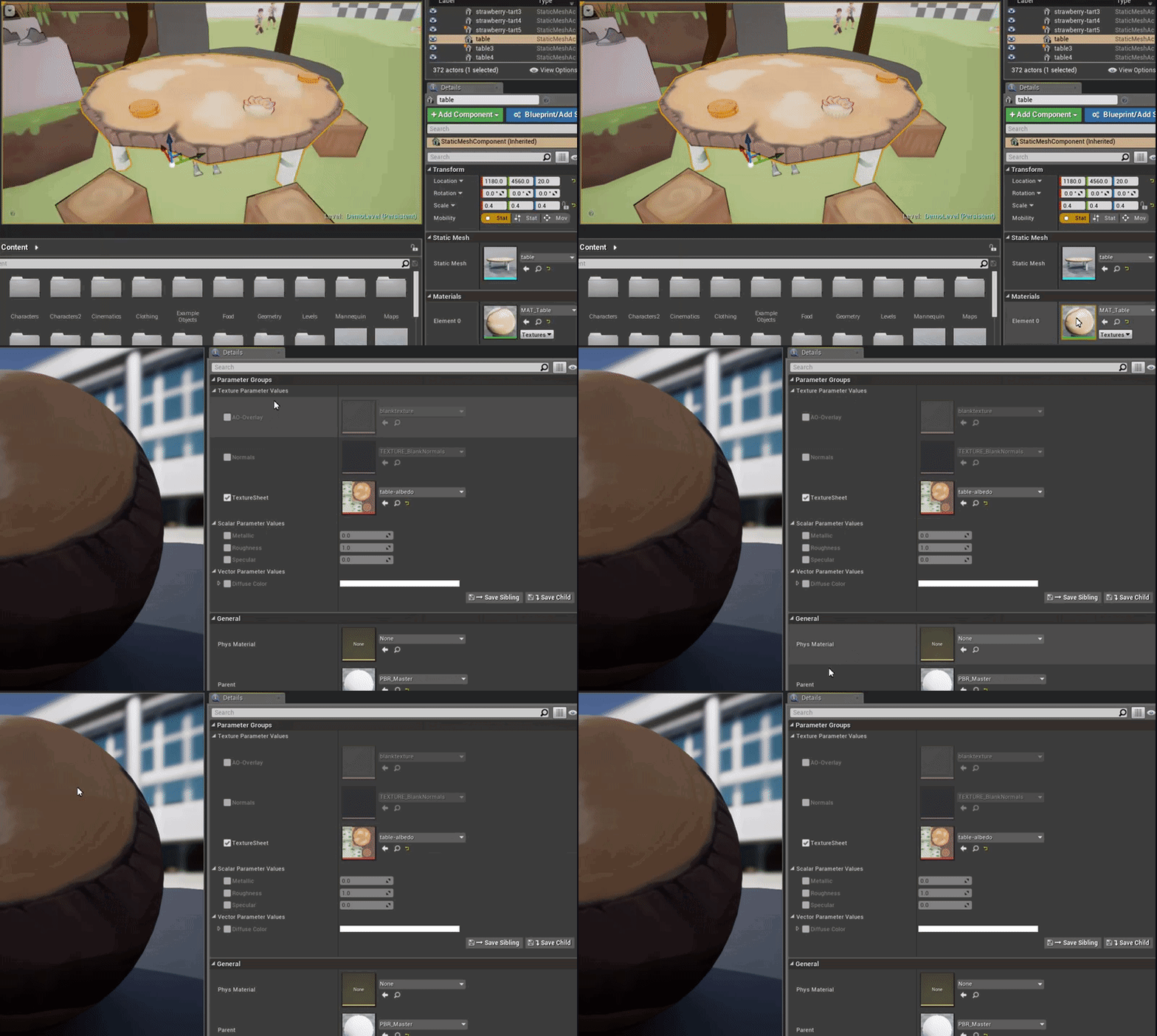
him:

sigh.
I know it's super simple so I'm a little annoyed here.
abstract marsh
In the menus we are clicking the same button.
This is confusing.
So I should make a new material or..?
abstract marsh
bleh!
Ok I'll try iot
Hey here it is!
thanks @digital anchor
This should help me.
The artists are on vacation or already overloaded with work so
I figured I'd try something like this out.
on my own*
 digital anchor
a instance is a "copy" of a material, which let you edit the parameters more easily, without changing the parent
honest vale
or like: instance is a house and the parent material is the blueprint of the house
you can change the colours but not the shape
cloud cobalt
Technically, a material is a program that's compiled, and doesn't change during gameplay
A material instance is a set of parameters to that material (that can change during gameplay)
tawdry raptor
serious im starting to unreal has an AI mind of its own and is taunting me, 10 times I follwed a tut and each time something different didnt work. the first time it was I couldnt get the radar off the HUD, then it was that the object wouldnt move, then it was that it did move but it did not update the image, and now, I get everything working and lo and behold what holds me up? I cant get SET RANGE to show up in the event blueprint screen
I mean WTF
it was always there before
each and everytime I had to connect it to the radius
abstract marsh
This is what I did with the knowledge from earlier
I made the rain bp work, so the ground has splatters and such.
From the markerplace rain asset.
It's really good looking. I'll mess with it more later.
ancient sandal
Is it just me or checkNoEntry() crashes the engine? (4.20)
 lilac cobalt
 honest rune
@abstract marsh That postprocessing looks great! Very fun!
abstract marsh
Thanks @honest rune I have a few other folks to thank for that personally.
Want more screens? DM me!
plush yew
I'm getting these glitches with the collision of the object. The collision box is a number of UCX meshes. Sometimes the character also gets launched into the air when he stands on it. Sometimes it disappears or gets launched. Is this due to bad form of the collision boxes? Maybe empty space in between 2 shapes?
plush yew
Would money raised by a Patreon fall under the 5% royalty for UE4?
 pallid compass
No because its not made by engine
Unless
They are paying to play on it
from patreon
it depends on the context
but tldr, go speak to a lawyer
tall pendant
if its in any way related to a product made with ue4 then yes
like getting the game or items
plush yew
So, like, as long as anything distributed through the patreon does not require the use of UE4 to use, I'm fine?
because I want my game to be free
patreon would just be a way for people to support the game.
so that I can keep the game free, and allow anyone to play it.
Is there a way I could maybe contact Epic themselves and get my questions and concerns answered for certain?
plush yew
I also have a question about filling out that one legal form that lets you use Unreal trademarks in-game for a "powered by unreal engine" intro movie. Not sure what a "principle office" is.
I have a feeling I do not have one given I literally develop from my bedroom.
and I'm...not...really...old enough....to....have a full-fledged gamedev studio? xD
plush yew
I don't have a lawyer to speak to about this
pallid compass
Most people in here will tell you the same thing, u should really take legal advice off anyone that is not trained
Otherwise you can end up in a fuck ton of trouble
Best you can do is email epic
plush yew
Well, yeah, but, would contacting Epic by email be a better idea for me? I don't have any lawyers to talk to. I'm only in highschool.
pallid compass
as harsh as it sounds regardless of if your in high school or not, your still accountable to the law, so thats why i say be careful with what u do
plush yew
god I can't find the email for Epic's legal dept.
I was looking at it last night but I can't find that page
pallid compass
keep searchin
 grim ore
@plush yew this is literally on the page for the branding stuff that you are filling out I assume, Please download, complete and return the Trademark License Agreement Form to legal@epicgames.com prior to implementation of the Unreal Engine logo.
grim ore
come on game jam theme, be something I can work with. I have a complete project I can skin as needed to fit the them 😛
plush yew
hey there everyone, need help.
i'm making this WOT-style garage system, and i can't quite manage to make it possible to stop the right scrolling when there's nothing left to see. here's a screenshot.
 stoic dew
Anyone have any suggested resources for new users? I've made games before with other engines I know how to code in c++. Just seems all the info I am finding for this engine is either outdated for the newer engine versions or only cover blueprints which I want to avoid in most cases
plush yew
Unreal Engine Forums
Talk about Level Design, Static Meshes, Physics, and more.
 sonic pagoda
@grim ore im snitching
jk, we have some premade assets which we will totally disclose
stoic dew
Oh thanks @plush yew Those will come in handy but I was mainly looking for learning resources my mistake 😮
stoic dew
Alright thank you. I wil see where that leads me.
grim ore
@sonic pagoda 😉 I do wonder how many people actually do something like that tho
stoic dew
Its hard for me to follow the blueprints though so I could jsut be an idiot and have no clue what im taling about tho
stoic dew
ok just another guess here but
This is increasing the value of your currentTank by one, are you doing any checks after this node to make sure its nots greater than the max value that it can be?
nvm thats what that other node was doing
grim ore
this is a good case of using debugging to fix the problem 😛 F9 on the Branch and check the value of the current tank integer and the amount of items you have in your array
and see if anything obvious pops out
plush yew
k
stoic dew
Is there anything i will be forced to use this visual style of coding for in unreal? From what I understand I can do everything in c++ if I want yes?
grim ore
no
you can do most programming in C++, but there are parts of the engine that run in the visual language that you would be using.
now I could be wrong and you can probably force yourself to do it all in C++ but doing an anim graph in C++ seems weird
stoic dew
Ah yeah this makes sense for stuff like animation graphs. What about shaders?
grim ore
100% visual unless you use custom nodes and then do it in HLSL
stoic dew
alright thanks.
grim ore
if you are comfortable in c++ you will probably be fine, it's the other way around (trying to go from visual to C++) that tends to be the issue. most of your logic would be in c++ and you just expose stuff to the visual side of the engine for hooking up
stoic dew
Yeah i am sure I could make things work with the blueprints. I am just not too sure how maintaining something like that would be.
Code readability can be a big deal and the visual scripting stuff kinda shits on that
grim ore
it's not too bad if you treat it properly. Same issue with c++, you could maintain one c and h file for the entire app or split it out.
you have functions and events and classes so everything can be put in it's happy home. you have routing of wires to make them read easier. You have comments, etc..
 worn granite
I think once you get to grips, you'll find yourself actually using BP for some stuff that really is just easier to do in it.
stoic dew
Yeah maybe so!
plush yew
whoa @grim ore thanks. i just saw that it was scrolling but not changing the mesh as it was only getting the 0 value in the array of meshes.
fixed it
grim ore
yay
stoic dew
Ok I have one other question though, when it comes to using third party libraries do I have to jump through any special hoops with unreal or can I just link a static lib to the c++ project and be good?
 manic pawn
you can "just link it", sort of
the normal way is to put the binaries and includes for the library in a folder like Project/Source/ThirdParty/Lib/
then create a Build.cs file for it that registers it as an external module
and add this module as a dependency in modules where you want to use it
plush yew
hi
manic pawn
check out the Engine/Source/ThirdParty folder for tons of examples
stoic dew
@manic pawn alright thanks I will give it a look now.
 warm slate
How important is creativity in game dev, or do you guys think most people never got the skills to bring an actual game to life.
manic pawn
the 3 main things you'll need to care about in that build.cs file are PublicIncludePaths, PublicAdditionalLibraries, Target.Platform
grim ore
Creativity is good if you need it. If you are a tool designer you might not need it for example, if you are designing reload animations then it might help 😃
warm slate
What about for an indie game developer
grim ore
Don't see why it would change it, indie or AAA or A or B+ it's still doing work just at a different scale.
I guess you could say if you were holding all the hats on the project solo then yes creativity would help but that would be due to handling the creative stuff like art, music, design, etc.
 small oar
Has anyone else had this error when trying to play their game after building it? https://cdn.discordapp.com/attachments/402958499660955658/479360078454063104/247289-capture.png

 buoyant compass
Is there a built in function for getting level bounds at runtime? I can always for loop through all my pieces, and grab the furthest ones and do a bit of math, but was just wondering if this is something that already exists
plush yew
@grim ore help? even if my SLOTS variable is at 0, it still uses the TRUE path and sets it to -1. tried the breakpoint thing, doesnt bring me anywhere
stoic dew
@manic pawn do you know a decent link that explains this stuff a little more in detail? I was able to make it work but i don't really understandwhat it was doing
manic pawn
I don't, you might be able to find one with google
plush yew
Guys I have black void instead of Sky in UE4
Did anyone deal with it before
hellooo? anyone?
@plush yew Hey, sorry if i'm annoying, but which versions of Windows 10 SDK i must install? (VS Enterprise 2017 15.7.6 version.)
grim ore
@plush yew that is weird if your garage slots is 0 and it does that. when your breakpoint hits you should be able to mouse over the garage slots and it shows 0 at runtime?
plush yew
give me a sec
grim ore
the latest windows 10 SDK from the VS installer should work fine
plush yew
huh. it says current value = 2
thats the default.
even though i have 2 tanks in the garage.
grim ore
where did you set it to 0 to test?
grim ore
Yep if ever in doubt, breakpoint and check
dire storm
@grim ore Thanks again for all the videos. I was binging last night on them. They put out the game jam info yet? I just woke up
nevermind here it is!!!
grim ore
yay game jam 😃
dire storm
I never got a straight answer if it was okay to observe a team for the game jam
grim ore
like stream it and watch?
or sit in a chair next to them and poke them when they fall asleep?
dire storm
both
grim ore
well streaming is fine, there are normally a few people who do it and I have done it before.
dire storm
I'm actually nightcrawler and I can teleport. Or just see whats going on discord/whatever 😃
grim ore
don't see an issue with being a cheerleader as well unless you actually do work on it and don't get flagged as helping.
dire storm
me being helpful omegalul!
pallid compass
can anyone confirm is Play montage on notify begin is broken? 4.19.2
plush yew
Anyone knows how to set menu level as default game level? (so it launches first) i tried googling
 queen arch
edit > project settings > search for default map
Can someone tell me how to do a press and hold key?
queen arch
np
 languid wyvern
Hey
plush yew
Whats up @languid wyvern
languid wyvern
nothin much
except i seriously haven't even installed unreal yet
its installing now
oof
i want to make a mobile hyper-casual game
plush yew
what hyper-casual means?
Well i hate all mobile games, they have no depth, no passion and no soul IMO
never played good one, but i heard theres good cash on ads from these games
@languid wyvern
languid wyvern
like
simple
ever played
uhhh
smash hit
phases
or games like that @plush yew
grim ore
@queen arch if you are using an input action when you press the key you are holding it until release. What are you trying to trigger? the easiest way might be to flip a boolean on or off based on press or release then on the tick do your action if you are trying to do something over time. alternately you can fire off a timeline and have it do something over time and cancel the timeline if you release
plush yew
@plush yew in response to your question, i was following the info from https://api.unrealengine.com/INT/Programming/Development/VisualStudioSetup/index.html - you would basically need to select the latest versions of win10 and win8.1 sdks. the info is found relatively low on the api website there. you might need to do sanity testing for this as i and most use the community version (and not enterprise like you do), but the principle should be the same.
Tips, tricks, and techniques for setting up Visual Studio for development with Unreal Engine 4.
Ok guys i hhave dumb question
I need to create new project using the template of third person, and I have my blueprints in one project already
How to migrate these blueprints to that new project im about to create?
grim ore
you select them all, -> right click -> asset action -> migrate or you can import the third person template into that project
plush yew
thx
 smoky oracle
anyone can Help with scripting Python? I want to import an FBX and textures PLEASE
wary wave
probably only a handful of people in here, also import into what?
smoky oracle
there's not even a Python section yet hehehe
import into the editor
need to import a bunch of files and assign materials so I'm trying to script it
grim ore
smoky oracle
I've read that
languid wyvern
what program would I use to make my first game? I want to make a mobile hyper-casual game
language*
🤦
C++? C#?
like what are good beginner required languages
wary wave
this is an Unreal Engine discord channel, so you're not likely to get a proper answer here
languid wyvern
Where would I go if I am looking to get that answer
grim ore
learn C because it's old so it has to be the best
languid wyvern
They can't answer what a good beginner programming language is for making mobile games in unreal?
smoky oracle
@languid wyvern use Unreal with Blueprints, no need for C++ or C#
smoky oracle
not for what you need
languid wyvern
It gets basic knowledge of coding and is more useful in the real world
but thats awhile away ._.
wary wave
you don't have a choice of languages in Unreal, so the question is moot
 barren coyote
4.20.2 will be released in 3 minutes 😃
plush yew

barren coyote
lol, I dont really know, but thats seems to be how it works
plush yew

languid wyvern
mie doods i instal unreel beecuz i wan mak gaem lik forknut
i wan mak forknnut gaem



 plush yew
so because of that i need nvidia blast
languid wyvern
ye both of us are going for hyper casual
plush yew

grim ore
a game like fortnite would be rough as a solo dev. It's too much work to maintain you would just go crazy. Aim for a smaller success
plush yew

grim ore
no
grim ore
All of the major stores require some form of money to set up the account or per title
languid wyvern
00f
so how much is it to publish a game
and what percentage of revenue do they take off your game if any
grim ore
all of these questions are for google
languid wyvern
00f
plush yew
Smash hit remake will be gud cuz it is easy to do and easy to do extremely beautiful graphics, 8k textures, and so on
grim ore
you can use bing or duck duck go if you don't like google.
plush yew
btw glass breaking is good anti-stress thing
polar hawk


plush yew

plush yew
cuz i liek to get new friends
👍
btw maybe i can create my game using only UE, without nvidia plugins 
 wicked radish
Hey guys, I've just recently installed unreal and began learning it but it really really hates Xcode
Anybody have any solutions on working with unreal through mac
because auto complete and intellisense just do not work, random errors and it'll show me the GetOwner() method but none of its functions
wary wave
Visual Studio's intellisense etc struggles as well
in which case most people use the Visual Assist X plugin
but I don't know if there is an XCode equivalent
plush yew
Btw guys who knows how to merge nvidia gameworks branches? Because in custom merged branches it is max. 4-5 plugins, not all-in-one.
pallid compass
whats the drawcall cost on UMG widget in screen space
its like 30 or something stupid right?
 gleaming lotus
Any idea how I can stop the lighting coming through my landscape and onto my meshs? I've enabled double sided texure on my landscape.
smoky oracle
Anyone that can help importing FBX into the editor using Python thanks 🐍
queen arch
Help. For some reason a timeline of mine throws me an "infinite loop detected" crash, every time i try to "set new time" back to 0
 dark depot
@queen archif your ssetting it to 0 just use Play from start
wicked radish
I think im going to have to stop learning unreal development because of the complete lack of Xcode support 😦
I bought a 12 dollar class on Udemy where the professor effortlessly receives autocomplete but Xcode is a disaster with it and I get terrible intellisense and lack of suggestions
I hope I find a solution soon
pallid compass
Yeah prob wouldnt dev on a mac if i was you
wary wave
tbh, Mac aren't really suited for game development and haven't been for years
Apple's insistance in using unsuitable graphics sets
plush yew
@wicked radish i have been using win10 for a fair amount of years now, and can report that the process is fairly stable and productive, especially in conjunction with a fairly good cost optimized CPU and GPU (some good ones now are the 1950x CPU and the 1060/1070 GPUs). you can get a lot done and also save on costs if you build the machine yourself, you might be able to sell your current system online or something of that sort.
however if you are used to your current setup, it's completely up to you what to choose.
wicked radish
Thanks for the responses, im a college student and unfortunately just dont have funds to buy or build a new pc
plush yew
when i boot into my win10 machine i dont experience delays or any significant problems of deterioration over time, despite the fact that mac is based on their optimized kernel.
oh, i see. just something to think about then.
what's your major? i did comp sci
wicked radish
Comp sci as well, in my second year
plush yew
cool
wicked radish
thanks for the advice I definitely appreciate it
wary wave
comp sci on a mac environment? that's unusual
wicked radish
Lol this is the first problem I've run into and it's outside of my formal education
But yeah, I know its a tad unconventional
plush yew
james if you are just experimenting with unreal you can also use BPs until you transition to another system if you like
pallid compass
Quick question, as iv only just started faffing about with skeletal mesh's, if i wanted any sort of VFX attached to it, would i have to wrap it in a Actor?
wary wave
yes, you'd want an actor
wicked radish
Unity had worked for me with intellisnse and auto completion when I was using visual studio community with c# which but I guess c++ is a new beast
Yeah I could gothic, but I was participating in a course that taught c++ in conjunction with unreal
wary wave
Unreal is very macro heavy and intellisense just collapses
I've been working without it for years though
¯_(ツ)_/¯
wicked radish
haha I seriously aspire to be on your level! No doubt its a bad crutch to rely on it like I do, but it just makes the flow so much quicker
wicked radish
I just need to practice reading the public api
pallid compass
thanks to very fast cpu & storage drives i think
wicked radish
Rei what system?
plush yew
@wicked radish you are aware you need to include what you use in the header files for the functions you call right?
because unreal changed recently to use the IWYU protocol
pallid compass
6800k at 4.5ghz, m.2 and u.2 drives
6 cores
fun fact, i nearly bought a 12 core cpu today
wicked radish
I believe I have been including the correct headers but I get false errors regardless. Everything will compile and build but the intellisense lies to me
wicked radish
12 core cpu weeeewwwww
pallid compass
Yeah your rig's too slow then
i once tried intellsense on an old laptop
yeah
i had a bad time
lmao
wicked radish
the indexing and parsing completes but I get an error such as Cannot initialize object parameter of type 'const UActorComponent' with an expression of type 'const UOpenDoor'