#ue4-general
1 messages · Page 292 of 1
 true ledge
its not 100% accurate and I dont believe surface materials are taken into account, but it still works great
(overwatch messes with the audio mix beyond that, so that sounds you care about (enemies) are given higher priority over sounds you dont care about (your own feet))
 tawdry wyvern
Jetpack Blueprint System [Update 1.2] https://www.unrealengine.com/marketplace/jetpack-blueprint-system any body have this message me

A customizable Jetpack mechanic developed for both the first and third person character classes.
 sturdy star
Hello - has anyone noticed UE4.20 doesn't import collision from fbx files? I have SM_Mesh and UCX_SM_Mesh and it refuses to even recognise there is collision - this worked perfectly in 4.19
 unreal spoke
Billboard component created on the fly doesn't appear in the inspector when I pause the game. It's there in the 3D view and the parent actor itself is there but the billboard is not in the list of components of the actor. Is that normal?
In fact I don't need to pause the game, just F8 does the same. The billboard is in 3D but it's not in the hierarchy of the actor
I tried to detach and then attach again and no luck. It's there but doesn't show up in the hierarchy
 dire storm
heya guys. If I wanted to test the time it took to say generate a grid of 1000 hex tiles using correct maths sqrt(3)r/2 instead of .866r to see if there's a noticeable performance drop how would I put in a check for that?
 cloud cobalt
Profiling
dire storm
I mean yeah I know its profiling. I'll dig into it when I get there in more detail. was just curious if there was a common way to see how long a blueprint takes or a how to watch 1 process. I've watched a few profiling tutorials but I haven't dug in deep yet.
 grim flower
Hi! Has anyone tried using a shared Derived Data Cache before? Our studio are considering using it to potentially save some time. Unreal docs doesn't say much: https://docs.unrealengine.com/en-us/Engine/Basics/DerivedDataCache
We're also using Perforce, so we're considering just placing the DDC inside the project folder and see how that works. Anyone had any experience with that?
sturdy star
are you in the same office?
grim flower
yes
sturdy star
ok, perfect. p4 or shared network location should be fine?
i don't know if p4 is best place as you won't really need any kind of source control on it
grim flower
hopefully 😄 current issue atm is that if we move the DDC to p4, then we end up filling up the space on our server quite quickly. Using a cloud service for p4 atm, but we're going to move it to a local server instead
sturdy star
yeah it shouldn't be on p4imho, local server would be better. as you'll have faster access speeds to it right
if p4 is external
grim flower
I read on the documentation that "there will occasionally be stalls when assets need to be processed" which worries me a bit
if it slows down the process, there's no point imo
sturdy star
i think the payoffs are worth it. previous studio had a version of DDC, and it saves designers and programmers and artists, everyone really lol, a lot of time when lots of large new assets are added. like shaders don't need to be compiled by each person etc. a huge time saver. the difference was incredibly noticeable when you had to clean your DDC for whatever reason and had to rebuild all the local stuff without pulling down from the DDC, it took forever. so I mean, no harm in trying it.
on that note: we had a batch file to clean out a local DDC incase there were errors on an individuals' PC, came in handy, but i don't know entirely how epics' DDC works or if that's needed
 plush yew
hi all
grim flower
does that mean you had one DDC on a network server/pc and copied it over to each individual pc in the studio? because I'm considering just having the DDC on a network drive we all use
plush yew
do you guys know how can i create gridded world in ue4 so one grid would be a small area, and as long as player is on that area it would display him position of the grid like 1:1 or 32:0 or 32:353 (position of grid on whole map)
sturdy star
yeah we had it copied to local, but it was a different system, not actually DDC, not pertinent to DDC i imagine, apologies for the confusion
@plush yew you would have to do some maths with some clamps, or make a shitload of box triggers to update location grid
do maths
sturdy star
or well, depends on your usecase really
sturdy star
oh like actually draw a box
plush yew
wait
grim flower
thanks for your help @sturdy star ! I'll experiment a bit with a local Perforce server first to see how well it goes, ideally for us it would be great if we can just "get latest" and everything is ready to go (including the DDC), alternatively we'll just use a shared DDC on our network 😃
sturdy star
yeah good luck man!
plush yew
I want to draw lines like these on map where each of these boxes is like one grid https://i.imgur.com/hrXuOkG.jpg
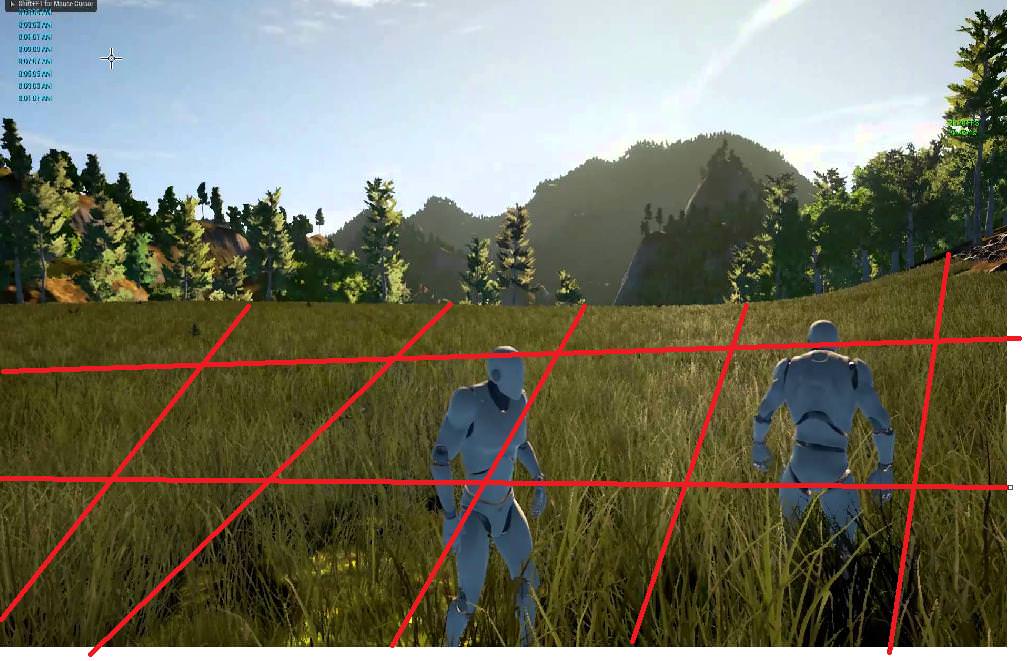
@sturdy star
but im not sure how to paint anything like this on map, even if i know at what position it has to be painted, for example 500x 500y draw a 10pixels border, but no idea how to do that in ue4
plush yew
i tried to make these lines with cube but it drowns in landscape lol https://i.imgur.com/iUSGjt7.png
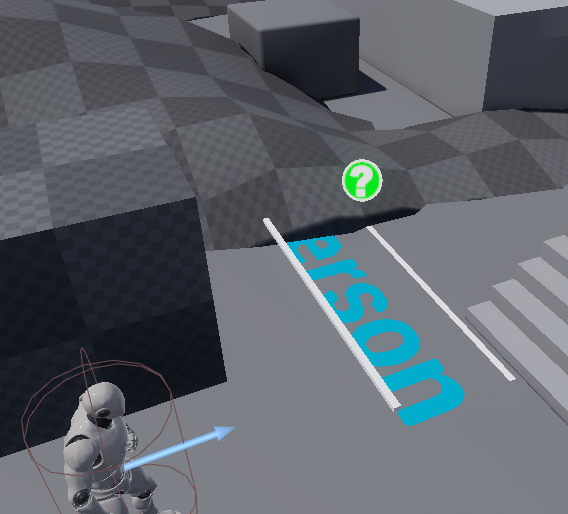
Possibly a dumb question but is there a way to keep the effects of volumetric fog without it looking like there are two suns?
surrealism
is cool
 obtuse path
Generic question: Did they add the folder favouriting in 4.20?
If they did, how do I favourite a folder?
never mind
first few times I looked at right click I didn't spot the "add to favourites" Could really do with a star Icon in that menu entry
 cinder iron
speaking about design, how would you guys implement level boundaries? In the picture would be the grayed out area. There are several approaches for this but I want to hear cooler ones! (Not volume based if posible)
plush yew
who made u graphics @cinder iron
cinder iron
DICE
plush yew
what
cinder iron
DICE made that in the picture
plush yew
how
plush yew
bf is not 2d
 sudden agate
what exactly do you want? Do you just want to visualize the Level boundaries on your map or in 3D?
cinder iron
I don't need any visualization
I need to be able to make custom shapes for this playable area
cloud cobalt
@plush yew It's the overhead map for BF4
cinder iron
I don't want to rely on blocking volumes
I would need pairs
one for inner and another one for outer
there are several approaches, but I am looking for specific ones not based on volumes at all
for example, drawing with a spline the boundaries and determine wether a point is inscribed inside the area created by the spline
or outside
z is not a problem for me
I would like to know how titles like battlefield, cod or even battlefront solved this issue
maybe it is just solved by using volumes
but for me seems like something else
the setup I have rn is using volumes
and its a bit tedious in the placement phase
 grave nebula
@cinder iron To determine if a point is inside a polygon, you can intersect a ray with every edge. If number of intersections is odd, point is inside.
cinder iron
with every edge...
mh, seems cheap for the cpu
so is the spline thing all right? you think so? or would you approach this problem in another way @grave nebula
grave nebula
@cinder iron Yes a closed spline. I would not handle the logic part differently. For visual part you can just render a polygon,
cinder iron
visually will be only reflected on the minimap
as soon as the spline can be accessed by it its fine
the logic would need to be on tick then, movement doesn't necesarily mean input axis
there is a problem with that solution, which probably is not very relevant and a technical limitation
you cannot create curves
since you are getting locations from every edge
and calculating wether a point is inside a spline a curve between two edges will not be posible
grave nebula
It is irrelevant. The same applies. But instead of finding intersection between ray and a segment, you would do so for ray and interpolated spline segment.
Logic is still same. No intersections- outside. Even number of intersections- outside. Otherwise, inside. Special case when exactly on the border.
cinder iron
you mean this?
grave nebula
I am not sure what I am looking at
cinder iron
purple point isa soldier, pentagon is the defined area by the spline
each edge represents each vertex of the spline
red lines represent the distance between the soldier to the vertex
grave nebula
I am not sure how the drawing is relevant though.
cinder iron
it is for me to undertand what you are trying to explain
grave nebula
 grave nebula
ray direction is arbitrary, but same for tests against all edges.
cinder iron
mh...
sudden agate
what exactly are you trying to achieve ?
cinder iron
what I said before
now... defining a ray on a 2D space for a spline would be easier, but having a ray for a 3D space? I would need to have a way to solve all of this with vector math
grave nebula
Kinda remains the same, but segments turn into triangles.
besides, I can't imagine you needing an arbitrary shaped volume.
cinder iron
thing is I wanted to avoid volumes
there are several approaches to sort this out using volumes
grave nebula
If yours is defined by a polygonal prism, you can keep the test 2d, but add a simple check if third coordinate is within the limits.
cinder iron
but it is just nor very comfortable
I could actually
great idea
I can transform the problem to a 2D plane
tracing imaginary lines in one direction from where the soldier is
cinder iron
yes?
plush yew
you know you mentioned to change my multicast firing events to server, right? run on server, and then set the projectiles to replicates / replicates movement
does this save network bandwidth?
cinder iron
no, you are spawning replicated bodies onto the world
what you save is the multicast
and you spawn the projectile on the server
where it should be
@grave nebula thank you so much rey <3
grave nebula
@cinder iron o7
cinder iron
I'll give it a go and post something out there
plush yew
all right, thanks. trying to optimize it now.
cinder iron
I was sick of these volumes hahaha
you can't imagine how tedious is moving them all to cover all the map
 remote roost
is there a key shortcut to progress by one frame
 fierce tulip
<_< lately i hear everyone talk about fortnite in my local vincinity, and to make it worse, they always ask me if I worked on fortnite or pubg, and when I say no, they tell me i should so i can make millions
.#thatsnothowitworks
cloud cobalt
Yeah, and working on a commercially successful product usually doesn't give you a percentage either
fierce tulip
hehe, I often ask them if they get a cut when their bosses make a million euro deal.
"oh.. yea.. right"
remote roost
is there a key shortcut to progress by one frame when paused
 whole turtle
Hey guys! o/ I'm getting this error while trying to login the ue4 launcher:
any suggestions on how to solve this?
I couldn't find the AS-0 reference in the knowledge base
 wary wave
you want to know whether an object is inside an area defined by a spline?
@cinder iron
cinder iron
yes
wary wave
that would be essentially impossible, but you can sample points along the spline and define that as a primitive
cinder iron
I am sorting it out already dw
wary wave
hehe, ok
cinder iron
thank you anyways
wary wave
it was a problem I was looking at with the air drop on Vigor not that long ago - if you have a particularly complex spline it's basically impossible xD
 tawdry raptor
I have a hand held item that I have placed a HUD screen in. I made this item a blueprint because it needed to have code for the HUD. Now I cant seem to pick the item I made it a blueprint for a character
did I do something wrong
will I be able to pick up this item? or I cant because I made it a blueprint character?
cinder iron
@wary wave I ended up not allowing curved lines
wary wave
yeah, that's a sensible solution
cinder iron
but basically this https://www.geeksforgeeks.org/check-if-two-given-line-segments-intersect/

GeeksforGeeks
Given two line segments (p1, q1) and (p2, q2), find if the given line segments intersect with each other. Before we discuss solution, let us… Read More »
so spline loop' starts at 1 and lines are paired
i check each one of those to count up num of intersections
then mod(2)
to see if its even or odd
I don't like having to loop for this on tick
but couldn't find any other better solution
however I imagine my playable area to be something like this

so doable i think
 grim ore
@tawdry raptor you should be able to pick up anything if it's set up properly for collision and physics and however you are "picking" it up.
 rocky kayak
any way to manually refresh a navmesh without using the console command? my game moves the player infinitely forward and simply moving my dynamic navmesh forward via setactorlocation doesn't update unless i manually click and drag it.
tawdry raptor
would it make a difference in game if I used a blueprint character for my hand held item vs a blueprint actor? I dont want to lose performance all it is is a hand held item
with a HUD on it
wary wave
@rocky kayak - nav mesh isn't intended for that kind of purpose
rocky kayak
ah what would i use instead then?
 native kite
is a weapon switching system hard to make?
wary wave
nothing that's built in
rocky kayak
aw man i gotta do actual work then
wary wave
nav mesh is intended to be static, and work with largely static environments
what kind of game are we talking about?
rocky kayak

Clicker Heroes 2 is a game about the feeling of getting amazing powerups. You will embark on a never-ending journey to defeat mythical creatures, progressing through an infinite number of worlds. There will always be another upgrade. 1.52e394+ Hours Of Gameplay!FeaturesHop fr...
Price
$29.99
Recommendations
802
similar to this
infinitely runs forward
wary wave
in games like this the character itself doesn't move
rocky kayak
yea i actually thought about that approach
wary wave
in an infinite runner style game, the environment moves past the player instead
you can't really move a player infinitely in one direction because you'll reach the bounds of the coordinate system
you could teleport them back again, but it makes more sense to just keep the player at the origin
rocky kayak
hah that was what i had planned to do
wary wave
in any case, you're going to need a custom system if you need path finding
rocky kayak
got it, thanks amber
native kite
would it be hard to make a weapon selection system using the number keys (not the numpad ones)?
I plan on adding stuff like keycards and guns, so I somehow need to select them
 digital anchor
sounds simple
 lusty carbon
grim ore
lusty carbon
grim ore
@native kite it would be no different than any other input. You set up the keys in the input manager and then have the keys do stuff when you press them.
 manic pawn
wow that is one slow site
wary wave
because characters aren't rigid bodies
I do not like this 'academy' website
it's a good resource in that it's all the old tutorial streams in a sensible place
but it's organised in a way that pretends it's something else
it looks like a lot of the videos are just shoved in random categories with little regard for their content too
for example Hourences session on how UE4 renders a scene is in the "game designer" role section, which is nonsense
tawdry raptor
i had a tut
where the guy came back with a fully lit scene without showing us the steps
wary wave
that's relevant to people who want to know how the renderer works, which is more or less most people except designers
tawdry raptor
he just said I did this that and this
cinder iron
prototyped the boundary system on bp, since it needs to loop on tick I'll convert it to c++ soon, in case anyone is interested or have any suggestion to improve it feel free to do so https://blueprintue.com/blueprint/6e13nbtk/
wary wave
nice
wary wave
looks reasonable at a glance
cinder iron
heh couldn't find a cheaper way to do it smh
wary wave
it's not a particularly cheap operation
the two ways to do it generally include either the boundary tracing method or winding - and winding includes a lot of trig, which means it's usually expensive
cinder iron
don't make me sweat even more XD
just wondering how triple A titles solve this problem
but battlefield to me seems straight spline
so prob same method
wary wave
it's not unlikely they do something similar yeah
tawdry raptor
how come I cant grab my object I always get pushed back
i made my object a blueprint character
I cant even grab a mesh
weird yesterday i could
wary wave
https://www.unrealengine.com/en-US/blog/announcing-unreal-engine-online-learning
comments too harsh?
dire storm
Good morning Unreal Slackers! Hows the grind going this morning?
 sonic pagoda
great
preparing our minds for the game jam
im so excited , we had 7 members, but then we had to kick 2, which was heart breaking
felt like a real ceo for a second there
i even got to fire somebody
 marsh valley
Which game jam is this? Would love to start collaborating but I imagine you kind of have to have a group already
 marsh valley
Oh cool, they have an in-built team building function. That's actually really nice
Thanks Imagine, will see what I can find 🙂
sonic pagoda
you r welcome
dire storm
I'm not ready to be in a game jam yet but I would love to sit in on one. I think that would be a massive learning experience for me.
sonic pagoda
why arent you ready? how long you been working with ue4 and what areas do you prefer doing?
i honestly dont know what the official rules for people "sitting" in and just watching the process but i wouldn't mind having you there and seeing us chop it up on discord and trello.. im just afraid of getting disqualified though
dire storm
I'm just generally familiar with the editor. I haven't really made anything yet. I like to learn my way around first. Right now I'm learning how to make hex grids 😃
yeah I don't wanna cause any problems. Just observe 😃
marsh valley
What kind of team you running Imagine, and are you still recruiting?
(If you don't mind me asking)
dire storm
it says his team is full on the link
sonic pagoda
yea we are full, its 5 max
dire storm
@sonic pagoda well if there's a way I can observe I would love to watch your team in action if its allowed by the rules.
will anyone be streaming the progress for your team? I've noted in the past some people try to stream their gamejams
@wary wave why so savage?! 😃
sonic pagoda
i think i could stream some parts
i also have a kid though, so interuptions will definitely occur
wary wave
eh, it just rubbed me the wrong way - it's like all the entire page was designed to be disingenuous
it could have been a filterable list where you could check boxes for things like 'blueprint scripting', 'rendering' or whatever
but instead it's a user-unfriendly list of nonsense categories that each have just about every video shoved in them
it's like it's been deliberately made that way to make it look like there's way more content than there actually is
wary wave
haha
I also dislike that they call them 'courses' and track which ones you have 'completed' - as if there's anything to complete
they're just videos
dire storm
I gotta get busy on the hex grid math but my brain is crying out "please nooooot yet"
wary wave
it's really good material, but eh, this isn't Coursera, haha
funnily enough I dug out my early hex grid stuff just last night
 elfin jacinth
How is everyone doing today?
dire storm
I love unreal engine don't get me wrong. I think its amazing and the community is awesome and I'm so happy all this material is out here. But lately I've found myself watching unity tutorial videos because thats where people actually make great tutorials and break down game design mechanics and code. Unreal does a really great job on releasing videos on engine features but I need to learn how to program, design and implement mechanics and the unity fan base has a MASSIVE amount of material on that.
@elfin jacinth Fantastic. Just getting on the grind and learning me some hex grids mappings 😃
elfin jacinth
Very awesome
 heavy falcon
Unity is much easier, also it was more accessible for a longer time
elfin jacinth
We're always trying to improve that. The first iteration of the page you guys saw today is obviously something we're super proud to release, but will always improve upon.
dire storm
Oh I have a question about the game jam. Is it okay to observe a team without participating for learning? @sonic pagoda offered to let me observe his team in action so I could learn a little bit but I don't want to put his team in jeopardy of being disqualified.
elfin jacinth
I know we just brought in some amazing talent from the education space that will help us design and improve the way we teach and share lessons.
sonic pagoda
@elfin jacinth 1 of our artists also had a question: if we use Quixel Megascan textures does that count as pre-made content, we are trying to see how deep this premade content hole goes
tawdry wyvern
hi
dire storm
idk if anyone has ever watched Khan Academy but there is a lot that could be learned about teaching from that site. Its my personal gold standard in online learning.
tawdry wyvern
can anyone help me
digital anchor
everyone can, if they know the question
sonic pagoda
@dire storm have you ever watched this series: https://www.youtube.com/watch?v=1pmPb_TWG-8

This video introduces the Twin Stick Shooter project and shows the end result. In order to follow along, you should get the TwinStickShooterContent.zip file ...
dire storm
I have at one point watched pretty much every tutorial video once
sonic pagoda
theres a lot of people with bad videos for unreal engine, that just waste your time with stuff that wont help you in your game... i learned that the hard way
its only when you really start getting out and trying to figure stuff out yourself, failing, going to forums and asking questions that you really start to get it all
wary wave
I've heard good things about the Khan Academy stuff, though tbh I usually avoid videos
it can take a lot of time to present simple information that could have been much more easily digested with some text and pictures, hehe
sonic pagoda
@wary wave i agree with that, a lot of people just like the sound of their voice
plush yew
Good ol Khan Academy. Explain something and then slowly write it out while repeating it three times
grim ore
@sonic pagoda I would assume as the assets are sourced from a 3rd party not part of your team they would be disclosed as 3rd party and not original from your team. If you used something like substance designer it would be original from your team but mega scans are just textures right?
dire storm
I agree there is no better teacher than experience. But at the same time I came to the conclusion that by cramming insane amounts of tutorial videos my general "understanding" of the vocabulary, workflows, and how all the parts of the editor work together would be a solid foundation to work from. Then I go back, as I am doing now, and start working on my own mechanics and whatnot. When I have a question now alot of times I have a vague memory of having seen it before somewhere and have a general idea where to look. But before my hundreds of hours worth of tutorials I had zero idea about any of it.
sonic pagoda
oh yeah, definetly lvl1, i forgot to mention there are hundreds if not thousands of great ue4 tutorial videos
i actually have a hard time keeping up with all that i do want to learn, and stuff i have to finish
dire storm
@wary wave I'm a visual and hands on learner. Thats why I go to Khan Academy for all my mathematic learning. I have terrible reading comprehension.
sonic pagoda
but the forums is also a great source of learning, i generally find some1 has already asked the same question i had
wary wave
I dunno - I find a resource like this:
https://www.redblobgames.com/grids/hexagons/
is infinitely more useful than a video
dire storm
idk I avoid forums unless they show up in a google search. I find it to be a huge time sink with little gain for me personally unless a really good post pops up on a search that has great material in it which in that case I usually save it
@wary wave I love that site. I have it open now
wary wave
and unlike 5 hours of videos, if there's something I want to reference, I can just CTRL+F right to it
but yeah, that was the site I referenced for my own hex stuff
sonic pagoda
what do you guys need hex math for?
dire storm
It took me a while to find it. I think I stumbled across it on reddit. I also picked up a hex asset pack from the marketplace because I wanted to see working code examples and bp implementation. From there I could gut it and play with it. Unreal engine marketplace is like buying someone else lego creation to smash it and see what you can make. I really do love UE4 and the community
 leaden dust
What would be a appropiate vertex render count for a high end game. I know this is a stupid question but still I want to know
Number of vertices rendering at one time
dire storm
I'm glad you asked. @sonic pagoda . I'm toying with a prototype idea of mine and I wanna see how far I can push it once I learn everything about hex generation. I'm taking it slowly one step at a time. But basically in a nutshell I want to replicate civ or endless map tiles however I want every single tile on my map to be a clickable level that opens into a smaller hex map.
dire storm
I don't care if there's loading. I'm not making civ or endless. I just want to see what I can do with it. I'm just learning the basics of it right now but I'm in love with hex grids and I have some concepts I wanna do and everything evolves around hex so here I am. Hexing it up 😃
sonic pagoda
@leaden dust thats a hard question to answer... and i dont think you should worry about that right now..... just experiment with scenes, build a game, see how the fps / gpu stats are and try adding removing stuff and measuring...
dire storm
I was really sad to see ShardBound fail. That game looked really beautiful and it was an UE4 title. I found them on the forums and posting on the UE4 fb page. The art style they had with hexes was so beautiful
sonic pagoda
this game?

Shardbound is a Tactical Collectible Card Game. As you play, you’ll collect hundreds of units and build armies to compete head-to-head with other players in matches of cunning and skill. Use positioning, the terrain, and your units’ unique abilities to achieve victory.
Recommendations
993
 vale silo
@elfin jacinth Are there any plans to release more Paragon stuff (characters/anims/animBPs , VFX, sounds, etc.) in 2018 ?
dire storm
@wary wave You dug out your Hex stuff because you were grinding Endless Legend for like 8 hours last night thats why 😃
wary wave
haha, nah, unrelated
oof, free to play
that's a bold move if you're virtually unknown
I'd never head of them until today
dire storm
@sonic pagoda Thats the one. Have you looked at the tile artwork for it? Its so purdy
sonic pagoda
yea it looks nice, the comments are anything but though
dire storm
The studio flopped apparently from what I gathered off google. The price tag on purchasing ingame content was pretty high from what I gathered. regardless, I loved alot of the work that went into it and the style of the hex boards they were using.
 inner yacht
Is a Multicast event enough to show all clients my attached equipment or should the client run an event also?
wary wave
free to play is a death sentence unless you have significant ability to advertise, afford running costs long term whilst initial onboarding is ongoing, and have the investment into metrics to understand your game
I honestly wouldn't try doing free to play unless my budget was into seven digits
plush yew
hello
elfin jacinth
@vale silo We have another Paragon asset release later, yep!
dire storm
Oh no. Dog just completely shredded my nephews new teddy bear. Stuffing is everywhere. I'm gonna be on the Nephew naughty list big time. RL problems
Oh love the Paragon Assets. Such an amazing learning resource. Thank you so much for that!
wary wave
lol
 safe rose
I just hit the end of each video
since it doesn't care
But overall, I mean, it's nice that they did this, looks like they put a little bit of effort

Unreal Engine
Mastering Unreal Engine just got a whole lot easier! Our new online learning platform features video tutorials, industry tracks, and downloadable tutorial files for a variety of UE4 workflows. And it’s open to everyone, for free!
Guess this is one of many reasons to not have to do Tuesday streams anymore
dire storm
I was trying to find my favorite training streams on there like the proc generated room and the rpg one.
safe rose
@dire storm hmm that's not going to be here
AFAIK, this is more of a "curated" thing
with some of these being new content
Since Zak was the OG BP Senpai
dire storm
yes he was/is?
I'm trying to decipher what this means for hex grid calculations.
What does it mean to use each edge as a graph between nodes.
cloud cobalt
Familiar with graph theory ?
dire storm
No. I guess that means I gotta put another something in my queue 😦 I love learning, I love learning...
cloud cobalt
What he's saying is, treat the map as a graph, in terms of graph theory. You'll be able to apply nice pathfinding tools on it.
Obviously easier to say than do
dire storm
I have a ton of reference material gathered up. I'm just working on the understanding 😃
dire storm
This makes sense to me but how do you handle the edge coordinates for tiles not generated. How do those values get populated?
The code loop just stores the coordinates in the array anyways even though the outside tiles don't get generated I guess?
safe rose
@livid haven Since you worked on the Localization Dashboard. Do you know how to get a .po file imported successfully? Tried Google Toolkit, POEdit and POEditor, nothing's working. Rather not do this manually, but if i have to, I'll do it.
cloud cobalt
@safe rose I did
The process is to gather ; export ; edit as a .po ; import ; compile
The import dir has to be the root localization dir - not the specific language dir or po file
I use Poedit too
safe rose
Aye
I figured it out by accident
Thanks though @cloud cobalt 😃
They really need to update the docs
Especially since it's like 4 workarounds
To do it
cloud cobalt
Yeah, it's not trivially set up
Works fairly well after that as long as you never do anything stupid
safe rose
Yeah, I am excited
I am trying to not have to do it all manually
😃
And have everyone localize it online
So I don't even have to worry about that myself either
cloud cobalt
We only localized in our native language, and english, and didn't try to have people do it
Just too many obcure texts in complex UI that would be nigh impossible to translate without real guidance
safe rose
Heh
It's actually not that complex, but a general overview of each part would be nice to newbies
As is, it took me 2-3 hours to get to the point of importing .po files
It's not that bad, but still, if it wasn't for the wiki and the answerhubs letting me know about all the bugs and workarounds
I'd be screwed
elfin jacinth
@safe rose We're working on revamping streaming, so Tuesday may be coming back.
safe rose
@elfin jacinth Sweet because it used to be one of the best parts of Unreal
Unreal Learning/Education I guess
As long as it stayed on point and didn't go to questions on twitch within 15 minutes
We talking about Official Epic Tuesday Streams @elfin jacinth ?
dire storm
Absolutely love the official Tuesday training streams.
safe rose
The Community ones were...alright, very much hit or miss.
Stuff like this: https://www.youtube.com/watch?v=EM_HYqQdToE

Announce Post: https://forums.unrealengine.com/showthread.php?101051 This Training Stream takes a look at Blueprint Communication. We find that Unreal Develo...
Freaking golden
 polar hawk
Is there anyone in here who maintains an active github repo that contains an engine build from source + a game project using git + lfs that isn't a direct fork from Epic Games?
Hit me up or #source-control
 cursive dirge
I could imagine dependencies could be an issue when hosting elsewhere
elfin jacinth
Correct, Victor.
 tranquil bone
Anyone use the procedural foliage generator im having a issue with mine it says "Unable to spawn instances. Ensure a large enough surface exists within the volume"
Anyone know how to fix this since my landscape is big enough and im very confused
grim ore
The main complaint I tend to see pop up when epic does programming stuff is "not enough C++, why is this not C++, Blueprints killed my cat". I am genuinely curious at what percentage UE4 users that use C++ are that would need tutorials like these.
 worn granite
People who only know BP but whose curiousity about C++ hasn't been killed off by all the avoid C++ undertone.
dire storm
I'm slowly learning C++ and I enjoy any content that further helps open the door.
worn granite
I'll grant you, those people would be better served by just digging into C++ and getting into the spirit of reading source to understand it.
The door may be heavy and slow to open, but its unlocked.
You don't have to have somebody unlock it for you.
 frank escarp
sadly, C++ is very hard to show in a stream
safe rose
TBH, if they did more C++ tutorials, you'd see a lot oh happy folks
Like, if they had done Tanks vs Zombies right
dire storm
For example: If I want to write a hex generator and wanted to use the actual math using sqrt(3) to calculate my hex grid locations over using .866 multiplier to generate lets say 1000 hex instanced meshes. How much of a performance difference is that? I know that when I get to that point I'll have to use the profiler but I'm not experienced enough to know off the top of my head.
 versed spear
The new Action RPG demo is a good place to start.
worn granite
Handmade seems to do alright showing code on stream
safe rose
BatteryCollector is a pretty nice project series still
probably their best one
@cloud cobalt Hmm, is there some trick to switching the language in game ? Changing cultures doesn't actually change the the text in game sadly 😭 Only does the editor
worn granite
@dire storm most of the benefit to switching from BP to C++ is avoiding when you jump into/out of the BP layer.
I doubt you get any significant gains on the math ops themselves
frank escarp
you do becouse the compiler can actually optimize it
specially important in loop
do not loop in blueprints
dire storm
okay thanks for that feedback. I recalled reading somewhere that using sqrt math operations over thousands of operations could cause performance issues so I put that on my radar.
frank escarp
please just dont
if you need to loop put it in C++, it will be much more efficient
modern cpus love looping
dire storm
I will be putting it all in C++. It will a great learning process
worn granite
Don't loop in BP. Just have your C++ loop and then call into the BP graph for your actual body implementation. 👺
frank escarp
please thats even worse
worn granite
ik
versed spear
The problem usually is not your math or if it is BP. It is the Engines C++ that kills it regardless. If you code smart, using BP is not a problem at all and it will save a lot of time.
frank escarp
for events, blueprints are fine
for math and/or loops, they arent
also, blueprint tick is really expensive
really, really, really expensive
 gaunt raptor
what should bp tick even be used for
worn granite
See now, this is the kind of thing I meant with avoid C++ undertone.
Using BP absolutely introduces a cost.
polar hawk
Yo, I am never going out of my way to code a fucking loop call in c++ instead of doing it in bp
worn granite
Truly, if you care about performance enough, you'd use raw C++. That doesn't mean the difference doesn't exist.
frank escarp
even if you care you shouldnt use C++ for everything
versed spear
I am finding that I am limited by other things like AI controller and number of draw calls not what I do in BP but I agree there is some improvement with C++ but not much in some cases.
dire storm
@gaunt raptor bp tick all actors of class obviously
frank escarp
im running DWVR at 120 fps on a ps4 with blueprints for enemies/ai and a bunch of other stuff
dire storm
c++ is too slow. Assembly or riot. Is that what we are doing here?
frank escarp
actually you cant outspeed C++ with assembly
worn granite
hey you do you
versed spear
naw just binary.
frank escarp
becouse C++ has a thing called an optimizing compiler
so its very likely that you wont write assembly code faster than the compiler
dire storm
thats cool. didn't know that
frank escarp
there is only 1 real exception
vectorization
and then you can just use the intrinsics
worn granite
The gains you can get, that compiler will have been optimized to do.
sonic pagoda
blueprint ticks are expensive, but whats your target? are you making something to run on an arduino or something
i still stick by my super noob advice that isnt actually good advice: if it runs at 60fps its efficient enough
frank escarp
i dont have to run at 120 on ps4pro
but i do it
becouse i can
there is pretty much no other reason
versed spear
Well I am going through 200+ actor array 10 times a second so any increase would help.
sonic pagoda
okay, that makes sense
i can't imagine what kinda games you guys are making, but for my cases, i've pretty much gone blueprint the entire way except for when something wasnt exposed to blueprints
and ive never had a perfomance issue related to cpu
althought i havent driven too far into multiplayer...
online multiplayer
versed spear
I use a mid grade android device to test on. Help with testing fps issues.
sonic pagoda
@frank escarp i test my game out on a wafer thin pc with no gpu
and it works at 30fps... it still is limited to gpu, and not cpu
frank escarp
still stronger than a ps4 for game code
sonic pagoda
im not gonna argue that c++ isn't better, because we all know it is.... im just saying.. whatever gets the job done, especially for a solo game developer
worn granite
I can agree with that, ImagineGames.
sonic pagoda
@frank escarp i guess ill just wait for the ps5 then lmao
versed spear
Everything is set up perfectly in the Action RPG demo. They are still limited to the amount of ai move to calls. It is around 50 calls a second. I just wanted to know the limits of the engine before I got to much into it. Rendering is a big issue for me right now since I got a handle on the amount of ai calls. I don't think the engine is optimized for using to many flip books on screen. Knowing the limits rely does help with your game design.
worn granite
lol that's not even a real problem. replace that with not that you had a dangling pointer which you couldn't troubleshoot
And yeah, I agree. Go with what's the best for you to be productive. But I think C++ will continue to have a place, and that you're doing yourself a disservice if you go out of your way to ignore/avoid it.
manic pawn
wonder what they're waiting for with releasing 4.20.2
sonic pagoda
@worn granite i actually want to learn c++ but the book is so heavy i literally have no place to study lmao... true story
native kite
heavy book nice
versed spear
You do have a place to study. Start with the Action RPG demo by Epic Games it is free all set up and ready to go.
safe rose
@manic pawn Where did you see they were doing a 4.20.2?
manic pawn
there's been a ton of commits on the 4.20 branch after 4.20.1
sonic pagoda
@versed spear thanks I will check it out
 jolly coral
Hello guys! Just started to learn UE4 through internal tutorials and documentation. May you please recommend some nice tutorials with sample projects?
Just did not find anything like that on official website
 upper heart
They are still working on some issues for 4.20.2 https://issues.unrealengine.com/issue/search?q=fix%3A4.20.2&resolution=unresolved&component=&sort=
frank escarp
@sonic pagoda if you want to learnC++
dont touch unreal
seriously dont
learn C++ by itself first
 thick ridge
@jolly coral https://docs.unrealengine.com/en-US/GettingStarted
safe rose
@upper heart nice. I typed in fixed:4.20.2 and that wasn't it
dire storm
hmm this article I'm reading is suggesting using hash tables for storing hex grids. Everything I've seen just uses arrays with enums and such to store tile info
safe rose
Just in case anyone searches for Localization Dashboard, Importing Localization, Cultures not importing, cultures not switching, .po not importing, po files:
https://answers.unrealengine.com/questions/778661/localization-po-import-failed.html?childToView=818258#answer-818258
BTW, this makes testing Localization in VR ... basically never happening
dire storm
https://www.redblobgames.com/grids/hexagons/#map-storage I cannot wrap my brain around the axial storage section or its significance at all.
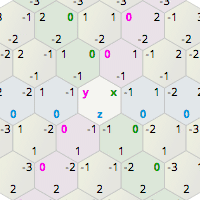
Guide to math, algorithms, and code for hexagonal grids in games
 barren coyote
Hi, In the game ARK survival evolved (made with UE4.5) players can be transferred from one server process to another, there are limitations in that each server process must be running on the same physical hardware. Any tutorials on how to setup something like this, and is it possible to achieve similar results but with servers running on different physical hardware?
 south ridge
@barren coyote do you know C++ really well?
The thing you're asking for is something you don't need a tutorial for
You just design it and implement it. It's not a trivial task
I don't know what ARK does specifically, but transferring state is not hard, but overall it's not a trivial thing
Like... basic way to transfer state is to have all servers be linked to a single database, storing some base player state (inventory, stats etc)
And whenever player connects up, you just initialize him from that database
barren coyote
I konw C++ but would not say really well, and I have Ue4 blueprint experience modding ARK, adn now wish to make a small game for fun. So really looking for tips along the lines of "No thats is imposisble" and "Yes, it can be done " etc 😃
south ridge
Yes. It can be done.
No, there are probably no tutorials on the subject. Yes, there are tutorials on linking up database to UE4
barren coyote
thanks,. I am thinking of having a server process for a player lobby, players choos a map for a FPS type match and then get transferred to the server process running that map/match and then back to the lobby when it is over.
 broken shadow
@barren coyote Welcome to the show :P
I'm gonna be getting my keyboard dirty with C++ As well
I'm interested in making a counterpart to the capsule component that better fits animal characters
Currently digesting UE4's character related source code to see what's up
I dub it project AnimalComponent
barren coyote
@broken shadow 😃
I'm just a bit over ARK modding so looking to make a toy game, not a game a bout toy's but just a for fun project with no real purpose of future other than being fun to make
broken shadow
I'm not interested in putting together a game but I've seen people ask "hey how should I handle collision for my animal character?"
Always the answer is accept the limitations of the capsule component, or C++ up your own solution.
barren coyote
have fun
broken shadow
yup lol
 trim night
Whats the best way to add an clickable overlay to the game? Should I use the HUD class or the UMG class? I am asking because a HUD is just for displaying data, normally.
 mint raptor
As far as I recall reading there isn't much reason to use the HUD class anymore
Use widgets
trim night
Alright. Are HUD classes deprecated?
manic pawn
now the hud is mostly used as a manager for your umg widgets
more separation I guess
ideally the character would never directly call ui
mint raptor
That makes sense to use the hud as a manager, but what concern is there managing all player related widgets on the player?
 finite vault
Probably get this question a lot but apart from quixel megascans where would you get realistic free materials textures ?
 whole quarry
Google, make them yourself or get someone to make them for you
sonic pagoda
@broken shadow ive had some things ive done regarding animals, such as setting the capsule as the center of the body and then via construction script attacthing other spheres or boxes with collision to bone sockets
 cunning umbra
Ah man, I do not want to do QA
14 videos to watch, localized to 12 languages = watching the same 14 videos 12 times each
20 minutes per language * 12 languages = 240 minutes = 4 hours. Uuuuugh
tawdry raptor
can someone please help, I bought a script from the store and followed the directions but its giving me errors
does anyone know what this means
the guy I bought it from is russian
 weary basalt
@tawdry raptor If there are issues with an Marketplace asset you purchased you should talk with the Author first.
tawdry raptor
oh
weary basalt
The Author will know the pack inside and out and will be more able to assist you with its usage.
Try emailing them first.
They are required to give you support with problems in direct relationship to their assets.
tawdry raptor
im also trying to learn
seems like Blueprint Runtime Error: Accessed None trying to read property is a common error
i dont want to have to crawl to this guy every time i have a simple problem
weary basalt
Yes it basically means, you tried to access something that isnt there.
Yes im saying if his Asset has errors, you should eemail him.
tawdry raptor
well I dont know if its because something I did
im trying to put a display on an object
well it doesnt give any errors on his map
the demo map just mine
maybe I should just start building my level ontop of his
right or wrong?
if I remove all the stuff and build on his I should be ok
should I build my game ontop of his world?
or his level?
 cerulean perch
Let me start out by saying I'm new to UE4 ( not new to programming ) and realize I have a lot to learn before i'm going to be able to finish making a good game. Currently following lots of tutorial and experimenting with code. For the RPG I'm wanting to create in the future I was planning a free move system like point click for the party when moving and switching to turn based movement when hostiles are close. I'm curious how this would be implemented in UE4... would I set up some sort of state machine called from the project settings game start or does UE4 already have a way to handle it or am I completely off on how to handle it?
grim ore
@cerulean perch will the turn based combat be on the same map or switch like classic Final Fantasy games do? If so you just use separate game modes to handle how things are between exploration and combat and you can use separate player controllers to control how players are ... controlled during combat lol.
cerulean perch
the plan in most cases would be for the level not reload or change when the hostiles get close as combat will not be final fantasy style more like classic D&D RPG with everyone taking their turn to move and attack on their initiative....
grim ore
yeah you might basically just handle that with a simple toggle setup. A bool on each control that forks off to what should happen based on your state like you suggested
a simple start might be to have the game mode handle the current state, exploration or combat or such. The controls can check the state when they trigger and branch based on the state to handle if they should move or handle the combat movement type. another way that might be weird as well is to kinda make it context sensitive. Like when your moving your clicking on the map would hit just terrain and then it would know to move. If you get into your combat state you would overlay your combat grid or something similar and then when you click you would hit the grid instead and the controls wold know to do something based on combat
dunno how feasable the second one might be but it would be fun (for me lol) to try and figure out atleast
 buoyant compass
Hey guys, been working on a procedural dungeon generator, and have it at a place im pretty happy with. However, for AI navigation, whats a good way of generating a nav mesh, since its different every time?
 marble spire
Guys
is there a way to change the folder of the projects?
my ssd is running out of space
but after if i delet the original one, it will desappear from the ue4 menu, right?
then i gonna need to open from the file?
grim ore
then you just double click on the uproject in the new location
it will add itself back to the list. the act of opening it up is what adds it to the list in the first place
 bleak widget
cleaning this folder periodically
and i searching the way how to change this setting in UE
cerulean perch
Thank you MathewW. This gives me some ideas to think about before I get to implementing it as I said still a little ways off yet but learning lots from RPG tutorials.
plush yew
dont delete the old one until you are sure the new one is working for a day or two.. i've migrated root game project directories many times and never had any problems but it's good to test with standalone and maybe a packaging to make sure everything is okay.
grim ore
@bleak widget you can change it from the .ini file for the project, the .ini file file for the engine, or in the settings for the project itself in the editor
tawdry raptor
im using an example map and am trying to delete everything on the map when i hit play alot of other things show up on the map level, how can I delete everything so I can build my level from a non buggy one?
why is the first person coming back after I deleted him
grim ore
when you hit play the Game Mode will spawn in defaults. you can try to change those to none or just make a new map?
bleak widget
MathewW thanks
 winged crypt
What's the "Version=?" supposed to be inside this file?
I found old forum posts saying it would =5 but maybe that's specifically for an older engine build
weary basalt
Depends on the engine version your using?
winged crypt
4.19
I'm not sure how the Version= would be 5 in a forum post from 2015, I don't understand what version # it refers to
tawdry raptor
why wont unreal tell me what i need to do ti fix my problem
weary basalt
Probably because your problem is to generic. Research and experience.
Is it still the Access None issue?
tawdry raptor
yes
tawdry raptor
Blueprint Runtime Error: "Accessed None trying to read property RadarBounds". Blueprint: BP_RadarSettings Function: Execute Ubergraph BP Radar Settings Graph: ForEachLoop Node: Branch
weary basalt
That its talking about
weary basalt
An variables called "RadarBounds" didnt exist when it was trying to be used inside a ForLoop
tawdry raptor
the guy told me to make a radar bounds so the enemies will show up on this its a capsule
weary basalt
You will need to use an IsValid node on the variable RadarBounds before you use it.
Ok well why havent you done that?
tawdry raptor
i did
but the error comes from a section of code I never touched
I never went into Blueprint: BP_RadarSettings Function: Execute Ubergraph BP Radar Settings Graph: ForEachLoop Node: Branch
its a macro
weary basalt
Yes thats fine.
But its telling you that it expected an reference inside something called RadarBounds to be valid.
Meeaning that you probably didnt setup somethign correctly as per the asset requirrements.
Is there a tutorial you can follow for the Asset you purchased?
tawdry raptor
yes
weary basalt
Well if you followeed the tutorial and wasnt paying attention then you miss vital details.
tawdry raptor
let me start all over
polar hawk
you have a thingy thats not actually a thingy at all but you're like hey thingy do this but nothing happens because you're yelling into the void and not at a thingy and thus the error
so get a thingy
weary basalt
Such a sage




 neon ivy
I just started working with UE4 like 2 days ago, and this is hard AF to use
jesus
compared to Unity3D anyway
lmao
yeah i agree
polar hawk
wanna make a door
worn granite
jfc allar is this what youre doin with your life? I mean I shouldn't judge...
thats just how epic DO oml
sonic pagoda
@polar hawk so we got this little ball thing, that doesnt help us... lmao.... too bad that is so true when im trying to make a small actor
tawdry raptor
seems like I attached something to my guy
oh no the guy who sold this radar ripped us all off
i just realized
polar hawk
its not a real radar
tawdry raptor
he doesnt tell us how to add our OWN ememies....this is barbaric
when we add his we get errors
 storm venture
hey, you guys know that default sphere that sometimes appears where a player's camera was? any idea on how to get rid of a rogue one of those?
tawdry raptor
why cant we delete character movement componets from the screen? its all greyed out for delte
delete
 delicate needle
Allar - your door tutorial is missing 1. a one minute shitty aftereffects sweeper logo intro 2. "Hey guys, Allar here, before we get started go ahead and hit that like button, and get subscribed"
tawdry raptor
It's not me it's unreal
Why won't unreal let me delete
These are the issues nobody ever talks about
storm venture
you cannot delete the movement component because it is inherited from the parent class that your character uses
if you don't want a movement component, use a pawn class instead
tawdry raptor
it sounds so simple in theory
worn granite
Yeah, you can't really have a character without a character movement component. That's sort of the point of the character class.
bleak widget
soon we will see you convulsion 😬
worn granite
Nah, just complain the chat is blaming you, and insist that unity doesn't have this problem.
barren coyote
@tawdry raptor Have a look at this article https://www.howtogeek.com/207754/how-to-use-the-snipping-tool-in-windows-to-take-screenshots/
grim ore
anyone know if there is a sig graph livestream or rewind to watch. they just tweetered about real time collab in UE4 being shown
storm venture
did he rage? what did i miss?
weary basalt
Yeah i really dont miss Unity lol
cursive dirge
they are so bad, that all tech and other sample scenes Unity provided so far make the whole engine look bad
when most of the issues are only in the char controller
it makes everything look choppy
nothing would really prevent one building own char controller there
nor would prevent doing the same on ue4
issue with that is the modern game development approach tho
people want complex char feats and multiplayer
most people using these engines wouldn't know how to even start building such themselves
tawdry raptor
I have a HUD on my screen and on a hand held object. I would like to remove the HUD off my screen but keep it on the hand held object. Is this possible?
It's a tricky situation
Because the I used the HUD from a project file but it puts it on the screen
inner yacht
look for add to viewport or add to player screen and remove the node
tawdry raptor
this is what i could find you say remove that?
plush yew
Anyone got an Unreal Engine icon as a PNG with a black background?
I'd like to run it through an image-to-ascii converter so I can experiment with my video editing software and make a "powered by Unreal Engine" intro movie for my game
tawdry raptor
it didnt work
inner yacht
That is a reference that is being set
inner yacht
try the player blueprint or player controller to see if its being added to the viewport or player screen
tawdry raptor
no its not being added I only added it to the hand held item
dire storm
When does the Unreal streaming begin tomorrow. @grim ore post just reminded me. Hopefully I don't sleep through. I'm quite burned out from studying
tawdry raptor
I noticed that when I dont add the item to the level the radar doesnt show uo
dire storm
How does Ben Tristam learn all these damn engines and able to explain how it all works. Just trying to survive a few more videos and not crash
tawdry raptor
when i add the hand held radar to the level it adds it to my screen
no its a serious question
how can a person remove a HUD from screen and not the object
I guess ill ask on the unreal forum
i miss the days of MIRC
these discord era is to barbaric
i know
but if you were faced with the same situation from a client you would be lost
where is the blueprint bible
I need to read it when im on the toilet
because blueprints has so many commands
if a person doesnt get fimilar with them they are french
i did but they dont go over my issue
of removing the hud ill just post the code on the forums maybe someone can help
Or I need a tutorial on how to make the radar go to an item or material
there are no tutorias for hand held radars
everything is a HUD
which i think is strnage
even a pipboy tut would do i guess
im almost done with my game
believe it or not this is all i need
the gun is already there and ill just make some AI
removing the hud is a problem!
 midnight oar
Anyone know if it's possible to change the pivot point of a mesh via blueprint?
@limpid star Trying to work out how to snap objects together that are not regular shapes. I'd like to be able to snap them based on source & target faces - what i've seen so far is that everyone seems to use the pivot point as the snapping point and the ray-trace hit point as the place to snap to
I'm pretty new to all this actually so I'm not sure what you mean by making a root/child node?
ok - the mesh I want to snap will only snap from it's pivot to that node correct? If so, i am still limited to how the to actors snap together.
agreed. I'd really like to be able to (1) Find face midpoint on object A and snap that to either the mid point of another object's face OR a vertex. Dunno how to get vertex info tho either.
ok, so if i want to snap a cube to something else, that cube would have child nodes at say each of the 8 verts and maybe also at each of the 6 mid-face points? Then, I choose which child node to use for the snapping. Is that what you mean?
hmmm! interesting.
What would these "marker" nodes be? Can they be simple points or do they need to be actual 3d objects like spheres or cubes?
Would the direction the arrow is pointing = the normal of the arrow? If so, I might need a lot more arrows to allow for normals in several directions ... or maybe just do that with math.
That's kinda the idea ... it's all just hyperthetical atm until I get the algo sorted out in my head
How easy (hard) is it to position these child nodes exactly on a vert or somewhere else like the middle of a face?
But if the attachment point are the things controlling the snaps, shouldn't they need to be place exactly?
ok, that sounds like the way to go. I'll just have to figure out how to implement it.
The concept I'm thinking of is a bit like the game crossout where you build different vehicles but snapping different chunks together
cool, thx
tawdry raptor
can I move a hud off the square grid or is it stuck there?
barren coyote
hey @tawdry raptor have a look here: https://academy.unrealengine.com/
tawdry raptor
you know what i think
i think if I cast to actor instead
of the canvas
it should bring everything to the actor
tawdry raptor
hmmm since I dont know much, you know what im going to try, to flip the picture like a paper so you could barley see it
midnight oar
How do you lock objects in the editor so you don't accidentally change them?
plush yew
@midnight oar Would this help? https://answers.unrealengine.com/questions/40500/can-you-lock-an-object-in-the-3d-view-so-its-not-s.html
midnight oar
lol - i was just reading that. Thanks. It's been 3 more years and they still have not added a freeze/unfreeze feature. Disappointing.
The topic is also closed so I can't ad my 2c worth.
plush yew
Ahh well atleast you can't move your object that way 😛
midnight oar
I just added a post about it - any luck the devs might see it and/or others will respond and add weight to the request for future updates.
Although I don't think it will help ... just look at the threads requesting support for 3D mice.
midnight oar
LOL! not this 'lil black duck.
plush yew
Haha
I have another issue with ue4 myself..
Like ehh, 100% when applying a material 😛 and that can take up to 30 seconds sometimes
It's quite annoying
midnight oar
I imagine it gets exponentially worse as the project grows.
bleak widget
new stage of developing my game - dynamic landscape material😬 and i noob
plush yew
@midnight oar I added the kite demo open world assets to my project so I can quickly block out some ideas for levels and such
But if I drag in a tree for example (the first time) it literally freezes the editor and I have to wait 4 minutes 😛
@bleak widget Sounds good!
midnight oar
I had a similar issue ... i read somewhere that the problem is the very high res textures and lowering them makes it a lot faster with little or no impact - certainly not for just testing purposes.
south ridge
I can help with it
For very complex meshes, there are a few options on import that can speed it up A LOT
plush yew
My teammates say it has to do with the dynamic cache thingy
bleak widget
i found some tutorial how to make the material depends from slope surface. But the material function is unknow
plush yew
@south ridge If you would have an idea I would be glad to hear it and try it out 😄
south ridge
When importing meshes, it builds some additional data that speeds up stuff like tessellation
plush yew
It's not like I'm throwing slow hardware at UE haha
south ridge
You can disable that to speed up import of large-poly 3d models
plush yew
The importing itself goes quite fast to be honest! It's just when I drag it into a scene for the first time
cloud cobalt
THe Kite assets are just not to be used for production
south ridge
Use TGA instead of PNG as an intermediate for textures - compressed PNG will carry a decompression overhead that is considerable
Ah
When you drag it into the scene for the first time, it build platform-specific data
cloud cobalt
And TGA too, sure - just a way better format for textures that PNG
plush yew
I know they aren't @cloud cobalt but 65k poly's is not too much right?
bleak widget
@cloud cobalt i agreed. Kite demo not usability
south ridge
You can't really optimize that. In our game we have zoo levels with all meshes so we can quickly re-generate cache for those and not have random freezeups on new platforms
cloud cobalt
65k tris is quite high, so it will slow a bit
plush yew
Yeah but 4 minutes to drag it into my scene for the first time?
bleak widget
it targeted on hi end extremely hardware
south ridge
@cloud cobalt uncompressed PNG is pretty much same as TGA, but lots of tools don't offer you fine control over png saving 😦
plush yew
After that I can just drag them in very quickly
I never compress my png's (when I export from substance)
midnight oar
Take a look at the textures - I remember a long time ago i went through and converted all the hi-rez ones down to 2K or less (via Photoshop macro) and everything went really faset after that.
south ridge
PNG can compress and decompress fast with a good compression ratio on 1-3 quality (from 1..10 range), but you can't always set that quality proper
plush yew
Hmm okay

Alien sprout, what else to say? - Alien sprout - 3D model by MadModel (@madmodel)
For example this one
south ridge
I have an internal tool that saves lightly-compressed PNG's (TGA's don't support dimensions over 32k)
cloud cobalt
PNG can be fine, but TGA is all around a simpler, safer choice imho
plush yew
If I try and change the material a bit it can take up to 40 seconds for me to see the change in editor
south ridge
TGA doesn't support some exotic bit widths and doesn't support dimensions over 32k pixels - that's usually not relevant to game textures, TGA is indeed a very good intermediate format
cloud cobalt
@plush yew What kind of hardware are you running ? Updating materials is kind of slow generally
Since they need to be recompiled - materials are actually programs
south ridge
Also Photoshop apparently can't read TGA format properly hurr
plush yew
i7 7820hk
32gb ram
GTX1080
2x nvme pcie ssd (in raid UE and projects are here)
1x 1tb hdd for general data storage
@cloud cobalt This is my hardware
south ridge
It only reads and writes subset of TGA. Though, it also writes a subset of PNG...
bleak widget
recently somebody get bug with a PNG. It issues by TGA
south ridge
@plush yew so one thing that can speed up the initial lag on drag n drop is making textures uncompressed
south ridge
I don't know if there's a way to temporarily force that globally
But it will remove DXT compression overhead which is considerable too
plush yew
Hmm okay
bleak widget
most gamers have a calculater😅
plush yew
Well the issue with the sprout model is that it consists of 2 parts, the outer shell and the inner core. Wheras the outer shell has a opacity map and the core an emissive one 😛
I found out that if I have them together (all in one) Unreal applies the opacity to the entire model instead of to what my map says, which gives quite the wierd results
south ridge
@bleak widget Haha. That's not a slang word in English. In English, that'd be a potato (computer) instead
plush yew
south ridge
You are probably seeing depth sorting issues if this thing has just one material
plush yew
This is what I sent to our other teammembers. As in.. "GUYS! Finally got the material right" haha
south ridge
With translucency, the drawing order is determined by depth of the bounding box to the camera
Not Z-buffer like with normal masked translucency or opaque rendering
bleak widget
@south ridge ok my English not perfect😩 and i learning😬
plush yew
It has 5 maps
diffuse
ambient occlusion
normal
opacity
emissive
south ridge
So sometimes you need to break up mesh into several chunks (if the mesh has insets that are rendered with translucency shader, they should be split off into a separate mesh section)
More drawcalls, but no sorting issues
plush yew

Still need to figure out this tho
The core needs to glow, but now it's so strong it just blasts through the outer shell, ignoring the dirt 😛

This is what happened when everything was one, instead of seperated
bleak widget
glow potato😄
plush yew
Kinda 😛
south ridge
Multiply emission map by the dirt mask to modulate the glow and give it some pattern (dirt pattern)?
plush yew
Can't do that 😛 The dirt is on the outer shell only so it's a seperate material now
plush yew

This was kind of right (with the dirt)

And this when the scene lighting was normal
Ahh well we have much to learn!
 dim arch
anyone know what the white pipe signs in the sequencer track view are supposed to represent?
plush yew
guys in Game Mode there is even call "PostLogin" is this even work if the new player is client? or only the server?
midnight oar
I am having an issue with 4.20.1 and the "Attach To" process not working as in earlier versions.
I have a cube with a socket at the centre of one of it's faces and I have a quad-pyramid with nothing added. When I Attach the pyramid to the cube and choose the cube's socket as the attach point, nothing happens! The pyramid becomes a child of the cube but it does not "snap" to the cube as it used to. Is this a bug?
... or is there some setting that I now need to toggle on for it to work right?
tranquil bone
Is there any free alternatives to world machine, im a $0 budget 😃
midnight oar
yep! ... Seems the socket attach/snap thingo is broken in 4.20 coz it works fine in 4.18
 steel shuttle
guys
wanna ask something
is there any realtime multiuser function for unreal engine?
if use perforce, that one not realtime
is there any realtime version control existed yet?
trim night
I have a lot of thumbnails from meshes and I dont know how to name the folder. Actually I am following this guide: https://wiki.unrealengine.com/Assets_Naming_Convention
Any suggestions?
 grim sinew
@trim night https://github.com/Allar/ue4-style-guide

GitHub
ue4-style-guide - An attempt to make Unreal Engine 4 projects more consistent
 dawn linden
@steel shuttle Just saw this, don't know how far away it is though: https://twitter.com/mworch/status/1029548851584294913

In case you missed it, we just demoed fully integrated multi-user collaboration in UnrealEd, coming to #UE4! We showed a vision for how these tools may be used for the real-time film production; collaboration is just as useful for making games and other interactive content.
 Twitter
 prisma dagger
Hi .... I just want to ask something about shaders in UE4 is this the right room for that ?
prisma dagger
thanks
plush yew
hello
is there a way to set the view distance of a 3d widget component?
or i have to use some overlap or traceline to flip/flop the visibility
something like, the player is near the actor with the widget, show the widget
 chrome cedar
I have a question about triangles and quads in 3D. can anyone tell me why the mesh gets triangulated when I import it into my game engine like unreal? why does the engine need triangles and not quads? quads are better for modeling but what´s the purpose of the triangulation?
cloud cobalt
Because of rasterization
Easier to work with triangles all around
Quads are better for modeling because of smoothing
chrome cedar
yea
grim sinew
Everything is triangulated in the end, by the way. Even in offline rendering, they render tris.
chrome cedar
hmm..so it´s because they can be rendered more quickly? or why? still haven´t understand the purpose :/
cloud cobalt
Triangles have plenty of great properties like always having a clear normal, for example
A triangle has a normal, discounting obviously wrong cases
A quad almost never does
chrome cedar
aaah I see!
broken shadow
@sonic pagoda When I tried attaching a box component in the character BP to simulate the longer body of most creatures, it worked great for actor to actor collision but did nothing for interactions with world objects. But I wasn't doing it via construction script, I was just adding another component
chrome cedar
ty for your answers 😃
 trim night
@bitter iris Restarting the editor might helps you.
 bitter iris
Okay
Doesnt help that the engine just chokes it self when just resizing the window :/
plush yew
Any way to get a Ray Depth/ Transmission Depth/Bounce parameter in a material or Volume Absorption? I found nothing on Google
 tame bluff
that feel when you try to make a lookin' for talent post but instead of typing "Shoot (my name) a message" you just type "Shoot (my name)" so you accidentally put a hit on yourself
tawdry raptor
does anyone want to make me a radar system that doesnt stay on the HUD and can be displayed on a hand held item
 frosty bloom
@tawdry raptor Have you checked the Marketplace? If nothing there match what you are looking for I suggest using the #looking-for-talent channel
dire storm
Any Terrain gurus around? I'm curious if its possible to use a hexagon based heightmap for terrain. Like basically is there any way to make any of the generators (world machine) spit out a heightmap in hexagon shapes and would unreal engine even work with it properly if it did
dire storm
ty. That saved me alot of time 😃
 torn canopy
how do I set a particular camera to be used when running the game, as opposed to using the viewport camera?
I dropped a MotionControllerPawn from the VR assets into my level, but whenever I run the game the camera won't switch to the one of the pawn
I can't figure out what's different from the example level
dire storm
you need to set it as the default camera in the player controller
torn canopy
how do I do that?
dire storm

In this tutorial I go over how to add a camera system that switches cameras to show the player something or the point of view of a NPC conversation. In this ...
search for a tutorial either on unreals tutorials or youtube is usually the fastest option. This one might work
open the player controller blueprint and in the top left corner will be your default camera pawn. You can add the camera you want to use and remove the one you don't
torn canopy
but shouldn't the MotionControllerPawn be the PlayerController?
I don't understand why it wouldn't work in a new level if I use the same controller
dire storm
oh maybe. I would just open whatever controller I'm using and change its camera pawn. Have you tried googling it yet? Thats where I get 90% of my answers
torn canopy
not yet, figured I could get an answer here
well there was nothing on google so I'm hoping someone here knows what's going on
I figured it out, it was auto possess
it's disabled by default
tawdry raptor
do you know how to get a HUD widget off the screen and into an object
all the radars they make are childish ones that go on the screen
and they all cast to the canvas HUD
tranquil bone
Does anyone know good landscape creators or heightmap creators for free?
grim sinew
Good or free. Pick one.
manic pawn
how about no
tawdry wyvern
😦
plush yew
hello
is there a way to set the view distance of a 3d widget component?
or i have to use some overlap or traceline to flip/flop the visibility
something like, the player is near the actor with the widget, show the widget
 astral marsh
use toggle visiblity
like
first add box collision to your mesh
and then add a component called Widget
select your widget
@plush yew
plush yew
Why does my vertex color turn out to be different in UE4? Model made in Blender. Other models seem to work.
Solved
dire storm
what was it?
 dark depot
bleak widget
dark depot
bleak widget
i have a flat white when use alpha channel mask. But it working in tutorial
plush yew
@dire storm I dont even know, reimporting did somehow not import the new model. I deleted it and imported it new.
plush yew
Is this lightmap bleeding? And if so how could it occur when the UV Map looks like this. I set the margin on way too much, recent uv maps look the same with lower margin. Resolution is 512.
grim sinew
It is lightmap bleeding, and your lightmap is terrible
It's not the worst I've seen but it's pretty close.
plush yew
I used Blender's "Lightmap Pack" function and the margin is way too much.
grim sinew
Packing isn't your problem, your UVs to begin with aren't suitable for lightmaps
You need to re-UV the mesh.
plush yew
@grim sinew Thanks for the advice, I will try making better ones, though a fast generation of lightmap uvs would still be the best.
grim sinew
When the fast method doesn't work, you do the correct method.
You tried doing it fast. It gave you trash. Now do it better 😛
plush yew
Yo
anyone who can lend me a lvl 30 euw acc?
heavy falcon
what's euw
 tall pendant
wrong server mate
 junior frost
What would be the best channel for some advice on level streaming?
blueprints? level-design? game-design?
 sinful umbra
Realtime raytracing be like...
dire storm
@junior frost I've recently done a decent amount of learning in that area. I highly recommend you watch the UE4 level streaming videos and watch a few on youtube. There's a ton of well explained tutorials avaible
junior frost
Thanks for your response, I've had a look at them and learned a lot. I understand there is the LoadStreamLevel, LoadLevelInstance and GetStreamingLevel->CreateInstance, each have their pros and cons
My questions relate to dynamic level instances and level transformations. If you have time for a few questions i'd greatly appreciate it.
If not then no stress
dire storm
I'm a complete nub as the name implies but shoot away and I'll see if I can find what you need with my AI Overlord named Google
junior frost
Haha, maybe your google-foo is greater than mine
dire storm
I have over a thousand tutorials saved
junior frost
So my prototyping something in the style of the arcade game Outrun, where the player races through a level and at the end of the level, there is a transition level that moves the player between level 1 and level 2.
And the player has a choice between two paths at the end of each level.
That's a lot of tutorials 😄
I'm essentially trying to find the best performance approach and design to accomplish this.
dire storm
I recall playing that game when I was much younger
junior frost
If i use the LoadStreamLevel i have problems that the level transform doesn't apply in Editor which limits my developing speed
dire storm
Well you have the option of using the title screen or your persistent level to this. The other option to me would be to put the map selection on the UI. So when the race is complete a pop up from the UI allows the player to choose the next map
junior frost
So i've been testing the PerisistentLevel design which has some success, but i have that problem as mentioned earlier
dire storm
so use the UMG to make it selectable on the UI after a race is complete. Add Event kinda style. So when RaceEvent is complete. User interface spawns 2 boxes: Race 1 and Race 2 to choose from. Clicking on either will load the full map for that level if that makes sense
junior frost
So the idea is a seemless transition, i'll find a youtube clip so i can show you what i mean
dire storm
then you don't have to worry about level streaming giant race maps. You can make each map its own and selected at the end of the race or the main load screen however you wish. From there you can use level streaming to segement each map however you wish
junior frost
https://youtu.be/W-0fT1-SMKQ?t=341 This is an example of what i mean

Original Xbox Game,Played On Xbox 360 With Microsoft Wheel
The player has a choice between the left or right path, and each path loads a different level seemlessly
junior frost
But each map in the race is a different level, so depending on the game mode, different levels will be available at the transition stage. At no point during the race does a player get taken out control
dire storm
The video shows actual loading please wait in the bottom right between maps. I'm having a hard time picturing what you want. You don't want a UI option to just pop up as you end the race?
You want to continue driving continuously into the next level of your choice?
 mint umbra
Hey guys, anyone here that could help me out with achieving sweet godrays with True Sky? I've followed a tutorial that sets it up, I'm just not getting the right look of it. The godrays are there, but they don't pop. Pretty faint and unnoticeable haha.
@dire storm Yeah I'm not talking about Volumetric fog. I'm talking about True Sky which has an inbuilt Godrays system which generates godrays in the haze that the plugin provide, outside of the UE4 fog system.
In True Sky's setup tutorial on Youtube they just make a basic set-up in the clouds and haze to get amazing godrays that shine through the clouds. I'm getting that to, but it's superfaint.
And they haven't responded on my support e-mail for a week hehe 😃 Thanks for linking those tuts though, they're super useful for whoever needs to get into volumetric fog 👍
dire storm
in that case I'll delete my spam
tawdry raptor
could I cast the HUD to an actor component does anyone know if this is possible?
 pallid compass


 tawdry raptor
well how can I make something cast to something other then the HUD
I dont want my screen cluttered up but I do want a hand held radar system
sonic pagoda
so how Beta is git in ue4editor for source control... do you guys not recommend it?
are we talking constantly crashing beta and ill be a guinea pig beta or is it super stable
really want to get this up and running for the gamejam
grim sinew
It is "not touched in 4 years" beta
 dry perch
Found it
I am absolutely new to all this and i was wondering, what you guys would suggest about what would be the right strategy to get hired? What would i need to do?
dire storm
make impressive stuff. Get cracking
make a portfolio showing off said impressive stuff
step 3. Make Monies
 final owl

dry perch
What do you consider impressive and how does a good portfolio look like?
 boreal shadow
hey guys, ive just recently started learning how ue4 works, ive made a fps character and found a map design online, so i imported the content folder of the fps character into the project with the map design. the problem i have is, i cant control the character when i press play
how can i fix this?
plush yew
@boreal shadow if you import a content folder that contains things like game mode and gameplay settings and controller settings to go along with a possessed pawn, it may not work properly. what i usually do is i import any and all environment / asset / weapon / map data to my main game folder that contains my possessed pawn (in your case a character). you might try importing the map data to the fps character game project and stick to one root game project folder for your work.
boreal shadow
thanks @plush yew ill try and see if i can get it to work!
dire storm
Unreal Siggraph stream where are you? 😃
 slow hearth
what does Desired Filling Percentage do on the HLOD setup actor?
slow hearth
@grim sinew I did, it isn't helpful, it just says it calculates the filling factor but doesn't define what that means
finite vault
Anyone here got experience with admob displaying ads in ue4?
 shy silo
I hope this is the right place, but I’m looking for some good YouTube channels for basics of UE4. Any recommendations?
@shy silo
Blender too
dire storm
All of the official material on unreal engine website is very good starting place. There's 10 million hours of tutorials there.
The official UE4 youtube channel also good start.
Virtus Learning another one
 rare shadow
Why is my pc hacked I downloaded only one thing(ram)
dire storm
Mathew Wadstein's series on WTF is or HTF is a gold mine. You now have 365 days worth of tutorials
rare shadow
Can anyone tell me why my pc has a virus
I dont watch that thing
Pc is brand new havent done anything just downloaded the ram
The guy on the internet told me to download more ram
dry perch
STD? i have a sexual transmitted disease ... but i don't have sex! ..... that is what they all say, but your STD tells us a different story.... no comment ;P
 azure roost
Is there a way to disable realtime for all of the tabs in the editor?