#ue4-general
1 messages · Page 281 of 1
 cloud cobalt
 hot drum
It wont let me save
cloud cobalt
@rose quartz Do yourself a service and get a 1070/1080
Definitely not anything like a "pro" GPU
cloud cobalt
699 for the GPU ?
 rose quartz
no complete system
cloud cobalt
That's probably a bit low-cost, are you reusing parts from your current machine ?
Case, power supply, hard drives, etc
rose quartz
Gebruikte, maar zo goed als nieuwe 'Dell Refurbished' workstation in rackmount-uitvoering met fantastische specificaties. Compleet in originele Dell-verpakking geleverd en voorzien van legitieme Windows 7 Professional software, zodat u
 quiet copper
servers are up boiiiii
cloud cobalt
That's not really UE4 hardware here
 languid shard
that quadro isn't really powerful
hot drum
Ok I fixed my issue, I found out that I had two instances of the same project open
rose quartz
Thats what theu told me :S and thats why im now here
languid shard
the xeon is decent
 subtle ibex
@hot drum common mistake
languid shard
but that frequency is a bit low though
rose quartz
I have now a fx6350 with 16gb 1800 ddr3 and 2 ssd drives and gforce 960oc
cloud cobalt
What do you have right now ? Swap the CPU, motherboard, RAM & GPU - get a 1060 with a good i7, put it in your current case, you're good
Keep the drives, power supply, etc
rose quartz
with high l3 cache?
hot drum
@subtle ibex Hah, good thing I caught that soon, otherwise I would've pulled my hair out over that for hours and hours
languid shard
it just occured to me that the coffee lake i7 lineup only has two desktop CPUs ?
cloud cobalt
@rose quartz an i7-7700K would be my pick for a new computer today
languid shard
the 8700 and 8700k
cloud cobalt
8700 is like 5% faster, 10% costlier
A 7700, cheapest motherboard that supports it, 16GB RAM
languid shard
yeah that'll work
cloud cobalt
1070 if you can afford it, else a 1060
rose quartz
but its like only 8mb cache on it
languid shard
I pushed my 8700k to 4.8ghz so far, so I guess its something like 7% faster than the 7700 ? 😂
cloud cobalt
I currently have a 3770, which is old, and it's still very capable
CPUs get better really slowly these days
subtle ibex
its the number of cores that makes the difference nowadays
rose quartz
oke well i looking for a board that can do like 64gb
also i thought the cache because the speed what it wil reduce
or i mean like it can be quicker
cloud cobalt
Don't bother looking at the specs
Look up on the net which CPU performs better overall
You want an i7 because light baking, shader compilation, etc will need as much CPU cores as you can get
languid shard
cloud cobalt
You want a fast one because games
And you still want something cheap because 700€ is kind of average
cloud cobalt
Hence the 7700 😃
languid shard
its all about finding the right balance between these
cloud cobalt
I'd consider sticking with the 960 and replacing the CPU tbh
Until you can afford a 1080
rose quartz

Marktplaats
Processors : intel quad core i7-3770. Dit is een processor met 4 cores. Cores : 4 threads : 8 socket : fclga1155 snelheid : 3.40Ghz - 3.90Ghz. Tdp 77w. Voorraad : 3 stuks. Onze computers, laptops,
😛
100 euro hahaha
rose quartz
6700k for like 60 euro and then the prices go like creazy up
rose quartz
@plush yew and how is it working for you?
 winged crypt
Not sure where to post this, not sure what's causing it - anyone seen this before?
Complete crash
 calm wadi
Hi, when the docs say pass a variable on cmd line (e.g. Pass -ddc=noshared on the command line.) How is it recommended you set this up to run each time. Is it a PIE preferences thing?
 spark cedar
Hi, sorry this might be a straightforward question but how can I force the full screen on my packaged game? I tried several solutions found in the Unreal forums, with no luck so far. Can someone give me a solution? (I'm on 4.14)
 wary wave
should also be a config setting, I think?
 stray shoal
Guys, how to send personal message via Discord?
wary wave
just click on the person's user name
 odd steeple
Hello, I am having trouble with FBX importation with collision. Here are my settings:
Maya geo and collision
Game Exporter of Geo and Collision
Unreal FBX import settngs
Geo with collision in Unreal
There's only two cube's represented as the collision, the box that looks like it may be my MasterCube geo in Maya, and a floor collision that is phasing in and out of visibility. Also the imported collision looks like it has a beveled edge now.
 plush yew
Can anyone recompile the BTUtilityPlugin for 4.20 for me? I keep getting: failed to compile, please try rebuilding from source manually Newest version is 4.18
spark cedar
@cloud cobalt thanks! Where should I put this?
cloud cobalt
It's a console command
It's up to you to see how to use it in your game
Most games have a full screen option
spark cedar
Alright, so I just enter this and my package should be full screen by default?
 raven kayak
is it fine to build objects in unreal ?
cloud cobalt
@spark cedar No, it will just set the running game to FS
You should put a button on your settings menu and call the console command when it's changed
spark cedar
@cloud cobalt ah okay, what I'm looking for is a solution to put my the full screen by default on my packaged game
cloud cobalt
DefaultGameUserSettings.ini, look for FullscreenMode ?
spark cedar
I tried that yeah but didn't work... 😦
 sullen wraith
how do i add a variable to a player that is persistent even after death?
 vale halo
Your best bet is probably the player state
Or player controller
But it very much depends on how death works in your game I’d say
sullen wraith
whats difference between the state and controller
it's in multiplayer
if that helps
 opaque salmon
Are the grants done in rounds instead of always being available to apply for?
cloud cobalt
You can always apply to them, not that you should bother
They're granted in rounds from time to time when Epic feels like doing some headlines
 grim ore
@odd steeple besides other errors and it being a pain to get working this was the only post I found that seemed like it might have an option to check for when you import that might help? https://www.reddit.com/r/unrealengine/comments/74s37i/losing_collision_information_on_import_maya_to/

reddit
2 votes and 1 comment so far on Reddit
 safe rose
damn @fierce tulip cartdge shutting down so fast for you 😦
 sonic pagoda
have you guys ever tried copying a widget such as graphics settings from 1 project o another different project
im currently getting a crash, i removed all references to anything that might cause an error but still crashes right on trying to open the widget in the other project
sonic pagoda
hehehehe... you are right.... the thing is... i copy paste all the time lol i know its wrong but it usually just works for a lot of things... but yea im going to do it the right way @manic pawn thanks
 manic pawn
uasset files are really not meant to be touched by something outside the editor ever
sonic pagoda
dammit, i just copied like 3000 files
lmao
"migrated"
holding myself not to make a trump joke right now
especially since the situation is anot a joke
manic pawn
🤦
sonic pagoda
yea im just making it worse huh
well good news
the widget was migrated!
now compiling shaders, 42,000 left... maybe i can make a cross-over game that is about a rat trying to escape from a 4 player local top down twin stick shooter
Rats Will Rule The World
manic pawn
how on earth did you reach 42000 shaders
sounds like you need to reuse more or use more material instances
cloud cobalt
You might want to remove that, since UE4 will put all of that in the final game, used or not.
sonic pagoda
how many shaders does a game typically have
are you sure? im pretty sure ue4 does not package unused or unreferenced assets? at least thats how i get 4gb builds from a 120gb folder
manic pawn
huh, it does? do unused shaders not get removed in packaging like all the other unused content?
cloud cobalt
No unused content is ever removed, unless I'm wildly mistaken and something changed drastically ?
manic pawn
unreferenced assets aren't packaged
cloud cobalt
I'm very sure they are
manic pawn
unless they're in special always-package folders
sonic pagoda
i pretty sure it works like this... the game scans for levels, and then scans those levels for assets
at packaging
manic pawn
I figured this out the hard way when stuff that was intended to load with asset manager was missing in game
cloud cobalt
At the very least, I'm positive Data Assets that are not referenced anywhere in the game, will always be in the game no matter what
That's 100% sure for all UE4 versions between 4.3 something, and 4.19
manic pawn
why would those be special?
manic pawn
I'm 100% sure it does
because I had to add folders to the always cook section in project settings to get it to package some things
sonic pagoda
that would be impossible stranger, think about my case, 120gb of content, 4gb build... thats physically impossible if it did not removed unused assets
digitally impossible
physically too
cloud cobalt
Then I guess data assets are special
Or UE4 physically runs the game at packaging to prune content
cloud cobalt
Because like I said - our assets are never referenced in any level or asset or code
That includes like, 70% of the game content
manic pawn
then what loads them?
cloud cobalt
On startup, we look at all the "spacecraft data assets" or "asteroid data asset" or... and then we load that.
No hard link anywhere
manic pawn
how are you doing that? with the asset manager / primary assets?
cloud cobalt

GitHub
HeliumRain - HELIUM RAIN - Full sources for Helium Rain, a realistic space opera using Unreal Engine 4
Here's a simple example
It's the asset registry, not the asset manager.
cloud cobalt
To be honest i'm not sure what the asset manager is, I think it's a recent addition to make it easier ?
manic pawn
it basically lets you do this same thing but async
cloud cobalt
Okay, cool.
manic pawn
searching for references to data assets doesn't show anything that would indicate them getting special handling in packaging
I'm confused
cloud cobalt
Now if the data assets are special, then it makes sense
My DAs link to all the other content
Because none of the other content is referred to directly either
Unreal Engine Forums
Talk about Level Design, Static Meshes, Physics, and more.
I've seen this discussed plenty of times here, I thought everyone agreed that UE4 doesn't prune anything
Might be wrong, but it's curious
manic pawn
let's make a test
simple project with an unused mesh, and see if it ends up in the pak file
cloud cobalt
👍
manic pawn
we don't know yet
cloud cobalt
Compression and removal of sources
sonic pagoda
compression for 120gb to 4gb is currently impossible, afaik...
cloud cobalt
Textures before cooking are source + compressed version for example
So they're like 10x heavier
sonic pagoda
ah
i probably have a special noob version of ue4 that knows im a noob and just accounts for all of the complicated stuff that i would have messed up
cloud cobalt
You might also not package all levels
Lightmaps are heavy
Or you might have taken the size of your entire project rather than content
sonic pagoda
yes im talking about the folder size on the hdd
and then the folder size after built as an .exe
manic pawn
aha
as soon as you start using this setting

it will only package content that is referenced by these maps
cloud cobalt
@sonic pagoda Folder size of your entire project ?
sonic pagoda
so all of us were right, actually.. thats something i always do , i always make that list
yes stranger, the entire project
cloud cobalt
Because that includes a shit ton of generated stuff that doesn't go into the client
Backups, typically (auto save)
Or your debugging symbols, or Visual Studio data, or crash dumps, or...
sonic pagoda
ah
manic pawn
so by default it packages everything until you set it up
sonic pagoda
🖐
 muted jasper
I have been wondering what is the corolation between between fps in editor and a packaged game? Are they 1 to 1 or is there a difference?
manic pawn
the editor has tons of overhead, packaged game is always faster
muted jasper
good to know
sonic pagoda
a quick way to get closer to your built project "Fps' would be to play in standalone mode, and minimize the editor, as per the ue4 official video livestream on that subject
but yea, package is always best for the truest test
muted jasper
@sonic pagoda I will have to check out that livestream, thanks.
sonic pagoda
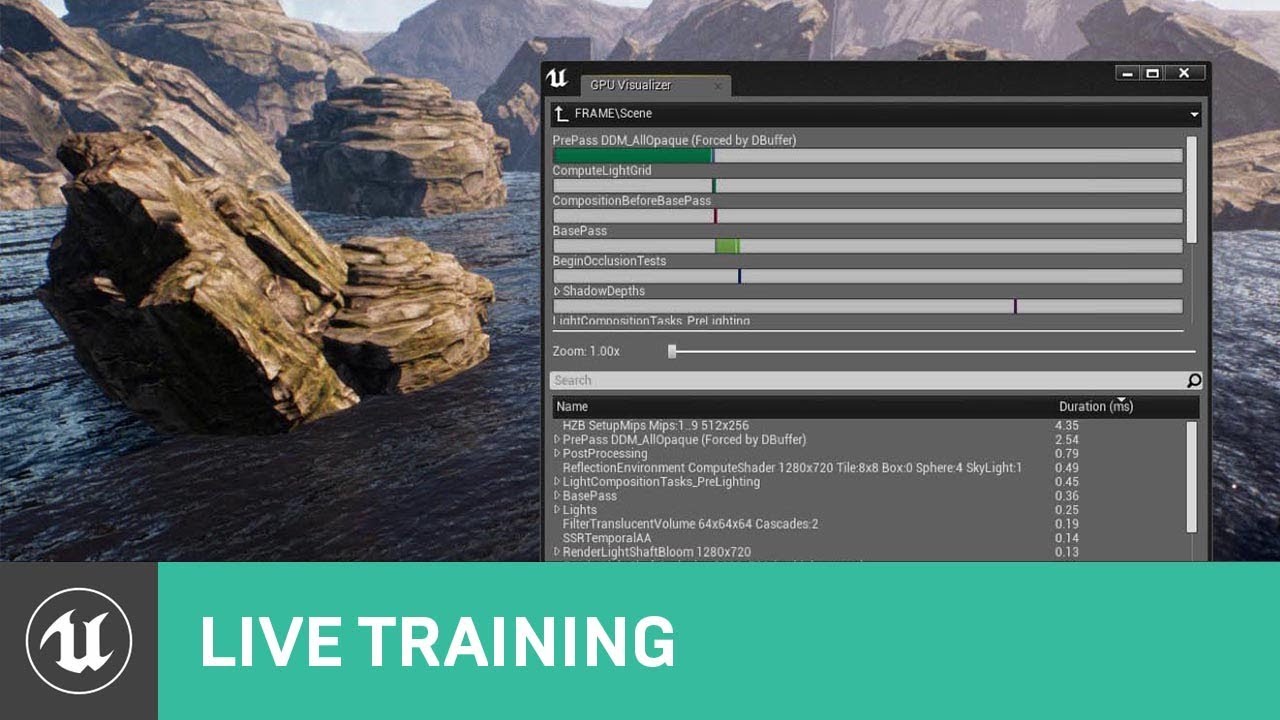
When developing any type of project in UE4, trying to maintain a target framerate of 30, 60 or even 90 FPS without sacrificing the quality of the visuals can...
muted jasper
Thank you both for your quick and helpful responses
sonic pagoda
👍
 cedar snow
@cloud cobalt out of curiosity, couldn't you have also used a DataAsset for the FlareQuestCatalog?
or would that imply more work (in editor) as you'd need to configure the DataAsset with all the available quests?
 charred dove
im on 4.20, i deleted the Saved and Intermediate folders, and the project wont load back up, is this a bug? as it has worked on every other project iv made?
grim ore
Yes?
sonic pagoda
Assertion failed: !PinRef->bWasTrashed [File:D:\Build++UE4+Release-4.19+Compile\Sync\Engine\Source\Runtime\Engine\Private\EdGraph\EdGraphPin.cpp] [Line: 1840]
trying to open a widget migrated from another project
i must have deleted some obscure reference somewhere
sonic pagoda
fixed it
was casting to bp's that didnt exist in the other proejct
working again, "again"
 abstract marsh
Hey all, does anyone know any good VFX animators who can do like this:
https://www.artstation.com/artwork/aA8J9

ArtStation
A collection of VFX I did, not related to any particular project. All made with Unity. The flipbook animations were made on photoshop and animated in Unty using particle systems.
I've already requested in #looking-for-talent
But if you guys happen to know a friend or some available artist I'd be happy to check them out
This style is just way too pretty.
 wispy plume
Hello everyone, i've been dabbling with AI and environments queries. Could anyone tell me why i cant use the query templates that show on the top right? I have a query available called FindHidingSpot. So i have no clue why it doesnt let me select one
 steady hinge
When creating a 'button' inside of a widget blueprint, is there any way to create a 'collision area' that is something other than just a square?
I am trying to make buttons that are shaped like circles and triangles, so I am simply using an alpha to mask the image for the button, but then the area where you click on said button overlaps into the area where you click on a totally different button in my ui...
Is there a way to do this other than creating a lot of small squares? Is there a downside to using the many small squares method, other than taking a long time?
grim ore
as far as I know non square collision for UMG is not available right now 😦 You might be able to override the mouse down then somehow see if where you moused down has your button color or if its clear and then determine if the button should fire from that?
yeah here is Nick commenting on it in a thread, https://forums.unrealengine.com/development-discussion/blueprint-visual-scripting/27801-circle-widget-with-button-in-pizza-piece-shape?56972-Circle-widget-with-button-in-pizza-piece-shape=
Unreal Engine Forums
Build powerful visual scripts without code.
steady hinge
Time for me to do some more testing.
 vale osprey
Is it a bug or UE4 really likes to consume all available CPU resource when installing ?
vale osprey
Interferes with my dinner plans
Have to watch YouTube on a phone
Can’t even open bloody resource manager
Just trying to figure out if this is normal
manic pawn
don't think it's ever blocked my pc completely
vale osprey
Hmm, maybe it needs more space than I have on c partition
vale osprey
yeap
 cursive dirge
when building from source, it pretty much halts the whole computer 😄
manic pawn
wym overnight it only takes a few minutes
cursive dirge
that depends on your connection
manic pawn
download is the slowest part
cursive dirge
oh, I thought he was talking about download part
vale osprey
Nah, it downloaded in few minutes
I think it’s an issue with free space
Like it tries to unpack it on c and waits for swap file to shrink or something
 limpid sandal
After running a behaviour tree, it is supposed to run again and again automatically right?
 pure mesa
My world outline is not updated with spawned agents, even though the agent count is increased. Anyone else having this?
limpid sandal
welp did you rename anything
 primal prairie
nope
but my pc didnt turn off properly earlier
i really dont want this to have corrupted..
limpid sandal
oh well its corrupted
try opening with another engine version
save is your best friend
primal prairie
i guess thats that gone then
fuck my pc recently
microphone corrupted
now my files
does UE4 autosave backup?
 grim sinew
Yes it does. Check your saved folder in the project.
Unreal keeps 5 incremental saves of every file and 5 autosaves.
 vivid ore
I'm a coordinator, I'm looking for people to work on the project Paragon Battle royale, we need enthusiasts, write to me if you liked the idea, we are all happy
charred dove
after my character jumps out of the water, i set his movement mode back to walking, when he lands it automatically goes back to swimming? any idea's how to stop this?
grim sinew
@vivid ore #looking-for-talent
primal prairie
ill have a look thank you @grim sinew
grim sinew
I meant to post in there, since that's what your post is
It's a channel dedicated to that
 wild glacier
Ot: is someone able to recognize this Song? https://drive.google.com/file/d/1FPbzPxJLFILXif3VAPqovr9o8BzfHFeW/view?usp=drivesdk
Google Docs
grim sinew
Copy and paste.
limpid sandal
I'm stuck in ue4 :(
Been a while since I've left a year ago
My behaviour tree ain't running
It does, the first time
Then no re-loop, heck not even the second sequence is ran
grim ore
do your nodes for your sequence have ends so it knows the node is finished and the next part can run?
assuming your using custom nodes
limpid sandal
@grim ore One sequence on the root that runs : 2 sequences and a 1s wait. These 2 child sequences have some conditional decorators. The first is a move to actor - attack and the other one is move to (spawn) location
Only custom task is the attack and I call finish task. It neither loops nor runs more than 1 task node, without it having effect
grim ore
yeah the finish node was my only thought 😦
limpid sandal
@grim ore that's what I thought , I even added a loop decorator on the root sequence
Still won't work and I'm stuck
Runs only once on a test task that prints 'haha' and then kinda stays there
grim ore
super weird
limpid sandal
The embarrassing thing is that I was teaching a guy and then it didn't work
@grim ore Is it proper practise to change billboard values from my aicontroller? I guess so
grim ore
blackboard values? yeah
limpid sandal
Then everything's cool, last thing I have to check to work through it would be to add some notify s :/
charred dove
iv been struggling with this problem for hours, i have gone though all of my code disabling each of it to the find the error, but it keeps happening.
after i set my pawn to swimming, every time i set it back, it goes back to swimming???
grim ore
so every one of your nodes that sets the movement to swimming is disabled and it still does it?
charred dove
yep
the only thing setting swimming is this: and it doesn't print the string the second time
https://gyazo.com/8e273547f6ead7fc0ffc7a561518cb2b
 grim ore
well this is what you call but where do you call it?
charred dove
1 place in my water
grim ore
and if you disable that the issue is gone right?
charred dove
when he overlaps with the water basicly
no
well i cant reproduce the issue if i cant swim in the first place
 twin grotto
Hi
grim ore
true but you can verify that is causing the issue if you do that
have you put a breakpoint on the set movement mode so you can catch it when it triggers and see what caused it?
charred dove
its not printing that its making the character swim, so it cant be causing the issue?
yes, nothing triggers
grim ore
well it has to trigger atleast once right?
charred dove
yes, the first time i go in the water
grim ore
and where do you set the movement mode back to normal?
charred dove
i have changed that all up now, im checking and setting it on a loop (super inefficient) because it works that way, instead of when he stops overlapping the water
grim ore
any reason to not set it when he leaves the water?
charred dove
thats whats causing the problem
i tried, but when he lands, he goes back to swimming for no reason
grim ore
ok so the setting it back to walking you debugged that to make sure it's firing?
charred dove
il have another do to see what happens after the walking
grim ore
well just setting a breakpoint on any of your set nodes should help figure out the order
alternately are you sure you only have 2 nodes doing set movement mode? have you tried doing the find in blueprints to verify
limpid sandal
@grim ore just a recap to see if I'm wrong; you know my behaviour tree. I'm having the ai controller do the blackboard setup, and then run the tree. On some event on my blueprint inside the controlled pawn, I update some billboard values through the controller. Any suspicious thing here?
grim ore
None that I can see, updating the blackboard is pretty common especially if stuff changes like the player dies or new target or i dunno ran out of ammo and such
what do you update in the billboard and how is it used? even if it was a bad value the node should just fail and move on I would assume
or give you a ton of errors when you hit stop
yeah I just dug out an old AI example which still works. I did a delay of 2 seconds in my AI Controller that sets my player key blackboard value to NONE instead of the player and it worked fine, set the value to None, and then when the sequence I was running couldnt find the None target anymore if failed back up to the beginning node and just sat there doing nothing
limpid sandal
@grim ore just some boolean flags. Thanks for the help. Ill call it a day for now
grim ore
yeah should be no issues. I tested it completely and this is a project from like 4.15 and no problems. I did have a "problem" where my service was only firing once but that was because I had it hooked up to activate and not tick lol
 worthy jungle
hey gang, newb here
i have a problem, got the dreaded "Myproject could not be compiled try rebuilding from source manually" when trying to open my .uproject
i've tried deleting Binaries, Build, Intermediate, Saved no love
grim ore
I know it's weird but did you try to recomplile the project in VS?
worthy jungle
not yet, not a programmer so didnt take that step yet
sonic pagoda
@worthy jungle what version are you on? and when did your project last work, what has changed from it working to now not being compiled?
did you try to switch engine version and then maybe forgot to install aplugin that was on the last engine version
 wraith bloom
Has anyone imported their own footage into a Composure project? I'm struggling to figure out how to add my own....
worthy jungle
@sonic pagoda nope. I did try adding a C++ class but it failed when i did it...
(last time i had project open)
i'm on 4.18
sonic pagoda
you will need to compile your projects files now that you've added 1 c++ file its become a code project
worthy jungle
ok, figured thats where this was headed. I'm going down that path ....thanks
sonic pagoda
yeah its scary in the beginning i know
ive been there
but it gets easier, and less daunting
once you get into a healthy habit of opening up VS
but pretty much just right click on your .uproject
generate vs files
and then open that and right click on your projects name and where it says build or rebuild just click that
theres probably a better explanation out there on the internets
grim ore
You can always remove that C++ file and change back the .uproject if you really did not need it
worthy jungle
@grim ore any idea where it might live? i didnt add anything in particular, just did a menu pulldown (as a test)
@sonic pagoda tjamls. o
@sonic pagoda thanks, i'll try that once update VS
grim ore
The Source folder holds all the C++ code, you can delete that. Then edit the .uproject with like notepad and remove the modules section similar to this one "Modules": [ { "Name": "FP419", "Type": "Runtime", "LoadingPhase": "Default" } ]
I just tested it, added a c++ file and didn't compile. shut it down, tried to open and it complained about needing to recompile. Deleted the Source folder, updated the .uproject, project is back to being BP only
worthy jungle
@grim ore ok, tried that...didnt work here is my .uproject
{
"FileVersion": 3,
"EngineAssociation": "4.18",
"Category": "",
"Description": "",
"Modules": [
{
"Name": "MyProject",
"Type": "Runtime",
"LoadingPhase": "Default",
"AdditionalDependencies": [
"Engine"
]
}
],
"Plugins": [
    {
        "Name": "ApexDestruction",
        "Enabled": true
    }
]
}
(after removing "Modules" of coures)
oops sorry wrong paste
{
"FileVersion": 3,
"EngineAssociation": "4.18",
"Category": "",
"Description": "",
"Plugins": [
{
"Name": "ApexDestruction",
"Enabled": true
}
]
}
(that was the before, this is after)
grim ore
well remove the space between description and plugins and it looks ok here
maybe the apex plugin is an issue but I doubt it, it's an engine plugin
grim ore
Yay so far
plush yew
@worthy jungle you haven't gotten into adding cpp to ur project yet?
it's good to do that because i use some code plugins from the marketplace in my game that are really vital to the functionality. even if you don't use a single line of CPP. my game is BP based.
look at allar adding cpp to unreal on google for the itemized steps (first result)
 lost seal
I'm just getting started with UE4. I created a starter third person project, I downloaded an animation from maximo called Strike Forward Jog, choose the option without skin. When I import the fbx to UE4 and choose the UE_Mannequin_Skeleton it gives an error : Mesh contains root bone as root but animation doesn't contain the root track. How can I solve this issue and then bind my new animation to a keyboard key
Thank you very much for your help!
 tawdry raptor
If I make a 3rd person or 1st person game in unreal can I make it a vr game by the push of a button or do I need to start from scratch?
grim ore
@lost seal It's a known issue, there are a few fixes but they mainly consists of making a new skeleton you can use and getting it from mixamo or fixing that issue in your DCC program like maya or blender
@tawdry raptor you can import the VR Feature pack which will give you all the basic VR setup for the player and you can then use those instead of your existing player. Alternately you can make your VR pawn from scratch, all of those tools are in the engine. The template just sets up the defaults and gives you a hand with some things like the player
 viral herald
hey guys, im working on a game and was wondering if someone has already completed a game and ahs expereince is programming to give me some pointers on how things should progress and what to focus on
if someone has that kind of experience, could you please contact me so i can ask some questions?
would really appreicate it
 pallid compass
that is such a broad question
sort of like
"whats the right way to make a rocket?"
grim ore
wikiHow
Are your hobbies playing computer games, coming up with new tactics to beat them, and creating universes from your mind's ensorcelled depths? There are many tools that let you make your own computer game with nothing more than these...
lost seal
@grim ore thanks a lot for the answer! I liked the style of the default character mannequin, how should I proceed please ? 😃
grim ore
@lost seal I don't know what software you have available to you to fix the issue but google that error and start researching I would guess. There are multiple ways of fixing it and if you are using 4.20 I think it even has a new error 😦
lost seal
@grim ore I'm using 4.20. I tried searching google and that's why I came hjere :/
viral herald
@pallid compass , basically, i got decent progress, just want to know what would be the ebst approach form here
 glacial arch
Hey guys, anybody got experience with compute shaders in UE4?
Trying to offload my mesh generation onto the GPU
grim ore
I found word of WARNING for mixamo rigs... UE 4.20 now appears to import the 'mixamorig' prefix for mixamo skeleton, so existing rigs and animations will no longer match with pre-4.20 rigs... either reimport your rigs with the new rigs, or change any new anims to the old rigs (no prefix)… do it now or pay for it later :-) in the 4.20 release thread, might be causing some of the issue
it seems like making sure you use the mixamo skeleton is important when importing them, not trying to import them against the ue4 skeleton
then you can retarget once they are in the engine
lost seal
Yeah that's what I understood too but that's a lot of things to do for such a 'simple task as to add an animation' and I'm a complete beginner. I think i'll just wait for the issue to be fixed
grim ore
It wont be fixed, mixamo is not really supported anymore
grim ore
its more of a workflow for getting an unsupported product into the engine
lost seal
where should I look then if I want a free animation of my skeleton kicking a ball
glacial arch
inside yourself young student
for real though animation aint that hard
i learned it to a passable degree in a few months
grim ore
If you want free Mixamo can work but it's work. If you want no work, you will probably have to pay
lost seal
Ok, I'll go for the retarget route then, ty
odd steeple
@grim ore Thanks for the link! I tried some suggestions there but still can't get my collision to work. I appreciate the info though.
 ocean flare
I'm brand new to Unreal, just trying to play with some lighting, texturing, and general map design
So I'm trying to use point lights to illuminate a room, but the lights barely have any power behind the,
them
ocean flare
That's not the issue
sec
At first, I had the light inside a glass dome attached to a stick, so I thought maybe some shit was blocking it weird, like it was clipped inside of something
So I added a new one, same thing.
If I rotate it 180 degrees, nothing changes, so it has to be related to something else.
@remote roost
grim ore
well that light is set to stationary so you have to build lighting to see the actual results
and then the light quality is going to be affected by your mesh UV's and it's light settings
do you have the issue with it on movable?
sullen wraith
i want ot have flying cards flying around the background of my city, what is the best way to get this done?
cars*
grim ore
check out the Infiltrator Demo on the learn tab in the launcher, it has that in the 2nd part of it
sullen wraith
will do 😃 thanks legend 😃
games coming along slowly, each little thing I accomplish is like a sudden burst of happyness, cause i spend hours trying to learn each aspect 😂
grim ore
I would assume they are just meshes with the appropriate textures based on distance
sullen wraith
I finally got my skins randomizing on spawn 😃
not sure if its the most efficient way
random integer > branch, if value == value then use branch to set skeletal mesh
if false, moves down to next line
if value == different value etc
where is the learn tab?
grim ore
If you are doing something based on an int like that, look at the Select Node instead of branching branches
on the launcher on the left, should be the 2nd tab down
sullen wraith
you have to speak dumb to me, I'm from LUA, all this stuff is new to me 😂
ocean flare
@grim ore I built the whole project before posting here
I also set them to moveable and rebuilt lighting. Exact same thing
sullen wraith
where is the learn tab? cant fnd it
ocean flare
All the wall meshes are exactly the same, and so are the ceiling and floor, so there should be 0 issues with the meshes or anything being different
grim ore
well movable doesnt need to rebuild, it should just light up stuff. Are the lights themselves the issue or is in that level or your project? Im assuming you dropped a light into a new level and it worked fine?
@sullen wraith on the launcher, not in the engine itself but the launcher that launcher the engine.
ocean flare
I'll start a new level and test. This is my first time playing with unreal
Just trying to build a house lol
grim ore
it does kinda seem off but dropping a light into a new level with just the default floor might help figure out what is going wrong. It should be fairly round for the light, yours looks kinda off on one side
Maybe its the fact you scaled it? I never scaled a light lol
ocean flare
Default light does the same thing
and rotating keeps the light going in the same direction
grim ore
well rotating wont matter on a point light, its a round light from the center
grim ore
so dropping a light into a new default level gets that weird cut off issue? if so uh... video drivers lol?
or hell restart the engine
safe rose
Anyone else having issues uploading their builds up to Steam? I think the update may have broken a few things.
ocean flare
Im starting a blank room
grim ore
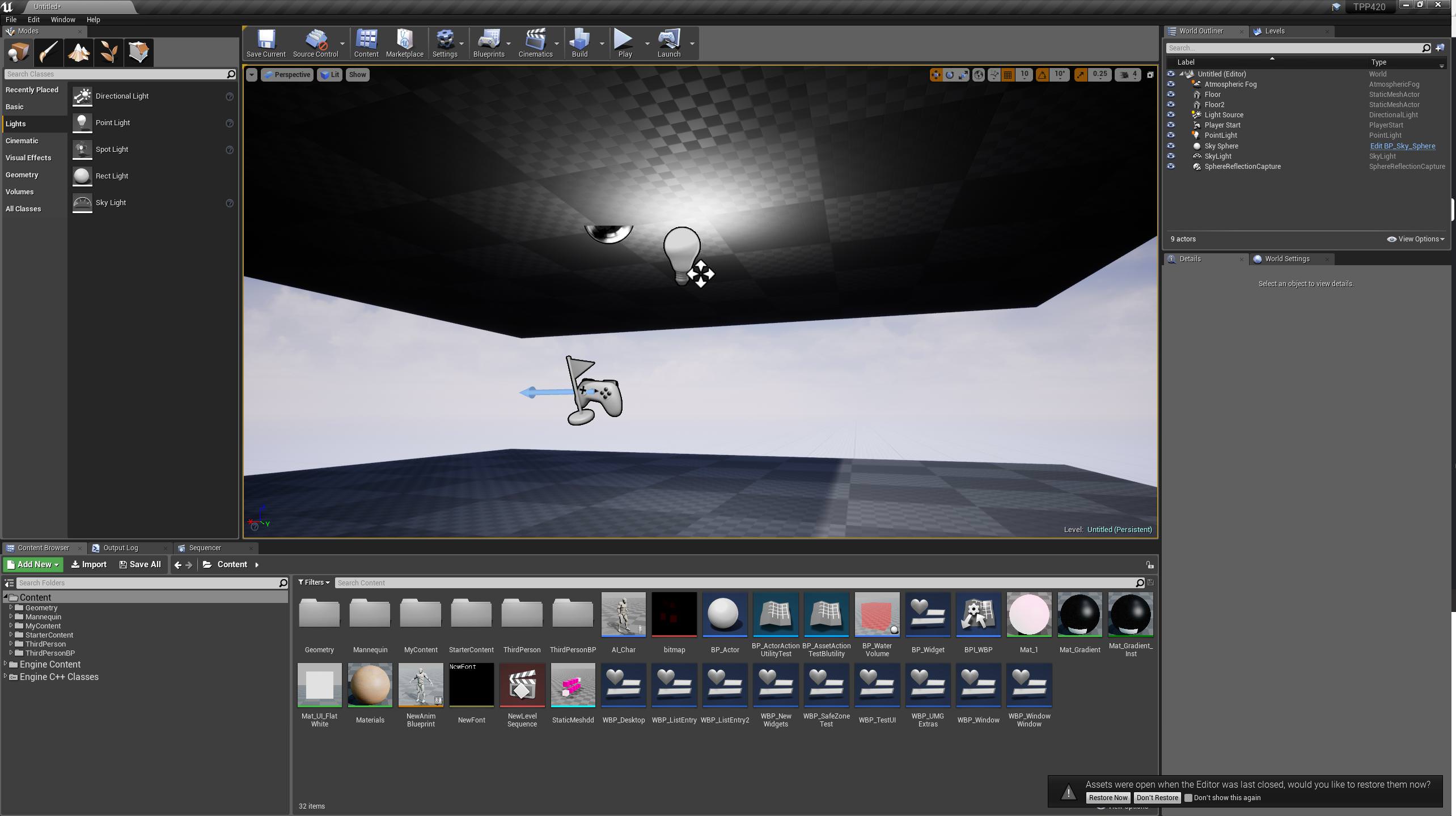
yeah I started a new map, duplicated the floor up a bit, drug a point light in, and this is what I get which is what you should get https://i.imgur.com/9ZjYX6V.jpg
 ocean flare
Same for me
that's what I did
so I still can't figure out why it doesn't work on my first level
grim ore
well you get the same result i pasted above? no issues
grim ore
ok so it's something in the level then. a setting or your meshes. Are they default meshes or you brought something in?
ocean flare
default
grim ore
do you have an IES profile set up on it?
sullen wraith
mathew, you're the biggest helper on here, always on helping out, are you from epic? game dev or what
grim ore
I am a game dev and a teachery type person and I have done some learning stuff for Epic before
That and I have no real work to speak of so I get to do whatever I want all day including hang out in here lol
 inner yacht
how can i replicate set actor loc and rot? Ive done it before I believe run as server in the player controller.Can someone verify this is the correct way or not thanks
 remote roost
thinking of switching over to unity tbh
 mint sequoia
So with epic constantly backlogging pretty much every PR.. do they have a plan to go through them at some point? And how are they going to catch up? Presumably they're ignoring the engine to focus on Fortnite
safe rose
Fortnite or Bust
No marketplace asset creator is crying about that now
They do need to work on VR again
because this shit is broke in 4.19
on Rift
(hope 4.20 is better, fixed)
sullen wraith
any good multiplayer tps kits? currently got one but it doesn't allow weapons unequipted
want to be able to implement it in an inventory system, if nothing equipted standard run anims
sullen wraith
are all sounds assets in the learn demos free to use?
worthy jungle
hey gang, i have a Blueprint problem (newb) hoping someone can help
or at least point in right direction
i'm just trying to spawn an emitter; run it through WhileLoop until MaxDuration is hit, then kill it
its not dying; nor is the emitter (a beam) inheritng the source/target geometry, its just short @ 0,0,0 (not reading in the 'beam_begin' and 'beam_end' actors referenced inside the beam emitter type).
also, Delay not working anywhere here and it just RIPS through my loop count
(sry reposted in #blueprint)
grim ore
Well your delay is not hooked up to anything
And delays won't work in loops generally
Any node that has an execute input, the white arrows at the top, have to be hooked up to an execute wire or it will not execute.
worthy jungle
ah ok
i did try delay in every position i could think of, this has it removed
any suggestions how i might slow this thing down?
grim ore
What are you trying to do?
worthy jungle
fire emitter once, check the MaxDuration value....fire again...etc. then kill when value hit
grim ore
Let the emitter kill itself is the easiest way
worthy jungle
well, here's the thing...the duration is coming from outside the engine...it's going to be a variable comiing from an external datafile
raven kayak
man, RIME has been sitting on my ps4 for months now. never bothered to open. but it does look beautiful. I'm loving this art style
grim ore
Otherwise you can spawn the emitter, save the output in a variable, then delay the duration, then destroy the emitter based on your saved variable
worthy jungle
hmm...k i'll try building that (kinda reverse of what i have)
grim ore
Well it's literally what you want right? Spawn, wait, destroy.
worthy jungle
right, thanks @grim ore
also, since beam, i dont think it will 'kill itself' like a regular particle emitter
also, its the beam is not picking up it's start/end points, but i dont expect u to know how do to THAT 😃
grim ore
So your not really setting the duration on the emitter your just spawning an infinite particle and then destroying it later.
worthy jungle
yeah, thats the hack
grim ore
Then yeah spawn it and save the output variable for later so you can destroy it when done.
grim ore
The blue output pin, that is a reference to the spawned emitter.
worthy jungle
ah, right ok
grim ore
The return value
worthy jungle
should i be using Destroy Actor?
i couldnt figure out how tto get that node to point to the EXACT single actor i want
i tried "Get All Actors of Class' but i know thats not right
and it didnt nuke all Emitters either
grim ore
Destroy actor should be fine.
worthy jungle
hmm..ok
grim ore
The get all actors would be fine except it's not hooked up
And it's slower and not needed since you should be saving the variable when you spawn it if you plan on using it later.
worthy jungle
how so? I have the Out Actors pin going into Target for DestroyActor
right, i need to switch that around; got it
grim ore
If it's the picture above it's not hooked up. The execute wires never run
worthy jungle
hmmm...okay i'll futz around thanks
hate to keep bothering; here's what i have ; it spawns but doesn't kill....what exactly do i have to do?
u mentioned 'save the variable' but not sure how
grim ore
Pull off the return value from the spawn and promote to variable.
You should watch or read the intro to bp series videos and docs as they can help cover the basics of how they should be used.
 warm mountain
Does anyone know why this happens?
or these really weird shadows
when i move the lights towards them they look normal till i build it
i got an error about wrapping UVs although i don't think thats the problem? Because some of my meshes with them have no issues
grim sinew
Are any of your lightmap UVs overlapping?
https://wiki.unrealengine.com/LightingTroubleshootingGuide also check this
warm mountain
Not that i know
if they are they belong to a different material
or they are another mesh combined
i need to keep it big like this to keep texture density in check
yea doesn't seem to be it even when i seperate the overlapping one of the material
the weird this is that
the other mesh which has the exact same UV's except for a deleted wall
is totally fime
fine*
 sudden agate
@warm mountain you need two UV CHannels. One for the texture, one for the lightmap.
Lightmaps are usually on UV1
in UV1, the UVs should not overlap and should all be within 0-1
something like above (out of the 0-1 range) is not allowed and UE will throw an error/warning when you build lighting
languid shard
aren't @warm mountain 's uvs like completely out of bound ?
sudden agate
Texture UVs however do not have this limitation
warm mountain
Rail so that means i need to create a seperate UV channel for the lightmap in UE4?
Life if I keep it in the box
I can't preserve texture density
@sudden agate @languid shard
languid shard
thats why you have to use a second UV
texture UV0 can overlap
lightmap UV1 cant @warm mountain
see this tutorial
warm mountain
i guess i'll have to develop the lightmap in the 3d software and not unreal?
never knew there were 2 UV maps i always thought the lightmap was automade in UE haha
sudden agate
unreal can generate it automatically, if your UV0 is unwrapped properly
warm mountain
i see
grim sinew
Lightmap UVs also need to be entirely in 0-1 space
UE tries to make lightmaps automatically, but it's not 100% reliable and it's the first thing to check if things look weird
warm mountain
ah
that makes sense
some of them turned out quite okay tbh
mainly the more simpler ones
languid shard
there's a plugin to batch auto UV models in max, but I've got no clue for maya
warm mountain
but a number of the platform meshes are screwed
Alrighty i'm going to test it out
light map UV is UV1 so I'll just
create a new one in the set editor
 buoyant mesa
hi I have odd problem with unreal import into level feature. Every mesh imported this way turns out to be extremely tiny but the blueprint that it makes of them are correct size, also the pieces imported separate via normal import option works without problems.
So my question is why the separate meshes are not correct scale, if the blueprint combination of them are just right?
 tepid bronze
Did anyone else have Fortnite install silently just by having the engine installed?
cloud cobalt
no
tepid bronze
I never once downloaded the game myself, installed 4.20 yesterday aaaaaand now I suddenly have Fortnite.
cloud cobalt
I also downloaded 4.20, but I do not have Fortnite
tepid bronze
Can you do me a sanity check and at check your desktop for the icon?
Maybe it just gave me the icon to install it and didn't actually install it. Dunno
cloud cobalt
Lol no I don't
warm mountain
DONE
tepid bronze
WTF
cloud cobalt
I really really really doubt that Epic would push a game on your machine
tepid bronze
I wouldn't have thought so either, still not sure that they did. I just know for a fact that I didn't download it. I never could get into it, so I already wrote it off. o.O
Huh. It is just a web launcher.
Never mind. But still, fuck off with that icon. 😛
FUCKING NOPE!
Checked the Fortnite tab in the Epic Games Launcher and noticed the uninstall option. Regained fucking 30GB.
Now I know for a fact that I didn't accidentally install it. I NEVER install games to the particular drive it was on.
/rant
 plucky reef
you accidentally clicked it.
cloud cobalt
I mean, maybe it's a bug, but a bug that triggers a 30GB download that takes hours on some connections, set the taskbar icon to a green progress bar for all that time, etc... should be widely reported
plucky reef
I don't know, loooooool you're the first person to encounter that bug
oh guys I know this is out of topic but anyone here using ryzen series? what motherboard should I buy? k7 gaming mobo , k5 gaming mobo or ultimate (yes I'm a fan of aorus since I wanna make my pc aorus build). thanks!
plush yew
import into level - why does every mesh has it's pivot point it its local 0,0,0 but when i import via content browser a fbx file with a finidhed room the pivot point is in world 0,0,0
hot drum
Can somebody please tell me why my sky sphere is an abomination
A n d h o w t o f ix it
nvm I deleted it
grim sinew
A little late but my guess was you just scaled it nonuniformly a ton
 whole quarry
looks funky
plush yew
Hey, if I wanted to create a TV animation for my Ue4 game, can I just import a gif, or does it have to use a flipbook?
 visual hollow
 azure dirge
plush yew
azure dirge
plush yew
anyone know?
 tall pendant
one way to do an tv animation stuff could be using image media source asset to play back an image sequence in-engine
whole quarry
@plush yew Google is your friend: https://docs.unrealengine.com/en-us/Engine/MediaFramework/Overview
 trim trail
anyone knows if datasmith plugin works for sketchup make? or is it only for pro version?
whole quarry
you should ask the makers of the plugin
trim trail
who are they?
whole quarry
i dont know.. where did you get the plugin from? it should also say who made it
and where to get support
grim sinew
Sketchup Make is a google product they don't support anymore
Looks like they took it down in 2017
There is a Sketchup integration for datasmith looks like, but no idea beyond that
trim trail
i downloaded plugin from unreal website
and in installation it selected my version (didnt say if its make or pro version)
i assumed it worked, but no export option in sketchup
wary wave
Datasmith plugin is Epic
however I would expect the additional stuff only works with the pro version
languid shard
datasmith only works with pro so far afaik
trim trail
bummer, thanks for answers
seems theres no plugin for blender, is it in plans?
ive checked skethcup website, seems they did major changes
going in direction of free version being only web version
 flat marlin
Hey guys i was looking for help on unreal since im new to it. and in the project we are doing someone sent me a unreal project but i cant open it
trim trail
i dont like it 😦
whole quarry
@trim trail From what I find: https://www.blender3darchitect.com/unreal-engine/datasmith-will-speed-up-archiviz-using-the-unreal-engine/
A few points to consider:

At this moment there is no support for Cycles, but an existing API will enable anyone to code a possible integration;
Datasmith won't be free. The beta is free to enroll, but Epic Games already stated that once released, you will have to pay a fee to use Datasmith.
You have to set materials and environment correctly at the source to Datasmith to work. The purpose is to work on the model just once.```
Was from 2017, august
Architectural visualization artists using various software to show their projects knows that getting data from one place to another is a synonym to rework. On best case scenarios, you will only have to make minor adjustments to materials or textures. But, in reality, you will...
flat marlin
https://answers.unrealengine.com/questions/811274/i-cant-open-a-project.html
This was the issues i was having with the project file
grim sinew
Do people even read error messages?
"WARNING: Exception while generating include data for UE4Editor: No 32-bit compiler toolchain found in C:\Program Files (x86)\Microsoft Visual Studio 14.0\VC\bin\cl.exe " seems pretty clear cut
It says that like 5 times
whole quarry
I think that (newbie) people can't see the trees trough the forest
a lot of text and no idea where they need to look
and also, ye, many simply dont read
flat marlin
uh actually ive had to do alot of things following several error messages before
inner yacht
Can someone verify run on server set actor location in the player controller will work for dedicated server? Thought is how I did it last time
flat marlin
i looked up these errors on the internet and still no help
so your just gonna piss on me for not knowing
grim sinew
No help? Really? Not a single one of these helped?
I'm not pissing on you, I just find it hard to believe.
 bitter iris
Do mp4 files have to be rendered a specific way to work on ue4 or something?
 digital anchor
open your visual studio installer and check if everything needed is checked on
 young meadow
Do anybody know how I can create gta5 mechanics
cloud cobalt
Which mechanics in particular ? GTA5 is a huge game
languid shard
hi can someone make me skyrim please thxbai
whole quarry
Always great when someone asks something like that and doesn't respond after it
grim sinew
It's because they didn't want a specific mechanic, they just wanted the whole game
cloud cobalt
Unless no one answers, then it's spamming time
flat marlin
yeah there's over 12 different C++ tools. and ive ticked the main ones but still nothing
cloud cobalt
@flat marlin Do you have Visual Studio installed ?
flat marlin
yes and im looking through the components now to see what i need
cloud cobalt
In the instller tool for 2017 you need the "desktop development for C++" thing
VS defaults to not supporting C++, for some reason
manic pawn
maybe the majority of users only gets it for c#
cloud cobalt
Maybe
flat marlin
so which of these do i need because ive already put on compiler and libraries and i still get the same error
grim sinew
Further down do you have Visual Studio C++ core features ticked on? Or Windows 8.1 SDK?
And Windows 10 SDK?
flat marlin
uh ive only just went to individual components after the mains did nothing
grim sinew
Do you have the workload for C++ game development on?
flat marlin
also which ones theres like a few of them
grim ore
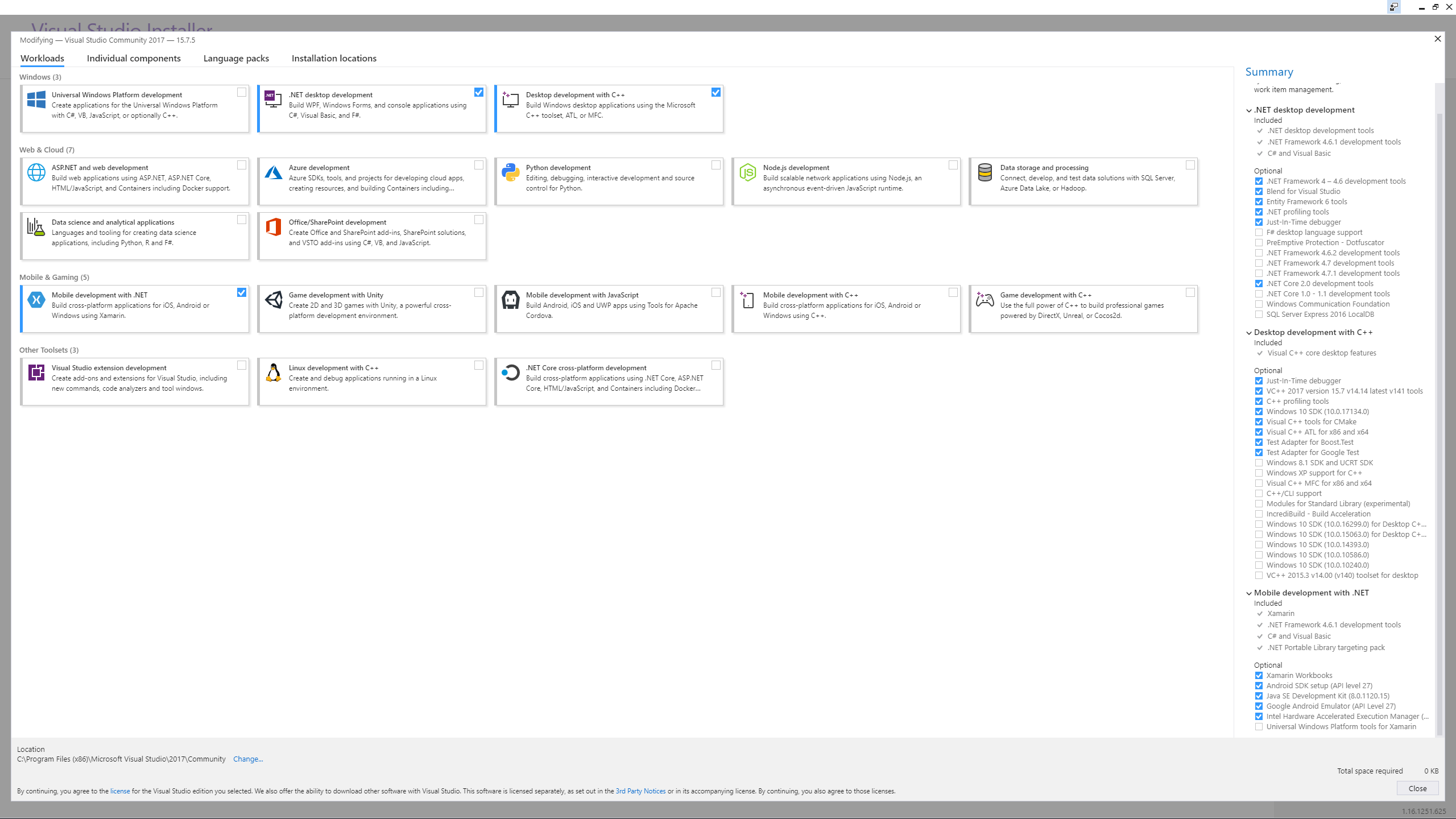
If you have the C++ dev on the main page checked & Windows 10 SDK on the individual checked (and installed) you should be good to go, this is assuming 2017 of course. If using 2015 you want Windows 8.1 SDK.
sullen wraith
if an item on the marketplace says it isn't network replicated, does that mean it wont work in multiplayer
cloud cobalt
@sullen wraith Yeah
sullen wraith
dam it, only good TPS kit is not replicated
cloud cobalt
Not much stuff will be drop-in multiplayer, realistically - that's not the kind of thing that can "just work"
Though a TPS kit could
 visual belfry
What's a good way to compose rooms? Say I have a Room blueprint that I want to coordinate access to features of a room such as seating and light switches. Would it be easier to have seating/lightswitches as child actor components or have the room query relevant actors in its bounds on beginplay? I'm leaning heavily towards the second option, but would be interested in hearing alternatives
limpid sandal
So when the decorator conditional changes on the blackboard, any child task below stops executing?
visual belfry
only if you set Abort Self
default is abort None, which lets the current subtree keep executing
limpid sandal
@visual belfry abort self only aborts every child of the node if the condition goes false
?
visual belfry
correct
limpid sandal
good.
I've been trying to figure out how to rotate my character with a camera boom to face an enemy, but turn the camera boom as well so that the camera is on the player's back
touch template with joysticksk btw
visual belfry
Not everything from C++ is exposed to blueprints, but I'd estimate they can get you 99% of the way there
Here's a good overview: https://docs.unrealengine.com/en-us/Resources/SampleGames/ARPG/BalancingBlueprintandC-
flat marlin
okay so i tried re installing visual studio with sdk and C++ but i still get the same error message
sullen wraith
my game will have a persistent currency across all servers, how can I store player data on external server/ie website to be accessed while ingame
tawdry raptor
I have imported a 3d object that I bought online and it imported as a fbx scene and I can't copy and paste the code from a cube to make it grabable because it's a fbx scene
Can anyone help
tawdry raptor
It's a scene
It says it's an fbx scene but I removed the camera and light so now it's just 2 files which is a hand held radad
Radar
 autumn elbow
It's a 3d object
tawdry raptor
Yes but why can't I grab it
 gloomy glen
@flat marlin uninstall vs completely, then in unreal create a new c++ script. It'll tell you there's no compiler found. Click install visual studio button. Then it should work after that
autumn elbow
Make sure physic is turned on
gloomy glen
Just went through that problem
tawdry raptor
It is
autumn elbow
For your radar... import it as a object. Make sure it has a Collision. Turn physics on
tawdry raptor
Is there anyway to test grabbing it in vr with out vr? I'm away from my pc right now and using TeamViewer to edit
autumn elbow
Hmmm...don't think so because the AttachTo is on the Motion Controller.
whole quarry
Uff deving over TV. Many bad experiences
tawdry raptor
Well I'm learning
autumn elbow
👌
 loud oasis
 torpid sierra
o_O
flat marlin
@gloomy glen
Funny because all i want to do is open this file someone made because they are trying to promote making this game on unreal
the error message says Visual studio 2015
is there that much incompatibility between each new release?
grim ore
that looks like you are trying to create a new project in C++, not open an existing one. Did you double click on the .uproject that they sent you or is it not a project but some assets or something else?
flat marlin
It's a Uproject file yes.. in the end all i could do was take some of the files from that project and convert them over to other softwares but most of it remains inaccessible. if you look up in the chat you'll find ive been trying to open a file but i get the same error message over and over even though i have C++ installed in VS as well as SDK 10 and 8.1
tried un installing completly and re installing both unreal and VS
grim ore
do you have 2015 installed btw?
flat marlin
VS 2015
grim ore
and 2017?
grim ore
well a 4.20 project will want 2017 and sdk10, a 4.19ish project will want 2015 and sdk 8.1
you can make a 4.19 project work with 2017 and 8.1
but if you are using 4.20, a fresh install of 2017 with the c++ option and sdk10 installed, it should just work. I tested this the other day
flat marlin
the project in question was made on 4.19
grim ore
have you tried changing the version number in the uproject or right clicking it and changing the version to 4.20? alternately installing 4.19 only and opening it in that
autumn elbow
Anyone figure out the IK thing in this vid i posted ? https://www.reddit.com/r/unrealengine/comments/91p4es/what_am_i_doing_wrong/
@grim ore Love your vids
grim ore
the fact that you can't actually make a new blank c++ project makes me think the project itself really is not an issue its your VS/SDK install itself
 teal tulip
@flat marlin Basically you have VS 2015 wrong installed, at install you have to check the c++ option
4.20 works with VS2015 from what I know too
grim ore
If all this doesnt work I guess the next thing is to try the basics. Move the project to your C: drive in a lower folder closer to root, make sure VS is installed on the C drive.
flat marlin
Its VS2017 so trying to use VS2017 with a 4.19 project doesn't work?
thats the hint im getting
grim ore
it does. 2017 and 8.1sdk will work fine with 4.19
 ivory prism
Hello I need help because Unreal keeps crashing for random reasons
flat marlin
Here's what i had checked for those who need it again
grim ore
seems like it should be fine, here is what I have. I have .net stuff installed as I do desktop work but that shouldnt matter. All I did was choose the Desktop for C++ and the Windows 10 SDK individual component and this works fine for me in 4.20 https://i.imgur.com/OvqRYGO.png

 amber sedge
I have been having this issue for several days now, where I cannot make a proper weapon swapping mechanism solely because the Destroy Actor node puts the actor being killed in a queue or something, and then kills it? I get errors saying "It is pending kill", those I know how to fix, but the Actor never actually gets killed.
Also, when I called detach/attach to actor after the gun has already been attached to the player, it attempts to kill the gun. Same thing, it gives the pending kill errors, the actor is not moved. I've tried so many methods of destroying/moving the actor, nothing works properly. Set location doesn't work either for some reason.
Any help? Maybe it's a setting or something? I just need to be able to destroy/move the gun.
grim ore
when you call destroy actor it might not happen the same frame, it might end up pending (which you can check for if needed) but it's normally very quick and not noticeable. If it doesn't actually get killed then something else might still be holding on to it (which is weird) unless it's something like a UMG Widget which might take up to 60 seconds before the GC kicks in.
amber sedge
There might be something holding on to it
 storm venture
hey quick question, just turning the volume of an audio component to 0 turn it off?
amber sedge
I have the gun attached to actor, but I tried using detach as well, so really there shouldn't be anything holding on to it
The Actor is just a simple Blueprint Actor with a skeletal mesh to it
grim ore
IF you detach it then destroy it yeah it sounds like it should be fine. Does it physically still appear in the scene after you call destroy?
grim ore
@flat marlin I downloaded the project and tried to open it. Did not open as expected as I don't have sdk 8.1 installed, gave me the error about sdk 8.1 when I tried to generate solution files. I tried to convert it to 4.20 and open it but it threw some major error codes in VS. I nuked it and uncompressed it again, installed 8.1 SDK, and created the solution files. Opened it up, it asked to compile due to being out of date, and it compiled fine. This is with 2017 as I posted above with 8.1 and 10 SDK's. It opened up fine in 4.19.2
so it's definitely an install issue 😦
 royal comet
Anyone know of an alternative source for all of the UE4 tutorial assets? They've been removed from the tutorials so I'm unable to complete them
grim ore
The Wiki might still have some of the assets on their tutorial pages
flat marlin
the error i kept getting was no 32 bit compiler
royal comet
@grim ore thanks a lot man, now i can continue where i left off
amber sedge
yea I just tested Detaching first, then destroying, doesn't work at all. This has been stopping me from moving on with the project for the past like 3 days
flat marlin
@grim ore you'll have to DM me if possible
grim ore
I don't have DM's turned on. It should work fine with the basics. It's weird but have you tried uninstalling it completely and trying to generate the solution to make sure UE4 complains about the correct thing( no VS) then go from there
flat marlin
I just model and animate i dont know anything about UE4
what did you mean about nuke and uncompressed it?
grim ore
@amber sedge ok it must be due to how you have it set up then. I just created a new BP Actor with a mesh in it, added a socket to the default third person character, in the third person blueprint on begin play I spawn in my gun actor, save a reference to it, and attach it to my mesh in that socket. I then hit the U key and all it does is destroy actor on that reference I saved earlier and no issue. The only real problem I had was collision was enabled on the gun and causing issues so I disabled it.
@flat marlin I basically mean start over. I deleted my files and unzipped the zip file so I had a fresh start on the project.
for some reason your Visual Studio is not installed correctly. Have you rebooted the PC atleast once after installing visual studio to eliminate a path issue where VS can't be found?
but literally installing VS 2017 with the Desktop development for C++ selected as well as the 8.1 and 10 SDK's from the individual components should let you compile any C++ project for UE4 on 4.19 or 4.20
grim ore
yeah I'm not very well versed on the Art side of the engine 😦 Animation stuff is nothing I really mess with
autumn elbow
Its Blueprint and Tracing
grim ore
maybe try using the console command slomo 0.1 or 0.2 when recording so people can see it in slower motion?
might help debug it easier
autumn elbow
ok ill do that
side note...check out this bug... https://www.youtube.com/watch?v=g7z0KrWxJVw&list=PL2xipcX1Om1GQ8zVhXm8Ush6vIG-zglAu&index=7&t=0s

when playing by pressing the different buttons, I get different results
vale osprey
the hell is going on:
autumn elbow
When I press play from the main viewport..all works. When I play from blueprint... numbers flicker
flat marlin
Yeah i did that but now im gonna do it for the third time -_-
the only reason im still bashing my head against this is because of the game in question
teal tulip
@vale osprey You're sending your project to Epic 🤖
 lofty nest
if your project ever start moving on it own, before you spend 30 min frustrated
remember you might have an xbox controller plugged in
autumn elbow
LOL
 astral glen
crazy
flat marlin
great the installer for VS is broke
 fair violet
Wow I've been sleeping on the power of Sequencer..... I had been exporting low res proxy clips to edit with in Premiere when I could do the whole thing in Sequencer itself!
Kind of funny that Premeire chugs playing back the static 24fps video files and with Sequencer you can change any element in the scene and scrub in realtime... gamechanging!
 silver compass
Noice
 cobalt owl
is it possible to download all paragon assets without adding them to any project?
 paper kernel
that's why you have the "asset" project
plush yew
Has anyone else had issues with UE4.19.2 crashing randomly? I'm trying to figure out why it keeps on crashing for me but there's no pattern
@plush yew if you look at the crash log that pops up on crash or Engine/Saved/Crashes/CrashReport-ProjectName/ you'll have a general starting point for understanding; was able to find that by googling unreal logs. crashes can happen for any number of reasons, so make sure your engine is not corrupt, and you have installed the latest graphics drivers and have the proper system requirements to run UE.
It's saying
LogWindows: Failed to load 'aqProf.dll' (GetLastError=126) LogWindows: File 'aqProf.dll' does not exist LogWindows: Failed to load 'VtuneApi.dll' (GetLastError=126) LogWindows: File 'VtuneApi.dll' does not exist LogWindows: Failed to load 'VtuneApi32e.dll' (GetLastError=126) LogWindows: File 'VtuneApi32e.dll' does not exist
So I guess I get to spend today googling a fix for this
amber sedge
How would you go about reattaching an actor to a different socket?
What I have is a gun, and 2 sockets on the player. When I spawn the weapon, I attach it and it's fine. Then when I detach, attach, and set transform, it doesn't look like it's actually attached to the socket.
What I mean is, when the player switches, the gun in his hands has 1 rotation, it does not rotate with the players hands like it does when the player spawns/before he switches.
Any help would be appreciated
grim ore

the 2nd picture shows when I create the gun actor and attach it to my back socket. the 1st picture are just 3 keybinds doing the same thing and attaching to a new point. No idea if this is the best way but it works without any problem
Check to see if the gun is attached? -> If so detach itself from its parent -> Attach to the new socket.
plush yew
@plush yew you can try installing unreal 4.20 from source if you are using an launcher version. here's the steps:
amber sedge
@grim ore Thanks, I was trying to fix it before I read your message, and realized that Attach To Component was the one that worked, I was using Attach To Actor. I looked at yours and yours was Attach To Component too, thank you for your time. 😃
grim ore
yep when you do it to the actor it's going to be the base so probably the capsule which doesnt really move
I had a really cool gif as well but couldnt get it to upload lol. score got it to work lol https://thumbs.gfycat.com/LongBigheartedArgentineruddyduck-max-1mb.gif so tiny
 plush yew
lol thats cool
grim ore
Amaze yourself at the wonders of my 3d modeling prowess!
safe rose
@plush yew where's that source build checklist from?
plush yew
i wrote it from when i made my game @safe rose
and went through the process of creating a dedicated server. good stuff
@safe rose any comments or critiques on the pipeline i have? always trying to improve it.
I changed from SLI disabled to enabling SLI and I think that fixed my issue
are you using 4.20 Rhys?
4.19
thats crazy about SLI. did you source build your engien version?
No I didn't
lol i have never heard of such a thing. well glad it works.
I also need to have SLI disabled for VR to work so I guess I'll deal with that bridge when I come to it
if you need to disable SLI later just get into the source build pipeline
it iwll likely work with 4.20R
What's the difference between the source and the one installed through the epic games launcher?
@plush yew the source built engine can be modified later if you want customization. (basically Rhys it's just something to try if you can't get it to work with launcher version 4.20 and you are getting the dll errors still). also you can get the source built version from the github site slightly faster than epic puts the files into the launcher. so it's better if you want to be on the bleeding edge and get the latest platform sooner and just be cool. 😃 and it's a good practice to get into using it i often migrate the methodology of source building UE4 to my game itself, and it often helps greatly and keep in mind - i dont even use CPP in my game cuz i dont really write code (as of yet) i only use code plugins, advanced sessions, that kinda stuff The full source version from github allows you to debug into the engine code, as deep as you need to. The regular "Downloaded from the Unreal Launcher" does not, you can still create C++ projects with the regular version, but you only have the headers from the engine, meaning if you wanted to see what was happening say in the rendering core, you would not be able to unless you had the full source version. that's some info on the exact difference (being able to debug into the engine code here)
amber sedge
Is it possible to play a FABRIK conditionally? I need the player to hold the gun correctly, but also if I do any other animation like weapon swapping, or throwing something, it's messed up.
Maybe the Alpha has something to do with this situation?
Oh yea, Alpha was the solution. Solved.
plush yew
Can someone do me a quick favor?
I'd like to know if I've got this git repo set up right - it hosts a UE 4.19.2 project
I'd like to know if:
a. I got my licenses right
b. all my content will load up just fine even on a fresh computer that's never seen my game before.
c. I don't have any unnecessary things on the repo
the repo's at https://github.com/TheFuzzyRiolu/peacenet-ue

I'm about to switch to Linux so knowing this repo is good is especially important so I don't have to make a local backup
 worn granite
define fresh?
if you mean Has Unreal ready to go and will use the uproject file to generate the files needed to build executables on the new computer, then yes.
Looks pretty neat, regarding c. Can't speak for licenses, though that looks like the right idea.
plush yew
what I mean by "Fresh" is
a computer that doesn't have the source assets used to generate the .uasset files in /Content
 hot ledge
PAYABLE HELP - hey yall i have a somewhat simple problem i have a fist person mesh which is visible only to self and i have a thirdperson mesh not visible to self but visible to everyone else but when i spawn my weapon class it goes in the right socket and everything but it doesnt appear correctly on the third person character
amber sedge
@hot ledge have you called any methods that make the mesh invisible/visible?
hot ledge
im working with networking with client and server btw
server spawns the weapons correctly as i asked in code but client no
amber sedge
Quick question about animations, I am trying to get a aim down sights animation for when you jump mid air, but it doesn't transition successfully while I am in the air. My transition rule is (IsFalling AND Aiming). The engine shows the animation working, but the regular jump is overriding
hot ledge
i have the weapon class replicated and spawn weapon function i made sure i put if (role == role_authority
layered blend per bone is your answer
amber sedge
I have that too
hot ledge
get it in both jump and aim
amber sedge
that animation should only be called if they aim while in the air, and the engine shows that it's processing, but the character doesn't aim in the air :/
hot ledge
do you have layered blend per bone in the animation while they are in air
amber sedge
yea
Layered Blend per Bone, Base pose = Jump Anim, Blend pose = Aim Anim, Branch fliter = Spine2, Depth 1
hot ledge
idk bro make a video or something
amber sedge
Don't mind the Bandicam, don't record professionally xd
did you get the vid @hot ledge
hot ledge
k holdup
the base pose is the state you want to have your character to be playing the most
like if your aiming while jumping you need your body to be jumping the most part so lower half and your top torso do aiming
in aiming jump state have base pose be jump and the other be your aim
amber sedge
I debugged and went in my regular jump animation, and made it aim and jump there, what my AimJumping is fine in my opinion
hot ledge
and setup the spine correctly you didnt show that in vid
amber sedge
so* not what
hot ledge
huh
amber sedge
so I have a layered blend per bone in my regular jump animations right
I made it blend the aim there
and it looked fine
it's just that's failing to transition or something
hot ledge
so your problem is it wont transition back to idle when you land or when your nolonger aiming
amber sedge
when I am in the air and I aim, it doesn't transition to the AimJump animation
it just continues playing the regular jump animatino
animation
hot ledge
k holdon
amber sedge
ok
hot ledge
go to AimJump state and maybe setup different bone or look at whatever is triggering is aiming to true you might have issues with that
idk what else to say bro
amber sedge
I tried different bones, didn't work (didn't think it would xd) I went to preset, turned falling and aiming on, didn't work. Idk it's just weird xd
Thanks for your time doe :p
 high wolf
hey guys
I'm creating a First Person Shooter from a Third person and I noticed that the arms are going through the walls
I want to know
how can I see the character through the walls?
like Resident Evil 7 or any other FPS
 fiery harbor

I'm wondering for a while now, what happened with the move and scale tool in 4.19?
why are they not really existing when selected?
 zealous vale
This is really weird - I'm opening the ParagonSample map from Paragon: Agora and Monolith, and when I press Play all lights just disappear out of existence and the scene is pitch black
 left ridge
Anybody know how to get a build playing on a 3D projector with shutter glasses?
 hidden hornet
Hello everybody! so as a part of my education at futuregames in stockholm, we've created this game in Unreal engine. We where 10 students and had four weeks to tell a story through the environment, without using anywords. I would love to get some feedback, or share it with you guys. it is completely free and can be found here : https://lions-vultures.itch.io/echo

itch.io
Trapped in her own Subconscious, Mira wakes up to find herself in dark but strangely familiar place.
raven kayak
@hidden hornet , just four weeks for that? looking at the gif, looks amazing
 latent moth
all, i have a screencapture2d that renders to a target , however the splines are badly rendered: https://gyazo.com/4c2e1086f9ddf28b95e533fc7901197a

you can see the road is partially masked, and same happens with rivers
is there any way to make these appear better?
cloud cobalt
This is a z-buffer issue basically
- probably the dynamic LOD for terrain
You can cheat around it, for example by displacing the road in material with distance - make it higher the farther it is
Or tweaking the terrain LOD
teal tulip
One of the cases where the old Terrain Landscape 4.18 and before could be better as didn't have vertical LOD
wary wave
it would still have z-fighting issues
grim sinew
Have an LOD where it's higher up on the terrain. Or something.
latent moth
yeah i changed that from -1 to 1
cloud cobalt
"both" is a likely issue tbh
Simply put, you can't have a flat object like a road laying on terrain, visible from a high altitude, without issues
At least not without cheating
latent moth
it's better but I still see rivers disappearing: https://gyazo.com/2de513934413ecf580448c924fa6ce2f


 cloud cobalt
Can you make the rivers deeper ?
latent moth
so roads are ok now (lanscape splines) but not the rivers (BP splines, see the right of the image)
i'm just trying to make a map of the area
plush yew
how do i make the texture spread over all of the faces not be individual on every face
whole quarry
@plush yew Depends on the UV map
plush yew
😦
whole quarry
if its badly UV mapped... no idea
if its properly UV mapped u can divide the texture coordinates
plush yew
ok thanks
whole quarry
Unreal Engine Forums
Talk about Level Design, Static Meshes, Physics, and more.
plush yew
ok thanks i did it 😃
warm mountain
Hey guys quick question is there a particular type of A-pose that is standard for rigging in UE4?
there seems to be quite a lot of variations to how its done
whole quarry
i always go for a T-Pose, but its just a default preview position when no animations are running
warm mountain
alrighty
left ridge
Can anybody help with getting an Unreal built project running on 3d projector with shutter glasses?
whole quarry
is there even support from the engine for 3D screen?
cloud cobalt
Not sure
There is side-by-side for VR rendering emulation
But I don't believe there is real stereoscopy support @left ridge
With 3D having fully fizzled out in consumer TV
hidden hornet
@raven kayak Yeah well alot of hard work!
@whole quarry Yes the mechanics have been appreciated, did you play it/enjoy it? En achor is underwater, it might not be very clear :)
left ridge
@cloud cobalt Try running a packaged demo with "-emulatestereo" active....there is support....I just need help getting it running on the projectors
cloud cobalt
Yes that is for VR.
left ridge
how is 3d projection different from VR?
cloud cobalt
VR outputs left + right eye at the same time on the screen
left ridge
Both need stereo rendering
cloud cobalt
3D TV does it by alterning frames with a shutter
 steel shuttle
Guys. Did you know the highest and suitable PC specs to render the game? Currently i got two 1080ti strix
Other than gpu
cloud cobalt
@steel shuttle UE4 doesn't do SLI, so only one is required
steel shuttle
Its okay i build for gaming also
😂
I just need to know what specs is the best to render the game for unreal engine
Like cpu
cloud cobalt
Depends on what you'll do with it really
To play your own game, well, you need a decent i5 I guess
To work with the engine, a fast i7 is best
cloud cobalt
Are you looking to dump money into it, or the best performance/price ?