#ue4-general
1 messages · Page 278 of 1
 plush yew
How do you make a wheel rotate on one direction?
be more specific what you need "car" what kind of "car"
how do you want to rotate that wheel?
i believe SetComponentRotation
I already tried googling. But I still can't get the vehicle to move properly
Have you tried those tutorials?
on youtube?
theres a lot of information about it
Yep
 pine parcel
Things seem to be taking longer for me in 4.20 so far. Generating a blank empty plugin took wicked long and it felt like the editor froze. Just restarted my comp too. Maybe it's a lack of caching?
pine parcel
VS just launched and it is indeed reparsing the solution files so I guess that's a good sign.
plush yew
Theres 2 demo projects in ue4 that works fine for "wheeld vehicles"
@pine parcel VS Assist!
Yes I know
But I it still won't work
I love how long it takes to parse the project for the first time
plush yew
If you reload your project it will reparese all of it
 turbid plover
@plush yew dont give up! it took me about a year before i felt like i could fluidly work in unreal without regularly referencing guides. even still, i spend time doing tutorials and reading forum posts. if i had xp with a car, id help you. 😦 did you look at the racing game example? maybe it helps
plush yew
How do you set center of mass in blue print?
Well, theres a very important skill that many people don't learn in school 😄 and that is self learning
@turbid plover Yeah the basic and advance
I got the vehicle to move but it's leaning back.
 grim juniper
So I guess they're already using the geo tools even if it's for little things https://youtu.be/P75oIsxrYlY

Unreal Engine now includes a basic mesh editing toolset for quick, simple fixes to imported geometry. These tools are ideal for simple touch-up, or when you ...
plush yew
Also wheels aren't moving of course...
is the car moving?
Yes but the wheels aren't spining. And the kart is leaning back.
@grim juniper it bothers me that i've made a similar tool 2 years ago but its under NDA 😄
Well I don't know what I'm gonna do. Will someone take a look at my project file?
grim juniper
4.20 added the opensubdiv mesh editor stuff (although sort of hidden and not complete at all)
I'm guessing this Unreal Studio feature uses that, so maybe that's why they included it hidden in 4.20
plush yew
If anyone wants to help me. Just DM me and I'll send the project file
 fallen schooner
Crap, 4.20 breaks the ShooterGame sample was using as a base.
Good thing I didn't really develop much, though it was nice to have a dummy AI to play with
plush yew
I'm wondering when Dynamic Resolution Scaling on Windows is gonna be implemented.
 dim arch
welp, managed to crash 4.20 3 times so far
 tawdry quail
does anyone know if amongst the paragon assets released, there are also the sound effects? I can't find any sound effect
plush yew
what the hell's this mean
Fast CreateWidget Warning! This class can not be created using the fast path, because the property SourceObject on PropertyBinding references PeacegateButton. Please add the 'Instanced' flag to this property.
 mighty kettle
Anyone else having trouble accessing documention?
 manic pawn
means you used widget bindings somewhere and it doesn't like it
mighty kettle
It won’t load for me, and before it was giving license errors
plush yew
@manic pawn yeah but like I've used this widget in other places and it was fine
and I haven't added any bindings
 opaque salmon
ezpz question: where is DefaultEngine.ini located in packaged builds and should it be this hard to find?
manic pawn
in the pak file
mighty kettle
I think documentation is down
plush yew
I'm taking a break from the controls.
fallen schooner
Can someone like a copy of the patch notes? Unreal's main site is being hammered
mighty kettle
There’s some on the gamedev reddit. There’s a post to the link, and text copy in the comments
It’s probably related to the documentation going down
fallen schooner
I don't see the text copy.
mighty kettle
 manic pawn
it's on the forum as always https://forums.unrealengine.com/unreal-engine/announcements-and-releases/1502911-unreal-engine-4-20-released
mighty kettle
Has anyone else been able to see the documentation?
fallen schooner
Thanks
plush yew
Ugh. It's no matter how much I try. I still can't get the damn vehicle to be driven correctly. I'm giving up. I can't do it. I have no idea how the other people can do it. But I really wished I could make my vehicle move correctly. It shouldn't be hard.
opaque salmon
is there an easy way to check a packaged defaultengine.ini? I think I'm running into a bug where something in it is pointing to the wrong location but I can't confirm cause it's in its protective pak shell
 cursive dirge
@fallen schooner just download and create shootergame for 4.20, compare the code changes, apply
you always have to maintain your code based project bit more on engine upgrades
sometimes blueprints break too but c++ api changes are even more common
fallen schooner
@cursive dirge Was Shootergame updated for 4.20?
cursive dirge
yes
most of the examples from learn tab get new version each major engine update
only some outdated assets will not get those
but those don't have 4.19 version either
plush yew
I'm sorry. I'm giving up now. The project I'm making is cancelled. I simply can't make a car move properly.
I just think the program is broken at this point.
Like Seriously is this even possible on what I'm trying to do? I'm trying to make a simple vehicle but apparently that's impossible. I don't know why but that's just...just unbelievable.
opaque salmon
hmm, so my standalone always fails gameinstance casts, I checked project settings to make sure custom gameinstance class is set as the ginstance and it is, also checked gameengine.ini to make sure it's pointing to the correct path, still not working, any suggestions?
 ionic oxide
@plush yew Your vehicle will never move if you give up
plush yew
if you never google that doesn't help either
I did Google like 30 times....
i did only once
found some answers
plush yew
i also told you that same thing.
I did do that. And it still leans back and the vehicle wheels won't spin.
 vast pine
hows 4.20 being received so far?
plush yew
Sometimes it moves and other times it doesn't
I just want it to move like a car. That's all I want...
ionic oxide
I'm doing a custom movement for my character in my project, and watched the Data-Driven Character Movement stream like 5 times
didn't get nothing at first
but after debugging and doing changes
now I can make the character move using curves
plush yew
Sigh Fine... I'll try again. But don't be surprised if I quit.
ionic oxide
at first I thought it was going to be super hard
so I started to understand the code
Download the vehicle template and read the code
debug
plush yew
@plush yew no one really cares.
ionic oxide
see the methods they are using
plush yew
Enjoy the videos and music you love, upload original content, and share it all with friends, family, and the world on YouTube.
ionic oxide
how they are using
plush yew
if this doesn't work then you're doin something wrong
@plush yew hey. there's a really good vehicle marketplace asset a friend of mine made. whatever you do, don't give up!
I'm not. But I just don't understand what I'm doing wrong. I followed the tutorials on YouTube. The unreal engine channel is outdated. And some channels have different versions.
 grim ore
I just set up a new project in 4.19 with the standard vehicle, pulled the camera to the side, and played it. I saw a vehicle move in a realistic fashion and I saw tires look like they are spinning. Is that not what you are getting?
ionic oxide
Don't try to understand every thing at once
grim ore
when the vehicle starts accellerating the back does drop down but that is expected using physics
ionic oxide
go piece by piece
plush yew
Or maybe start with some other tutorials first
to understand the basics
Well there's this 4 hour ago video that does a unreal engine setup. I'll give that a shot again. Also no I'm not getting that. It doesn't move
ionic oxide
Unreal wiki has some pretty good and explanatory tutorials, maybe there is a vehicle tutorial there
grim ore
you press W on the keyboard and the vehicle doesnt move?
grim ore
yep using 4.19.2, new project with just the vehicle template, hit play and it works fine out of the box here
if it's not working for you like that then it's something else, maybe reinstall the engine or try another machine?
If you imported the feature pack it's possible your input is not set up.
plush yew
and you can also migrate to the latest release 😃 4.20 just came out too. excited. was just source compiling
@plush yew sent me a link to his friends asset. I'll try that out first.
4>Deploying UE4Editor Win64 Development...
4>Total build time: 3529.11 seconds (Parallel executor: 3467.75 seconds)
========== Build: 4 succeeded, 0 failed, 0 up-to-date, 0 skipped ==========```wow it took me an hour to build 4.20 lol
grim ore
need more cores!
grim ore
well I have a 5820k and it does it in about 15 but I just build the engine
soo.... thats weird on your side
plush yew
i opened the sln and right clicked UE4 and clicked build, deveelopment editor
maybe it built some depencies or something
grim ore
oh yeah thats the entire thing
grim ore
well that builds other stuff you probably don't need, should be able to just right click and build the engine itself from the solution list
plush yew
here's my pipeline thus far
i build UE4, then lightmass because there's some lightmass swarm issues if i dont build it
grim ore
yeah are you right clicking the UE4 and building just that?
plush yew
try 4.20 lol maybve it will take you an hour too? 😛
4.20 just came out
a few hrs ago
grim ore
yeah I might be talking out of my ass but I could swear it was ~15 minutes the last time I did it for 4.19
plush yew
its like usually ~30m for me or so i think (with past builds)
usually around that
anyways glad i got it running. gonna migrate my game to it now
grim ore
4.20 branch?
plush yew
and get the topmost zip file
thats what i built
10 hours ago
4.20.0-release  …
f509bb2 zip tar.gz Notes``` sonic pagoda
you guys just gave me an idea, to build from source, ive been running all my versions from the marketplace and there are a bunch of features i need that i haven't been able to fix/edit the c++ files, and now i can
thanks guys for the insight
a bunch is like 1 or 2 features
mostly multiplayer splitscreen post process
grim ore
@plush yew yeah its not 15 minutes but its less than half of yours, 5820k at 4.3ghz so yours should be comparable. Just building out the Engine with right click build. 4>Deploying UE4Editor Win64 Development... 4>Total build time: 1702.89 seconds (Parallel executor: 1635.10 seconds) ========== Build: 4 succeeded, 0 failed, 0 up-to-date, 0 skipped ==========
plush yew
ah, still migrating my game over as we speak. almost done. excited to try out 4.20
 honest rune
Boom! ActionRPG sample game is live!
sonic pagoda
so you download the source, and you run setup.bat? or did i just make a noobie mistake
grim ore
from github? thats the right steps so far. download/clone, setup, wait
then run generate project files and compile the engine
and wait
 livid haven
Setup.bat is just going to download a bunch of non-github stuff.
Mat's got the right of it.
Expect to spend an hour or more waiting for that first build.
grim ore
the fun part is if you want to compile the other build targets like android or linux
livid haven
Make sure you pick the appropriate build configuration and platform.
livid haven
It will suck if you mistakenly waste hours building the wrong configuration and/or for the wrong platform.
So, y'know, don't.
plush yew
then you just go through and build out your engine by rlight clicking the UE4 item in vs and click build. make sure you're in development editor
sonic pagoda
cant i just build for all platforms like the epic launcher version?
 sullen wraith
how do i add another one of these
i need it for osmething thats not health bar :3
but it wont let me edit it
grim ore
@sullen wraith we don't really know what that is. It looks like a reference to a variable maybe? if so uh your gonna need another variable I would guess
livid haven
@sonic pagoda You can use UnrealVS to batch build all platforms, that will of course take even longer.
Engine/Extras/
sullen wraith
yeah i have a widget thingy, and that is getting the health bar
i want to grab the armour bar to which is something im adding
grim ore
I bought the wrong m.2 when I built this machine so I have to use a PCIE adapter lol =/
sullen wraith
but i cant find out how to get it :#
livid haven
After installing and enabling the UnrealVS toolbar, it's this button
honest rune
@livid haven Send that sln on over 😉 lol
livid haven
I'd troll and literally send just the SLN, but I don't know what data that might contain that would be NDA breaching too... :X
honest rune
lol
grim ore
@sullen wraith well if you have a widget you want to be a variable you check the is variable button on the top right and then it will show up in your variable list and you can drag it into your graph then
sonic pagoda
so, generally.. 1 does not build a source verison of the engine with all platforms in mind?
the current project i am working on is intended for pc/mac and consoles primarily ps4/xbox and then later switch and then mobiles , and then i wake up from my dream, i mean , could i just have a pc/mac platform engine version and then later add in support for the rest?
sullen wraith
still confused as to how i get it :3
grim ore
opening up a learn resource from the launcher, trying to open up an included C++ file, and being greeted with "there is no .sln file" is suuuuuper annoying
honest rune
lol
 weary basalt
Read the #old-rules mate.
sonic pagoda
so icejaff, where is the armour bar located?
sullen wraith
ui widget W_PlayerInfo
livid haven
I'm also out. Going to let a debug editor config of the editor run trying to cook Fortnite overnight, so I can debug why the hell it crashes for me. :/ Peace, peeps.
sonic pagoda
have fun
so icejaff
you are trying to drag from the wrong place
you see where target is pulling from
pull from there to get the armour
sullen wraith
slightly confused, im trying to change the bottom one to armour bar
not health bar
sonic pagoda
from as w player info, drag off that and type in armour
or armor depending on your nationality
its w_player info a struct ?
or save file
 true ledge
question: I was going to start a new project tonight, and finally installed 4.19 while I was eating dinner, somehow missing that 4.20 is out. should I hold off on starting my project until 4.20 is downloaded, or use 4.19 until 4.20 has been out for awhile?
sonic pagoda
start now cthomlan, never wait... 4.20 is probably still going to see many updates... so you can always hold off, and upgrading a project is not that difficult, USUALLY ... but im not an expert, and thats just my opinion , but the sooner you get started with the engine the better, how fast is your internet?
sullen wraith
very confused :\
still cant change health bar to armour bar :3
i dont know where to find it
sonic pagoda
icejaff, dude
okay
go to your content browser
search w_PlayerInfo
find that darned blueprint or whatever it is
and then open it
add another variable
called armourbar
does armourbar already exist?
grim ore
man tearing apart this new Action RPG sample game is going to be good for a ton of people. Finally a clear and usable example of the Gameplay systems
sonic pagoda
what is this action rpg i keep hearing off from like 2 people
i received no such official notice via email from epic
so apparently you have to press enter at generateproject files, i was just waiting all this time for something magical
and voila a solution appears
@sullen wraith okay
now
delete that 2nd health bar
you dont need that
sullen wraith
one is for armour, the other is health?
sonic pagoda
drag from where it used to be on the w_playerinfo and then type in armour
and it should appear
i know but right now you just have 2 healths
grim ore
you shouldnt have to hit enter but yay if it worked lol. Action RPG is on the learn tab in the launcher, on the bottom its a new game example project.
sonic pagoda
holy moly, that thing looks cool @grim ore
yes delete the 2nd health bar
just click it and delete it
and where target is connect to player info (which should no longer be there) you drag out and type in armour
true ledge
if you cant see the learn tab, for whatever reason (I cant), action RPG is something like Dark Souls
sonic pagoda
i see it
sullen wraith
ooh got it
you legend
thank you!
still learning engine, sorry about being so slow
sonic pagoda
dude you need to watch more tutorials
theres a guy i heard of
called mathewWadstein i hear his tutorials on youtube are good
true ledge
tomatoes?
sonic pagoda
😂
grim ore
man this is an honest to goodness really decent example project, I am proud of Epic lol
true ledge
are ablities exposed to blueprints or is it still c++?
grim ore
like a ton of questions that pop up on workflow or how to do things are in here. Master sound classes including volume control, settings menus, fading in and out levels, using game mode appropriately, etc.
last I used abilities you still need to use some C++ but this is set up so you can do a good chunk of the design work in BP
sonic pagoda
i have a tb m2 and another extra 1tb ssd and still not enough space to fit my life projects... all these unreal engine versions do not help disk space
grim ore
I just love the fact there is a BP library with a function that does nothing but shortcut getting things like the player character and casting it for you
grim ore
yeah its a helper function so it makes sense. no use in redoing the same stupid stuff over and over.
It's nice to see it in an official example
sonic pagoda
tahts really cool
and i told myself i would relax tonight and play video games, that just never happens when you decide to make video games
true ledge
looks like I'll be grabbing 4.20 tonight after all, if only to see this new example
sonic pagoda
alright guys im out, take care, have fun with 420 tonight ... ill see myself out
sullen wraith
take care man
 eternal orchid
uhm i have a problem
and im talking here because I can find no help chat
anyway whenever i launch my game to the desktop, all the buttons work except for the start game button, which in the output log "fails" yet when i test it in the engine it loads the next level the game starts in and works fine. what did i do wrong?
sonic pagoda
what do you mean by launch to the desktop
did you move your project folder to the desktop
thats a big mistake
sullen wraith
whenver any player respawns, the entire server sees this
how can i make it so only the correct player gets it
sonic pagoda
ice id this local multi or online?
sullen wraith
online
actually ignoe that for now, it's not important right now
better question
i need to do a if variable > variable then
how do i do that logic in blueprint
sonic pagoda
ice i highly recommend you watch epics official twin stick shooter tutorial series, it goes over all this stuff
casting getting references to actors
comparing variable values
but to answer your question
literally just right click and type >
eternal orchid
i mean when i launch via this, the start button does nothing, but with the engine "play" button, it works just fine
eternal orchid
pfff
sonic pagoda
jk...
 torpid sierra
ha
sonic pagoda
launch is for mobile or other devices why do you want to launch to desktop?
eternal orchid
oh i thought launching was supposed to simulate launching the game executable
plush yew
@sonic pagoda you get the engine to build yet?
plush yew
hope you migrate to 4.20
eternal orchid
well im not the only one whos gonna play this lol
plush yew
i just switched over. all good. 😃 all code plugins now working.
sonic pagoda
yea sorr6 i meant i usually play in new editor window for testing
awesome gothic
and then compile for actual testing
eternal orchid
so this error wont affect the final product? its just a weird quirk?
sullen wraith
so i get the true value from => now how do i make that into exec
so
if a1 >= a0 then a1 - damage
sonic pagoda
cyber75 try compiling it thats when you really make that exe or .app file..
thays the true test
branch
eternal orchid
okay thanks
sullen wraith
legend thank you
sonic pagoda
with a boolean like >= for ex as the condition
sullen wraith
my maths is wrong i don't know how, whenever you take damage you insta die instead of losing shield :3
 errant lintel
I don't remember how can I show FPS on editor viewport :c
 grim sinew
ctrl+shift+h
errant lintel
@grim sinew thanks !
 vernal tapir
Hey guys, maybe someone can help me out?
Precompute visibility just stppped working.
Despite allsettings being correct, it just won't do anything anymore, no cells built with lighting.
 rigid pasture
~Obligatory Unreal Studio 420 joke~
 hexed yoke
Hey guys, I was trying to implement manual save system .Any idea how to implement or look for references to achieve the same? Thank you.
 whole quarry
the same as?
 sudden agate
Unreal's save System is garbage in Blueprint
you need to work around it a lot if you want to save actors dynamically
hexed yoke
@sudden agate - you may be right. But i'm bit confused as my work in progress game involves level streaming. I'm looking for the solution or an approach to handle the various data in those levels.
sullen wraith
Would anyone take a quick $20 to fix a skeleton mesh for me 😂 I need it to work with the gun kit I'm using but it gets all skewed up :3
 mortal cedar
anyone elses .vs folder massive? this is a pretty new game. is this something I can cull? Couldnt find much via google
 cloud cobalt
mortal cedar
cloud cobalt
mortal cedar
I cant really tell what it is. are they error logs from visual studio?
I should tell my version control to ignore it right?
sullen wraith
Would anyone take a quick $20 to fix a skeleton mesh for me 😂 I need it to work with the gun kit I'm using but it gets all skewed up :3
dim arch
hey guys I have a question, the touchcontrol ring (for mobile) is added as a widget to the viewport
is there any way to access that canvas to add buttons etc
and where is the code which implements the touch interface? can you access it in BP or is it cpp
 austere hinge
When I try to open c++ project in unreal 4.20
It is saying universal CRT to be installed.. How to fix this
dim arch
if I make touch controls via UMG they seem to override eachother (if I have the move ring pressed, I cant press a button at the same time)
what version of VS do you have @austere hinge
austere hinge
@dim arch 2017
dim arch
hmm
I know it requires 2017, possibly missing some dependencies, try updating it? I could open 4.20 code version last night
austere hinge
I updated. Vs 2017 to latest version.. Still same error 😐
dim arch
not sure then sorry , try asking in the cpp channel
austere hinge
Ok
 fiery harbor
@austere hinge which windows do you use?
austere hinge
@fiery harborwin 10
fiery harbor
ok, should work
 open isle
Happy 4.20 folks!
 dire zealot
Is there a way to have something glass like without recking my performance?
 tacit silo
 paper kernel
now now, let's be professional here
 strange jacinth
hey guys here's a question for you. if i have a material with POM setup ,is it possible to rotate the texture properly? i tried it in a few ways now but everytime it gives some issues and the POM doesn't work perfectly anymore after rotation
 rocky wadi
 digital anchor
1 - if by coop you mean work with other people, then look at pinned from #source-control .... 2 - look pined from #looking-for-talent
 next badger
Hmm. Can't login to Epic through launcher. Anyone else?
plush yew
Well someone told me it could be the blueprint for the wheels. I'll see what I can do
whole quarry
someone did scroll down before replying? 😄
 dense galleon
installing the UE 4.20 prerequisites seems to force the PC to restart for some reason
 wary wave
cursive dirge
wary wave
cursive dirge
I had that too
it's so stupid
they literally just rebooted the whole PC without warning
good thing I didn't have anything important unsaved
 heavy relic
cursive dirge
heavy relic
cursive dirge
worse
MS at least warns you and / or lets you postpone
I haven't seen this level crap in ages
 viscid quail
Looking to instance meshes along a spline anyone know if it is currently possible
If so where can I start looking 😃
cursive dirge
you can't bend the instanced meshes along spline if that's what you want to do
you can instance say, trees along spline just fine
manic pawn
sure hope the prereq installer isn't going to pull that shit on users pcs for packaged games
that'd be a disaster if it does
 teal tulip
@viscid quail yeah its possible on the marketplace you have samples I think, I made a pack aswell
basically you get the distancealogn spline and add the meshes that is all
a different thing is if you need curves etc
plush yew
Does anyone have any good tutorials on the substance plugin?
 languid shard
@plush yew what do you need to know ?
the substance plugin is pretty straight forward 😃
viscid quail
@teal tulip by default spline mesh component does not make instanced meshes got it setup to curve ect.
I see it’s possible to spawn prefabs along a spine interesting 😃
 soft pawn
hello
whole quarry
hi
 latent moth
is there anyway to change the physical material of a landscape layer DYNAMiCALLY
whole quarry
Unreal Engine Forums
For discussions about Materials, Textures, Lighting, Particle Systems, and Post Process Effects.
latent moth
unfortunately this does not work: https://gyazo.com/68074ffa985f19745b1b518d0923fadd
 austere hinge
Any tutorials to building lighting for mobile
plush yew
On what amount should you keep the draw calls?
austere hinge
Iam trying Archviz for mobile.. I need best quality..
whole quarry
@austere hinge Google is your best friend: https://docs.unrealengine.com/en-us/Platforms/Mobile/Lighting
austere hinge
I saw everything bro.. Iam not able yo get shadows on static light
 cerulean nova
"Crouced Eye height" is 32 and Base Eye Height is 64 but even if i adjust crouced eye height it still always go to the standard height any idea? maybe a bug?
(4.20)
 carmine lodge
Question for anybody using the Action RPG demo - do you know where the inputs MoveForward and MoveRight are being bound/used? There's no SetupPlayerInputComponent method in RPGCharacter which is where I normally declare input bindings, and they're not in the player controller either. I've checked Blueprints and can't find them.
grim ore
@austere hinge if your still confused about that error on the CRT console I am 99% sure its due to needing to install the Windows 10 SDK to allow VS 2017 to work.
austere hinge
@grim ore I uninstalled vs 2017 and installed it through unreal.. (when I open c++ project without vs 2017 it will ask to install )... But still iam getting same error
cerulean nova
why through unreal
u just have to go into propertys from the install and check the urneal engine stuff and then it downloads the files for it...
@austere hinge
 delicate needle
I was going to hold off on asking for help, yet again, but I'm still newb to figure this out in short time.
I am trying to list all my pawn actors into an array, but I want them to be at set locations in said array. Example - BP_P_Dest-Entrance [0], BP_P_Dest-Kitchen [1].
I made a empty simple actor BP in my scene, but I cant directly drag and drop another actor into it, which would likely get the job done...
grim ore
@austere hinge did you install the Windows 10 SDK thru the VS installer tho?
@delicate needle if you make the variable public (the little eye icon next to it in the variables list in your actor BP) it will show up in the details panel when you click on that actor in your scene. You can then add items to the array that way from the scene.
in the details panel on that actor where you have your variable there is an eye dropper next to each variable that you can use to let you pick an item in the scene. Alternately you can just click on the drop down and select an item from the scene that matches the correct variable type.
This all assumes you actually created slots in the array for your items tho using the + button to add atleast one slot in the array
 marble spire
Hi guys, i want to ask a question
Im using a sword with a OverLapAll to apply damage
But it was casting too many times, u know? So i was thinking about apply a do once, but is casting even on ME, since is overlapping my hand to my character hold
so if i put the do once, it wont do any dmg on the enemy, but do on me
is there a way to ignore the collision with my own character?
cerulean nova
make an exception to yourself?
marble spire
it can be, or if u guys know a solution to this
because u know, on my attack it was casting the apply damage many times on the enemy
plush yew
Has anyone here used World Creator?
marble spire
with the Do once it wont do dmg, since is applying in me
marble spire
Is not just dont do dmg on me
is because is casting to much
since the sword pass through the boddy, it cast the damage like, 3x times
grim ore
The overlapp all has an actor return that it hits, just make sure its an enemy type and not you, or make sure its not you and apply it to everything else
carmine lodge
So you're damaging the same actor multiple times in one swing? Maybe you need to apply damage to the first actor hit and then stop whatever function is applying damage/casting etc
grim ore
or change its collision channel to ignore you
or move your sword out of your body so it doesnt hit you
cerulean nova
so many solutions 😄
marble spire
Will try that guys
Thx
Also found it yesterday u had a channel MathewW, great work
cerulean nova
also keep in mind sometimes less is more
whole quarry
@grim ore has a channel? are there any videos on it? 😛
cerulean nova
he also has a super nice documentation of his videos wich many might not know 😃

Google Docs
Completed Videos
no, DESC, Youtube URL, GitHub Source Location
UPDATE 05/ 12/ 2017
I have less time than I need to continue updating the channel daily along with the live streams so for now I have to stop working on the channel as I have been. I hope to be able to return ...
austere hinge
This is shader model 5.. Only skylight used..
whole quarry
makes sense that shadows are lacking then
austere hinge
This is gles 3.1 preview... How to fix the bright area
grim ore
@marble spire awesome, hopefully some of them help 😃
cerulean nova
imagine having the sun in your room 😄
whole quarry
@austere hinge to quote Blender Guuruu: Screw glass. Its only for fancy reflection that doesnt add much 😛
austere hinge
How to fix that bright area in gles 3.1 preview 😞
cerulean nova
MathewW it also helps maybe discover new nodes and get inspired to use them in some ways 😃
last note i discovered from your videos was "Snap to Grid" wich was exactly what i needed 😃
marble spire
The AI videos was awesome, since is almost 0 the good quality of videos about this ive found in my language
The good ones dont use behavior, but only On see pawn, things like that, i was searching for behavior tree for studys
whole quarry
@austere hinge Also also also... Don't trust any kind of preview on PC for mobile
marble spire
Try to use launch on mobile
just let the usb depure and try to run
maybe is better, and since is launching and not building the APK, is fast
whole quarry
PC is very poor in emulating mobile platform
cerulean nova
am i right that Epic on 3k+ gets 5% and steam will stake 30% and tax may take ~19% so im on 54% of the income is already gone wich is quiet alot and that makes defining a price quiet hard 🤔
delicate needle
@grim ore Sorry, I am lost for what you are saying about making an actor into an exposed variable. The idea of exposed variables I have messed with before, but not in this context.
I don't see what you are describing in the pawn's BP
carmine lodge
Click the eye icon next to the variable in blueprints to expose it to other blueprints
I think that's what he means
grim ore
should be next to the variable in the variable list on the left. where is the variable you want to expose?
this should be in the actor you have your array in
carmine lodge
Create a new variable of whatever type you need and you should see a closed eyelid icon next to it. click it to open the icon and expose it.
austere hinge
@whole quarry I also thought that and launched the apk and checked in mobile.. Still getting that bright areas
delicate needle
Ah
marble spire
anyone know a tutorial about making a dodge system like nioh or bloodborne?
delicate needle
Thanks guys, what a way of doing things.
grim ore
the eye is a shortcut to making it public, it's a checkbox in the details panel for the variable as well but the eyeball is easier to click and remember lol
I want to say its something stupid like Instance Editable for the name in the panel
austere hinge
@cerulean nova tq bro... Solved the visual studio error
delicate needle
Yeah, that sort of concept I understand, public vars, etc. Its the fact that you can only input the contents of the var in "the world" that confused me
I was expecting it to be able to find the actors in the details panel inside the BP, after I made it public.
grim ore
you can if you are editing the blueprint in the world
plush yew
how the frick to get these to go away?
grim ore
if you are trying to edit the blueprint in the browser than it has no knowledge of what is in the world
delicate needle
What is the browser
grim ore
the thingy at the bottom, the content browser. Where it stores all the base files
plush yew
I'm trying to create my first C++ Slate widget and it's...really hard to learn the language, API, etc when Visual Studio keeps kicking out these errors.
grim ore
once you put the blueprint in your level its created and then it knows about all the other stuff in the level, you could then open it up (that instance) and select the items in the world directly
marble spire
Sorry to ask it again guys, but did someone know about it how to make a dodge system? like nioh or bloodborne
plush yew
The thing is... Not only are those intellisense errors showing up in the error list but I'm getting red squigglies in the code which is distracting
and I'd like to keep intellisense on so I know if I'm on the right track.
 worn granite
Ok, well you can turn that off, too. Its just not as easy to point to.
The intellisense errors, I mean.
If you're not ok with turning off intellisense errors (not the whole thing), then I'm afraid you better get comfortable with false errors when you change things to do with reflection macros and/or haven't compiled yet.
plush yew
well, I have compiled. Multiple times. At least, I've gone to "Build -> Build Solution."
worn granite
Well then maybe you do have errors.
plush yew
Unlikely, this is engine-generated code
the code you get from going "New C++ Class", "Slate Widget", and filling out the form
and it is saying "Build successful"
worn granite
¯_(ツ)_/¯
grim ore
Intellisense is basically useless with the UE4 code base is what I hear all the time 😦 Your gonna have to deal with the false positives or invest in a better solution like VAX
worn granite
I wouldn't know how to fix it - first thing I did was turn it off outright.
grim ore
it sucks to have to deal with it but I have never seen a real solution other than don't use it heh
worn granite
Intellisense might be alright outside of the errors.
plush yew
I also noticed that my new Slate widget isn't showing in Content Browser at all.
even though I've got my editor running from within visual studio so the project is building.
worn granite
well its not a reflected class
plush yew
Can I make it one? And can I expose it to UMG?
This widget is going to be a terminal emulator.
worn granite
You have to make a UUserWidget wrapper for your slate widget.
Check out UButton and the like.
 wispy plume
hello, could anyone help me. Im having troubles finding the animnotify events i set up on a animation montage, when i go to call for them on the animation blueprint they just arent there
a picture to my problem
ive tried saving and compilling all things and closing and opening the program
 opal hornet
does anyone else have this issue? Says unavailable
wispy plume
😦 ok, ill try asking latter
opal hornet
i have 4.20 installed
opal hornet
I got it working, just simply had to restart Epic launcher
marble spire
Ive found it why i was doing dmg to my self
my sword is hitting my sphere colission in the atk animation
now i just dk how to fix that
opal hornet
collision channels
plush yew
does expiring a set of steam curator keys only give you a percentage of your keys back? lol
marble spire
anyone know how to make my enemy turn around to me
He's following me, and atacking me, but if i stay behind him, he just stays stucked attacking the to the other side
worn granite
Out of curiosity, have you sought out resources which might cover these gameplay mechanics?
marble spire
thats my simple behavior
 gleaming lotus
Is there any documentation on the 4.20 update regarding the steam authenticator?
Cant find too much for it
New: Steam Authentication
Steam Authentication has been added! Games can now add a packet handler component that interfaces with Steam’s authentication APIs, enabling them to advertise their servers properly, handle VAC/publisher bans, and provide better validation of clients. If enabled, clients joining a server now have to be authenticated by Steam before being allowed into gameplay. By default, clients who fail authentication are kicked from the server.
This is all I've found.
delicate needle
Okay, I need to jump off Unreal for a little bit (sad), but before I jet off, I could use some help understanding what is going on here, and why there is a disparity.
gleaming lotus
Press compile.
Hold on, are you adding these indexs to an actor already in the level editor?
delicate needle
Yeah
gleaming lotus
If so, this becomes a child of the blueprint class, and does not affect the class that you've got up on the smaller window.
If you want to make changes to the class that'll affect every instance of this class, you want to do it on the blueprint editor and not an actor that is in the level.
delicate needle
Just an empty BP Actor with a bilboard and Actor Array Variable
It is compiled, right, and also in the world.
There is only one instance of this class, this pawns job is to hold an array that list all of my Pawn_Destinations - "BP_P_Dest-*" pawns.
Of which I will be adding more as I work on it (bedroom 1, bathroom 1, etc)
gleaming lotus
Yes, but you're adding these variables into a child of this actor's class
When you want to be adding it to the class
delicate needle
Is that what I did in the default section?
austere hinge
Download the Action rpg example.. Iam trying to launch it on my mobile(one plus 3 ).. While shaders are compiling.. My engine is crashing
 gloomy helm
austere hinge
gloomy helm
austere hinge
And one more dout is..
In action rpg they build the lighting in default shader mode 5.. But mobiles don't support shader mode 5 right..
plush yew
anyone know a way (through blueprint or engine interface) to hide the mouse cursor if it is not moved for x seconds?
gleaming lotus
@delicate needle That is the wrong section. That section is for the actor you have selected in the world. The correct section is the one on the left
@plush yew You could use a tick event to check on the delta if there has been a mouse input?
wispy plume
could anyone help me. Im having troubles finding the animnotify events i set up on a animation montage, when i go to call for them on the animation blueprint they just arent there
ive tried saving and compilling all things and closing and opening the program
dim arch
nice setup
I cant assign events from dispatchers in 4.20
well, I can but the assign function used to create a new custom event wired into the bind node, now it doesnt, idk if its a bug or
grim ore
so serious question, where is the cinematic DOF option in 4.20 lol?
 hot ledge
grim ore
hot ledge
grim ore
@wispy plume what you are doing seems like it should work, I just tested it in a new project with the TPP template. Are you using the correct animation on the correct anim bp? is that a custom notify event?
wispy plume
im using a animation montage, inside i created the custom notification
if i have to screenshot anything that will help you help me, tell me. Im lost atm
it just doesnt show
grim ore
well it should work, I just tried that as well. made a new montage and chose my mannequin skeleton, then added a custom notify, and it showed up on the right click in the event graph.
maybe your skeleton is wrong for your montage?
considering your preview in both windows is different it seems like it might be something like that
wispy plume
grim ore
well you can see your using the test male model skeleton
which means when you click on the blueprint in the top right and it goes to your anim graph I would assume it would show him as well for the preview
wispy plume
hmmmm i hadnt noticed that
ohhhh when i retargeted i kept using the old animations, so my montages are using the wrong skeleton. @grim ore I totally understood my mistake now
grim ore
hopefully that helps 😃
grim ore
man don't even think that
there is so much shit going on the screen among so many windows getting lost is easy
UE4 is not pick up and play, you make a mistake and it's easy to get lost
wispy plume
yeah im very new, so i really get lost but i love what you can do with the program. It was always my dream to make video games since i was a children but i kinda gave up on it since in my small country you cant really live off of that. But a friend showed me how blueprints work and how far the engine goes to help you get something done and i've been putting long hours after work trying to learn. Its amazing so far
even if i can only make small games at the start its fine, ill keep learning more the more i make
grim ore
https://www.twitch.tv/unrealengine in 10 showing us the new network replication graph stuff that has like no documentation or info for the 2 people who want to use it 😛

 tiny arch
hello new guy here, just started with UE4 and have a weird problem:
when i start UE4Editor the crash reporter shows up, that it noticed, there were some crashes in the past, and do i wanna report it, but there weren't any crashes afaik lately
i built UE4 from github source 4.20 branch
did i fuck up anything? i'm on windows unfortunately
 hoary charm
Can believable cracks in concrete floors be achieved through decals? Or is that better off to design in the texture?
 tribal pebble
Anyone that uses Sequencer , can tell me how to Keyframe Visibility of an object
for the purpose of different scenes in the Animation
?
like in blender i can right click and insert keyframes on the Visibility of an object but in Ue4 i don't know how
i found "Level Visibility Track" but its not just object visibility
 pallid compass
Do you ever look at your project and think
how did i end up with over a 100 classes
grim ore
if you right click the item in your sequence there should be an actor hidden in game option at the bottom of the list of items you can use
sorry not right click lol
tribal pebble
will this keyframe itself for the Sequencer that i use for Rendering my animations made in blender?
grim ore
click the + for the tracks
tribal pebble
one sec i'm re opening cuz of a crash
in the + tracks there is an actor hidden right?
grim ore
should be, it is here. It adds a visibility track you can keyframe for the object
grim ore
the track list for your actor
like I have a cube mesh track, to the right of it is a + which is your tracks for that actor
grim ore
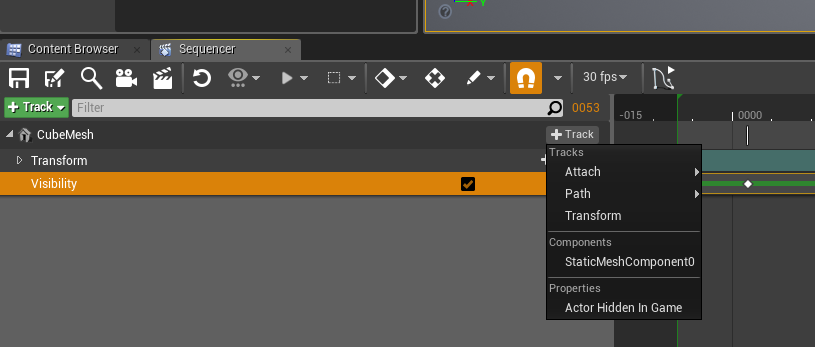 grim ore
lol
yeah I don't know why its not keyframeable by default
I mean the stupid thing has a visible checkbox under render, they could atleast add a shortcut to that toggle there even if it doesnt do the same thing lol
tribal pebble
indeed! 😛
by any chance do you know anything about Uv-Animations ?of character Eyes or Mouths for example?
as the Uv-Warp from blender can't be exported
grim ore
I do not art sorry 😦
tribal pebble
aw np , i'm using for now a method where i have many planes for each expression , and i have all planes keyframed inside the head and the visible expression on the face
grim ore
I know there was a cool little gif I saw once that explained how to do it in Unity that should be transferable but thats it
tribal pebble
eh hope they'll add something like that 😛 because uv warps are very great for games expecially
grim ore
It's probably doable now as you have access to the UV's in the material editor but that is voodoo to me
tribal pebble
yea i seen some tutorials and it seems finneky , expecially for when you wanna keyframe all the expressions to the Sequencer xD
 robust shadow
Is one 2k 27” monitor good for ue4 editor or would you guys recommend 2 monitors
I’ve been using this 21” 1080p for too damn long. Trying to decide weather a single or dual monitor setup would be better for ue4 development 🤔
grim ore
3 or more monitors is always good, 2 I guess if you have to sacrifice
but yes 2 monitors or more is always good for any development unless you have 1 large monitor that you can split into multiple windows. Being able to watch execution and debug while things work on another screen is great.
plush yew
anyone know of a way in blueprints to drag off multiple exec lines at once? as you might ctrl click on folders/icons etc
also does anyone have the most recent inside info on acquiring a switch dev console on discount? I heard nintendo recently made or is making changes for their indie department or something?
 rigid anchor
I can't RAVE enough about this wonderful relevancy system in 4.20!!! So much potential has been opened up.
 bitter iris
does anyone elses 4.19 just keep crashing randomly?
 surreal viper
randomly? nope
doing pretty much anything in UMG? yes
plush yew
mine only crashed once
because I forgot to call the base function in an override in a UUserWidget
so it was my fault
Anyway, how does one measure a string of text while in a UMG widget?
trying to paint a string of text onto a widget one character at a time and I need to know the size of each character (in pixels)
bitter iris
anyone wanna help me with a crash? i have no idea
vernal tapir
Can anyone help? Lightmass out of memory even on a map with a single plane!
 spare steeple
are there any settings for mouse input? there is definitely something that feels off about it
seems like theres some acceleration
nevermind i just noticed mouse smoothing is on by default
 steady owl
Anyone know how to get the same effect as the photoshop multiply blend mode in ue4?
Whenever I literally multiply the base color texture by an ao texture it brightens the base color, but in PS using the multiply blend node, only the dark colors stay which is what I want
true ledge
if I had to guess, thats a color space issue, since (afaik) ue4 and PS use the same math for multiply (base * blend). are you using linear colors?
robust shadow
does anyone know if i'll run into any issues use different monitors in ue4 editor?
specifically these
 latent terrace
2560x1440 has issues for me
robust shadow
latent terrace
however it might've been fixed in 4.20 so I'll tell you tomorrow 😛
robust shadow
@latent terrace what issues do you have using a 2k monitor?
 polar hawk
I'm really curious as to why you'd need higher refresh rates on your non 4k
latent terrace
all umg buttons have a weird offset
like my mouse is away from the button but UE thinks its on the button
annoying as hell
robust shadow
I don’t @polar hawk
Right now I just have a 1080p 60hz so my idea was to buy those 2 cheap 1080p Asus monitors to use for now
grim ore
I've got a 1440p for main and 1080p for secondary at home and no real issues here with UE4
latent terrace
what ver are you using?
grim ore
well I don't use scaling so that is probably why
latent terrace
4.17 worked fine for me, problem appeared in 4.19, only in editor : P
robust shadow
Then a few months down the line hopefully upgrade to the 2k monitors and keep the 1080s off to the side. Then hopefully a few years down the line out a 4K in the middle
grim ore
weird no issues here in editor for any version but i use 100% scaling
robust shadow
I’m not planning on buying them all outright. Was more of adding them as I go haha
 short dagger
what are the pre-req's for 4.20? worked on my PC but not my laptop and not sure which SDK's and toolchains i should be including to get it to properly build
polar hawk
Shit changes fast
grim ore
VS 2017 and Windows 10 SDK
short dagger
have both and doesn't seem to work, hrm
robust shadow
True
polar hawk
Just go cheap until you want to go ridiculous
robust shadow
It’s not THAT long term though. I’d be buying them all this year except the 4K that one would be down the road more
true ledge
this is probably a dumb question, but: I'm looking at the new ActionRPG project and I'm seeing 3 maps: _P, _Dungeon02_Asset, _Dungeon02_Lights. I've never seen this kind of setup before, so what's Epic doing here?
worn granite
I mean, I've still only got 3 monitors
polar hawk
Either way $700 is ridiculous imo for a 2k
polar hawk
I bought a massive desk and need more desk
robust shadow
@worn granite VESA mounts m8
worn granite
I actually have this big ass slab of wood I could use as a desk, but its seated pretty damn high
And I'm too lazy to fuck with it anyway
polar hawk
I wish I could find a sane way to mount my 8 inch monitor speakers
That'd free up a lot of desk space
grim ore
abort abort, we have a problem! all hands on deck. The docs are going down.... 😛 https://i.imgur.com/1wGTSCn.png
 worn granite
I've got a 4:3 monitor I wish I had the space to set up
polar hawk
The docs are being temporarily confuckizzled with
grim ore
@true ledge that is pretty standard to alleviate large map issues and to allow multiple people to work on the same setup. They are using multiple levels or level streaming to do it
robust shadow
I got this 1:1 monitor lying around I should throw up just for the lulz
 crude totem
@grim ore Do you know of any tutorials online that teach that kind of workflow?
short dagger
1:1 monitor? never realized that was a thing h aha
true ledge
huh! TIL
worn granite
Why you gotta tease me with your perfectly square wall of pixels?
 glacial arch
Anybody know of any free stylized texture packs? I need a bunch for testing
realistic textures make my stuff look like garbage but painterly textures are prettyyyyyyyyyy
robust shadow
maybe i'm tripping. i coulda sworn it was a square display. iirc it was a 75hz acer or asus display. i'll check the model number when i get home to confirm 😂 @worn granite
worn granite
.... wut
plush yew
Okay. I'm still having this kart problem. I don't know what to do.
 winged crypt
anyone use perforce?
 silver crown
 high stone
Discovered dynamic lighting on my TN panel. O:
plush yew
Will someone please DM me to teach me how to make a proper vehicle? I've tried all the tutorials and none worked
high stone
Rover the key is to start with a side view, then work in from the front and back view. I helps to have screen shots in the background. Sec.
plush yew
@high stone uuh what do you mean?
high stone
Start with a side view. Then work on front and rear. You will need photographs of a real car.
plush yew
you doing a racing game redstar?
Umm...What I'm trying to do is make my kart move.
It won't. Well move properly
high stone
Hm... It's been a while since I was asked that question. I think 2002?
worn granite
Yeah so with proper reference imagery, you can get pretty decent looking results fairly easily. Source: Am programmer, made this https://gyazo.com/ca0a3ba61919454fab6a3ab8ca58eb12
 plush yew
😃 i was gonna do a racing game. got a cool mp asset. but had to focus on my 6dof
doing lighting now lol. so much work
tedious
high stone
If it's in C++ you probably want vector location and vector speed.
Don't forget float and sin.
plush yew
anyone have any tips on how i can get surface snapping working properly for my lights? dang things wont rotate to surface normals
i have to rotate them each time lol
@plush yew May I ask have you got your vehicle to move properly yet?
yes
in the thing balint did
worn granite
What you mean properly?
high stone
Getting vehicles moving initially can be very difficult.
plush yew
Not just move straight and lean to left
worn granite
Are you using add movement input?
plush yew
I want my game to have simple physics. But A. The kart won't move. B. The tires don't move. or C. the kart moves but it doesn't move like a real car.
worn granite
Are you using AddMovementInput?
high stone
What I did was get movement on the vehicle then give the node it's own set of properties for sway, collision.
plush yew
@worn granite Yeah. The option in Plugin settings
plush yew
Oh that. I used that to.
high stone
You have the vehicle separated into nodes for tires, vehicle sway, overall vehicle? Group, parent.
worn granite
No better result?
plush yew
@high stone So basically if I click my kart. Its suppose to select the body only and not the wheels?
@worn granite Correct
high stone
You want the wheels to respond to their own code. If car moves wheels, spin froward, if backwards wheel rotation reverses.
From there you can add in shock absorbent. If car hits a bump, car goes down a little on impact, wheels go further down then bounce back to normal on Y coordinates. Most of it is code responding to the core node in X, Y, Z movement, rotation.
bitter iris
anyone know why im getting these errors
LogWindows: Failed to load 'aqProf.dll' (GetLastError=126)
LogWindows: File 'aqProf.dll' does not exist
LogWindows: Failed to load 'VtuneApi.dll' (GetLastError=126)
LogWindows: File 'VtuneApi.dll' does not exist
LogWindows: Failed to load 'VtuneApi32e.dll' (GetLastError=126)
LogWindows: File 'VtuneApi32e.dll' does not exist
[2018.07.19-21.16.30:728][479]LogUObjectGlobals: Warning: Failed to find object 'Object /Script/Engine.DestructibleMesh'
[2018.07.19-22.05.32:296][498]LogOutputDevice: Error: Ensure condition failed: GIsTransacting [File:D:\Build++UE4+Release-4.19+Compile\Sync\Engine\Source\Runtime\Engine\Private\Components\SceneComponent.cpp] [Line: 1038]
 frosty bloom
@plush yew http://ue4resources.com/3d-projects
high stone
@bitter iris Looks like you're either missing files, or they are incompatible with your current version.
I would locate these files on your HDD and see if they are there.
bitter iris
should i verify files?
plush yew
@plush yew hey im gonna DM you a great vid of the racing game i updated to 4.20. get rdy 😃
Okay
high stone
If the files are there. I recommend running a fix on them, patch, reinstall option.
bitter iris
i dont know where to look for the .dlls
plush yew
@bitter iris i've seen that error before - from waht i remember you might try disabling media plugins in unreal plugins section - or possibly reinstalling engine / updating to new engine version. also i notice your error log said something about landscape too large - might try lowering navmesh
high stone
I dmed you a link that should help. It's on Unreal's answer section.
bitter iris
thx
high stone
Hope it helps. Often it's something missing or damaged in those cases.
plush yew
so you made a racing game way back in 02? 😮
high stone
No. That was the last time I did coding for cars.
I made a truck that went in one direction.
worn granite
Well you can't have done worse than big rigs
high stone
Actually the game was pretty good. A horror, mystery game. Unfortunately it never got fully funded and was scrapped.
If I net myself a few million dollars in, investing I'll probably remake it. Emphasis on the word, 'if'.
cursive dirge
@plush yew I didn't see if others replied this but if you model real car, just get blueprints to guide on the modeling process + get plenty of reference images
https://www.the-blueprints.com/ is one source for example
plush yew
No I'm fine with modeling. Its the thing about moving my kart. It won't move at all.
Or it'll act stupid or etc.
plush yew
Okay. I'm gonna try using a mesh. No Custom. I want to see if it's my model that's causing this issue
vast pine
Wonder when vaRest will get updated to 4.20
cursive dirge
can't you just update it yourself manually?
I usually do that for plugins I need and don't have updated versions
vast pine
i'm part time coder specializing in google.
right now my visual studio is taking forever to update to current version to work haha
plush yew
Okay my kart is moving. But the wheels won't move at all
And the front wheels are rotating either
@vast pine lol. still workin on ur game thingy? it on steam y et? i use vs2017 latest. works ok
vast pine
For sure - Its a long lime coming but getting there 😃
plush yew
cool
vast pine
wonder if steams blowing smoke but amiright this would be super helpful
plush yew
i host a ded server rn
you usualily just gotta go with one in each main zone if you are actualy going global
i only have one t2.micro lol . its strictly testing only. los angeles based
zero cost 😃
so happy about that
vast pine
i'm gathering my own regional data and looks like mostly eastern NA and Wester EU
weird
haha
plush yew
lol
east na? would think cali. odd
no idea on EU front
interesting idea though, global servers
vast pine
well i need some in each regions for testing, sport type games seem to attract sports likers of all kinds
plush yew
oh, yeah
i would imagine especially from europe
they have like an entire la liga thing over there.it's crazy
vast pine
in total close to the NA ppl small size pool of ppl actually took the poll though
plush yew
was watching brizn krzanich from intel rail on about it in one of his tech demos in all things digital
vast pine
for shame
plush yew
lol
vast pine
pretty lil graph though
vast pine
yeah, but only like a few thousand probably know about this game haha
plush yew
lol
marble spire
Hi Guys
sorry to ask again but
someone know how to make my enemy turn to me?
I mean, ive made it he come to me and atack
but if im behind him, he still atacking to the other side
since im at his range
grim ore
use the find look at rotation node and use that every tick or every whatever to rotate it to face you
 analog bay
4.20 from git does not generate project files...
 storm glen
Thanks, Phyronnaz
analog bay
had to delete environment variable now working
plush yew
Nice my kart goes through the world...Sigh I just don't get why it's so hard to make simple vehicle movement.
grim ore
It's not.
plush yew
Okay so how come it's taking me 4 days just to try to fix the controls?
I just want to make simple kart movement. That's all I want to do for now but apparently that's too much. Man...I'm gonna try to use a normal mesh and see if that works...
high stone
@plush yew It's one of the trickier things to code.
plush yew
I'm not coding. I'm just using blueprints.
high stone
Even in engine it can require a lot of small tweaks just to function.
plush yew
Ugh...What makes me mad is I'm still stuck on controls. I don't mind if it took me a day but jeez. Its been 4 days.
grim ore
There are 2 working vehicle templates in the engine. If those are not working for you then it's something else that's causing a problem and not the engine.
plush yew
Well. I don't know how I'm gonna try to fix my model. Like, is it gonna require bones? Does it need smoother wheels?
when copying a project to 4.20, was a post process attached to an object NOT supposed to come with it? seems as though it was deleted straight off
grim ore
It might if you are using parts of it for physics and attaching physics components. The default vehicle in the vehicle template is a skeletal mesh and uses bones for the wheel mounts
plush yew
i only had one object with a post process attached, so it's not an issue you know
I'm going to bed. I seriously hope I can fix this tomorrow.
grim ore
Unity had atleast 1 if not more Vehicle projects as well you can try out for free, maybe it's just Unreal not being suitable for what you need. It's free to check it out atleast.
high stone
GL. A nights rest may bring in a fresh outlook.
plush yew
Nah I don't wanna use unity. I wanna get into unreal.
high stone
I think Unreal needs a better archive system of videos, tutorials, example files. A lot of the site is still running on forums. 2004 help support.
It's understandable. Since the recent update to UE4, a lot of the old stuff needs to be updated. New tutorials, resources.
worn granite
Actually sometimes stuff from as old as 4.5 can be perfectly applicable to the newest UE
Especially in Blueprint
Context search helps a lot
high stone
Aye. The sheer volume of content. I think a overhaul into a new archive would be great. At the minimum YT videos attached to every area like cars, explosions, planes... probably got thrown into a NSA watch list for that lol.
worn granite
I don't think everything needs to be covered, not in that interpretation
No need for both an explosion reference and a muzzle flash reference
At least, from Epic.
Luos would do that kind of specificity better.
high stone
Cover all the basics.
 obtuse mesa
Is the link to console source code access request not working for everyone?
http://epicgames.desk.com/customer/en/portal/articles/2313998-how-do-i-get-access-to-ue4-console-source-code-?b_id=9727
plush yew
copied my project to 4.20 and my text renders are all stuck black? anyone know what's up with that?
cursive dirge
did all shader compile already?
plush yew
as far as i know
i mean yeah i saw it compiling shaders as soon as the level loaded
my text material become un-emissive in the transfer
nonemissive
whatever
 sage grail
anyone know if you can spawn another particle on particle death?
plush yew
I have a question.
about UE4 licensing.
I want my game to be free, but... it's getting an original soundtrack
if the composer wants to sell it as an album (or allow me to), would money made from that album count as revenue that would require Epic's 5% royalty?
cursive dirge
it's a difficult question, consider that soundtrack could be used to bypass the original royalty share
silver crown
True
 silver crown
🤔
 maiden swift
4.20 lets you use Blueprint utility classes to script the editor.
cursive dirge
@plush yew https://www.unrealengine.com/en-US/eula 5. Royalty
maiden swift
You can add custom actions to the right-click menu in the content browser or for selected actors in a level. Just getting the hang of it and it's super handy.
cursive dirge
6. Revenue from ancillary products which are not software and which do not contain embedded information (such as QR codes) which affects the operation of the Product (e.g., comic books, soundtracks, apparel); ```@maiden swift Seems super dangerous to me 😛
worn granite
I'd lean that you don't have to pay epic royalty, but that you ought to check with epic directly
cursive dirge
I dunno, I've said a long time that they'd need to allow UMG to be used for editor scripting
if that ever happens, we'll get lots of editor tools
cursive dirge
blutility is too limiting
silver crown
ang off ang off
cursive dirge
it's a way to run blueprint code in the editor
worn granite
i know


 worn granite
I've never gotten blutilities to be useful
silver crown
That's cuz you know the real power
cursive dirge
you could use them to serialize content I guess
silver crown
Ah
cursive dirge
couldn't you still run c++ functions in blutility
worn granite
Aye
cursive dirge
writing editor menus and maintaining it on c++ and slate is pain
worn granite
Theoretically its a better abstraction layer than slate.
silver crown
I like slate
worn granite
slate == easy blasphemy
silver crown
What?
worn granite
shhhhhhhhhhhhh its k
silver crown

worn granite
also isn't it like 6 am?
silver crown
Shhhh
worn granite
damn, /r/me_irl
silver crown
Shhhh
worn granite
goddammit I've given myself hiccups
silver crown
Shhhh
worn granite
0/10 did not help
silver crown
Rho
worn granite
7/10 w/ rice th o
silver crown
🤔
worn granite
I saw that first reaction
maiden swift
@cursive dirge While blutilities have technically been around for a long time, their functionality has changed for the better.