#ue4-general
1 messages · Page 277 of 1
 cursive dirge
 languid shard
thats some nice vectors
cursive dirge
there are two ways you can fix that same issue on UE4 atm, just spin the wheels slower (don't tie them into real speed after some threshold)
or, do it old school by replacing the wheelmesh with flat plane after some speed and have custom blurred wheel shader for it
well, for tire part you'd still need some fake shader as well
many old racing games did this for tires, they had few texture variants where they just swapped the texture into more blurred one once the speed got up
shader would just pan it around the mesh while the actual mesh stays at same angle (you can still steer)
@grim juniper oops, meant to tag you

also, good luck on getting the thing Alan Noon posted, he doesn't even work at Epic anymore 😄
 grim juniper
He says it should still exist on his old workstation, so maybe someone at epic can work it into an engine feature
cursive dirge
to be realistic tho, that'll only happen if Epic adds vehicles into fortnite
grim juniper
They did though 
 cerulean nova
there are vehicles as far as i know
grim juniper
Golf carts
cursive dirge
?
grim juniper
Season 5 added golf carts
cursive dirge
I said the other day that they must be adding vehicles as 4.20 got bunch of physics networking fixes and profiling tools
now it all makes sense
@cerulean nova those carts move so slowly that the default motion blur will not freak out yet
it's possible they still add the radial blur for it (I don't know if they have already done that)
 cloud cobalt
Realistically, only thing needed from Epic is the ability to wrote motion vector from material
The rest is fairly easier
cerulean nova
idk i do not play that game 😄 i dont like the building while fighting stuff ^^
languid shard
@grim juniper these vehicles are pretty fun to drive with btw
and the warp stuff they added acts as you'd expect with them 😅
cursive dirge
heh, this is a thing too https://youtu.be/UPqq6m9NXYo?t=581

SUB TO BE A LEGEND - http://goo.gl/HXwElg FOLLOW ME! • Twitter - https://goo.gl/Amqx54 • Discord - http://discord.gg/LazarBeam • Instagram - https://goo.gl/g...
besides the golf cart
languid shard
yep
you can backflip em too, tried yesterday with a friend
they added a mountain with a double jump and carts on top of it for players
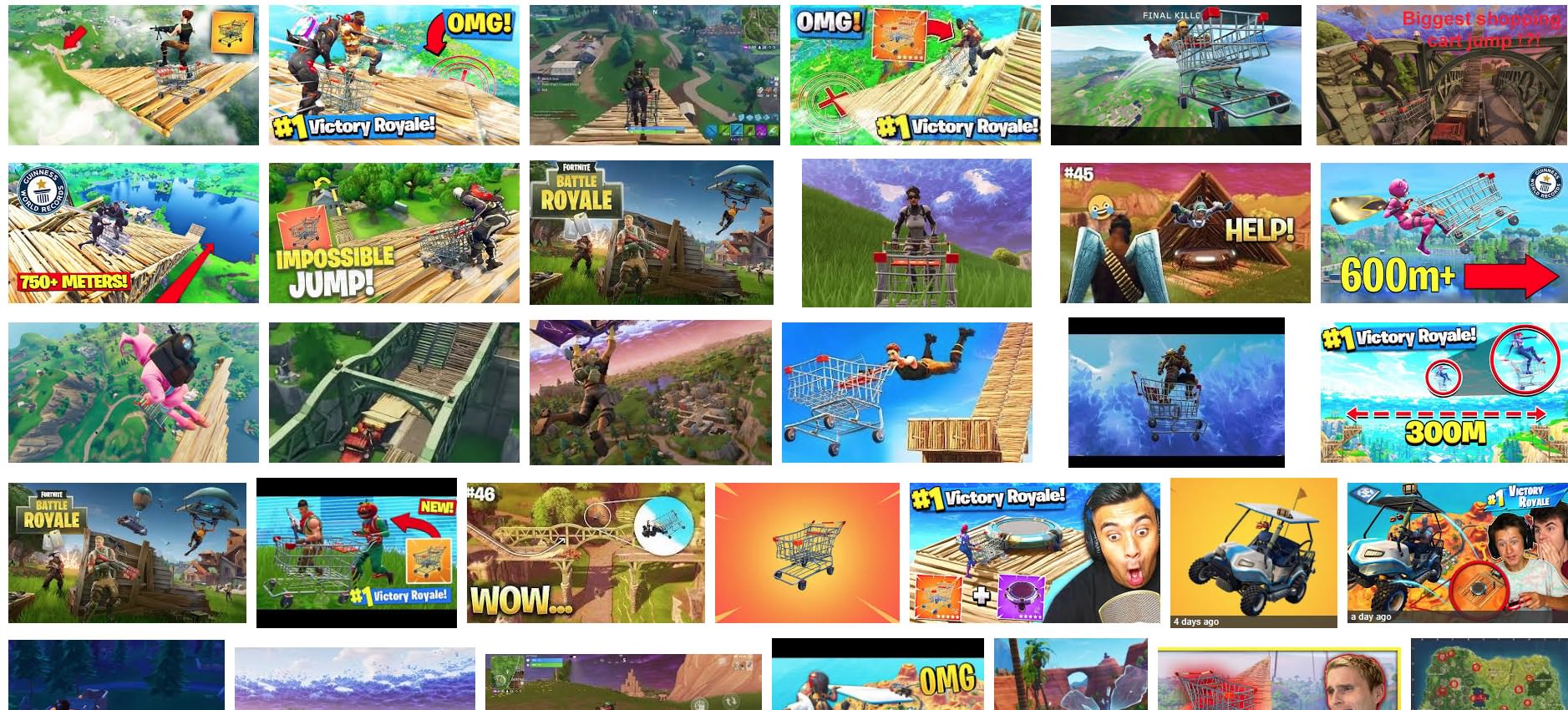
help, just got cancer by searching images on google https://i.imgur.com/pshv9xB.jpg
 cerulean nova
"im doing Youtube for fun" is such a bad joke 😂
oooh right thats why all your videos are atleast 10 minutes so you can monetize them...
and they clickbait and stretch stiupid videos just to get money for the video
Youtube is so cancer these days
languid shard
sometimes you find videos from the early days
damn these were nice
genuine at least
 opaque salmon
I've run into a bug that does not occur when I set debugging breakpoints
is my machine learning?
should I donate it to a museum?
 worn granite
Oh, you're in a fun place
that's a rare bug, you're going to have to lock in a reproduction before you can expect to hit breakpoints on it
 silver crown
Hehe
Sometimes putting breakpoints changes the program behavior a little bit
Making it unreproducible with breakpoints
But that's really rare and fun
opaque salmon
I think I figured it out, though I'm not sure I understand why it wasn't reproducing with breakpoints set, should have still happened
it's fixed now so no point in learning a lesson amirite
cursive dirge
@opaque salmon are we talking about c++ or BP?
if you can't hit c++ breakpoint, it's not a bug, it just means compiler has optimized that part of the code and it no longer resembles the same lines as you have, your options then are a) compile the thing using debug mode (it's named that for a reason) or add pragma call around the function where you tell compiler to not optimize that part
latter is bit hacky but has always worked for me
opaque salmon
bp, double firing of create widget cause I had a button set to open it both on pressed and clicked but it appeared one of them wasn't fired if breakpoints were set
cursive dirge
ah, I don't know much about BPs 😄
worn granite
I'm actually not sure if that's just a edge case in the BP debugger and you somehow only saw one, or if you really weren't having two calls because it was debugging in general.
Could be either
 thick mortar
Does anyone know what bullets u would use for a gun like one from cs go
 dusky chasm
sorry, moving it to WIP channel
 hoary charm
Hey guys, do you think a Quad Core i7 and 16 GB RAM will be substantial for UE for the next couple years?
cloud cobalt
Depends on your role
16GB RAM might not be enough for art work
For programming it will be fine
CPUs basically only get 5% faster every year now so that's fine
 manic pawn
more cores would be useful if you ever need to build the engine for any reason
or if you need to build lighting
hoary charm
Ok thanks. When you say "not enough for art work" - you mean handling textures etc?
cloud cobalt
Baking high poly, building lighting, painting high-res textures
hoary charm
Oh you mean creating art, not UE handling the art.
 fluid swallow
I used 16gb for a long time, and it wasn't bad at all
I ran into issues with generating heightmaps for terrain
as Stranger said, baking lightmaps used a lot of ram, too
 odd steeple
Hello, I'm looking up how to snap objects in the unreal editor. How can I move an object by a vert and have it snap to another vert?
 graceful grove
I've dirtied an object in my browser so badly that I can't delete it without crashing the engine, what do? 🤔
hoary charm
@fluid swallow I'm currently on a QuadCore with 16GB Ram, it's not bad for my art pipeline. I can't really paint at 4k in Painter, I always switch back from 2k-4k. I'm looking at getting a new laptop, one has the option of 32GB RAM and an i9 but the cost is nearly double 😛
graceful grove
i9 laptop is a thing? 👀
 paper kernel
yea, you don't want one
graceful grove
I mean, these productivity laptop bricks need to be plugged in anyway, not particularly certain why they even have batteries except for acting as a UPC in some ways
hoary charm
Yeah, the new MBP's were just released.
silver crown
I guess else they wouldn't be laptops
odd steeple
I can't seem to get middle mouse to select a vertex for snapping in the Unreal Editor.
Nevermind, didn't realize you had to hover over the transform gizmo first before the middle click.
fluid swallow
@hoary charm yeah I feel that 32 gb is ideal. I never have issues with ram now unless I have a memory leak, but we will pretend that I didn't say that 😂
hoary charm
@fluid swallow Thanks for the info!
 vale osprey
@opaque salmon BP debugging breaks if you use re-route nodes. Your second call to a function can be actually a next frame call 😄
Imho with such major issue it’s rather useless
 fair violet
Is the best way to mimic a handheld camera in UE4 to use a Vive Controller or can it now be done using an ipad too? (Saw they shot the Star Wars short with an iPad)
Have the vive set up but forgot how much of a hassle it is, would be much handier with an iPad
 thorny cipher
Do debug builds have console and stat commands?
 upper heart
yes
thorny cipher
Ok cool
It strips out things like show collision etc though right?
Also is there a difference between debug and debugGame?
Not much documentation on it
 lost torrent
When I am using level streaming, I have one persistent level with a few sublevels that are unloaded. If I have them set to "Hidden" does that mean they are not being streamed? Or is there another setting somewhere I have to hit?
thorny cipher
Hidden only changes the visible in editor, right click and set it's streaming condition
To 'always' or blueprint
upper heart
No, show collision still works
lost torrent
Thank you joshua
 dense hound
nvm got it
 hot drum
Hello!
 ripe sandal
hi
hot drum
I really have no idea why I didn't search up a UE4 discord server yet
last night I tried to import a model to unreal
It only imported one object despite me selecting all
I've tried everything for it to actually work propperly
and now when I try to import
The interface is different and the import buttons don't work
fluid swallow
It's trying to import it as an animation
lost torrent
Alright I need serious help. How can I take more load off of start up of my game?
My game runs great on ipads, and iphones with 2 gigs of ram.
But on my Iphone 6+ it crashes after trying to get past the initial splash PNG. However, there is practically nothing loaded. It loads into the persistent level which is a void level, no lights or actors. This is all that initiates on the creation of the persistent level, but it doesn't even make it to the print screen.
ANY help would be great.
 plush yew
Is there a way to stop particle effects from affecting auto exposure?
 signal pier
Does anyone know a way for an action to happen when collision happens with an object with a certain property for example boxes that have the property Food give health to character when touched
lost torrent
Easiest way is to add a collision box to that actor, then go to your event graph and click on that box, and choose the event "On Component Overlap"
lost torrent
Just go to the actor, on the top left of the viewport, click "add component" and search for "Box" you'll see collision box there.
hot drum
A h e m
signal pier
k thx
hot drum
lol
signal pier
now blender i understand that
hot drum
That's my fbx file I tried to import to ue4
signal pier
Yes its working thank you very much Dreamshade
lost torrent
Right on. Good luck with the rest of your project.
 glacial otter
Hey guys, is there any place where i can find the live trainings from epic, but categorized and in order?
Youtube's playlist is a mess right now
signal pier
let me check
plush yew
when do steam's curator review's show up on your store page? takes a while or what anyone know?
 swift spindle
can take a while
 real pasture
Question, has anyone here use Udemy?
 plucky reef
guys can I merge a blueprint class ? I mean I bought IK system and I want to put it in my main character, do I have to rebuild it?
 safe ridge
Does anyone know how to make the character look more realistic when jumping. (it looks like it's in an antibiotic gravity map) I tried to change a lot for settings like jump speed but it just made it look like I was hitting something above me halfway thru the jump. If anyone has any suggestions pls let me know, thanks.
 elder hatch
Anyone else having crashes with the material editor?
I downloaded some megascan stuff and it keeps crashing my project
 crude jasper
@safe ridge ik what u mean
safe ridge
@crude jasper do u have any solution s
 keen crane
Out of curiosity, how come there aren't many motorcycle games on unreal? Or at least assets? I can only find one thing of motorcycle assets blueprints or otherwise in the unreal store.
 hoary sleet
hey, anyone like me have trouble finding C++ api stuff in the documentation?
like the documentation is there, it's just not showing up on Google or the internal search
I had to add a site: prefix to my Google searches so I wrote a bookmarklet
javascript:search=prompt("Search%20UE4%20C++%20API","");if(search){location.replace("https://www.google.com/search?hl=en&q=site:api.unrealengine.com/INT/API "+search);}else{void%200;}
 silent drum
Hey i need help with making some kind of crate opening system like pubg or cod. If any one knows a good way or are super Nice to help pls message me 😀
 storm cave
Hello,
Can anyone save my life please? I need your help and it is super important for my
 small basin
I have a problem with the scale. I just created a new UE4 project, and something's off with the scaling. If I add a 200x200 cube it takes up 2 "meters" as shown in the grid, and the player also seems scaled right according to the background grid. However, the measurement in the bottom-left corner sets 1 meter to be a weird measurement inbetween grid sizes, and if I use the measuring tool to measure the 2mx2m cube it says it's only 1.33m. Anyone know what can cause this, and how to fix it?
storm cave
Anyone knows somethig about create different lighting scenario within different sublevels (all lights are movable)?
languid shard
@storm cave you mean you want your sublevels as lighting scenarios ?
or sublevels with multiple lighting scenarios
ie sub sub levels
storm cave
I need to have two different sublevels each for different scenario
and all geometry on persistent level
languid shard
hmm not sure you can go that deep with lighting scenarios
I'm sure it works with scenarios linked to your persistent level, but in sublevels no idea
plush yew
can't you just tag the lights and group them by tag and turn on or off that way?
never done env stuff like lighting scenarios before.. not sure if thats how u guys do it
languid shard
lighting scenarios are more for baked lighting
plush yew
ah
languid shard
it switches between lightmaps
plush yew
Anyone here good with multiplayer blueprints?
I am trying to make an asymmetrical multiplayer game and after 4 hours of research I've got nothing to work with
@plush yew hi, you can encapsulate different behaviors in blueprints for each character type, and then have general stuff in game modes / states. as far as RPC calls, just use normal server calls for auth stuff and multicast for weapon firing, etc.
plush yew
@plush yew say what
you can have separate pawns for each class, and then put the global vars in game mode / game states
ah i see there's more to it - you have different time states. found some links online for it but looks like you have to do some engine mods to get it working. asymmetrical multiplayer unreal on google yielded a good forum guidance result on first hit
@paper kernel what is ur tut?
paper kernel
pawn movement using blueprint only
plush yew
o cool where is it
can u dm me more info maybe?
@plush yew Could you link me those?
I legit found nothing
I've been finding stuff like this with no replys
ill send you the link in a DM ok
 plain laurel
anyone online to help me out with a few things?
 grim sinew
You ask this every night. It's going to be hard finding a personal tutor unless you pay them. For random questions, just ask in the appropriate channel.
plain laurel
sometimes I find a nice person that helps me out
cursive dirge
so, this happened https://assetstore.unity.com/packages/tools/utilities/amplify-impostors-beta-119877

-
- BETA RELEASE * *
1-Click Impostor Creator!
Optimize your projects with ease by using next-generation Billboard Impostors.
What are Impostors?
Impostors are camera facing quads, or simple polygonal shapes, that replace complex geometry by rendering a fake 3D...
timing is bit funny
considering that free setup just popped up few days ago
 frank escarp
it will make much more money than the free version
becouse people will pay
even if its the same thing as the free version
grim sinew
"it will make much more money than the free version" Technically one single sale would do that
silver crown
🤔
cursive dirge
oh, I didn't mean to post that into this channel, my bad 😃
languid shard

 wary ferry
where do i put questions regarding LOD of environmental assets and shader design
wary ferry
@wary wave 😃
 wary wave
graphics
wary ferry
ty 😃
wary wave
no problem!
upper heart
Anyone else expecting 4.20 today or tomorrow?
silver crown
HELLO
 grim ore
I expected 4.20 last week, now I just expect sadness and work
grim ore
Every new release is just a rush rush rush to get stuff done. I hope in the future they start releasing more thorough update notes during the preview process similar to the way Unity does their beta process. One can hope 😃
on the plus side it's either 4.20 videos if it releases or WoW 8.0 patch so my day will not be boring!
upper heart
I wasn't expecting 4.20 last week. It's pretty obvious when the are getting closer to release if you look at the github commits for that branch. It takes a few days of no commits before I start thinking the release is coming.
grim ore
yeah we had some small fixes yesterday in the staging branch so who knows now
 maiden swift
@upper heart I'm hoping for today or tomorrow. Anxious to play with 4.20 and migrate some projects.
upper heart
Yeah same here 💯
maiden swift
Seems like it's shaping up to be a big release.
grim ore
I think Niagara and the Mobile stuff are the big ones for sure. the Mobile ones are not even front and center but a ton of tweaks to the back end definitely helps now for mobile devs.
 delicate needle
I'm still very stuck on this "simple" issue. I have in my scene a custom class for my Default Pawn "BP_ArchVizChar" and a custom class for my PCC "BP_PCC_Mouse" . My default pawn is just a character, with a camera component, etc. My PCC has code that allows me to look around when using the right mouse button. This is that code:
The problem is, I lose the ability to look around once I use the "set view target with blend" with a target as another camera (with a BP).
maiden swift
Where are you calling Set View Target with Blend? Can you share that code as well?
delicate needle
In the Level BP
I have an HUD with buttons that use the same "set view target with blend" node to other parts of the apartment. Kitchen, Den, etc etc
maiden swift
When you set the view target to a new camera, you're no longer viewing the world through the camera attached to the player controller. That's why your look input appears to be doing nothing, I think.
What is your goal for the experience? Is the player supposed to be "teleporting" to different locations in the apartment?
delicate needle
In a sense yes, smoothly transitioning from one part of the room to another. If the user decides to go up stairs, or a cordoned off area, then I will literally teleport.
Once the user reaches the goal location, kitchen for instance, I like them to keep their mouse active, so they can select options on the HUD, paint, trim, fridge options, but also retain the ability to look around, via the right mouse button.
So my current project has an always active mouse interface, which is what I want, and buttons that teleport the viewer to pre-set locations. Its just I lose my player controller ability once I use the "set view target..." node.
The reason I am using cameras at this point is because I can exactly define the orientation of the camera once it reaches its goal. I wouldn't want the user to be looking at the floor if they transition from the kitchen to the bedroom. I'm not stubborn to the method, so if there is a more sensible route, I am all ears.
maiden swift
Is the player ever going to need gravity, e.g. to walk around the apartment?
delicate needle
Nope
 cedar snow
i have an actor in a persistent level and see no replication options in the details panel. what am i missing?
 waxen finch
cedar snow
waxen finch
cedar snow
like i'am missing this tab
silver crown
@cedar snow I think it's in the class defaults only
cedar snow
in this case i'am inheriting from AActor and made a BP from it
grim ore
@delicate needle what template are you using if any and is this first person camera work or TPP?
cedar snow
and i don't think that i've seen any replication settings in the BP
delicate needle
No template persay, it was an empty scene. First person only
cedar snow
uh no, they're actually there in the BP; must've checked out the wrong BP
delicate needle
cedar snow
@silver crown so i can't disable replication for an actor instance placed in level?
😦
silver crown
Seems not
cedar snow
at least not via editor i guess
silver crown
Kinda makes sense
cedar snow
y?
silver crown
Most of the time you do that kind of stuff class wide
Like for the tick
Would be weird if you could manually disable ticks on every actor in the level 🤔
delicate needle
@grim ore No template per-say, it was an empty scene. First person only
cedar snow
like an actor controlling background music
maiden swift
@delicate needle This might be confusing, but... as far as I know, Set View Target with Blend changes the camera you're looking through but the input events in your controller are still tied to the original camera, in a sense. Your input is still firing; you're just not seeing the rotation anymore because it's not rotating the new camera you're looking through. It's still rotating the original one.
delicate needle
@maiden swift, yeah - I'm rounding that conclusion now. I'm thinking about transforming the actual camera actor now, via key inputs.
@maiden swift - the camera that I am looking through. Upon exit of the camera, I would input the XYZ-RotationX,YZ back to its default.
maiden swift
Yeah. You'll need a way to move the controller and/or pawn to the new camera location smoothly.
As opposed to just setting a new view target.
delicate needle
While I have not used, or messed with any "move to target" stuff, I'm aware I could likely do that with a smooth curve. If I go that route, I need to learn which is the best type of actor to spawn as the "customer instance" for lack of a better term, or "player"
thorny cipher
[2018.07.16-16.06.40:956][356]LogNetPackageMap: Warning: UPackageMapClient::InternalLoadObject: Unable to resolve default guid from client: PathName: NODE_AddStaticMeshComponent-3_5324, ObjOuter: /Game/Maps/City.City:PersistentLevel.House_a_large6
[2018.07.16-16.06.40:981][357]LogNetPackageMap: Warning: UPackageMapClient::InternalLoadObject: Unable to resolve default guid from client: PathName: NODE_AddStaticMeshComponent-3_5324, ObjOuter: /Game/Maps/City.City:PersistentLevel.House_a_large6
[2018.07.16-16.06.40:982][357]LogNetPackageMap: Warning: UPackageMapClient::InternalLoadObject: Unable to resolve default guid from client: PathName: NODE_AddStaticMeshComponent-3_5324, ObjOuter: /Game/Maps/City.City:PersistentLevel.House_a_large6
[2018.07.16-16.06.41:031][359]LogNetPackageMap: Warning: UPackageMapClient::InternalLoadObject: Unable to resolve default guid from client: PathName: NODE_AddStaticMeshComponent-3_5324, ObjOuter: /Game/Maps/City.City:PersistentLevel.House_a_large6
[2018.07.16-16.06.41:032][359]LogNetPackageMap: Warning: UPackageMapClient::InternalLoadObject: Unable to resolve default guid from client: PathName: NODE_AddStaticMeshComponent-3_5324, ObjOuter: /Game/Maps/City.City:PersistentLevel.House_a_large6
[2018.07.16-16.06.41:056][360]LogNetPackageMap: Warning: UPackageMapClient::InternalLoadObject: Unable to resolve default guid from client: PathName: NODE_AddStaticMeshComponent-3_5324, ObjOuter: /Game/Maps/City.City:PersistentLevel.House_a_large6 ```

Is there a way to stop this issue when using instanced static meshes & multiplayer?The GUID of the actor on the client and server is different because the instance is created on construct
grim ore
@delicate needle so like most have said here using set view target is going to cause a problem as your "pawn" is not actually moving just what the camera is looking from. I just mocked up a small example to test some stuff out and doing something like positioning your arch viz pawn in the spots you want them and then just posessing them to move would probably be the easiest thing. You can have them also cache their current view on begin play so that when you possess them they can orient back to that rotation so it's the same every time as well.
delicate needle
@grim ore Cool, thank you! What node is used to change possession to another pawn?
grim ore
possess
also this might help, if you right click on an actor you can pilot them to move them in the scene exactly where you want and looking where you want. This might make it easier setting up their default location/rotation
tho it doesnt look like it's an actual issue lol. testing this when I possess it goes to the default orientation automatically lol
delicate needle
I have an test going at this moment trying to use "set actor rotation" on the actual camera, with the input coming from the mouse.
grim ore
I copied what you had and basically just replace set view target with possess and got what I think is your desired results so if all else fails it should work 😃
delicate needle
hm!!
What are you possessing exactly? Is it an empty pawn, or a pawn with an camera component?
grim ore
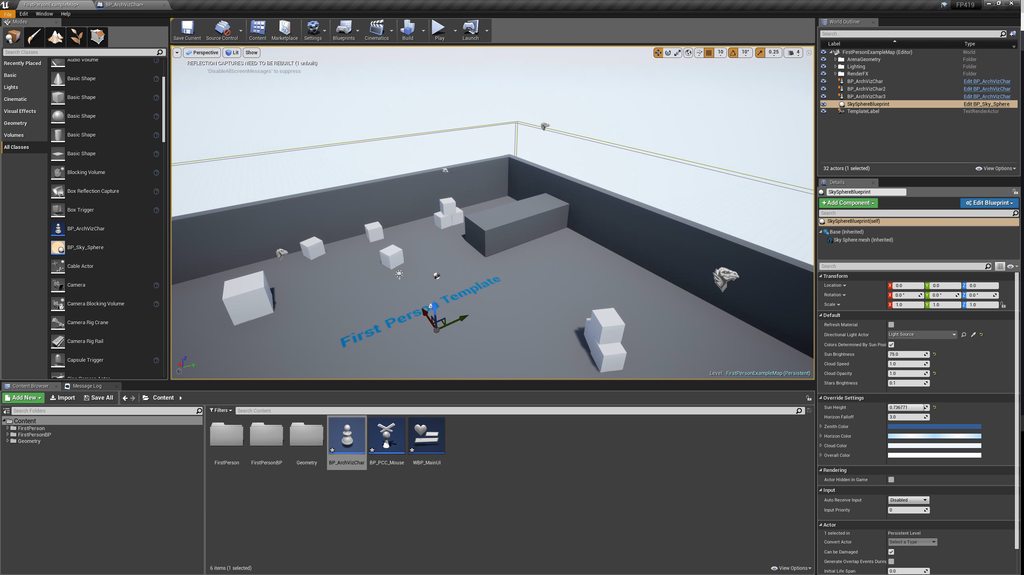
there are 3 pics, the top pic is the scene with the dragon heads being each pawn
the 2nd is the player controller which mimics yours
the last is the widget with the buttons and each click is just grabbing one of the arch viz pawns I have saved in an array and possessing it
the arch viz pawn itself is just a new pawn, I did nothing to it
there is a default player camera in every object if you have none
delicate needle
"there is a default player camera in every object if you have none" - that is one of those facts that I wish more people made clear, even though how obvious it seems!
Especially in documentation! When automation makes things easier, the ironic result is I get confused.
grim ore
well it's sugar coating it but the player camera manager takes care of cameras for you basically and you always have one if you dont lol. its more complicated than that but the basics are there
its basically a spectator camera setup
I also set the game mode to have no default pawn so I don't have to worry about an extra spawning in as well.
I also realized I set the pawn to be auto possess player 0 but that was just for testing, would be smarter to just set one of them to that in the editor or just possess your "default" one on startup
delicate needle
my default pawn would be the one at the main entrance of the apartment, so I can set that as default posses, and then have my room GUI buttons take it from there. Click living room, - possess Pawn_LivingRoom - etc etc. That sounds like a sound plan.
grim ore
yep it should work, works here atleast lol
and it makes more sense from an engine perspective as your supposed to have a pawn or higher for controlling and taking input and you possess/unpossess to move around pawns
It's one of those "the game framework is designed this way so you're gonna do it this way or have a bad time working around it" and then it's not too heavily detailed
delicate needle
The possession of pawns, as movable objects, etc to, me make sense. How I get confused is mainly how the engine handles the "viewport" - for example, a super empty scene, nothing in it, but if you were to press play in the editor, you would be a floating camera spectator. So in that instance, you are now an automatically created camera. I would almost rather have the engine yell at me and say "Hey, you must make a 1. camera object, 2. pawn object with a camera component, or 3. press the automatically create camera for primary pawn button."
delicate needle
Yeah, a "defaultpawn"
As I discuss this, it makes more sense.
Also my entrance into "game design" was way back in the hammer/world craft days. For better or worse, that has left certain expectations of procedure in my head. I'm also spending time getting into learning the basic of C++ so I can better understand how Unreal BP is sort of an allegorical visual implementation of c++ classes, functions, objects etc.
graceful grove
It's not even really secret I think, it's just that the default gamemode has a default pawn and controller, as I understand
although yes these things are really obtuse from a beginner standpoint
I do well remember my confusion with the requirements of a gamemode to decide what pawn and controller to spawn
delicate needle
Yeah, I want to hunt down the .cpp class file for that "default gamemode" so I can see what it actually does.
The more videos I watch, and more I mess with it, I get. My way of working most the time is to open an existing project and delete stuff till it breaks, then take a step back and be really reductive until I can figure out what is doing what.
*the more I get.
 night stirrup
Hey guys, don't know if here is the best place to post this doubt.
I'm having a problem to generate Visual studio files in all my projects. It happens when they are located in another disk. I have my Windows on C: (ssd) and some projects on F: (hdd, where my UE4.18 is), when the project is located on C: I can generate the VS files fine, but on F: i get this error:
UnrealBuildTool Exception: Couldn't find target rules
This happend on 4.18.3 and 4.19.2
I tryed creating a .uprojectdirs file in the engine root folder but had no success either
Has anybody encounter this problem too?
 earnest pawn
Hey could someone please explain something to me, how do I implement lag compensation for projectile shooting. I’ve read what’s on here http://blog.bluecurse.com/2017/09/18/lag_compensation_part_1/
However the author hasn’t done part 3 the final part
Do I have to spawn capsule components for each of the hit boxes saved and delete them after?
manic pawn
why does unreal sometimes have random nonsense in the undo history after starting the editor?
so when you keep pressing ctrl-z it just changes random files you didn't even have open?
like wat
you'd expect the history to be empty on start ???
upper heart
Yeah I would love to see someone do a tutorial on lag compensation that uses phat
 high wolf
Hello
I have an issue
I am trying to reduce the triangles of an mesh (Kite Demo Tree) usind the LOD settings in the Static Mesh editor
But when I try to Apply changes
The engine freezes and crashes
Is there anything to do to fix this?
 dark depot
is your pc strong enough to be running the kite demo?
high wolf
I guess not
dark depot
is the level loaded when you are trying to do this? if so you can open an empty level then try doing this
high wolf
Yes, the level is loaded
dark depot
yeah you could just have to much stress on your system
high wolf
And I'm using an level with an small terrain
So
Do I need to open an Empty level and try again?
dark depot
idk its just a thought
high wolf
I'll try it anyway
If something happens, I'll "report"
Thanks for the help
Well
Froze again
Still not crashes
earnest pawn
@upper heart i think you can use https://api.unrealengine.com/INT/API/Runtime/Engine/PhysicsEngine/FBodyInstance/GetAllShapes_AssumesLocked/index.html
Utility to get all the shapes from a FBodyInstance Shapes belonging to sync actor are first, then async.
thats what someone replied on a thread i created, you can use this to get the capsule location, rotation and whatnot
upper heart
Ahh okay, can you link me to the thread?
upper heart
@earnest pawn ^
plush yew
What would I set this to in order to make the canvas slot fill the entire canvas?
my internet is absolutely pooping. great.
idk if the image is showing up for you guys - I posted it twice and I don't see anything but
I'm setting the size of a canvas slot through blueprint using the Canvas Slot's "Set Size" node
 soft pawn
hello
manic pawn
to make it fullscreen you should be changing the anchor instead so its min is 0 0 and its max 1 1 @plush yew
soft pawn
i have an big help to helping my MMPORG
plush yew
@manic pawn alrighty, will give that a try. :D
manic pawn
probably easiest if you just use the SetLayout method
or not, that doesn't have the fancy editor in bp
soft pawn
hello?
delicate needle
If it wasn't for that horse I wouldn't have made it through college, @soft pawn
soft pawn
who ping me
plush yew
It KIND of works but it's not taking up the entire canvas space
it's TRYING to but it's not
manic pawn
uh
there's another value you need to make sure is set to 0
size or offset or whatever
not sure what it's called because the ui in the editor changes depending on the anchor positions
plush yew
I've got Auto Size off, Offset was never set, Position is 0
soft pawn
yo riolu
grim ore
There are default settings that are not 0 is why
grim ore
Offset Right is probably set to 100 and offset bottom is probably set to 30. You can see this is the defaults by testing in editor
grim ore
yay
so Thursdays stream is showing off the new replication graph plugin in 4.20 so 🤞 we get 4.20 tomorrow
manic pawn
how did you get to that conclusion
I just assume we get 4.20 next month so I'm either wrong or surprised :D
delicate needle
Okay, got a lot of things working now @grim ore , new issue. I have buttons that jump me from pawn to pawn, and I am using a delay with a set view target with blend, then taking poss of the destination paw. The issue is I'm getting this letter boxing shifting during the blend between the pawns.
Does anyone know about some new blueprint log? Isn't there a new blueprint debug log in 4.20?
plush yew
is anyone here pro at steamworks
grim ore
there is a new watch window and stack window in 4.20 for blueprints yeah
well one of them is new, the other is 4.19 lol
delicate needle
My pawns have cameras, perhaps I should test and delete them.
grim ore
there is a setting on the camera for the aspect ratio and uhm.. something else that causes that
constrain aspect ratio checkbox
try unchecking that
delicate needle
I have it set to locked, 1.777, i'll rule out the cameras first
grim ore
just try unchecking that first and see if it helps
delicate needle
YEP!!
Force of habit, 11 years of rendering cameras with actual aspect ratios.
Your so much help, @grim ore, Thank you!
grim ore
it's all good there is a ton of stuff in the engine
Unity takes a hands off approach to a lot of stuff and lets you add it in. UE4 assumes alot and hopes you know how to use it. It's a weird difference
delicate needle
Yeah, I'm curious about Unity, but I decided to go with the Unreal route given its history, and the fact that they launched the Unreal Studio indicative in support of my industry. Also, I can learn this for my own ends, game design, education hobbies. I was able to meet some of the tools team in NC the other month at the Unreal Academy event, super cool event, great stuff.
grim ore
not a bad idea to check out Unity for a week or so as well to get a feel. They both work well, they both have quirks and hit certain needs, and can more than likely both get things done with enough time and effort.
UE Studio is a nice little product tho if you need what it has. Unity has something similar but I don't think it is as robust yet.
delicate needle
Unity has a unique connection to microsoft, with the C# stuff and support of holo lens.
From what I heard, the Epic guys are not fold of hololens being that the tech is closed source. That might be a slightly off way of describing the situation, but in general I think that's the case/
not fond of hololens being closed source**
 upbeat tendon
my laptop is struggling to cope, i was wondering if i could off load some work like compiling shaders onto my desktop
grim ore
I don't think shader compiling is offloadable. Lightmass is.
manic pawn
it can use xge for distributed shader compiling since 4.19
but who can even afford xge licenses :(
(xge is the task distribution thing powering distributed compiling with incredibuild)
 heavy yew
How do you get unreal cpp to use VS 2017?
im very new to unreal cpp (im used to blueprints), and for some reason its using VS 2015, and idk how to switch
manic pawn
you can set it in project settings
but lots of people said that doesn't work
so to completely override it you would put this in appdata/roaming/unrealengine/unrealbuildtool/buildconfiguration.xml:
<?xml version="1.0" encoding="utf-8" ?>
<Configuration xmlns="https://www.unrealengine.com/BuildConfiguration">
    <BuildConfiguration>
        <ProcessorCountMultiplier>2</ProcessorCountMultiplier>
    </BuildConfiguration>
    <WindowsPlatform>
        <Compiler>VisualStudio2017</Compiler>
    </WindowsPlatform>
    <VCProjectFileGenerator>
        <Version>VisualStudio2017</Version>
    </VCProjectFileGenerator>
</Configuration>
anyone familiar with steam capsule images ?
manic pawn
don't post the same thing in 3 channels
 high stone
Anyone have a helium HDD? How long do they last? I hear the 12tb are infamous for overheating.
night stirrup
Hey guys,
I'm having a problem to generate Visual studio files in all my projects. It happens when they are located in another disk. I have my Windows on C: (ssd) and some projects on F: (hdd, where my UE4.18 is), when the project is located on C: I can generate the VS files fine, but on F: i get this error:
UnrealBuildTool Exception: Couldn't find target rules
This happend on 4.18.3 and 4.19.2
I tryed creating a .uprojectdirs file in the engine root folder but had no success either
Has anybody encounter this problem too?
This 4.18 is fresh installed, the project I was trying (besides the others I already tried) is fresh git cloned
it seems to be related to the location of the project...
 worn blade
hello , how is everyone
 torpid onyx
Hi
worn blade
so i have a question , about how to do somthing in unreal as i wasa unity user and dont know how to do it
would anyone mind helping me out
torpid onyx
depends on what it is amigo
worn blade
xD
im wanting to make a skydive , i have the anmations and a BR kit from the unreal store , ive changed some things out but , cant figure out how i would go about it in UE4
i have it so my players spawn in the air
but hey if no one can i will figure it out i guess
torpid onyx
What specifically are you having trouble with
worn blade
well i want to make it so that it plays the animation when im up in the air falling
from a high enough distance
in unity i would have it in animator and just trigger it via c# by checking the distance to the ground
worn blade
but i dont know where to do it
grim ore
well I would assume for changing animation you might want to do it in your animation blueprint which controls your other animations
 hot ledge
How can I decrease the scale of an emitter
heavy yew
@manic pawn that folder doesent exist
plush yew
any steamworks wizards online?
 spice scarab
Damn... This weird thing happens to me like once a month.
Sometimes the ground just is lower / higher in some points than what it's supposed to, making both my procedural foliage and self-placed meshes float above ground or go underground.
Also while this happens my character can either float or go underground based on the spot. If I try to fix it it just seems weird like nothing is happening even if I pull the Z values to negative thousands. But when I restart everything the ground, foliage and meshes are where they are supposed to be.
I was wondering if this had something to do with the landscape LODS or perhaps low memory or something.... any ideas? 😮
(Also one of my testers had this issue [but not always] when testing a packaged version of the game...)
(ps. And now they are suddenly fine again. 😱 )
plush yew
@upper heart @torpid onyx on steam under a user's profile you will see a small image for a recently played game. I believe this to be the 'Small Image Capsule' in steamworks. However i've updated all the image assets I can find in steamworks to replace this old image and it won't update. It has been days. Is it not the Small Image Capsule? Hope my description is clear
 visual hollow
Hey Guyz I want to take a reference of an object from my level to my pawn BP but its not coming
plush yew
@visual hollow you can use get all actors of class, and find the shortest distance to get the actor you want instead of referencing from level.
@spice scarab you can try to use a fbx import or displacement map image as import for terrain height. try to avoid using the internal landscape tool for setting height if it causes problems?
 winged crypt
how many line traces (on tick) would it take to cause noticeable perf loss in UE?
as in, how many objects casting line traces each frame
plush yew
that's a really bad idea. i usually only do a line trace on a custom event and fire when necessary or on a timer with a relatively low freq
i tried to do a tick line trace once, i think it was like if fired every frame it caused a loss, but i had debug on though
i would just put the objects on a timer or timeline and do it that way
winged crypt
damn. there's a nice bird system on the marketplace but each bird uses a line trace
 gloomy glen
1 object firing a trace per tick wouldn't really cause a problem
but if you had a bunch then maybe
winged crypt
nah i'd have hundreds
maybe I can fire their traces once every few seconds or something but even then, having a bunch of traces fire off at once might cause hiccups
gloomy glen
it most likely wouldn't be a problem
winged crypt
possible, might break his system though if the birds need it on tick to make decisions (avoids objects)
plush yew
maybe alternate their start / stop firing based on bird groups? 😛
winged crypt
like if he checks each frame to see if there's an object coming up and if yes, it tilts up. if not, evens out. if I check every few seconds, it'll tilt up slightly each trace and then even out, then repeat
and crash anyway 😂
it's cool cause these land and fly away when you get near them
might just stick to flocks flying around and not landing
plush yew
i think i see the one ur talking about
winged crypt
by LivingSystems
plush yew
i tried it a long time ago
winged crypt
how was it?
winged crypt
lots of tracing here
plush yew
1070 gpu
plush yew
lmao yea
winged crypt
and that pic is like 6 birds
plush yew
want a vid of it? i can try to make one 😛
winged crypt
if having like 100 of these is a bad idea, probably not worth it anyway 😂
unless they make this change
gloomy glen
couldn't you make the change after you get it
winged crypt
probably. i don't have much experience with btrees
how would you detect nearby objects using a btree? the occasional trace?
wary wave
if you have lots of birds, you probably want some kind of flocking behaviour anyway?
which this marketplace asset probably doesn't do?
winged crypt
was thinking of adding the occasional small flock, nothing crazy but i have a big map so around 100 birds total would work
wary wave
if it's a big map you probably don't see most of the birds at the same time anyway
winged crypt
it's multiplayer, the server will have to handle a lot of them
gloomy glen
unless the birds are moving crazy fast you could move the trace to a timer/delay like once a second and wouldn't really mess with performance at all
plush yew
phew project is almost 1gb lol
if i'm applying a post process to an entire level, is there a way i can remove post processing in a region?
just set up the post processing volume to where you want it to apply
i tried creating a post process volume with the variables i've changed removed, but that didnt work
wary wave
does the server even need to care about the birds?
wary wave
can be client side
plush yew
oh. but would all clients see then?
plush yew
honestly the project is too large to even load on my machine right now. i am not sure its worth it lol
its taking forever
wary wave
I'd be less worried about 100 birds doing traces, and more worried about the 100 actors and their network requirements
plush yew
nevermind that method did work
@winged crypt you still there? lol
hang tight bud. still goin here
winged crypt
@plush yew yeah ill be around for a while, just about to eat
no worries tho, im curious about the perf cost of like a flock of birds but i wont be doing birds for a while
plush yew
umm guys i created a project on windows can i migrate my project to linux?
 empty berry
@plush yew Can probably create a new project then just copy over the content and config files right? But given I know nothing about Linux maybe not 😕
silver crown
@plush yew Just copy the files and delete Intermediate & Binaries folders
 limpid elm
Hi
worn blade
all these slackers xD
vale osprey
Anyone had issue with game pad - left stick is not registered anymore in gameplay
But I can see it working in the editor UI itself
 sullen wraith
been trying for about 7 hours to fix this stupid error in my game, If I spawn on the level everything is fine, but if I start on the main menu, then go into the level my character can not move at all
would either of these be causing it
LogCharacterMovement: Warning: GetSimulationTimeStep() - Max iterations 8 hit while remaining time 0.077865 > MaxSimulationTimeStep (0.050) for 'BP_Char_Master_C_0', movement 'Walking'
LogNet: UNetDriver::TickDispatch: Very long time between ticks. DeltaTime: 0.01, Realtime: 9.58. IpNetDriver_0
cedar snow
does automatic possession of a pawn happen after BeginPlay?
i'am logging IsLocallyControlled in the pawn and get false, even though the owning PlayerController has IsLocalController of true
 sudden agate
The order of Execution is really fucked up and not documented at all.
It is different on Server and Client for example and even more different on SeamlessTravel
delicate needle
Stuck again! I'm trying to disable the mouse's ability to click a button after the buttons is pressed (for about 3 seconds). It seems to me the player controller dosnt "care" about UX buttons. So whats going on here?
 whole quarry
@delicate needle You need to cast to the PC, but why not just do it in the widget? 😕
delicate needle
the logic I shared is within the user interface widget
whole quarry
just Disable the button after click?
delicate needle
That would work, I want to disable all "navigation" buttons after a click, during the 3 second transition animation.
sullen wraith
anyone know what this error means, my character can't move and im trying to figure out if this is why
LogCharacterMovement: Warning: GetSimulationTimeStep() - Max iterations 8 hit while remaining time 0.077866 > MaxSimulationTimeStep (0.050) for 'BP_Char_Master_C_0', movement 'Walking'
LogSlate: FSceneViewport::OnFocusLost() reason 0
whole quarry
looks like you can make it a variable and just make a disable/enable function for it
whole quarry
you can
there is also a option in the Visibity
iirc, Hit test Invisible (Art only)
but then the player doesnt have any visual feedback that its disabled
plush yew
Hi
whole quarry
while IsEnabled:False grays out the button
plush yew
Is there a help channel?
grim ore
There are many help channels. Each one is specific to the topic. If you post in the wrong channel you get a 2 day ban tho so you better choose wisely!
delicate needle
There are very helpful people here, not me, unless you have a question about vray, or 3ds max, then I might know more then the average.
 digital tapir
hey all, im looking to make some game music, but i cant seem to find the demand for it, which i find kind of hard to believe considering every game has music.
plush yew
Oh...Umm...Well its about my kart leaning back. I dont wanna get banned for 2 days because i posted the in the wrong channel ^^;
digital tapir
Can anyone offer advice as to where I might look?
delicate needle
You want a place to sell/offer your music services to?
whole quarry
you're evil @grim ore 😛
digital tapir
@delicate needle Pretty much. I would like to work with a team though and write the music based on what they are creating. I dont want to just push a library of music at someone, but be more a part of the creative process.
whole quarry
you could make a post in #looking-for-work
digital tapir
i have hardware synthesizers and a ton of music gear that ive acquired over the years for working with bands and i think i could make just about anything.
delicate needle
@digital tapir , cool, I'm not making any games here, yet, I do arch viz, but I do appreciate game music, way underrated!
grim ore
@plush yew I was kidding about the ban. Try and find the specific channel to post in to get more accurate help if not you can always ask in here and you might get lucky.
whole quarry
@digital tapir I'm looking for people to join my 'team' for a space sandboxy game, but it would be royalty based 😛
plush yew
Oh okay lol. Well...I think physics could work for my kart leaning back.
digital tapir
Heres something i wrote last week.
@whole quarry how far along are you guys? What platform are you launching on?
whole quarry
Its just me at the moment, very early stages, not functioning game at the moment... Its in the workings for a year tho and it had been accepted in the Stream Greenlight (before Direct came)
Its not a game I want to rush in making
will be for PC (Windows) mainly
later on, hopefully, Linux and Mac as well
I restarted it from scratch a few months ago as I wasnt happy with it at that point
digital tapir
sounds very cool, id love to help on something like that. I was making some synth stuff the other day that was really demented, sounded like the devil speaking from the unknown. In an alien encounter it would really amp up the mystery and danger of the situation
if its in space a synth is a must have.
whole quarry
space is scary and mysterious, dark tonation would be fitting in some parts 😛
delicate needle
@whole quarry - My schedule is tight, but in my small moments of time, perhaps I could help with static mesh assets. I would value it mainly as a learning experience in the unreal universe.
whole quarry
tho, as indie dev, no marketing budget, I dont think it would sell more than a 1000 units once it gets released 😄
digital tapir
if its good, you should be able to source marketing funds
delicate needle
The last time I collaborated with someone to make a game was for the TI-83+ Calculator back in 1999!
sullen wraith
hoping someone might be able to help, if I play on my level, everything works fine, however if I start on a main menu, then load into my level, my character refuses to move at all, no errors at all. what could be the issue?
grim ore
your input mode is still set to UI only?
sullen wraith
Don't believe so, it works if I change default pawn class, but then I can't use the pawn class which I need to
but the pawn class I use works perfectly fine if I spawn into the level, just not if it changes
grim ore
so your spawning your character in and not using the player start?
or it's already in the map on load
whole quarry
GameMode pawn and player controller set right?
sullen wraith
so I have a main menu, which I then host server, when server starts host, it then loads the map, once I spawn in I can't move at all, however, if I skip the menu, and just spawn in the level straight away I can move.
whole quarry
uggggg, #multiplayer
grim ore
yeah mentioning it's networked to start changes everything. you have to burn it with fire and start over now.
whole quarry
so when it works you skip the part of hosting server, pc0 is always pc0 in that case
when you host server and posses pawn, pc indexation is different
try asking in #multiplayer
also check http://cedric-neukirchen.net/Downloads/Compendium/UE4_Network_Compendium_by_Cedric_eXi_Neukirchen.pdf which was made by the glorius @regal mulch
grim ore
and is this being tested on a listen server or a dedicated server
sullen wraith
it's just in unreal viewpoint currently
whole quarry
there is no 'just' when working with multiplayer
MP is actually one of the most difficult thing you can do
grim ore
well if it's in the viewport we can assume it's a listen server then?
sullen wraith
sigh, why'd I need to do mp for my first unreal project! 😛
grim ore
so then it comes down to how are you spawning in your player on your map
whole quarry
someone should make a UE4 Game Dev Starter Guide
grim ore
and also are you sure it's not a input UI issue? like have you put breakpoints on your player controller to make sure the input is being read in and then go from there.
There are a few starter guides but they all smartly skip Multiplayer because it's evil and should be burned in a pool of hellfire
whole quarry
- dont start with multiplayer
- dont start with MMO
- start with something small and semi-easy like Ping Pong or Breakout.
- Really, dont do MMO...
- Google is your friend, got a question? Start the query with: UE4 <question>
- Dont do MMO..
grim ore
The biggest problem with MP is you have to figure out how to do it before you do it so you do it right for your project type =/
sullen wraith
player is spawning in fine, just not moving in mp, no error.
using playerstarts for spawn
delicate needle
I'm no expert, but something that complicated should have BP gamemodes, class etc?!!
sullen wraith
already have that
whole quarry
its set to none?
imho, make a level for the Main Menu with its own GameMode, and for the playing level make a GameMode for that
whole quarry
screw the GameMode in Project Settings 😄
grim ore
so back to the breakpoint part. are you sure the character input is happening?
sullen wraith
unsure mathew, I assume so, if I skip the menu and just press play from the level i can walk around fine
whole quarry
maybe a "hard-coded" Possession of the pawn?
though, I can forsee issues with that when having more than 1 player
grim ore
yeah but that's not testing, you need to test. You need to put a breakpoint on your input code, like after the action input node for forward, and see if it fires when you load it up from the main menu and you try to move.
the issue is I can't move so you test if move is firing.
sullen wraith
can you give an example on how I would do that
whole quarry
To breakpoint of to PrintString... thats a good question 💀
grim ore
F9 is the breakpoint key, hit F9 on one of your nodes after your action input. like on the add node
whole quarry

Here is a UE4 tutorial about debugging blueprints and using breakpoints. It is a primer for beginners to debugging with blueprints. See my social profiles he...
^ quick google search
sullen wraith
I've noticed it does put my hud on, and change my player name, it just doesn't let me move, but it also doesn't swap to ingame so character follows mouse, it stays with mouse over window, as if in menu
so i dont need to shift f1
whole quarry
( @grim ore how the nuts can there not be a 'wtf is breakpoint' video from you)?
delicate needle
TOMATO?!
grim ore
Uhmm... I think I did debugging in the intro series is why lol
sullen wraith
i'd much prefer printstring, is that doable in blueprint?
grim ore
print string works as well but if its on the server firing it you will never see it so keep that in mind.
whole quarry
just more labor intensive
sullen wraith
coming from LUA, print is much more my line of thinking for debugging
i cant seem to figure out how to on blueprint though
grim ore
@whole quarry maybe with the new BP watch window in 4.20 it would be a good time to do an actual BP debugging video so good call mentioning it
use the print string node to print string
sullen wraith
where do i find that?
grim ore
should be able to just drag off any execute wire in the blueprint and type and it will come up
sullen wraith
alright, so i've done a breakpoint, once i launched game, it closed it, and opened up my breakpoint
does that mean it succesfully reached the breakpoint?
delicate needle
Okay, stuck. I'm trying to use set the behavior of my set of buttons to be disabled upon being pressed.
grim ore
well if it's on the breakpoint it should be in the blueprint at that point an the top should show like step and step over and step into and continue and such.
the fact that your UI is showing the mouse tho instead of in game mode points back to it being in UI mode tho and not game mode
delicate needle
Looks like when I create a binding, it makes a "get_**" function..? How do I set this
Something I'm not understanding about functions, etc.
grim ore
on the left in the panel should be a list of all functions you created
delicate needle
grim ore
basically that function since it is bound will return out a true or false and pass that true or false to the thingy it is bound to, in your case setting enabled
so you would do your check in there to determine if it should be enabled or not
so you might in that function ask your character if its moving and if it is return false so your ui is disabled (not enabled)
delicate needle
What I am doing is much more simple, I am just overlooking something simple.
grim ore
when you do your transition and want to disable the buttons how are you doing the transition?
delicate needle
Upon clicking of the button, I want to fire a false to the "Is Enabled" setting of the button set.
whole quarry
@grim ore please make the debugging video for 4.20, im slow at exploring but quick in absorbing global information for later reference! 😄
sullen wraith
question, when I add a breakpoint, once it activates, it wont let me close the script window
nevermind
all good
grim ore
you dont "need", and shouldnt use, a binding to do that. Just actually get the border and set "is enabled" to false when you click your button then.
delicate needle
grim ore
turning back on is enabled can be handled after your animation finishes for example
delicate needle
Thats what I trying to do, I'm just trying to do that.
whole quarry
Event OnAnimationFinished is pretty usefull actually
grim ore
if you want to do it like you have it, set the nav menu enabled to false not true in that code
whole quarry
couldnt you add also custom events in the animation timeline?
grim ore
and then in your function you bound, get the nav menu enabled boolean, not set it, and feed it into the return node
delicate needle
The code you are seeing might be me testing,
In other words, wrong for the sake of testing 😃
grim ore
im at home so I cant show any actual screenshots here =/ but setting the nav menu enabled to false when you click then setting your return from that function to the nav menu enabled value "should' work
now the right way would be to skip the function bind as it's useless wasted cycles and just set the is enabled when you start and end the "animation"
whole quarry
Bind functions eat ticks
delicate needle
I dont care about bindings, I actually have no idea what it is! So skipping that is fine!
grim ore
click button -> get your border thingy -> set is enabled to false -> do your animation stuff -> get your border thingy -> set is enabled to true -> profit?
delicate needle
I just need to figure out the node that sends a BOOL to the "Is Enabled" thingy
grim ore
you would literally drag the border variable from your list on the left and get it, then drag off and get the is enabled node and have it checked or unchecked.
whole quarry
OnClickButton = getButton isEnabled, if true -> disable it?
grim ore
if its not on the left then go back to the design view and check "is variable" in the top right to make it one
hot ledge
How do I rotate my characters spine when the look up or down third person
grim ore
There are set bone rotation nodes in the anim blueprints you should be able to use
sullen wraith
hey mathew still on
grim ore
for a minute or 2 yeah
sullen wraith
I've used break points
grim ore
Shakes Magic 8 Ball Will 4.20 release today? Outlook not good
sullen wraith
and then done it without the menus, so loaded directly in
and the things which fired, which didn't fire when using menus where
server set turn
mouse input (replicated turn in place) ^
server_setturn
so it seems to be server issue?
grim ore
well that just means that the input is not firing, is this an axis or action input? if its axis debug an action (like jump or forward) so you can actually hit the button a few times to test it.
You might want to set in the level blueprint a Player Controller -> Set input to Game Mode as well to be safe and just eliminate that issue.
sullen wraith
yeah it doesn't fire at all, however, if i launch without the menus, it's fine, and does fire
i think when i use menus its trying to host a multiplayer server
but when I don't its just in unreal?
grim ore
well if you use the menu bar option to test with the network play then regardless if it's the menu level or the map level it's still going to be a listen server on the back end
when you launch just the map do you see the mouse cursor in the game? when you launch it from the menu then go to the map do you see the mouse cursor (you mentioned you do)?
sullen wraith
when i launch from menu, and from level, it looks same, however when launched from menu, there is a cursor over my screen
so i can't move ingame
as if there was ui still
grim ore
yep which makes me still think you have the game set to UI input.
the player controller sets the input mode, UI or UI and Game or Game only, and if its in UI mode the player controller input will never fire
sullen wraith
just confused by that, as when it changes to the level, it as overwride settings which should get rid of ui mode?
delicate needle
1 step forward, 1 step back! - Okay, I was able to disable the damn thing after hitting the button, but then now I can re-enable it, im getting an error -
Blueprint Runtime Error: Accessed None trying to read property NavMenu from function: 'ExecuteUbergraph_BP_Widget_MainHud' from node: Set Is Enabled in graph: EventGraph in object: BP_Widget_MainHud with description: Accessed None trying to read property NavMenu
grim ore
the ui settings tend to persist between level loads so setting it when you leave the menu or setting it when you start your map tend to fix it
grim ore
Get Player Controller -> Set Input Mode
you can do that from the level blueprint on your map so it will set it when it loads up
sullen wraith
thats where I am confused, I am pretty sure i already have that
grim ore
Welp find where you have it and make sure it's correct?
sullen wraith
levle settings:
gamemode override: mp_gm
default pawn class bp_char_master
player controller class pc_mp
they are the settings which work once in the level :3
grim ore
Those are just setting the default those don't actually change the input mode
the default is game mode for input if your main menu allows you to use the mouse then somewhere in the main menu you are setting the input mode to UI or UI and game
I mean technically your player controller could be setting show Mouse cursor but that shouldn't disable the game input which it seems like is happening
sullen wraith
can you give me an example on how I can disable the ui ingame?
grim ore
It's the notes I mentioned above get player controller and then set input. There are set input nodes for game, game and UI, and UI
sullen wraith
how do i get the player controller?
 still zodiac
Hi, does anyone know how to import a fbx model with multiple materials from cinema4d to unreal? The materials are imported in the content browser but none/one of them is applied on the model
sullen wraith
holy shit
i somehow fixed it mathew
but only somewhat
can move and stuff now, just cant look left or right 😛
hmm
now i can only turn left or right while holding right moues..
 gleaming lotus
@still zodiac You have to manually apply these materials, open up the static mesh and then on the details panel it'll have a few material slots
You may also need to set up the textures as materials - Theres tons of guides on how to set these up
still zodiac
there are multiple materials applied to one model. The distinction as to which polys have which material are not there.
sullen wraith
have fixed my problems 😃
thanks guys
thanks for all your help mathew, you where a legend
still zodiac
when editing the mesh in said editor, everything is using the first material, nothing is using the second one
delicate needle
I cant set my button back to enabled after it being disabled!
https://blueprintue.com/blueprint/6g6h2vk2/
Error:
Blueprint Runtime Error: Accessed None trying to read property NavMenu from function: 'ExecuteUbergraph_BP_Widget_MainHud' from node: Set Is Enabled in graph: EventGraph in object: BP_Widget_MainHud with description: Accessed None trying to read property NavMenu
note: that execution path should be bridged
graceful grove
🤔
delicate needle
still has an issue, I forgot to fix it between the Un Possess - Possess nodes,
worn granite
what
delicate needle
I just noticed the pastebin i shared had a broken execution path, between nodes. That isnt the main mistake, lol.
worn granite
The image you posted would work if NavMenu was valid before you enable it and set the reference to null, ONLY IF the set node's output pin is always a variable get. I'm not sure if it is a variable get. If it isn't a variable get, it'd just cache the last value that node processed - in this case, null.
Even if that setup did work, its super weird and you should just use two different nodes.
graceful grove
Do it like this instead https://gyazo.com/cfb449f010d5cbcae1c569b114b42262 🤔
 worn granite
Yeah, ok, and the entire reason why you can't re-enable it is because you set the variable to null
delicate needle
Okay, hyiumungo, thank you! that did it!
I figured something was up just because of silly wiring job I ended up with, should have been my first clue. As I learn this system, I know enough to do something, and enough to get lost in the weeds, FAST!
plush yew
Can anyone help me in physics?
manic pawn
grim ore
my god they did it. 4.20 was released
 elfin jacinth
We did that thing
upper heart
Time to download and play with the shinyness ❤
 ashen brook
Anyone know if/how it's possible to make the stat commands report times in microseconds instead of milliseconds?
grim ore
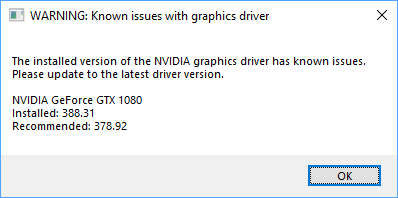
lol.... update to the latest older version please.... https://i.imgur.com/MpHSV61.png
 ashen brook
oh I can confirm that though
drivers later than 385.69 cause really annoying editor performance hitches
manic pawn
thought those hitches were related to aftermath and fixed in 4.20?
ashen brook
we downgraded across the board at work because of it
grim ore
WoW wants me to have newer drivers or it bitches and now UE4 wants me to update to older drivers or it's going to complain. wheeee
On the plus side now I have the full release notes and can do videos 😃
delicate needle
When I do an "get all actors of class" and send that data to an array, is there anyway to have those actors say "hey, I want to be in array slot 2"
grim ore
I am sure there are easier ways but you could set a variable on each one for its "slot #" and after you get them all you make a new array called like organized array and then loop thru your first one, get the slot # from the one you are looking at in the loop, and set that one to that slot in the new array. This is super silly but again it would work lol.
having each item register itself somewhere would be smarter, or having a premade list already done would be smarterer probably
your biggest issue is widgets don't exist at editor time so you cant set variables in it that are in the scene. You would have to use an intermediary like another actor that just sits there holding the data for you
delicate needle
Maybe an actor that keeps track of all my pawn destinations... you know.. its not a big issue, I will just update the array location numbers once I make all my actor_pawns.
grim ore
yep pretty much that, I just tested and it works fine.
instead of getting all actors of class for your camera thingies you would just get that "I keep track of shit" actor instead and get a variable from it that actually holds the things you want in the order you want
and then you just set the variable in that i keep track of stuff actor in the order you want and you win
delicate needle
That does sound like a cool solution.
grim ore
There's not much way around it unfortunately due to the fact that UI does not exist at design time. This is one place where Unity has an advantage but it's super annoying as it's also on your screen all the time when working in the editor lol
plush yew
I hate to say this again but can anyone help in the physics channel?
plush yew
I accidentally tried creating a new C++ class while my game was running in editor.
Now I cannot create any C++ classes or generate the Visual Studio project.
ERROR: c:\Users\Riolu\Documents\Unreal Projects\ProjectOglowia\Intermediate\Source\ProjectOglowia.Target.cs(6,14) : error CS0101: The namespace '<global namespace>' already contains a definition for 'ProjectOglowiaTarget'
ERROR: UnrealBuildTool Exception: Unable to compile source files.
Is it safe to delete the Intermediate folder and try again?
 glossy flame
Yes, those are just generated files.
plush yew
Should I tell my problem here?
elfin jacinth
Just a heads up, your report about the driver issue has spurred people into action, and we'll be making an update to it. I am not sure when that would go out, however.
plush yew
I'd like to create a custom Slate widget that's usable within UMG, that acts as a terminal emulator.
Who?
Where would be a good spot to go to get someone to walk me through setting up this kind of Slate widget? I'm completely new to C++. I've been using Blueprint all along so far.
Who is Tim talking to?
delicate needle
@plush yew , likely it was @grim ore .
plush yew
Ah got it
@grim ore
But really can anyone please help me? Ive been trying to fix my problem for 3 days.
delicate needle
I cant, I'm a newbie. I think you should type out your whole issue here, and check back often.
plush yew
Ah alrighty
Well...Im trying to make controls for my vehicle. The thing is its either not moving, leaning forward or backwards, or the wheels rotating 360. I mean ive used unity and coded my kart to move and it wasnt too hard. But it only goes forward. Anyway is it really that hard to make vehicle movement?...The tutorials I followed made it look easy but I tried all but all failed...
grim ore
Have you tried starting with the vehicle template?
plush yew
No? Was I suppose to?
grim ore
this is also a neato video on how to use line traces and physics to control a vehicle http://blog.spaceduststudios.com/space-dust-racing-unreal-engine-4-arcade-vehicle-physics-tour/

Space Dust Studios
A rundown of the general principles used for arcade-style vehicle physics using Unreal Engine 4 for the upcoming party combat racer Space Dust Racing.
no you can use whatever you want but the vehicle template would get you started with a working vehicle out of the box as a start
plush yew
Ah alrighty. Im gonna check the link you sent
 celest merlin
is 4.20 stable then?
grim ore
as stable as any other .0 release so between 50 and 100% give or take 100%
I will say with the last preview I never really had any hard crashes so that was a plus
plush yew
sigh The link doesnt help me. Like seriously is it really that hard to make car movements?
soft pawn
Hello! I want to make my character go walk around, and when an AI spots him, I want there to be a noise. How do I do that?
grim ore
import the vehicle template and see how Epic has created vehicles
delicate needle
There is a tutorial included with the vehicle template, find it in the content browser once you start the project, at the root I think,
plush yew
Is this it? http://prntscr.com/k83chx
 delicate needle
Yeah, its not in-debth
cerulean nova
The "grid" in editor on wich Objects can be "locked" onto is it possible to build a building system based on the grid?
so that objects go along the grid ingame
plush yew
I know what to do. But its just every time I play the kart doesnt move or leans back. Ugh its so frustrating...
http://prntscr.com/k83gd7 Ugh...Is this even possible to do? Like really? It really makes me mad.

 flat trail
why does my 4.20 preview 5 still show after updating it to 4.20?
grim ore
yay the new samples and the action rpg example is up
flat trail
is it supposed to? xD
grim ore
restart the editor and see if it fixes it, it should not.
flat trail
haha small fix thanks @grim ore got stressed out xD
plush yew
Have you guys made a vehicle and have seen this error im having?
grim ore
well shoot we might actually have a real example for people to learn from for gameplay abilities now, yay!
 dim arch
anyone know how to set a vector variable from the console
grim ore
wtf... the docs pages.... https://docs.unrealengine.com/en-us/Resources/Showcases/DigitalHumans , it has a nav bar on the left for the main docs nav. Then once you are on the page the right has a nav bar for what is on that page and it scrolls/jumps to sections and then of course on the far right is the actual page navigation bar for the entire page. How many nav and scroll bars do we need lol
maiden swift
I feel like they've never quite hit a home run with the apps they use for docs.
 maiden swift
The new docs always take a long time to load for me; sometimes the page just never loads.
frank escarp
ActionRPG sample WHen
maiden swift
@frank escarp It's in the Learn tab of the launcher.
maiden swift
Yep! Under the Games category.
maiden swift
I think the doc most people will care about is this: https://docs.unrealengine.com/en-US/Resources/SampleGames/ARPG/GameplayAbilitiesinActionRPG
grim ore
4 new examples on the learn page as well. updated digital human, 2 AR, and one using video cameras
maiden swift
Yeah. This is a very big release.
@grim ore What did you mean when you said "far right"? I only see the left sidebar nav and the "On This Page" nav on the right.
And the breadcrumbs up top, of course.
grim ore
well the on this page has a nav bar
scroll bar...
and then the actual scroll bar for the page itself
maiden swift
Ohhh, the extra scroll bar. Yeah.
grim ore
so 2 scrolls bars on the right for me which is super annoying lol
maiden swift
Because it's so dang long.
grim ore
its better than before but man the poor docs team has so much work to do
maiden swift
That scroll bar is there because the On This Page nav has a max container height and that page has a lot of sections.
grim ore
yep yep, just a nitpick
maiden swift
I feel ya.
grim ore
and yeah the entire page is slower than a 14.4 modem
grim ore
oof now it just plain crashed. ah well I guess I will read that later
plush yew
4.20 4.20 4.20
grim ore
Epic login, fortnite, docs pages, launcher. Epic needs to pick up another hamster or 2 for the server when they are out.
dim arch
idk why they keep releasing a new plug, the functionality is the same for most of it
grim ore
It might not even be a new plugin, just compiled against the new engine version
dim arch
yah there should be a way to bruteforce the 4.19 plug
maiden swift
Yeah. That's going to be the case for any plugin.
dim arch
the only difference in the plugin code is prob the engine version
grim ore
oof I wonder how many people are gonna get bit with needing 2017 VS when upgrading to 4.20
 brisk obsidian
@dim arch To brute force the compatibility check you can open the ".modules" file in the plugin's binaries folder and replace the BuildId with the BuildId from a plugin that you know works in that engine version.
Just be warned it may have some strange issues if something has changed in the code the plugin use. Changing the Id is basically telling the engine "Shut up, I know what I'm doing"
dim arch
I downloaded a debloated version and disabled a bunch of service updates/registry keys
grim ore
I didnt have the C++ compiler installed for my one at home since I only do C# work in it so updating now.
dim arch
it somehow still found a way to download some patcher through my firewall into /program files(x86)
fml
because even with netlimiter, if you block svchost it can tunnel updates
through the one service required for internet access
or rather you need to keep that version of svchost open to use the internet
OK @brisk obsidian thanks, I'll give it a shot!
brisk obsidian
Let me know how it goes! I have no idea what hooks they use in the engine which might have changed.
And if anyone asks, I definitely didn't suggest this 😛
 whole sonnet
#420 Unreal it
dim arch
hehee
just tried it, no dice, cant find entrypoint
oh well
gg
I guess it has the engine version encoded into some of the dlls or smth
 frosty bloom
@dim arch I do not know if it would fix your issue but if you can locate the UPLUGIN File changing "EngineVersion": "4.20.0" might do the trick
plush yew
cant wait to use the new lighting tbh
 steady owl
3 Textures with packed RGB channels or 2 Textures with packed RGBA, which would you recommend? I see both being used by Epic
plush yew
How does one get the size of a character or string when rendered in a specified font? I am not dealing with a HUD here, I'd just like to grab the width and height of a character and set a UMG widget's size to (80 * charWidth, 20 * charHeight).
dim arch
hmm dont think so @frosty bloom
there is a version name but I tried changing it, didnt launch
thanks though
it updates the plugin version in the engine but pretty sure it has a version check which is compiled into the code
well, no worries I am sure they will release the new plugin soon
seems like I cant convert/export a substancetexture2d file into a texture though
frosty bloom
You changed the version name, not the engine version 😄
cerulean nova
On uneven terrain i want foundations that are build by players to be always the same height so that when someone else starts to build on a diffrent height the either get lifted lowered by placement so all foundations can be connected to other buildings on diffrent heights what am i searching for?
same for x & y
so that the build stuff acts like its being placed in a 3 Dimensional Grid
but its only possible to place by collision of other objects that are either build from players or the level itself
maybe pre placing them instanced and make them visible on "building"?
flat trail
issue here
how do i activate the hierarchical lod system for sub levels?
is it possible to do from persistent level?
opaque salmon
if I have an issue where my ui works great in the editor but is completely broken in a packaged build (things like hud text which are bound to functions don't show and submenus in a widget switcher don't populate), is this a packaging issue or possibly something to do with clipping?
plush yew
what was that blender ue4 fbx scale trick again? Unit Scale: 0.01, Export Scale: 100 or something?
or was it the other way around?
dim arch
No dice @frosty bloom thx anyway
plush yew
Alright so the thing was that the physics assets would get wrong scaling, thus couldnt be scaled down, so what you would do is set the Unit Scale to 0.01 and then scale the model at 100 and apply
cerulean nova
@grim ore Thanks for all your Videos and the work u put into them 😃 👍
 gentle crypt
Awesome to see UE4.20 released. Just one thing, what are curve atlases? is it a shortcut for making gradients in UE4 rather than in photoshop?
steady owl
Can someone explain why you have to be in 8 bit mode in Photoshop when making 16 or 24 bit targa textures? I can't wrap my head around it
 spare kestrel
Anyone else presently seeing a blank Community view in the Epic Games Launcher when they load it up? I was seeing stuff earlier and was wondering if I messed up something or just caught it in the midst of an update. My community view is totally blank and the other sections (Learn, Marketplace, Library) are fine
 honest rune
did something change in 4.20 about the GENERATED_BODY() macros etc and their implied accessibility level?
noticed in 4.20
Severity    Code    Description    Project    File    Line    Suppression State
Error (active)    E0265    member "USpringArmComponent::SocketName" (declared at line 154 of "c:\Program Files\Epic Games\UE_4.20\Engine\Source\Runtime\Engine\Classes\GameFramework\SpringArmComponent.h") is inaccessible
project compiles but odd that now its stating this for the SocketName static variable for springarm component
grim ore
@gentle crypt a curve atlas is an atlas of curves.. I know stupid name but it's what it is. A curve is basically what you are saying is a gradient yeah. Basically the curve atlas lets you define multiple curves(gradients) in one asset and you can then pick and choose which one you want out of it rather than having to reference multiple curves
 livid haven
@honest rune I would never depend on their implied accessibility level.
Always specify the accessibility level you actually want afterwards.
The engine would break in a million ways if it changed though.
But, I still wouldn't rely on the unintuitiveness of the implied default behavior.
honest rune
This is an engine class. The static socket name from SpringArmComponent used for setting up attachments
I think this is just intellisense though
honest rune
There s abunch of other intellisense stuff throwing too. I can ignore it I suppose 😦
livid haven
You new to programming in UE4? I know I've seen your name here for a long while.
One of the first things to do is turn off intellisense errors, or even intellisense entirely and replace it with Visual Assist X for ~100 USD.
honest rune
lol 😉
actually my intellisense has been bang on until this update
on my old pc it was crap but since I built my beast pc its been solid
plush yew
i had intellisense errors fairly frequently
but imade sure to include what i use in headers and it stopped
still just getting into CPP though, exciting new language
visual assist takes a long time to parse.. so i don't really use it.
i have it currently disabled, but if i need it i can enable it again
manic pawn
what? va just took 1 minute to parse my 4.20 source build and now it's lightning fast
honest rune
I usually ignore the intellisense errors anyway. Just happened to notice that accessibility one and thought well thats new lol
plush yew
why are you even getting errors? are you including your header files?
honest rune
they aren't real errors
right now my intellisense is showing 1066 errors, almost all are "cannot open source file xxx.generated.h" for completely unrelated files within the engine
just some sort of parsing error
plush yew
i have zero red lines in my code.. so yeah. look at IWYU Reference Guide in the unreal docs page. for example if you are using GetWorld() and you get an intellisense error, you google GetWorld and find that it's GameFramework/Actor.h. so then all you gotta do is just include that file in the top of your code.
honest rune
only thing that changed is new project in 4.20
with a single class in it to boot
its definitely engine related
plush yew
4.20 R just came out lol get that version! it's out 6 hrs ago
honest rune
thats the one
plush yew
going to DL it now. sweet
upper heart
4.19 -> 4.20 upgrade was a breeze so far 😃 Navigation was moved to a separate module so a little refactoring there. And some low level networking changes (FUniqueNetIdRepl). Now for the fun part, all of the hidden bugs that take a while to find 🤞
plush yew
i was testing 4.20P5 and had a few issues with code plugins but that was it. seems like a good release they tested it a lot
really excited about niagara
so cool
upper heart
Right, I mean hidden bugs in my project caused by upgrading mainly.
4.20 seems like a solid release so far 😎 💪
plush yew
i dont really understand the replication driver stuff but oh well lol
upper heart
They are doing a stream on it tomorrow
Unreal Engine Forums
ReplicationGraph_TW.jpg
WHAT
Working on a multiplayer game? Are there many players in-game together? On this livestream, our networking team will demonstrate
honest rune
they changed a lot about the build tool chain. everything is now vs 2017 default and win10 sdk so these intellisense issues are probably something to do with that
upper heart
I'm excited for the stream ❤
honest rune
@upper heart nice! that'll be a good one. Was getting tired of Animation Curves: part eleventy billion
manic pawn
I wonder why it's not using the newest installed windows 10 sdk but a seemingly random one 🤔
honest rune
was like "yes, thats nice what you did in paragon, now move along please"
 wild glacier




 grim ore
The ShooterGame example was updated with some replication graph stuff btw so if you want a jumpstart on it check it out
 turbid plover
niagara looks like its still in beta, even if its released to us. does that mean we cant package with it?
also @grim ore thank you very much for your tldr video. it was great 😃
love your content
they were a great goto resource when i was getting started and still reference a lot of the material ones
plush yew
Is it possible to get an event when a UMG widget's actual size on screen changes?
Trying to create a Terminal window entirely in BP, which is just an Image bound to a Canvas Render Target.
manic pawn
if you're only going to have one, it wouldn't hurt to just check on tick
plush yew
I need to recreate the Render Target when the Image's parent size changes
manic pawn
I searched a lot for some kind of resize event and didn't find anything
plush yew
I imagine this'd be easier if I could just paint arbitrary stuff right onto a UMG widget
is there a way to do that?
In Windows Forms I could just call CreateGraphics() on any control and use the returned Graphics object to paint whatever I want onto the control, but...that's Windows Forms - not Unreal.
grim ore
@turbid plover awesome, glad it was useful
niagara is in "early release" so yeah it's beta in that it's going to change some more and some bugs are going to be there. You can package with it tho
plush yew
I think I'm gonna give up on this project. I still can't make a single kart for my project. It's unbelievable it's this hard to make a kart...
grim ore
If you haven't had a ton of experience using the engine then anything might be hard 🤷
there are a couple car/racing/kart games out there using UE4 so it is possible at the least
plush yew
@plush yew Don't give up. Keep playing with the engine and eventually you will figure everything out.
...this coming from the guy that, minus back in 2015, has only been using the engine for 4 days lol
Well okay...I'm just confused why it's so hard to make a simple kart. Heck in the unreal engine tutorials it looks very easy. Idk...I'm just confused.
 proper quiver
4.20 looks so sick