#ue4-general
1 messages · Page 271 of 1
 leaden onyx
same, yeah, it runs on gpu but compiles on cpu
 vale osprey
I know that it uses CPU but you need to install compiler which might object
leaden onyx
in case of something like opengl it compiles it on cpu in driver's code
vale osprey
ahh wait UE4 might be using it's own anyway
 silver crown
If you want I can send you a 4.19 zip
leaden onyx
Ill just move it through rdp, thanks though!
guess it should work since I believe it is not changing anything in registry
leaden onyx
probably true, don't see a network disc, but its no hurry anyway
thanks @silver crown
 whole quarry
tho you get a error message when you install ue4 from the launcher that a GPU was not found?
silver crown
Yes, as the launcher is basically a game
And this is a RDP session, so no GPU at all
Only CPU
leaden onyx
yeah error message when you try to start launcher
I thought there might be command line arguments
but does not look like it
whole quarry
its for this kind of stuff? https://docs.unrealengine.com/en-us/Engine/Rendering/LightingAndShadows/Lightmass/Unreal-Swarm-Overview
leaden onyx
no, I'm intending to setup CI
silver crown
I'll probably do that too at some point
leaden onyx
meaning version control will trigger builds
silver crown
Let me know how it goes 😃
leaden onyx
I've done it in the past, when gpu was not required
didn't expect it to change
but now launcher became like Steam client
of sorts
 limber cliff
Hello there ! I'm quite lost here, is this the right channel if I want to ask for help on UE4?
I think I'll ask in #blueprint 😄
 grim ore
well you can ask in any of the channels 😃 who knows what might happen
limber cliff
Hahaha
 oblique sorrel
Niagara early access is officially done for 4.20!
 manic pawn
is it necessary to spam the output log with LogSlate: FSceneViewport::OnFocusLost() reason 2 ?
 spare steeple
i cant get my project to start with forward shading enabled
any reason for this? happens even with all other rendering settings at default
 jaunty herald
Hi friend. I developed Android game but I don't to how to promote it
Here is someone to help me
 upper heart
Does anyone know why custom depth mesh's get occluded when attached to a character that isn't moving/rotating in 4.19? I can't seem to narrow down the code change that caused this.
spare steeple
i got forward rendering to work, but now it looks light lighting channels are being ignored
only found one relevant result on google and apparently theyre supposed to work
 idle stump
Does anyone happen to know if there's any terms against using fonts from Google Fonts in a game?
 digital anchor
click on the font, the license is in the bottom right
Most are Apache 2, you can check what you can do on this site
@idle stump
idle stump
Thanks
 candid cypress
somehow I enabled this, what's the shortcut or where do I disable it?
digital anchor
\
 nocturne cove
Can anybody tell me why my skysphere is doing this?
 verbal thorn
I have no idea where to put this but why has my "TutorialStuff folder gone like that, and how do i change it back?
@ me if u know what to do plaz
@anyone?
 worn granite
@someone
verbal thorn
well, a restart seemed to fix it
 toxic wagon
I'm so happy UE4 has power 2 grid
it's such a nice grid to work with since everything subdivides nicely
and it's friendly coming from quake
nocturne cove
I really need help with my skysphere. Most of it disappears when I click play and half of it loads after a few seconds. It works in other projects...
toxic wagon
try deleting and respawning the object?
 plush yew
guys.. all of a sudden i cant run my unreal project anymore..
i deleted all the unnecsssary folders.. try rebuidling it.. restarted com
nothing is working
used old zipped projects and its still showing this
does anyone have any clues
 grim sinew
Have you tried doing what the error message said to do and build it in visual studio?
plush yew
yea i get over 800 errors when i try to compile it in visual studio
grim sinew
Don't you think you should look at what those errors are?
800 errors is no small number.
plush yew
the thing is i didnt change the source
i literally just redownloaded a zipped project which was working yesterday and i tried running it today and it wont work
grim sinew
Well that's nice, but it ultimately doesn't matter when you have 800 errors. You need to look at those errors and figure out from there what the cause is.
Something probably changed either in the engine source or in your project that caused a large, sweeping problem.
If, as you claim, you cleaned out all the intermediate files and such that could have glitched out.
That narrows it down to a pretty small list of things that could be wrong.
It might be the wrong engine version, maybe the engine was modified in some way, etc.
plush yew
ok thanks for your help.. i have no idea how to even beginlooking because the errors are all in the engine code.. my old projects work fine but i simply can't rebuild them anymore.. i guess i have to try reinstalling the engine etc
grim sinew
If you deleted Binaries, DerivedDataCache and Intermediate then it's probably not something simple you can fix up instantly. Those are the usual culprits that everyone always cleans out first.
plush yew
yes i deleted all those folders.. tried rebuilding from source and tried running it from unreal
same problem each time
plush yew
@plush yew gotta go thru all the errors and step thru them one by one
might be a good idea to get a new engine version and try recompiling it
if the errors are in that code
i also recommend using source control to make sure this kinda stuff doesn't hapen again
sometimes a corrupt file can cause problems in your game
 eternal talon
hello how are friends time I do not connect they do
plush yew
@eternal talon your friend wants to connect to your game?
you need to create a session for your game and set up your listen server that way, and make sure to use join session, or, you'll need to create a dedicated server and have people connect using exec console command open x.x.x.x
eternal talon
@plush yew I do not understand
plush yew
you only have two options here, listen and dedicated server if you want to host your games
eternal talon
AM ok good friend I just play a little Fortnite game drakensang rakion and League of leguend
plush yew
oh you're stating something, my bad i thought you were asking about multiplayer
have you started making a game yet? try it . it is fun
 stuck spade
anyone have experience in sequencer?
I have a camera with a custom lens but it seems to be ignoring the settings when rendering
 silk sleet
if I'm drying to make like 1-20 actors at once for a death inventory drop, is there a way to make it fast?
like an actor pool or something
right now it lags trying to make more than 2 or 3 in a frame
 quaint hare
Hey guys, I have a bit of an issue... I am trying to make a weapon firing system that can endlessly be expanded without any further modification to the script. To continue I need to somehow store the sphere collider component on my "shotgun" that serves as a projectile origin inside my data table. However, I have no clue how to put these things in the data table.. Anyone have an idea?
I have tried messing with object/class references of sphere colliders and actor components under the structure for my weapon template.
However, I cant find the sphere collider when I try to filter for it after making these changes.
plush yew
Hey thanks @plush yew and @grim sinew for helping.. I solved the problem. For anyone who might have trouble building make sure the folder your project is in does not start with a number. Unreal creates macros with your folder name and if it starts with a nunber the generated macro will cause a compilation error
idle stump
@silk sleet Is this in BP? Can you post a screenshot of the part where you're spawning them?
stuck spade
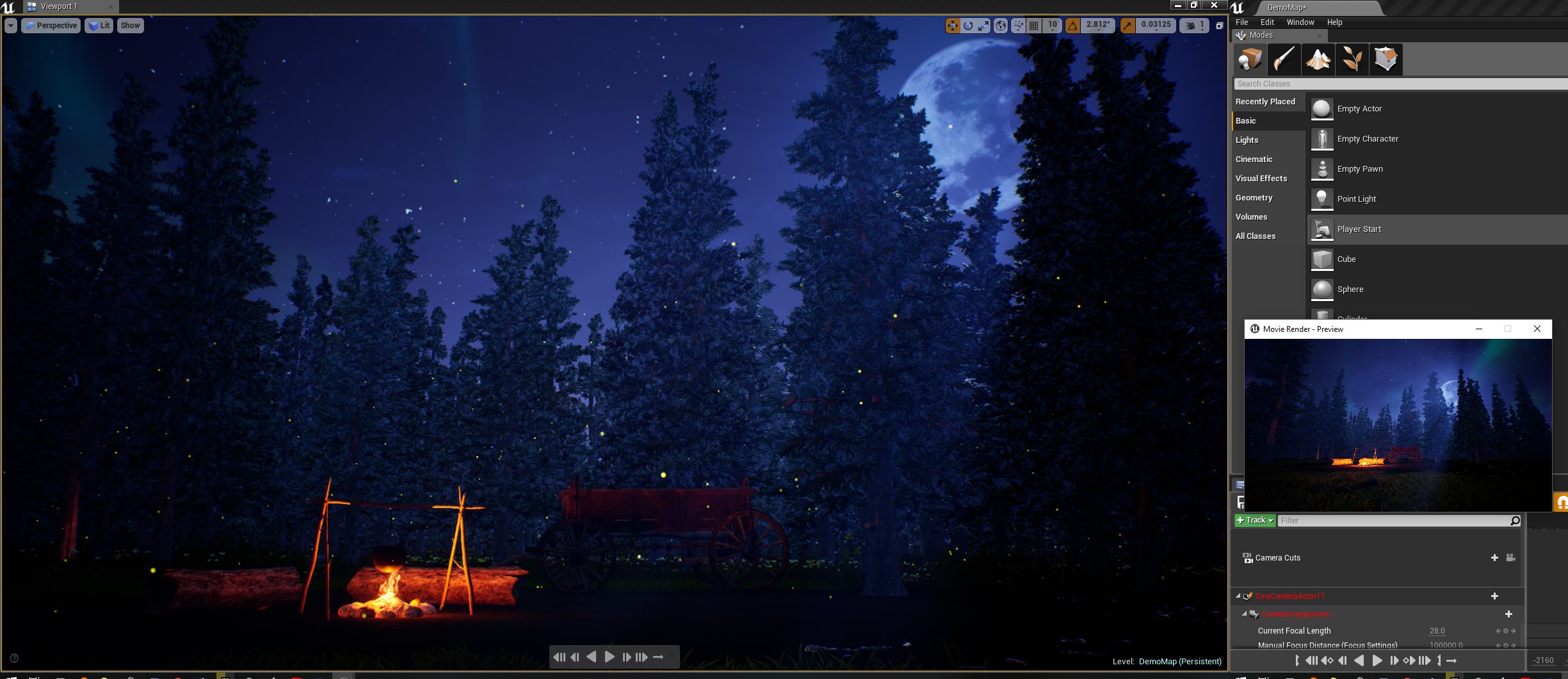
image of my problem
left has preview of camera in viewport
right is render, and you can see its a lot more zoomed out
 cerulean nova
its called Field of View (FoV)
Why is the 2,3,4,5... players view always so twitchy/laggy ?
stuck spade
In this case though the FoV is changing because of the lens' focal length
and the camera cuts shows the correct shot
but when rendered it's completely different
cerulean nova
check render settings wich might override it?
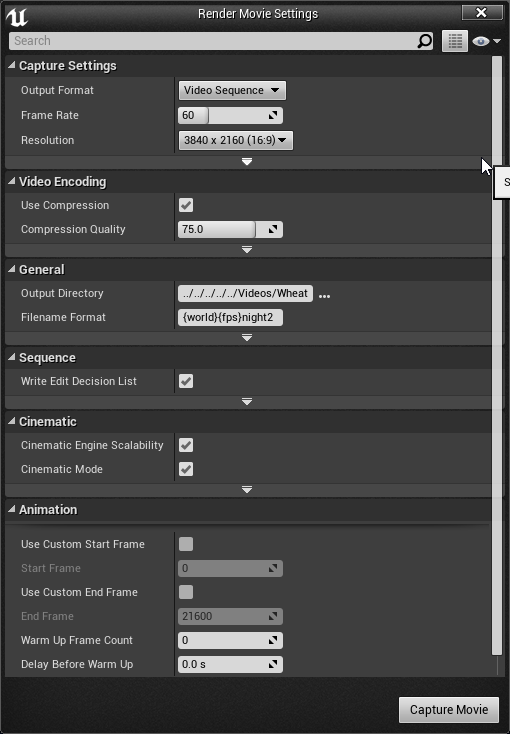
 noble minnow
Hello guys I need you're help, do you know how to fix "invalid lightmap settings"?
grim sinew
Make lightmaps.
noble minnow
How can I do that, I'm sorry I'm really new on this
quaint hare
Is anyone here familiar with Data Tables?
I am trying to store a component of an actor inside a Data Table, and I am having a bit of trouble.
grim sinew
 hoary charm
If we use Movable lights in a scene, can we avoid lightmaps/baking entirely?
grim ore
IF you are trying to store data in a data table at run time you will find you cannot. Data tables are editor only for construction and read only at runtime
yes if you use movable lights you will not have to bake. The downside is you will have potentially less performance than if you used one of the baked lighting methods.
hoary charm
@grim ore Thanks! If I already have a scene baked and want to change to movable, do I need to clear anything or something? Or will changing it be all that is required?
grim ore
if you change to movable you don't have to do anything but your old lightmap will still be there. You can find it under the world settings tab in the lighting/lightmap section and remove it/tell it to not use one
There is a button in the 'World Settings' tab called "Force No Precomputted Lighting." This deactivates Lightmass' ability to produce light and shadowmaps, forcing the level to only use dynamic lighting.
if you do that then build lighting again it will delete the lightmap and save space
hoary charm
Awesome thanks so much. testing this out now.
plush yew
Im having a major issue rn with ue4
all my transparent materials are black
i have no clue why
I just started the engine and then they all turned black, and its been like this for a couple days
 wispy plume
hello, can anyone help me with something. Im desperate, i tried posting on the official forums and havent gotten an answer. I created a big landscape and i want it to have multiple textures on the landscape, so it transitions from snowy, to rocky, to sand, to grass, etc... so far i can only make the landscape have a single material blend
plush yew

In this two part Tutorial Series we are going to create a Landscape Material that features advanced heightmap blends, tessellation and procedural puddles. Th...
it literally took me 2 seconds to find this @wispy plume
wispy plume
i have that tutorial open, i mean its probably me just being dumb
plush yew
oh my god...
plush yew

Unreal Engine 4 Beginner Tutorial Series - #17 Terrain Materials This is episode 17 of my unreal engine 4 beginner tutorial series, in today's episode create...
heres a better tutorial
gets straight to the point
wispy plume
what i have working right now is a material function that gets me 3 different materials based on height on a landscapelayerblend
but when i try to have similar heights terrain with different materials i have no idea how to get that done
like if i want some snowy part be the same height as a dune sandy terrain
 proven aurora
I’m packaging my game right now. It has one level with maybe 20-30 different materials in it in total. After ~5 minutes of packaging a tab pops up saying “Compiling shaders” and the numbers for that go up until it reaches around 8500. Then the whole thing freezes (I can’t tell if it’s still going or not but it starts slowing down or freezing my entire PC). Any ideas?
UE4.19, only plugin installed is CodeSpartan’s voxel plugin.
 tight sun
Umm.. I seem to have somehow inverted myself in the viewport... X is pointing down on meshes... and my left right movement is inverted... how the heck did I do this???
I had such a good day too, was just about to make a sweet sequencer with my new models and... now I'm upside down feelsbadman
Only seems to be in certain level.. anyone have any idea how I fix this? All movment flying around in viewport is inverted and the world is upside down
 warm mountain
hmm when people say hard edges, do they mean the abscence of edge loops to smooth the edges or do they mean the abscence of a baked normal map to give the impression of a smoothed edge?
 teal tulip
@stuck spade what about the camera that renders it on the scene ? the cameras have individual FOV from editor one
 void kraken
@here
Does anyone have any clue how this type of health bar is created.
Like whenever he loses HP there is different red bar after health drops that follows as trail
https://www.youtube.com/watch?v=jx4UK10j2eQ&t=148s
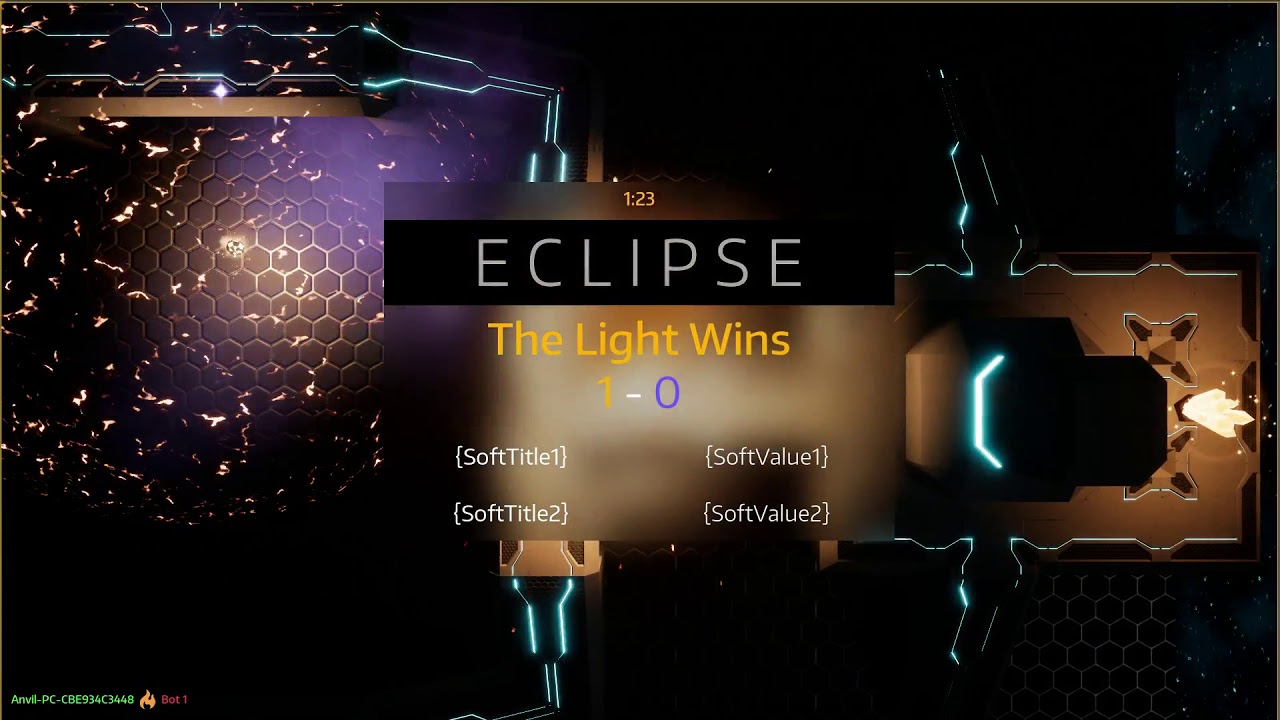
Testing out new abilities and old... Ability System was completely rewritten last month to be more flexible. It's paid off!
 latent warren
I would take a guess there's a timer involved, possibly a lerp to black every so many steps? looks like a neat game
void kraken
ok and how do you get that red trail @latent warren
latent warren
I don't know enough about Unreal to give you a good answer for that. I've done it in another language before using that basic idea
I started a timer that would go when damage was taken with a stop point of current health
and every so many steps (frames) have a row of pixels change to black until current health was hit
i.e. if you're using a float for your health, 0.01 would be eliminated every x frames
void kraken
ahhhh ok
 storm venture
Quick question, assuming you wanted to store items in an inventory that could be customized, what would you store them as?
latent warren
eh I can give you a C# answer. collection
not sure if that carries to this environment
storm venture
Lmao, I'm limited to blueprints I'm afraid
latent warren
they may have them... looks
storm venture
they have Structs, which is pretty handy
but Structs sometimes for no reason decid to say fuck you
sooooo ¯_(ツ)_/¯
latent warren
suppose you could use an array, depending on how those work in here
if they 'grow' with additions, that'd probably cut it
storm venture
Possibly, I might give those an attempt
latent warren
I'm sure UE has some sort of collection googles
yeah cool
check that ^
that'd be what you'd want to use
benefit to using those over arrays are numerous
storm venture
This looks like just an organization technique for folders, lol 😉
latent warren
oh shit. it is lol nevermind then!
storm venture
Not quite the same collection we were thinking of, lmao
Well, I've used collections with some java stuff before, I'm just assuming that's what you've been talking about,
I'm sure i'll find a ue4 equivalent somewhere 😛
latent warren
try poking around with that, that's in BP
it MAY do what you need
(and yeah, java collections are similar to C#)
 pine warren
hello i am making a game ready model i am stuck at hair any goo method to make texture for hair cards with zbrush i am not getting exct result plz mention my name in help so i can find it easily thankyou
 crisp fable
i have a unity->unreal question
in unity you can turn off physics automatic simulation and you therefore call Physics.Simulate manually
is there such a thing in UE4?
 cloud cobalt
Don't believe so, no
cloud cobalt
That's not what he's asking
whole quarry
SetSimulatePhysics, well, you CAN set it manually, or by default in the BP actor
cloud cobalt
Looks like he want to simulate frame by frame
For example for rollback/replay in MP
whole quarry
Set Simulate Physics
cloud cobalt
Still not what I believe he's asking for :/
whole quarry
He's asking if there is such a thing as manually calling Physics simulation. I don't know how you come up with simulation frame by frame for a reply thing
only one who can awnser that is @crisp fable
cloud cobalt
"call Physics.Simulate manually"
whole quarry
Yes, which does the SetSimulatePhysics?
crisp fable
yes its for multiplayer purposes
crisp fable
im trying to replicate this: http://www.codersblock.org/blog/client-side-prediction-in-unity-2018

Coder's Block
TL;DR I made a demo showing how to do client-side prediction with physics-based player movement in Unity - GitHub . Introduction Back in early 2012 I wrote a blog post about kind-of-but-not-really implementing client-side prediction of physics-based player movement ...
cloud cobalt
@crisp fable UE4 can't do this at all unfortunately
whole quarry
it sets to simulate physics, how is that different?
crisp fable
damn
whole quarry
simulate physics, physics simlate? Only the order is different? 
cloud cobalt
@whole quarry We're talking about manually simulating physics for a frame
Or for 100 frames
crisp fable
yeah with a given deltatime
because its multiplayer you're not getting a regular tick
cloud cobalt
UE4 can't do this, and generally speaking, can't really handle MP physics
the physics engine isn't deterministic
crisp fable
unity is based on physx too though
whole quarry
wow, no need to go all bold for that
crisp fable
WHATS WRONG WITH BOLD
cloud cobalt
Well I've explained three times already, at some point you need to stop saying "it's the same" - it's not
@crisp fable Dunno how Unity handles it internally
crisp fable
yeah you can enabled physics again but it's just going to tick at a regular rate, it wont play catchup
ok
thanks for the info
cloud cobalt
I've looked into it for UE4, others have - AFAIK, you only can do your own physics here
I'd love to be proven wrong 😉
whole quarry
I'm just awnsering a question as it asked. It said nothing about frame by frame nor anything about multiplayer. As this is a UE4 place, knowledge about Unity cannot be assumed. No need to be such a bitch about it...
cloud cobalt
Googling the method took me 3s - never used Unity in my life
whole quarry
And I've simply googled "UE4 Simulate Physics" ¯_(ツ)_/¯
teal tulip
@cloud cobalt @crisp fable is this related ? https://github.com/TheJamsh/UE4-Networked-PhysX-Component

GitHub
UE4-Networked-PhysX-Component - A solution for PhysX Pawns with Prediction and Reconciliation in Unreal Engine 4.
🤔
there was other repo no idea where
cloud cobalt
It is
Dunno how well-behaving this was in the end
I think it's barely proof-of-concept level
vale osprey
@crisp fable there was extensive discussion on forum
technically you can, in c++
but calling manually "simulate" is the least of the troubles
stuck spade
@teal tulip I got it working but I ended up not being able to use custom lenses. For some reason unreal just ignored those settings
plush yew
anyone interested to join a new Indie Team, please PM me. We're starting fresh and going to learn and share together on Unique projects.
we still have 2 weeks to form a team before pitching some IDEAS. All the people will be welcomed to share their opinions and explore new opportunities..
cloud cobalt
plush yew
I'd post there soon, with proper details
discussing with current team members
hesitant a bit since people mostly avoid Royalty projects. It's more of an Open Ended Team
For Artists and Designers, By Artists and Designers
cloud cobalt
Yeah people avoid that for a reason
cloud cobalt
Sure
You can also use high level timer stuff
But it's basically the same, and the performance hit for what you're doing is 0
 remote roost
alright, thanks
hoary charm
Does anyone know how to stop this from happening? I made a post process volume and turned Min/Max brightness to 1 on the Exposure as suggested before but it hasn't stopped. https://i.gyazo.com/399452af9689072364283766eeb8ac13.gif
 whole quarry
try disabling Auto Exposure in the Project Settings
cloud cobalt
Isn't that only the default setting for new levels ?
hoary charm
@whole quarry Done, now my scene is barely visible. So I have to reset exposure manually with a post volume or is that not working as intended?
whole quarry
try to reset it to the default .3 and 2 (iirc)
 whole quarry
how high is the intensity of the light sources?
hoary charm
10 being the highest
whole quarry
try to reset them to the defaults as well
hoary charm
ok I turned them up, rebaking, let's see if this is all it was
 sudden agate
a good example why I hate Auto Exposure :D
hoary charm
Odd, it's as if the light doesn't travel Remco
 delicate needle
Unreal 101 question - I'm messing with the rolling ball example, and it seems that the engine will default viewport ownership to the "PhysicsBallBP" Pawn Actor, via its camera component. I stripped away all the gamemode overrides, and it still does this. Am I missing something, is this normal?
grim ore
the game mode determines the default pawn spawned in a level using the player starts
if there is no player start, or if you have something else in the level that is set to auto possess (your problem), then that will take precedence
check the ball that is in the level by default in that template and see if it is set to auto possess to player 0
I haven't touched that template in a few months but this is the way most of the other ones are set up so it would make sense it is the same way
delicate needle
Auto Possess Player 0
There we go! Thanks, I missed that when looking around, go figure!
warm mountain
question guys say i have 2 modular pieces and i want to combine them in UE
is there a way to group them and duplicate them?
Or would i have to combine them with the use of a BP?
hoary charm
@warm mountain You can select both in the Outliner, and press CTRL + G to group them or right click > group
warm mountain
@hoary charm gotcha and thanks!
i suppose that would also be less expensive than creating a BP for an otherwise static mesh
hoary charm
Yeah I assume so, hope that helps! I am new to Unreal myself but I've used this briefly
sudden agate
has anyone profiled Niagara already? Can't imagine it being more perofrmant than cascade
 still island
Hi, I am pretty new to Unreal Engine. I've got a question. Why is alpha so heavy on performance? If I check the view under F5 to see the performance, everything I have is green, so it's good, but alphas are always red. Even with the meshes from unreal assets that come with the engine, their alpha is also red. With a lot of meshes having alphas fps goes down dramatically
 chrome ivy
Can anyone here test something for me?
like I need someone to test my game
it is something that doesnt work and I think it is because of my location...
chrome ivy
finding dedicated server
I mean It isnt on steam yet
I will send u a link to mega
but in DM
worn granite
uhk
chrome ivy
i sent it @worn granite
worn granite
k
plush yew
dang i am really getting a ton of login attempts, probably because of all the recent buzz. glad two factor authentication is an option for the launcher! haha
delicate needle
I have a pawn-character, and I'm activating its ability to "look around" by using right mouse button. I am using "Add Controller Yaw Input" as well as "Add Controller Pitch Input". So far it works, the Yaw is allowing me to look left and right, but for whatever reason I cannon get the Pitch to affect the up and down look.
Is Pitch treated differently, or maybe my whole approach is wrong?
delicate needle
I'll try and move this code to the player controller or pawn class, perhaps.
whole quarry
Yea level bp isnt meant for that
chrome ivy
I was wondering
Who is the admin of this server?
Because Moderator doesn't mean admin
grim ore
There is no admin, only Zuul
chrome ivy
how come?
plush yew
hey Mid, hope you were able to get your multi working 😃
chrome ivy
nope
lol
3 weeks mate
I tried everything @plush yew
I am starting to consider hiring someone...
plush yew
ah. you should really try falling back to ipnetdriver and just disable steam until you code it in later.
you can still have people download the game on steam and everything
and play it on there
plush yew
just set defaultengine.ini config lines to exclude steam stuff.
chrome ivy
open steam.XXXXX
XXXXX being the server unique id
and that works
I can join server
but i cannot find it
@plush yew I get these warnings in client log when trying to find server
[2018.07.03-18.45.17:926][229]LogNetVersion: StandYourGround 1.0.0.0, NetCL: 0, EngineNetVer: 2, GameNetVer: 0 (Checksum: 2374043608)
[2018.07.03-18.45.18:087][239]LogOnline: Warning: STEAM: Rules response NUMOPENPRIVCONN 0
[2018.07.03-18.45.18:088][239]LogOnline: Warning: STEAM: Rules response NUMOPENPUBCONN 100
[2018.07.03-18.45.18:088][239]LogOnline: Warning: STEAM: Rules response OWNINGID 90115716982511623
[2018.07.03-18.45.18:088][239]LogOnline: Warning: STEAM: Rules response OWNINGNAME SYG
[2018.07.03-18.45.18:088][239]LogOnline: Warning: STEAM: Rules response P2PADDR 90115716982511623
[2018.07.03-18.45.18:088][239]LogOnline: Warning: STEAM: Rules response P2PPORT 7777
[2018.07.03-18.45.18:089][239]LogOnline: Warning: STEAM: Rules response SESSIONFLAGS 683
[2018.07.03-18.45.18:089][239]LogOnline: Warning: STEAM: Rules response SYGServerName_s EU StandYourGround Game
[2018.07.03-18.45.18:089][239]LogOnline: Warning: STEAM: Rules refresh complete
[2018.07.03-18.45.18:089][239]LogOnline: Warning: Unknown or unsupported data type from Steam key data NUMOPENPRIVCONN 0
[2018.07.03-18.45.18:089][239]LogOnline: Warning: STEAM: Failed to parse setting from key NUMOPENPRIVCONN value 0
[2018.07.03-18.45.18:089][239]LogOnline: Warning: Unknown or unsupported data type from Steam key data NUMOPENPUBCONN 100
[2018.07.03-18.45.18:089][239]LogOnline: Warning: STEAM: Failed to parse setting from key NUMOPENPUBCONN value 100```for your ded server .exe, try to go into your project launcher and build it from there to lower ram util. once you're sure its working well, upload the whole thing to your t2 instance.
use exec console command: open x.x.x.x without the steam part to connect to your ded server, change defaultengine.ini lines :
[/Script/Engine.GameEngine]
+NetDriverDefinitions=(DefName="GameNetDriver",DriverClassName="OnlineSubsystemSteam.SteamNetDriver",DriverClassNameFallback="OnlineSubsystemUtils.IpNetDriver")

[OnlineSubsystem]
DefaultPlatformService=Steam

[OnlineSubsystemSteam]
bEnabled=true
SteamDevAppId=480

[/Script/OnlineSubsystemSteam.SteamNetDriver]
NetConnectionClassName="OnlineSubsystemSteam.SteamNetConnection"``` to
```[OnlineSubsystem]
DefaultPlatformService=Null```

only use steam for downloading and storing the game in the steampipe if your game is on steam. as a test bed, you can run a pure `ipnetdriver` dedicated server on t2. try that and if that works, gradually add steam code as necessary when you need to. keep in mind, *what is your goal?* do you really need steam to store your ded ip and search for it in your code? in my code, i just have the t2 ip stored away, and it's always the same. dedicated servers don't change ips unless you change it. so you can just automatically always know the ip that way. is it raw and a little watered down? yes. but it works and you can begin to test your multiplayer functionality. you can get a boost of confidence since you know your multi is working, and you can surely add in the steam functionality later once you know for sure your base dedicated code / all your RPCs if you use them are working properly without lag. sometimes you just need a refresher.and ill be in #multiplayer for more maybe a lil later. trying to do some singleplayer coding rn
does that make sense though?
just to get a testbed working?
chrome ivy
@plush yew My goal is to find the server and also to appear in Steam Master list
I will try tomorrow now it is late and I closed the PC
plush yew
yeah sebatnik's video talks about that. as you already looked at it. by the way i don't even use steam server lists, your best bet to get that working is decode. he told me he got his working earlier after i helped him with his t2 setup.
you just gotta try to fall back to ipnetdriver. no problem. ill be in #multiplayer later.
chrome ivy
also
Why wouldn’t it work for me?
I have a friend
that uses 4.18.3 source
he just followed sebatnik video
it works perfectly for him
?!
lol I mean why? is it just bad luck? something wrong with my IP?
@plush yew
 high stone
Anyone have insider knowledge on DDR5? If the specs advertised are true? I'm recalling DDR4 not living up to the hype. Where DDR3 did.
spare steeple
anyone know why steam audio wont package with my project? the log is showing me this
LogPluginManager: Error: Unable to load plugin 'SteamAudio'. Aborting.
 rocky violet
noble minnow
rocky violet
noble minnow
Hello guys, I need your help, I got my first person character but when I press play I don't use the character with the gun I just floating around, is there a way to link those two?
 fiery harbor
@silver crown @vale osprey https://issues.unrealengine.com/issue/UE-61559
silver crown
What does backlogged mean?
 grave nebula
Same as Won't Fix pretty much ><
silver crown
That's what I thought 😢
btw @grave nebula you don't happen to know how to apply a geometry shader to a mesh? 😛
grave nebula
I do, graphics channel.
fiery harbor
@grave nebula well, Won't Fix means "that's by design"
backlogged means "thats not by design, but we don't have time to fix it"
high stone
The current DDR5 claims 35% more speed, 6400 hertz, and immense capacity vs DDR4. Still waiting for official numbers.
plush yew
@high stone sounds interesting. doing a new build?
high stone
I'm waiting for DDR5 so the next round of advancements in voxels can be made. Faster real time shadows, effects.
plush yew
i pigged out and got a 5960x and purposely havent upgraded since that upgrade cycle was so expensive lol
will be great to see even more performance on an already fast engine
high stone
We are moving to higher quality shadows thanks to Nvidia. Realtime raytracing in 10 years? Probably?
plush yew
if lucky. i like my current build because its high end and still relatively similar to most desktops. good for devtesting. its worth about 4k lol but thats only cuz i have 2x 6tb for my local storage. i source control everything locally.
in any case glad that 4.20 is almost out in release. gonna really test niagara out. hopefully it runs fast.
high stone
Did you see the latest breakthroughs on flash nand? 128tb storage.
That will hurt when your ssd dies.
plush yew
would be great. i am using wd greens right now lol. disc drives
1x 6tb and 2x3tb in raid for a backup slot. i have all my unreal projects and everything all carefully filed away in both. i backup everything once a month or so. havent done my most recent backup. need to do it actually. a week or so late.
high stone
Be careful. I was told flash memory can die if it's not powered on for x amount of time. Vs spinning discs that are more on usage.
I had a guy archive his movies on a SSD then take it offline for 6 years. His drive is dead.
silver crown
lol
plush yew
haha wow. yeah i backup on HDD
silver crown
archive SSD
plush yew
im lucky neither of my raid backup drives died yet. they have been going for years. wd greens are not bad.
plush yew
haha
high stone
There is an even better option now. Mdiscs. All game companies should have them. 80+ years!
Waterproof too.
plush yew
Millenniata claims that properly stored M-DISC DVD recordings will last 1000 years. lol crazy
my data is so transient. on my ssd. i use SSD for my C drive. i literally read and write so much
high stone
80+ was after testing. I don't think anyone will be around to say 1000 works.
plush yew
i flush my entire backup drive every month - and re-write all data to it
lmao. 1000 years? maybe some family who passes it down as heirlooms 😛
high stone
I've got my game backed up on 3 hdds, and 1 ssd.
I remember back in the day when we only had 5gb hdds.
plush yew
i dont remember that lol
i was mentally unfit 😛
my mind only came into being once i began researching mocap and trying stuff out, then i understood what "storage" was lol
high stone
1998 was a dark time for storage.
plush yew
lol
i wonder what the future holds for storage. could be some kind of energy containment or something. could be really crazy stuff 😛
plush yew
how big are the HDD backups you use?
because you can get a really good deal online for a hdd these days.
you can raid your current HDDs into one, like i did, and then get one more. could be an option if you need more space for unreal.
when you say 3 hdds and 1 ssd if you already meant they are raided then nm lol
high stone
2tb each.
 robust shadow
tbs are pretty damn cheap nowadays
but man now you got me wondering what storage is gonna look like 20 years from now @plush yew
gonna be some crazy Black Mirror stuff lolol
plush yew
lol ⚛
all i can do is speculate. if only i could r&d it, but i don't have the capital or facilities. 😛
like most of my HDD is from my mocap days. unreal takes maybe 1/4 of my space. just about.
in any case, i have been happy with 6tb thus far for my unreal projects.
high stone
With full lidar based games we could be pushing 50tb open world games.
If you're interested in what that looks like. Check out Aerometrix on YT.
 broken shadow
Messing with camera rotation
Running around the level, press 2 to rotate camera 45 degrees to the right so that despite being "over the shoulder" it still ends up facing me.
Rotating the camera like that messed me up good lol
plush yew
lol. i always use spring arms and never rotate the cam. although i could understand how you would want to in that case. i have two cameras in my pawn, and i press tab to swtich first person third person
broken shadow
The thing I'm wanting to figure out is a dynamic camera system
I first got the idea while modding ARK, but its camera does not let you rotate it. Change its XYZ position, but not rotate.
plush yew
broken shadow
Messing with it in UE4 proper tells me I don't want the camera rotating. Moving yes, but not rotating on its own axis.
plush yew
if you set spring arm height and everything, you can rotate it there i believe..
plush yew
you want it following the char as it moves?
cuz then u gotta bind it to a scene component that is a parent of the possessed pawn
broken shadow
The idea is that an over the shoulder camera is desired, but not the perpetual left/right-bound nature normally associated with it.
If the character starts running to their right the camera should move to the right hand side, and vice-versa
plush yew
o
broken shadow
Yeah, I'm just goofing around seeing what feels right and what doesn't
oooooh
what's the alpha node connected to in that graph?
ah
So can just specify a number for quick testing or promote to variable if I need more
I figure for the 3rd person template i'd be wanting to get TurnRate & check if it's currently positive or negative
Gonna have to do some negative multiplication here, it works but when i turn right the camera shoots to the left lol
broken shadow
Definitely needs work. Biggest issue is that the camera will eventually fly off into orbit
plush yew
@maiden swift I cannot get in this server with my another account.... mayb because i was banned by someone... Back then I just asked was there any native member in this server... other members thought I am rasist and so they banned me.... I am from India ... we dont have such things in my country.... I didnt intended to hurt anyones feeling...so.. plz unban me if u can..
Can anyone tell me why my ball in unreal engine is hoping like 1-2units on z-axis when its velocity is set to -2000units on Y-axis and its sikyness is set to 500units on Z-axis. Also it gets stuck and just hops in place when it hits one of the slanted box brushes...???
Its a Pinball Project
 livid haven
"thought I am rasist and so they banned me.... I am from India ... we dont have such things in my country" - riiiiiiiiight...
livid haven
Yep
livid haven
That's a pretty complex question.
livid haven
The short of it was working my ass off to know more and be a better engineer than most of my peers in college, being social and networking with people at industry events, really preparing for technical interviews, and getting lucky along the way.
US
plush yew
so u had the same plan I have in my mind
livid haven
Really not much to it in concept, but executing on those things is another story.
plush yew
So i get a good engineering college... get a job so i get to US and then get a game school
I am aimming for VIT vellour
livid haven
Strictly speaking, you don't need a formal education, it's just one of several ways to get the knowledge and experience, as well as a kickstart to networking with peers who may also join the same industry.
livid haven
What?
livid haven
I'm not a moderator, so definitely not.
plush yew
and also... suggest me some solution on the question i asked above... watch those clips i uploaded...
livid haven
I don't have any experience with that, so I don't have anything to suggest.
cerulean nova
is it possible that my problem isnt caused by Network/Replication but from the standard PostProcessing?
because when i tryed to record the "jitter" it was even at 60fps recording not as extreme as in person 🤔
never mind im still pretty sure its a network thing
i try to make a video maybe someone here can hopefully help me 😃
cerulean nova
everything seems to be smooth but if Client A is moving itself the standing person seems to jutter/stutter
 unreal spoke
I want to make a radar widget (I already had a radar as part of the HUD but that looks messy and is not very scalable). Is possible to make a radar widget?
cerulean nova
yes to server wich seems to work but at the point of jitter there is no change to that
 regal mulch
You need to adjust Movement everywhere
cerulean nova
i try to capture a short video of it
regal mulch
It's not replicated
cerulean nova
i know i made a custom event for it
regal mulch
If you Client doesn't have the same MovemnetSpeed like the Server version, you'll start jittering due to correction
@unreal spoke Would ask in #umg
cerulean nova
it must be something with the camera / movement
it only happens when straving left or right or walking backwards
plush yew
@regal mulch my account name was : Elemental Destructor!!#8829
regal mulch
You were banned for spamming.
And creating a second account to bypass that isn't allowed.
cerulean nova
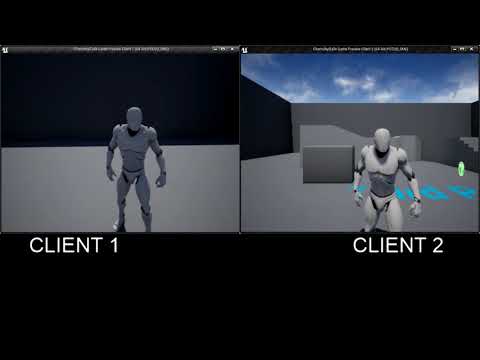
Here its more visible if u watch at 1080p
the moving person sees the not moving person kiiind of jitter and it feels more weird when playing then watching
@14 seconds its extremly visible
plush yew
@regal mulch I am not bypassing... this is my first account bytheway...
and i am sorry for it..
latent warren
messing around just learning Unreal (coming from other engines (not unity)). absolutely fell in love
made a nifty little Mode-7'esque scene
not sure how close that is to how THEY did it back then (probably insanely different) but still hugely technically impressive considering what they worked with at the time
cerulean nova
@regal mulch could you see what i mean in the video ? 😃
latent warren
yeah I do Net. that's a little offputting
how's the latency? kinda looks like lag hiccups
cerulean nova
its local
latent warren
oh lol scratch that one
hmm have you ran an FPS counter when you are running into that? would be curious if it dips
(I won't be able to solve your problem, I'm unreal noob but I like troubleshooting
regal mulch
@cerulean nova Not sure right now
Would've thought it affects both of your Characters
Can you try not attaching the camera to the mesh?
Just to test
cerulean nova
it does happen to both clients but only the moving one sees the standing one this weird
the camera is attatched to the head for "true first Person"
regal mulch
But Client1 was clearly jittering while Client2 moved fine
and yes, can you undo the true first person
I want to know if your mesh lags
cerulean nova
the weird thing is if i look down the own mesh is jittering wich may cause the other client to look jitter?
some movement thingy
regal mulch
So the mesh of Client1 also jitters if you look downwards?
cerulean nova
yes
cerulean nova
but only when walking backwards or strave left or right
yes this is a new fresh character
regal mulch
Alright can you try this: Your CharacterMovementComponent (CMC) should have a boolean called "Orient Rotation To Movement"
Is that checked?
cerulean nova
maybe some "animation" problem because the normal thirdperson does always walk forward and if u press S A or D it would turn in that direction
yes its checked
that causes the problem right?
latent warren
(I'd like to say I've been here idling for 24 hours with my mouth (mostly) shut. I've learned a lot just lurking in that time
cerulean nova
because he tryes to turn but cant because the view is fixing the movement orientation
latent warren
thanks for running this place)
regal mulch
Cheers
cerulean nova
back to replicating the sprint to work proper 😄
had to rethink the system because i had some checks running with the sprint itself wich would then get also replicated so i have to "rebuild" it abit
 cedar snow
if i want to include non .uasset files in a packaged build, do i have to create an custom asset type for it?
cedar snow
to answer myself: not really; just put the assets in a directory inside the contents dir and set the directory to be copied while packaging
current downside: the assets are literally just copied to the build directory and there for anybody to read/change/delete
 strong terrace
What is the best way to create and island lowpoly? With World Machine?
 rose bison
low poly plane with noise
any 3D package would do that for you
not sure if world machine does low poly
rose bison
a heightmap is just a mesh in 2D, when it comes to terrains
you can convert them from and to oneanother
strong terrace
Thanks Denny!, okey i try to do it with blender
cerulean nova
the GameSession Class is only aviable in the Source Version from github right?
found it...
If i change the 0 to 128 it should set the max. players to 128 right?
 slow relic
hey guys ... I'm coming from a unity bg .... is there an option in Unreal that lets you view the game during runtime like how the 'scene view' does in unity?
cerulean nova
@slow relic Shortcut would be ALT + S
slow relic
ah yes ..... one more tiny question .... can I do this in multiple windows? like simulate in one and play in another?
simultaneously?
I don't seem to have real-time input while playing/ simulatiing in my second view window even with the option selected
manic pawn
no, that isn't supported
slow relic
sigh, nvm ...... I'm just curious, are there any work arounds or hacks to make something like this? like a plugin? Would be real cool if something like this was there
cerulean nova
sure if ur able to write it yourself go ahead download the source and rewrite the engine 😃

GitHub
u need to register and verify before u can see the UE4 Rep.
but why would u need simulation and gameplay at the same time`?
manic pawn
theoretically it could be made, since it supports multiple views into the same world
but you'd need to spend a lot of time reverse engineering the thing to figure out how...
cerulean nova
i dont see the need to see simulated and gameplay at the same time tho 🤔
manic pawn
that's not what unity does
you play in one window and have a scene view open at the same time that lets you view the world being played
cerulean nova
for what?
manic pawn
dunno, never used it
cerulean nova
xD
slow relic
@cerulean nova haha I'm far writing something like that. I'm just used to a system like that where I can see if objects are entering the trigger zones in another window while playing it in another window. It just felt a bit weird that's all 😄 ...
spare steeple
is there a way to get steam audio working in a packaged game other than adding -audiomixer to a shortcut ?
vale osprey
@slow relic if you play in editor window, not in separate window, you can “eject” and fly around
 cursive dirge
@slow relic you must be ex-unity user
after years of UE4, I still missed the separate scene view in UE4
also if you don't see the need, you probably haven't tried it
it's so handy for some gameplay debugging and editing purposes
you can eject in UE4 but you practically have to pause the game usually for that
with separate scene view you can just keep tracking some game objects while you keep playing
but yeah, there's a reason why UE4 has separate simulate mode and "eject" mode
or unpossess, whatever they call it
 errant shale
Not sure where to ask; can the unreal build tool be configured to copy PDBs (on Windows) on Debug builds, like it does for DLL dependencies you add?
cerulean nova
if i walk with a handgun then switch to a rifle the arm position needs to switch without the legs change the animation is that called "animation blending" or do i have to make conditions and make a custom walk animation for all weapon types ?
slow relic
@cursive dirge yes i am, and I kinda miss that feature.
 pallid compass
 gentle crypt
is niagara in 4.20? or is it still experimental?
digital anchor
both
gentle crypt
so it wont be like a plugin like in 4.19?
grim ore
it will be and is a plugin
Epic is trying to move items to plugins to reduce wasted fluff in the main engine. If you never use particles why have a particle engine required for example.
 tall pendant
Yeah. I really hope they continue to further modularize the engine.
gentle crypt
oh i see. so cascade won't be removed?
digital anchor
it wont
plush yew
if you like helping noobs, you can check my problem in physics channel 👌
gentle crypt
ah cool. I thought it would be like how sequencer replaced matinee.
digital anchor
i have a limit i wont go below
digital anchor
👍
plush yew
gonna remove my message in physics, thanks
tall pendant
Cascade will be phased out at some point. But ofc not in the near future.
gentle crypt
oh im fine @plush yew im just deciding whether to do all VFX in Niagara or stick with cascade. 😆
gentle crypt
😆 its particles
plush yew
oh
tall pendant
whats the timeframe for the project? I'd say it makes a lot of sense to stick with cascade for a production for quite a while.
gentle crypt
its a personal project for a portfolio so no timeframe but yeah i'm leaning towards cascade.
 small oar
how can i get a list of all connected players controllers? im assuming you can only do this in game mode class
sudden agate
yes
 lament kraken
I need help
Do someone know blueprint for ship sailing on ocean
so that player can helm ship
pls ping me if you know or send me in dms
 ornate trellis
Is there a channel I can ask about a bug that a frequently get while playing any game that uses UE4?
plush yew
@ornate trellis you can post that on the bug reports in the UE forums. the discord is more for live help type stuff
ornate trellis
Yeah, I've read about 100 forum posts about my problem but have found no fix. Was hoping someone here could help. Sorry to bother
 surreal viper
you can always ask tbh 🤷
and in 99% of the time it is better to ask than to ask if you can ask
to avoid askception
plush yew
wat programming language does unreal engine use?
silver crown
Lisp
plush yew
wut?
silver crown
And also BP
plush yew
is it UScript?
silver crown
Hell I'm sure even google assistant can answer that
surreal viper
it uses lmgtfy
surreal viper
holy lol
plush yew
ugh, annoying kids these days
surreal viper
epic fail
silver crown
Indeed
wth @surreal viper
Trying to get ban?
Too late, the bot record every message
surreal viper
sorry 😦
plush yew
b****** isnt a swear
plush yew
Bas****
surreal viper
also that was for Phyronnaz
anyway the joke was on google as his answer is wrong
unreal engine uses c++ and Blueprint, later is a visual script language build in the engine
plush yew
c++ isnt the language for me soo
silver crown
With a C# build system
plush yew
il try blueprint
surreal viper
yeah but if you have to do anything with that you are in trouble already imo 😄
plush yew
C++ is a deity's level
surreal viper
tbh 99% of c++, the part you actually need to use is way nothing compared to game dev in general imo
plush yew
yep, is a god level
surreal viper
so if you have trouble learning c++ I am not sure you will get far with game dev in general
surreal viper
which is a highly competitive area
plush yew
I need to buy new cogs for my head then
surreal viper
but other people disagree, it's just my way of thinking
silver crown
I think game dev sucks
surreal viper
well not everyone is paid by government to be on holiday
so you kinda don't count!
silver crown
hehe
plush yew
phyronnaz would rather study a male and female reproductive system instead of game dev
silver crown
What?
surreal viper
(also normally this chat is way better, the negative experience you have is purely cause of @silver crown and me, we are just idiots)
forget that Iwrote that
welcome in the club 😄
 plush yew
I can murder phyronnaz on fortnite
silver crown
😓
plush yew
24/7 is 24 hours every week
silver crown
lol
plush yew
hi
does anyone know why the unreal tournament discord requires linking a phone? I don't like linking my phone number to stuff that doesn't really need it and would like not to, but have some questions I would like to pose on the UT discord 😦
 alpine oracle
is anyone here have interest in RTS games and want to make one we can co op
 lone swallow
so uh
i hit the undo button
in the editor
while in the sound cue editor
and uh
now i can't launch the editor
crashes constantly
what do?
lone swallow
ok nvm it's not undo, it's copy/paste
i created a custom sound node and whenever i copy/paste it, it crashes the sound editor
maybe a programming question
plush yew

silver crown

 oblique vortex
is 2070x good for ue4 ?
 keen frigate
@oblique vortex Erm... what's a 2070x?
 pulsar halo
hey i have this wireframe that wont go away on my meshes in UE editor https://i.imgur.com/YwTn7h8.jpg anyone know what setting this is?
 keen frigate
The Real Slark Shady#0253 Click on Show > uncheck Collisions
pulsar halo
thanks
 iron hill
hey uhh, just a small lil q, anyone know any good places to get started learning the engine? preferably a 3rd person, a tutorial or something would be amazing thanks uwu (plz @ if you respond)
high stone
Anyone familiar with new PCs? I'm building one and buying RAM for it. Will any recent ram pair well with a recent mobo?
pine warren
hii i am working on a character i am planning to make a showcase in unreal but i am confused how should rig hair that can simulate specially ponytail with air
high stone
You probably want a hinge, there should be a script for it. That stuff goes back to the PS2 days.
Google "ponytail game hinge unreal" Should be first link.
pine warren
thnx for the tip ill try
and to control cloak with apex i just need to paint it in unreal do i need to rig it along character too?
high stone
There are all kinds of ways to do cloaks. Cloth simulation is most likely the area you need.
pine warren
bascially i am planning to make a showcase of characters like i can move camera around character in idle pose only eye blink an little bit of movement but i want to parent the air with camera that in way to look cloak will go in opposite eith air hope u get what i actually trying to do
high stone
Not familiar with air simulation in Unreal. In a few weeks when I get the new PC, different story. I think the mods are asleep for the night? I recommend 7pm est and earlier.
pine warren
thanks for kind words i always get alot o help from here😊
high stone
(:
cerulean nova
Any Suggestions/Opinions on Building Objects vs Modular Building parts in a Instance?
silver crown
@high stone If you go for an AMD CPU be careful with the ram frequency
As it will also determine some internal cache clock
storm venture
hey whats a clever way of leaving notes in the content browser?
like if you wanted to leave a small reminder or maybe some brief instructions
my best guess is a readme actor with just comments inside of it?
regal mulch
Why would you need that note in the content browser?
Maybe there is some better way of doing what you want
You could try to utilize the Tutorial BPs
Not sure if they got ever updated and improved
storm venture
oh yeah i forgot about those
i just want to be able to leave some useful info for devs that may be using my work
i know documentations exist but i wanted more of a reminder type of thing
people forget what they read in docs, but they cant forget something thats right in front of them
ill check out tutorial bps, those sound like they may do the trick
 grim juniper
Man, I really don't like TAA
high stone
@silver crown It's a Intel 8700k. I'm not overclocking the RAM. I just want to make sure I don't run into a mix match like I did in 2013.
The motherboard wasn't having the G.Skill 4 slots. It did fine with the Corsair 2 slots.
I found out the G.Skill had different timings for 2 of the sticks,
 astral marsh
hello guys
can anybody tell how can i fix this thing
lemme make a gif of this

i want to make first one pickup
and the crowbar can only be picked up
if flashlight is dropped
 harsh tiger
does anyone know what could be causing this?
 faint cedar
I've been reading more and more about UE4's performance issues with AMD GPUs. Looking at the engine in general, considering the source is available and it's all cross-platform there is obviously no intentional bias going on for a specific vendor, but the issue seems to be prevalent enough with games released in UE4. Has there ever been any reasoning given for these things?
Driver issues? Implementation problems?
@harsh tiger - you have two domes on top of each other
silver crown
@faint cedar Maybe simply that the engine was developed with NVidia GPU in the first place
And thus optimized against that
harsh tiger
@faint cedar SkySphere? I only have 1 in the scene if thats what you mean
never mind, i had another one something with a weird name haha thanks!
faint cedar
@silver crown - that is an easy assumption to make but I think it's not correct. At the very least they test fortnite on all sorts of hardware
gentle crypt
@astral marsh You might want to get a boolean to fix that so when you pick one object it sets the boolean to true and next make branch to check the boolean if its true then make a code to drop one item to pick the other if false then it picks it up anyway.
 fast sigil
Hey guys, I've been using the 4.14 UE4 version for a while now, but when I tried launching the editor from Epic Games Launcher today, the 4.14 Engine version is gone, and I'm only left with installing other engine versions, moreover if I try to install the 4.14 version, I can't since it doesent appear in the list. Any idea what went wrong?
gentle crypt
@fast sigil hmmm 4.14 appears in my end.
oh wait you mean you already have it installed. hmmm
fast sigil
@gentle crypt yes, I have it installed, just played with it yesterday
And today when I wanted to launch it it was gone
I thought I deleted it by mistake or something, but If I try to install it again I cant
gentle crypt
go to C:\Program Files\Epic Games
and see if its there.
if it is there then remove it and try reinstalling it cos something might have moved that makes the launcher not recognise it.
fast sigil
For visual representation
@gentle crypt, found it there
guess i'll delete it and hopefully that resolves it
plush yew
Guys is ryzen 5 1600x is enough for unreal engine? (6 cores 12 threads 3.6 GHz)
or i should buy a ryzen 7 1700x? (8 cores 12 threads 3.4 GHz)
can anyone answer my question?
cedar snow
@plush yew both are great CPU's and more than capable of running UE4
silver crown
@faint cedar True
cedar snow
@plush yew why the surprise?
plush yew
i gonna buy just a new computer
cedar snow
if you have the budget, go for the 1700x or even the 2600x/2700x
also if you can manage, go for 32GB ram and a fast ssd/m2
manic pawn
my pc regularly uses over 20GB when doing things like light build or packaging
cedar snow
it's not strictly necessary, but you're definitely on the safe side with 32gb
plush yew
my current system really bad
8 gb ram radeon 7600m i7-3630QM 4 cores 8 thread 2.40 ghz
cedar snow
really depends on your project size
plush yew
its gives 60 fps when its only a landscape but if a put a tree on a level its gives 30 fps instantly more trees 10 fps more grass 5 fps
cedar snow
🤔
plush yew
read again please
cedar snow
seems like that is a notebook GPU from 2012
cedar snow
that's normal while doing that
cedar snow
Notebookcheck
Specifications and benchmarks of the AMD Radeon HD 7630M graphics card for notebooks.
it says the GPU is ~2400 days old
basically any new-ish GPU will feel like you're strapped to a rocket
comparatively
manic pawn
expecting to run any game on that thing
cedar snow
expecting to run a game inside an editor while having visual studio open on that thing

manic pawn


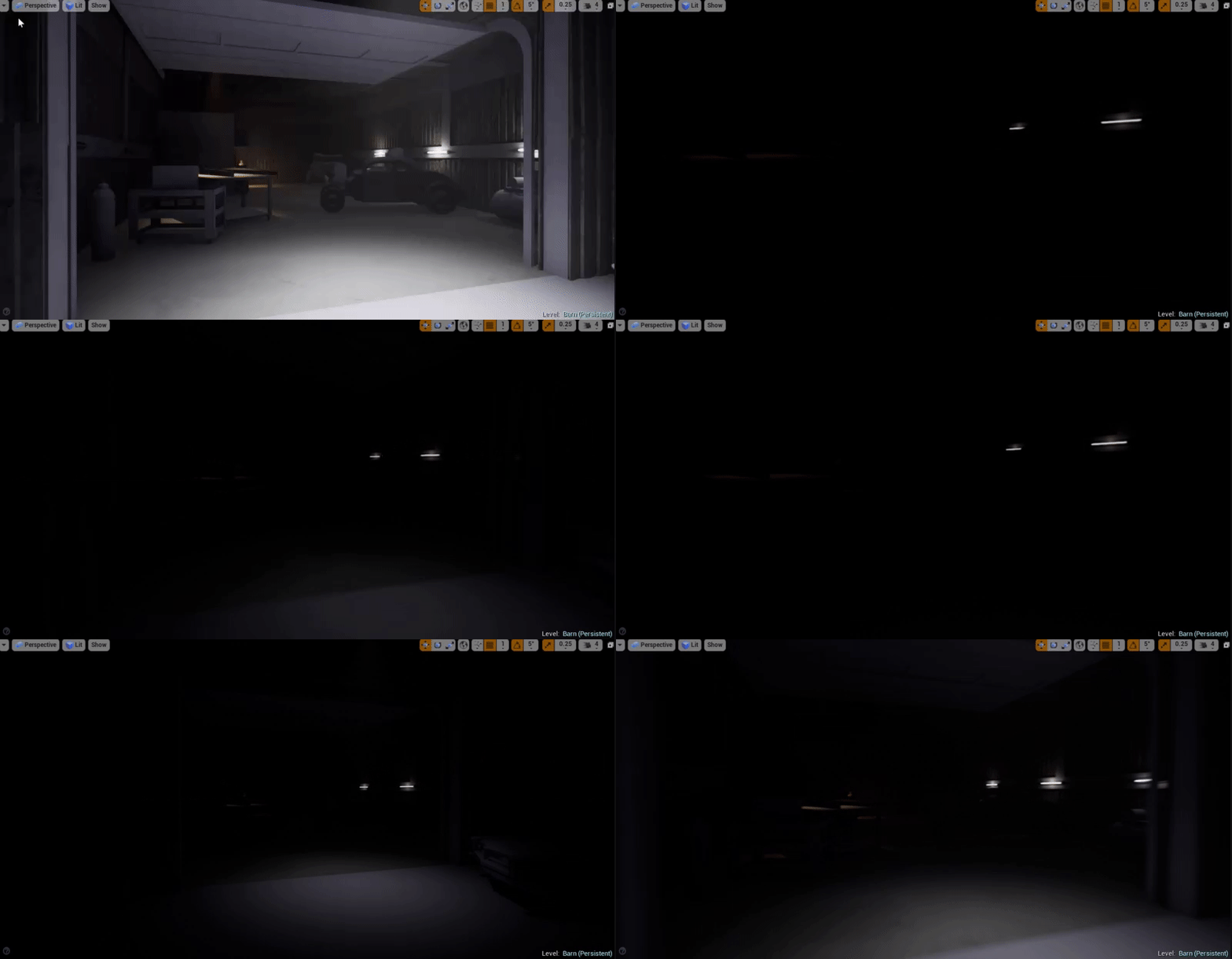


 plush yew
(killing the gpu with hammer)
plush yew
but i cant run cod mw3 in high details :D
cedar snow
😭
manic pawn
get a gtx 1080ti for your next pc :D
cedar snow
🤖
plush yew
1080 ti??!??!
cedar snow
another 4 weeks until current gen GPU's can be bought for scraps
manic pawn
huh
plush yew
sadly but its around 3600 - 4000 turk liras
manic pawn
you got some insider info about when the new ones release? 🤔
plush yew
so i cant buy :/
cedar snow
@plush yew 1060/1070 will do just fine
manic pawn
ye that was a joke
cedar snow
@manic pawn no insider info, but the rumor mill is spinning towards a gamescom release
plush yew
i gonna buy 1060 or 1070
manic pawn
wtf you're getting ripped off there
it's ~800eur here
google claims 7000 lira would be 1300€
cedar snow
holy shit
manic pawn
well that is what google says
plush yew
oh thats not 7000
cedar snow
but then again, currency exchange rate might still fuck you over
manic pawn
https://geizhals.de/msi-geforce-gtx-1080-ti-gaming-x-11g-v360-001r-a1599330.html this is the one I have
✔ Preisvergleich für MSI GeForce GTX 1080 Ti Gaming X 11G ✔ Bewertungen ✔ Produktinfo ⇒ Chip: GP102-350-K1-A1 "Pascal" • Chiptakt: 1569MHz, Boost: 1683MHz (OC Mode) • Speicher: 11GB GDDR5X, 139… ✔ PCIe ✔ Testberichte ✔ Günstig kaufen
manic pawn
nice
plush yew
thats the reason why computers very expensive in my country
manic pawn
no need for a 1080ti unless you're going to play at 4k or 1440p high fps
 next ivy
what is the requirements to run ue4 demos? I'd like to view demos of UE4 marketplace items but the pc i'm on doesn't have UE4 installed
plush yew
i dont care about 4k gaming
manic pawn
probably
you'll need vs 2017 redist and directx at minimum
though unreal games should install this automatically
they all come with a prereq installer
next ivy
Time to see if my computer supports dx11
manic pawn
if it doesn't it's probably too old to play the demo anyway
manic pawn
seems to be about the same speed as a 1060
next ivy
1070 is the sweet spot
You can get a prebuilt w/ a gtx 1070 for like $1100.00 and a 8700 which I imagine would be great for ue4
cause 6 cores
next ivy
I mean $1100 isnt a lot for a gtx 1070 + 8700
and 16gb ram
Building computers is more expensive these days
plush yew
in my country ecenomy is bad
1 dolar = 4,57 liras
1 Euro = 5,37 liras
next ivy
Ah yea - the computer market outside the US is a pain
plush yew
yes
next ivy
cause most computer components come from US companies
plush yew
yes sadly
next ivy
Nvidia, Intel, AMD, Microsoft, Apple are all american
though lots of the cheaper components like capacitors come from asian countries from what I understand
but its the micro and gpu that drive the cost up
Computing technology is the whole reason the economy in the US is good
livid haven
Got a quick one I'm going to field here
Anyone got any experience with faking velocities for physics simulations? I have some physicalized things attached to something that is actually not moving, but I want the physicalized bits to simulate as if the object they're attached to were falling.
plush yew
siriusly very cheap there
livid haven
I don't know that I'd claim computing technology is the whole reason the US economy is good. I'm pretty sure we produce something insane like 50% of the world's food?
I do not have a source for that statement. Do your own research before swallowing some random statistic I spouted from memory.
Also, while the companies that own the tech are American, most of this stuff isn't produced in the US anyways.
plush yew
Hi, I need help
I need a celshading in my game, and I made it as a material using this http://www.strangelynamed.com/tutorials/2016/5/23/cel-shading-in-ue4-material tutorial. I got it ready, but the problem is that I have no idea how/where to assign that in my level/game? It's now just a post process-material. If someone could help it would be a great
 digital anchor
Post process materials go into the post process volumes, put one on your level, check "unbound" and add a material
@plush yew
plush yew
How can I add a post process volume to my game?
digital anchor
its on the left, near the cubes, actors etc
plush yew
Oh thank you very much
you don't have a clue how much you helped me
lol
where's the "unbound"
next ivy
@livid haven They're still designed in the US. The rest of the world is at the mercy of american companies when it comes to computers
digital anchor
on the configs of the volume, let me open the engine 1 sec
next ivy
And computers control the world
plush yew
I found maybe the unboud, but how I assing the material to that volume
or where exactly I assign it
Oh I think I got it !
Thanks @digital anchor for your help
livid haven
@next ivy I feel like China and Japan would really beg to differ, but this discussion would be better suited to #lounge anyways and I'm about to take a shower.
 stoic moth
Can you attach SphereComponents to an Actor from an ActorComponent ?
Can't reach RootComponent to attach it to.
 naive furnace
Totally new to UE4, working through tutorials for at least two different means of creating a bouncing ball. No matter which method I use, the ball goes through the floor and deletes from the scene. I have tried enabling substepping from a forum post i found with fimilar symptoms. Any help or direction to find answers would be helpful. v4.19.2 Thank you
small oar
how can i get my game mode code to execute on the clients since i cant use RPCs on non actors?
grim ore
@naive furnace well the second one is the world kill z killing it when it gets too far below. The first one what are you using for a floor and what are you using to cause it to bounce?
naive furnace
I started with a First Person blueprint. I have added an Actor with a Sphere SM and Projectile Movement. Should bounce is checked and a 3d velocity is given. Collision on the SM is Projectile.
grim ore
since you are using the first person template have you looked at the projectile that is already there to see how it is set up?
 safe rose
Got a strange one for you all today if anyone's up for it. 4.19
~LogObj: Warning: Object MediaPlayer /Game/Movies/LivingRoomV2.LivingRoomV2 (0x00000150f6c52e00) from cluster Material /Game/Movies/M_LivingRoomMediaV2.M_LivingRoomMediaV2 (0x00000150f2db52a0 / 0x00000150906d6310) is referencing 0x00000150f6847500 MediaPlaylist /Game/Movies/LivingRoomPlaylist.LivingRoomPlaylist which is not part of root set or cluster.`
naive furnace
that would have been smart... I am looking at it now and it is a CollisionComponent with a sphere SM and projectile movement.
safe rose
Never knew MediaPlayers got GC'd
Rebuild the BP
Cleaned out Material
Still crashing
grim ore
@naive furnace ok so I found out your issue more than likely, you dont have physics enabled on your sphere
safe rose
Never happened before though
naive furnace
i have tried enabling the physics and disabling them... believe to be same result... hang on
grim ore
well I just made a new fpp, made a new actor, added a sphere object, added projectile, added the BP to the scene and ran it. The sphere went thru the floor
naive furnace
ok
grim ore
I removed the projectile movement, the sphere was static (no physics so this is expected). I checked simulate physics and played and the sphere dropped and hit the floor. I added back the projectile movement and same result
naive furnace
ok... i do get an error when enabling physics
grim ore
Collision needs physics so it makes sense
naive furnace
body set to simulate physics but collision enabled is incompatible
grim ore
I never changed the collision settings on mine and yep same error
naive furnace
yup that was it... changed collision to Block all
 velvet ravine
Hu guys sorry for jumping in unreal started acting a bit....Well Strange, My project is building less than a second, It don't fail says completed but nothing actually built just wondering if someone else has come across this
naive furnace
then the ball disappears... wow
grim ore
and the reason for that is if you look at the projectile preset the Collision Enabled settings is (query only (no physics collision)
naive furnace
ok that's great... so now after finishing its bounces and acheives stasis, it disappears... i don't have a destroy actor node. strange.
grim ore
IF you remove the projectile movement you will find that is the cause
naive furnace
oh for dumb... so, that would mean it never happens in the tutorial video because the ball never comes to rest
grim ore
I have to admit I have never actually seen that before (never let them rest as well lol) so.... that's an amusing part of the component that does not seem to be able to be turned off
naive furnace
well, i am happy it was just my naivety to the operation of the component and not something I overlooked
grim ore
off to the source code as honestly why is this not a toggle
naive furnace
where do you find the source code to which you refer? I have an easier time understanding code more often than parametric configurations.
grim ore
GitHub
there are instructions there to link your account to that repo then you can access it
naive furnace
perfect. thank you very much for all the help. I am sure I will be back with more as I progress
high stone
@limpid star I found out Newegg mixed the boxes. I got the combo pack. 1.333 and the new one was 1.666. I had no idea until I checked the sticks in the bios.
The motherboard would give me the black screen of death.
 fallen schooner
Hey folks.
I had a question but I figured out a solution right after that last message.
velvet ravine
Im still having my Issue
fallen schooner
@velvet ravine Are you building through visual studio? That usually means it doesn't detect any changes.
Try regenerating project files.
velvet ravine
no via engine,
fallen schooner
I would try making a minor but obvious change and see if that compiled correctly
velvet ravine
i rolled back to yesterday with p4, Still had issue, Downloaded source again wouldn't let me install that either so in the progress and creating a windows install disk
Had problems Since Windows "Fantasic" feature update
high stone
Win10?
plush yew
@velvet ravine you should probably wait for 4.20 R1. my build is working fine with 4.19.2. your issue could be related to the Preview description